

2026 İçin İncelenen En İyi 10 Kurumsal İş Akışı Yazılımı

10 En İyi Kurumsal İş Akışı Yazılımları Kısa Listesi


Kuruluşunuz büyüdükçe iş süreçleriniz ayak uydurmakta zorlanabilir. Kurumsal iş akışı yazılımları, karmaşık ve düzensiz iş akışlarını düzenlemenize, kaliteyi ve iş birliğini geliştirmenize ve işlerin gözden kaçmasını önlemenize yardımcı olabilir.
Piyasada çok sayıda kurumsal iş akışı aracı bulunuyor ve hâlihazırda kullandığınız iş akışı araçları artık ihtiyaçlarınızı karşılamıyor olabilir. Bu durum doğru aracı seçmeyi zorlaştırabilir.
İşte bu tür araçları kullanma deneyimime dayanarak en iyi kurumsal iş akışı yazılımları, bunların yaptıkları ve en uygun oldukları kullanıcılar için seçimlerim.
Why Trust Our Software Recommendations
Our team has been testing and reviewing software since 2012. As project managers ourselves, we know how difficult—and important—it is to choose the right software.
For this guide, we evaluated tools using hands-on testing and independent research, scoring tools using our selection criteria. We also draw on insights from industry thought leaders and practicing project management experts.
Our reviews reflect our human editorial judgment, not a sales pitch.
Expert reviewers:
Kurumsal İş Akışı Yazılımları Karşılaştırma Tablosu
En iyi kurumsal iş akışı yazılımı seçimlerim için fiyatlandırma ayrıntılarını bu karşılaştırma tablosunda özetliyorum:
| Tool | Starting Price | Website | |
|---|---|---|---|
| Best for scaling organizations | 4.3 out of 5 | $10/user/month Free plan + 14-day trial + demo available | Book Demo |
| Best for no-code document workflows | 4.5 out of 5 | $399/month Free demo available | Website |
| Best for enterprise AI-powered workflow automation | 4.6 out of 5 | Pricing upon request Not available | Book Demo |
| Best for customer-facing workflow portals | 4.4 out of 5 | $5,000/year Free trial + free demo available | Book Demo |
| Best for customizable project management | 4.6 out of 5 | $9/user/month Free plan + 14-day trial available | Book Demo |
| Best for co-creating on video conference | 4.8 out of 5 | $8/user/month Free plan + 14-day trial available | Book Demo |
| Best for real-time collaboration | 4.5 out of 5 | $9/month Free plan + 7-day free trial available | Website |
| Best visual enterprise workflow software | 4.3 out of 5 | Pricing upon request Free demo | Website |
| Best for advanced BPM automation | 4.5 out of 5 | $19/user/month 15-day free trial | Website |
| Best with 1,000+ prebuilt app connectors | — | Pricing upon request 30-day free trial available | Website |
En İyi Kurumsal İş Akışı Yazılımı İncelemeleri
Her bir kurumsal iş akışı yazılımının en uygun kullanım alanları ve öne çıkan özellikleriyle birlikte kısa açıklamasını burada bulabilirsiniz. İstediğiniz zaman bu yazılımı nasıl seçtiğime göz atabilirsiniz.

Wrike
Best for scaling organizations

Wrike is an enterprise work management software that helps teams streamline workflows and improve team efficiency. It's a cloud-based solution that offers a range of features like task management, time tracking, document collaboration, automation, and more.
Why I picked Wrike: It's highly customizable, which allows you to tailor the platform to your specific needs. This flexibility is a big plus in an enterprise setting where different teams may have different workflow requirements. On top of that, the platform gives you the option to work on your workflows from scratch or get a headstart using pre-built templates. These can range from OKRs and goal management to request management that will help you collect approvals or feedback swiftly without disrupting your workflows.
Finally, you can look at all the information that comes out of your workflows using the dashboard view or pulling a report. These will give you full visibility of your projects and allow you to make decisions based on data that is up-to-date.
Wrike Standout Features & Integrations
Standout features include its no-code automation module and security features. The no-code automation builder will let you decide how information is routed within the organization depending on pre-defined triggers. You simply select from drop-down menus and connect boxes in a flowchart. The security features though... they're awesome! You can set permissions per role and relax knowing that your information is highly encrypted in a platform that complies with multiple ISO certifications and is CSA Star cloud security certified. SLA: 99.9% uptime.
Integrations include Salesforce, Zoom, Tableau, Jira, MediaValet, Hubspot, Dropbox, Okta, Slack, Adobe, and hundreds of additional pre-built integrations. However, it also has an API you can use to build custom integrations with your favorite tools.
New Product Updates from Wrike

Wrike Redesigns Workspace Search With New Filters
Wrike introduces a redesigned Workspace Search interface with recent search shortcuts, item type and location filters, and parent-task context. These updates help users find relevant work items and navigate search results efficiently. For more information, visit Wrike’s official site.
 .
altaFlow
Best for no-code document workflows
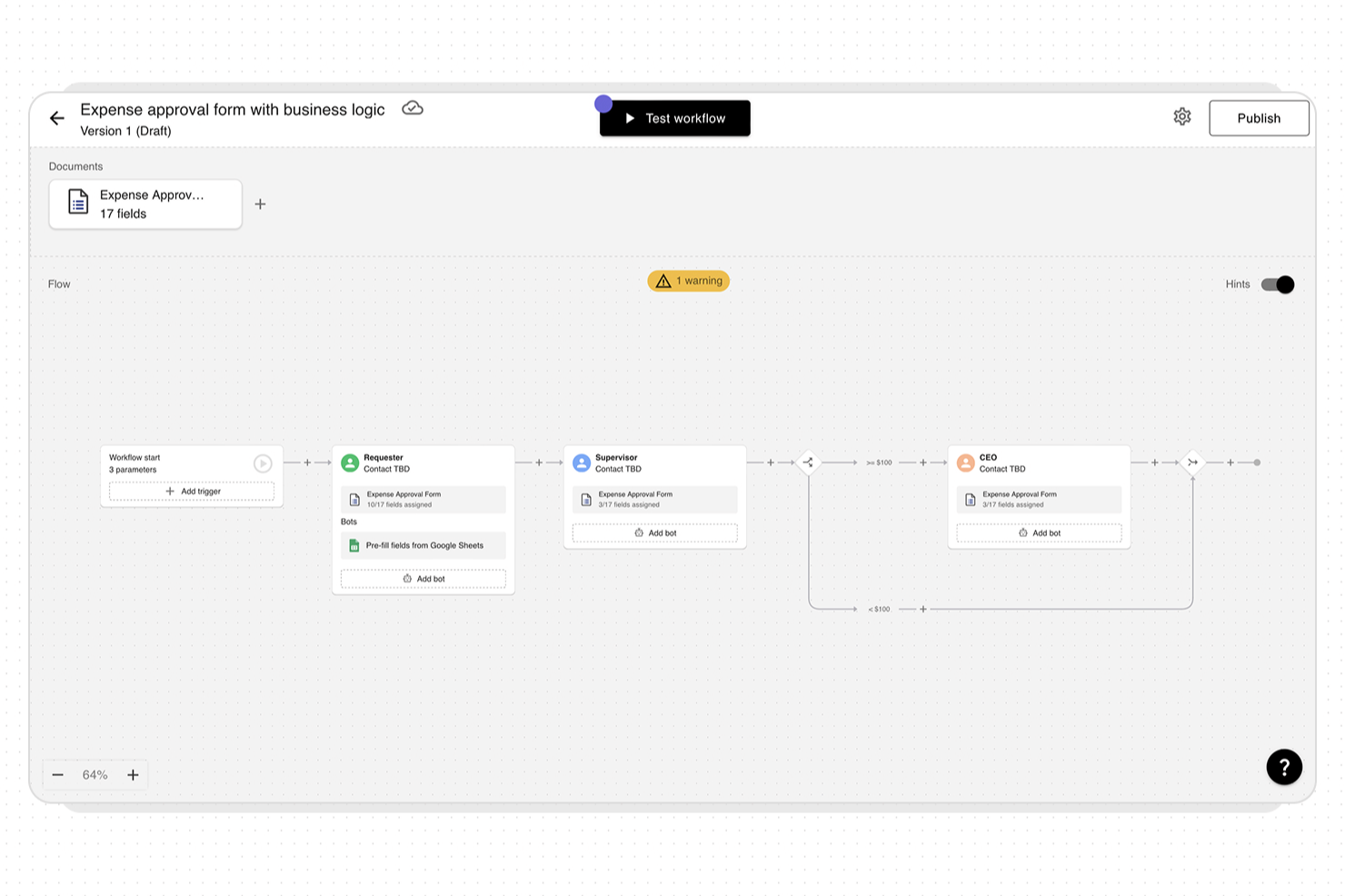
altaFlow is an enterprise workflow platform designed for organizations that need to automate and manage complex document processes. It’s especially relevant for teams in regulated industries or those with demanding integration needs. The platform helps businesses reduce manual work, improve compliance, and connect workflows across core business systems.
Who Is altaFlow Best For?
altaFlow is a strong choice for mid-sized to large organizations in regulated industries that need to automate and control document-centric workflows across multiple business systems.
Why I Picked altaFlow
For teams that need to automate document workflows without relying on IT resources, altaFlow’s no-code builder stands out. I picked it because its drag-and-drop interface lets users design, modify, and deploy document workflows visually, making it accessible to business users and process owners. The platform supports conditional logic and multi-step approvals, so you can create complex routing and automation rules without writing code. This approach helps organizations quickly adapt workflows as requirements change, which is essential in dynamic enterprise environments.
altaFlow Key Features
Some other features that make altaFlow useful for enterprise workflow management include:
- Document version control: Track changes and maintain a full audit trail for every document processed through your workflows.
- Role-based access controls: Assign permissions to users and groups to ensure sensitive information is only accessible to authorized personnel.
- Automated notifications: Set up alerts and reminders for workflow steps, approvals, or document status changes to keep processes moving.
- Custom form builder: Create and embed custom forms within workflows to capture structured data and trigger automated actions.
altaFlow Integrations
Integrations include Salesforce, NetSuite, SharePoint, Google Drive, OneDrive, HubSpot, Slack, and API access for custom integrations.
Pros and Cons
Pros:
- Detailed role-based access controls
- HIPAA-compliant security and audit trails
- Native Salesforce and NetSuite integration
Cons:
- Advanced features require higher-tier plans
- Limited reporting customization options

Best for enterprise AI-powered workflow automation

Screendragon is a workflow management platform built for enterprise marketing, creative, and operations teams. It provides a no-code environment that allows you to design and automate complex workflows without technical expertise. The platform helps large organizations manage approvals, resources, and budgets while maintaining visibility across departments and regions.
Why I picked Screendragon: I picked Screendragon because it gives enterprise teams complete control over how their workflows function — without relying on IT support. You can create tailored processes, automate repetitive tasks, and manage digital approvals in a single, secure platform that’s easy to customize for different departments or regions.
I also like how Screendragon builds governance into every step. Its advanced permission controls and data security features help you maintain compliance while managing projects at scale. For enterprise marketing and creative teams, that means you can protect sensitive information and ensure the right people are involved at the right time.
Screendragon Standout Features & Integrations
Standout features include a visual no-code workflow builder, dynamic custom forms, and AI-powered automation that handles routine tasks and routes approvals automatically. The software also provides advanced reporting dashboards for real-time insights into project progress and resource utilization.
Integrations include Microsoft Power BI, Slack, Microsoft Teams, HubSpot, Okta, Aprimo, Adobe, Google Drive, Salesforce, Zapier, Trello, and Jira.

Moxo
Best for customer-facing workflow portals

Moxo is a workflow orchestration platform that combines automated process design, conditional logic, role-based task routing, and client-facing portals to manage structured workflows across internal teams and external stakeholders.
Who Is Moxo Best For?
Moxo is a strong fit for mid-to-large professional services firms that run repeatable, client-facing processes across finance, legal, or consulting.
Why I Picked Moxo
Moxo is one of my top picks because I love how it puts structured workflows directly in front of clients through dedicated portals, complete with a flow catalog, resource pages, and branded layouts. In practice, my team can walk a client through a multi-step onboarding sequence where each participant sees only their assigned action, while we maintain full visibility across every step and status behind the scenes. Magic links remove the login friction entirely, so clients jump straight into their task without creating an account or navigating an unfamiliar interface.
Moxo Key Features
- Conditional branching: Route workflow steps dynamically based on form inputs, decisions, or participant responses within any process.
- Built-in eSignatures: Collect legally binding signatures directly inside a workflow step, without redirecting to a third-party tool.
- SLA timers and escalation: Set deadlines on individual workflow steps and trigger automatic escalations when a participant misses them.
- Role-based permissions: Control exactly what each internal or external participant can view, edit, or action within a workflow.
Moxo Integrations
Moxo offers integrations with Salesforce, HubSpot, Microsoft Dynamics 365, Jira, Slack, Stripe, DocuSign, QuickBooks, Google Drive, and Dropbox, among others. It also connects with Zapier and provides a REST API and webhooks for custom integrations.
Pros and Cons
Pros:
- SOC 2 Type II and GDPR compliant
- White-label portals for client-facing workflows
- Built-in eSignatures, forms, and document collection
Cons:
- Chat history limited to 90-day retention
- No built-in task time tracking

Best for customizable project management
monday AI Workspace is an AI-powered work management platform that brings project planning, workflow automation, cross-team orchestration, and portfolio visibility together in one highly configurable environment built for enterprise teams.
Who Is monday AI Workspace Best For?
It's a strong fit for enterprise PMOs and cross-functional teams that need to manage multiple concurrent projects across departments without sacrificing flexibility.
Why I Picked monday AI Workspace
monday AI Workspace is one of my top picks because I love how far the customization actually goes. Beyond boards and column types, the Vibe app builder lets my team turn specific business processes into purpose-built apps without writing code. The AI workflow builder then layers conditional, multi-step automations on top, so our workflows reflect how the org actually operates, not a predefined template.
monday AI Workspace Key Features
- AI-powered risk detection: Instantly analyzes project data to flag dependencies, bottlenecks, and timeline risks.
- Real-time portfolio dashboards: Visualizes status, resources, and KPIs across multiple projects and teams.
- Multi-level permissions: Lets admins assign granular access rights by user, team, or project workspace.
- Open API and 200+ native integrations: Connects to existing ERP, CRM, ITSM, and collaboration platforms for unified workflows.
monday AI Workspace Integrations
monday AI Workspace offers 200+ native integrations, including Slack, Salesforce, HubSpot, GitHub, Google Workspace, Microsoft Teams, Zendesk, Jira, Dropbox, Box, and connects with Zapier. An API is available for custom integrations.
Pros and Cons
Pros:
- Vibe app builder creates custom project interfaces
- AI-generated automations reduce manual workflow setup time
- Highly configurable boards adapt to any workflow
Cons:
- Dashboards require manual configuration across every project
- Steep setup time for complex enterprise configurations
New Product Updates from monday AI Workspace
monday AI Workspace Adds Human Approval Routing
monday AI Workspace adds a human-in-the-loop approval block to AI Workflows, sending approval requests and routing workflow paths based on responses. For more information, visit monday AI Workspace's official site.
 .

Miro
Best for co-creating on video conference

Miro is an enterprise-grade online collaborative platform that connects your company to increase alignment and spend less time in meetings.
Why I picked Miro: The platform is GDPR compliant, ISO & SOC3 certified, and has advanced user management. It lets you brainstorm, diagram, map, and come together under one roof. Among its collaborative highlights are the use of sticky notes, voting, live reactions and a plethora of shapes that go from basic to shape packs from specific companies.
Working with Miro lets your team have a visual shared language and easy access to templates that can help with flowcharts, BPMN, UML, and complex architecture diagrams. Users can also upload charts from other apps for further work, express ideas in varied forms including videos, and utilize TalkTrack to record video explanations of process maps. This broadens communication options within teams, especially useful during video conferences.
Miro Standout Features and Integrations
Features include Miro AI, which adds artificial intelligence to your boards to help with tasks like clustering sticky notes and fleshing out rough ideas. The tool also includes an extensive library of templates for common diagram types and specific use cases like org charts. Miro can handle large, complex org charts, and it's easy to update this as your org grows and changes.
Integrations include over 100 apps from the likes of InVision, Unsplash, Adobe Creative Cloud, Asana, Monday.com, Notion, Confluence, OneDrive, Slack, Box, and Zoom. Additionally, you can access thousands more through Zapier.
New Product Updates from Miro
Miro Adds Japan Data Residency for Enterprise Customers
Miro has introduced Japan data residency for enterprise customers, offering in-region storage for production data, backups, and metadata, plus in-region compute infrastructure. For more information, visit Miro's official site.
 .

Best for real-time collaboration
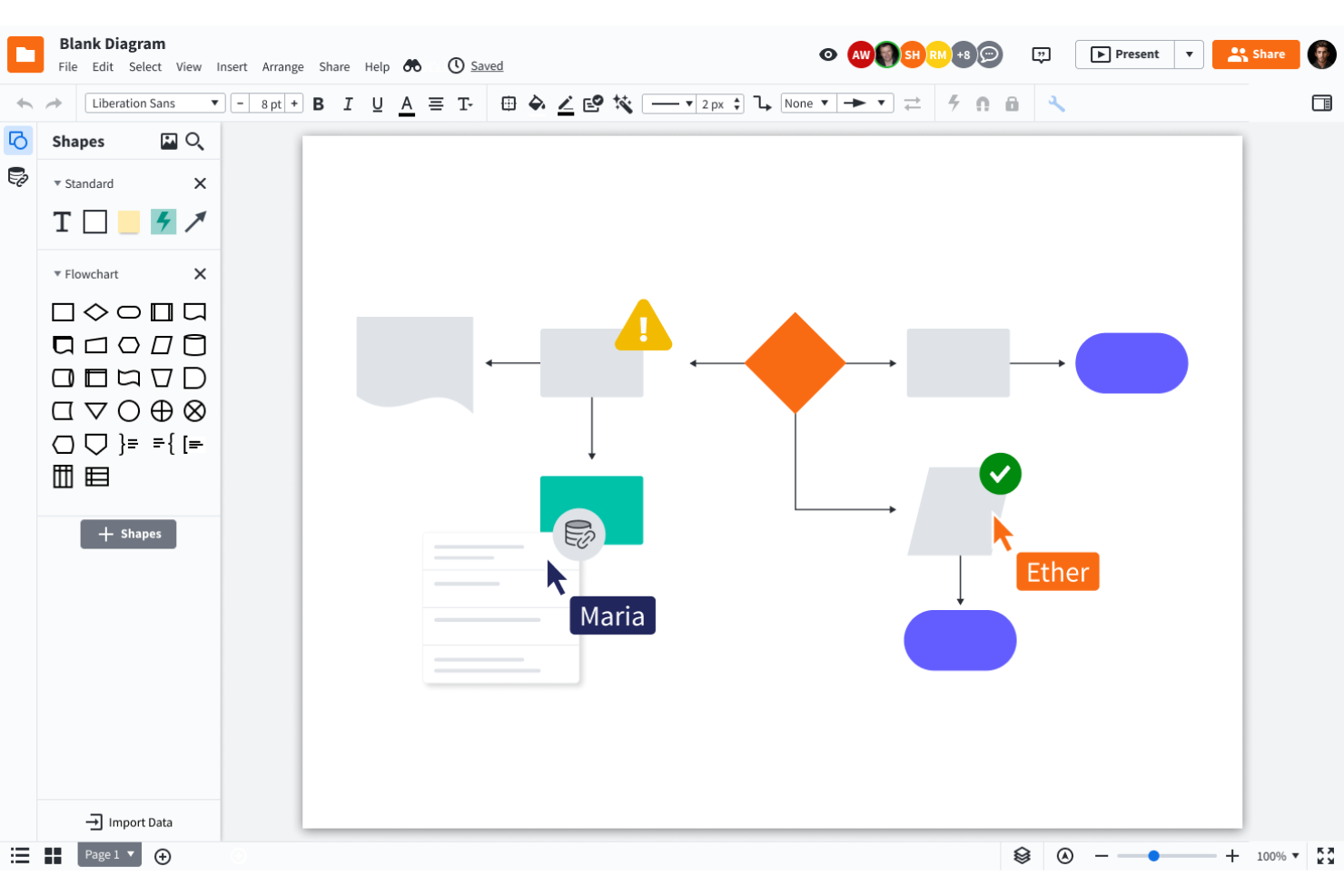
Lucidchart is an intelligent diagramming application that helps your team work together on building workflows.
Why I picked Lucidchart: This is a tool that offers great collaboration features. Mapping process workflows is a team effort in most cases. Lucidchart provides a canvas where everyone can co-create, leave comments, engage in conversations around a specific item, and share their work with as many stakeholders as they need.
Additionally, the platform is CCPA and GDPR compliant and keeps your information secure, using encryption on transfer and rest. The cryptographic keys are protected by Amazon’s Key Management Services.
Lucidchart Standout Features and Integrations
Features include the ability to set up value streams and sub-processes within your workflows so you can have multiple layers of a process running at once, as well as quick diagramming features that let you set up and edit a workflow diagram without starting completely from scratch. These include the ability to change shapes in the diagram without changing the text, automatic line adjustments when you move a shape, and shape suggestions based on what you've already added to your diagram.
Integrations include everything from Slack, Google Workspace, Asana, Atlassian, and Office365, to more industry-specific applications like Salesforce, AWS, Azure, and BambooHR. Lucidchart has a free plan available for individual users.
Kissflow
Best visual enterprise workflow software

Used by Dominos, The Telegraph, Pepsi, Sears, Comcast, and Hubspot, Kissflow is a digital workplace app with no-code process management functions that easily adapt to any business process system across different environments.
Why I picked Kissflow: It is among the most popular workflow software. Kissflow is a viable no-code option for all of your business process management needs, including automated processes, project board building, case flow handling, and collaboration tools.
With Kissflow, you can easily design flexible workflows with different elements and data sources. Then, set rules to automate the flow and use custom dashboards to get key insights into the workflow process.
Kissflow Standout Features & Integrations
Features include an easy-to-use interface, user and data scalability, real-time analytics, and more than 50 ready-to-use apps like Travel Reimbursements and Employee Onboarding.
Integrations include G suite, DropBox, Docusign, Webmerge, Salesforce, Oracle, and more.
Qntrl
Best for advanced BPM automation
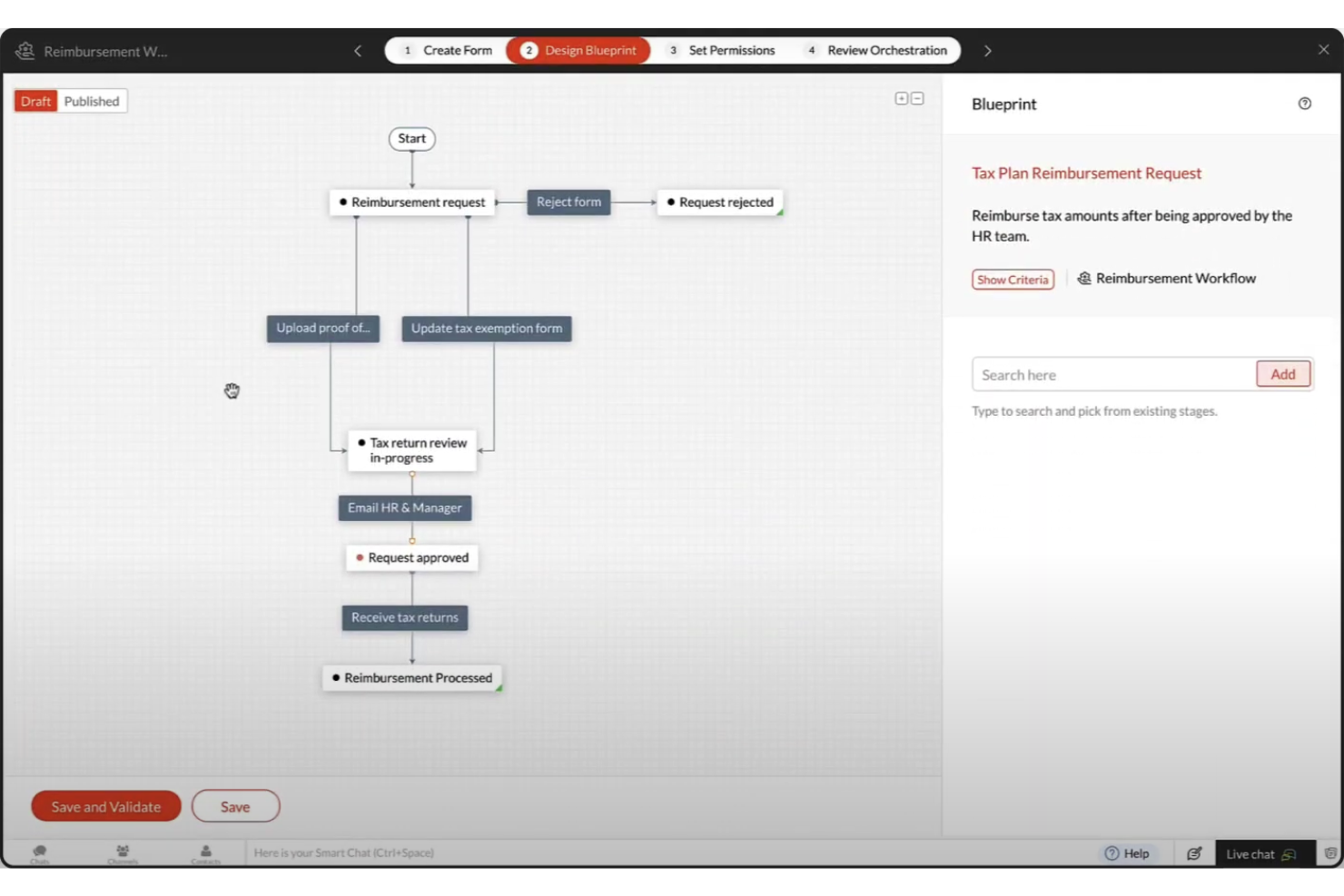
Qntrl is an advanced business process management (BPM) automation platform that helps you bring visibility, control, and automation to processes like purchasing, onboarding, and marketing.
Why I picked Qntrl: Qntrl gives you granular control over fields, forms, and permissions. It also lets you set business rules that apply across the board. This will let you set, for example, custom notifications every time a high-priority expense is submitted.
Qntrl Standout Features and Integrations
Features include a workflow designer that allows for parallel transitions (i.e. multiple steps need to occur at the same time, sometimes involving multiple teams). This will help you control processes that require multiple flows to happen in parallel. The system will automatically make sure that the next step is unlocked once all conditions are met.
Integrations are available in many ways, there are pre-built connections with popular apps like Slack, Dropbox, and Google Drive, webhooks, extensions that can sync information, and scripting that you can use to build custom functions.
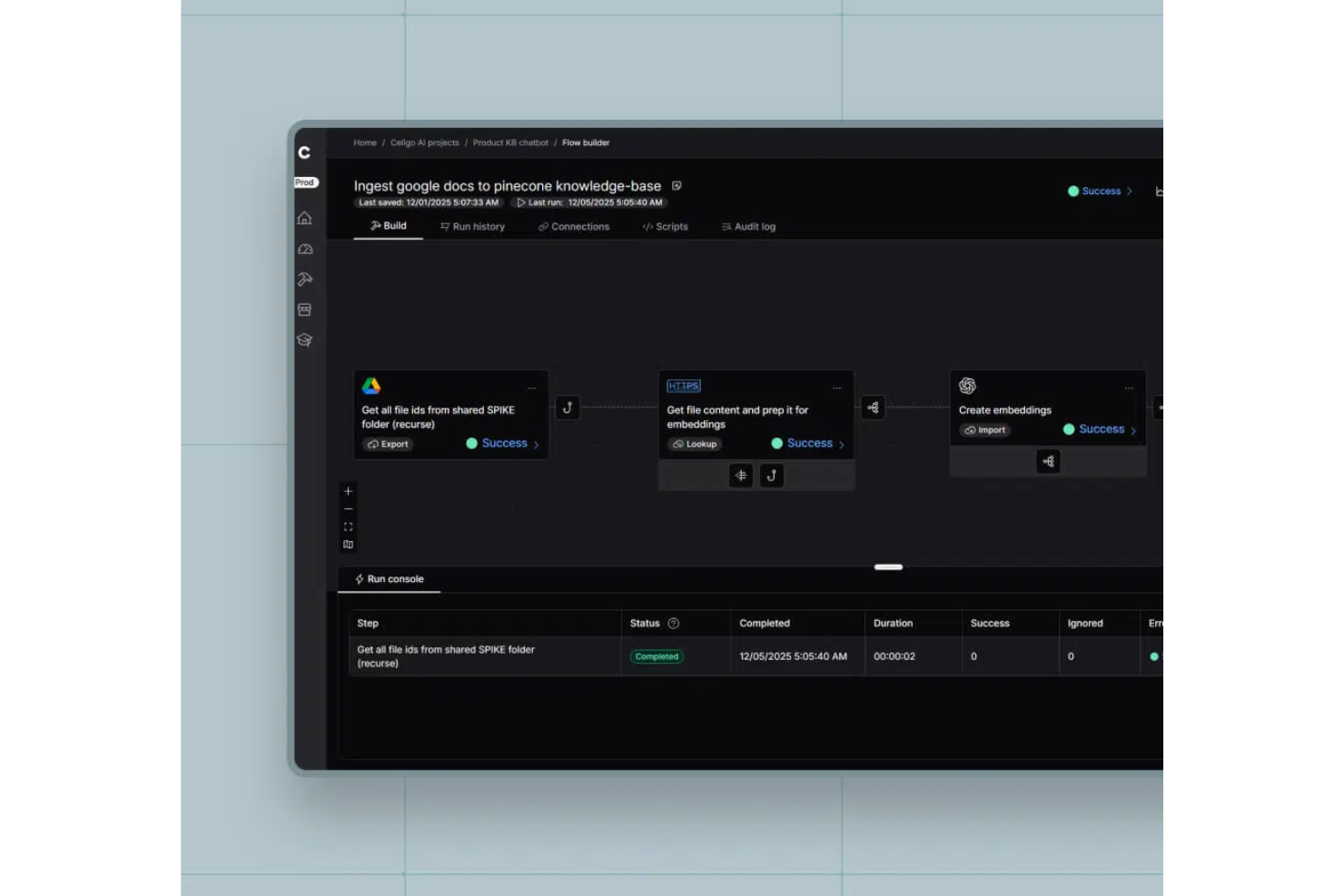
Celigo is an integration and automation platform for enterprises that connects business applications, orchestrates workflows, and manages data flows across cloud and on-premise systems.
Who Is Celigo Best For?
Large enterprises and IT teams that need to connect and automate workflows across a wide range of business applications and systems.
Why I Picked Celigo
I picked Celigo as one of the best because its library of 1,000+ prebuilt app connectors lets my team quickly integrate everything from ERP to CRM and ecommerce platforms. I can automate complex workflows across Salesforce, NetSuite, Shopify, and more without custom development. In practice, that means we can launch new integrations in days instead of weeks, even when connecting less common business apps.
Celigo Key Features
- Visual flow builder: Design, map, and automate workflows using a drag-and-drop interface.
- Error management dashboard: Monitor, troubleshoot, and resolve integration errors in real time.
- Role-based access controls: Set granular permissions for users and teams across integrations.
- Prebuilt workflow templates: Deploy ready-made automation templates for common enterprise processes.
Celigo Integrations
Celigo offers 1,000+ native integrations, including Salesforce, NetSuite, Shopify, Amazon, Zendesk, ServiceNow, Workday, Microsoft 365, Google Workspace, Jira, and Slack. An API is available for custom integrations.
Pros and Cons
Pros:
- Features dedicated training and certification programs
- Includes reusable integration templates for rapid deployment
- Provides advanced error handling and monitoring tools
Cons:
- Limited customization for some prebuilt connectors
- Complex integrations may require developer resources
New Product Updates from Celigo
Celigo Expands Storage, Data Imports, and Connection Management
Celigo adds a standalone storage connector, optimized Azure Synapse imports, NetSuite OAuth 2.0, flexible file templates, and expanded MCP access controls. These updates help teams manage files, process data, and secure integrations. For more information, visit Celigo’s official site.
 .
Diğer Kurumsal İş Akışı Yazılımları
Listeye giremeyen, ancak değerlendirmeye değer birkaç seçenek daha burada:
- TrailHQ
For AI-driven workflow automation
- Quixy
For its testing simulator
- Process Street
For automating scheduled tasks
- MeisterTask
For secure team collaboration
- Visio
Microsoft Power Automate integration
- Nintex
For change visibility
- beSlick
For monitoring process adherence
- Kissflow Workflow
For complex enterprise workflows
- Pneumatic Workflow
For automating business processes
- Decisions
For version change control
- Navvia
For automated process documentation
- Creatio AI CRM
For CRM and sales-related processes
- Acquia DAM (Widen)
For centralized digital asset management
- Creately
For its extensive shape libraries and database management
- ProWorkflow
For project and business process dashboards
- Kintone
For building custom business processes


İlgili Proje Yönetimi Yazılımları
Burada aradığınızı hâlâ bulamadıysanız, test edip değerlendirdiğimiz diğer ilgili araçlara göz atın:
- Proje Yönetimi Yazılımları
- Kaynak Yönetimi Yazılımları
- İş Akışı Otomasyonu Yazılımları
- Görev Yönetimi Yazılımları
- Gantt Şeması Oluşturucu
- Verimlilik Araçları
- Kurumsal Kaynak Yönetimi Yazılımları
- Kurumsal Proje Yönetimi Sistemleri
How I Evaluate Enterprise Workflow Software
I look at two layers: the must-haves a PMO-grade platform needs—automation, governance, and integrations—and the differentiators that show how a tool handles real enterprise scale.
Core Functionality (Table Stakes For This List)
When I'm selecting tools for my list, I rank each one on a scale from 0 (does not offer the functionality) to 5 (excels in this area) for each core functionality listed below. Then, I calculate the tool's total score into a percentage. Each tool needs to achieve a minimum total score of 75% to be considered for inclusion.
- Workflow Automation Engine: I evaluate whether the platform offers a visual, no-code/low-code builder with conditional branching—like auto-routing a change request through different approval paths based on budget impact.
- Enterprise Scalability: Large organizations need multi-entity hierarchies, SSO, and advanced RBAC, so I check how well a tool handles thousands of concurrent users across distributed teams.
- Cross-System Integrations: I look for native connectors to the systems enterprise PMOs actually rely on—ERP, CRM, ITSM, and HRIS platforms—plus open APIs and iPaaS compatibility.
- Project & Task Orchestration: The tool should connect workflow steps to real project structures with dependencies, milestones, and resource assignments—not just standalone task lists.
- Governance & Audit Controls: I evaluate approval chains, permission granularity, and audit logging, especially for teams managing regulated workflows that require full traceability of every action taken.
- Reporting & Analytics: Dashboards and reports should cover both individual workflow performance and portfolio-level views, so a PMO director can track cycle times alongside cross-project health metrics.
Once I have a list of tools that meet this criteria, I consider what sets each platform apart.
Differentiating Factors (What Sets Vendors Apart)
Here's how I compare and contrast different vendors:
Standout Features
AI-powered automation is a major differentiator—I look for platforms that can predict bottlenecks or suggest workflow optimizations before delays cascade across a portfolio. Resource capacity planning also carries real weight when a PMO is juggling dozens of concurrent projects and needs skills-based matching across teams. Scenario modeling rounds this out by letting program managers test timeline or budget shifts before committing to a plan.
Beyond Features
Security and compliance certifications matter when workflows touch regulated data—I check for SOC 2 Type II, ISO 27001, and region-specific standards like GDPR or HIPAA. Implementation support is equally important; rolling out an enterprise workflow tool across multiple departments often requires dedicated CSMs, certified partners, and structured onboarding programs. I also evaluate total cost of ownership, paying close attention to how licensing scales and whether hidden costs like premium connectors or API limits surface as adoption grows.
Kurumsal İş Akışı Yazılımı Nasıl Seçilir?
Kendinize özgü yazılım seçim sürecinizi yürütürken aşağıdaki noktaları göz önünde bulundurun:
- Ölçeklenebilirlik ve esneklik: İşletmenizin ihtiyaçları zaman içinde gelişecektir ve kurumsal iş akışı yazılımınız sizinle birlikte büyüyebilmelidir. Bu nedenle performanstan ödün vermeden artan görev, kullanıcı ve veri hacimlerini işleyebilen çözümler arayın. Örneğin, hızla büyüyen bir şirket, yeni iş akışlarının ve kullanıcıların kolayca eklenmesine olanak tanıyan yazılımlardan fayda sağlayacaktır.
- Entegrasyon yetenekleri: Kurumsal iş akışı yazılımı, mevcut araçlarınız ve sistemlerinizle sorunsuz bir şekilde entegre olmalıdır. Bu, veri tutarlılığını sağlar ve hata riskini azaltır. Örneğin, bir üretim şirketinin sipariş işleme ve müşteri yönetimini kolaylaştırmak için ERP ve CRM sistemleriyle entegre olan iş akışı yazılımlarına ihtiyacı olabilir. Muhasebe sistemleri, İK platformları ve iletişim araçları gibi temel yazılımlarla uyumluluğu kontrol edin.
- Kullanıcı dostu arayüz: Yazılım, teknik uzmanlık düzeylerinden bağımsız olarak tüm ekip üyeleri için anlaşılır ve kullanımı kolay olmalıdır. Karmaşık bir arayüz, benimsenmeyi engelleyebilir ve üretkenliği azaltabilir. Örneğin, bir sağlık hizmetleri ortamında sağlık personeli, hasta kayıtlarını hızlıca güncelleyebilmeli ve randevuları yönetebilmelidir. Özelleştirilebilir panellere ve sürükleyip bırakma işlevlerine sahip çözümlere öncelik verin.
- Güçlü güvenlik özellikleri: Özellikle finans ve sağlık hizmetleri gibi gizli bilgilerle çalışan sektörler için hassas verilerin korunması son derece önemlidir. Yazılımın veri şifreleme, kullanıcı kimlik doğrulama ve düzenli güvenlik güncellemeleri de dâhil olmak üzere güçlü güvenlik önlemleri sağladığından emin olun.
- Sağlayıcı desteği ve eğitim: Kapsamlı başlangıç süreci, dokümantasyon ve hızlı yanıt veren destek hizmetleri sunan bir sağlayıcı seçin. Örneğin, bir hukuk firması, tüm personelin dava dosyalarını ve son tarihleri etkili bir şekilde yönetmek için yazılımı kullanma konusunda yetkin olmasını sağlamak amacıyla ayrıntılı eğitim oturumlarına ihtiyaç duyabilir.
Kurumsal İş Akışı Yazılımlarındaki Eğilimler
Kurumsal iş akışı yönetimi yazılımlarını hem şimdi hem de gelecekte etkileyeceğine inandığım çeşitli eğilimler belirledim:
Otomasyon ve Yapay Zekâ Entegrasyonu
- Gelişmiş yapay zekâ ve makine öğrenimi: Yapay zekâ destekli analizler ve makine öğrenimi yetenekleri iş akışı yazılımlarına giderek daha fazla entegre ediliyor. Bu geliştirmeler arasında tahmine dayalı analizler, otomatik karar verme ve akıllı görev yönlendirme yer alıyor; bunların tümü yapay zekâ destekli iş akışı yazılımlarında yaygın yeteneklerdir.
- Robotik süreç otomasyonu (RPA): Birçok akıllı otomasyon aracı, tekrarlayan görevleri otomatikleştirmek, manuel iş yükünü azaltmak ve hataları en aza indirmek için RPA'yı kullanmaya başlıyor. Bu eğilim, daha akıllı ve özerk süreç yönetimine yönelik artan talebi yansıtıyor.
Gelişmiş İş Birliği ve İletişim
- Entegre iletişim araçları: İş akışı yazılımları artık sohbet, video konferans ve gerçek zamanlı iş birliği gibi yerleşik iletişim özellikleri sunuyor. Bu güncellemeler, ekip üyeleri arasındaki iş birliğini ve etkileşimi teşvik etmeye, proje koordinasyonunu geliştirmeye yardımcı oluyor.
- İş birlikli belge yönetimi: Gelişmiş belge yönetim sistemleri gerçek zamanlı ortak yazarlık, sürüm denetimi ve güvenli dosya paylaşımına olanak tanıyor.
Gelişmiş Güvenlik ve Uyumluluk
- Gelişmiş güvenlik özellikleri: Veri ihlalleriyle ilgili endişelerin artmasıyla uçtan uca şifreleme, tek oturum açma (SSO) ve çok faktörlü kimlik doğrulama gibi gelişmiş güvenlik önlemlerine öncelik veriliyor. Bu özellikler, hassas işletme verilerinizin korunmasını sağlamaya yardımcı olur.
- Uyumluluk takibi: İş akışı yazılımları, kapsamlı uyumluluk takibi ve raporlama özelliklerini içerecek şekilde gelişiyor. Bu, kuruluşların sektörel düzenlemelere ve standartlara daha verimli bir şekilde uymasına yardımcı olur.
Kurumsal İş Akışı Yazılımı Nedir?
Kurumsal iş akışı yazılımı, büyük işletmelerin düzenli süreçlerini ve görevlerini yönetmesine ve otomatikleştirmesine yardımcı olan bir araçtır. Çeşitli görevler ve faaliyetler için bir yol haritası görevi görür ve bunları bir sürecin başlangıcından bitişine kadar farklı aşamalarında yönlendirir. Birden fazla sisteme yayılan karmaşık otomasyonlarla ilgilenen iş akışı orkestrasyon araçlarının aksine bu yazılım genellikle projeler içinde iş akışları oluşturmanıza, yürütmenize ve izlemenize, ayrıca görevlerin verimli bir şekilde tamamlanmasını sağlamanıza olanak tanır.
Kurumsal iş akışı araçları operasyonları, iletişimi ve genel üretkenliği de geliştirir. Görevlerin doğru kişilere atanmasını ve bu kişilerin sorumluluklarının ve son tarihlerinin farkında olmasını sağlamanıza yardımcı olurlar. Bu, daha verimli görev yönetimi sağlar, hata olasılığını azaltır ve iş süreçlerinde tutarlılığın korunmasına yardımcı olur.
Kurumsal İş Akışı Yazılımının Özellikleri
Kurumsal iş akışı yazılımı seçerken aranması gereken en önemli özellikler şunlardır:
- Görev otomasyonu: Tekrarlayan görevleri otomatikleştirerek daha stratejik çalışmalar için zaman kazandırır.
- İş akışı tasarımcısı: İş akışları oluşturmak ve değiştirmek için görsel bir arayüz sağlar; böylece bunların belirli iş ihtiyaçlarını karşıladığından emin olabilirsiniz.
- Entegrasyon: Verilerin sorunsuz bir şekilde akabilmesi için diğer önemli araç ve sistemlere bağlanmanızı sağlar. Ayrıca manuel veri girişinden kaçınmanıza yardımcı olur.
- Gerçek zamanlı analiz: İş akışı performansı hakkında içgörüler sunarak veriye dayalı karar alma ve sürekli iyileştirme olanağı sağlar.
- Bildirimler ve uyarılar: Ekip üyelerini görev durumu ve teslim tarihleri hakkında bilgilendirerek teslim tarihlerinin kaçırılma riskini azaltır.
- Belge yönetimi: Belgelerin depolanmasını ve yönetimini merkezileştirerek bilgilere erişmeyi ve bunları paylaşmayı kolaylaştırır.
- Özelleştirilebilir şablonlar: Belirli iş süreçlerine göre uyarlanabilen, önceden oluşturulmuş iş akışı şablonları sunarak uygulamayı hızlandırmanıza yardımcı olur.
- Role dayalı erişim: Güvenliği artırmak ve yalnızca yetkili personelin değişiklik yapabilmesini sağlamak amacıyla iş akışlarına kimlerin erişebileceğini ve bunları kimlerin değiştirebileceğini kontrol eder.
- Mobil erişim: Kullanıcıların iş akışlarına herhangi bir cihazdan erişmesini sağlayarak hareket hâlindeyken bile üretken kalmalarına yardımcı olur.
- Uyumluluk takibi: İş akışlarının sektörel düzenlemelere ve standartlara uygun olmasını sağlamanıza yardımcı olur ve uyumsuzluk sorunları riskini azaltır.
- İş süreci modelleme: İş süreçlerini tasarlamanıza, görselleştirmenize ve optimize etmenize olanak tanıyarak verimsizlikleri belirlemenize ve operasyonel iş akışlarını iyileştirmenize yardımcı olur.
Kurumsal planlar genellikle aşağıdakiler gibi daha gelişmiş özellikleri içerir:
- Hassas verileri korumaya yönelik gelişmiş güvenlik önlemleri; tek oturum açma (SSO) ve gelişmiş şifreleme gibi
- Daha yüksek düzeyde özelleştirme; böylece iş akışlarınızı benzersiz ihtiyaçlarınıza göre uyarlayabilirsiniz
- Özel hesap yöneticileri ve öncelikli destek; böylece sorunlar hızlı ve etkili bir şekilde çözülebilir
- Entegre elektronik imza özellikleri; üçüncü taraf elektronik imza yazılımına güvenmeden belgeleri geniş ölçekte güvenli bir şekilde göndermenize, imzalamanıza ve yönetmenize olanak tanır.
Kurumsal İş Akışı Yazılımının Faydaları
Kurumsal iş akışı yazılımının kullanıcılar ve kuruluşlar için sunduğu beş temel fayda şunlardır:
- Artan verimlilik: Kurumsal iş akışı yazılımı tekrarlayan görevleri ve süreçleri otomatikleştirir; böylece ekip üyeleri daha yüksek değer sağlayan faaliyetlere ve stratejik girişimlere odaklanmak için daha fazla zamana sahip olur.
- Gelişmiş iş birliği: Kurumsal iş akışı yazılımı, ekip üyeleri arasındaki kesintisiz iletişimi ve koordinasyonu kolaylaştırır. Bu, üretkenliği artırır ve hata veya iletişim kopukluğu olasılığını azaltır.
- Artırılmış görünürlük: Kurumsal iş akışı yazılımı, iş akışı ilerlemesi ve performansı hakkında gerçek zamanlı içgörüler sağlar. Bu, bilinçli kararlar almanıza ve sorunları veya darboğazları hızla ele almanıza olanak tanır.
- Ölçeklenebilirlik: Kurumsal iş akışı yazılımı, performans veya işlevsellikten ödün vermeden artan görev, kullanıcı ve veri hacimlerine kolayca uyum sağlayarak işletmenizin büyümesini ve genişlemesini destekler.
- Uyumluluk ve güvenlik: Kurumsal iş akışı yazılımı, iş akışlarının sektörel düzenlemelere ve standartlara uygun olmasını sağlar ve şifreleme ile erişim kontrolleri gibi güçlü güvenlik önlemleri aracılığıyla hassas verileri korur.
Kurumsal İş Akışı Yazılımı Maliyetleri ve Fiyatlandırması
Seçeneklerinizi değerlendirmenize yardımcı olmak için tipik plan türleri, ortalama fiyatlar ve yaygın özelliklerin bir dökümü aşağıdadır:
Kurumsal İş Akışı Yazılımı İçin Plan Karşılaştırma Tablosu
| Plan Türü | Ortalama Fiyat | Yaygın Özellikler |
|---|---|---|
| Ücretsiz Plan | $0 | Temel görev yönetimi, sınırlı iş akışları ve entegrasyonlar, kısıtlı kullanıcı erişimi |
| Temel Plan | $10-$20 kullanıcı/ay başına | Gelişmiş görev yönetimi, temel otomasyon, e-posta desteği, sınırlı entegrasyonlar |
| Profesyonel Plan | $30-$50 kullanıcı/ay başına | Gelişmiş otomasyon, özel iş akışları, gelişmiş entegrasyonlar, analiz, öncelikli destek |
| Kurumsal Plan | $70-$100 kullanıcı/ay başına | Sınırsız iş akışı, yapay zekâ destekli analiz, tam entegrasyon, özel müşteri yöneticisi, gelişmiş güvenlik özellikleri |
| Özel/Kurumsal Artı | Değişir (genellikle özel fiyatlandırma) | İhtiyaca göre uyarlanmış özellikler, tamamen özelleştirme, yerinde eğitim, kurumsal düzeyde destek, uyumluluk takibi ve mevzuata ilişkin özellikler |
Her plan, farklı işletme ihtiyaçlarına ve büyüklüklerine göre uyarlanmış farklı bir işlevsellik ve destek düzeyi sunar. Kurumsal düzeyde olsun ya da olmasın, bir planı değerlendirirken kuruluşunuzun özel gereksinimlerini ve büyüme potansiyelini göz önünde bulundurun.
Fiyatlandırma planınızı yükseltmek isteyebileceğiniz yaygın aşamalar şunlardır:
- Süreç karmaşıklığının artması: Süreçler gelişmiş otomasyon ve özel iş akışları gerektirdiğinde daha üst düzey bir plana geçmelisiniz.
- Kullanıcı sayısının artması: Kuruluşunuz büyüdükçe ve daha fazla çalışanın iş akışı yazılımına erişmesi gerektiğinde, ek kullanıcıları desteklemek için planınızı yükseltmek isteyebilirsiniz.
- Diğer sistemlerle entegrasyon: İş akışı yazılımını ERP, CRM, İKY veya diğer özel yazılımlar gibi kurumsal sistemlerle entegre etme ihtiyacı doğduğunda daha gelişmiş bir fiyatlandırma kademesine geçmeniz gerekebilir.
- Gelişmiş raporlama ve analiz: Ayrıntılı raporlama ve gerçek zamanlı analiz gerekli hâle geldiğinde daha üst düzey bir aboneliğe geçmeniz gerekebilir.
- Gelişmiş güvenlik ve uyumluluk gereksinimleri: Daha yüksek veri güvenliği ve sektör standartlarına uyumluluk gerektiğinde, gelişmiş güvenlik özellikleri ve uyumluluk araçları sunan üst düzey bir plana geçmek iyi bir fikirdir.
Kurumsal İş Akışı Yazılımı SSS
Bu konuyla ilgili en sık sorulan soruların yanıtlarını bulun.
Kurumsal iş akışı nedir?
Sizi bir hedefe sırayla ulaştıran bir dizi adımdan oluşan geleneksel iş akışlarının aksine, kurumsal iş akışları daha yüksek düzeyde karmaşıklığa sahiptir. Bu iş akışları, kurumsal yapının ve farklı bileşenlerinin iş hedeflerini gerçekleştirmek için birlikte nasıl çalıştığını gösterir.
Kurumsal iş akışı otomasyonu nedir?
Kurumsal iş akışı otomasyonu, insan müdahalesi olmadan bir ekibin A noktasından B noktasına ilerlemesini sağlayan öngörülebilir bir iş akışı oluşturmanıza olanak tanıyan bir dizi kural, uygulama davranışı ve bildirimdir; buna bir onay iş akışı üzerinden ilerlemek de dahildir.
İş akışı otomasyonu ile süreç otomasyonu arasındaki fark nedir?
Bu, temel olarak kapsamla ilgilidir. İş akışı otomasyonu, belirli bir sonucu elde etmek için bir dizi adımın otomatik olarak çalışmasını sağlar ve süreç otomasyonunun bir alt kümesi olabilir. Süreç otomasyonu araçları, sonuçlardaki değişkenliği kontrol etmek ve iş hedeflerine ulaşmaya daha fazla yaklaşmak için iş akışlarını öngörülebilir hâle getirmeye odaklanır.