

2026 İçin İncelenen En İyi 10 İş Birliği Yazılımı

10 En İyi İş Birliği Yazılımları Kısa Listesi


Bu kadar çok farklı iş birliği yazılımı çözümü mevcutken hangisinin sizin için doğru olduğunu belirlemek zordur. Ekiplerinizin iletişim kurma ve birlikte çalışma biçimini kolaylaştırmak ve geliştirmek istediğinizi biliyorsunuz, ancak hangi aracın en iyi olduğunu bulmanız gerekiyor. Ben size yardımcı olacağım!
Bu yazıda, en iyi iş birliği yazılımı seçimlerimi paylaşarak onlarca farklı iş birliği aracını büyük ekipler ve projelerle kullanma konusundaki kişisel deneyimlerimi aktaracak ve seçiminizi kolaylaştıracağım.
Why Trust Our Software Recommendations
Our team has been testing and reviewing software since 2012. As project managers ourselves, we know how difficult—and important—it is to choose the right software.
For this guide, we evaluated tools using hands-on testing and independent research, scoring tools using our selection criteria. We also draw on insights from industry thought leaders and practicing project management experts.
Our reviews reflect our human editorial judgment, not a sales pitch.
Expert reviewers:
En İyi İş Birliği Yazılımları Karşılaştırma Tablosu
Bu seçenekleri yan yana karşılaştırmak için ihtiyacınız olan tüm ayrıntıları içeren kullanışlı bir tabloyu burada bulabilirsiniz.
| Tool | Starting Price | Website | |
|---|---|---|---|
| Best with AI-driven risk detection for projects | 4.6 out of 5 | $9/user/month Free plan + 14-day trial available | Book Demo |
| Best for versatile project management collaboration | 4.3 out of 5 | $10/user/month Free plan + 14-day trial + demo available | Book Demo |
| Best for knowledge sharing | 4.4 out of 5 | $10/month Free demo available | Website |
| Best for design thinking | 4.8 out of 5 | $8/user/month Free plan + 14-day trial available | Book Demo |
| Best communication platform for small teams | 4.8 out of 5 | $6.67/user/month Free plan + free demo available | Website |
| Best collaboration tool for team-based task management | 4.7 out of 5 | €17.50/user/month Free plan + 14-day free trial available | Website |
| Best for centralizing company knowledge | 4.7 out of 5 | $6/user/month Free plan available | Website |
| Best for team messaging | 4.5 out of 5 | $4.50/user/month 30-day free trial + free plan available | Website |
| Best for cross-device business management | 4.6 out of 5 | $11.95/month Free plan + 14-day free trial available | Website |
| Best for product management | 4.5 out of 5 | $19/user/month Free plan + free demo available | Website |
En İyi İş Birliği Yazılımları İncelemeleri
Aşağıda her araç için sunulan bu basit özetleri kullanarak bu seçenekleri neden tercih ettiğimi ve diğer iş birliği yazılımlarından nasıl ayrıldıklarını anlayabilirsiniz.

Best with AI-driven risk detection for projects
monday AI Workspace is an AI-powered work management platform that brings together task tracking, project planning, cross-team collaboration, and automated workflows across customizable boards, docs, and dashboards.
Who Is monday AI Workspace Best For?
It's a strong fit for project managers and cross-functional team leads in mid-size to enterprise organizations managing multiple workstreams across departments.
Why I Picked monday AI Workspace
monday AI Workspace earns its spot on my shortlist because of how it handles dependency-based risk detection across live project boards. When my team links tasks via the Dependency column, monday's AI monitors those connections and flags when a delay threatens downstream deliverables before it becomes a real problem. I also use the AI-powered portfolio dashboards to track risk across multiple projects simultaneously, without manually digging through individual boards.
monday AI Workspace Key Features
- Customizable boards and workflows: Set up visual boards with columns, rows, and automations tailored to your team’s process.
- Multiple project views: Switch between Kanban, Gantt, timeline, and calendar layouts to track work the way you prefer.
- File upload and collaborative docs: Attach files, co-edit documents, and manage assets directly from individual tasks or boards.
- Real-time notifications and activity feed: Stay updated with in-app, mobile, and email alerts for mentions, updates, and changes across workspaces.
monday AI Workspace Integrations
monday.com offers hundreds of native integrations through built-in features and its marketplace, including Slack, Salesforce, HubSpot, Google Workspace, Microsoft 365, Jira, GitHub, Trello, Dropbox, and Zoom. It also supports Zapier and provides an API for custom integrations.
Pros and Cons
Pros:
- Real-time co-editing across docs and boards
- Highly customizable board layouts and views
- AI flags project risks before they escalate
Cons:
- Notification volume can overwhelm distributed teams
- Automations require higher-tier plans to unlock
New Product Updates from monday AI Workspace
monday AI Workspace Adds Human Approval Routing
monday AI Workspace adds a human-in-the-loop approval block to AI Workflows, sending approval requests and routing workflow paths based on responses. For more information, visit monday AI Workspace's official site.
 .
Wrike
Best for versatile project management collaboration
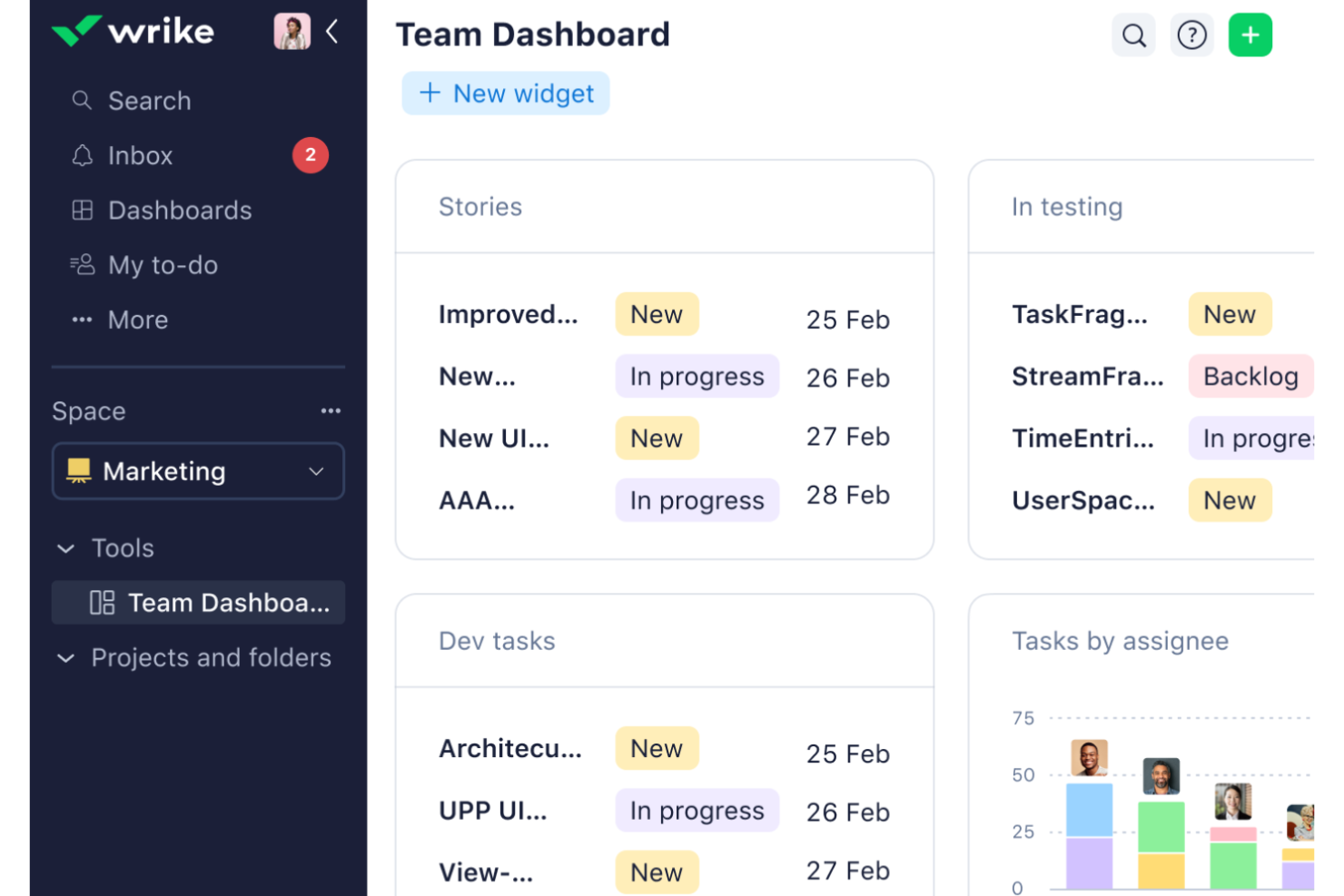
Wrike is a comprehensive work management platform that offers a wide range of features and integrations. With its focus on project management, workflow management, task management, and resource management, Wrike offers a versatile collaborative platform that caters to various teams and industries.
Why I picked Wrike: Its standout features include real-time collaboration tools, like task updates, file sharing, and in-platform comments. It also has a wide array of customizable options that support different workflows. With its shared dashboards and interactive Gantt charts, Wrike offers comprehensive visibility into project timelines and tasks, enabling teams to align on goals, monitor progress, and efficiently allocate resources.
Overall, Wrike excels as a versatile project management tool because it not only supports seamless communication and task management but also offers advanced reporting and resource allocation features, which are essential for managing complex projects effectively.
Wrike Standout Features and Integrations
Features include Gantt charts, automation, project resource planning, Kanban boards, approvals, custom item types, proofing, cross-tagging, custom dashboards, and dynamic request forms.
Integrations include Amazon S3, Google Drive, Slack, BambooHR, Gmail, ADP Workforce Now, Bitbucket, Cisco, Expensify, DocuSign, Stripe, Zendesk, and over 400 more.
Pros and Cons
Pros:
- Wide range of project management features
- Robust integration capabilities
- Extensive customization options
Cons:
- Steeper price for more advanced features or larger teams
- Learning curve for new users
New Product Updates from Wrike

Wrike Redesigns Workspace Search With New Filters
Wrike introduces a redesigned Workspace Search interface with recent search shortcuts, item type and location filters, and parent-task context. These updates help users find relevant work items and navigate search results efficiently. For more information, visit Wrike’s official site.
 .
Axero
Best for knowledge sharing
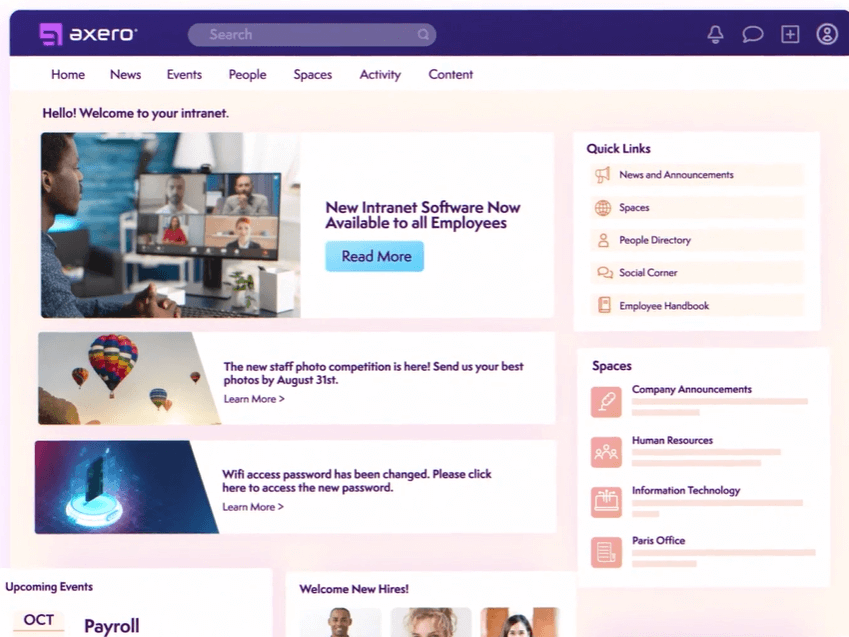
Axero provides a well-rounded platform for creating intranets, knowledge centers, and enterprise portals that cater to the modern, mobile workforce. It facilitates collaboration through streamlined communications and knowledge sharing, and it stands out for its AI-driven features, including its AI-powered bot, Copilot.
Why I picked Axero: This software facilitates knowledge sharing through both public and private spaces. These can be set up in both an intranet and extranet environment, making it suitable for collaboration among internal and external stakeholders. The knowledge sharing platforms can be fully managed and maintained as wikis.
There are tons of different communication tools available, from live chat to blog posts to forums to surveys and even mass broadcasts. Commenting and like buttons make for a more engaging experience where people can share their thoughts and opinions, too.
Axero Standout Features and Integrations
Features include polls & surveys, activity streams, discussion forums, commenting, notifications, suggestion box, live chat, video sharing, like buttons, @Mentions, mass email, and more.
Integrations include Outlook 365, Sharepoint, OneDrive, Microsoft Teams, Google Workspace, Slack, Zoom, Dropbox, Box, Unsplash, and Twilio, among others.
Pros and Cons
Pros:
- Highly flexible and customizable to various contexts
- Suitable to the needs of larger organizations
- Can be used for internal and external knowledge sharing
Cons:
- Takes time to get familiar with all features
- Integrations not included in starter plan

Miro
Best for design thinking
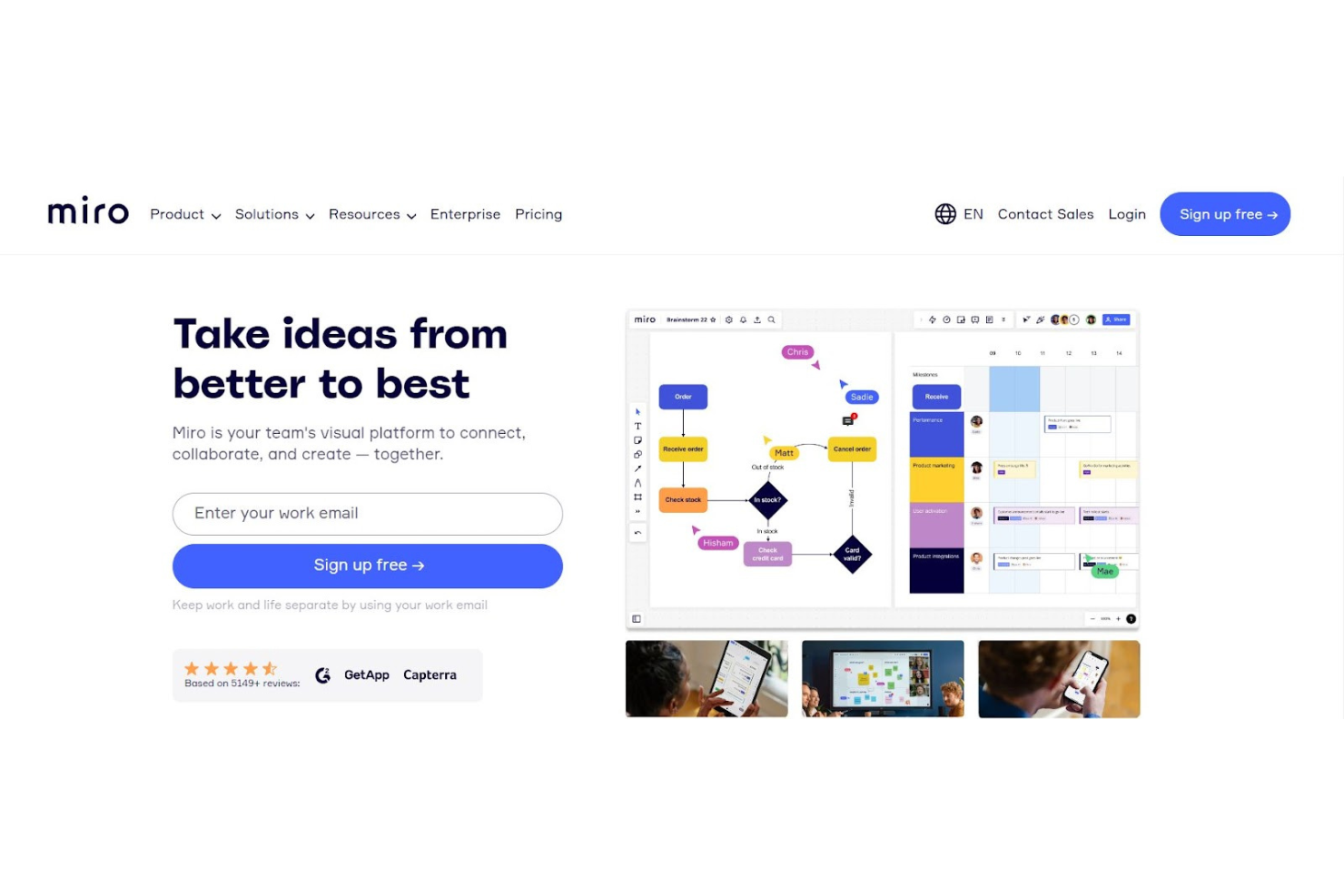
Miro is designed to effectively facilitate team collaboration, especially for those in design thinking, agile coaching, and UX/UI design. It integrates a range of project planning tools, including Gantt charts, RACI matrices, Kanban boards, and user story maps, into a single visual space. This allows teams to easily share ideas and feedback through features like tagged comments, video calls, and board chats, streamlining communication and project discussions.
Why I picked Miro: The platform's infinite canvas offers teams an expansive space for collective brainstorming and ideation, supporting a variety of idea expression methods such as numbers, images, videos, and brand elements. Miro Assist can also generate ideas and pathways from simple prompts, helping to encourage creative thinking and problem-solving.
Additionally, Miro's integrations with project management tools like Jira and Asana help facilitate seamless collaboration by connecting the planning and execution phases of projects. This focus on teamwork and integration can make Miro a valuable tool for bringing together diverse ideas and perspectives, driving innovation in design projects.
Miro Standout Features and Integrations
Features include mind mapping, task tracking, user story mapping, PI planning, online workshops, brainwriting, timebox sessions, digital sticky notes, video conferencing, Talktrack to asynchronously explain processes, a Planner tool, webinars, asset sharing, data visualization, customizable templates, and employee photos.
Integrations include Google Drive, Jira, Asana, Slack, Trello, Google Workspace, Confluence, Notion, DropBox Business, Zoom, and GitHub.
Pros and Cons
Pros:
- Simple interface and design
- Very user-friendly
- No learning curve
Cons:
- Too many items on one board can cause lag
- Works best with a trackpad
New Product Updates from Miro
Miro Adds Japan Data Residency for Enterprise Customers
Miro has introduced Japan data residency for enterprise customers, offering in-region storage for production data, backups, and metadata, plus in-region compute infrastructure. For more information, visit Miro's official site.
 .

Zulip
Best communication platform for small teams
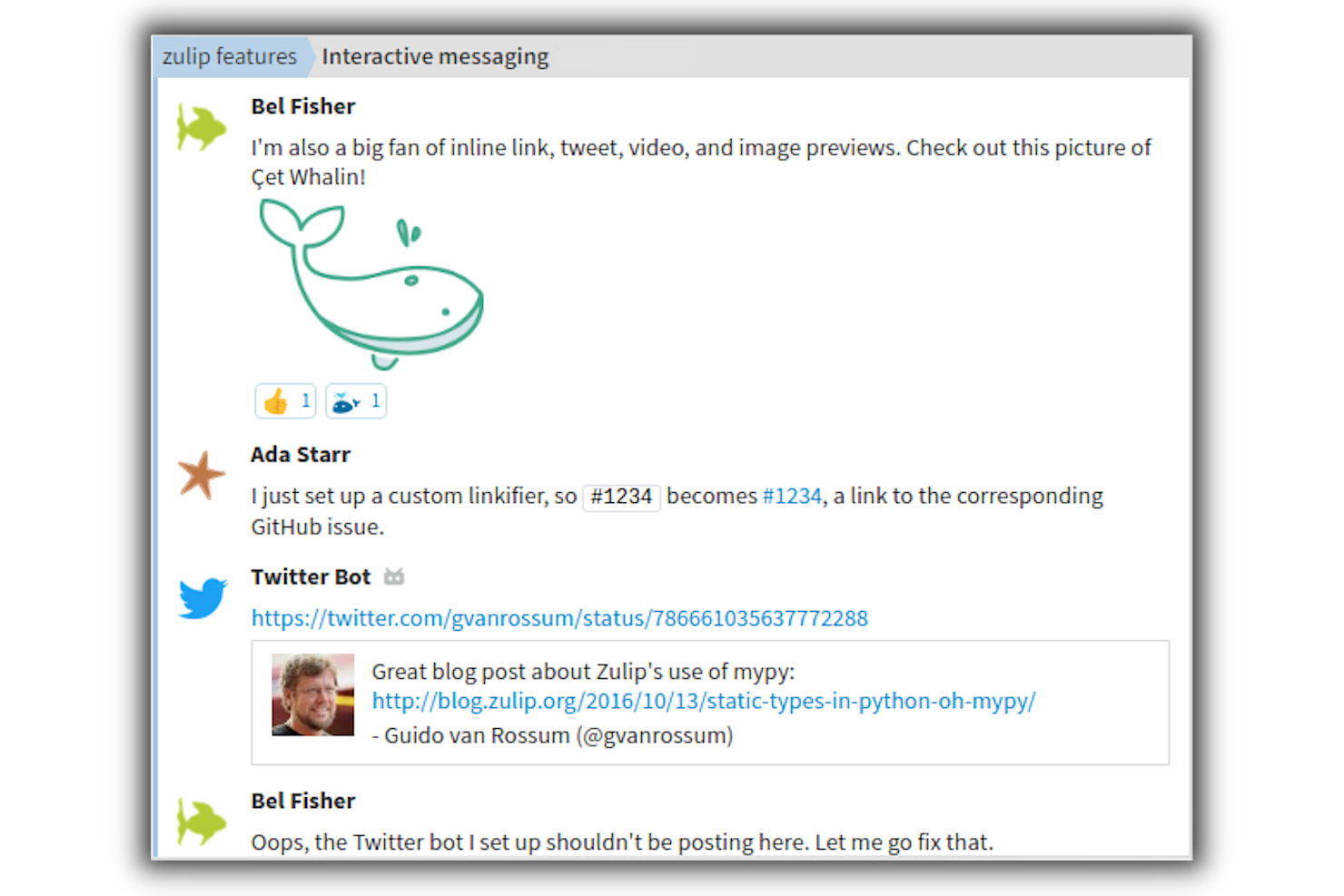
Zulip is a robust open-source group chat application that combines the immediacy of a live chat tool with the collaborative benefits of threaded conversations. Released under the Apache license, the app offers hosted instances, although it offers a variety of features and capabilities that users familiar with a software such as Slack would come to expect.
The app offers multiple streams, which work just like chat rooms or channels. This function is especially useful for teams collaborating on tasks and projects, as it enables them to communicate directly and in real time with the people involved in the project.
Zulip’s powerful chat application is compatible with multiple platforms, including Windows, Mac, Linux, Android, and iOS. It allows team members to collaborate using any platform, whether they’re using a desktop PC, Mac, or any mobile device like a smartphone or tablet.
Zulip Standout Features & Integrations
Features include @mentions, image embeds, logging, highly configurable notifications, emoji reactions, and file uploads.
Integrations include over 120 native integrations, including Airbrake, Basecamp, Asana, Dropbox, Flock, GitHub, Jenkins, Mailchimp, Slack, and Trello. Additionally, you can connect to thousands of applications using Zapier.
Best collaboration tool for team-based task management

MeisterTask is a task management tool designed to enhance collaboration and task management within teams. It emphasizes high acceptance rates, reduced security risks, and decreased email and meeting volumes, which contribute to a significant return on investment and peace of mind for businesses aiming to maximize team potential.
Why I picked MeisterTask: I included MeisterTask because the platform's quick setup feature allows teams to rapidly begin using the tool with minimal onboarding. Plus, thanks to its wide range of features and structured environment, it stood out as a well-rounded option for project-based collaboration.
The software also offers automation capabilities for repetitive actions, multiple checklists within tasks for detailed progress tracking, recurring task setup for regular duties, time tracking for productivity analysis, custom fields for tailored information capture, comprehensive statistics and reports for insight into team performance, roles and permissions management for access control, and integrations with other tools to centralize workflows.
MeisterTask Standout Features and Integrations
Features include a wide range of collaboration tools such as discussions, notes, note-sharing tools, task assignees & watchers, task and sub-task tracking, task relationships, tags, and checklists. Their Kanban boards also offer a visual workflow management system where tasks are represented as cards that can be moved across customizable columns, aiding in progress tracking and task prioritization.
Integrations include MindMeister Google and Outlook Calendars, Microsoft Teams, Slack, GitHub, ZenDesk, Microsoft Outlook and Gmail, PomoDone, and Zapier.
Pros and Cons
Pros:
- Solid range of project management features included
- User-friendly interface is quick to learn
- Due dates and reminders keep employees on track
Cons:
- No internal calendar within the software
- Limited integrations available

Nuclino
Best for centralizing company knowledge
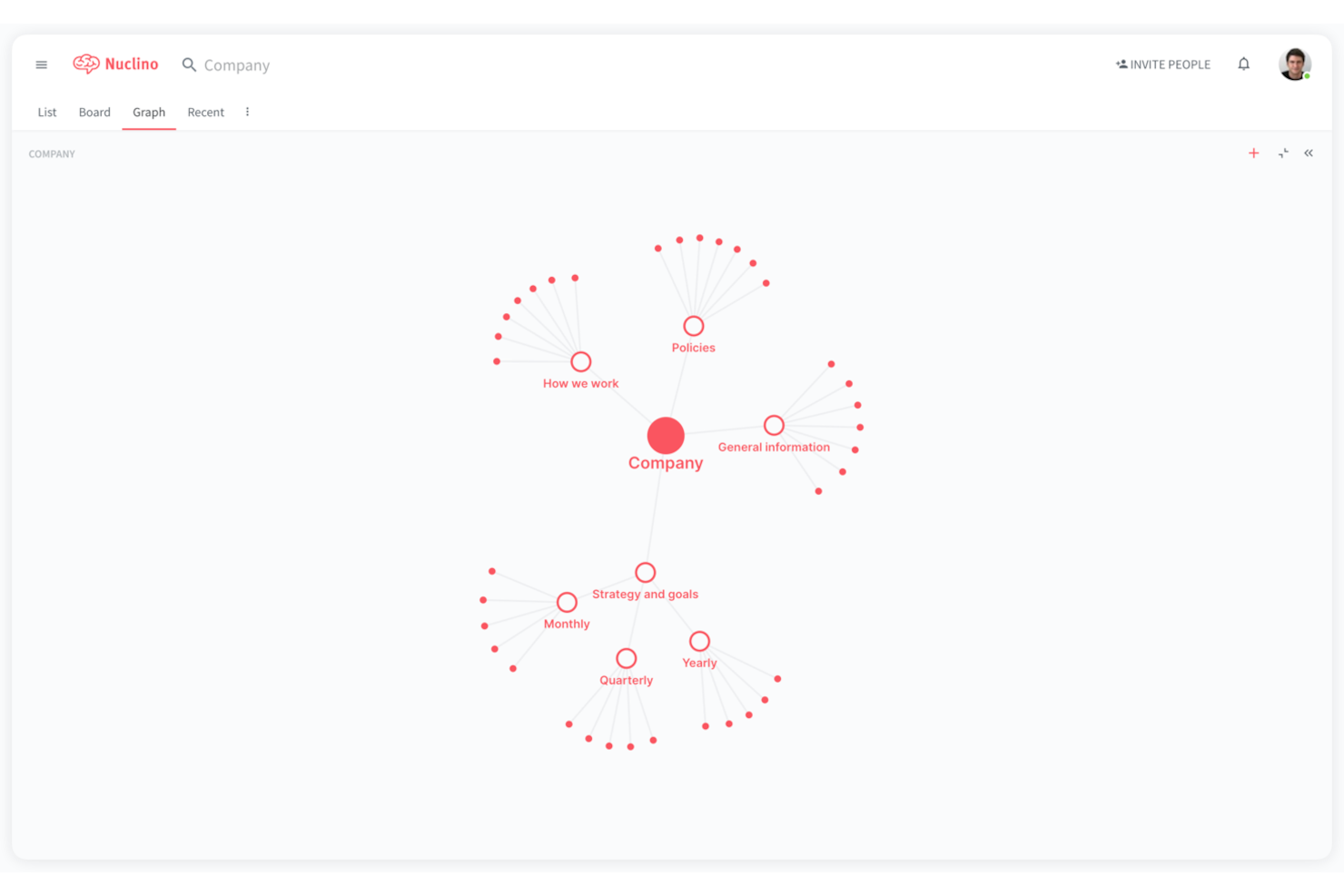
Nuclino is a collaborative knowledge platform that centralizes your knowledge, documents, and projects.
Why I picked Nuclino: The tool has a search engine that you and your team can use to find any company- or business-related information. Nuclino is designed to serve as a unified workspace for individuals and teams. It gives you the ability to organize knowledge, share ideas with colleagues, as well as manage different tasks and projects.
In addition to its search engine, Nuclino is also equipped with authoring and an intuitive interface. All its features are designed to help you improve the knowledge creation process as well as the sharing and collaboration within your team and the company.
Nuclino is a cross-platform solution, which means you and your team can use the app for work, regardless of the device or platform being used, be it a desktop PC or a mobile device. It allows your team to collaborate and learn on the go.
Nuclino Standout Features & Integrations
Features include quick setup, instant search, hotkeys, private workspaces, drag-and-drop attachments, real-time edits from other team members, and a board view to help track items in a workflow.
Integrations include more than 40 apps such as Zendesk, HipChat, and Jira Software, as well as other external applications that can enhance the overall efficiency of your team’s workflows and processes.

Flock
Best for team messaging
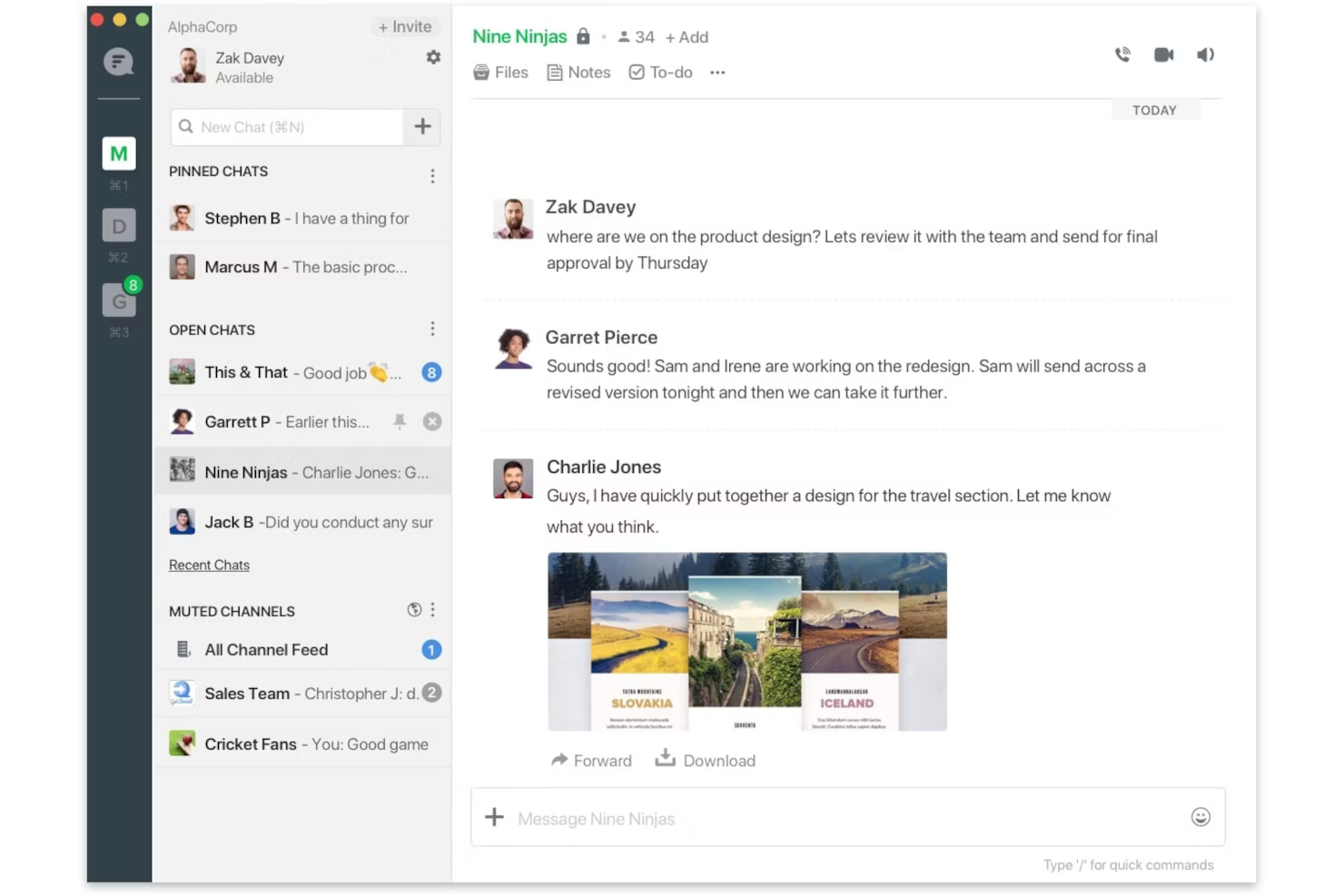
Flock is a collaborative business messaging app that facilitates collaborative project management through chat-based communication that supports direct and group messaging with private and public channel options.
Why I picked Flock: When it comes to collaboration, Flock works as expected, providing tools and capabilities that include the ability to tag colleagues or team members in the comment section, upload files and documents, set reminders and deadlines, and upload multimedia files like video clips and images. The app also has a to-do list and a search function that lets you search for specific files or comments in chat and discussion threads. It also allows you to create teams, projects, and tasks, as well as set up email reminders to alert your team members of mentions, changes in project status, and other relevant communications.
Flock’s audio and video call functions can be scheduled and are easily carried out from within the application, while the screen sharing feature gives users the ability to show their teammates what they’re currently working on, in real time. This scalable collaboration platform also enables code snippet sharing, poll taking, and group discussions.
Flock Standout Features & Integrations
Features include text-based messaging, audio and video calling, screen sharing, polls, reminders, and file sharing.
Integrations include connections to other apps through its app store. These include Zoom, Google Drive, Giphy, Asana, Trello, Mailchimp, Jira, OpsGenie, Sentry, and Jenkins. Additionally, you can connect to thousands of apps using a paid subscription with Zapier.
Pros and Cons
Pros:
- Add to-do lists, due dates right into chats
- Can make audio/video calls in the tool
- Integrations are simple to set up
Cons:
- Missed message emails can clutter inbox
- Notifications lag on mobile app
Avaza
Best for cross-device business management

If you’re looking for collaboration and business management tools that work on mobile, laptops, and tablets, Avaza has developed the responsive design you need to ensure your team can work from anywhere. With features for resource scheduling, project management, expense management, and customer support, this is an all-in-one solution optimized for mobile work.
With Avaza, your team can more easily visualize everything that needs to get done for a project or client. With snapshot visuals through Kanban boards, Gantt charts, and list views for everything from resource scheduling and task tracking to time management and online payments, everyone on your team can work more efficiently.
Avanza is all about helping businesses of all sizes save time in every aspect of their operations. Internal communication tools and file-sharing solutions ensure accurate tracking, insights, and reporting, as well as faster invoicing and online payments.
Avaza Standout Features and Integrations
Features include unified team chat, expense tracking, project management, invoicing, resource scheduling, automatic billing, calendar sync, cost-to-completion tracking, forecasting, risk management, discussions/forums, multi-location, and remote access.
Integrations include Zapier, Zero, QuickBooks, SharpSpring, Stripe, Google Workspace, Trello, Basecamp, Zendesk, and Insightly.
Pros and Cons
Pros:
- Simple navigation and interface
- Very easy to use
- Great value for the money
Cons:
- Importing data can cause lags

Productboard
Best for product management

If a lot of your task management revolves around your customers, Productboard may be for you. It not only empowers your team to get your products to market faster, but it also prioritizes client feedback to help you improve what you’re selling to ensure you’re meeting user needs.
With features like product roadmaps from pre-made templates and centralized feedback from customers, your team can stay up-to-date on the newest plans and strategies as your products evolve. This project management tool provides a holistic view of all the ideas and objectives you’ve got swirling around the office to bridge the divide between the product team and the customer community.
The basic Productboard plans are ideal for small and medium businesses, but they also offer a completely different level of online collaboration tools for enterprise-level needs. Their flexible, scalable platform allows you to build better products faster while reducing risk for large and small businesses.
Productboard Standout Features and Integrations
Features include activity planning, agile methodologies, assignment management, brainstorming, client portal, customizable reports, file sharing, timeline view, marketing calendar, percent completion tracking, project planning, and real-time updates.
Integrations include Slack, Typeform, Intercom, Zendesk, Trello, Salesforce Sales Cloud, Zapier, Microsoft Azure, Gong.io, and Drift.
Pros and Cons
Pros:
- Built-in features that prioritize planning
- Add new features by customer request
- Clean and intuitive user interface
Cons:
- Needs more integrations for ticket tracking
- Minimal reporting available
Diğer İş Birliği Yazılımları
En iyi iş birliği yazılımları listesine giremeyen birkaç seçenek daha aşağıda yer alıyor:
- Workplace from Meta
For company-wide communication
- ReviewStudio
For online proofing
- Elium
For ensuring company knowledge is readily available at all times
- Next Matter
For handling complex, cross-functional workflows
- Stackfield
For zero-knowledge encryption
- Notion
For maintaining a central knowledge base on multiple topics
- Project.co
For getting clients involved in the task completion
- Ziflow
For managing internal feedback
- Connecteam
For quick communication with jobsite teams and remote workers
- Celoxis
For advanced project cost and performance analysis


İlgili Proje Yönetimi Yazılımı İncelemeleri
Aradığınızı hâlâ burada bulamadıysanız, sizin için derlediğimiz diğer proje yönetimi aracı incelemelerine göz atın:
- Proje Yönetimi Yazılımı
- Kaynak Yönetimi Yazılımı
- İş Akışı Otomasyonu Yazılımı
- Zaman Takibi Yazılımı
- Görev Yönetimi Yazılımı
- İş Birliği Araçları
- Dosya Senkronizasyonu Yazılımı
- Eş Zamansız İş Birliği Araçları
- HIPAA Uyumlu İş Birliği Araçları
- Belge Toplama Yazılımı
How I Evaluate Collaboration Software
When project teams rely on separate tools just to share files, chat, and track work, I split my evaluation into two layers: baseline requirements and the differentiators that set options apart.
Core Functionality (Table Stakes For This List)
When I'm selecting tools for my list, I rank each one on a scale from 0 (does not offer the functionality) to 5 (excels in this area) for each core functionality listed below. Then, I calculate the tool's total score into a percentage. Each tool needs to achieve a minimum total score of 75% to be considered for inclusion.
- Real-Time Collaboration: I check whether multiple team members can edit the same board, doc, or task view simultaneously with live cursors and instant syncing.
- Team Messaging & Communication: Threaded comments tied to specific tasks or deliverables matter here, not just a generic chat window bolted onto the sidebar.
- Shared Workspaces: I evaluate how each tool organizes projects, files, and conversations into centralized spaces that teams across product, design, and engineering can navigate.
- File Sharing & Co-Editing: I look for native or integrated document editing so teams can collaborate on specs or briefs without toggling to a separate app.
- Task Assignment & Tracking: The tool should let you assign owners, set deadlines, and view progress across formats like Kanban boards, lists, or Gantt charts.
- Notifications & Activity Feeds: Customizable alerts are key—I look at whether you can filter notifications by project, mention, or status change to avoid inbox overload.
Once I have a list of tools that meet this criteria, I consider what sets each platform apart.
Differentiating Factors (What Sets Vendors Apart)
Here's how I compare and contrast different vendors:
Standout Features
Automation features are a big differentiator. I look for no-code workflow builders that trigger task handoffs when a status changes, like auto-assigning QA review once a developer marks a ticket complete. AI-powered assistance is gaining ground fast, too. Tools that summarize long comment threads or generate status updates from recent activity save real time during reporting cycles. I also evaluate cross-project dashboards, since PMO leads managing multiple workstreams need rolled-up views of deadlines, blockers, and workloads in one place.
Beyond Features
Integration depth matters. I check whether a tool connects natively with the broader PM stack—Jira, Slack, Google Workspace, Microsoft 365—so teams aren't copying updates between platforms. Pricing transparency is another factor I weigh; some vendors gate core collaboration features behind enterprise tiers, which makes evaluation tricky for growing teams. I also consider onboarding support, especially pre-built templates for Agile or Scrum workflows, since these cut weeks off adoption when rolling out a new platform across multiple squads.
İş Birliği Yazılımı Nasıl Seçilir?
Uzun özellik listeleri ve karmaşık fiyatlandırma yapılarına kendinizi kaptırmanız kolaydır. Benzersiz yazılım seçme süreciniz üzerinde çalışırken odaklanmanıza yardımcı olmak için aklınızda bulundurmanız gereken etkenlerin bir kontrol listesini burada bulabilirsiniz:
| Etken | Dikkat Edilmesi Gerekenler |
| Ölçeklenebilirlik | İhtiyaçlarınız arttıkça daha fazla kullanıcıyı, projeyi veya veriyi yöneterek yazılımın ekibinizle birlikte büyüyebildiğinden emin olun. |
| Entegrasyonlar | Slack, Zoom veya çeşitli proje yönetimi uygulamaları gibi ekibinizin hâlihazırda kullandığı araçlarla sorunsuz entegrasyon sağlayan çözümleri arayın. |
| Özelleştirilebilirlik | Yazılımın arayüzünü, iş akışlarını veya özelliklerini ekibinizin özel ihtiyaçlarına uyacak şekilde özelleştirip özelleştiremeyeceğinizi kontrol edin. |
| Kullanım Kolaylığı | Yazılım sezgisel olmalı ve hızlı öğrenilebilmelidir; böylece işe alıştırma süresi azalır ve ekibin benimsemesi sağlanır. |
| Bütçe | Yazılımın ekibinizin büyüklüğüne göre fiyatlandırmasını, gizli ücretleri ve sunulan özelliklerin bütçenizle örtüşüp örtüşmediğini değerlendirin. |
| Güvenlik Önlemleri | Yazılımın uyumluluk standartlarını karşıladığını ve hassas bilgilerinizi korumak için güçlü veri şifrelemesi içerdiğini doğrulayın. |
| Destek Seçenekleri | Sorunların hızlıca çözülmesi için canlı sohbet veya özel hesap yöneticisi gibi güvenilir müşteri desteği sunulduğundan emin olun. |
| Mobil Erişim | Yazılımın hareket hâlindeyken iş birliği yapmaya olanak tanıyan güçlü bir mobil uygulama sunduğundan emin olun. |
2025'te İş Birliği Yazılımlarındaki Trendler
Araştırmam sırasında farklı iş birliği yazılımı sağlayıcılarından sayısız ürün güncellemesi, basın bülteni ve sürüm günlüğü inceledim. Gözlemlediğim yeni trendlerden bazıları şunlar:
- Yapay Zekâ Destekli İçgörüler: Sağlayıcılar, ekip iletişimini analiz etmek ve görev önceliklendirme veya darboğazları tespit etme gibi uygulanabilir öneriler sunmak için yapay zekâ araçları ekliyor. Örneğin bazı araçlar artık yapay zekâ tarafından oluşturulan toplantı özetleri veya ekip iş yükü dengesi hakkında içgörüler sunuyor.
- Eş Zamanlı Olmayan İş Birliği: Daha fazla araç; video güncellemeleri, zaman kaydırmalı geri bildirim seçenekleri ve esnek bildirimler gibi özelliklerle eş zamanlı olmayan çalışmayı desteklemeye odaklanıyor. Bu, farklı saat dilimleri arasında çalışan uzaktan ve küresel ekipler için giderek daha önemli hâle geliyor.
- Sanal Gerçeklik (VR) Entegrasyonu: Bazı platformlar sanal toplantılar veya beyin fırtınası oturumları için VR kullanımını araştırıyor. Bu sürükleyici araçlar, ortak bir ortamda bulunma hissi yaratarak uzaktan çalışan ekipler için yüz yüze etkileşimleri taklit etmeye yardımcı olabilir.
- Çalışanların Refahına Odaklanma: İş birliği yazılımları yerleşik molalar, mesai saatleri sonrasında gelen bildirimleri sınırlama ve kısa anketler gibi özellikleri bünyesine katmaya başlıyor. Bu araçlar, çalışanları aşırı çalıştırmadan tükenmişliği azaltmayı ve çalışan bağlılığını korumayı amaçlıyor.
- Sektöre Özel Çözümler: Sağlayıcılar platformlarını sağlık, eğitim veya yaratıcı hizmetler gibi sektörlere göre uyarlıyor. Bu sürümler, niş ihtiyaçları daha iyi karşılamak için genellikle özel şablonlar, iş akışları ve uyumluluk özellikleriyle birlikte sunuluyor.
İş Birliği Yazılımı Nedir?
İş birliği yazılımı, bireylerin daha etkili bir şekilde birlikte çalışmasına yardımcı olmak için tasarlanmış bir araçtır. Ekip üyelerinin konumlarından bağımsız olarak iletişim kurmasına, dosya paylaşmasına, görevleri yönetmesine ve projeler üzerinde koordinasyon sağlamasına olanak tanır.
İş birliği araçları, grup çalışmalarını kolaylaştırarak herkesin aynı anlayışta olmasını ve verimli bir şekilde katkıda bulunabilmesini sağlar; üretkenliği artırır ve grup hedeflerinin daha sorunsuz tamamlanmasını kolaylaştırır. Temel olarak farklı ekip üyeleri arasındaki mesafeyi kapatan dijital bir çalışma alanı görevi görür ve daha iyi ekip çalışması ile iş birliğini mümkün kılar.
İş Birliği Yazılımının Özellikleri
Özellikle uzaktan çalışan ekiplerin yaygınlaşmasıyla birlikte günümüzün hızlı tempolu çalışma ortamında doğru iş birliği araçlarını seçmek; etkili ekip iletişimi sağlamak, üretkenliği artırmak ve proje hedeflerine zamanında ve bütçe dâhilinde ulaşmak için kritik öneme sahiptir. Burada, bu ihtiyaçları karşılayan iş birliği araçlarını seçerken dikkate alınması gereken en önemli özellikleri sıralıyorum.
- Gerçek Zamanlı İletişim: Ekip üyelerinin anında bilgi alışverişinde bulunmasını sağlar. Bu özellik, soruların hızlı bir şekilde yanıtlandığı iş birliğine dayalı bir ortamın teşvik edilmesi açısından önemlidir ve projelerin gecikmeden ilerlemesini sağlar.
- Görev ve Proje Yönetimi: Görevlerin ve projelerin düzenlenmesini ve izlenmesini sağlar. Ekiplerin proje takvimleri ve hedefleriyle uyumlu kalması, olası darboğazların erkenden belirlenmesine yardımcı olması açısından hayati önem taşır.
- Belge Paylaşımı ve İş Birliği: Belgelerin merkezi bir konumda paylaşılmasını, düzenlenmesini ve yönetilmesini kolaylaştırır. Bu özellik, ekip üyelerinin belgeler üzerinde eş zamanlı çalışmasına olanak tanıyarak iş akışlarını daha verimli hâle getirir ve düzeltmeler için harcanan zamanı azaltır.
- Diğer Araçlarla Entegrasyon: Diğer yazılım araçlarıyla sorunsuz bağlantıyı destekler. Bu entegrasyon, iş akışlarını otomatikleştirmek ve uygulamalar arasında geçiş yapma ihtiyacını azaltmak açısından kritik öneme sahiptir; böylece zamandan tasarruf edilir ve hatalar azaltılır.
- Mobil Erişilebilirlik: Herhangi bir cihazla her yerden çalışma olanağı sunar. Bu özellik, ekip üyelerinin masalarından uzakta olduklarında bile bağlantıda ve üretken kalmasını sağlar.
- Video Konferans: Konumdan bağımsız olarak yüz yüze toplantılar için bir platform sunar. Ekip üyeleri arasındaki insani bağların korunması ve yalnızca metin tabanlı yöntemlere kıyasla daha etkili iletişimin kolaylaştırılması açısından önemlidir.
- Güvenlik Özellikleri: Hassas bilgileri korumak için uçtan uca şifreleme ve iki faktörlü kimlik doğrulama içerir. Özellikle uzaktan çalışma ortamlarında veri güvenliğiyle ilgili endişelerin artması göz önüne alındığında, bu özellikler proje ayrıntılarının gizli kalmasını sağlamak için gereklidir.
- Özelleştirme ve Esneklik: Aracın bir projenin veya ekibin özel ihtiyaçlarına uyarlanmasını sağlar. Genellikle açık kaynaklı iş birliği yazılımlarının güçlü yönlerinden biri olan bu esneklik, benzersiz iş akışlarına ve süreçlere uyum sağlamak açısından önemlidir; aracın üretkenliği engellemek yerine artırmasını güvence altına alır.
- Analizler ve Raporlama: Proje ilerlemesi ve ekip performansı hakkında içgörüler sunar. Bu özellik, proje yöneticilerinin zaman çizelgelerini izlemesi, kaynakları verimli bir şekilde tahsis etmesi ve projeleri planlanan doğrultuda tutmak için bilinçli kararlar alması açısından son derece değerlidir.
İş Birliği Yazılımının Faydaları
Özellikle daha iyi proje sonuçları elde etmek için teknolojiden yararlanmak isteyen proje yöneticisi adayları açısından değerli olan, iş birliği yazılımının sunduğu beş temel faydayı aşağıda bulabilirsiniz.
- Gelişmiş Ekip İletişimi: Açık ve sürekli iletişim kanallarını kolaylaştırır. Bu fayda, tüm ekip üyelerinin aynı bilgiye sahip olmasını sağlar, yanlış anlamaları azaltır ve ortaya çıkabilecek sorunlara hızlı çözümler bulunmasını mümkün kılar; böylece projelerin sorunsuz bir şekilde ilerlemesi sağlanır.
- Geliştirilmiş Proje Verimliliği: Görev dağıtımını ve takibini kolaylaştırır. Proje yöneticileri, iş birliği yazılımını kullanarak görevleri kolayca atayabilir, ilerlemeyi izleyebilir ve gerektiğinde son teslim tarihlerini ayarlayabilir; böylece projelerin ayrılan süre ve kaynaklar dâhilinde tamamlanmasını sağlar.
- Merkezi Bilgi Merkezi: Proje belgeleri ve iletişim için tek bir güvenilir bilgi kaynağı sunar. Bu merkezileştirme, gereksiz e-posta ve toplantı ihtiyacını ortadan kaldırarak zamandan tasarruf sağlar ve proje ilerlemesini sekteye uğratabilecek kaybolmuş veya güncel olmayan bilgilerin riskini azaltır.
- Daha İyi Kaynak Yönetimi: Kaynakları ve iş yükü dağılımını izlemek için araçlar sunar. Proje yöneticileri bu içgörü sayesinde kaynak tahsisi konusunda bilinçli kararlar alabilir; böylece hiçbir ekip üyesine aşırı yük binmemesi ve projelerin yetersiz personelle yürütülmemesi sağlanarak daha dengeli ve sürdürülebilir iş yükleri oluşturulur.
- Artırılmış Esneklik ve Ölçeklenebilirlik: Her büyüklükteki ekibin ihtiyaçlarına uyum sağlar ve her yerden çalışmaya olanak tanır. İş birliği yazılımı, fiziksel konumlarından bağımsız olarak ekiplerin bağlantıda ve üretken kalmasını sağlar; proje gereksinimleri değiştikçe verimlilikten veya iletişimden ödün vermeden operasyonları büyütmeyi ya da küçültmeyi kolaylaştırır.
İş Birliği Yazılımı Maliyetleri & Fiyatlandırması
Doğru iş birliği yazılımını seçmek, özellikle çok az deneyimi olan veya hiç deneyimi olmayan yazılım alıcıları için kritik bir karardır. İş birliği yazılımı, tıpkı müşteri işe alıştırma yazılımının farklı işletme gereksinimleri için çeşitli kademeler sunması gibi, ekiplerin farklı ihtiyaçlarına, büyüklüklerine ve bütçelerine hitap eden çeşitli plan seçenekleri sunar.
Bu planlar genellikle küçük ekipler veya yazılımı denemek isteyenler için tasarlanmış ücretsiz sürümlerden, karmaşık proje yönetimi ihtiyaçları olan daha büyük kuruluşlara yönelik daha gelişmiş ve zengin özellikli paketlere kadar uzanır. Aşağıda, karar vermenize yardımcı olmak için yaygın plan seçeneklerinin ve fiyatlandırmanın bir dökümü yer almaktadır.
İş Birliği Yazılımı İçin Plan Karşılaştırma Tablosu
| Plan Türü | Ortalama Fiyat | Yaygın Özellikler |
|---|---|---|
| Ücretsiz | $0 | Temel görev yönetimi, sınırlı depolama, ekip iş birliği |
| Temel | $5-10 /kullanıcı/ay | Gelişmiş görev yönetimi, daha fazla depolama, temel entegrasyonlar |
| Standart | $10-15 /kullanıcı/ay | Tam proje yönetimi paketi, sınırsız depolama, gelişmiş entegrasyonlar |
| Premium | $20-30 /kullanıcı/ay | Gelişmiş raporlama, öncelikli destek, özel özellikler |
| Kurumsal | Fiyatlandırma için iletişime geçin | Özelleştirilebilir özellikler, kurumsal düzeyde güvenlik, kişisel destek |
Bir plan seçerken ekibin büyüklüğünü, projelerinizin karmaşıklığını ve iş birliği ile proje yönetimi konusundaki özel ihtiyaçlarınızı değerlendirmelisiniz. Daha pahalı bir seçeneğe geçmeden önce yazılımın etkililiğini değerlendirmek için ücretsiz veya daha düşük maliyetli bir planla başlamak da akıllıca olacaktır.
İş Birliği Yazılımı SSS
Bu konu hakkında başkalarının sorduğu yaygın soruların yanıtlarını bulun.
İş birliği yazılımının üç türü nedir?
İş birliği yazılımının temel özellikleri nelerdir?
Başka hangi iş birliği yazılımını kullanmalıyım?

Sırada Ne Var?
İş birliği yazılımı araştırma sürecindeyseniz, ücretsiz öneriler almak için SoftwareSelect danışmanıyla iletişime geçin.
Bir form doldurur ve ihtiyaçlarınızın ayrıntılarını ele aldıkları kısa bir görüşme yaparsınız. Ardından incelemeniz için kısa bir yazılım listesi alırsınız. Fiyat görüşmeleri de dahil olmak üzere satın alma sürecinin tamamında size destek olurlar.