

10 Best Document Collection Software Reviewed in 2026

Best Document Collection Software Shortlist


Document collection software helps teams securely request, track, and organize files—eliminating the chaos of back-and-forth emails, version confusion, and missed deadlines. Whether you're collecting client documents, onboarding materials, or internal approvals, the right tool makes it easy to centralize submissions, automate reminders, and maintain compliance.
I independently tested and reviewed top document collection tools to find platforms that are easy to use, secure, and flexible enough to handle different types of workflows. Whether you're part of a small team or managing enterprise-scale requests, this guide will help you choose a solution that fits your needs.
Why Trust Our Software Recommendations
Our team has been testing and reviewing software since 2012. As project managers ourselves, we know how difficult—and important—it is to choose the right software.
For this guide, we evaluated tools using hands-on testing and independent research, scoring tools using our selection criteria. We also draw on insights from industry thought leaders and practicing project management experts.
Our reviews reflect our human editorial judgment, not a sales pitch.
Expert reviewers:
Best Document Collection Software Summary
This comparison chart summarizes pricing details for my top document collection software selections to help you find the best one for your budget and business needs.
| Tool | Best For | Trial Info | Price | ||
|---|---|---|---|---|---|
| 1 | Best for multilingual document processing | Free demo available | Pricing upon request | Website | |
| 2 | Best for customer interactions | Free demo available | Pricing upon request | Website | |
| 3 | Best for workflow automation | Free demo available | Pricing upon request | Website | |
| 4 | Best for cloud storage | 14-day free trial | From CAD$21/user/month (billed annually) | Website | |
| 5 | Best for team collaboration | 30-day free trial available | From $5.40/user/month (billed annually) | Website | |
| 6 | Best for document signing | Free plan available + 14-day free trial available | From $19/user/month (billed annually) | Website | |
| 7 | Best for file sharing | Free plan available | From $9.99/person/month (billed annually) | Website | |
| 8 | Best for note organization | Free trial available | From $10.83/user/month (billed annually) | Website | |
| 9 | Best for automated reminders | 14-day free trial + free demo available | From $35/month (billed annually) | Website | |
| 10 | Best for client submissions | 7-day free trial | From $107.50/month (billed annually) | Website |
Best Document Collection Software Review
Below are my detailed summaries of the best document collection software that made it onto my shortlist. My reviews offer a detailed look at the key features, pros & cons, integrations, and ideal use cases of each tool to help you find the best one for you.
Doxis
Best for multilingual document processing
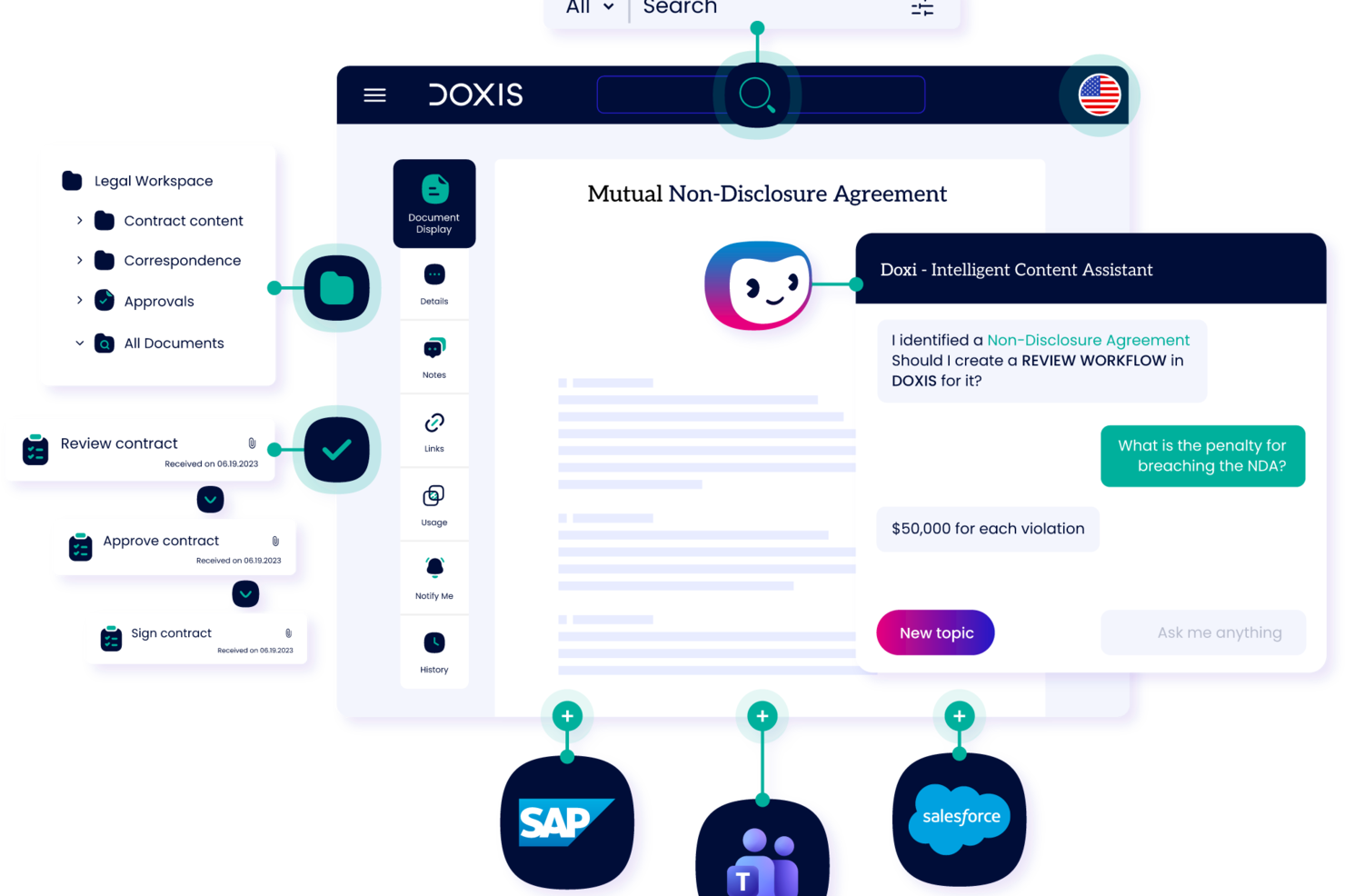
Doxis is an enterprise content management and document intelligence platform that provides document capture, AI-powered classification, digital filing, process automation, and audit-proof archiving throughout the entire document lifecycle.
Who is Doxis Best For?
Doxis suits large enterprises and mid-sized organizations in document-heavy industries like finance, healthcare, and manufacturing that need to manage high volumes of incoming documents across multiple systems.
Why I Picked Doxis
I've included Doxis in my top picks because its multimodal document recognition engine handles documents across languages, formats, and layouts without requiring manual configuration for each. When your team collects documents from international suppliers, customers, or partners, Doxis reads and extracts structured data from those files regardless of the source language. I also like that its AI.dp module uses NLP alongside OCR, which means it understands context inside a document, not just characters on a page. That matters when you're collecting complex, mixed-language documents like customs declarations, freight invoices, or cross-border contracts.
Doxis Key Features
- Inbound mail processing: Captures and routes incoming documents from email, fax, and print channels into the correct filing structure.
- Digital eFiles: Organizes collected documents into structured electronic files by entity type, such as customer, supplier, or case.
- Multi-channel document capture: Ingests documents from scanners, web portals, and connected business systems in a single pipeline.
- Audit-proof archiving: Stores collected documents in a tamper-proof, compliance-ready archive with full version history.
Doxis Integrations
Doxis offers native integrations with SAP, Salesforce, and the Microsoft ecosystem, including Microsoft 365, Microsoft Teams, Microsoft Outlook, Microsoft SharePoint, and Microsoft Dynamics 365. It also integrates with SAP SuccessFactors. The platform uses vendor-independent connectors to connect with ERP, CRM, and HR systems, and an API is available for custom integrations. Zapier support is not clearly documented.
Pros and Cons
Pros:
- Pre-configured content apps serve common departments
- Audit-compliant archiving supports regulated industries
- Natural language search provides contextual answers
Cons:
- Large file handling sometimes triggers bugs
- Suited to enterprises, not smaller teams

Lightico
Best for customer interactions

Lightico is a digital customer interaction platform designed to streamline the processes of collecting documents and signatures from clients. It is primarily used by industries such as finance, insurance, and telecommunications to enhance customer service and operational efficiency.
Why I picked Lightico: It specializes in customer interactions, allowing you to collect e-signatures and documents in real-time while on a call with clients. The platform supports instant document sharing, ensuring a smooth and efficient process. Lightico's secure environment protects sensitive data during transactions. In my experience, these features make it ideal for businesses looking to improve customer engagement and streamline document collection.
Standout Features & Integrations:
Features include the ability to complete transactions in real-time, which keeps your workflow moving smoothly. You can also use the platform to gather customer consent quickly through digital forms. Lightico provides a secure channel for sharing sensitive information, giving you peace of mind during customer interactions.
Integrations include Salesforce, Microsoft Dynamics, SAP, Zendesk, Oracle, Genesys, Twilio, NICE inContact, Avaya, and RingCentral.
Pros and Cons
Pros:
- Quick customer consent via digital forms
- Secure environment for transactions
- Real-time document collection
Cons:
- Learning curve for new users
- May require technical setup

DocuWare
Best for workflow automation

DocuWare is a document management and workflow automation tool designed for businesses looking to digitize and streamline their processes. It serves industries like finance, healthcare, and manufacturing by automating document workflows and improving efficiency.
Why I picked DocuWare: It’s strong in workflow automation, letting you set up digital workflows that cut down manual tasks. You can capture documents from different sources and send them automatically for approval. It also includes tools for document retention and compliance so your team meets regulations. In my experience, these features make it practical for improving efficiency.
Standout Features & Integrations:
Features include intelligent indexing, which quickly organizes your documents for easy retrieval. You can also use mobile access to manage documents on the go, keeping your team connected. The platform provides customizable dashboards that give you insights into workflow performance and document status.
Integrations include Microsoft Office 365, SAP, Salesforce, QuickBooks, Oracle, Outlook, Sage, Microsoft Dynamics, Google Workspace, and SharePoint.
Pros and Cons
Pros:
- Supports compliance and document retention
- Customizable workflow automation
- Effective document capture capabilities
Cons:
- Requires training for full utilization
- Initial setup complexity

Box
Best for cloud storage

Box is a cloud-based content management and file sharing service designed for businesses needing secure and scalable storage solutions. It caters to enterprises across various industries, helping teams collaborate and manage documents efficiently.
Why I picked Box: It gives you cloud storage to keep and access large amounts of data securely. You can set detailed permissions so sensitive information stays protected. Your team can work on documents together in real time with its collaboration tools. In my experience, these features make it dependable for teams that need secure cloud storage.
Standout Features & Integrations:
Features include advanced security controls that help you protect your data with encryption and compliance certifications. You can automate workflows to streamline repetitive tasks, saving time and effort. Box also offers file versioning, allowing you to track changes and revert to previous versions if needed.
Integrations include Microsoft Office 365, Google Workspace, Slack, Salesforce, IBM, Adobe Sign, DocuSign, Okta, ServiceNow, and Zoom.
Pros and Cons
Pros:
- Real-time collaboration tools
- Scalable storage for large enterprises
- Advanced security and compliance features
Cons:
- High learning curve for new users
- Initial setup can be complex

Best for team collaboration

Microsoft SharePoint is a collaboration and document management platform widely used by businesses of all sizes. It helps teams store, organize, and share information securely, enhancing productivity and collaboration across departments.
Why I picked Microsoft SharePoint: It’s built for team collaboration with shared document libraries and real-time co-authoring. You can set up intranet sites to keep your team informed and engaged. Its permission settings let you control who can access sensitive information. In my experience, these features make it dependable for improving communication and collaboration.
Standout Features & Integrations:
Features include the ability to create custom workflows that automate repetitive tasks, saving time and effort. You can also use version history to track changes and restore previous versions if needed. The platform offers advanced search capabilities, making it easy to find documents and information quickly.
Integrations include Microsoft Teams, OneDrive, Outlook, Power BI, Yammer, Dynamics 365, PowerApps, Azure, Salesforce, and Slack.
Pros and Cons
Pros:
- Customizable intranet site creation
- Supports real-time co-authoring
- Rich document management capabilities
Cons:
- Requires ongoing maintenance
- Complex setup for new users
PandaDoc
Best for document signing

PandaDoc is a document automation and management tool primarily used by sales teams, marketing departments, and legal professionals. It simplifies the creation, delivery, and signing of documents, offering a comprehensive solution for handling business paperwork.
Why I picked PandaDoc: It excels in document signing, providing you with features like e-signatures and document tracking. You can create templates to speed up the document creation process, saving time for your team. The platform offers analytics to track document engagement, giving you insights into client interactions. In my experience, these features make PandaDoc a top choice for businesses looking to enhance their document workflow.
Standout Features & Integrations:
Features include the ability to use a content library to store frequently used documents and assets. You can also collaborate on documents in real time, ensuring efficient team communication. PandaDoc provides a drag-and-drop document editor, making it easy to customize documents to your needs.
Integrations include Salesforce, HubSpot, Zoho CRM, Microsoft Dynamics, Pipedrive, Google Drive, Dropbox, Slack, QuickBooks, and Zapier.
Pros and Cons
Pros:
- Detailed document analytics
- Real-time document collaboration
- Extensive template customization
Cons:
- Initial setup requires time
- Limited offline functionality


Dropbox Business is a cloud-based file sharing and storage solution tailored for teams and businesses that need efficient document management. It enables users to store, share, and collaborate on files, making it suitable for a wide range of industries.
Why I picked Dropbox Business: It’s built for file sharing with shared folders and links that make collaboration easy. You can use file requests to gather documents from clients and teammates quickly. It also offers security options like two-factor authentication to protect your data. In my experience, these features make it dependable for secure and efficient file sharing.
Standout Features & Integrations:
Features include smart sync, which lets you access files without taking up space on your device. You can also use the admin console to manage user permissions and monitor activity across your team. The document watermarking feature adds an extra layer of security to your sensitive files.
Integrations include Microsoft Office 365, Slack, Zoom, Adobe Creative Cloud, Salesforce, Trello, Asana, Google Workspace, DocuSign, and Okta.
Pros and Cons
Pros:
- Smart sync for saving device space
- Advanced security with two-factor authentication
- Efficient file request feature
Cons:
- Initial setup can be time-consuming
- Requires constant internet connection


Evernote Business is a note-taking and organization tool designed for teams and businesses that need to manage information efficiently. It helps users capture ideas, organize documents, and collaborate on projects, making it a versatile tool for various industries.
Why I picked Evernote Business: It’s great for organizing notes and documents with notebooks and tags that keep information easy to sort. You can share notes with your team so everyone stays aligned. The search tool is strong and can even find text inside attachments. In my experience, these features make it useful for teams that need organized knowledge management.
Standout Features & Integrations:
Features include the ability to sync across devices, ensuring your notes are accessible anywhere you go. You can use the web clipper to save articles and web pages directly to your notes. The tool also allows you to annotate PDFs, making it easy to add comments and highlights.
Integrations include Google Drive, Slack, Microsoft Teams, Salesforce, Outlook, Gmail, Zapier, Trello, Asana, and Microsoft Office.
Pros and Cons
Pros:
- Web clipper for saving web content
- Syncs across multiple devices
- Effective note categorization options
Cons:
- Requires internet for full features
- Limited offline access


Content Snare is a document collection platform that gives clients a secure, branded portal to upload documents and respond to questions in one place. It's used by accounting firms (tax returns, workpapers, AML/KYC), law firms (client intake, case files), mortgage brokers (loan applications, payslips, ID), and agencies (briefs, brand assets, content). ISO 27001 certified. Auto-saving forms mean clients can complete a request over multiple sessions and automatic reminders that chase clients on your behalf.
Why I picked Content Snare: Automated reminders are a standout feature, ensuring you never miss a deadline. You can create clear checklists for client requests and track progress in a centralized dashboard. The user-friendly interface makes it easy for clients to submit documents without hassle. In my experience, this reduces the back-and-forth emails, saving time for both you and your clients.
Standout Features & Integrations:
Features include creating templates for repetitive requests, ensuring quick and efficient information collection. In-context communication reduces the need for separate email threads, and security is prioritized with military-grade encryption. The platform offers ready-made templates and item-level rejection for better document management.
Integrations include Google Drive, Dropbox, Zapier, Xero, QuickBooks, Slack, Trello, Asana, Monday.com, and Microsoft Teams.
Pros and Cons
Pros:
- Clear checklists for document requests
- User-friendly interface for clients
- Automated reminders reduce manual follow-up
Cons:
- Learning curve for new users
- Limited customization options


Collect is a platform designed to automate client document collection for industries like real estate, mortgage brokerage, and human resources. It provides tools to streamline workflows and enhance efficiency in collecting necessary documents from clients.
Why I picked Collect: It’s built for client submissions with automated document requests and notifications to keep you updated. You can customize forms to fit your needs and brand your client portal. It also protects data with encryption and controlled access. In my experience, these features make it practical for managing client documents efficiently.
Standout Features & Integrations:
Features include workflow automation that reduces manual tasks and enhances productivity. You can set up automatic reminders and SMS notifications to keep clients on track. The platform also supports cloud synchronization, ensuring your data is updated and accessible.
Integrations include API, webhooks, and other popular tools that enhance workflow efficiency.
Pros and Cons
Pros:
- Branding options for client portal
- Customizable client forms
- Automated document requests
Cons:
- Initial setup may be time-consuming
- Requires internet access for full use
Other Document Collection Software
Here are some additional document collection software options that didn’t make it onto my shortlist, but are still worth checking out:
- Checkhub
For compliance tracking
- Superdocu
For onboarding processes
- DocuPipe
For structuring incoming documents
- LogicalDOC
For enterprise document control
- Xerox DocuShare
For scalable content management


How I Evaluate Document Collection Software
I split my evaluation into two layers: the baseline every tool must meet—like structured request workflows and status tracking—and the differentiators that set one platform apart.
Core Functionality (Table Stakes For This List)
When I'm selecting tools for my list, I rank each one on a scale from 0 (does not offer the functionality) to 5 (excels in this area) for each core functionality listed below. Then, I calculate the tool's total score into a percentage. Each tool needs to achieve a minimum total score of 65% to be considered for inclusion.
- Document Request Workflows: I look for structured, multi-item request lists you can send to specific recipients—like requesting insurance certificates, signed contracts, and permits from a subcontractor in one go.
- Automated Follow-Up Reminders: Chasing people for missing files is a time sink, so I evaluate whether a tool can send scheduled reminder sequences to recipients with overdue submissions.
- Submission Status Tracking: I check for a dashboard view that shows what's been submitted, what's pending, and what's overdue across all active projects and recipients at a glance.
- Secure File Upload Portal: Recipients should be able to upload files through a secure link or portal without creating an account—especially important when collecting documents from external contractors or clients.
- Centralized Document Storage: Every collected file should land in an organized repository tied to its project or request, not scattered across email threads and chat messages.
- Reusable Request Templates: For recurring project types, I look for saveable checklists or templates—like a standard onboarding packet or a monthly compliance document set—that your team can deploy repeatedly.
Once I have a list of tools that meet this criteria, I consider what sets each platform apart.
Differentiating Factors (What Sets Vendors Apart)
Here's how I compare and contrast different vendors:
Standout Features
Conditional request logic is a big differentiator. I look for tools that adjust required documents based on a recipient's role or project type—like only requesting safety certifications from on-site contractors. Built-in e-signature support also matters because it keeps the entire collect-and-sign cycle in one place. I evaluate whether a platform offers AI-powered document validation to flag incomplete uploads or mismatched file types before your team reviews them manually.
Beyond Features
I check how well a tool integrates with the project management stack you're already using—syncing document statuses with tasks in tools like Asana or Jira keeps everything visible without manual updates. Pricing model matters too, especially whether external recipients can upload files for free. If your team collects documents from dozens of contractors per project, per-recipient fees add up fast. I also evaluate compliance credentials like SOC 2 and GDPR, which become essential when handling sensitive client or vendor files.
How to Choose Document Collection Software
It’s easy to get bogged down in long feature lists and complex pricing structures. To help you stay focused as you work through your unique software selection process, here’s a checklist of factors to keep in mind:
| Factor | What to Consider |
|---|---|
| Scalability | Will the software grow with your business? Consider future needs and look for tools that can handle increased data volume and users without performance issues. |
| Integrations | Does it work with your existing systems? Check compatibility with your current tools like CRM, email, and project management software to ensure seamless workflows. |
| Customizability | Can you tailor the software to your processes? Look for solutions offering flexible templates and settings to match your specific workflow needs. |
| Ease of use | Will your team adopt it easily? A user-friendly interface reduces training time and increases productivity. Test the demo to gauge ease of navigation and functionality. |
| Implementation and Onboarding | How fast can you get started? Evaluate the setup time and resources needed. Look for software with guided onboarding and support to ease the transition. |
| Cost | Is the pricing transparent and within budget? Compare subscription plans, one-time fees, and additional charges. Consider annual billing discounts for savings. |
| Security Safeguards | How well does it protect your data? Ensure it offers encryption, access controls, and compliance with data protection standards like GDPR. |
What Is Document Collection Software?
Document collection software is a tool that helps businesses gather, organize, and manage documents from clients and stakeholders. Professionals like project managers, accountants, and HR specialists use these tools to simplify data collection and improve workflow efficiency.
Automated reminders, secure storage, and easy sharing features support efficient document handling and timely submissions. Overall, these tools enhance productivity by reducing manual tasks and ensuring organized document management.
Features of Document Collection Software
When selecting document collection software, keep an eye out for the following key features:
- Automated reminders: Sends timely notifications to clients to ensure they submit documents on schedule, reducing manual follow-up tasks.
- Secure storage: Protects sensitive information with encryption and access controls, ensuring compliance with data protection standards.
- Customizable templates: Allows users to create and modify templates to fit specific data collection needs, saving time on repetitive tasks.
- Real-time collaboration: Enables multiple users to work on documents simultaneously, improving team communication and efficiency.
- Data encryption: Safeguards data during transmission and storage, providing peace of mind for both users and clients.
- Integration capabilities: Connects with existing tools like CRM and project management systems to streamline workflows and data management.
- Mobile access: Provides the ability to manage and collect documents on the go, ensuring flexibility and productivity outside the office.
- Document tracking: Monitors the status of document submissions and approvals, helping users stay organized and informed.
- User-friendly interface: Simplifies navigation and reduces the learning curve, encouraging quick adoption by teams.
- Workflow automation: Automates routine processes, freeing up time for users to focus on more strategic tasks.
Benefits of Document Collection Software
Implementing document collection software provides several benefits for your team and your business. Here are a few you can look forward to:
- Time savings: Automated reminders and workflow automation reduce manual tasks, giving your team more time to focus on high-priority projects.
- Improved organization: Centralized document storage and customizable templates help keep information organized and easily accessible.
- Enhanced security: Data encryption and secure storage protect sensitive documents, ensuring compliance with data protection regulations.
- Better collaboration: Real-time collaboration features allow team members to work together efficiently, improving communication and productivity.
- Increased flexibility: Mobile access enables you to manage documents from anywhere, supporting remote work and on-the-go productivity.
- Greater efficiency: Integration capabilities streamline data management by connecting with existing systems, reducing duplication of effort.
- Clear visibility: Document tracking provides insights into the status of submissions and approvals, keeping your team informed and proactive.
Costs and Pricing of Document Collection Software
Selecting document collection software requires an understanding of the various pricing models and plans available. Costs vary based on features, team size, add-ons, and more. The table below summarizes common plans, their average prices, and typical features included in document collection software solutions:
Plan Comparison Table for Document Collection Software
| Plan Type | Average Price | Common Features |
|---|---|---|
| Free Plan | $0 | Basic document collection, limited storage, and basic security features. |
| Personal Plan | $5-$15/user/month | Unlimited document uploads, customizable templates, and priority support. |
| Business Plan | $20-$50/user/month | Advanced security features, integration capabilities, and workflow automation. |
| Enterprise Plan | $60-$100/user/month | Customizable solutions, dedicated account management, and enhanced compliance and security options. |
Document Collection Software FAQs
Here are some answers to common questions about document collection software:
How does document collection software integrate with existing systems?
Document collection software often integrates with tools like CRM systems, email platforms, and cloud storage solutions. You’ll want to check if the software supports APIs or has pre-built integrations with your existing systems. This ensures a smooth workflow and prevents data silos. Integration can save time and reduce errors in data handling.
What security measures should I look for in document collection software?
Security is crucial for protecting sensitive information. Look for features like data encryption, secure access controls, and compliance with data protection regulations like GDPR. Check if the software offers audit trails to track data access. These measures help safeguard your data against unauthorized access.
Can document collection software handle large volumes of data?
Yes, many document collection tools are designed to scale with your business needs. However, it’s important to verify if the software can manage your expected data volume without performance issues. Consider the software’s storage limits and whether it supports efficient data processing. This ensures it can grow with your organization.
How do automated reminders work in document collection software?
Automated reminders help ensure timely document submissions by sending notifications to clients or team members. You can usually customize the frequency and timing of these reminders. This feature reduces the manual effort of follow-ups and helps maintain deadlines. It’s particularly useful for managing multiple submissions.
What types of analytics are available in document collection software?
Analytics features provide insights into document status, submission rates, and user activity. Look for tools that offer dashboards and reports to track key metrics. Understanding these analytics helps you identify bottlenecks and optimize processes. It also aids in making informed decisions based on real-time data.
How customizable is document collection software?
Customization varies by software, but most allow you to tailor templates, workflows, and user permissions. Check if you can adjust settings to fit your specific business needs. Customizability ensures the software aligns with your processes and enhances user experience. It’s a key factor for maximizing the tool’s effectiveness.
What’s Next:
If you're in the process of researching document collection software, connect with a SoftwareSelect advisor for free recommendations.
You fill out a form and have a quick chat where they get into the specifics of your needs. Then you'll get a shortlist of software to review. They'll even support you through the entire buying process, including price negotiations.