

2026 İçin En İyi 10 Üretim Proje Yönetimi Yazılımı

10 En İyi Üretim Proje Yönetimi Yazılımları Kısa Listesi


Bir üretim projesinde parçaları, çalışanları ve teslim tarihlerini takip etmek kolay değildir. Tedarik zinciri sorunları, ekipman programları ve üretim hedefleri aynı anda ilerler. Tek bir gecikme tüm süreci aksatabilir.
Üretim proje yönetimi yazılımları bu noktada yardımcı olabilir. Doğru araç size daha fazla kontrol, daha az sürpriz ve üretim alanında neler olup bittiğine dair daha iyi bir görünüm sunar.
Bu makalede, bugün kullanabileceğiniz en iyi seçenekleri inceleyeceğim. Bu araçları kendim test ettim ve ekibinize en uygun olanı seçebilmeniz için her birinin en iyi yaptığı işleri açıklayacağım.
Why Trust Our Software Recommendations
Our team has been testing and reviewing software since 2012. As project managers ourselves, we know how difficult—and important—it is to choose the right software.
For this guide, we evaluated tools using hands-on testing and independent research, scoring tools using our selection criteria. We also draw on insights from industry thought leaders and practicing project management experts.
Our reviews reflect our human editorial judgment, not a sales pitch.
Expert reviewers:
Üretim Proje Yönetimi Yazılımları Karşılaştırma Tablosu
Bu karşılaştırma tablosu, en iyi üretim proje yönetimi yazılımı seçimlerim için fiyatlandırma ayrıntılarını özetler.
| Tool | Starting Price | Website | |
|---|---|---|---|
| Best for a high level of customization | 4.3 out of 5 | $10/user/month Free plan + 14-day trial + demo available | Book Demo |
| Best for small manufacturers' MRP needs | 4.5 out of 5 | $49/user/month 15 + 15-day free trial available | Website |
| Best for data-driven project decisions | 4.5 out of 5 | $10/user/month 14-day free trial | Website |
| Best for team coordination and collaboration | 4.3 out of 5 | Pricing upon request Free plan + 15-day trial + demo available | Website |
| Best for secure task collaboration | 4.7 out of 5 | €17.50/user/month Free plan + 14-day free trial available | Website |
| Best for creating custom business apps | 4.6 out of 5 | $24/user/month 30-day free trial + free demo available | Website |
| Best for task visualization tools | 4.5 out of 5 | $35/month 30-day free trial and free plan available | Website |
| Best for end-to-end project visibility | 4.7 out of 5 | $8/user/month 14-day free trial + demo available | Website |
| Best for product launch and delivery tools | 4.5 out of 5 | $45/month 14-day free trial + free demo available | Website |
| Best for manufacturing-specific features | 4.2 out of 5 | $15/user/month 30-day free trial + demo available | Website |
En İyi Üretim Proje Yönetimi Yazılımları İncelemeleri
Değerlendirdiğim her yazılım platformuna dair kısa bir genel bakış aşağıda yer alıyor. Bunlar, her aracın temel güçlü yönlerini ve üretime yönelik diğer proje yönetimi yazılımlarından nasıl farklılaştığını anlamanıza yardımcı olacak:

Wrike
Best for a high level of customization
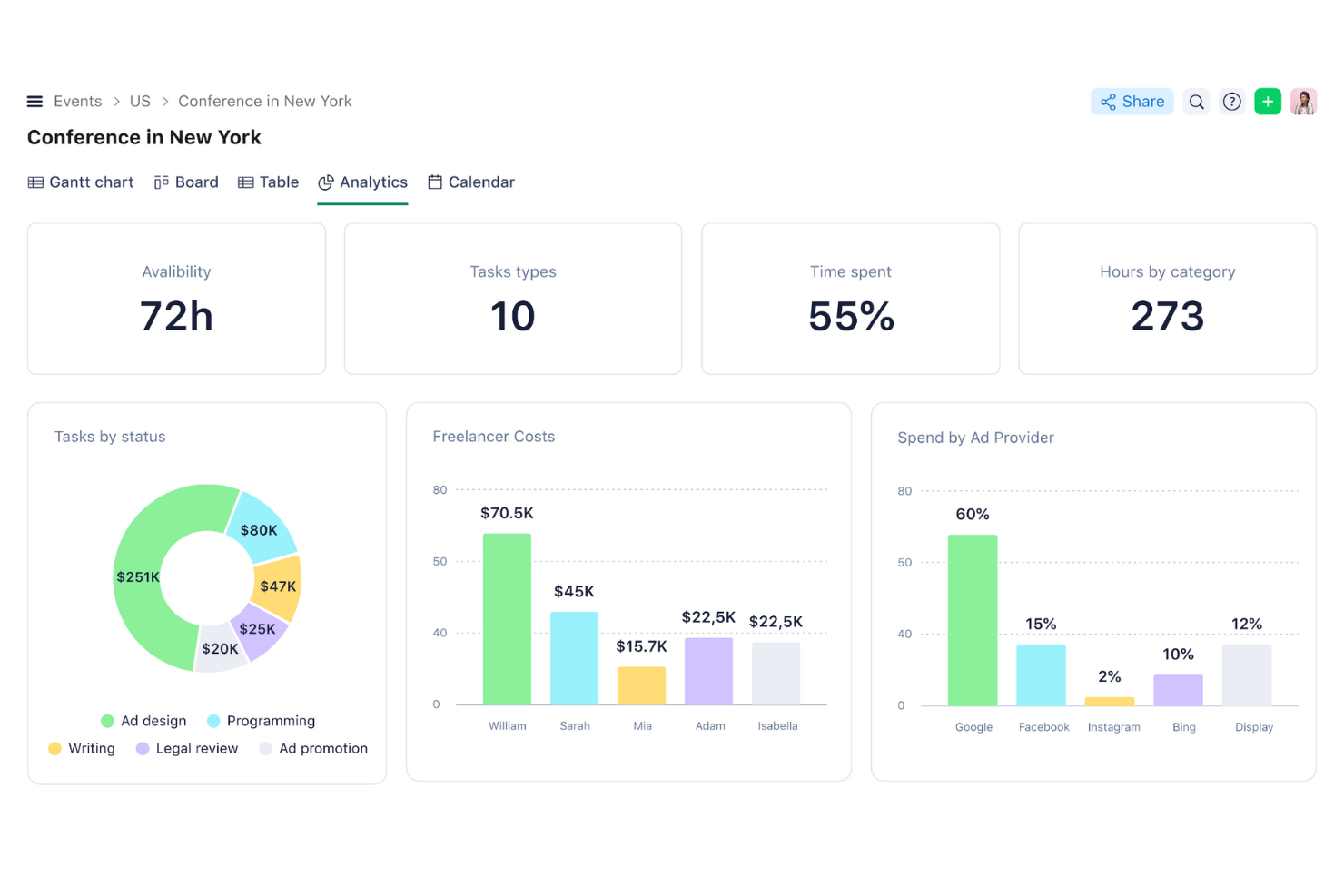
Wrike is a highly customizable work management platform that brings together project scheduling, resource planning, workflow automation, and real-time dashboards into a single workspace.
Who Is Wrike Best For?
Wrike is a strong fit for mid-size to enterprise manufacturing organizations managing complex, cross-functional projects across multiple teams or facilities.
Why I Picked Wrike
I've included Wrike in my top picks because the depth of customization it offers is hard to match in a general-purpose PM tool. I like that you can build custom item types, configure multi-step approval workflows, and set up dynamic request forms that auto-generate tasks and assignments without writing code. In manufacturing project coordination, that means I can model an NPI process or capital equipment workflow precisely, rather than forcing it into a generic template.
Wrike Key Features
- Real-time dashboards and analytics: Customizable dashboards display project status, work order progress, and key manufacturing KPIs.
- Resource and capacity planning: Track and balance workloads across teams, departments, and facilities at scale.
- Advanced automation builder: Automate task assignments, approvals, and workflow progress without code.
- Multi-view project visualization: Switch between Gantt charts, Kanban boards, table, and list views to suit different project phases.
Wrike Integrations
Wrike offers hundreds of integrations through its built-in integrations and marketplace, including tools like Google Workspace, Microsoft 365, Salesforce, and Slack. It also supports Zapier and provides an API for custom integrations.
Pros and Cons
Pros:
- Real-time dashboards visible across teams and facilities
- Supports custom NPI and ECO request workflows
- Highly customizable workflows for manufacturing project types
Cons:
- Not built specifically for shop floor use
- No native BOM or MRP functionality
New Product Updates from Wrike

Wrike Redesigns Workspace Search With New Filters
Wrike introduces a redesigned Workspace Search interface with recent search shortcuts, item type and location filters, and parent-task context. These updates help users find relevant work items and navigate search results efficiently. For more information, visit Wrike’s official site.
 .
MRPeasy
Best for small manufacturers' MRP needs
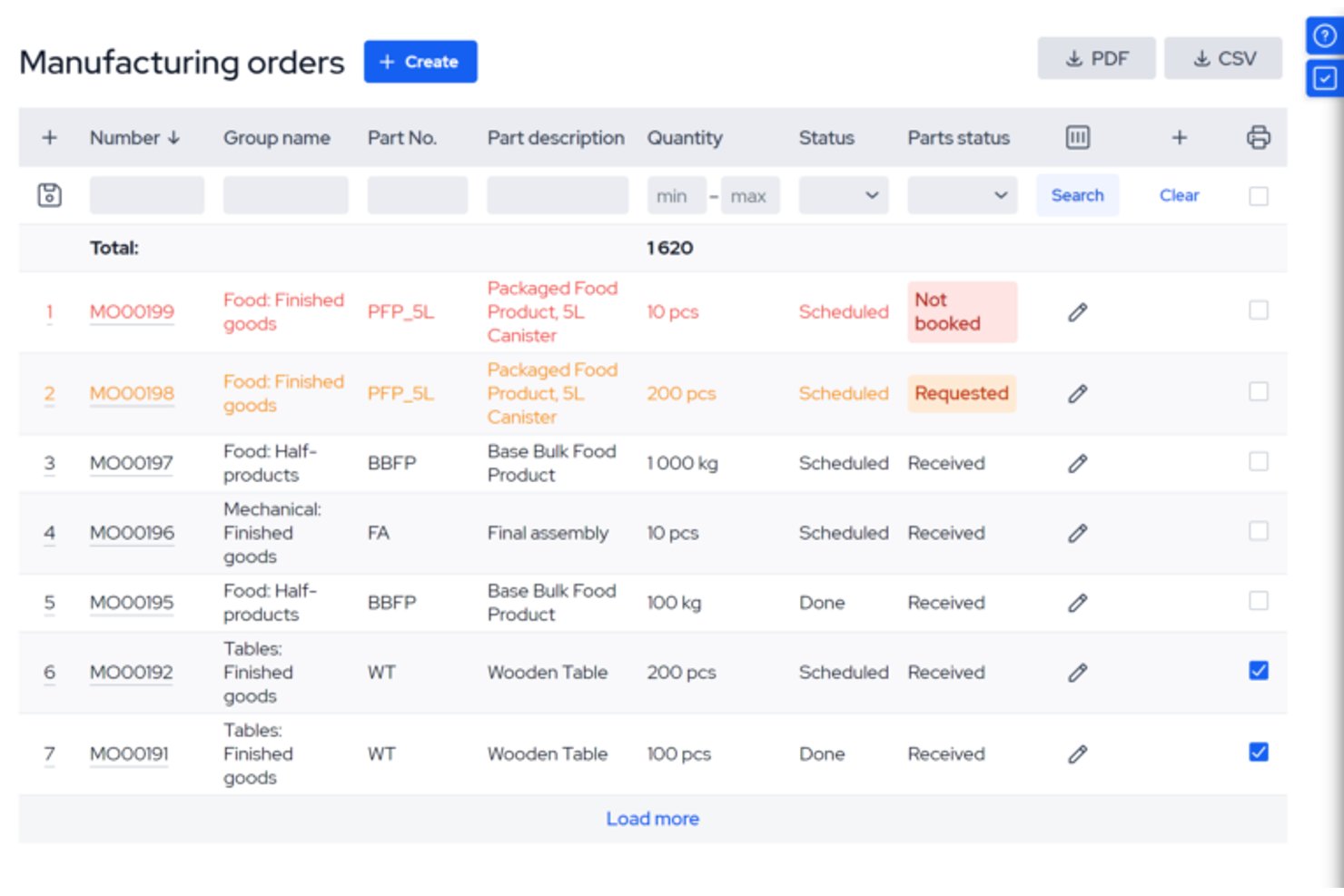
MRPeasy is a cloud-based MRP/ERP platform built for small manufacturers that combines production planning, BOM management, inventory tracking, shop floor reporting, and procurement into a single system.
Who Is MRPeasy Best For?
MRPeasy is a strong fit for small manufacturing teams (roughly 10–200 employees) that need real MRP depth without the cost or complexity of enterprise ERP systems.
Why I Picked MRPeasy
MRPeasy earns its spot on my shortlist because it's built from the ground up around MRP logic, not bolted onto a generic project tool. I particularly like the multi-level BOM engine, which connects production orders directly to real-time inventory and automatically flags material shortfalls before they stall a job. The Internet-Kiosk shop floor reporting is genuinely useful: operators clock into jobs from a tablet, and I can see live labor costs and order progress without leaving my desk.
MRPeasy Key Features
- Master production schedule (MPS): Lets you plan manufacturing operations and balance demand with available resources for long-range production runs.
- Multi-level bill of materials (BOM): Supports complex product structures, disassembly BOMs, and revision control for engineering changes.
- Quality control module: Enables configurable inspection checkpoints and records results directly in each work order.
- Native accounting integration: Syncs seamlessly with cloud accounting systems like Xero and QuickBooks, automating purchase and sales order financials.
MRPeasy Integrations
MRPeasy offers native integrations with Xero, QuickBooks, Shopify, WooCommerce, BigCommerce, Salesforce, HubSpot, Pipedrive, Amazon, and Power BI. Zapier and an API are also available for custom integrations.
Pros and Cons
Pros:
- Multi-level BOM with automatic material shortage alerts
- Real-time shop floor tracking via Internet Kiosk
- Deep MRP logic built for small manufacturers
Cons:
- Reporting dashboards lack deep customization options
- Limited multi-site and multi-plant project support
New Product Updates from MRPeasy
MRPeasy Adds Stocktake for Physical Inventory Counts
MRPeasy adds Stocktake for planning, conducting, and documenting physical inventory counts. This supports both full warehouse counts and cycle counts for selected items. For more information, visit MRPeasy’s official site.
 .

Celoxis
Best for data-driven project decisions
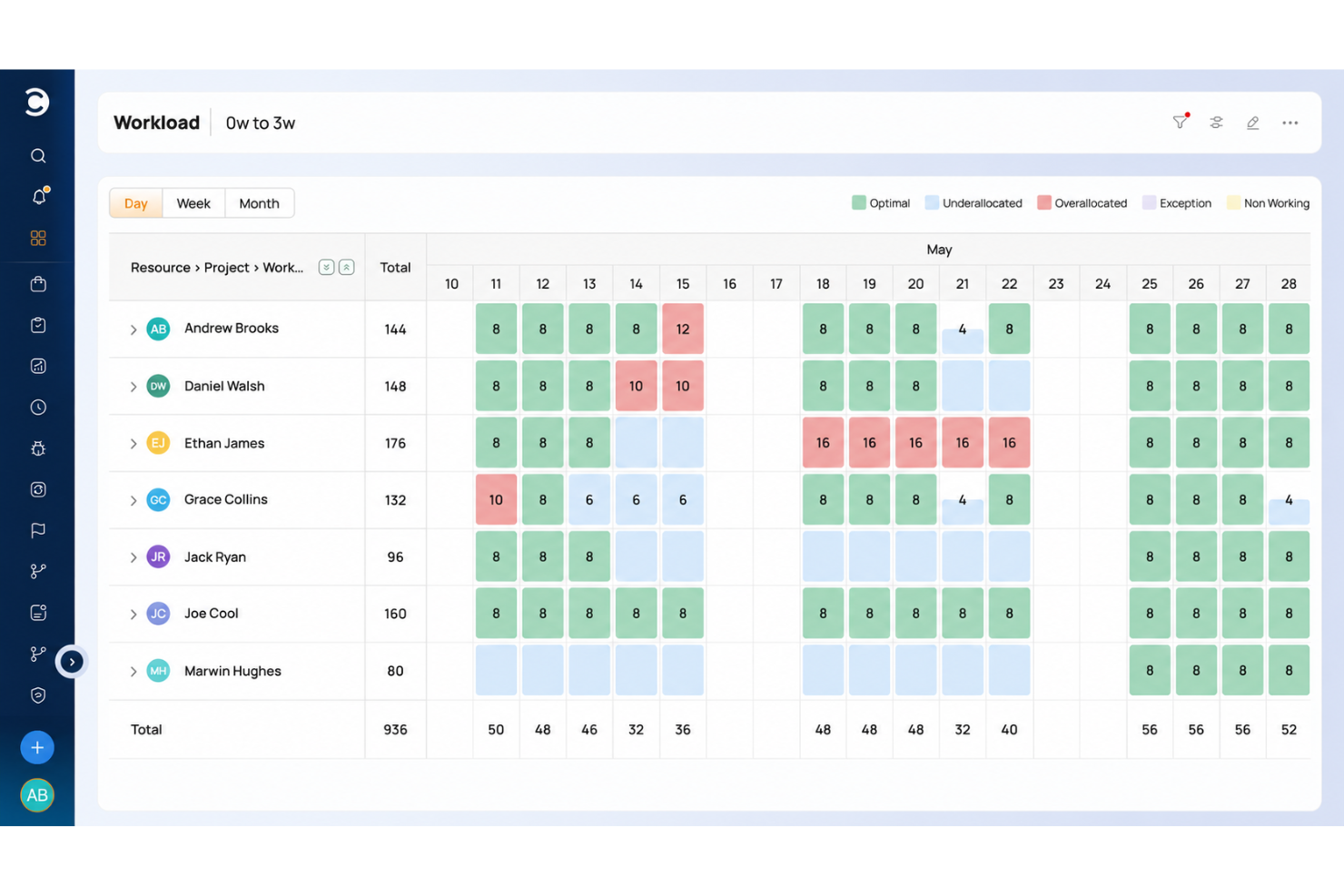
Celoxis is an enterprise project portfolio management platform that combines Gantt scheduling, resource capacity planning, financial tracking, and AI-powered dashboards for manufacturing PMOs managing NPI, capital equipment, and engineering change projects.
Who Is Celoxis Best For?
Celoxis suits mid-to-large manufacturing organizations with established PMOs that need multi-project visibility, portfolio-level financial control, and cross-functional resource management in one platform.
Why I Picked Celoxis
I picked Celoxis as one of the best because of how seriously it treats project financials as a decision-making tool. In manufacturing, where NPI timelines and capital equipment projects carry real cost consequences, earned value tracking and cost variance analysis show me where a project is drifting before it becomes a problem. I also rely on Lex, Celoxis's AI assistant, to surface portfolio-level risk signals without digging through reports manually.
Celoxis Key Features
- Interactive Gantt chart: Lets you update project timelines with real-time progress adjustments for manufacturing initiatives.
- Custom workflow automation: Supports tailored approval flows, document processes, and task routing for engineering or compliance steps.
- Role-based dashboards: Offers configurable dashboards with granular access controls for executives, project leads, and team members.
- Resource loading and skill mapping: Visualizes staff and team allocation by skill set, making it easier to coordinate across complex manufacturing projects.
Celoxis Integrations
Celoxis offers native integrations with Salesforce, Jira, QuickBooks, Microsoft Project, Excel, Slack, and Google Drive, connects with Zapier, and provides an API for custom integrations.
Pros and Cons
Pros:
- AI-driven risk flags reduce manual reporting effort
- Granular capacity planning across multi-project portfolios
- Earned value tracking surfaces cost drift early
Cons:
- Setup complexity grows with multi-site configurations
- No manufacturing-specific templates out of the box

Best for team coordination and collaboration
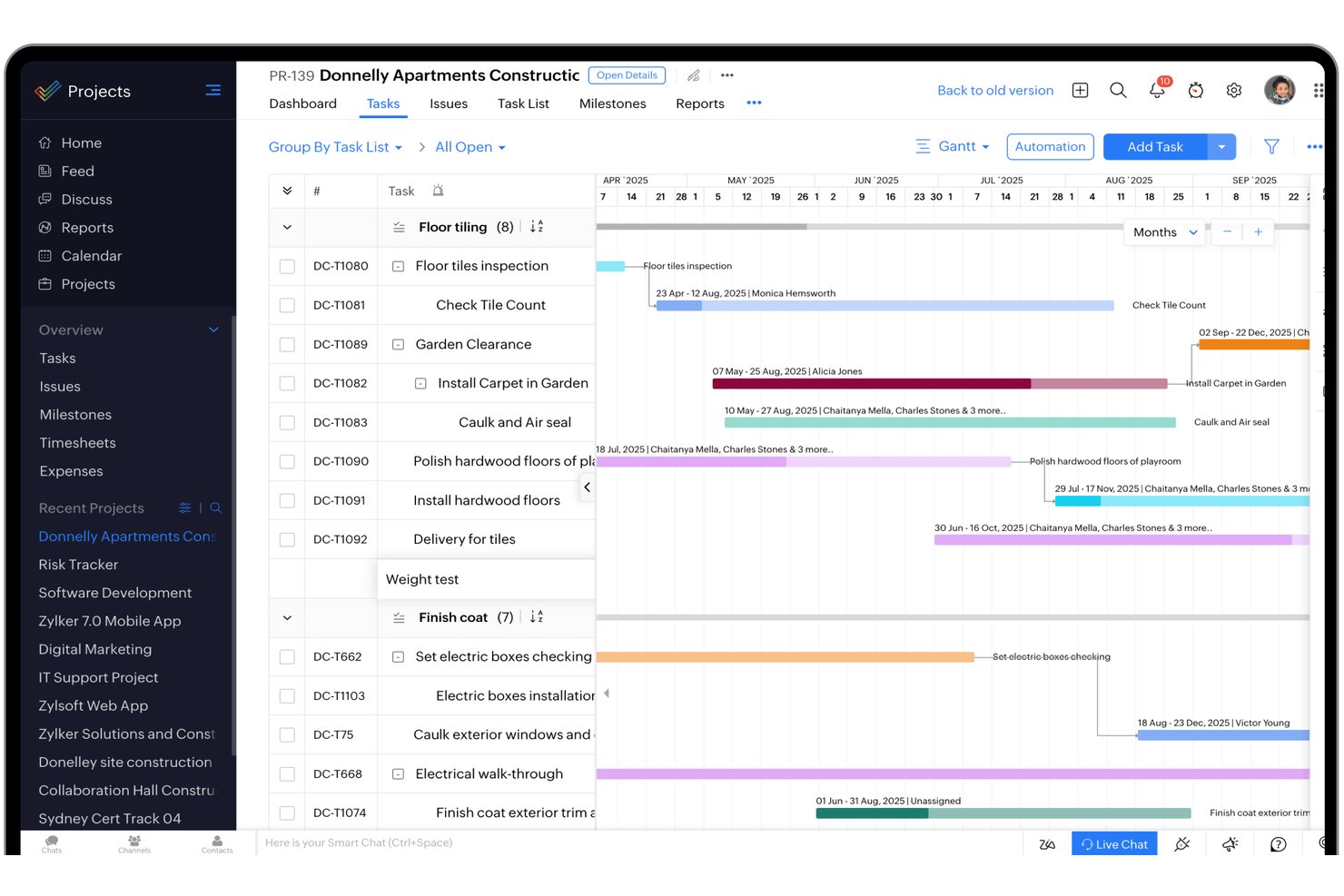
Zoho Projects is a cloud-based project management platform that extends into manufacturing workflows through custom modules for BOM tracking, defect logging, inventory and material movement, procurement management, and maintenance scheduling.
Who Is Zoho Projects Best For?
It's a strong fit for small to mid-sized manufacturing teams already using the Zoho ecosystem who need lightweight project coordination without a dedicated ERP.
Why I Picked Zoho Projects
Zoho Projects earns its spot on my shortlist because of how well it keeps cross-functional manufacturing teams aligned through structured communication. I like that Blueprints let you define approval chains for change requests or quality sign-offs, so nothing moves to the next phase without the right authorization. The discussion forums tied directly to tasks mean my team isn't hunting through email threads to understand why a production milestone shifted or who flagged a defect.
Zoho Projects Key Features
- Custom modules: Tailor workflows with configurable modules for tasks like BOM tracking or material movement.
- Task Blueprints: Build rule-based task flows that automate approvals and hand-offs unique to your process.
- Portfolio dashboard: View project health and progress across multiple operations from a single dashboard.
- Gantt chart with baselining: Visualize project schedules and compare baseline vs. actual progress at any stage.
Zoho Projects Integrations
Zoho Projects offers native integrations with Zoho Books, Zoho CRM, Slack, Microsoft Teams, Google Drive, Dropbox, and Zapier. An API is available for custom integrations.
Pros and Cons
Pros:
- Portfolio dashboard surfaces cross-project production visibility
- Custom modules adapt to manufacturing-specific tracking needs
- Blueprint workflows enforce structured production approval chains
Cons:
- Limited shop floor operator-facing interface options
- Scalability can be limited
New Product Updates from Zoho Projects
Zoho Projects Adds CodeX Scripts for Custom Modules
Zoho Projects now supports CodeX Scripts for custom modules, enabling conditional logic and rules for creating, updating, and deleting records. For more information, visit Zoho Projects' official site.
 .
Best for secure task collaboration
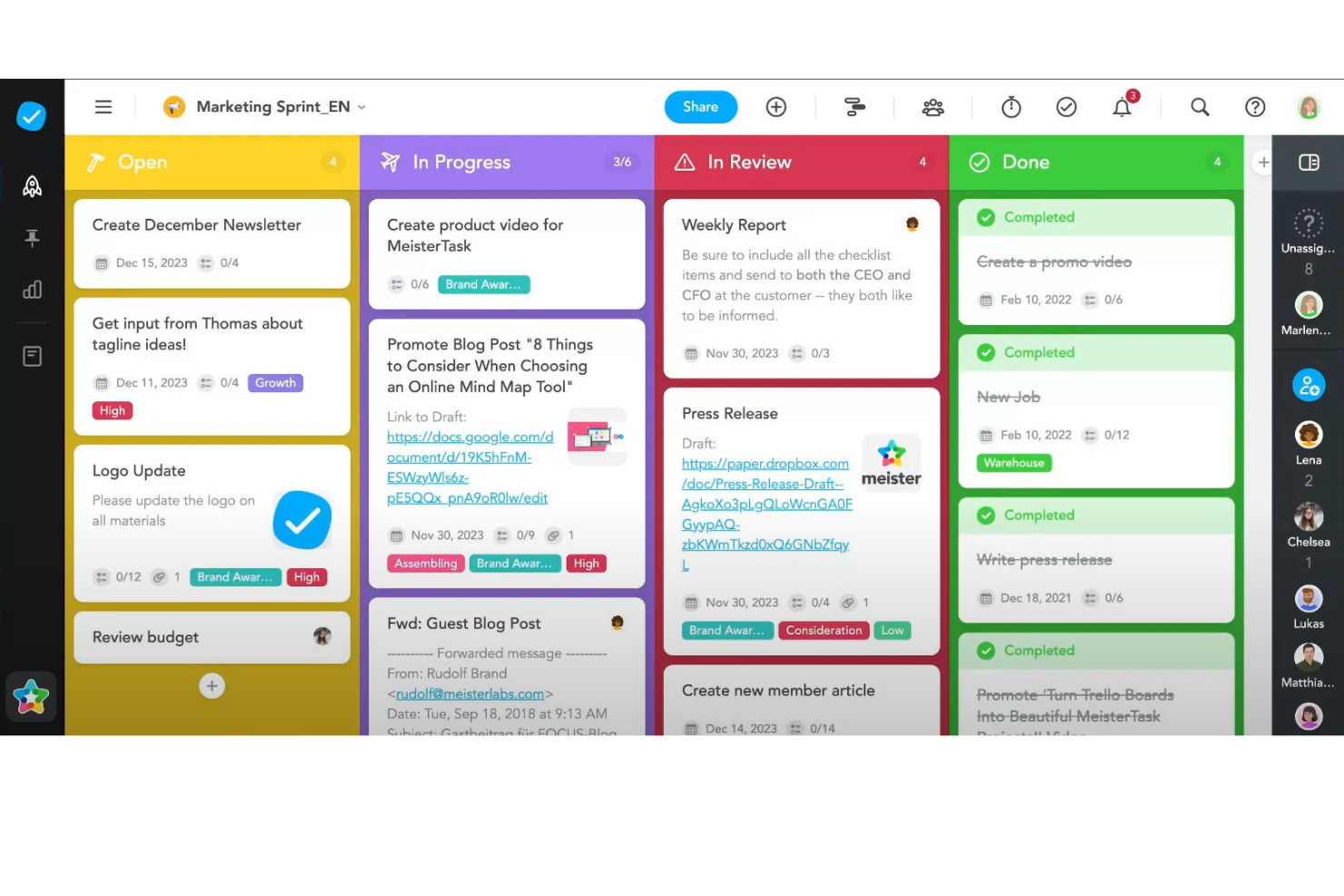
MeisterTask is a task collaboration and project management platform offering Kanban boards, Gantt-style timelines, workflow automation, and real-time collaboration tools for coordinating work across teams.
Who Is MeisterTask Best For?
MeisterTask suits small to mid-sized manufacturing and operations teams that need secure, structured task coordination across production, logistics, and procurement functions.
Why I Picked MeisterTask
MeisterTask earns its spot on my shortlist because of how seriously it treats data security across collaborative workflows. I like that it runs on ISO 27001-certified, EU-hosted servers in Frankfurt, which matters when teams are sharing sensitive production documentation across departments. On top of that, granular in-app permissions and SAML-based SSO give administrators real control over who can view, edit, or export project data.
MeisterTask Key Features
- Kanban project boards: Organize tasks visually using drag-and-drop boards that support customizable workflows.
- Gantt-style timeline: Map out project schedules and task dependencies with a calendar-based timeline view.
- Automated workflow actions: Set up rules to automate recurring steps, such as handoffs or status updates, across project stages.
- Custom checklist templates: Create repeatable checklist templates to standardize task completion and compliance steps for production projects.
MeisterTask Integrations
MeisterTask offers native integrations with Slack, Microsoft Teams, Google Workspace, and more. It connects with Zapier and provides an API for custom integrations.
Pros and Cons
Pros:
- Automated workflows reduce manual task handoffs
- Granular role-based access controls available
- ISO 27001-certified data hosting in Europe
Cons:
- Limited shop floor visibility and reporting
- Limited options for setting reminders
Kintone
Best for creating custom business apps
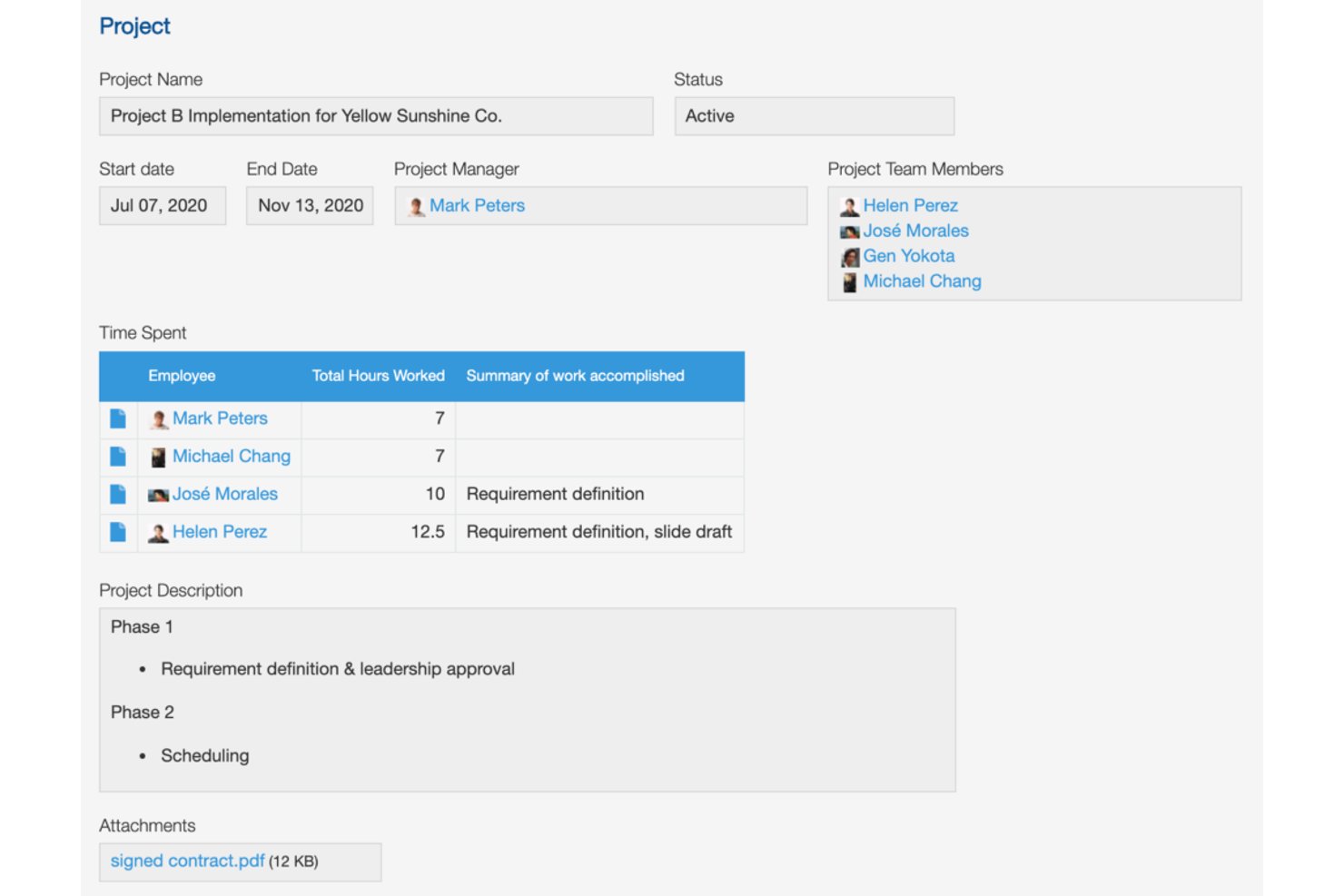
Kintone is a no-code platform that lets teams build custom apps, workflows, and databases to manage processes like supply chain tracking, inventory, and project coordination across manufacturing operations.
Who Is Kintone Best For?
Kintone is a strong fit for small to mid-sized operations teams that need to build and manage custom business processes without relying on developer resources.
Why I Picked Kintone
I picked Kintone as one of the best because manufacturing teams often run on disconnected spreadsheets and manual processes that are hard to scale. What I like is its no-code app builder, which lets operations teams convert those spreadsheets into structured apps with custom process management, status tracking, and branch-based approval flows. I've seen teams use it to build supplier portals and hourly quality check apps without writing a single line of code.
Kintone Key Features
- Granular permission controls: Set detailed access rights by department, app, or field to protect sensitive manufacturing data.
- Custom notifications and reminders: Automate alerts and follow-ups for project deadlines, approvals, and shop floor activities.
- REST API and webhooks: Connect Kintone to ERP, inventory, or external manufacturing systems for data sync and workflow automation.
- Native mobile apps: Access dashboards, update records, and manage projects from Android or iOS devices on the shop floor.
Kintone Integrations
Kintone offers native integration with Boxn, and connects with Zapier. An API is available for custom integrations.
Pros and Cons
Pros:
- Dashboards show real-time shop floor data
- Adapts to any custom production workflow
- Builds custom apps without writing code
Cons:
- Limited storage with all plans
- No native Gantt chart included
Backlog
Best for task visualization tools
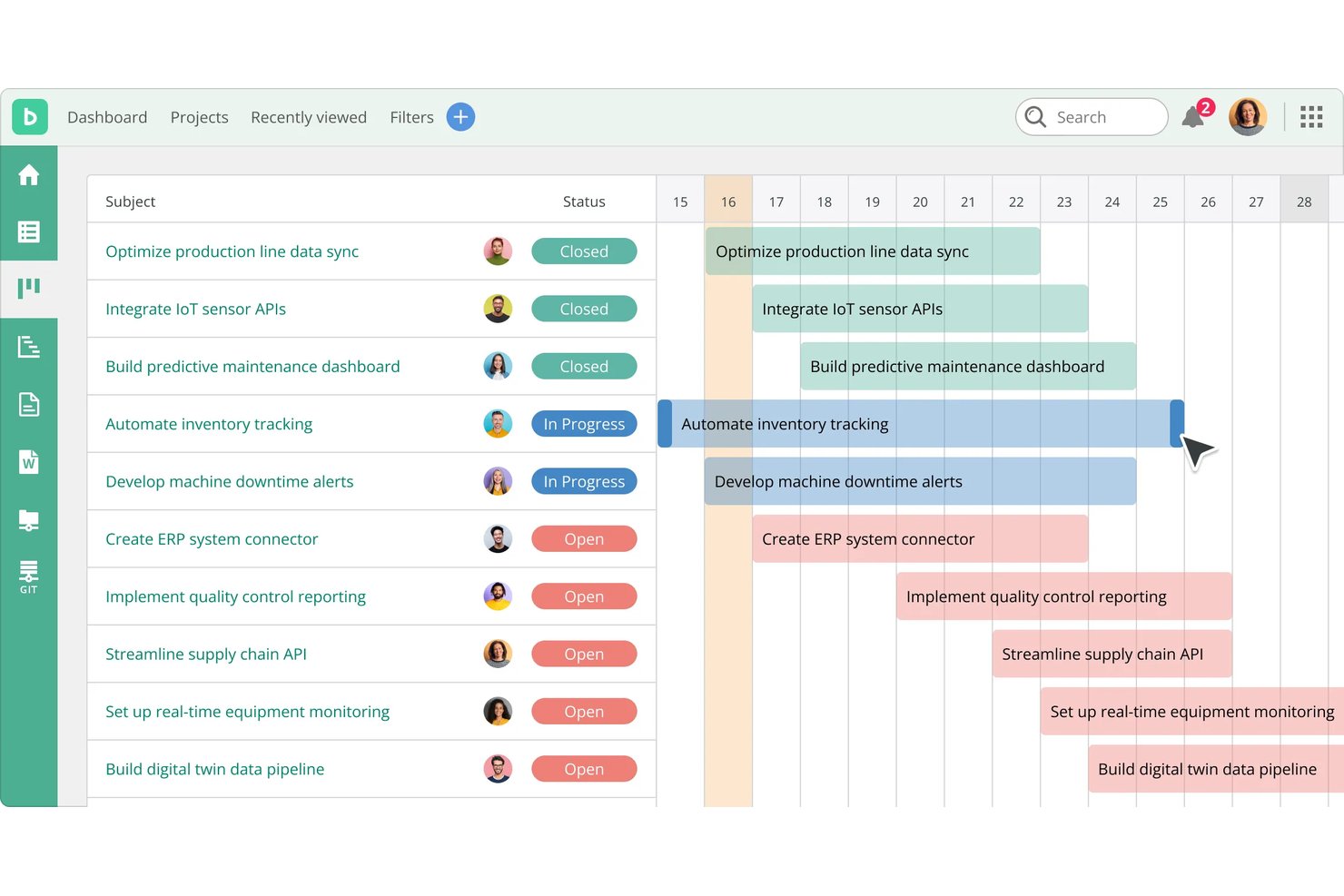
Backlog is a project management and issue-tracking platform that combines task management, Kanban boards, Gantt charts, bug tracking, and code repository management in a single workspace.
Who Is Backlog Best For?
Backlog works well for small-to-mid-sized operations teams that need a straightforward way to coordinate projects, track tasks, and manage workflows without a steep learning curve.
Why I Picked Backlog
Backlog earns its spot on my shortlist because of how well it handles task visualization across multiple views. I particularly like that teams can switch between Kanban boards, Gantt charts, and burndown charts on the same project, making it easy to track overlapping production tasks at a glance. The Gantt chart's dependency mapping is genuinely useful when coordinating sequential work orders where one task can't start until another finishes.
Backlog Key Features
- Issue tracking: Create, assign, and monitor tickets with status updates and priorities.
- Subtask management: Break larger tasks into smaller, actionable subtasks for better workflow organization.
- Custom fields: Add unique data fields to tasks, such as serial number or QA status, to tailor tracking.
- Wikis and file sharing: Store and manage important project documents, specs, and files in a shared workspace.
Backlog Integrations
Backlog offers native integrations with Slack, Microsoft Teams, Google Drive, OneDrive, Dropbox, Jenkins, and more. An API is available for custom integrations.
Pros and Cons
Pros:
- Built-in issue tracking alongside project tasks
- Gantt charts include built-in task dependency mapping
- Multiple task views support overlapping production workflows
Cons:
- Limited resource and capacity planning features
- No manufacturing-specific work order tools

Workzone
Best for end-to-end project visibility
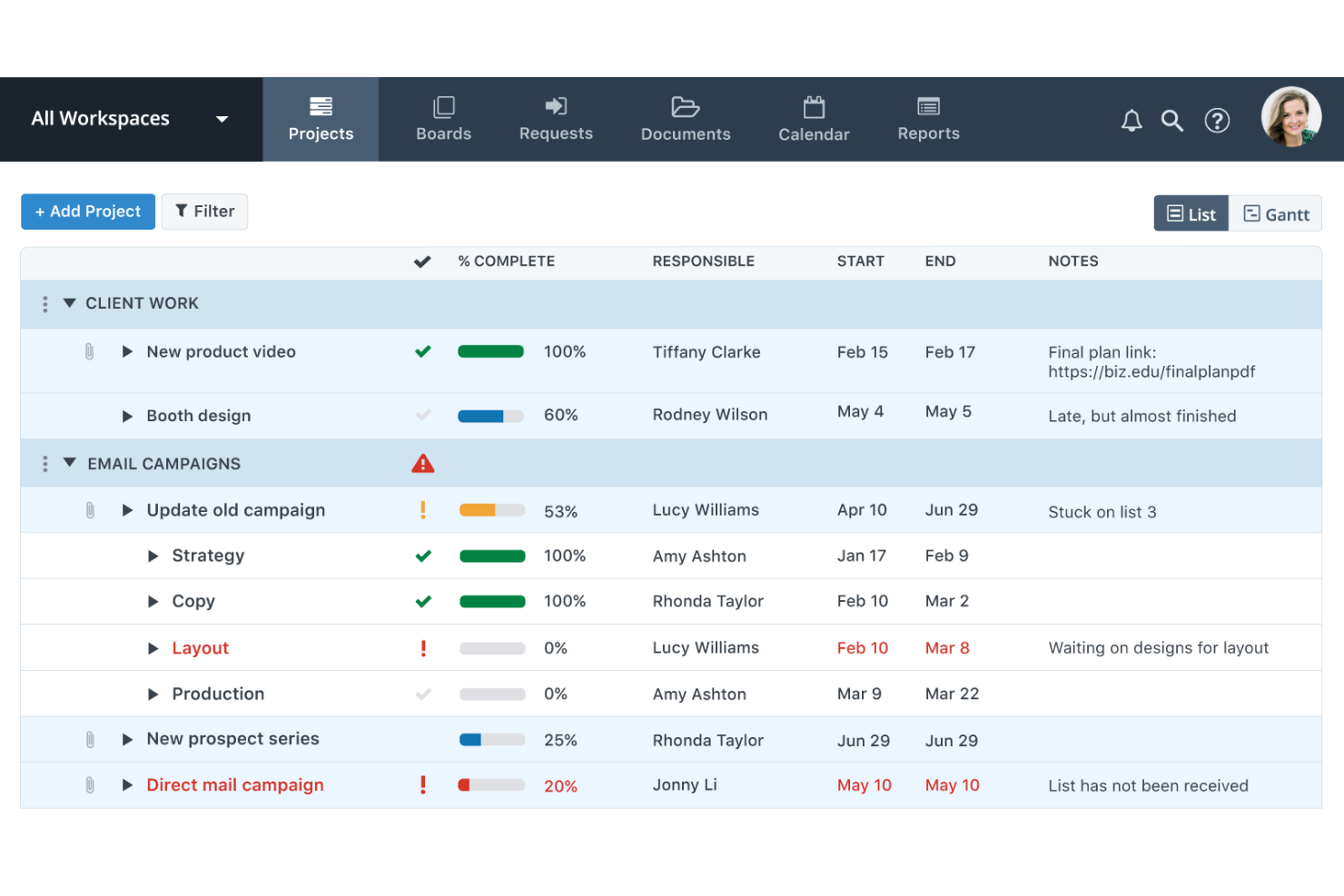
Workzone is a project management platform that combines portfolio-level visibility, Gantt scheduling, workload management, and proofing and approvals tools for cross-functional teams coordinating production launches, engineering change orders, and compliance initiatives.
Who Is Workzone Best For?
Workzone suits mid-sized manufacturing and operations teams that manage multiple concurrent projects and need clear visibility across workstreams without adopting a complex enterprise tool.
Why I Picked Workzone
I picked Workzone as one of the best because the portfolio view gives me a single pane across every active project, so I can spot which production launch or ECO is off-track before it becomes a problem. I also like how task dependencies and Gantt charts connect directly to workload capacity, so I can see if a bottleneck on one project is spilling into another. Pre-built templates for product launches and engineering change orders mean my team isn't building visibility frameworks from scratch.
Workzone Key Features
- Pre-built manufacturing templates: Choose from ready-made templates for product launches, engineering change orders, and compliance projects.
- Built-in proofing and approvals: Review CAD files, packaging designs, and compliance documents directly within the platform.
- Unlimited training and support: Access US-based support and book training sessions for your team at any time.
- Portfolio-level reporting: Generate cross-project dashboards and status reports for leadership and team stakeholders.
Workzone Integrations
Workzone offers native integrations with Microsoft Teams, Slack, Google Drive, OneDrive, and more. It supports integrations via Zapier and provides an API for custom integrations.
Pros and Cons
Pros:
- Pre-built templates for production launch workflows
- Gantt charts support complex multi-project dependencies
- Portfolio view spans all concurrent projects
Cons:
- No real-time shop floor data feeds
- No native ERP or MRP connections
New Product Updates from Workzone

Workzone Enterprise Adds Multi-Stage Approval Workflows
Workzone Enterprise now includes Approval Workflows, enabling multi-stage document approvals to standardize complex processes and reduce manual effort. For more information, visit Workzone's official site.
 .

ProofHub
Best for product launch and delivery tools
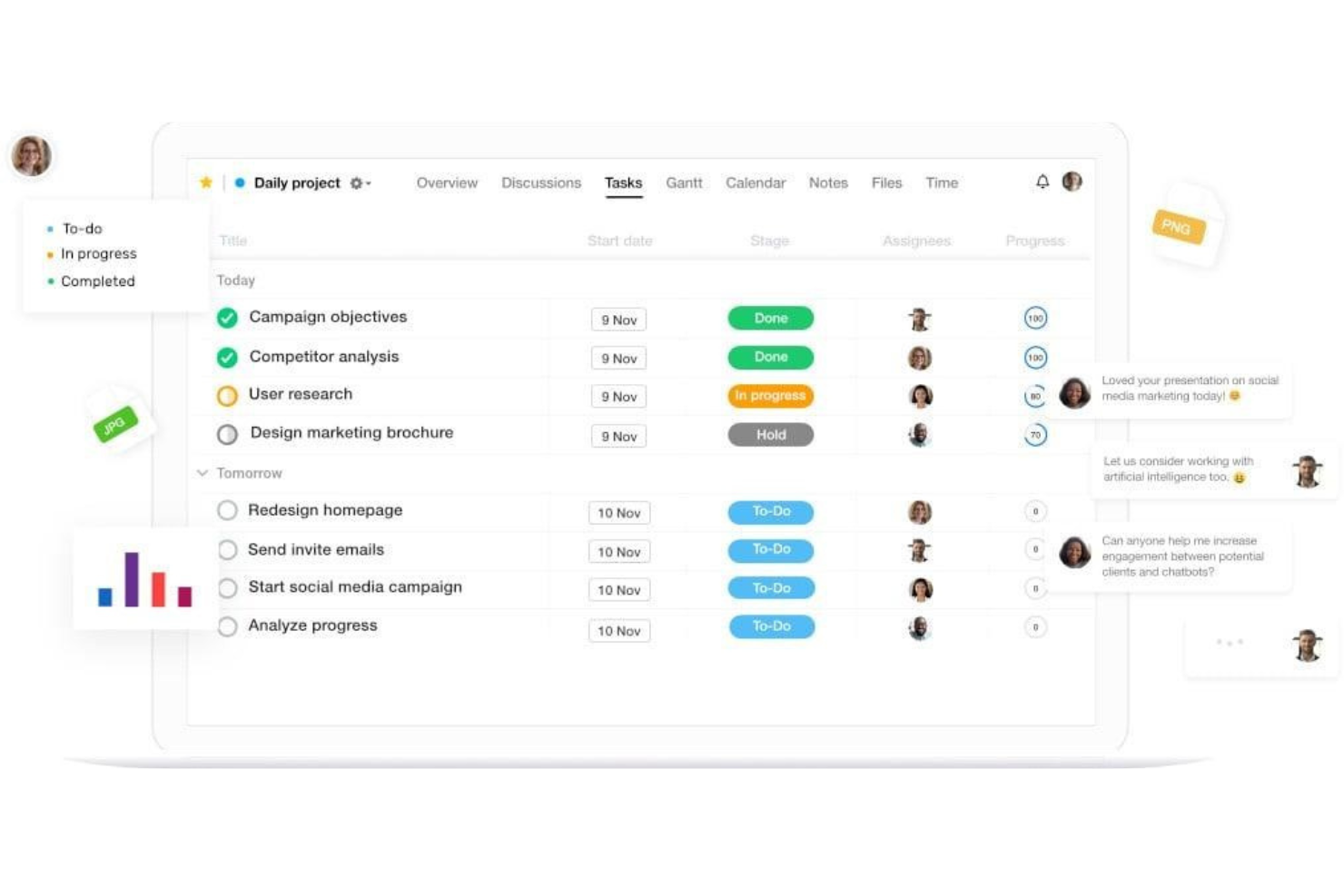
ProofHub is a product management software that offers team collaboration, reporting, and accessibility features.
Why I picked ProofHub: This software is a good choice for product development teams that include proofing stages as part of their production process. You can plan your projects, assign tasks, and allocate resources through the platform, but the real reason I picked it is because of its launch and delivery capabilities. Concept launches and product launches can be managed, and the proofing tool allows team members to exchange feedback and notes on new products.
ProofHub Standout Features and Integrations
Some standout features include the level of detail you can go into when planning projects. You can set up project categories and assign specific project managers to each project. At the task level, you can create unique task IDs to differentiate one task from another, set dependencies between tasks, and add subtasks to break work down into smaller pieces. Employees get a daily agenda in the platform, and you can see a detailed history of completed tasks so no details slip through the cracks.
Integrations include Google Drive, OneDrive, Box, and Dropbox. An API is also available for building custom integrations.
Pros and Cons
Pros:
- Flat-rate pricing structure, unlimited users
- Good balance of simplicity and functionality
- Quick and easy setup
Cons:
- No freemium version
- Lacks budgeting capabilities
Best for manufacturing-specific features

ProjectManager is a user-friendly, web-based project management tool that’s tailored specifically for manufacturing teams.
Why I picked ProjectManager: I added this software to my list because it’s easy to use and offers all the essential project management features. It comes with a full suite of work view options, including Kanban boards, calendar views, list views, and Gantt charts. But what’s really great about it is that it’s designed with manufacturing teams in mind. For example, the supply chain management capabilities let you oversee project resources and ensure you have the raw materials needed. Workers can submit timesheets from the shop floor, and the software tracks workloads to ensure efficient resource allocation.
ProjectManager Standout Features and Integrations
Standout features include its user-friendly workflow automation capabilities. You can set workflow descriptions, transitions, and approvals with a simple drop-down menu, and implement triggers and actions to complete your workflow. Permission access can also be configured to ensure only the right people can update statuses on each workflow. No coding is required, so you can quickly get your automated workflow up and running no matter your technical expertise.
Integrations include Slack, Trello, Jira, Microsoft Project, Office 365, Excel, and Exchange. You can also connect the software to a paid Zapier account to configure additional integrations.
Pros and Cons
Pros:
- Highly customizable
- Detailed project planning and budgeting
- Easy to implement
Cons:
- May be too complex for some teams Team plan is limited to 10 users
- May be too complex for some teams
Diğer Üretim Proje Yönetimi Yazılımları
İlk seçkiye giremeyen ancak yine de incelemeye değer birkaç üretim proje yönetimi aracı daha:
- Project Insight
For ease of use and scalability
- monday AI Workspace
With AI-powered risk identification
- Creatio AI CRM
For no-code workflow automation
- Quire
For breaking down complex tasks
- ProWorkflow
For resource planning features
- Epicflow
For multi-project resource planning
- GoodDay
For unlimited project hierarchy
- Smartsheet
For low-code workflow automation
- Airtable
For creating secure project databases
- Prism PPM
For scheduling and time management


How I Evaluate Project Management Software for Manufacturing
I evaluate every tool on two levels: core capabilities like work order scheduling and ERP sync, then the differentiators that determine fit for your specific plant and team.
Core Functionality (Table Stakes For This List)
When I'm selecting tools for my list, I rank each one on a scale from 0 (does not offer the functionality) to 5 (excels in this area) for each core functionality listed below. Then, I calculate the tool's total score into a percentage. Each tool needs to achieve a minimum total score of 65% to be considered for inclusion.
- Production Scheduling & Planning: I look for Gantt-based scheduling that handles capacity constraints and work orders, not just generic task timelines.
- BOM & Materials Integration: Each tool should connect project tasks to Bills of Materials and inventory so you can flag shortages before they delay a milestone.
- ERP/MRP System Integration: I check for native connectors to platforms like SAP, Oracle, or Epicor that sync production and procurement data bidirectionally.
- Resource & Capacity Management: Tracking both labor and machine availability matters here, especially when you're balancing multiple jobs across shared equipment and shifts.
- Quality & Compliance Tracking: I evaluate whether the tool supports quality checkpoints, audit trails, and documentation workflows tied to standards like ISO 9001 or FDA requirements.
- Real-Time Shop Floor Visibility: Dashboards should surface live project and work order status for both floor operators and managers without manual data entry.
Once I have a list of tools that meet the criteria, I consider what sets each platform apart.
Differentiating Factors (What Sets Vendors Apart)
Here's how I compare and contrast different vendors:
Standout Features
Change order management is a big differentiator. When an engineering change hits mid-project, the tool should route ECOs through approval workflows and automatically update linked BOMs and timelines. I also evaluate multi-site coordination, especially for teams running parallel product launches across facilities with different shift structures. IoT and machine connectivity adds real depth—tools that pull live data from PLCs or sensors give you project updates grounded in actual production output rather than manual status reports.
Beyond Features
Deployment model matters a lot in manufacturing. Some plants require on-premise or air-gapped hosting for security reasons, so I check whether vendors offer cloud, hybrid, and on-premise options alongside mobile access for floor use. I also evaluate the integration ecosystem beyond ERP—connectors for PLM, MES, and SCADA systems determine how well the tool fits into your existing plant infrastructure. Compliance certifications like ISO 27001, SOC 2, or ITAR readiness are worth checking early, since retrofitting a non-compliant tool in a regulated facility is painful.
Üretim Proje Yönetimi Yazılımı Nasıl Seçilir?
Uzun özellik listeleri ve karmaşık fiyatlandırma yapılarına takılıp kalmak kolaydır. Kendinize özgü yazılım seçimi sürecinizde ilerlerken odağınızı korumanıza yardımcı olmak için aklınızda bulundurmanız gereken faktörleri aşağıda bir kontrol listesi olarak sıraladım:
| Faktör | Dikkat Edilmesi Gerekenler |
| Ölçeklenebilirlik | Aracın ekibinizle birlikte büyüyebildiğinden ve zaman içinde daha fazla projeyi, kullanıcıyı ve iş akışını destekleyebildiğinden emin olun. |
| Entegrasyonlar | Veri silolarını önlemek için ERP, MES, envanter ve muhasebe sistemlerinizle uyumluluk arayın. |
| Özelleştirilebilirlik | Alanları, iş akışlarını ve panoları ekibinizin üretim projelerini yönetme biçimine uyacak şekilde özelleştirip özelleştiremeyeceğinizi kontrol edin. |
| Kullanım Kolaylığı | Özellikle teknoloji konusunda deneyimli olmayabilecek üretim alanındaki çalışanlarınızın hızlıca öğrenebileceği bir araç seçin. |
| Bütçe | Kullanıcı başına ücretler, kurulum maliyetleri ve gerçekten ihtiyaç duyduğunuz gelişmiş özelliklerin ücretleri de dahil olmak üzere toplam maliyetleri değerlendirin. |
| Güvenlik Önlemleri | Hassas üretim ve tedarikçi verilerini korumak için platformun şifreleme, erişim denetimleri ve denetim günlükleri kullandığını doğrulayın. |
| Planlama Araçları | Yazılımın üretim döngülerinizin temposuna uygun Gantt grafikleri, zaman çizelgeleri ve bağımlılık takibini desteklediğinden emin olun. |
| İş Birliği | Mühendislerinizin, yöneticilerinizin ve üretim alanındaki ekiplerinizin güncellemeleri, yorumları ve belgeleri gerçek zamanlı olarak paylaşabildiğinden emin olun. |
Üretim Proje Yönetimi Yazılımlarındaki Eğilimler
Araştırmam sırasında farklı üretim proje yönetimi yazılımı sağlayıcılarından sayısız ürün güncellemesi, basın bülteni ve sürüm kaydı derledim. Takip ettiğim yeni trendlerden bazıları şunlar:
- Yapay Zekâ Destekli Planlama: Daha fazla araç, gecikmeleri öngörmek ve planları otomatik olarak ayarlamak için yapay zekâ kullanıyor. Bu, ekibinizin malzeme eksiklikleri veya makine arızaları gibi aksaklıklara sürekli manuel güncelleme yapmadan daha hızlı tepki vermesine yardımcı olur.
- Proje Planlama için Dijital İkizler: Bazı yazılımlar artık üretim süreçlerini uygulamaya almadan önce modellemek için dijital ikizleri destekliyor. Sanal bir kurulumda yerleşim değişikliklerini veya yeni iş akışlarını test edebilir, böylece fabrika sahasında deneme-yanılmayı azaltabilirsiniz.
- Yerleşik Kalite Kontrol Takibi: Kalite kontrolleri artık proje iş akışına dâhil ediliyor. Ekipler denetimleri kaydedebilir, sorunları takip edebilir ve düzeltici faaliyetleri doğrudan sistemde işaretleyebilir. Bu da kalitenin teslimat zaman çizelgeleriyle bağlantılı kalmasına yardımcı olur.
- Görsel Üretim Sahası Haritalama: Giderek daha fazla araç, üretim sahanızın görsel yerleşimlerini içeriyor. Bunlar görevleri belirli bölgelere veya ekipmanlara atamaya yardımcı olur ve insanların, makinelerin ve malzemelerin tek bir görünümde koordine edilmesini kolaylaştırır.
- Sürdürülebilirlik Ölçütlerinin Takibi: Araçlar enerji kullanımını, emisyonları ve atıkları takip etmek için alanlar ve raporlar sunmaya başlıyor. Bu, üreticilerin çevresel hedefleri üretim hedefleriyle birlikte yönetmesine yardımcı olur.
Üretim Proje Yönetimi Yazılımı Nedir?
Üretim proje yönetimi yazılımı, ekiplerin üretim odaklı projeleri planlamasına, takip etmesine ve yönetmesine yardımcı olan bir araç türüdür. Bu yazılımı çoğunlukla zaman çizelgelerini, görevleri ve kaynakları kontrol altında tutması gereken proje yöneticileri, operasyon yöneticileri ve üretim planlamacıları kullanır.
Planlama araçları, kalite kontrol takibi ve görsel üretim sahası haritalama; günlük koordinasyona, sorun çözmeye ve karar vermeye yardımcı olur. Bu araçlar ekibinize ilerleme durumunu daha net görme olanağı sunar, gecikmelerin önlenmesine yardımcı olur ve karmaşık üretim işlerinin yönetilmesini kolaylaştırır.
Üretim Proje Yönetimini Farklı Kılan Nedir?
Üretim projeleri yalnızca görevlere ve teslim tarihlerine değil; malzemelere, makinelere, kapasiteye ve kaliteye de bağlıdır. Proje yönetimi yazılımınızın bu operasyonel bağımlılıkları hesaba katması gerekir.
| Üretim Zorluğu | Standart Proje Yönetimi Araçları Neden Zorlanabilir? | Yardımcı Olan Unsur |
|---|---|---|
| Malzeme bağımlılıkları | Bir görev, tamamlanması için gereken malzemeler hazır olmadan tamamlanmaya hazır olabilir. | BOM, envanter ve satın alma görünürlüğü |
| Makine kapasitesi | Bir görevi atamak, gerekli ekipmanın kullanılabilir olduğu anlamına gelmez. | Kapasite ve üretim planlaması |
| Üretim bağımlılıkları | Bir aşamadaki gecikmeler, sonraki tüm operasyonları etkileyebilir. | Bağımlılık takibi ve gerçek zamanlı planlama |
| Üretim sahası uygulaması | Ofis odaklı görev yönetimi, üretimde gerçekte neler olduğunu yansıtmayabilir. | İş emirleri ve üretim sahası durum güncellemeleri |
| Kalite kontrolü | Bir görevin tamamlanması, çıktının bir sonraki üretim aşamasına hazır olduğu anlamına gelmez. | Kalite kontrol noktaları ve denetim iş akışları |
| Değişen talep | Yeni siparişler veya öncelik değişiklikleri mevcut üretim planını hızla geçersiz kılabilir. | Kaynak planlaması ve plan ayarlama |
| Maliyet takibi | Yalnızca proje bütçeleri iş gücü, malzeme, hurda ve üretim maliyetlerini kapsamayabilir. | İş maliyetlendirmesi ve üretime özel raporlama |
Üretim Teknolojisi Yığınını Anlamak
Üretim proje yönetimi yazılımı genellikle üretim, envanter ve finans sistemleriyle birlikte çalışır. Her sistemin nerede devreye girdiğini anlamak, iş için doğru araçları seçmenize yardımcı olabilir.
| Sistem | Ana Görev | Proje Yönetiminin Yeri |
|---|---|---|
| MRP | Malzeme ve üretim gereksinimlerini planlar | Proje yönetimi yazılımı, bu üretim planı kapsamındaki projeleri, teslim tarihlerini, kaynakları ve bağımlılıkları koordine eder. |
| MES | Üretim sahasındaki yürütmeyi yönetir ve izler | Proje yönetimi yazılımı daha kapsamlı proje planlamasını yürütürken MES, üretim sırasında neler olduğunu izler. |
| ERP | Finans, satın alma, envanter ve operasyonları birbirine bağlar | Proje yönetimi yazılımı proje yürütmesini yönetirken ERP, daha kapsamlı kayıt sistemi olmaya devam eder. |
| BOM | Bir ürünü üretmek için gerekenleri tanımlar | Gerekli bileşenlerin mevcut olup olmadığını belirlemek için proje planları BOM verilerine bağlı olabilir. |
| İş emirleri | Belirli üretim veya bakım işlerini yönlendirir | Üst düzey planları sahada gerçekleştirilen gerçek işle birbirine bağlar. |
Üretim Proje Yönetimi Yazılımını Uygulama
Başarılı bir kullanıma sunma süreci, sahada hâlihazırda gerçekleştirilen işleri aksatmadan üretim görünürlüğünü artırmalıdır. Küçük başlayın, iş akışını doğrulayın ve sistem operasyonunuzun gerçekte nasıl yürüdüğünü yansıttığında kapsamı genişletin.
| ✓ | Üretim proje yönetimi yazılımını kullanıma sunmadan önce… |
|---|---|
| ☐ | Mevcut iş akışınızı haritalandırın; yazılımı yapılandırmadan önce sipariş veya proje alımından üretim ve tamamlanmaya kadar olan süreci belirleyin. |
| ☐ | Tüm operasyonu aynı anda değiştirmek yerine tek bir ekip, üretim hattı veya proje türüyle başlayın. |
| ☐ | Geçmiş verilerden hangilerinin gerçekten taşınması gerektiğine karar verin; kullanılmayan kayıtları yıllar boyunca içe aktarmayın. |
| ☐ | ERP, envanter, muhasebe, CAD veya diğer üretim sistemleriyle kritik entegrasyonları test edin; bunu kullanıma sunmadan önce gerçekleştirin. |
| ☐ | Role göre eğitim verin; planlamacıların, yöneticilerin, üretim sahası çalışanlarının ve müdürlerin yalnızca ihtiyaç duydukları iş akışlarını öğrenmesini sağlayın. |
| ☐ | Pilot uygulamayı gerçek bir üretim döngüsü boyunca yürütün ve kullanıma sunma kapsamını genişletmeden önce iş akışındaki eksiklikleri giderin. |
Üretim Proje Yönetimi Yazılımının Özellikleri
Üretim proje yönetimi yazılımı seçerken aşağıdaki temel özellikleri göz önünde bulundurun:
- Üretim planlaması: Üretim aşamalarındaki görevleri planlamanızı, zaman çizelgeleri belirlemenizi ve bağımlılıkları yönetmenizi sağlar.
- Kaynak yönetimi: Aşırı kullanımı veya atıl kalma süresini önlemek için iş gücünü, ekipmanı ve malzemeleri tahsis etmenize yardımcı olur.
- Görev takibi: İş atamanıza, ilerlemeyi izlemenize ve ekiplerin sorumluluklarını yerine getirmesini sağlamanıza olanak tanır.
- Envanter takibi: Aşırı stok oluşturmadan ihtiyacınız olanları sipariş edebilmeniz için malzeme seviyelerini izler.
- Kalite kontrol araçları: Proje kapsamında denetimleri kaydetmenize, kusurları izlemenize ve düzeltici faaliyetleri yönetmenize olanak tanır.
- Gantt şeması görünümleri: İşlerin nasıl ilerlediğini görmeniz için görevlerin ve kilometre taşlarının görsel bir zaman çizelgesini sunar.
- Özel iş akışları: Adımları ve onayları ekibinizin sürecine uyacak şekilde özelleştirmenize olanak tanır.
- Belge yönetimi: Ekiplerin gerektiğinde doğru dosyalara erişebilmesi için teknik özellikleri, çizimleri ve talimatları saklar.
- İş birliği araçları: Yorumlar, dosya paylaşımı ve bildirimler aracılığıyla ekip iletişimini destekler.
- Raporlama ve analiz: Zaman çizelgeleri, kaynak kullanımı ve üretim performansı hakkında içgörü sağlar.
Üretim Proje Yönetimi Yazılımının Faydaları
Üretim proje yönetimi yazılımını uygulamak, ekibiniz ve işletmeniz için çeşitli faydalar sağlayabilir. Yararlanabileceğiniz birkaç faydayı aşağıda bulabilirsiniz:
- Daha az üretim gecikmesi: Zamanlama araçları ve görev takibi, sorunları erken fark etmenize ve işlerin zamanında ilerlemesini sağlamanıza yardımcı olur.
- Daha iyi kaynak planlaması: Kaynak yönetimi özellikleri; iş gücünü, makineleri ve malzemeleri daha verimli kullanmanıza yardımcı olur.
- Geliştirilmiş ürün kalitesi: Yerleşik kalite kontrol araçları, sorunları fark etmeyi ve büyümeden önce düzeltmeyi kolaylaştırır.
- Daha net ekip iletişimi: İş birliği özellikleri, herkesin güncel bilgilere sahip olmasını sağlar ve departmanlar arasındaki karmaşayı azaltır.
- Daha hızlı karar alma: Panolar ve raporlama araçları, sorunlara hemen müdahale edebilmeniz için gerçek zamanlı veriler sunar.
- Uyumluluğu daha kolay takip etme: Belge depolama ve denetim günlükleri, denetimler veya sertifikasyonlar için düzenli kalmanıza yardımcı olur.
- Daha iyi proje görünürlüğü: Gantt şemaları ve ilerleme takibi, her şeyin nasıl ilerlediğini bir bakışta görmenizi sağlar.
Üretim Proje Yönetimi Yazılımının Maliyetleri ve Fiyatlandırması
Üretim proje yönetimi yazılımını seçmek, mevcut çeşitli fiyatlandırma modellerinin ve planların anlaşılmasını gerektirir. Maliyetler; özelliklere, ekip büyüklüğüne, eklentilere ve diğer unsurlara göre değişir. Aşağıdaki tabloda, üretim proje yönetimi yazılımı çözümlerinde yaygın olarak sunulan planlar, bu planların ortalama fiyatları ve tipik özellikleri özetlenmiştir:
Üretim Proje Yönetimi Yazılımı İçin Plan Karşılaştırma Tablosu
| Plan Türü | Ortalama Fiyat | Yaygın Özellikler |
| Ücretsiz Plan | $0 | Temel görev takibi, sınırlı proje görünümleri ve kısıtlı kullanıcı erişimi. |
| Kişisel Plan | $5–$15/user/month | Görev yönetimi, basit zamanlama, dosya ekleri ve temel raporlama. |
| İşletme Planı | $20–$40/user/month | Gelişmiş zamanlama, kaynak yönetimi, ekip iş birliği ve özel iş akışları. |
| Kurumsal Plan | $50–$100/user/month | Kalite kontrol araçları, denetim günlükleri, gelişmiş analizler, entegrasyonlar ve öncelikli destek. |
Üretim Proje Yönetimi SSS
Üretim proje yönetimi yazılımı hakkında sık sorulan soruların bazı yanıtları:
Neden bir üretim proje yönetimi aracı kullanmalıyım?
Bir proje yönetimi çözümü iş akışlarınızı kolaylaştırmanıza, görevleri tanımlayıp atamanıza ve ekip iş birliğini desteklemenize yardımcı olur. İşlerin nasıl yürütüldüğünü yönetmek için elektronik tablolardan ve yapışkan notlardan kurtulmanın en iyi yoludur. Ayrıca projeleri gerçek zamanlı olarak takip edebildiğiniz için darboğazları kolayca tespit edip ortadan kaldırabilir ve paydaşları güncel tutabilirsiniz.
Bu platformlar özellikle üreticiler ve ürün geliştiriciler için faydalıdır. Büyük bir şirket ya da küçük bir işletme olmanız fark etmez; bu her iki durum için de geçerlidir. İş akışlarının sorunsuz ilerlemesini sağlamak, tüm operasyonunuzun temelidir. Bu nedenle bulut tabanlı bir yardımcı ekiplerinize gerçekten destek olabilir
Üretim proje yönetimi yazılımı ERP sistemleriyle çalışabilir mi?
Evet, birçok araç ERP sistemleriyle entegrasyon sunar. Bu sayede envanter seviyeleri, sipariş durumları ve iş maliyetleri gibi verileri sistemler arasında senkronize edebilirsiniz. Çift veri girişini azaltmaya ve verilerinizin departmanlar arasında doğru kalmasına yardımcı olur
Genel proje yönetimi yazılımı ile üretim için geliştirilmiş yazılım arasındaki fark nedir?
Genel araçlar görev listelerine, zaman çizelgelerine ve iş birliğine odaklanır. Üretim araçları; üretim programları, kaynak planlaması ve kalite kontrolleri gibi konular için ek özellikler içerir. Ürünlerin üretilmesi ve gönderilmesiyle birlikte gelen fiziksel iş akışlarını yönetmek üzere tasarlanmışlardır.
Üretim için bulut tabanlı yazılım mı yoksa şirket içi yazılım mı daha iyidir?
Bulut tabanlı araçlara birden fazla konumdan erişmek daha kolaydır ve bu araçlar düzenli güncellemeler alır. Şirket içi yazılımlar veriler ve kurulum üzerinde daha fazla kontrol sunabilir. Seçim; BT altyapınıza, güvenlik gereksinimlerinize ve ekibinizin uzaktan erişime ihtiyaç duyup duymadığına bağlıdır.
Üretim proje yönetimi yazılımının uygulanması ne kadar sürer?
Üretim yazılımını uygulamak için bir danışman tutmam gerekir mi?
Her zaman gerekmez. Daha küçük veya nispeten basit uygulamalar, özellikle sağlayıcı işe alıştırma ve veri taşıma desteği sunuyorsa, çoğu zaman kurum içinde yürütülebilir. Karmaşık üretim verilerini taşıyorsanız, ERP/MRP sistemlerini entegre ediyorsanız, iş akışlarını yeniden tasarlıyorsanız veya yazılımı birden fazla tesiste kullanıma sunuyorsanız bir danışman faydalı olabilir.
Üretim şirketleri başka hangi yazılım türlerini kullanır?
Üretim işletmeleri, operasyonlarını yönetmek için proje yönetimi yazılımının yanı sıra çeşitli başka yazılım araçları da kullanır. Üretim şirketlerinin sıklıkla yararlandığı diğer yazılım türlerinden bazıları şunlardır:
- Üretim yürütme sistemleri (MES): Makineler, çalışanlar, programlar ve daha fazlası dâhil olmak üzere genel üretim sürecini yönetir ve izler; genellikle üretim programlarını planlamak ve ayarlamak için üretim planlama yazılımı ile birlikte kullanılır.
- Envanter yönetimi yazılımı: Üretim süreci için gerekli olan üretim malzemelerini takip eder.
- Tedarik zinciri yönetimi (SCM) yazılımı: Ham madde tedarikçilerini, üretim ihtiyaçlarını ve eğilimlerini ve ürün dağıtımını yönetir.
- Kurumsal kaynak planlama (ERP) yazılımı: Genellikle birçok farklı işlevi kapsayan kapsamlı sistemlerdir. Bunlar proje, kaynak, envanter ve finans yönetimini içerebilir. Ayrıca risk ve uyumluluk yönetimini, satın almayı ve tedarik zinciri operasyonlarını da ele alabilir.
- Müşteri ilişkileri yönetimi (CRM) yazılımı: Bir müşteri veritabanı sağlar ve müşteri iletişimlerini yönetir. Ayrıca pazarlama, satış ve müşteri destek faaliyetlerini kolaylaştırır.
- İnsan kaynakları yönetimi yazılımı: Bir çalışan veritabanı sağlar ve temel İK görevlerini kolaylaştırır. Genellikle bordro, zaman takibi, kaynak tahsisi ve performans değerlendirmesi özelliklerine sahiptir.