

10 Best Production Scheduling Software Reviewed in 2026

10 Best Production Scheduling Software Shortlist


Managing production schedules can be a real headache. You're juggling deadlines, resources, and unexpected hiccups that can throw everything off balance. That’s where production scheduling software comes in. It helps you stay organized, reduce stress, and keep work moving forward.
I’ve tested and reviewed top production scheduling solutions to help you find the best fit for your team. In my experience, choosing the right tool can make a meaningful difference.
In this article, you’ll get an unbiased look at features, ease of use, and what sets each option apart. Read on to see how these tools can help solve scheduling challenges and keep your projects running smoothly.
Why Trust Our Software Recommendations
Our team has been testing and reviewing software since 2012. As project managers ourselves, we know how difficult—and important—it is to choose the right software.
For this guide, we evaluated tools using hands-on testing and independent research, scoring tools using our selection criteria. We also draw on insights from industry thought leaders and practicing project management experts.
Our reviews reflect our human editorial judgment, not a sales pitch.
Expert reviewers:
Best Production Scheduling Software Summary
This comparison chart summarizes pricing details for my top production scheduling software selections to help you find the best one for your budget and business needs.
| Tool | Best For | Trial Info | Price | ||
|---|---|---|---|---|---|
| 1 | Best for mobile shop-floor data capture | Free demo available | Pricing upon request | Website | |
| 2 | Best for e-commerce production synchronization | Free plan available | From $299/month | Website | |
| 3 | Best for preconfigured industry templates | Free demo available | Pricing upon request | Website | |
| 4 | Best for custom workflows | Free demo available | From $15/user/month | Website | |
| 5 | Best for single-database ERP | Free demo available | Pricing upon request | Website | |
| 6 | Best for complex supply chains | Free demo available | Pricing upon request | Website | |
| 7 | Best for cloud-native automotive manufacturing | Free demo available | Pricing upon request | Website | |
| 8 | Best for multi-plant MES standardization | Free demo available | Pricing upon request | Website | |
| 9 | Best for integrated finance and manufacturing | Free demo available | Pricing upon request | Website | |
| 10 | Best for global financial consolidation | Free trial + free demo available | Pricing upon request | Website |
Best Production Scheduling Software Reviews
Below are my detailed summaries of the best production scheduling software options. My reviews offer a detailed look at the key features, pros and cons, integrations, and ideal use cases of each tool to help you find the best one for you.

Fulcrum
Best for mobile shop-floor data capture

Fulcrum is a production scheduling software designed for manufacturers who need real-time data to manage their operations. It helps optimize production schedules, inventory, and workflow management.
Why I picked Fulcrum: It excels in providing real-time data, allowing you to make quick decisions based on the latest information. Live tracking of production activities keeps you continuously informed, while the intuitive dashboard gives you a clear view of operations. You can also adapt to changing demands by efficiently scheduling resources with its flexible scheduling features.
Standout Features and Integrations:
Features include advanced analytics for tracking production efficiency, built-in job costing to monitor production expenses, and a drag-and-drop scheduling tool for quick workflow adjustments.
Integrations include QuickBooks Online, Xero, Shopify, Slack, Microsoft Teams, HubSpot, Zapier, and more.
Pros and Cons
Pros:
- Detailed job costing
- Flexible scheduling options
- Visual schedule management
Cons:
- Limited reporting filters
- No native financials

Katana
Best for e-commerce production synchronization
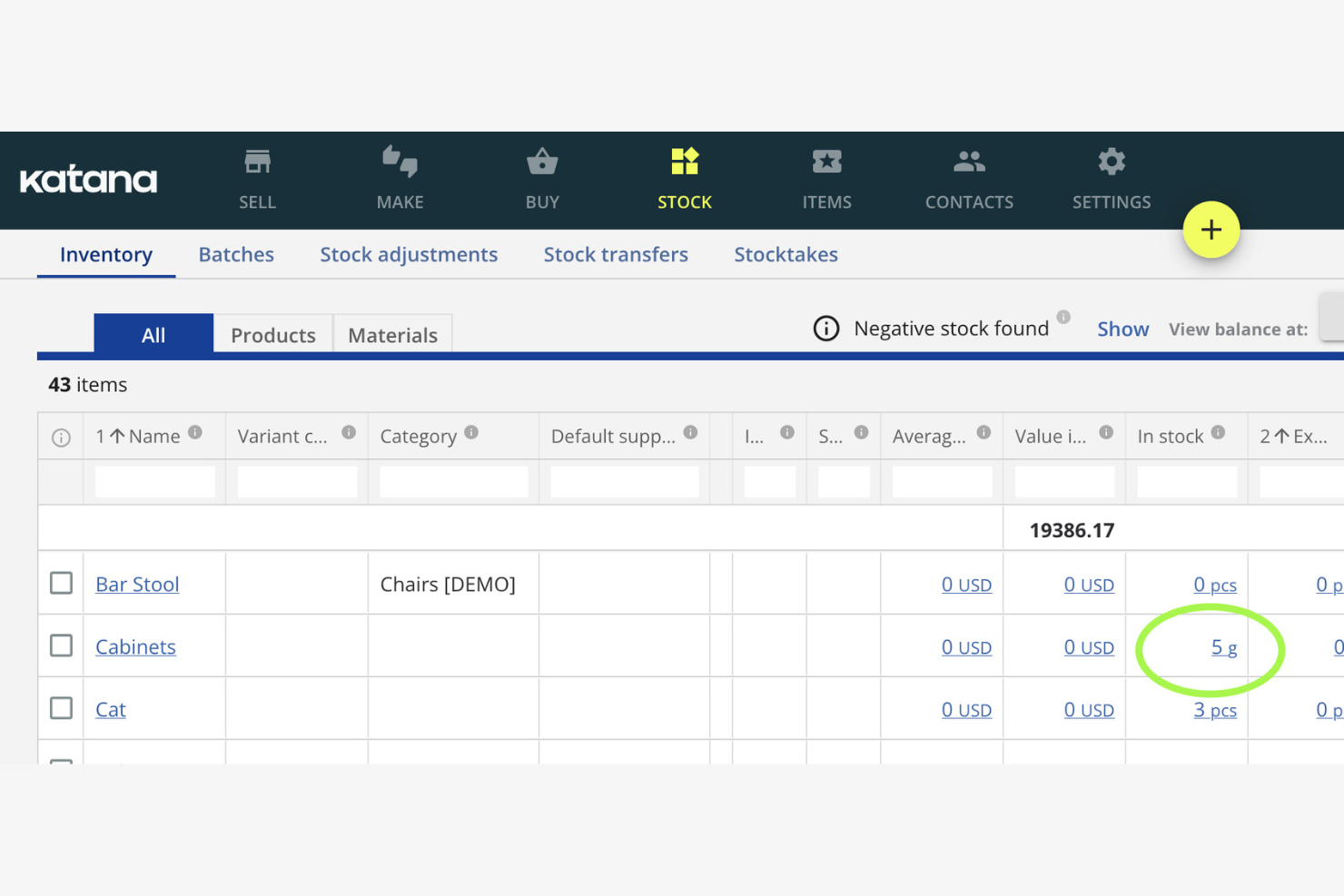
Katana is a production scheduling software tailored for small manufacturers. It helps you manage inventory, orders, and production tasks efficiently.
Why I picked Katana: It's designed for small manufacturers, focusing on ease of use and simplicity as a modern manufacturing software platform. The real-time inventory management keeps you updated on stock levels, helping you avoid production delays and reduce lead times. Its visual dashboard makes it easy to see your production schedule, including active work orders. The integration with e-commerce platforms keeps your sales and production in sync.
Standout Features and Integrations:
Features include batch tracking to trace goods movement, purchasing tools to make sure raw materials are available on time, and sales order management to support efficient fulfillment.
Integrations include Shopify, WooCommerce, QuickBooks Online, Xero, Zapier, BigCommerce, Amazon, Etsy, and more.
Pros and Cons
Pros:
- Syncs with e-commerce platforms
- Visual scheduling board
- Real-time updates
Cons:
- Basic reporting tools
- Not ideal for large operations

Infor is a production scheduling software aimed at various industries, including manufacturing and distribution. It helps manage production schedules, inventory, and supply chain processes efficiently.
Why I picked Infor: It's known for providing industry-specific solutions, offering tailored features for different sectors. The software includes advanced scheduling tools and resource planning capabilities that adapt to your industry's needs and support day-to-day operations. Its analytics provide insights to improve decision-making. The demand planning capabilities help you meet customer needs without overstocking.
Standout Features and Integrations:
Features include capacity planning to optimize resources, inventory management tools to maintain optimal stock levels, and real-time visibility into your production processes.
Integrations include Salesforce, Microsoft Dynamics, AutoCAD, Ariba, and more.
Pros and Cons
Pros:
- Real-time process visibility
- Strong demand planning tools
- Tailored for specific industries
Cons:
- Manual data entry hurdles
- High dependency on technical resources

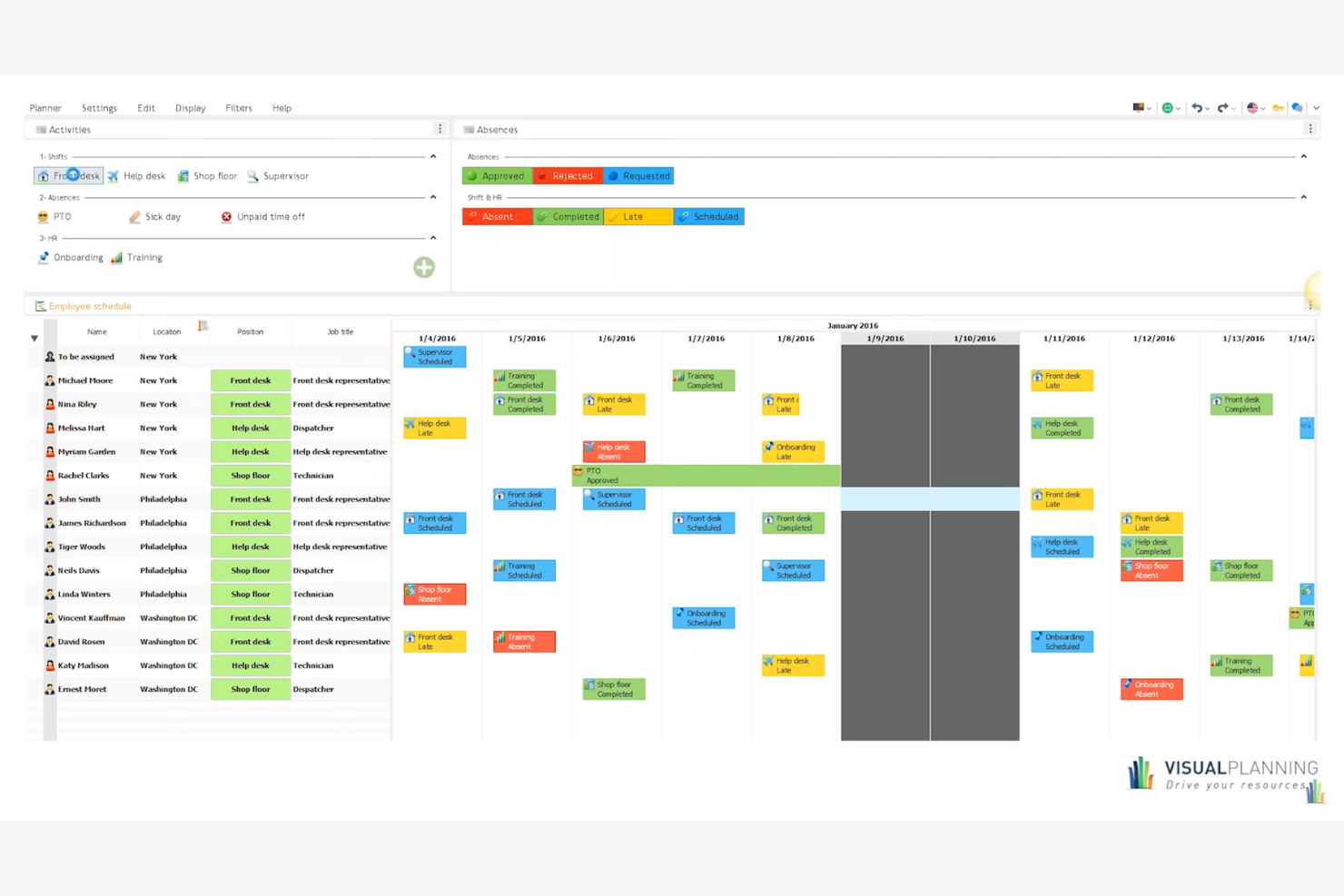
Visual Planning is a versatile production scheduling software designed for various industries, including manufacturing and construction. It helps you manage resources, schedules, and tasks efficiently, providing a tailored experience for different business needs.
Why I picked Visual Planning: It's known for its custom workflows, allowing you to adapt the tool to your specific processes, including manufacturing production and manufacturing scheduling. The drag-and-drop scheduling feature makes it easy to adjust plans and support on-time delivery. Its mobile app lets you access schedules and make updates from anywhere.
Standout Features and Integrations:
Features include customizable dashboards for clear project visibility, resource management tools to allocate tasks effectively, built-in automation to reduce manual scheduling, and real-time collaboration features to keep teams aligned.
Integrations include Microsoft Excel, Google Calendar, Outlook, Salesforce, SAP, Dropbox, and more.
Pros and Cons
Pros:
- Mobile app access
- Multi-resource scheduling
- Highly customizable workflows
Cons:
- Rigid license management
- Slow performance with large datasets

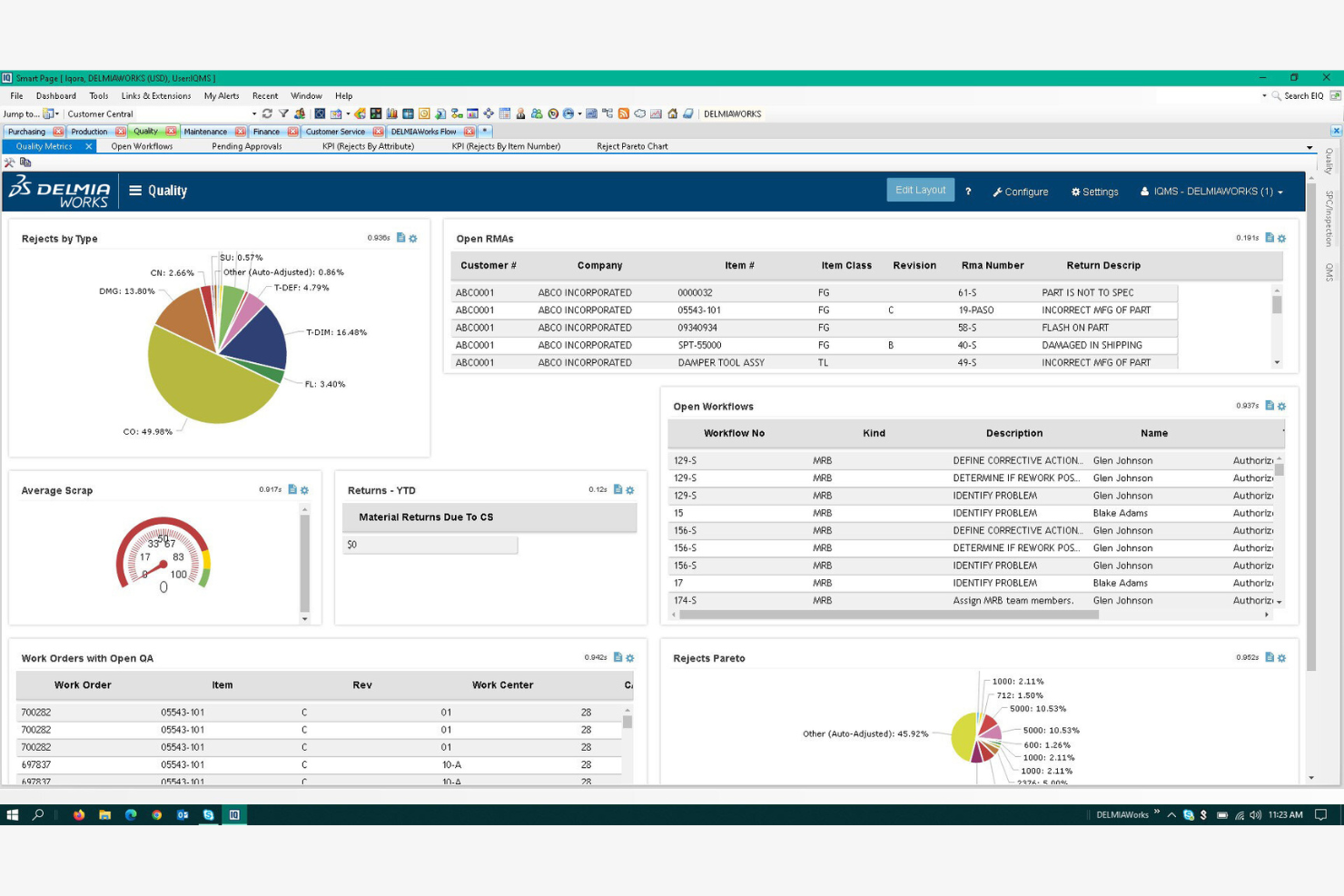
DELMIAWorks is a production scheduling software designed for manufacturers looking to integrate ERP functionalities. It helps manage production schedules, inventory, and operations efficiently.
Why I picked DELMIAWorks: It's ideal for manufacturers needing ERP integration, offering a unified solution for managing production and business processes. The software provides real-time data visibility, helping you make informed decisions quickly and run what-if scenarios to evaluate operational changes. Its scheduling tools are tailored to maximize manufacturing efficiency and balance production capacity. The quality management features are built to maintain high production standards.
Standout Features and Integrations:
Features include adaptive advanced planning and scheduling, real-time shop floor monitoring, and built-in material requirements planning to make sure you have the right materials at the right time.
Integrations include SOLIDWORKS, QuickBooks, Salesforce, AutoCAD, and more.
Pros and Cons
Pros:
- Integrates with major ERP systems
- Real-time data access
- Supports complex manufacturing processes
Cons:
- High implementation barrier
- Lack of a native web interface
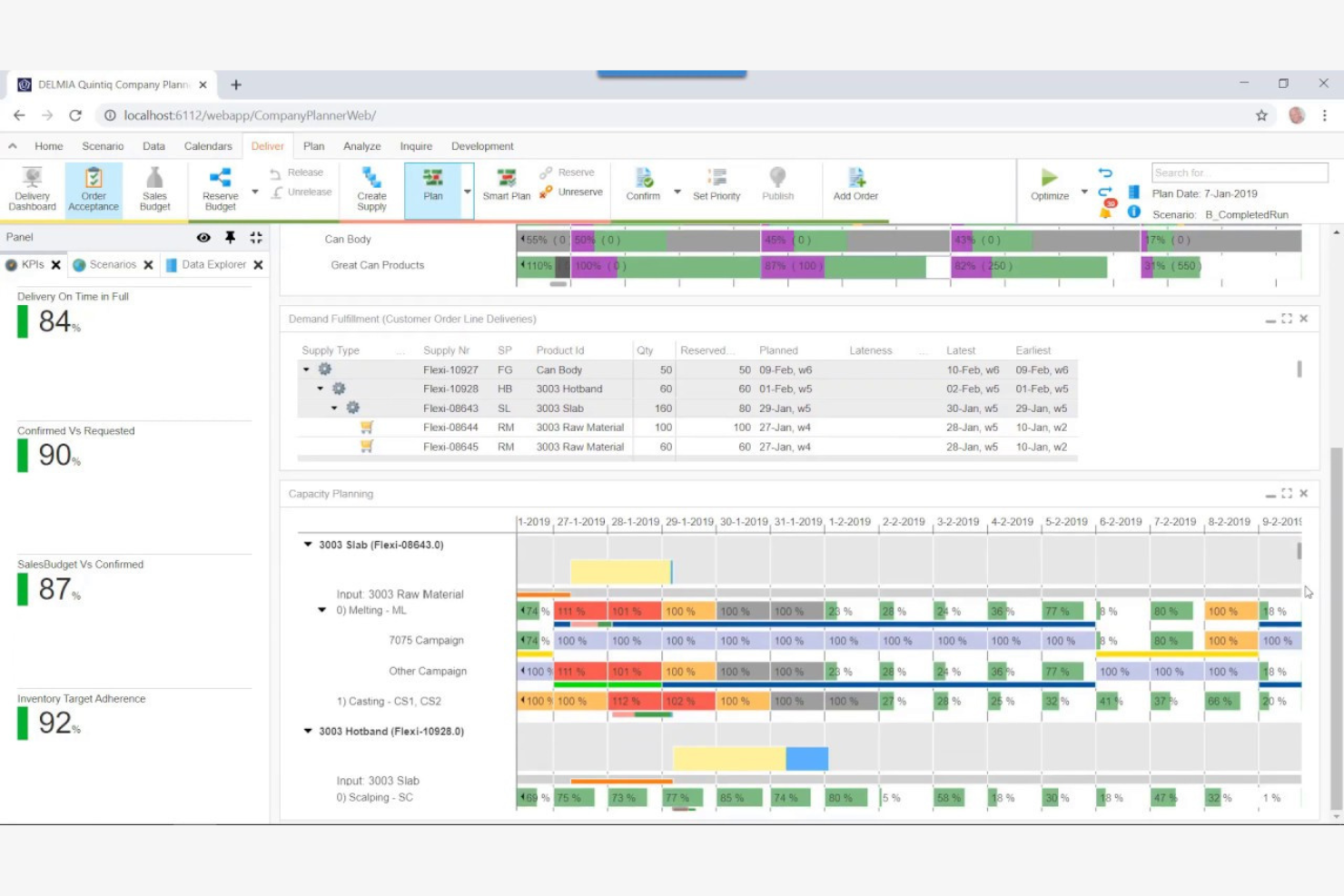
DELMIA Quintiq is a production planning software designed for businesses with complex supply chains. It helps manage planning, scheduling, and optimization of resources across various industries.
Why I picked DELMIA Quintiq: It's tailored for complex supply chains, providing advanced planning capabilities powered by optimization algorithms. The software offers optimization tools that help you improve resource utilization across operations. Its scenario planning feature allows you to test different strategies before implementation. You can also benefit from its real-time data analytics and performance metrics to make informed decisions.
Standout Features and Integrations:
Features include multi-site scheduling for coordinated resource allocation, demand forecasting to anticipate market needs, and capacity planning to meet production goals without overextending resources.
Integrations include SAP, Oracle, Microsoft Dynamics, JD Edwards, IBM Maximo, Salesforce, Infor, Manhattan Associates, Blue Yonder, Ariba, and more.
Pros and Cons
Pros:
- Supports multi-site operations
- Strong optimization capabilities
- Handles complex scheduling scenarios
Cons:
- Limited out-of-the-box solutions
- Requires significant customization
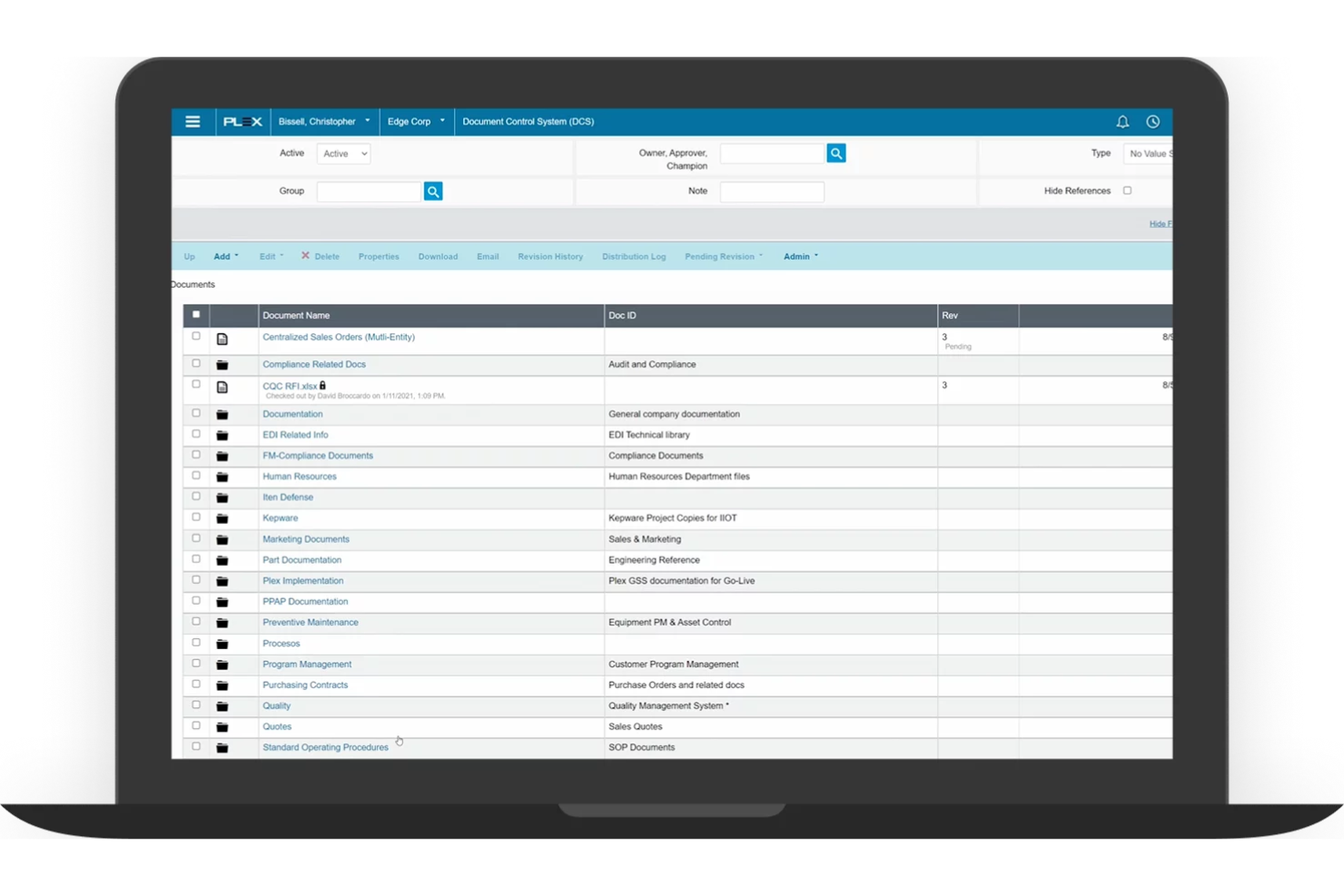
Plex is a cloud-based production scheduling software designed for manufacturers. It helps manage production processes, inventory, and quality control efficiently.
Why I picked Plex: It's known for its cloud-based planning, supporting your production planning process with easy access to real-time data from anywhere. The software's real-time monitoring helps you track production activities as they happen and optimize throughput. Its quality management features help your products meet the necessary standards. You can also leverage its detailed reporting tools to gain insights into your operations.
Standout Features and Integrations:
Features include precise shop floor management, real-time production tracking, and built-in compliance management tools that help you adhere to industry regulations.
Integrations include Salesforce, Microsoft Dynamics, QuickBooks, and more.
Pros and Cons
Pros:
- Cloud-based accessibility
- Strong compliance management
- Real-time production tracking
Cons:
- New interface lacks working versions of key tools
- Designed to replace your entire business software

Siemens Opcenter is a production scheduling software designed for large-scale manufacturers. It helps optimize production processes, manage resources, and improve overall efficiency.
Why I picked Siemens Opcenter: It offers scalability, making it suitable for growing operations. The software provides advanced planning capabilities that adapt to changing production demands and support a flexible scheduling process. Its real-time data access allows you to monitor and adjust schedules as needed. The simulation tools help you test different scenarios to find the best solutions.
Standout Features and Integrations:
Features include detailed production tracking for end-to-end visibility, built-in quality management to meet industry standards, and capacity planning to allocate resources effectively across operations.
Integrations include Teamcenter, MindSphere, TIA Portal, Infor, and more.
Pros and Cons
Pros:
- Flexible capacity planning
- Advanced simulation tools
- Supports large-scale operations
Cons:
- Windows-only limitation
- Poor documentation examples
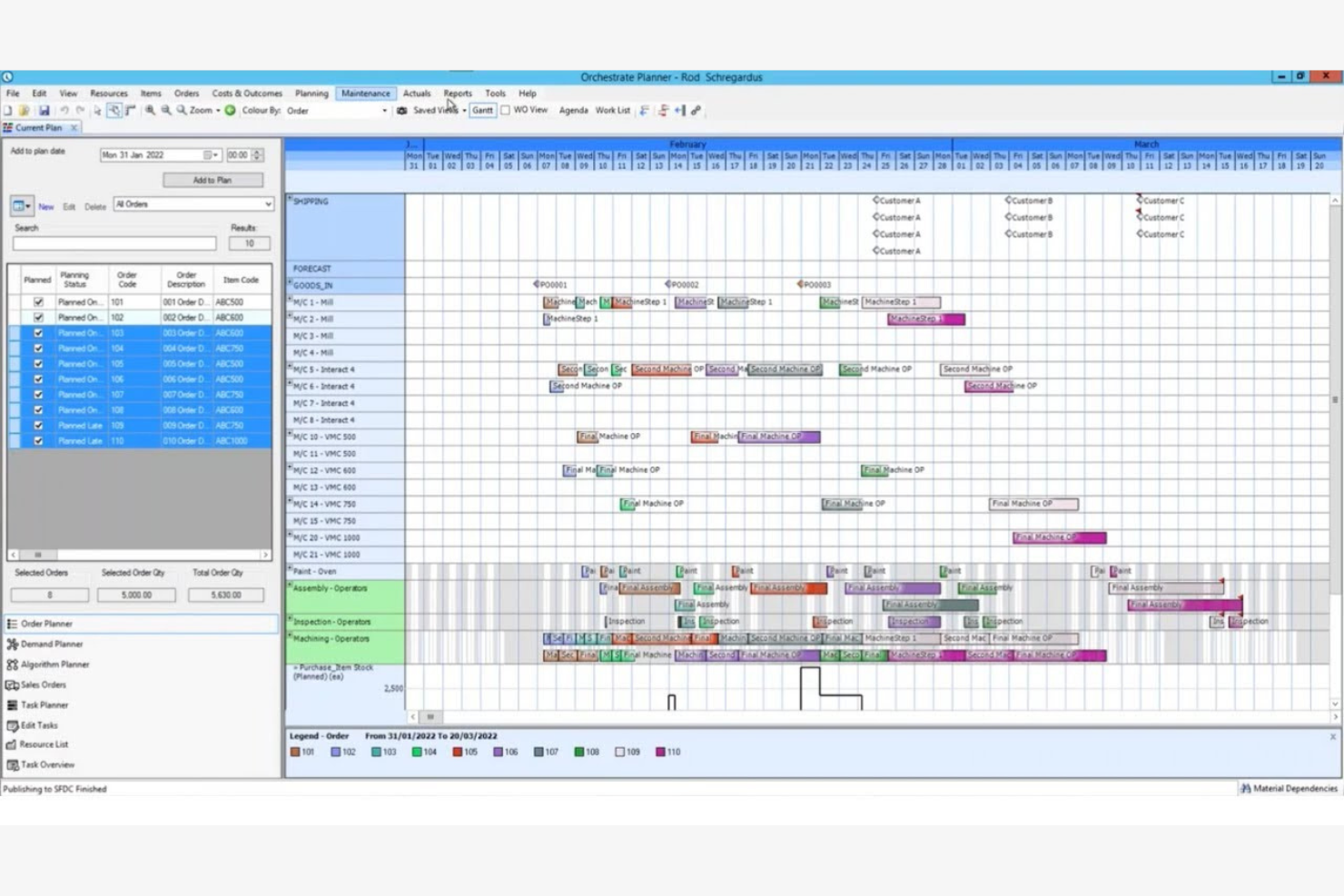
Access Orchestrate offers production scheduling software tailored for midsize businesses. It helps manage production planning, inventory, and workflow processes efficiently.
Why I picked Access Orchestrate: It provides solutions specifically for midsize businesses with tools that can scale with your operation and improve long-term profitability. The software's intuitive interface makes it easy for your team to adopt and utilize. It includes planning features that help optimize your production schedules. You can also track inventory levels to make sure you have the necessary materials on hand.
Standout Features and Integrations:
Features include real-time visibility into production processes to make informed decisions quickly. Built-in reporting highlights performance gaps and cost drivers, helping improve operational efficiency and profitability. Resource management tools to allocate tasks efficiently.
Integrations include Salesforce, QuickBooks, Xero, Sage, HubSpot, and more.
Pros and Cons
Pros:
- Strong reporting tools
- Live production status tracking
- Integrated planning features
Cons:
- No built-in API
- Heavy internet reliance
Best for global financial consolidation
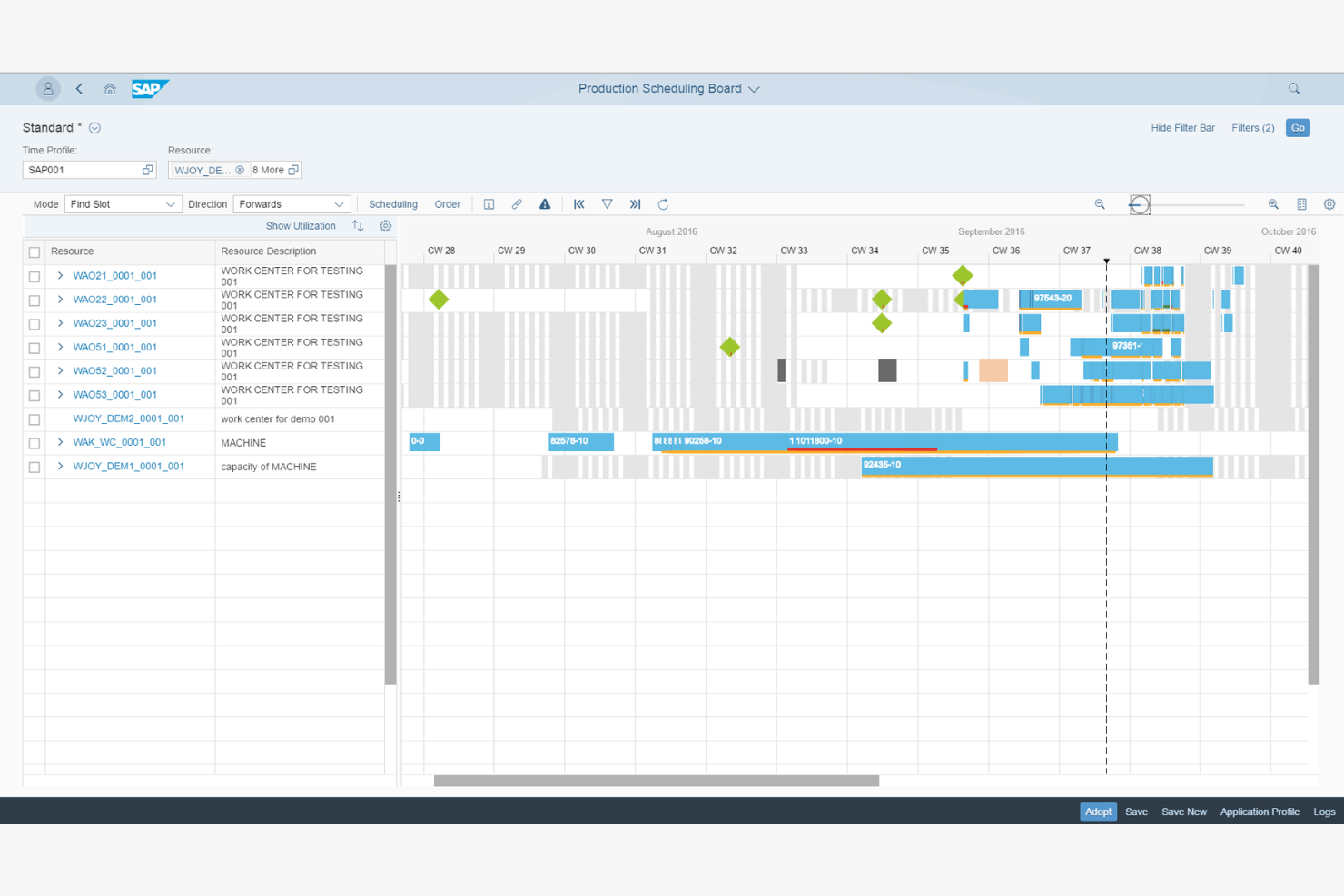
SAP S/4HANA Manufacturing for planning and scheduling offers production scheduling software for large global enterprises. It helps manage complex manufacturing processes, optimize supply chains, and improve efficiency across operations.
Why I picked SAP S/4HANA Manufacturing for planning and scheduling: It's designed for global enterprises, providing extensive features to manage large-scale operations. The software's advanced analytics help you make data-driven decisions. Its integration with supply chain processes keeps operations running smoothly across different regions. The real-time visibility feature keeps you updated on all production activities.
Standout Features and Integrations:
Features include demand-driven replenishment to maintain optimal inventory levels, predictive analytics for forecasting, and production planning with detailed scheduling features to meet output targets.
Integrations include Microsoft Azure, Amazon Web Services, Google Cloud, IBM Cloud, Salesforce, Microsoft Dynamics, SAP HANA, Ariba, and more.
Pros and Cons
Pros:
- Flexible production planning
- Live visibility into orders and capacity
- Built for complex, multi-site production
Cons:
- No built-in supply network planning
- Consultant-dependent implementation
Other Production Scheduling Software
Here are some additional production scheduling software options that didn’t make it onto my shortlist, but are still worth checking out:
- Eyelit APS
For compliance needs
- MRPeasy
For fast MRP setup for small factories
- Fishbowl Inventory
For inventory management
- Microsoft Dynamics 365 Business Central
For small to medium businesses


How I Evaluate Production Scheduling Software
When a planner needs to resequence 50 jobs after a machine goes down, I look for two things: baseline scheduling capabilities and the differentiators that separate a good tool from the right one.
Core Functionality (Table Stakes For This List)
When I'm selecting tools for my list, I rank each one on a scale from 0 (does not offer the functionality) to 5 (excels in this area) for each core functionality listed below. Then, I calculate the tool's total score into a percentage. Each tool needs to achieve a minimum total score of 65% to be considered for inclusion.
- Production Gantt Scheduling: I check whether the Gantt view covers multiple resources or lines and lets planners filter by work center, job status, or due date at a glance.
- Finite Capacity Planning: Every schedule is useless if it ignores real constraints, so I evaluate how well a tool models machine capacity, labor shifts, and tooling limits together.
- Drag-and-Drop Rescheduling: When a rush order lands or a machine goes offline, I look for rescheduling that recalculates downstream dependencies automatically after a single drag action.
- Material & Inventory Sync: I evaluate whether the scheduler pulls live inventory and BOM data so planners can spot a resin shortage or missing component before it stalls a production run.
- ERP/MES Integration: Pre-built connectors to systems like SAP, Oracle, Epicor, or Microsoft Dynamics matter here, along with open APIs for linking to MES and shop-floor data sources.
- Schedule Optimization & KPIs: I look for rule-based or algorithmic logic that minimizes changeovers or prioritizes on-time delivery, paired with dashboards tracking utilization and throughput.
Once I have a list of tools that meet this criteria, I consider what sets each platform apart.
Differentiating Factors (What Sets Vendors Apart)
Here's how I compare and contrast different vendors:
Standout Features
What-if scenario simulation is a major differentiator. I want planners to model a machine breakdown or surprise rush order and compare schedule impacts before committing changes. AI-powered optimization builds on this by auto-generating sequences that cut changeovers or prioritize at-risk due dates. For teams managing multiple facilities, I also evaluate multi-plant coordination to confirm a tool can balance workloads across sites from one centralized view.
Beyond Features
Industry fit matters a lot here. A tool built for discrete manufacturing may fall flat for a process or batch-mode environment, so I check whether a vendor supports the buyer's specific production mode. Implementation and time-to-value are other factors I weigh heavily because schedulers often need shop-floor buy-in to succeed. I also evaluate deployment options, since some plants require on-premise or hybrid hosting to meet OT security policies or data residency requirements that cloud-only platforms can't satisfy.
How To Choose Production Scheduling Software
It's easy to get bogged down in long feature lists and complex pricing structures. To help you stay focused as you work through your unique software selection process, here's a checklist of factors to keep in mind:
| Factor | What To Consider |
| Scalability | Can the software grow with your business? Consider whether it can handle increased production volume or additional locations without a hitch. Make sure it supports future growth without requiring a complete overhaul. |
| Integrations | Does it connect with your current tools? Check for compatibility with your existing ERP, CRM, or accounting systems. Avoid solutions that require manual data entry or complex workarounds to integrate with your tech stack. |
| Customizability | Can you tailor the software to your processes? Look for options that allow you to adjust workflows, dashboards, and reports. Avoid rigid solutions that force you to change your established processes. |
| Ease of use | Is the software intuitive for your team? Test the user interface and navigation. A steep learning curve can slow adoption and reduce productivity. Choose a tool that your team can pick up quickly with minimal training. |
| Implementation and onboarding | How long will it take to get up and running? Consider the time and resources needed for setup. Look for solutions offering onboarding support, including training materials, to allow a smooth transition. |
| Cost | Does the pricing fit your budget? Evaluate the total cost of ownership, including subscription fees, setup costs, and potential add-ons. Watch out for hidden fees and make sure the price aligns with the value it delivers. |
| Security safeguards | Are your data and operations protected? Check for data encryption, regular backups, and compliance with industry standards. Make sure the vendor has measures in place to prevent data breaches and protect sensitive information. |
What Is Production Scheduling Software?
Production scheduling software is a tool that helps businesses plan, manage, and optimize their production processes. Typically used by production managers, planners, and operations professionals, it provides value by improving efficiency and reducing downtime. Features such as resource allocation, inventory management, and real-time tracking help with coordinating production activities and meeting deadlines. Overall, these tools improve productivity and support better decision-making in manufacturing operations.
Features
When selecting production scheduling software, keep an eye out for the following key features:
- Resource allocation: Helps you efficiently assign tasks and resources to optimize production schedules and reduce bottlenecks.
- Inventory management: Tracks stock levels.
- Real-time tracking: Provides live updates on production processes, enabling quick adjustments and informed decision-making.
- Demand forecasting: Predicts future production needs based on historical data.
- Customizable dashboards: Allow you to tailor views and reports.
- Quality management: Makes sure products meet industry standards.
- Integration capabilities: Connect with existing systems such as ERP or CRM.
- Advanced analytics: Offer insights into production performance and trends.
- Compliance tracking: Monitors and documents adherence to industry regulations.
Benefits
Implementing production scheduling software provides several benefits for your team and your business. Here are a few you can look forward to:
- Improved efficiency: Resource allocation and real-time tracking help optimize workflows, reducing downtime and boosting productivity.
- Better inventory control: Inventory management features help you maintain optimal stock levels, preventing shortages and overstocking.
- Optimized decision-making: Advanced analytics and demand forecasting provide insights that guide data-driven decisions and strategic planning.
- Quality assurance: Quality management tools monitor production standards, helping you deliver consistent, high-quality products.
- Regulatory compliance: Compliance tracking features keep you aligned with industry regulations, minimizing risks and avoiding penalties.
- Integrated operations: Connect with existing systems to maintain data flow and improve overall operational efficiency.
Costs and Pricing
Selecting production scheduling software requires an understanding of the various pricing models and plans available. Costs vary based on features, team size, add-ons, and more. The table below summarizes common plans, their average prices, and typical features included in production scheduling software solutions:
Plan Comparison Table for Production Scheduling Software
| Plan Type | Average Price | Common Features |
| Free Plan | $0 | Basic scheduling, limited reporting, and basic inventory management. |
| Personal Plan | $15-$60/user/month | Advanced scheduling, basic analytics, and email support. |
| Business Plan | $50-$500/user/month | Real-time tracking, integration capabilities, and detailed reporting. |
| Enterprise Plan | $800+/month | Customizable dashboards, advanced analytics, and dedicated customer support. |
Production Scheduling Software FAQs
Here are some answers to common questions about production scheduling software:
What industries benefit most from production scheduling software?
Industries such as manufacturing, automotive, aerospace, and food production benefit greatly from production scheduling software. These tools help manage complex production processes, improve efficiency, and maintain quality. If you’re in a sector with intricate scheduling needs or strict deadlines, consider implementing this software to improve operations and productivity.
How does production scheduling software help improve my team's workflow?
Production scheduling software simplifies task assignments, deadlines, and resource allocation on one platform. This helps you spot bottlenecks, avoid overbooking, and quickly shift priorities.
Can production scheduling software integrate with existing systems?
Yes, most production scheduling software can integrate with existing systems such as ERP, CRM, and accounting software. Integration helps make sure that data flows across platforms, reducing manual data entry and errors. Check the software’s compatibility with your current tools before purchasing to avoid potential integration issues.
How do I determine the right software for my business size?
Consider your team size, production volume, and specific needs. Small businesses might opt for simpler, more affordable options with basic features. Larger enterprises may require advanced capabilities like real-time tracking and analytics. Evaluate your current and future needs to choose a solution that’s scalable.
What should I expect during the implementation process?
Expect a period of setup, training, and adjustment. The implementation process varies by software, but it typically involves data migration, system configuration, and user training. Choose a provider that offers onboarding support, such as tutorials and customer service, to allow a smooth transition for your team.
Is technical support available for production scheduling software?
Yes, most vendors offer technical support, but the level of service varies. Look for providers with multiple support channels such as phone, email, and chat. Some offer 24/7 support, while others have limited hours.
What's Next:
If you're in the process of researching production scheduling software, connect with a SoftwareSelect advisor for free recommendations.
You fill out a form and have a quick chat where they get into the specifics of your needs. Then you'll get a shortlist of software to review. They'll even support you through the entire buying process, including price negotiations.