

2026 İçin En İyi 10 Ücretsiz İnşaat Proje Yönetimi Yazılımı Seçimi

En İyi Ücretsiz İnşaat Proje Yönetimi Yazılımları Kısa Listesi


Ücretsiz inşaat proje yönetimi yazılımları, ek bir yazılım masrafı oluşturmadan görevleri, zaman çizelgelerini ve ekipleri yönetmenize yardımcı olabilir. Neyse ki ücretsiz inşaat proje yönetimi yazılımları tam da bu noktada destek sunabilir. İster küçük bir firma olun ister hızla büyüyen bir işletme, bu araçlar başka bir masraf eklemeden daha fazla düzen sağlayabilir.
Bu listede, kullanıma sunulan en iyi ücretsiz araçları inceledim. Ekibinizin kendine özgü ihtiyaçlarına en uygun seçeneği bulabilmeniz için sahadaki inşaat ekipleri açısından gerçekten işe yarayan özelliklere, planlamaya, iletişime, dosya paylaşımına ve kullanım kolaylığına odaklandım.
Why Trust Our Software Recommendations
Our team has been testing and reviewing software since 2012. As project managers ourselves, we know how difficult—and important—it is to choose the right software.
For this guide, we evaluated tools using hands-on testing and independent research, scoring tools using our selection criteria. We also draw on insights from industry thought leaders and practicing project management experts.
Our reviews reflect our human editorial judgment, not a sales pitch.
Expert reviewers:
Ücretsiz İnşaat Proje Yönetimi Yazılımları Karşılaştırma Tablosu
Bu karşılaştırma tablosu, en iyi ücretsiz inşaat proje yönetimi yazılımı seçimlerimin fiyatlandırma ayrıntılarını özetlemektedir:
Score legend (out of 5)
- Excellent 4.5–5
- Good 4–4.4
- Average 3–3.9
- Below average 2–2.9
- Poor 1–1.9
| Tool | Starting Price | Website | |||||||
|---|---|---|---|---|---|---|---|---|---|
| Best for construction management templates | 2.5 out of 5 | 4 | 2 | 2 | 2 | 2 | 3 | $9/user/month Free plan + 14-day trial available | Book Demo |
| Best for Agile workflows | — | 4 | — | 4 | 3 | 3 | 3 | $10/user/month Free plan + 14-day trial + demo available | Book Demo |
| Best for interactive Gantt charts | — | 2 | 3 | — | 1 | 5 | 4 | $7/user/month 14-day free trial + demo available | Website |
| Best for an intuitive user interface | 3.2 out of 5 | 3 | 1 | 3 | 4 | 4 | 4 | Pricing upon request Free plan + 15-day trial + demo available | Website |
| Best for nested task breakdown | 2.5 out of 5 | 4 | 1 | 3 | 2 | 2 | 3 | $7.65/user/month Free plan + 30-day free trial available | Website |
| Best for all-in-one team chat and file sharing | 3.2 out of 5 | 3 | 2 | 4 | 4 | 2 | 4 | $12/user/month Free plan available | Website |
| Best for sharing updates with clients and subs | — | 4 | — | 3 | 2 | 4 | 4 | $9.99/user/month Free plan + 14-day free trial + free demo available | Website |
| Best with GPS time cards and crew scheduling | — | 4 | 5 | — | 4 | 5 | 4 | $49/month 30-day free trial + free demo available | Website |
| Best for field punch lists and offline logs | 3.5 out of 5 | 4 | 2 | 3 | 4 | 4 | 4 | $39/user/month Free plan available | Website |
| Best for estimate-linked schedule and cost tracking | 3.8 out of 5 | 2 | 4 | 4 | 4 | 5 | 4 | $79/month Free plan available | Website |
En İyi Ücretsiz İnşaat Proje Yönetimi Yazılımları İncelemeleri
Aşağıda, kısa listeme giren en iyi ücretsiz inşaat proje yönetimi yazılımlarının ayrıntılı özetlerini bulabilirsiniz. İncelemelerim, size en uygun seçeneği bulmanıza yardımcı olmak için her aracın temel özelliklerine, artılarına & eksilerine, entegrasyonlarına ve ideal kullanım alanlarına ayrıntılı bir bakış sunmaktadır. Bu araçların bazıları tamamen ücretsiz bir sürüm sunarken diğerleri ücretsiz deneme süresi sunmaktadır. İncelemelerimin her birine hangi özelliklerin ücretsiz olduğuna dair bir not ekledim.

Best for construction management templates
monday AI Workspace is a general-purpose project management platform that brings AI-assisted scheduling, task tracking, document management, and team collaboration to construction workflows through customizable boards and templates.
Who Is monday AI Workspace Best For?
It's a strong fit for small construction teams and independent general contractors who want a flexible, customizable platform over a rigid, construction-native tool.
Why I Picked monday AI Workspace
I picked monday AI Workspace because its construction template library is one of the most practical I've seen for GCs who need to build project workflows from scratch. Templates span every phase, from pre-construction drawings and RFIs through submittals, purchase orders, and budget tracking columns, so there's no blank-canvas guessing. I like that these templates are available on the free plan, and that each one is fully customizable by project type, trade, or stakeholder.
monday AI Workspace Key Features
- AI-powered project scheduling: Lets you plan timelines and spot risks with automated recommendations for task assignment and milestones.
- Mobile app with offline mode: Allows field teams to access documents, communicate, and update tasks even without internet connectivity.
- Customizable daily log boards: Enables tracking of daily jobsite progress with photo uploads and checklists tailored to your workflow.
- Budget tracking columns: Lets you monitor estimated versus actual costs directly in your task boards using customizable columns.
monday AI Workspace Integrations
monday AI Workspace offers hundreds of integrations through its built-in integrations and marketplace, including Slack, Google Workspace, Microsoft 365, Salesforce, DocuSign, Dropbox, HubSpot, Jira, Trello, and Zoom. It also supports Zapier and provides an API for custom integrations.
What's Free?
monday AI Workspace offers a free-forever plan limited to 2 seats, with up to 3 boards, 200+ templates, and access to the iOS and Android apps. Automations, integrations, and advanced reporting are gated behind paid plans, and the 2-seat cap makes it impractical for teams larger than a solo contractor or two-person crew.
Pros and Cons
Pros:
- AI assists with task scheduling and dependencies
- Boards adapt to any construction workflow
- Extensive library of construction-specific templates
Cons:
- Not purpose-built for construction workflows
- Two-seat cap limits real team use
New Product Updates from monday AI Workspace
monday AI Workspace Adds Human Approval Routing
monday AI Workspace adds a human-in-the-loop approval block to AI Workflows, sending approval requests and routing workflow paths based on responses. For more information, visit monday AI Workspace's official site.
 .

Wrike
Best for Agile workflows
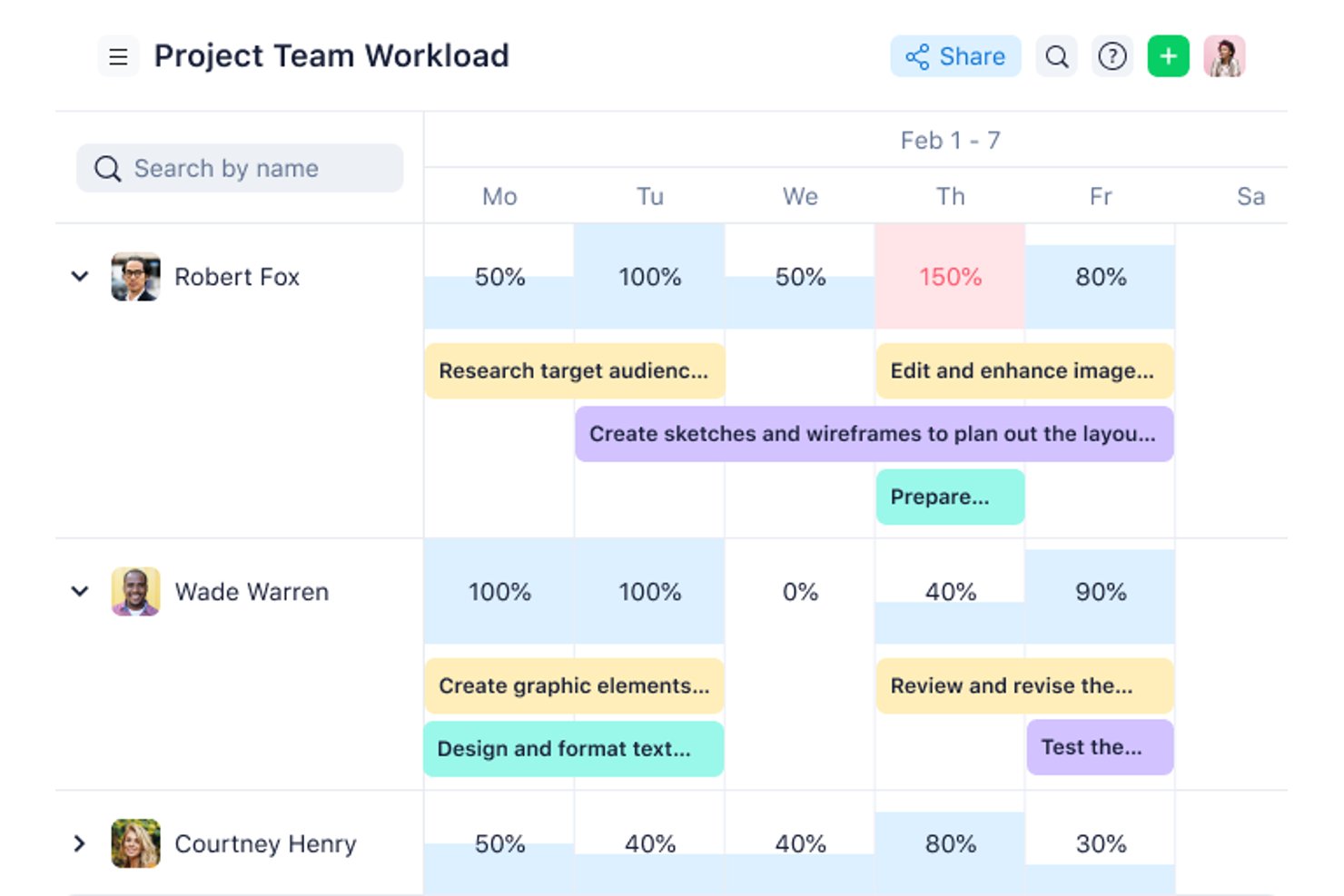
Wrike is a project management platform for construction teams that brings together task management, Gantt charts, document sharing, and real-time collaboration in one workspace.
Who Is Wrike Best For?
Wrike is a good fit for mid-size to large construction teams that need a flexible platform to manage multiple projects and coordinate across departments.
Why I Picked Wrike
I picked Wrike as one of the best because of how well it handles Agile workflows on construction projects where scope and priorities shift constantly. Wrike's Scrum boards let my team manage backlogs, run sprints, and track progress in real time without switching tools. I also like that you can toggle between Kanban boards and Gantt charts depending on the phase of a project. That flexibility means my team can run Agile sprints during planning and switch to a timeline view when coordinating with subcontractors or tracking phase deadlines.
Wrike Key Features
- Custom request forms: Build dynamic intake forms that automatically generate tasks, assign owners, and trigger workflows when a new project or change order comes in.
- Resource bookings: Reserve time from specific team members or job roles and check their availability before assigning them to a project phase.
- Wrike document editor: Attach files directly to tasks and edit them in the platform without downloading, keeping submittals and project documents version-controlled.
- User activity reports: Pull on-demand audit logs that show exactly who modified a task or document and when, useful for accountability across subcontractor teams.
Wrike Integrations
Wrike offers hundreds of integrations via its marketplace and built-in connectors, including tools like Google Workspace, Microsoft 365, Salesforce, Slack, Box, Dropbox, GitHub, Jira, and Adobe Creative Cloud. It also supports Zapier and provides an API for custom integrations.
What's Free?
Wrike offers a free-forever plan for small teams with up to 5 users. The free plan includes basic task management but limits access to advanced features, integrations, and reporting tools.
Pros and Cons
Pros:
- Dynamic intake request forms
- Built-in file proofing features
- Flexible custom workflow options
Cons:
- Expensive higher-tier plans
- Steep initial learning curve
New Product Updates from Wrike

Wrike Redesigns Workspace Search With New Filters
Wrike introduces a redesigned Workspace Search interface with recent search shortcuts, item type and location filters, and parent-task context. These updates help users find relevant work items and navigate search results efficiently. For more information, visit Wrike’s official site.
 .

GanttPRO
Best for interactive Gantt charts
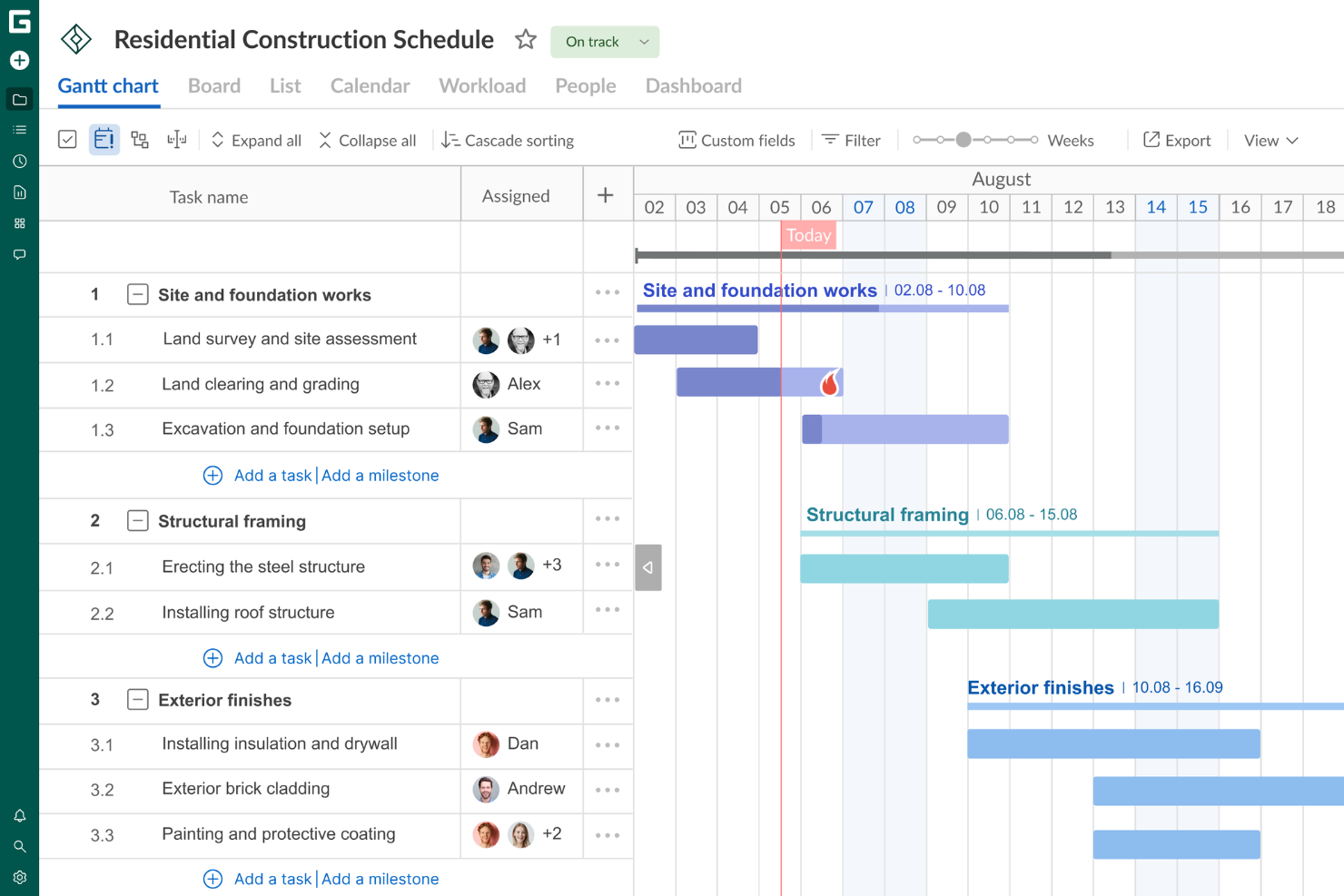
GanttPRO is a construction project management platform that centers on visual project scheduling, task management, resource allocation, and team collaboration using interactive Gantt charts.
Who Is GanttPRO Best For?
GanttPRO is a good fit for project managers and construction teams who need a visual, timeline-driven approach to scheduling and tracking work across multiple projects.
Why I Picked GanttPRO
GanttPRO is on my shortlist because its interactive Gantt charts handle the multi-phase scheduling that construction projects demand. I like that you can set task dependencies and let the auto-scheduling feature recalculate timelines automatically when dates shift—something that happens constantly on construction sites. I also use the critical path feature to instantly see which tasks could push back a project's completion date if they slip. The baseline comparison lets me track actual progress against the original plan, which is exactly what you need when reporting to stakeholders mid-build.
GanttPRO Key Features
- Board view: Switch between Gantt chart, Kanban-style board, and list view to manage tasks in the format that fits each phase of a construction project.
- Workload management: See each team member's task load across projects and reassign work directly from the workload view to avoid over-allocation.
- Time logs: Log actual hours spent on tasks and milestones, with comments, so you can track labor time against your project schedule.
- Portfolio view: Monitor multiple construction projects simultaneously from a single view to track progress across all active workstreams.
GanttPRO Integrations
GanttPRO offers native integrations with Jira Cloud, Google Drive, and Slack. An API is available for custom integrations.
What's Free?
GanttPRO offers a 14-day free trial with access to all features. After the trial, a paid subscription is required, and there is no free-forever plan.
Pros and Cons
Pros:
- Interactive Gantt charts enhance project visualization and planning.
- Task dependencies allow for clear project sequencing.
- Kanban-style board view provides flexible task management.
Cons:
- Limited native integrations with other software tools.
- While reporting tools are present, it lacks more advanced options for complex forecasting.

Best for an intuitive user interface
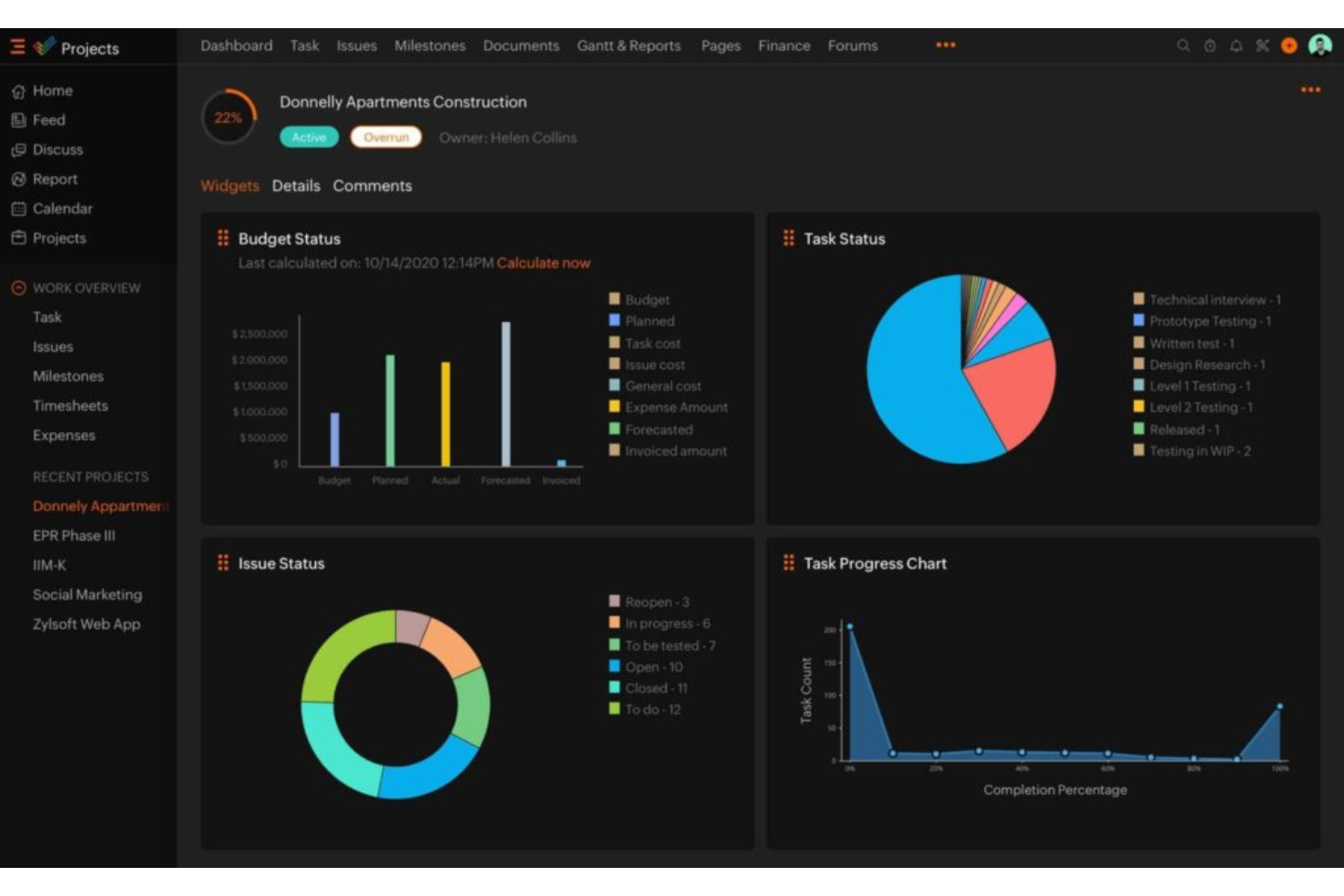
Zoho Projects is a cloud-based construction project management platform that covers task management, Gantt charts, time tracking, document sharing, and team collaboration.
Who Is Zoho Projects Best For?
Zoho Projects is a good fit for small to mid-sized construction teams that need a straightforward project management tool without a steep learning curve.
Why I Picked Zoho Projects
Zoho Projects is one of my top picks because I like that construction teams can get up and running with minimal setup and without a long onboarding process. The interface uses a clean, left-panel navigation that keeps milestones, task lists, Gantt charts, and timesheets all within one or two clicks. I particularly like the Kanban board view, which lets site managers drag tasks across status columns as work progresses on the ground. The Blueprint feature also stands out here—it lets you map out a task workflow visually, so every handoff between subcontractors or trades follows a defined process without anyone needing to chase updates manually.
Zoho Projects Key Features
- Issue tracking: Log bugs or site issues, assign them to team members, and monitor resolution progress within the same platform as your tasks.
- Project baseline: Set a baseline at any point in a project to compare planned vs. actual progress and catch schedule deviations early.
- Resource management: View each team member's workload before assigning tasks, and redistribute work when someone is over- or under-allocated.
- Budget forecasting: Track planned vs. actual project costs in real time and forecast total spend based on current completion percentage.
Zoho Projects Integrations
Zoho Projects offers 30+ native integrations, including Zoho CRM, Zoho Analytics, Zoho Desk, Zoho Invoice, Google Calendar, Google Drive, Microsoft Teams, Slack, Dropbox, GitHub, and Zapier. An API is available for custom integrations.
What's Free?
Zoho Projects offers a free-forever plan for up to 3 users and 2 projects. The free plan has limited storage and does not include features like Gantt charts, resource management, or most integrations.
Pros and Cons
Pros:
- Seamless Zoho ecosystem integration
- Built-in time tracking tools
- Highly affordable pricing plans
Cons:
- Limited third-party app integrations
- Restricted free plan features
New Product Updates from Zoho Projects
Zoho Projects Adds CodeX Scripts for Custom Modules
Zoho Projects now supports CodeX Scripts for custom modules, enabling conditional logic and rules for creating, updating, and deleting records. For more information, visit Zoho Projects' official site.
 .

Quire
Best for nested task breakdown
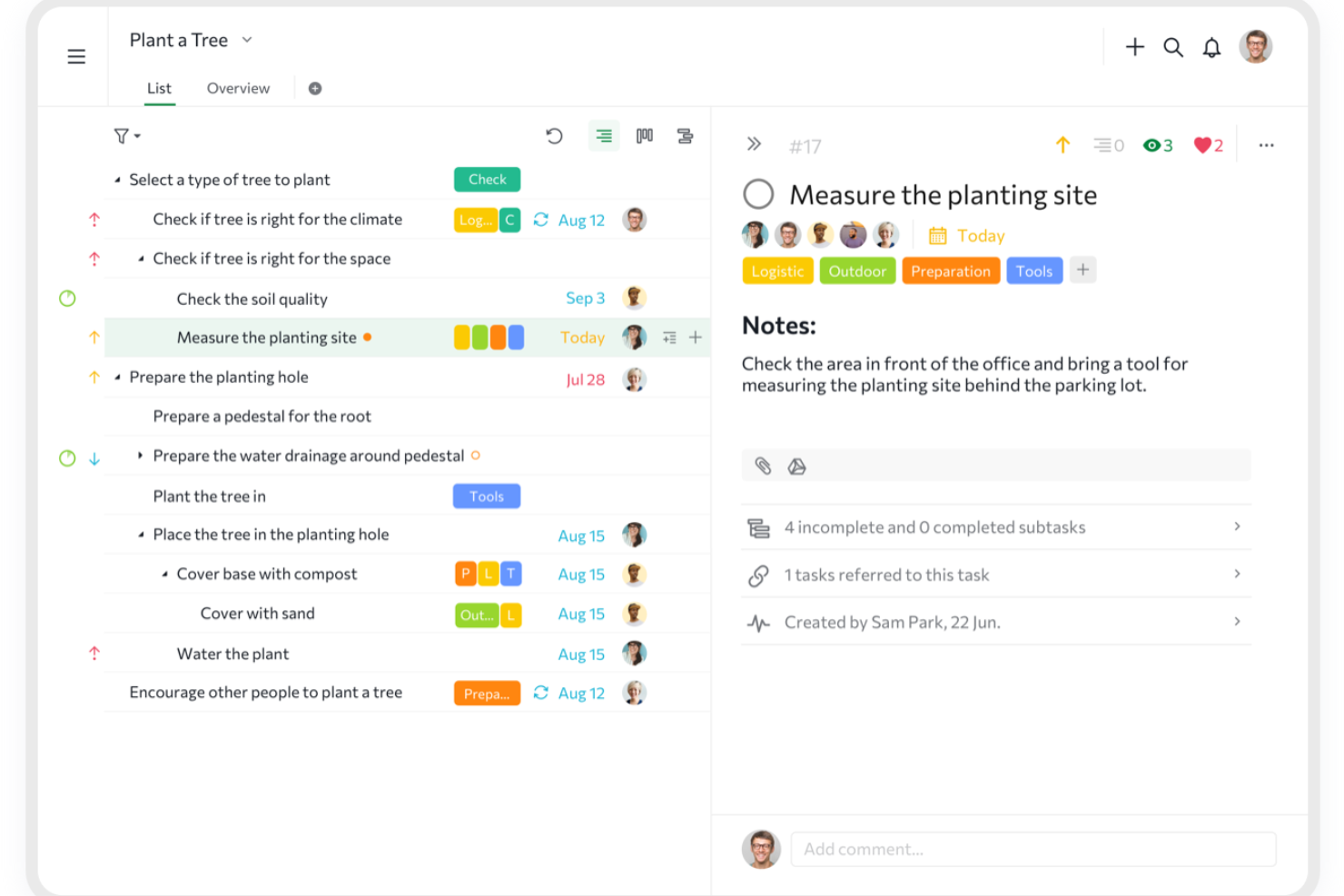
Quire is a project management platform for construction teams that organizes projects with nested task lists, kanban boards, and timeline views for tracking work and collaboration.
Who Is Quire Best For?
Quire is a good fit for small to mid-sized construction teams that need to break complex projects into manageable, hierarchical task structures.
Why I Picked Quire
Quire is one of my top picks because I love how its infinite nested task list handles the layered complexity of construction projects. On a real build, that means I can break a phase like "foundation work" into sub-phases, then into individual tasks, then into checklist-level steps—all within a single view. I also use the zoom-in feature to drill down into one branch of the task tree without losing sight of the broader project structure. The task dependency mapping ties it all together, letting me flag when a concrete pour can't start until inspections are signed off.
Quire Key Features
- Gantt chart timeline view: Map out project phases and deadlines on a visual timeline that switches between list and board layouts.
- Project milestones: Mark key checkpoints across a construction timeline to track phase completions and flag potential delays early.
- Custom fields: Add project-specific data fields to tasks, such as contractor names, permit numbers, or material specs.
- Roles and permissions: Assign custom access levels to team members, subcontractors, or clients within a project workspace.
Quire Integrations
Quire offers native integrations with Slack, Google Drive, and GitHub, and connects with Zapier. An API is available for custom integrations.
What's Free?
Quire offers a free-forever plan for up to 10 users per organization. The free plan includes unlimited tasks and projects but limits access to advanced features and some integrations.
Pros and Cons
Pros:
- Easy to learn and use
- Flexible views (tree, board, timeline)
- Infinite nested task structures
Cons:
- No native team chat
- Basic reporting and analytics
New Product Updates from Quire
Quire Adds Custom Field Locking and Comment Reaction API Support
Quire adds custom field locking and API support for reading and setting emoji reactions on comments. These updates give teams more control over field data and expand comment interaction options for developers. For more information, visit Quire’s official site.
 .

Lark
Best for all-in-one team chat and file sharing
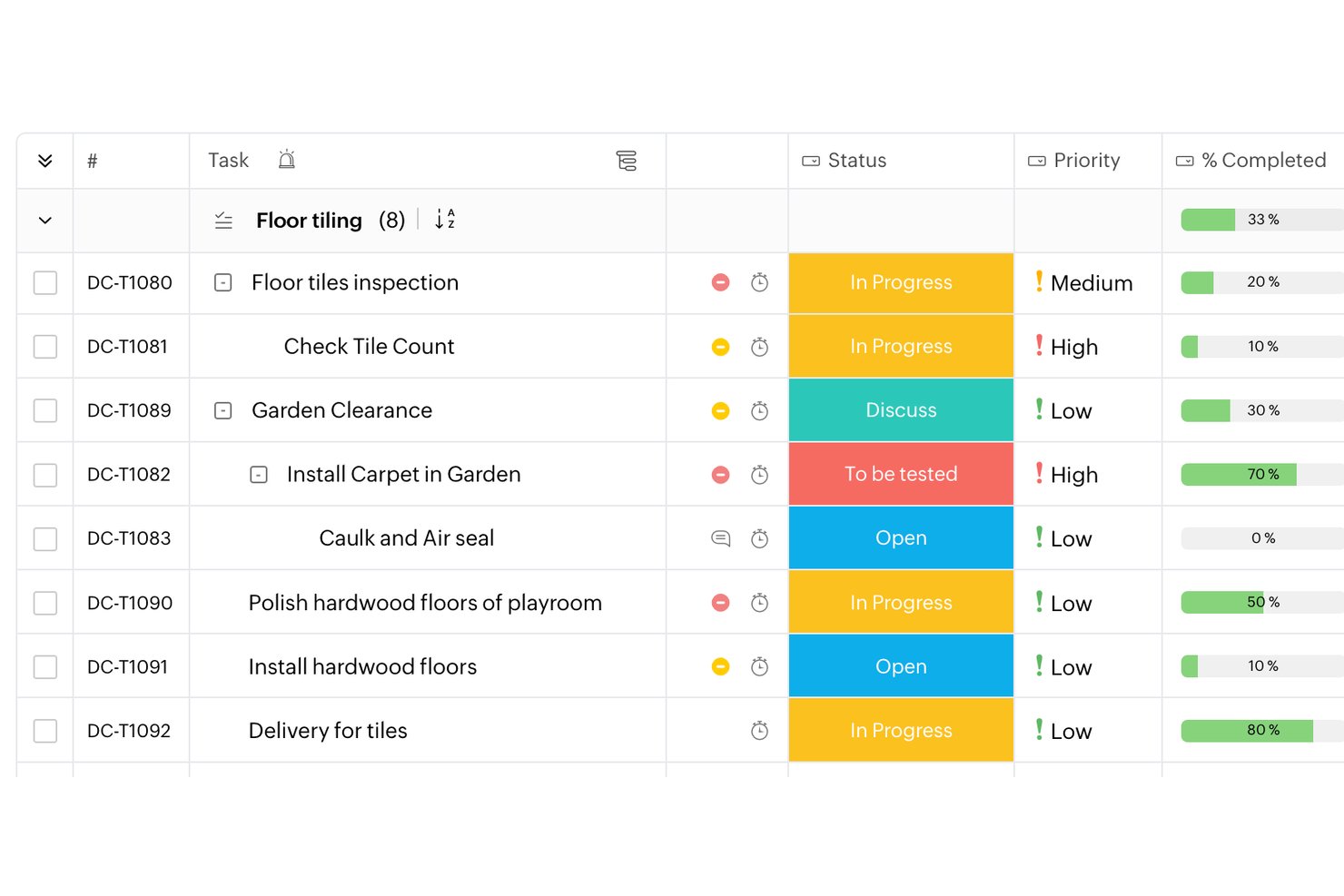
Lark is a free project management option for construction teams, combining task tracking and customizable workflows with team chat, collaborative documents, and file sharing in one workspace.
Who Is Lark Best For?
Lark fits small construction firms looking for a flexible workspace to coordinate office and field teams across active projects.
Why I Picked Lark
I picked Lark, Best for all-in-one team chat and file sharing, because construction teams can keep field updates beside shared project documents. A foreman can post a site update in chat, while task tracking and customizable workflows help the office team assign and follow up on the next action.
Lark Key Features
- Shared calendar: Schedule project milestones, site visits, and team events on shared calendars.
- Video meetings: Meet with project participants using video calls and screen sharing.
- Meeting minutes: Capture and organize meeting notes and recordings in Lark Minutes.
- Lark Base: Build structured tables and forms to record site inspections or material details.
Lark Integrations
Lark AnyCross connects Lark with external apps, including Salesforce, and supports workflow automation. Lark also offers open APIs for custom integrations.
What's Free?
Lark’s Starter plan is free indefinitely and supports up to 20 members, with 100 GB of total storage and 1,000 Base automation runs per month.
Pros and Cons
Pros:
- Base forms capture inspection and material details
- Shared calendars coordinate milestones and site visits
- Site updates stay beside shared project files
Cons:
- No built-in job costing or bid management
- No construction-specific drawing or submittal controls
Best for sharing updates with clients and subs
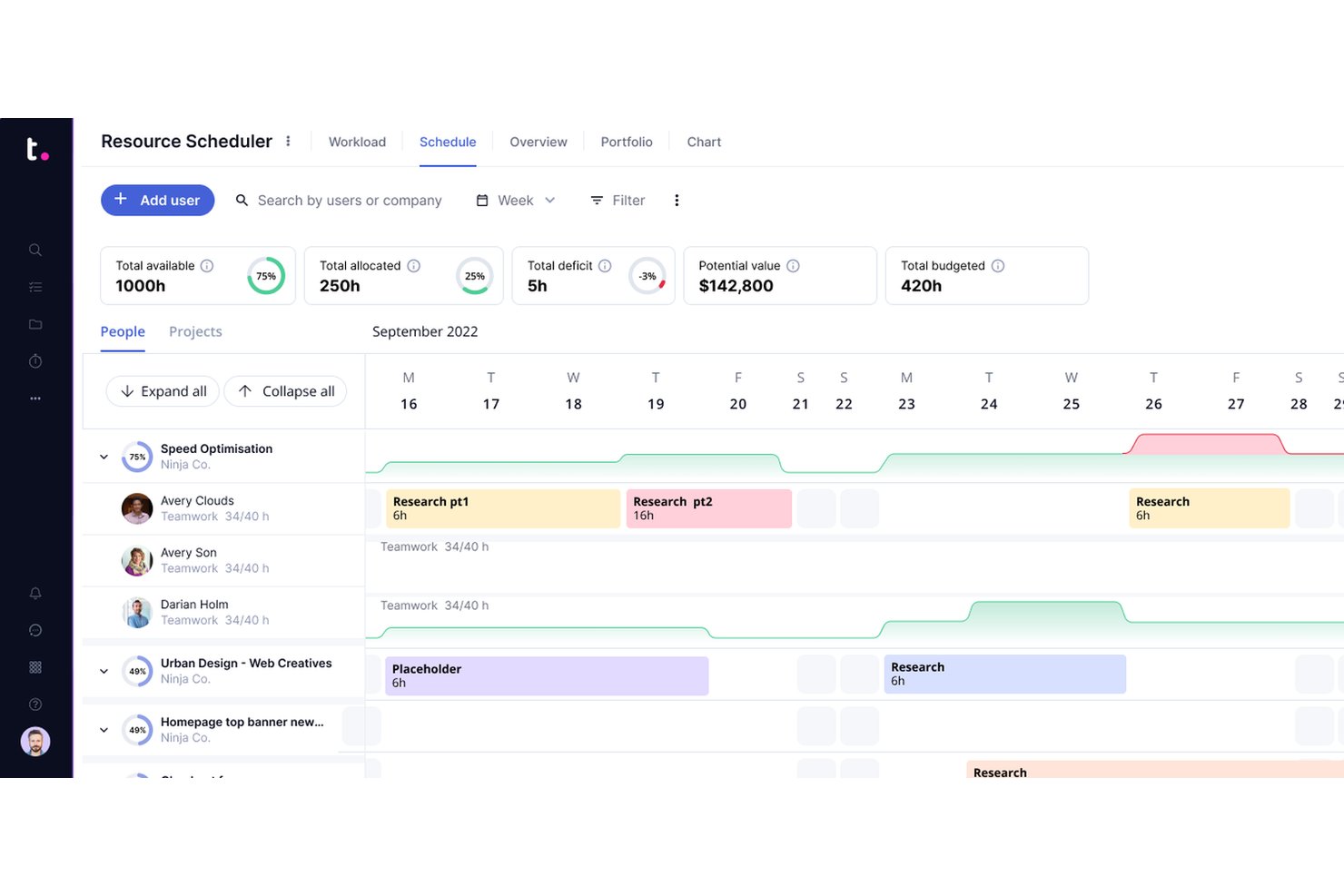
Teamwork.com is a project management platform for construction teams that need task tracking, Gantt charts, time tracking, document management, and built-in collaboration tools.
Who Is Teamwork.com Best For?
Teamwork.com is a strong fit for construction project managers who need to coordinate across internal teams, external contractors, and clients from a single platform.
Why I Picked Teamwork.com
Teamwork.com earns its spot on my shortlist because of how well it handles client and stakeholder visibility on construction projects. The Client Users feature lets you add unlimited clients to your projects at no extra cost, with granular permission controls that determine exactly what they can see and do. I find the Clients view especially useful—it rolls up cross-project metrics like budget health, billable time, and project status into a single dashboard, so you're never scrambling to pull together a progress report before a client call. The Proofs feature also cuts down on the back-and-forth approval cycles that slow down construction deliverables, giving clients a structured way to leave feedback and sign off on work.
Teamwork.com Key Features
- Gantt charts: Visualize project timelines, set task dependencies, and track what's due and when across construction phases.
- Milestone tracking: Set checkpoints within a project so your team and clients always know what's expected and by when.
- Budget tracking: Create project-specific budgets, monitor hours and spend in real time, and get alerts when costs approach set thresholds.
- Workload and capacity management: View your team's day-to-day capacity, spot scheduling conflicts, and reassign tasks to keep delivery on track.
Teamwork.com Integrations
Teamwork.com offers native integrations with Slack, Google Drive, Dropbox, Microsoft Teams, HubSpot, QuickBooks, Xero, and Harvest. It also connects with Zapier and provides an API for custom integrations.
What's Free?
Teamwork.com offers a free-forever plan for up to 5 users and 2 projects. The free plan has limited features and restricts access to advanced project templates, time tracking, and some integrations.
Pros and Cons
Pros:
- Integrated client proofing tools
- Built-in time tracking
- Unlimited free client users
Cons:
- Learning curve for newcomers
- Paid plans require user minimums

Best with GPS time cards and crew scheduling
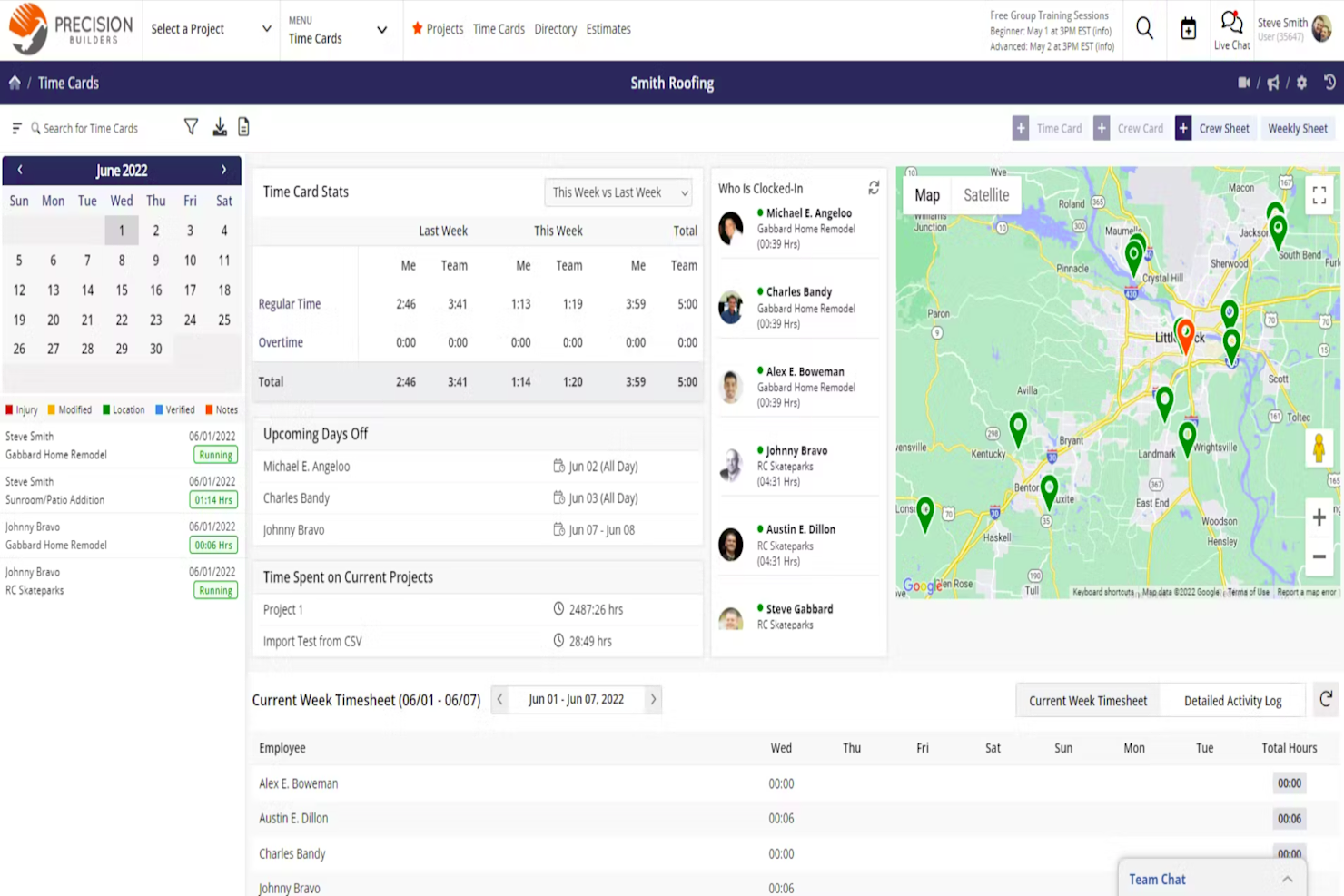
Contractor Foreman is construction project management software with tools for managing schedules, estimates, project documents, daily logs, and job costs.
Who Is Contractor Foreman Best For?
Contractor Foreman suits construction contractors coordinating field crews across active jobsites; it’s Best with GPS time cards and crew scheduling.
Why I Picked Contractor Foreman
I picked Contractor Foreman for Best Free Construction Project Management Software because it’s Best with GPS time cards and crew scheduling. I like how field crews can record time by jobsite while managers coordinate assignments across active projects. Daily logs help keep a record of site activity alongside the schedule.
Contractor Foreman Key Features
- Estimates: Create estimates with material and labor pricing, markups, and client approval.
- Document management: Store and organize project documents in one place.
- Change orders: Record and manage changes to project scope.
- Invoicing: Create invoices with retainage and AIA-style billing options.
Contractor Foreman Integrations
Contractor Foreman lists integrations with QuickBooks Online and QuickBooks Desktop for Windows, Google Calendar, and Stripe. Zapier is also listed.
What’s Free?
Contractor Foreman offers a 30-day free trial, not a free-forever plan. Paid plans start at $49/month, billed annually.
Pros and Cons
Pros:
- Daily logs record activity alongside schedules
- Crew scheduling coordinates assignments across active projects
- GPS time cards connect labor to jobsites
Cons:
- 30-day trial limits evaluation time
- No free-forever plan for ongoing projects

Best for field punch lists and offline logs
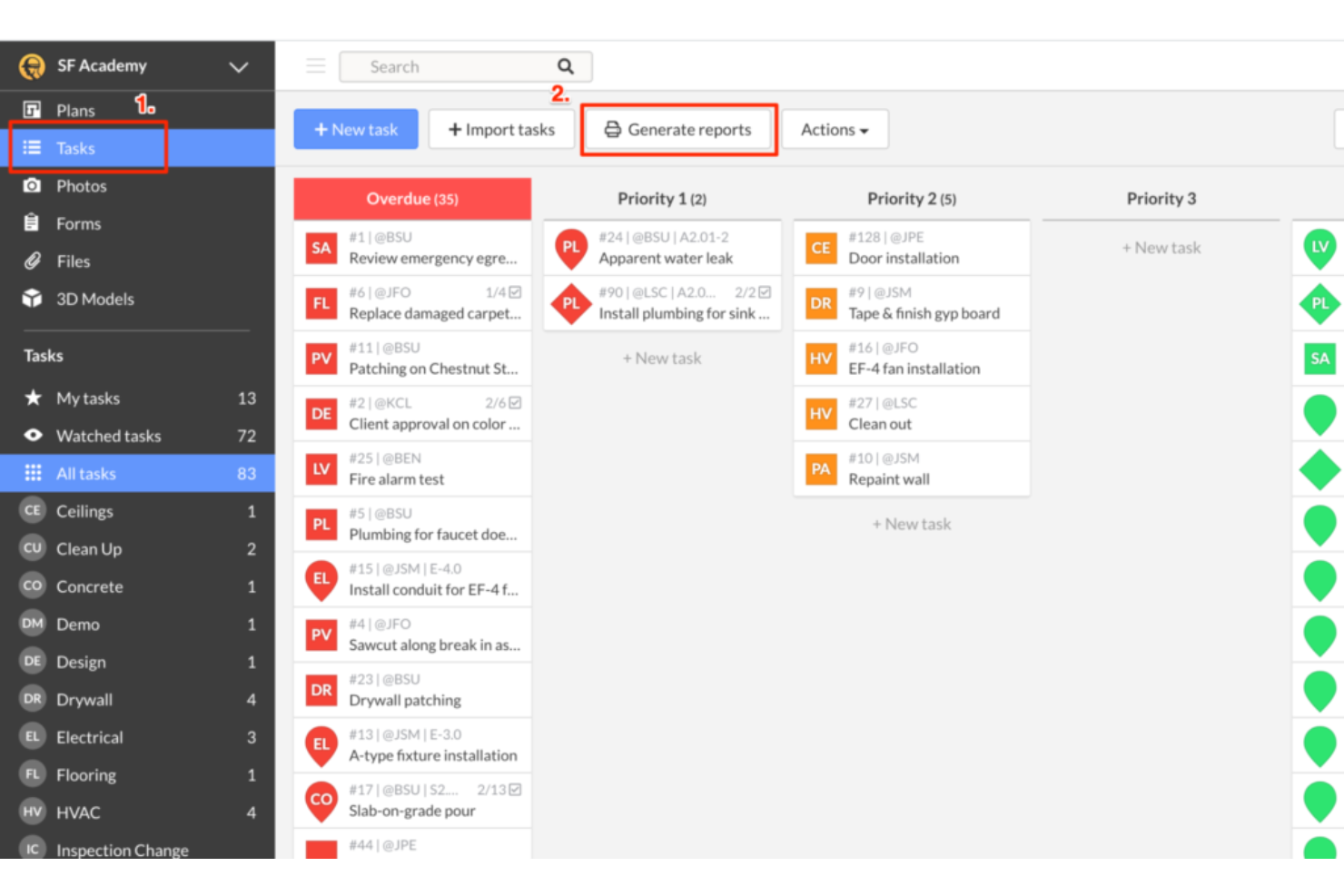
Fieldwire is construction project management software with a free plan that connects construction drawings with field tasks, forms, punch lists, and RFIs.
Who Is Fieldwire Best For?
Fieldwire is a good fit for construction site supervisors and forepersons coordinating crews and monitoring work across active job sites.
Why I Picked Fieldwire
I picked Fieldwire for job site management because it ties field work to construction drawings. I use plan-linked tasks to show crews exactly where work needs attention, then track punch list items and RFIs against the project plans. That keeps site updates connected to the drawings crews rely on.
Fieldwire Key Features
- Forms: Create and complete digital forms for inspections, safety checks, and other site records.
- Plan version control: Upload revised sheets and keep previous versions available for reference.
- File storage: Store project documents alongside site information for team access.
- Reports: Generate reports from project data to review and share site activity.
Fieldwire Integrations
Integrations include Microsoft SharePoint and Google Drive for syncing plans and files, plus Microsoft Power BI for task and form analytics. Fieldwire also offers a REST API for custom integrations; API access requires a managed account.
What's Free?
Fieldwire offers a free-forever Basic plan for up to five users, three projects, and 100 sheets. It includes core features such as plan viewing, task management, files, photos, and checklists, while reports, integrations, custom forms, and RFIs require a paid plan.
Pros and Cons
Pros:
- Photos and checklists support site documentation
- Plan viewing and task management included
- Drawing-linked tasks pinpoint field work
Cons:
- Reports and RFIs require paid plans
- Free plan caps teams at five users

Methvin
Best for estimate-linked schedule and cost tracking
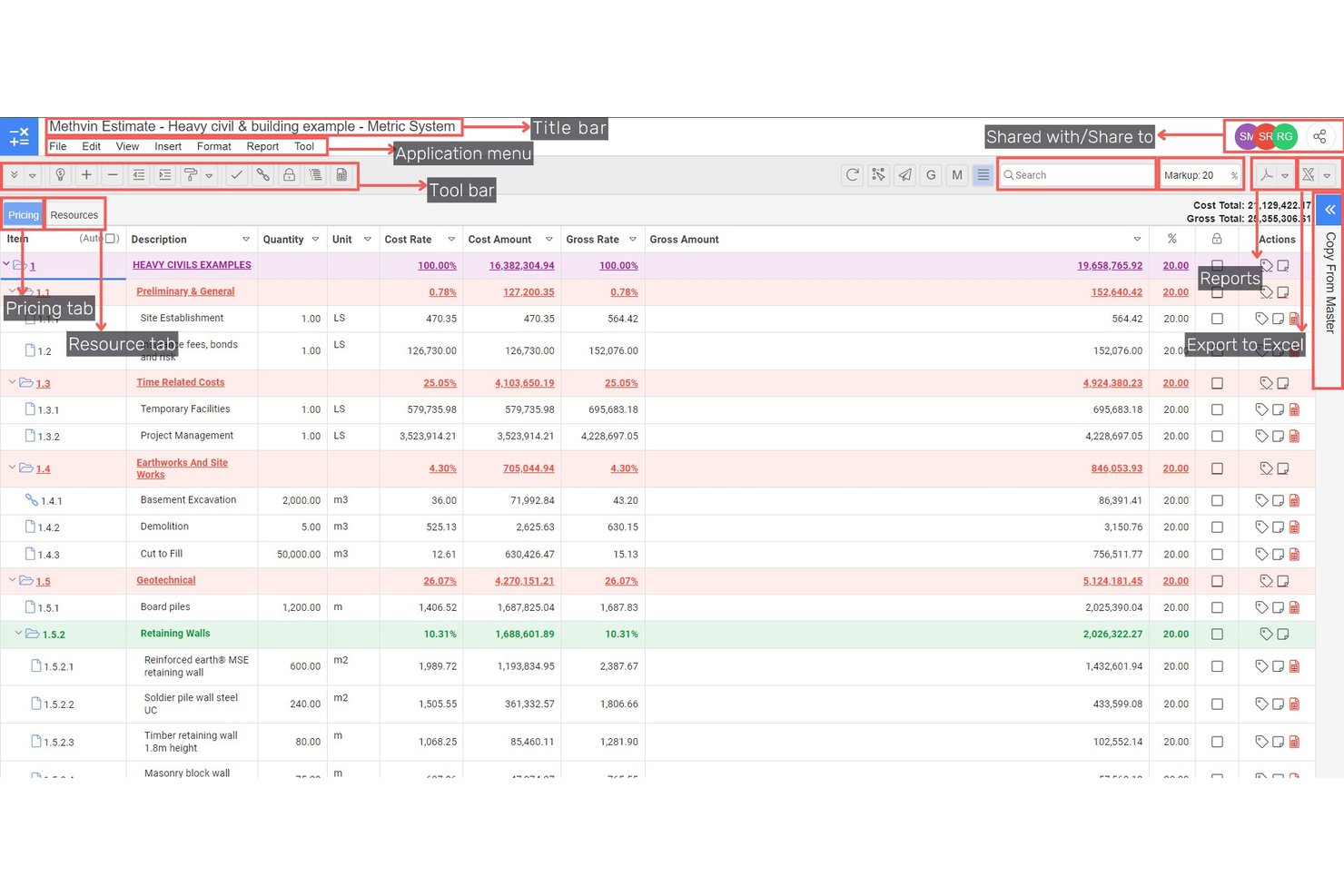
Methvin is construction project management software with estimating, digital takeoffs, tendering, project scheduling, and job cost tracking.
Who Is Methvin Best For?
Methvin suits construction estimators and project managers who need to coordinate bid preparation with project delivery.
Why I Picked Methvin
I picked Methvin because it connects construction estimating with project delivery. Its digital takeoffs, scheduling, and job-cost tracking support an estimate-linked view of planned work and costs as a job progresses.
Methvin Key Features
- Multi-view task register: Track tasks in board, timeline, calendar, progress, and file views.
- Role-based access: Set project access for team members and external collaborators.
- Task-linked correspondence: Keep comments and construction communications attached to related tasks.
- Task document attachments: Add drawings, submittals, and specifications to tasks or work packages.
Methvin Integrations
Methvin lists integrations with Xero, Wave, SAP, Oracle JDE, Aconex, and Basecamp. Its Business plan includes API access for Xero, SAP, and Oracle JDE.
What’s Free?
Methvin has a free-forever Starter plan, which includes Project Management (PMIS) for unlimited users and one free app. Shared apps are read-only, and the Estimating, Job Costing, and BIM apps are limited to five projects each.
Pros and Cons
Pros:
- Tasks offer board, timeline, and calendar views
- Unlimited users can access core PMIS
- Connects estimates with schedules and job costs
Cons:
- Five-project caps constrain estimating and job costing
- Shared apps are read-only
Diğer Ücretsiz İnşaat Proje Yönetimi Yazılımları
Kısa listeme girmeyen ancak yine de göz atmaya değer bazı ek ücretsiz inşaat proje yönetimi yazılımı seçenekleri şunlardır:
- ClickUp
For creating customizable workspaces
- Jira
For adapting agile workflows to build phases
- ProjectManager
For Gantt-driven schedule tracking
- OpenProject
For self-hosted open-source scheduling
- Notion
For flexible solo contractor workspaces


How I Evaluate Free Construction Project Management Software
First, I define what counts as free. A free construction project management tool needs a free-forever plan, not just a trial, with usable project and user limits for ongoing jobs. From there, I weigh core functionality most: assigning tasks, tracking deadlines; standout features: photo-based daily logs; and beyond features: free-plan limits as crews grow.
Core Functionality (Table Stakes For This List)
In addition to my free plan requirements, I use a scoring system to select tools for my list. I score each one on a scale from 0 (does not offer the functionality) to 5 (excels in this area) for each core functionality listed below, based on what's available on the free plan. I then convert the total into a percentage to help assess each tool's overall fit, with extra weight on any functionalities I've deemed essential.
- Task & Schedule Management (Essential): I look for tasks with owners and due dates, plus phase or timeline views that help track work from site preparation through closeout.
- Document & File Storage: I check whether teams can organize and share plans, permits, and site photos alongside the work they support.
- Budget & Cost Tracking: I look for project fields or logs to record estimates and actual costs, so managers can review spend as work progresses.
- Team Collaboration & Communication: I assess whether comments, activity updates, or notifications keep office staff, crews, and subcontractors informed about changes.
- Mobile Accessibility: I check whether field teams can view schedules, update tasks, add photos, or comment from a mobile device.
Once I have a list of tools that meet the criteria, I consider what sets each platform apart.
Differentiating Factors (What Sets Vendors Apart)
Here's how I compare and contrast different vendors:
Standout Features
I look for photo-based daily logs that let field crews attach jobsite images directly to reports—this gives office teams visual proof of progress without a site visit. Punch list tools matter just as much, since built-in checklists for flagging and assigning deficiencies keep closeout organized across trades. I also check for offline mobile mode, because crews working in basements or rural areas need to log updates without connectivity and sync later.
Beyond Features
I check whether free plans let you export schedules and daily logs to PDF or CSV, since contractors regularly need to hand reports to clients or inspectors outside the platform. Team size scalability matters just as much—some tools cap users at three or five, which falls apart the moment you bring on a second subcontractor. I also evaluate how quickly field crews can get started, looking for pre-built templates and intuitive mobile layouts that don't require a training session before someone can log a task from the jobsite.
Ücretsiz İnşaat Proje Yönetimi Yazılımı Nasıl Seçilir?
En iyi ücretsiz inşaat proje yönetimi yazılımı; ekibinizin büyüklüğüne, yönettiğiniz etkin proje sayısına ve yazılımın desteklemesini istediğiniz inşaat iş akışlarına bağlıdır. Ücretsiz planların önemli sınırlamaları olabilir; bu nedenle bir platformu kullanmaya karar vermeden önce gerçekten nelerden yararlanabileceğinizi karşılaştırın.
| Faktör | Dikkat Edilmesi Gerekenler |
|---|---|
| Ücretsiz Plan Sınırlamaları | Dahil edilen maksimum kullanıcı, proje ve depolama alanı sayılarını kontrol edin. Ücretsiz katmanın, hemen yükseltme gerektirmeden mevcut ekibinizi ve devam eden işlerinizi destekleyebildiğinden emin olun. |
| İnşaat İş Akışları | Planlama, günlük kayıtlar, çizimler, RFI'lar, eksik işler listeleri, değişiklik emirleri ve ilerleme takibi gibi projeleri yürütme biçiminizle uyumlu özellikleri arayın. |
| Saha Erişimi | Ekiplerin planları görüntüleme, görevleri güncelleme, fotoğraf yükleme ve şantiye ilerlemesini kaydetme dahil olmak üzere telefon veya tabletten neler yapabileceğini değerlendirin. Güvenilir bağlantının olmadığı sahalarda çevrimdışı erişim de önemli olabilir. |
| Planlama ve Bağımlılıklar | Ücretsiz planın ihtiyaç duyduğunuz planlama düzeyini destekleyip desteklemediğini belirleyin. Daha küçük işler için temel görev tarihleri yeterli olabilirken daha karmaşık projeler bağımlılıklar, kilometre taşları veya Gantt çizelgeleri gerektirebilir. |
| Belge Yönetimi | Çizimlerin, izinlerin, fotoğrafların, sözleşmelerin ve diğer proje dosyalarının nasıl depolanıp paylaşıldığını ve ücretsiz plandaki depolama sınırlarını kontrol edin. |
| Maliyet Takibi | Proje maliyetlerini izlemeniz gerekiyorsa bütçeleme, tahmin, zaman takibi veya iş maliyetlendirmesinin ücretsiz olarak sunulup sunulmadığını ya da ücretli planlara mı ayrıldığını kontrol edin. |
| İş Birliği ve İzinler | Ücretsiz kullanıcı sınırını aşmadan taşeronları, müşterileri veya saha ekiplerini ekleyip her kişinin neleri görüntüleyebileceğini veya düzenleyebileceğini kontrol edip edemeyeceğinizi değerlendirin. |
| Yükseltme Gereksinimleri | Hangi özelliklerin ileride ücretli bir plan gerektireceğini ve bu yükseltmenin ne kadara mal olacağını belirleyin. Bu, kısa sürede yetersiz kalacağınız ücretsiz bir aracı seçmekten kaçınmanıza yardımcı olabilir. |
Bir araç seçmeden önce ücretsiz plan sınırlarını ekibinizin inşaat projelerini gerçekte nasıl yönettiğiyle karşılaştırın. Daha küçük bir ekip yalnızca görev takibine, çizelgelere ve belge paylaşımına ihtiyaç duyabilirken birden fazla işi yöneten yükleniciler daha gelişmiş planlama, maliyet takibi, saha raporlaması ve taşeron koordinasyonuna ihtiyaç duyabilir.
Ücretsiz İnşaat Proje Yönetimi Yazılımı Nedir?
Ücretsiz inşaat proje yönetimi yazılımı, yüklenicilerin ve inşaat ekiplerinin ücretli abonelik gerektirmeden projeleri planlamasına, koordine etmesine ve izlemesine yardımcı olur. Bu araçlar sürekli kullanılabilen ücretsiz bir plan sunar; ancak genellikle mevcut kullanıcı, proje, depolama alanı veya gelişmiş özellik sayısını sınırlar.
İnşaat ekipleri ücretsiz proje yönetimi yazılımını görevleri ve çizelgeleri yönetmek, proje belgelerini paylaşmak, saha ile ofis arasındaki koordinasyonu sağlamak ve iş ilerlemesini takip etmek için kullanabilir. Bazı platformlarda ayrıca günlük kayıtlar, çizimler, RFI'lar, eksik işler listeleri, tahmin veya maliyet takibi gibi inşaata özgü özellikler de bulunur.
Ücretsiz İnşaat Proje Yönetimi Yazılımı Nasıl Yardımcı Olur?
Ücretsiz inşaat proje yönetimi yazılımı, daha küçük ekiplerin proje bilgilerini elektronik tablolar, e-postalar, basılı belgeler ve ayrı iletişim araçları arasında dağılmış halde tutmak yerine merkezi bir yerde yönetmesini sağlar. Ayrıca gelişmiş özelliklere ihtiyaç duymayan ekipler için özel inşaat proje yönetimi yazılımına daha erişilebilir bir alternatif sunabilir.
Örneğin görev yönetimi ve planlama, proje yöneticilerinin yaklaşan işleri koordine etmesine yardımcı olurken belge paylaşımı saha ekiplerinin güncel planlara ve proje dosyalarına erişmesini sağlar. Mobil araçlar ayrıca ekiplerin ilerlemeyi kaydetmesine, fotoğraf yüklemesine ve şantiyeden güncellemeleri paylaşmasına yardımcı olabilir. Daha özel saha koordinasyonuna ihtiyaç duyan ekipler, çalışma saatlerini kaydetmek ve iş gücü verilerini proje çalışmalarıyla ilişkilendirmek için inşaat zaman takip yazılımından da yararlanabilir.
Ücretsiz planlarda genellikle sınırlamalar bulunur; bu nedenle bu planlar daha küçük yükleniciler, bireysel proje yöneticileri veya nispeten basit proje gereksinimlerine sahip ekipler için en iyi sonucu verir. Proje, kullanıcı veya inşaat iş akışı sayısı arttıkça gelişmiş planlama, iş maliyetlendirme, raporlama ve taşeron yönetimi gibi özellikler ücretli bir plan gerektirebilir. Seçenekleri karşılaştıran ekipler, genel amaçlı araçların inşaat odaklı platformlarla nasıl karşılaştırıldığını görmek için daha kapsamlı ücretsiz proje yönetimi yazılımlarını da inceleyebilir.
Ücretsiz İnşaat Proje Yönetimi Yazılımının Özellikleri
İnşaat proje yönetimi yazılımında yaygın olarak bulunan özellikleri ve bunların ücretsiz ve ücretli planlarda genellikle hangilerinin yer aldığını inceleyelim.
Genellikle Ücretsiz Sunulan İnşaat Proje Yönetimi Yazılımı Özellikleri
- Görev yönetimi: Görevleri atamanıza, son teslim tarihleri belirlemenize ve ilerlemeyi takip etmenize olanak tanıyarak hiçbir işin gözden kaçmamasını sağlar.
- Belge paylaşımı: İzinleri, çizimleri ve planları tek bir yerden yüklemenize ve bunlara erişmenize olanak tanır.
- Temel zamanlama: Tarihleri atamanıza, proje aşamalarını düzenlemenize ve yaklaşan inşaat görevlerini takip etmenize yardımcı olur. Bağımlılıklar, kritik yol araçları ve gelişmiş Gantt zamanlaması ücretli bir plan gerektirebilir.
- Ekip mesajlaşması: Doğrudan platform üzerinden ekibinizle iletişim kurmanız için basit yollar sunar.
- Sınırlı proje yönetimi: Ücretsiz planlar genellikle sınırlı sayıda aktif projeyi, kullanıcıyı veya her ikisini destekler; ancak kesin sınırlar platforma göre değişir.
- Mobil uygulama erişimi: Saha ekiplerinin görevleri veya güncellemeleri telefonlarından ya da tabletlerinden görüntülemesini sağlar.
- Etkinlik günlükleri: Herkesin gelişmelerden haberdar olması için değişikliklerin veya güncellemelerin sürekli güncellenen bir listesini gösterir.
Genellikle Ücretli Olan İnşaat Proje Yönetimi Yazılımı Özellikleri
- Birden çok proje yönetimi: Ayrı zaman çizelgeleri, görevler ve dosyalarla aynı anda birden fazla işi yönetmenize olanak tanır.
- Zaman ve iş gücü takibi: Ekip çalışma saatlerini projeye, göreve veya şantiyeye göre takip eder ve ekiplerin iş gücü maliyetlerini proje bütçeleriyle karşılaştırmasına yardımcı olabilir.
- Bütçe ve maliyet takibi: inşaat maliyetlerini tahmin etmenize, harcamaları takip etmenize ve gerçek maliyetleri bütçeyle karşılaştırmanıza olanak tanır.
- Gantt grafiği görünümleri: Bağımlılıkları planlamaya ve gecikmeleri erkenden fark etmeye yardımcı olan görsel zaman çizelgeleri sunar.
- Gelişmiş raporlama: Proje durumu, bütçe kullanımı ve ekip verimliliği için özel raporlar oluşturur.
- Özel kullanıcı izinleri: Farklı kullanıcıların veya rollerin neleri görebileceğini ve yapabileceğini kontrol etmenize olanak tanır.
- Müşteri veya alt yüklenici portalları: Harici iş ortaklarına ilgili proje bilgilerine sınırlı erişim sağlar.
Ücretsiz İnşaat Proje Yönetimi Yazılımının Faydaları
Ücretsiz inşaat proje yönetimi yazılımı, yüklenicilere ve küçük ekiplere başka bir yazılım aboneliği eklemeden işleri yönetmek için daha düzenli bir yol sunabilir. Ücretsiz plana dahil edilen özelliklere bağlı olarak temel faydalar şunları içerebilir:
- Merkezi proje bilgileri: Görevleri, zaman çizelgelerini, çizimleri, fotoğrafları ve diğer proje bilgilerini elektronik tablolara, e-postalara ve basılı kayıtlara dağıtmak yerine tek bir yerde tutun.
- Daha iyi saha ve ofis koordinasyonu: Proje yöneticilerine ve saha ekiplerine aynı görev güncellemelerine, zaman çizelgelerine, belgelere ve proje durumu bilgilerine erişim sağlayın.
- Daha net proje zamanlaması: İnşaat aşamalarını, son teslim tarihlerini ve atanan işleri düzenleyerek ekiplerin şu anda neler olduğunu ve sırada ne yapılması gerektiğini görmesini sağlayın.
- Daha tutarlı ilerleme takibi: Şantiyede tamamlanan işleri belgelemek ve gecikmeleri belirlemek için görev güncellemelerini, etkinlik günlüklerini, fotoğrafları ve günlük raporları kullanın.
- Daha kolay belge erişimi: Ekiplerin ihtiyaç duyduklarında güncel bilgilere erişebilmesi için planları, izinleri, proje dosyalarını ve diğer belgeleri depolayın ve paylaşın.
- Daha düşük yazılım maliyetleri: Temel inşaat proje iş akışlarını yazılım için önceden ödeme yapmadan yönetin; bu da ücretsiz planları küçük yükleniciler ve ekipler için kullanışlı hale getirebilir.
- Yükseltme öncesinde değerlendirme fırsatı: Daha yüksek sınırlara veya daha gelişmiş özelliklere sahip ücretli bir plana geçmeden önce platformun inşaat iş akışlarınıza uygun olup olmadığını belirlemek için ücretsiz sürümü kullanın.
Ücretsiz İnşaat Proje Yönetimi Yazılımının Maliyetleri ve Fiyatlandırması
Ücretsiz inşaat proje yönetimi yazılımını kullanmaya başlamak $0 maliyetlidir; ancak ücretsiz planlar genellikle kullanıcı sayısını, aktif projeleri, depolama alanını veya sunulan gelişmiş özellikleri sınırlar. Ekibinizin ya da proje gereksinimlerinizin büyümesiyle birlikte gelişmiş zamanlama, maliyet takibi, raporlama, entegrasyonlar veya ek kullanıcılar gibi özellikler için ücretli bir plana yükseltmeniz gerekebilir.
Aşağıdaki tablo, tipik fiyatlandırma kademelerini ve her düzeyde bulabileceğiniz özellik türlerini gösterir.
İnşaat Proje Yönetimi Yazılımı İçin Plan Karşılaştırma Tablosu
| Plan Türü | Ortalama Fiyat | Yaygın Özellikler |
|---|---|---|
| Ücretsiz Plan | $0 | Görev yönetimi, belge paylaşımı, temel planlama, ekip mesajlaşması ve tek proje. |
| Kişisel Plan | $5–$15/kullanıcı/ay | Birden fazla proje, mobil erişim, temel raporlar, takvim görünümü ve sınırlı entegrasyonlar. |
| İşletme Planı | $20–$40/kullanıcı/ay | Zaman takibi, bütçe araçları, Gantt çizelgeleri, gelişmiş raporlar ve kullanıcı izinleri. |
| Kurumsal Plan | $50–$100/kullanıcı/ay | Özel roller, denetim günlükleri, müşteri portalları, gelişmiş güvenlik ve özel destek. |
Ücretsiz İnşaat Projesi Yönetimi Yazılımı Hakkında SSS
Ücretsiz inşaat projesi yönetimi yazılımı hakkında sık sorulan soruların yanıtlarını burada bulabilirsiniz.