

2026 İçin CRM Özellikli En İyi 10 Proje Yönetimi Yazılımı

CRM İçeren En İyi Proje Yönetimi Yazılımları Kısa Listesi


Yerleşik müşteri ilişkileri yönetimi (CRM) özelliklerine sahip proje yönetimi yazılımlarını kullanmak, proje ve satış ekipleri arasındaki iş birliğini teşvik etmenin ve müşteri ihtiyaçlarını ön planda tutmanın en iyi yoludur.
Piyasada pek çok seçenek bulunuyor, bu nedenle çok çeşitli seçenekleri denedim ve değerlendirdim. Dijital proje yönetimindeki kapsamlı deneyimimi kullanarak küçük ve büyük işletmeler için CRM özelliklerine sahip en iyi proje yönetimi yazılımlarını buldum; böylece ihtiyaçlarınıza en uygun seçeneği bulabilirsiniz.
Why Trust Our Software Recommendations
Our team has been testing and reviewing software since 2012. As project managers ourselves, we know how difficult—and important—it is to choose the right software.
For this guide, we evaluated tools using hands-on testing and independent research, scoring tools using our selection criteria. We also draw on insights from industry thought leaders and practicing project management experts.
Our reviews reflect our human editorial judgment, not a sales pitch.
Expert reviewers:
Proje Yönetimi Yazılımları Karşılaştırma Tablosu
Aşağıdaki tabloda her bir CRM aracına sahip proje yönetimi yazılımının fiyatlandırma ayrıntılarını ve diğer özelliklerini karşılaştırın
Score legend (out of 5)
- Excellent 4.5–5
- Good 4–4.4
- Average 3–3.9
- Below average 2–2.9
- Poor 1–1.9
| Tool | Starting Price | Website | |||||||
|---|---|---|---|---|---|---|---|---|---|
| Best for agencies | 4.0 out of 5 | 5 | 4 | 4 | 4 | 3 | 4 | $10/user/month 14-day free trial + demo available | Book Demo |
| Best for CRM-native deal-to-project workflows | 3.7 out of 5 | 4 | 5 | 3 | 4 | 3 | 3 | $20/user/month Free plan available | Website |
| Best for client-facing project visibility | 3.5 out of 5 | 4 | 4 | 2 | 4 | 3 | 4 | $9/user/month 7-day free trial | Website |
| Best for linking contacts across deals and projects | 3.5 out of 5 | 4 | 4 | 4 | 2 | 3 | 4 | $29/user/month 14-day free trial + free demo available | Website |
| Best for creative agency project and revenue tracking | 3.7 out of 5 | 4 | 4 | 3 | 4 | 4 | 3 | $49/user/month Free demo available | Website |
| Best for custom fields tailored to CRM needs | 3.5 out of 5 | 5 | 4 | 2 | 4 | 3 | 3 | $10/user/month Free plan + free demo available | Book Demo |
| Best for small teams linking deals to delivery | 3.7 out of 5 | 4 | 4 | 3 | 3 | 4 | 4 | $22/user/month Free plan + 14-day free trial available | Website |
| Best for tracking deals into deliverables | 3.7 out of 5 | 4 | 4 | 3 | 4 | 4 | 3 | $17/user/month 14-day free trial | Book Demo |
| Best for professional services ops automation | 3.5 out of 5 | 4 | 4 | 3 | 4 | 3 | 3 | Pricing upon request Free demo available | Book Demo |
| Best for won-deal-to-project handoff | 3.7 out of 5 | 4 | 4 | 4 | 4 | 3 | 3 | $14/seat/month 14-day free trial + free demo available | Website |


CRM İçeren En İyi Proje Yönetimi Yazılımları İncelemeleri
CRM özelliklerine sahip en iyi proje yönetimi yazılımları hakkındaki incelemelerim burada. Her bir araç için avantajları ve dezavantajları, özellik setlerini ve öne çıkan kullanım alanlarını ele alarak hangi yazılımın ihtiyaçlarınıza en uygun olduğunu keşfetmenize yardımcı oluyorum.

Best for agencies

Productive is an all-in-one project management platform with a built-in Sales CRM, covering deal pipelines, project planning, time tracking, resource management, and invoicing in a single workspace.
Who Is Productive Best For?
Productive is a strong fit for digital and creative agencies that need to manage client relationships, project delivery, and financial performance without juggling multiple tools.
Why I Picked Productive
I've included Productive in my top picks because it's the only tool on this list built specifically around how agencies operate—from pitching new clients to delivering and billing for the work. What I like most is the Scenario Builder, which lets you model different pricing and resourcing combinations before you commit to a proposal, so you're not just winning deals, you're winning profitable ones. Once a deal closes, converting it directly into a project with the context already in place means there's no manual handoff between sales and delivery.
Productive Key Features
- Sales CRM pipeline: Track leads, contacts, and deals through customizable pipeline stages before any project work begins.
- Resource planning: Schedule your team's capacity across active projects using a visual workload overview to avoid over-allocation.
- Budget tracking: Monitor project budgets in real time against tracked hours and expenses to catch overruns early.
- Custom dashboards: Build reports across sales, project, and financial data using filters and metrics you define.
Pros and Cons
Pros:
- Sales CRM feature for tracking opportunities
- Comprehensive features for financial management and reporting
- Robust resource planning and tracking capabilities
Cons:
- Could have more integrations
- Initial setup can be time-consuming
New Product Updates from Productive
Productive Adds Email and Calendar Integrations for Agents
Productive adds Gmail, Outlook, Google Calendar, and Outlook Calendar connectors for its AI agents. These integrations let agents manage emails and create calendar events directly within Productive. For more information, visit Productive’s official site.

HubSpot
Best for CRM-native deal-to-project workflows
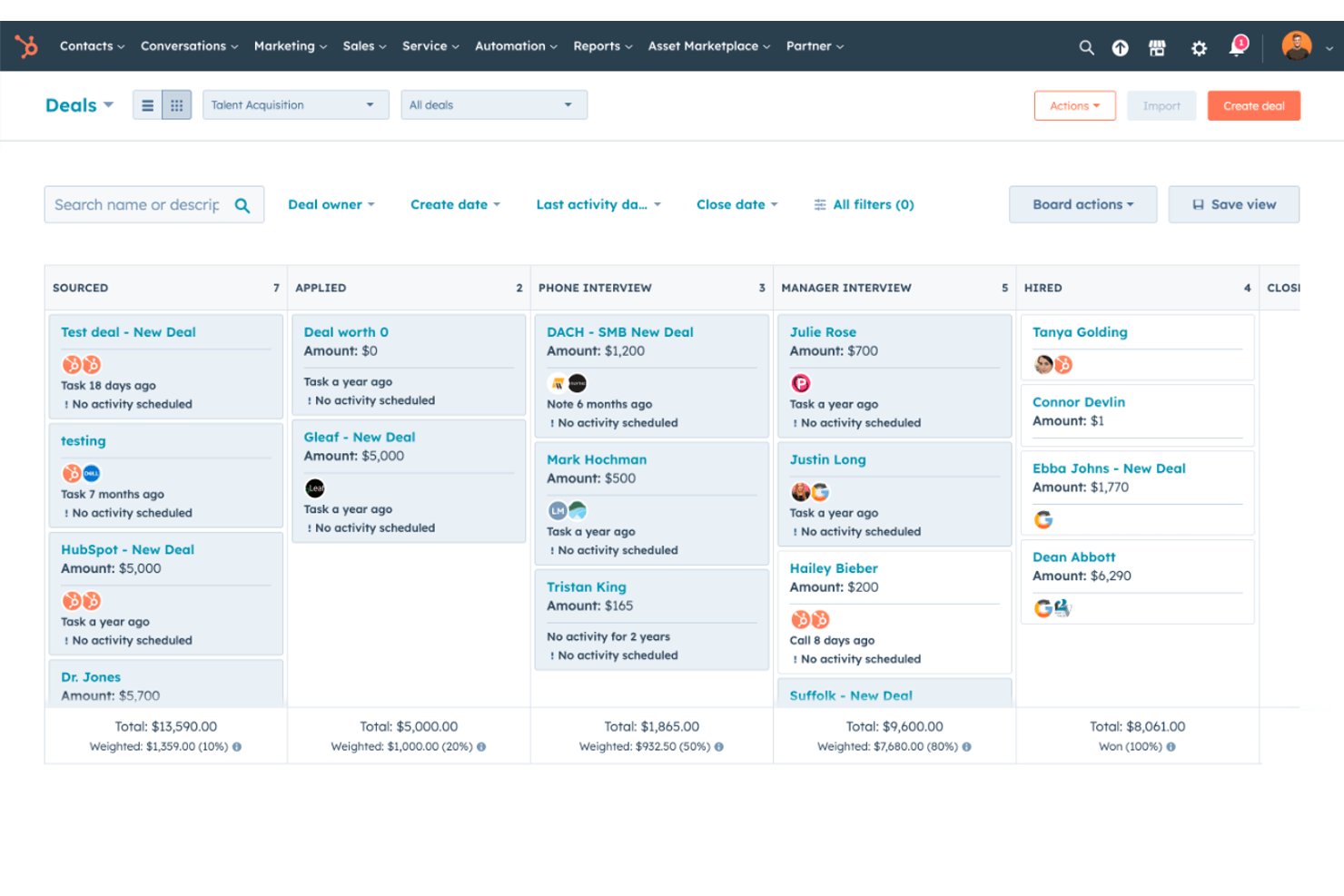
HubSpot Smart CRM is a CRM platform that combines contact, deal, and pipeline management with a built-in Projects object for task tracking, Gantt and board views, workflow automation, and deal-to-project conversion.
Who Is HubSpot Best For?
HubSpot Smart CRM is a strong fit for sales-led teams that want to manage deals and coordinate post-sale delivery work inside a single CRM platform.
Why I Picked HubSpot
I've included HubSpot in my top picks because its native Projects object lives inside the same CRM where your deals close, which means you're not copying data across tools when a sale converts to delivery work. I particularly like how you can build a workflow that triggers the moment a deal hits Closed Won and automatically creates a linked project record, complete with a dedicated delivery pipeline staged from kickoff through final sign-off. The Gantt view then lets me track that project's tasks on a timeline alongside the associated contact and deal data, all without leaving HubSpot.
HubSpot Key Features
- Contact and deal pipeline management: Create, customize, and clone pipelines and stages to track deals from first contact through close.
- Workflow automation: Trigger automated task creation, status updates, and notifications based on deal stage changes or CRM record activity.
- Custom reporting dashboards: Build role-specific dashboards that pull data across contacts, deals, and project records.
- Data enrichment: Automatically updates contact and company records to keep CRM data current without manual entry.
HubSpot Integrations
HubSpot supports over 2,000 integrations, including native Salesforce, Google Workspace, Microsoft 365, Slack, and Shopify connections. Marketplace integrations include Gmail, Google Calendar, Outlook, Jira, and Zapier; APIs, webhooks, and UI extensions support custom connections.
Pros and Cons
Pros:
- Reviewers praise centralized contact and deal histories
- Gantt timelines connect project tasks to CRM
- Won deals can trigger linked project creation
Cons:
- Client portal doesn’t expose project records
- Deal workflows require manual property mapping
Best for client-facing project visibility
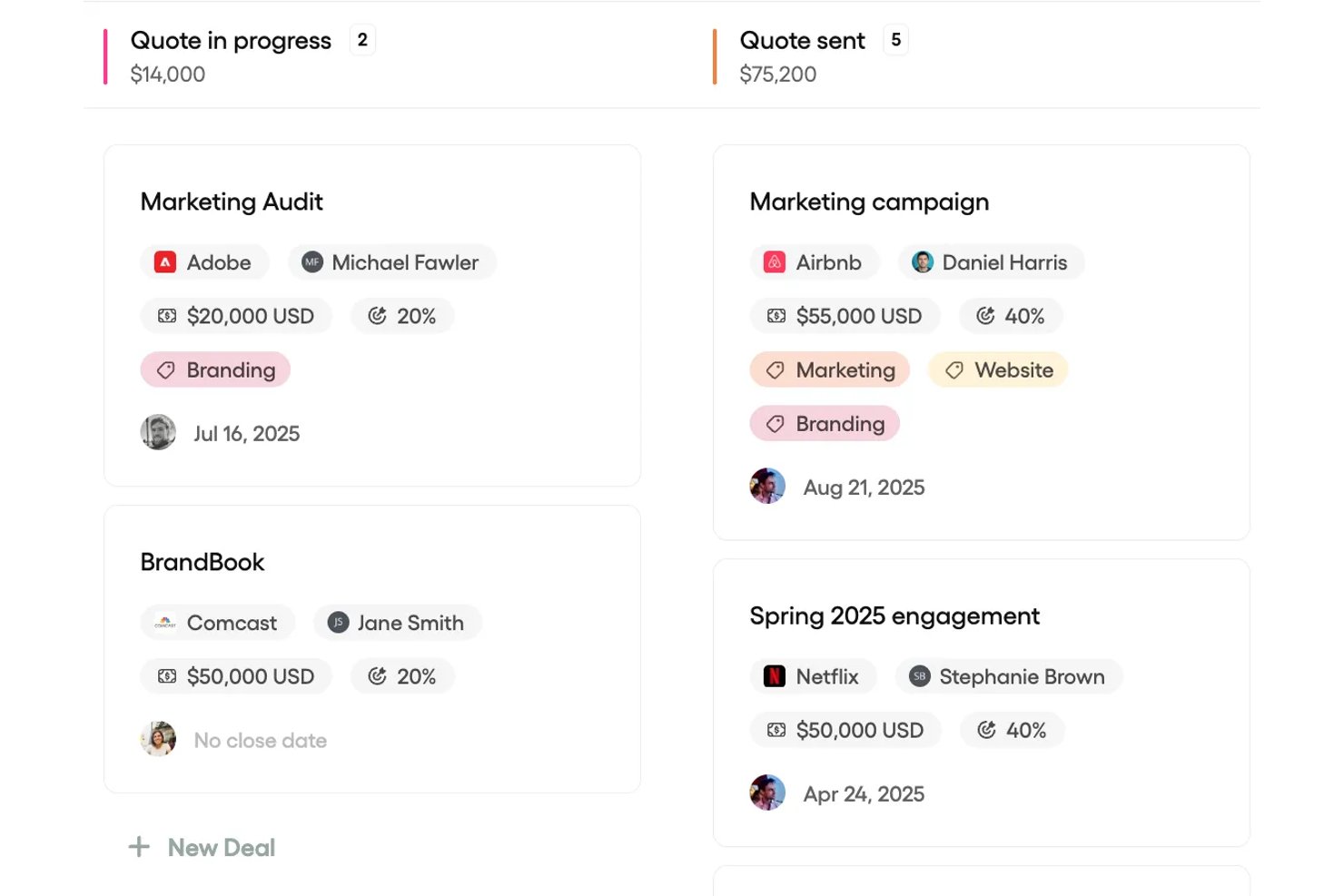
Bonsai Agency Software is an all-in-one platform for agencies and service businesses that combines CRM, deal pipeline management, project tracking, time tracking, and client invoicing in a single workspace.
Who Is Bonsai Agency Software Best For?
Bonsai is a strong fit for small agencies and client services teams that need to manage projects, client relationships, and billing without juggling multiple tools.
Why I Picked Bonsai Agency Software
I picked Bonsai Agency Software because it genuinely centralizes client-facing project visibility in a way most project tools don't. The client portal lets you share live project status, invoices, files, and task progress with clients directly, with per-client controls over exactly what they see. I also love that the contact activity feed logs proposals, contracts, emails, and portal messages in one timeline, so nothing slips through the cracks between sales and delivery.
Bonsai Agency Software Key Features
- Deal pipeline management: Track opportunities through customizable stages with win probabilities, deal values, and close dates on a Kanban board.
- Resourcing schedule: View team members' project allocations, spot over-allocation, and reassign or reschedule work across your roster.
- Task dependencies: Set "Waiting On," "Blocking," or "Related To" relationships between tasks, with dependent due dates that shift automatically.
- Time tracking with billable status: Log hours via timer or manual entry, mark time as billable or non-billable, and connect tracked hours directly to invoices.
Bonsai Agency Software Integrations
Bonsai lists integrations with QuickBooks, Xero, Calendly, Google, and Zapier. Its REST API supports API-key and OAuth 2.1 authentication for custom connections.
Pros and Cons
Pros:
- Contact timelines unite deals and correspondence
- Tracked hours connect delivery to billing
- Client portal keeps project updates visible
Cons:
- Task controls trail dedicated project platforms
- Won deals require manual project setup

Best for linking contacts across deals and projects
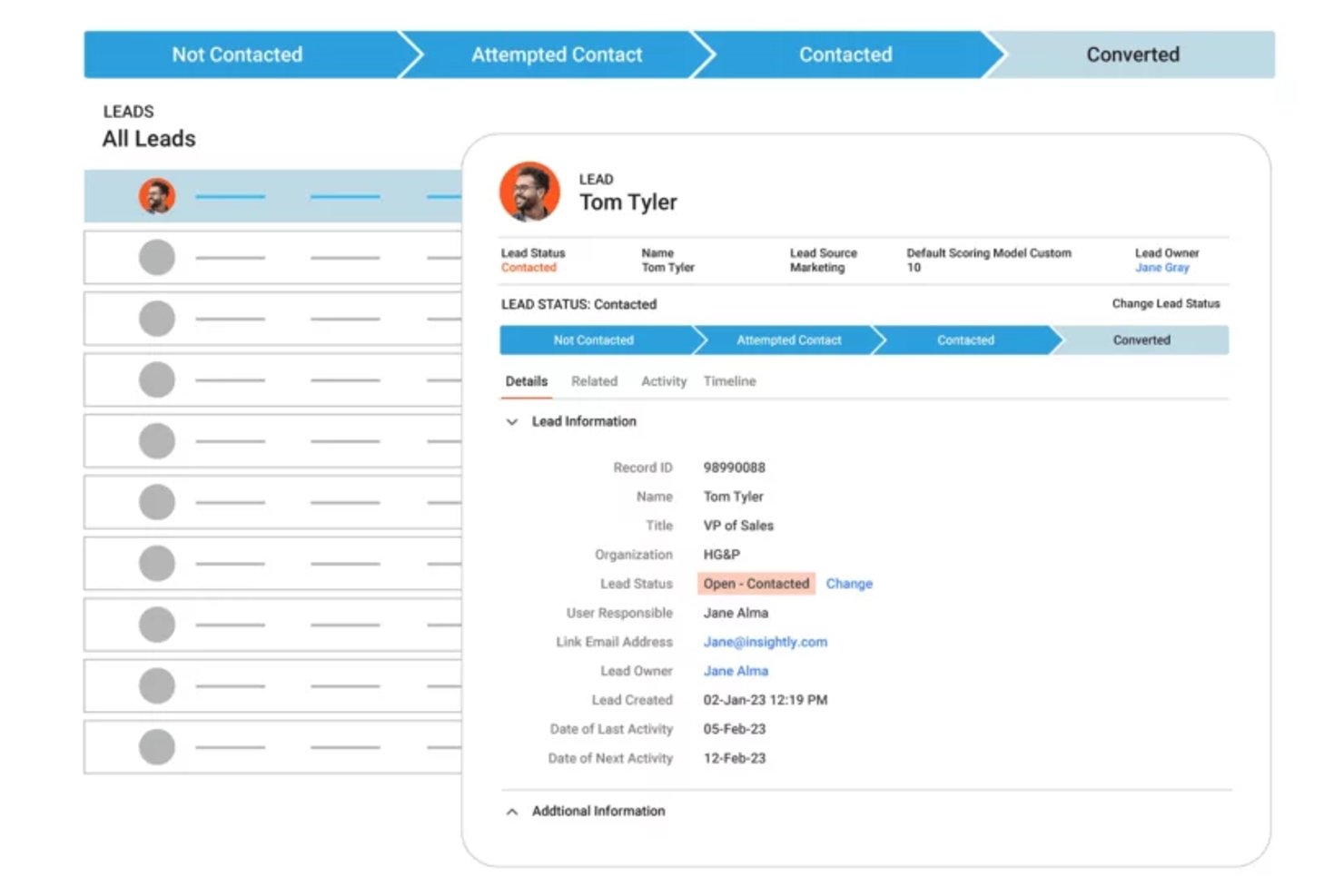
Insightly is a CRM and project management platform that combines sales pipeline tracking, contact and organization management, opportunity-to-project conversion, task management, and milestone tracking in a single system.
Who Is Insightly Best For?
Insightly fits small businesses and client services teams that need to manage contacts, deals, and project delivery without switching between separate tools.
Why I Picked Insightly
I picked Insightly as one of the best because of how tightly it links contacts across both deals and projects. When a deal closes, I can convert the opportunity into a project in a single action, and all the associated contacts, organizations, and links carry over automatically. From there, Insight Cards surface open deal details directly on linked contact records, so my team always sees where a client stands across the full relationship, not just the current project.
Insightly Key Features
- Activity sets: Group tasks and events into reusable sets that trigger automatically when a project or opportunity reaches a defined pipeline stage.
- Workflow automation: Automatically create tasks, update records, and send emails based on rules you configure across opportunities and projects.
- Time tracking timesheets: Log time against tasks across multiple projects using daily or weekly timesheets, with submission and approval states built in.
- AI email replies and summaries: Generate context-aware email responses and summarize prior communications directly from CRM records.
Insightly Integrations
Insightly offers marketplace integrations with over 2,000 business tools, including Slack, Jira, QuickBooks Online, Xero, DocuSign, Google, Microsoft 365, Shopify, and Asana. Its REST API and webhooks support custom integrations.
Pros and Cons
Pros:
- Reviewers value tracking tasks beside sales
- Won deals convert into linked projects
- Client records connect deals and project work
Cons:
- No documented Gantt charts or dependencies
- Sales and project dashboards remain separate

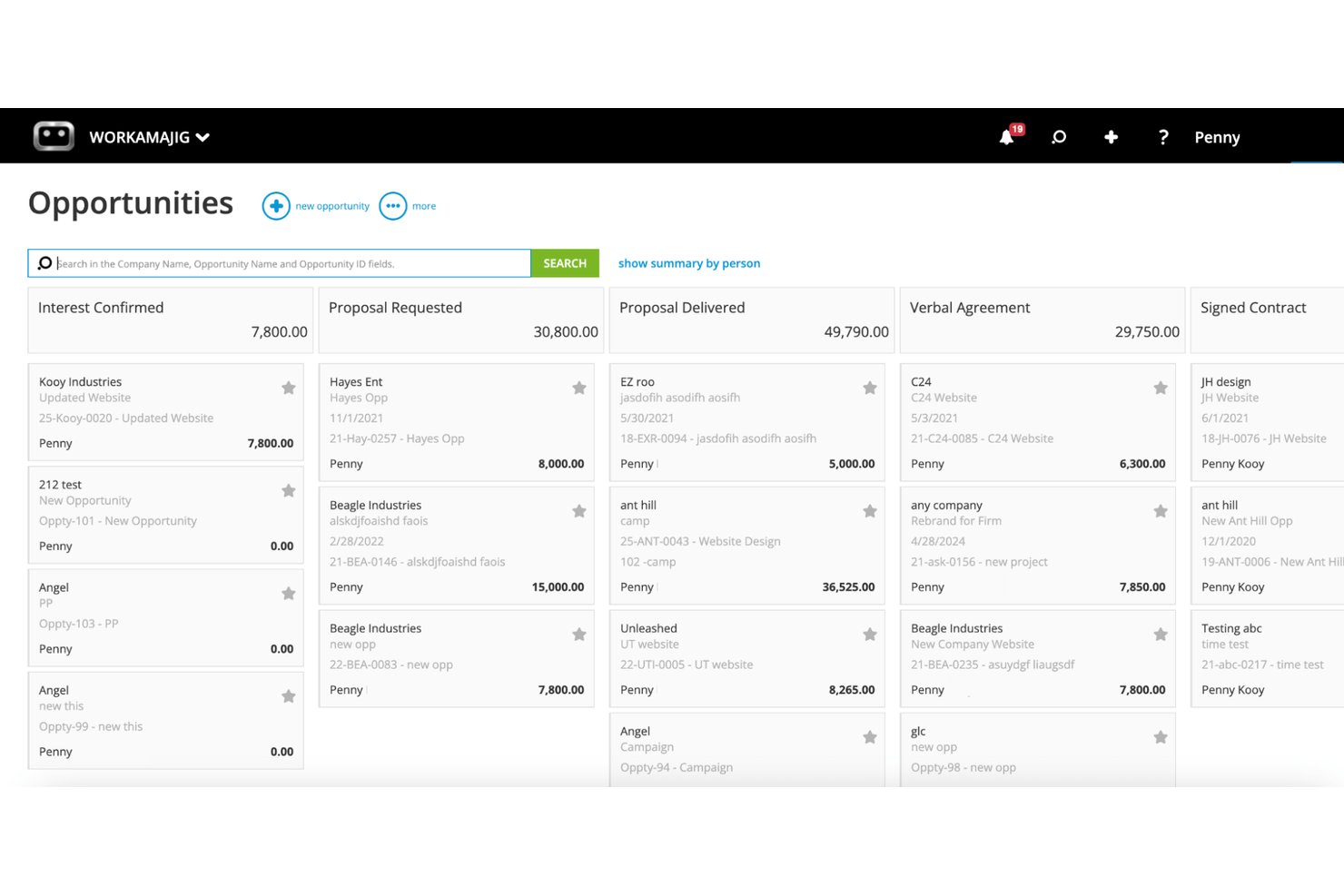
Workamajig is an agency management platform that combines project management, sales CRM, resource scheduling, time tracking, and financial management tools built specifically for creative and marketing agencies.
Who Is Workamajig Best For?
Workamajig is purpose-built for creative and marketing agencies that need to manage client projects, track billable time, and monitor revenue all in one place.
Why I Picked Workamajig
I picked Workamajig as one of the best because it's purpose-built for creative and marketing agencies that need project delivery and revenue tracking to live in the same system. When an opportunity is won, you can convert it directly into a project, carrying over estimates, schedules, and client conversations without re-entering anything. I also like that time logged against projects flows straight into billing worksheets, so invoicing reflects actual work rather than guesswork.
Workamajig Key Features
- Resource scheduling: View team availability, workload, and capacity, then assign or rebalance work using drag-and-drop scheduling.
- Digital proofing and approvals: Annotate images, videos, and live web pages directly in the platform and route them through approval workflows.
- Client portal: Give clients free logins to submit project requests, track status, review deliverables, and approve work.
- Revenue forecasting: Track projected revenue, pipeline stage totals, and sales performance against team targets from the CRM dashboard.
Workamajig Integrations
Workamajig offers native integrations with Google Calendar, iCal, Outlook/Exchange, and Slack. It also supports a REST API, JSON data feeds, CSV import/export, and Zapier.
Pros and Cons
Pros:
- Logged project time feeds client invoicing
- Client portal supports requests and approvals
- Agency workflows connect CRM, projects, and billing
Cons:
- Sales and project reporting can feel constrained
- Routine project updates require extra navigation
ClickUp
Best for custom fields tailored to CRM needs
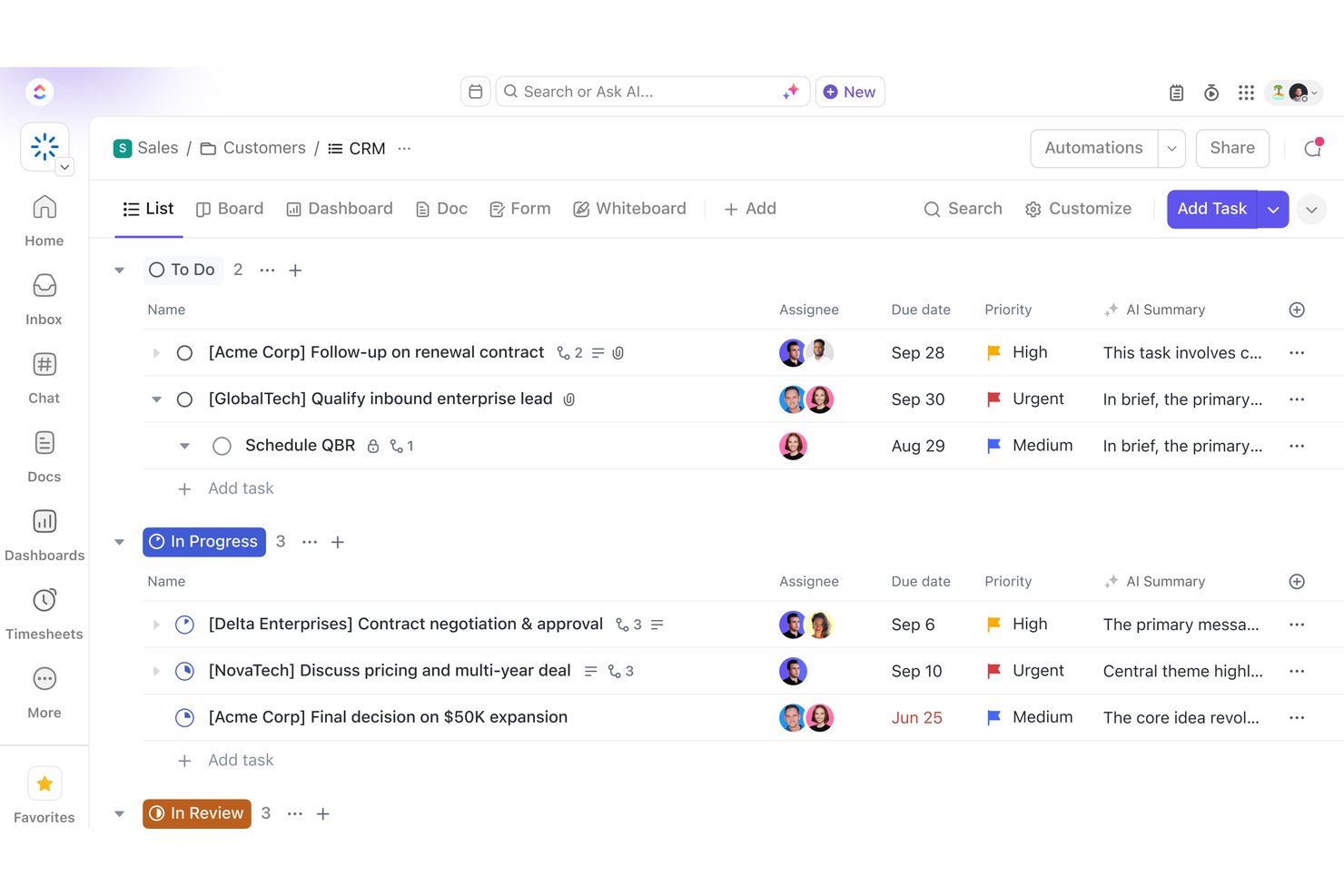
ClickUp is a work management platform that combines project tracking, task management, CRM pipelines, custom fields, dashboards, and team collaboration tools in a single workspace.
Who Is ClickUp Best For?
ClickUp is a strong fit for project managers and client services teams that need to build a customized CRM pipeline alongside their delivery workflows in one workspace.
Why I Picked ClickUp
ClickUp earns its spot on my shortlist because of how far you can push its custom fields to mirror your actual CRM process, not a generic one. I like that you can build deal records with fields for contract value, stage, owner, and region, then filter those fields directly into project views and dashboards. That means a services team tracking a B2B deal can surface the same client data across their pipeline board and their delivery workspace without duplicating it.
ClickUp Key Features
- CRM pipeline views: Display deal records in List, Board, or Table views to track leads, contacts, and deals by stage.
- Automated workflow triggers: Set rules that move leads between stages, create deal tasks, or kick off delivery work based on field changes or checkboxes.
- Native time tracking: Log billable hours directly on tasks with hourly rates set by member, task, or project and export reports by date range or billable status.
- Guest access controls: Share client-facing dashboards or list views with external stakeholders using view-only or comment-only permissions.
ClickUp Integrations
ClickUp offers 50+ native integrations, including HubSpot, Slack, GitHub, Google Drive, Microsoft Teams, Zoom, and Figma. It also supports API connections, webhooks, OAuth, an MCP Server, and Zapier.
Pros and Cons
Pros:
- Tasks connect client context with execution
- Dashboards surface pipeline and delivery status
- Custom fields map directly to deal workflows
Cons:
- Client records lack an automatic unified hub
- Won deals need manual project setup
New Product Updates from ClickUp
ClickUp Adds List Automations, Time Off Scheduling, and Org Charts
ClickUp adds template-based List automations, personal time off scheduling, a unified picker, automatic task date syncing, and Org Charts. These updates help teams automate project setup, manage availability, and organize work. For more information, visit ClickUp’s official site.

Capsule
Best for small teams linking deals to delivery
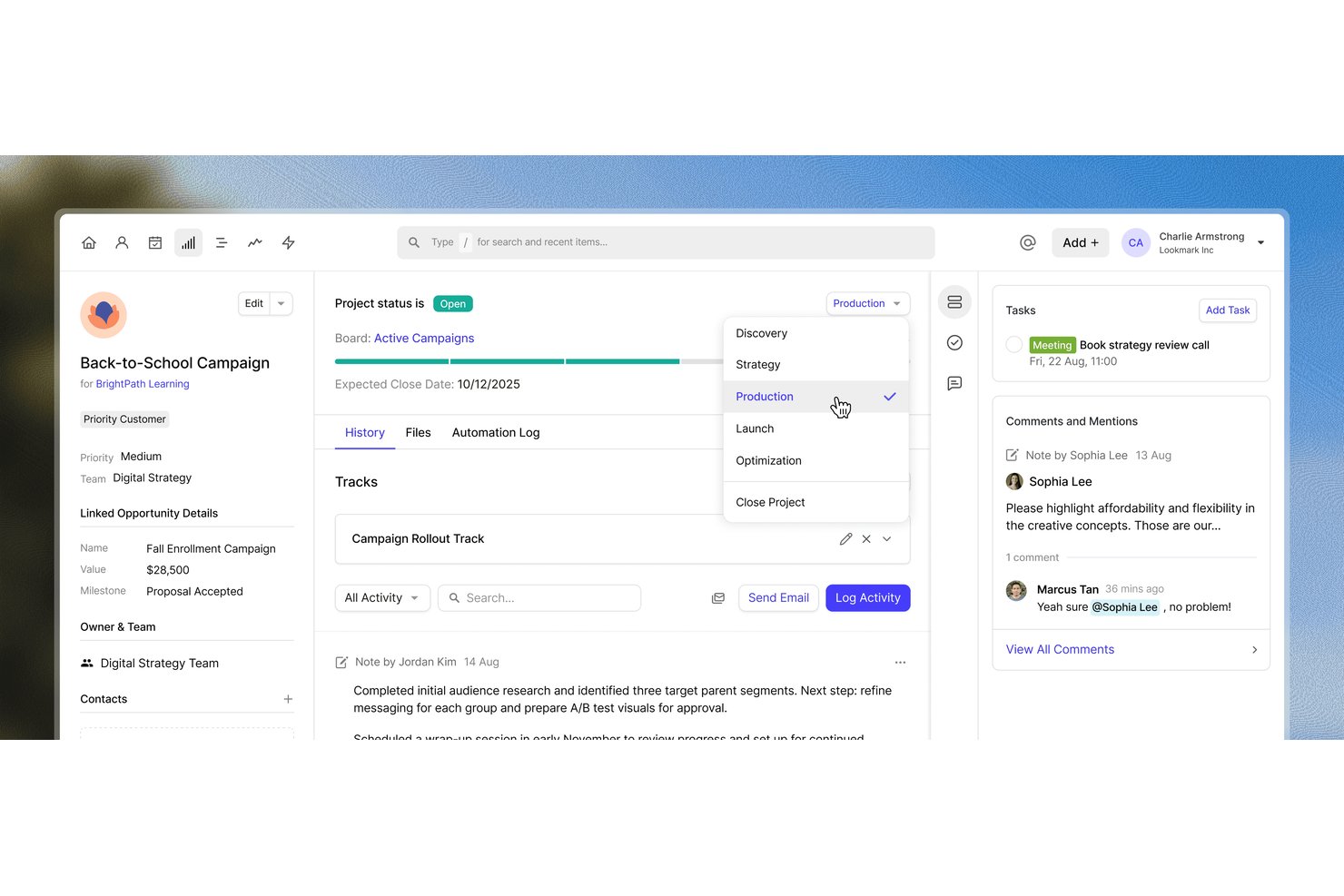
Capsule CRM is a contact and deal management platform that pairs a visual sales pipeline with project boards, task tracking, and workflow automation to manage client relationships and delivery work in one place.
Who Is Capsule Best For?
Capsule fits small teams that need to manage client relationships and deliver project work without juggling two separate tools.
Why I Picked Capsule
I picked Capsule as one of the best because it's one of the few tools that genuinely closes the loop between winning a deal and delivering on it. When an opportunity moves to Won, Capsule can automatically create a linked project, assign it to the right person, and apply a reusable Track, so your delivery team picks up exactly where sales left off. I also like how project dashboards surface Opportunity value by board, giving you a real view of revenue tied to active delivery work.
Capsule Key Features
- AI contact enrichment: Automatically populates contact records with job title, seniority, LinkedIn profile, and missing contact details.
- Custom reporting dashboards: Lets you combine sales, task, project, and activity reports into a single shareable dashboard.
- Mail Drop Box: A unique email address per project that logs forwarded or BCC'd emails directly to that project's record.
- Reusable Tracks: Pre-built task sequences that can be applied to any project, assigning due dates automatically based on an end date.
Capsule Integrations
Capsule lists 60+ integrations in its pricing FAQ, including marketplace integrations with Slack, Microsoft Teams, DocuSign, Clockify, Tidy Work, Xero, and QuickBooks Online. It also supports Zapier and REST API access for custom integrations.
Pros and Cons
Pros:
- Task reminders and calendars keep deadlines visible
- Dashboards connect opportunity value with project boards
- Won deals can launch linked delivery Tracks
Cons:
- Users report limited flexibility in project reporting
- No Gantt view or task dependencies
New Product Updates from Capsule
Capsule Adds AI-Powered Marketing Assistance in Transpond
Capsule’s Transpond has opened early access to AI-powered marketing assistance, letting users connect an AI tool to query campaign data and get help building automations. For more information, visit Capsule's official site.
 .
Scoro
Best for tracking deals into deliverables
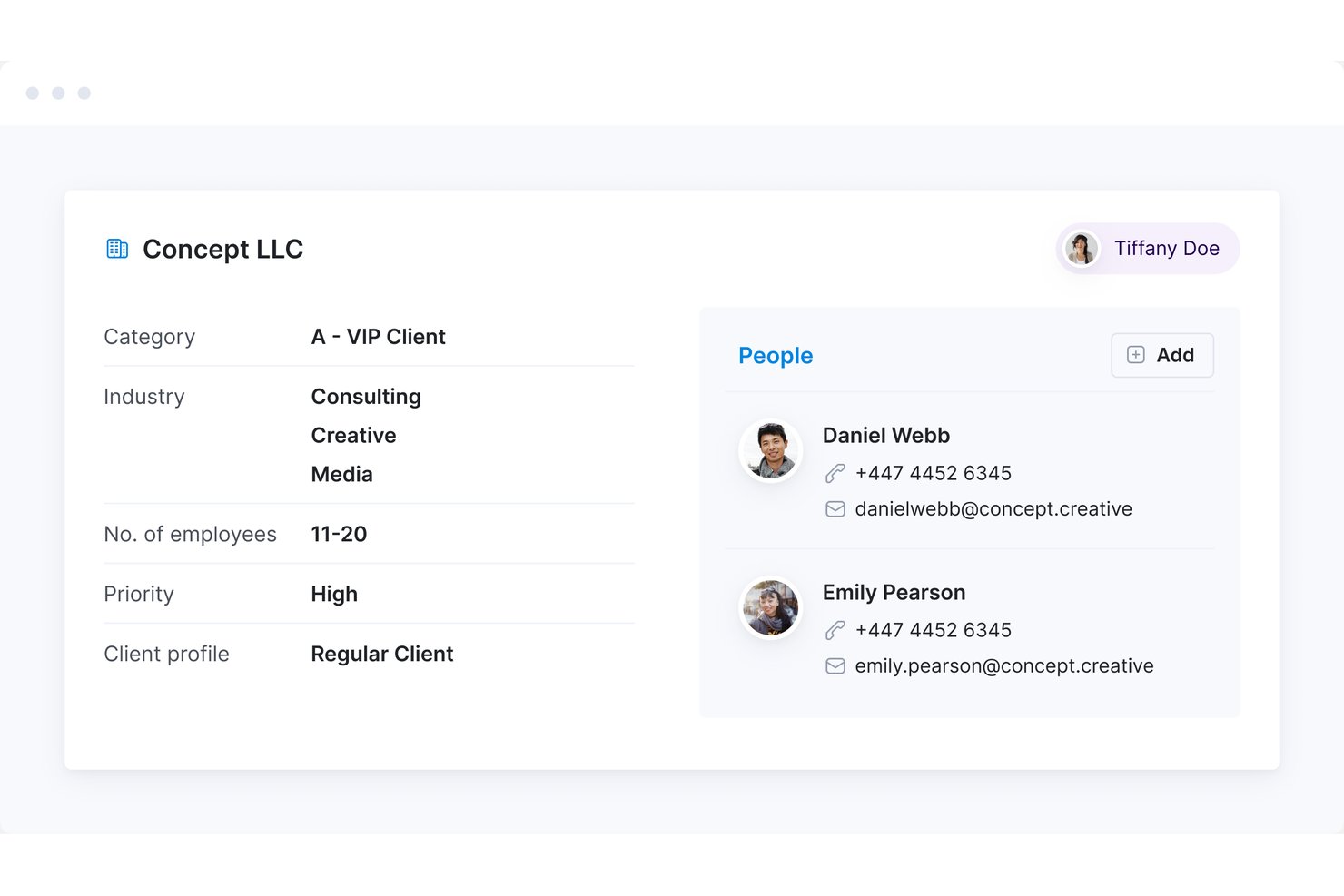
Scoro is a professional services automation platform that brings CRM and pipeline management, project delivery, time tracking, resource planning, and invoicing into a single modular system.
Who Is Scoro Best For?
Scoro fits professional services teams—agencies, consultancies, and engineering firms—that need to manage the full arc from client pipeline to project delivery and invoicing in one place.
Why I Picked Scoro
Scoro earns its spot on my shortlist because it's genuinely built around the full arc from pipeline to payment—not just bolted-together CRM and project tools. I love how a won quote converts directly into a project, with budget fields prefilled and tasks created from the quote line items, which means delivery teams start with real scope instead of a blank canvas. The pipeline report also does something I find valuable: it weights deal values by close probability and stage, so you're not flying blind when planning capacity for upcoming projects.
Scoro Key Features
- Customer portal: Give clients controlled access to selected projects, tasks, files, invoices, and comments through a dedicated external portal.
- Utilization report: View scheduled, available, and used team time across upcoming periods, with skills filters to assess capacity before taking on new work.
- Time-billing: Generate invoices directly from logged billable project activities, consolidating time across multiple projects into a single client invoice.
- Gmail add-on: Create or link Scoro tasks from emails, attach email content to task descriptions, and log time entries without leaving your inbox.
Scoro Integrations
Scoro offers integrations with 40+ tools, including native integrations with Salesforce, Xero, QuickBooks, Jira, Slack, Google Calendar, and Stripe, plus marketplace integrations with HubSpot and Asana. It also provides a REST API, webhooks, Scoro MCP, and Zapier.
Pros and Cons
Pros:
- Logged billable time feeds client invoices
- Weighted pipeline forecasts inform capacity planning
- Quotes carry scope into project setup
Cons:
- Custom reporting questions require workarounds
- Task edits can take extra clicks
New Product Updates from Scoro

Scoro Adds Time Mobile App and ELI Improvements
Scoro adds the Scoro Time mobile app for iOS/Android to track time anywhere and expands ELI with attachments, smarter filtering, and trigger-based actions. For more information, visit Scoro's official site.

Accelo
Best for professional services ops automation
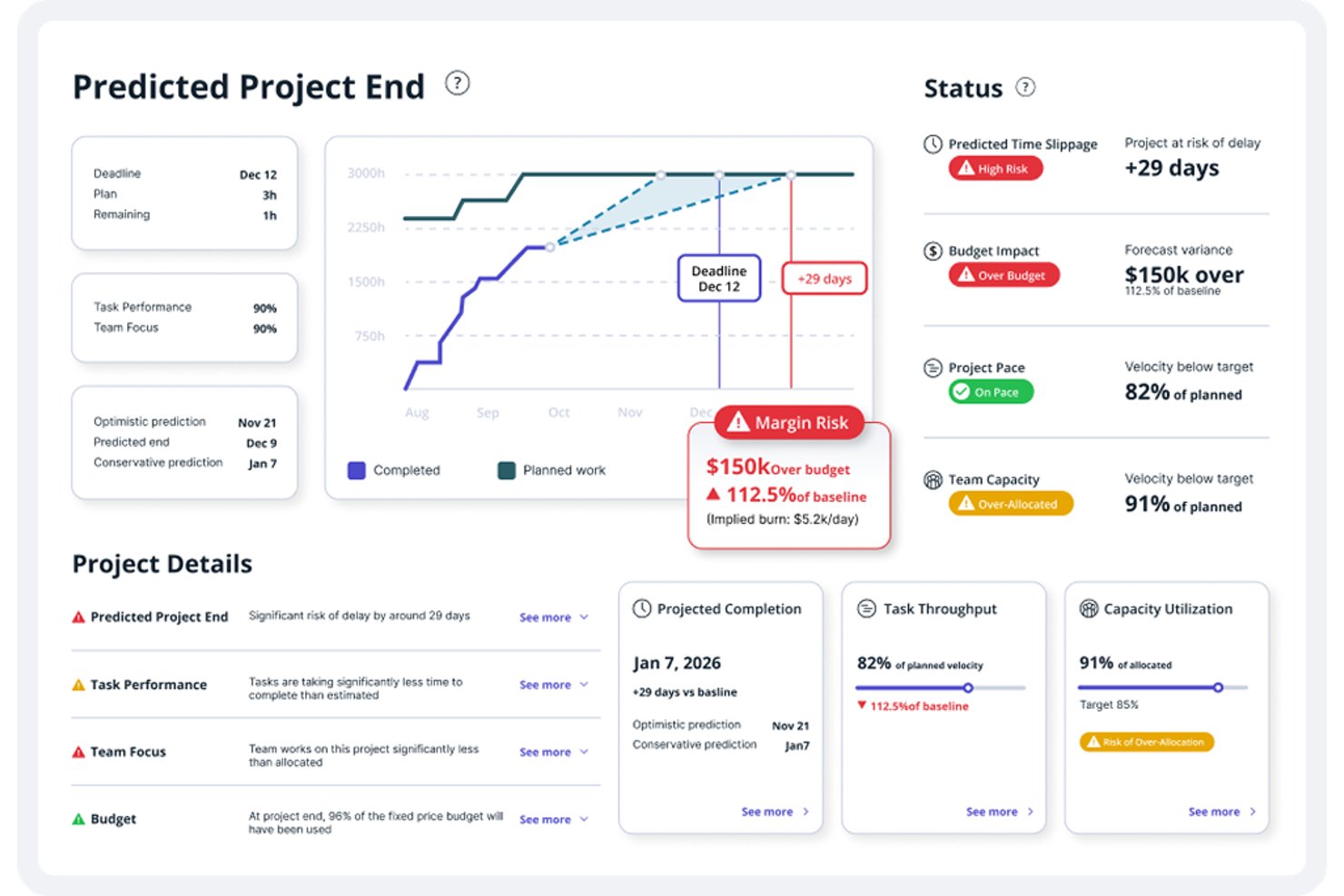
Accelo is a professional services automation platform that combines CRM, project management, time tracking, resource planning, and billing in one connected system.
Who Is Accelo Best For?
Accelo is a strong fit for client services teams at professional services firms that need to manage the full client lifecycle—from sales and quoting through project delivery and billing—in one connected system.
Why I Picked Accelo
I picked Accelo as one of the best because it's purpose-built for professional services ops automation in a way that few tools match. I love that accepted quotes convert directly into projects, carrying over milestones, tasks, budgets, and assignees, so delivery teams aren't rebuilding context from scratch. Accelo's Margin Guard and AI-powered profitability forecasting also surface financial risk before it becomes a problem, which is exactly what client services teams need when managing multiple engagements at once.
Accelo Key Features
- Client portal: Gives clients on-demand access to quotes, projects, invoices, tickets, and retainers, with the ability to view and pay invoices directly.
- Dynamic scheduling: Automatically updates task start and due dates as your team logs time, reschedules work, or approaches a deadline.
- Resource capacity planning: Forecasts future demand using pipeline opportunities and role-based placeholders to model tentative workloads before projects begin.
- Configurable triggers: Lets you set up automated condition-based actions—like creating a follow-up task after an unanswered quote—to keep deals and projects moving.
Accelo Integrations
Accelo lists integrations with Jira, Azure DevOps, GitHub, Slack, Microsoft 365, Google Workspace, Salesforce, HubSpot, QuickBooks, and Xero. It also provides RESTful and Forms APIs for custom integrations and supports Zapier.
Pros and Cons
Pros:
- Time entries link billable work to margins
- Client records keep correspondence beside related projects
- Accepted quotes carry tasks and budgets forward
Cons:
- Workflow setup takes time and configuration
- No combined pipeline-to-project outcome reports
New Product Updates from Accelo

Accelo Rebuilds Mobile App for Project and Time Management
Accelo rebuilds its mobile app with task management, new work creation, and mobile timesheets for Forecast customers. This helps teams keep project and time data current while working away from a desktop. For more information, visit Accelo’s official site.
Pipedrive
Best for won-deal-to-project handoff
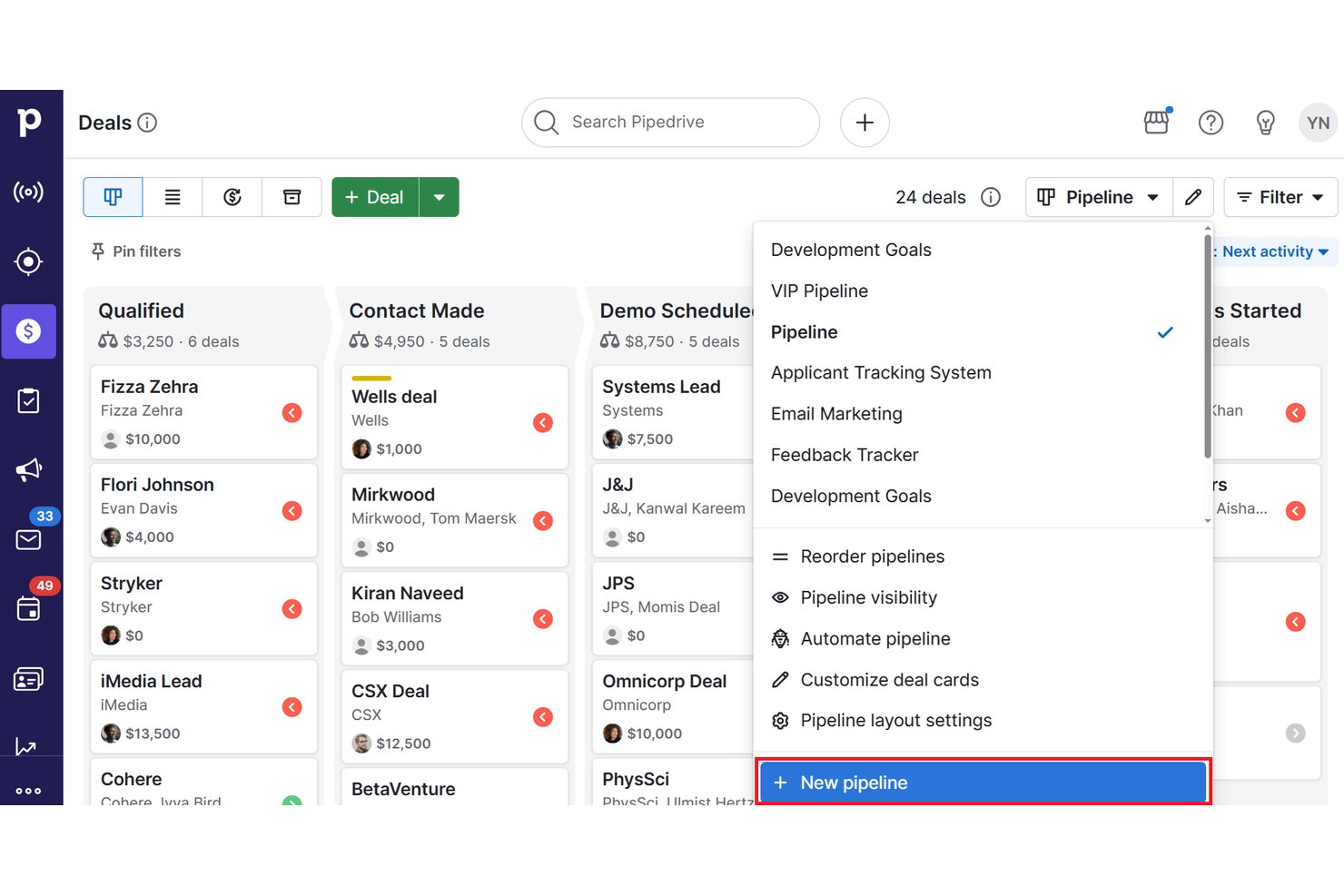
Pipedrive is a sales CRM with a built-in project management add-on that combines pipeline management, deal tracking, contact management, and post-sale project delivery in one workspace.
Who Is Pipedrive Best For?
Pipedrive suits small business owners and client services teams that need to take a won deal and hand it off to a delivery team without switching tools.
Why I Picked Pipedrive
I picked Pipedrive as one of the best because it handles the won-deal-to-project handoff better than any other CRM I've seen. When a deal closes, you can trigger a project automation that instantly builds a project from a template, complete with phased tasks, assignees, and relative due dates, all pre-loaded with the deal's notes, files, and email history. I also love that the deal detail view stays live-linked to the project, so your sales and delivery teams can see progress on both sides without duplicating a single record.
Pipedrive Key Features
- Gantt timeline view: Visualize project tasks and milestones on adjustable day, week, month, or year timelines with drag-and-drop rescheduling and task dependencies.
- Reusable project templates: Build templates with phased tasks, relative due dates, and dependencies that can be applied to new projects or triggered through automations.
- Insights combined-data reporting: Filter project performance reports using linked deal, contact, or organization data to connect sales and delivery in one report.
- Smart Docs with e-signatures: Create, send, and track quotes, proposals, and contracts with built-in e-signature support directly within Pipedrive.
Pipedrive Integrations
Pipedrive lists 500+ integrations, including native Asana, Microsoft Teams, DocuSign, QuickBooks, and WhatsApp Business integrations, plus marketplace options such as Slack, Trello, Xero, Zoom Meetings, and Zapier. Its RESTful API and webhooks support custom integrations.
Pros and Cons
Pros:
- Linked emails and files preserve handoff context
- Reviewers praise clear pipeline visibility
- Won deals trigger templated delivery projects
Cons:
- No native time tracking or capacity planning
- Sales and project reporting remain separate
CRM İçeren Diğer Proje Yönetimi Yazılımları
Yukarıda aradığınızı bulamadıysanız CRM özellikleri sunan birkaç proje yönetimi yazılımı aracı daha burada yer alıyor.
- Zoho CRM
For deal-driven project creation
- monday.com
For customizable deal-to-delivery workflows
- Asana
For AI-driven client delivery handoffs
- Zoho Projects
For Zoho-ecosystem project delivery
- Ravetree
For pipeline stages tied to project delivery
- Bitrix24
For all-in-one CRM and project suites
- Odoo
For modular ERP-linked project delivery


İlgili Proje Yönetimi Yazılımı İncelemeleri
Burada hâlâ aradığınızı bulamadıysanız, test edip değerlendirdiğimiz diğer ilgili araçlara göz atın:
- Proje Yönetimi Yazılımları
- Ücretsiz Müşteri Yönetimi Araçları
- Halkla İlişkiler Proje Yönetimi Yazılımları
- Kaynak Yönetimi Yazılımları
- İş Akışı Otomasyonu Yazılımları
- Zaman Takibi Yazılımları
- Görev Yönetimi Yazılımları
- İş Birliği Araçları
- Gantt Şeması Oluşturucu
- Verimlilik Araçları
- Proje Takibi Yazılımları
- Proje Planlama Yazılımları
How I Evaluate Project Management Software With CRM
I split my evaluation into three parts, giving the most weight to core functionality: connect contacts and won deals to projects, assign tasks, and track deadlines. Next, I consider standout features such as closed-won project triggers. Finally, I weigh beyond-feature factors like onboarding support and pricing value.
Core Functionality (Table Stakes For This List)
When I'm selecting tools for my list, I score each one on a scale from 0 (does not offer the functionality) to 5 (excels in this area) for each core functionality listed below. I then convert the total into a percentage to help assess each tool's overall fit, with extra weight on any functionalities I’ve deemed essential.
- Task & Project Tracking (Essential): I look for multiple projects with assignable tasks, clear statuses, and progress tracking from kickoff through delivery.
- Contact & Deal Management (Essential): I check whether teams can track contacts, companies, deal stages, and client history in a usable pipeline.
- Deal-to-Project Conversion: I evaluate how a won deal becomes a project, including whether client details, tasks, and files carry over.
- Shared Client Visibility: I look for client profiles that connect active projects and deals, so teams can see delivery context alongside relationship history.
- Scheduling & Timeline Views: I assess how teams plan and adjust work across calendar, board, or Gantt views when deadlines and dependencies shift.
- Sales and Project Reporting: I check whether dashboards connect pipeline activity with project progress, helping teams compare booked work with delivery status.
Once I have a list of tools that meet the criteria, I consider what sets each platform apart.
Differentiating Factors (What Sets Vendors Apart)
Here's how I compare and contrast different vendors:
Standout Features
I check whether a tool can auto-generate a project the moment a deal closes. That single trigger—spinning up folders, tasks, and timelines from a template—eliminates the manual handoff that causes dropped details between sales and delivery. I also evaluate client portal access, because giving clients a branded view of milestones and approvals keeps status updates out of your inbox and reduces internal interruptions.
Beyond Features
I evaluate whether CRM and project management features are bundled or split across paid tiers, since per-seat costs add up fast when both sales and delivery teams need access. Onboarding support matters just as much—vendors that offer dedicated migration assistance help teams recreate pipeline-to-project workflows without weeks of trial and error. I also check for role-based permissions and audit logs, especially for agencies handling confidential client contracts alongside open project boards.
CRM İçeren Proje Yönetimi Yazılımı Nasıl Seçilir?
Uzun özellik listeleri ve karmaşık fiyatlandırma yapılarına kendinizi kaptırmanız kolaydır. Kendinize özgü yazılım seçimi sürecinizi yürütürken odağınızı korumanıza yardımcı olmak için aklınızda bulundurmanız gereken faktörlerin bir kontrol listesini burada bulabilirsiniz:
| Faktör | Dikkat Edilmesi Gerekenler |
|---|---|
| Ölçeklenebilirlik | Yazılımın işletmenizle birlikte büyüyebildiğinden emin olun. Uzun vadeli büyümeyi destekleyen esnek fiyatlandırma, sınırsız kullanıcı ve otomasyon ile raporlama gibi gelişmiş özellikleri arayın. |
| Entegrasyonlar | Yazılım mevcut araçlarınıza (e-posta, muhasebe, pazarlama otomasyonu ve belge depolama) bağlanabilmelidir. Yerel entegrasyonlar ve açık API'ler iş akışlarını kolaylaştırır ve manuel çalışmayı azaltır. |
| Özelleştirilebilirlik | Ekibinizin iş akışları kendine özgüdür. Gerçekte çalışma şeklinize uyacak şekilde işlem hatlarını, panoları, otomasyon kurallarını ve kullanıcı rollerini özelleştirmenize olanak tanıyan bir platform seçin. |
| Kullanım Kolaylığı | Aşırı karmaşık bir araç ekibinizi yavaşlatır. Benimsenmeyi hızlandırmak için sade ve sezgisel bir arayüz, sürükle ve bırak işlevi ve kısa bir öğrenme süresi arayın. |
| Bütçe | Kullanıcı başına fiyatlandırma, eklentiler ve uygulama ücretleri dahil olmak üzere toplam maliyeti değerlendirin. Ücretsiz denemeler veya freemium planlar, taahhütte bulunmadan önce yazılımı test etmenize yardımcı olur. |
| Güvenlik Önlemleri | Müşteri ve proje verileriniz korunmalıdır. Şifreleme, rol tabanlı izinler, çok faktörlü kimlik doğrulama ve GDPR veya SOC 2 gibi sektör standartlarına uyumluluk özelliklerini arayın. |
| İş Birliği Özellikleri | Ekiplerin gerçek zamanlı iletişime, dosya paylaşımına ve görev atamalarına ihtiyacı vardır. Platformda yerleşik sohbet, paylaşılan çalışma alanları ve harici müşteri erişimi bulunup bulunmadığını kontrol edin. |
| Otomasyon Yetenekleri | Potansiyel müşteri takibini, görev atamalarını, takip işlemlerini ve faturalandırmayı otomatikleştirerek zamandan tasarruf edin. Yapay zekâ destekli öneriler ve iş akışı tetikleyicileri verimliliği daha da artırabilir. |
CRM İçeren Proje Yönetimi Yazılımlarındaki Trendler
Önümüzdeki yıllarda şekillenecek CRM özelliklerine sahip proje yönetimi yazılımlarındaki temel trendlerden bazıları şunlardır:
- Yapay zekâ ve makine öğreniminin entegrasyonu: Yapay zekâ ve makine öğrenimi, hem CRM araçlarında hem de proje yönetimi araçlarında devrim yaratmaya başlıyor. Bu özellikler görevleri otomatikleştirmenize, anlamlı analizler sunmanıza ve müşteri hizmetlerini geliştirmenize yardımcı olabilir.
- Çok kanallı müşteri deneyimine verilen önem: CRM sistemleri, çeşitli kanallar genelinde tutarlı bir müşteri deneyimi sunmaya giderek daha fazla odaklanıyor. Bu sayede tüm müşteri etkileşim noktalarında tutarlı hizmet ve pazarlama sunabilirsiniz.
- Veri güvenliği önlemlerinin güçlendirilmesi: Veri güvenliği, CRM sistemleri için en önemli önceliklerden biridir. Tedarikçiler, müşteri bilgilerini korumak ve veri koruma düzenlemelerine uymak için daha güçlü önlemler sunuyor.
- Sektöre özel çözümlerin yükselişi: Belirli sektörlere göre uyarlanmış özelleştirilmiş CRM çözümleri daha yaygın hâle geliyor. Bu uzmanlaşmış sistemler, kendine özgü sektör gereksinimlerini ve uyumluluk koşullarını karşılamak üzere tasarlanıyor.
- Daha fazla CRM otomasyonu: CRM otomasyonu satış süreçlerini iyileştirmeye, manuel iş yüklerini azaltmaya yardımcı olur ve satış ekiplerinin müşteri ilişkileri kurmaya ve satış sonuçlarını geliştirmeye odaklanmasını sağlar.
- Düşük kodlu ve kodsuz platformların benimsenmesi: Düşük kodlu ve kodsuz CRM platformları, sistemlerinizi çok az teknik uzmanlıkla yönetmenizi sağlar. Bu durum, ekip üyelerinin birçok farklı sorumluluk üstlendiği küçük ekipler veya yeni kurulan şirketler için özellikle faydalıdır. Yeni kurulan şirketler için daha özel proje yönetimi yazılımlarını burada bulabilirsiniz.
- Üçüncü taraf uygulamalarla daha fazla entegrasyon: CRM platformları, daha geniş bir üçüncü taraf uygulama yelpazesiyle daha fazla entegrasyon sunuyor. Bu, satış süreçlerinizi merkezileştirmenize ve genel işletme operasyonlarınızı iyileştirmenize yardımcı olur.
- Sosyal CRM'nin büyümesi: Sosyal medyanın CRM sistemleriyle entegrasyonu hızla yaygınlaşıyor. Bu özellik sayesinde sosyal medya aracılığıyla müşterileri daha iyi anlayabilir ve onlarla etkileşim kurabilir, marka görünürlüğünü ve genel müşteri memnuniyetini artırabilirsiniz.
- IoT veri akışlarının dahil edilmesi: Tedarikçiler Nesnelerin İnterneti'ni CRM sistemlerine entegre ediyor. Bu, daha kişiselleştirilmiş pazarlama ve ürün geliştirme sunabilmeniz için değerli müşteri verileri sağlar.
- Müşteri deneyimine öncelik verilmesi: Tedarikçiler, müşteri deneyimini yönetmeyle ilgili daha fazla özellik sunuyor. Kişiselleştirilmiş deneyimler sunmak, müşteri etkileşimini ve elde tutmayı geliştirmek için bu özelliklerden yararlanabilirsiniz.
Daha fazlasını okuyun: Müşterilerden faturalandırmayı da proje yönetimi yazılımınıza dahil etmek mi istiyorsunuz? İşte faturalandırma özelliklerine sahip en iyi proje yönetimi yazılımları listemiz.
CRM İçeren Proje Yönetimi Yazılımı Nedir?
Proje yönetimi yazılımı, bireylerin, ekiplerin ve kuruluşların projelerini verimli bir şekilde yönetmesine ve optimize etmesine yardımcı olmak üzere tasarlanmış bir araçtır.
Bu araçlara örnek olarak Salesforce ile entegre olan proje yönetimi yazılımı verilebilir. Salesforce veya diğer CRM'lerle entegre edildiğinde bu yazılımı ekip projelerini kolaylaştırmak ve stratejik veri içgörüleriyle müşteri memnuniyetini artırmak için kullanabilirsiniz.
CRM İçeren Proje Yönetimi Yazılımının Özellikleri
CRM özelliklerine sahip bir proje yönetimi yazılımı ararken şu temel özellikleri göz önünde bulundurmalısınız:
- İletişim bilgileri yönetimi: Bu özellik, müşteri bilgilerine kolayca erişmenizi sağlayarak iletişimi ve hizmetlerin kişiselleştirilmesini geliştirir.
- Görev yönetimi: Bu özellik, tüm proje faaliyetlerinin zamanında tamamlanmasını ve kaynakların etkili şekilde tahsis edilmesini sağlar.
- Proje takibi: Proje takibi sayesinde ekipler kilometre taşları ve son tarihler hakkında bilgi sahibi olur; bu da projelerin zamanında teslim edilmesi için önemlidir.
- Satış otomasyonu: Bu özellik, idari işlere harcanan zamanı azaltarak satış ekiplerinin ilişkiler kurmaya ve anlaşmaları sonuçlandırmaya odaklanmasını sağlar.
- Potansiyel müşteri yönetimi: Bu özellik, ekibinizin potansiyel müşterileri belirlemesine ve onlarla takip iletişimi kurmasına yardımcı olarak gelir artışına katkıda bulunur.
- E-posta entegrasyonu: Bu özellik, tüm iletişimleri kaydetmenize ve bunlara kolayca erişmenize olanak tanıyarak yazışmaları kolaylaştırır.
- Belge paylaşımı: Belge paylaşımı, tüm ekip üyelerinin proje dosyalarının en güncel sürümlerine erişebilmesini sağladığı için iş birliği açısından önemlidir.
- Raporlama ve analiz: Raporlama ve analiz, verilere dayalı kararlar almanızı ve süreçlerinizi sürekli olarak geliştirmenizi sağlar.
- Özelleştirme: Bu özellik, yazılımı benzersiz iş akışlarınıza ve işletme gereksinimlerinize uyarlamanıza olanak tanır.
- Entegrasyon olanakları: Bu özellik, verimliliği ve veri tutarlılığını en üst düzeye çıkaran bir teknoloji ekosistemi oluşturmanıza olanak tanır.
CRM'li Proje Yönetimi Yazılımının Faydaları
CRM özelliklerine sahip bir proje yönetimi yazılımını uyguladığınızda elde edeceğiniz başlıca faydalar şunlardır:
- Daha iyi iletişim ve iş birliği: CRM özelliklerine sahip proje yönetimi yazılımı, iletişim kanallarını ve müşteri verilerini merkezileştirir. Böylece ekip üyeleri etkili bir şekilde iş birliği yapmak ve müşterilere tutarlı bir mesaj iletmek için ihtiyaç duydukları bilgilere erişebilir.
- Geliştirilmiş müşteri ilişkileri: CRM özelliklerinin entegrasyonu, müşteri etkileşimlerini ve geçmişini daha iyi takip etmenizi sağlar. Bu, daha kişiselleştirilmiş bir hizmet sunulmasına ve müşteri ihtiyaçlarının daha iyi anlaşılmasına olanak tanır; bunun sonucunda müşteri memnuniyeti ve sadakati artabilir.
- Kolaylaştırılmış süreçler ve verimlilik: Proje yönetimi ve CRM araçlarını birleştirmek, rutin görevleri otomatikleştirmenize ve iş akışlarınızı daha verimli yönetmenize yardımcı olur. Bu, birden fazla sisteme duyulan ihtiyacı ve hata olasılığını azaltarak zaman kazandırabilir ve üretkenliği artırabilir.
- Daha iyi proje denetimi ve analiz: Proje yönetimi yazılımına entegre edilmiş bir müşteri veri tabanı sayesinde projelerinizin müşteriyle ilgili yönleri hakkında değerli içgörüler elde edersiniz. Bu, verilere dayalı kararlar almanıza, proje performansını takip etmenize ve proje çıktılarını müşteri beklentileriyle uyumlu hâle getirmenize yardımcı olabilir.
- Artan satış ve gelir fırsatları: Proje zaman çizelgelerini ve müşteri verilerini tek bir görünümde birleştirerek çapraz satış ve üst satış fırsatlarını daha etkili bir şekilde belirleyebilirsiniz. Bu, satışların artması ve müşterilere zamanında ve ihtiyaçlarıyla ilgili hizmet seçeneklerinin daha fazla sunulması anlamına gelir.
CRM'li Proje Yönetimi Yazılımının Maliyetleri ve Fiyatlandırması
Aşağıda, CRM özelliklerine sahip proje yönetimi yazılımı sağlayan çeşitli sağlayıcılardaki farklı plan türlerini ve ortalama fiyatları inceleyen bir tablo yer almaktadır:
| Plan Türü | Ortalama Fiyat | Yaygın Özellikler |
|---|---|---|
| Ücretsiz | $0 | 1 projeye kadar temel görev yönetimi ve sınırlı CRM özellikleri |
| Temel | $10-$20/kullanıcı/ay | 10 projeye kadar daha iyi görev yönetimi ve temel CRM araçları |
| Profesyonel | $20-$50/kullanıcı/ay | Tam proje yönetimi paketi, gelişmiş CRM özellikleri, sınırsız proje ve raporlama araçları |
| Kurumsal | Özel fiyatlandırma | Özel entegrasyonlar, özel destek, gelişmiş güvenlik seçenekleri ve her şeyde sınırsız kullanım |
CRM Özellikli Proje Yönetimi Yazılımı Hakkında SSS
CRM özelliklerine sahip proje yönetimi yazılımı hakkında aldığım sık sorulan sorular:
CRM özellikli proje yönetimi yazılımı tüm işletme büyüklükleri için uygun mu?
CRM ve diğer müşteri veritabanı yönetimi özelliklerine sahip proje yönetimi yazılımı araçları, her büyüklükteki işletme için uygundur. Küçük işletmeler iyileştirilmiş süreçlerden ve merkezi bilgi yönetiminden yararlanabilirken, daha büyük kuruluşlar karmaşık projeleri ve büyük müşteri veritabanlarını yönetmek için ölçeklenebilirlikten ve gelişmiş özelliklerden yararlanabilir. Serbest çalışan danışmanlar gibi tek başına çalışan profesyoneller bile müşteri verilerini, görevleri ve iletişimi tek bir yerde verimli bir şekilde düzenlemek için danışmanlar için proje yönetimi yazılımını kullanabilir.
CRM özellikli proje yönetimi yazılımı sektöre özgü ihtiyaçlara uyacak şekilde özelleştirilebilir mi?
Birçok CRM özellikli proje yönetimi yazılımı çözümü, sektöre özgü ihtiyaçlara uyacak özelleştirme seçenekleri sunar. Bunlar arasında özel iş akışları, uzmanlaşmış raporlama ve sektöre özgü araçlarla entegrasyonlar bulunabilir. İşletmenizin benzersiz gereksinimlerine göre uyarlanabilecek bir yazılım seçin.
CRM proje yönetimi yazılımı hangi sorunların çözülmesine yardımcı olabilir?
CRM proje yönetimi yazılımı; görev yönetimindeki verimsizlikler, zayıf müşteri iletişimi, proje ilerlemesini takip etme güçlüğü ve kopuk iş akışları gibi çeşitli sorunları ele alır. Proje bilgilerini ve müşteri verilerini merkezileştirerek kaynakları daha etkili yönetebilir, müşterilerle tutarlı iletişim kurabilir ve süreçlerinizi iyileştirerek hataları azaltıp üretkenliği artırabilirsiniz.
CRM proje yönetimi yazılımı veri güvenliğini ve gizliliğini nasıl ele alır?
CRM proje yönetimi yazılımı genellikle veri şifreleme, güvenli erişim kontrolleri ve GDPR gibi uluslararası gizlilik düzenlemelerine uyumluluk gibi güçlü güvenlik özellikleri içerir. Bu özellikler, hassas müşteri ve proje verilerinin yetkisiz erişime ve ihlallere karşı korunmasını sağlar. Bu da işletme operasyonlarını yönetmek için güvenli bir ortam anlamına gelir.