
14 Compliance Document Management Software for 2026

Compliance Document Management Software Shortlist
Here’s my shortlist of compliance document management software:


A compliance document management system (DMS) helps your team organize, track, and control documents required for regulatory and policy compliance. If you’re searching for the right platform, you’re likely facing mounting documentation demands across your business processes, shifting regulations, and the need to keep audits stress-free. The right ai-powered software can help you centralize records, automate version control, and maintain clear audit trails—without adding extra manual work or creating data silos. A user-friendly interface makes navigating these systems simpler. In this guide, you’ll find a carefully selected list of compliance document management solutions for 2026, so you can compare features and make an informed decision for your organization.
Why You Can Trust Us
Best Compliance Document Management Software Summary
This comparison chart summarizes pricing details for my top compliance document management software selections to help you find the best one for your budget and business needs.
| Tool | Best For | Trial Info | Price | ||
|---|---|---|---|---|---|
| 1 | Best for integrated quality management | Free demo available | Pricing upon request | Website | |
| 2 | Best for cloud-based document storage | Free demo available | Pricing upon request | Website | |
| 3 | Best for metadata-driven organization | Free demo + 30-day free trial available | Pricing upon request | Website | |
| 4 | Best for automated document workflows | Free plan + free demo + 14-day free trial available | From $19/user/month (billed annually) | Website | |
| 5 | Best for field safety documentation | Free demo available | Pricing available upon request | Website | |
| 6 | Best for granular access controls | Free demo + 30-day free trial available | Pricing upon request | Website | |
| 7 | Best for risk and vendor oversight | Free demo available | Pricing upon request | Website | |
| 8 | Best for life sciences regulatory needs | Free demo available | Pricing upon request | Website | |
| 9 | Best for engineering document control | Free demo available | Pricing upon request | Website | |
| 10 | Best for policy and procedure tracking | Free-forever plan + free demo available | Pricing upon request | Website |
-

Accelo
Visit WebsiteThis is an aggregated rating for this tool including ratings from Crozdesk users and ratings from other sites.4.4 -
Forecast
Visit WebsiteThis is an aggregated rating for this tool including ratings from Crozdesk users and ratings from other sites.4.6 -
Wrike
Visit WebsiteThis is an aggregated rating for this tool including ratings from Crozdesk users and ratings from other sites.4.2





Compliance Document Management Software Reviews
Below are my detailed summaries of the compliance document management software that made it onto my shortlist. My reviews offer a detailed look at the features, best use cases, and integrations of each platform to help you find the best one for you.

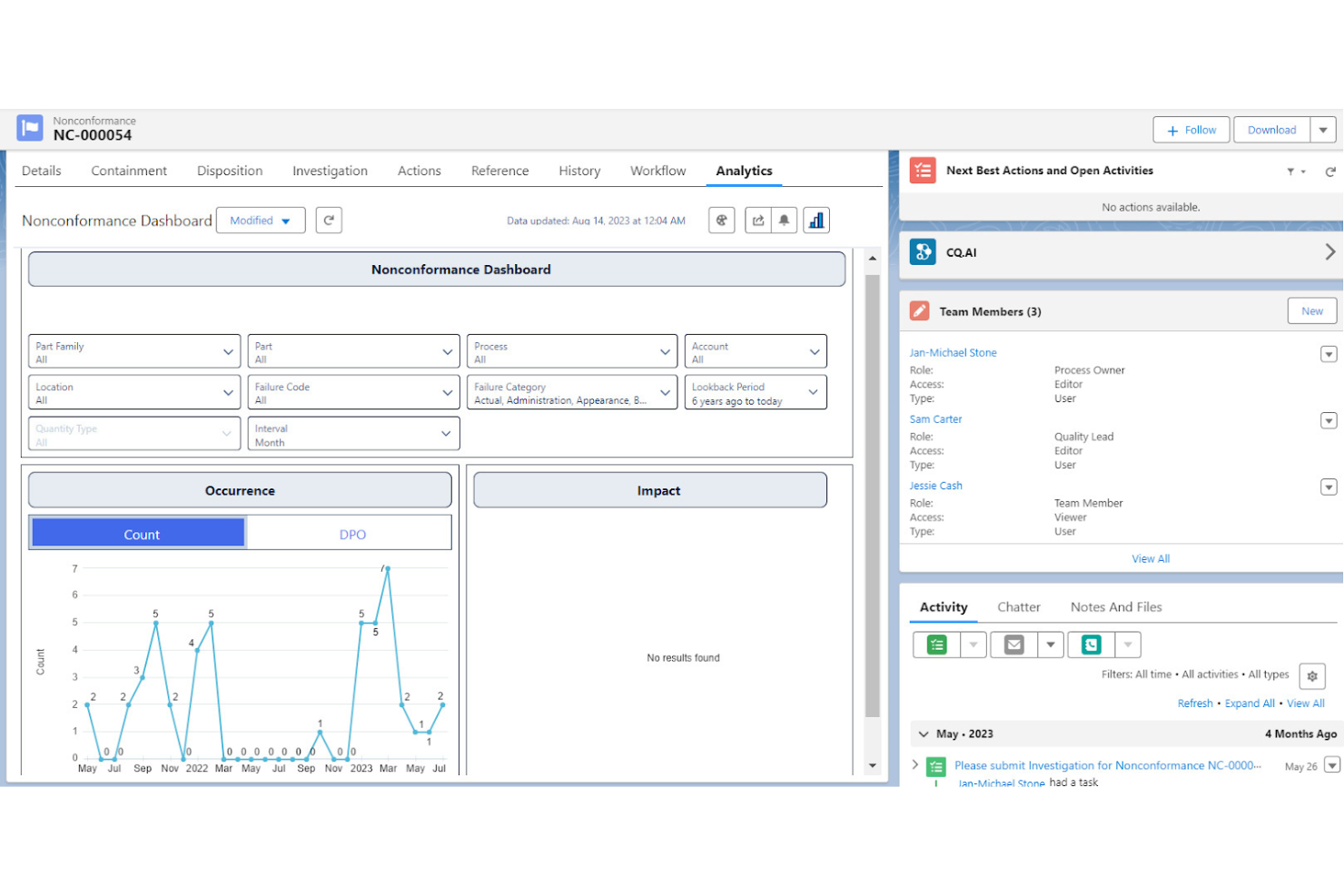
ComplianceQuest brings together quality, compliance, and risk management in a single cloud platform built on Salesforce. It’s especially useful for regulated industries like life sciences, manufacturing, and automotive that need to connect document control with broader quality processes. If your team needs to unify audits, training, and document management under one system, ComplianceQuest offers integrated tools designed for end-to-end compliance oversight.
Why I Picked ComplianceQuest
What sets ComplianceQuest apart is its ability to connect document management with quality and risk processes in a single platform. I picked it because it lets teams manage controlled documents, audits, and CAPAs all within the same environment, which is especially valuable for regulated industries. The platform’s workflow automation supports document review, approval, and training assignments, helping organizations maintain compliance across departments. This integrated approach makes ComplianceQuest a strong fit for businesses that need to align document control with broader quality management initiatives.
ComplianceQuest Key Features
Some other features in ComplianceQuest help teams manage compliance documentation and related processes more thoroughly:
- Electronic Signatures: Supports secure, compliant sign-off on documents and records.
- Change Management Module: Tracks and manages document changes with full audit trails.
- Supplier Management: Centralizes supplier qualification, onboarding, and compliance documentation.
- Training Management: Assigns, tracks, and documents employee training linked to compliance requirements.
ComplianceQuest Integrations
Integrations include Salesforce, SAP, Microsoft Dynamics, Oracle, QuickBooks, SharePoint, DocuSign, Adobe Sign, Google Drive, and Box.
Pros and Cons
Pros:
- Links docs to risk
- Strong CAPA tools
- Great audit trails
Cons:
- Needs SFDC basics
- Heavy admin burden

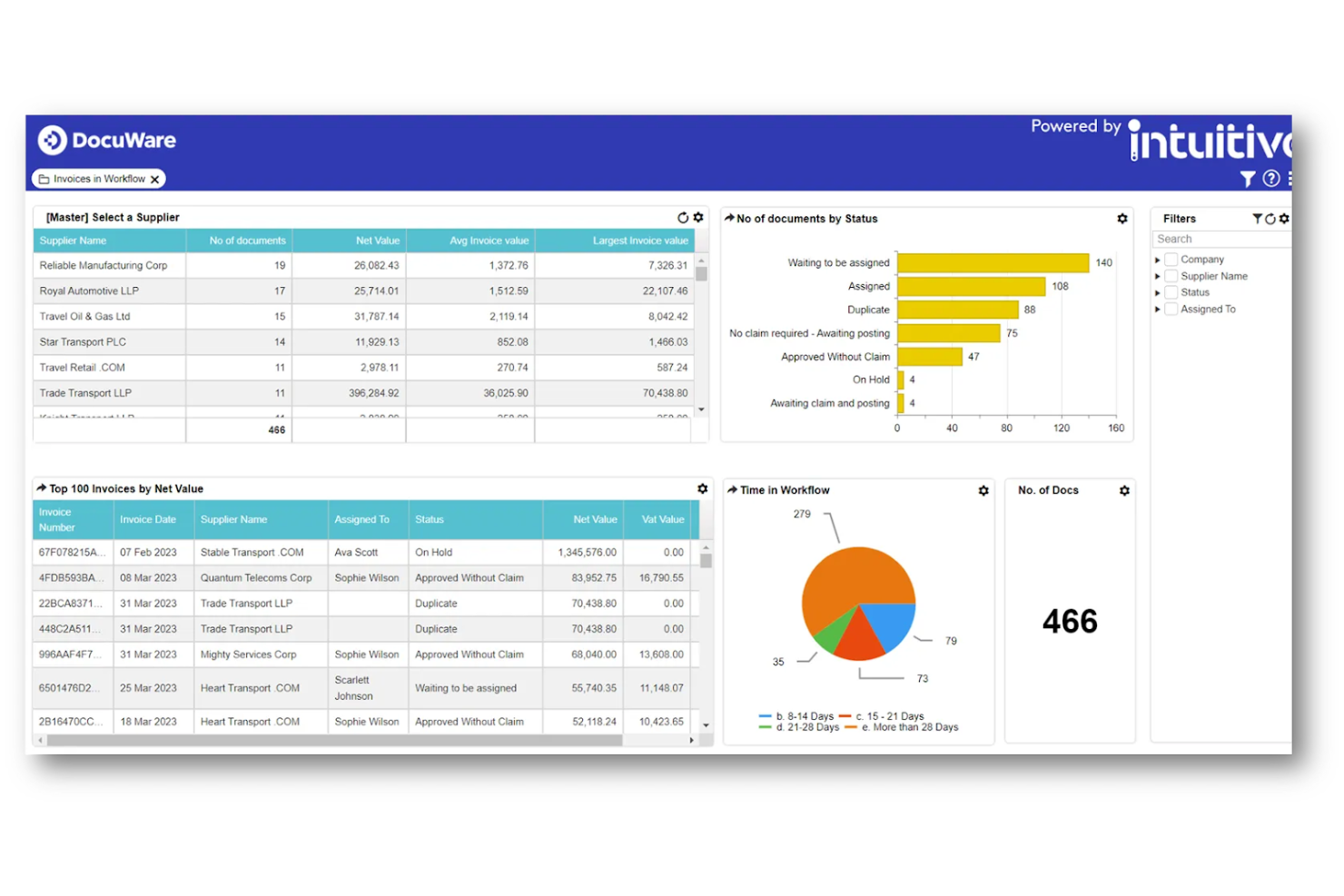
DocuWare offers cloud-based document storage designed for teams that need secure, centralized access to business-critical files. It’s a strong fit for organizations with distributed workforces or those managing high volumes of sensitive documents across departments. If you’re looking to replace paper-based processes and improve document traceability, DocuWare provides features tailored to compliance and audit-readiness.
Why I Picked DocuWare
For teams prioritizing secure, cloud-based document storage, DocuWare offers a focused solution that addresses compliance and audit requirements. The platform provides encrypted storage and granular access controls, which help organizations safeguard sensitive information and meet regulatory standards. I like that DocuWare also includes automated document retention policies, making it easier to manage lifecycle requirements for compliance. These features make DocuWare a strong choice for businesses that need reliable, cloud-first document management with compliance at the core.
DocuWare Key Features
Some other features in DocuWare help teams manage compliance documentation and workflows efficiently:
- Automated Workflow Routing: Routes documents for review, approval, or escalation based on custom rules.
- Version Control: Maintains a complete history of document changes and previous versions.
- Mobile Access: Lets users view, upload, and manage documents from mobile devices.
- E-Forms Creation: Allows teams to build and deploy digital forms for data capture and compliance processes.
DocuWare Integrations
Integrations include SAP, Sage, QuickBooks, Microsoft Dynamics, and Microsoft Teams.
Pros and Cons
Pros:
- Secure web access
- Automates retention
- Good audit logging
Cons:
- Heavy for small biz
- Hard to configure

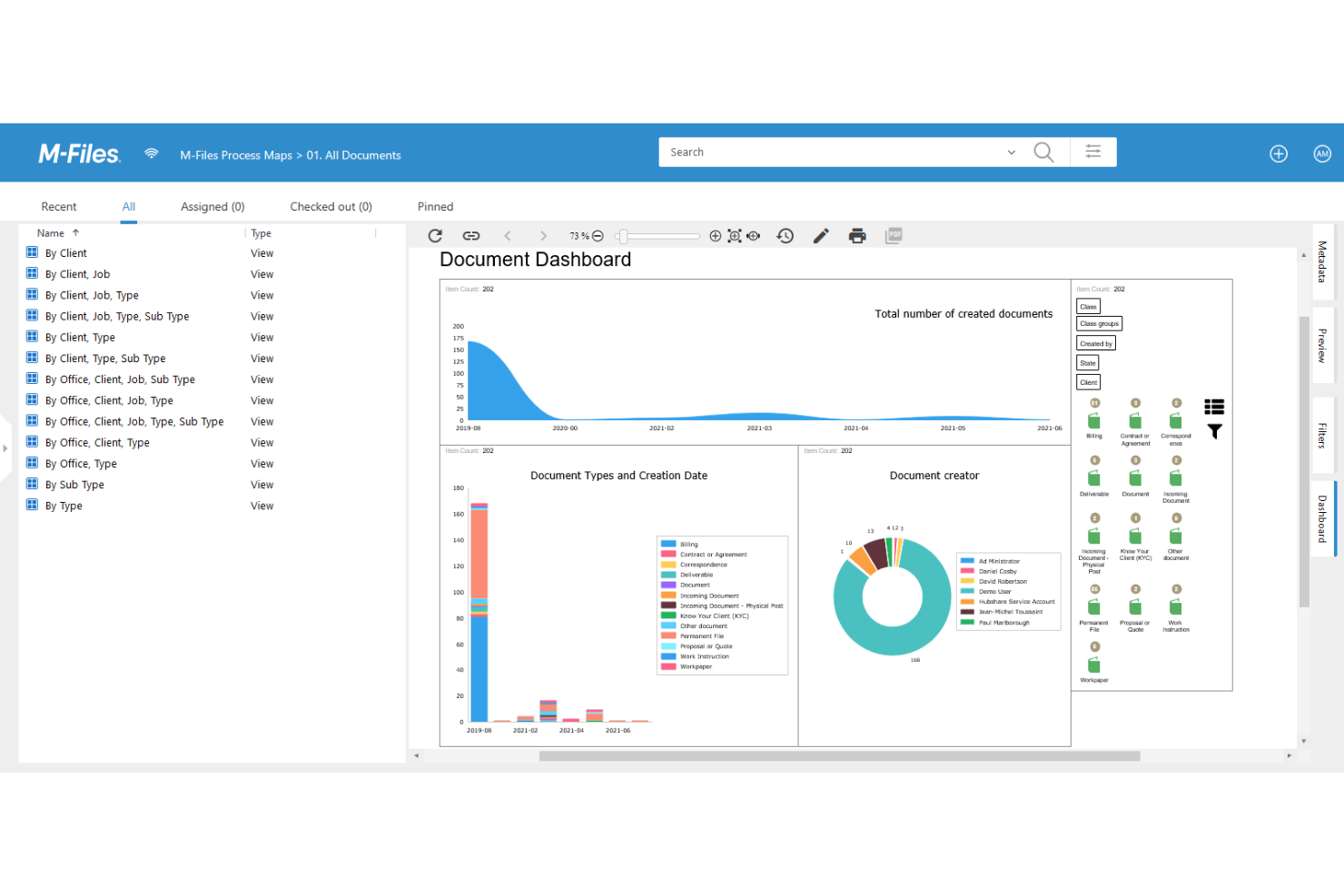
M-Files takes a metadata-driven approach to organizing and managing compliance documents, which sets it apart from traditional folder-based systems. This platform is a strong fit for teams in regulated industries—like finance, legal, or manufacturing—that need to classify, track, and retrieve documents based on content and context. If your business struggles with version control or finding the right compliance files quickly, M-Files offers a way to automate and standardize document handling using metadata tags.
Why I Picked M-Files
Unlike traditional document management systems, M-Files organizes files based on metadata rather than folders, which is especially useful for compliance teams handling large volumes of regulated documents. I picked M-Files because its metadata-driven structure lets you classify, search, and retrieve compliance records by attributes like document type, status, or owner. This approach supports automated workflows for document approval and version control, reducing the risk of misplaced or outdated compliance files. For organizations that need to demonstrate audit trails and maintain strict document governance, M-Files offers a flexible and highly organized solution.
M-Files Key Features
Some other features that make M-Files valuable for compliance teams include:
- Automated Retention Scheduling: Applies retention rules to documents based on compliance requirements.
- Electronic Signature Support: Enables secure signing and approval of compliance documents.
- Audit Trail Logging: Tracks every action taken on a document for audit purposes.
- Microsoft 365 Integration: Connects with Microsoft Teams, SharePoint, and Outlook for document collaboration.
M-Files Integrations
Integrations include Microsoft Teams, Salesforce, SharePoint, Google Workspace, and SAP.
Pros and Cons
Pros:
- Offline compliance
- Good version tracks
- ISO 9001 support
Cons:
- Clunky web view
- Expensive licenses
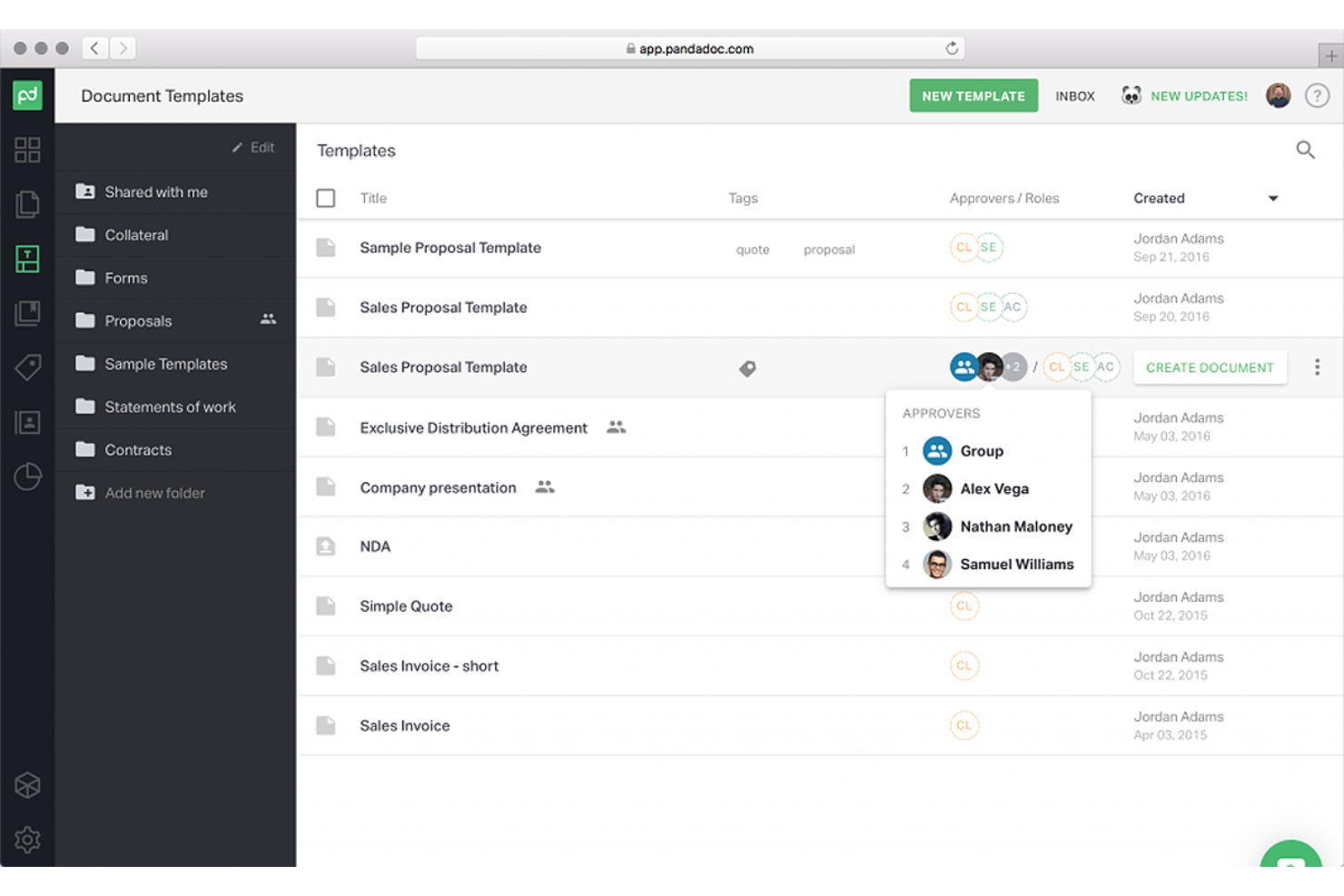
PandaDoc stands out for teams that need to automate document workflows and approvals in regulated environments. It’s especially useful for sales, legal, and operations teams that manage high volumes of contracts or compliance documents. If your business needs to standardize processes and track every step of document handling, PandaDoc’s workflow automation features address those needs directly.
Why I Picked PandaDoc
What drew me to PandaDoc is its focus on automating document workflows, which is a key requirement for compliance-driven teams. The platform lets you build custom approval processes, set up automated reminders, and track document status in real time—all of which help ensure that compliance documents move through the right channels without delays. I appreciate that PandaDoc also provides detailed audit trails, so you can always see who reviewed or signed a document and when. These workflow automation features make it a strong choice for organizations that need to enforce consistent, auditable processes for compliance documentation.
PandaDoc Key Features
Some other features in PandaDoc help teams manage compliance documents more efficiently:
- Template Library: Lets you create and reuse standardized document templates for contracts, policies, and compliance forms.
- Role-Based Access Controls: Allows you to assign permissions to users based on their roles to protect sensitive information.
- eSignature Capabilities: Enables secure, legally binding electronic signatures directly within the platform.
- Document Expiration and Renewal Tracking: Monitors document lifecycles and sends alerts when compliance documents are due for renewal or expiration.
PandaDoc Integration
Integrations include Salesforce, HubSpot, Pipedrive, Zendesk, and Microsoft Dynamics.
Pros and Cons
Pros:
- Auto-reminders sent
- Good integrations
- Compliant templates
Cons:
- Limited permissions
- Not a true QMS tool
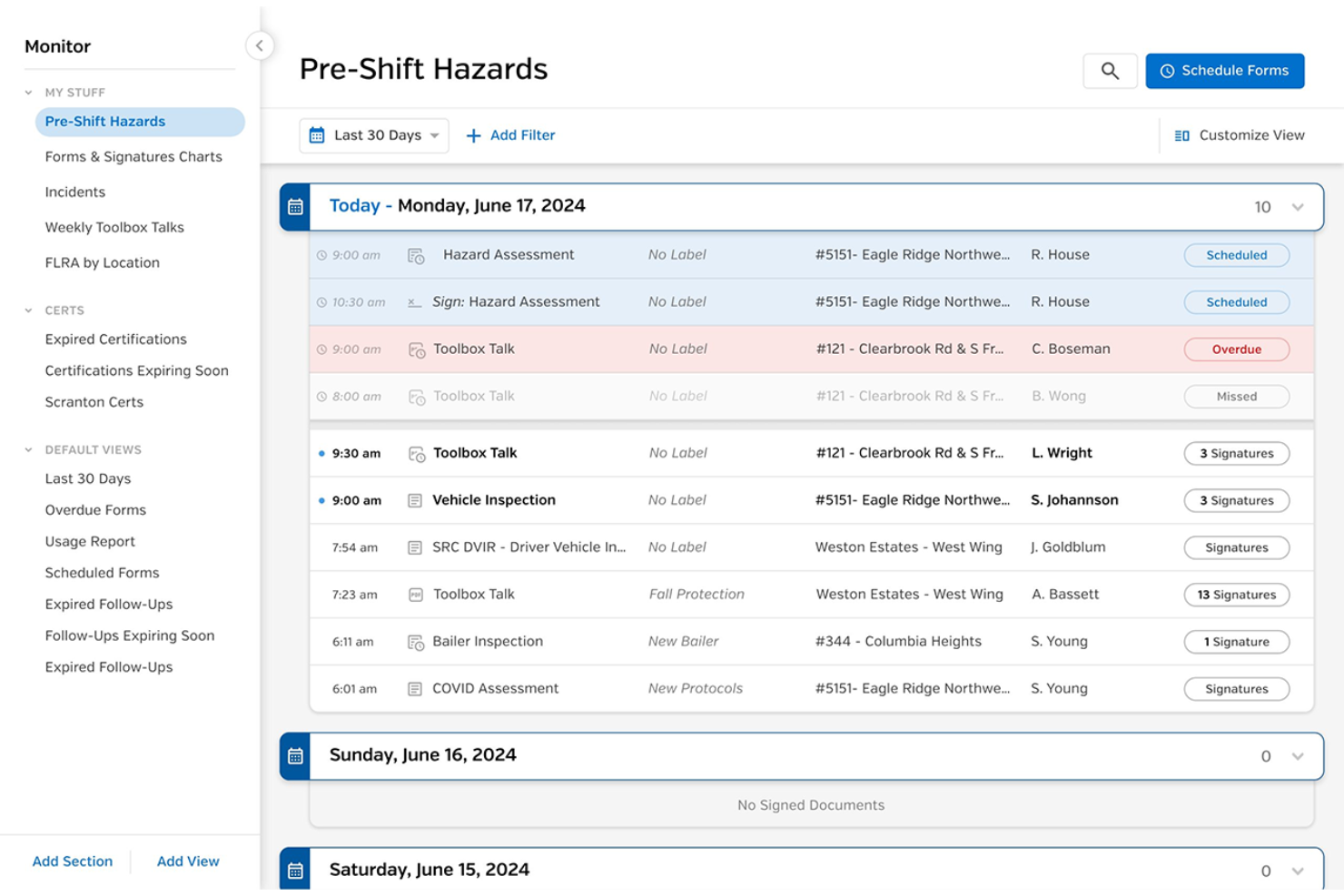
SiteDocs is purpose-built for teams that need to manage safety documentation and compliance in the field. Construction, utilities, and other site-based industries use it to digitize safety forms, inspections, and incident reports right where work happens. If your compliance process depends on real-time field data and mobile access to safety records, SiteDocs addresses those needs directly.
Why I Picked SiteDocs
When field safety documentation is your top compliance concern, SiteDocs offers a focused solution that’s hard to overlook. I picked SiteDocs because it lets teams complete, sign, and submit safety forms directly from mobile devices while on site. The platform also tracks real-time compliance status and stores all safety records in a centralized digital location for quick access during audits. For organizations that need to manage safety documentation across multiple job sites, SiteDocs brings field data and compliance oversight together in one place.
SiteDocs Key Features
Some other features that make SiteDocs valuable for compliance management include:
- Customizable Form Builder: Allows you to create and modify safety and compliance forms to match your organization’s requirements.
- Automated Reminders: Sends notifications to prompt completion of required safety documentation and inspections.
- Document Expiry Tracking: Monitors expiration dates for certifications and safety documents, alerting you before they lapse.
- User Activity Logs: Records detailed user actions for audit trails and compliance verification.
SiteDocs Integrations
Integrations include Procore, Autodesk Construction Cloud, Acumatica, Power BI, and Zapier.
Pros and Cons
Pros:
- Fast safety audits
- Cert tracking tools
- Offline mobile use
Cons:
- Limited integrations
- Lacks deep QMS
Docsvault offers compliance-focused document management with detailed access controls, making it a strong fit for organizations with strict data security or regulatory requirements. Teams in finance, healthcare, or legal fields can use its permission settings to manage sensitive files and maintain audit trails. If you need to control who sees or edits compliance documents at a granular level, Docsvault addresses that challenge directly.
Why I Picked Docsvault
I chose Docsvault because its granular access controls address a core compliance need: restricting document visibility and actions to only authorized users. The platform lets you set detailed permissions at the folder, document, or even user level, which is essential for organizations handling confidential or regulated information. I also like that Docsvault includes audit trails, so you can track every access or change for compliance reporting. These features make it a strong option for teams that need to demonstrate strict control over sensitive compliance documents.
Docsvault Key Features
Some other features in Docsvault support compliance management and document control:
- Document Versioning: Keeps a complete history of document changes, so you can review or restore previous versions as needed.
- Automated Retention Policies: Lets you set rules for document retention and automatic disposal to meet regulatory requirements.
- Document Check-In/Check-Out: Prevents conflicting edits by allowing users to lock documents while making changes.
- Full-Text Search: Enables users to quickly locate documents using keywords or phrases within the content.
Docsvault Integrations
Integrations include Microsoft Office, Active Directory, Outlook, and SharePoint.
Pros and Cons
Pros:
- Alerts for reviews
- Strict version control
- Easy to route docs
Cons:
- Mobile app is basic
- Setup takes time
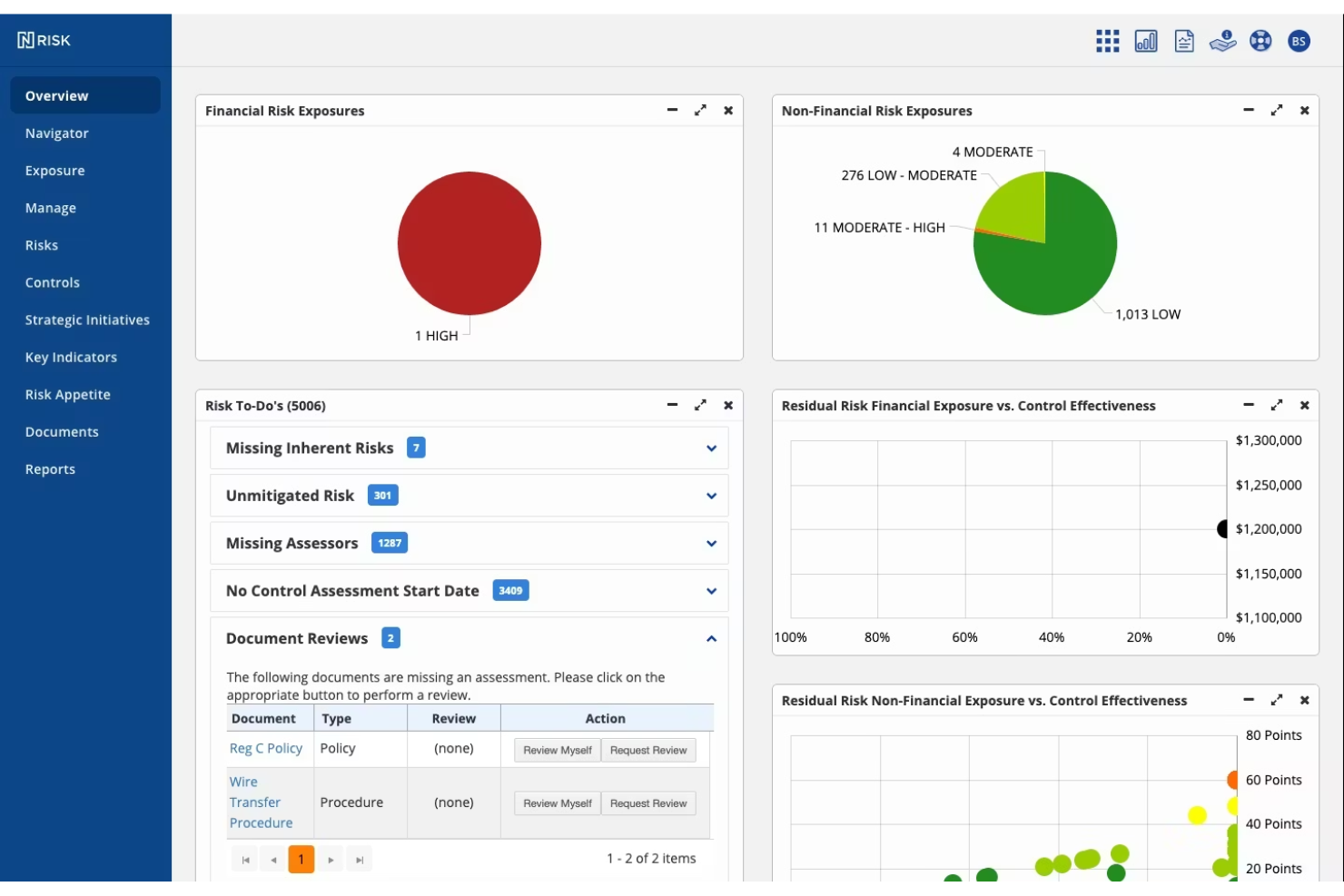
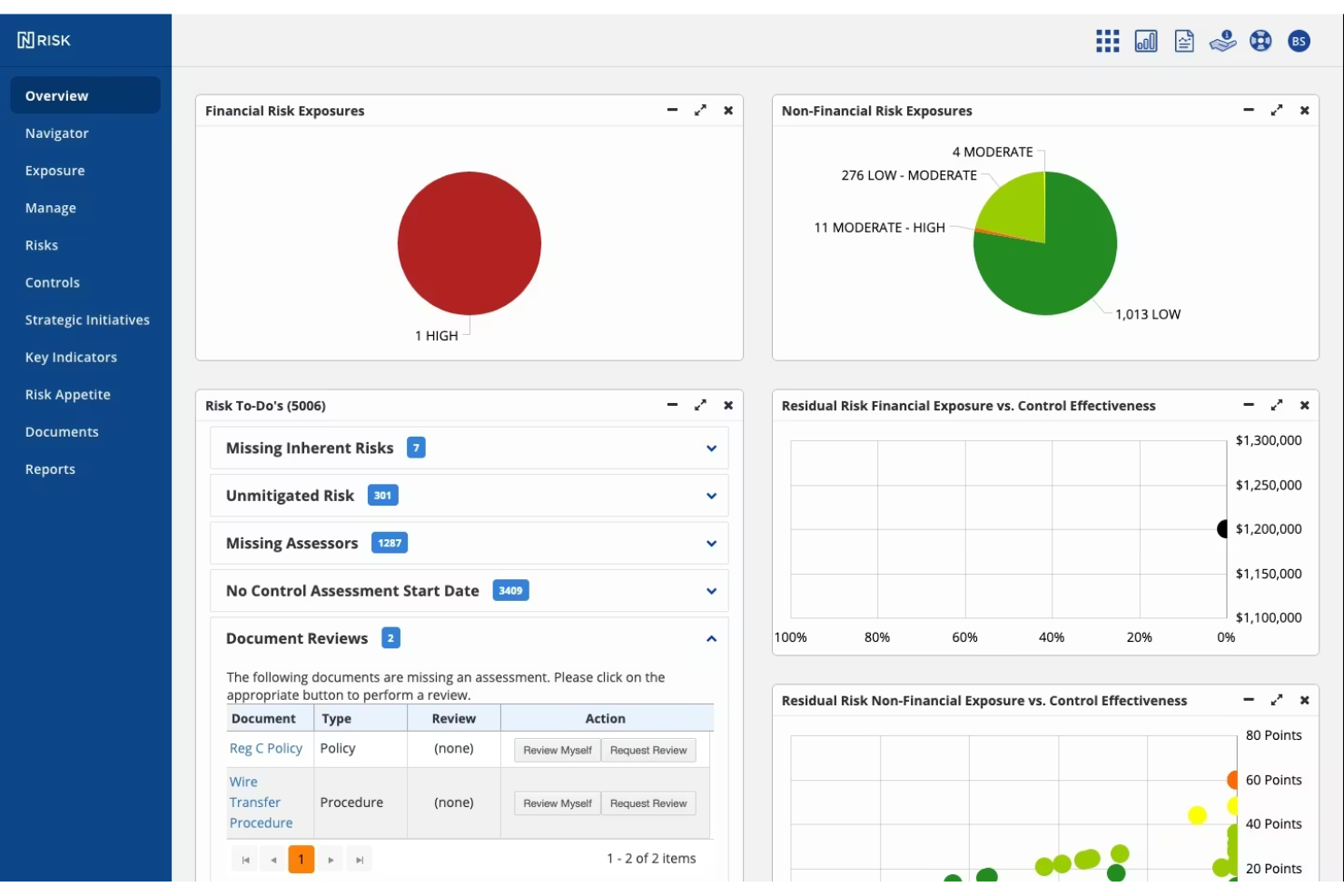
Ncontracts is designed for organizations that need to manage risk and vendor compliance across complex business relationships. It’s especially relevant for financial institutions, healthcare providers, and regulated industries that face strict oversight of third-party vendors and internal processes. If your team struggles with tracking vendor documentation, monitoring risk, or maintaining audit-ready records, Ncontracts brings these elements together in a single platform.
Why I Picked Ncontracts
What sets Ncontracts apart is its focus on risk and vendor oversight, which is a core challenge for compliance-driven organizations. The platform centralizes vendor contracts, risk assessments, and compliance documentation, making it easier to monitor third-party relationships and internal controls. I picked Ncontracts because it offers automated alerts for contract renewals and risk events, helping teams stay ahead of compliance deadlines. These features make it a strong choice for businesses that need to maintain strict oversight of both vendors and regulatory requirements.
Ncontracts Key Features
Some other features that make Ncontracts useful for compliance management include:
- Policy Management Module: Centralizes policy documents and tracks updates or revisions.
- Incident Tracking: Logs compliance incidents and manages follow-up actions.
- Customizable Reporting Tools: Builds tailored reports for audits and board presentations.
- Role-Based Access Controls: Restricts document access based on user roles and responsibilities.
Ncontracts Integrations
Integrations include Salesforce, Microsoft Office, SharePoint, SAP, Oracle, QuickBooks, Google Workspace, Dropbox, DocuSign, and Adobe Sign.
Pros and Cons
Pros:
- Exam prep features
- Good board reports
- Risk mapping docs
Cons:
- Complex modules
- UI is a bit clunky
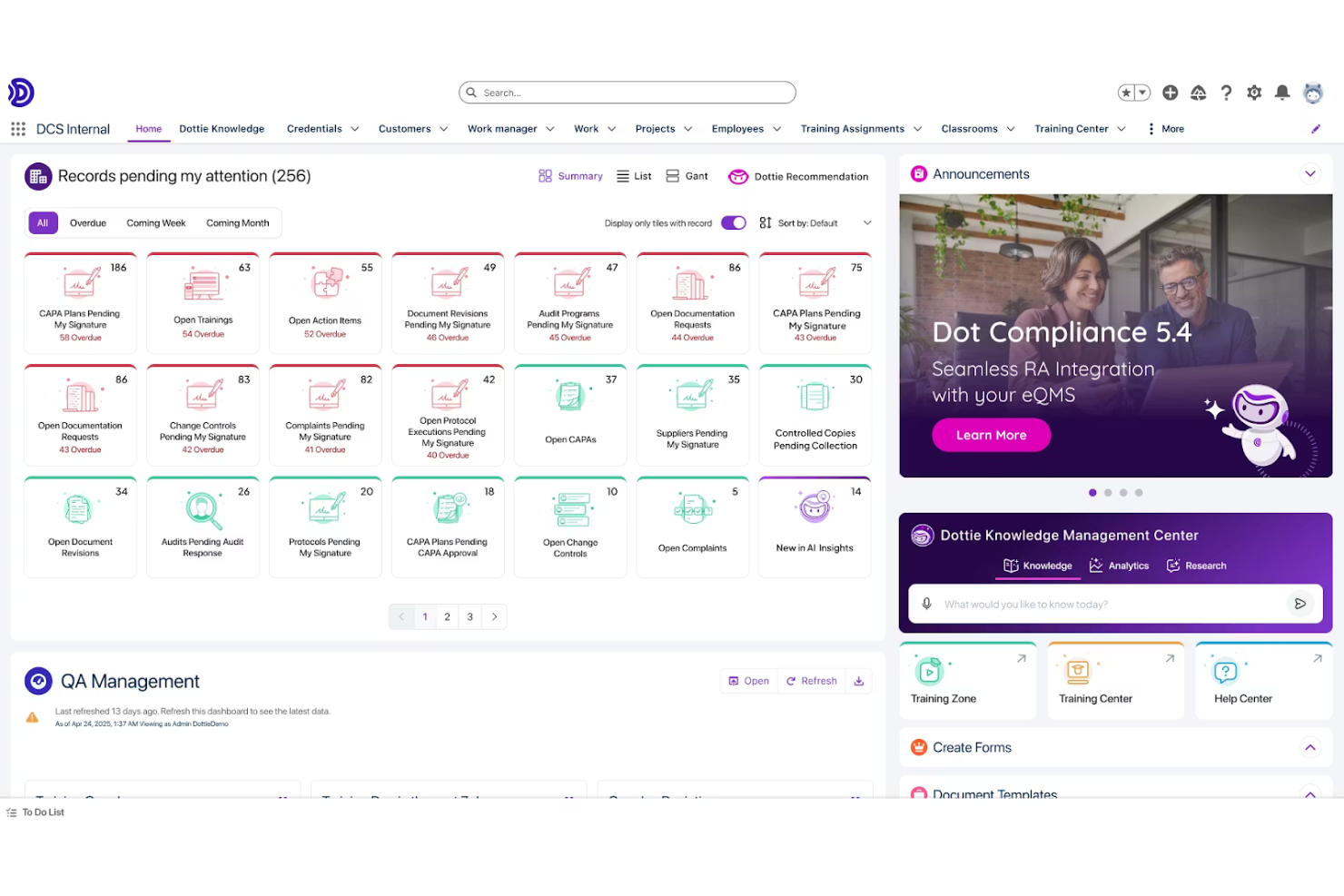
Dot Compliance is purpose-built for life sciences organizations that need to meet strict regulatory and quality standards. It’s designed for quality, regulatory, and compliance teams in pharma, biotech, and medical device companies who manage complex documentation and audits. If your business faces evolving FDA, EMA, or ISO requirements, Dot Compliance offers specialized tools to help you maintain control and readiness.
Why I Picked Dot Compliance
Dot Compliance stands out because it’s built specifically for the life sciences sector, where regulatory needs are complex and constantly changing. The platform includes pre-configured quality and compliance process modules, which help teams align with FDA, EMA, and ISO requirements right out of the box. I appreciate that Dot Compliance also offers audit-ready document control and electronic signatures, both of which are essential for regulated environments. These features make it a strong fit for organizations that need to manage documentation and workflows under strict industry regulations.
Dot Compliance Key Features
Some other features in Dot Compliance help teams address documentation and compliance challenges unique to life sciences:
- Automated Change Control: Tracks and manages document revisions and approvals for regulated processes.
- Training Management: Assigns, tracks, and documents employee training on compliance procedures.
- CAPA Management: Supports corrective and preventive action workflows directly within the platform.
- Supplier Quality Management: Monitors and documents supplier compliance and qualification status.
Dot Compliance Integrations
Integrations include Salesforce, Microsoft 365, Google Workspace, Microsoft Teams, and Zendesk.
Pros and Cons
Pros:
- Strong e-signatures
- Salesforce backed
- Ready to use fast
Cons:
- Overkill for non-med
- UI can be complex

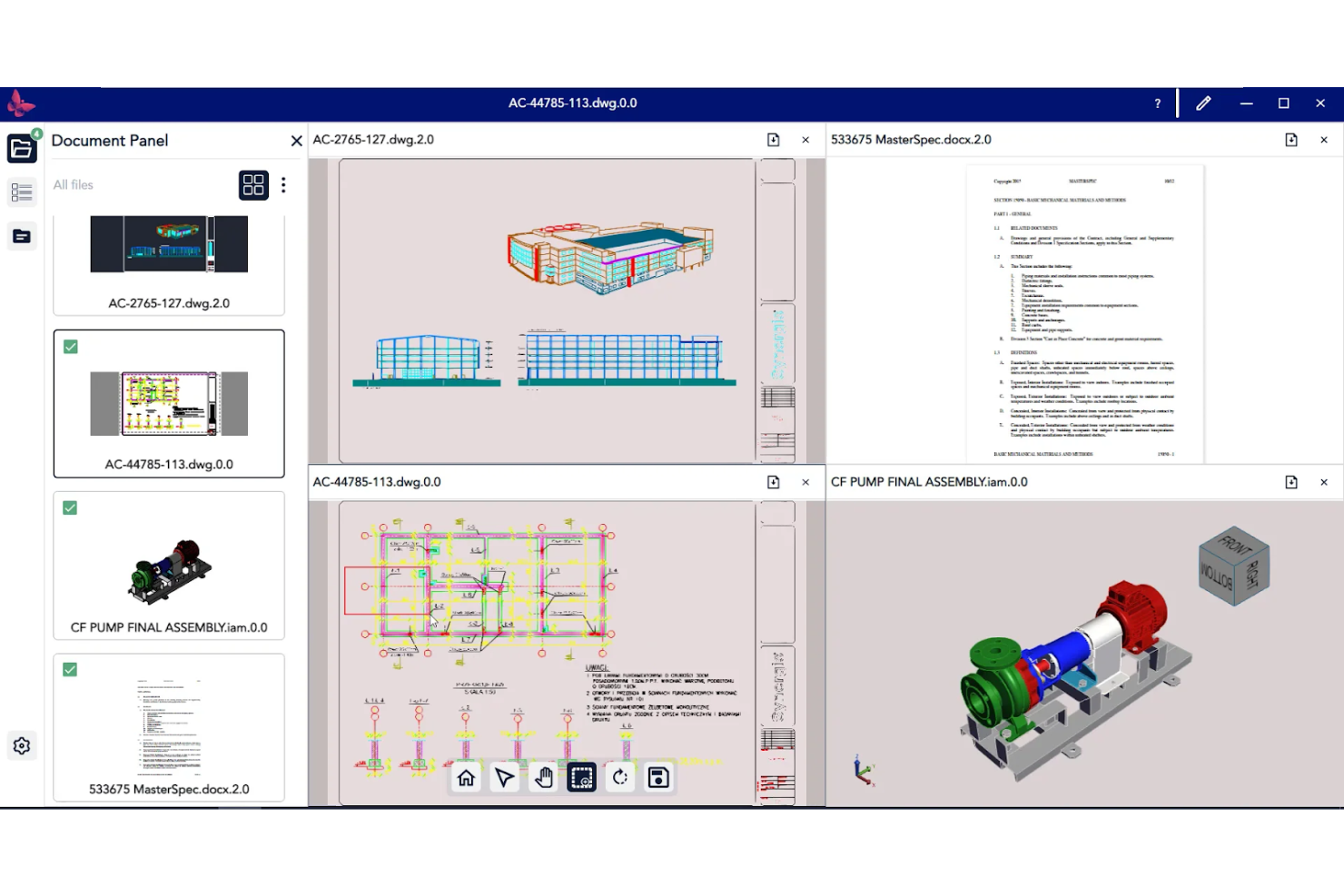
Synergis Software is purpose-built for engineering teams that need strict control over technical documents and CAD files. It’s especially useful for manufacturers, utilities, and construction firms managing complex drawings, revisions, and approvals. If your business faces challenges with version control, audit trails, or secure collaboration on engineering documents, Synergis Software addresses these needs with specialized tools.
Why I Picked Synergis Software
For teams that need rigorous engineering document control, Synergis Software stands out with its focus on managing CAD files and technical drawings. The platform supports detailed version control, so you can track every change and maintain a clear audit trail for compliance. I picked Synergis Software because it also offers configurable workflows for document approvals, which is essential for regulated industries. These features make it a strong fit for organizations that need to manage complex engineering documentation while meeting strict compliance requirements.
Synergis Software Key Features
Some other features that make Synergis Software valuable for compliance-focused teams include:
- Automated Document Distribution: Sends updated documents to designated users or groups automatically.
- Granular User Permissions: Allows administrators to set detailed access rights for files and folders.
- Audit Trail Reporting: Generates reports on document access, changes, and user activity.
- Integration With CAD Applications: Connects directly with popular CAD tools for streamlined file management.
Synergis Software Integrations
Integrations include Autodesk, SolidWorks, Microsoft Office, SharePoint, AutoCAD, Inventor, Revit, MicroStation, Bentley, and SAP.
Pros and Cons
Pros:
- Good audit logging
- Strict check in/out
- Deep version control
Cons:
- Expensive setup fees
- Hard to implement

Compliance.com specializes in helping organizations track, update, and manage policies and procedures across complex regulatory environments. It’s a strong fit for healthcare, financial services, and other highly regulated industries that need to keep documentation current and accessible for audits. If your team struggles with version control or policy attestation, Compliance.com offers focused tools to centralize and automate these processes.
Why I Picked Compliance.com
What drew me to Compliance.com is its specialized focus on policy and procedure tracking, which is a core challenge for many compliance teams. The platform offers centralized policy management, making it easier to update, distribute, and track policy documents across departments. I appreciate that it includes automated attestation workflows, so you can confirm that employees have reviewed and acknowledged the latest versions. These features make Compliance.com a strong choice for organizations that need to maintain strict oversight of policy documentation and ensure regulatory alignment.
Compliance.com Key Features
In addition to its policy and procedure tracking strengths, Compliance.com offers several other features that support compliance management:
- Document Version Control: Maintains a full history of document edits and updates for audit readiness.
- Automated Review Scheduling: Schedules and tracks recurring policy and document reviews.
- Role-Based Access Controls: Restricts document access based on user roles and permissions.
- Incident Reporting Module: Captures and manages compliance incidents directly within the platform.
Compliance.com Integrations
Integrations include Microsoft Office, SharePoint, SAP, Salesforce, Oracle, Google Drive, Dropbox, Adobe Sign, DocuSign, and Box.
Pros and Cons
Pros:
- Clean audit trails
- Easy to distribute
- Regulatory alerts
Cons:
- Hard integration
- Niche focus area
Other Compliance Document Management Software
Here are some additional compliance document management software options that didn’t make it onto my shortlist, but are still worth checking out:
- PowerDMS
For accreditation management
- Connecteam
For mobile compliance checklists
- Ideagen
For audit trail tracking
- QT9 QMS
For automated training records


Compliance Document Management Software Selection Criteria
When selecting the best compliance document management software to include in this list, I considered common buyer needs and pain points like maintaining audit readiness and managing document version control. I also used the following framework to keep my evaluation structured and fair:
Core Functionality (25% of total score)
To be considered for inclusion in this list, each solution had to fulfill these common use cases:
- Store and organize compliance documents
- Track document versions and changes
- Manage user access and permissions
- Automate document review and approval workflows
- Provide audit trails for all document actions
Additional Standout Features (25% of total score)
To help further narrow down the competition, I also looked for unique features, such as:
- Accreditation standards mapping
- Automated policy distribution and acknowledgment tracking
- Mobile document access and sign-off
- Customizable assessment and audit tools
- Real-time compliance dashboards
Usability (10% of total score)
To get a sense of the usability of each system, I considered the following:
- Simple and intuitive user interface
- Clear navigation and menu structure
- Fast document search and retrieval
- Minimal clicks to complete common tasks
- Accessibility for users with different needs
Onboarding (10% of total score)
To evaluate the onboarding experience for each platform, I considered the following:
- Availability of training videos and tutorials
- Access to pre-built templates and sample documents
- Interactive product tours for new users
- Guided setup wizards or onboarding checklists
- Responsive onboarding support team
Customer Support (10% of total score)
To assess each software provider’s customer support services, I considered the following:
- Multiple support channels like chat, email, and phone
- Fast response times to support requests
- Access to a searchable knowledge base
- Availability of live training or webinars
- Dedicated account management for enterprise clients
Value For Money (10% of total score)
To evaluate the value for money of each platform, I considered the following:
- Transparent and predictable pricing structure
- Features included in base pricing
- Flexibility to scale up or down as needed
- No hidden fees or surprise charges
- Discounts for annual or multi-year contracts
Customer Reviews (10% of total score)
To get a sense of overall customer satisfaction, I considered the following when reading customer reviews:
- Positive feedback on compliance management capabilities
- Reports of reliable uptime and performance
- Comments on ease of document retrieval
- User satisfaction with support and onboarding
- Constructive criticism about missing features or limitations
How to Choose Compliance Document Management Software
It’s easy to get bogged down in long feature lists and complex pricing structures. To help you stay focused as you work through your unique software selection process, here’s a checklist of factors to keep in mind:
| Factor | What to Consider |
|---|---|
| Scalability | Will the software handle your document volume and user growth over time? Check for user limits, storage caps, and upgrade paths. |
| Integrations | Does the tool connect natively with your HR, ERP, or workflow systems? Confirm compatibility with your current tech stack. |
| Customizability | Can you tailor document workflows, templates, and permissions to your organization’s policies and structure? |
| Ease of use | Will your team adopt the tool quickly? Look for clear navigation, minimal training needs, and intuitive document search. |
| Implementation and onboarding | How long will it take to get up and running? Ask about migration support, onboarding resources, and typical time-to-value. |
| Cost | Are pricing tiers transparent and predictable? Watch for extra charges for storage, users, or advanced compliance modules. |
| Security safeguards | Does the software meet your data protection standards? Look for encryption, audit logs, and compliance with regulations like GDPR or HIPAA. |
| Compliance requirements | Does the tool support your specific regulatory frameworks (e.g., ISO, SOC, HIPAA)? Check for built-in standards mapping and audit support. |
What Is Compliance Document Management Software?
Compliance document management software is a digital platform that helps organizations store, organize, and control access to every secure document required for regulatory compliance. These systems support version control, audit trails, and secure sharing to ensure that policies, procedures, and evidence of compliance are always up to date and accessible for audits or inspections, streamlining your overall document processes. This software is essential for maintaining accountability, preserving data integrity, and meeting industry or legal standards.
Features
When selecting compliance document management software, keep an eye out for the following key features:
- Document version control: Tracks changes to documents over time, allowing users to view, restore, or compare previous versions and maintain a clear audit trail.
- Access permissions management: Lets administrators set user roles and control who can view, edit, or approve specific documents, protecting sensitive information.
- Automated workflow routing: Moves documents through predefined review and approval steps, ensuring compliance processes are followed and documented.
- Audit trail tracking: Records every action taken on a document, including edits, approvals, and access, providing a transparent history for audits.
- Policy acknowledgment tracking: Captures digital signatures or confirmations from users to verify that they have read and understood required policies or procedures.
- Centralized document repository: Stores all compliance-related documents in a single, organized location, making it easy to search, retrieve, and manage files.
- Expiration and renewal alerts: Notifies users when documents are due for review, renewal, or expiration, helping teams stay ahead of compliance deadlines.
- Template management: Provides standardized templates for common compliance documents, reducing manual work and ensuring consistency across the organization.
- Reporting and analytics: Generates reports on document status, user activity, and compliance metrics to support internal reviews and external audits.
Benefits
Implementing compliance document management software provides several benefits for your team and your business. Here are a few you can look forward to:
- Improved audit readiness: Centralized storage, audit trails, and version control make it easier to prepare for and respond to compliance audits.
- Reduced compliance risk: Automated workflows, access controls, and policy acknowledgment tracking help ensure regulatory requirements are consistently met.
- Faster document retrieval: Searchable repositories and organized file structures allow users to quickly locate compliance documents when needed.
- Enhanced accountability: Digital signatures, user activity logs, and permission management create clear records of who did what and when.
- Streamlined policy management: Automated review cycles, expiration alerts, and template management simplify the process of updating and distributing policies.
- Greater data security: Role-based access and encryption features protect sensitive compliance information from unauthorized access or loss.
- Consistent document standards: Template management and workflow automation help maintain uniformity and accuracy across all compliance documentation.
Costs & Pricing
Selecting compliance document management software requires an understanding of the various pricing models and plans available. Costs vary based on features, team size, add-ons, and more. The table below summarizes common plans, their average prices, and typical features included in compliance document management software solutions:
Plan Comparison Table for Compliance Document Management Software
| Plan Type | Average Price | Common Features |
|---|---|---|
| Free Plan | $0 | Basic document storage, limited user access, simple version control, and basic search functionality. |
| Personal Plan | $15–$35/user/month | Single-user access, document upload, version history, and basic compliance tracking. |
| Business Plan | $40–$85/user/month | Multi-user access, workflow automation, audit trails, policy acknowledgment tracking, and reporting tools. |
| Enterprise Plan | $90–$200/user/month | Advanced security, custom integrations, role-based permissions, dedicated support, and compliance dashboards. |
Compliance Document Management Software FAQs
Here are some answers to common questions about compliance document management software:
How does compliance document management software support regulatory audits?
Compliance document management software creates audit trails, tracks document versions, and stores all compliance evidence in one place. This makes it easier to retrieve required documents, demonstrate policy adherence, and respond quickly to auditor requests.
Can compliance document management software integrate with other business systems?
Yes, many compliance document management solutions offer integrations with HR, ERP, and workflow tools. This allows you to sync user data, automate document distribution, and connect compliance processes with your broader tech stack.
What security measures should I look for in compliance document management software?
Look for features like role-based access controls, encryption, and detailed activity logs. These safeguards help protect sensitive compliance data and ensure only authorized users can access or modify documents.
How do automated workflows help with compliance management?
Automated workflows route documents through required review and approval steps, reducing manual errors and ensuring that compliance processes are consistently followed and documented.
What should I consider when migrating existing documents into a new compliance document management system?
Plan for data mapping, file format compatibility, and user training. Ask vendors about migration support, import tools, and whether they offer onboarding resources to help your team transition smoothly.