

10 Best Wufoo Alternatives Reviewed in 2026

Best Wufoo Alternatives Shortlist


Are you struggling with Wufoo's limitations and looking for a better fit for your team? You're not alone. Many project managers face challenges like limited customization, integration issues, or data management concerns with Wufoo.
Many alternative Cloud-based form builders offer solutions that cater to your specific needs. In my experience, finding the right tool can make a big difference in your workflow and efficiency.
In this article, I'll share my unbiased review of the best Wufoo alternatives. You'll discover options that could enhance your team's productivity and address your unique challenges. Let's dive into the top picks and find the perfect match for your business.
What Is Wufoo?
Wufoo is a cloud-based form builder that allows you to create online forms with ease. It's commonly used by professionals in marketing, customer service, and event planning for data collection and management. Drag-and-drop functionality, customizable templates, and easy integration with other tools all help with quick and efficient form creation. Overall, Wufoo provides a user-friendly platform for managing form-based tasks.
Best Wufoo Alternatives Summary
This comparison chart summarizes pricing details for my top Wufoo alternative selections to help you find the best one for your budget and business needs.
| Tool | Best For | Trial Info | Price | ||
|---|---|---|---|---|---|
| 1 | Best for design-focused forms | 7-day free trial + free plan available | From $24/month (billed annually) | Website | |
| 2 | Best for survey customization | Free plan available | From $30/user/month (billed annually) | Website | |
| 3 | Best for WordPress integration | Free plan available | From $49.50/year (billed annually) | Website | |
| 4 | Best for lead generation funnels | 14-day free trial | From $56/month (billed annually) | Website | |
| 5 | Best for industry compliance | 14-day free trial + free demo available | From $83/month (billed annually) | Website | |
| 6 | Best for secure online forms | 14-day free trial available | From $21/month (billed annually) | Website | |
| 7 | Best for easy sharing | Free plan available | Free plan available; from $7/user/month (billed annually) for Google Workspace | Website | |
| 8 | Best for real-time collaboration | 30-day free trial | From $9.99/user/month (Microsoft 365 Business Basic or included with Microsoft 365 plans) | Website | |
| 9 | Best for workflow automation | 14-day free trial + free plan available | From $19/month | Website | |
| 10 | Best for engaging surveys | Free plan available | From $28/month (billed annually) | Website |
Why You Can Trust Us
We’ve been testing and reviewing project management software since 2012. As project managers ourselves, we know how critical and difficult it is to make the right decision when selecting software.
We invest in deep research to help our audience make better software purchasing decisions. We’ve tested more than 2,000 tools for different project management use cases and written over 1,000 comprehensive software reviews. Learn how we stay transparent & our software review methodology.
Best Wufoo Alternatives Reviews
Below are my detailed summaries of the best Wufoo alternatives that made it onto my shortlist. My reviews offer a detailed look at the key features, pros & cons, integrations, and ideal use cases of each tool to help you find the best one for you.

Best for design-focused forms

Paperform is a versatile online form builder that allows you to create beautiful forms and landing pages. It's popular among small businesses, marketers, and creatives who value design flexibility and aesthetics.
Why Paperform is a good Wufoo alternative: Paperform offers extensive customization options, letting you design forms that match your brand's identity. Its intuitive editor supports rich media like images and videos, making your forms more engaging. You can also automate workflows with conditional logic, helping your team save time. These features make Paperform ideal if you're looking to create visually appealing forms that stand out.
Standout features & integrations:
Features include the ability to accept payments directly through forms, which is perfect for e-commerce businesses. You can use advanced calculations to perform complex operations within forms. The platform also offers custom HTML and CSS, empowering you with full control over your form's appearance.
Integrations include Zapier, Mailchimp, Google Sheets, Stripe, PayPal, Slack, HubSpot, Trello, Dropbox, and Square.
Pros and Cons
Pros:
- Ability to inject custom HTML and CSS code for greater control
- Supports rich media, including images, videos, custom maps, and calendars
- Free-text interface for extensive design flexibility
Cons:
- Potential for overwhelming options due to high customization
- Limited built-in analytics

Best for survey customization

SurveyMonkey is an online survey tool that helps businesses and individuals gather and analyze feedback. It's widely used by researchers, marketers, and organizations that need to collect data efficiently.
Why SurveyMonkey is a good Wufoo alternative: SurveyMonkey offers extensive customization options, allowing you to tailor surveys to your specific needs. The variety of question types and logic features enables the creation of complex surveys for deep insights. The platform's analytics tools help you interpret data effectively, making it easier for your team to make informed decisions. Its intuitive design makes survey creation straightforward, even for beginners.
Standout features & integrations:
Features include advanced survey logic that lets you customize the flow based on responses. You can use pre-built survey templates to save time and ensure you're asking the right questions. The platform also offers real-time data analysis, which helps you track responses as they come in.
Integrations include Salesforce, Mailchimp, HubSpot, Slack, Microsoft Teams, Google Drive, Dropbox, Zendesk, Eventbrite, and Constant Contact.
Pros and Cons
Pros:
- Wide variety of question types, including multiple-choice, Likert scales, rankings, and image choices
- Affordable free plan and scalable options to meet user needs
- Extensive customization for survey themes, colors, and branding elements
Cons:
- Response limits on the free plan
- Higher pricing for advanced features

WPForms
Best for WordPress integration

WPForms is a WordPress plugin designed to create and manage online forms directly from your WordPress site. It's mainly used by bloggers, small business owners, and developers who need an easy way to add forms to their websites.
Why WPForms is a good Wufoo alternative: WPForms offers integration with WordPress, making it a convenient choice for users already on that platform. Its drag-and-drop builder lets you create forms quickly without coding. With features like pre-built templates and smart conditional logic, you can customize forms to fit your needs. The plugin also supports instant notifications, so you’re automatically updated on any new form submissions.
Standout features & integrations:
Features include the ability to create multi-page forms, which break long forms into manageable sections. You can use survey and poll add-ons to gather detailed feedback from your audience. The platform also offers spam protection tools to keep your forms secure from unwanted submissions.
Integrations include Mailchimp, PayPal, Stripe, AWeber, Campaign Monitor, GetResponse, Drip, Constant Contact, Salesforce, and Zapier.
Pros and Cons
Pros:
- 2,000+ pre-built form templates
- User-friendly drag-and-drop form building in free and paid versions
- Dedicated WordPress plugin built to integrate directly into the dashboard
Cons:
- Advanced features need add-ons
- Support is only available to users with active premium licenses
Heyflow
Best for lead generation funnels

Heyflow is a no-code platform designed to convert website visitors into leads through interactive, mobile-first funnels. It's primarily used by performance marketers, designers, and developers across various industries like B2C and B2B.
Why Heyflow is a good Wufoo alternative: Heyflow offers extensive customization of interactive landing pages and forms, making it ideal for lead generation. With built-in analytics, A/B testing, and lead scoring, it helps you optimize engagement and conversion rates. Its mobile-first design ensures a smooth user experience, while features like custom coding and built-in payments support advanced marketing efforts.
Standout features & integrations:
Features include built-in A/B testing to optimize your funnels, drop-off analytics to understand where users leave, and lead scoring to prioritize potential customers. The platform also offers over 40 drag-and-drop blocks for easy customization.
Integrations include Zapier, HubSpot, Mailchimp, Salesforce, Google Analytics, Facebook Pixel, Intercom, Slack, Google Tag Manager, and Shopify.
Pros and Cons
Pros:
- Powerful integrated analytics for clear performance data
- All funnel flows are optimized for mobile devices by default
- Step-by-step interactive funnels capture leads with higher conversions than static forms
Cons:
- Visible Heyflow funnel branding on free and basic plan tiers
- No-code interface confines the users to the platform’s pre-defined blocks

Best for industry compliance

Formstack is a versatile form builder that helps businesses automate workflows and manage data efficiently. It's widely used by healthcare providers, educational institutions, and financial services that require secure and compliant data handling.
Why Formstack is a good Wufoo alternative: Formstack offers advanced compliance features, including HIPAA compliance and data encryption, making it ideal for industries with strict data regulations. Its flexible form builder supports complex workflows and approvals, helping you refine processes. The platform's security measures ensure your data is protected, providing peace of mind for your team.
Standout features & integrations:
Features include advanced form analytics that help you track form performance and make data-driven decisions. You can use conditional logic to create dynamic forms that adapt to user inputs. The platform also offers document generation capabilities, allowing you to create PDFs from form submissions.
Integrations include Salesforce, Mailchimp, Google Drive, HubSpot, PayPal, QuickBooks, Dropbox, Stripe, Microsoft Teams, and Slack.
Pros and Cons
Pros:
- 256-bit SSL encryption, data encryption at rest, secure downloads, and password protection
- Automation capabilities allow for customized approval chains
- Compliance and security measures to align with key industry regulations and standards
Cons:
- Usage limits across all plan tiers
- Little to no phone support on basic plans


Formsite is an online form builder that focuses on creating secure forms for data collection. It's mainly used by businesses and organizations that need to handle sensitive information, including healthcare providers, educational institutions, and financial companies.
Why Formsite is a good Wufoo alternative: Formsite offers advanced security features, including SSL encryption and password protection, to keep your data safe. Its customizable forms allow you to tailor them to your specific needs while maintaining compliance with industry standards. The platform also offers features like form analytics and conditional logic, which help you manage and analyze your data efficiently.
Standout features & integrations:
Features include a drag-and-drop form builder that lets you create forms quickly and easily. You can use conditional logic to show or hide questions based on user responses. The platform also provides file upload capabilities, allowing users to submit documents through your forms.
Integrations include Google Sheets, Salesforce, Dropbox, Mailchimp, PayPal, Zapier, Slack, HubSpot, Constant Contact, and Stripe.
Pros and Cons
Pros:
- Secure file upload feature on all paid plans to collect respondent documents and images
- Customizable drag-and-drop form builder and CSS editing options
- Strong data security, including HTTPS encryption and a data retention policy
Cons:
- Limited mobile responsiveness
- Built-in form analytics lack visual sophistication


Google Forms is an online survey tool that allows users to easily create forms and collect data. It's widely used by educators, small businesses, and individuals who need to gather and share information quickly.
Why Google Forms is a good Wufoo alternative: Google Forms offers simple sharing options and real-time collaboration, which make it ideal for teams that need to work together. You can easily share forms via a link or email, and responses are automatically collected in Google Sheets. The intuitive interface and integration with Google Workspace further enhance its usability.
Standout features & integrations:
Features include automatic data collection in Google Sheets, which helps you analyze responses efficiently. You can customize themes and add images or videos to your forms for a more engaging experience. The tool also provides real-time response tracking, so you can monitor incoming data in real-time.
Integrations include Google Sheets, Google Drive, Google Classroom, Google Calendar, Google Docs, Google Slides, Google Chat, and Google Sites.
Pros and Cons
Pros:
- Enhanced workflow efficiency through Google Workspace integration
- Supports real-time collaboration
- Forms can be shared via direct link, email, social media, or embedded into websites
Cons:
- Basic conditional logic
- Limited design and branding customization


Microsoft Forms is an online survey and quiz tool designed to gather feedback and data efficiently. It's mainly used by educators, businesses, and organizations that need to collect information quickly and collaborate in real time.
Why Microsoft Forms is a good Wufoo alternative: Microsoft Forms offers real-time collaboration features that allow multiple team members to work on forms simultaneously. You can easily share forms via email or links, making distribution simple. The platform's integration with Microsoft 365 enhances its functionality, providing a familiar interface for users. With built-in analytics, you can swiftly analyze responses and gain insights.
Standout features & integrations:
Features include automatic response collection and analysis, which saves your team time. You can create branching forms that adapt based on user input, providing a personalized experience. The platform also supports quizzes, allowing you to assess knowledge or gather feedback effectively.
Integrations include Microsoft Teams, Microsoft Excel, Microsoft SharePoint, Microsoft OneDrive, Microsoft Power Automate, Microsoft Outlook, and Microsoft Power BI.
Pros and Cons
Pros:
- Automated real-time charts and reports can be exported to Excel for deeper analysis
- Forms can be shared via links, QR codes, email, or embedded into Microsoft products
- Real-time collaboration for simultaneous form editing and management
Cons:
- Limited question types
- Less suitable for complex surveys
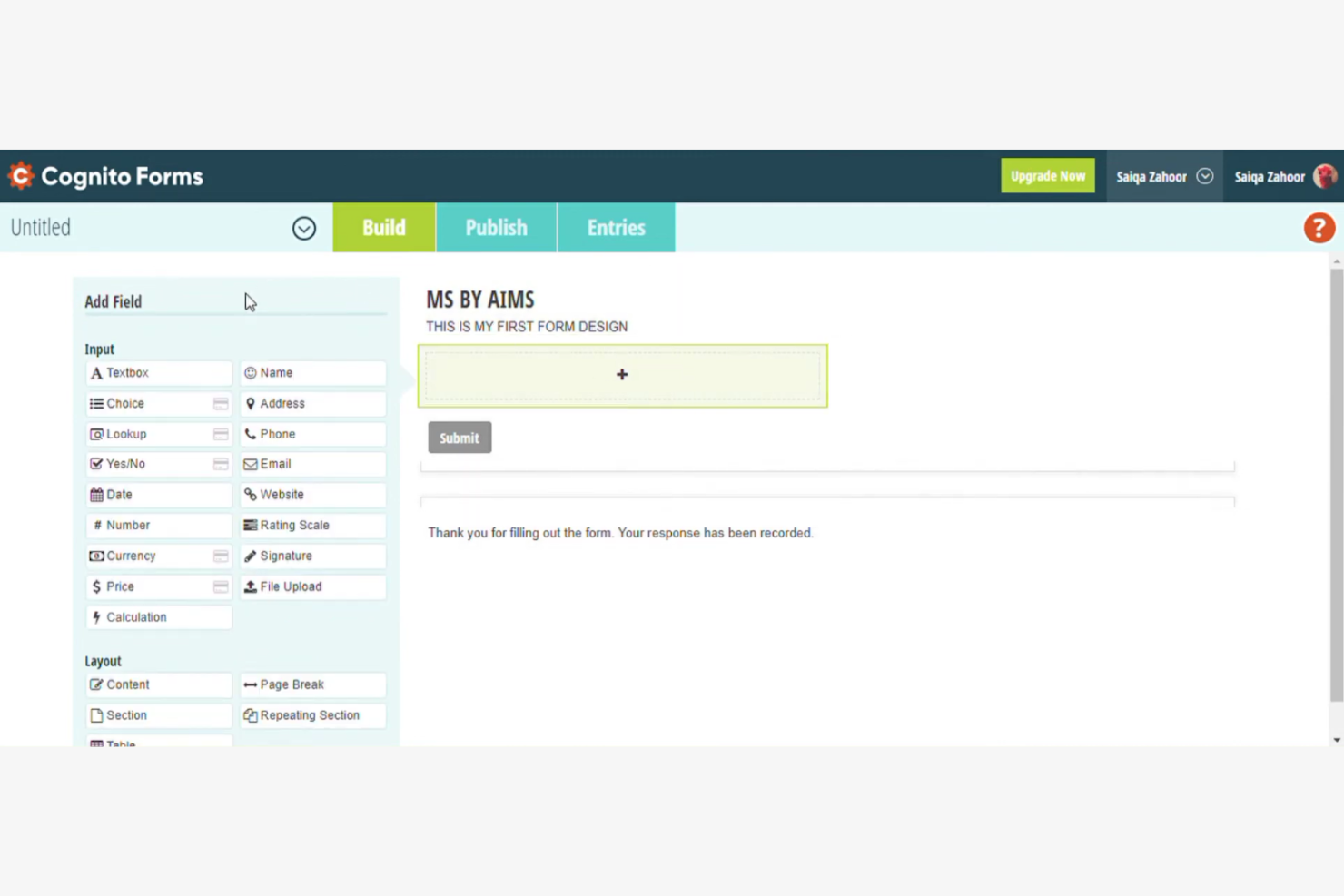
Cognito Forms is an online form builder that excels in creating complex forms and automating workflows. It's widely used by businesses and organizations that need to simplify processes and manage data efficiently.
Why Cognito Forms is a good Wufoo alternative: Cognito Forms offers advanced calculations and conditional logic to automate workflows, making it a great option for improving efficiency. You can create forms that perform calculations directly within the interface, reducing manual work. The platform's ability to handle complex logic and data management sets it apart. Its security features ensure your data is protected, making it a reliable choice for sensitive information.
Standout features & integrations:
Features include the ability to perform complex calculations within forms, which helps reduce manual errors. You can use repeating sections to collect multiple entries under a single form submission. The platform also offers customizable email notifications to keep your team informed of new submissions.
Integrations include Zapier, Microsoft Power Automate, Dropbox, Google Sheets, Stripe, PayPal, Mailchimp, Square, Microsoft OneDrive, and QuickBooks Online.
Pros and Cons
Pros:
- Supports complex conditional logic for sections, pages, calculated values, and routing
- Strong calculation capabilities directly within the form interface
- Platform integrations facilitate advanced workflow automation and data transfers
Cons:
- Limited design customization without using CSS code
- UI is perceived as utilitarian or less modern than competitors


Typeform is an online form builder that focuses on creating interactive and visually appealing surveys. It's popular among marketers, educators, and businesses looking to engage their audience with dynamic forms.
Why Typeform is a good Wufoo alternative: Typeform offers a unique experience with its conversational forms, which guide respondents through questions one at a time. This approach encourages higher completion rates and better engagement. With features like customizable designs, logic jumps, and multimedia support, you can easily create stand-out surveys. This makes it a strong choice if you're looking to hook your audience and gather more insightful responses.
Standout features & integrations:
Features include customizable templates that let you tailor forms to your brand's look and feel. Logic jumps allow you to personalize the survey experience based on respondents' answers. You can also embed videos and images to make your forms more engaging.
Integrations include HubSpot, Slack, Google Sheets, Mailchimp, Zapier, Salesforce, Airtable, Asana, Trello, and Intercom.
Pros and Cons
Pros:
- Interactive question flow featuring logic jumps
- Extensive design flexibility for precise form tailoring
- Conversational, one-question-at-a-time interface for improved completion rates
Cons:
- No native file upload on the free plan
- Limited advanced customization options for developers or designers
Other Wufoo Alternatives
Here are some additional Wufoo alternatives that didn’t make it onto my shortlist, but are still worth checking out:
- Fillout
For customizable workflows
- Jotform
For enterprise needs
- MightyForms
For automated workflows
- forms.app
For mobile-responsive forms
- Zoho Forms
For team collaboration
- Growform
For lead capture forms
- Formtitan
For Salesforce integration
- Formplus
For offline data collection
- form.io
For API-driven forms


How I Evaluate Wufoo Alternatives
I evaluate form builders for project teams across two layers: the baseline features a tool must have—like routing intake requests into Jira—and the differentiators that set great options apart.
Core Functionality (Table Stakes For This List)
When I'm selecting tools for my list, I rank each one on a scale from 0 (does not offer the functionality) to 5 (excels in this area) for each core functionality listed below. Then, I calculate the tool's total score into a percentage. Each tool needs to achieve a minimum total score of 65% to be considered for inclusion.
- Custom Form Builder: I look for a drag-and-drop editor with diverse field types—file uploads, dropdowns, date pickers—so PMs can build intake forms without developer help.
- Conditional Logic & Workflows: Branching logic matters here. I evaluate whether a tool can route a change request to the right approver based on project type or priority level.
- Project Tool Integrations: Each tool's native connectors to platforms like Asana, Jira, Monday, and ClickUp get checked, along with Zapier, Make, or API support for custom setups.
- Submission Management & Notifications: I look for a central dashboard where you can filter, assign, and export submissions—plus configurable alerts so the right PM gets pinged on new requests.
- Data Security & Access Controls: Role-based permissions, SSL, and compliance certifications like GDPR and SOC 2 are what I evaluate, especially for teams handling client-facing project data.
- Form Sharing & Embedding: Distribution flexibility counts. I check for shareable links, website embeds, QR codes, and email options so forms reach both internal teams and external stakeholders.
Once I have a list of tools that meet this criteria, I consider what sets each platform apart.
Differentiating Factors (What Sets Vendors Apart)
Here's how I compare and contrast different vendors:
Standout Features
E-signature support is a big one. Tools that let clients sign off on change orders or SOWs inside the form itself save PMs from juggling a separate signing platform. I also look for prefill capabilities, where fields auto-populate from URLs or previous submissions, because recurring status updates shouldn't require re-entering the same data every time. For teams with field coordinators, offline data capture is worth evaluating since site inspections don't stop when Wi-Fi does.
Beyond Features
Pricing structure matters a lot here. Some tools charge per form, others per submission or per seat, and the wrong model can get expensive fast when you're running multiple active projects. I also evaluate how easy it is to migrate existing Wufoo forms—template libraries and import tools shorten time-to-value considerably. Collaboration and team usage round out my evaluation. I check whether a platform supports shared workspaces, internal notes on submissions, and role-based access so PMs, contributors, and stakeholders each see only what they need.
Why Look For a Wufoo Alternative?
While Wufoo is a good choice of a Cloud-based form builder, there are a number of reasons why some users seek out alternative solutions. You might be looking for a Wufoo alternative because…
- You need more advanced customization options
- Your team requires better data security features
- You're looking for improved integration capabilities
- You need a tool with better scalability for growth
- Your team needs more responsive customer support
- You require offline form functionality
If any of these sound like you, you’ve come to the right place. My list contains several Cloud-based form builder options that are better suited for teams facing these challenges with Wufoo and looking for alternative solutions.
Wufoo Key Features
Here are some of the key features of Wufoo, to help you contrast and compare what alternative solutions offer:
- Drag-and-drop builder: Easily creates forms without coding, making it accessible for all users.
- Custom branding: Personalizes your forms with logos and brand elements to maintain consistency.
- Payment integration: Accepts payments directly through forms using various providers, simplifying transactions and enabling online payments.
- File uploads: Collect files directly from respondents, which is useful for applications and surveys.
- Real-time notifications: Receive instant alerts for new submissions, keeping you updated on responses.
- Workflow automation: Automates data transfer to other tools and systems, saving your team time.
- Branching logic: Personalizes the form experience based on user responses, enhancing engagement.
- Custom reports: Analyze submissions with built-in or custom reports to gain insights.
- Data export: Easily exports data for further analysis, which is helpful for reporting.
- Security features: Include SSL encryption and CAPTCHA for data protection, ensuring safe submissions.
What’s Next:
If you're in the process of researching Cloud-based form builders, connect with a SoftwareSelect advisor for free recommendations.
You fill out a form and have a quick chat where they get into the specifics of your needs. Then you'll get a shortlist of software to review. They'll even support you through the entire buying process, including price negotiations.