

10 Best Tettra Alternatives for Internal Wikis in 2026

Best Tettra Alternatives Shortlist


The best Tettra alternatives give your team straightforward process documentation, strong search, and easy integration with your go-to tools. If you’re searching for Tettra alternatives, you’re likely finding gaps in how Tettra fits with your workflows, handles collaboration, or keeps vital processes organized and accessible. Missing details, limited permissions, or a need for more structure can lead you to look at other options. In this guide, you’ll find proven tools for knowledge and process documentation, so you can confidently choose what fits your team’s day-to-day needs and scale your documentation as you grow.
What Is Tettra?
Tettra is a cloud-based knowledge base software platform built for internal documentation, process documentation, and team knowledge sharing. It helps teams organize company policies, procedures, FAQs, and project details in searchable pages, giving employees a central place to find trusted answers.
As knowledge management software, Tettra supports team collaboration with permissions, page requests, content verification, and integrations with tools like Slack and Google Workspace. Companies use it to support self-service access to process information, reduce repetitive questions, and keep daily operations easier to manage across growing teams.
Tettra Alternatives Comparison Table
This comparison table summarizes pricing details for my top Tettra alternatives selections:
| Tool | Best For | Trial Info | Price | ||
|---|---|---|---|---|---|
| 1 | Best for flexible team wikis and databases | Free plan available | From $10/user/month (billed annually) | Website | |
| 2 | Best for familiar collaborative file sharing | Free plan + 14-day free trial available | From CAD $9.20/user/month (billed annually) | Website | |
| 3 | Best for governed enterprise document hubs | 30-day free trial available | From $6/user/month (billed annually) | Website | |
| 4 | Best for searchable multimedia knowledge | Free demo available | Pricing upon request | Website | |
| 5 | Best for knowledge-based employee training | Free plan available | From $1/user/month | Website | |
| 6 | Best for Jira-linked technical documentation | Free trial + free plan available | From $5.42/user/month | Website | |
| 7 | Best for customizable open-source wikis | Free plan + 30-day free trial available | From €2.50/user/month (billed annually) | Website | |
| 8 | Best with browser extension and Slack integration | Free demo available | Pricing upon request | Website | |
| 9 | Best for clean team knowledge organization | Free plan available | From $6.67/user/month (billed annually) | Website | |
| 10 | Best for interactive process documentation | Free plan available | From $8/user/month | Website |
Why Trust Our Software Recommendations
Our team has been testing and reviewing software since 2012. As project managers ourselves, we know how difficult—and important—it is to choose the right software.
For this guide, we evaluated tools using hands-on testing and independent research, scoring tools using our selection criteria. We also draw on insights from industry thought leaders and practicing project management experts.
Our reviews reflect our human editorial judgment, not a sales pitch.
Expert reviewers:
Best Tettra Alternatives Reviews
Below are my detailed summaries of the best Tettra alternatives that made it onto my shortlist. My reviews offer a detailed look at the features, integrations, and best use cases of each process documentation platform to help you find the best one for you.

Notion
Best for flexible team wikis and databases
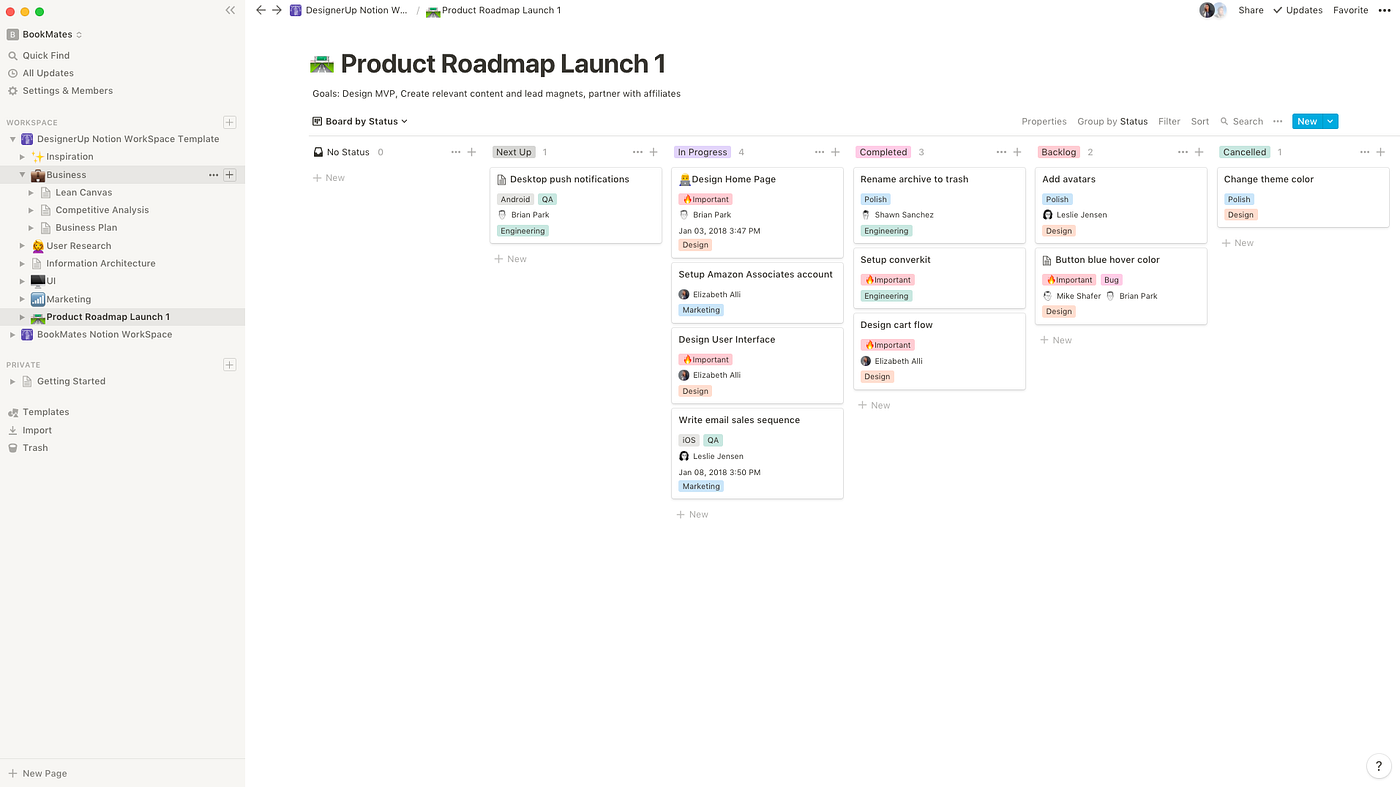
Notion is an all-in-one workspace for teams who want to build custom knowledge bases, process hubs, and collaborative docs in one platform. Its mix of databases, dynamic templates, and real-time editing is a strong fit for fast-paced product, engineering, and operations teams.
Who Is Notion Best For?
Notion is a natural fit for startups and cross-functional teams who need customizable internal hubs for process documentation and team knowledge.
Why Notion Is a Good Tettra Alternative
I picked Notion because no other tool in this space lets you build your knowledge base exactly the way your team actually works. The flexibility comes from its database-driven architecture—you can create linked wikis, structured SOPs, and process libraries all connected through relations and filters. I particularly like how you can embed a database of process docs inside a team home page, so everything stays contextual rather than buried in folders. For teams who've outgrown Tettra's more rigid structure, Notion gives you the building blocks to design something that actually fits.
Notion Key Features
- Nested pages: Build multi-level page hierarchies to organize processes, team wikis, and documentation in one place.
- Template library: Access and duplicate pre-built templates for SOPs, meeting notes, project briefs, and more.
- Slash commands: Insert any content block, embed, or media type directly inline while writing.
- Collaborative editing: Multiple team members can write and comment on the same page simultaneously.
Notion Integrations
Notion offers native integrations with Slack, GitHub, GitLab, Google Drive, Figma, Asana, Jira, Trello, Zoom, and Slack. An API is available for custom integrations.
Pros and Cons
Pros:
- Real-time collaboration supports fast updates across teams
- Linked pages connect wikis, SOPs, and project documentation
- Flexible databases help teams build custom process libraries
Cons:
- Advanced page exports may not preserve complex formatting
- Highly flexible setup can become inconsistent without governance

Best for familiar collaborative file sharing
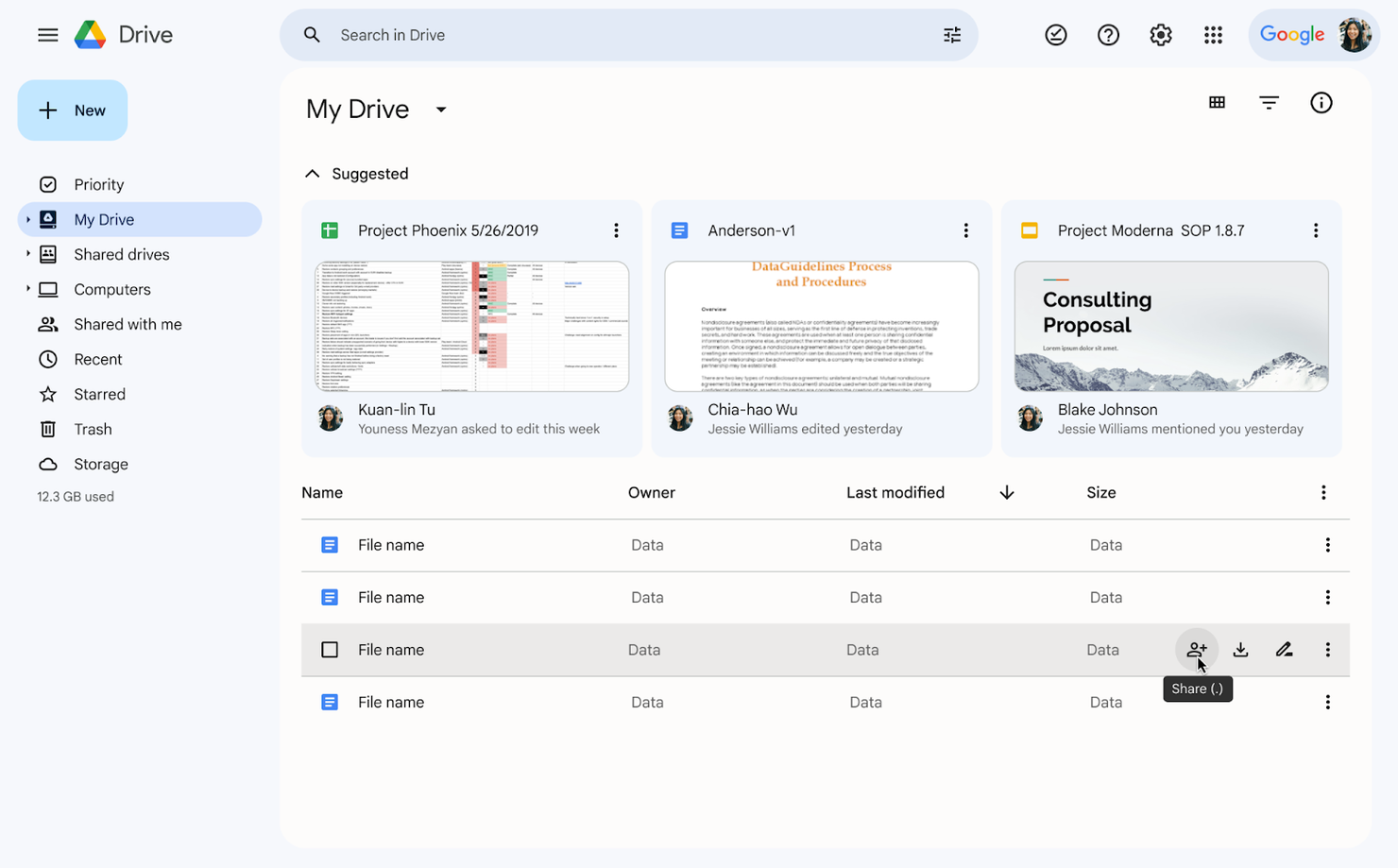
Google Drive is a cloud-based platform that makes it simple for teams to store, organize, and share business process documents. I think it’s a strong fit for teams who need secure, centralized access to files in familiar formats across devices.
Who Is Google Drive Best For?
Distributed teams and small businesses that want to manage, share, and update business process documents using familiar Google file types.
Why Google Drive Is a Good Tettra Alternative
I picked Google Drive because it gives teams a familiar, low-friction environment for creating and sharing process documents using Google Docs, Sheets, and Slides—formats most people already know. I particularly appreciate how Docs handles collaborative editing, with inline commenting, suggestion mode, and real-time co-authoring that make it easy to draft and refine SOPs with input from multiple stakeholders. My team also relies on shared drives with structured folder hierarchies and granular permission settings to organize documentation by team or function. For teams that don't need a dedicated wiki tool, that combination covers most process documentation needs.
- AI-powered search: Drive's AI-driven search surfaces relevant files based on your activity and content, not just file names.
- PDF annotation: Add and edit comments directly in PDFs by highlighting text, without needing a separate tool.
- Activity view: Get a running log of file activity across your workspace, including access requests and edits, in one place.
- Document scanning: Use the Drive mobile app to scan and store physical documents as searchable PDFs directly in Drive.
Google Drive Integrations
Google Drive offers native integrations with Google Docs, Google Sheets, Google Slides, Gmail, Google Calendar, Google Meet, and other Google Workspace apps. An API is available for custom integrations.
Pros and Cons
Pros:
- Mobile app supports document scanning and editing
- Integrates directly with other Google Workspace apps
- Supports live collaboration on docs and sheets
Cons:
- No native support for approval workflows
- Folder organization can get chaotic at scale

Best for governed enterprise document hubs
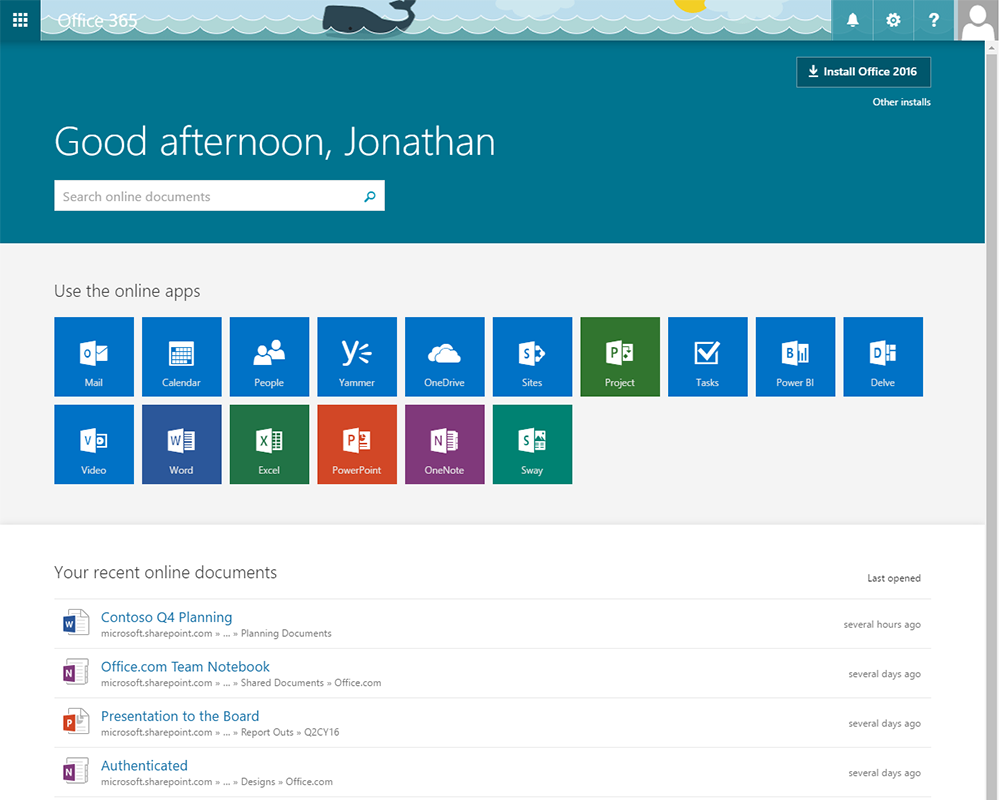
Microsoft 365 combines familiar apps like Word, OneNote, and SharePoint to help businesses of any size document and share processes. I think teams looking for collaborative, organization-wide process documentation and built-in content access controls will find it especially useful.
Who Is Microsoft 365 Best For?
Large organizations and distributed teams that need secure, collaborative process documentation and content sharing across departments.
Why Microsoft 365 Is a Good Tettra Alternative
I picked Microsoft 365 because no other tool in this list gives teams a full suite of documentation tools that work at the organizational level. SharePoint alone lets my team build structured intranets where process docs, SOPs, and knowledge articles are organized by department, with granular permission controls that determine who can view or edit each page. I also use Word and OneNote in tandem to draft, collaborate on, and version-control documents in real time. For teams that already live in Microsoft's ecosystem, that level of built-in content sharing across departments is hard to replicate elsewhere.
Microsoft 365 Key Features
- Microsoft Loop components: Create modular, real-time collaborative content blocks that can be embedded and stay synced across multiple documents and apps.
- Co-authoring in Word: Multiple team members can edit the same document simultaneously, with tracked changes and comment threads for inline feedback.
- Viva Topics: Automatically identifies and organizes knowledge from across your Microsoft 365 content into topic cards that surface relevant docs and experts.
- SharePoint page templates: Build structured, reusable page layouts for process documentation that teams can replicate across departments.
Microsoft 365 Integrations
Microsoft 365 has native integrations across the Microsoft ecosystem, including Microsoft Teams, SharePoint, OneDrive, Outlook, Power Automate, Power BI, and Azure. An API is available for custom integrations.
Pros and Cons
Pros:
- Built-in compliance and retention management features
- Supports complex workflows via Power Automate
- Immediate sharing across Microsoft apps and Teams
Cons:
- Organizational search sometimes surfaces irrelevant files
- SharePoint navigation can confuse new users

Best for searchable multimedia knowledge
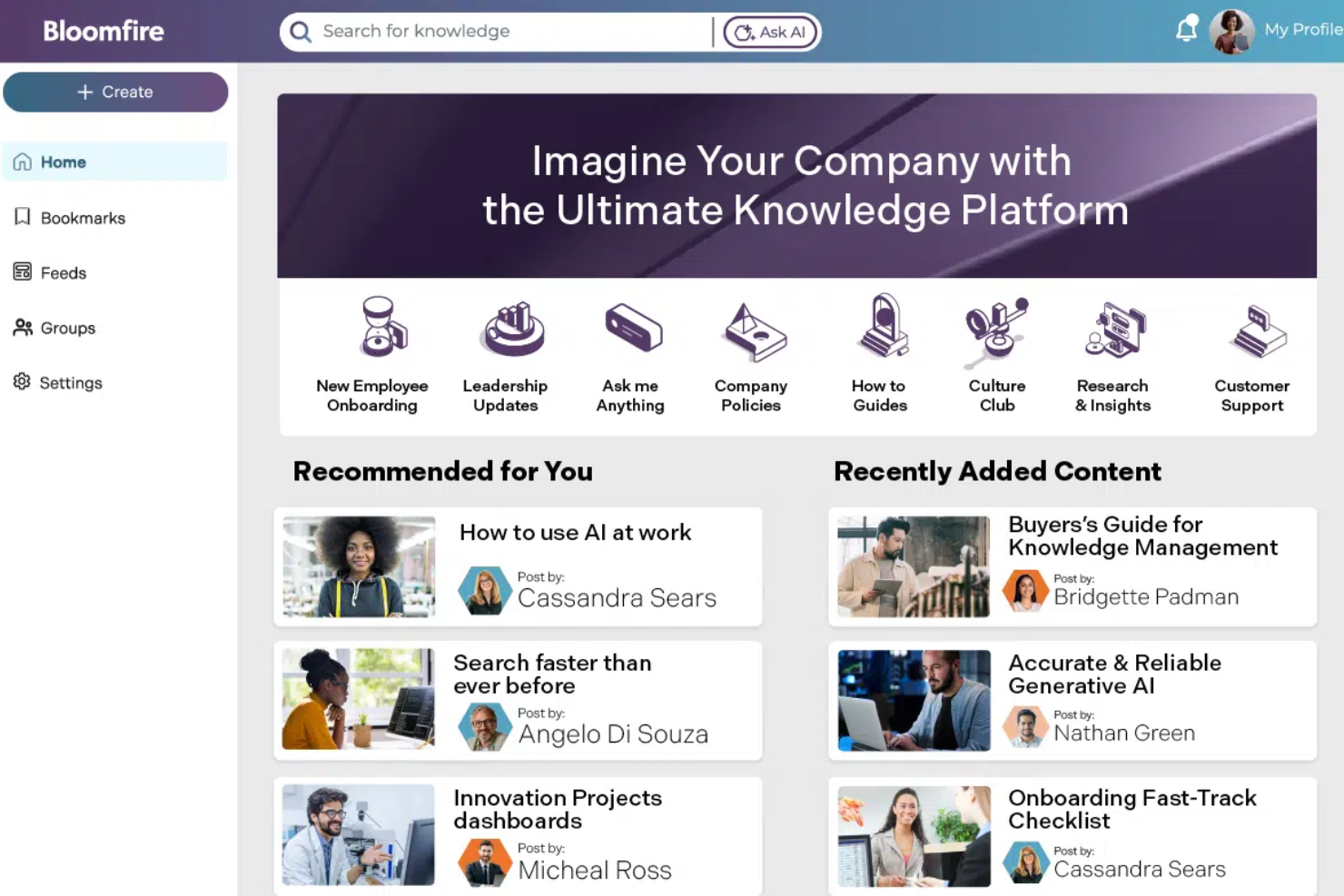
Bloomfire is designed for teams in highly regulated industries and customer-facing roles who need quick access to company knowledge. You’ll find it especially useful for organizing and centralizing process documents, FAQs, and best practices to support internal knowledge sharing.
Who Is Bloomfire Best For?
Bloomfire is a good fit for customer support, operations, and compliance teams in mid-size to large organizations that handle complex processes and need secure, centralized knowledge sharing.
Why Bloomfire Is a Good Tettra Alternative
I picked Bloomfire because its AI-powered search goes deeper than most knowledge tools. It indexes content inside PDFs, slides, audio, and video—so when a support agent or ops team member searches for a process, they get an exact answer, not a list of files to dig through. I also like the self-healing knowledge base, which flags stale or duplicate content and prompts authors to update it automatically. For teams switching from Tettra who need tighter content governance at scale, that combination of deep search and automated quality control is hard to match.
Bloomfire Key Features
- Q&A collective knowledge engine: Capture and organize institutional knowledge into structured, searchable question-and-answer pairs.
- Learn and confirm: Embed quizzes and knowledge checks directly into content to validate that critical information has been reviewed.
- Moderation tools: Use approval workflows and version control to govern content quality across all knowledge communities.
- Custom user experiences: Configure role-specific homepages and navigation so different teams see the content most relevant to them.
Bloomfire Integrations
Bloomfire offers native integrations with Salesforce, Slack, Zendesk, Google Drive, Microsoft 365, Microsoft Teams, Box, Dropbox, Okta, and OneLogin. An API is available for custom integrations.
Pros and Cons
Pros:
- Role-specific experiences support different team knowledge needs
- Content health features help identify stale or duplicate information
- AI search indexes knowledge across documents, media, and files
Cons:
- Learning checks offer less flexibility than dedicated training platforms
- No native diagramming tools for mapping visual processes
Best for knowledge-based employee training
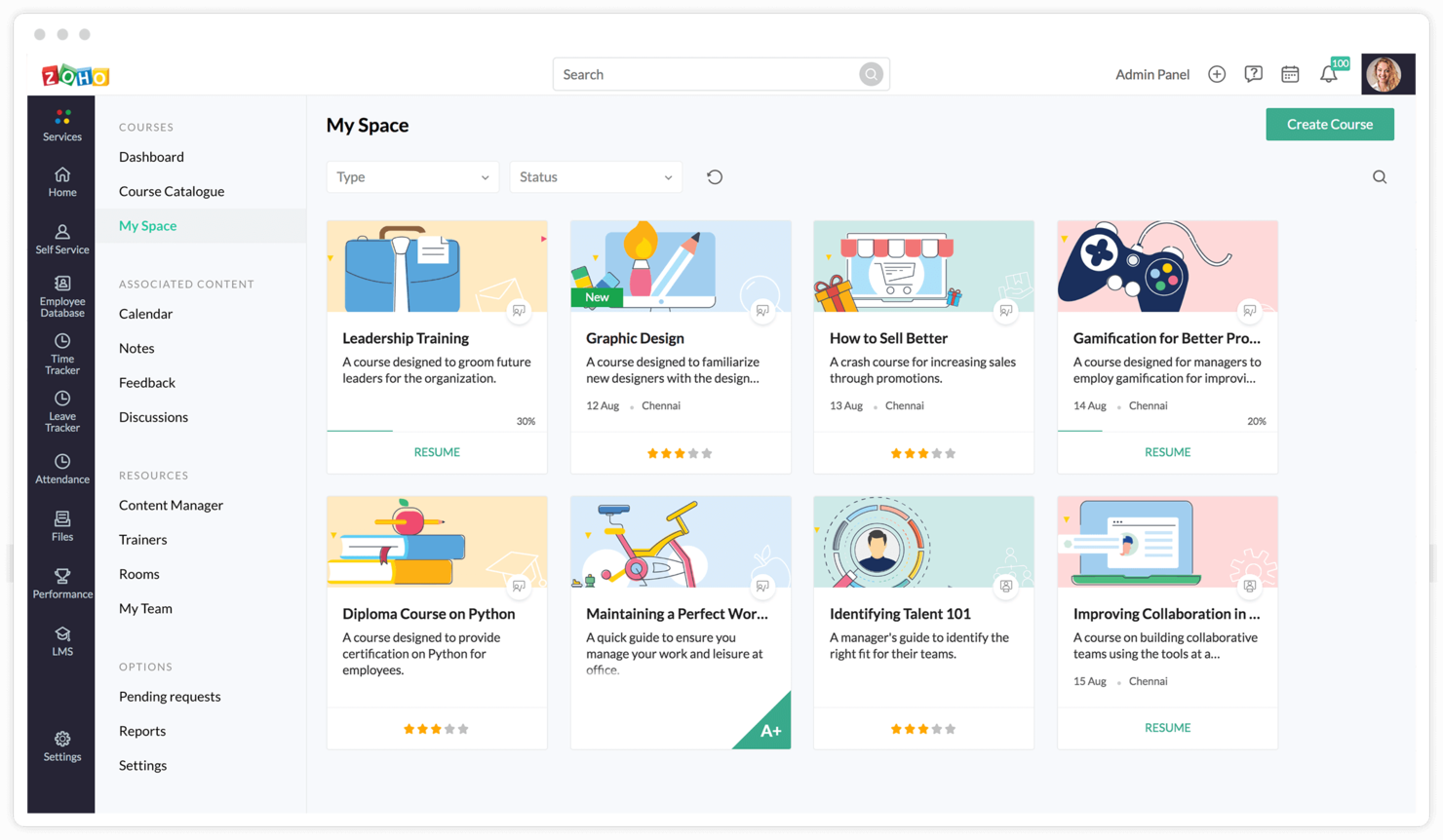
Knowledge-driven organizations searching for a documentation platform that blends team wikis with structured employee development may find Zoho Learn stands out. Its focus on linking knowledge management with actionable skills training solves onboarding and process consistency gaps for growing teams.
Who Is Zoho Learn Best For?
Distributed companies that need to document processes and deliver training content to support onboarding, compliance, and ongoing team development.
Why Zoho Learn Is a Good Tettra Alternative
What sets Zoho Learn apart from Tettra is its ability to turn static documentation into structured learning paths. I like that my team can organize articles into chapters and modules, then assign them as mandatory training with trackable completion. We've successfully used this to run new hire onboarding entirely within the platform—tracking who's read what and where they're stuck. The built-in assessment tools let me attach quizzes to any module, which adds accountability that pure documentation tools like Tettra simply don't offer.
Zoho Learn Key Features
- Article editor: Create and format documentation with embedded images, videos, code snippets, and tables.
- Content spaces: Organize knowledge into separate workspaces segmented by team, department, or project.
- Role-based permissions: Control who can view, edit, or publish content across different spaces.
- Search and tagging: Locate articles quickly using full-text search and custom content tags.
Zoho Learn Integrations
Zoho Learn offers native integrations with Zoho CRM, Zoho People, Zoho Analytics, and other Zoho apps. An API is available for custom integrations.
Pros and Cons
Pros:
- Analytics for tracking learning progress
- Granular workspace and user permissions
- Built-in course and quiz creation tools
Cons:
- No public API documentation for developers
- Limited integrations beyond the Zoho ecosystem

Best for Jira-linked technical documentation
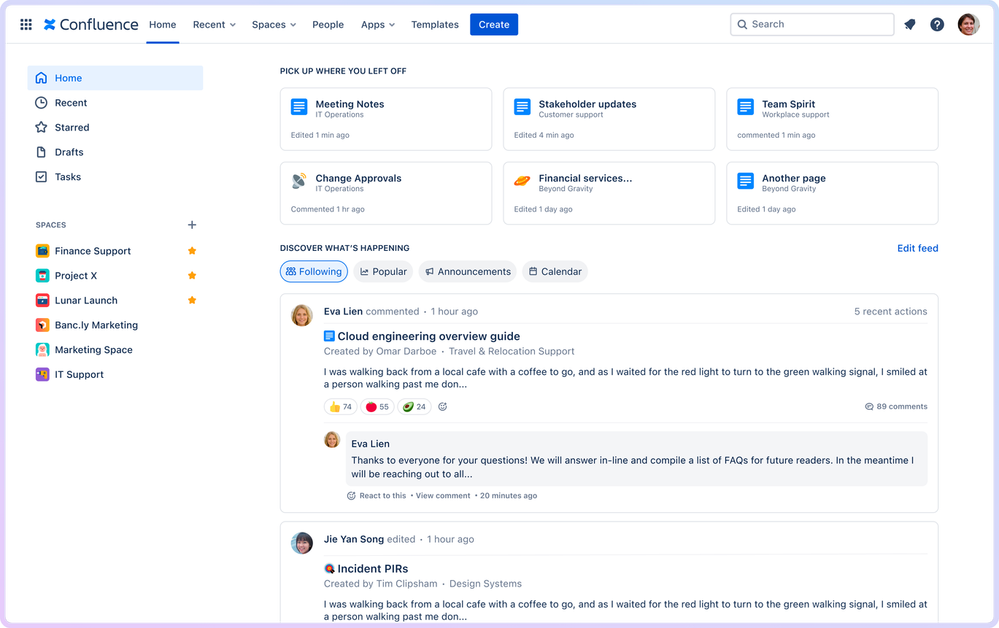
Confluence is a collaborative workspace that helps teams document, organize, and share company processes and knowledge. It’s a strong choice for organizations that want integrated project documentation, version control, and flexible collaboration across distributed teams.
Who Is Confluence Best For?
Confluence is a good fit for cross-functional teams that need collaborative knowledge sharing and structured process documentation, especially in software, IT, and professional services.
Why Confluence Is a Good Tettra Alternative
I picked Confluence because of how naturally it fits into teams already using Jira, Trello, or other Atlassian tools. When your sprint tickets live in Jira and your process docs live in Confluence, linking between them is instant—I can attach a spec doc directly to a Jira epic without ever leaving either tool. I also appreciate Confluence's Spaces structure, which lets teams organize documentation by project, team, or function with page hierarchies that stay navigable as content grows. For teams managing active delivery cycles alongside documentation, that tight Atlassian integration removes a lot of context-switching.
Confluence Key Features
- Page templates: Use pre-built or custom templates to standardize how documentation is created across teams.
- Inline comments: Leave feedback directly on specific sections of a page without interrupting the document structure.
- Page versioning: Access a full edit history for any page and restore previous versions when needed.
- Whiteboards: Build visual diagrams, flowcharts, and brainstorming canvases directly inside Confluence.
Confluence Integrations
Confluence offers native integrations with Jira, Trello, Bitbucket, GitHub, Slack, Microsoft Teams, Google Drive, Dropbox, and Zoom. An API is available for custom integrations.
Pros and Cons
Pros:
- Whiteboards and templates help teams standardize collaborative planning
- Jira connectivity supports project-linked process documentation
- Spaces and page trees keep team documentation organized at scale
Cons:
- Documentation exports may feel limiting for some publishing needs
- Advanced macros can require technical familiarity

XWiki
Best for customizable open-source wikis

XWiki is an open source knowledge management platform with deep customization options for technical teams and organizations that value control over their documentation. It’s a strong option for process documentation when you need flexible permissioning and integrations tailored to complex workflows.
Who Is XWiki Best For?
XWiki is a good fit for technical teams and enterprises needing open source, highly customizable process documentation and knowledge management.
Why XWiki Is a Good Tettra Alternative
I picked XWiki because it gives teams full control over their documentation environment in a way that closed-source tools simply can't match. Since it's open source and licensed under LGPL, you can self-host it, modify the codebase, and build entirely custom applications on top of it. I especially appreciate the App Within Minutes feature, which lets you create structured data forms and custom wiki-based applications without writing code. For teams with complex, non-standard documentation needs that outgrow the templates of tools like Tettra, that kind of extensibility is genuinely useful.
XWiki Key Features
- Full-text search: Search across all wiki pages, attachments, and structured data using Apache Solr-powered indexing.
- Granular rights management: Control view, edit, and delete permissions at the page, space, or entire wiki level.
- Multi-language page support: Create and manage translations of individual pages so users see content in their own language.
- Office document import: Import Word, Excel, and PowerPoint files directly into wiki pages without leaving the platform.
XWiki Integrations
XWiki offers native integrations with OnlyOffice, Microsoft 365, Google Drive, Dropbox, and LDAP directories. An API is available for custom integrations.
Pros and Cons
Pros:
- Structured data and macros enable custom knowledge workflows
- Granular permissions work well for complex documentation environments
- Open-source architecture supports deep customization and control
Cons:
- Mobile editing is less polished than desktop documentation workflows
- Admin setup can be complex for nontechnical teams
Guru
Best with browser extension and Slack integration
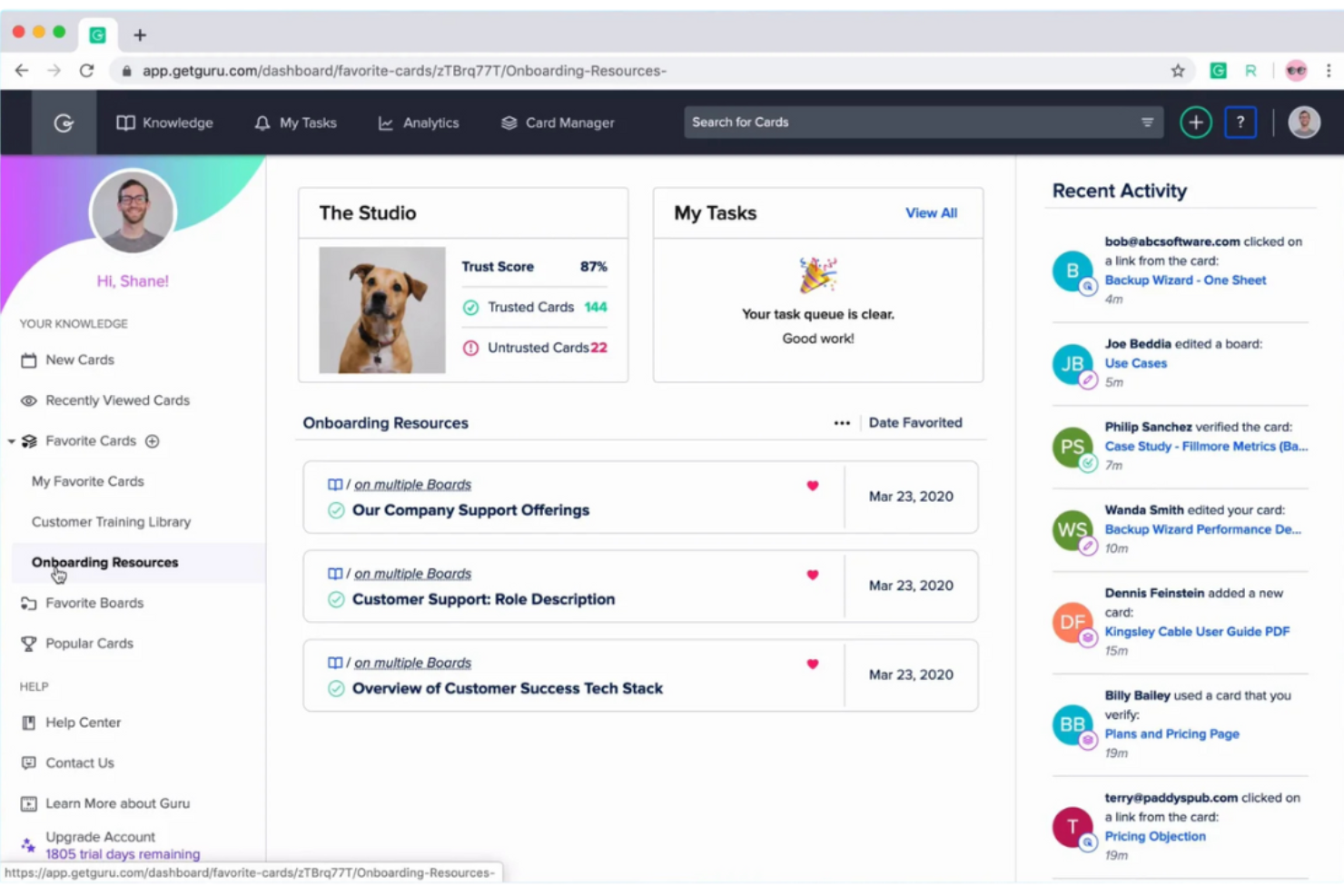
Guru stands out for fast knowledge capture and tailored insights for distributed teams, especially in fast-moving tech, support, or sales. If you want process documentation that surfaces answers where your team works, Guru’s smart browser extension and integrations can help break down silos.
Who Is Guru Best For?
Fast-growing support and sales teams who need real-time answers to common processes and policies within their daily workflows.
Why Guru Is a Good Tettra Alternative
I picked Guru because it delivers process knowledge directly inside the tools your team already uses, rather than requiring a context switch to a separate documentation hub. I especially appreciate the browser extension, which lets anyone surface verified knowledge cards without leaving their current tab. Guru's Slack integration means my team can query documented processes mid-conversation, which keeps workflows moving without interruption. The knowledge verification workflow also flags outdated cards, so documentation stays accurate as processes evolve.
Guru Key Features
- Knowledge triggers: Guru automatically surfaces relevant knowledge cards when you visit specific websites or tools, without any manual searching.
- Duplicate detection: Guru's AI flags redundant content in your knowledge base, so your team isn't maintaining overlapping documentation.
- Publishing workflows: Set author controls and required approvals before content goes live, keeping documentation quality consistent.
- Announcements: Push process updates directly to specific teams or individuals and track who has read and acknowledged the content.
Guru Integrations
Guru offers native integrations with Slack, Microsoft Teams, Google Workspace, Zendesk, Salesforce, Confluence, Jira, Box, and GitHub, and connects with Zapier. An API is available for custom integrations.
Pros and Cons
Pros:
- Slack and Teams access make answers easier to find during conversations
- Knowledge verification helps teams keep process content current
- Browser extension surfaces verified knowledge in daily workflows
Cons:
- Large imports can require cleanup and content restructuring
- Card-based structure may feel restrictive for complex documentation

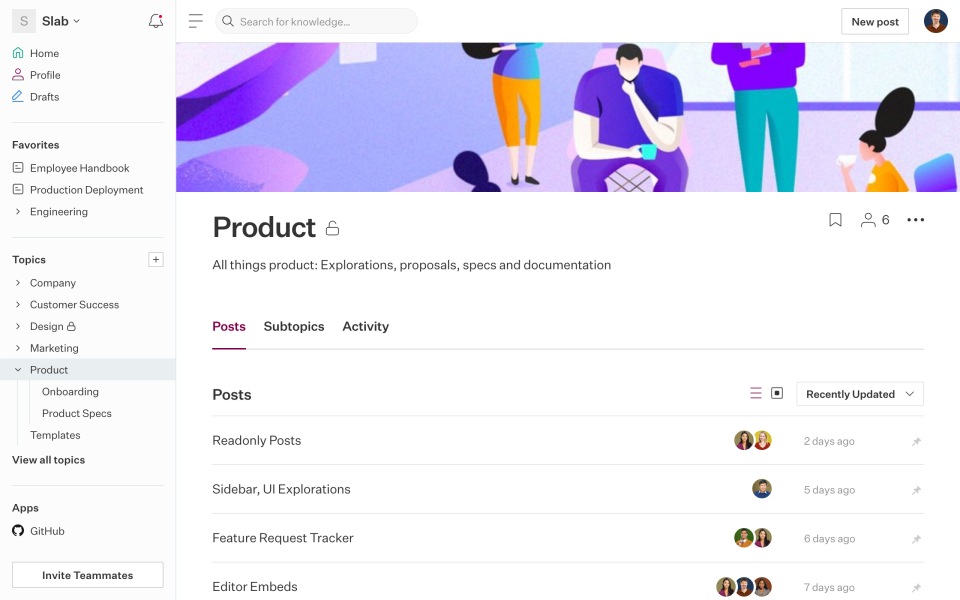
Slab is a unified knowledge base platform built for teams who want structured, easily discoverable documentation with a focus on usability and clean organization. It appeals to startups and growing businesses that need fast knowledge sharing and intuitive document linking across departments.
Who Is Slab Best For?
Slab is a strong choice for product, engineering, and business teams in small to mid-sized companies that need simple, organized knowledge bases for process and policy documentation.
Why Slab Is a Good Tettra Alternative
I chose Slab for its ability to handle knowledge discovery through its Topics system, which goes beyond simple folders by layering context around documentation—showing what's important to read, in what order, and who to ask if you get stuck. That structure makes it genuinely useful for onboarding and cross-functional documentation. I also appreciate Unified Search, which pulls results from both Slab content and connected tools like Google Drive and GitHub in a single query. For teams tired of hunting across multiple platforms to find a process doc, that alone changes how knowledge sharing works day to day.
Slab Key Features
- Admin insights: Track which posts are most viewed, which are going stale, and what questions your team is asking that go unanswered.
- Real-time collaborative editor: Edit the same post simultaneously with teammates, so no one overwrites anyone else's work.
- Slab Provisions: Set up custom user templates so new team members see the most relevant content the moment they log in.
- Rich media embeds: Add interactive widgets and third-party embeds directly into posts to go beyond plain text documentation.
Slab Integrations
Slab offers native integrations with Google Drive, Slack, GitHub, Asana, Trello, and Zapier. An API is available for custom integrations.
Pros and Cons
Pros:
- Version history with easy page rollback
- Topic hierarchies promote content discoverability
- Fast search that indexes connected integrations
Cons:
- Archive and tag management feels basic
- No granular permission control for subtopics

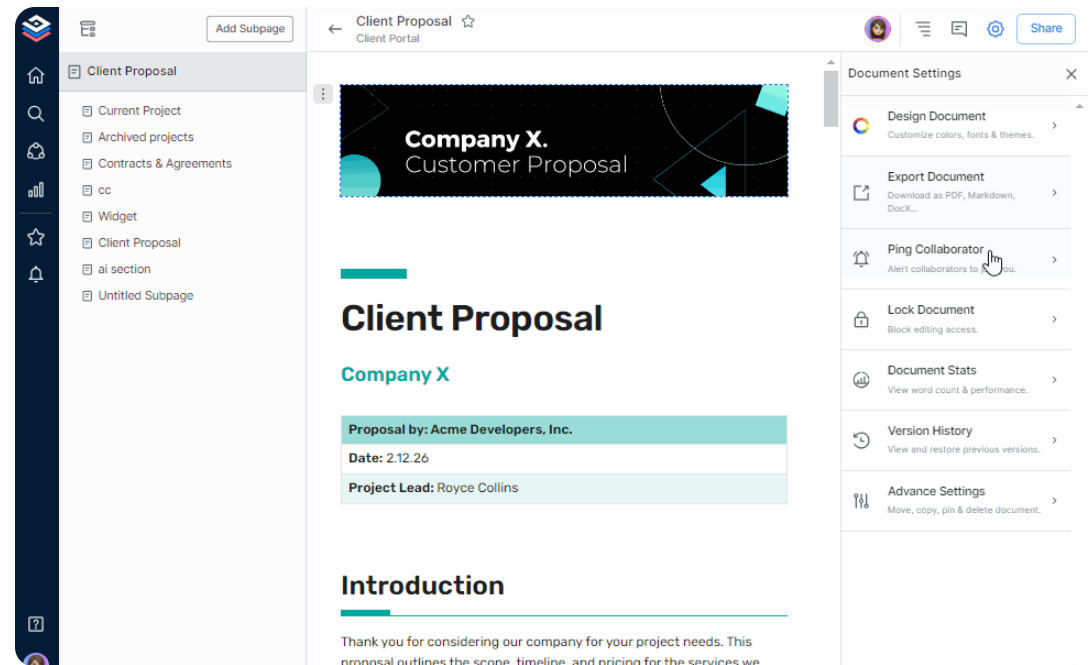
Bit.ai is a cloud-based platform designed for teams who want to make business process documentation more interactive and visually engaging. I think it's an appealing option for those who need to centralize guides, SOPs, and knowledge with rich media and collaboration in one place.
Who Is Bit.ai Best For?
Remote and hybrid teams that need to build visually engaging, media-rich documentation for cross-functional processes and internal knowledge sharing.
Why Bit.ai Is a Good Tettra Alternative
I picked Bit.ai specifically because it turns static process documents into interactive, media-rich guides—something Tettra can't match. Where Tettra keeps documentation text-heavy, Bit.ai lets my team embed live Figma files, Google Sheets, Typeform surveys, Loom videos, and more directly inside a document, so readers can interact with the content rather than just read it. I also appreciate the trackable link sharing, which lets you see how external stakeholders or new hires are actually engaging with process docs. For teams whose documentation spans multiple tools and content types, that combination makes a real difference.
Bit.ai Key Features
- Smart wiki builder: Convert any document into a multi-page wiki with a nested subpage hierarchy to structure complex internal knowledge.
- Document templates: Choose from nearly 100 pre-built templates to create SOPs, technical guides, and internal references.
- Asset library: Save and categorize frequently used digital content so your team can reuse it across documents without rebuilding from scratch.
- Document themes: Apply design themes and custom fonts across documents to keep your internal knowledge base visually consistent.
Bit.ai Integrations
Bit.ai offers native integrations with Google Drive, OneDrive, Slack, Trello, YouTube, Figma, Miro, Airtable, and Loom. An API is available for custom integrations.
Pros and Cons
Pros:
- Real-time document tracking and engagement analytics
- Smart search across all workspace documents
- Dynamic embeds for over 100 external tools
Cons:
- Limited options for password-protecting documents
- Limited granular page permissions per subpage
Other Tettra Alternatives
Here are some additional Tettra alternatives that didn’t make it onto my shortlist, but are still worth checking out:


How I Evaluate Tettra Alternatives
I look at two layers: the baseline a tool must clear—wiki hierarchy, content verification, real-time editing—and the differentiators that matter for project teams managing SOPs and distributed docs.
Core Functionality (Table Stakes For This List)
When I'm selecting tools for my list, I rank each one on a scale from 0 (does not offer the functionality) to 5 (excels in this area) for each core functionality listed below. Then, I calculate the tool's total score into a percentage. Each tool needs to achieve a minimum total score of 65% to be considered for inclusion.
- Internal Wiki Structure: I check whether a tool supports nested pages, categories, and structured navigation so teams can organize runbooks and SOPs without everything ending up in a flat list.
- Search Across All Content: Finding a specific post-mortem from three months ago should take seconds. I evaluate full-text search quality, filtering options, and whether attachments are indexed.
- Collaborative Editing: Project docs evolve fast, so I look for real-time or async co-editing, inline comments, and version history that lets you restore a page after an accidental overwrite.
- Permissions & Access Control: I consider whether you can lock down sensitive pages—like budget docs or vendor contracts—to specific groups while keeping general project wikis open to the whole team.
- Content Verification & Freshness: Stale documentation is worse than no documentation. I look for review reminders, owner assignment, and verification workflows that flag outdated content automatically.
- Integrations With Work Tools: A knowledge base works best when it connects to where your team already works. I evaluate native Slack, Teams, and PM tool integrations like Jira or Asana connectors.
Once I have a list of tools that meet this criteria, I consider what sets each platform apart.
Differentiating Factors (What Sets Vendors Apart)
Here's how I compare and contrast different vendors:
Standout Features
I pay close attention to AI knowledge assistants that can answer team questions by pulling from existing docs—a huge time-saver when onboarding new sprint team members. Q&A workflows matter too, especially ones that route unanswered questions to subject-matter experts and turn replies into permanent wiki pages. I also evaluate content analytics to see which pages get used, which searches return nothing, and where knowledge gaps are hiding across your project documentation.
Beyond Features
Content migration is a big deal when switching from Tettra. I check whether a platform offers native importers for common formats like Markdown, HTML, or Confluence exports—because manually recreating hundreds of wiki pages kills adoption. Integration depth with your PM stack also matters; a Jira or Asana connector that links knowledge pages to active tasks is far more useful than a basic embed. Finally, I evaluate pricing models to see whether per-user costs stay reasonable as your project team scales beyond a small pilot group.
Why Look For a Tettra Alternative?
While Tettra is a good choice of process documentation software, there are a number of reasons why some users seek out alternative solutions. You might be looking for a Tettra alternative because…
- You need integrations beyond Slack and Teams
- You want more advanced analytics and reporting
- Your team requires multilingual content support
- You need deeper customization for branding
- Your workflows need built-in process automation
If any of these sound like you, you’ve come to the right place. My list contains several process documentation software options that are better suited for teams facing these challenges with Tettra and looking for alternative solutions.
Tettra Key Features
Here are some of the key features of Tettra, to help you contrast and compare what alternative solutions offer:
- Knowledge base: Lets you organize internal documentation into structured collections and pages, making information simple for teams to create, edit, and find.
- Question and answer workflow: Enables team members to ask questions within Tettra and get documented answers, actively turning tribal knowledge into accessible processes.
- Slack integration: Allows users to search, create, and share Tettra pages directly from Slack, keeping process knowledge available in your team's messaging hub.
- Content verification: Prompts owners to review and verify documentation on a recurring basis, so your company’s knowledge base stays current and reliable.
- Approval workflows: Assigns specific team members to review and approve content before publishing, enforcing quality control for sensitive or regulated information.
- Permissions control: Provides fine-grained access and editing rights for pages, so only the right people can change or view designated content.
- Page suggestions: Highlights gaps in existing documentation and recommends new articles, encouraging teams to continuously capture tacit expertise.
- Template management: Lets teams standardize documentation style and structure using reusable templates for processes and workflows.
- Integrations: Connects with tools like Google Drive, Microsoft Teams, GitHub, and Zapier, letting your documentation stay coordinated with your broader tech stack.