

10 Best Small Business Document Management Software 2026

10 Best Small Business Document Management Software Shortlist


Document management software for small businesses helps teams organize, store, and access important files in one place—eliminating the chaos of scattered folders, endless email attachments, and inconsistent versioning. With the right tool, you can streamline your workflows, stay compliant, and save time searching for the documents you need.
I’ve tested and reviewed a variety of document management tools with small teams in mind—focusing on affordability, ease of use, and essential features like permissions, cloud access, and searchability. Whether you’re just starting out or growing fast, this list will help you find a solution that fits your budget and needs.
Why Trust Our Software Recommendations
Our team has been testing and reviewing software since 2012. As project managers ourselves, we know how difficult—and important—it is to choose the right software.
For this guide, we evaluated tools using hands-on testing and independent research, scoring tools using our selection criteria. We also draw on insights from industry thought leaders and practicing project management experts.
Our reviews reflect our human editorial judgment, not a sales pitch.
Expert reviewers:
Small Business Document Management Software Comparison Table
The table below compares pricing details for my top small business document management software selections.
| Tool | Best For | Trial Info | Price | ||
|---|---|---|---|---|---|
| 1 | Best for easy collaboration | Free plan + 14-day free trial available | From CAD $9.20/user/month (billed annually) | Website | |
| 2 | Best for open source flexibility | Free demo available | Pricing upon request | Website | |
| 3 | Best for document workflows | Free demo available | Pricing upon request | Website | |
| 4 | Best for enterprise security | 14-day free trial | From CAD$21/user/month (billed annually) | Website | |
| 5 | Best for metadata management | Free demo available | From $65/user/month | Website | |
| 6 | Best for team collaboration | Free demo + 15-day free trial available | From CAD $3/user/month (billed annually) | Website | |
| 7 | Best for small teams | Free plan available | From $52/month | Website | |
| 8 | Best for document automation | Free plan available | From $19/user/month (billed annually) | Website | |
| 9 | Best for simple sharing | Free plan available | From $9.99/person/month (billed annually) | Website | |
| 10 | Best for office integration | Free plan available | From $1.99/month | Website |
Best Small Business Document Management Software Reviews
Below are my detailed summaries of the best small business document management software that made it onto my shortlist. My reviews offer a detailed look at the key features, pros & cons, integrations, and ideal use cases of each tool to help you find the best one for you.

Best for easy collaboration

Google Drive earns its spot because teams usually need to share and edit documents together without delays. When I work with small businesses, easy permission controls and the ability to comment in real time make a huge difference. I like how you can start a doc during a meeting, loop people in, and have feedback instantly—all in your browser.
If you want files, spreadsheets, and presentations organized and accessible for everyone, this is the first place I'd send you.
Google Drive’s Best For
- Small teams that need quick, cloud-based file sharing
- Businesses focused on collaborative editing and feedback
Google Drive’s Not Great For
- Organizations needing strict document retention policies
- Businesses with highly regulated industry compliance needs
What sets Google Drive apart
Google Drive is organized around letting you start work fast and involve others instantly. Unlike Dropbox, which prioritizes document storage and backup, Google Drive expects you to draft, edit, and review in a shared space, with live comments and easy file links. In practice, this works best for groups who care more about speed and collaboration than hierarchy or strict file control.
Tradeoffs with Google Drive
Google Drive optimizes for quick access and shared editing, but you lose advanced document controls, so work can get messy if you need rigorous oversight.
Pros and Cons
Pros:
- PDF annotation tools
- AI-powered search capabilities
- Customizable access permissions
- Seamless Google apps integration
- Easy real-time collaboration
Cons:
- No task management features
- Limited offline capabilities
- Requires internet connection
- Occasional syncing issues
- Limited storage options

Best for open source flexibility

LogicalDOC makes my shortlist because it delivers true open source flexibility for document management. I recommend it when you want granular control over deployment or customization, especially if your team has specific needs around workflow automation or on-premise hosting.
I like that LogicalDOC supports custom scripting for automation and granular permissions, which isn’t something you get with most small business DMS platforms.
LogicalDOC’s Best For
- IT admins or technical teams needing open source customization
- Organizations with specific requirements for workflow or integration
LogicalDOC’s Not Great For
- Non-technical users looking for simple, out-of-the-box tools
- Teams needing polished mobile apps or frequent UI updates
What sets LogicalDOC apart
LogicalDOC is built with open access and modularity in mind, making it a good choice when you want to own your deployment and tweak configurations. Unlike Google Workspace or Dropbox, it’s designed for control at the file system and process level. In practice, this works best when you prioritize customization or compliance and have resources for ongoing system management.
Tradeoffs with LogicalDOC
LogicalDOC optimizes for flexibility and control, but that often means more setup time and heavier maintenance for your internal IT team.
Pros and Cons
Pros:
- Version control features
- Automated workflows
- Advanced search options
- Open-source flexibility
- Highly customizable
Cons:
- High resource requirements
- Steep learning curve
- Limited user support
- Complex initial setup
- Requires technical expertise

DocuWare
Best for document workflows

DocuWare is on my shortlist because its document workflow automation stands out in small business environments. I see teams use DocuWare to route, review, and approve documents without constant manual nudges. The configurable workflow builder lets you map steps like invoice approvals or employee onboarding exactly how your business runs. I like how you can set custom triggers and notifications—DocuWare genuinely takes repetitive steps off your plate.
DocuWare’s Best For
- Businesses automating invoice, contract, or HR document workflows
- Teams needing reliable, rule-based review and approval processes
DocuWare’s Not Great For
- Teams that just need basic document storage
- Businesses with advanced records retention or legal archiving needs
What sets DocuWare apart
DocuWare is built around mapping out consistent, rule-driven document lifecycles. Unlike Google Workspace, which is mostly about file storage and sharing, DocuWare expects you to design workflows for every step: submission, review, sign-off, and archiving. This fits best when documents need to move through the same checks and approvals each time, without relying on ad hoc team habits.
Tradeoffs with DocuWare
DocuWare optimizes for structured, automated routing, but you lose some of the quick flexibility you get with freeform storage tools. For ad hoc uploads and casual document collaboration, the workflow design can feel like unnecessary overhead.
Pros and Cons
Pros:
- Automated document processes
- Supports electronic signatures
- Mobile app for document management
- Intelligent document indexing
- Customizable workflow templates
Cons:
- Complex customization options
- High initial setup cost
- Limited offline capabilities
- Requires technical setup
- Steep learning curve

Box
Best for enterprise security

Box is on this list because its approach to enterprise-grade security sets it apart from typical document management platforms. When I see teams with sensitive documents or compliance requirements, Box's granular permissions and audit trails handle that need. I like the way Box automates security classifications and integrates with legal holds, especially for regulated industries.
You get full control over file access and detailed activity logs, so you're not left guessing about data exposure.
Box's Best For
- Teams with strict data security or compliance needs
- Businesses handling sensitive client or legal documents
Box's Not Great For
- Small teams who don’t need advanced security features
- Companies wanting heavy workflow automation or customization
What sets Box apart
Box is built around securing and controlling every file and action, rather than just storing and sharing documents the way Google Drive does. I see it cater well to teams that need to lock down access, set granular rules for who can see or edit files, and know exactly who touched what, when. Unlike Dropbox or Google Workspace, it handles compliance and security configurations up front, which fits environments where audit trails matter more than quick collaboration.
Tradeoffs with Box
Box prioritizes enterprise-level security, but you give up a more flexible approach to workflow automation and lightweight collaboration. This means teams needing to customize their processes or automate document-driven work may feel limited.
Pros and Cons
Pros:
- External file requests
- Automated workflow options
- Detailed activity tracking
- Custom permission settings
- Strong encryption features
Cons:
- No built-in task management
- Occasional performance issues
- Limited offline access
- Requires training for new users
- Complex user interface

M-Files
Best for metadata management

M-Files is on my list because its metadata-driven approach changes how you manage and find documents. I recommend it when you’re tired of navigating messy folder structures and need to tag, organize, and retrieve files based on content, not just file names. What I appreciate is how you can search by project, client, or document type, which actually speeds up audits or information requests. It’s especially useful for small businesses that juggle a lot of different document types and compliance requirements.
M-Files’ Best For
- Businesses needing to organize documents by metadata tags
- Firms with complex compliance or audit documentation needs
M-Files’ Not Great For
- Teams that want simple, folder-based document storage
- Companies with low document search or retrieval complexity
What sets M-Files apart
M-Files organizes documents by what they are, not where they are stored. Instead of navigating nested folders like in Google Drive or Dropbox, you use metadata to tag and find files based on context—project, client, document type. This approach fits situations where you often revisit or repurpose the same content for different uses and need to locate the right file fast.
Tradeoffs with M-Files
M-Files optimizes for metadata-driven organization, but you lose the simplicity and familiarity of folder-based navigation. For teams used to traditional file structures, adjusting workflows and retraining staff becomes a necessary hurdle.
Pros and Cons
Pros:
- Strong version control
- Advanced search functionality
- Automated metadata workflows
- Precise document retrieval
- Custom metadata fields
Cons:
- Metadata management can be overwhelming
- Limited offline access
- High initial learning curve
- Requires training for users
- Complex setup process

Best for team collaboration
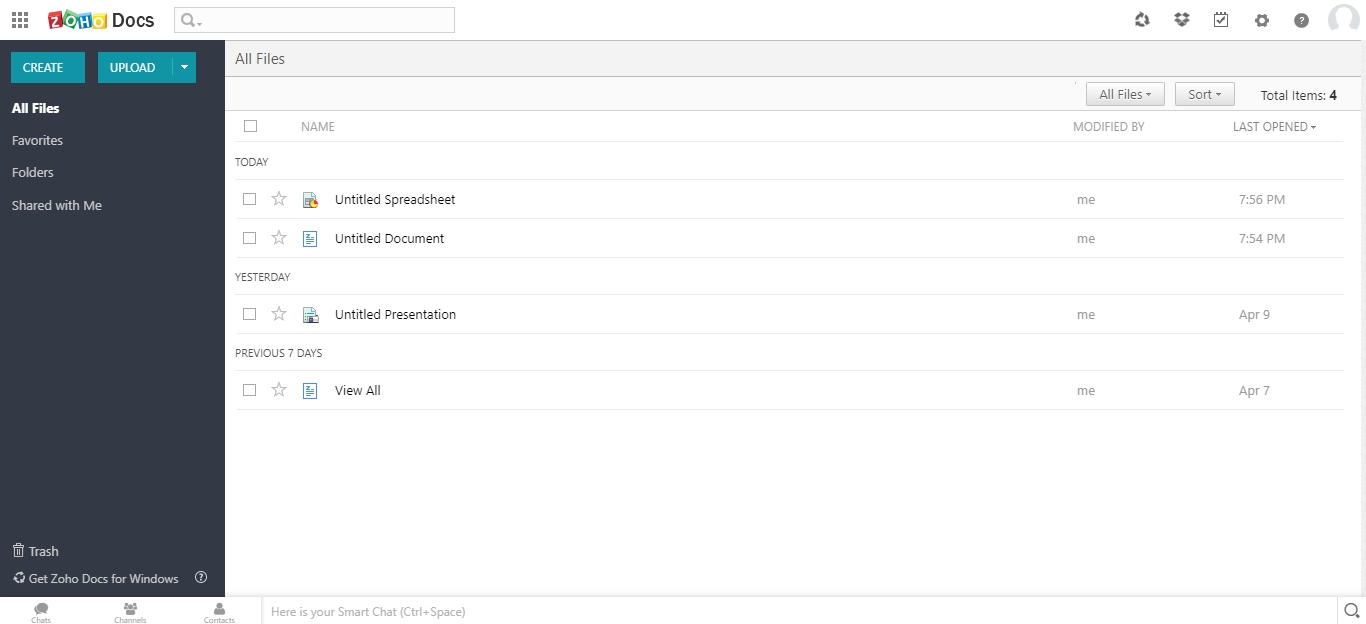
Zoho WorkDrive is on my shortlist because it’s designed for true team-centric document management. I see small teams using its Team Folders to organize, co-author, and update files in real time, which helps prevent version confusion during project work.
What I like about WorkDrive is its built-in granular permissions and unified file activity tracking. You get continuous visibility into who’s doing what, making it easier to keep work moving without bottlenecks.
Zoho WorkDrive’s Best For
- Small teams needing shared file storage and co-authoring
- Businesses that require granular access control and audit tracking
Zoho WorkDrive’s Not Great For
- Companies needing advanced workflow automation
- Teams focused on industry-specific document compliance
What sets Zoho WorkDrive apart
Zoho WorkDrive structures collaboration around shared team folders with fine-grained permissions rather than personal storage or loose file sharing, like Google Drive. In practice, this makes file management feel much more deliberate, especially for teams handling lots of client or project-specific documents.
Unlike Dropbox, which is often about quick syncing and sharing, WorkDrive encourages teams to centralize everything and tie access to roles and responsibilities. You see this work best when businesses want to keep control without lots of admin overhead.
Tradeoffs with Zoho WorkDrive
WorkDrive optimizes for organized collaboration, but limits your ability to automate complex multi-step document workflows. If your work depends on advanced automation or triggers tied to documents, you’ll likely need an outside tool.
Pros and Cons
Pros:
- Flexible permission settings
- Comprehensive version history
- Offline access capability
- Detailed activity dashboards
- Shared workspaces for projects
Cons:
- Learning curve for new users
- Basic task management features
- Requires internet for full functionality
- Occasional sync issues
- Limited third-party integrations

Folderit
Best for small teams

Folderit made my list because it’s geared toward small teams who need secure sharing and organized document control without extra complexity. I’ve set up automatic approval workflows and multi-level permissions for teams with basic compliance needs, which keeps everything simple but accountable.
What I appreciate most is how Folderit lets you automate document retention rules and assign unique access per folder or group, making it a lot easier for small businesses to manage who’s seeing and changing what.
Folderit's Best For
- Small businesses needing simple, secure document control
- Teams managing approval workflows and compliance basics
Folderit's Not Great For
- Complex organizations with advanced automation needs
- Companies that require deep integration with external systems
What sets Folderit apart
Folderit centers around simple, permission-based document management that’s accessible even for teams without IT experience. Instead of the complexity you’ll find in something like Google Workspace or SharePoint, Folderit uses a straightforward folder hierarchy and easy-to-set approval workflows. I see it work best for businesses with clear roles and low need for process customization.
Tradeoffs with Folderit
Folderit optimizes for simplicity and directness, but teams lose out on advanced automation or deep integration options. That limits how far you can scale when requirements—or system connections—get more complex.
Pros and Cons
Pros:
- Designed for small teams
- Simple approval workflows
- Detailed audit trails
- Custom metadata options
- Easy to set up
Cons:
- Requires internet access
- Minimal customization
- No mobile app
- Basic feature set
- Limited scalability
PandaDoc
Best for document automation
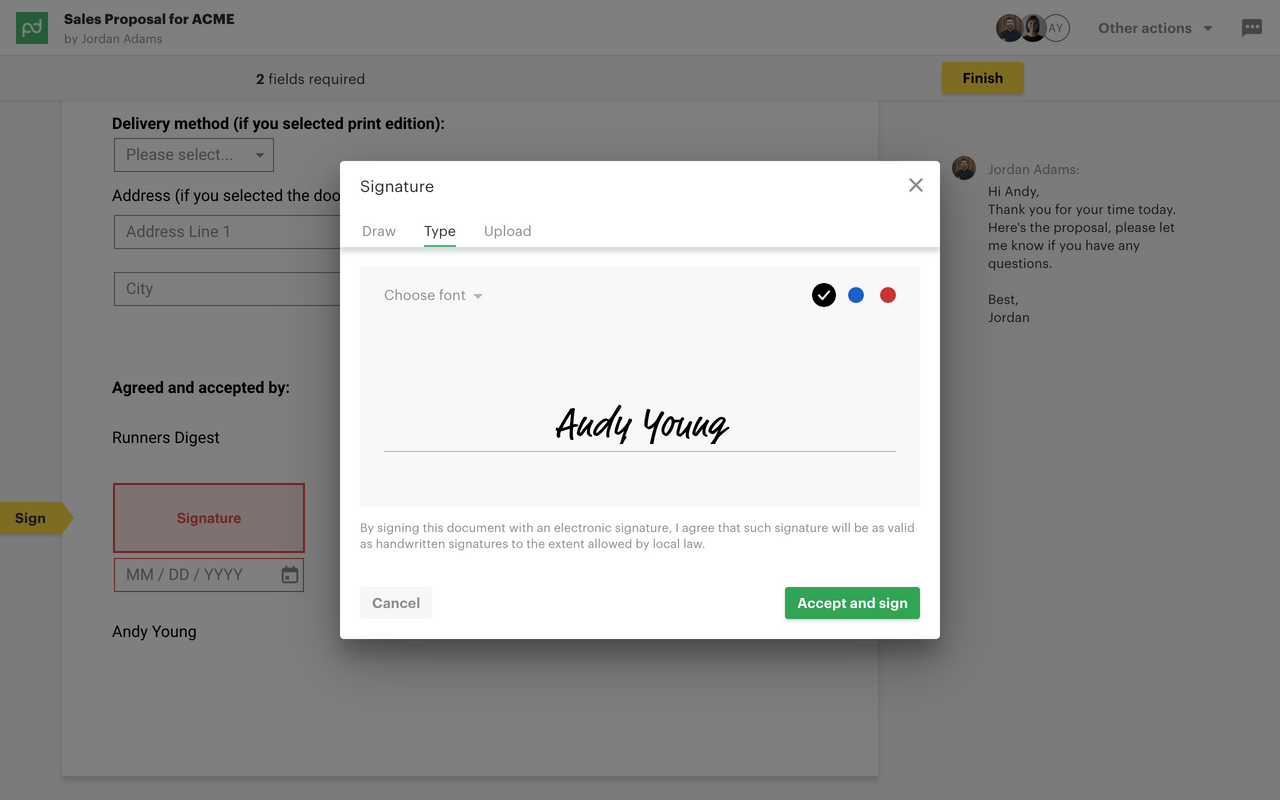
PandaDoc is here for document-heavy teams who need more than just storage. I like how you can automate contracts, proposals, and approvals with customizable templates and native e-signature. This is where PandaDoc stands out—workflow automation makes handling docs at scale practical for small businesses.
What impresses me is how easy it is to build end-to-end document flows, making collaboration for sales or HR teams fast and repeatable.
PandaDoc’s Best For
- Teams handling lots of contracts, proposals, or quotes
- Small businesses that need automated document workflows
PandaDoc’s Not Great For
- Teams looking mainly for advanced document storage or search
- Companies with heavily regulated document compliance needs
What sets PandaDoc apart
PandaDoc takes a process-first approach, with everything built around document creation, approval, and tracking in repeatable workflows. Unlike traditional cloud storage or file management tools like Google Workspace, it works best for groups that rely on sending, signing, and moving documents through steps. In practice, I see sales and operations teams getting the most value from this format.
Tradeoffs with PandaDoc
PandaDoc optimizes for document automation, but that means file storage, tagging, and advanced search options can feel limited if you treat it like a typical document repository.
Pros and Cons
Pros:
- Detailed analytics dashboard
- Built-in electronic signatures
- Real-time document tracking
- Customizable templates
- Efficient document automation
Cons:
- Occasional performance lags
- Basic customization options
- Requires internet for full use
- Learning curve for advanced features
- Limited offline functionality


Dropbox Business makes my shortlist because it removes friction from sharing files and folders, especially for small teams that need to move quickly. I see a lot of organizations adopt Dropbox when they hit a point where email attachments and drives are slowing collaboration.
What stands out for me is its link-based file sharing and granular permission controls. I like that you can send a large folder to a client or collaborator by sharing a single link, without ever worrying about email limits or who has what software.
Dropbox Business’s Best For
- Small businesses that prioritize quick, secure file sharing
- Teams collaborating with external partners or agencies
Dropbox Business’s Not Great For
- Companies needing complex document approval workflows
- Businesses with strict records retention or compliance needs
What sets Dropbox Business apart
Dropbox Business is built around making file sharing and basic collaboration as direct as possible, without piling on workflow requirements. Unlike Google Workspace, which mixes documents, chat, and editing in a single interface, Dropbox starts from the idea that files and folders are the main unit of work. In practice, this approach keeps things simple for small teams who move documents around a lot but don’t need deep integration into other business tools.
Tradeoffs with Dropbox Business
Dropbox optimizes for fast sharing and minimal process, but you give up built-in document lifecycle management. If your team needs things like formal approvals or retention policies, you’ll find those missing or basic.
Pros and Cons
Pros:
- Collect files from non-users
- File recovery options
- Secure file permissions
- Smart Sync space saving
- Easy file sharing
Cons:
- Basic collaboration tools only
- No task management features
- Requires internet connection
- Occasional sync delays
- Limited customization options


I picked Microsoft OneDrive because it’s the most seamless way to manage documents if you already use Word, Excel, and the rest of Microsoft 365. I see small businesses benefit most from how changes sync instantly across teams and devices, so files always reflect the latest edits. What I like is the file sharing, version history, and granular permissions directly in folders, all without leaving the tools you already use.
OneDrive’s Best For
- Small businesses using Microsoft 365 for daily work
- Teams that need real-time document co-editing
OneDrive’s Not Great For
- Companies avoiding Microsoft products
- Document workflows needing built-in e-signature or advanced automation
What sets OneDrive apart
OneDrive focuses on making document management feel like a natural extension of Microsoft 365 apps, not a separate system. Unlike Google Drive, which builds around browser-based collaboration, OneDrive puts files and folders right inside your desktop file explorer and Office apps. In practice, this works best when your workflow revolves around Word, Excel, and shared drives.
Tradeoffs with OneDrive
OneDrive optimizes for tight Microsoft 365 integration, but you lose advanced document process automation found in specialty DMS tools, so complex workflows can be harder to build.
Pros and Cons
Pros:
- Customizable document libraries
- Supports remote work
- Comprehensive version control
- Advanced permission settings
- Strong office suite integration
Cons:
- Limited offline access
- Requires Microsoft ecosystem
- Occasional sync delays
- Steep learning curve
- Complex setup process
Other Small Business Document Management Software
Here are some additional small business document management software options that didn’t make it onto my shortlist, but are still worth checking out:
- ONLYOFFICE
For office suite integration
- Evernote Teams
For team note-taking
- Rubex by eFileCabinet
For compliance management
- Citrix ShareFile
For secure file sharing


How I Evaluate Small Business Document Management Software
I look at these tools in two layers: whether they handle the basics like versioned project files and permission-based sharing, then what sets the top picks apart for small teams.
Core Functionality (Table Stakes For This List)
When I'm selecting tools for my list, I rank each one on a scale from 0 (does not offer the functionality) to 5 (excels in this area) for each core functionality listed below. Then, I calculate the tool's total score into a percentage. Each tool needs to achieve a minimum total score of 65% to be considered for inclusion.
- Centralized Document Storage: I check whether the tool organizes files into structured workspaces or libraries tied to projects, not just a flat file dump where SOWs and meeting notes get buried together.
- Version Control & History: Every tool I evaluate should track document revisions automatically so your team can roll back a client proposal or contract to a prior version without file-naming chaos.
- Granular Access Permissions: I look for role-based or user-level controls that let you restrict a subcontractor to one project folder while giving your project lead full edit access across the workspace.
- Document Search & Metadata: Strong search goes beyond filenames. I evaluate whether a tool supports full-text search, tagging, and metadata filters so you can surface a specific change order from hundreds of project files.
- Collaboration & Sharing: The tool should support internal comments, external sharing links, and review or approval workflows. I check whether stakeholders outside your organization can review deliverables without needing a paid seat.
- Audit Trails & Integrations: Activity logs that show who accessed or modified a file matter for accountability. I also look at native integrations with tools like Google Workspace, Microsoft 365, Slack, and popular project management platforms.
Once I have a list of tools that meet this criteria, I consider what sets each platform apart.
Differentiating Factors (What Sets Vendors Apart)
Here's how I compare and contrast different vendors:
Standout Features
Client portals are a big differentiator. When clients can review and approve deliverables through a branded portal without needing their own license, it removes friction that slows project sign-offs. I also look for built-in e-signature support, since sending a SOW for signing inside the same platform where it's stored saves a round trip to a separate tool. For teams with field staff, mobile document capture matters too—being able to scan a signed form or site photo directly into the right project folder keeps files from living in someone's camera roll.
Beyond Features
Pricing structure matters for small teams, so I evaluate whether a tool offers a usable free or low-cost plan that doesn't gate core features like version control behind enterprise tiers. Implementation speed is another priority—I check for migration support that pulls existing files from Google Drive or Dropbox, since a five-person team rarely has bandwidth for a multi-week rollout. How well each platform connects to the project management tools your team already runs on, whether that's Asana, Trello, or Monday.com, also shapes how much real value you'll get day to day.
How to Choose Small Business Document Management Software
It’s easy to get bogged down in long feature lists and complex pricing structures. To help you stay focused as you work through your unique software selection process, here’s a checklist of factors to keep in mind:
| Factor | What to Consider |
|---|---|
| Scalability | Can the software grow with your business? Consider if the tool offers tiered plans that allow you to add more users and storage as needed without a complete overhaul. |
| Integrations | Does it connect with your existing tools? Check if it supports integrations with your CRM, email, and other essential software to avoid data silos. |
| Customizability | Can you tailor it to your workflows? Look for options to customize dashboards, fields, and document templates to fit your specific processes. |
| Ease of use | Is it user-friendly for your team? Avoid tools with steep learning curves. Opt for intuitive interfaces that minimize training time and streamline daily operations. |
| Implementation and onboarding | How smooth is the transition? Assess the availability of training resources, like tutorials and webinars, to ensure a quick and easy setup for your team. |
| Cost | Does it fit your budget? Compare the pricing plans, including any hidden fees or annual discounts, to ensure it aligns with your financial constraints. |
| Security safeguards | Are your documents protected? Verify if the tool includes encryption, access controls, and regular security updates to safeguard sensitive information. |
| Compliance requirements | Does it meet industry standards? Ensure the software complies with regulations relevant to your industry, such as GDPR or HIPAA, to avoid legal issues. |
What Is Small Business Document Management Software?
Small business document management software is a tool that helps companies organize, store, and share documents digitally. It's typically used by professionals like office managers, administrative staff, and project teams to increase efficiency and reduce paper clutter. Features like version control, access permissions, and search capabilities help with organizing files and ensuring data security. Overall, these tools save time and improve collaboration by making document handling easier.
Features of Small Business Document Management Software
When selecting small business document management software, keep an eye out for the following key features:
- Document storage: Securely stores digital documents in a centralized location, making them easy to access and manage.
- File sharing: Allows users to share documents with team members and external partners, enhancing collaboration.
- Version control: Tracks changes to documents and maintains a history of edits, ensuring that everyone works with the latest version.
- Access permissions: Enables administrators to control who can view, edit, or share documents, providing an added layer of security.
- Search capabilities: Offers advanced search functions to quickly locate documents based on keywords or metadata, saving time.
- Workflow automation: Automates repetitive tasks like approvals and notifications, increasing efficiency and reducing manual work.
- Electronic signatures: Facilitates quick and secure document approvals without the need for physical signatures.
- Custom metadata fields: Allows users to categorize and tag documents with specific attributes, improving organization and retrieval.
- Mobile access: Provides access to documents from mobile devices, enabling work on-the-go.
- Audit trails: Keeps a record of all document interactions for accountability and compliance purposes.
Benefits of Small Business Document Management Software
Implementing small business document management software provides several benefits for your team and your business. Here are a few you can look forward to:
- Increased efficiency: Automates routine tasks like document approvals and notifications, freeing up time for more important work.
- Improved collaboration: Facilitates easy sharing and simultaneous editing of documents, allowing team members to work together more effectively.
- Enhanced security: Provides access permissions and audit trails to protect sensitive information and track document interactions.
- Better organization: Uses custom metadata fields and search capabilities to keep documents organized and easy to find.
- Cost savings: Reduces the need for physical storage and paper, lowering operational costs for your business.
- Flexibility: Offers mobile access to documents, enabling your team to work from anywhere and stay productive.
- Compliance support: Helps meet industry regulations with features like version control and detailed audit logs, reducing the risk of non-compliance.
Costs and Pricing of Small Business Document Management Software
Selecting small business document management software requires an understanding of the various pricing models and plans available. Costs vary based on features, team size, add-ons, and more. The table below summarizes common plans, their average prices, and typical features included in small business document management software solutions:
Plan Comparison Table for Small Business Document Management Software
| Plan Type | Average Price | Common Features |
| Free Plan | $0 | Basic storage, simple sharing, and limited integrations. |
| Personal Plan | $5-$15/user/month | Increased storage, basic collaboration tools, and access permissions. |
| Business Plan | $15-$30/user/month | Advanced collaboration, workflow automation, and enhanced security measures. |
| Enterprise Plan | $30-$60/user/month | Custom integrations, comprehensive analytics, and priority customer support. |
Small Business Document Management Software FAQs
Here are some answers to common questions about small business document management software:
How does document management software enhance security?
Document management software enhances security by providing access controls that let you decide who can view or edit documents. It also includes encryption to protect data during transmission and storage. Audit trails track all activities, so you can monitor document access and changes for compliance.
What should I consider when integrating with existing systems?
When integrating document management software with existing systems, check if it supports the tools you currently use, like CRM or email platforms. Consider the ease of integration and whether it requires custom development. Ensure it won't disrupt your current workflows or require extensive changes.
Can document management software support remote work?
Yes, document management software supports remote work by providing cloud access to documents from any location. It allows your team to collaborate in real-time and share files securely. Look for features like mobile access and offline capabilities to enhance remote work flexibility.
How do I ensure compliance with industry regulations?
Ensure compliance by selecting software that supports standards like GDPR or HIPAA. Check for features like audit trails and secure data storage. Regular updates and certifications can also indicate a commitment to maintaining compliance with evolving regulations.
What types of documents can I manage with this software?
You can manage various document types, including PDFs, Word files, spreadsheets, and images. Some software also supports specialized files like CAD drawings. Check if the software provides templates or tools to handle specific document formats relevant to your business.
How do I evaluate the scalability of document management software?
Evaluate scalability by considering if the software offers tiered plans that grow with your business. Check if it supports adding users and storage without major disruptions. Look for cloud-based solutions that provide flexibility and resources to accommodate your expanding needs.