

10 Best Open Source Knowledge Base Software in 2026

10 Open Source Knowledge Base Software Shortlist


Open source knowledge base software is a type of knowledge management software that helps teams create a flexible, customizable knowledge base solution without vendor lock-in. These tools let you build a centralized repository for documentation, making it easier to organize and share information across your organization.
They support both external self-service resources and an internal knowledge base for employees, helping your support team and help desk handle troubleshooting more efficiently. Many platforms are also user-friendly, making it simple for teams to contribute, update, and maintain content as your knowledge hub grows.
In this guide, you’ll find the top open source platforms for creating, managing, and collaborating on documentation—so you can pick the right fit for your team’s workflow, tech stack, and growth plans.
Why Trust Our Software Recommendations
Our team has been testing and reviewing software since 2012. As project managers ourselves, we know how difficult—and important—it is to choose the right software.
For this guide, we evaluated tools using hands-on testing and independent research, scoring tools using our selection criteria. We also draw on insights from industry thought leaders and practicing project management experts.
Our reviews reflect our human editorial judgment, not a sales pitch.
Expert reviewers:
Open Source Knowledge Base Software Comparison Table
This comparison table summarizes pricing details for my top open source knowledge base software selections:
| Tool | Best For | Trial Info | Price | ||
|---|---|---|---|---|---|
| 1 | Best for structured content collaboration | Free plan + 30-day free trial available | From €2.50/user/month (billed annually) | Website | |
| 2 | Best for document workflows and storage | Free demo available | Pricing upon request | Website | |
| 3 | Best for clean team documentation | Free plan + 30-day free trial available | From $10/month | Website | |
| 4 | Best for book-style documentation | Free to use | Free to use | Website | |
| 5 | Best for modern wiki interfaces | Free to use | Free to use | Website | |
| 6 | Best for highly customizable wikis | Free to use | Free to use | Website | |
| 7 | Best for database-free documentation | Free, open-source | Free to use | Website | |
| 8 | Best for lightweight markdown docs | Free trial available | From $3.5/user/month (billed annually) | Website | |
| 9 | Best for multilingual FAQ systems | Free to use | Free to use | Website | |
| 10 | Best for wiki and document management | Free for first five users | From $9/user/year | Website |
Open Source Knowledge Base Software Reviews
Below are my detailed summaries of the open source knowledge base software that made it onto my shortlist. My reviews offer a detailed look at the features, best use cases, and integrations of each platform to help you find the best one for you.

XWiki
Best for structured content collaboration

XWiki is an open source enterprise wiki platform for building structured knowledge bases, supporting advanced content organization, collaborative editing, and customizable data-driven applications.
Who Is XWiki Best For?
Large organizations or enterprises that need a customizable, structured knowledge base for complex documentation and collaboration.
Why I Picked XWiki
I picked XWiki as one of the best because I like how its structured data support lets my team build custom forms and applications directly inside our wiki. I use its advanced page templates and scripting features to create dynamic documentation that adapts to our workflows. The ability to manage complex hierarchies and metadata makes it a strong fit for large-scale, enterprise knowledge bases.
XWiki Key Features
- Version control: Track and compare changes across all wiki pages.
- Rights management: Set granular permissions for users and groups.
- WYSIWYG editor: Edit content visually without needing to write code.
- Attachment management: Upload, organize, and manage files within the wiki.
XWiki Integrations
Native integrations are not currently listed. XWiki supports integrations via its RESTful API and webhooks for custom connections.
Pros and Cons
Pros:
- Handles large-scale documentation projects well
- Extensive plugin system for added wiki features
- Structured data and scripting for advanced customization
Cons:
- Occasional plugin compatibility and upgrade issues
- Complex setup for advanced features and integrations


OpenDocMan is an open source document management system designed for organizing, storing, and controlling access to files and documentation with workflow and compliance features.
Who Is OpenDocMan Best For?
Compliance-driven teams in regulated industries who need granular document control and approval workflows.
Why I Picked OpenDocMan
I picked OpenDocMan as one of the best because I need a system that enforces document approval workflows and granular access controls—features that are essential for compliance-driven teams. I like that my team can set up custom metadata fields and automate document review cycles. In practice, that means we can track document status and ensure only authorized users can access sensitive files.
OpenDocMan Key Features
- Web-based interface: Access and manage documents through any modern web browser.
- Automated file versioning: Automatically tracks and stores previous versions of uploaded documents.
- Document search: Search for documents using keywords, metadata, or file properties.
- User group management: Assign users to groups for simplified permission and access control.
OpenDocMan Integrations
Native integrations are not currently listed. An API is available for custom integrations.
Pros and Cons
Pros:
- Web-based interface for remote access
- Custom metadata fields for document organization
- Built-in document approval workflow
Cons:
- Folder navigation can get cumbersome at scale
- Search performance dips with large repositories


Outline is an open source knowledge base platform for teams that offers collaborative editing, markdown support, structured document organization, and real-time search.
Who Is Outline Best For?
Teams and startups that want a fast, modern open source knowledge base with collaborative editing.
Why I Picked Outline
I picked Outline as one of the best because I like how quickly my team can spin up a modern, open source knowledge base with real-time collaborative editing. I use its markdown-based editor and nested collections to keep our documentation organized and easy to update. The fast, responsive interface means my team can search and navigate large knowledge bases without lag.
Outline Key Features
- Access permissions: Control who can view, edit, or share documents at a granular level.
- Revision history: Track and restore previous versions of any document.
- Public sharing: Publish selected documents or collections with a public link.
- Slack integration: Connect Outline to Slack for notifications and quick document sharing.
Outline Integrations
Outline offers native integrations with Slack, Google Workspace, Alfred, Figma, Airtable, and Zapier. An API is available for custom integrations.
Pros and Cons
Pros:
- Nested collections for structured documentation
- Markdown-based editor with rich formatting
- Real-time collaborative editing for teams
Cons:
- Fewer rich formatting options than some rivals
- No built-in migration tool for legacy data

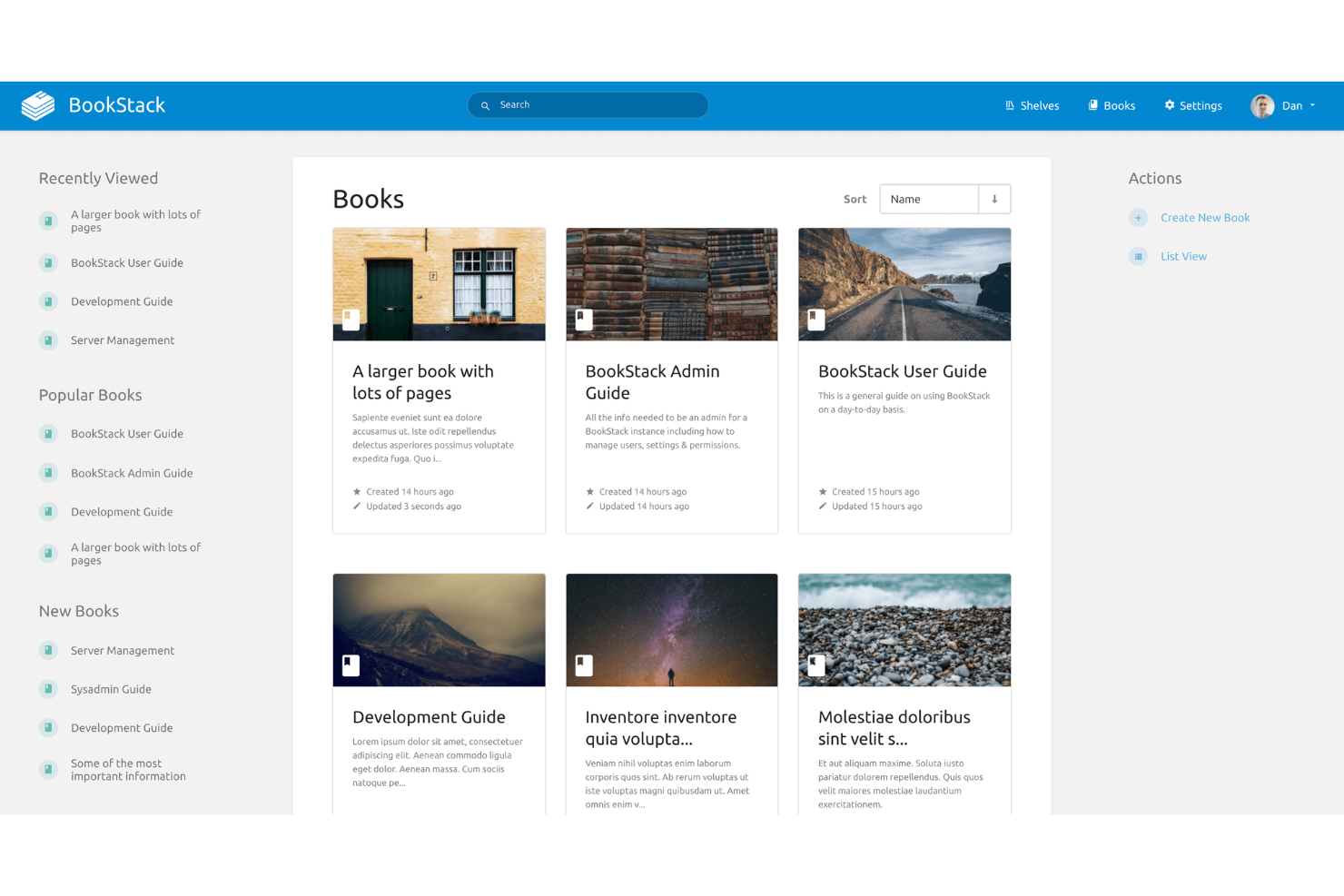
BookStack is an open source knowledge base platform that organizes content into books, chapters, and pages, offering a structured approach to documentation and internal wikis.
Who Is BookStack Best For?
Small to midsize teams who want a straightforward, book-style documentation system for internal knowledge sharing.
Why I Picked BookStack
I picked BookStack as one of the best because its book-style documentation structure lets my team organize content into books, chapters, and pages for clear hierarchy. I like how the WYSIWYG editor makes formatting simple, and the role-based permissions help us manage access across different groups. When we need to link related topics, the cross-book linking feature keeps everything connected.
BookStack Key Features
- Markdown support: Write and edit pages using markdown syntax for quick formatting.
- Revision history: Track and restore previous versions of any page or chapter.
- Customizable themes: Change the look and feel of your knowledge base with theme options.
- Multi-language support: Create and manage content in multiple languages for global teams.
BookStack Integrations
BookStack offers native authentication integrations with LDAP, Active Directory, SAML, and social login providers like Google and GitHub. A REST API is available for custom integrations.
Pros and Cons
Pros:
- Role-based permissions for granular access control
- WYSIWYG and markdown editors both available
- Book-style hierarchy organizes documentation clearly
Cons:
- Lacks advanced analytics or reporting features
- No built-in support for multimedia embedding

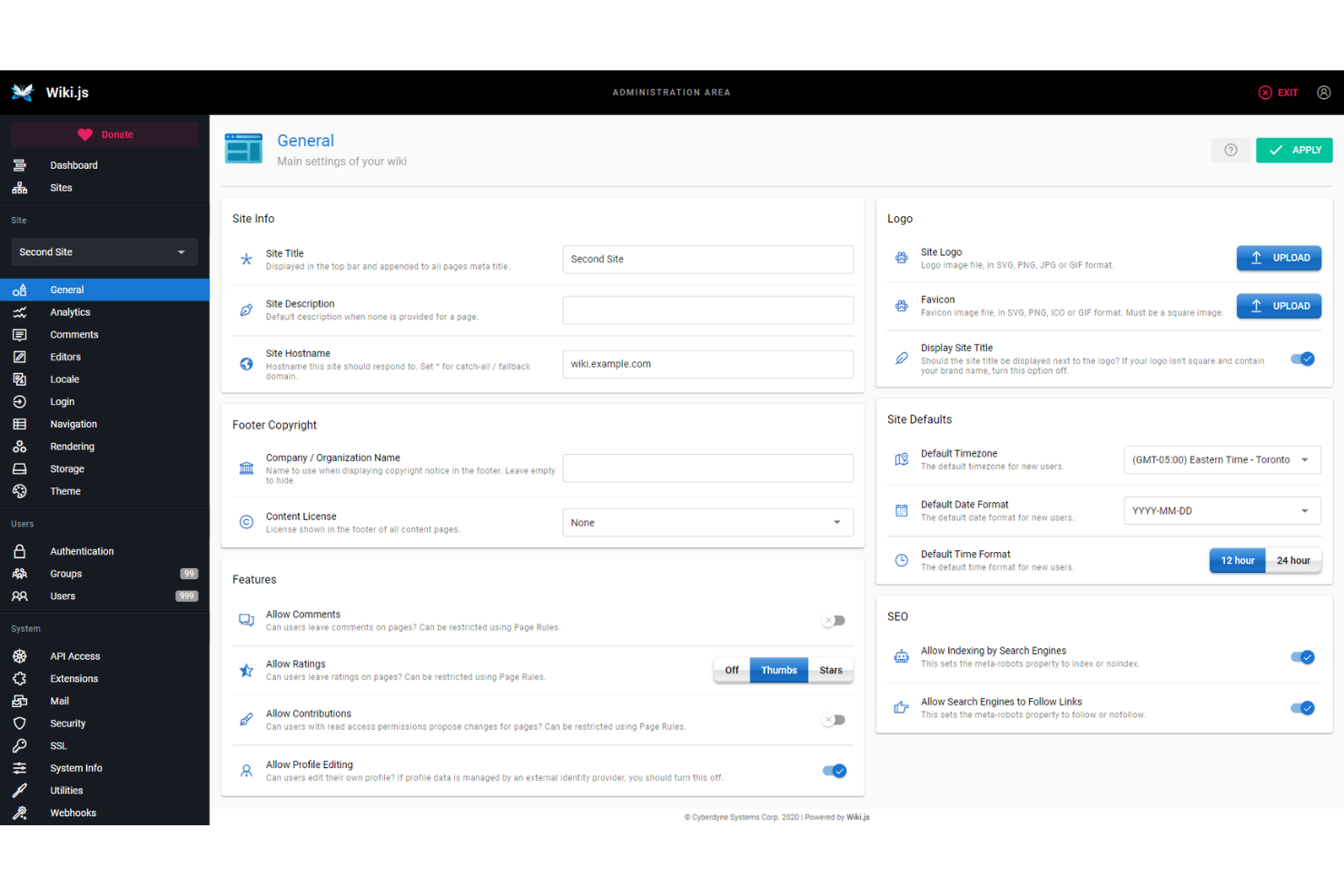
Wiki.js is an open source knowledge base platform that lets you create, manage, and organize documentation with a modular architecture, multiple editor options, and extensive authentication and storage integrations.
Who Is Wiki.js Best For?
Technical teams and organizations that need a customizable, extensible documentation platform with advanced authentication and storage options.
Why I Picked Wiki.js
I picked Wiki.js as one of the best because its modular architecture lets me enable only the features my team needs, keeping our knowledge base lean and focused. I like how it supports multiple editors, including markdown and visual, so contributors can work in their preferred style. The extensibility through integrations and authentication providers means I can tailor Wiki.js to fit complex technical environments.
Wiki.js Key Features
- Granular access control: Set permissions at the page, group, or user level.
- Multi-language support: Manage and display content in multiple languages.
- Built-in search engine: Quickly find pages and files across your knowledge base.
- Content versioning: Track, compare, and restore previous versions of any page.
Wiki.js Integrations
Wiki.js offers native integrations with GitHub, Google Cloud, Azure, Dropbox, Algolia, AWS, and provides an API for custom integrations.
Pros and Cons
Pros:
- Markdown and visual editors both available
- Supports multiple authentication providers out of the box
- Modular system lets you enable only needed features
Cons:
- Lacks built-in multimedia embedding support
- Search can be slow on large wikis

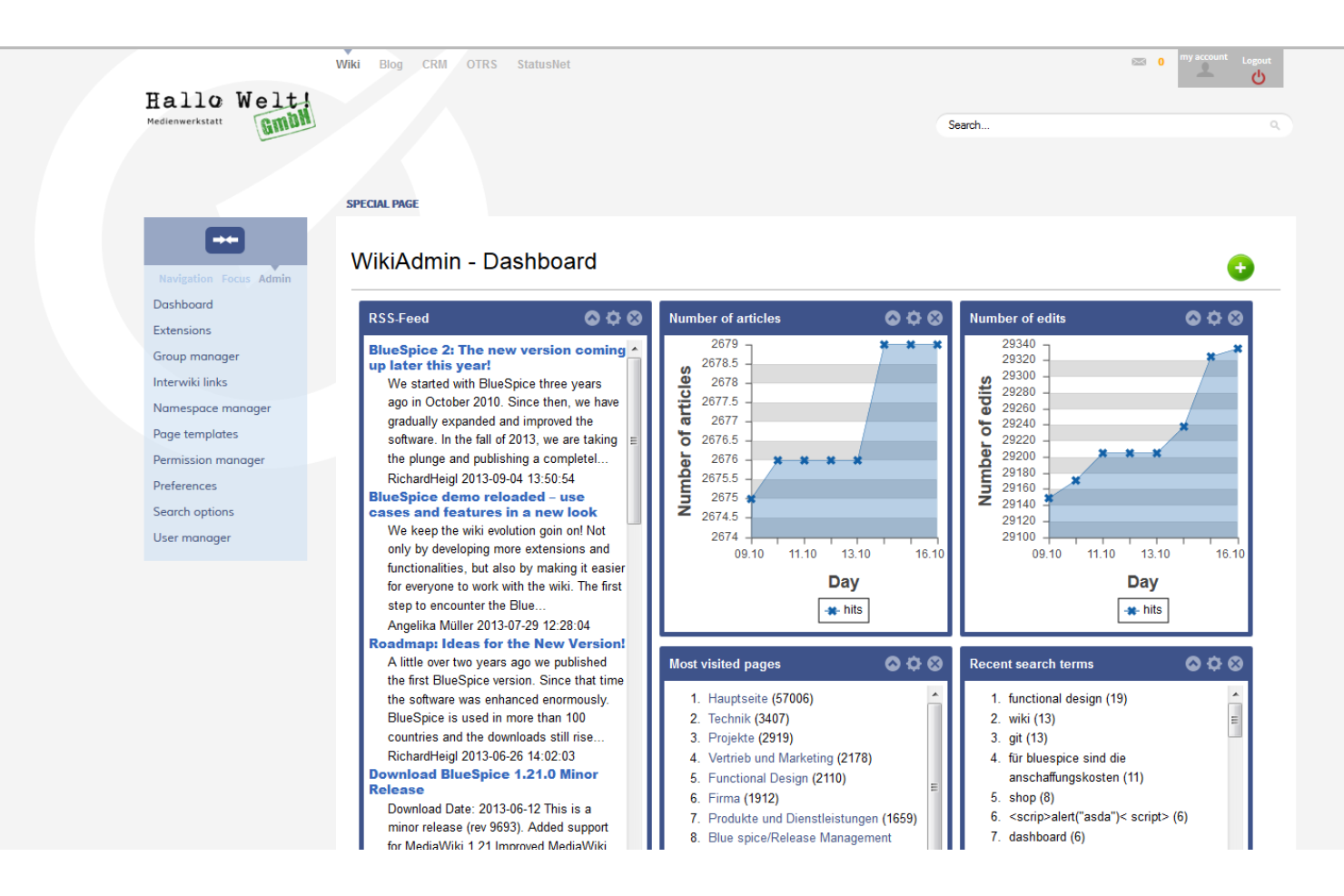
MediaWiki is an open source wiki platform designed for collaborative editing, version control, and content management at scale, with a flexible extension system and support for complex documentation structures.
Who Is MediaWiki Best For?
Large organizations and communities managing extensive, collaborative documentation or knowledge bases.
Why I Picked MediaWiki
I picked MediaWiki as one of the best because it’s the open source engine behind Wikipedia, which means my team can handle massive, multi-user documentation projects with proven scalability. I like how its extension system lets us add features for citations, templates, and advanced content structuring. In practice, that means we’re able to build complex, interlinked knowledge bases that support detailed revision histories and collaborative editing at scale.
MediaWiki Key Features
- Namespaces: Organize content into separate, logical areas for different types of pages.
- User rights management: Assign granular permissions to users and groups for editing and administration.
- Watchlists: Track changes to selected pages for easier monitoring and collaboration.
- API access: Integrate with external tools and automate tasks using a web API.
MediaWiki Integrations
Native integrations are not currently listed. MediaWiki supports integrations via its API and hundreds of community-developed extensions for connecting with tools like LDAP, Google Analytics, and Slack.
Pros and Cons
Pros:
- Strong version control and revision history
- Handles very large documentation projects well
- Highly customizable with extensive extension support
Cons:
- No built-in WYSIWYG editor by default
- Outdated default interface compared to modern tools


DokuWiki is an open source wiki software designed for creating and managing structured documentation, offering plain text storage, easy syntax, and a plugin system for extending functionality.
Who Is DokuWiki Best For?
Small to mid-sized teams or organizations needing a lightweight, file-based wiki for internal documentation.
Why I Picked DokuWiki
I picked DokuWiki as one of the best because I like how its plain text file storage means I never need a database, which keeps setup and backups simple. My team uses its flexible plugin system to add features like access control and structured data, so we can tailor our wiki to fit specific documentation needs. I also appreciate the built-in page versioning, which lets us track every change without extra configuration.
DokuWiki Key Features
- Access control lists: Set granular permissions for users and groups.
- Media manager: Upload and organize images and files within the wiki.
- Full-text search: Quickly find content across all wiki pages.
- Template system: Customize the look and feel with different themes.
DokuWiki Integrations
Native integrations are not currently listed. DokuWiki supports integrations via its plugin system and provides an API for custom integrations.
Pros and Cons
Pros:
- Handles large documentation projects well
- No database required for installation
- Plugin system adds advanced wiki features
Cons:
- Manual setup needed for multimedia embedding
- Limited native integrations with other tools

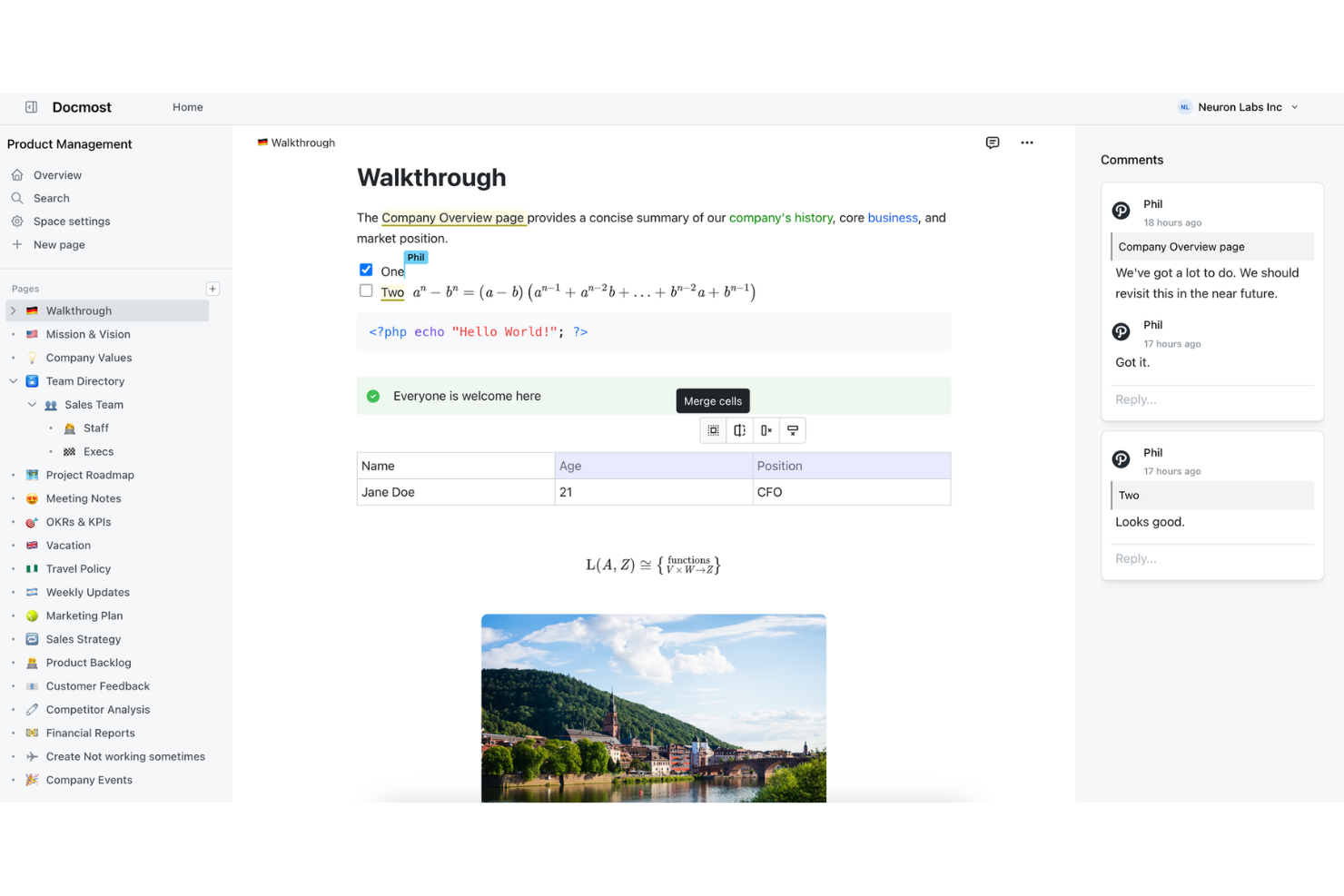
Docmost is an AI-powered knowledge base platform for teams that combines document creation, smart search, and collaborative editing in a single workspace.
Who Is Docmost Best For?
Teams and organizations that want an AI-powered knowledge base to centralize internal documentation and support collaboration.
Why I Picked Docmost
I picked Docmost as one of the best because I like how its AI-powered search and document suggestions help my team surface relevant knowledge instantly. I use its collaborative editor and smart organization features to keep our internal documentation up to date. The AI assistant makes it easy to generate and refine content directly in the workspace.
Docmost Key Features
- Version history: Track and restore previous document versions at any time.
- Role-based permissions: Set granular access controls for users and groups.
- Custom templates: Create and reuse document templates for consistent formatting.
- Bulk import: Import multiple documents at once from supported file types.
Docmost Integrations
Docmost offers native integrations with Loom, Typeform, Miro, Airtable, Figma, plus a REST API and support for AI and external tool connectivity via the Model Context Protocol (MCP).
Pros and Cons
Pros:
- Instant local search across all documents
- Self-hosted with privacy-first architecture
- AI-powered content suggestions for documentation
Cons:
- Interface customization options are very restricted
- Minimal analytics or usage reporting tools


phpMyFAQ is an open source FAQ and knowledge base software that lets you create, organize, and publish structured question-and-answer content with multilingual support, user permissions, and content versioning.
Who Is phpMyFAQ Best For?
Small to mid-sized organizations that need a structured, multilingual FAQ or knowledge base.
Why I Picked phpMyFAQ
I picked phpMyFAQ as one of the best because it’s open source and purpose-built for structured FAQ management. I like that I can organize content into categories, use built-in multilingual support, and manage user permissions for editing and publishing. My team uses its revision history to track changes and maintain accuracy across our knowledge base.
phpMyFAQ Key Features
- Attachment management: Upload and manage files alongside FAQ entries.
- User feedback system: Collect user ratings and comments on articles.
- LDAP and Active Directory support: Integrate authentication with enterprise user directories.
- Backup and restore tools: Export and import the entire knowledge base for disaster recovery.
phpMyFAQ Integrations
phpMyFAQ offers native support for MySQL, MariaDB, PostgreSQL, Microsoft SQL Server, SQLite, Elasticsearch, OpenSearch, and LDAP/Active Directory authentication.
Pros and Cons
Pros:
- LDAP and Active Directory authentication
- Category-based FAQ organization
- Multilingual support for global teams
Cons:
- Admin interface relies on traditional PHP styling
- Lacks collaborative real-time editing capability

Documize is an open source knowledge base platform that lets teams organize, author, and manage internal documentation, technical guides, and collaborative content in a unified workspace.
Who Is Documize Best For?
IT teams and technical departments in mid-sized organizations that need a centralized, open source documentation hub.
Why I Picked Documize
I picked Documize as one of the best because I like how it combines open source flexibility with a structured workspace for technical documentation. My team uses its Spaces and Pages system to organize internal docs and technical guides. I also rely on its granular permissions to manage access for different departments.
Documize Key Features
- Markdown editor: Create and format documentation using markdown syntax.
- Document versioning: Track changes and restore previous document versions.
- REST API: Integrate Documize with other tools and workflows.
- Full-text search: Quickly find content across all spaces and pages.
Documize Integrations
Documize offers native authentication and directory integrations with LDAP, Active Directory, Keycloak, and is compatible with identity providers like Auth0. A REST API is available for custom integrations.
Pros and Cons
Pros:
- Support for both public and private spaces
- Customizable workflow automation and approvals
- Multiple documentation modes in one platform
Cons:
- Steeper resource use on large deployments
- Occasional bugs disrupt document editing flow
Other Open Source Knowledge Base Software
Here are some additional open source knowledge base software options that didn’t make it onto my shortlist, but are still worth checking out:
- Docusaurus
For developer documentation sites
- Raneto
For simple markdown knowledge bases
- eXo Platform
For digital workplace collaboration
- OpenKM
For document-driven knowledge management
- TiddlyWiki
For personal knowledge management


How I Evaluate Open Source Knowledge Base Software
I evaluate tools on two levels: a baseline they must clear—self-hosting, open licensing, version-controlled docs—and differentiators like PM integrations and deployment flexibility.
Core Functionality (Table Stakes For This List)
When I'm selecting tools for my list, I rank each one on a scale from 0 (does not offer the functionality) to 5 (excels in this area) for each core functionality listed below. Then, I calculate the tool's total score into a percentage. Each tool needs to achieve a minimum total score of 65% to be considered for inclusion.
- Open Source Licensing: I check that the project carries an OSI-approved license and that the source code is publicly available—tools like BookStack (MIT) and Wiki.js (AGPL) make this easy to confirm on their repositories.
- Self-Hosted Deployment Options: Whether it's a Docker image, a Kubernetes Helm chart, or a manual install, I look for official, well-documented paths to get the platform running on your own infrastructure.
- Structured Content Organization: Project teams accumulate a lot of documentation fast, so I evaluate how each tool handles nested pages, spaces, categories, and tagging to keep runbooks and SOPs logically organized.
- Collaborative Editing & Versioning: I look for revision history with rollback and diff views—features that matter when multiple contributors are updating a lessons-learned article or sprint retrospective simultaneously.
- Full-Text Search: Finding that one migration guide buried under months of sprint notes is a real scenario, so I evaluate search quality including filters, relevance ranking, and content previews in results.
- Access Control & Permissions: Granular role-based permissions at the space or page level are what I look for, along with support for group management so you can mirror your project team structure inside the tool.
Once I have a list of tools that meet the criteria, I consider what sets each platform apart.
Differentiating Factors (What Sets Vendors Apart)
Here's how I compare and contrast different vendors:
Standout Features
A well-documented API with webhook support is one of the first things I evaluate, since it determines whether you can automate doc creation from sprint events or pipe updates into Slack. Built-in diagramming is another differentiator—tools like Outline and Wiki.js support Mermaid embeds, which let you map project workflows without leaving the editor. Native integrations with platforms like Jira or GitHub also matter when you want issue references to stay linked to relevant knowledge base pages.
Beyond Features
Community health is a major signal I evaluate—active commit histories, regular releases, and responsive forums tell you whether a project will still be maintained when your team depends on it two years from now. Total cost of ownership also deserves attention, since a "free" tool can get expensive once you factor in server infrastructure and DevOps time for upgrades. Security posture rounds out my evaluation; I look for SSO and LDAP support, encryption at rest, and audit logging, especially for teams managing sensitive delivery data.
How to Choose Open Source Knowledge Base Software
It’s easy to get bogged down in long feature lists and complex pricing structures. To help you stay focused as you work through your unique software selection process, here’s a checklist of factors to keep in mind:
| Factor | What to Consider |
| Scalability | Will the software handle your expected growth in users, documents, and teams without performance issues? |
| Integrations | Does it connect natively or via API to your existing tools, such as authentication systems or collaboration platforms? |
| Customizability | Can you tailor workflows, permissions, and content structure to fit your organization’s processes and terminology? |
| Ease of use | Will your team adopt the tool quickly, or will the interface and navigation slow down daily work? |
| Implementation and onboarding | How much time and technical skill will it take to deploy, migrate content, and train users? Are guides or migration tools available? |
| Cost | What are the true costs, including hosting, support, and add-ons? Are there hidden expenses or licensing restrictions? |
| Security safeguards | Does the software support encryption, access controls, and audit logs to protect sensitive knowledge and meet compliance needs? |
| Support availability | Is there an active community, documentation, or paid support to help resolve issues and answer questions as they arise? |
What Is Open Source Knowledge Base Software?
Open source knowledge base software is a knowledge management tool that lets organizations create, manage, and share documentation using freely available code. These platforms support collaboration across internal teams and help team members build and maintain knowledge base articles in a flexible system.
They’re often used by both small business teams and large organizations that need enterprise-grade customization. With support for workflows, version control, and integrations like project management tools, they help streamline documentation processes while adapting to specific needs.
Many solutions are available as SaaS or self-hosted options, giving teams the flexibility to choose the right knowledge base for their setup while improving user experience and overall customer experience, often with a manageable learning curve.
Features
When selecting open source knowledge base software, keep an eye out for the following key features:
- Document version control: Tracks changes to articles or documents, allowing users to view, compare, and restore previous versions as needed.
- Role-based permissions: Lets administrators assign different access levels to users or groups, ensuring sensitive information is only available to authorized individuals.
- Full-text search: Enables users to quickly find relevant articles or documents by searching across all content, including titles, body text, and metadata.
- Customizable templates: Provides pre-built or editable templates for consistent article formatting and faster content creation.
- Collaborative editing: Allows multiple users to edit and comment on documents simultaneously, supporting real-time teamwork and feedback.
- Approval workflows: Automates the review and publishing process, ensuring content is vetted before it goes live.
- API access: Offers integration points for connecting the knowledge base with other tools or automating content management tasks.
- Multilingual support: Supports the creation and management of content in multiple languages for global teams or audiences.
- Analytics and reporting: Delivers insights into content usage, search trends, and user engagement to help improve documentation quality.
- Custom metadata fields: Lets users tag and categorize documents with custom attributes for better organization and advanced filtering.
Benefits
Implementing open source knowledge base software provides several benefits for your team and your business. Here are a few you can look forward to:
- Full control over data: You decide where and how your knowledge is stored, with the ability to self-host and manage security settings.
- Customizable workflows: Adapt the platform to match your team’s processes, from article approval to user permissions, using open source flexibility.
- Cost savings: Avoid expensive licensing fees and reduce total cost of ownership by leveraging free or low-cost open source solutions.
- Community-driven improvements: Benefit from ongoing enhancements, bug fixes, and new features contributed by a global developer community.
- Integration flexibility: Connect your knowledge base to other tools and systems using APIs or custom integrations, supporting unique business needs.
- Transparency and auditability: Access to source code allows for thorough security reviews and compliance with internal or regulatory standards.
- Scalability for growth: Easily expand your knowledge base as your organization grows, without worrying about restrictive pricing tiers or user limits.
Costs and Pricing
Selecting open source knowledge base software requires an understanding of the various pricing models and plans available. Costs vary based on features, team size, add-ons, and more. The table below summarizes common plans, their average prices, and typical features included in open source knowledge base software solutions:
Plan Comparison Table
| Plan Type | Average Price | Common Features |
| Free Plan | $0 | Access to core features, basic user management, community support, and open source code. |
| Personal Plan | $5–$15/user/month | All free features, improved customization, limited integrations, and email support. |
| Business Plan | $15–$30/user/month | All personal features, advanced permissions, workflow automation, analytics, and priority support. |
| Enterprise Plan | $30–$60/user/month | All business features, single sign-on, audit logs, dedicated onboarding, and premium support. |
Open Source Knowledge Base Software FAQs
Here are some answers to common questions about open source knowledge base software:
Can I self-host open source knowledge base software?
Yes, most software can be self-hosted on your own servers or cloud infrastructure. This gives you full control over data security, compliance, and customization, but also means you’re responsible for maintenance and updates.
How difficult is it to migrate existing documentation into an open source knowledge base?
Migration difficulty depends on your current system and the import tools available. Many open source platforms offer CSV, HTML, or API-based import options, but complex formatting or large volumes may require custom scripts or manual adjustments.
What kind of support is available for open source knowledge base software?
Support usually comes from community forums, documentation, and sometimes paid support plans. Some projects have active user communities and detailed guides, while others may require more self-sufficiency or reliance on third-party consultants.
Are open source knowledge base tools secure enough for sensitive information?
Yes, open source tools can be secure if properly configured. Look for features like role-based permissions, encryption, and audit logs, and make sure to keep your installation updated to address security vulnerabilities.
Can I customize the look and feel of my open source knowledge base?
Yes, most open source knowledge base software allows you to customize themes, layouts, and branding. You can often modify templates, CSS, and even core code to match your organization’s style and requirements.