
15 Online Proofing Software Solutions Picked for 2026

Online Proofing Software Shortlist
Here’s my shortlist of online proofing software:


Online proofing software lets your team review, mark up, and approve creative assets in one place, replacing scattered email threads and manual feedback loops. If you’re searching for the best online proofing software, you’re likely dealing with slow approvals, version confusion, or feedback lost across channels.
This list will help you compare leading tools built for creative, marketing, and digital teams—so you can choose a solution that fits your workflow, keeps projects moving, and ensures every stakeholder’s input is captured.
Why You Can Trust Us
Best Online Proofing Software Summary
This comparison chart summarizes pricing details for my top online proofing software selections to help you find the best one for your budget and business needs.
| Tool | Best For | Trial Info | Price | ||
|---|---|---|---|---|---|
| 1 | Best for compliance-driven document reviews | Free demo + 10-day free trial available | From $249/month | Website | |
| 2 | Best for fast-turnaround creative feedback | Free plan + free demo available | From $66/month (billed annually) | Website | |
| 3 | Best with advanced version control tools | Free trial available | From $199/month (billed annually) | Website | |
| 4 | Best for real-time team markup sessions | Free plan + free trial available | From $12/user/month (billed annually) | Website | |
| 5 | Best for multilingual content review needs | Free demo available | Pricing upon request | Website | |
| 6 | Best for all-in-one task and file review | Free plan available | From $7/user/month (billed annually) | Website | |
| 7 | Best for high-volume asset management | Free demo available | Pricing upon request | Website | |
| 8 | Best for print production workflow integration | Free demo + 15-day free trial available | From $112/month | Website | |
| 9 | Best for customizable visual feedback boards | Free plan available | From $9/user/month (billed annually) | Website | |
| 10 | Best for cross-team creative collaboration | Free plan + free demo + 14-day free trial available | From $10/user/month (billed annually) | Website |


-

Insightful
Visit WebsiteThis is an aggregated rating for this tool including ratings from Crozdesk users and ratings from other sites.4.8 -
Accelo
Visit WebsiteThis is an aggregated rating for this tool including ratings from Crozdesk users and ratings from other sites.4.4 -
Wrike
Visit WebsiteThis is an aggregated rating for this tool including ratings from Crozdesk users and ratings from other sites.4.2




Online Proofing Software Reviews
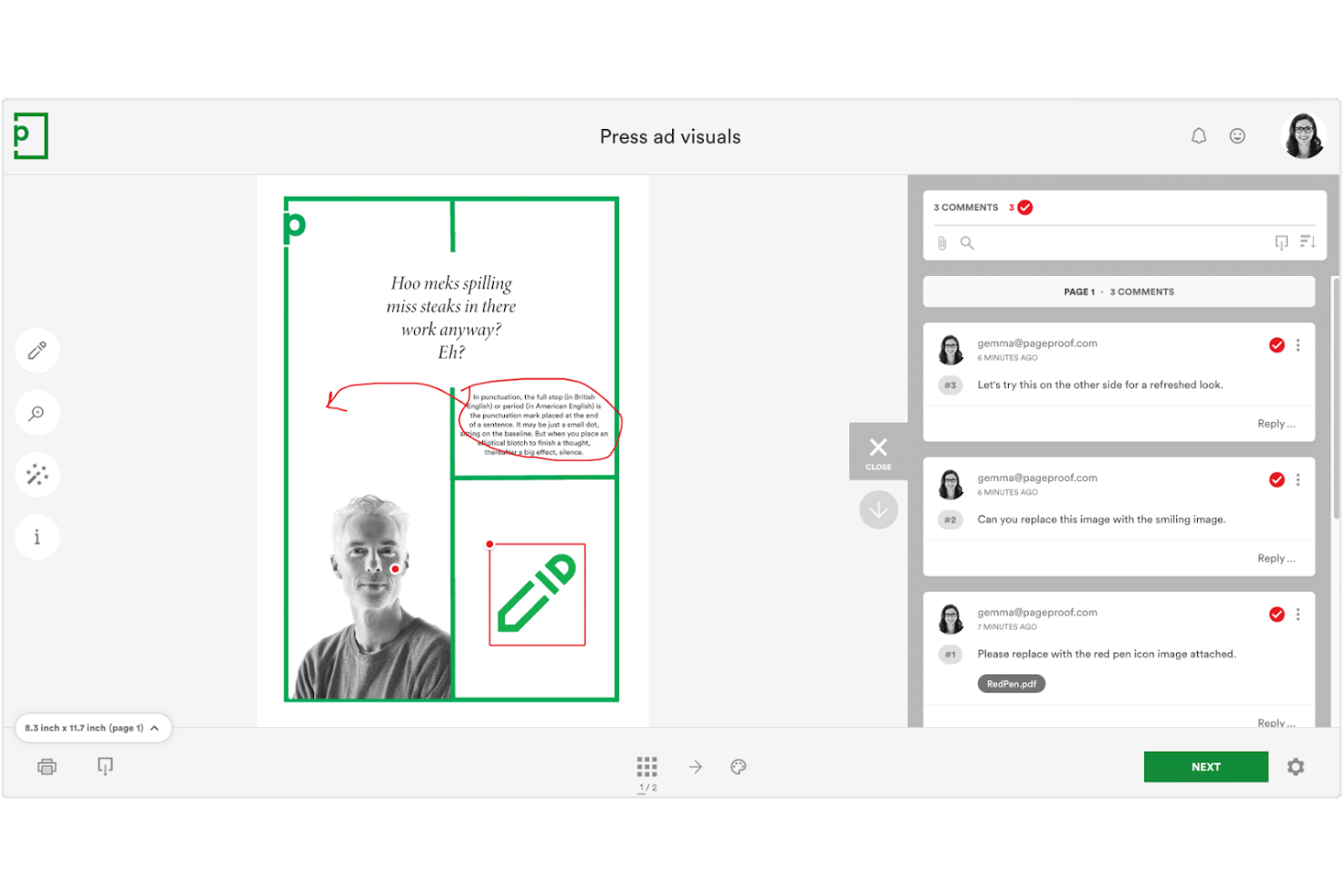
PageProof is designed for teams that need to manage document reviews with strict compliance and audit requirements. Legal, finance, and regulated industries use its encrypted workflows and detailed audit trails to meet internal and external standards. If your review process demands traceability and secure sign-offs, PageProof addresses those needs directly.
Why I Picked PageProof
When compliance and auditability are top priorities, PageProof offers features that go beyond standard online proofing tools. I picked it because its encrypted workflows and digital sign-off process help teams meet strict regulatory requirements.
PageProof also provides a detailed audit trail for every review, making it easy to demonstrate compliance during audits. These features make it a strong choice for organizations where secure, traceable document reviews are essential.
PageProof Key Features
Some other features in PageProof that support document review and collaboration include:
- Automated reminders: Set up notifications to prompt reviewers about pending tasks or deadlines.
- Multi-format support: Review and annotate PDFs, images, videos, presentations, and web pages within the same platform.
- Custom branding: Apply your organization’s logo and colors to the review interface for a consistent experience.
- Comment threading: Organize feedback by allowing users to reply directly to specific comments.
PageProof Integrations
Integrations include Asana, monday.com, Airtable, ClickUp, Trello, Slack, Microsoft Teams, Adobe Creative Cloud, Figma, and more.
Pros and Cons
Pros:
- Multi-format support covers documents and media
- Digital sign-off supports regulated approval processes
- Encrypted proofing meets strict compliance standards
Cons:
- Custom branding only on higher-tier plans
- Bulk upload is limited for large teams

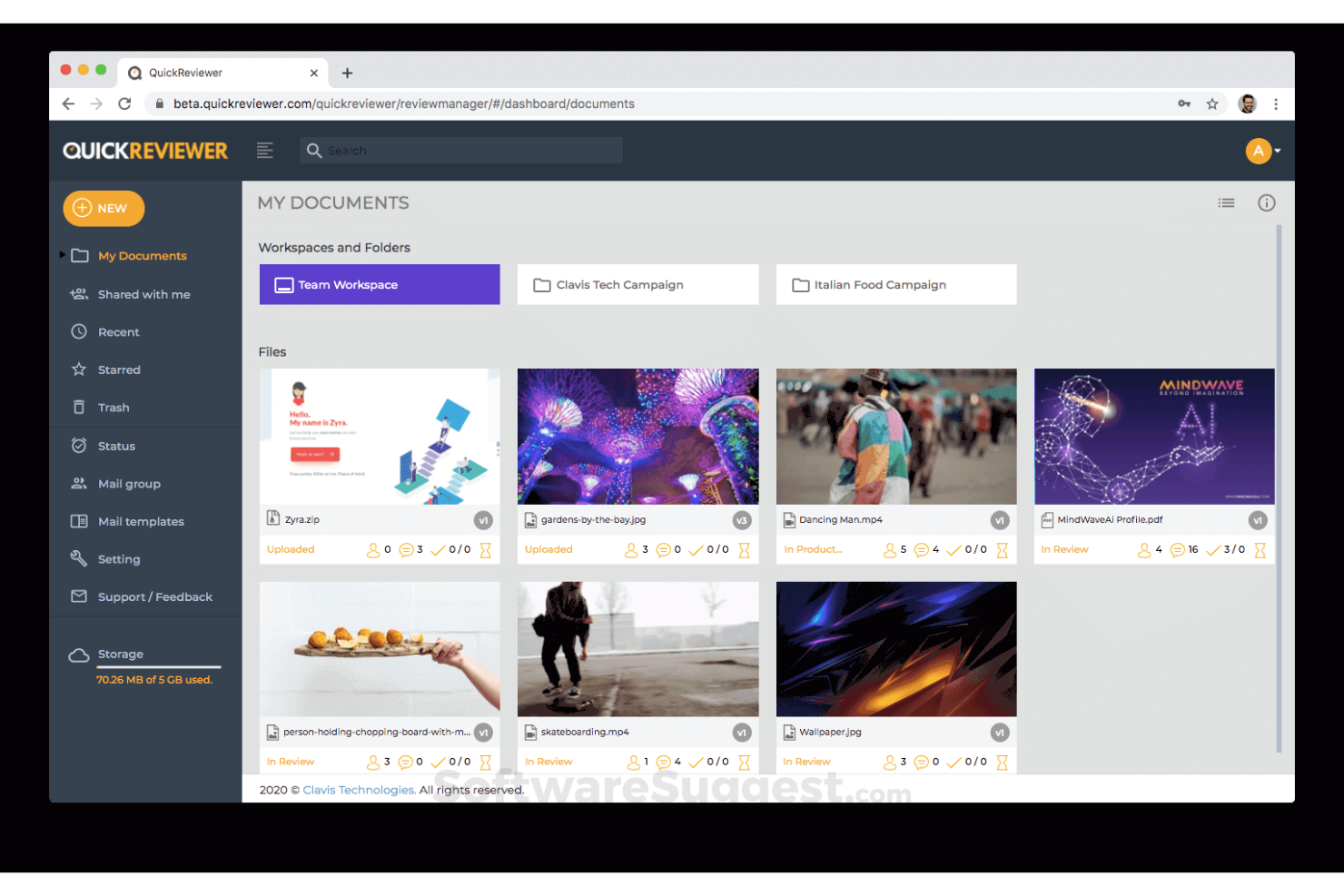
QuickReviewer is designed for creative teams that need to collect feedback and approve assets quickly. It’s a strong fit for agencies, graphic designers, and marketers who work with tight deadlines and frequent revisions. The platform helps you centralize comments and approvals on videos, images, PDFs, and web content so you can keep projects moving without delays.
Why I Picked QuickReviewer
When fast feedback cycles are a priority, QuickReviewer offers tools that help creative teams keep projects on track. I picked it because you can review and annotate videos, images, PDFs, and even live HTML web pages in real time, which is ideal for rapid creative iteration.
The platform’s instant notification system ensures reviewers are alerted as soon as new versions are uploaded, so feedback happens without lag. This setup is especially useful for agencies and marketing teams that need to deliver polished assets on tight deadlines.
QuickReviewer Key Features
Some other features in QuickReviewer that help teams manage creative reviews include:
- Custom branding: Add your company logo and colors to the review interface for a branded experience.
- Version comparison: View and compare different versions of a file side by side to track changes.
- Role-based access control: Assign specific permissions to reviewers, collaborators, and clients.
- Bulk file upload: Upload multiple files at once to speed up the review process.
QuickReviewer Integrations
Integrations include Adobe Creative Cloud, Google Drive, Box, Dropbox, YouTube, Vimeo, Shopify, Wix, Jira, and more.
Pros and Cons
Pros:
- Role-based permissions for client collaboration
- Bulk upload supports large creative projects
- Real-time commenting on live web pages
Cons:
- Mobile experience can be inconsistent
- No built-in task management features

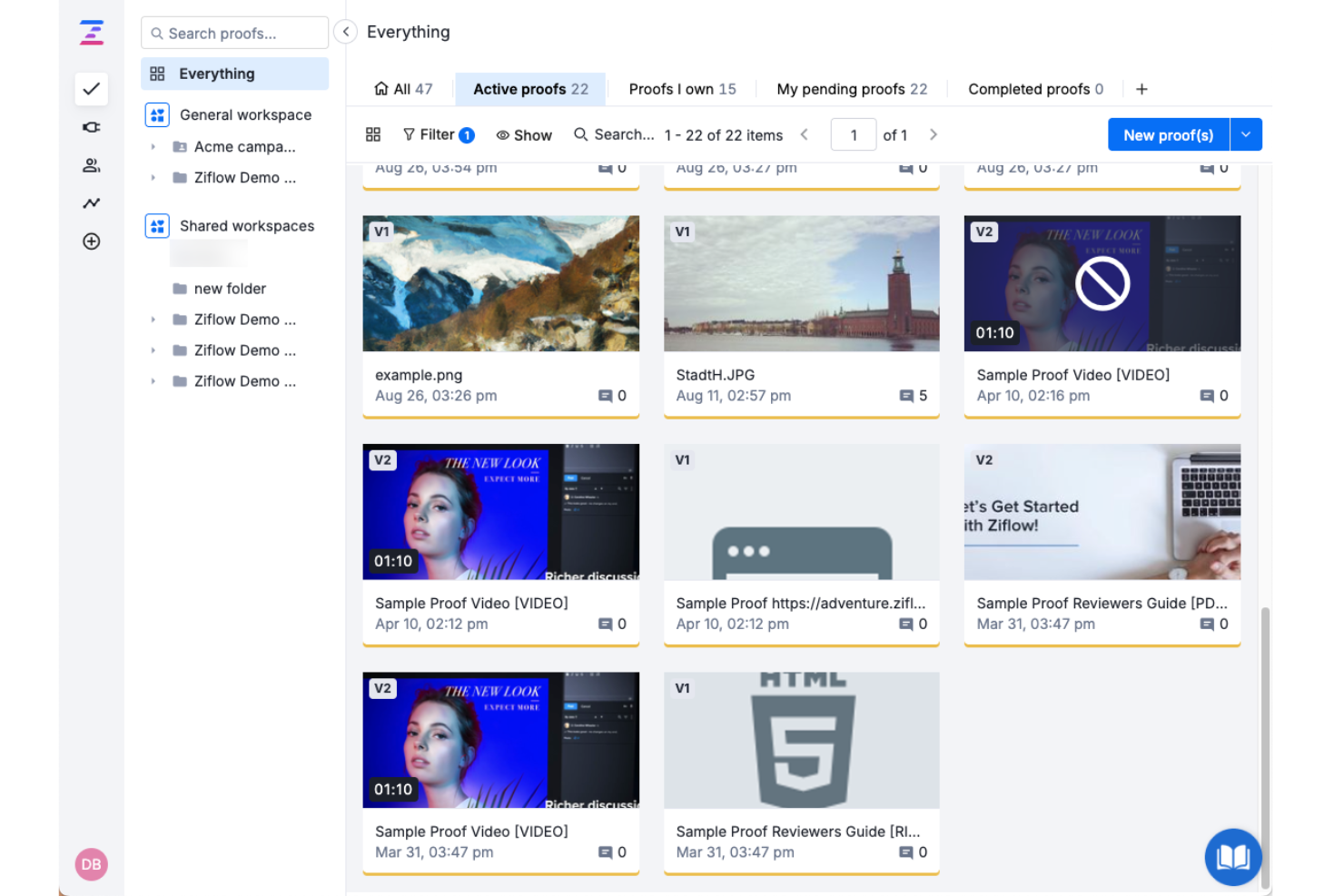
Ziflow is built for creative teams that manage frequent file updates and need advanced version control. Agencies and marketing departments use it to organize feedback across multiple asset iterations. Its review tools help track changes and compare versions throughout complex approval cycles.
Why I Picked Ziflow
For teams that need to manage multiple file versions and keep feedback organized, Ziflow stands out with its advanced version control tools. I picked it because you can upload new versions of assets, compare them side by side, and automatically carry over unresolved comments from previous rounds.
Ziflow also tracks every change and decision, so you always know which version is approved and why. These features make it a strong fit for creative teams and agencies handling complex review cycles with frequent updates.
Ziflow Key Features
Some other features in Ziflow that help teams manage online proofing include:
- Automated workflow builder: Create custom review and approval workflows with conditional logic.
- Comment pinning: Attach feedback directly to specific areas of an asset for precise communication.
- Customizable proof templates: Standardize review processes by saving and reusing proof setup templates.
- Real-time activity feed: Monitor all proofing activity and updates as they happen.
Ziflow Integrations
Integrations include monday.com, Asana, Dropbox, ClickUp, Trello, Slack, Microsoft Teams, Adobe Creative Cloud, Jira, and more.
Pros and Cons
Pros:
- Real-time activity feed for proof tracking
- Pin comments directly on visual elements
- Automated workflow builder for review routing
Cons:
- Audit logs require a higher-tier subscription
- Limited annotation tools for 3D file formats

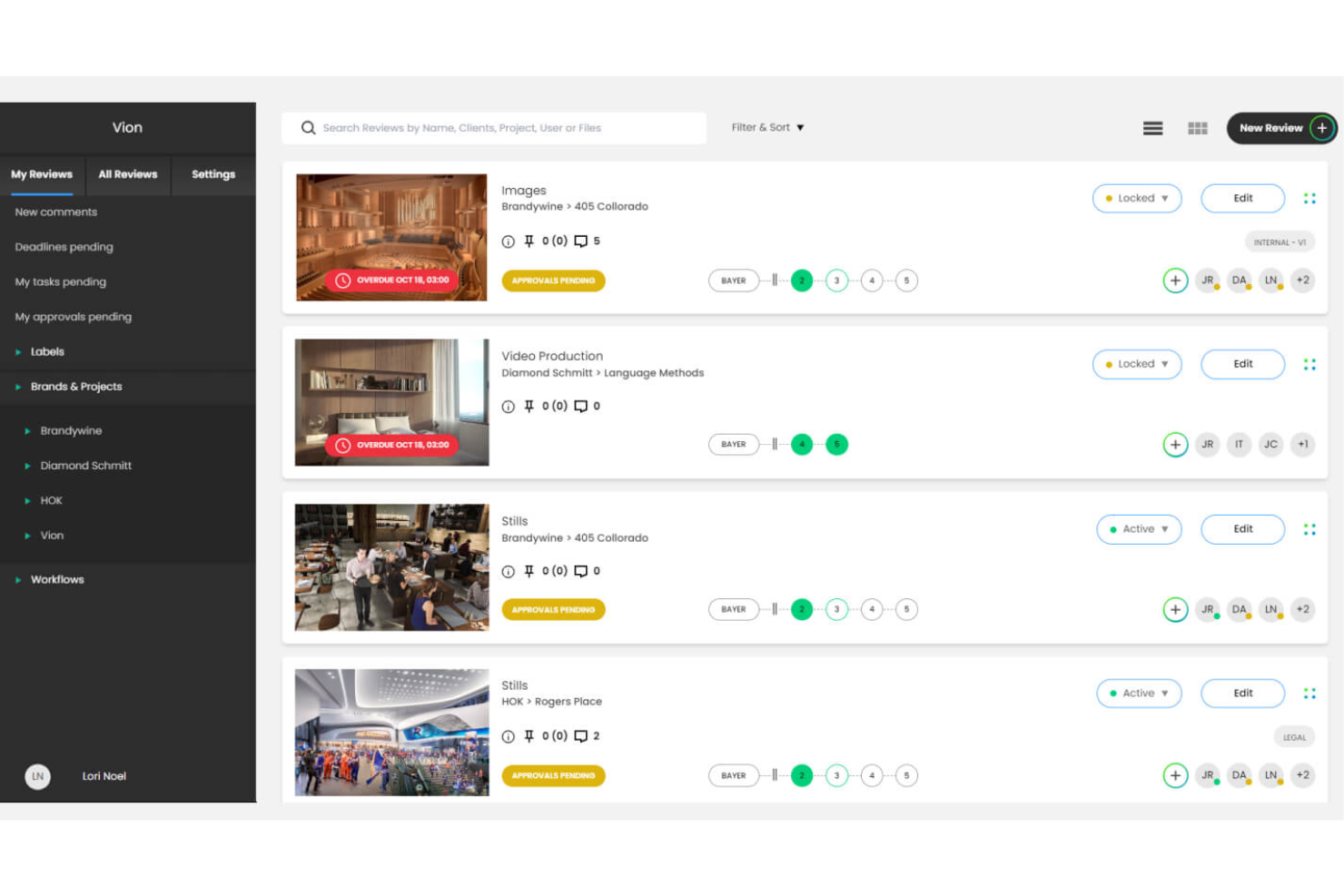
ReviewStudio is designed for teams that need to collaborate on creative assets in real time. Marketing teams, agencies, and design studios use it for interactive markup sessions on shared files. This setup helps resolve feedback faster and keeps everyone aligned throughout review cycles.
Why I Picked ReviewStudio
What sets ReviewStudio apart is its focus on real-time team markup sessions, which is especially valuable for creative teams that need to collaborate live. I picked it because you can invite multiple reviewers to annotate, comment, and draw directly on assets together during a session.
The live cursor tracking and synchronized view ensure everyone is literally on the same page, reducing confusion and miscommunication. This makes ReviewStudio a strong choice for teams that want to speed up feedback cycles and keep discussions focused in one place.
ReviewStudio Key Features
Some other features in ReviewStudio that help teams manage creative reviews include:
- Version stacking: Organize and compare multiple versions of an asset within a single review thread.
- Task assignment: Assign actionable tasks to specific team members directly from feedback.
- Custom branding: Add your company’s logo and colors to the review environment.
- Activity audit trail: Track all comments, changes, and approvals for accountability.
ReviewStudio Integrations
Integrations include Asana, Zapier, Wrike, Kantata, Dropbox, and more.
Pros and Cons
Pros:
- Activity audit trail for tracking all actions
- Custom branding for client-facing reviews
- Real-time markup sessions for group feedback
Cons:
- Bulk download of assets is not supported
- No mobile app for on-the-go reviews

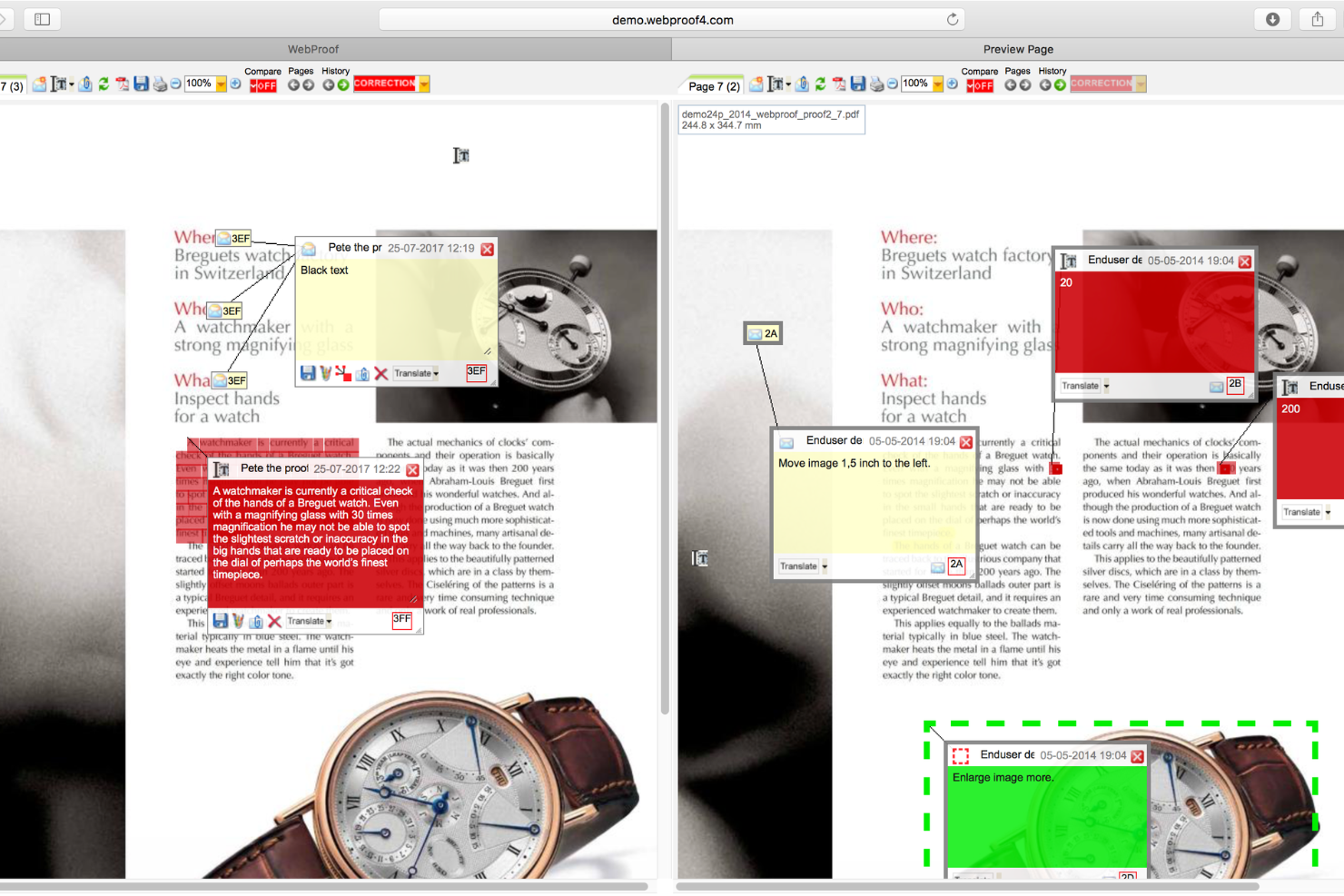
WebProof is built for teams that need to review and approve content in multiple languages. It’s especially useful for marketing departments, publishers, and agencies managing global campaigns or multilingual documents. The platform helps you centralize feedback and track changes across language versions, so nothing gets lost in translation.
Why I Picked WebProof
For teams handling multilingual projects, WebProof stands out by making it easy to manage content reviews across several languages at once. I picked it because you can organize, proof, and approve different language versions of the same document in a single workflow.
The platform’s translation management tools let you track edits and comments by language, so you always know which version is being discussed. This approach helps global teams avoid confusion and keep multilingual campaigns moving forward without missing details.
WebProof Key Features
Some other features in WebProof that help teams manage content reviews include:
- Automated workflow management: Set up custom review and approval steps for each project.
- Adobe InDesign integration: Connect directly with InDesign to update and proof files without manual uploads.
- Comment pinning: Place comments directly on specific areas of a document for precise feedback.
- Audit trail: View a complete history of all changes, comments, and approvals for every project.
WebProof Integrations
Integrations include Adobe InDesign, Adobe Illustrator, and more.
Pros and Cons
Pros:
- Comment pinning for precise markup locations
- Direct Adobe InDesign and Illustrator integration
- Multilingual review tools for global teams
Cons:
- Pricing information is not publicly available
- Interface can feel dated to some users

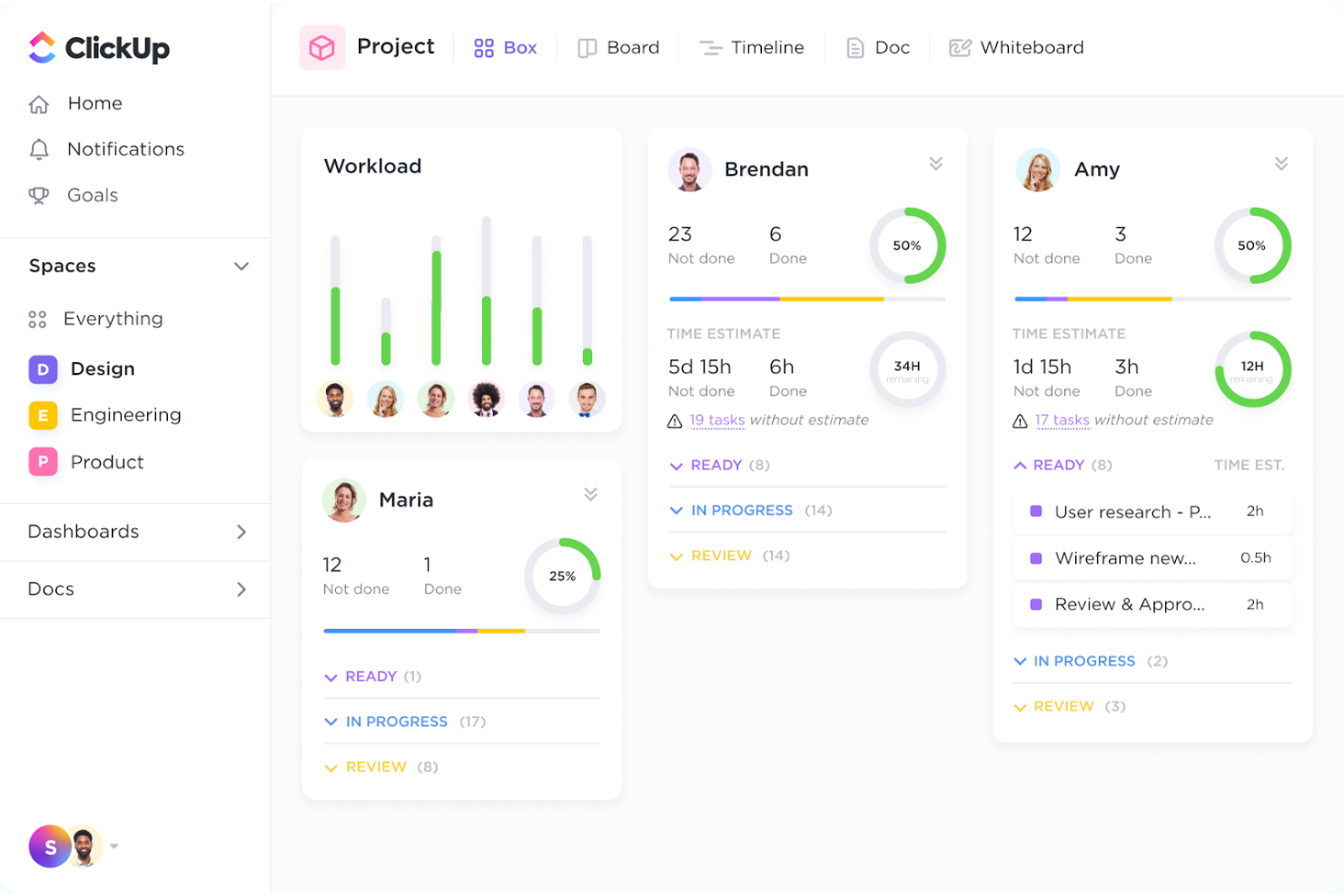
ClickUp brings together task management and file review in a single workspace, making it a strong fit for teams juggling both project tracking and creative feedback. Marketing departments, agencies, and product teams use its built-in proofing tools to comment on images, PDFs, and videos right alongside tasks. This all-in-one approach helps teams keep feedback, approvals, and project updates tightly connected.
Why I Picked ClickUp
Unlike many tools that separate project management from creative review, ClickUp combines both in one platform, which is why I picked it for teams needing all-in-one task and file review. You can attach files directly to tasks and use built-in proofing to add comments, markups, and threaded discussions on images, PDFs, and videos.
This setup keeps feedback and approvals tied to specific deliverables, so nothing gets lost between tools. For teams that want to manage project progress and creative feedback in a single workflow, ClickUp offers a unified solution.
ClickUp Key Features
Some other features in ClickUp that support online proofing and creative collaboration include:
- Custom statuses: Set up unique workflow stages to match your team’s review and approval process.
- Role-based permissions: Control who can view, comment, or edit files and tasks within each workspace.
- Automated reminders: Schedule notifications for reviewers and assignees to keep feedback cycles on track.
- Activity log: View a detailed history of comments, edits, and approvals for each file or task.
ClickUp Integrations
Integrations include Slack, GitHub, GitLab, HubSpot, Google Drive, Dropbox, Outlook, Figma, Zoom, and more.
Pros and Cons
Pros:
- Reviewers can annotate files without downloading
- Comments can be resolved or assigned as tasks
- Proofing supports images, PDFs, and videos
Cons:
- Limited markup tools for complex design feedback
- No live co-editing on creative files

Aproove is built for organizations that need to manage and review large volumes of creative assets across multiple teams or departments. It’s especially useful for enterprises, publishers, and agencies handling complex workflows and high asset turnover. The platform brings together asset management, automated approval routing, and detailed audit trails to help you keep control over every stage of the creative process.
Why I Picked Aproove
For teams managing hundreds or thousands of creative assets, Aproove stands out with its focus on high-volume asset management. I picked it because it combines advanced digital asset management with automated workflow routing, so you can keep large projects organized and moving.
The platform’s granular permission controls let you assign access and approval rights at scale, which is essential for enterprise environments. Its detailed audit trails also help you track every action and decision, making it easier to manage compliance and accountability across complex review cycles.
Aproove Key Features
Some other features in Aproove that help teams manage creative reviews include:
- Custom workflow builder: Design and automate multi-step approval processes tailored to your organization’s needs.
- Batch review tools: Review, comment on, and approve multiple assets at once to speed up high-volume projects.
- Advanced search and filtering: Locate specific files or comments quickly using metadata, tags, and filters.
- White-labeling options: Customize the platform interface with your company’s branding for a consistent client experience.
Aproove Integrations
Aproove offers an API for custom integrations.
Pros and Cons
Pros:
- Advanced search filters for large asset libraries
- White-labeling supports agency and client branding
- Custom workflow builder for complex approvals
Cons:
- Limited built-in reporting and analytics
- Native integrations with third-party tools missing
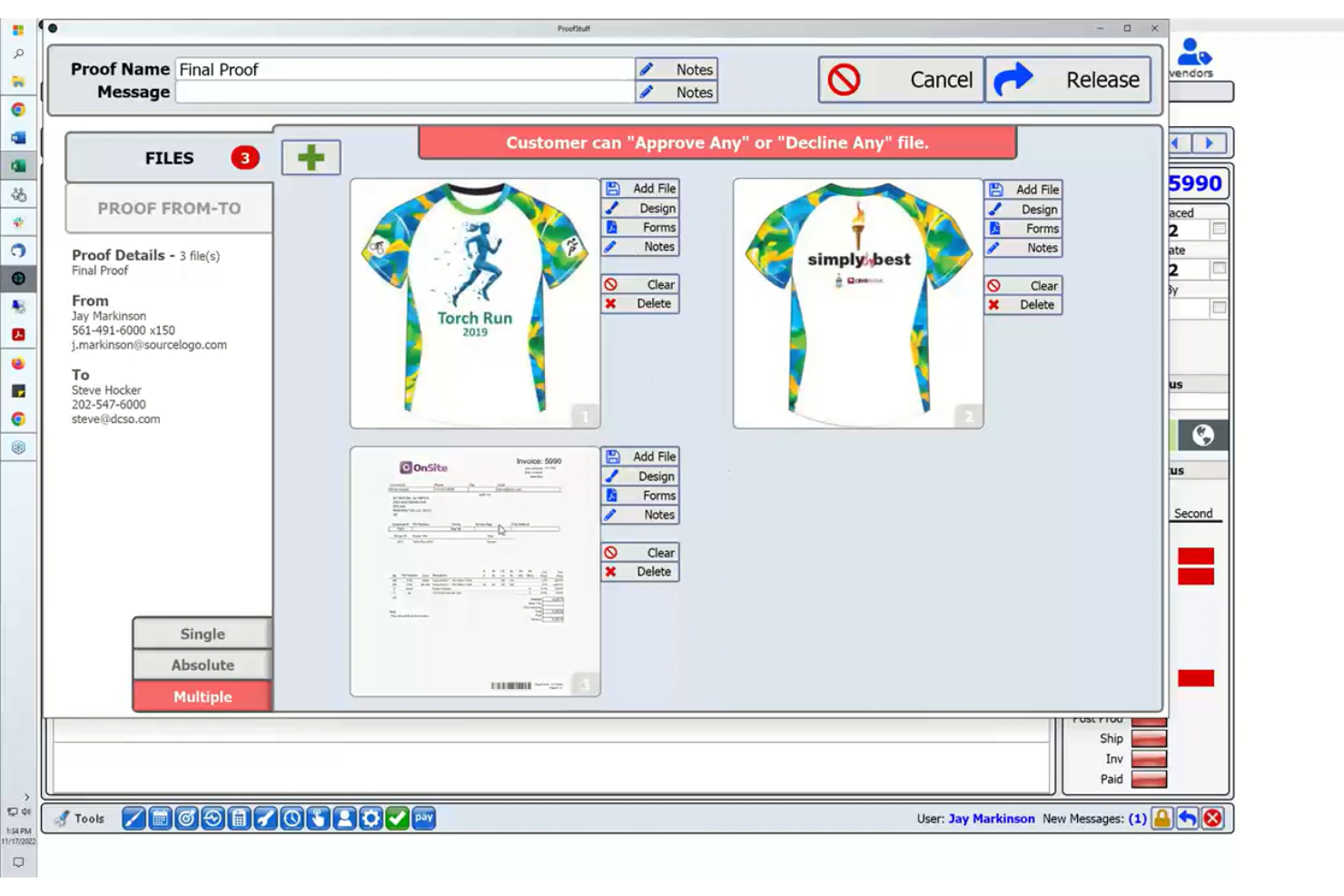
ProofStuff is designed for print shops and production teams that need online proofing tightly connected to their print workflow. It’s especially useful for businesses that want to manage proofs, approvals, and production steps all in one place. The platform helps reduce errors and turnaround times by linking proofing directly with job tickets and production schedules.
Why I Picked ProofStuff
What sets ProofStuff apart is how it connects online proofing directly with print production workflows. I picked it because it lets you manage proofs, approvals, and production steps from a single dashboard, which is rare in this space.
The tool links proofing activity to job tickets and production schedules, so you can track every stage of a print job without switching systems. This level of integration helps print shops and production teams reduce errors and keep projects moving on schedule.
ProofStuff Key Features
Some other features that make ProofStuff useful for print teams include:
- Version comparison tools: Quickly compare different proof versions side by side to spot changes or errors.
- Automated email notifications: Keep clients and team members updated on proof status and required actions.
- Markup and annotation tools: Add comments, highlights, and markups directly on proofs for clear feedback.
- Role-based access controls: Assign specific permissions to users based on their role in the project.
ProofStuff Integrations
Integrations include ShipStation, WooCommerce, Shopify, Avalara Sales Tax, and more.
Pros and Cons
Pros:
- Direct markup tools for client feedback
- Automated notifications for proof status updates
- Integrates proofing with print job tickets
Cons:
- Reporting features are basic and limited
- Limited support for rich media

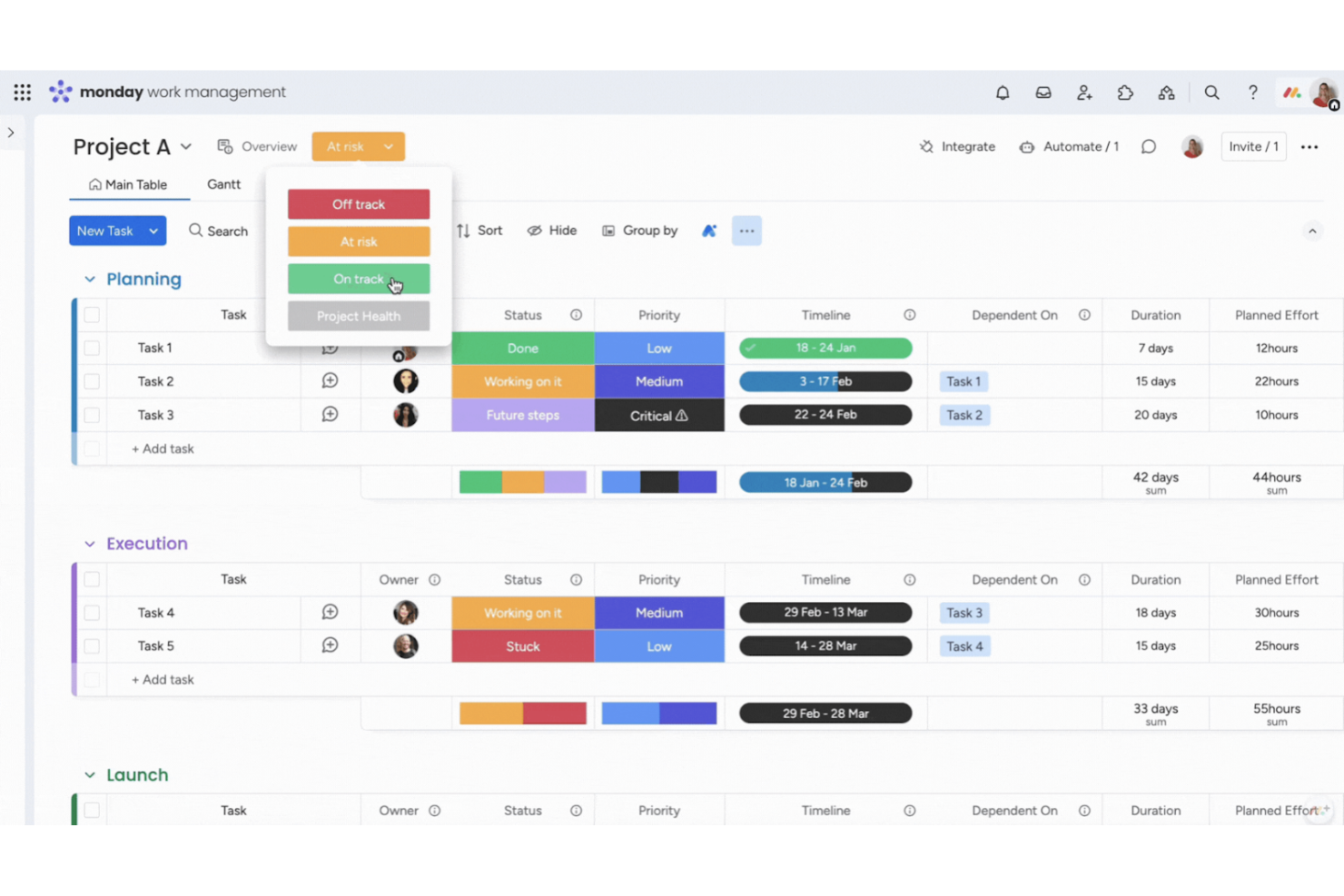
monday.com offers visual boards designed for teams that need a flexible way to collect and organize creative feedback. Marketing teams, creative agencies, and product designers use its drag-and-drop layouts to centralize comments, approvals, and file versions. Its visual structure helps track feedback cycles and keeps stakeholders aligned on project status.
Why I Picked monday.com
What sets monday.com apart for online proofing is how you can build custom visual boards to match your team’s exact feedback process. I picked monday.com because its boards let you create columns for status, reviewers, file uploads, and even custom feedback fields, so you can adapt the workflow to any creative project.
The ability to add comments directly to items and track changes across multiple review rounds helps teams keep feedback organized and visible. This flexibility is especially useful for creative teams that need to manage feedback on a variety of asset types and approval stages.
monday.com Key Features
Some other features in monday.com that support creative review and collaboration include:
- File annotation: Add comments and markups directly on image and document files for precise feedback.
- Automations: Set up automated notifications and status changes to keep review cycles moving.
- Guest access: Invite external reviewers to boards with controlled permissions for secure collaboration.
- Version history: Track and restore previous versions of files and board items as feedback evolves.
monday.com Integrations
Integrations include Slack, Gmail, Microsoft Teams, GitLab, Mailchimp, Microsoft Excel, Outlook, Docusign, Google Drive, and more.
Pros and Cons
Pros:
- Guest access enables secure external collaboration
- Automations trigger reminders for pending approvals
- Visual boards support feedback on multiple assets
Cons:
- Reviewers need accounts for full feature access
- Limited threaded discussions within file comments
New Product Updates from monday.com

monday.com Adds Time Range Support to Calendar Widget
monday.com introduces time range support in the Calendar Widget. This update allows users to visualize events across their full duration instead of single dates, improving scheduling clarity. For more information, visit monday.com’s official site.

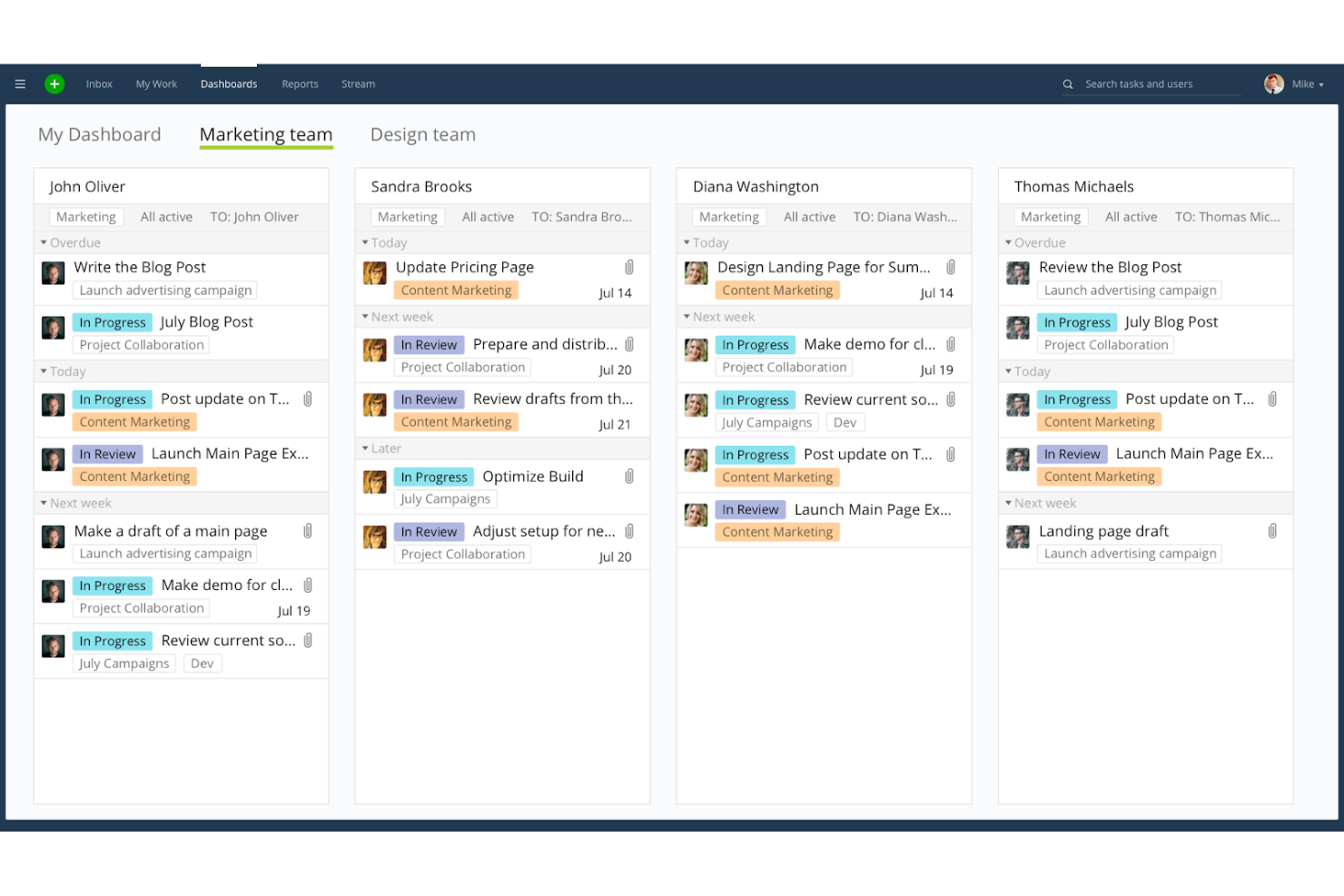
Wrike brings together project management and online proofing in a single platform designed for creative and marketing teams working across departments. If your team needs to coordinate feedback, approvals, and asset reviews with multiple stakeholders, Wrike’s collaborative workspace can help reduce confusion and speed up creative cycles. Its flexible structure supports everything from campaign planning and file sharing to detailed markup on visual assets.
Why I Picked Wrike
I chose Wrike because it’s built to support creative teams that need to collaborate across departments and functions. Its proofing tools let multiple reviewers add comments, mark up images, and track changes directly on creative assets, which helps keep feedback organized and actionable.
I also like that Wrike’s request forms and automated approval workflows make it easier to manage input from marketing, design, and external stakeholders in one place. This focus on cross-team collaboration makes Wrike a strong fit for organizations juggling complex creative projects with lots of moving parts.
Wrike Key Features
Some other features in Wrike that support creative review and project delivery include:
- Customizable dashboards: Build visual dashboards to track project status, asset approvals, and outstanding feedback in real time.
- File versioning: Upload and manage multiple versions of creative assets, so your team always reviews the latest file.
- Task dependencies: Set up dependencies between tasks to keep creative workflows moving in the right order.
- Calendar view: Use a shared calendar to schedule deadlines, review cycles, and key project milestones.
Wrike Integrations
Integrations include Salesforce, HubSpot, Microsoft Teams, Slack, Google Drive, Dropbox, Jira, GitHub, Zoom, and more.
Pros and Cons
Pros:
- Tracks asset versions and reviewer comments
- Handles multi-stage approval workflows
- Supports real-time markup on images and PDFs
Cons:
- Limited annotation tools for complex designs
- No video proofing for frame-by-frame feedback
New Product Updates from Wrike

Streamlining Workspaces with New Updates
Wrike announces custom space templates, AI Agents in Wrike Labs, and a new Guage widget to improve project management. For more information, visit Wrike's official site.
Other Online Proofing Software
Here are some additional online proofing software options that didn’t make it onto my shortlist, but are still worth checking out:
- Adobe Workfront
With enterprise-grade workflow automation
- StreamWork
For video and multimedia approvals
- Airtable
For spreadsheet-style asset reviews
- GoVisually
With client-facing approval portals
- Krock.io
For storyboard and video project feedback


Online Proofing Software Selection Criteria
When selecting the best online proofing software to include in this list, I considered common buyer needs and pain points like managing high volumes of creative feedback and reducing approval bottlenecks. I also used the following framework to keep my evaluation structured and fair:
Core Functionality (25% of total score)
To be considered for inclusion in this list, each solution had to fulfill these common use cases:
- Upload and share files for review
- Collect and manage feedback from multiple reviewers
- Track version history and changes
- Approve or reject assets
- Notify users of updates and deadlines
Additional Standout Features (25% of total score)
To help further narrow down the competition, I also looked for unique features, such as:
- Automated workflow routing
- Real-time collaborative markup tools
- Integration with print production systems
- Custom branding options
- Advanced reporting and analytics
Usability (10% of total score)
To get a sense of the usability of each system, I considered the following:
- Clean and intuitive interface design
- Minimal clicks to complete core tasks
- Logical navigation and menu structure
- Responsive performance with large files
- Accessibility for external reviewers
Onboarding (10% of total score)
To evaluate the onboarding experience for each platform, I considered the following:
- Availability of step-by-step product tours
- Access to training videos and documentation
- Pre-built templates for common workflows
- In-app chat or onboarding support
- Clear migration tools for importing existing projects
Customer Support (10% of total score)
To assess each software provider’s customer support services, I considered the following:
- Multiple support channels (chat, email, phone)
- Fast response times to inquiries
- Access to a searchable help center
- Availability of onboarding specialists
- Community forums or user groups
Value For Money (10% of total score)
To evaluate the value for money of each platform, I considered the following:
- Transparent and flexible pricing tiers
- Features included at each price point
- Discounts for annual billing or volume
- No hidden fees or surprise charges
- Free trial or demo availability
Customer Reviews (10% of total score)
To get a sense of overall customer satisfaction, I considered the following when reading customer reviews:
- Consistent positive feedback on reliability
- Praise for specific features or workflows
- Reports of responsive customer support
- Comments on ease of adoption
- Critiques of limitations or missing features
How to Choose Online Proofing Software
It’s easy to get bogged down in long feature lists and complex pricing structures. To help you stay focused as you work through your unique software selection process, here’s a checklist of factors to keep in mind:
| Factor | What to Consider |
|---|---|
| Scalability | Will the software handle your current and future project volume? Consider user limits, storage caps, and workflow complexity as your team grows. |
| Integrations | Does it connect natively with your existing tools (like project management, DAM, or print systems)? Check for direct integrations, not just API access. |
| Customizability | Can you tailor workflows, approval steps, and notifications to match your team’s processes? Avoid rigid systems that force you to adapt your workflow. |
| Ease of use | Will all stakeholders—including clients and external reviewers—find the interface intuitive? Test with a non-technical user before committing. |
| Implementation and onboarding | How long will it take to get your team up and running? Look for migration support, training resources, and clear onboarding timelines. |
| Cost | Are pricing tiers transparent and predictable as your usage grows? Watch for hidden fees, user minimums, or charges for extra storage or reviewers. |
| Security safeguards | Does the platform offer role-based access, data encryption, and audit trails? Ensure it meets your organization’s security and privacy standards. |
| Support availability | What support channels are offered, and during what hours? Consider if you’ll need live chat, phone, or dedicated onboarding help, especially during rollout. |
What Is Online Proofing Software?
Online proofing software is a digital platform that enables teams to review, mark up, and approve creative assets or documents in a centralized, web-based environment.
It centralizes the feedback and approval process by allowing multiple stakeholders to comment, compare versions, and track changes in real time. This helps reduce errors, shortens project timelines, and ensures everyone stays aligned throughout the review cycle.
Benefits
Implementing online proofing software provides several benefits for your team and your business. Here are a few you can look forward to:
- Faster review cycles: Automated notifications, centralized feedback, and structured approval workflows help reduce delays and keep projects moving.
- Clearer feedback: Markup and annotation tools allow reviewers to give precise, actionable input directly on creative assets.
- Improved version control: Built-in version tracking ensures everyone is reviewing the correct file and makes it easy to compare changes.
- Greater accountability: Audit trails and role-based permissions provide transparency into who made creative approvals and when.
- Enhanced collaboration: Multiple stakeholders can review, comment, and approve assets through real-time collaboration, regardless of location.
- Reduced approval bottlenecks: Automated reminders and status tracking help prevent projects from stalling at any stage of the review process.
- Better compliance and record-keeping: Detailed logs of feedback, approvals, and changes within the proofing process support regulatory requirements and internal audits.
Costs and Pricing
Selecting online proofing software requires an understanding of the various pricing models and plans available. Costs vary based on features, team size, add-ons, and more. The table below summarizes common plans, their average prices, and typical features included in online proofing software solutions:
Plan Comparison Table for Online Proofing Software
| Plan Type | Average Price | Common Features |
|---|---|---|
| Free Plan | $0 | Basic file uploads, limited reviewers, simple markup tools, and basic notifications. |
| Personal Plan | $5-$25/user/month | Unlimited projects, version control, advanced markup tools, and email notifications. |
| Business Plan | $20-$50/user/month | Team management, approval workflows, integrations, audit trails, and reporting features. |
| Enterprise Plan | $40-$100/user/month | Custom branding, advanced security, dedicated support, API access, and compliance management. |
Online Proofing Software FAQs
Here are some answers to common questions about online proofing software:
Can online proofing software handle large file sizes?
Yes, most online proofing software can handle large file sizes, especially for high-quality and high-resolution images, videos, or design files. However, upload limits and performance may vary by vendor and plan, so check the specifications if your team works with especially large assets.
How secure is online proofing software for confidential projects?
Most online proofing platforms offer security features like data encryption, role-based permissions, and audit trails. For highly confidential projects, confirm the software meets your organization’s security standards and ask about compliance certifications such as SOC 2 or ISO 27001.
Can external clients or stakeholders participate in the review process?
Yes, many online proofing tools allow you to invite external reviewers or clients via secure links or guest access. You can usually control what they can see or do, such as commenting, approving, or only viewing files.
What types of files can be reviewed in online proofing software?
Most platforms support a wide range of file types, including images, PDFs, videos, and design files. Some tools also support document formats like Word or PowerPoint. Always check file compatibility if your workflow relies on specialized formats.
Is it possible to integrate online proofing software with project management tools?
Yes, many online proofing solutions offer integrations with project management, DAM, or storage platforms. This helps keep feedback and approvals in sync with your broader workflow and reduces manual updates.
What’s Next:
If you're in the process of researching online proofing software, connect with a SoftwareSelect advisor for free recommendations.
You fill out a form and have a quick chat where they get into the specifics of your needs. Then you'll get a shortlist of software to review. They'll even support you through the entire buying process, including price negotiations.