

10 Best HVAC Project Management Software Reviewed in 2026

Best HVAC Project Management Software Shortlist


Managing HVAC projects can be a headache. You juggle tasks, timelines, and teams, all while ensuring quality and efficiency. It's a lot to handle, and that's where HVAC project management software comes in. These tools can help you keep everything on track.
I've tested and reviewed these software solutions independently. My goal is to provide you with unbiased insights into which tools can best meet your needs.
In this article, I'll share my top picks for HVAC project management software. You'll get a sense of each tool's strengths, helping you decide which one fits your team. Let's make managing your projects a little easier.
Why Trust Our Software Recommendations
Our team has been testing and reviewing software since 2012. As project managers ourselves, we know how difficult—and important—it is to choose the right software.
For this guide, we evaluated tools using hands-on testing and independent research, scoring tools using our selection criteria. We also draw on insights from industry thought leaders and practicing project management experts.
Our reviews reflect our human editorial judgment, not a sales pitch.
Expert reviewers:
HVAC Project Management Software Comparison Table
This comparison table summarizes pricing details for my top HVAC project management software selections:
| Tool | Best For | Trial Info | Price | ||
|---|---|---|---|---|---|
| 1 | Best for HVAC crew dispatch and GPS tracking | Free demo available | Pricing upon request | Website | |
| 2 | Best for all-in-one contractor job costing | 30-day free trial | From $49/month (billed annually) | Website | |
| 3 | Best for small HVAC shops managing field ops | Free demo available | From $245/month | Website | |
| 4 | Best for mixed service and project scheduling | Free demo available | Pricing upon request | Website | |
| 5 | Best for HVAC maintenance agreement management | Free demo available | Pricing upon request | Website | |
| 6 | Best for scheduling HVAC crews end to end | 14-day free trial | From $49/month | Website | |
| 7 | Best for trades businesses managing field ops | Free demo available | Pricing upon request | Website | |
| 8 | Best for small HVAC service businesses | 14-day free trial + free demo available | From $59/month (billed annually) | Website | |
| 9 | Best for HVAC service dispatch and scheduling | Free demo available | Pricing upon request | Website | |
| 10 | Best for HVAC compliance and contract management | 7-day free trial; Free demo available | From £49/user/month (billed annually) | Website |
Best HVAC Project Management Software Reviews
Below are my detailed summaries of the best HVAC project management software that made it onto my shortlist. My reviews offer a detailed look at the key features, pros & cons, integrations, and ideal use cases of each tool to help you find the best one for you.

Zuper
Best for HVAC crew dispatch and GPS tracking
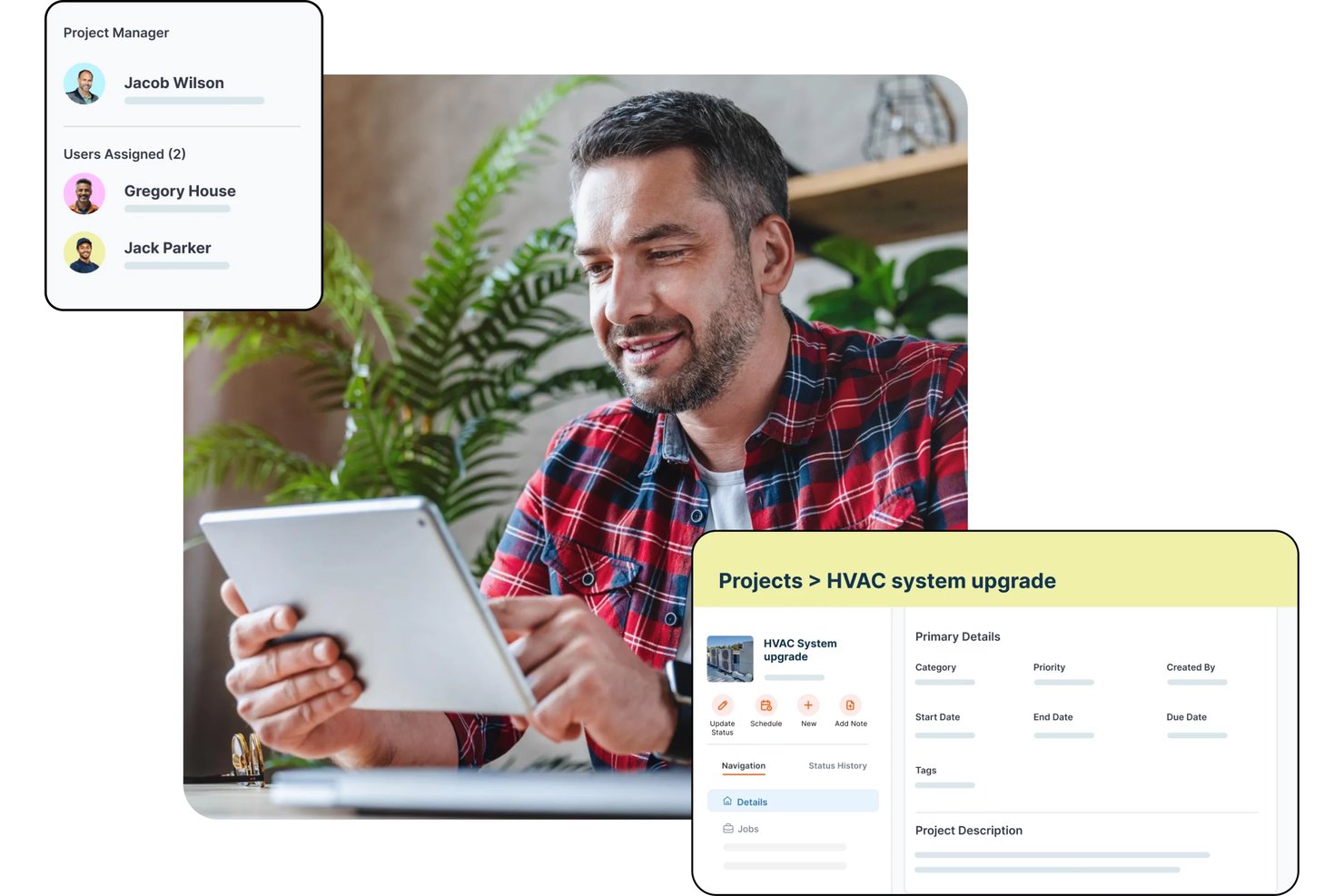
Zuper is a field service management platform for HVAC businesses that covers AI-powered dispatching, crew scheduling, GPS tracking, work order management, job costing, estimating, and preventive maintenance.
Who Is Zuper Best For?
Zuper is a strong fit for HVAC field service managers and dispatchers who need real-time crew visibility and skill-based job assignment across multiple technicians or territories.
Why I Picked Zuper
I picked Zuper as one of the best because its dispatch board and real-time GPS crew tracking are genuinely built for HVAC operations, not bolted on. I like that you can see live technician locations alongside job availability and drag-and-drop rescheduling in one view, so assigning the nearest qualified tech to an emergency call takes seconds. Skill-based and proximity-based assignment means the right person goes to the right job, and customers get automated ETA updates without anyone making a manual call.
Zuper Key Features
- Job costing: Track labor, parts, and expenses against estimated budgets with a live profitability breakdown that updates as time logs and line items change.
- Progressive invoicing: Generate milestone-based or scheduled draft invoices tied to a fixed project amount or time-and-materials totals.
- Asset inspection forms: Configure custom forms with media, barcode-scan, signature, and data-table fields that technicians complete before marking a job done.
- Preventive maintenance scheduling: Set recurring maintenance records to auto-generate jobs daily, weekly, monthly, or on a custom interval ahead of each service date.
Zuper Integrations
Zuper lists 60+ integrations, including ABC Supply, QuickBooks, Salesforce, HubSpot, Xero, Zoho Books, Stripe, and Microsoft Teams. REST API, webhooks, and an MCP server support custom integrations.
Pros and Cons
Pros:
- Drag-and-drop scheduling organizes technician assignments
- Mobile work orders keep office teams informed
- GPS dispatch helps coordinate field crews
Cons:
- Mobile updates can sync slowly
- Estimating tools may feel limited

Best for all-in-one contractor job costing
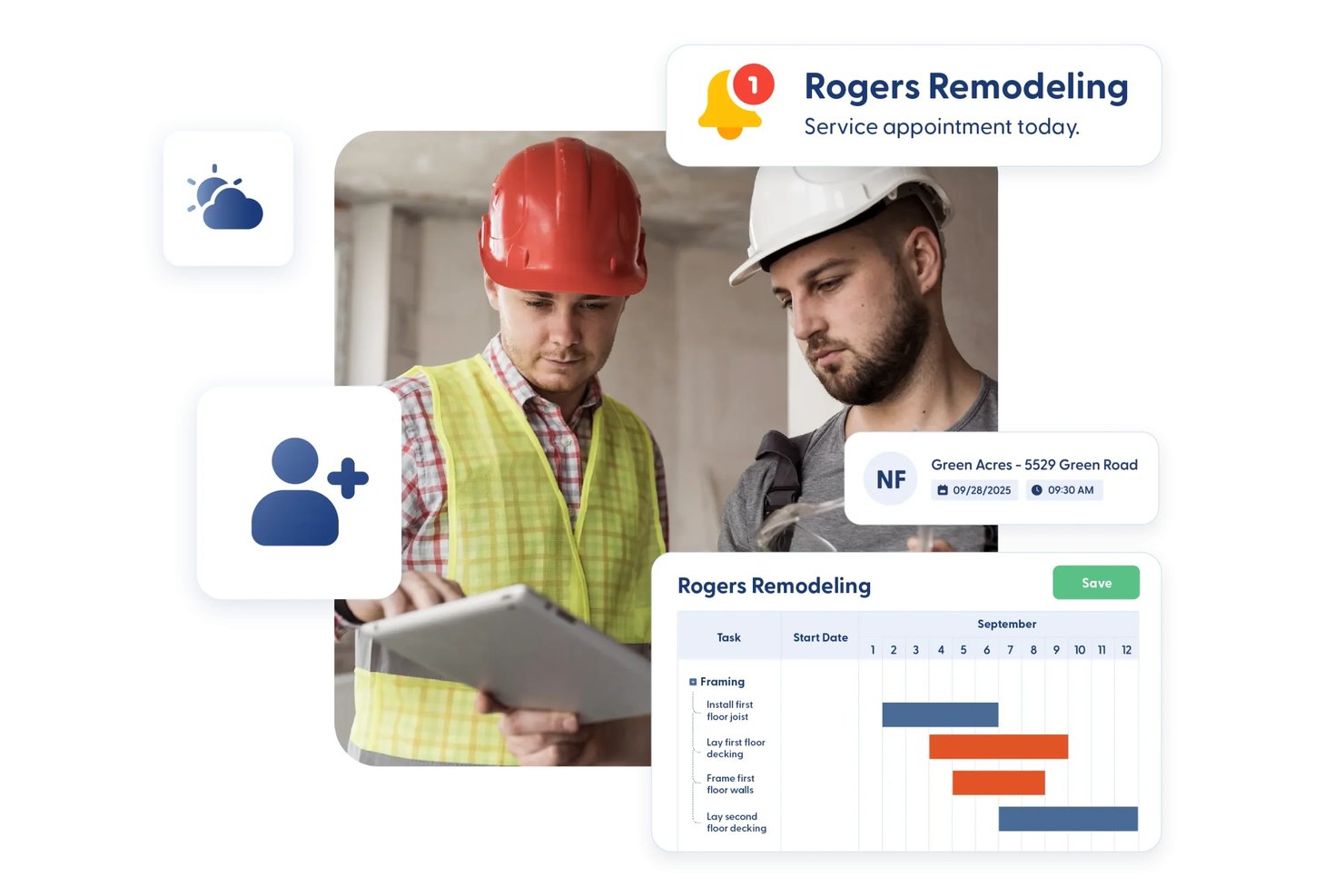
Contractor Foreman is an all-in-one construction management platform for contractors that covers estimating, job costing, scheduling, work orders, service tickets, subcontracts, and field documentation.
Who Is Contractor Foreman Best For?
Contractor Foreman is a strong fit for small to mid-sized trade contractors who need project management, estimating, and job costing in one affordable platform.
Why I Picked Contractor Foreman
I've included Contractor Foreman in my top picks because it pulls job costing, estimating, and project financials into a single platform at a price point that actually makes sense for smaller HVAC operations. I like how job-costing reports track estimated, committed, and actual costs side by side, so you can see exactly where labor or materials are drifting on an active installation job. The crew scheduling and service ticket dispatch map also let you assign techs and sequence nearby calls visually, which I find genuinely useful for day-to-day field coordination.
Contractor Foreman Key Features
- Service ticket dispatch map: A visual map plots open service tickets geographically so you can sequence nearby calls and assign techs without switching tools.
- Change order mobile signing: Clients and owners can sign change orders directly in the iOS or Android app, with the signature included on the generated PDF.
- Permit and inspection tracking: Permits log dates, fees, status, and paperwork, with linked inspection records showing who completed each inspection and when.
- Subcontracts module: Dedicated subcontract records capture scope, terms, retainage, billing, and payments separately from work orders.
Contractor Foreman Integrations
Contractor Foreman lists 50+ integrations, including native connections with QuickBooks Online, QuickBooks Desktop, Google Calendar, Outlook Calendar, Gusto, CompanyCam, and Stripe. Xero is listed for mid-2026, and Zapier is also supported.
Pros and Cons
Pros:
- Dispatch map groups nearby service calls
- Field photos and logs reduce paperwork
- Estimated, committed, and actual cost visibility
Cons:
- Cost reports need more detail
- Mobile app lags on large projects

Best for small HVAC shops managing field ops
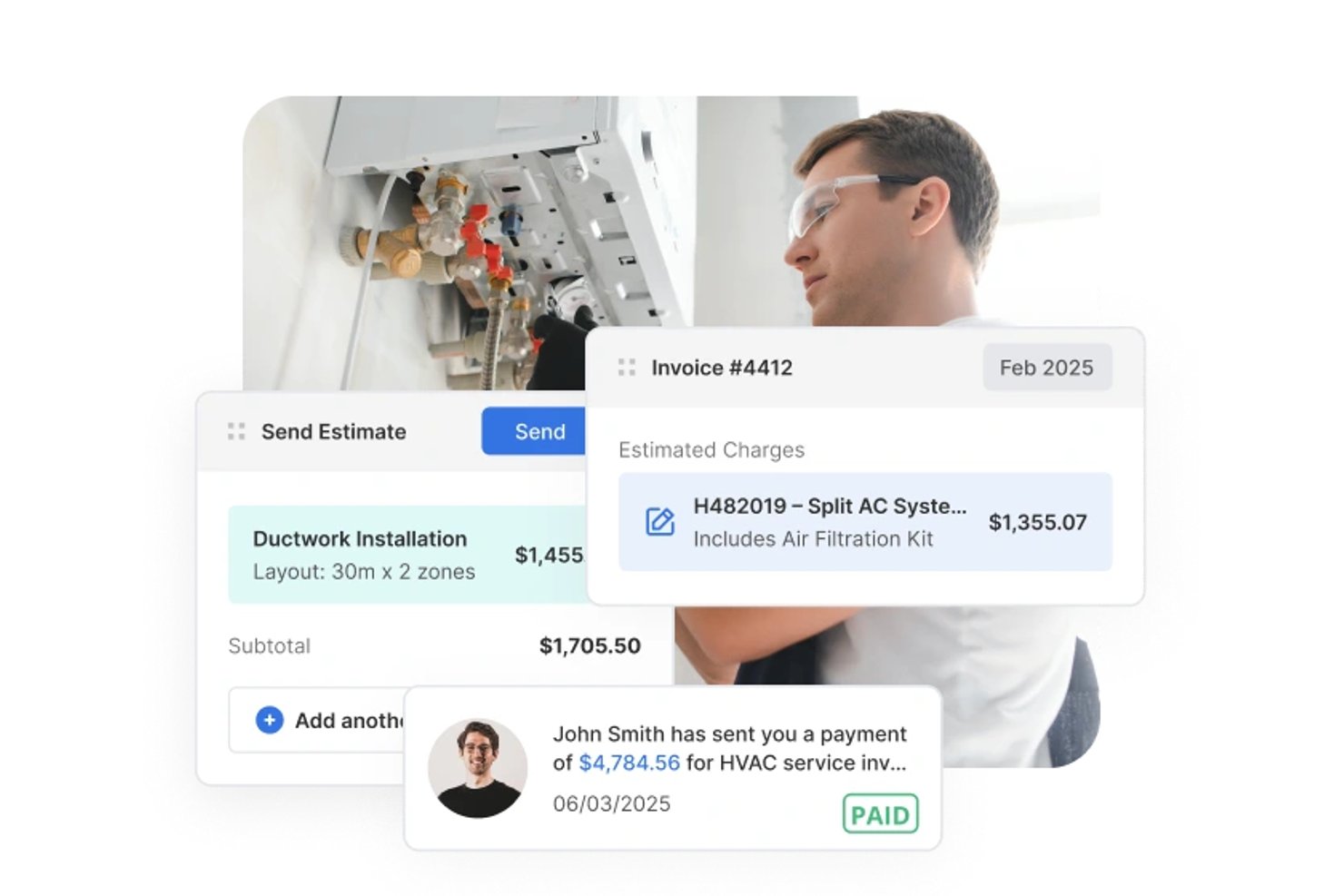
Service Fusion is a field service management platform built for HVAC and other trade contractors, covering scheduling, dispatch, estimating, work order management, invoicing, and mobile field access.
Who Is Service Fusion Best For?
Service Fusion fits small HVAC contractors who need to manage scheduling, dispatch, and field operations without paying per user.
Why I Picked Service Fusion
I picked Service Fusion as one of the best because it handles the full dispatch cycle that small HVAC shops actually live inside every day: the Dispatch Grid lets you assign jobs to technicians, drag and drop as calls come in, and push job details straight to the mobile app. I also like that technicians can capture notes, photos, and signatures in the field and process payment on the spot, keeping the office loop closed without extra back-and-forth. Status rules can require a photo or signature before a job is marked complete, which adds real accountability without a manual checklist.
Service Fusion Key Features
- Estimate options: Build and send a single estimate with up to five named alternatives that customers can review, accept, and sign online.
- Purchase order tracking: Create POs directly from a job, email them to vendors, and track receipt and closure status within the same job record.
- Customer service agreements: Set up agreement records with effective dates and member pricing that automatically applies to products and services on jobs and invoices.
- Offline mobile access: The mobile app switches to offline mode automatically, letting technicians view job details, add notes, photos, and checklists without a connection.
Service Fusion Integrations
Service Fusion offers native integrations with QuickBooks Online and QuickBooks Desktop, plus partner connections including Gusto, Coast, and PaySimple. It also provides an API for custom integrations, although its total integration count isn't documented.
Pros and Cons
Pros:
- Work orders and billing stay together
- Estimate alternatives help customers compare HVAC scopes
- Dispatch board keeps technicians and jobs aligned
Cons:
- Manual cost entry weakens budget tracking
- Mobile app can lag in the field


Fieldpoint is a field service management platform built for commercial contractors, with tools covering work order management, job costing, scheduling and dispatch, preventive maintenance contracts, mobile field access, and quoting.
Who Is Fieldpoint Best For?
Fieldpoint is a strong fit for commercial HVAC contractors who need to manage both project installations and ongoing service work within a single platform.
Why I Picked Fieldpoint
I picked Fieldpoint as one of the best because field service automation is where it genuinely excels—dispatchers can manage a mixed workload of HVAC installs, preventive maintenance calls, and break/fix jobs from a single drag-and-drop scheduling board, with real-time technician GPS locations visible alongside skills and certifications. I also like that preventive maintenance contracts automatically trigger work orders, inspections, and renewal reminders without manual follow-up. That kind of hands-off automation keeps recurring service commitments from slipping through the cracks on busy commercial accounts.
Fieldpoint Key Features
- Quote-to-job conversion: Approved quotes and spend plans convert directly into work orders, contracts, or projects, carrying over tasks, parts, and contract lines.
- Subcontractor management: Assign and dispatch subcontractors based on proximity and satisfaction rating, with vendor quotes, pricing agreements, and invoicing managed in one place.
- Equipment and serial tracking: Equipment records store make, model, serial number, warranty data, and manufacturer, with full history accessible to technicians in the field.
- Job costing with profit forecasting: Track labor, parts, and costs against estimates in real time, and add expected parts and hours to future work orders to forecast profit.
Fieldpoint Integrations
Fieldpoint offers native integrations with Microsoft Dynamics, Microsoft Dynamics 365, Microsoft Dynamics GP, Microsoft Business Central, CMiC, NetSuite, QuickBooks, WorkMarket, and ServiceChannel. Its Open API and Fieldpoint Data Transfer Service support custom integrations.
Pros and Cons
Pros:
- Automates preventive maintenance work orders
- Tracks labor and materials against estimates
- Schedules project crews alongside service calls
Cons:
- Mobile data transfers falter with weak connectivity
- Rollouts can require substantial staff effort

Best for HVAC maintenance agreement management
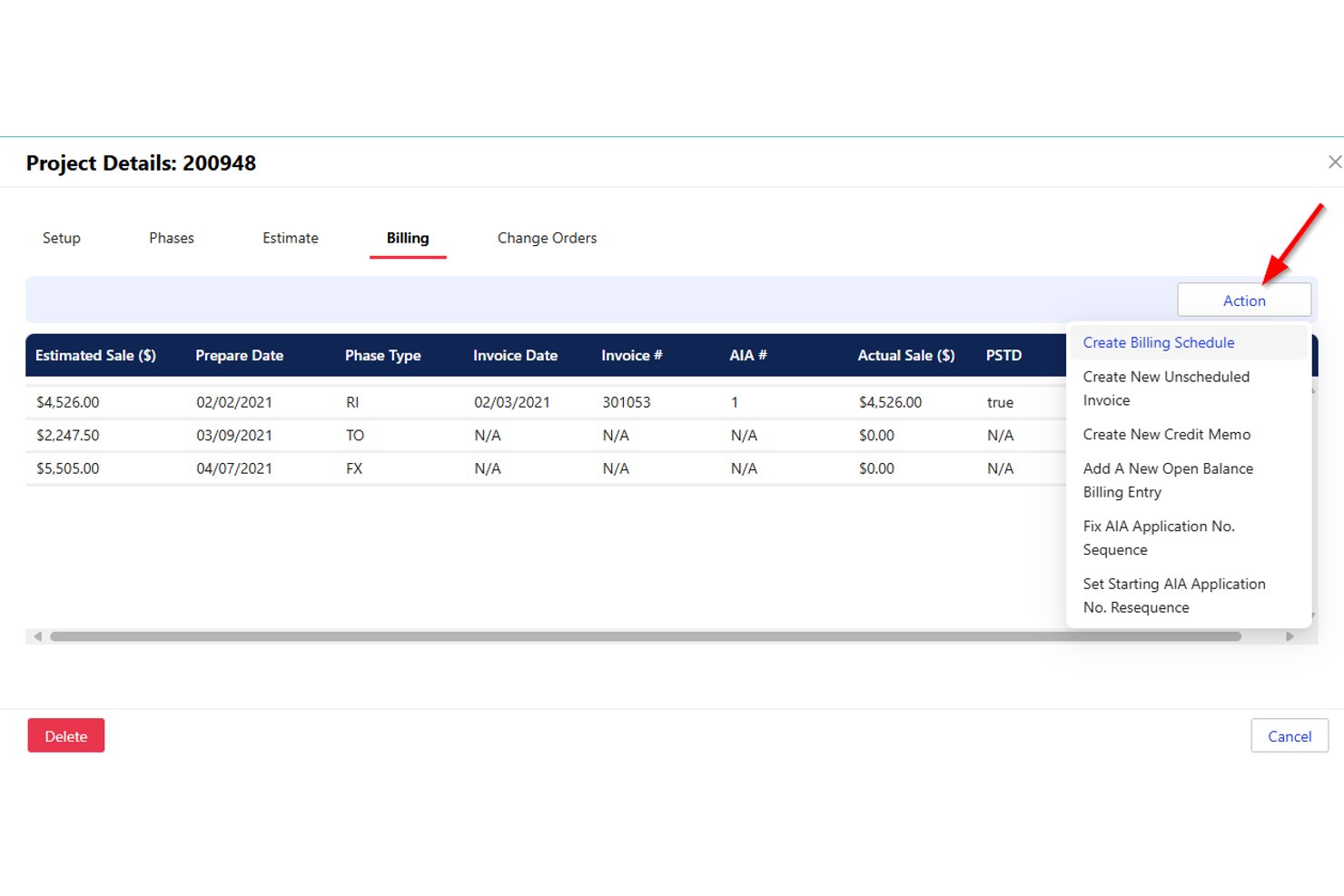
Successware is a cloud-based field service management platform built for home-service contractors, offering scheduling, dispatch, job costing, maintenance agreement management, and integrated accounting tools.
Who Is Successware Best For?
Successware is a strong fit for home-service contractors—particularly HVAC businesses—that need maintenance agreement management, dispatch, and built-in accounting in one platform.
Why I Picked Successware
Successware earns its spot on my shortlist because of how well its Agreement Manager handles the full maintenance agreement lifecycle, from scheduling recurring visits and processing periodic billings to managing renewals automatically. I like that open agreement visits convert directly into dispatchable jobs, so nothing slips through the cracks between your agreement records and your actual schedule. The platform also tracks equipment by serial number, model, and warranty at each service location, which gives technicians the context they need before they arrive on site.
Successware Key Features
- Drag-and-drop dispatch board: Assign and reschedule technicians across daily and weekly views using skill-based filtering and department grouping.
- Integrated accounting: Built-in accounts receivable, accounts payable, income statements, and balance sheets eliminate the need for a separate accounting system.
- Successware Mobile offline access: Technicians can access job data and complete field tasks without a live connection, syncing when connectivity returns.
- Equipment and warranty tracking: Service locations store equipment records by serial number, model, and warranty details for both in-house and manufacturer coverage.
Successware Integrations
Successware offers native integrations with CompanyCam, The New Flat Rate, Profit Rhino, NSPG Price Guide, ADP, QuickBooks Payroll, Ally Lending, GreenSky, PulseM, and Customer Lobby. A public API is not documented.
Pros and Cons
Pros:
- Agreement visits convert into dispatchable jobs
- Field mobile shows customer and job history
- Visual dispatch makes technician assignments clear
Cons:
- Project costing lacks overrun alerts and forecasts
- Unfinished calls require one-at-a-time rescheduling

Jobber
Best for scheduling HVAC crews end to end
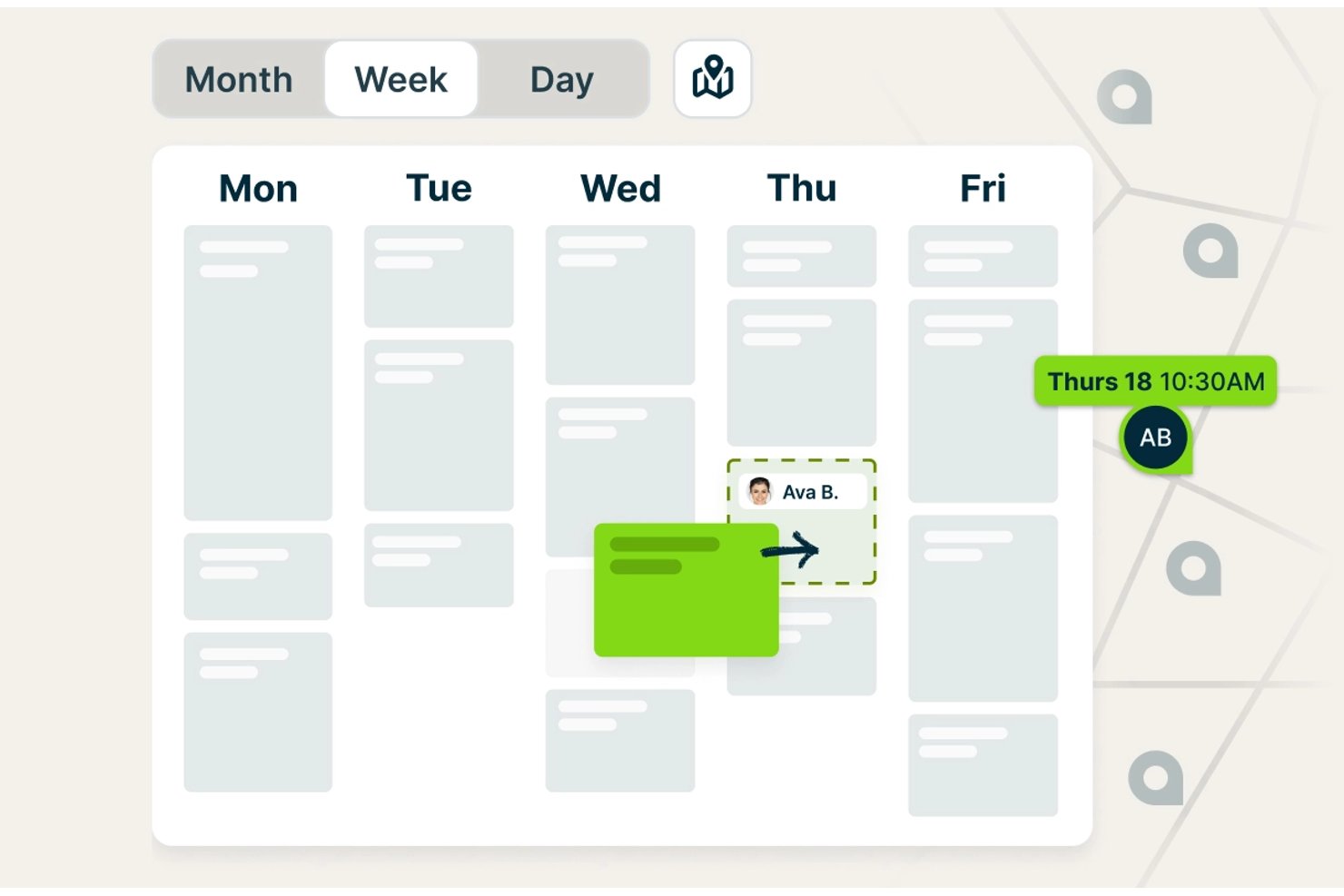
Jobber is a field service management platform built for trades businesses, combining scheduling, dispatching, estimating, job costing, invoicing, and customer communication in a single system.
Who Is Jobber Best For?
Jobber works well for small HVAC contractors and field service managers who need to handle scheduling, dispatching, quoting, and invoicing in one place without a steep learning curve.
Why I Picked Jobber
Jobber earns its spot on my shortlist because of how well it handles the full scheduling loop for HVAC crews, from assigning technicians to flagging travel-time conflicts before the day starts. I particularly like the "Find a Time" tool, which checks each tech's existing workload, working hours, and drive time simultaneously, so you're not manually cross-referencing calendars to avoid double-booking. On the Plus plan, crew scheduling lets you group techs and assign an entire crew to a job in one move.
Jobber Key Features
- Job costing: Tracks labor, materials, and expenses against each job and displays revenue, cost, profit, and margin in one view.
- QuickBooks Online sync: Syncs customer, invoice, and payment data between Jobber and QuickBooks to keep accounting records aligned.
- Online booking: Lets customers request and book appointments based on your configured services and team availability.
- Progress invoicing: Bills clients against project milestones rather than requiring a single invoice at job completion.
Jobber Integrations
Jobber’s marketplace connects 100+ tools, including QuickBooks Online, Xero, The Home Depot, Gusto, and Zapier. Its GraphQL API supports custom integrations with queries, mutations, and webhooks.
Pros and Cons
Pros:
- Mobile app gives technicians access to job details
- Approved quotes convert into jobs without re-entry
- Scheduling keeps HVAC crews and office staff coordinated
Cons:
- Job costing can double-count expenses and line items
- Field notes and photos can fail to sync

Best for trades businesses managing field ops

ServiceTitan is a field service management platform built for trade businesses that covers HVAC scheduling, dispatching, estimating, job costing, work order management, and project tracking across residential and commercial operations.
Who Is ServiceTitan Best For?
ServiceTitan suits HVAC contractors and field service businesses that need scheduling, dispatch, job costing, and project tracking in one platform for residential and commercial work.
Why I Picked ServiceTitan
ServiceTitan earns its spot on my list because it's built specifically for trade businesses, covering the full operational loop from booking through invoicing in one platform. I'm particularly drawn to its Adaptive Capacity scheduling, which automatically assigns technicians to jobs based on configured skills, zones, and shift availability, reducing the manual back-and-forth that slows down dispatch. I also like how its Budget vs. Actual reporting breaks down labor, materials, and subcontractor costs against sold estimates in real time, giving project managers clear visibility into margin before a job closes.
ServiceTitan Key Features
- Pricebook-linked estimates: Create itemized job estimates tied directly to your pricebook, with line items for services, materials, and equipment that feed into project budgets and invoicing.
- Progress billing and AIA pay applications: Bill across project phases and generate payment applications following AIA standards, supporting multi-phase commercial HVAC projects.
- Supplier catalog integration: Connect to supplier catalogs for real-time pricing and availability checks, and send electronic purchase orders directly from a project record.
- Equipment and serial number tracking: Record manufacturer, model, serial number, install date, and warranty details for installed equipment, with warranty status visible to both office staff and technicians.
ServiceTitan Integrations
ServiceTitan offers 70+ pre-built integrations and 149 Marketplace listings, including QuickBooks Online, QuickBooks Desktop, Sage Intacct, Xero, Avalara, and ABC Supply. Its V2 APIs and webhooks support custom integrations.
Pros and Cons
Pros:
- Project records unite jobs, costs, and documents
- Adaptive Capacity assigns technicians by skills
- Budget-versus-actual reporting tracks project margins
Cons:
- Offline project access has notable gaps
- Project setup and workflows take effort
Best for small HVAC service businesses
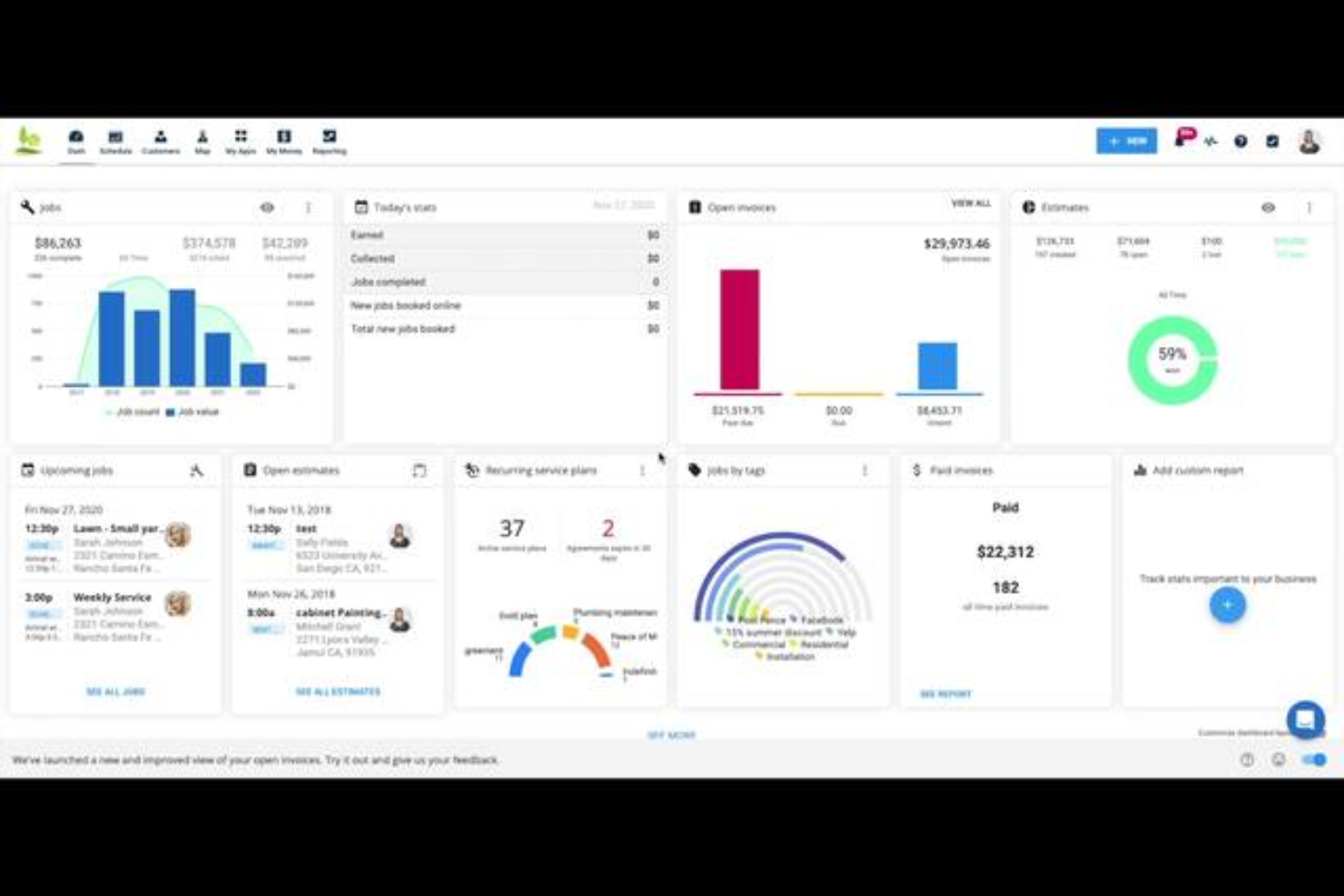
Housecall Pro is a field service management platform for home service businesses, including HVAC contractors, that covers scheduling, dispatching, work order management, job costing, estimating, and recurring maintenance agreements.
Who Is Housecall Pro Best For?
Housecall Pro is a strong fit for small HVAC businesses that need scheduling, dispatching, and invoicing in one place without a steep learning curve.
Why I Picked Housecall Pro
I've included Housecall Pro in my top picks because it gives small HVAC businesses a single place to run the day-to-day without a complicated setup. I particularly like how scheduling works: you drag unscheduled jobs onto the calendar, see your whole team's availability at a glance, and dispatch from the same screen. Job Costing then tracks labor using fully loaded employee rates against actual time logged, so you always know where a job stands on margin.
Housecall Pro Key Features
- Property profile: Records customer equipment details—including make, model, serial number, and install date—and links them directly to jobs.
- Purchase orders: Creates and tracks material orders through statuses like Draft, Issued, Confirmed, and Received, with vendor association and notes.
- Recurring service plans: Schedules maintenance visits and automates recurring billing, with automatic card-on-file charges per plan frequency.
- Employee GPS tracking: Monitors technician locations during business hours and displays routes and estimated travel times on a map view.
Housecall Pro Integrations
Housecall Pro offers documented integrations with QuickBooks Online and Reece, plus marketplace integrations with CompanyCam, MeasureQuick, Profit Rhino, and Zapier. Its public API is available on the Max plan for custom integrations.
Pros and Cons
Pros:
- Reviewers praise estimates-to-payment workflows
- Job costing tracks labor and material margins
- Drag-and-drop dispatch shows crew availability
Cons:
- Change orders lack linked cost tracking
- Long retrofit projects outgrow service-job workflows

Best for HVAC service dispatch and scheduling

FieldEdge is a field service management platform built for HVAC contractors that covers dispatching, scheduling, work order management, quoting, invoicing, and customer records.
Who Is FieldEdge Best For?
FieldEdge suits HVAC service contractors with multiple trucks and technicians who need dispatch, scheduling, and field work order management in one place.
Why I Picked FieldEdge
FieldEdge earns its spot on my list because its dispatch board is genuinely built for service-call operations: I can drag an unassigned work order onto a technician's time slot in seconds, with skill, location, and availability filtering doing the heavy lifting. I also like that technicians can update work orders, attach job photos, and collect payment on-site through the mobile app, keeping the office and field in sync without a separate tool. The real-time status tracking (pending, traveling, working, completed) gives dispatchers a live view of every truck on any given day.
FieldEdge Key Features
- Pricebook and flat-rate pricing: Lets you build quotes using a managed pricing database with standardized rates for consistent job pricing across technicians.
- Service agreements: Supports basic and advanced recurring service agreements with automated alerts and reminders to help manage maintenance contracts.
- QuickBooks synchronization: Syncs customer records, invoices, payments, parts requests, expenses, and time entries between FieldEdge and QuickBooks Online or Desktop.
- Multi-option quoting: Lets technicians or office staff present customers with multiple quote options from the field or office before a job is scheduled.
FieldEdge Integrations
FieldEdge offers native integrations with QuickBooks Online, QuickBooks Desktop, Xplor Pay, and FieldEdge Flat Rate, plus marketplace integrations including FleetSharp. It also provides an API for custom integrations.
Pros and Cons
Pros:
- Field quotes and invoicing support job completion
- Work orders link customer and service histories
- Dispatch board organizes daily service calls
Cons:
- Mobile sync can lag in poor reception
- Reporting offers limited project cost visibility

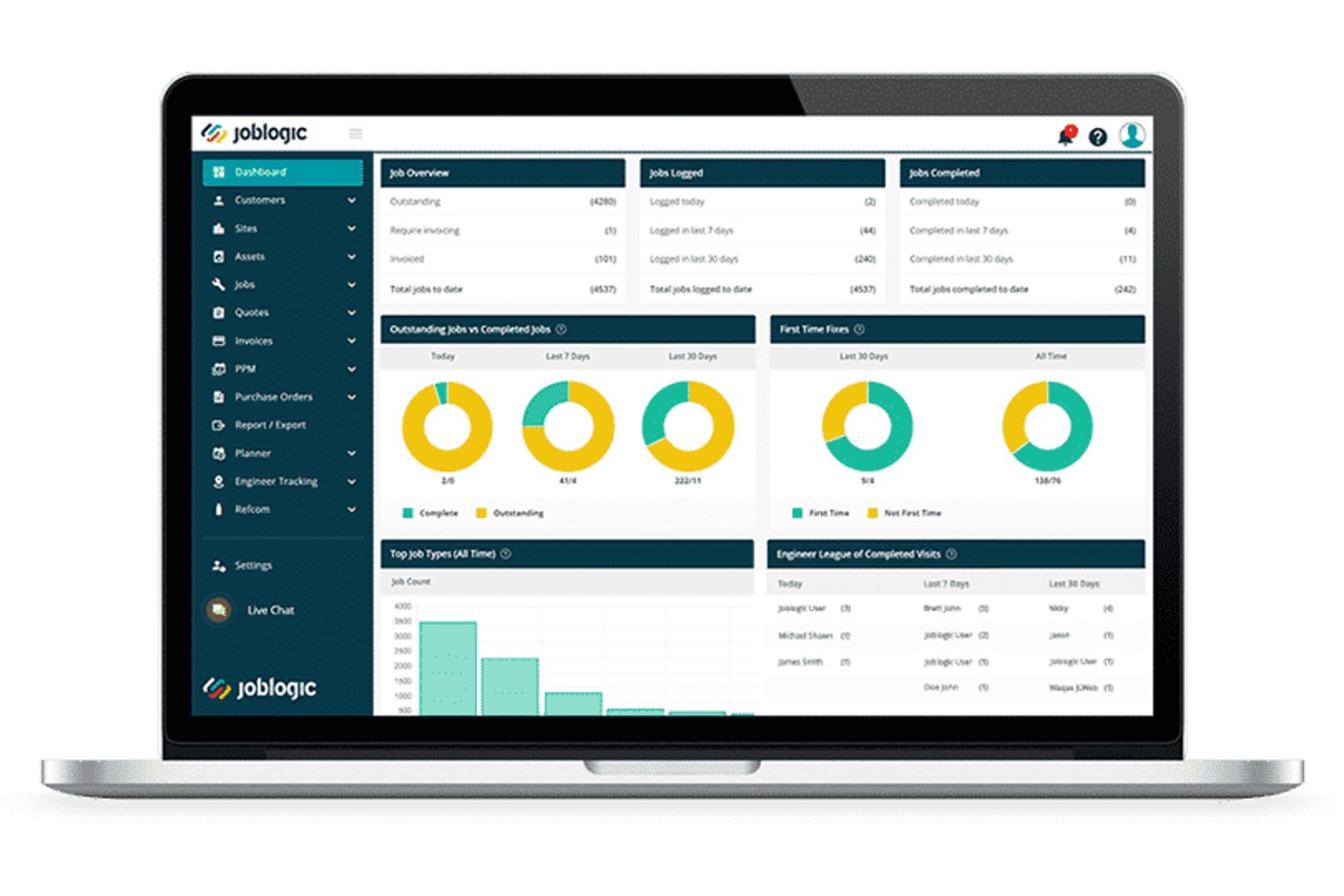
Joblogic is a cloud-based field service management platform built for HVAC and mechanical contractors, covering job scheduling, estimating, PPM contracts, F-Gas compliance, job costing, and field mobile workflows.
Who Is Joblogic Best For?
Joblogic suits growing HVAC and mechanical service contractors who need to manage F-Gas compliance, PPM contracts, and multi-engineer scheduling from a single platform.
Why I Picked Joblogic
Joblogic earns its spot on my shortlist because of how tightly it connects F-Gas compliance, PPM contracts, and project costing in one place. I love that the HVAC Industry Pack gives engineers access to 26 trade-specific forms, including refrigeration maintenance and gas safety records, directly from the mobile app on site. On the project side, I can track estimated versus committed costs, assign subcontractors as named resources, and manage scope changes through formal quote variations without losing the original project quote.
Joblogic Key Features
- Dynamic Scheduler: Automatically recommends engineer routes and assignments based on location, skills, availability, and job priority.
- Asset PPM scheduling: Sets service triggers by frequency or meter readings, with per-asset or per-contract billing options.
- Mobile engineer tracking: Shows live GPS locations and historical journeys for all engineers directly in the back-office Planner.
- Sub-Contractor Portal: Assigns jobs to subcontractors and tracks their progress from a central system.
Joblogic Integrations
Joblogic offers 70+ marketplace apps, modules, and integrations, including native connections to Xero, QuickBooks, Sage, AccountsIQ, FreeAgent, KashFlow, Stripe, and PartsArena. It also supports Microsoft 365, Zapier, and API access for custom integrations.
Pros and Cons
Pros:
- Dispatch views help assign engineers quickly
- PPM tools handle high-volume maintenance contracts
- HVAC compliance forms cover refrigeration and F-Gas
Cons:
- Custom reports can require exports and workarounds
- Mobile photo uploads can lag or fail
Other HVAC Project Management Software
Here are some additional HVAC project management software options that didn’t make it onto my shortlist, but are still worth checking out:
- AnyDB
For configurable HVAC field records
- Foundation
For mechanical contractors with job costing
- Kickserv
For estimate-to-job workflow on service calls
- ServiceTrade
For commercial HVAC change order tracking
- Simpro
For end-to-end HVAC job costing
- Knowify
For project and service work in one
- FieldPulse
For growing HVAC teams managing field ops
- BuildOps
For end-to-end commercial mechanical jobs
- Buildertrend
For construction project cost tracking
- Commusoft
For HVAC service contract management


How I Evaluate HVAC Project Management Software
I split my evaluation into baseline requirements—like job scheduling and field-to-office mobile access—and differentiators that separate the best tools from the rest.
Core Functionality (Table Stakes For This List)
When I'm selecting tools for my list, I rank each one on a scale from 0 (does not offer the functionality) to 5 (excels in this area) for each core functionality listed below. Then, I calculate the tool's total score into a percentage. Each tool needs to achieve a minimum total score of 65% to be considered for inclusion.
- HVAC Job Scheduling & Dispatch: I look for drag-and-drop scheduling that lets you assign crews to multiple job sites and see technician availability at a glance.
- Estimating & Bidding Tools: Each tool should support building HVAC-specific estimates with line items for equipment, ductwork, and labor units—not just generic quote templates.
- Job Costing & Budget Tracking: Real-time cost tracking against the original bid matters here, especially the ability to compare labor and material actuals to estimates mid-project.
- Field-to-Office Mobile Access: I evaluate whether field techs can pull up job details, log time, capture photos, and submit updates from the job site through a dedicated mobile app.
- Work Order & Service Management: The platform should handle the full work order lifecycle—creation, assignment, status tracking—for installs, maintenance calls, and warranty service.
- Project Document Management: I check for centralized storage of permits, equipment specs, warranties, and customer records tied directly to specific HVAC jobs or service addresses.
Once I have a list of tools that meet this criteria, I consider what sets each platform apart.
Differentiating Factors (What Sets Vendors Apart)
Here's how I compare and contrast different vendors:
Standout Features
Preventive maintenance contracts are a major differentiator—I look for tools that automate recurring PM schedules and billing, since these agreements drive steady revenue for HVAC businesses. Equipment and asset tracking matters too, especially when techs need to pull up a unit's serial number, install date, and full service history on-site. I also evaluate how each platform handles subcontractor workflows, from assigning sheet metal or controls subs to tracking their costs against the project budget.
Beyond Features
Accounting integrations are one of the first things I check. HVAC contractors live in QuickBooks or Sage, so two-way sync for invoices and job costs saves hours of double entry each week. Scalability matters just as much—a three-truck residential shop and a 50-crew commercial mechanical contractor need very different setups. I evaluate whether pricing tiers and multi-location support grow with the business. Compliance tools also stand out, particularly EPA refrigerant tracking, technician certification management, and built-in OSHA safety checklists that keep field crews audit-ready.
How to Choose HVAC Project Management Software
It’s easy to get bogged down in long feature lists and complex pricing structures. To help you stay focused as you work through your unique software selection process, here’s a checklist of factors to keep in mind:
| Factor | What to Consider |
| Scalability | Will the software grow with your business? Consider if it supports an increasing number of users and projects without slowing down or requiring expensive upgrades. |
| Integrations | Does it connect with your existing tools? Look for software that integrates with your CRM, accounting systems, and IoT devices to streamline workflows and data sharing. |
| Customizability | Can you tailor the software to fit your processes? Ensure you can customize dashboards, reports, and workflows to match your team's specific needs. |
| Ease of use | Is the interface intuitive for all users? A complex system can slow down adoption. Test the demo to ensure it's user-friendly for both tech-savvy and non-tech-savvy staff. |
| Implementation and onboarding | How smooth is the transition to the new software? Evaluate the training materials, support during setup, and time needed to fully implement the system. |
| Cost | Are there hidden fees or tiered pricing? Review the pricing structure for any additional charges for features, support, or upgrades to avoid unexpected costs. |
| Security safeguards | Does it protect your data? Check for robust security measures like encryption, regular updates, and compliance with data protection regulations to safeguard sensitive information. |
| Support availability | Is help readily accessible when needed? Ensure the vendor offers reliable support channels, including live chat, phone, and email, and check their response times. |
What Is HVAC Project Management Software?
HVAC project management software is a tool designed to help manage and coordinate HVAC projects, including scheduling, resource allocation, and communication. These tools are typically used by HVAC contractors, project managers, and technicians to enhance efficiency and productivity. Scheduling, budgeting, and reporting features help with organizing tasks, tracking costs, and analyzing project progress. Overall, these tools provide a centralized platform to manage HVAC projects more effectively.
Features of HVAC Project Management Software
When selecting HVAC project management software, keep an eye out for the following key features:
- Scheduling: Allows you to plan and organize tasks and appointments, ensuring timely project execution.
- Resource allocation: Helps assign and manage resources effectively, preventing overbooking and ensuring efficiency.
- Budget tracking: Monitors project expenses and keeps financials in check to avoid overspending.
- Reporting: Provides insights through detailed reports, helping analyze project performance and make informed decisions.
- Mobile access: Enables technicians to access project details and update statuses on the go, improving field communication.
- Customer management: Keeps track of client interactions and history, fostering strong relationships and repeat business.
- Inventory management: Tracks parts and supplies, ensuring you have what you need for each project.
- Integration capabilities: Connects with existing tools like CRM and accounting systems to streamline workflows.
- Task management: Organizes tasks and responsibilities, making it easier to track progress and meet deadlines.
- Security safeguards: Protects sensitive data with encryption and compliance with data protection regulations.
Benefits of HVAC Project Management Software
Implementing HVAC project management software provides several benefits for your team and your business. Here are a few you can look forward to:
- Improved efficiency: Automates scheduling and task management, helping your team complete projects faster and with less effort.
- Cost control: Tracks budgets and expenses, giving you a clear view of financials to prevent overspending.
- Enhanced communication: Facilitates real-time updates and mobile access, keeping everyone on the same page, whether in the office or out in the field.
- Better resource management: Manages resource allocation to ensure optimal use of personnel and materials, reducing waste and delays.
- Increased client satisfaction: Keeps customer data organized and accessible, allowing for better service and stronger relationships.
- Data-driven decisions: Provides detailed reporting and analytics, enabling you to make informed decisions based on actual project performance.
- Security assurance: Protects sensitive information with robust security measures, ensuring compliance with data protection standards.
Costs and Pricing of HVAC Project Management Software
Selecting HVAC project management software requires an understanding of the various pricing models and plans available. Costs vary based on features, team size, add-ons, and more. The table below summarizes common plans, their average prices, and typical features included in HVAC project management software solutions:
Plan Comparison Table for HVAC Project Management Software
| Plan Type | Average Price | Common Features |
| Free Plan | $0 | Basic scheduling, task management, and limited reporting. |
| Personal Plan | $5-$25/user/month | Scheduling, task management, reporting, and mobile access. |
| Business Plan | $30-$60/ user/month | Advanced scheduling, budgeting, team collaboration, and customer management. |
| Enterprise Plan | $75-$150/ user/month | Custom integrations, advanced security, dedicated support, and comprehensive analytics. |
HVAC Project Management Software FAQs
Here are some answers to common questions about HVAC project management software:
How can HVAC project management software improve team communication?
HVAC project management software improves team communication by offering a centralized platform for sharing project updates, documents, and schedules. Your team can access real-time information, reducing misunderstandings and ensuring everyone is aligned. It also allows for easy messaging and collaboration, regardless of location.
What should you look for in HVAC project management software?
When choosing HVAC project management software, consider features like scheduling, budget tracking, mobile access, and estimating and bidding tools. Ensure it integrates with your existing tools and offers strong customer support. Evaluate its ease of use for your team and check if it provides the necessary security safeguards for your data.
Can HVAC project management software help with compliance?
Yes, HVAC project management software can assist with compliance by tracking regulatory requirements and deadlines. It can store essential documents and certifications, ensuring they are easily accessible for audits. This helps you avoid potential fines and maintain industry standards.
How does HVAC project management software assist in resource allocation?
The software aids resource allocation by providing tools to assign tasks and manage workloads efficiently. You can track resource availability and project demands, ensuring optimal use of personnel and materials. This minimizes downtime and prevents overbooking, keeping your projects on schedule.
What role does mobile access play in HVAC project management software?
Mobile access allows your team to update job statuses, access project details, and communicate with the office while on the go. This flexibility improves field operations, as technicians can quickly address issues and receive updates without returning to the office, enhancing overall efficiency.
How does HVAC project management software support data-driven decisions?
The software supports data-driven decisions by offering detailed reporting and analytics tools. You can monitor project performance, track financials, and identify trends, helping you make informed decisions. This insight aids in optimizing processes and improving overall project outcomes.