

10 Best HVAC Estimating Software Reviewed in 2026

Best HVAC Estimating Software Shortlist


Managing HVAC projects can be difficult. You’re juggling tight deadlines, complex calculations, and unexpected costs. I get it. That’s why I’ve reviewed the best HVAC estimating software to help you tackle these challenges.
These tools can simplify your project estimates, making your job easier and freeing up your time. In this article, I’ll share my top picks, focusing on what makes each one stand out.
Whether you’re dealing with small-scale projects or large contracts, I’ve got you covered. Let’s dive into the solutions that can make a difference for you and your team.
Why Trust Our Software Recommendations
Our team has been testing and reviewing software since 2012. As project managers ourselves, we know how difficult—and important—it is to choose the right software.
For this guide, we evaluated tools using hands-on testing and independent research, scoring tools using our selection criteria. We also draw on insights from industry thought leaders and practicing project management experts.
Our reviews reflect our human editorial judgment, not a sales pitch.
Expert reviewers:
HVAC Estimating Software Comparison Table
This comparison table summarizes pricing details for my top HVAC estimating software selections.
| Tool | Best For | Trial Info | Price | ||
|---|---|---|---|---|---|
| 1 | Best for cloud-based takeoffs with team access | Free demo + free trial available | From $2,599/user/year | Website | |
| 2 | Best for all-in-one HVAC management | Free demo available | Pricing upon request | Website | |
| 3 | Best for dispatch and invoicing estimates | Free demo available | Pricing upon request | Website | |
| 4 | Best for digital takeoffs with custom assemblies | 14-day free trial available | From $2,000/year | Website | |
| 5 | Best for sheet metal labor and fitting details | Free demo available | Pricing upon request | Website | |
| 6 | Best for detailed ductwork estimating workflows | Free demo available | From $250/month | Website | |
| 7 | Best for fabrication-driven estimating and costing | Not available | Pricing upon request | Website | |
| 8 | Best for quick estimates for small contractors | Free plan + free demo available | From $54/month (billed annually) | Website | |
| 9 | Best for flat rate pricing during service calls | Free demo available | From $99/technician/month | Website | |
| 10 | Best for linking estimates to project accounting | Free demo available | Pricing upon request | Website |
Best HVAC Estimating Software Review
Below are my detailed summaries of the best HVAC estimating software that made it onto my shortlist. My reviews offer a detailed look at the key features, pros and cons, integrations, and ideal use cases of each tool to help you find the best one for you.

STACK
Best for cloud-based takeoffs with team access
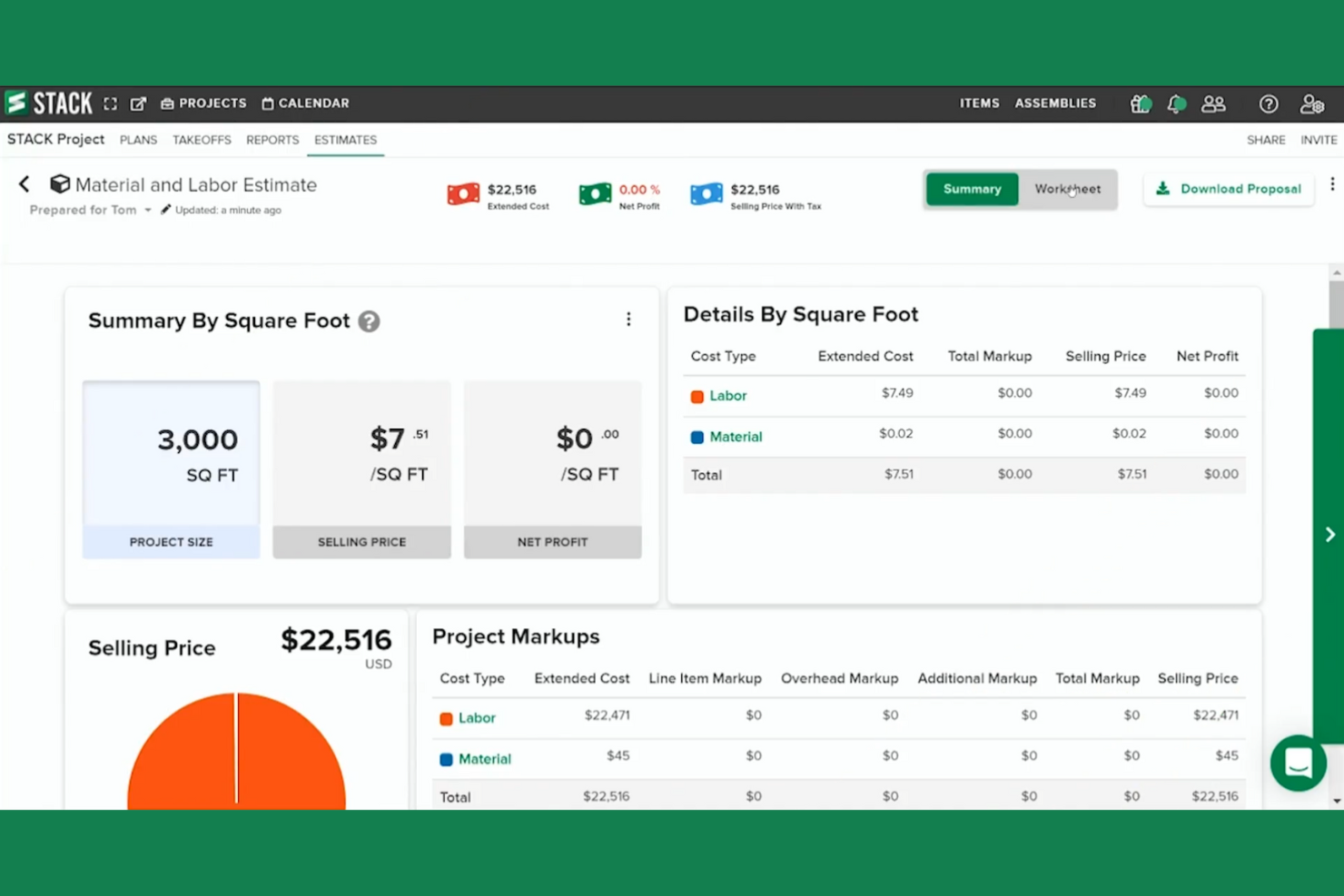
STACK is a cloud-based HVAC estimating and takeoff software designed for contractors looking to speed up their bidding process. It helps contractors perform quick takeoffs and create detailed estimates to increase project profitability.
Why I picked STACK: Its cloud-based nature ensures that your team stays aligned. The platform's open architecture can integrate with other systems, making it highly adaptable.
Standout Features and Integrations:
Features include cloud-based quantity and material takeoff, allowing you to manage takeoffs and keep everyone on the same page. It also offers detailed cost estimates and proposals, letting you adjust costs and create customized branded proposals. Real-time collaboration features ensure your team stays connected with markup, callout, and sharing options.
Integrations include Procore, QuickBooks, Velixo, Sage Intacct, and more.
Pros and Cons
Pros:
- Open architecture for integrations
- Cloud-based collaboration features
- Detailed cost adjustments
Cons:
- Large blueprint uploads take time
- Complex initial setup

Best for all-in-one HVAC management
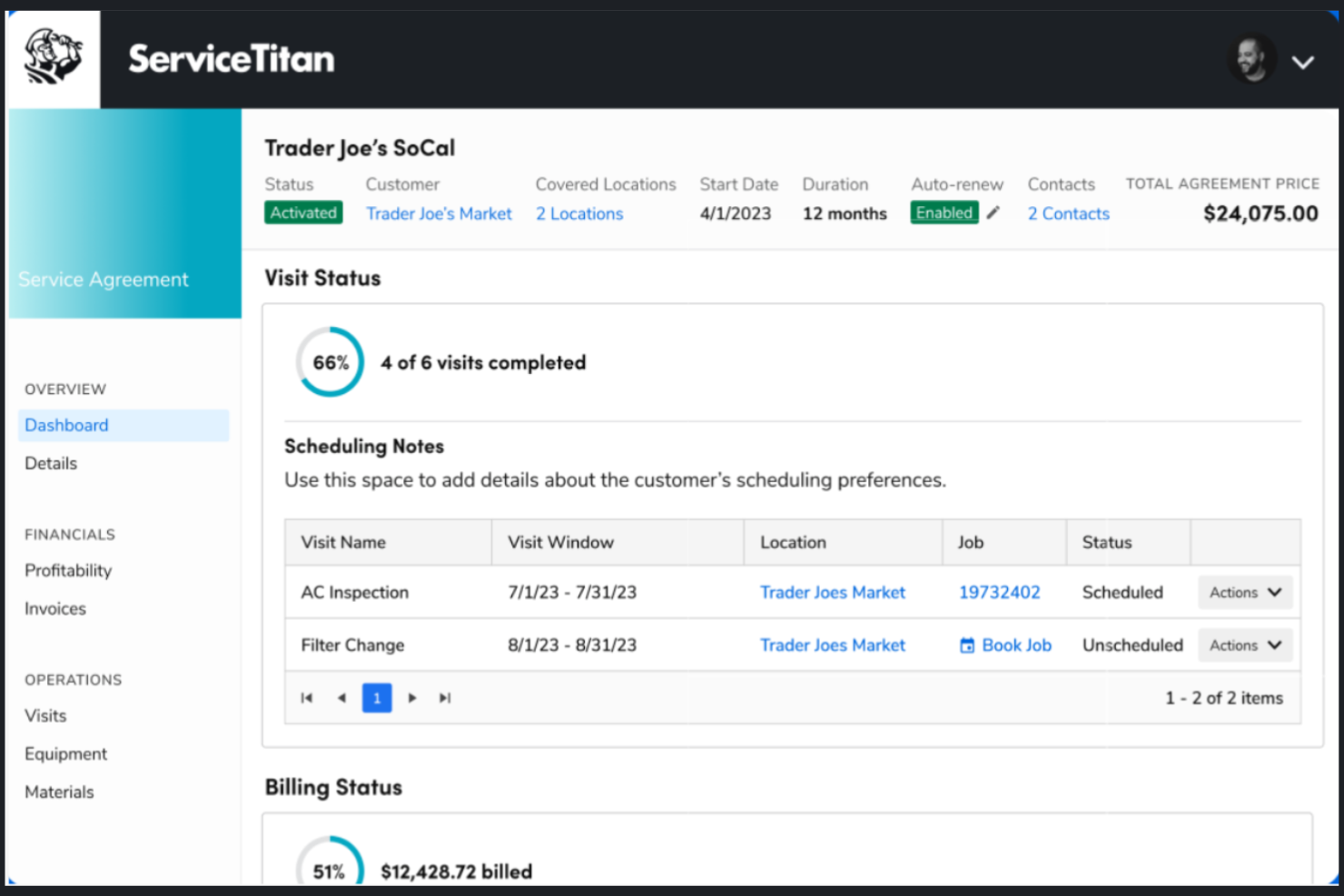
ServiceTitan is a cloud-based residential and commercial HVAC estimating software tailored for contractors, particularly in the HVAC, plumbing, and electrical sectors. It focuses on project management, customer relationship management, and accurate job pricing.
Why I picked ServiceTitan: It's ideal for contractors who want a complete HVAC business management solution. You can create polished digital proposals, automate pricing updates, and produce accurate bids for your HVAC jobs. It also integrates scheduling, dispatching, and invoicing, making it a unified tool for contractors. This versatile software can manage residential and commercial projects.
Standout Features and Integrations:
Features include accurate labor and material cost calculations, digital proposal creation, and mobile app access for technicians. A digital pricebook lets you manage material costs efficiently. It also tracks technician performance with scorecards to monitor service quality.
Integrations include Sage Intacct, BlueVine, MindCloud, and more.
Pros and Cons
Pros:
- Automates pricing updates
- Offers mobile app templates
- Provides project management tools
Cons:
- Limited offline access
- Custom pricing may vary

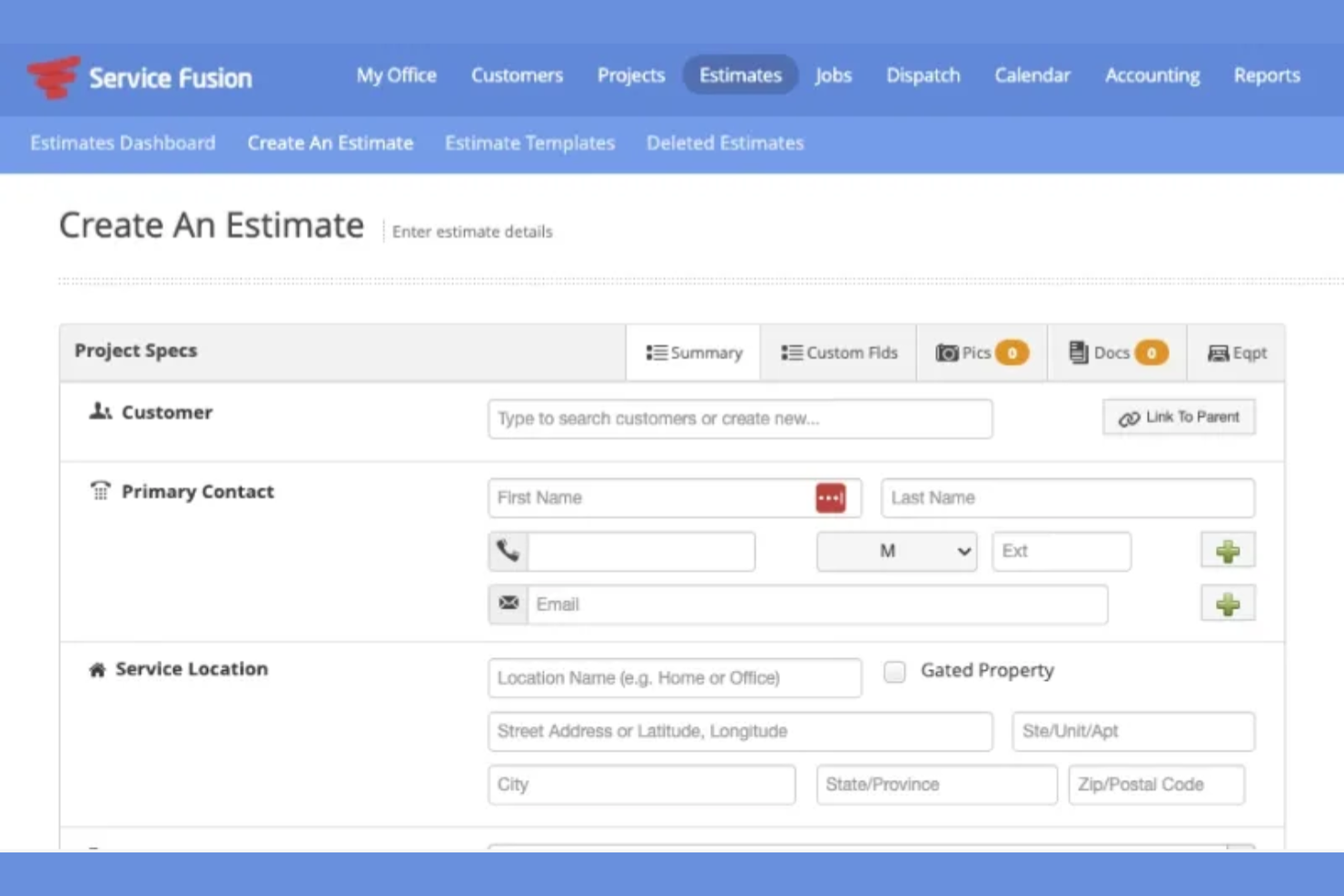
Service Fusion is a field service management platform that helps teams manage jobs from initial quote through payment. It brings estimating, scheduling, and billing into one system so work stays connected as it moves forward. The software is built to support day-to-day operations for service-based teams.
Why I picked Service Fusion: Service Fusion lets you create estimates that tie directly into job scheduling and invoicing, so nothing gets disconnected as work progresses. Once an estimate is approved, you can turn it into a job and dispatch your team without reentering details. Your technicians can see all the required job information in the field. When the job’s done, invoices are created from the same data used in the estimate. This flow helps your team stay organized from the first quote to the final payment.
Standout Features and Integrations:
Features include estimate creation that converts into jobs, built-in dispatch tools for assigning work, and invoicing tied to completed services. You can track job status as it moves from quote to scheduled work. Your team can also manage customer records and service history in one place.
Integrations include QuickBooks, PaySimple, and more.
Pros and Cons
Pros:
- Supports end-to-end job tracking
- Supports communication between office and field teams
- Clear workflow from estimate to invoice
Cons:
- Custom workflows are limited
- Limited options for complex estimates

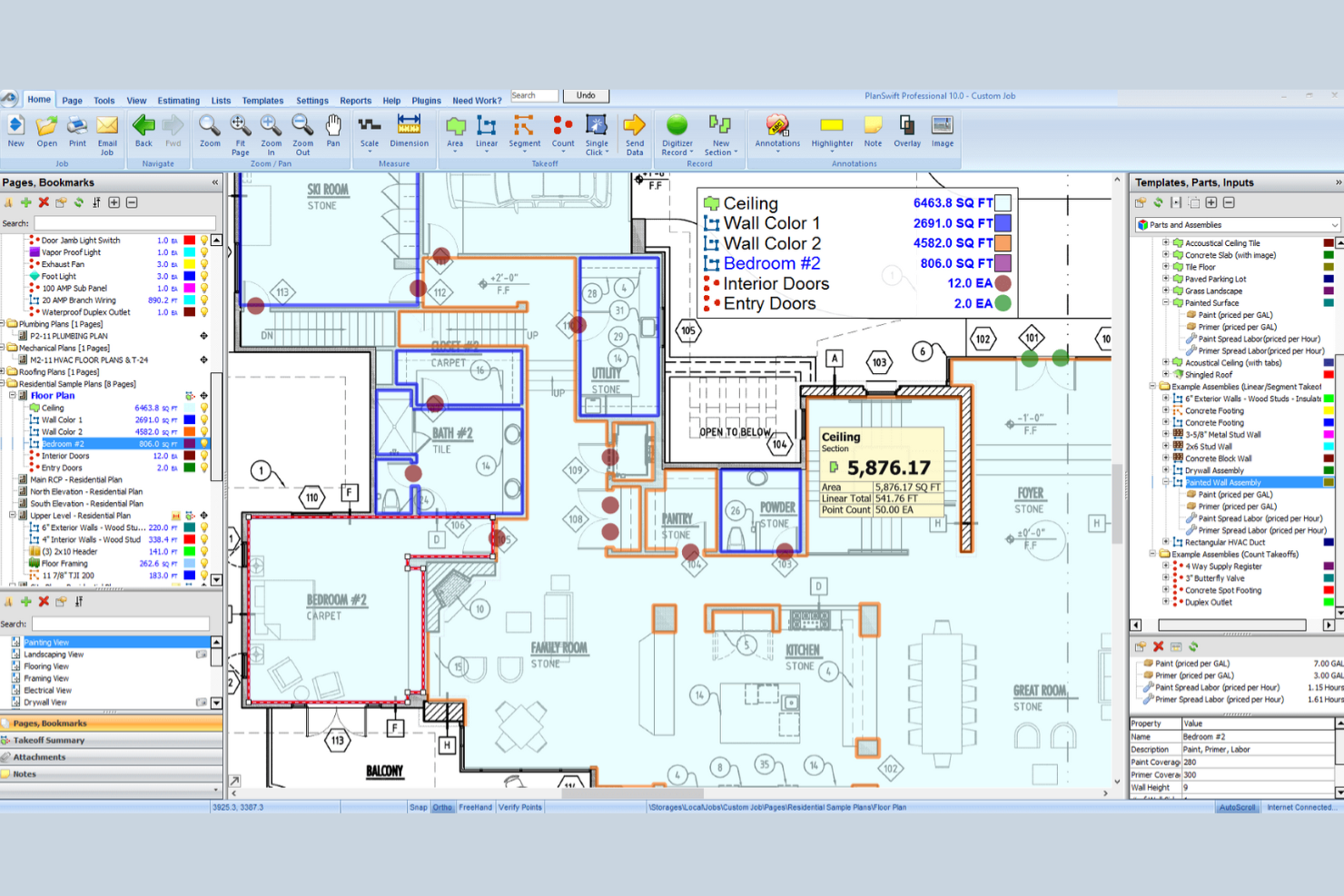
PlanSwift is HVAC estimating software designed for contractors to improve their estimating process. It provides takeoffs and detailed material lists that help calculate costs and volumes for HVAC systems efficiently.
Why I picked PlanSwift: It excels in providing precise HVAC takeoffs, offering features such as digital plan tracing and customizable bills of materials. This software also supports accurate heating and cooling estimates, perfect for complex layouts.
Standout Features and Integrations:
Features include takeoffs, material lists, and the ability to trace room layouts. You can quickly estimate ductwork and integrate additional components such as dampers and insulation. It also has a point-and-click tool that counts items such as pumps and controls, directly adding them to your material list for precise calculations.
Integrations include Microsoft Excel, Sage, and more.
Pros and Cons
Pros:
- Point-and-click counting tool
- Customizable material lists
- Takeoff process
Cons:
- No built-in CRM features
- Requires digital plan uploads

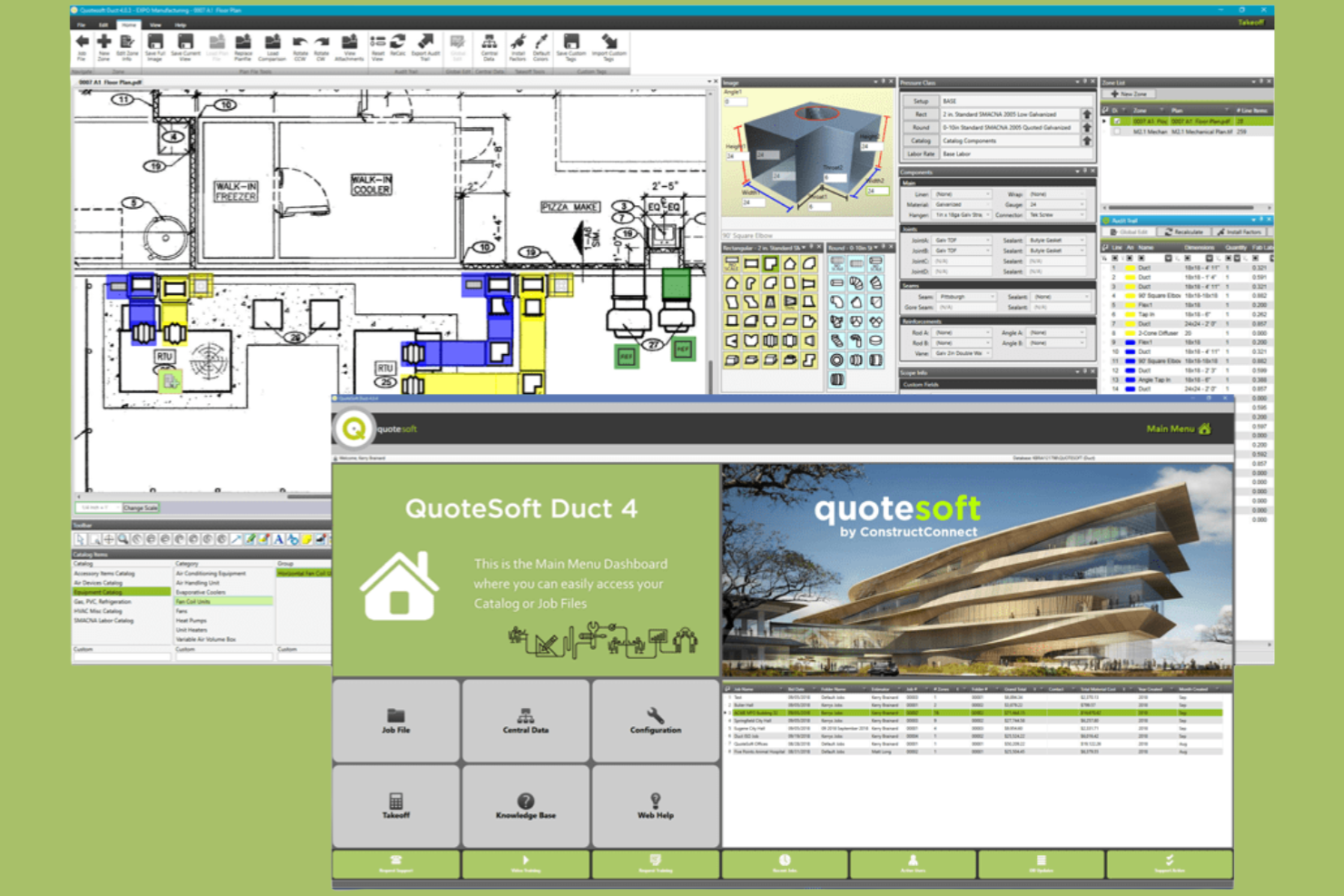
QuoteSoft is an estimating and takeoff product built for mechanical and sheet metal work. It supports bid preparation workflows from takeoff through finalized estimates.
Why I picked QuoteSoft: You get very detailed control over labor and fitting logic, which matters when your work involves complex sheet metal assemblies. You apply labor rates, fitting allowances, and fabrication rules directly to your takeoff items. You can break work down by fittings, joints, and connections instead of relying on broad assemblies, reducing guesswork when bids depend on precise fabrication assumptions.
Standout Features and Integrations:
Features include built-in labor calculation tables that apply hours automatically as you measure, customizable databases for materials and fittings, and on-screen takeoff tools tied directly to estimating logic. You can adjust labor assumptions without redoing the takeoff. Your team can also reuse saved assemblies to keep estimates consistent across jobs.
Integrations are not publicly listed.
Pros and Cons
Pros:
- Handles complex duct layouts
- Strong control over fitting assumptions
- Detailed labor logic for fabrication work
Cons:
- Less flexible for quick ballpark bids
- Time-consuming setup before first bid

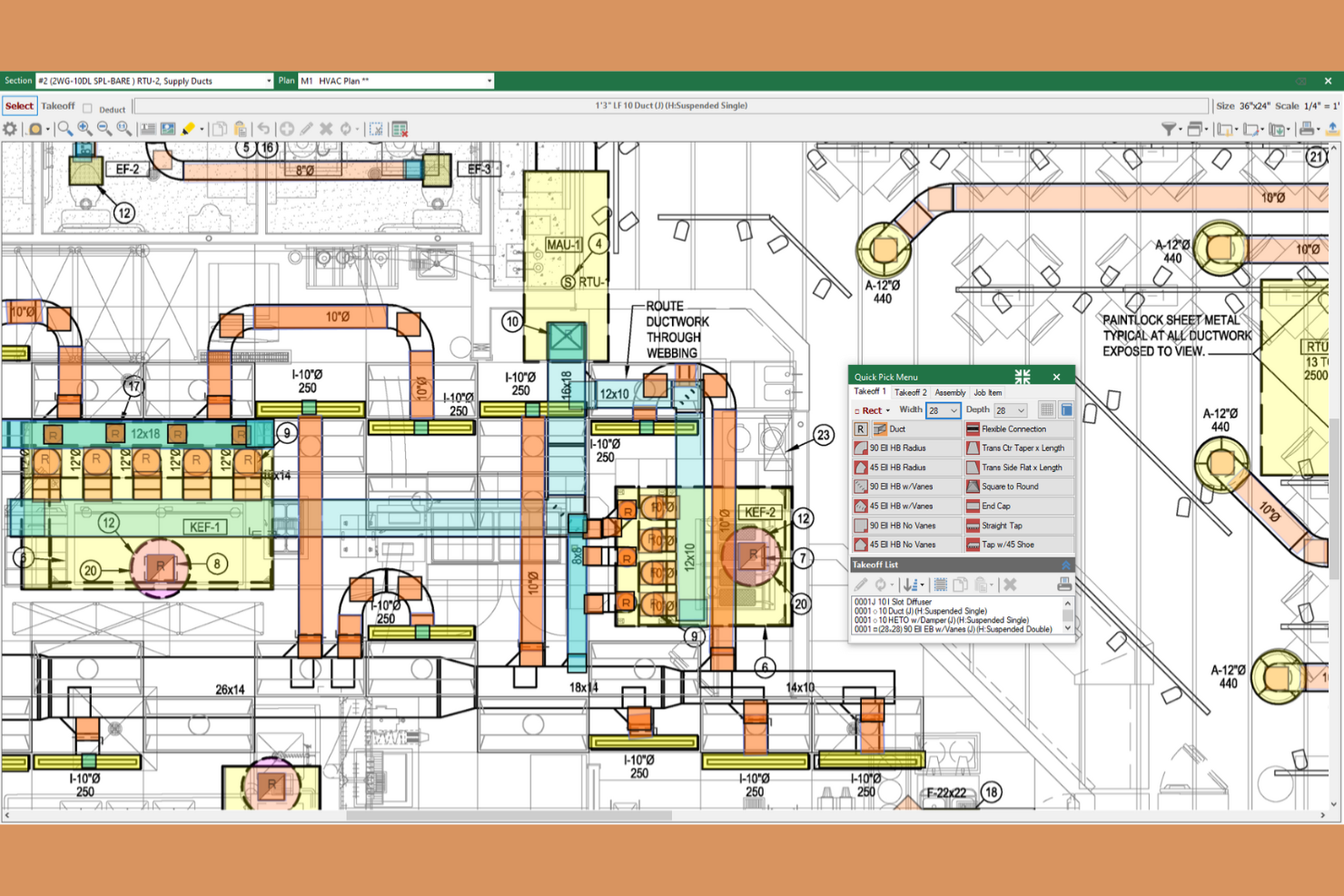
FastDUCT is an HVAC estimating software designed for commercial and industrial sheet metal contractors. It specializes in providing fast and accurate cost estimations for ductwork and HVAC systems.
Why I picked FastDUCT: It’s ideal for creating precise ductwork estimates for your HVAC business. You can customize specifications to match each job’s specific needs. Features such as job templates and easy conversion between duct pricing can increase productivity.
Standout Features and Integrations:
Features include an HVAC pricing catalog with over 250,000 items and an on-screen digitizer for digital plans. It supports various CAD formats and offers high-resolution graphics for detailed analysis. The software also allows for scalable assemblies and customizable cost codes for precise estimates.
Integrations include Microsoft Excel, FastPIPE, and more.
Pros and Cons
Pros:
- Supports multiple CAD formats
- On-screen digitizer
- Extensive pricing catalog
Cons:
- Limited non-Autodesk compatibility
- Limited to HVAC and ductwork

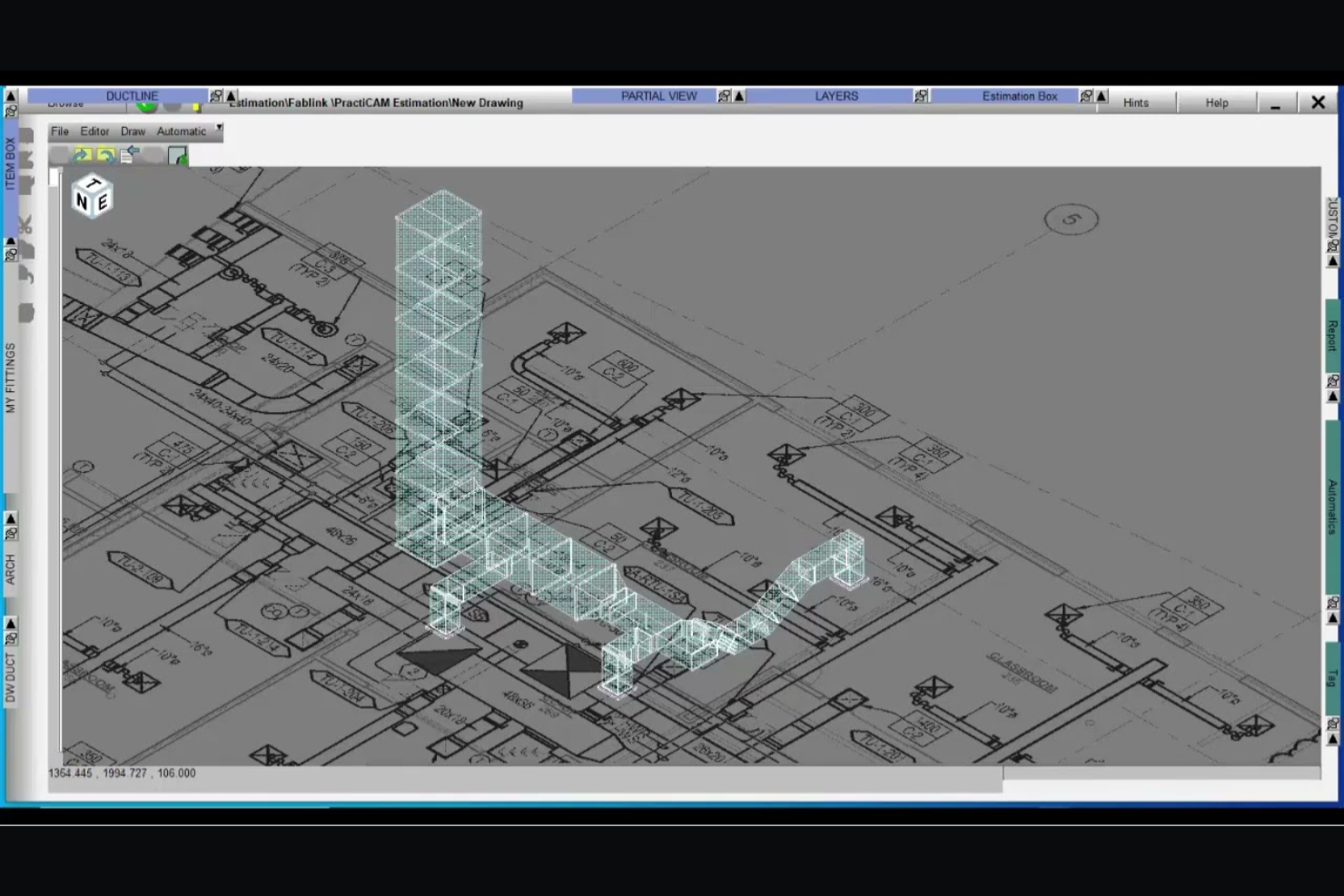
Fablink is an HVAC estimating software tailored for sheet metal and HVAC trades. It helps contractors simplify the estimating process with both standalone and integrated options on Windows and AutoCAD platforms.
Why I picked Fablink: It excels in integrated HVAC and sheet metal estimating. You can quickly convert estimates into 2D or 3D models before finalizing your plans. The software's centralized pricing database ensures quick updates, making it easier to keep your estimates current.
Standout Features and Integrations:
Features include data sharing across systems, which keeps your team aligned. You can track materials and accessories efficiently to avoid discrepancies. The software also offers automatic markups and real-time estimates for accurate projections.
Integrations include AutoCAD, MetaLab, and more.
Pros and Cons
Pros:
- Real-time estimating capabilities
- Centralized pricing database
- Converts estimates to 3D models
Cons:
- Dependent on FabLink ecosystem
- Limited to Windows and AutoCAD

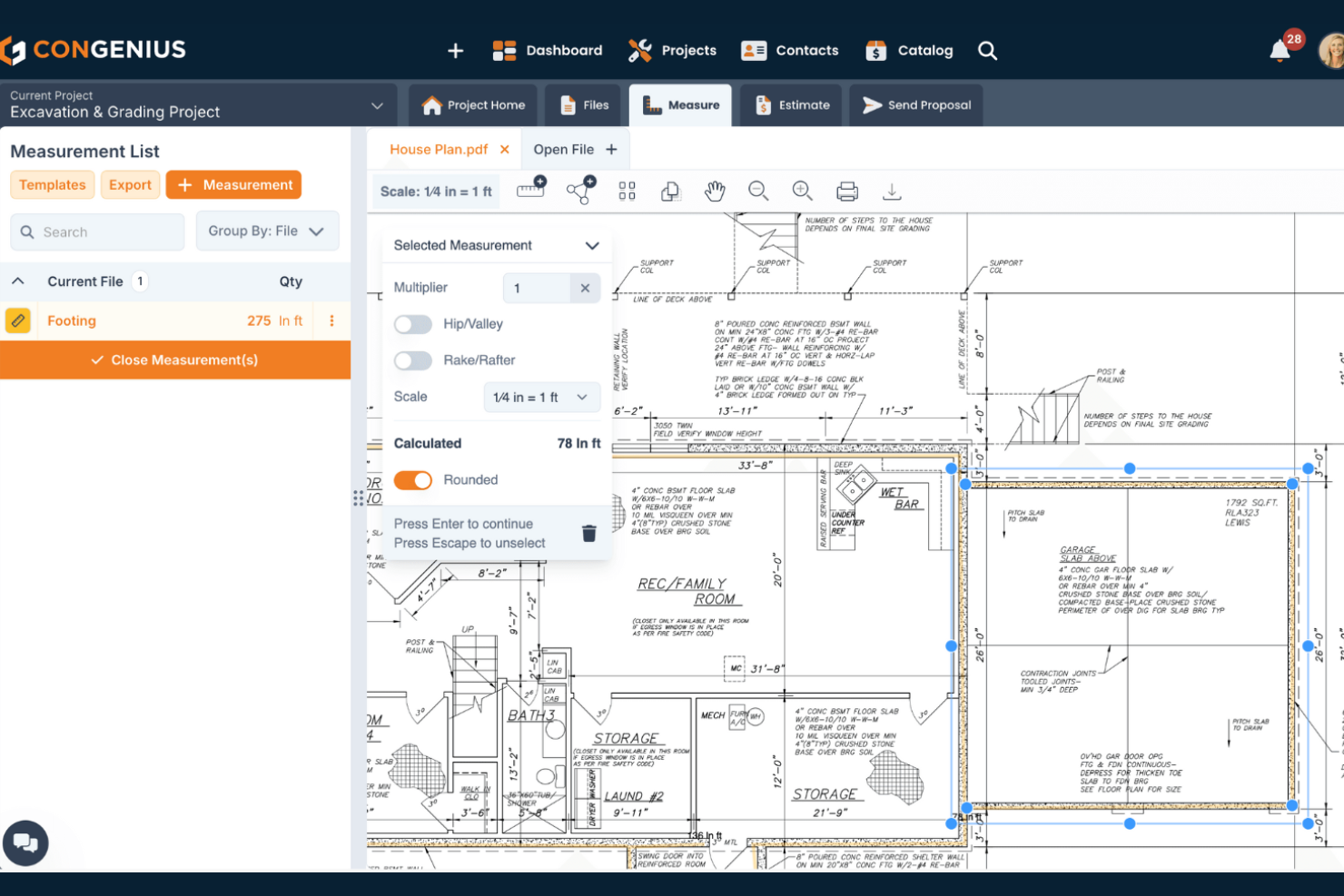
ConGenius is a cloud-based platform that helps contractors build job estimates and project proposals with fewer manual steps. The tool supports sales and estimating functions together, so your team can keep job pricing and proposals in one place.
Why I picked ConGenius: It lets you organize cost items, assemble commonly used work units, and measure from digital plans, so you don’t have to juggle multiple spreadsheets or documents. You can build and reuse catalogs of items and assemblies to spend less time creating estimates for jobs. You can also create and customize proposals that include electronic signature options, helping you boost your win rates.
Standout Features and Integrations:
Features include digital measurement tools that let you count quantities from plans, access to preloaded cost data and item catalogs, and customizable estimate and proposal generation that links your takeoffs to pricing. You also get file management and CRM-like contact organization that keeps your jobs and customer info in one place.
Integrations are not publicly listed.
Pros and Cons
Pros:
- Organizes contacts and job details
- Electronic signature capabilities
- Can measure takeoffs from digital plans
Cons:
- Missing advanced project management features
- Lacks a built-in pdf text search tool

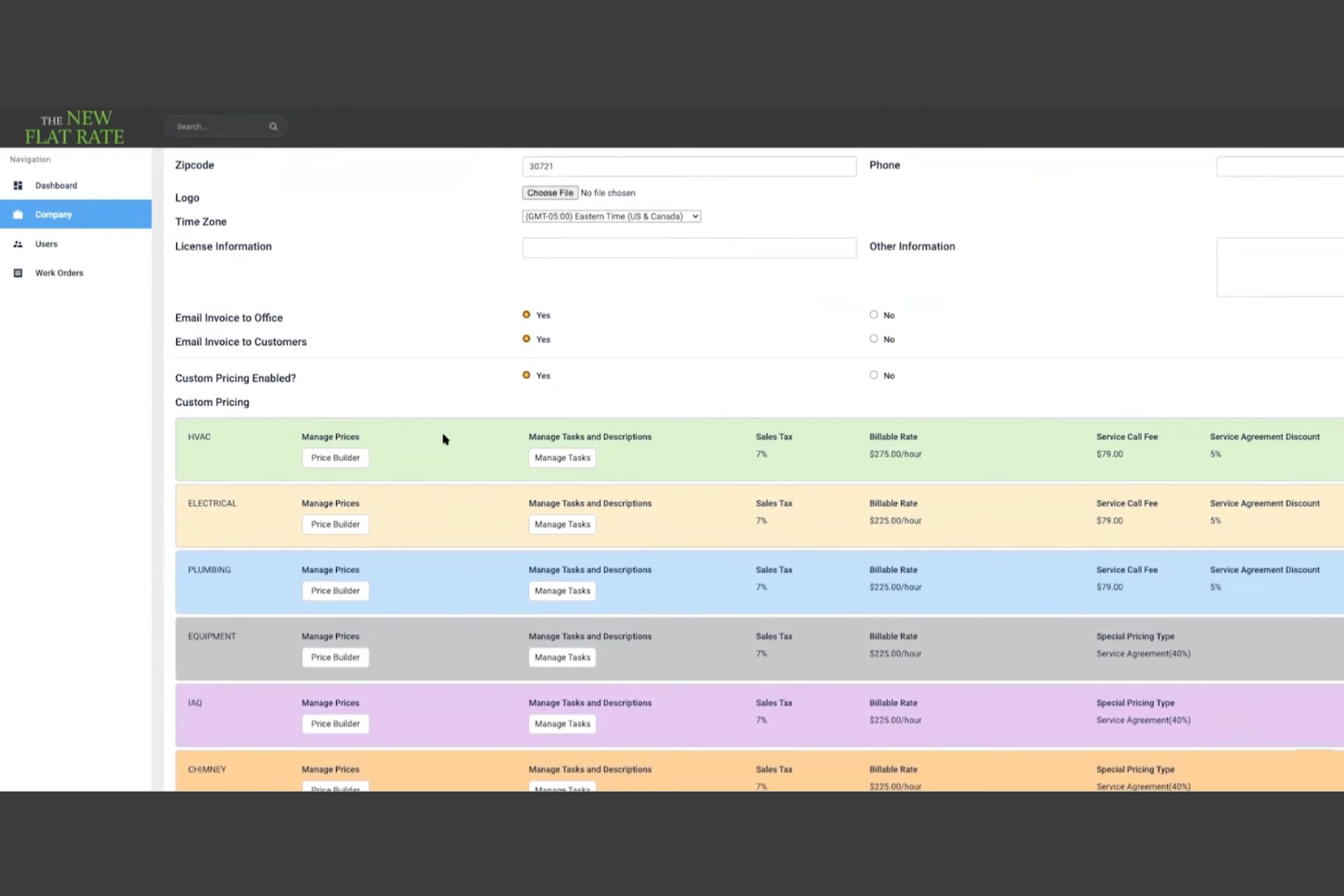
The New Flat Rate is a flat rate pricing platform built to help service teams present consistent prices while they’re in the field. It centers on digital pricebooks that technicians can access during jobs to build and present options quickly.
Why I picked The New Flat Rate: The New Flat Rate gives you a ready-to-use flat rate pricebook that technicians can rely on during service calls. You can present clear pricing options to customers instead of calculating costs after the visit. This keeps prices consistent across jobs and reduces pricing disputes. Real-time pricing updates ensure your technicians aren’t working from outdated numbers. This setup helps you focus on closing work while you’re still on site.
Standout Features and Integrations:
Features include digital flat rate pricebooks your team can access on mobile devices, built-in price presentation tools for service calls, and editable tasks and descriptions to match how you work. You can organize services so technicians find the right option quickly during a visit.
Integrations include ServiceTitan, Housecall Pro, iWallet, and more.
Pros and Cons
Pros:
- Supports standardized service menus
- Creates quotes during service visits
- Mobile app available
Cons:
- Requires regular pricebook upkeep
- Less flexible for custom jobs
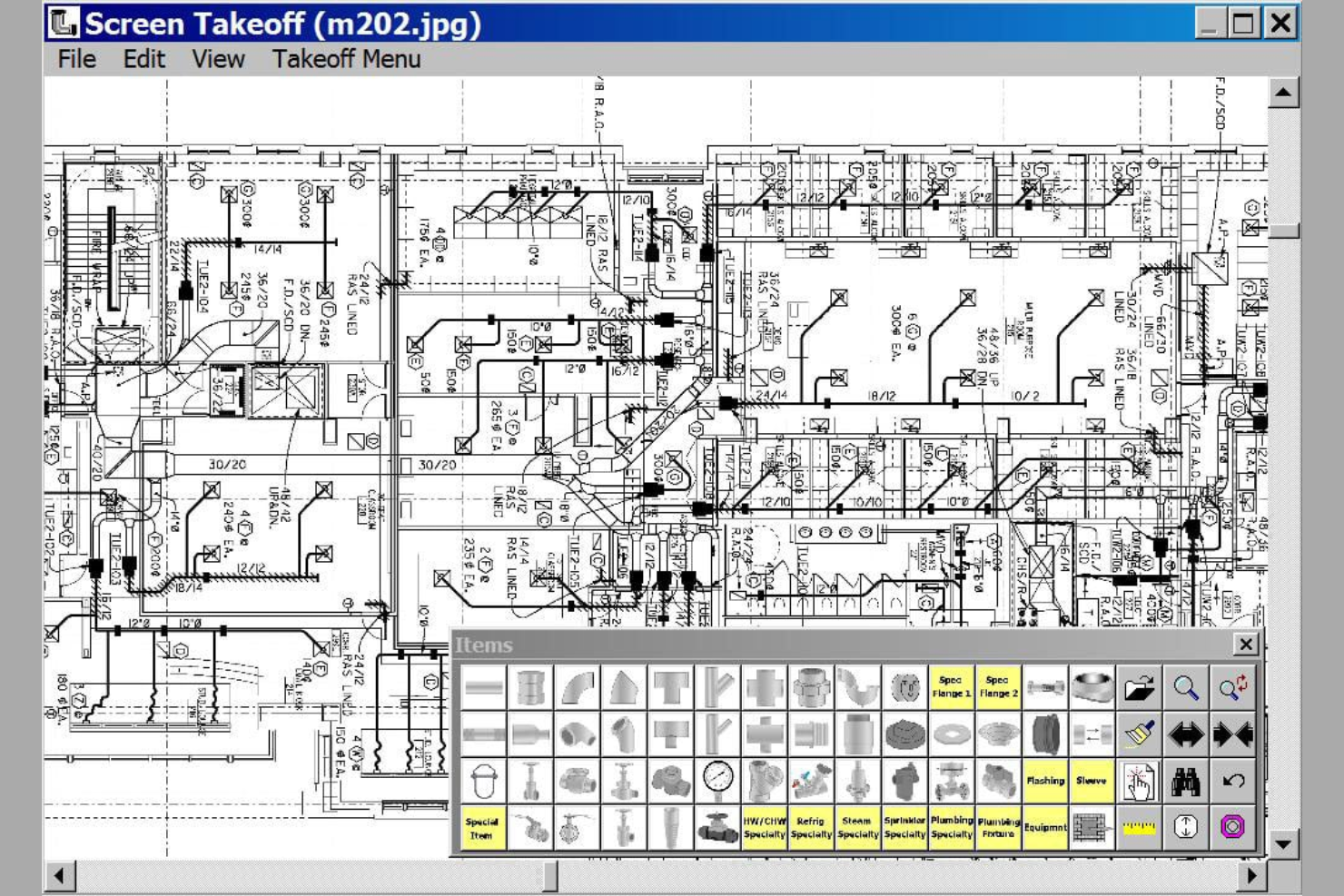
Wendes is a construction management and accounting platform designed to connect estimating with financial and project data. The system supports end-to-end project tracking from bid through completion.
Why I picked Wendes: Wendes combines job costing, accounting, and project controls, so estimates stay tied to actual costs as work progresses. You can build estimates that flow into budgets and cost tracking without reentering data. As jobs move forward, your team can compare estimated costs to actuals in the same system to help you spot gaps early instead of waiting until closeout. You can keep labor, materials, and overhead aligned from bid through billing, fitting teams that want stronger cost control across projects.
Standout Features and Integrations:
Features include job estimate data that ties directly into job cost structures, real-time cost tracking against original estimates, and financial reporting that reflects project performance. Your team can also review cost history to improve future estimates.
Integrations not publicly listed.
Pros and Cons
Pros:
- Multi-job accounting
- Supports long-term project tracking
- Links estimates and costs
Cons:
- Not ideal for quick quotes
- Requires accounting knowledge
Other HVAC Estimating Software
Here are some additional HVAC estimating software options that didn’t make it onto my shortlist, but are still worth checking out:
- SAMPro Enterprise
For enterprise-level job costing
- Beam AI
For AI-assisted takeoffs
- Housecall Pro
For estimates converted into invoices
- FieldEdge
For flat rate and pricebook-based estimates
- Procore
For estimating on large construction projects
- Zoho FSM
For estimating within a service workflow
- Jobber
For simple estimates tied to job management


How I Evaluate HVAC Estimating Software
I split my evaluation into two layers: the baseline a tool must have—like duct takeoff and labor costing—and the differentiators that separate the best from the rest for mechanical contractors.
Core Functionality (Table Stakes For This List)
When I'm selecting tools for my list, I rank each one on a scale from 0 (does not offer the functionality) to 5 (excels in this area) for each core functionality listed below. Then, I calculate the tool's total score into a percentage. Each tool needs to achieve a minimum total score of 55% to be considered for inclusion.
- HVAC Takeoff Tools: I check whether the tool handles digital measurement of ductwork, piping, and fittings from plan sets rather than relying on generic shape-based takeoff alone.
- HVAC Cost Databases: Pre-loaded material and equipment pricing matters, so I look for libraries with HVAC-specific items like AHUs, VAV boxes, and diffusers that teams can update.
- Assembly-Based Estimating: Reusable assemblies save hours on repeat bids. I evaluate whether you can build grouped components like a rooftop unit with curb, duct tie-in, and controls.
- Labor Hour Calculations: Each tool should apply HVAC-specific productivity rates for tasks like spiral duct installation or copper brazing rather than flat hourly multipliers.
- Bid & Proposal Generation: I look at how each tool formats final deliverables, from itemized breakdowns by system or floor to professional proposals ready for a GC's bid day.
- Project Management Handoff: Estimating data shouldn't dead-end at contract award. I evaluate how each tool moves bid data into PM, accounting, or fabrication workflows.
Once I have a list of tools that meet the criteria, I consider what sets each platform apart.
Differentiating Factors (What Sets Vendors Apart)
Here's how I compare and contrast different vendors:
Standout Features
Fabrication integration is a major differentiator. I look for tools that push takeoff data directly into shop production systems so your estimating work carries straight to the fab floor. Cloud collaboration also matters, especially when multiple estimators need to split up a large commercial bid simultaneously. I evaluate bid analytics too, where tools track win/loss history and margin trends to help you sharpen pricing on future projects.
Beyond Features
I evaluate how well each tool fits different business sizes. A two-person residential shop has very different needs than a 50-estimator commercial mechanical firm. The integrations ecosystem also weighs heavily—I check whether the tool connects to construction accounting platforms like Sage 300 CRE or Viewpoint and PM tools like Procore. Industry specialization matters too. Vendors with deep HVAC focus tend to offer better manufacturer catalogs, trade-specific support staff, and faster onboarding for mechanical estimators.
How To Choose HVAC Estimating Software
It’s easy to get bogged down in long feature lists and complex pricing structures. To help you stay focused as you work through your unique software selection process, here’s a checklist of factors to keep in mind:
| Factor | What To Consider |
|---|---|
| Scalability | Can the software grow with your business? Consider if it can handle more projects or users without a hitch. Look for solutions that offer tiered pricing. |
| Integrations | Does it connect with your existing tools? Check for compatibility with the accounting software or project management systems you already use. |
| Customizability | Can you tailor it to fit your processes? Look for options to adjust templates, reports, and workflows to match your needs. |
| Ease of Use | Is it easy for your team to learn? Evaluate the user interface and check for training resources that can speed up the adoption process. |
| Implementation and Onboarding | How quickly can you get started? Consider the time and resources needed to integrate the software into your current setup. |
| Cost | Does it fit your budget? Compare the pricing with its features and determine if it's a good value. Look for hidden fees or long-term contracts. |
| Security Safeguards | Does it protect your data? Ensure it complies with industry standards for data protection and offers secure user access controls. |
| Support Availability | Can you get help when you need it? Check if the vendor offers 24/7 support, live chat, or a detailed knowledge base for troubleshooting. |
What Is HVAC Estimating Software?
HVAC estimating software is a tool that helps contractors and technicians calculate costs for heating, ventilation, and air conditioning projects. These tools are typically used by HVAC professionals, including project managers and estimators, to improve accuracy and efficiency in preparing bids and proposals. Cost estimation, project management, and integration capabilities help with organizing data, managing resources, and simplifying workflow. Overall, these tools save time and reduce errors, making project planning and execution smoother.
Features
When selecting HVAC estimating software, keep an eye out for the following key features:
- Cost estimation: Helps calculate project costs accurately, saving time and reducing errors.
- Project management: Organizes tasks and schedules to ensure projects run smoothly and on time.
- Integration capabilities: Connect with other tools, such as accounting software, for a smooth workflow.
- Mobile access: Allows field teams to input data and access information on the go.
- Customizable templates: Let users tailor reports and estimates to match their business needs.
- Real-time collaboration: Enables team members to work together and share updates instantly.
- Data analytics: Provide insights into project performance and help with decision-making.
- Security safeguards: Protect sensitive data with strong access controls and compliance measures.
Benefits
Implementing HVAC estimating software provides several benefits for your team and your business. Here are a few you can look forward to:
- Time savings: Automated calculations and processes free up time for other tasks.
- Accuracy: Reduced errors in estimates lead to more reliable project bids.
- Improved collaboration: Real-time communication among team members keeps everyone on the same page.
- Better decision-making: Detailed data analytics help you make informed choices about projects and resources.
- Cost control: Tracking expenses and budgets helps to prevent overspending.
- Scalability: The software adapts to growing business needs, allowing for expansion and increased project load.
Costs and Pricing
Selecting HVAC estimating software requires an understanding of the various pricing models and plans available. Costs vary based on features, team size, add-ons, and more. The table below summarizes common plans, their average prices, and typical features included in HVAC estimating software solutions:
Plan Comparison Table for HVAC Estimating Software
| Plan Type | Average Price | Common Features |
|---|---|---|
| Free Plan | $0 | Basic estimating tools, limited support, and community access. |
| Personal Plan | $20-$55/user/month | Advanced estimating features, mobile access, and email support. |
| Business Plan | $65-$100/user/month | Team collaboration tools, integration options, and priority support. |
| Enterprise Plan | $150-$3000+/user/month | Customizable solutions, dedicated account management, and advanced analytics. |
HVAC Estimating Software FAQs
Here are some answers to common questions about HVAC estimating software:
What is the difference between HVAC estimating software and general estimating software?
HVAC estimating software is specifically designed for the HVAC industry, focusing on heating, ventilation, and air conditioning projects. It provides features such as ductwork estimation and load calculations that general estimating software might not offer. This specialization helps HVAC professionals simplify their estimating processes and improve accuracy. If you’re in the HVAC field, using industry-specific software can save you time and reduce errors compared to using a generic tool.
How does HVAC estimating software simplify project workflows?
HVAC estimating software automates manual calculations, organizes bids, and helps you track revisions in one place. This saves time, reduces errors, and makes it easier to update estimates as project specs change. By digitizing your workflow, you can respond faster to clients, keep track of HVAC equipment, and boost your team’s efficiency.
Can HVAC estimating software integrate with other business tools?
Yes, most HVAC estimating software can integrate with other business tools such as accounting software, CRM systems, and project management platforms. Before purchasing, check if the software supports the specific integrations you need to ensure it fits well with your existing tools.
How accurate are estimates generated by HVAC estimating software?
Estimates from HVAC software are highly accurate if you use updated pricing databases and input precise project specs. Many tools link with live materials costs, which minimizes surprises during procurement. Regularly update your cost data for the best results.
How secure is HVAC estimating software?
Most HVAC estimating software solutions prioritize security and offer features such as data encryption, secure user access, and regular backups. It’s essential to verify that the software complies with industry standards for data protection. You should also look for features such as two-factor authentication to add an extra layer of security for your team’s data.
Is training available for new users of HVAC estimating software?
Yes, many providers offer training resources such as video tutorials, webinars, and user guides to help new users get started. Some may also offer personalized onboarding sessions. Taking advantage of these resources can help your team learn the software more quickly, ensuring a smoother transition and better adoption across your organization.