
13 Best Gravity Forms Alternatives for 2026

Best Gravity Forms Alternatives Shortlist
Here’s my shortlist of Gravity Forms alternatives:


A strong Gravity Forms alternative offers flexible form building, reliable WordPress integration, and features that match or exceed what Gravity Forms provides. If you’re searching for a different WordPress form plugin, you’re likely dealing with limitations around pricing, customization, or specific features that don’t quite fit your workflow.
This list will help you compare the top Gravity Forms alternatives for 2026, so you can find a tool that aligns with your project requirements, supports your team’s processes, and keeps your forms running smoothly as your needs evolve.
What is Gravity Forms?
Gravity Forms is a WordPress plugin that lets you create custom forms for your website using a visual, drag-and-drop editor. It supports a wide range of form types, including contact forms, surveys, and payment forms.
Project managers and site admins use Gravity Forms to collect data, automate workflows, and integrate with third-party tools directly from their WordPress dashboard. Its flexibility and add-on library make it a popular choice for many teams.
Best Gravity Forms Alternatives Summary
This comparison chart summarizes pricing details for my top Gravity Forms alternative selections to help you find the best one for your budget and business needs.
| Tool | Best For | Trial Info | Price | ||
|---|---|---|---|---|---|
| 1 | Best with pre-built template selection | Free plan available | From $49.50/year (billed annually) | Website | |
| 2 | Best for conversational form experiences | Free plan available | From $99/year (billed annually) | Website | |
| 3 | Best for dynamic content support | Free plan available | From $49/year (billed annually) | Website | |
| 4 | Best for multi-column form layouts | Free plan available | From $49/year (billed annually) | Website | |
| 5 | Best for advanced calculation fields | Free plan available | From $39.50/year (billed annually) | Website | |
| 6 | Best with developer-friendly features | Free demo available | From $59/year (billed annually) | Website | |
| 7 | Best for multi-step form creation | Free plan available | Free to download (wordpress plugin) | Website | |
| 8 | Best with built-in marketing integrations | Free plan available | From $55/year (billed annually) | Website | |
| 9 | Best for drag-and-drop customization | Free plan available | From $59.40/year (billed annually) | Website | |
| 10 | Best for interactive quizzes and polls | Free plan available | From $36/year (billed annually) | Website |
Why You Can Trust Us
-

Accelo
Visit WebsiteThis is an aggregated rating for this tool including ratings from Crozdesk users and ratings from other sites.4.4 -
Forecast
Visit WebsiteThis is an aggregated rating for this tool including ratings from Crozdesk users and ratings from other sites.4.6 -
Wrike
Visit WebsiteThis is an aggregated rating for this tool including ratings from Crozdesk users and ratings from other sites.4.2





Best Gravity Forms Alternatives Reviews
Below are my detailed summaries of the Gravity Forms alternatives that made it onto my shortlist. My reviews offer a detailed look at the features, integrations, and best use cases of each tool to help you find the best one for you.


For teams that want to launch forms quickly, WPForms offers one of the largest libraries of pre-built templates among WordPress form plugins. It’s a strong fit for marketers, small businesses, and site owners who need to deploy contact forms, surveys, or payment forms with minimal setup. WPForms stands out from Gravity Forms by letting you start with a template for nearly any use case, so you can skip building forms from scratch.
Why WPForms Is a Good Gravity Forms Alternative
If you want to get forms live without starting from scratch, WPForms is worth a look. Its extensive template library covers everything from event registrations to payment forms, so you can launch new forms in minutes. I picked WPForms because you can browse, preview, and insert templates directly from the editor, making it easy to find a starting point for nearly any workflow. The template search and filtering features also help you quickly narrow down options that fit your specific use case.
WPForms Key Features
Some other features in WPForms make it a flexible choice for WordPress sites:
- Drag-and-Drop Builder: Build and rearrange form fields visually without any coding.
- Conditional Logic: Display or hide fields based on user responses to create dynamic forms.
- Form Entry Management: View, search, and manage all form submissions directly from the WordPress dashboard.
- Spam Protection: Use built-in tools like reCAPTCHA and custom CAPTCHA to reduce unwanted submissions.
WPForms Integrations
Integrations include PayPal, Stripe, Square, Authorize.Net, Mailchimp, HubSpot, Salesforce, ActiveCampaign, Brevo, and Google Sheets.
Pros and Cons
Pros:
- Great email marketing sync
- Fast and lightweight code
- Free lite version available
Cons:
- Basic entry management
- No lifetime license option


If you want to create forms that feel more like a conversation than a questionnaire, Tripetto is designed for that experience. This plugin is a strong fit for marketers, educators, and service providers who want to boost engagement and completion rates with interactive, logic-driven forms. Tripetto stands apart from Gravity Forms by offering visual flowcharts and chat-style interfaces that guide users step by step.
Why Tripetto Is a Good Gravity Forms Alternative
Unlike traditional form plugins, Tripetto lets you build conversational forms that feel more like guided interactions than static surveys. The visual flowchart builder makes it easy to design branching logic and personalized question paths. I appreciate how Tripetto offers multiple form faces, including chat, classic, and autoscroll, so you can match the experience to your audience. These features make Tripetto a strong Gravity Forms alternative for anyone focused on engagement and user experience.
Tripetto Key Features
Some other features in Tripetto help round out its offering for WordPress users:
- Customizable Form Themes: Choose from multiple design themes to match your site’s branding.
- Real-Time Response Saving: Automatically save user progress as they fill out forms.
- Advanced Calculations: Add calculation fields for quizzes, pricing, or scoring.
- Spam Protection: Use built-in anti-spam tools like reCAPTCHA and Akismet.
Tripetto Integrations
Native integrations are not currently listed.
Pros and Cons
Pros:
- No external data storage
- Unique face-to-face mode
- High completion rates
Cons:
- Fewer deep WP integrations
- Pricey for multiple sites

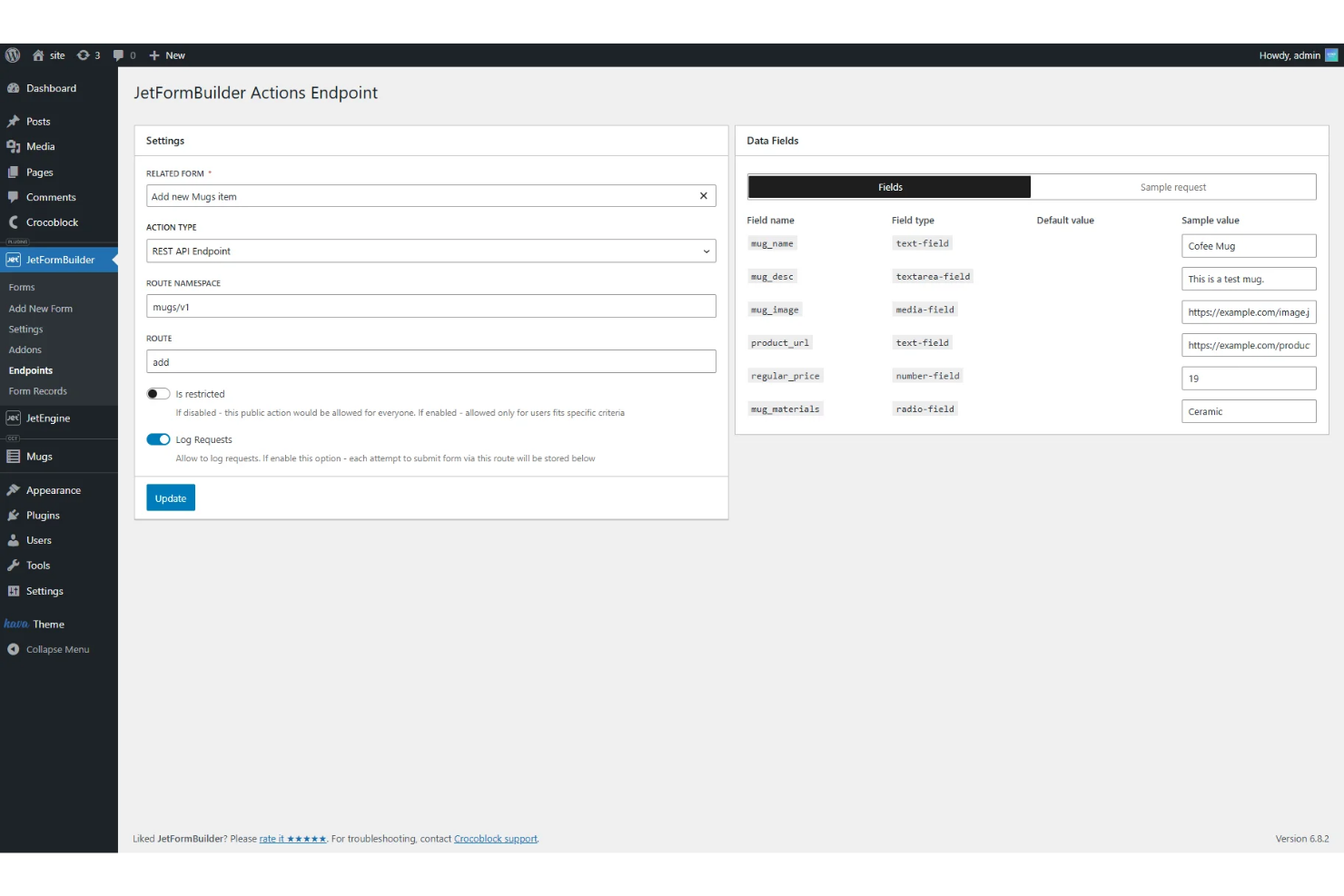
If you need forms that interact with dynamic content on your WordPress site, JetFormBuilder is built for that purpose. This plugin is a strong fit for agencies, content-driven businesses, and site builders who work with custom post types, user profiles, or listings. JetFormBuilder stands out from Gravity Forms by letting you create forms that display, update, or create dynamic content directly from the front end.
Why JetFormBuilder Is a Good Gravity Forms Alternative
JetFormBuilder is a strong choice if you need forms that work with dynamic content on your WordPress site. The plugin lets you create forms that can add, edit, or display custom post types and user data directly from the front end. I like that you can use conditional logic and dynamic field population to tailor forms to each user’s context. These features make JetFormBuilder a practical alternative to Gravity Forms for anyone building interactive, content-driven WordPress sites.
JetFormBuilder Key Features
Some other features in JetFormBuilder help round out its toolkit for WordPress site builders:
- Drag-and-Drop Form Builder: Build forms visually using a block-based editor inside WordPress.
- Calculated Fields: Add fields that perform real-time calculations based on user input.
- Email Notifications: Set up automated email alerts for form submissions.
- Anti-Spam Protection: Use built-in tools like reCAPTCHA to reduce spam entries.
JetFormBuilder Integrations
Integrations include MailPoet, ConvertKit, MailerLite, Moosend, HubSpot, PayPal, WooCommerce, and Stripe.
Pros and Cons
Pros:
- Works great with Gutenberg
- Great for complex directories
- Deep Crocoblock integration
Cons:
- Overkill for simple sites
- UI is highly technical

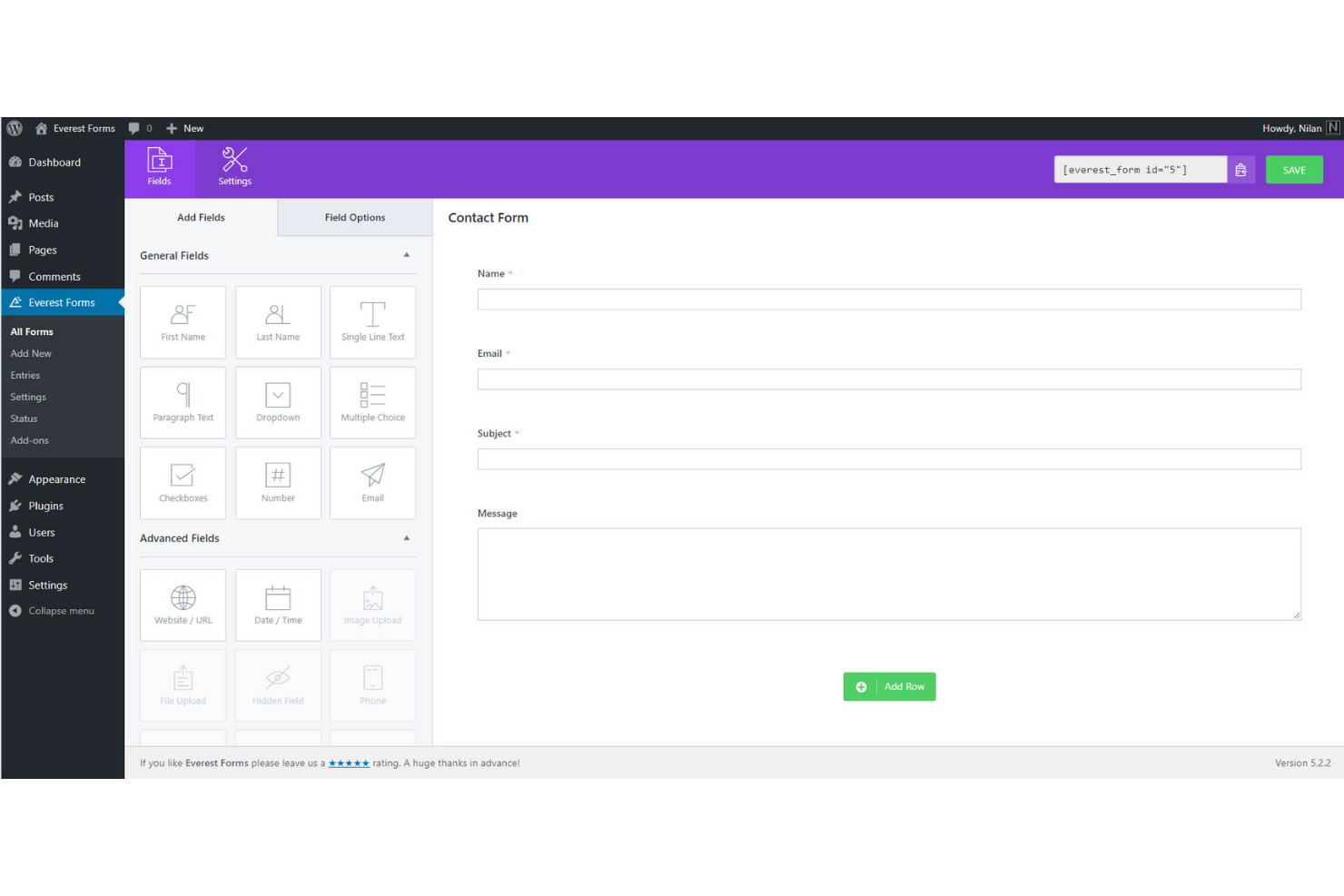
Designing complex, multi-column forms on WordPress is much easier with Everest Forms. This plugin is a strong choice for agencies, nonprofits, and businesses that need flexible layouts for registrations, applications, or surveys. Unlike Gravity Forms, Everest Forms lets you create advanced multi-column designs with a visual builder and pre-made templates, so you can match your site’s structure without custom code.
Why Everest Forms Is a Good Gravity Forms Alternative
If you need advanced multi-column layouts for your WordPress forms, Everest Forms is built for that use case. The drag-and-drop builder lets you add, resize, and rearrange columns visually, so you can create complex forms without touching code. I like that you can use pre-designed column templates to speed up the process, especially for multi-step forms or detailed applications. This focus on layout flexibility makes Everest Forms a strong alternative to Gravity Forms, which requires more manual setup for similar designs.
Everest Forms Key Features
Some other features in Everest Forms help round out its capabilities for WordPress users:
- Form Entry Management: View, filter, and export all form submissions from the WordPress dashboard.
- Spam Protection: Use Google reCAPTCHA and custom anti-spam tokens to reduce unwanted submissions.
- Email Notifications: Set up automated email alerts for both admins and users after form submissions.
- File Upload Field: Let users attach documents or images directly through your forms.
Everest Forms Integrations
Integrations include Mailchimp, ActiveCampaign, HubSpot, Salesforce, PayPal Standard, Stripe, Google Sheets, Slack, Trello, and WooCommerce.
Pros and Cons
Pros:
- Solid free version offered
- Clean and intuitive UI
- Easy drag-and-drop builder
Cons:
- Smaller template library
- Expensive top-tier plans


If you need to build forms that handle complex calculations, Formidable Forms is built for the job. It’s especially useful for agencies, educators, and businesses that want to create calculators, quote forms, or data-driven applications on WordPress. Unlike Gravity Forms, Formidable Forms gives you advanced calculation fields and formula options that let you build interactive forms for everything from mortgage calculators to order estimators.
Why Formidable Forms Is a Good Gravity Forms Alternative
For anyone who needs forms that go beyond simple data collection, Formidable Forms stands out with its advanced calculation capabilities. You can build forms that perform real-time calculations, use complex formulas, and even reference values from other fields or entries. I picked Formidable Forms because it lets you create interactive calculators for quotes, pricing, or custom applications directly within WordPress. The calculation field options are much more flexible than what you’ll find in Gravity Forms, making it a strong choice for data-driven workflows.
Formidable Forms Key Features
In addition to its advanced calculation fields, Formidable Forms offers several other powerful features to enhance your form-building experience:
- Drag-and-Drop Builder: Easily create and customize forms with a user-friendly drag-and-drop interface that requires no coding skills.
- Conditional Logic: Show or hide fields, sections, or entire pages based on user input to create dynamic and personalized forms.
- Multi-Page Forms: Break long forms into multiple pages to improve user experience and increase form completion rates.
- Form Templates: Access a variety of pre-built form templates to quickly start building common form types without starting from scratch.
Formidable Forms Integrations
Integrations include WooCommerce, Salesforce, ActiveCampaign, HubSpot, Mailchimp, Zapier, Twilio, Stripe, PayPal, and Authorize.Net.
Pros and Cons
Pros:
- Great for building web apps
- Built-in visual form styler
- Complex multi-page forms
Cons:
- High cost for advanced features
- Interface feels highly technical

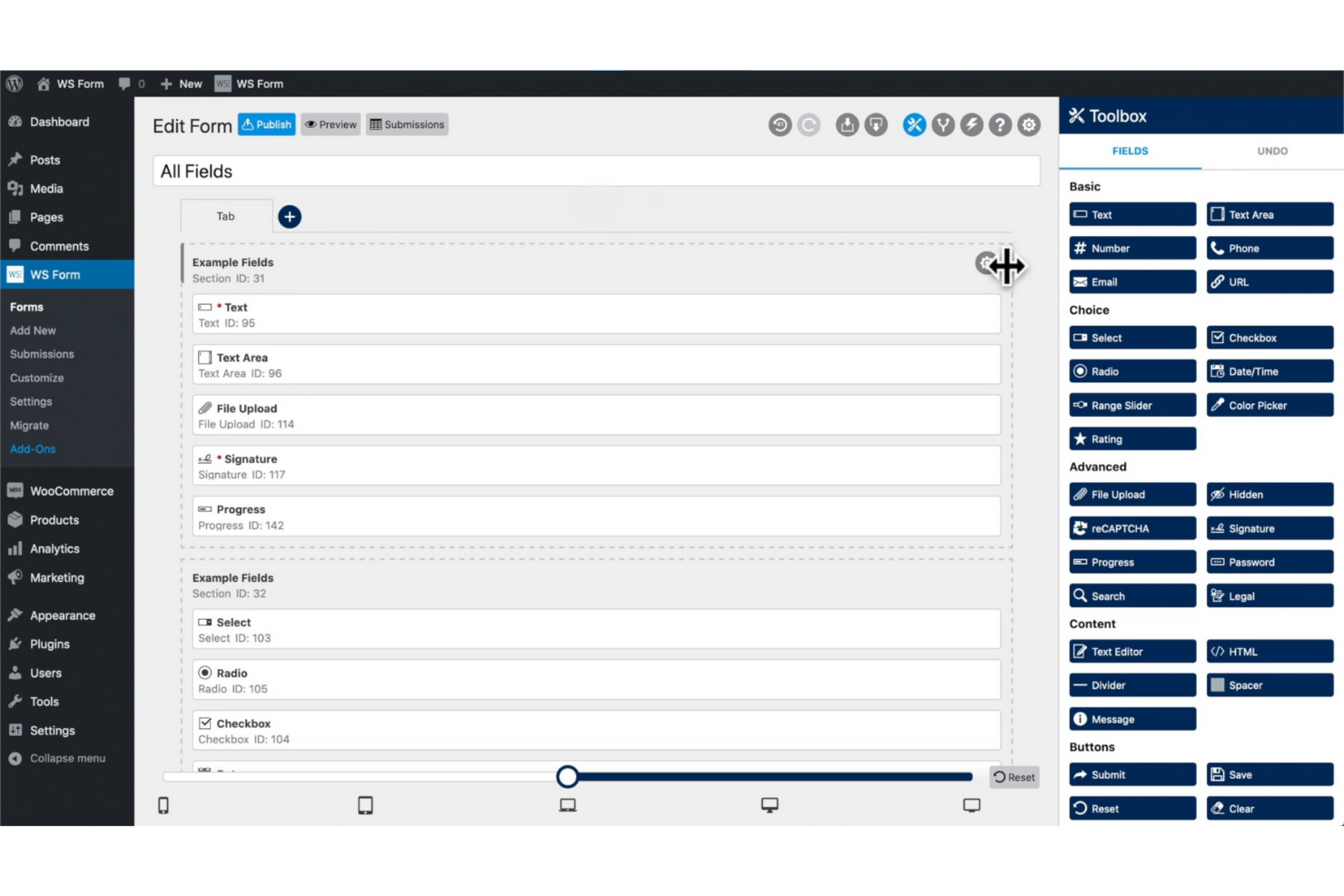
For teams that need advanced customization and developer control, WS Form offers a unique approach to WordPress forms. This plugin is built for agencies, freelancers, and technical users who want to use custom code, hooks, and debugging tools in their form workflows. Unlike Gravity Forms, WS Form includes a built-in developer console, full REST API support, and granular field controls for complex projects.
Why WS Form Is a Good Gravity Forms Alternative
For developers who want more control over their WordPress forms, WS Form stands out with its technical flexibility. The built-in developer console lets you debug forms in real time and test submissions without leaving the WordPress dashboard. I appreciate that WS Form offers full REST API support, so you can connect forms to custom workflows or external apps. These developer-focused features make it a strong alternative to Gravity Forms for teams that need advanced customization and hands-on control.
WS Form Key Features
Some other features in WS Form help expand its capabilities for technical users and agencies:
- Conditional Logic Builder: Create dynamic forms that show or hide fields based on user input.
- Multi-Page Forms: Break long forms into multiple pages with progress indicators.
- Accessibility Tools: Ensure forms meet WCAG and ADA accessibility standards.
- Built-In Calculations: Add calculated fields for quotes, order forms, or custom scoring.
WS Form Integrations
Integrations include Mailchimp, HubSpot, Salesforce, Google Sheets, Slack, Dropbox, PayPal, Stripe, WooCommerce, and Zendesk.
Pros and Cons
Pros:
- Excellent responsive design
- Deep ACF and Meta Box sync
- Dynamic data population
Cons:
- Smaller template selection
- Overkill for basic users

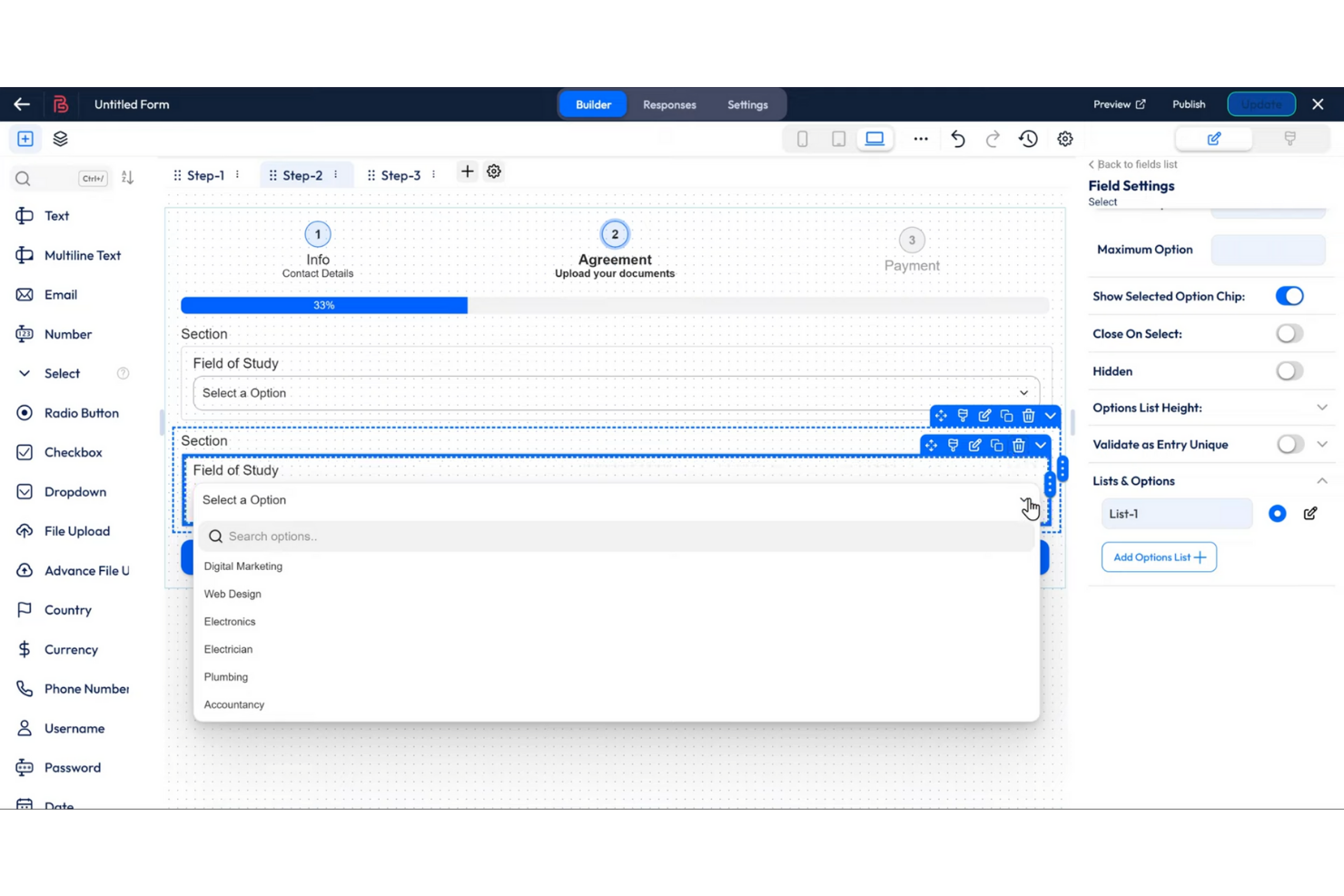
If your team needs to build complex, multi-step forms in WordPress, Bit Form is designed for that purpose. It’s especially useful for agencies, educators, and businesses that want to guide users through detailed workflows or surveys. Bit Form stands out from Gravity Forms by offering a visual multi-step form builder with flexible page logic and progress indicators built in.
Why Bit Form Is a Good Gravity Forms Alternative
For teams focused on building multi-step forms, Bit Form offers a dedicated visual builder that makes the process straightforward. You can add multiple pages, set up conditional logic between steps, and display progress bars to guide users through longer forms.
I picked Bit Form because it gives you granular control over each step, letting you customize the user journey for surveys, registrations, or onboarding flows. This approach is especially helpful if you need to collect detailed information in stages rather than all at once.
Bit Form Key Features
Some other features in Bit Form make it a versatile option for WordPress users:
- Drag-and-Drop Editor: Arrange and customize form fields visually without coding.
- Webhook Support: Send form data to external apps or services in real time.
- Built-In Anti-Spam Tools: Use honeypot and reCAPTCHA to reduce spam submissions.
- Custom Email Notifications: Set up automated emails triggered by form submissions.
Bit Form Integrations
Native integrations are not currently listed.
Pros and Cons
Pros:
- Drag-and-drop file uploads
- Conditional logic included
- Good built-in integrations
Cons:
- Can be slightly buggy
- Fewer third-party tutorials


If you’re looking for a WordPress form plugin with built-in marketing tools, Fluent Forms is worth a close look. It’s a strong fit for marketers, agencies, and small businesses that want to automate lead capture and connect forms directly to email and CRM platforms. Fluent Forms stands out from Gravity Forms by offering a wide range of native marketing integrations without needing extra add-ons.
Why Fluent Forms Is a Good Gravity Forms Alternative
Unlike many WordPress form plugins, Fluent Forms comes with a wide range of built-in marketing integrations right out of the box. You can connect forms directly to email marketing tools, CRMs, and automation platforms without relying on third-party add-ons. I picked Fluent Forms because it lets you automate lead capture and follow-up workflows from inside your WordPress dashboard. This makes it especially useful for marketers and small businesses who want to streamline their marketing processes without extra plugins.
Fluent Forms Key Features
Some other features in Fluent Forms make it a flexible choice for WordPress users:
- Drag-and-Drop Form Builder: Build and customize forms visually without writing code.
- Conditional Logic: Show or hide fields, sections, or entire pages based on user input.
- Multi-Step Forms: Break long forms into multiple pages to improve completion rates.
- Form Entry Management: View, filter, and export form submissions directly from the WordPress dashboard.
Fluent Forms Integrations
Integrations include Mailchimp, HubSpot, Salesforce, Google Sheets, Dropbox, Trello, Notion, Amazon S3, Authorize.net, and WPML.
Pros and Cons
Pros:
- Built-in PDF generation
- Conversational forms included
- Lifetime payment option
Cons:
- Advanced math is tricky
- Less 3rd-party dev support


If you want a WordPress form plugin with a true drag-and-drop experience, Ninja Forms stands out. It’s a strong fit for teams that need to build and customize forms quickly without touching code. Agencies and site owners who prioritize flexible layouts and easy field management often choose Ninja Forms over Gravity Forms for its intuitive editor and modular add-ons.
Why Ninja Forms Is a Good Gravity Forms Alternative
Ninja Forms is a strong choice if you want more control over form layouts and field placement. Its drag-and-drop editor lets you build complex forms visually, moving fields and sections exactly where you want them. I picked Ninja Forms for its ability to let users create multi-column layouts and reusable field groups without custom code. The plugin’s modular add-on system also means you can extend functionality as your needs grow, making it a flexible option for WordPress sites.
Ninja Forms Key Features
Some other features in Ninja Forms make it a versatile option for WordPress users:
- Conditional Logic: Show or hide fields, sections, or entire pages based on user input to create dynamic forms.
- File Uploads: Allow users to attach files directly through your forms, with customizable file type and size restrictions.
- Spam Protection: Built-in anti-spam tools like Google reCAPTCHA and Akismet integration help reduce unwanted submissions.
- Email Notifications: Set up automated email alerts for both users and administrators when a form is submitted.
Ninja Forms Integrations
Integrations include Mailchimp, HubSpot, Salesforce, Zoho CRM, Pipedrive, Slack, Trello, Google Sheets, PayPal, and Stripe.
Pros and Cons
Pros:
- Seamless WP integration
- Developer-friendly structure
- A la carte add-on purchasing
Cons:
- Styling requires paid extension
- Complex logic can be buggy


If you’re looking to add interactive quizzes, polls, or calculators to your WordPress site, Forminator is built for that. It’s a strong fit for marketers, educators, and content creators who want to boost engagement or collect feedback in creative ways. Unlike Gravity Forms, Forminator includes built-in tools for creating dynamic quizzes and polls without extra add-ons.
Why Forminator Is a Good Gravity Forms Alternative
When interactive quizzes and polls are a priority, Forminator offers built-in modules that make these features easy to launch. You can create BuzzFeed-style quizzes, knowledge tests, and engaging polls directly from the dashboard without needing extra plugins. I appreciate that Forminator also includes calculator forms, letting you build custom calculators for quotes or lead generation. This focus on interactive content sets it apart from Gravity Forms, which requires add-ons or custom development for similar functionality.
Forminator Key Features
Some other features in Forminator make it a flexible choice for WordPress sites:
- Drag-and-Drop Form Builder: Build and customize forms visually without coding.
- File Upload Field: Allow users to attach files directly through your forms.
- Spam Protection: Use Google reCAPTCHA and honeypot fields to reduce spam submissions.
- Custom Email Notifications: Set up automated emails for both admins and users after form submissions.
Forminator Integrations
Integrations include Mailchimp, HubSpot, ActiveCampaign, Google Sheets, Slack, Trello, AWeber, Campaign Monitor, Mailjet, and MailerLite.
Pros and Cons
Pros:
- Modern and clean interface
- Built-in payment integrations
- Amazing free version features
Cons:
- Complex styling is tricky
- Support requires paid plan
Other Gravity Forms Alternatives
Here are some additional Gravity Forms alternatives options that didn’t make it onto my shortlist, but are still worth checking out:
- AR Forms
With built-in analytics dashboard
- Contact Form 7
For simple code-based customization
- weForms
For quick form deployment


Gravity Forms Alternatives Selection Criteria
When selecting the best Gravity Forms alternatives to include in this list, I considered common buyer needs and pain points related to WordPress form plugin products, like needing advanced conditional logic or wanting more visually engaging form layouts. I also used the following framework to keep my evaluation structured and fair:
Core Functionality (25% of total score)
To be considered for inclusion in this list, each solution had to fulfill these common use cases:
- Create and embed forms on WordPress pages
- Collect and store form submissions
- Support for multiple field types
- Enable email notifications on submission
- Provide spam protection options
Additional Standout Features (25% of total score)
To help further narrow down the competition, I also looked for unique features, such as:
- Visual form flowchart or builder
- Conversational or chat-style form layouts
- Built-in payment processing
- Advanced calculation fields
- Integration with marketing or CRM tools
Usability (10% of total score)
To get a sense of the usability of each system, I considered the following:
- Clean and intuitive user interface
- Logical navigation and menu structure
- Minimal clicks to build and publish a form
- Responsive design for mobile and desktop
- Accessibility for users with disabilities
Onboarding (10% of total score)
To evaluate the onboarding experience for each platform, I considered the following:
- Availability of step-by-step setup guides
- Access to training videos or webinars
- Pre-built form templates for quick start
- Interactive product tours or tooltips
- Migration support from other plugins
Customer Support (10% of total score)
To assess each software provider’s customer support services, I considered the following:
- Multiple support channels like chat and email
- Fast response times to inquiries
- Helpful and knowledgeable support staff
- Access to a searchable help center
- Community forums or user groups
Value For Money (10% of total score)
To evaluate the value for money of each platform, I considered the following:
- Transparent and flexible pricing plans
- Features included at each pricing tier
- Free plan or trial availability
- No hidden fees or surprise charges
- Fair pricing compared to similar tools
Customer Reviews (10% of total score)
To get a sense of overall customer satisfaction, I considered the following when reading customer reviews:
- Positive feedback on reliability and uptime
- Praise for unique or standout features
- Reports of helpful customer support
- Critiques of limitations or missing features
- Overall satisfaction with value and experience
Why Look For A Gravity Forms Alternative?
While Gravity Forms is a good choice of WordPress form plugin, there are a number of reasons why some users seek out alternative solutions. You might be looking for a Gravity Forms alternative because…
- You want more visually engaging or conversational forms
- You need built-in payment processing without add-ons
- You require native integrations with specific marketing tools
- You’re looking for a free plan with unlimited forms
- You need easier onboarding for non-technical users
- You want more flexible form logic or branching options
If any of these sound like you, you’ve come to the right place. My list contains several WordPress form plugin options that are better suited for teams facing these challenges with Gravity Forms and looking for alternative solutions.
Gravity Forms Key Features
Here are some of the key features of Gravity Forms, to help you contrast and compare what alternative solutions offer:
- Drag-and-drop form builder
- Conditional logic for dynamic form fields
- Multi-page forms with progress indicators
- File upload fields for attachments
- Built-in spam protection with reCAPTCHA
- Email notifications and autoresponders
- Integration with popular payment gateways
- User registration and login forms
- Extensive library of add-ons for integrations
- Detailed entry management and export options