

10 Best Google Meet Alternatives for Video Calls in 2026

Best Google Meet Alternatives Shortlist


A strong Google Meet alternative gives you reliable video calls, easy joining for anyone, smart call features, and smooth team collaboration. If you’re searching for Google Meet alternatives, you’re probably looking for software that makes video meetings easier, integrates with the tools you already use, or handles larger groups. In this guide, you’ll find top video conferencing solutions that stand out for specialized features, unique joining experiences, and ways to better match how your team actually works. Use this list to compare your options and find the right fit for your next call, training, or virtual event.
What Is Google Meet?
Google Meet is a cloud-based video conferencing platform from Google that lets teams host, join, and schedule secure online meetings. It supports real-time video, audio, chat, and screen sharing from any device. Users can collaborate virtually, connect with remote participants, and integrate meetings with Google Workspace tools like Calendar and Gmail. Google Meet fits organizations that need a simple, reliable solution for virtual meetings, interviews, webinars, and daily check-ins.
Google Meet Alternatives Comparison Table
This comparison table summarizes pricing details for my top Google Meet alternative selections:
| Tool | Best For | Trial Info | Price | ||
|---|---|---|---|---|---|
| 1 | Best for instant no-download joining | Free plan available | From $10.99/host/month | Website | |
| 2 | Best for automated event workflows | Free trial + free demo available | From $3/attendee | Website | |
| 3 | Best for built-in AI transcription | 14-day free trial + free demo available | Pricing upon request | Website | |
| 4 | Best for interactive webinars | Free trial + free demo available | From $37/month (billed annually) | Website | |
| 5 | Best for unified communications suite | 14-day free trial | From £18/user/month | Website | |
| 6 | Best for team-based collaboration channels | Free plan available | From $7.25/user/month (billed annually) | Website | |
| 7 | Best for large interactive meetings | Free plan available | From $14.16/user/month (billed annually) | Website | |
| 8 | Best for browser-based video calls | 14-day free trial | From $1/host/month (billed annually) | Website | |
| 9 | Best for chat and file sharing integration | Free trial available | From $4.00/user/month (billed annually) | Website | |
| 10 | Best for advanced security controls | Free plan available | Pricing upon request | Website |
Why Trust Our Software Recommendations
Our team has been testing and reviewing software since 2012. As project managers ourselves, we know how difficult—and important—it is to choose the right software.
For this guide, we evaluated tools using hands-on testing and independent research, scoring tools using our selection criteria. We also draw on insights from industry thought leaders and practicing project management experts.
Our reviews reflect our human editorial judgment, not a sales pitch.
Expert reviewers:
Best Google Meet Alternatives Reviews
Below are my detailed summaries of the best Google Meet alternatives that made it onto my shortlist. My reviews offer a detailed look at the features, best use cases, and integrations of each video conferencing platform to help you find the best one for you.

Whereby
Best for instant no-download joining
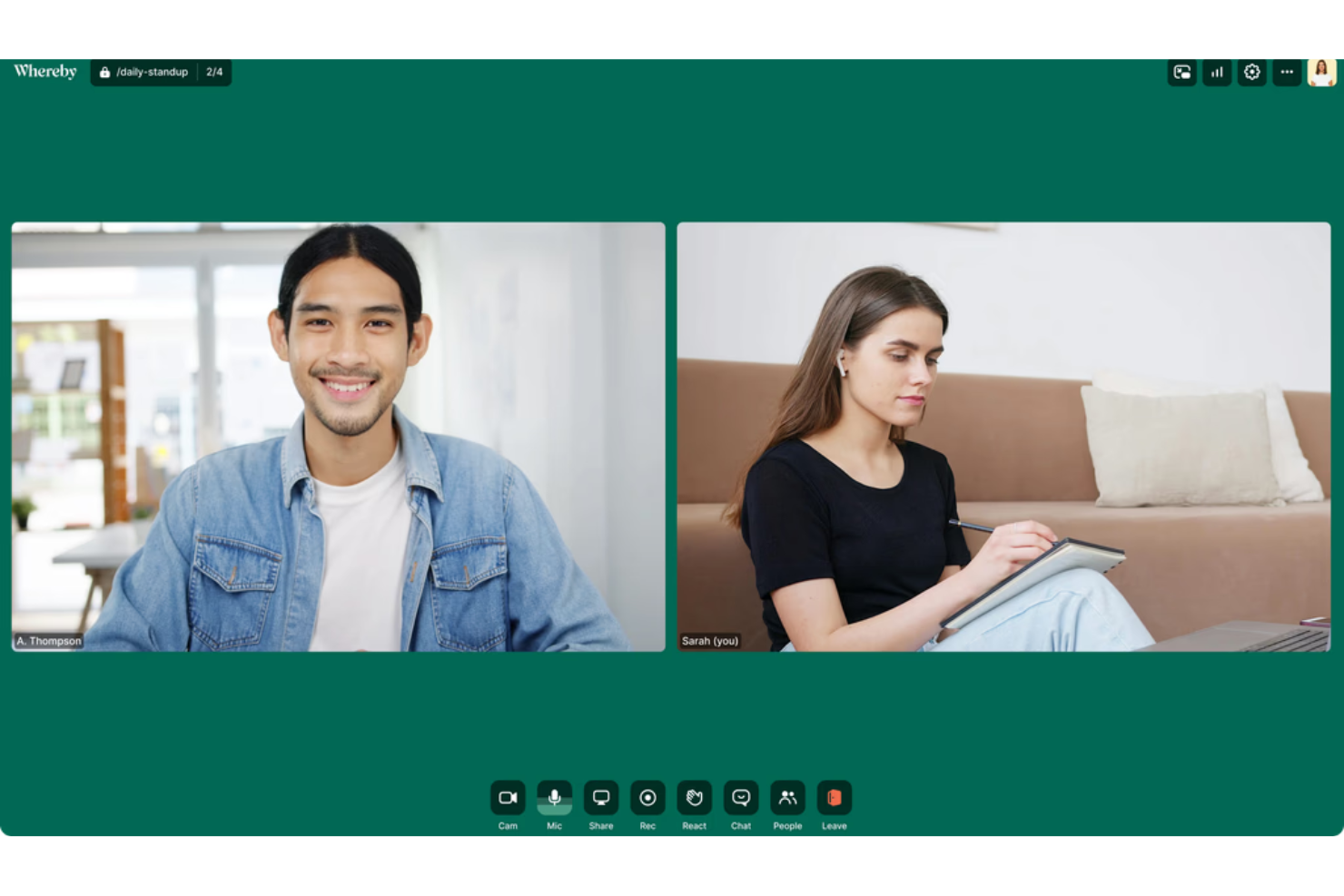
Whereby is a browser-based video meeting platform that lets your team host and join calls without installations or logins. I think small businesses, consultants, or client-facing professionals who need fast, frictionless video meetings will find it appealing.
Who Is Whereby Best For?
Small teams and independent consultants who need quick, hassle-free video calls with external clients.
Why Whereby Is a Good Google Meet Alternative
I picked Whereby because guests can join a meeting by clicking a link—no account, no app, no setup required. That makes it genuinely useful when you're hosting external clients or contractors who aren't going to install anything just for a quick call. I also like that every host gets a permanent, custom room URL, so your meeting link never changes, and you don't have to generate a new one each time. For recurring client check-ins or open office hours, that kind of consistency removes a small but real source of friction.
Whereby Key Features
- Virtual whiteboard: Collaborate visually during calls using a built-in whiteboard without switching to an external tool.
- File sharing: Share files directly inside a meeting room without relying on a separate messaging thread.
- In-meeting chat: Send text messages to participants during a live call without interrupting the speaker.
- Meeting transcriptions: Generate written transcripts of your calls to reference key points afterward.
Whereby Integrations
Whereby offers native integrations with Involve Interpreter, Salesforce Quick Call, Cronofy, and Assuric. A REST API is available for custom integrations.
Pros and Cons
Pros:
- Fixed meeting room links for recurring use
- Browser-based meetings require no downloads
- No account needed for guests to join
Cons:
- Advanced moderation tools are limited
- Free tier limited to four participants

Best for automated event workflows
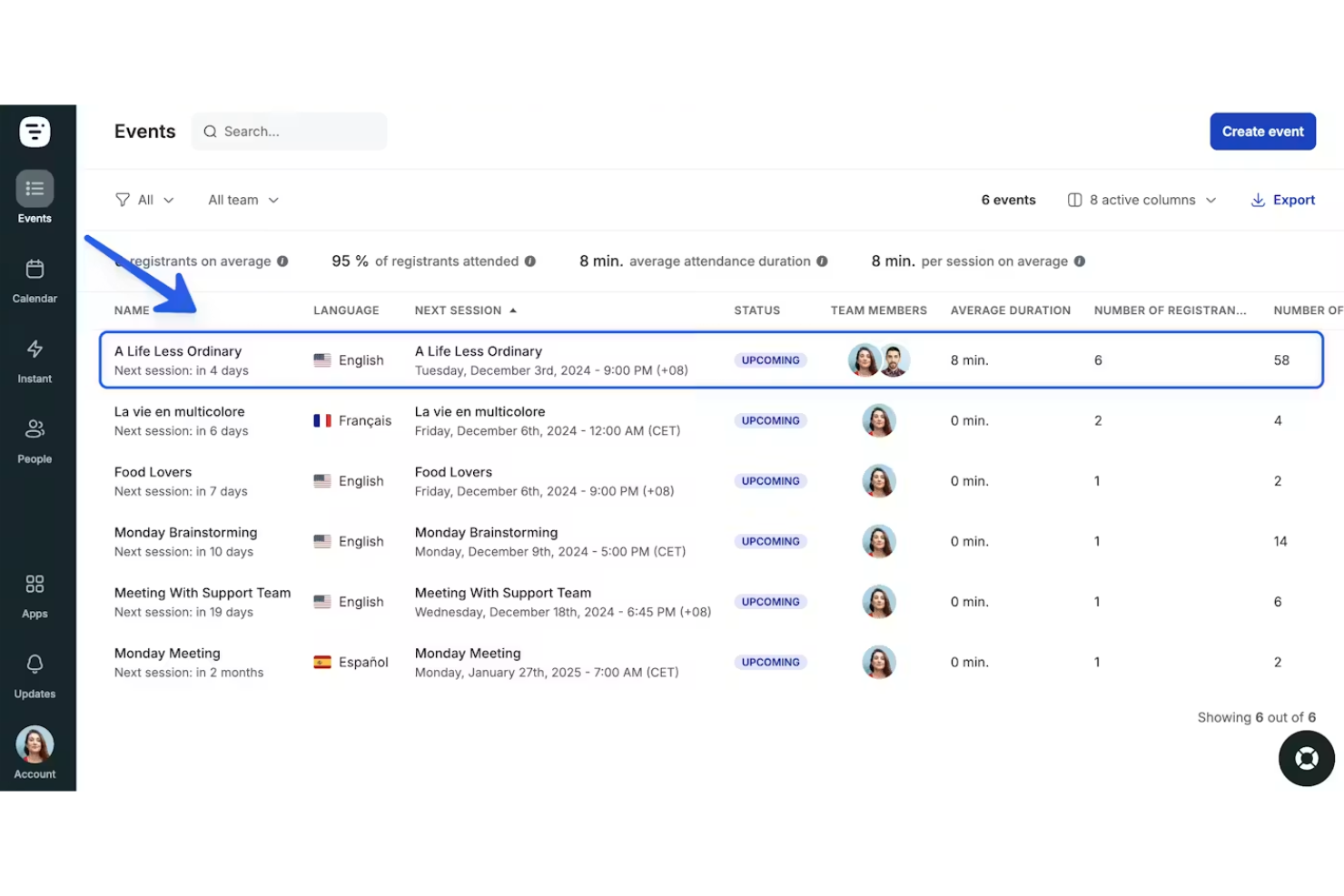
Livestorm is a browser-based platform designed for teams that want to automate their event hosting workflows. Companies running product demos, webinars, or employee onboarding sessions often turn to Livestorm to streamline scheduling, engagement, and analytics in one place.
Who Is Livestorm Best For?
Event marketers and HR teams at growing companies who need to automate recurring webinars or live training.
Why Livestorm Is a Good Google Meet Alternative
I picked Livestorm because its event automation tools go well beyond what Google Meet offers. I can set up entire event workflows in advance—registration emails, reminders, and follow-up sequences—without touching anything on the day of the event. I also like the on-demand video feature, which lets my team repurpose live sessions into self-serve recordings that new registrants can access anytime. For teams running repeat events like product demos or onboarding webinars, that kind of automation removes a lot of the manual coordination that Google Meet leaves to you.
Livestorm Key Features
- Live captions: Automatically transcribes spoken content in real time during sessions.
- AI content repurposing: Extracts content from event transcripts to generate assets for multiple channels.
- Custom room design: Brand each event room with a logo, background images, and custom colors.
- Multi-session registration: Let participants register once to join multiple sessions of the same event.
Livestorm Integrations
Livestorm offers native integrations with Google Analytics, HubSpot, Salesforce, Slack, Intercom, Microsoft Dynamics, and Google Calendar. It connects with Zapier and provides an API for custom integrations.
Pros and Cons
Pros:
- On-demand event replay for registrants
- Customizable event registration and email workflows
- Automated scheduling for recurring webinars and meetings
Cons:
- Occasional video and audio sync issues
- Limited breakout room functionality

Dialpad
Best for built-in AI transcription
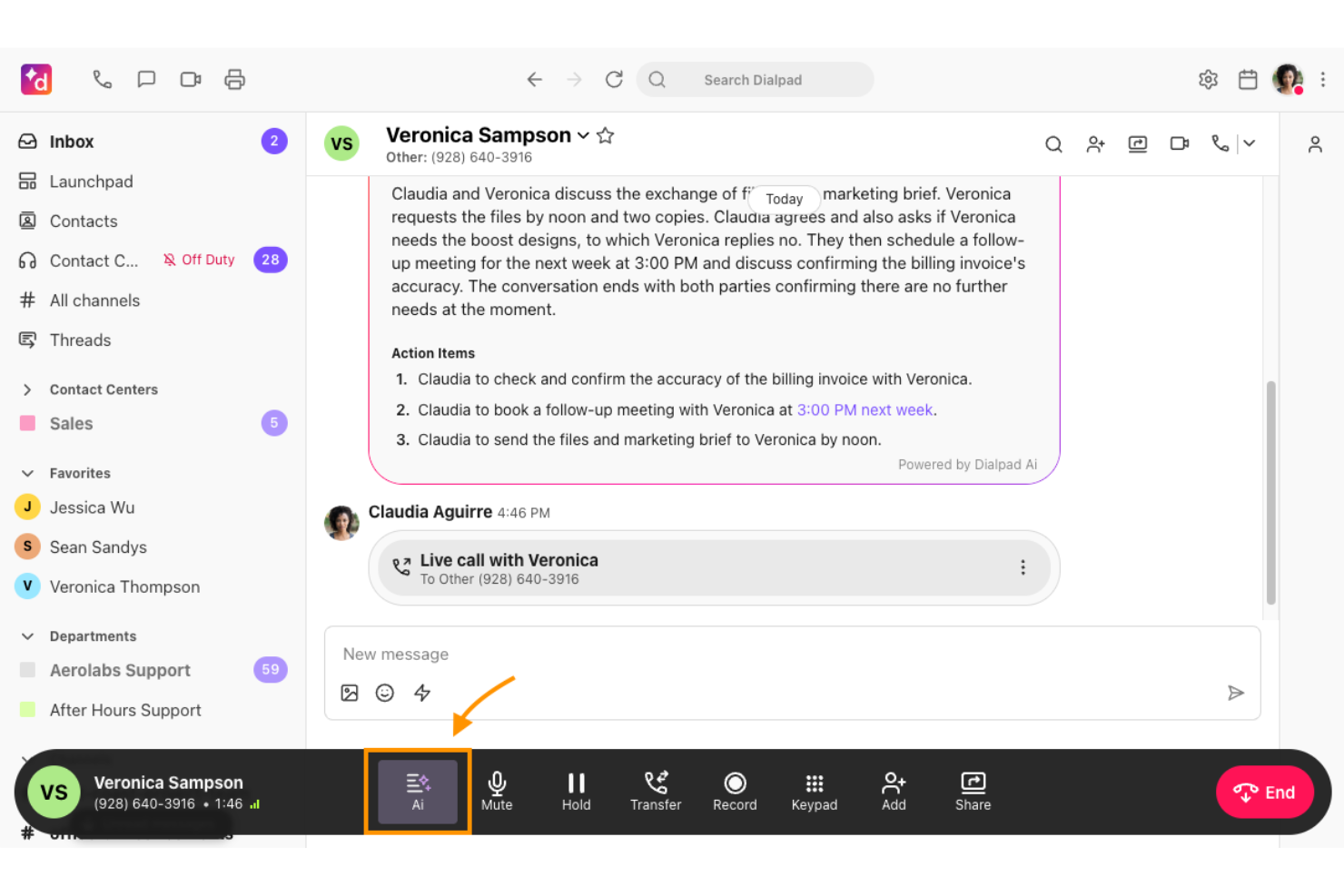
Dialpad is a unified communications platform designed for businesses that need seamless video, voice, and messaging in one place. It stands out for teams who want AI-powered tools to simplify meetings and enhance collaboration.
Who Is Dialpad Best For?
Sales and support teams in small to mid-sized businesses who want video meetings, calling, and messaging with automatic call transcription.
Why Dialpad Is a Good Google Meet Alternative
I picked Dialpad because its built-in AI transcription runs in real time during calls and meetings, so my team doesn't need a third-party transcription tool layered on top. I particularly like the AI-generated action items, which automatically surface next steps from the conversation without anyone manually taking notes. Dialpad also produces post-meeting summaries that my team can reference or share immediately after a call ends. For sales or support teams logging dozens of calls a week, that kind of built-in documentation is hard to replicate with Google Meet alone.
Dialpad Key Features
- Video meetings: Host HD video calls with screen sharing directly in the platform.
- Built-in phone system: Make and receive calls through a cloud-based business phone number.
- Team messaging: Send direct messages and create group channels alongside your meetings.
- Analytics dashboard: Track call and meeting activity across your team with usage reporting.
Dialpad Integrations
Dialpad offers native integrations with Google Workspace, Microsoft 365, Salesforce, Slack, HubSpot, Zendesk, ServiceNow, Okta, and more. Zapier and an API is also available for custom integrations.
Pros and Cons
Pros:
- Automatic action items after calls
- Integrated voice, video, and messaging platform
- Real-time AI-generated meeting transcriptions
Cons:
- Advanced AI features require paid plans
- Occasional lag in transcription accuracy

Best for interactive webinars
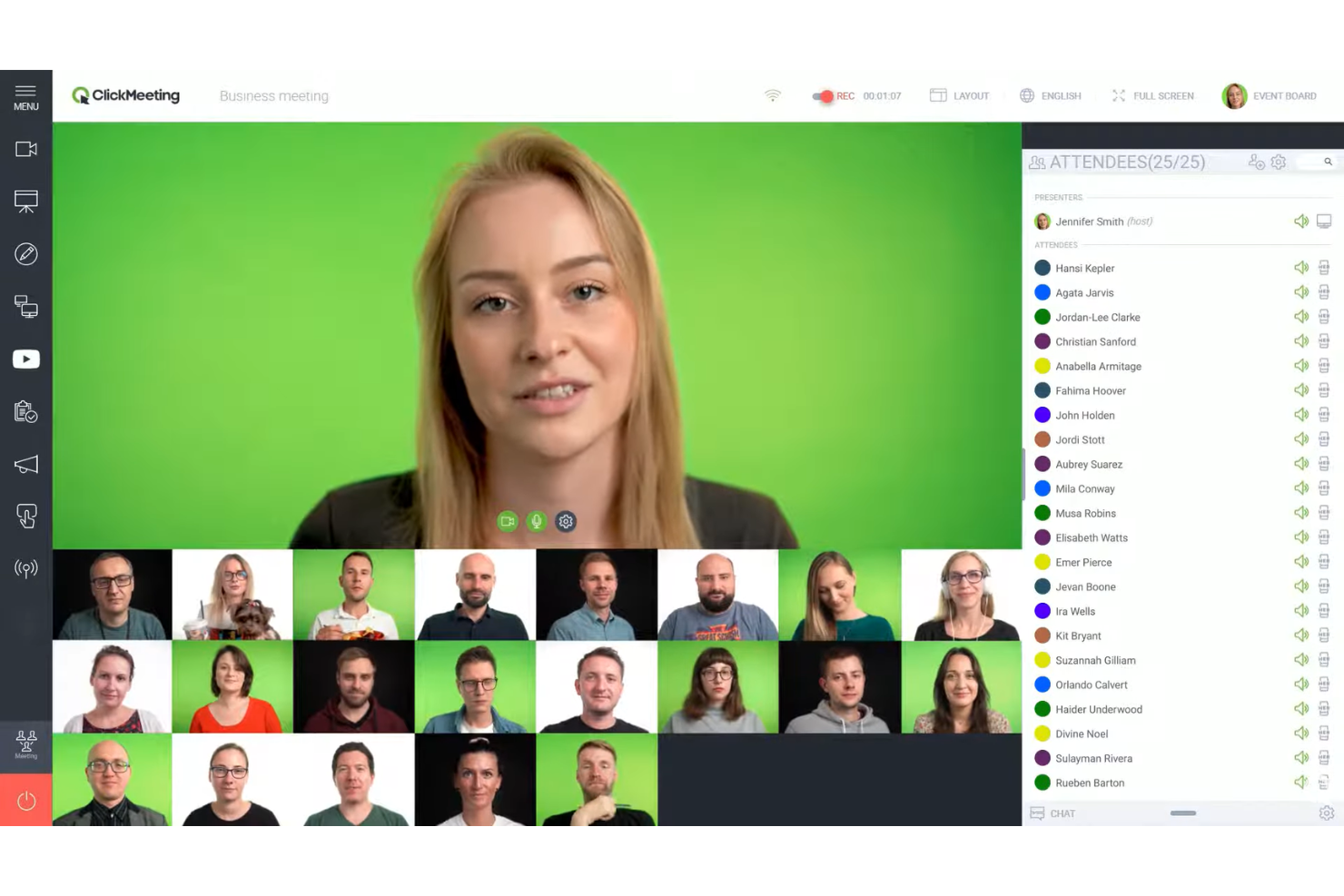
ClickMeeting brings live webinar capabilities to organizations that want to engage large audiences online. It appeals to teams that need tools for polls, Q&A sessions, and interactive presentations during virtual events.
Who Is ClickMeeting Best For?
Marketing and education teams running frequent interactive webinars or large online training sessions.
Why ClickMeeting Is a Good Google Meet Alternative
I picked ClickMeeting because it's purpose-built for webinars in a way that Google Meet simply isn't. Features like live polls, moderated Q&A, and call-to-action buttons during a presentation give my team real tools for driving audience participation. I also appreciate the automated webinar option, which lets us schedule and run pre-recorded sessions as if they were live. For teams that regularly host structured online events with large audiences, ClickMeeting handles that format far better than a general-purpose meeting tool.
ClickMeeting Key Features
- Edu mode: Restrict participant actions during a session to keep the focus on the presenter.
- Multistreaming: Broadcast live sessions simultaneously across social media platforms.
- Waiting room with agenda: Display event details and branding to attendees before a session begins.
- Event statistics: Review post-event attendance data, engagement metrics, and attendee activity logs.
ClickMeeting Integrations
ClickMeeting offers native integrations with Stripe, Paypal, Keap, Piepdrive, Moodle, GetResponse, Hubspot, Slack, Dropboz, and more. It also connects with Zapier, and an API is available for custom integrations.
Pros and Cons
Pros:
- Attendee engagement analytics during events
- Custom attendee registration forms available
Cons:
- Fewer breakout room options than competitors
- Strict storage caps for meeting recordings
- Automated webinars for recurring presentations

Best for unified communications suite

RingCentral offers a unified communications platform that brings video meetings, messaging, and phone into one app. I think IT leaders and distributed teams who want to manage all calls and collaboration in a centralized space will see the appeal.
Who Is RingCentral Best For?
Large organizations and IT departments needing a unified solution for voice, video meetings, and business messaging across global teams.
Why RingCentral Is a Good Google Meet Alternative
I picked RingCentral because it's one of the few platforms that genuinely combines video meetings, team messaging, and a cloud phone system under one roof. When my team needs to escalate a chat into a video call or a video call into a phone conference, we can do that without switching apps. I also like RingCentral's call handling features—things like auto-attendant and call routing—which go far beyond what a standard video conferencing tool offers. For organizations managing both internal collaboration and external client calls, that depth is hard to match.
RingCentral Key Features
- Video meeting recording: Capture and store video calls directly within the platform for later review.
- Breakout rooms: Split participants into smaller groups during a meeting for focused discussions.
- Whiteboard: Collaborate visually during calls using an in-meeting digital whiteboard.
- Meeting analytics: View attendance, engagement, and usage data across your team's video meetings.
RingCentral Integrations
RingCentral offers over 500 pre-built integrations, including Google Workspace, Microsoft Teams, Salesforce, Jira, and Google Sheets. An API is available for custom integrations.
Pros and Cons
Pros:
- Advanced call management features included
- Supports large meetings with high-quality video
- Switch between video, messaging, and phone instantly
Cons:
- Occasional sync issues across devices
- Meeting recordings have limited cloud storage

Slack
Best for team-based collaboration channels


Zoom
Best for large interactive meetings
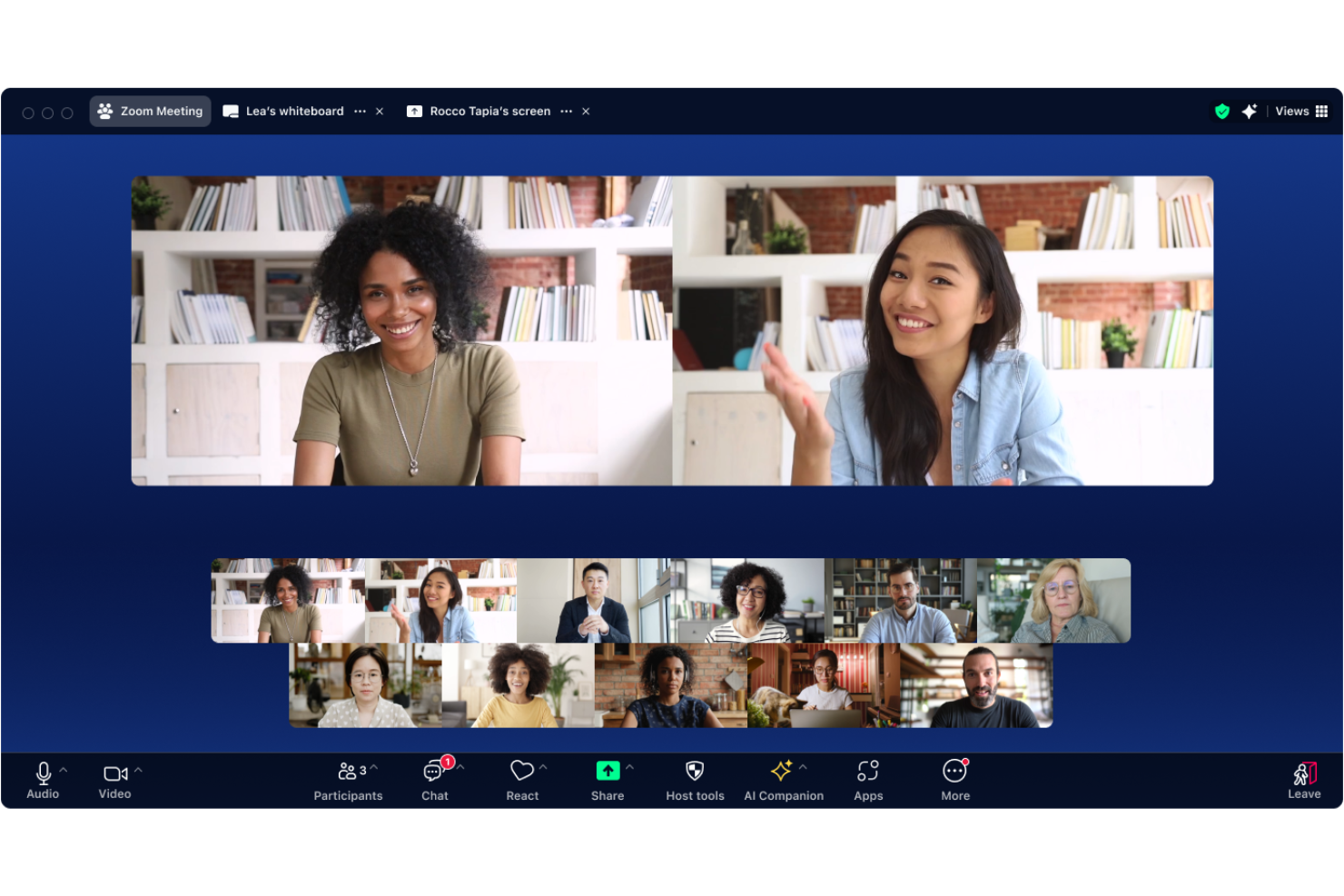
Zoom is an all-in-one video conferencing platform known for connecting remote and hybrid teams in companies of all sizes. Organizations looking for scalable meetings with reliable video and audio quality should consider Zoom when consistent group communication and collaboration are essential.
Who Is Zoom Best For?
Large organizations and educational institutions that need to host secure, high-capacity meetings or events across distributed teams.
Why Zoom Is a Good Google Meet Alternative
I picked Zoom for this list because it handles large, interactive meetings better than most video conferencing platforms. Features like Zoom Webinars and breakout rooms let my team split hundreds of attendees into smaller working groups mid-session, which is something Google Meet simply doesn't support at scale. I also appreciate Zoom's polling and Q&A tools, which keep large audiences engaged during all-hands meetings or training sessions. For teams that regularly host events with 100-plus attendees, Zoom gives you the structure to manage them well.
Zoom Key Features
- AI Companion: An AI assistant built into Zoom that generates meeting summaries, action items, and transcripts automatically after each session.
- Cloud recording: Record meetings directly to the cloud with automatic storage, playback, and sharing options for participants who missed the call.
- Screen annotation: Annotate over shared screens in real time, letting multiple participants draw, highlight, or mark up content together during a meeting.
- Virtual backgrounds: Replace or blur your background during video calls using custom images or video to maintain privacy or professionalism.
Zoom Integrations
Zoom offers over 2,000 native integrations through its App Marketplace, including Google Workspace, Microsoft Teams, Slack, Salesforce, HubSpot, Asana, Dropbox, Trello, Zendesk, and Zapier. An API is available for custom integrations.
Pros and Cons
Pros:
- Live polling and Q&A for engagement
- Webinar mode for high-attendance events
- Breakout rooms for group collaboration
Cons:
- Lacks end-to-end encryption by default
- Desktop app is required for some advanced features
Best for browser-based video calls

If your team needs a video conferencing tool that’s easy to launch in the browser and avoids cumbersome downloads, Zoho Meeting is worth a look. I think consultants, agencies, and SMBs who run meetings with external guests will appreciate how quickly you can get started.
Who Is Zoho Meeting Best For?
Solo professionals and small businesses hosting frequent video calls with clients or external collaborators.
Why Zoho Meeting Is a Good Google Meet Alternative
I picked Zoho Meeting because it runs entirely in the browser—no downloads, no plugins, and no friction for external guests joining a call. That's a real advantage when you're hosting clients or contractors who aren't on your internal tools. I also like the built-in meeting scheduler, which lets you send calendar invites and email reminders directly from the platform. For teams already in the Zoho ecosystem, the connection to Zoho CRM means you can launch client calls straight from a contact record.
Zoho Meeting Key Features
- Screen sharing: Share your full screen or a specific application window during live meetings.
- Polls: Launch polls during a session to gather quick input from attendees.
- Waiting room: Hold participants in a lobby before granting them access to the meeting.
- Session recording: Record meetings and share the replay link with participants afterward.
Zoho Meeting Integrations
Zoho Meeting offers native integrations with Zoho CRM, Zoho Projects, Zoho Mail, Zoho Calendar, and Google Workspace. An API is available for custom integrations.
Pros and Cons
Pros:
- Supports polls and Q&A during meetings
- Host meetings for up to 250 participants
- Runs in-browser with no downloads required
Cons:
- Fewer third-party integrations
- Limited video layouts compared to competitors

Best for chat and file sharing integration

Microsoft Teams is a collaboration hub designed for organizations that want unified chat, meetings, and collaboration. I think you’ll appreciate it if your team relies on integrated messaging, calls, and file sharing to work efficiently across projects.
Who Is Microsoft Teams Best For?
Distributed teams and organizations that need chat-driven collaboration with integrated video meetings and file sharing.
Why Microsoft Teams Is a Good Google Meet Alternative
I picked Microsoft Teams because it blends persistent chat and video meetings in a way that genuinely reflects how teams collaborate day-to-day. Chat threads are organized by channels and topics, so conversations about a project live alongside the meetings, files, and notes tied to that project. I like that my team can co-edit Word, Excel, or PowerPoint files directly in a Teams channel without switching apps. For teams already working inside Microsoft 365, that level of integration between chat, calls, and file sharing is hard to match.
Microsoft Teams Key Features
- Together mode: Places all participants in a shared virtual background during video calls to create a more natural meeting feel.
- Meeting recaps: Automatically generates post-meeting notes, recordings, and action items through AI Companion after each call.
- Live captions: Transcribes spoken dialogue in real time during meetings, with support for multiple languages.
- Breakout rooms: Lets meeting hosts split participants into smaller groups mid-call and pull everyone back at any time.
Microsoft Teams Integrations
Microsoft Teams has native integrations across the Microsoft ecosystem, including Microsoft 365 and Azure, and offers an API for custom integrations.
Pros and Cons
Pros:
- Direct scheduling within the Outlook calendar
- Persistent chat threads for ongoing collaboration
- In-channel file sharing during meetings
Cons:
- Mobile app notifications can be inconsistent
- Occasional syncing delays between messages and files

Webex
Best for advanced security controls

Webex gives you video meetings, messaging, and calling in a platform built with IT and business users in mind. I think teams needing reliable, enterprise-grade conferencing and strong administrative controls will be interested.
Who Is Webex Best For?
IT administrators and compliance-driven organizations that need granular security options in their video conferencing.
Why Webex Is a Good Google Meet Alternative
I picked Webex because it gives IT teams a level of security control that most video conferencing tools simply don't offer. End-to-end encryption is on by default, and admins can configure it at the meeting, user, or organizational level. I also appreciate the built-in data loss prevention policies and compliance features, which matter a lot when my team handles sensitive information across calls. For organizations in regulated industries, that kind of granular control over who joins, what gets recorded, and where data lives is a genuine differentiator.
Webex Key Features
- AI meeting assistant: Generates real-time transcription, summaries, and action items during and after meetings.
- Noise removal: Filters out background sounds on both ends of a call without requiring external hardware.
- Webex Slido: Lets hosts run live polls, Q&As, and quizzes directly inside a meeting.
- Breakout sessions: Splits large meetings into smaller groups with a host-controlled timer and automatic return.
Webex Integrations
Webex offers hundreds of native integrations through its App Hub, including Google Workspace, Microsoft 365, Salesforce, Slack, Trello, Asana, Box, Zendesk, Miro, and ServiceNow. An API is available for custom integrations.
Pros and Cons
Pros:
- AI-powered meeting transcription and highlights
- Participant management settings for regulated industries
- Highly secure standard encryption by default
Cons:
- Admin settings can be overly complex
- Occasional lag when joining large meetings
Other Google Meet Alternatives
Here are some additional Google Meet alternatives that didn’t make it onto my shortlist, but are still worth checking out:
- Adobe Connect
For customizable meeting rooms
- Jitsi Meet
For open-source customization
- GoTo Meeting
For simple meeting scheduling
- Skype
For international calling features
- Lifesize
For 4K video conferencing rooms
- Pexip
For interoperability with legacy systems
- Nextiva
For combining calls and meetings
- Amazon Chime
For AWS ecosystem integration
- Discord
For persistent topic-based voice rooms


How I Evaluate Google Meet Alternatives
I first check whether a tool matches what Google Meet already delivers—HD video, screen sharing, recording, and calendar sync for standups and client calls. From there, I evaluate the extras that separate one platform from another for project teams.
Core Functionality (Table Stakes For This List)
When I'm selecting tools for my list, I rank each one on a scale from 0 (does not offer the functionality) to 5 (excels in this area) for each core functionality listed below. Then, I calculate the tool's total score into a percentage. Each tool needs to achieve a minimum total score of 75% to be considered for inclusion.
- HD Video Conferencing: I evaluate call quality, participant capacity, and stability under real conditions—like a 15-person sprint planning with cameras on and screen shares running simultaneously.
- Screen Sharing: The ability to share full screens, specific windows, or individual browser tabs matters when walking stakeholders through a Jira board or a Gantt chart in real time.
- Meeting Recording: I look for cloud recording with enough storage and retention to let teams revisit sprint reviews or client kickoffs days or weeks after they happen.
- In-Meeting Chat: A solid chat lets participants drop links to tickets, specs, or docs mid-call without interrupting the speaker—I check whether messages persist after the meeting ends.
- Calendar & Scheduling Integration: I check for native connections to Google Calendar and Outlook so PMs can schedule recurring standups and send join links directly from their existing workflow.
- Cross-Platform Access: Distributed teams join from laptops, phones, and browsers, so I look for feature parity across desktop apps, mobile apps, and browser-based access on both iOS and Android.
Once I have a list of tools that meet the criteria, I consider what sets each platform apart.
Differentiating Factors (What Sets Vendors Apart)
Here's how I compare and contrast different vendors:
Standout Features
An AI meeting assistant can save PMs hours each week by generating transcripts, summaries, and action items that sync straight into tools like Jira or Asana. Breakout rooms are another feature I look for, especially for retros and workshops where you need smaller groups to discuss and then regroup. I also consider built-in whiteboarding—being able to sketch a roadmap or run a story mapping session without switching to a separate tool like Miro keeps the team focused and cuts context-switching.
Beyond Features
PM tool integrations matter a lot here—I check whether a platform lets you launch calls from a Jira ticket or Asana task and push meeting notes back into the project record. Security is another factor I evaluate closely, especially for client-facing calls where SSO, end-to-end encryption, and compliance certifications like SOC 2 or GDPR come into play. Pricing structure also shapes my recommendations, since a per-host model works very differently than per-user licensing when you're rolling out across a 50-person PMO.
Why Look For a Google Meet Alternative?
While Google Meet is a good choice of video conferencing software, there are a number of reasons why some users seek out alternative solutions. You might be looking for a Google Meet alternative because…
- You need built-in webinar or event automation tools
- You want advanced engagement features like polls and Q&A
- You require stronger meeting access controls or moderation
- Your organization needs custom branding for meetings
- You experience video quality or stability issues
- You work with attendees who struggle with Google account access
If any of these sound like you, you’ve come to the right place. My list contains several video conferencing software options that are better suited for teams facing these challenges, with Google Meet and looking for alternative solutions.
Google Meet Key Features
Here are some of the key features of Google Meet, to help you contrast and compare what alternative solutions offer:
- Video meetings: Host secure video meetings for up to 500 participants, with high-definition audio and video, using any device with a web browser or mobile app.
- Screen sharing: Present your entire screen, a specific tab, or an application window to other attendees for collaborative discussions and walkthroughs.
- Live captions: Use built-in speech-to-text to display real-time captions during meetings, improving accessibility for all participants.
- Meeting recording: Record meetings directly to Google Drive, making it easy to share or review discussions later.
- Integration with Google Workspace: Schedule and join meetings straight from Google Calendar or Gmail, with automatic links and reminders.
- Noise cancellation: Automatically reduces background noise to enhance audio clarity, even in busy environments.
- Host controls: Manage participant permissions, mute or remove attendees, and lock meetings for added security.
- Breakout rooms: Split participants into separate sessions for group activities and discussions, then bring everyone back to the main meeting.
- In-meeting chat: Communicate through a text chat panel to share links, questions, or notes without disrupting the conversation.
- Dial-in access: Offer phone dial-in options so participants can join meetings even without an internet connection.