

10 Best Free Document Management Software Reviewed in 2026

Best Free Document Management Software Shortlist


The best free document management software helps you organize, store, and access digital files in one place without adding cost or complexity. When documents are scattered across drives, email threads, and desktop folders, version control breaks down, approvals get delayed, and your team will waste time hunting for the right file.
A good free tool centralizes your files, lets you control who can access and edit them, and makes sure you never lose track of important records. I’ve tested 15+ document management tools using my expertise as a project manager, and in this guide, I’ll share the best free options that meet your business needs without costing you a thing.
Why Trust Our Software Recommendations
Our team has been testing and reviewing software since 2012. As project managers ourselves, we know how difficult—and important—it is to choose the right software.
For this guide, we evaluated tools using hands-on testing and independent research, scoring tools using our selection criteria. We also draw on insights from industry thought leaders and practicing project management experts.
Our reviews reflect our human editorial judgment, not a sales pitch.
Expert reviewers:
Free Document Management Software Comparison Table
Here are the base costs for each of the tools that made it onto my shortlist:
| Tool | Best For | Trial Info | Price | ||
|---|---|---|---|---|---|
| 1 | Best for enterprise use | Free demo available | Pricing upon request | Website | |
| 2 | Best for secure storage | 14-day free trial | From CAD$21/user/month (billed annually) | Website | |
| 3 | Best for document office suite | Free plan + 30-day free trial available | From $20/admin/month | Website | |
| 4 | Best for document sharing | Free trial + free plan available | From $5.42/user/month | Website | |
| 5 | Best for business apps integration | Free plan available | From $8.95/user/month (billed annually) | Website | |
| 6 | Best for team collaboration | 15-day trial + free plan + free demo available | From $49/organization/month (billed annually) | Website | |
| 7 | Best for open-source access | Free demo available | Pricing upon request | Website | |
| 8 | Best for knowledge management | Free demo available | Pricing upon request | Website | |
| 9 | Best for creative teams | Free tiral available | From $12/user/month | Website | |
| 10 | Best for workflow automation | 30-day free trial | From $30/user/month | Website |
Best Free Document Management Software Reviews
Here are my detailed summaries of the best free document management software that made it onto my shortlist. I cover key features, pros & cons, integrations, and use cases for each tool. While some of these tools offer a completely free version, others offer a free trial period. I’ve added a note about what’s free in each of my reviews.

Best for enterprise use
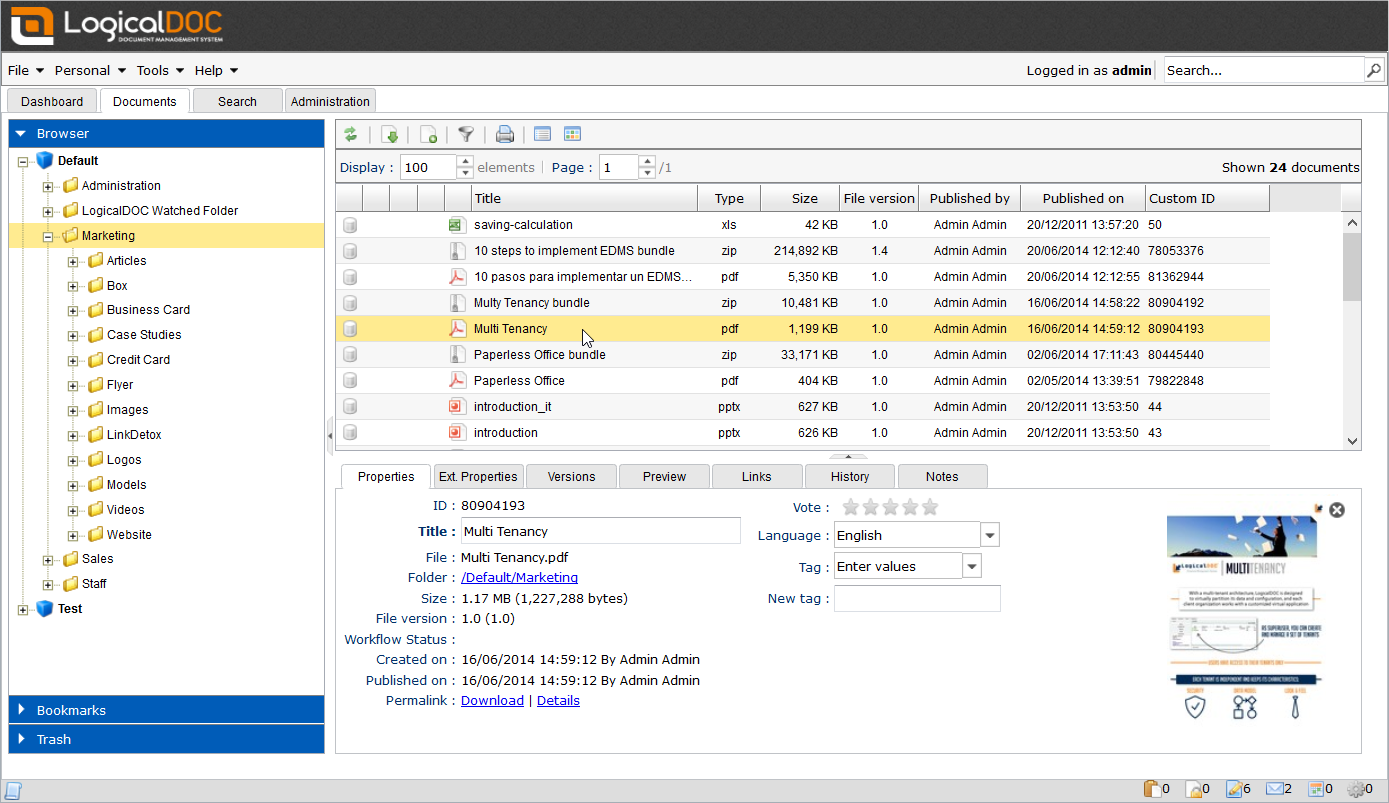
LogicalDOC is a document management system aimed at enterprises that need a secure, efficient way to manage and share documents. Its main users are organizations that want to improve document accessibility, collaboration, and compliance with industry standards.
Why I picked LogicalDOC: LogicalDOC offers a free community edition that provides essential document management features. You can manage documents with ease using its intuitive interface. The software allows for document versioning, so you can track changes and maintain control over document revisions. It’s open-source, so you can customize the software to meet your specific enterprise needs.
Standout features & integrations:
Features include advanced search capabilities and the ability to automate document workflows to streamline processes and improve efficiency.
Integrations include Microsoft Office, Google Drive, Dropbox, and Docusign.
What's free?
LogicalDOC offers a free community edition with basic document management features.
Pros and Cons
Pros:
- Automation of document workflows
- Advanced search functionality
- Open-source customization options
Cons:
- Not all features in free version
- Limited support for free version

Box
Best for secure storage

Box is a cloud content management and file sharing service for businesses and individuals who need secure storage and collaboration tools. It's ideal if you need strong security and compliance alongside the ability to manage and share files across teams.
Why I picked Box: Box offers a free plan that provides secure cloud storage with advanced encryption to protect sensitive documents. You can store up to 10GB of data, which is sufficient for personal use or small projects. The free version includes basic collaboration tools, so your team can share and comment on files easily.
Standout features & integrations:
Features include advanced security controls that help you manage who can access your files as well as the ability to automate workflows and streamline document approval processes.
Integrations include Microsoft Office 365, Google Workspace, Slack, Zoom, Salesforce, Adobe Sign, Docusign, Okta, IBM, and ServiceNow.
What's free?
Box offers a free-forever plan with 10GB of storage, though it limits file uploads to 250MB each.
Pros and Cons
Pros:
- Real-time commenting on files
- Supports 10GB of data storage
- Secure storage with encryption
Cons:
- Some users find setup complex
- File upload limit of 250MB

Best for document office suite

ONLYOFFICE is an online office suite for businesses and teams that need document management, collaboration, and productivity tools in one place. You can use it to create, edit, and share documents, spreadsheets, and presentations.
Why I picked ONLYOFFICE: ONLYOFFICE offers a free plan with both office suite and document management features, which makes it ideal for teams that need both. You can create and edit documents with familiar tools like word processors, spreadsheets, and presentation editors. The collaborative editing feature lets multiple team members work on the same document simultaneously. With its open-source nature, you can customize and extend functionalities to fit your team's needs.
Standout features & integrations:
Features include customizable access rights that let you control who can view or edit documents. The document versioning feature helps you track changes and revert to previous versions if needed. You can also embed documents into websites for easy sharing and access.
Integrations include Nextcloud, ownCloud, Alfresco, Confluence, SharePoint, WordPress, Moodle, Liferay, and Drupal.
What's free?
ONLYOFFICE offers a free-forever plan with essential office suite and document management features.
Pros and Cons
Pros:
- Embedding documents into websites
- Document version control
- Collaborative editing in real-time
Cons:
- May need technical knowledge for customization
- Initial setup may be complex

Best for document sharing

Confluence is a team workspace that lets teams create, share, and manage content. It's for teams that need a centralized platform for document sharing and project collaboration.
Why I picked Confluence: Confluence's free plan lets you create and share documents with up to 10 users, which makes it ideal for small teams. The space and page organization features help you keep information structured and accessible. There are also customizable templates, you can use to start new projects or documentation. The real-time editing feature lets your team collaborate on documents simultaneously and improve productivity.
Standout features & integrations:
Features include a powerful search function that helps you find documents quickly and efficiently. You can also create dynamic pages with embedded multimedia and dynamic content. The permissions settings let you control who can view or edit documents.
Integrations include Jira, Trello, Slack, Microsoft Teams, and Dropbox.
What's free?
Confluence offers a free-forever plan for up to 10 users with limited storage and features.
Pros and Cons
Pros:
- Strong document organization
- Real-time editing capabilities
- Customizable templates for projects
Cons:
- Storage restrictions in free version
- Limited to 10 users in free plan

Odoo
Best for business apps integration

Odoo is a comprehensive business management software that provides a suite of apps to help you manage your operations. Its main users include small to medium-sized enterprises that need an integrated approach to managing documents, clients, and sales.
Why I picked Odoo: Odoo's free version lets you manage documents within a larger system of business applications. It also supports essential features like document sharing and collaboration. This integration capability is a key differentiator if you want to unify your operations.
Standout features & integrations:
Features include a user-friendly interface that simplifies document uploading and organization. You can automate document workflows to maintain efficient handling and processing, and use reporting tools to track document usage and performance.
Integrations include PayPal, Amazon, eBay, and Microsoft Outlook.
What's free?
Odoo has a free-forever plan for one app (the document management app in this case).
Pros and Cons
Pros:
- Comprehensive reporting tools
- Automated workflows for efficiency
- Integration with other Odoo apps
Cons:
- Requires setup for full functionality
- Limited to one app in free plan
Bitrix24
Best for team collaboration
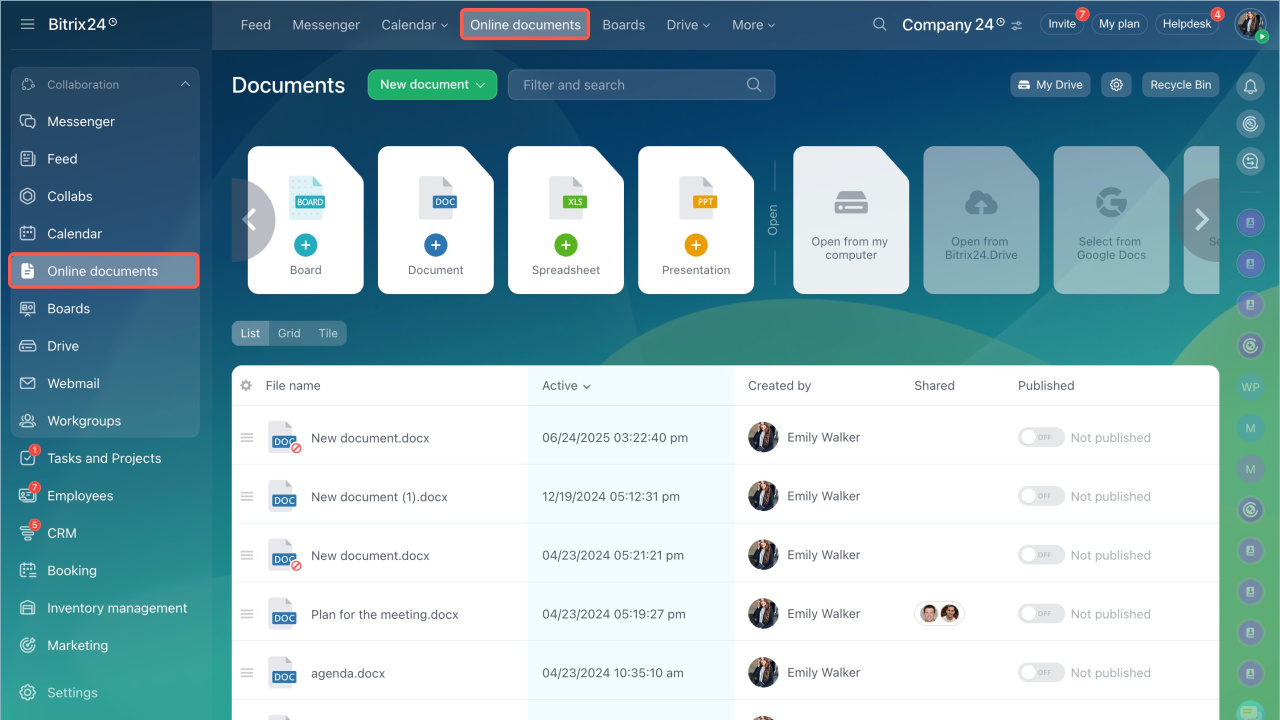
Bitrix24 is a comprehensive business tool that combines project management, communication, and document management functionalities. It's designed for small to medium-sized businesses that want to improve collaboration and streamline their workflows.
Why I picked Bitrix24: Bitrix24's free plan offers unlimited users, which makes it suitable for growing teams. You get access to task management features that help keep your team organized. The free version also includes document management, and you can store and share files with ease.
Standout features & integrations:
Features include customer relationship management (CRM) tools and a calendar feature that helps your team schedule and track important events. You can also automate routine tasks.
Integrations include Mailchimp, Google Drive, Microsoft Office, Dropbox, Xero, and Zapier.
What's free?
Bitrix24 offers a free-forever plan with unlimited users, though storage is capped at 5GB.
Pros and Cons
Pros:
- Supports workflow automation
- CRM functionality included
- Unlimited users in free plan
Cons:
- Limited customer support in free plan
- Storage limit of 5GB


OpenDocMan is a free, open-source document management system primarily for web use. Its main users are organizations that want a PHP-based solution for managing documents efficiently. The system supports centralized storage, access control, and document tracking.
Why I picked OpenDocMan: OpenDocMan is entirely free and open-source, and you can customize it to fit your specific needs. You can manage various file types via the minimalist interface, and it offers robust user management features.
Standout features & integrations:
Features include web-based access, fine-grained user permissions, and automated installation. This lets you manage document workflows efficiently and maintain existing business rules.
Integrations include MySQL and support for various file types.
What's free?
OpenDocMan offers a free-forever plan with no user limit, though it relies on community support for troubleshooting.
Pros and Cons
Pros:
- Multi-language support
- Supports multiple file types
- Free and open-source customization
Cons:
- Reliance on community support
- Limited compared to commercial options

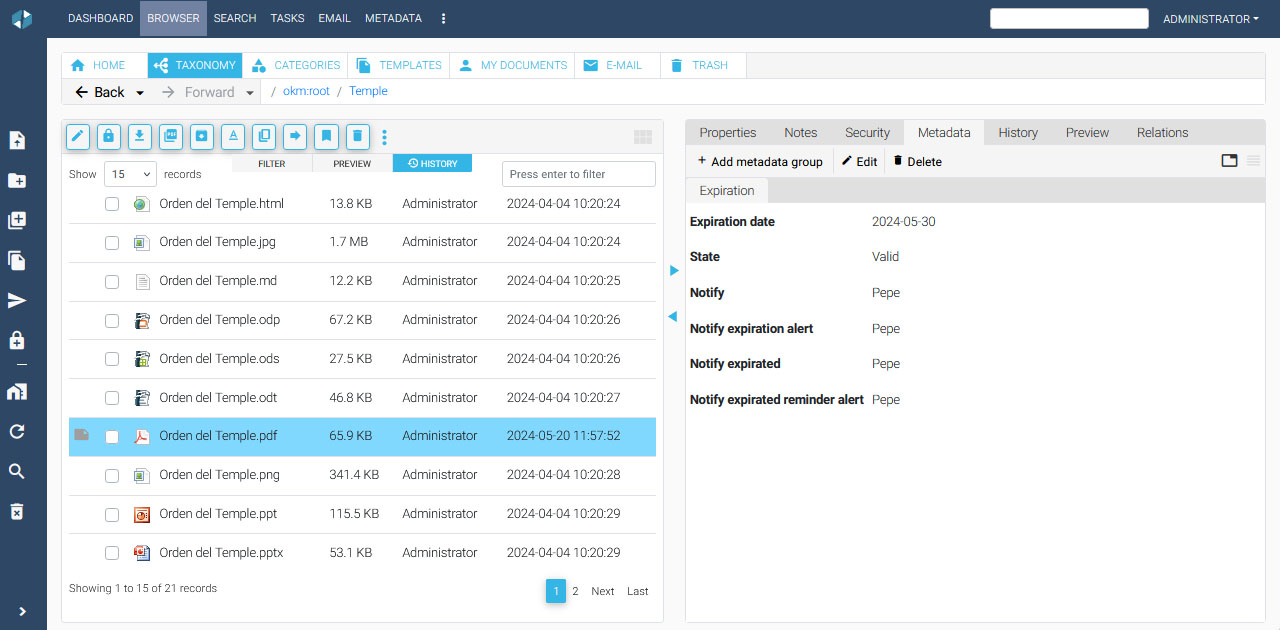
OpenKM is an open-source document management system for organizations that need to manage, maintain, and govern documents. Its main users include businesses that want to improve organization, accountability, and compliance with regulatory requirements.
Why I picked OpenKM: OpenKM offers a free plan that provides a range of features to support knowledge management. It includes automatic cataloging, which lets you set rules for document handling. The advanced preview supports various file formats. With version control and tracking, you can easily manage document changes and maintain an audit trail.
Standout features & integrations:
Features include OCR, which converts scanned documents into editable formats, and modules that offer functionalities like multitenancy and digital signatures. The system also supports advanced preview for multiple file formats.
Integrations include an API so you can build custom integrations.
What's free?
OpenKM offers a free-forever plan with basic features.
Pros and Cons
Pros:
- Detailed audit trails
- Comprehensive document lifecycle management
- Open-source flexibility
Cons:
- Limited support options
- Requires technical setup


Hightail is a file-sharing and collaboration platform for creative teams who need to share large files and gather feedback. It helps you improve creative workflows and collaboration among team members.
Why I picked Hightail: Hightail's free plan is best for creative teams that need to send large files. You can easily share projects and gather feedback with its simple interface. The visual feedback tool lets team members comment directly on images and videos for clear communication. You can also track file activity to make sure everyone is up to date on project progress.
Standout features & integrations:
Features include collaboration tools that let you manage feedback and approvals in one place and file tracking that lets you see who has viewed or downloaded your content.
Integrations include Adobe Creative Cloud, Microsoft OneDrive, Google Drive, and Dropbox.
What's free?
Hightail offers a limited free plan with a maximum file size of 100MB and basic sharing features.
Pros and Cons
Pros:
- File activity tracking available
- Simple interface for file sharing
- Visual feedback on images and videos
Cons:
- Limited customization in free version
- Limited to 100MB file size


airSlate Workflow is a cloud-based automation platform for businesses that need to automate document workflows and improve business processes. It's ideal if you want to reduce manual tasks and improve efficiency in document management.
Why I picked airSlate Workflow: airSlate Workflow offers a free plan that includes essential workflow automation tools, so you can automate your document processes. You can design custom workflows to fit your specific business needs via a simple drag-and-drop editor.
Standout features & integrations:
Features include a document generation tool that lets you create documents automatically based on templates. The e-signature feature lets you collect signatures digitally, and you can also track document progress in real-time.
Integrations include Salesforce, Microsoft Dynamics 365, Google Drive, Microsoft Office, Dropbox, Box, QuickBooks, and NetSuite.
What's free?
airSlate Workflow offers a limited free trial with access to basic workflow automation features.
Pros and Cons
Pros:
- Supports digital signatures
- Automates repetitive document tasks
- Drag-and-drop workflow editor
Cons:
- May require training for new users
- Some setup complexity
Other Document Management Software
Here are some additional document management software options that also offer free plans or trials. While these tools didn’t make it onto my shortlist, they’re still worth checking out:
- FormKiQ
For API access
- Connecteam
For deskless teams
- Dropbox
For easy-file sharing
- Google Docs
For real-time collaboration
- Notion
For all-in-one workspace
- monday.com
For project tracking
- Mayan EDMS
For self hosted document control


How I Evaluate Free Document Management Software
I check every option against two layers: core criteria a tool must meet—like version control and external sharing—and differentiating factors that separate the right fit for project teams.
Core Functionality (Table Stakes For This List)
When I'm selecting tools for my list, I rank each one on a scale from 0 (does not offer the functionality) to 5 (excels in this area) for each core functionality listed below. Then, I calculate the tool's total score into a percentage. Each tool needs to achieve a minimum total score of 65% to be considered for inclusion.
- Free Plan Availability: I look for a genuinely free tier—not a 14-day trial—that gives project teams enough storage and seats to manage real documents over time.
- Centralized Document Storage: Every tool should let you organize files into project-based folders or workspaces, so deliverables like SOWs and status reports live in one place.
- Version Control: I evaluate how each platform handles revisions, checking whether you can view prior versions, restore earlier drafts, and track who changed what.
- File Sharing & Collaboration: Teams need to share documents with clients, contractors, and cross-functional partners, so I check for external sharing, co-editing, and commenting.
- Access Permissions & Security: Role-based controls matter when sensitive project files are involved. I look at whether you can restrict access at the folder or individual file level.
- Search & Metadata Tagging: Finding the right document across dozens of project folders is a daily task. I check for full-text search, tag support, and filtering options.
Once I have a list of tools that meet this criteria, I consider what sets each platform apart.
Differentiating Factors (What Sets Vendors Apart)
Here's how I compare and contrast different vendors:
Standout Features
Workflow automation is a big differentiator. I look for tools that can route a document through an approval chain without manual follow-up, like pushing a project brief from draft to stakeholder sign-off. I also evaluate how well each platform connects to project management tools like Jira or Asana, since linking documents directly to tasks saves time hunting for files. For teams with field-based staff, mobile access with offline sync matters. Pulling up specs or plans on-site without a connection is a real advantage.
Beyond Features
Free plan limits deserve close attention. I check storage caps and user seat restrictions to see whether a growing project team will hit a wall within months. Security is another factor I weigh—especially whether audit logs and encryption are available on the free tier, since project documents often include contracts and sensitive deliverables. Guest access also matters. If external stakeholders like clients or vendors need to review files, I look at whether that requires a paid seat or is supported on the free plan.
How to Choose Free Document Management Software
Complex feature lists and pricing structures can make it hard to figure out what you’re really getting from a free document management software. To help you stay focused as you work through your software selection process, here are some factors to keep in mind:
| Factor | What to Consider |
|---|---|
| Free offer scope | Check what features are included in the free plan. Make sure it covers your basic needs without hidden costs. |
| Scalability | Consider whether the software can grow with your team. Look for options to upgrade or add users as your needs expand. |
| Integrations | Make sure the software integrates with tools you already use, like Google Workspace or Slack, to improve your productivity. |
| Ease of Use | Evaluate the user interface and navigation. It should be intuitive so your team can start using it without extensive training. |
| Security | Look for features like encryption and access controls to protect sensitive documents. |
| Support | Check the availability of customer support, whether through chat, email, or phone, especially if you anticipate needing help. |
| Customization | Determine whether the software allows customization so you can tailor the system to fit your specific workflows and preferences. |
| Storage Limits | Be aware of any storage caps in the free version and make sure they align with your document volume needs. |
What Is Free Document Management Software?
Document management software is a tool that helps individuals and businesses organize, store, and retrieve digital documents. Free offerings typically include basic features like storage, file sharing, and version control, but they often limit storage space or the number of users.
These tools are commonly paired with free e-signature software and used by project managers, administrators, and small business owners who need to manage documents without incurring high costs. Storage, collaboration, and security features help organize documents, facilitate teamwork, and protect sensitive info.
Features of Free Document Management Software
Let’s go over the features commonly found in document management software, and which ones are usually included in free vs. paid plans.
Typically Free Document Management Software Features
- Storage: Lets users keep digital files in one place and makes it easy to organize and access documents.
- File sharing: Lets users share documents with others to facilitate collaboration and communication.
- Version control: Tracks changes to documents, so users can access previous versions and maintain a history of edits.
- Basic collaboration: Provides tools for teams to work together on documents, such as commenting and shared editing.
- Search functionality: Helps users quickly find documents using keywords or filters to save time and increase efficiency.
- Access permissions: Lets administrators control who can view or edit documents to maintain data security.
- Mobile access: Lets users access and manage documents on the go through mobile devices.
Typically Paid Document Management Software Features
- Advanced security: Offers additional security measures like encryption and two-factor authentication to protect sensitive data.
- Workflow automation: Streamlines repetitive tasks and document workflows, with AI document management software supporting classification, search, and routing.
- Customizable dashboards: Provides personalized views and analytics to help users track document activity and performance.
- Integration with third-party apps: Connects with other tools like CRM or ERP systems to improve functionality and operations.
- Advanced reporting: Generates detailed reports on document usage and performance to help with decision-making and strategy planning.
- E-signature capabilities: Lets users sign documents digitally to speed up approval processes and reduce paper use.
- Metadata tagging: Lets users categorize documents with tags to improve searchability and organization.
Benefits of Free Document Management Software
Implementing free document management software provides several benefits for your team and your business. Here are a few you can look forward to:
- Cost savings: Free plans eliminate the need for expensive software, so you can manage documents without impacting your budget.
- Improved organization: Features like storage and version control keep your documents organized and easy to retrieve.
- Better collaboration: File sharing and basic collaboration tools let your team work together efficiently, even from different locations.
- Increased accessibility: Mobile access makes sure your team can manage and view documents on the go to improve flexibility.
- Data security: Access permissions protect sensitive information by controlling who can view or edit your documents.
- Time efficiency: Search functionality and metadata tagging allow for quick document retrieval to save time and boost productivity.
Costs and Pricing of Free Document Management Software
I realize you came to this article looking for the best document management software options that are available for free. However, since free plans only offer limited features, there's a good chance you'll need to scale your plan up in the future. Additionally, free software like open source document management software may come with requirements for added internal support from your technical team, causing unexpected costs.
The table below summarizes common plans, their average prices, and typical features included in document management software solutions:
Plan Comparison Table for Document Management Software
| Plan Type | Average Price | Common Features |
|---|---|---|
| Free Plan | $0 | Basic storage, file sharing, version control, and access permissions. |
| Personal Plan | $5-$15/user/month | Increased storage, advanced search, mobile access, and basic integrations. |
| Business Plan | $20-$50/user/month | Workflow automation, advanced security, custom dashboards, and collaboration tools. |
| Enterprise Plan | $60-$100/user/month | Unlimited storage, enterprise-level security, advanced integrations, and dedicated support. |
Free Document Management Software FAQs
Here are some answers to common questions about free document management software:
Is there a free document management system?
Yes, there are several free document management systems available. These solutions often offer basic features like storage and file sharing without cost. However, they may have limitations on storage space or user numbers, so they are typically better for small teams or personal use.
How secure is free document management software?
Free document management software typically includes basic security features like password protection and user access controls. While these features offer some level of security, they may not be as comprehensive as those in paid plans. Assess whether the security meets your specific needs.
Can I upgrade from a free plan?
Most free document management software solutions offer the option to upgrade to a paid plan. Upgrading usually provides additional features like increased storage, advanced security, and more collaboration tools. Consider your team’s growth and feature needs to determine if an upgrade is necessary.
What are the limitations of free document management software?
Free document management software often comes with limitations such as reduced storage capacity, fewer integrations, and basic support options. These constraints may affect larger teams or businesses with complex document management needs. Evaluate whether these limitations align with your team’s requirements.
How do free document management systems handle integrations?
Free document management systems may offer limited integration capabilities compared to their paid counterparts. They usually support basic integrations with popular tools like Google Workspace or Microsoft Office. If your team relies heavily on integrations, you might need to explore paid options for more robust connectivity.
Is customer support available for free plans?
Customer support for free plans is generally limited compared to paid plans. You may have access to basic support resources like FAQs, community forums, or email support. For more comprehensive support, such as live chat or phone assistance, you might need to upgrade to a paid plan.