
20 Best Digital Asset Management Software For Video 2026

10 Best Digital Asset Management Software For Video Shortlist
Here's my pick of the 10 best software from the 20 tools reviewed.


DAM software keeps your content organized and accessible, which is crucial for maintaining brand consistency and efficient asset management.
However, due to the many options available, selecting the ideal digital asset management software for video can be daunting. Leveraging my project management expertise, I have thoroughly used and reviewed various solutions to help you identify the best fit.
Whether you run a small business or manage a large enterprise, my review will help you understand the features and capabilities of different DAM software so you can make an informed decision.
Why Trust Our Software Reviews
We’ve been testing and reviewing project management software since 2012. As project managers ourselves, we know how critical and difficult it is to make the right decision when selecting software.
We invest in deep research to help our audience make better software purchasing decisions. We’ve tested more than 2,000 tools for different project management use cases and written over 1,000 comprehensive software reviews. Learn how we stay transparent & our review methodology.
Table of Contents
- Software Shortlist
- Why Trust Us
- Compare Specs
- Reviews
- Other Digital Asset Management Software For Video
- Related Project Management Reviews
- Selection Criteria
- How To Choose
- Trends In Digital Asset Management Software For Video
- What Is Digital Asset Management Software For Video?
- Features
- Benefits
- Costs & Pricing
- FAQs
Best Digital Asset Management Software For Video Summary
Here is a side-by-side comparison of the top DAM software solutions for video.
| Tool | Best For | Trial Info | Price | ||
|---|---|---|---|---|---|
| 1 | Best for automated video tagging | Free demo available | Pricing upon request | Website | |
| 2 | Best with a brand portal experience | Free demo available | Pricing upon request | Website | |
| 3 | Best for automated video transcription | Free demo available | Pricing upon request | Website | |
| 4 | Best for integrated video captioning | Free demo available | Pricing upon request | Website | |
| 5 | Best for centralized asset feedback | Free plan available | From $10/month (billed annually) | Website | |
| 6 | Best for AI-driven video tagging | 7-day free trial | From $100/month/user | Website | |
| 7 | Best for dynamic asset transformation | Free demo available | Pricing upon request | Website | |
| 8 | Best for face recognition & automated tagging | 30-day free trial available | From $250/month (billed annually) | Website | |
| 9 | Best for image and video scaling | Free plan available | From $89/month (billed annually for 3 users) | Website | |
| 10 | Best for marketing compliance | Free demo available | Pricing upon request | Website |

-

Insightful
Visit WebsiteThis is an aggregated rating for this tool including ratings from Crozdesk users and ratings from other sites.4.8 -
Accelo
Visit WebsiteThis is an aggregated rating for this tool including ratings from Crozdesk users and ratings from other sites.4.4 -
Forecast
Visit WebsiteThis is an aggregated rating for this tool including ratings from Crozdesk users and ratings from other sites.4.6




Best Digital Asset Management Software For Video Reviews
Here are my complete reviews of all the leading digital asset management software solutions tailored for video content. My analysis details the advantages and drawbacks of each platform, highlights key features, and suggests optimal use cases to guide your selection process.


Adobe Experience Manager helps creative teams and marketing departments in large organizations manage, organize, and distribute video assets with advanced automation and AI-driven workflows tailored for high-volume content environments.
Who Is Adobe Experience Manager Best For?
Adobe Experience Manager is a strong fit for enterprise-level organizations managing large-scale video libraries across marketing, media, and digital content teams.
Why I Picked Adobe Experience Manager
Adobe Experience Manager earns its spot on my shortlist because of how it handles automated video tagging at scale. Using AI-powered metadata, it classifies and tags video assets upon ingestion—saving my team from manually labeling hundreds of files. I also like the Content Advisor Agent, which uses conversational search to surface relevant video assets across multiple DAM instances in search results. Additionally, the agentic ingestion feature enriches video content during upload by applying predefined tags, reducing manual tagging before a video even hits the library.
Adobe Experience Manager Key Features
- Dynamic Media Templates: Deliver personalized video and rich media content by applying real-time, contextual data to asset templates across channels.
- Versioning and duplication detection: Track asset versions and automatically flag duplicate files to keep your video library clean and current.
- Role-based permissions management: Use agentic workflows to create and manage access controls, so only the right people can view or edit specific video assets.
- Asset performance insights: Review usage data and cross-channel analytics to understand which video assets are being activated and where they can be reused.
Adobe Experience Manager Integrations
Integrations include Adobe Creative Cloud, Adobe Express, Adobe Firefly, Frame.io, Adobe Commerce (Magento), Workfront, Adobe Analytics, Marketo Engage, Acrobat Sign, and Adobe Learning Manager.
Pros and Cons
Pros:
- Built-in analytics for performance tracking
- Scales to handle large video libraries
- Automated tagging simplifies video asset organization
Cons:
- Pricing not publicly listed
- Complex interface requires training to use effectively

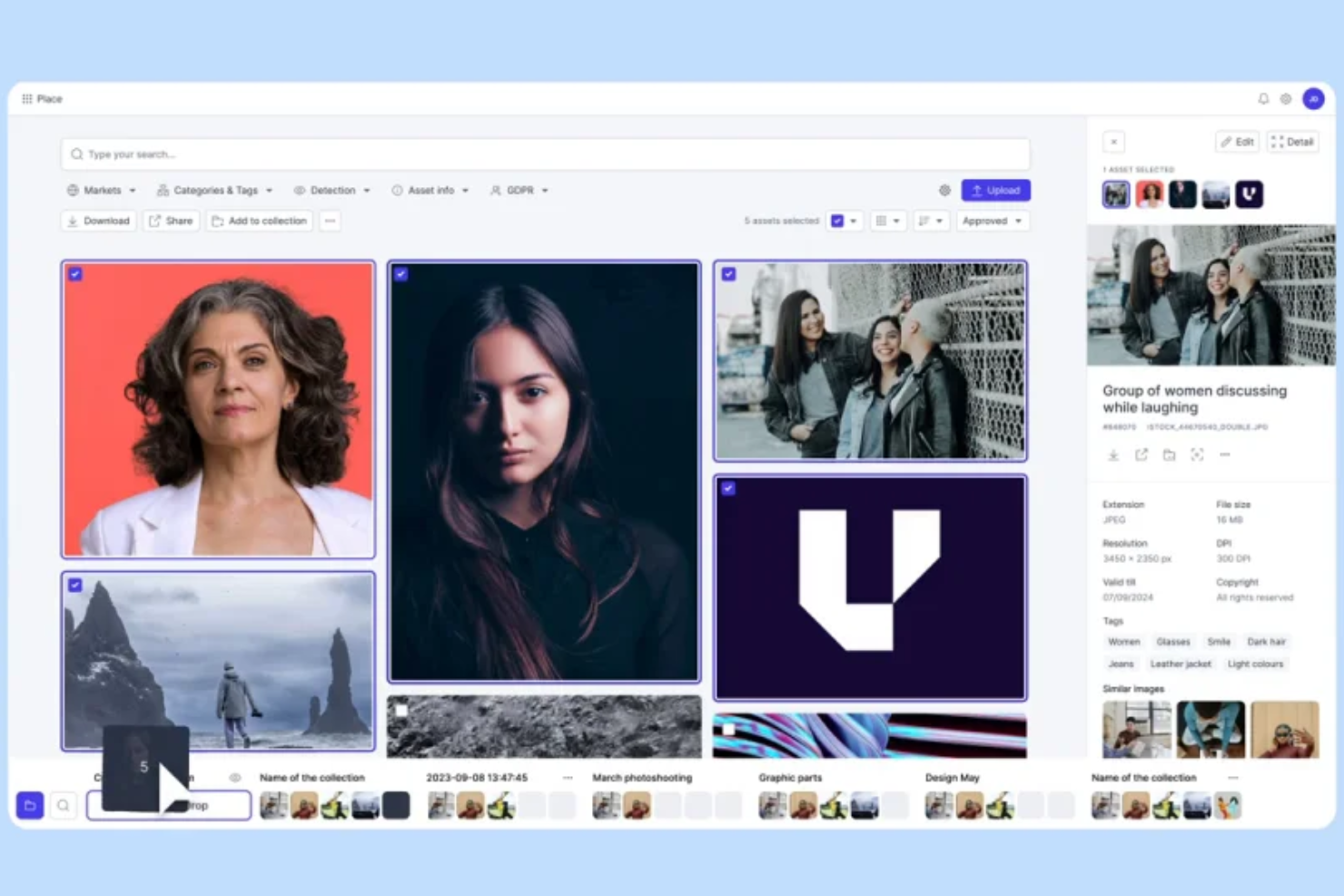
Papirfly helps video-centric teams bring order and clarity to their constantly growing libraries of clips, trailers, recordings, and multimedia content by giving you a central place to store, tag, and manage every moving-image asset alongside your broader brand library. Instead of wrestling with scattered files across drives and platforms, your team can quickly find, organize, and reuse video files in a way that aligns with your brand guidelines and workflows.
Why I Picked Papirfly
I picked Papirfly because it brings core digital asset management features — like searchable metadata tagging and robust version control — into a single platform that supports video alongside images and documents, helping you keep all media in sync with your creative workflows. Its metadata and tagging system makes it easier for your team to categorize and find video files by campaign, format, or use case without endless manual searching.
The version control and preview tools let you compare edits, view clips before downloading, and keep track of the latest approved cut. And the brand portal experience provides a clear, visual interface where stakeholders can access and understand which video assets are available for use.
Papirfly Key Features
In addition to its standout features, Papirfly offers several other tools to enhance your video management experience:
- AI-Driven Asset Discovery: This feature utilizes artificial intelligence to make your video assets instantly discoverable, saving you time and effort in locating the right content.
- Multilingual Support: Papirfly supports content creation in multiple languages, ensuring your video messages reach a global audience without losing brand consistency.
- Approval Workflows: Enables review and sign-off processes for video assets so only final versions are shared or published.
- Branded Video Templates: These templates ensure all video content adheres to your brand guidelines, incorporating necessary elements like colors, graphics, and watermarks.
Papirfly Integrations
Integrations include 100+ options, like Adobe AEM, Adobe Commerce, Adobe Illustrator, Asana, Canva, Cegid, CKEditor, Contentful, CoreMedia, Frontify, Google Drive, Jira, Mailchimp, Odoo, Salesforce, and TikTok.
Pros and Cons
Pros:
- Version control lets you trace and restore previous media edits.
- AI-driven discovery simplifies asset searching and management.
- Templates facilitate quick creation of on-brand materials.
Cons:
- No mobile app for asset management on the go.
- Template customization options may feel restrictive for complex designs.


MediaValet is a cloud-based digital asset management platform built for teams in media, marketing, and creative industries who need to organize, search, and share large video libraries securely and at scale.
Who Is MediaValet Best For?
MediaValet is a strong fit for mid-to-enterprise-level marketing and media teams managing high volumes of video content across distributed, global workflows.
Why I Picked MediaValet
I picked MediaValet because its Audio Video Intelligence (AVI) feature handles automated transcription natively inside the DAM—without a third-party tool. Transcripts are auto-generated and can be translated into 100+ languages, which helps when my team distributes video content across global markets. AVI also automatically tags spoken words, objects, people, and locations, so searching a large video library by what's said or shown in a clip becomes practical rather than painful. That pairing of transcription and AI-powered search makes MediaValet a strong choice for video-heavy workflows.
MediaValet Key Features
- Brand portal: Create customizable, shareable portals that give external stakeholders on-demand access to approved video assets without needing a full DAM login.
- Version control: Track and manage multiple iterations of a video file, with the ability to restore previous versions and maintain a clear edit history.
- Role-based permissions: Assign granular access controls at the folder, collection, or asset level to manage who can view, download, or edit video content.
- Adobe Creative Cloud integration: Access and sync MediaValet assets directly inside Premiere Pro and After Effects without leaving your editing environment.
MediaValet Integrations
Integrations include Adobe Creative Cloud, Canva, monday.com, Marq, Asana, AutoDesk, Azure Active Directory, Dropbox, Google Drive, and Salesforce Sales Cloud.
Pros and Cons
Pros:
- Mobile access allows for asset management on the go
- Advanced security features ensure assets remain protected
- Robust search capabilities allow for quick location of assets
Cons:
- Limited options for customizing the user interface
- Potential learning curve for new users

Acquia DAM (Widen) is a digital asset management platform designed for creative teams, marketers, and media professionals who need to organize, manage, and distribute large volumes of video content across channels.
Who Is Acquia DAM (Widen) Best For?
Acquia DAM (Widen) is a good fit for mid-to-enterprise-level marketing and creative teams that manage high volumes of video and media assets across multiple brands or channels.
Why I Picked Acquia DAM (Widen)
Acquia DAM (Widen) earns its spot on my shortlist because of how well it handles video captioning directly within the platform. I like that you can generate captions automatically and edit them without leaving the DAM, which keeps my team from bouncing between tools mid-workflow. The platform also supports timed text tracks, so captions stay synced to the correct video version as assets get updated. I've found the metadata tagging on caption files especially useful for searchability across large video libraries.
Acquia DAM (Widen) Key Features
- Video conversions on the fly: Convert video files into specific bitrates, frame rates, or pixel dimensions directly within the platform without external tools.
- AI video transcription: Automatically generate searchable text transcripts from video files to speed up asset discovery and content reuse.
- Version control: Track file iterations across video assets and retain associated metadata values as new versions are uploaded.
- Asset insights: Monitor video asset engagement, including views, downloads, and embeds, with filterable analytics dashboards.
Acquia DAM (Widen) Integrations
Integrations include Adobe Creative Cloud, Drupal, Shopify, Salesforce, Workfront, and an open REST API for custom integrations.
Pros and Cons
Pros:
- AI-powered auto-tagging enhances asset discoverability
- Dynamic embed codes allow for flexible asset customization
- Branded portals facilitate organized asset sharing
Cons:
- Channel distribution limited to higher-tier plans
- Could have more template options for portals and dashboards
New Product Updates from Acquia DAM (Widen)
Acquia DAM Enhances AI Document Summarization
Acquia DAM enhances AI document summarization, enabling automatic summaries for .docx and .pdf assets. This update helps users quickly understand document content and retrieve key information without manual review. For more information, visit Acquia DAM’s official site.
 .
.

Air is a digital asset management platform built for creative teams and agencies who need to organize, collaborate on, and deliver video content while keeping feedback and version control in one place.
Who Is Air Best For?
Air is a strong fit for creative teams and marketing departments at mid-sized companies that manage high volumes of video and visual content across multiple projects.
Why I Picked Air
Air earns its spot on my shortlist because of how it handles feedback directly on video assets. I like that reviewers can leave timestamped comments on video files without needing a separate tool—my team can drop feedback at the exact moment in a clip where a change is needed. Air also keeps all versions of a video in one place, so I can track what changed between rounds and who approved what. That version history tied to specific feedback threads is what makes it genuinely useful for video review workflows.
Air Key Features
- Custom boards: Organize video assets into visual, drag-and-drop boards that mirror your team's project structure.
- Smart search: Filter and locate video files using tags, metadata, and custom fields across your entire asset library.
- Shareable workspaces: Send external stakeholders a branded, password-protected link to review specific video collections.
- Permissions control: Set role-based access levels to manage who can view, upload, or edit video assets in each workspace.
Air Integrations
Integrations include Adobe Creative Cloud, Slack, Google Drive, Dropbox, Box, Figma, Canva, Microsoft Teams, Asana, and Zapier.
Pros and Cons
Pros:
- Version control features
- Good asset feedback and approval features
- Smart search for quickly locating assets
Cons:
- Could offer more integrations
- Advanced security features limited to higher tier plans
New Product Updates from Air

Air Adds Performance Analytics and Bulk Updates
Air introduces Performance Analytics and Bulk Updates, enabling you to analyze asset performance directly within the platform while updating multiple assets at once to improve efficiency and workflow speed. For more information, visit Air's official site.


Pics.io is a digital asset management platform designed for creative teams and media professionals who need to organize, search, and collaborate on large video libraries across distributed teams and cloud storage.
Who Is Pics.io Best For?
Pics.io is a strong fit for marketing and creative teams at mid-sized companies managing high volumes of video content across collaborative, cloud-based workflows.
Why I Picked Pics.io
I picked Pics.io as one of the best because its AI Video Intelligence feature genuinely changes how video-heavy teams work with their archives. Instead of manually tagging footage, the AI auto-generates transcripts, chapters, entity tags, and OCR from on-screen text—all with timestamps. I like that you can search across all of that from a single search box, so if my team needs a specific product demo clip or a customer quote buried in a two-hour webinar, we can jump straight to that moment without scrubbing through the timeline. The AI-generated metadata is also fully editable, which means the AI handles the bulk of the tagging work and my team only steps in to refine what matters.
Pics.io Key Features
- Custom metadata fields: Create custom metadata fields that go beyond default options, so your team can tag and filter video assets using terminology specific to your workflow.
- Version control: Upload new versions of a video file without breaking existing shared links, with side-by-side comparisons and a full revision history.
- Role-based access management: Set user-level permissions to control who can view, edit, or share video assets, with options for password protection and expiration dates on shared links.
- Timestamped comments: Add comments directly to video assets with timestamps and time codes, so collaborators can give frame-specific feedback without leaving the platform.
Pics.io Integrations
Integrations include Google Drive, Amazon S3, Adobe Creative Cloud, Google Workspace, and WordPress.
Pros and Cons
Pros:
- Allows for collaboration on assets
- Easy asset search functions
- Supports a wide range of file types
Cons:
- Larger files may load slower
- Limited platform customization
New Product Updates from Pics.io
Pics.io Enhances Video Intelligence With Improved UI and Search
Pics.io introduces improvements to its Video Intelligence experience, including UI/UX updates and enhanced search display. These updates make it easier to navigate videos and find relevant moments. For more information, visit Pics.io’s official site.
 introduces improvements to its Video Intelligence experience, including UI/UX updates and enhanced search display. These updates make it easier to navigate videos and find relevant moments. For more information, visit

Bynder is a digital asset management platform designed for creative teams and marketing departments who need to organize, manage, and distribute large volumes of video content at scale.
Who Is Bynder Best For?
Bynder is a strong fit for mid-to-large enterprises with high-volume creative output that need centralized control over video and multimedia assets across global teams.
Why I Picked Bynder
I picked Bynder as one of the best because its Dynamic Asset Transformation (DAT) capability is genuinely impressive for video-heavy teams. DAT uses URL parameters to manipulate a single master asset in real time—so instead of manually exporting a video in five different formats for five different channels, Bynder handles the resizing, reformatting, and optimization automatically. I also like the Speech-to-Text Search feature, which generates transcripts for video and audio files so your team can find content even when metadata is missing. That's a real time-saver when you're managing hundreds of video assets across campaigns.
Bynder Key Features
- Brand guidelines portal: Host and share living brand guidelines alongside your video assets so teams always reference the latest approved standards.
- Workflow approvals: Route video assets through customizable review and approval stages with assignable tasks and deadline tracking.
- Collections: Group related video assets into shareable collections for campaign distribution or stakeholder review without duplicating files.
- Role-based access control: Set granular permissions to control who can view, edit, download, or share specific video assets across your organization.
Bynder Integrations
Integrations include Adobe Creative Cloud, Salesforce, Shopify, SharePoint, Asana, HubSpot, OneDrive, Smartsheet, monday.com, and Figma.
Pros and Cons
Pros:
- Extensive integrations
- AI-powered search
- Automated asset optimization
Cons:
- Limited customization options
- Setup can be time-consuming
New Product Updates from Bynder
Bynder Expands Integrations for Content and Asset Workflows
Bynder introduces integrations with Salesforce Data 360, echo3D, FirstSpirit, monday service, Pixelz, and Frame.io. These updates enhance asset management, content workflows, and cross-platform collaboration. For more information, visit Bynder’s official site.
 .
.

Tagbox.io is a digital asset management platform designed for creative teams and media companies who need to organize, search, and manage large video libraries with advanced automation and AI-driven tagging.
Who Is Tagbox.io Best For?
Tagbox.io is a strong fit for media and marketing teams at mid-size to enterprise companies that manage high volumes of video content and need fast, searchable access to their assets.
Why I Picked Tagbox.io
Tagbox.io earns its spot on my shortlist because it applies AI to video content specifically—not just images. Face recognition works across video files, so my team can search a library of hundreds of clips and surface every video featuring a specific person without manually scrubbing through footage. The auto-transcript feature makes spoken words searchable, letting you jump directly to a specific scene based on a phrase. Custom AI tagging lets you train the model to recognize things generic tools miss—like a specific product model or a branded event moment.
Tagbox.io Key Features
- Smart collections: Automatically group video assets into dynamic collections based on tags, metadata, or content attributes.
- Role-based access control: Assign different permission levels to team members, controlling who can view, upload, or edit video assets.
- Custom metadata fields: Add and configure metadata fields specific to your video library to support more precise search and filtering.
- Embeddable portals: Share curated video collections with external stakeholders through branded, shareable portals without requiring a login.
Tagbox.io Integrations
Native integrations are not currently listed.
Pros and Cons
Pros:
- Custom tagging for video libraries
- Face recognition improves asset discovery
- AI-powered video asset organization
Cons:
- Limited offline access options
- No built-in video editing


Cloudinary is a digital asset management platform built for creative teams, marketers, and developers who need to organize, transform, and deliver high-quality video content at scale.
Who Is Cloudinary Best For?
Cloudinary is a strong fit for mid-size to enterprise teams in media, e-commerce, and tech that manage large libraries of video and image assets across multiple channels.
Why I Picked Cloudinary
Cloudinary earns its spot on my shortlist because of how well it handles image and video scaling across different resolutions, formats, and delivery contexts. I like that you can apply on-the-fly transformations—resizing, cropping, and reformatting video—without re-uploading assets or running manual conversion jobs. My team uses Cloudinary's dynamic URL parameters to serve the right video format and resolution to each device automatically. The AI-powered smart cropping feature is also genuinely useful, keeping the focal point of a video frame intact even when scaling down for mobile.
Cloudinary Key Features
- Video transcoding: Convert video files into multiple formats, including MP4, WebM, and HLS, directly within the platform.
- Adaptive bitrate streaming: Automatically adjust video quality based on a viewer's network speed for uninterrupted playback.
- AI-powered tagging: Automatically generate metadata tags for video assets using machine learning to speed up search and organization.
- Access controls: Set role-based permissions to manage who can view, edit, or download specific video assets in your library.
Cloudinary Integrations
Cloudinary offers an API for custom integrations.
Pros and Cons
Pros:
- Wide range of integrations with eCommerce and marketing platforms
- Advanced AI features for automated content manipulation
- Powerful image and video optimization features
Cons:
- Overkill for small businesses or projects that don't require heavy media manipulation
- May have a steep learning curve for new users


IntelligenceBank is a digital asset management platform designed for marketing teams and agencies who need to organize, share, and control access to large volumes of video and creative content while maintaining brand consistency and compliance.
Who Is IntelligenceBank Best For?
IntelligenceBank is a strong fit for mid-to-large marketing teams in regulated industries that need tight control over brand assets and content approvals.
Why I Picked IntelligenceBank
I picked IntelligenceBank as one of the best because its AI-powered compliance review features go well beyond what most DAM tools offer. I particularly like the automated content risk detection, which scans video and other assets for legal, brand, and regulatory issues in real time—before anything goes live. My team can also set up custom approval workflows that route video content through legal and compliance reviewers at specific stages, so nothing slips through without sign-off. For teams in regulated industries like financial services or healthcare, that kind of built-in compliance infrastructure is genuinely hard to replicate with a standard DAM.
IntelligenceBank Key Features
- Video closed captions: Generate searchable and editable closed captions for video and audio files within the platform.
- AI-powered asset tagging: Use AI to add metadata to video assets so they're searchable without manual tagging.
- Asset expiry and usage rights controls: Set expiration dates and define usage rights on video files to prevent outdated or unlicensed content from being distributed.
- Audit trails and usage tracking: Monitor where video assets have been shared, downloaded, and used across your organization with full visibility logs.
IntelligenceBank Integrations
Integrations include Adobe Photoshop, Canva, Figma, Dropbox, Google Drive, Microsoft Teams, Slack, Salesforce, WordPress, and YouTube.
Pros and Cons
Pros:
- Strong customer support and user-friendly interface
- Broad integration capabilities with other software
- Customizable to fit various marketing needs
Cons:
- Desktop uploader lacks bidirectional syncing
- Some challenges with single sign-on integration
Other Digital Asset Management Software For Video
Below is a list of additional digital asset management software for video that we shortlisted, but did not make it to the top list. It’s definitely worth checking them out!
- Canto
For brand asset organization
- Imagen
For media content distribution
- Aprimo
For AI-powered asset searchability
- Adobe Experience Manager Assets
For cloud-native DAM
- DemoUp Cliplister
For eCommerce product content
- Lytho
For version control and compliance management
- NetX
For end-to-end DAM solutions
- Orange Logic
For large, high-resolution files
- ioMoVo
For BYOS solutions
- Filecamp
For digital asset sharing


Related Project Management Software Reviews
If you still haven't found what you're looking for, check out these related project management tools we've tested and reviewed.
- Project Management Software
- Video Production Project Management Tools
- Digital Asset Management Tools for Events
- Resource Management Software
- Workflow Automation Software
- Task Management Software
- Collaboration Tools
- Gantt Chart Maker
- Document Verification Software
Digital Asset Management Software For Video Selection Criteria
As an expert who has personally tried and researched these tools, I have developed a set of criteria that address the essential features and user experience considerations for this type of software.
Core Digital Asset Management Software For Video Functionality: 25% of Total Weighting Score
- Centralized storage for video assets
- Metadata tagging and indexing for easy searchability
- Access controls and permission settings
- Version control and audit trails
- Integration capabilities with other tools and platforms
Additional Standout Features: 25% of Total Weighting Score
- Unique collaboration tools for team feedback and approval processes
- Advanced AI-driven search and recognition features
- Customizable branding options for the interface
- Real-time analytics and reporting capabilities
- Innovative content distribution and publishing options
Usability: 10% of Total Weighting Score
- Intuitive navigation and user-friendly interface design
- Responsive design for cross-device compatibility
- Clear and concise layout of features and tools
- Simplified workflows that reduce the number of steps to complete tasks
- Visual elements like thumbnail previews and drag-and-drop functionality
Onboarding: 10% of Total Weighting Score
- complete knowledge bases and FAQs
- Step-by-step interactive tutorials and product tours
- Availability of training materials such as videos and webinars
- Access to customer success teams for personalized guidance
- Template libraries to jumpstart asset organization
Customer Support: 10% of Total Weighting Score
- Multiple channels of support, including email, chat, and phone
- Quick response times and resolution of issues
- Dedicated account managers for enterprise clients
- Community forums for peer-to-peer assistance
- Regular updates and clear communication about new features
Value For Money: 10% of Total Weighting Score
- Transparent DAM pricing structures without hidden fees
- Flexible plans that scale with business needs
- Free trials or demos to evaluate the software before purchase
- Cost comparison with similar products in the market
- Assessment of long-term ROI based on feature set and performance
Customer Reviews: 10% of Total Weighting Score
- Consistency in positive feedback across various user segments
- Specific mentions of reliability and uptime
- User testimonials about the impact on workflow efficiency
- Balanced consideration of both positive and negative reviews
- Trends in customer satisfaction over time
How To Choose Digital Asset Management Software For Video
As you work through your unique software selection process, remember the following points to know how to choose a digital asset management system.
- Scalability: As your video content library grows, so does the need for a system that can handle increasing assets without a drop in performance. Choose software that can scale with your business, ensuring that your video production increases and your digital asset management system can keep up. For instance, a growing marketing agency will require a system to manage an expanding portfolio of client video assets.
- Integration Capabilities: Your digital asset management software should work well with other tools in your workflow. Look for software integrating video editing, content management systems, and marketing platforms. This consideration is important for a production house that relies on a workflow between video editing and content distribution channels.
- Searchability and Metadata: Finding the right video among thousands can be daunting. Opt for software that offers advanced search capabilities and solid metadata options. This feature is particularly relevant for organizations with large video archives, such as broadcasters or educational institutions, where quick retrieval of video content is important.
- Security and Permissions: Protecting your video content from unauthorized access is paramount. Select digital asset management tools with complete security features and customizable permission settings. This is especially important for companies that handle sensitive or proprietary video content.
- Support and Training: Implementing a new system can be complex. Ensure that the software provider offers adequate support and training resources. This is vital for businesses that may not have in-house expertise in digital asset management, such as startups or non-profits, to help them get the most out of their investment.
Trends In Digital Asset Management Software For Video
The landscape of digital asset management for video is advancing. Here are some trends that redefine how video content is managed and used.
- AI-Driven Efficiency and Metadata Management: Artificial intelligence is transforming DAM software by automating metadata tagging and aiding in content creation. This automation enhances asset discoverability and return on investment. Generative AI is being tested for its ability to compile videos into new marketing materials.
- Integration with CMS, PIM, and Creative Toolkits: DAM systems are increasingly integrating with content management systems, product information management systems, and creative toolkits. This integration maintains DAM as the central hub for media assets and supports the creation of cohesive content experiences.
- Automation and Workflow Enhancements: DAM systems embed automation and advanced workflows to simplify processes. Enhanced collaboration features support marketing and creative teams, while persona-based interfaces offer role-specific access, improving efficiency for large, diverse organizations.
- DAM as a Foundational Technology for Innovation: DAM is becoming critical for fostering innovation and creativity across digital platforms. It enables brands to reduce time to market, cut asset production costs, and attract new customers through consistent digital experiences.
The trends in DAM software for video indicate a move towards solutions that are more integrated, automated, and focused on the user, facilitating the creation of dynamic and personalized content experiences. Find more information on the digital asset management market here.
What Is Digital Asset Management Software For Video?
Digital asset management software for video is a specialized tool designed to store, organize, and retrieve video content. It is used by media professionals, marketers, and organizations to manage large volumes of video files. The software is a central repository for video assets, allowing users to easily access, share, and distribute content across various platforms and channels.
It caters to those who require quick retrieval and consistent management of video files for multiple purposes, such as broadcasting, marketing campaigns, or content creation.
The components of digital asset management software for video include metadata tagging, advanced search capabilities, access controls, and version management. These features enable users to categorize video content, locate specific files quickly, manage permissions for different users, and track changes over time. The software is essential for maintaining an organized digital video library and ensuring that the right content is available when needed.
Features Of Digital Asset Management Software For Video
When selecting digital asset management software for video, it's important to consider DAM features that cater to video content. These features ensure efficient management, quick access, and effective collaboration on video assets. Here are the top features to look for.
- High-Performance Video Playback - This allows for smooth previewing of videos directly within the platform. Quick and clear video playback is essential for reviewing content without downloading large files.
- Advanced Search Capabilities - Enables users to find videos and audio files quickly using metadata, tags, or keywords. Being able to locate video assets swiftly saves time and increases productivity.
- Support for Various Video Formats - The software should handle multiple video formats without compatibility issues. This flexibility is important as it ensures all video content can be managed regardless of its original format.
- Bulk Upload and Download - Allows multiple videos to be uploaded or downloaded simultaneously. This feature is critical for time efficiency, especially when dealing with large volumes of video content.
- Version Control - Keeps track of different versions of a video file. Maintaining an accurate history of revisions is important for ensuring the final product reflects all intended edits.
- Access Controls and Permissions - Manages who can view, edit, or share assets. This control is important for maintaining the security and integrity of video content.
- Integration with Editing Software - Connects with video editing tools. Direct integration is important for a smooth workflow between editing and asset management.
- Collaboration Tools - Facilitates teamwork by allowing multiple users to comment and give feedback on video content. Effective collaboration is key to producing high-quality video content.
- Customizable Metadata Fields - Enables adding specific data to videos, making them easier to organize and track. Custom metadata is important for tailoring the DAM system to the needs of the organization.
- Cloud-Based Storage and Backup: Ensures video assets are securely stored and backed up online. Reliable cloud storage protects content against data loss and enables remote access.
Choosing the right digital asset management software for video is a strategic decision that can greatly impact an organization's video content management efficiency. The features listed above are essential to ensure that video assets are well-organized, easily accessible, and securely managed.
Benefits Of Digital Asset Management Software For Video
Digital asset management software for video offers a range of advantages that can improve the effectiveness of managing video content for users and organizations. Here are five primary benefits of this type of DAM software.
- Centralized Storage and Retrieval - DAM systems offer a single source of truth for all video assets. This centralization makes it easier for users to store, organize, and retrieve videos, saving time and reducing the risk of lost or duplicated content.
- Improved Collaboration and Workflow - DAM software enables teams to work together more effectively. It simplifies the review and approval process, allowing for real-time feedback and edits, accelerating project timelines, and improving productivity.
- Brand Consistency - Organizations can maintain a consistent brand image by using DAM software. The software ensures that only the most current and approved videos are used, which helps uphold the brand's reputation and messaging across all platforms.
- Scalable Distribution - DAM systems simplify distributing video content across various channels. They allow for quick resizing and repurposing of videos, ensuring content is optimized for each platform.
- Actionable Analytics - With DAM software, organizations can track how their videos are being used and how they perform. This insight allows data-driven decisions to improve video strategies and maximize return on investment.
DAM software for video provides a structured and efficient approach to storing, accessing, and using video assets, which can lead to better collaboration, more substantial brand consistency, and more strategic content distribution.
Costs & Pricing Of Digital Asset Management Software For Video
When considering digital asset management pricing, you should know the various plan options that cater to different needs and budgets.
Below is a summary of the typical plan types, their average prices, and the common features included in each plan.
Plan Comparison Table for Digital Asset Management Software For Video
| Plan Type | Average Price | Common Features |
| Basic | $0 - $20 per user/month | - Basic asset storage and organization- Basic search functionality- Limited file sharing capabilities |
| Professional | $25 - $100 per user/month | - Advanced search capabilities- Greater storage capacity- Version control- Basic integration options |
| Enterprise | Custom pricing | - Customizable workflows- Unlimited storage- complete integration options- Advanced security features |
| Free Option | $0 | - Limited asset storage- Basic search and filter capabilities- File sharing with some restrictions |
When choosing a digital asset management plan for video content, consider the number of assets, team collaboration needs, scalability, ease of use, and customer support from the vendor.
Digital Asset Management Software For Video FAQs
Here are some of the frequently asked questions I receive about digital asset management software for video.
How does digital asset management software for video differ from regular DAM systems?
Video DAM software is tailored specifically for handling video content, which requires more storage space and specialized features for editing and playback compared to standard digital assets. It often includes codecs and transcoding tools to ensure videos can be viewed on different devices and platforms, as well as more solid bandwidth to handle the larger file sizes associated with video content.
Can digital asset management software for video integrate with other systems?
Yes, many digital asset management systems for video offer integration capabilities with other software tools such as content management systems (CMS), marketing automation platforms, and creative software. This integration allows for a more efficient workflow, enabling users to access and use their video content across different stages of their digital marketing and content creation processes.
How does digital asset management software for video improve collaboration?
Video DAM software improves collaboration by providing centralized access to video assets, which team members can access from different locations. It also typically includes tools for commenting, reviewing, and approving content, as well as version control to track changes and updates. This facilitates clear communication and efficient teamwork on video projects.
Is cloud-based digital asset management software for video more beneficial than on-premise solutions?
Cloud-based DAM software offers several advantages, such as reduced IT infrastructure costs, easier access from any location, automatic updates, and scalability. However, the choice between cloud-based and on-premise solutions depends on the specific needs of an organization, including considerations for security, control, and integration with existing systems.
What security features should digital asset management software for video have?
Security features to consider in video DAM software include encryption, secure access controls, user authentication, and activity logs. It’s also important to assess the vendor’s compliance with industry standards and regulations to ensure that your video content is protected against unauthorized access and data breaches.
How does digital asset management software for video handle large video files and formats?
Video DAM software is designed to handle large video files and a variety of formats efficiently. It often includes features such as high-capacity storage, fast upload and download speeds, transcoding tools to convert videos into different file formats, and streaming capabilities to preview content without downloading large files.
What is the difference between video DAM software and animation DAM software?
DAM software for video focuses on managing large video files with tools for playback, transcoding, and format compatibility. DAM software for animation supports complex, layered assets like storyboards, character rigs, and renders, often requiring more granular version control and collaboration features. While both handle large media files, animation DAM emphasizes asset iteration and production workflows.
What’s Next?
Want to connect with other digital project managers to share resources and best practices?
Join our membership community and get access to 100+ templates, samples, and examples, and connect with 100s of other digital project managers in Slack.