

10 Best Developer Productivity Tools Reviewed in 2026

10 Best Developer Productivity Tools Shortlist


Managing a team of developers can feel like juggling a dozen tasks at once. You’re dealing with deadlines, code quality, and keeping everyone on the same page. Developer productivity tools can make your life a bit easier. They help your team code faster, collaborate better, and keep track of progress without the usual headaches.
I've spent time testing and reviewing these tools to give you an unbiased look at what works and what doesn’t. In this article, I'll share my top picks, focusing on tools that really make a difference in day-to-day project management. Whether you’re dealing with code reviews or time tracking, there’s something here to help your team perform at its best.
Why Trust Our Software Recommendations
Our team has been testing and reviewing software since 2012. As project managers ourselves, we know how difficult—and important—it is to choose the right software.
For this guide, we evaluated tools using hands-on testing and independent research, scoring tools using our selection criteria. We also draw on insights from industry thought leaders and practicing project management experts.
Our reviews reflect our human editorial judgment, not a sales pitch.
Expert reviewers:
Developer Productivity Tools Comparison Table
The table below compares pricing details for my top developer productivity tool selections.
| Tool | Best For | Trial Info | Price | ||
|---|---|---|---|---|---|
| 1 | Best for time tracking | Free plan + 7-day free trial available | From $4.99/user/month | Website | |
| 2 | Best for Java development | 45-day free trial available | From $19.90/user/month | Website | |
| 3 | Best for GitHub-native AI-assistance | Free plan + 30-day free trial available | From $4/user/month | Website | |
| 4 | Best for API testing | Free plan available | From $9/month (billed annually) | Website | |
| 5 | Best for CI/CD pipelines | 30-day free trial + free plan available | From $6/user/month | Website | |
| 6 | Best for delivery performance alerts | “Free forever” trial for up to 8 devs (with 45 days of data retention) | From $15/dev/month | Website | |
| 7 | Best for privacy-first, local AI code completion | Free demo available | From $39/user/month (billed annually) | Website | |
| 8 | Best for developer experience insights | Free demo available | Pricing upon request | Website | |
| 9 | Best for workflow bottleneck metrics | 14-day free trial + free plan + free demo available | From $45/developer/month (billed annually) | Website | |
| 10 | Best for AI-powered security scanning | Free plan + free demo available | From $25/developer/month | Website |
Best Developer Productivity Tool Reviews
Below are my detailed summaries of the best developer productivity tools that made it onto my shortlist. My reviews offer a detailed look at the key features, pros and cons, integrations, and ideal use cases of each tool to help you find the best one for you.

Clockify
Best for time tracking

Clockify is a time-tracking software designed for teams and freelancers to monitor work hours and productivity. It helps businesses track time spent on tasks and projects, making it easier to manage resources and improve efficiency.
Why I picked Clockify: It offers time-tracking features for developers who need precise time management. Clockify allows you to log hours manually or use an automatic timer, providing flexibility in how your team records their work. You can generate detailed reports to analyze productivity and time allocation.
Standout Features and Integrations:
Features include time tracking through both manual entry and automatic timers, detailed reporting for productivity analysis, and a user-friendly interface that suits teams of all sizes. It also offers project tracking to monitor progress and budget management tools to keep projects on track financially.
Integrations include Asana, Trello, Atlassian Jira, monday.com, Intuit QuickBooks, and more.
Pros and Cons
Pros:
- Suitable for teams of all sizes
- Detailed reporting options
- Flexible time logging
Cons:
- Requires consistent manual input
- Can be overwhelming for beginners

Best for Java development
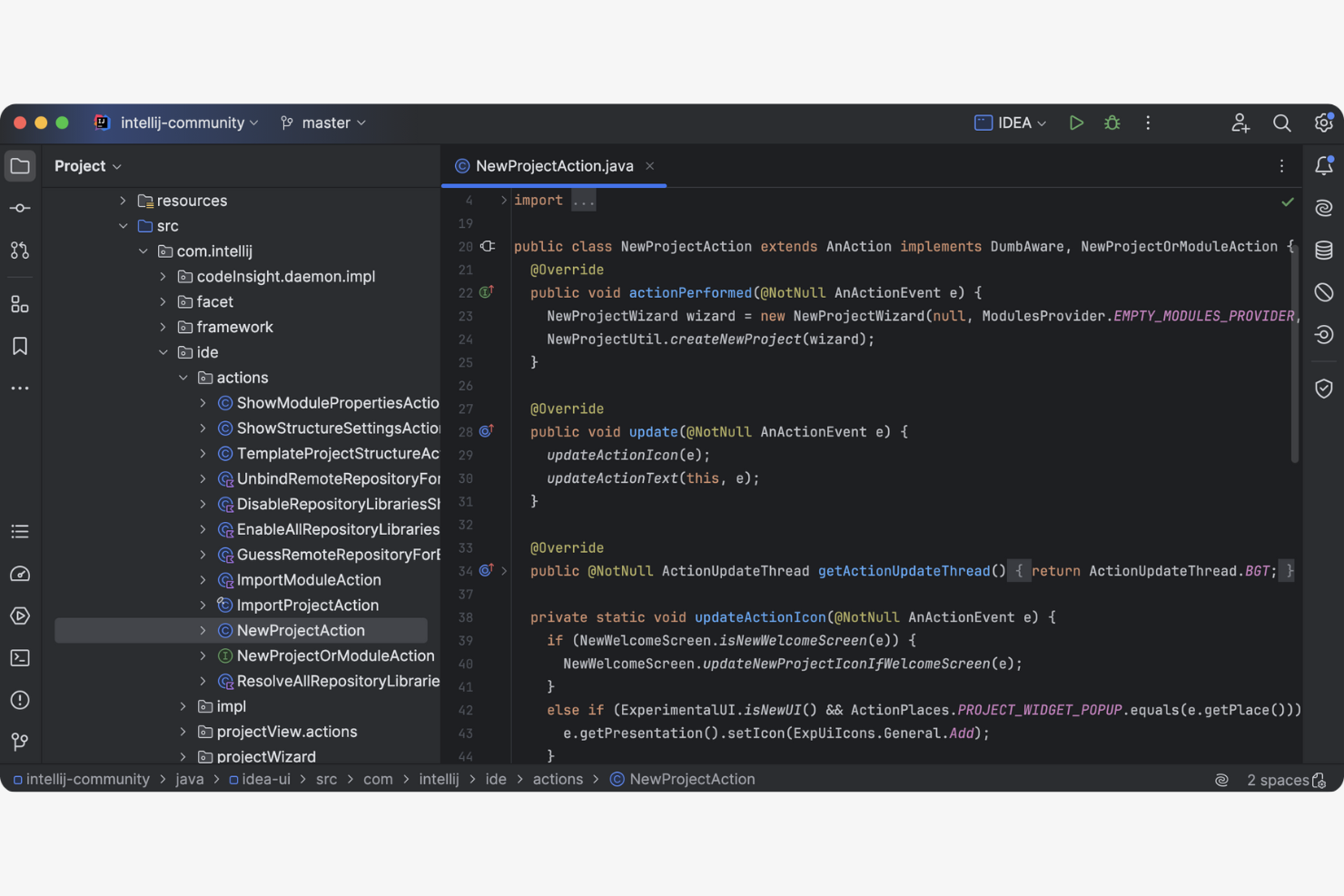
IntelliJ IDEA is an IDE primarily used by Java developers to test, debug, and write code. It offers a range of tools that facilitate coding, refactoring, and code analysis.
Why I picked IntelliJ IDEA: It excels in Java development, providing features that improve coding efficiency and accuracy. The tool integrates well with various build systems and version control systems.
Standout Features and Integrations:
Features include intelligent autocomplete that predicts what you're going to write next, saving time and reducing errors. It offers on-the-fly code analysis, providing instant feedback on your code quality. Additionally, its advanced refactoring tools make it easy to improve and maintain your codebase.
Integrations include Git, GitHub, Maven, Gradle, Docker, Jenkins, and more.
Pros and Cons
Pros:
- Supports advanced refactoring
- Provides on-the-fly code analysis
- Offers intelligent code completion
Cons:
- Limited to Java-centric features
- Can be resource-intensive
Best for GitHub-native AI-assistance
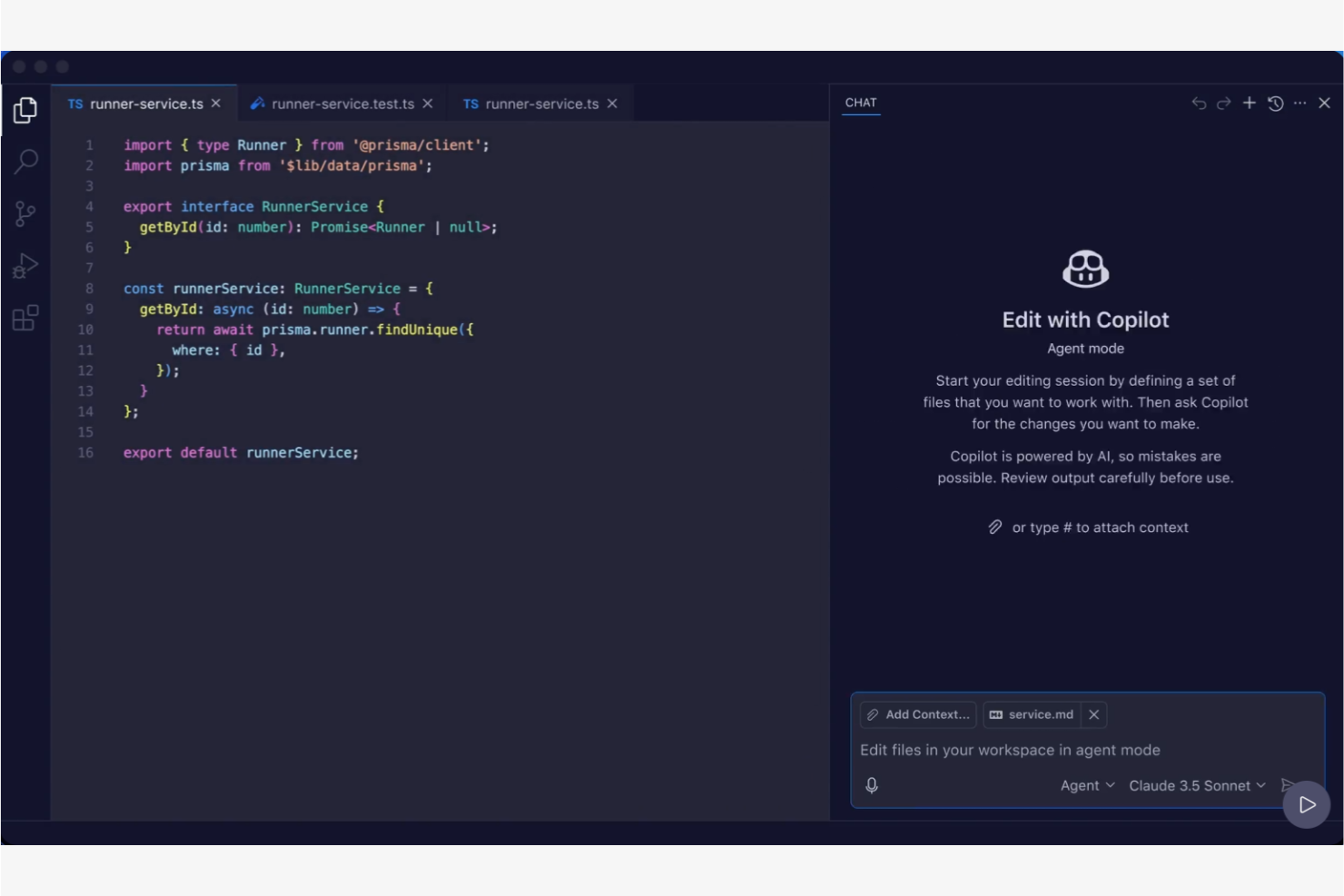
GitHub Copilot is an AI tool designed primarily for developers. It provides contextual code suggestions and task automation, making it a valuable tool for software development teams.
Why I picked GitHub Copilot: This tool offers AI-powered coding and integrates with popular integrated development environments (IDEs), including VS Code. Features such as Autofix address code vulnerabilities and add to GitHub Copilot’s utility in maintaining code quality.
Standout Features and Integrations:
Features include real-time, contextual code suggestions that adapt to your coding style, support for a wide range of programming languages (including JavaScript and TypeScript), and the ability to automate repetitive coding tasks. It also offers a code-referencing tool to identify open source licenses, and filters to block insecure or offensive code.
Integrations include Visual Studio Code, JetBrains, Neovim, GitHub, and more.
Pros and Cons
Pros:
- Provides contextual code suggestions
- Integrates with popular IDEs
- Supports multiple languages
Cons:
- Limited free tier features
- Occasional buggy code suggestions

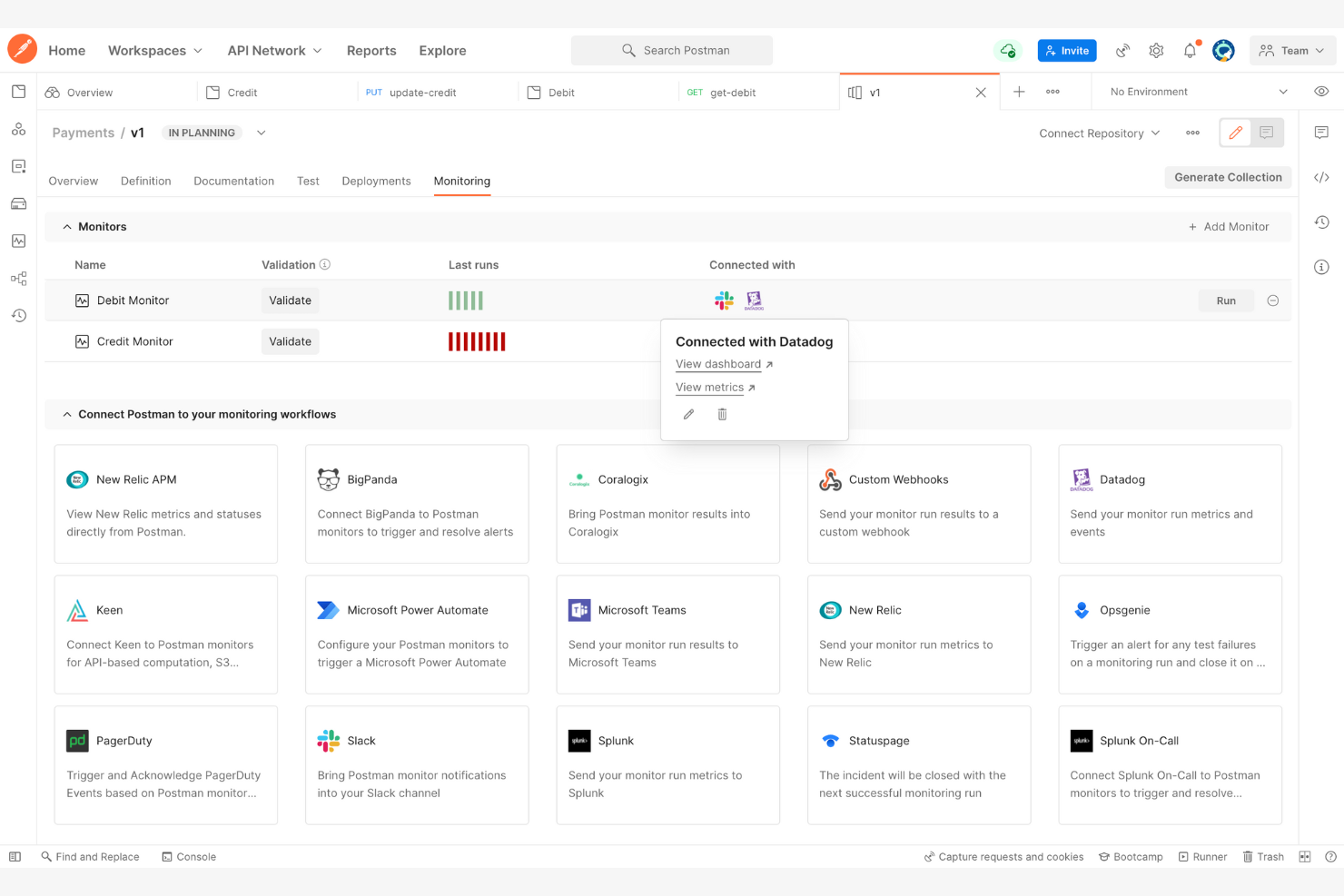
Postman is a collaboration platform for API development used by developers to design, test, and document APIs. It serves software development teams by offering tools that facilitate API lifecycle management.
Why I picked Postman: It excels in API testing, providing tools that simplify the process of designing and testing APIs.
Standout Features and Integrations:
Features include a user-friendly interface and pre-built templates that simplify API request creation and management. Automated testing features ensure your APIs perform as expected, catching potential issues early. Collaboration tools allow your team to share and review API documentation efficiently, improving team productivity.
Integrations include GitHub, GitLab, Jenkins, Slack, Microsoft Teams, and more.
Pros and Cons
Pros:
- Supports team collaboration
- Offers automated testing
- Simplifies API request creation
Cons:
- Mandatory account and cloud dependence
- Can be resource-intensive to operate

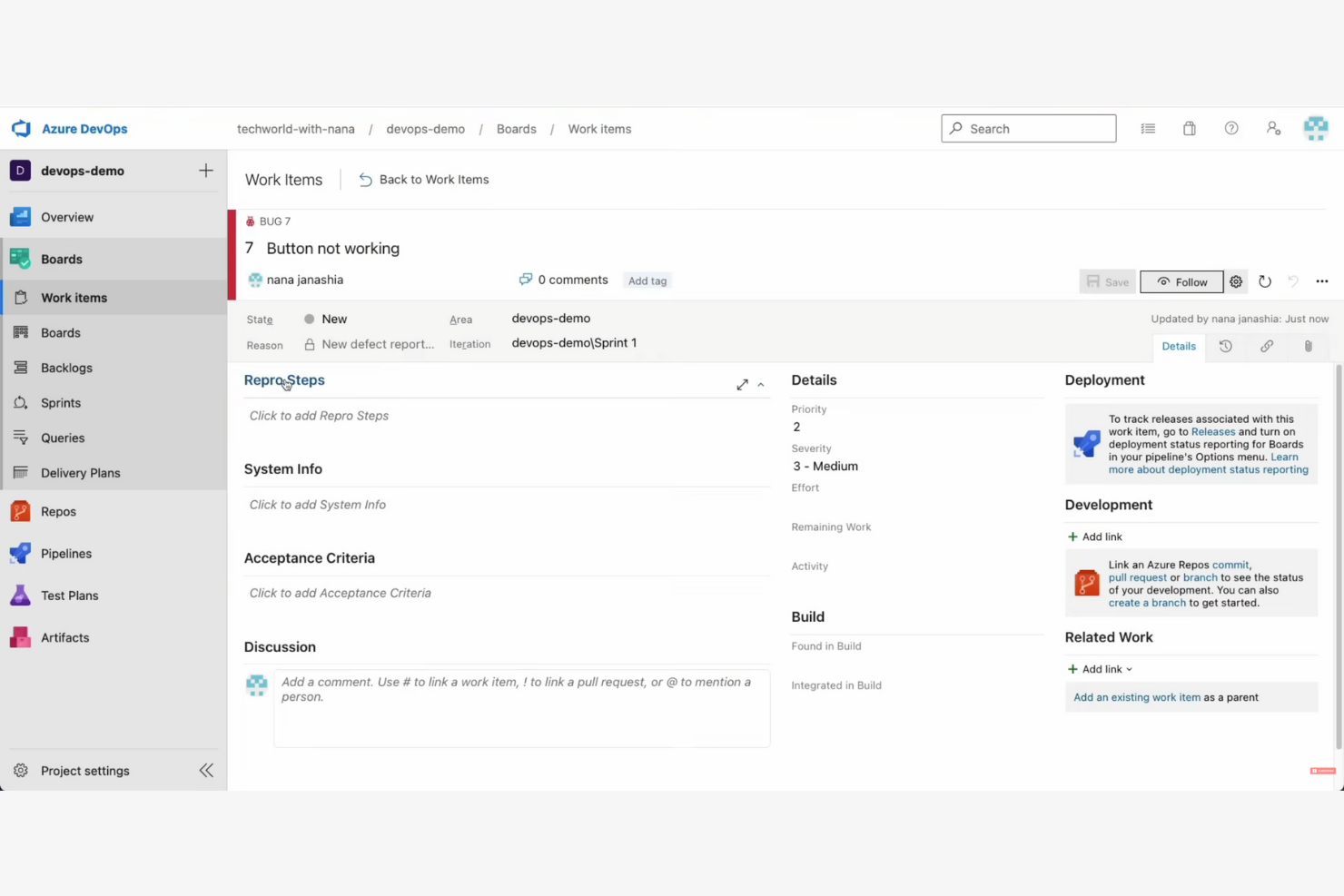
Microsoft Azure DevOps is a suite of development tools designed for teams to plan, develop, and deliver software applications. It caters mainly to software development teams, providing tools for continuous integration and continuous delivery (CI/CD), project management, and collaboration.
Why I picked Microsoft Azure DevOps: It excels in CI/CD pipelines, offering tools that support the software development lifecycle. The platform supports multiple languages and integrates with a variety of tools, making it versatile for different projects.
Standout Features and Integrations:
Features include Microsoft Azure Pipelines, which automate builds and deployments across multiple platforms. Microsoft Azure Boards offer project tracking and management capabilities, which help you organize work items across sprints. The platform also provides test plans for ensuring software quality through automated testing.
Integrations include GitHub, Slack, Docker, Jenkins, Jira, and more.
Pros and Cons
Pros:
- Offers test plans for quality assurance
- Automates builds and deployments
- Supports multiple languages
Cons:
- Microsoft focus makes multi-cloud scenarios complex
- Teams often require significant time to adapt to the platform
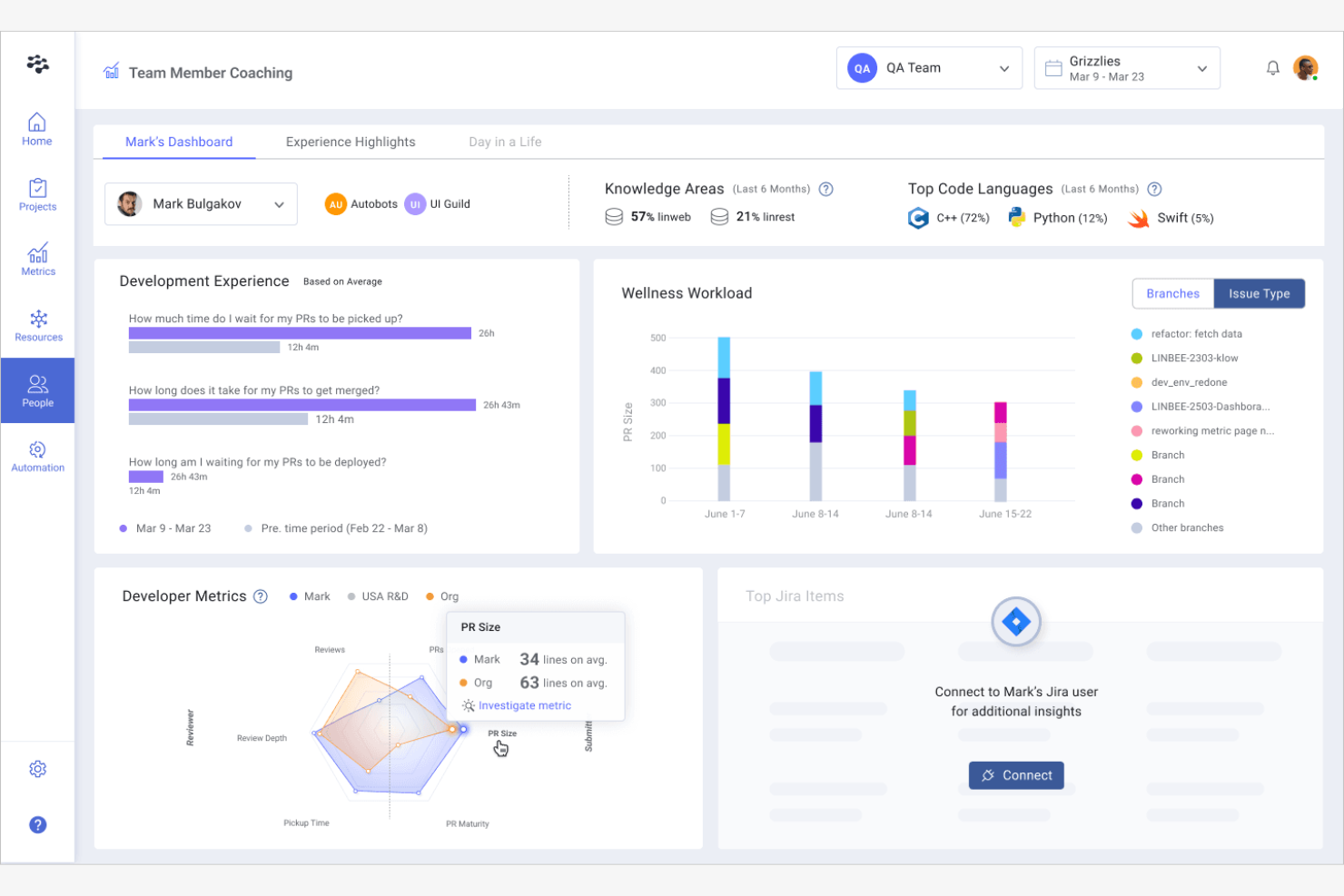
LinearB is a developer analytics tool designed to provide insights into development processes for engineering teams.
Why I picked LinearB: It specializes in engineering analytics, offering tools that help your team understand and improve their workflow.
Standout Features and Integrations:
Features include real-time metrics that track pull request cycle time and deployment frequency, helping teams measure their productivity. It offers project delivery insights that align engineering efforts with business objectives. LinearB also provides workflow optimization tools that identify bottlenecks and suggest improvements.
Integrations include GitHub, GitLab, Bitbucket, Atlassian Jira, Slack, and more.
Pros and Cons
Pros:
- Identifies bottlenecks
- Offers project delivery insights
- Provides real-time metrics
Cons:
- High cost for smaller teams
- Limited non-engineering data
Tabnine
Best for privacy-first, local AI code completion
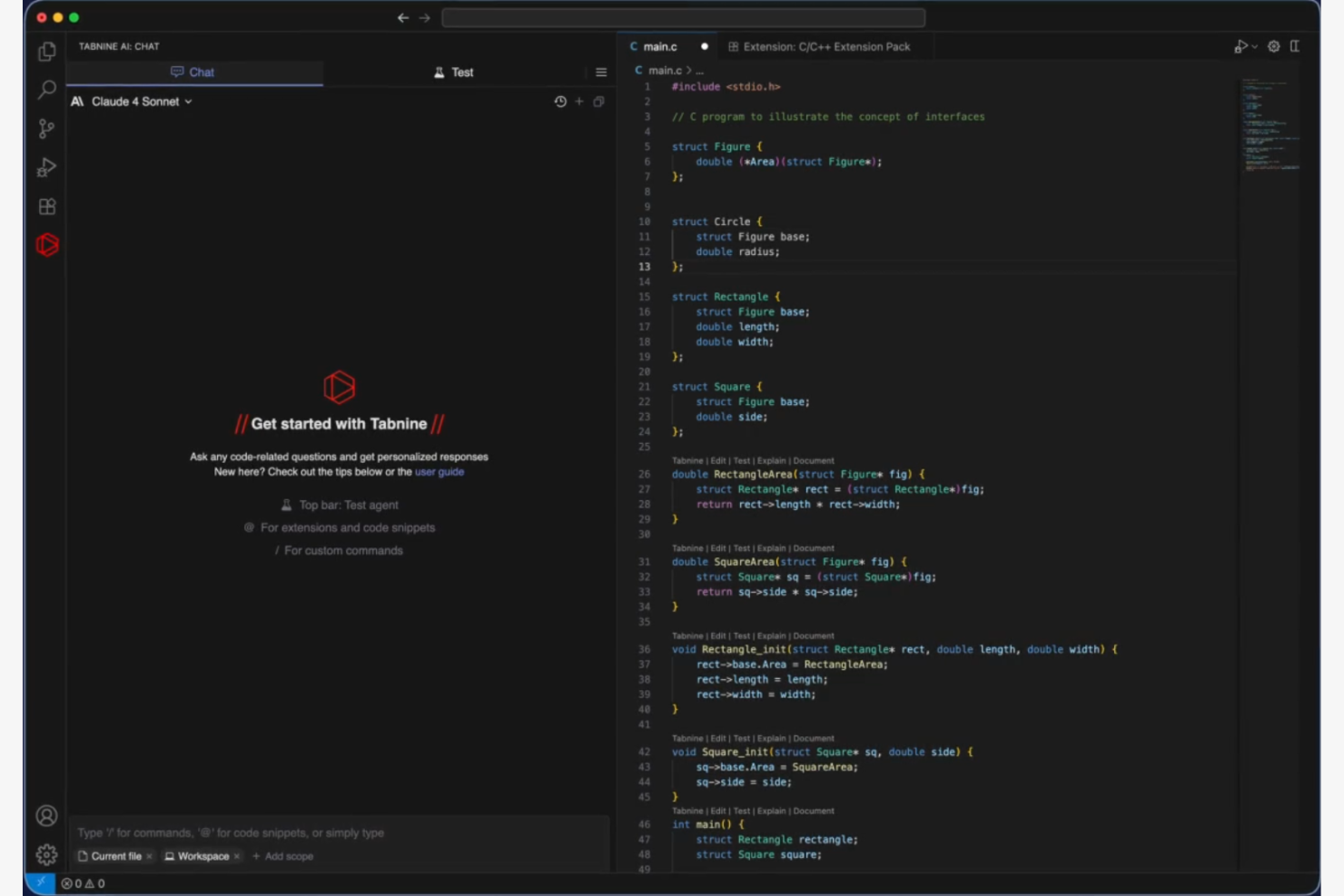
Tabnine is an AI coding assistant designed for enterprises, providing secure coding solutions across various environments, such as SaaS and on-premises. It serves developers by integrating with popular IDEs and aligning with organizational coding standards.
Why I picked Tabnine: Tabnine integrates into your development environment, making it easy to use without disrupting your workflow. Its AI capabilities learn your coding style, offering personalized suggestions that improve over time. The tool also includes code explanation to help maintain high coding standards.
Standout features and Integrations:
Features include real-time code suggestions that adapt to your coding style, support for multiple programming languages, and a feature that explains code snippets. It also offers model fine-tuning to align with your team's specific coding standards.
Integrations include Visual Studio Code, JetBrains, Neovim, and more.
Pros and Cons
Pros:
- Fine-tunes models for consistency
- Offers code explanation
- Adapts to your coding style
Cons:
- Privacy concerns with cloud code
- High memory and CPU usage

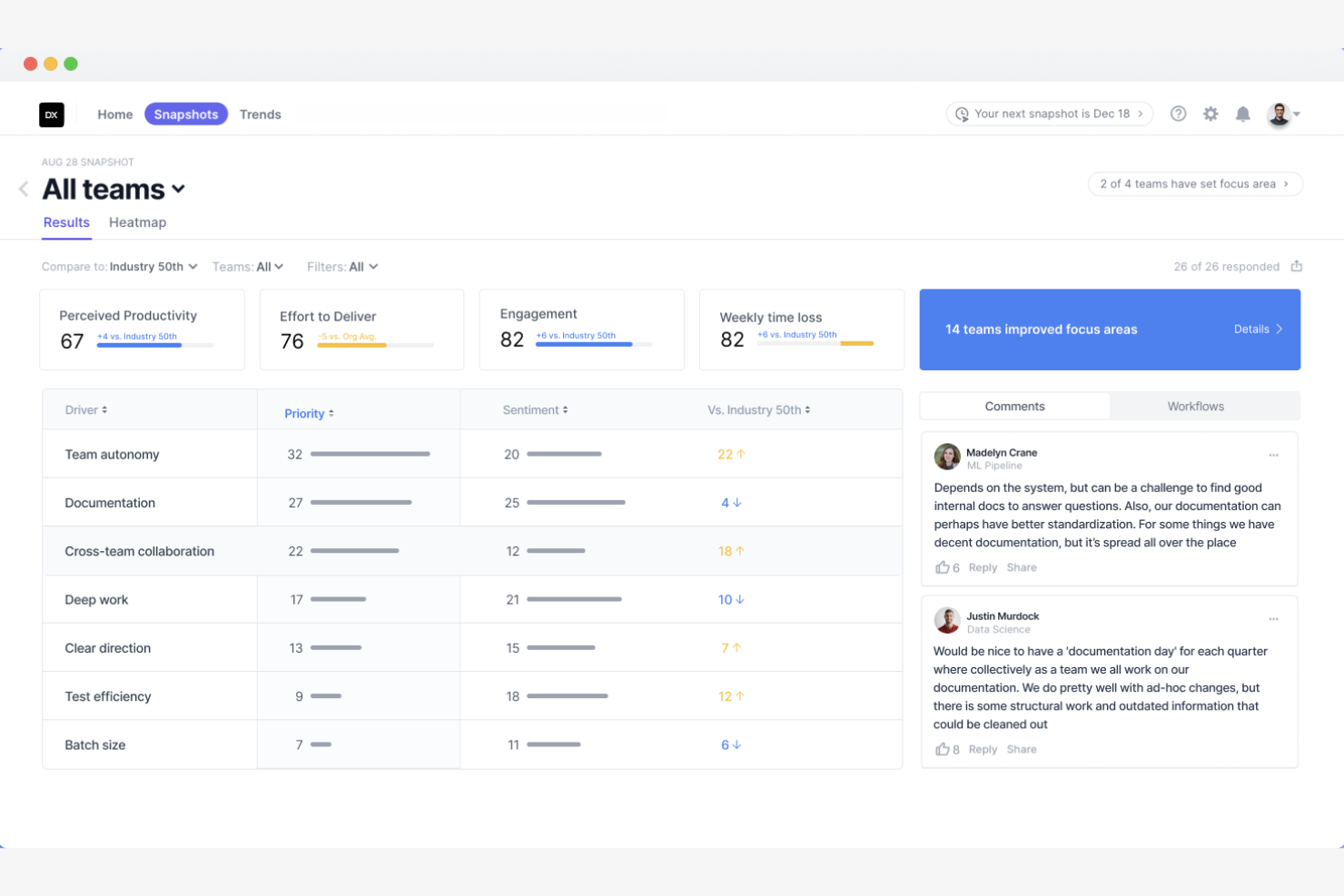
DX is a developer intelligence platform that primarily serves software engineering teams by providing tools for measuring developer productivity and tracking productivity metrics.
Why I picked DX: It offers valuable insights into developer workflows. It provides custom reporting and dashboards that align engineering efforts with business goals. Additionally, AI integration offers recommendations to optimize engineering workflows.
Standout Features and Integrations:
Features include developer experience tools that analyze workflows to identify friction points, DORA metrics to measure output, and AI transformation tracking to monitor technology adoption. It also provides engineering acceleration tools, such as software catalogs and scorecards.
Integrations include GitHub Copilot, GitLab, Jira, Microsoft Azure DevOps, and more.
Pros and Cons
Pros:
- Includes engineering scorecards
- Provides AI recommendations
- Offers custom reporting
Cons:
- Limited to engineering metrics
- Requires data integration

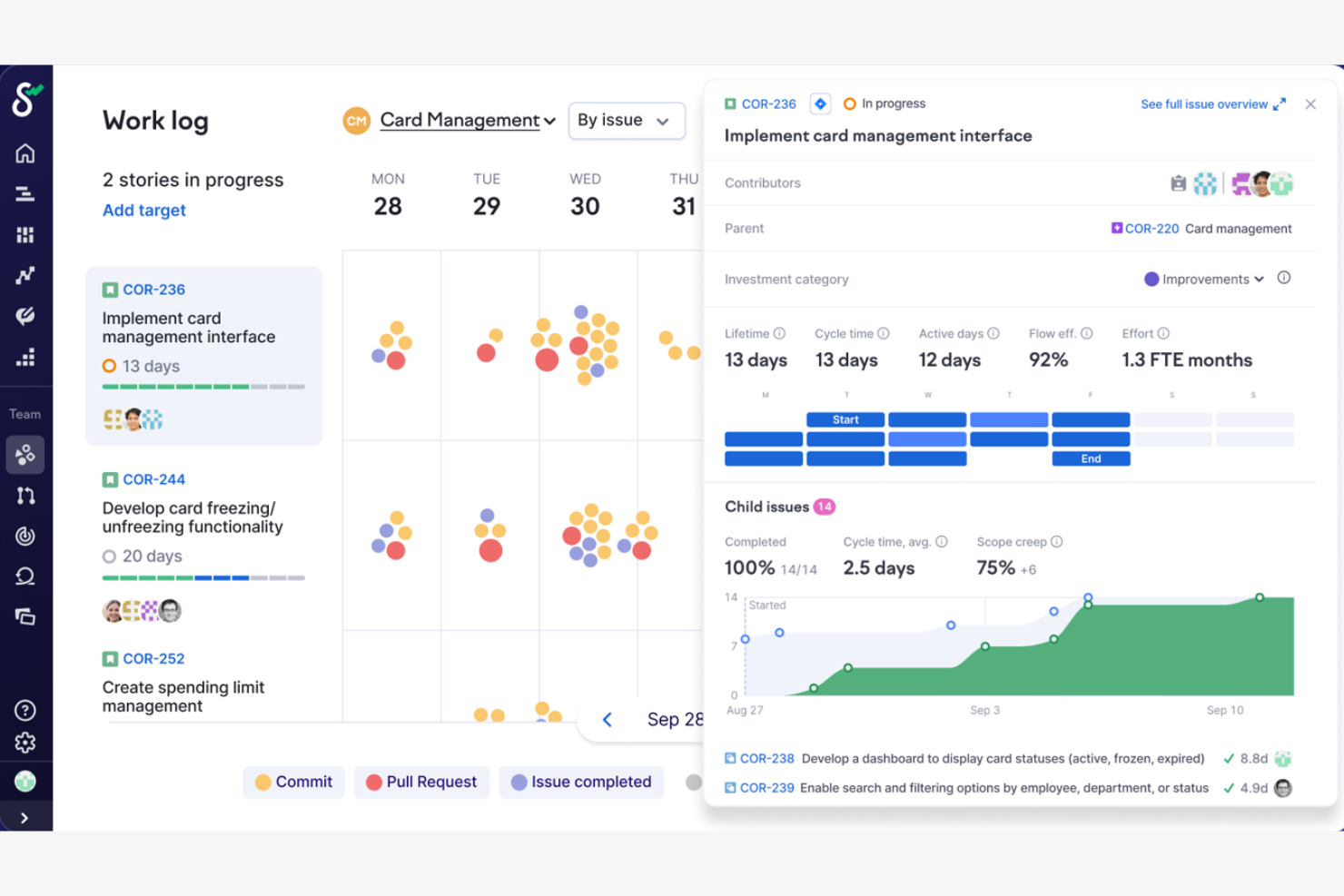
Swarmia is a tool designed to help software development teams track productivity metrics. It helps teams identify bottlenecks and improve collaboration by providing actionable insights into their development processes.
Why I picked Swarmia: It delivers detailed team productivity metrics that help you understand and improve your team's workflow.
Standout Features and Integrations:
Features include customizable dashboards that provide insights into cycle time and deployment frequency. It offers tools for setting and tracking team goals, helping align efforts with business objectives. Additionally, Swarmia provides insights into code review processes and work distribution, aiding in workflow optimization.
Integrations include GitHub, GitLab, Atlassian Jira, Slack, Linear, and more.
Pros and Cons
Pros:
- Tracks deployment frequency
- Offers customizable dashboards
- Supports goal setting
Cons:
- Can feel like micromanagement
- Requires high GitHub/Jira hygiene
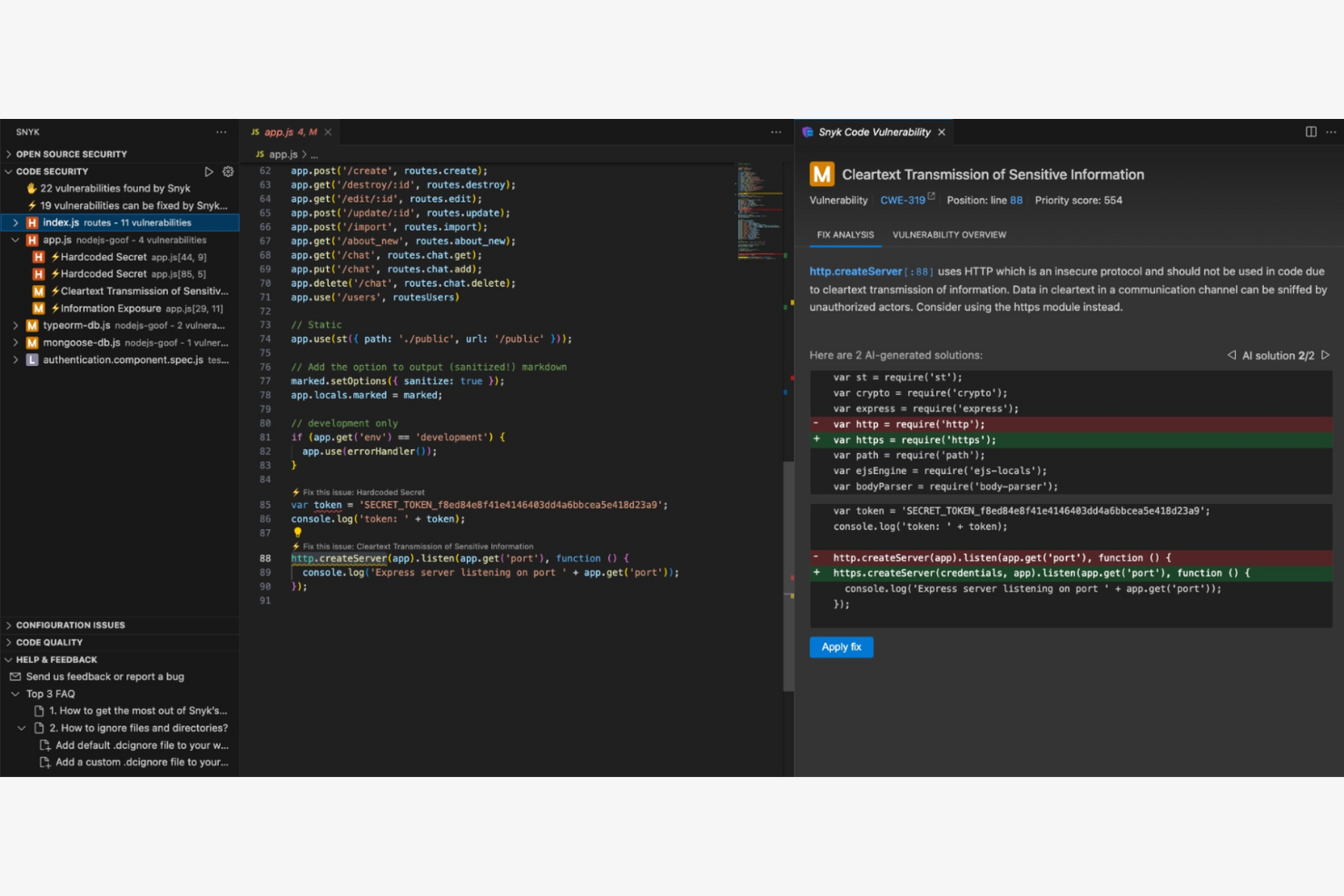
Snyk DeepCode AI is a code review tool that uses AI to help developers identify and fix bugs in their code. It serves software development teams by improving code quality and reducing the time spent on manual code reviews.
Why I picked Snyk DeepCode AI: It excels in code review automation, providing insights that help your team catch bugs early. Its AI engine learns from millions of open-source projects, ensuring that recommendations are relevant and up-to-date. Automating the code review process frees up your team to focus on more complex tasks.
Standout Features and Integrations:
Features include real-time code analysis that identifies bugs and dependency issues and suggests improvements. It provides AI-driven insights that are constantly updated with new data from open-source projects. The tool also offers a user-friendly interface that makes it easy for your team to review and implement suggestions.
Integrations include GitHub, Bitbucket, GitLab, Visual Studio Code, and more.
Pros and Cons
Pros:
- Automates the code review process
- Highly security-focused
- Offers real-time code analysis
Cons:
- AI-fix features is expensive for small teams
- Can be complex to configure and fine-tune Access to some
Other Developer Productivity Tools
Here are some additional developer productivity tool options that didn’t make it onto my shortlist, but are still worth checking out:
- Sourcegraph Amp
For code search and navigation
- Notion
For customizable knowledge workspaces
- Swimm
For code documentation
- Jira
For agile project management
- Flow
For low-code workflow automation
- Spacelift
For infrastructure automation
- Chrono Platform
For billing and time tracking
- Greptile
For code search efficiency
- Port
For microservices management
- GitPrime
For engineering performance analytics


How I Evaluate Developer Productivity Tools
When PRs stall and sprint velocity tanks, these tools should tell you exactly why—I split my evaluation into baseline requirements and the differentiators that separate good from great.
Core Functionality (Table Stakes For This List)
When I'm selecting tools for my list, I rank each one on a scale from 0 (does not offer the functionality) to 5 (excels in this area) for each core functionality listed below. Then, I calculate the tool's total score into a percentage. Each tool needs to achieve a minimum total score of 65% to be considered for inclusion.
- Engineering Metrics & Analytics: I check whether a tool tracks DORA metrics like cycle time and deployment frequency, not just vanity stats like raw commit counts.
- Git & Repo Integration: Real-time connections with GitHub, GitLab, or Bitbucket matter here—I look for how deeply a tool pulls PR and branch-level data.
- Project Management Tool Sync: I evaluate whether code activity maps back to Jira tickets or Linear issues so you can tie commits to actual sprint work.
- Workflow Automation: Tools that auto-assign PR reviewers, trigger CI/CD runs, or nudge stale reviews in Slack score higher in my evaluation.
- Bottleneck & Blocker Detection: I look for tools that flag where work gets stuck—like PRs waiting days for review or deployments queued behind failing tests.
- Team & Sprint Reporting: Dashboards need to be customizable enough that an engineering manager can build a sprint summary and a VP can get a capacity forecast.
Once I have a list of tools that meet this criteria, I consider what sets each platform apart.
Differentiating Factors (What Sets Vendors Apart)
Here's how I compare and contrast different vendors:
Standout Features
I pay close attention to AI-powered insights—tools like LinearB and Jellyfish use machine learning to flag delivery risks before they derail a sprint. Investment allocation tracking is another big differentiator. It shows whether your team's effort goes toward new features or gets swallowed by tech debt. I also look for developer experience surveys that pair sentiment data with hard metrics. They give you a fuller picture of team health beyond what cycle time alone reveals.
Beyond Features
Ethical measurement matters here. If a tool exposes individual contributor stats without guardrails, you risk turning a productivity platform into a surveillance tool—and that erodes trust fast. I evaluate whether vendors offer aggregated reporting and clear documentation on scoring methodology. Tech stack depth is equally important. A tool that connects to your CI/CD pipeline, incident management, and observability stack gives a much richer picture than one limited to Git and Jira alone. For enterprise teams, I also check for SOC 2 Type II compliance and SSO support.
How To Choose Developer Productivity Tools
It’s easy to get bogged down in long feature lists and complex pricing structures. To help you stay focused as you work through your unique software selection process, here’s a checklist of factors to keep in mind:
| Factor | What to Consider |
| Scalability | Will the tool grow with your team? Consider user limits and feature scalability. Ensure it can handle increased workloads as your projects expand. |
| Integrations | Does it work with your current tools? Check compatibility with existing software, such as version control systems and project management tools, to ensure smooth workflow. |
| Customizability | Can you tailor it to your needs? Look for tools that offer customizable dashboards or workflows to fit your specific processes and team preferences. |
| Ease of use | Is it intuitive for your team? Evaluate the learning curve and interface design. A user-friendly tool saves time and reduces frustration. |
| Implementation and onboarding | How quickly can your team get started? Assess the availability of training materials and support during the onboarding phase to ensure a smooth transition. |
| Cost | Does it fit your budget? Compare pricing plans, including user fees and any hidden costs. Look for value rather than just the lowest price. |
| Security safeguards | Is your data protected? Check for encryption, access controls, and compliance with industry standards to safeguard sensitive information. |
| Support availability | Will you have help when needed? Consider the provider's support hours, response times, and available channels to ensure you get help when you need it. |
What Are Developer Productivity Tools?
Developer productivity tools are software solutions designed to help developers and software teams work more efficiently by automating repetitive tasks and improving collaboration. These tools are commonly used by software developers, project managers, and IT professionals to improve code quality, manage projects, and track progress. Code analysis, version control, and project management capabilities support the improvement of workflow and team productivity. Overall, these tools help teams deliver high-quality software faster and with fewer errors.
Features
When selecting developer productivity tools, keep an eye out for the following key features:
- Code analysis: Automatically scans code for errors and suggests improvements, helping maintain high code quality.
- Version control: Manages changes to code over time, enabling collaboration and tracking of modifications across teams.
- Project management: Organizes tasks and timelines, aiding teams in staying on schedule and meeting deadlines.
- Automated testing: Runs tests on code to ensure functionality and catch bugs early, reducing manual testing efforts.
- Collaboration tools: Facilitate communication and sharing among team members, improving project coordination and teamwork.
- Customizable dashboards: Allow users to tailor the interface to their needs, for greater usability and efficiency.
- Integration capabilities: Connect with other tools and platforms, ensuring a smooth workflow across different systems.
- Security safeguards: Protect sensitive data with encryption and access controls, ensuring compliance with industry standards.
- Real-time feedback: Provides immediate insights into code and project status, allowing for quick adjustments and decision-making.
Benefits
Implementing developer productivity tools provides several benefits for your team and your business. Here are a few you can look forward to:
- Improved code quality: Tools with code analysis features help catch errors early and suggest improvements, leading to cleaner, more reliable code.
- Stronger collaboration: Collaboration tools and integration capabilities ensure team members can communicate and work together, boosting overall team productivity.
- Time savings: Automated testing and version control reduce manual tasks, freeing up time for developers to focus on more complex work.
- Better project management: Project management features help organize tasks and timelines, keeping projects on track and ensuring deadlines are met.
- Increased security: Security safeguards protect sensitive data, helping your team comply with industry standards and avoid breaches.
- Real-time insights: Features, such as real-time feedback, provide immediate visibility into project status, allowing for quick decision-making and adjustments.
Costs & Pricing
Selecting developer productivity tools requires an understanding of the various pricing models and plans available. Costs vary based on features, team size, add-ons, and more. The table below summarizes common plans, their average prices, and typical features included in developer productivity tools solutions:
Plan Comparison Table for Developer Productivity Tools
| Plan Type | Average Price | Common Features |
| Free Plan | $0 | Basic code editing, version control, and limited integrations. |
| Personal Plan | $5-$39/user/month | Advanced code completion, project management tools, and collaboration features. |
| Business Plan | $7.99-$50/ user/month | Customizable dashboards, automated testing, and priority support. |
| Enterprise Plan | $12-$105/ user/month | Extensive security safeguards, full integration capabilities, and dedicated account management. |
Developer Productivity Tools FAQs
Here are some answers to common questions about developer productivity tools:
How do developer productivity tools improve team collaboration?
Developer productivity tools improve team collaboration by providing features such as shared workspaces, real-time communication, and integrated task management. These tools allow team members to access the same information and updates, reducing miscommunication. For example, tools with built-in chat functions enable quick queries and responses, helping teams stay aligned. By having a centralized platform, your team can track project progress, assign tasks, and share documents, keeping everyone on the same page.
What are the common challenges when adopting new productivity tools for developers?
Common challenges include resistance to change, compatibility issues with legacy systems, and a steep learning curve. You can tackle these by providing training, ensuring new tools fit with your current workflows, and offering support during the transition. Open communication and clear documentation help smoothen the process.
Are developer productivity tools suitable for remote teams?
Yes, developer productivity tools are suitable for remote teams. They offer cloud-based access, allowing team members to collaborate from different locations. Features such as video conferencing, file sharing, and virtual whiteboards help remote teams work together effectively. For instance, tools that support version control ensure that all team members are working on the latest codebase, minimizing errors and conflicts. By facilitating smooth communication and collaboration, these tools make remote work more efficient and manageable.
What should I consider when integrating developer productivity tools with existing software?
When integrating developer productivity tools with existing software, consider compatibility and ease of integration. Check if the tool supports APIs or connectors for your current systems. Evaluate the effort required for integration and any potential disruptions to your workflow. For example, some tools may offer plug-and-play integrations with popular platforms, such as GitHub or Atlassian Jira, making the process smoother. Understanding your existing tech stack and choosing tools that align with it can save time and prevent headaches during the integration process.
How can I measure the ROI of developer productivity tools?
Track key metrics such as deployment frequency, bug resolution times, and code review turnarounds before and after introducing a tool. Monitor adoption rates and gather feedback on how tools impact developer satisfaction and project delivery. Quantitative data and team input together show you the real value of your investment.
How can I measure the effectiveness of developer productivity tools?
To measure the effectiveness of developer productivity tools, track key performance indicators (KPIs), such as code quality, time-to-deploy, and team satisfaction. Use built-in analytics and reporting features to monitor these metrics over time. For instance, if your tool offers automated testing, you can track the number of bugs caught before release. Regularly reviewing these KPIs helps you assess whether the tool meets your team’s needs and contributes to your business goals. Adjust your approach based on these insights for continuous improvement.