
12 Best Capital Project Management Software Picks For 2026

7 Best Capital Project Management Software Shortlist
Here are my picks for the best tools for capital project management to use on your design and construction projects.


Capital project management software is the best and easiest way to manage large, complex, and unruly capital and construction projects. There are many different options available, and finding the right one for your processes and projects can be tough.
Here are my picks for the best capital project management software to help you improve your project management processes, efficiency, and collaboration among team members. I've tested and reviewed each of these based on my experience managing hundreds of large, complex projects with different platforms.
Why You Can Trust Us
Compare Specs Side-by-Side
Compare pricing and specs for each of the capital project management software tools on my list.
| Tool | Best For | Trial Info | Price | ||
|---|---|---|---|---|---|
| 1 | Best for field collaboration | Free demo available | Pricing upon request | Website | |
| 2 | Best for real-time capital project tracking and insights | 30-day free trial + free demo available | From $14/user/month (billed annually) | Website | |
| 3 | Best for integrated design & construction workflows | 30-day free trial | Pricing upon request | Website | |
| 4 | Best for advanced project analytics | Free demo available | Pricing upon request | Website | |
| 5 | Best for design-build projects | Free demo available | Pricing upon request | Website | |
| 6 | Best for document collaboration | 30-day free trial | From $260/user/month (billed annually) | Website | |
| 7 | Best for collaboration with on-site construction crews | Free plan available | From $39/user/month (billed annually) | Website |
-

Insightful
Visit WebsiteThis is an aggregated rating for this tool including ratings from Crozdesk users and ratings from other sites.4.8 -
Accelo
Visit WebsiteThis is an aggregated rating for this tool including ratings from Crozdesk users and ratings from other sites.4.4 -
Wrike
Visit WebsiteThis is an aggregated rating for this tool including ratings from Crozdesk users and ratings from other sites.4.2





Best Capital Project Management Software Reviews
Here’s a brief description of each capital project management software that covers the tool’s best use case, their noteworthy features, and some pros and cons. I’ve also included screenshots to give you a preview of the user interface too.


Procore is a cloud-based construction project management software that provides tools for project management, financials, quality and safety, and field productivity. Its mobile app and web-based platform make it easy for contractors, architects, and owners to manage their projects from anywhere.
Why I picked ProCore: I picked ProCore because it’s probably the most well-known turnkey software platform in industry for capital project management. What sets Procore apart is its seamless integration of innovative tools. It combines and features that enhance project communication, collaboration, and documentation. With cloud-based accessibility, it also has user-friendly mobile apps and real-time data capabilities.
Procore is great for the consultant-contractor relationship at all phases of a project, and particularly during construction. With the volume of documentation and information that needs coordinating and expediting, this is an excellent tool. I love the user interface especially and the excellent dashboarding functions also help the owner keep on top of everything. Whether in the office or the field, ProCore has a great suite of mobile and desktop apps to keep everyone singing from the same song sheet.
Ideal User Groups: Owners, architects, engineers, and contractors.
Ideal Project Type: Large, complex projects.
ProCore Standout Features and Integrations
Features include streamlined communication and document management, automated workflows and field productivity, project financials and cost control, quality and safety management, BIM modeling and coordination, and mobile app for on-the-go access.
Integrations include accounting tools like QuickBooks, Sage 300 Construction and Real Estate, Viewpoint, Office tools like Microsoft Office, Google Suite, Dropbox, and collaboration tools like Microsoft Teams and Slack.
Pros and Cons
Pros:
- Customizable dashboards and reports.
- Integration with accounting software.
- Excellent customer support.
- Robust set of features.
- User-friendly interface.
Cons:
- Some features require additional add-ons.
- Limited customization options.
- Steep learning curve.

Best for real-time capital project tracking and insights

ProjectManager is an advanced project management software designed to support a wide range of industries, including those managing large-scale capital projects. It offers an extensive suite of tools for planning, scheduling, and tracking projects in real time, making it an ideal choice for capital project managers who need to ensure their projects are delivered on time and within budget.
Why I picked ProjectManager: I selected ProjectManager for its exceptional real-time project tracking and insightful analytics. Capital projects often involve substantial investments, complex logistics, and extended timelines, making it crucial to monitor project health closely. ProjectManager’s real-time dashboards provide immediate visibility into key project metrics such as progress, budget status, and resource utilization.
Additionally, ProjectManager excels in its ability to manage large-scale capital projects by offering comprehensive planning and scheduling capabilities. The software's Gantt charts are particularly valuable for capital projects, allowing managers to create detailed project plans, set dependencies, and adjust schedules dynamically. The ability to track the critical path and monitor project baselines ensures that all aspects of the project are aligned with the overall timeline and objectives.
Ideal User Groups: Engineers, construction managers, manufacturing companies, and infrastructure firms
Ideal Project Type: Large-scale infrastructure, manufacturing, and construction projects
ProjectManager Standout Features and Integrations
Features include workflow automation, secure collaboration, mobile app access, customizable reporting, resource management, time tracking, and portfolio management.
Integrations include Google Drive, Microsoft Teams, Microsoft Office, Salesforce, Slack, Jira, Trello, Power BI, Hubspot, Acumatica, OneDrive, Dropbox, Desk.com, QuickBooks, and Xero.
Pros and Cons
Pros:
- Real time reporting and tracking
- Comprehensive planning tools
- Intuitive and easy-to-use interface, even when managing larger projects
Cons:
- Could offer more integrations
- Automation feature can take time to learn

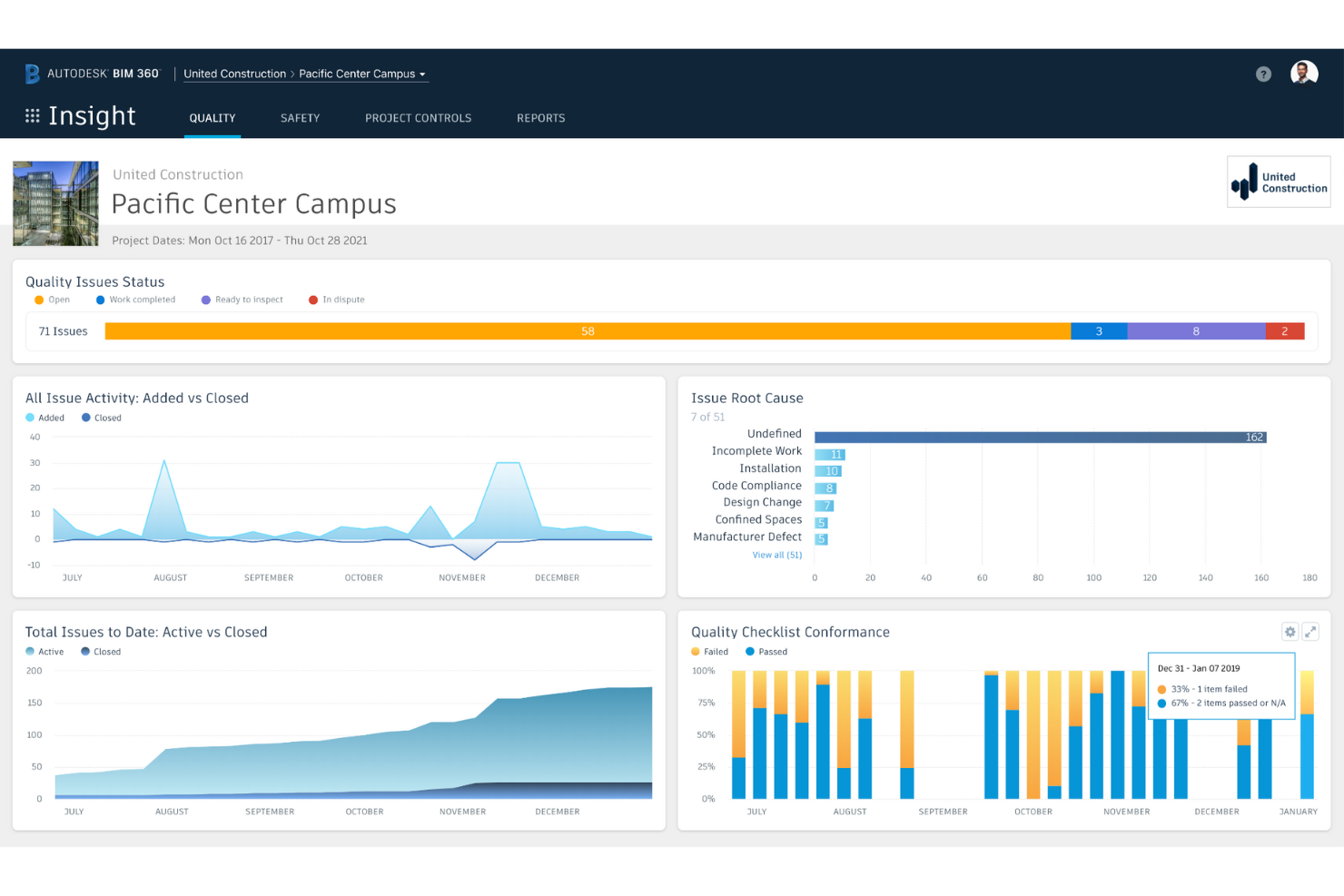
Now a part of the Autodesk Construction Cloud, BIM 360 is a construction management software that helps you predict safety hazards, proactively manage quality, automate tasks, and reduce rework so that you can control costs and stay on schedule.
Why I picked Autodesk BIM 360: I needed to highlight this tool because of its advanced Building Information Modelling (BIM) capabilities (which makes sense, as it’s in the name!). Again, it’s great for cross-team collaboration due to the real time access to 3D models, designs and documentation. It has cloud-based and mobile platform support, which really aids efficiency throughout the project lifecycle.
BIM 360 is best for architects, engineers and contractors (rather than owners). It’s exceptionally useful for complex design coordination and teams involved in clash detection. For me, the standout features are it’s ability to facilitate real time collaboration and track project and design changes. Obviously, the clash detection features are excellent, and it does a great job of managing data-rich 3D models.
Ideal User Groups: Large construction firms.
Ideal Project Type: Simple to medium-sized projects.
Autodesk BIM 360 Standout Features and Integrations
Features include BIM collaboration and coordination, document management and control, issue tracking and resolution, mobile access for on-the-go productivity, real-time updates and collaboration, and safety and quality management.
Integrations include QuickBooks, Sage 300 Construction and Real Estate, Viewpoint, Microsoft Office, Google Suite, Dropbox, Microsoft Teams, and Slack.
Pros and Cons
Pros:
- Integration with accounting software.
- Customizable dashboards and reports.
- Robust set of features.
- Excellent BIM coordination and collaboration.
Cons:
- Expensive pricing.
- Limited customization options.
- Steep learning curve.


Oracle Primavera is a construction platform that helps you invest in the right projects to ensure maximum return on investment and shareholder value.
Why I picked Oracle Primavera: Primavera is an especially great package if you care about project performance data. I like how it’s particularly suited to capital-intensive industries, such as oil and gas, construction, and utilities, where measuring and monitoring the value of an investment, and the returns on that investment, matter.
Its main use case is capital project portfolio management (PPM) for organizations handling complex projects. These organizations often have significant resources, multiple stakeholders, and intricate scheduling requirements. Primavera works exceptionally well in this context. It allows users to efficiently manage progress, risks, timelines and resources on multiple projects. With its advanced capabilities, Primavera enables organizations to make informed decisions based on real-time data. Standout features include its ability to handle large-scale projects with intricate dependencies, perform critical path analysis, and integrate with other enterprise systems for seamless data exchange. Its scalability and flexibility make it suitable for organizations of various sizes, from small teams to enterprise-level operations.
Ideal User Groups: Large construction firms.
Ideal Project Type: Large and complex projects.
Oracle Primavera Standout Features and Integrations
Features include Portfolio management, resource management, schedule management, risk management, cost management, and BIM integration.
Integrations include QuickBooks, SAP, Microsoft Dynamics, Sage, Microsoft Office, Google Suite, Dropbox, Microsoft Teams, and Slack.
Pros and Cons
Pros:
- Integration with accounting software.
- Excellent customer support.
- Advanced scheduling and resource management.
- Robust set of features.
Cons:
- Limited customization options.
- Expensive pricing.
- Steep learning curve.


Aconex is a construction project management platform from Oracle that helps you capture a complete project record and minimize disputes through an unalterable audit trail.
Why I picked Aconex: A notable aspect of Aconex is its strength in managing complex construction project documentation and workflows. I really like how it offers a centralized platform that allows stakeholders to collaborate. You can share and track documents and information in real-time: great for communication and streamlining processes. Its ability to handle large volumes of project documentation (like drawings, contracts, and RFIs) while ensuring version control and audit trails, certainly sets Aconex apart.
Aconex is primarily designed for large scale construction projects. It’s standout features include its ability to handle vast volumes of project documents, and very importantly, provide comprehensive audit trails. It also excels in bringing together multiple parties, such as contractors, architects, and project owners.
Ideal User Groups: Large construction firms.
Ideal Project Type: Large and complex projects.
Aconex Standout Features and Integrations
Features include document management and control, project collaboration, workflow management, real-time reporting and analytics, and BIM integration.
Integrations include SAP, Oracle, Sage, Microsoft Office, Google Suite, Dropbox, Microsoft Teams, and Slack.
Pros and Cons
Pros:
- Integration with accounting software.
- Customizable dashboards and reports.
- Excellent document control.
- User-friendly interface.
Cons:
- Steep learning curve.
- Expensive pricing.
- Limited customization options.


Bluebeam Revu is another popular software option for construction projects. It offers a unique markup tool for reviewing and editing construction documents, which simplifies the document review process. The software is suitable for small to large construction projects and is popular among architects, engineers, and contractors.
Why I picked Bluebeam Revu: This is my “go to” app everyday of the week when it comes to collaborating on 2D documents (drawings etc) and PDFs. The markup features are tailored specifically for the construction industry, and you can create custom toolsets for maximum productivity. Revu is a staple in every capital project manager’s tool box in my opinion.
Revu works for anyone in the capital projects space, though it’s likely architects, engineers and contractors are going to use it the most. If you rely on PDF documentation for communication and collaboration, this is for you. The standout features of Bluebeam Revu include the advanced PDF markup abilities, customisable toolsets and automation of repetitive tasks.
Ideal User Groups: Architects, engineers, and contractors.
Ideal Project Type: Small to medium-sized projects.
Bluebeam Revu Standout Features and Integrations
Features include document management and control, automated workflows, BIM collaboration and coordination, real-time updates and collaboration, mobile access for on-the-go productivity, and customizable dashboards and reports.
Integrations include QuickBooks, Sage 300 Construction and Real Estate, Viewpoint, Microsoft Office, Google Suite, Dropbox, Microsoft Teams, and Slack.
Pros and Cons
Pros:
- Integration with accounting software.
- Customizable dashboards and reports.
- Robust set of features.
- User-friendly interface.
Cons:
- Expensive pricing.
- Some features require additional add-ons.
- Limited customization options.


Fieldwire is a construction project management platform that offers a really user-friendly interface and some powerful features for project collaboration.
Why I picked Fieldwire: I wanted to highlight Fieldwire because it really stands out for streamlining complex workflows among project stakeholders, especially on the contractor side and at the construction phase of a project. Like many of the other platforms I’ve reviewed here, Fieldwire makes document sharing and real-time progress tracking easy. Communication is key (in any setting) and especially so with capital projects. The clear and transparent communication channels Fieldwire enables make all the difference.
Fieldwire works well for the construction phase of projects, though it can be utilized throughout the entire project lifecycle. It is especially well-suited for field workers and construction professionals who value efficient task management. The real-time collaboration and document control features, combined with a great user interface, mobile app support, and integrations with Building Information Modelling (BIM) software and office tools, come in really handy for productivity when on the job.
Ideal User Groups: Large construction firms
Ideal Project Type: Projects with complex specifications and requirements.
Fieldwire Standout Features and Integrations
Features include document management and control, project collaboration tools, workflow management, real-time reporting and analytics, and integration with Building Information Modelling (BIM) tools.
Integrations include SAP, Oracle, Sage, Microsoft Office, Google Suite, and Dropbox.
Pros and Cons
Pros:
- Integration with accounting software
- Customizable dashboard and reports
- Excellent document control
- User-friendly interface
Cons:
- Steep learning curve for new users
- Expensive pricing
- Limited customisation options
Get the PM Software Buyer's Guide
Other Options
Here are a few options that didn’t make the shortlist but which are still worth your consideration.
- CMiC
For a integrated solution with advanced cost control
- GoodDay
For custom workload views
- Kahua
For its flexibility to align with your business model
- Archibus
For its onboarding services
- NextProcess
For ERP integrations


Related Reviews
If you still haven’t found what you’re looking for here, check out these tools closely related to project management software that we’ve tested and evaluated:
- Project Management Software
- Resource Management Software
- Workflow Management Software
- Time Tracking Software
- Task Management Software
- Collaboration Tools
- Productivity Tools
- Free Construction Project Management Software
- Online Construction Project Management Software
- Best Construction Resource Management Software
Capital Project Management Software Selection Criteria
When selecting the best capital project management software to include in this list, I considered common buyer needs and pain points like managing multi-year budgets and maintaining collaboration across multiple stakeholders. I also used the following framework to keep my evaluation structured and fair:
Core Functionality (25% of total score)
To be considered for inclusion in this list, each solution had to fulfill these common use cases:
- Manage project budgets and track financials
- Track project timelines and milestones
- Facilitate document management and version control
- Maintain collaboration across teams and external partners
- Provide reporting and analytics for decision-making
Additional Standout Features (25% of total score)
To help further narrow down the competition, I also looked for unique features, such as:
- AI-driven cost forecasting and risk analysis
- Mobile-friendly field reporting and inspections
- BIM integration for design and construction planning
- Automated compliance tracking and audit logs
- Custom workflow automation for approvals and processes
Usability (10% of total score)
To get a sense of the usability of each system, I considered whether each tool had the following:
- Intuitive dashboard design with minimal learning curve
- Clear navigation and easy access to key project data
- Responsive performance with minimal lag time
- Mobile and tablet-friendly interfaces
- Customizable user roles and permissions for clarity
Onboarding (10% of total score)
To evaluate the onboarding experience for each platform, I considered availability of the following:
- Guided product tours and interactive walkthroughs
- Pre-built templates for project planning and reporting
- On-demand training resources, including videos and documentation
- Dedicated onboarding specialists or implementation teams
- Migration assistance for importing existing project data
Customer Support (10% of total score)
To assess each software provider’s customer support services, I considered whether each tool offered the following:
- 24/7 availability for urgent issues and outages
- Multiple support channels, including chat, email, and phone
- Access to a dedicated account manager for enterprise users
- Community forums or user groups for peer-to-peer assistance
- SLA-backed response times for critical support requests
Value For Money (10% of total score)
To evaluate the value for money of each platform, I considered whether the tools offered the following:
- Transparent pricing with no hidden fees
- Flexible pricing tiers that scale with project needs
- Inclusion of essential features without costly add-ons
- ROI potential based on efficiency gains and risk reduction
- Trial periods or money-back guarantees for risk-free testing
Customer Reviews (10% of total score)
To get a sense of overall customer satisfaction, I considered the following when reading customer reviews:
- Overall user sentiment and satisfaction scores
- Commonly mentioned pros and cons across multiple reviews
- Feedback on long-term reliability and performance
- Responsiveness of customer support to user concerns
- Reported ease of implementation and adoption across teams
How to Choose Capital Project Management Software
It’s easy to get bogged down in long feature lists and complex pricing structures. To help you stay focused as you work through your unique construction project management software selection process, here’s a checklist of factors to keep in mind:
| Factor | What to Consider |
|---|---|
| Scalability | Make sure the software can handle growing project complexities, larger teams, and expanding budgets. Look for cloud-based options with flexible user limits and data storage. |
| Integrations | Your team likely relies on tools like accounting software, BIM platforms, or ERP systems. Choose software that integrates seamlessly to avoid data silos and redundant work. |
| Customizability | Every capital project is unique. You need software that lets you tailor workflows, dashboards, and reports to fit your specific project needs. |
| Ease of Use | Complicated interfaces slow down adoption. Look for intuitive navigation, clear reporting tools, and mobile access so your team can work efficiently from any location. |
| Budget | Consider total cost, including licensing, implementation, and training. Beware of hidden fees, and make sure the pricing scales fairly as your needs grow. |
| Security Safeguards | Sensitive project data must be protected. Verify encryption standards, role-based permissions, and compliance with industry regulations like SOC 2 or ISO 27001. |
| Collaboration Tools | Capital projects involve multiple stakeholders. Look for real-time communication, document sharing, and task tracking to keep everyone aligned. |
| Reporting & Analytics | Your team needs accurate data to make informed decisions. Prioritize software with robust reporting features, dashboards, and predictive analytics. |
What is capital project management software?
Capital project management software is a specialized tool that facilitates the planning, execution, and control of large-scale capital projects that involve significant financial investments. Features include project scheduling, budgeting, resource allocation, risk management, document management, and collaboration tools, which let you track progress, manage budgets, monitor resource utilization, and mitigate risks associated with your projects.
Capital project management software is a critical tool used by project managers, construction managers, building operators, program managers, and anyone involved in infrastructure projects. It helps navigate the complexities of large-scale projects, ensure successful outcomes, and maximize return on investment.
Features of Capital Project Management Software
When selecting capital project management software, keep an eye out for the following key features:
- Budget tracking and forecasting: Helps you monitor project costs, predict overruns, and maintain financial alignment with long-term capital plans.
- Document management: Centralizes project documents with version control for easy access and compliance with regulatory requirements.
- Collaboration tools: Allows communication and file sharing among stakeholders and keeps teams aligned and informed.
- Risk management: Identifies potential risks, provides mitigation strategies, and tracks issues to minimize project disruptions.
- Resource allocation: Helps optimize labor, materials, and equipment scheduling to improve efficiency and reduce waste.
- Compliance tracking: Automates regulatory reporting and helps you adhere to industry standards and local regulations.
- Workflow automation: Streamlines approvals, task assignments, and notifications to improve efficiency and reduce manual work.
- Custom reporting and dashboards: Provides real-time analytics and visual insights to support data-driven decision-making.
- Mobile accessibility: Allows teams to update project details, access documents, and communicate from any location.
- Third-party integrations: Connects with ERP, accounting, and other business systems to improve data flow and reduce silos.
Frequently Asked Questions About Capital Project Management Software
Find answers to common questions other people ask about this topic.
What’s the difference between project management software and capital project management software?
Managing capital projects is not like managing any other kind of project, and capital project management software is designed with unique features and capabilities. Here are five key differences between capital project management software and project management software:
- Cost management: Capital project management software offers advanced tools like budget tracking, cost forecasting, and resource allocation to handle complex financial management. Generic project management software may provide only basic budget tracking features, which might be insufficient for capital projects.
- Schedule management: Construction schedules for capital projects are typically complex and require critical path analysis, resource scheduling, and other advanced features that capital project management software can handle with ease. Generic project management software may not have the required features to manage construction schedules effectively.
- Risk management: Software for construction projects includes tools for identifying, assessing, and managing project risks. This includes risk analysis, mitigation planning, and risk tracking capabilities. Generic project management software may offer basic risk management features, but it often lacks the specificity and depth required for capital projects.
- Document management: Capital project management software can handle large volumes of project documentation, including drawings, specifications, and contracts. These tools provide sophisticated document management features that generic project management software often lacks.
- Regulatory compliance: To address the complex and extensive regulatory compliance requirements associated with such projects, specialized project management software includes features for environmental regulations, safety standards, and building codes. It is essential for capital projects to comply with regulatory standards, and software is ideal for handling these tasks efficiently. Generic project management software may not have the required features to manage regulatory compliance effectively.
What are capital projects?
Capital projects are projects whose costs are capitalized (into tangible assets). For example, designing and constructing a building or real estate development, or developing infrastructure for oil and gas extraction such as drilling platforms, refineries, or pipelines.
What are capital projects examples?
Examples of capital projects include:
- Making improvements to public playgrounds or parks
- Repairing streets and sidewalks
- Installing accessibility ramps on public property
- Renovating public buildings
- Installing benches or street lights
- Creating a community garden
- Resurfacing a basketball court
What's Next?
If you're in the process of researching capital project management software, connect with a SoftwareSelect advisor for free recommendations.
You fill out a form and have a quick chat where they get into the specifics of your needs. Then you'll get a shortlist of software to review. They'll even support you through the entire buying process, including price negotiations.