
14 Business Rules Engine Software for 2026

Business Rules Engine Software Shortlist
Here’s my shortlist of business rules engine software:


Business rules engine software lets you define, manage, and automate decision logic across your systems without hard-coding rules. If you’re searching for the best business rules engine software, you’re likely looking to improve how your team handles complex logic, adapts to changing requirements, and keeps processes consistent as your business grows. With so many options available, it’s tough to know which platform fits your technical needs, integration requirements, and workflow preferences. This list will help you compare top solutions, understand their strengths, and choose the right tool to support your automation and compliance goals.
Why You Can Trust Us
We’ve been testing and reviewing project management software since 2012. As project managers ourselves, we know how critical and difficult it is to make the right decision when selecting software.
We invest in deep research to help our audience make better software purchasing decisions. We’ve tested more than 2,000 tools for different project management use cases and written over 1,000 comprehensive software reviews. Learn how we stay transparent & our software review methodology.
Best Business Rules Engine Software Summary
This comparison chart summarizes pricing details for my top business rules engine software selections to help you find the best one for your budget and business needs.
| Tool | Best For | Trial Info | Price | ||
|---|---|---|---|---|---|
| 1 | Best for audit workflow integration | Free demo available | Pricing upon request | Website | |
| 2 | Best for large-scale enterprise automation | Free demo + free trial available | Pricing upon request | Website | |
| 3 | Best for spreadsheet-style rule editing | 30-day free trial + free plan + free demo available | From $291/month (billed annually) | Website | |
| 4 | Best for rapid rule deployment | Free demo available | Pricing upon request | Website | |
| 5 | Best for no-code rule configuration | Free demo available | Pricing upon request | Website | |
| 6 | Best for workflow-driven rule execution | Not available | Pricing upon request | Website | |
| 7 | Best for cloud-native rule management | Free plan + free demo available | From €50/month | Website | |
| 8 | Best for visual decision modeling | Free trial + free demo available | Pricing upon request | Website | |
| 9 | Best for integration with legacy systems | Free trial available | Pricing upon request | Website | |
| 10 | Best for open-source flexibility | Not available | From $5,460/license | Website |
-

Insightful
Visit WebsiteThis is an aggregated rating for this tool including ratings from Crozdesk users and ratings from other sites.4.8 -
Accelo
Visit WebsiteThis is an aggregated rating for this tool including ratings from Crozdesk users and ratings from other sites.4.4 -
Wrike
Visit WebsiteThis is an aggregated rating for this tool including ratings from Crozdesk users and ratings from other sites.4.2





Business Rules Engine Software Reviews
Below are my detailed summaries of the business rules engine software that made it onto my shortlist. My reviews offer a detailed look at the features, best use cases, and integrations of each platform to help you find the best one for you.

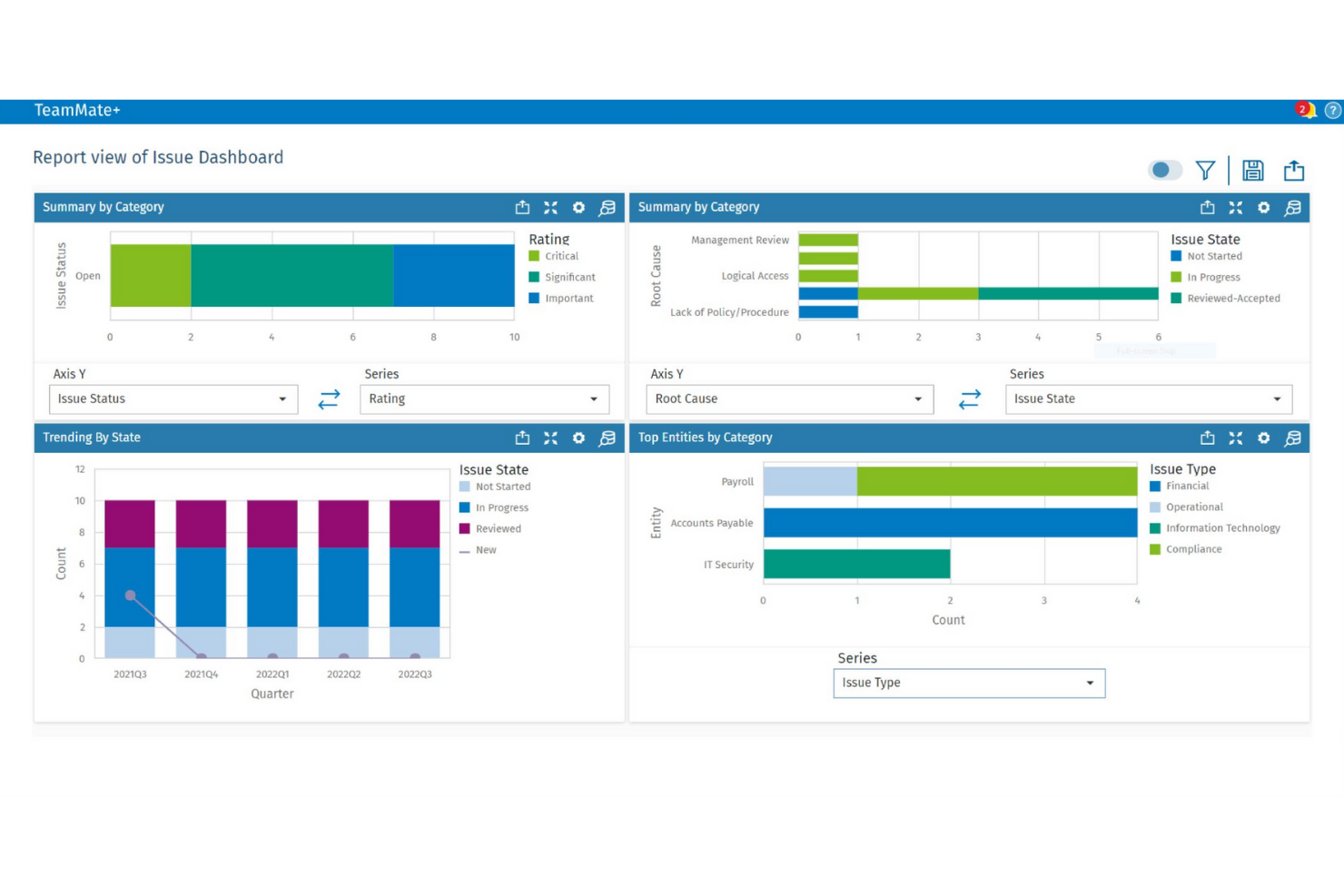
TeamMate+ is designed for audit teams that need to embed business rules directly into their audit workflows. It’s especially useful for internal audit departments in large organizations that want to automate risk assessments, approvals, and documentation processes. By integrating business rules with audit planning and execution, TeamMate+ helps teams maintain consistency and compliance across complex audit cycles.
Why I Picked TeamMate+
What sets TeamMate+ apart is its focus on embedding business rules directly into audit workflows. This approach allows audit teams to automate risk scoring, approvals, and escalation processes as part of their day-to-day work. I picked TeamMate+ because it supports configurable rule sets that adapt to different audit types and regulatory requirements. Its ability to link business logic with audit planning and execution makes it a strong fit for organizations that need to maintain audit consistency and compliance.
TeamMate+ Key Features
I also found several other features that support business rules management in audit environments:
- Automated Task Assignment: Assign audit tasks based on predefined rules and team member roles.
- Customizable Templates: Create and reuse audit templates that include embedded business logic.
- Real-Time Dashboards: Monitor audit progress and rule-triggered events through interactive dashboards.
- Document Version Control: Track changes and maintain a full history of audit documentation updates.
TeamMate+ Integrations
Native integrations are not currently listed. However, an API is available for custom integrations.
Pros and Cons
Pros:
- Tracks rule-triggered actions in audit logs
- Supports granular permissions for rule management
- Audit workflows include embedded business rules logic
Cons:
- Interface updates can disrupt saved workflows
- Reporting customization options are restricted

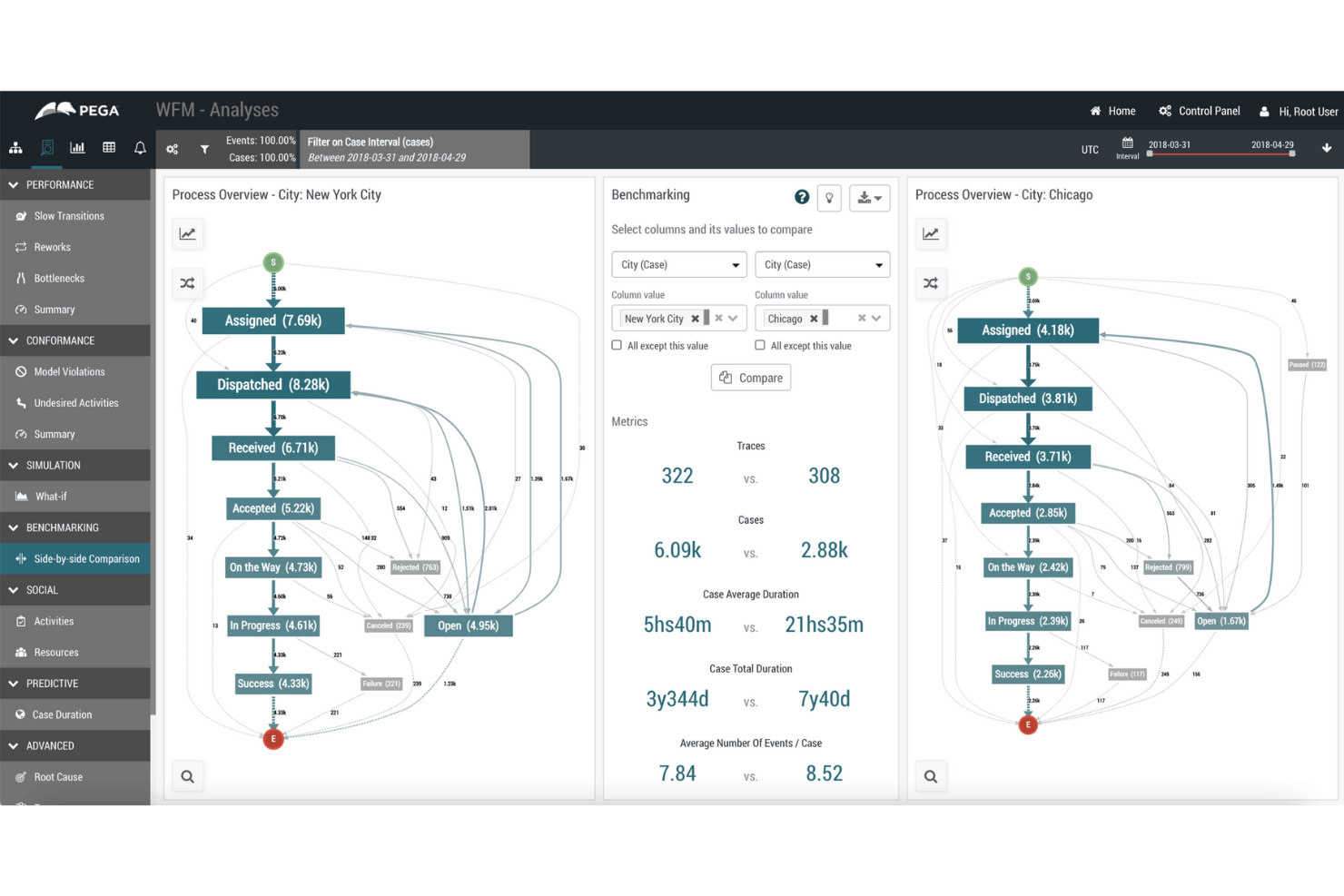
Pega’s business rules engine is built for organizations managing complex, high-volume processes across multiple departments or regions. It’s especially relevant for large enterprises in finance, insurance, and government that need to automate decision-making at scale. With Pega, teams can centralize, update, and audit business logic while supporting advanced workflow automation and compliance requirements.
Why I Picked Pega
For organizations that need to automate business rules at scale, Pega stands out with its ability to handle complex, enterprise-wide logic. The platform supports centralized rule management, so teams can update and govern decision logic across multiple business units from a single location. I appreciate that Pega includes advanced audit and compliance tracking, which is essential for regulated industries. Its support for dynamic, event-driven workflows also makes it a strong choice for enterprises with high transaction volumes and evolving requirements.
Pega Key Features
Some other features that make Pega a strong option for business rules management include:
- Visual Rule Designer: Build and modify rules using a drag-and-drop interface without writing code.
- Decision Table Support: Define and manage complex decision logic using spreadsheet-like tables.
- Real-Time Analytics Integration: Connect rules to real-time data streams for adaptive decision-making.
- Case Management Tools: Link business rules directly to case workflows for end-to-end process automation.
Pega Integrations
Integrations include REST APIs, SOAP APIs, enterprise systems connectors, cloud platform support, legacy system integration tooling, and more.
Pros and Cons
Pros:
- Scalable for high-volume transaction environments
- Supports complex, multi-step workflow automation
- Centralizes business rules for global enterprises
Cons:
- Upgrades can be resource-intensive for IT teams
- Requires specialized expertise for advanced configuration

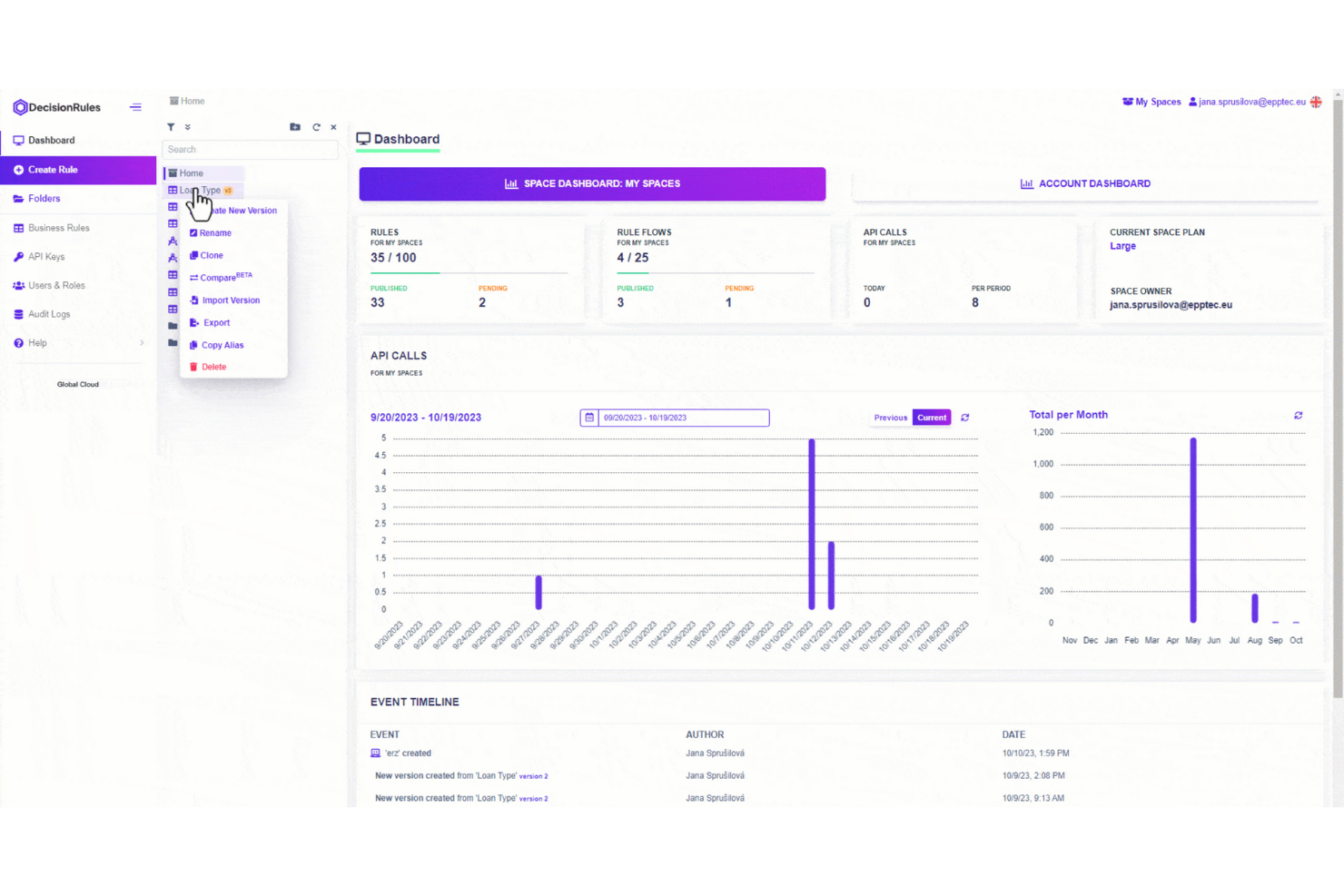
DecisionRules stands out for teams that want to manage business rules in a familiar, spreadsheet-like interface. It’s a strong fit for operations, finance, or product managers who need to build, test, and update rules without coding. The tool helps you translate complex decision logic into editable tables, making rule management accessible and transparent for non-technical users.
Why I Picked DecisionRules
Unlike many business rules engines, DecisionRules uses a spreadsheet-style editor that makes rule creation and updates feel intuitive for anyone familiar with Excel or Google Sheets. This approach is especially helpful for teams that want to manage complex logic without writing code or relying on IT. I picked DecisionRules because it lets you define, test, and deploy rules directly in table formats, so you can visualize and adjust logic in real time. The tool also supports bulk editing and versioning, which helps teams keep track of changes and collaborate on rule management.
DecisionRules Key Features
Some other features that make DecisionRules stand out include:
- API Integration: Connect rules directly to your applications using REST API endpoints.
- Rule Chaining: Link multiple rules together to handle complex decision logic.
- Built-In Testing Environment: Test rules with sample data before deploying them live.
- Audit Logs: Track all changes and rule executions for compliance and troubleshooting.
DecisionRules Integrations
Integrations include Salesforce, Jira, Excel, Google Sheets, AWS, Azure, Power BI, Tableau, Datadog, Anthropic, and more.
Pros and Cons
Pros:
- Rule chaining handles complex decision logic
- Built-in rule testing environment for validation
- Spreadsheet-style editor supports non-technical users
Cons:
- Limited support for advanced scripting languages
- No on-premises deployment option available

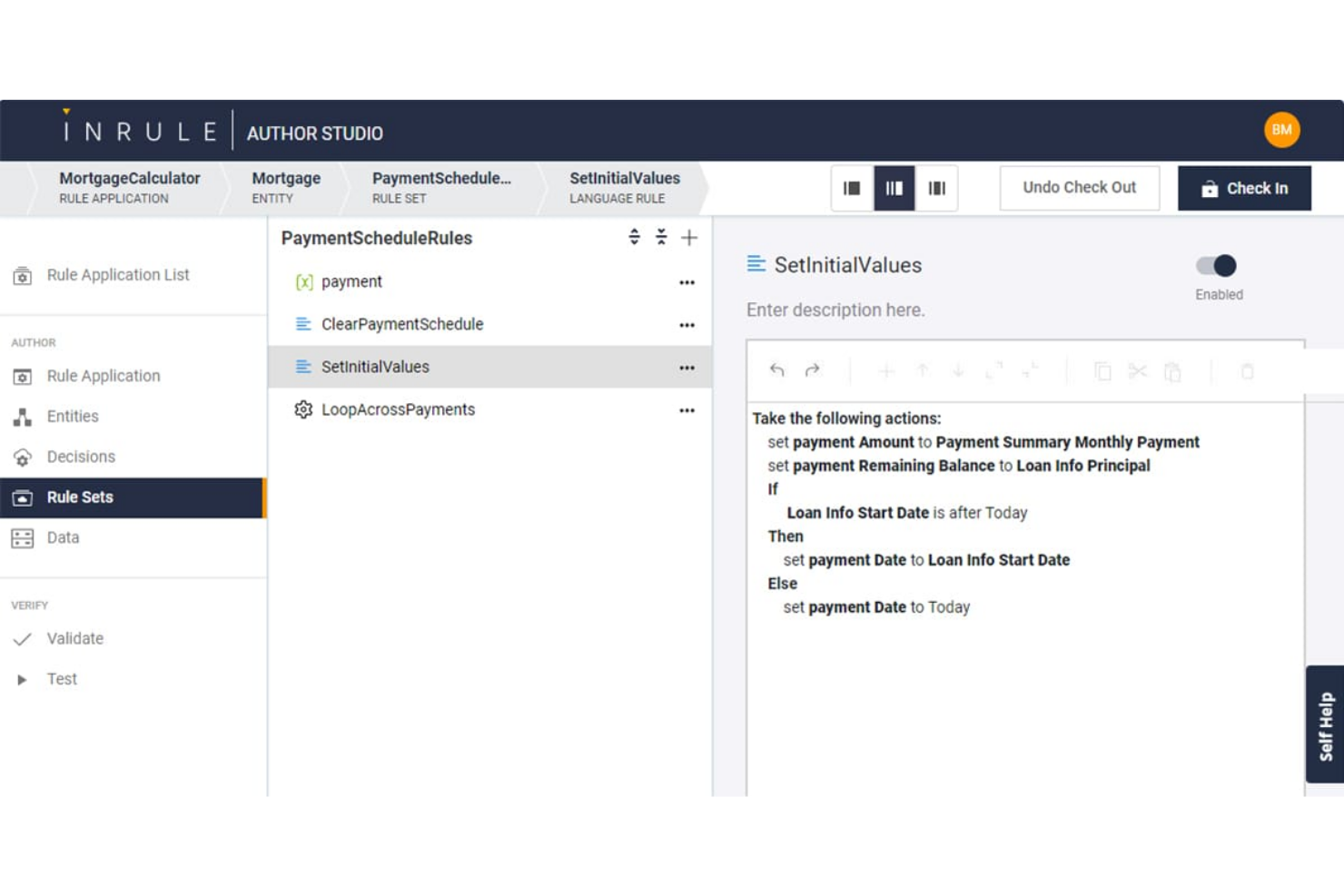
InRule is built for teams that need to deploy and update business rules quickly without heavy developer involvement. It’s a strong fit for enterprises in finance, insurance, and healthcare that require frequent rule changes to keep up with regulations or market shifts. With its low-code interface and real-time rule editing, InRule helps organizations respond rapidly to evolving business logic needs.
Why I Picked InRule
Rapid rule deployment is where InRule really shines for business rules engine software. The platform lets users author, test, and deploy rules in real time, so you can respond to business changes without waiting on development cycles. I picked InRule because its low-code environment allows both technical and non-technical users to update rules directly in production. Its simulation and impact analysis tools also help teams validate rule changes before they go live, reducing risk and speeding up decision-making.
InRule Key Features
Some other features that make InRule stand out for business rules management include:
- Decision Tables: Build and manage complex decision logic using spreadsheet-like tables.
- Natural Language Authoring: Write and edit rules in plain language for easier collaboration.
- Version Control: Track, compare, and roll back rule changes as needed.
- REST API Support: Connect InRule to other systems and trigger rules through API calls.
InRule Integrations
Integrations include Salesforce, Microsoft Dynamics, Snowflake, and APIs for custom integrations.
Pros and Cons
Pros:
- Natural language authoring for business users
- Decision tables support complex rule logic
- Real-time rule deployment without code changes
Cons:
- Advanced analytics features are not built-in
- On-premises deployment requires additional setup

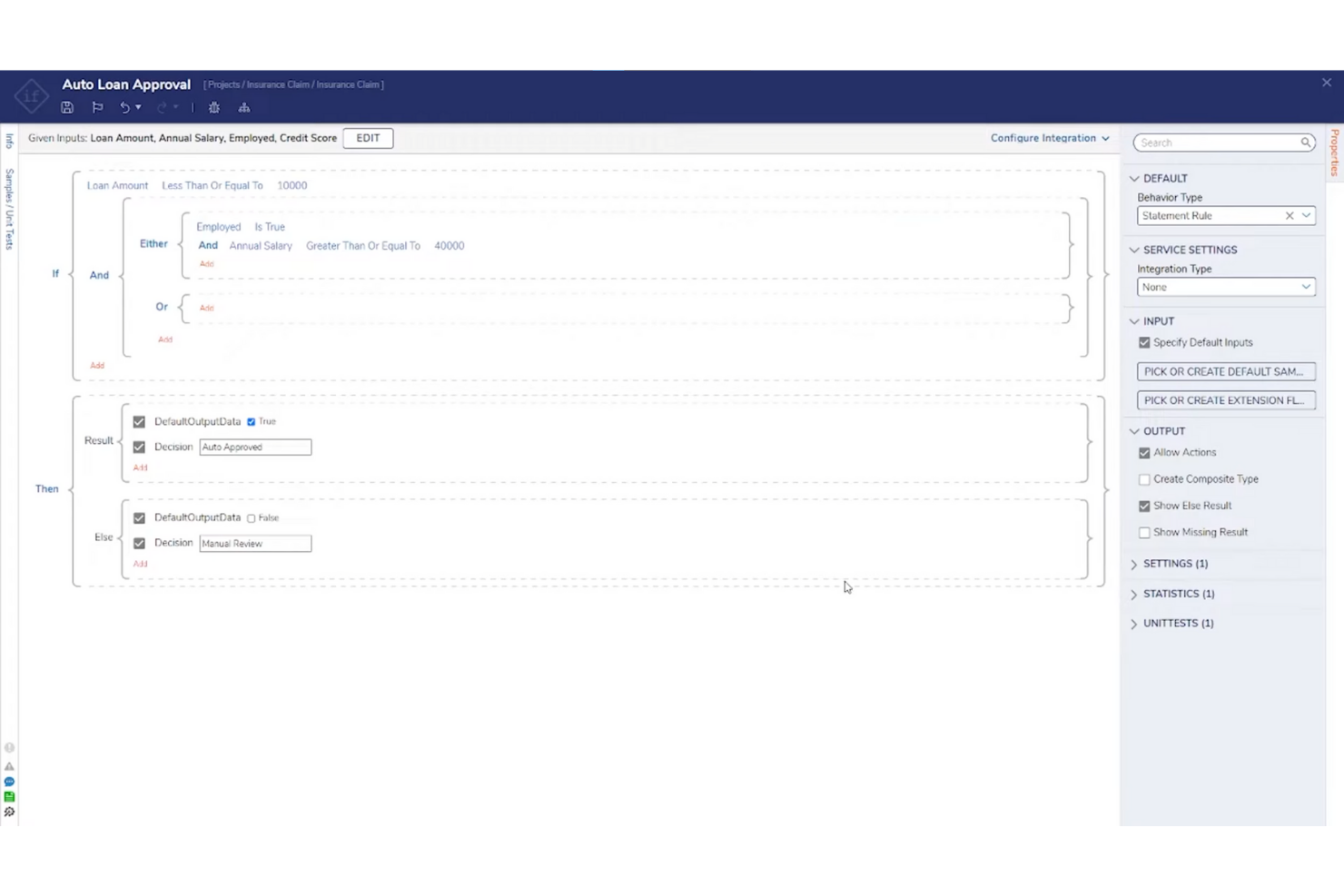
Decisions is designed for teams that want to configure and automate business rules without writing code. It’s a strong fit for operations managers, compliance teams, and business analysts who need to adapt processes quickly as requirements shift. The platform’s no-code interface helps you build, test, and deploy rules directly, reducing reliance on IT and speeding up change cycles.
Why I Picked Decisions
What drew me to Decisions is its focus on no-code rule configuration, which is especially useful for teams that want to empower business users to manage logic directly. The platform offers a drag-and-drop rule designer and visual workflow builder, so you can create and update rules without programming knowledge. I picked Decisions because it supports real-time testing and validation, letting you see the impact of changes before deploying them. This approach helps organizations respond quickly to new requirements and reduces bottlenecks that often come with IT-driven rule management.
Decisions Key Features
Some other features that stood out to me include:
- Business Metrics Tracking: Monitor rule outcomes and performance with built-in analytics tools.
- Version Control: Manage rule changes and roll back to previous versions as needed.
- Audit Logging: Track all rule modifications and user actions for compliance.
- Rule Scheduling: Set rules to activate or expire automatically based on date or event triggers.
Decisions Integrations
Integrations include Microsoft Dynamics, Salesforce, SAP, Oracle, AWS, Azure, Google Cloud, Slack, ServiceNow, Twilio, and more.
Pros and Cons
Pros:
- Real-time rule testing previews logic outcomes
- Built-in version control manages rule updates
- Drag-and-drop designer supports rapid rule changes
Cons:
- User interface can feel dated in places
- Complex workflows may require vendor support


FlowWright is designed for teams that need to embed business rules directly into automated workflows. It’s especially useful for organizations in manufacturing, logistics, or operations where process automation and rule execution must work hand in hand. By combining workflow automation with a built-in rules engine, FlowWright helps you manage complex decision logic as part of your end-to-end business processes.
Why I Picked FlowWright
What sets FlowWright apart is its ability to tightly couple business rules with workflow automation, making it a strong choice for workflow-driven rule execution. The platform lets you design, execute, and manage rules as part of larger process flows, so decision logic is always in sync with operational steps. I picked FlowWright because it offers a visual workflow designer that integrates rule evaluation directly into process diagrams. This approach helps teams automate complex, multi-step processes where rules and workflows need to interact smoothly.
FlowWright Key Features
In addition to its workflow-driven approach, FlowWright offers several other features worth noting:
- Rule Versioning: Maintain and manage multiple versions of business rules for audit and rollback purposes.
- Custom Scripting Support: Incorporate C# scripts directly into rules for advanced logic.
- Email Notification Triggers: Set up automated email alerts based on rule outcomes.
- Role-Based Access Control: Define user permissions for rule creation, editing, and execution.
FlowWright Integrations
Integrations include OneDrive, Slack, Google Drive, Microsoft Azure, and more.
Pros and Cons
Pros:
- Enterprise-grade architecture
- Shared decision table logic
- Flexible graphical rule creation
Cons:
- Limited mobile-focused UI support
- Advanced testing requires developer skills

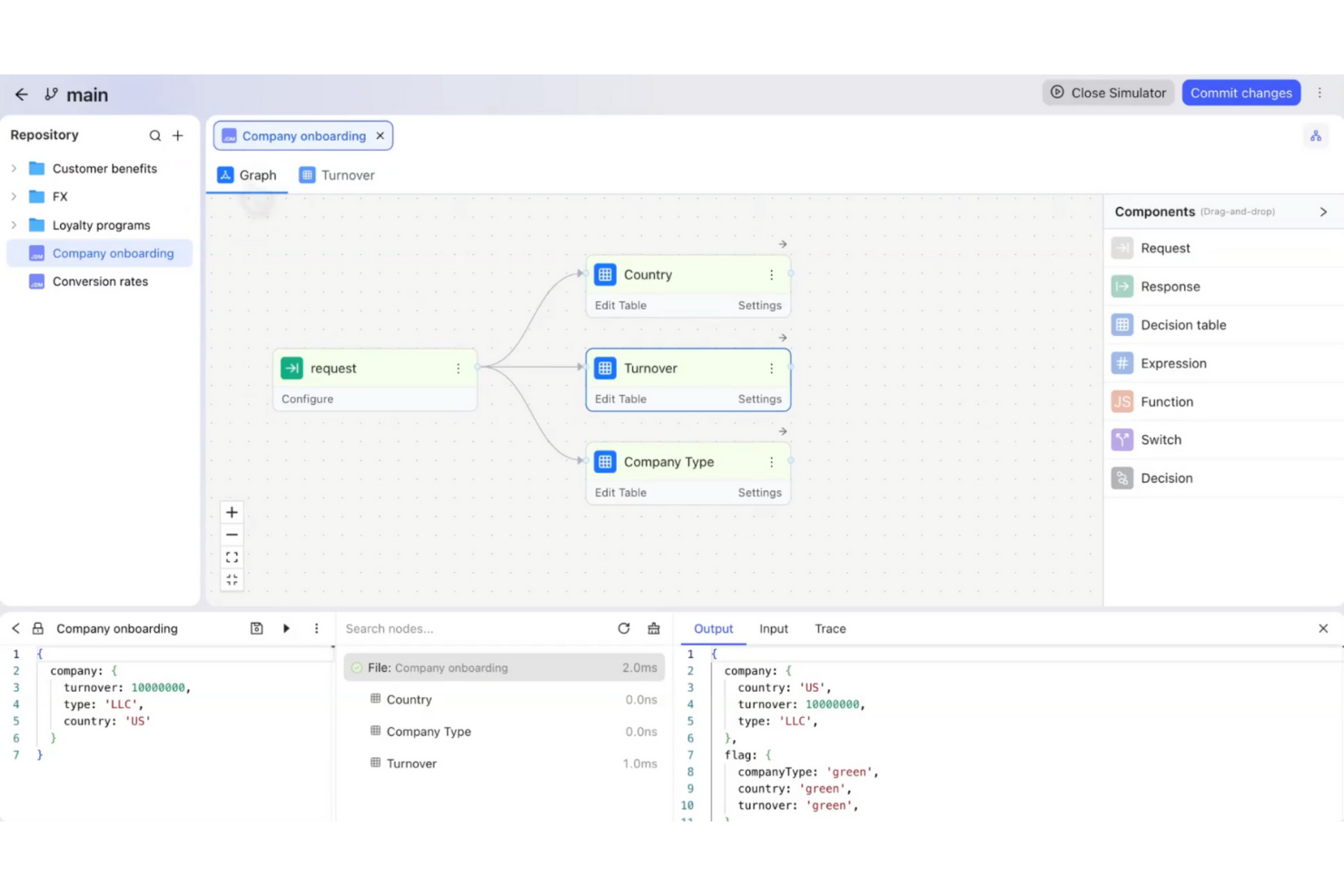
GoRules is a cloud-native business rules engine designed for teams that need flexible, API-driven rule management. It’s a strong fit for SaaS providers, fintechs, and digital businesses looking to centralize and automate decision logic without heavy infrastructure. If you want to update rules quickly and keep your systems agile, GoRules offers a modern approach to rule deployment and governance.
Why I Picked GoRules
I chose GoRules because it’s built specifically for cloud-native rule management, which is a priority for teams running distributed or API-first applications. The platform lets you define, test, and deploy rules directly through a web interface or via REST API, making it easy to integrate with modern cloud architectures. I like that GoRules supports versioning and audit trails for every rule change, so you can track updates and maintain compliance. Its real-time rule execution and centralized management help teams keep business logic consistent across multiple environments.
GoRules Key Features
Some other features that make GoRules stand out for business rules automation include:
- Rule Simulation: Test new or updated rules in a sandbox environment before deploying them to production.
- Role-Based Access Control: Assign permissions and manage user roles to control who can view, edit, or deploy rules.
- JSON Logic Support: Author and manage rules using JSON logic, making it easy to work with structured data.
- Webhook Integration: Trigger external workflows or notifications automatically when specific rules are executed.
GoRules Integrations
Integrations include Azure AD, Okta, and any OpenID Connect provider for SSO, as well as native SDKs for Rust, Node.js, Python, Go, Java, Kotlin, and Swift.
Pros and Cons
Pros:
- Supports JSON logic for flexible rule authoring
- Real-time rule execution via REST API
- Cloud-native deployment with multi-cloud support
Cons:
- Smaller community compared to legacy vendors
- No visual rule builder for non-technical users

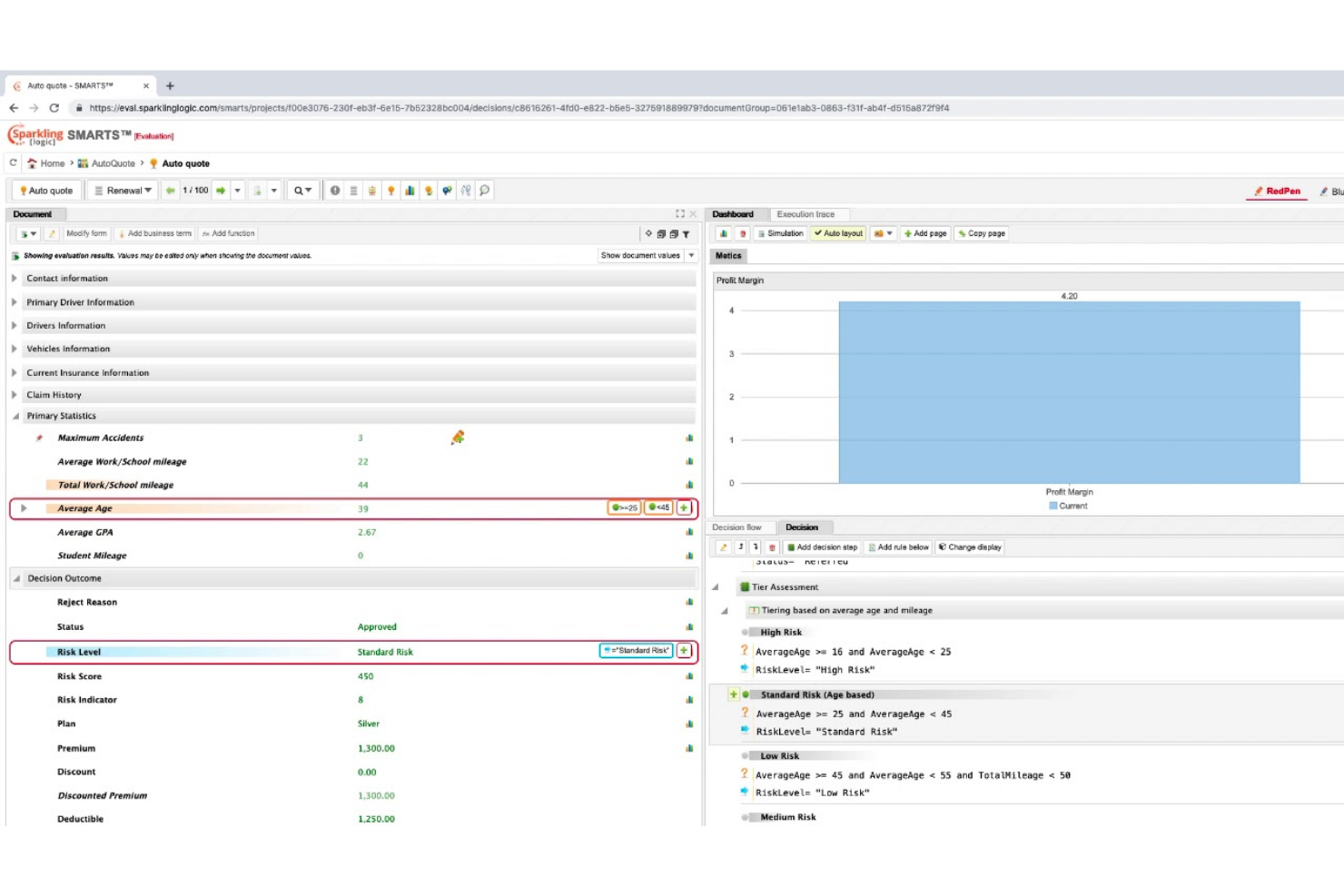
Sparkling Logic offers a visual approach to decision modeling that appeals to teams managing complex business logic. It’s especially useful for analysts and product owners who want to map, test, and optimize rules using flowcharts and decision tables. The platform helps you visualize dependencies and outcomes, making it easier to align stakeholders and adapt rules as requirements change.
Why I Picked Sparkling Logic
What sets Sparkling Logic apart is its focus on visual decision modeling, which is especially valuable for teams that need to map out and communicate complex business logic. The platform lets you build and manage rules using flowcharts and decision tables, so you can see how decisions connect and evolve. I picked Sparkling Logic because it supports real-time rule testing and simulation, helping you validate outcomes before deploying changes. This visual approach makes it easier to collaborate with stakeholders and adapt rules as business needs shift.
Sparkling Logic Key Features
In addition to its visual modeling capabilities, I also found these features worth noting:
- RedPen Rule Authoring: Create and edit rules using a guided, form-based interface.
- Automated Rule Discovery: Analyze historical data to suggest new rules automatically.
- Decision Analytics Dashboard: Monitor rule performance and outcomes with built-in analytics.
- Role-Based Access Control: Assign permissions and manage user roles for secure collaboration.
Sparkling Logic Integrations
Native integrations are not currently listed.
Pros and Cons
Pros:
- Automated rule discovery suggests new decision logic
- RedPen authoring guides non-technical rule creation
- Visual rule modeling supports complex logic mapping
Cons:
- Limited community support and user forums
- Documentation lacks detailed implementation examples

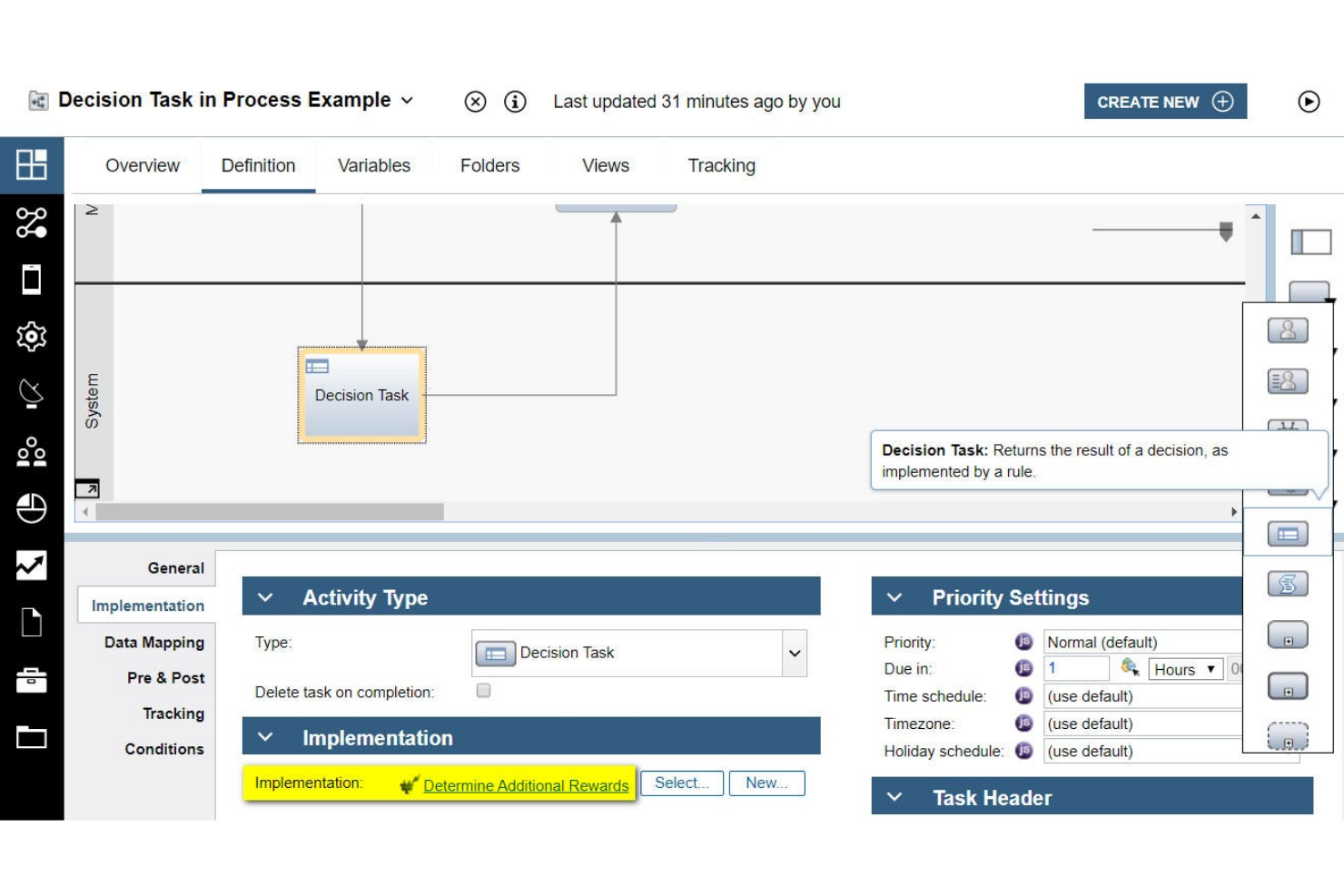
IBM Operational Decision Manager’s business rules management system is built for organizations that need to modernize decision automation while maintaining deep integration with legacy systems. It’s especially relevant for enterprises in finance, insurance, and government that rely on mainframes or older infrastructure. The platform helps you centralize, update, and govern complex business logic without disrupting existing operations.
Why I Picked IBM Operational Decision Manager
What sets IBM Operational Decision Manager apart is its strong focus on supporting legacy system integration, which is a major concern for large enterprises with established infrastructure. The platform offers tools for connecting business rules directly to mainframes and older databases, so you can automate decisions without overhauling your existing tech stack. I picked IBM Operational Decision Manager because it provides centralized rule management and governance features that help maintain consistency across distributed systems. This makes it a practical choice for organizations that need to modernize decision logic while keeping legacy operations running smoothly.
IBM Operational Decision Manager Key Features
Some other features that caught my attention include:
- Decision Modeling Notation (DMN) Support: Create and manage decision models using industry-standard DMN diagrams.
- Role-Based Access Control: Assign permissions and manage user roles for rule editing and deployment.
- Simulation and Testing Tools: Run simulations to validate rule changes before production deployment.
- Automated Rule Deployment: Deploy updated rules to multiple environments with automated workflows.
IBM Operational Decision Manager Integrations
Native integrations are not currently listed.
Pros and Cons
Pros:
- Includes simulation and rule testing tools
- Offers DMN and decision table modeling
- Supports mainframe and legacy system integration
Cons:
- Limited out-of-the-box rule templates
- Cloud and on-prem features differ
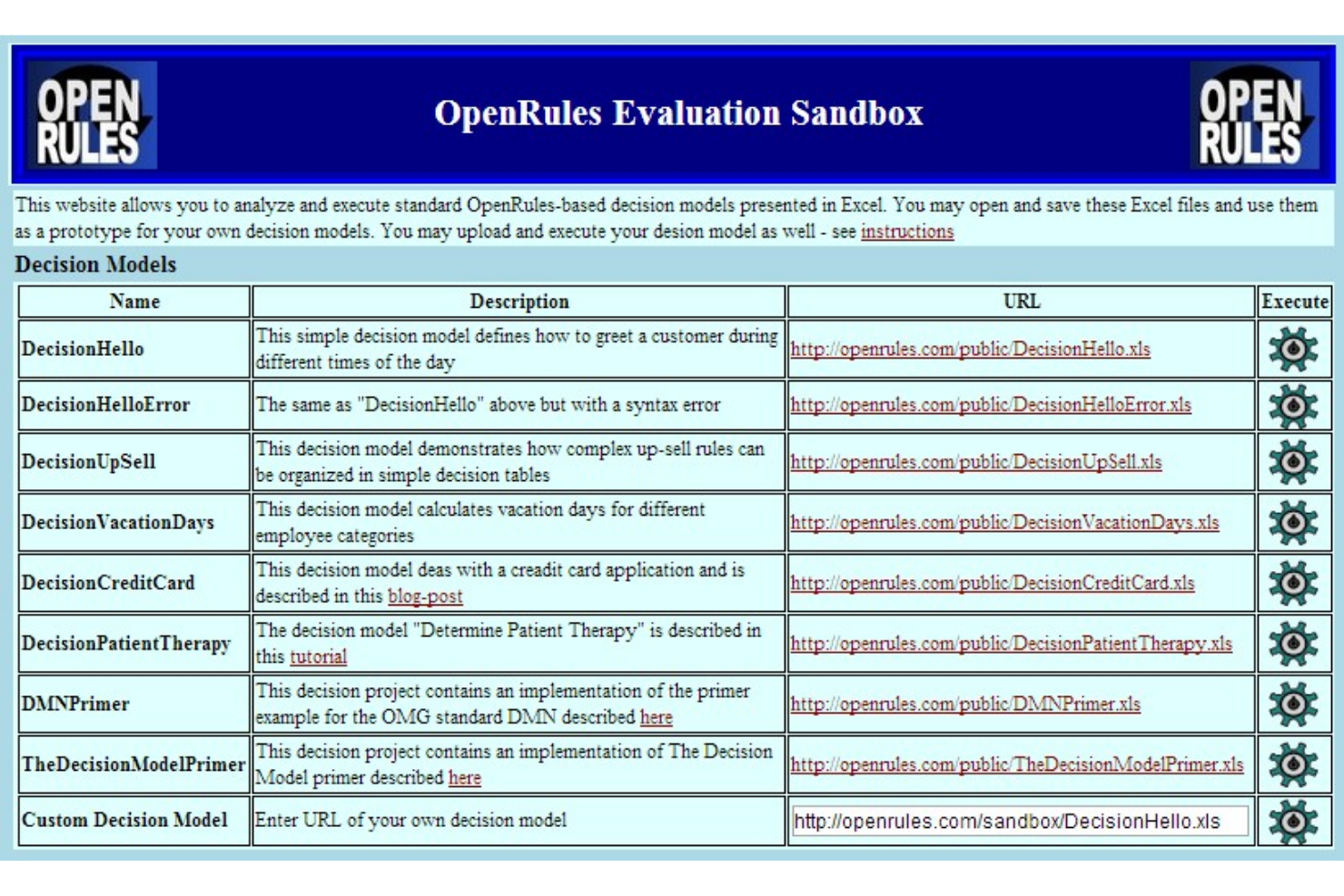
OpenRules stands out for teams that want full control over their business rules engine and prefer open-source solutions. It’s a strong fit for developers and IT teams in regulated industries who need to customize, audit, and extend rule logic without vendor lock-in. The platform helps you build, test, and deploy decision models using familiar tools like Excel and Java.
Why I Picked OpenRules
OpenRules offers a level of open-source flexibility that’s hard to find in other business rules engines. You can modify, extend, and audit the source code, which is especially valuable for organizations with strict compliance or customization needs. I picked OpenRules because it lets teams define rules in Excel or Java, making it accessible for both technical and non-technical users. This approach supports transparency and control, which are key for teams that want to avoid vendor lock-in and tailor their decision logic.
OpenRules Key Features
Some other features worth highlighting include:
- Decision Model and Notation (DMN) Support: Build and execute decision models using DMN standards for consistency and clarity.
- RESTful API Integration: Connect rule services to external applications through RESTful endpoints.
- Rule Testing Framework: Validate and test business rules with built-in testing tools before deployment.
- Deployment to Cloud Platforms: Deploy rule engines to cloud environments like AWS and Azure for scalability.
OpenRules Integrations
Native integrations are not currently listed.
Pros and Cons
Pros:
- Offers a REST API for external integrations
- Supports DMN and Excel-based rule modeling
- Fully open-source with a transparent codebase
Cons:
- User interface is primarily code and spreadsheet-based
- Limited vendor-provided technical support options
Other Business Rules Engine Software
Here are some additional business rules engine software options that didn’t make it onto my shortlist, but are still worth checking out:
- Progress Corticon
For complex decision automation
- SAS
For analytics-driven rule creation
- Knack
For custom database-driven rule logic
- Flowable
For BPMN-based rule automation


Business Rules Engine Software Selection Criteria
When selecting the best business rules engine software to include in this list, I considered common buyer needs and pain points like managing frequent rule changes and ensuring auditability of automated decisions. I also used the following framework to keep my evaluation structured and fair:
Core Functionality (25% of total score)
To be considered for inclusion in this list, each solution had to fulfill these common use cases:
- Define and manage business rules
- Automate decision logic
- Test and validate rule sets
- Deploy rules to production systems
- Monitor and audit rule execution
Additional Standout Features (25% of total score)
To help further narrow down the competition, I also looked for unique features, such as:
- No-code or low-code rule authoring
- Visual rule modeling tools
- Built-in rule conflict detection
- Batch processing capabilities
- Integration with external data sources
Usability (10% of total score)
To get a sense of the usability of each system, I considered the following:
- Clear and intuitive user interface
- Logical navigation between rule components
- Minimal clicks to perform key actions
- Accessibility of documentation within the platform
- Customizable dashboards or views
Onboarding (10% of total score)
To evaluate the onboarding experience for each platform, I considered the following:
- Availability of step-by-step product tours
- Access to training videos and webinars
- Pre-built templates for common rule scenarios
- In-app guidance or chatbots for new users
- Quality of migration support and documentation
Customer Support (10% of total score)
To assess each software provider’s customer support services, I considered the following:
- Availability of live chat or phone support
- Responsiveness to support tickets
- Access to a knowledge base or help center
- Community forums or user groups
- Availability of dedicated account managers
Value For Money (10% of total score)
To evaluate the value for money of each platform, I considered the following:
- Transparent and flexible pricing options
- Features included in base pricing
- Cost compared to similar tools
- Availability of free trials or demos
- Scalability of pricing as needs grow
Customer Reviews (10% of total score)
To get a sense of overall customer satisfaction, I considered the following when reading customer reviews:
- Positive feedback on rule management capabilities
- Reports of reliable performance and uptime
- Comments on ease of integration
- User satisfaction with support and onboarding
- Critiques of limitations or missing features
How to Choose Business Rules Engine Software
It’s easy to get bogged down in long feature lists and complex pricing structures. To help you stay focused as you work through your unique software selection process, here’s a checklist of factors to keep in mind:
| Factor | What to Consider |
|---|---|
| Scalability | Will the tool handle your current and projected rule volume, user count, and transaction load? Ask vendors for real-world scaling examples. |
| Integrations | Does the software connect natively to your core systems (ERP, CRM, databases)? Check for pre-built connectors and API options. |
| Customizability | Can you tailor rule logic, workflows, and outputs to your business processes without heavy IT involvement? |
| Ease of use | Will business users be able to author, test, and update rules independently, or will IT need to be involved for every change? |
| Implementation and onboarding | What resources, training, and migration support does the vendor provide? Ask about onboarding timelines and required internal effort. |
| Cost | Are pricing tiers transparent and predictable as your usage grows? Watch for hidden fees tied to users, transactions, or integrations. |
| Security safeguards | Does the tool support your organization’s data protection, access control, and audit requirements? Request documentation on certifications. |
| Compliance requirements | Does the platform support industry-specific regulations (like HIPAA, GDPR, or SOX) relevant to your business? |
What Is Business Rules Engine Software?
Business rules engine software, often referred to as a BRMS (business rules management system), is a tool that lets organizations define, manage, and automate decision logic separately from application code. These platforms help teams create, update, and audit rules—such as eligibility checks, approvals, or compliance requirements—without relying on developers. By centralizing rule management, businesses can streamline operations, support business process management, and enable use cases like fraud detection and dynamic pricing, especially in financial services and financial institutions. With a user-friendly interface and seamless integration across systems, these tools help organizations respond quickly to changes while maintaining consistency and transparency in decision-making.
Features
When selecting business rules engine software, keep an eye out for the following key features:
- Rule authoring interface: Provides a visual or text-based environment for creating, editing, and organizing business rules without writing application code.
- Rule versioning: Tracks changes to rules over time, allowing users to review, revert, or audit previous versions as business needs evolve.
- Rule testing and simulation: Lets users validate rule logic and outcomes using sample data before deploying changes to production systems.
- Batch processing: Processes large volumes of data or transactions through defined rules in a single operation, supporting high-throughput decision automation.
- Conflict and gap detection: Identifies overlapping, contradictory, or missing rules to help maintain logical consistency and avoid errors in automated decisions.
- Role-based access control: Restricts rule creation, editing, and deployment permissions based on user roles, supporting governance and compliance requirements.
- Integration connectors: Enable direct connections to databases, applications, and other systems so rules can access real-time data and trigger downstream actions.
- Audit logging: Records all rule changes, executions, and user actions, providing a transparent history for compliance and troubleshooting.
- Deployment management: Supports publishing, updating, and rolling back rules across different environments (such as development, testing, and production).
- Monitoring and reporting: Offers dashboards and reports to track rule execution metrics, errors, and business outcomes for ongoing optimization.
Benefits
Implementing business rules engine software provides several benefits for your team and your business. Here are a few you can look forward to:
- Faster rule changes: Business users can update decision logic directly through a visual interface, reducing reliance on developers and speeding up response to new requirements.
- Consistent decision-making: Centralized rule management ensures that automated decisions follow the same logic across all systems and processes.
- Improved auditability: Built-in versioning, audit logs, and reporting features make it easy to track changes and demonstrate compliance with internal and external standards.
- Reduced operational risk: Conflict and gap detection tools help prevent contradictory or missing rules, minimizing errors in automated processes.
- Greater agility: Teams can quickly adapt to regulatory changes or shifting business priorities by updating rules without redeploying application code.
- Improved collaboration: Role-based access controls and clear rule documentation support collaboration between business, compliance, and IT teams.
- Scalable automation: Batch processing and integration connectors allow organizations to automate high-volume, complex decisions as they grow.
Costs & Pricing
Selecting business rules engine software requires an understanding of the various pricing models and plans available. Costs vary based on features, team size, add-ons, and more. The table below summarizes common plans, their average prices, and typical features included in business rules engine software solutions:
Plan Comparison Table for Business Rules Engine Software
| Plan Type | Average Price | Common Features |
|---|---|---|
| Free Plan | $0 | Basic rule authoring, limited rule executions, single-user access, and community support. |
| Personal Plan | $50–$300/user/month | Visual rule editor, basic integrations, rule versioning, and email support. |
| Business Plan | $300–$1000+/user/month | Multi-user collaboration, advanced integrations, batch processing, audit logging, and role-based access. |
| Enterprise Plan | $1000–$4000+/user/month | Custom integrations, dedicated onboarding, compliance tools, premium support, and advanced security. |
Business Rules Engine Software FAQs
Here are some answers to common questions about business rules engine software:
Can business rules engine software be used by non-technical users?
Yes, most business rules engine software is designed with visual editors and no-code interfaces so business analysts and other non-technical users can create, modify, and test rules without writing code. This helps teams respond quickly to changing requirements without waiting for developer resources.
How does business rules engine software integrate with existing systems?
Business rules engine software typically offers integration connectors, APIs, or webhooks to connect with databases, CRMs, ERPs, and other business applications. When evaluating options, check if the tool supports your core systems natively or if custom integration work will be required.
What are the main challenges when implementing business rules engine software?
Common challenges include migrating existing rules from legacy systems, aligning rule logic with business processes, and ensuring all stakeholders understand how to use the new platform. Planning for training, documentation, and phased rollouts can help address these issues.
How do business rules engines support compliance and audit requirements?
Business rules engine software provides audit logs, rule versioning, and detailed reporting to track changes and rule executions. These features help organizations demonstrate compliance with internal policies and external regulations by maintaining a transparent record of automated decisions.
Is it possible to test rules before deploying them to production?
Yes, most business rules engine software includes rule testing and simulation features. These allow users to validate rule logic and outcomes using sample data, reducing the risk of errors or unintended consequences when rules go live.