
16 Best Appian Alternatives for 2026

Best Appian Alternatives Shortlist
Here’s my shortlist of Appian alternatives:


A strong Appian alternative offers flexible process modeling, low-code automation, and integration with your existing tech stack—without locking you into a single vendor’s approach. If you’re searching for Appian competitors, you’re likely weighing options that can handle complex workflows, support rapid change, and fit your team’s unique requirements. This list will help you compare leading BPM and low-code development tools, highlighting what each one does best so you can make an informed decision for your next project or process overhaul.
What Is Appian?
Appian is a business process management (BPM) and low-code platform that lets teams design, automate, and streamline workflows. It supports process modeling, data integration, and app development across departments. Appian is used by large organizations that need to manage complex processes, adapt quickly to change, and connect multiple data sources within a single development platform. Its low-code approach helps both technical and non-technical users build custom applications, though some users find it has a steep learning curve.
Best Appian Alternatives Summary
This comparison chart summarizes pricing details for my top Appian alternative selections to help you find the best one for your budget and business needs.
| Tool | Best For | Trial Info | Price | ||
|---|---|---|---|---|---|
| 1 | Best for large-scale enterprise deployments | Free trial + free demo available | From $0.45/case | Website | |
| 2 | Best for AI-driven automation tools | Free demo available | Pricing upon request | Website | |
| 3 | Best for low-code process design | Free trial available | From $3000/month (billed annually) | Website | |
| 4 | Best for customizable workflow templates | Free trial + free demo available | Pricing upon request | Website | |
| 5 | Best with Microsoft 365 integration | 30-day free trial | From $15/user/month (billed annually) | Website | |
| 6 | Best with advanced security features | Free demo available | Pricing upon request | Website | |
| 7 | Best for process mining capabilities | 30-day free trial + free demo available | Pricing upon request | Website | |
| 8 | Best for visual process modeling | Free demo available | Pricing upon request | Website | |
| 9 | Best for manufacturing process optimization | Free demo available | From $504/quarter | Website | |
| 10 | Best for on-premise deployment options | Free demo available | Pricing upon request | Website | |
| 11 | Best for quick implementation | Free trial + free demo available | From $2,500/month | Website |
Why You Can Trust Us
-

Accelo
Visit WebsiteThis is an aggregated rating for this tool including ratings from Crozdesk users and ratings from other sites.4.4 -
Forecast
Visit WebsiteThis is an aggregated rating for this tool including ratings from Crozdesk users and ratings from other sites.4.6 -
Wrike
Visit WebsiteThis is an aggregated rating for this tool including ratings from Crozdesk users and ratings from other sites.4.2





Best Appian Alternatives Reviews
Below are my detailed summaries of the best Appian alternatives that made it onto my shortlist. My reviews offer a detailed look at the features, capabilities, and integrations of each platform to help you find the best one for your team.

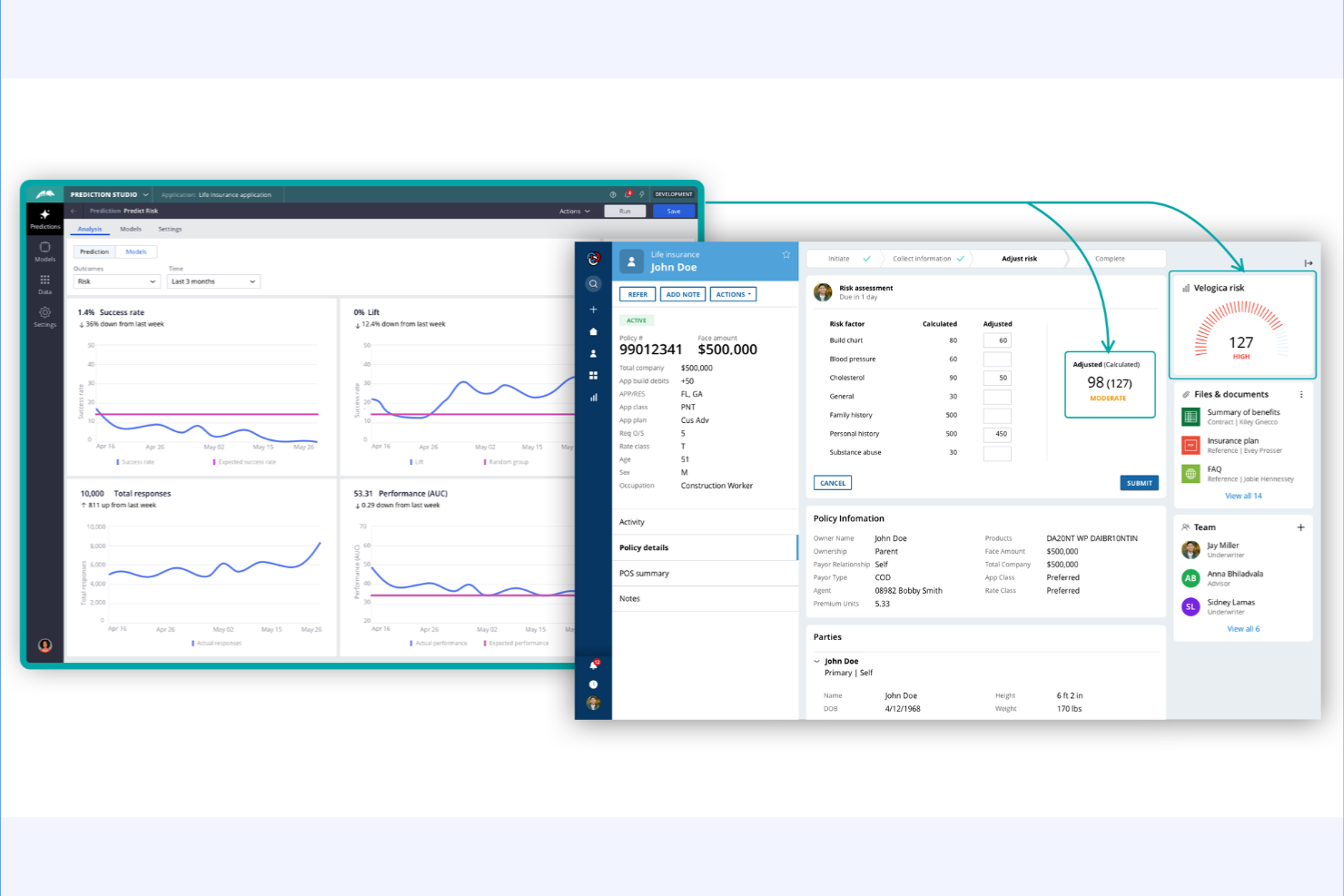
Pega stands out for organizations managing complex, large-scale operations across multiple regions or business units. Its platform is designed for enterprises that need advanced case management, end-to-end automation, and real-time decisioning at scale. Unlike Appian, Pega offers deep industry-specific solutions and a unified architecture that supports high-volume, mission-critical processes.
Why Pega Is a Good Appian Alternative
When it comes to supporting large-scale enterprise deployments, Pega offers capabilities that go beyond what many BPM platforms provide. I picked Pega because its architecture is built for high-volume, mission-critical processes and complex case management across global organizations. The platform includes advanced decisioning tools and real-time AI to automate and optimize workflows at scale. For enterprises that need to orchestrate processes across multiple business units or regions, Pega’s unified approach and industry-specific solutions make it a strong Appian alternative.
Pega Key Features
Some other features that make Pega appealing for enterprise BPM needs include:
- Low-Code App Studio: Build and deploy process applications using a visual, drag-and-drop interface.
- Omnichannel Case Management: Manage cases and interactions across web, mobile, chat, and email from a single platform.
- Robotic Process Automation (RPA): Automate repetitive tasks with integrated bots that work alongside human users.
- Built-In SLA Management: Set, monitor, and enforce service level agreements directly within process workflows.
Pega Integrations
Integrations include Salesforce, SAP, Oracle, AWS, Google Cloud, ServiceNow, and DocuSign.
Pros and Cons
Pros:
- Deep case management
- Incredible AI routing
- Massive enterprise scale
Cons:
- Very rigid architecture
- Overkill for simple apps

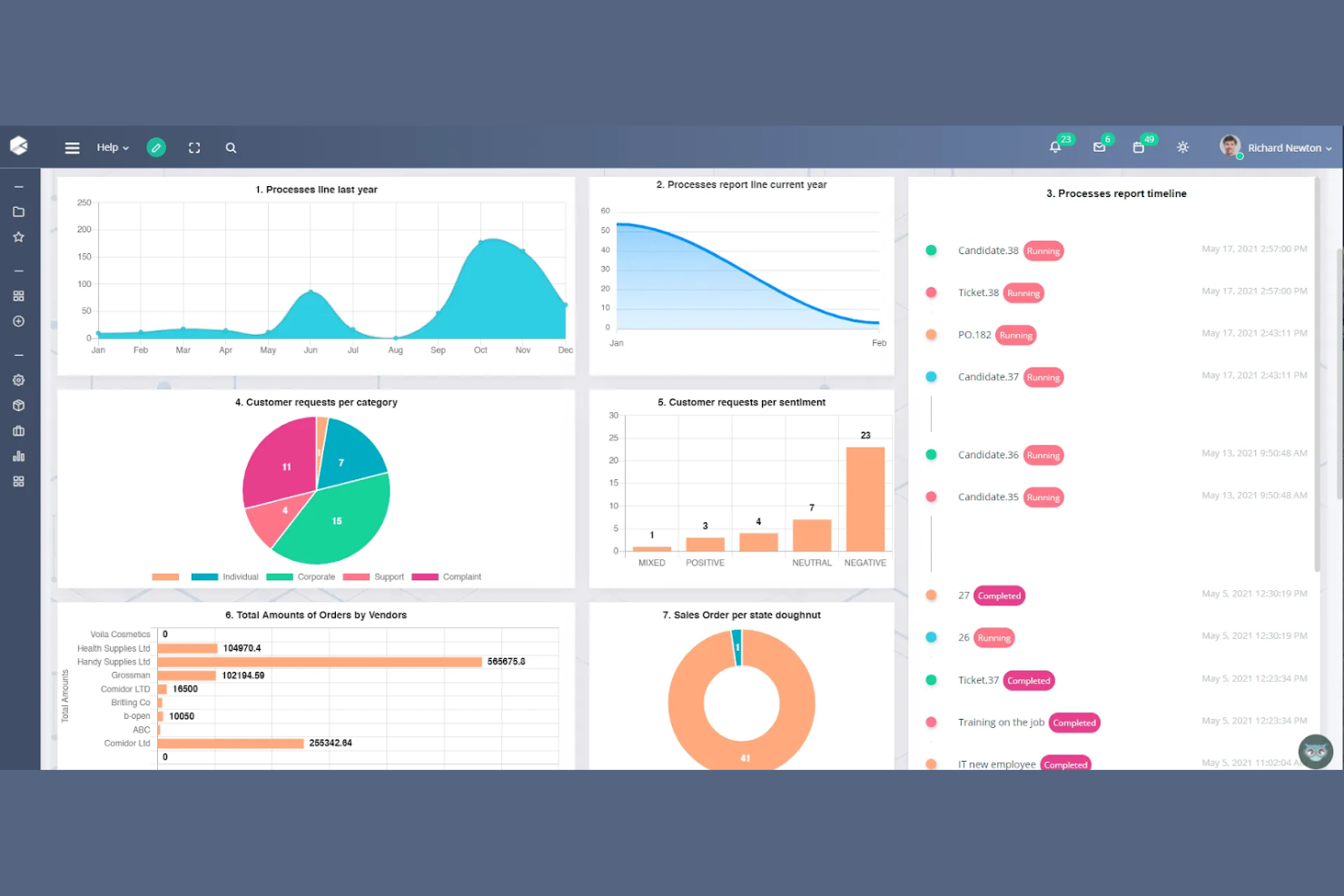
AI-powered automation is at the core of Comidor, making it a strong choice for teams looking to modernize complex business processes. It’s especially useful for organizations that want to combine workflow automation with advanced AI tools like intelligent document processing and predictive analytics. Unlike Appian, Comidor puts a heavy emphasis on low-code AI features that help automate decision-making and optimize end-to-end processes.
Why Comidor Is a Good Appian Alternative
For teams prioritizing AI-driven automation, Comidor brings a unique set of capabilities to the BPM space. I picked it because its platform combines low-code workflow design with built-in AI tools for intelligent document processing and predictive analytics. Users can automate complex decision-making and leverage machine learning models directly within their business processes. This focus on embedded AI makes Comidor a strong choice for organizations looking to go beyond traditional automation and add intelligence to every workflow.
Comidor Key Features
In addition to its AI-driven automation capabilities, Comidor offers several other features for managing business processes:
- Drag-and-Drop Process Designer: Build and modify workflows visually without writing code.
- Integrated Project Management: Track tasks, milestones, and resources alongside process automation.
- Document Management System: Store, organize, and collaborate on files within the platform.
- Custom Form Builder: Create tailored data entry forms to capture and manage process information.
Comidor Integrations
Integrations include Salesforce, SAP, Oracle, Microsoft Dynamics 365, Slack, DocuSign, Google Drive, Dropbox, Jira, and Outlook.
Pros and Cons
Pros:
- Predictive ML models
- Strong RPA capabilities
- Built in team workspace
Cons:
- Niche user community
- Complex setup process

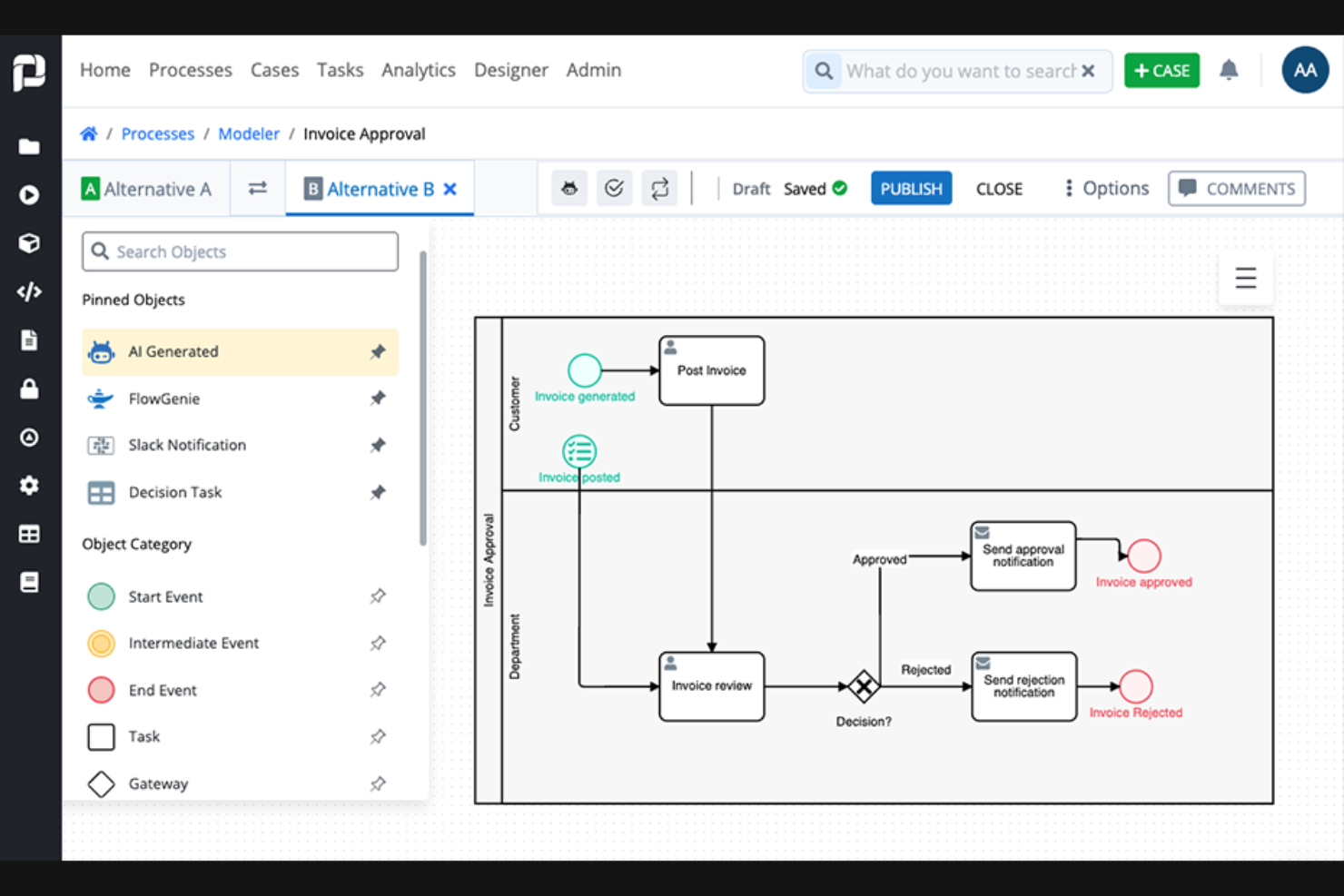
ProcessMaker is designed for teams that want to build and automate business processes with minimal coding. It’s especially useful for IT leaders and business analysts in organizations that need to quickly prototype, deploy, and iterate on workflows. Unlike Appian, ProcessMaker’s low-code environment makes it easier to involve non-developers in process design and automation.
Why ProcessMaker Is a Good Appian Alternative
For teams prioritizing low-code process design, ProcessMaker offers a more accessible approach than Appian. Its drag-and-drop process modeler lets you visually map out workflows without writing code, which is ideal for business users and analysts. I like that you can also use its form builder to create custom data capture forms directly within your processes. This focus on low-code tools makes ProcessMaker a strong choice for organizations that want to empower non-technical staff to automate and optimize business processes.
ProcessMaker Key Features
Some other features in ProcessMaker help teams manage and optimize their business processes:
- REST API Integration: Connect workflows to external systems and data sources using built-in REST API connectors.
- Multi-Language Support: Configure processes and user interfaces in multiple languages for global teams.
- Advanced Reporting: Generate custom reports and dashboards to track process performance and bottlenecks.
- Role-Based Permissions: Assign granular access controls to users based on their roles within the organization.
ProcessMaker Integrations
Integrations include BambooHR, DocuSign, GitHub, Gmail, Microsoft Excel, Slack, SAP S/4HANA, Formstack, Jotform, and Typeform.
Pros and Cons
Pros:
- Easy for citizen devs
- Great API integrations
- Lower cost than Appian
Cons:
- Basic analytics tracking
- Requires some coding
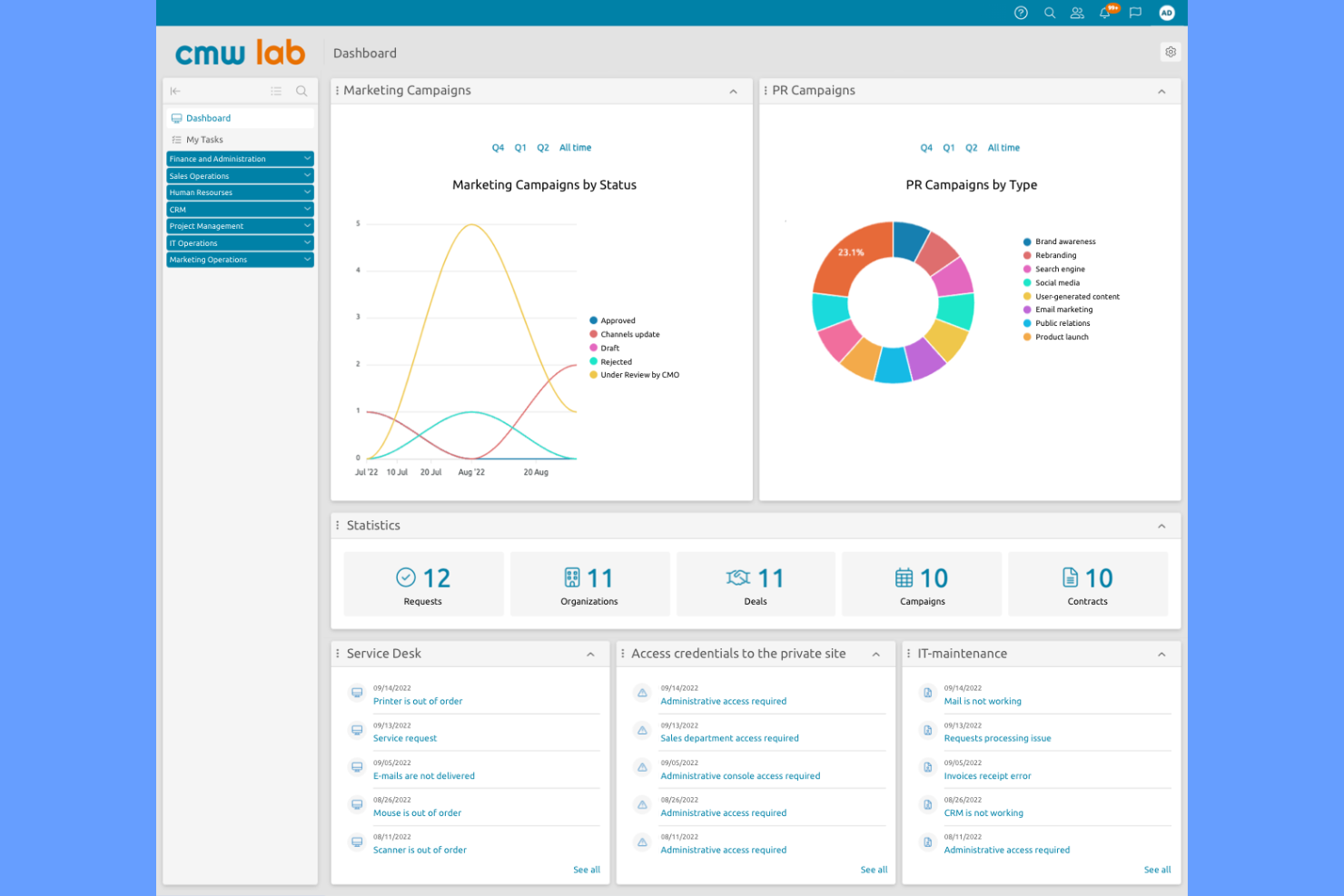
If you need a BPM platform that adapts to your unique workflows, CMW Lab stands out for its customizable workflow templates. This tool is a strong fit for operations managers and process owners in industries with complex, evolving requirements. CMW Lab helps teams design, automate, and adjust business processes without heavy IT involvement, making it easier to respond to change than with more rigid platforms like Appian.
Why CMW Lab Is a Good Appian Alternative
CMW Lab is a strong Appian alternative if you need deep customization for your business processes. Its workflow template designer lets you build and modify process templates to match your team’s exact requirements, rather than forcing you into a rigid structure. I appreciate that you can adjust approval paths, task assignments, and process logic on the fly, which is especially useful for organizations with frequently changing workflows. This flexibility makes CMW Lab a practical choice for teams that want more control over process design than Appian typically allows.
CMW Lab Key Features
Some other features in CMW Lab make it a versatile BPM platform for different teams and industries:
- Form Builder: Create custom forms to capture and manage process data without coding.
- Role-Based Access Control: Set permissions and access levels for users based on their roles within your organization.
- Process Analytics: Monitor process performance with built-in dashboards and reporting tools.
- Document Management: Store, share, and track documents directly within workflows for better version control.
CMW Lab Integrations
Integrations include Microsoft Outlook, SharePoint, Salesforce, Oracle, SAP, and Active Directory.
Pros and Cons
Pros:
- Good drag and drop UI
- Strong template library
- Cost effective scaling
Cons:
- Support can be quite slow
- UI looks slightly dated


Microsoft Power Automate is a cloud-based service that enables business users to automate workflows and tasks across various applications and services. It's popular among IT professionals and business users looking to enhance productivity by automating repetitive tasks.
Why Microsoft Power Automate Is a Good Appian Alternative
When you need a BPM platform that works natively with Microsoft 365, Power Automate is the clear choice. I picked it for its ability to automate workflows directly within Outlook, SharePoint, and Teams, letting users trigger actions and approvals without leaving familiar apps. Its prebuilt templates and connectors for Microsoft services help teams quickly digitize and orchestrate business processes. This makes Power Automate especially appealing for organizations already invested in the Microsoft ecosystem and looking to extend automation across their daily tools.
Microsoft Power Automate Key Features
Some other features in Power Automate help teams build and manage business processes at scale:
- Robotic Process Automation (RPA): Automate repetitive tasks across legacy and modern systems using attended and unattended bots.
- AI Builder Integration: Add AI-driven capabilities like document processing and sentiment analysis to workflows without custom coding.
- Process Mining: Analyze and visualize process data to identify inefficiencies and optimization opportunities.
- Role-Based Access Control: Set granular permissions for users and groups to manage workflow access and security.
Microsoft Power Automate Integrations
Integrations include Microsoft Teams, SharePoint, Outlook, OneDrive, Dynamics 365, Azure DevOps, Power BI, Salesforce, SAP, and Twitter.
Pros and Cons
Pros:
- Fast desktop automation
- Great AI builder tools
- Included in MS licenses
Cons:
- Not a full BPM platform
- Complex licensing tiers

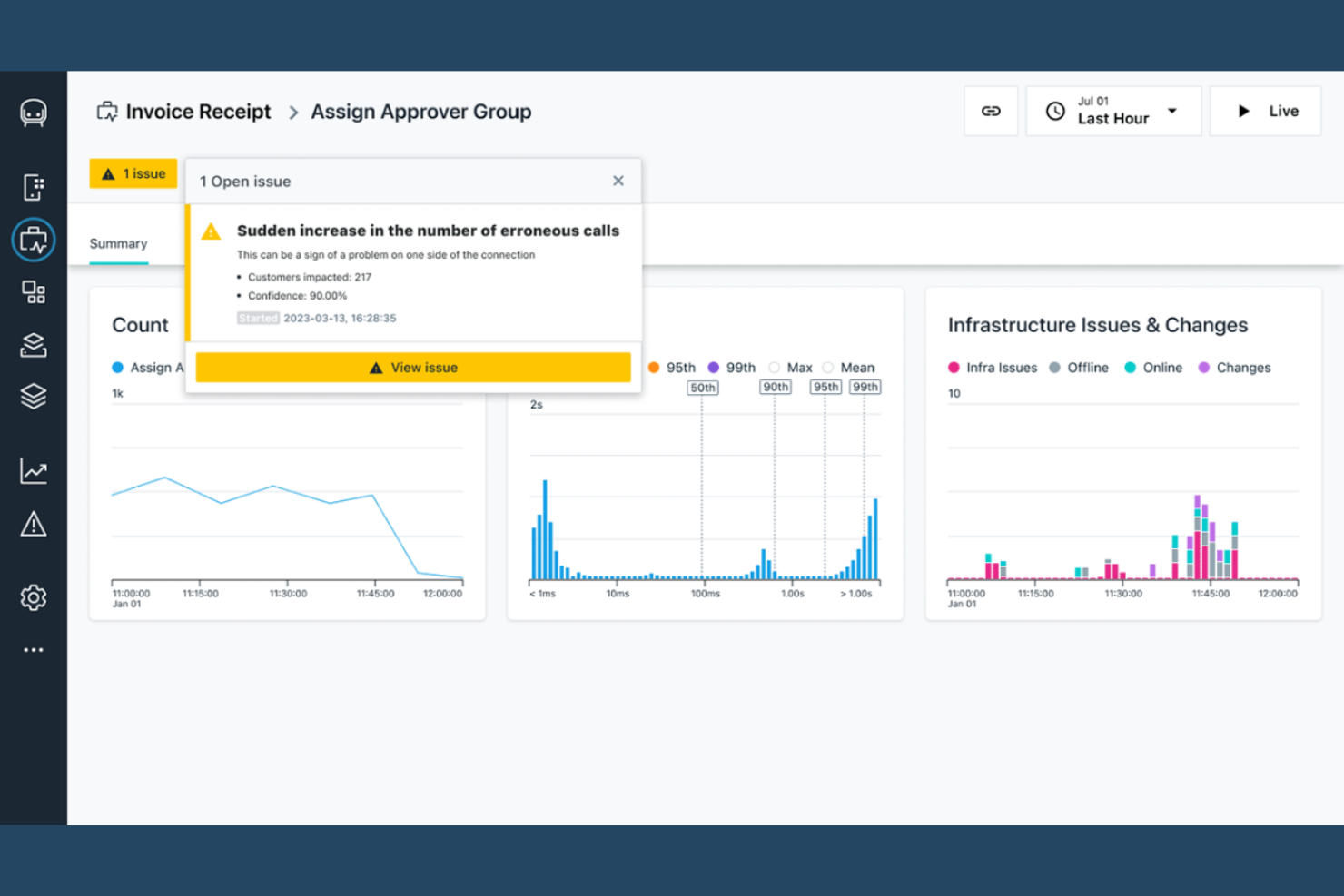
Security-focused organizations often look to IBM for BPM solutions that prioritize advanced threat protection and compliance. IBM’s managed security services are designed for enterprises in regulated industries, such as finance and healthcare, where data privacy and risk management are top priorities. Unlike Appian, IBM integrates security monitoring, incident response, and governance directly into process management workflows.
Why IBM Is a Good Appian Alternative
If your BPM priorities center on advanced security, IBM offers capabilities that go beyond what Appian provides. I picked IBM because it embeds real-time threat detection and automated incident response directly into business process workflows. Its platform also supports granular access controls and compliance management, which are essential for organizations handling sensitive data or operating in regulated sectors. For teams that need to align process automation with enterprise-grade security, IBM’s managed security features make it a strong alternative.
IBM Key Features
Some other features that BPM teams may find useful include:
- Automated Workflow Orchestration: Design and manage complex workflows with built-in automation tools.
- Customizable Dashboard Views: Create tailored dashboards to monitor process performance and security events.
- Audit Trail Logging: Maintain detailed logs of all process activities for compliance and review.
- Multi-Cloud Deployment Support: Deploy BPM solutions across public, private, or hybrid cloud environments.
IBM Integrations
Integrations include SAP, Salesforce, Microsoft 365, ServiceNow, AWS, and Box.
Pros and Cons
Pros:
- Strong rules engine
- Highly scalable platform
- Massive legacy support
Cons:
- Extremely expensive
- Slow implementation

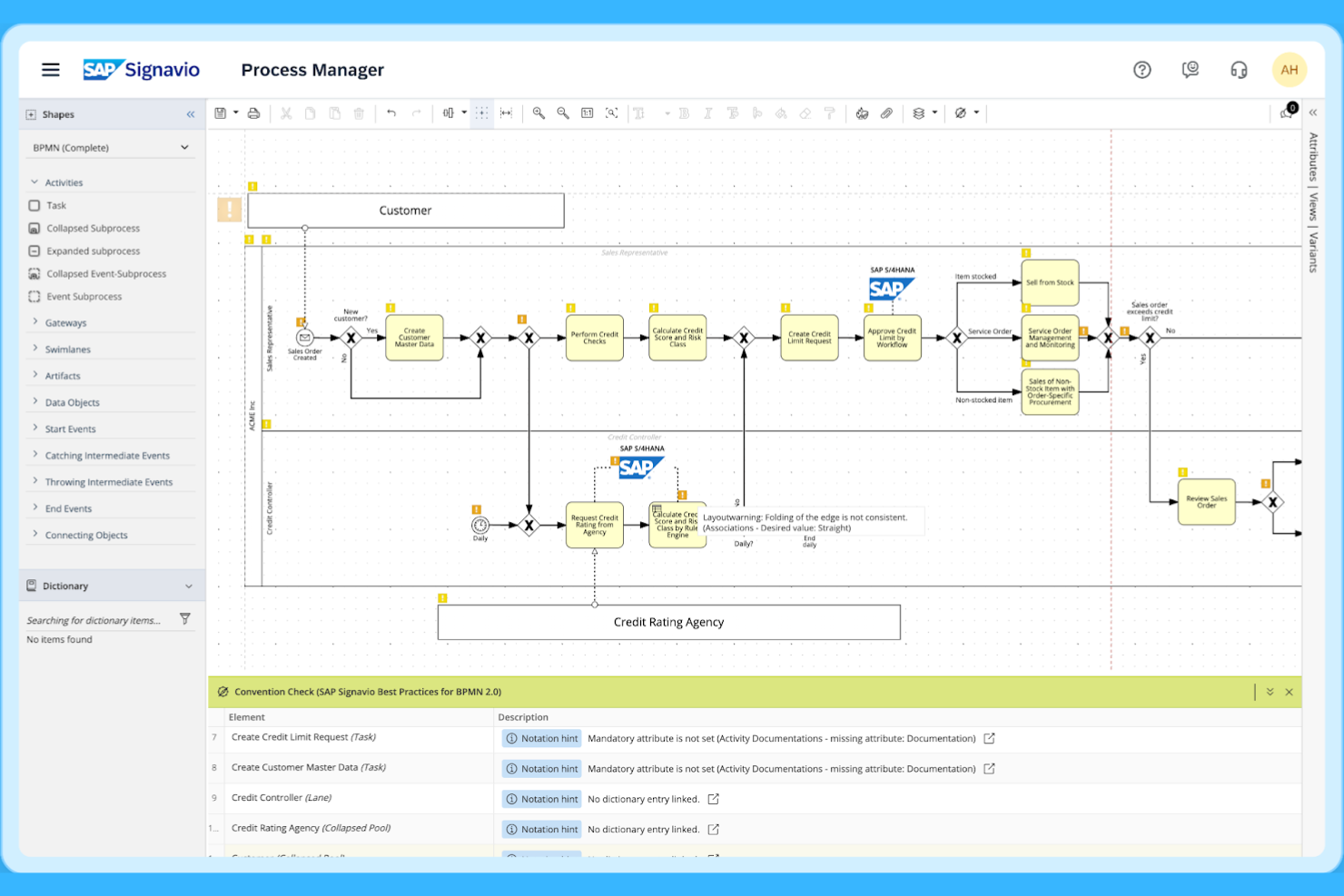
SAP Signavio is designed for organizations that want to dig deep into their business processes using advanced process mining. It’s especially useful for enterprise teams and process analysts who need to uncover inefficiencies and visualize end-to-end workflows across complex systems. What sets SAP Signavio apart from Appian is its ability to analyze real process data and provide actionable insights for continuous improvement.
Why SAP Signavio Is a Good Appian Alternative
If your team needs advanced process mining, SAP Signavio is a strong choice. I picked SAP Signavio because it lets you map, analyze, and monitor real business processes using data from your existing systems. Its process intelligence tools help you identify bottlenecks, compliance gaps, and automation opportunities that aren’t always visible in traditional BPM platforms. For organizations focused on data-driven process improvement, SAP Signavio offers capabilities that go beyond what Appian provides.
SAP Signavio Key Features
Some other features that make SAP Signavio valuable for BPM teams include:
- Collaborative Process Modeling: Multiple users can co-design and update process diagrams in real time.
- Process Documentation Generator: Automatically create detailed documentation from process models for compliance and audits.
- Change Impact Analysis: Visualize how proposed changes will affect connected processes and systems.
- Role-Based Access Controls: Set permissions and manage access for different user groups within your organization.
SAP Signavio Integrations
Integrations include SAP S/4HANA, SAP ECC, SAP SuccessFactors, SAP Ariba, SAP Concur, SAP Business AI, LeanIX, Automation Anywhere, Datricks, and Knoa.
Pros and Cons
Pros:
- Strong ROI tracking
- Data driven insights
- Maps complex journeys
Cons:
- Very high learning curve
- Massive enterprise price

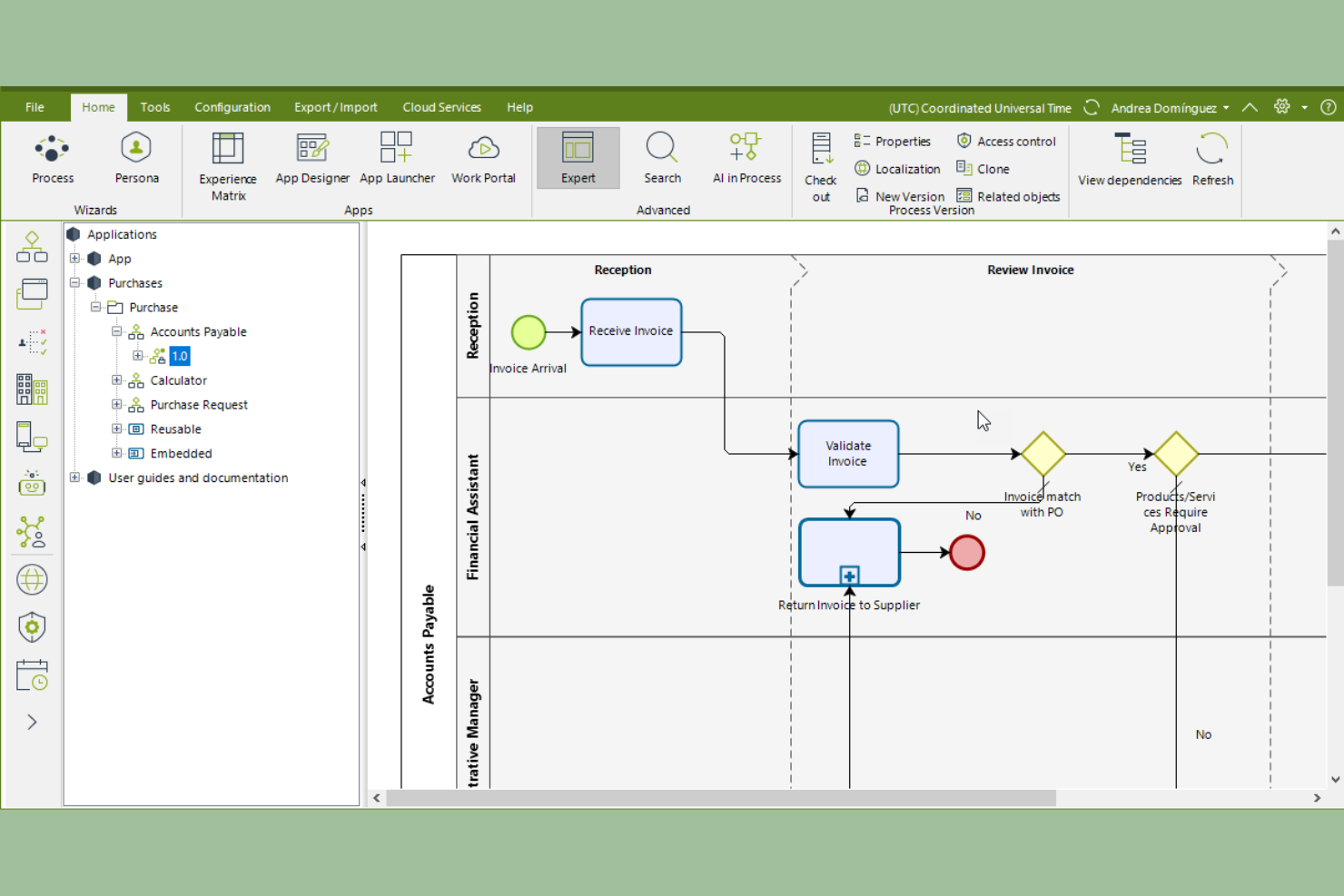
If your team needs a BPM platform with a strong focus on visual process modeling, Bizagi is worth considering. It’s designed for business analysts and process owners who want to map, simulate, and optimize workflows with an intuitive drag-and-drop interface. Bizagi stands apart from Appian by offering detailed process visualization tools that help teams quickly identify bottlenecks and improve process clarity.
Why Bizagi Is a Good Appian Alternative
For teams that prioritize visual process modeling, Bizagi offers a distinct advantage over many BPM platforms. I picked Bizagi because its drag-and-drop process modeler lets you build, document, and simulate workflows with a high level of detail and clarity. The platform’s process simulation tools help you test scenarios and forecast outcomes before making changes in production. If you need to communicate complex processes across business and technical teams, Bizagi’s visual approach makes it a strong Appian alternative.
Bizagi Key Features
Some other features that make Bizagi useful for BPM teams include:
- Process Governance Module: Assign roles, responsibilities, and approval workflows to maintain process control.
- Reusable Process Templates: Access a library of pre-built templates to accelerate process design.
- Collaboration Portal: Share process models and gather feedback from stakeholders in a centralized space.
- Cloud Deployment Options: Deploy process applications in the cloud for scalability and remote access.
Bizagi Integrations
Integrations include SAP, SharePoint, Salesforce, UiPath, Blue Prism, Oracle, and Microsoft 365.
Pros and Cons
Pros:
- Good native integrations
- Cheaper than Appian
- Great process mapping
Cons:
- Smaller developer pool
- Not as fast to build


Manufacturing teams looking to optimize complex production processes often turn to Dassault Systèmes for its specialized BPM capabilities. This platform is built for industries like automotive, aerospace, and industrial equipment, where process efficiency and digital continuity are essential. Unlike Appian, Dassault Systèmes offers integrated 3D modeling and simulation tools that help teams visualize, refine, and automate manufacturing workflows.
Why Dassault Systèmes Is a Good Appian Alternative
For manufacturing process optimization, Dassault Systèmes brings unique strengths that set it apart from Appian. I picked Dassault Systèmes because it combines BPM with advanced 3D modeling and simulation, allowing teams to visualize and test process changes before implementation. Its digital twin technology helps manufacturers monitor real-time production data and predict the impact of adjustments on the shop floor. If your focus is on optimizing and automating manufacturing workflows, Dassault Systèmes offers specialized tools that go beyond traditional BPM platforms.
Dassault Systèmes Key Features
In addition to its manufacturing optimization focus, I also found these features valuable for BPM teams:
- Process Lifecycle Management: Manage the entire lifecycle of business processes from design to execution and monitoring.
- Regulatory Compliance Tracking: Track and document compliance with industry standards and regulations directly within workflows.
- Role-Based Workflow Automation: Assign tasks and approvals based on user roles and organizational hierarchy.
- Integrated Reporting Dashboards: Access real-time dashboards that visualize process performance and key metrics.
Dassault Systèmes Integrations
Integrations include SAP, Oracle, Microsoft Office, SolidWorks, AutoCAD, and CATIA.
Pros and Cons
Pros:
- Highly secure data vaults
- Strong supply chain tools
- Deep manufacturing focus
Cons:
- Slow deployment timeline
- Extremely high pricing

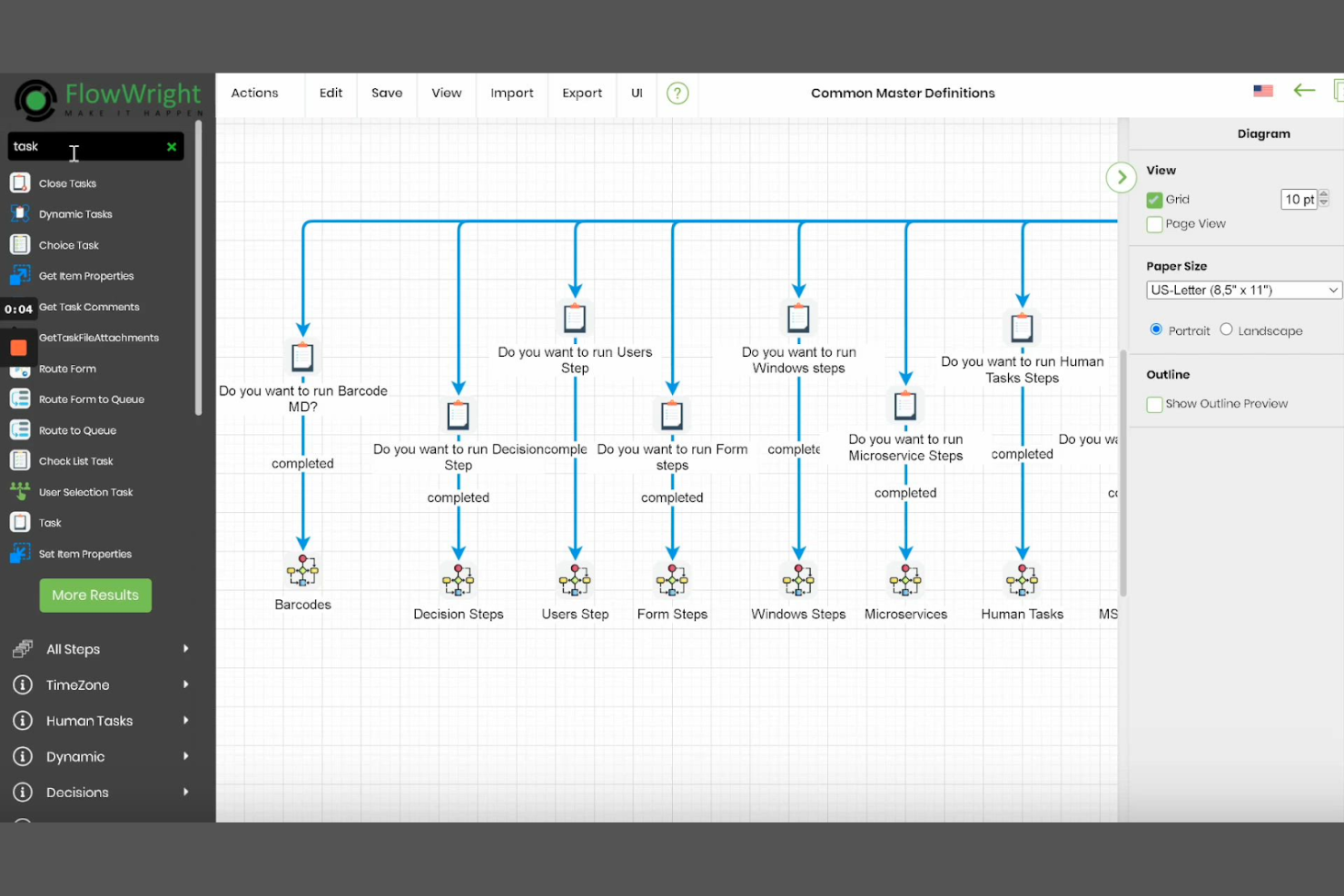
Organizations that require full control over their BPM infrastructure often turn to FlowWright for its on-premise deployment flexibility. This platform is a strong fit for IT teams in industries with strict data residency or security requirements, such as government or manufacturing. Unlike Appian, FlowWright gives you the ability to host, manage, and customize your BPM environment entirely within your own infrastructure.
Why FlowWright Is a Good Appian Alternative
For teams that need on-premise deployment options, FlowWright stands out as a BPM platform built for full infrastructure control. I picked FlowWright because it lets you install and manage the entire solution within your own data center, which is essential for organizations with strict compliance or data sovereignty requirements. The platform also supports custom workflow design and direct database access, giving IT teams more flexibility than most cloud-based BPM tools. If your business can’t use SaaS BPM due to regulatory or security reasons, FlowWright offers a practical alternative to Appian.
FlowWright Key Features
Some other features that BPM teams may want to consider include:
- Visual Workflow Designer: Build and modify workflows using a drag-and-drop interface.
- Task Escalation Rules: Set up automated escalation paths for overdue tasks.
- Email Notification Engine: Configure custom email alerts for workflow events.
- REST API Support: Connect FlowWright with other business systems using RESTful APIs.
FlowWright Integrations
Integrations include SharePoint, Active Directory, Salesforce, Microsoft Dynamics, SAP, and DocuSign.
Pros and Cons
Pros:
- Good data synchronization
- Easy custom API links
- Strong dot NET framework
Cons:
- Basic AI capabilities
- Lacks cloud native scale

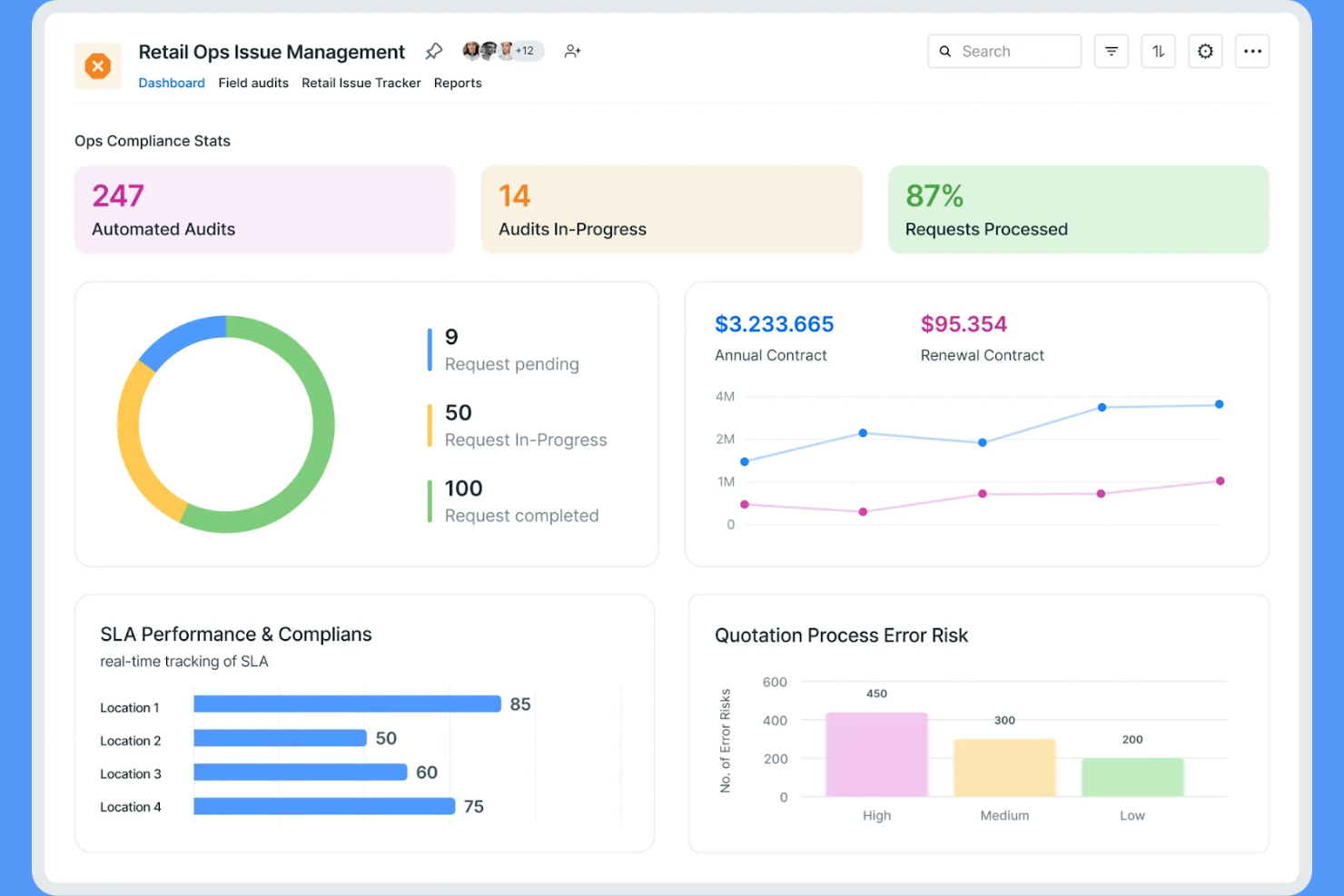
Teams looking to launch BPM workflows without a lengthy setup process often turn to Kissflow. This no-code platform is built for organizations that want to design, automate processes, and deploy business solutions quickly, even with limited technical expertise. Kissflow’s user-friendly workflow builder and ready-to-use templates help citizen developers get new processes running in days, not weeks.
Why Kissflow Is a Good Appian Alternative
If you need to get BPM workflows up and running fast, Kissflow is built for quick implementation. I picked Kissflow because its intuitive interface lets you create and launch workflows without waiting on IT resources. The platform also offers a library of pre-built templates, so you can deploy common business processes in just a few clicks. For small businesses and startups that want to move quickly from idea to execution, Kissflow’s ease of use stands out among BPM options.
Kissflow Key Features
Some other features that BPM buyers may want to know about include:
- Custom Form Builder: Create forms with drag-and-drop fields to capture process data.
- Role-Based Access Controls: Set permissions and visibility for users based on their roles.
- Analytics Dashboard: Monitor process performance with real-time charts and reports.
- Automated Notifications: Trigger email or in-app alerts based on workflow events.
Kissflow Integrations
Integrations include Salesforce, HubSpot CRM, Jira, Slack, Microsoft Teams, Google Drive, QuickBooks, DocuSign, Asana, and SAP S/4HANA.
Pros and Cons
Pros:
- Clean modern dashboard
- Great for business users
- Highly affordable tiers
Cons:
- Limited backend control
- Basic enterprise scaling
Other Appian Alternatives
Here are some additional Appian alternatives and automation platform options that didn’t make it onto my shortlist, but are still worth checking out:
- Pipefy
For workflow automation in SMBs
- Nintex
For workflow management and document automation
- Mendix
For rapid low-code development and scalable apps
- OutSystems
For full-stack development in large enterprises
- jBPM
With open-source process modeling


Appian Alternatives Selection Criteria
When selecting the best Appian alternatives to include in this list, I considered common buyer needs and pain points related to Business Process Management (BPM) platform products, like automating repetitive processes and improving cross-team workflow visibility. I also used the following framework to keep my evaluation structured and fair:
Core Functionality (25% of total score)
To be considered for inclusion in this list, each solution had to fulfill these common use cases:
- Design and automate business workflows
- Assign and track tasks across teams
- Set up approval processes
- Monitor process performance with dashboards
- Integrate with other business tools
Additional Standout Features (25% of total score)
To help further narrow down the competition, I also looked for unique features, such as:
- No-code or low-code workflow builders
- AI-driven process recommendations
- Advanced analytics and reporting
- Customizable form builders
- Built-in document management
Usability (10% of total score)
To get a sense of the usability of each system, I considered the following:
- Clean and intuitive user interface
- Logical workflow navigation
- Minimal clicks to complete tasks
- Responsive design for mobile and desktop
- Clear labeling and helpful tooltips
Onboarding (10% of total score)
To evaluate the onboarding experience for each platform, I considered the following:
- Availability of training videos and tutorials
- Access to pre-built workflow templates
- Interactive product tours or walkthroughs
- In-app chatbots for onboarding support
- Live or recorded onboarding webinars
Customer Support (10% of total score)
To assess each software provider’s customer support services, I considered the following:
- 24/7 support availability
- Multiple support channels like chat, email, and phone
- Access to a searchable knowledge base
- Fast response times
- Dedicated customer success managers
Value For Money (10% of total score)
To evaluate the value for money of each platform, I considered the following:
- Transparent and flexible pricing plans
- Features included in entry-level plans
- Cost compared to similar BPM tools
- Free trial or demo availability
- Discounts for annual billing or larger teams
Customer Reviews (10% of total score)
To get a sense of overall customer satisfaction, I considered the following when reading customer reviews:
- Positive feedback on workflow automation
- Reports of reliable uptime and performance
- Comments on customer support quality
- User sentiment about ease of adoption
- Suggestions for improvement or missing features
Why Look For an Appian Alternative?
While Appian is a good choice of Business Process Management (BPM) platform, there are a number of reasons why some users seek out alternative solutions. You might be looking for an Appian alternative because…
- You need faster implementation with minimal IT involvement
- Your team wants more flexible pricing options
- You require deeper customization for unique workflows
- You prefer a simpler, no-code interface for process design
- You need better integration with your existing tools
- Your organization operates in regions with limited Appian support
If any of these sound like you, you’ve come to the right place. My list contains several Business Process Management (BPM) platform options that are better suited for teams facing these challenges with Appian and looking for alternative solutions.
Appian Key Features
Here are some of the key features of Appian, to help you contrast and compare what alternative solutions offer:
- Low-code process modeling and automation
- Drag-and-drop workflow designer
- Integrated case management
- Advanced business rules engine
- Real-time analytics and reporting
- Native mobile app support
- Robotic process automation (RPA) integration
- Secure role-based access controls
- Document management and collaboration tools
- AI-powered process recommendations