

10 Best AI Proposal Generator in 2026

Best AI Proposal Generator Shortlist


An AI proposal generator is software that uses artificial intelligence to draft, customize, and organize business proposals in less time. If you’re looking for the best AI proposal generator, you’re likely under pressure to produce polished proposals quickly without missing critical details or chasing feedback across teams.
With clients and internal stakeholders demanding faster turnarounds, automating repetitive proposal tasks can be a huge relief. This listicle will help you compare top-rated AI proposal generators, highlighting which are best for different industries, workflows, and collaboration styles so you can choose the right fit for your team.
Why Trust Our Software Recommendations
Our team has been testing and reviewing software since 2012. As project managers ourselves, we know how difficult—and important—it is to choose the right software.
For this guide, we evaluated tools using hands-on testing and independent research, scoring tools using our selection criteria. We also draw on insights from industry thought leaders and practicing project management experts.
Our reviews reflect our human editorial judgment, not a sales pitch.
Expert reviewers:
AI Proposal Generator Comparison Table
This comparison table summarizes pricing details for my AI proposal generator software selections.
| Tool | Best For | Trial Info | Price | ||
|---|---|---|---|---|---|
| 1 | Best for instant activity notifications | 14-day free trial | From $19/user/month | Website | |
| 2 | Best for automating follow-ups and reminders | 14-day free trial + free demo available | From $25/user/month (billed annually) | Website | |
| 3 | Best for Microsoft 365 integration | Free demo available | Pricing upon request | Website | |
| 4 | Best for federal government compliance support | Free demo available | Pricing upon request | Website | |
| 5 | Best for agencies handling government RFPs | Free demo available | Pricing upon request | Website | |
| 6 | Best for managing proposal approval processes | 14-day free trial + free demo available | From $19/user/month (billed annually) | Website | |
| 7 | Best for enterprise-level collaboration | Free demo available | Pricing upon request | Website | |
| 8 | Best for interactive webpages through proposals | 14-day free trial | From $35/user/month (billed annually) | Website | |
| 9 | Best for integrating e-signature workflows | Free plan available | From $19/user/month (billed annually) | Website | |
| 10 | Best for AI-driven bid and tender responses | Free demo available | Pricing upon request | Website |
Best AI Proposal Generator Reviews
Below are my detailed summaries of the best AI proposal generators that made it onto my shortlist. My reviews offer a detailed look at the features, integrations, and best use cases of each platform to help you find the best one for you.

Best for instant activity notifications

Better Proposals is a digital proposal generator that lets you create, send, and track interactive proposals and documents with built-in analytics, template management, electronic signatures, and instant status tracking.
Who Is Better Proposals Best For?
Sales teams, freelancers, and small agencies that need to generate, send, and manage digital proposals quickly across multiple client accounts.
Why I Picked Better Proposals
I picked Better Proposals because I get instant notifications every time a prospect opens, reads, or interacts with my proposals. I can track views, clicks, and signatures in real time, so my team is never left guessing about client engagement.
Better Proposals Key Features
- Template library: Choose from a wide selection of ready-to-use, customizable proposal templates.
- Custom domain branding: Send proposals from your own branded domain for a professional look.
- Payment integration: Collect payments directly through Stripe or GoCardless within your proposals.
- PDF export: Download and share proposals as PDF documents for offline access or record-keeping.
Better Proposals Integrations
Better Proposals offers native integrations with HubSpot, ClickUp, Trello, Pipedrive, Keap, Salesforce, Pipedrive, Zapier, Stripe, GoCardless, and Mailchimp, and more, and provides an API for custom integrations.
Pros and Cons
Pros:
- Custom domain branding on sent proposals
- Built-in analytics for document engagement
- Real-time notifications for proposal activity
Cons:
- Editing complex proposals can slow down
- Limited advanced design customization options

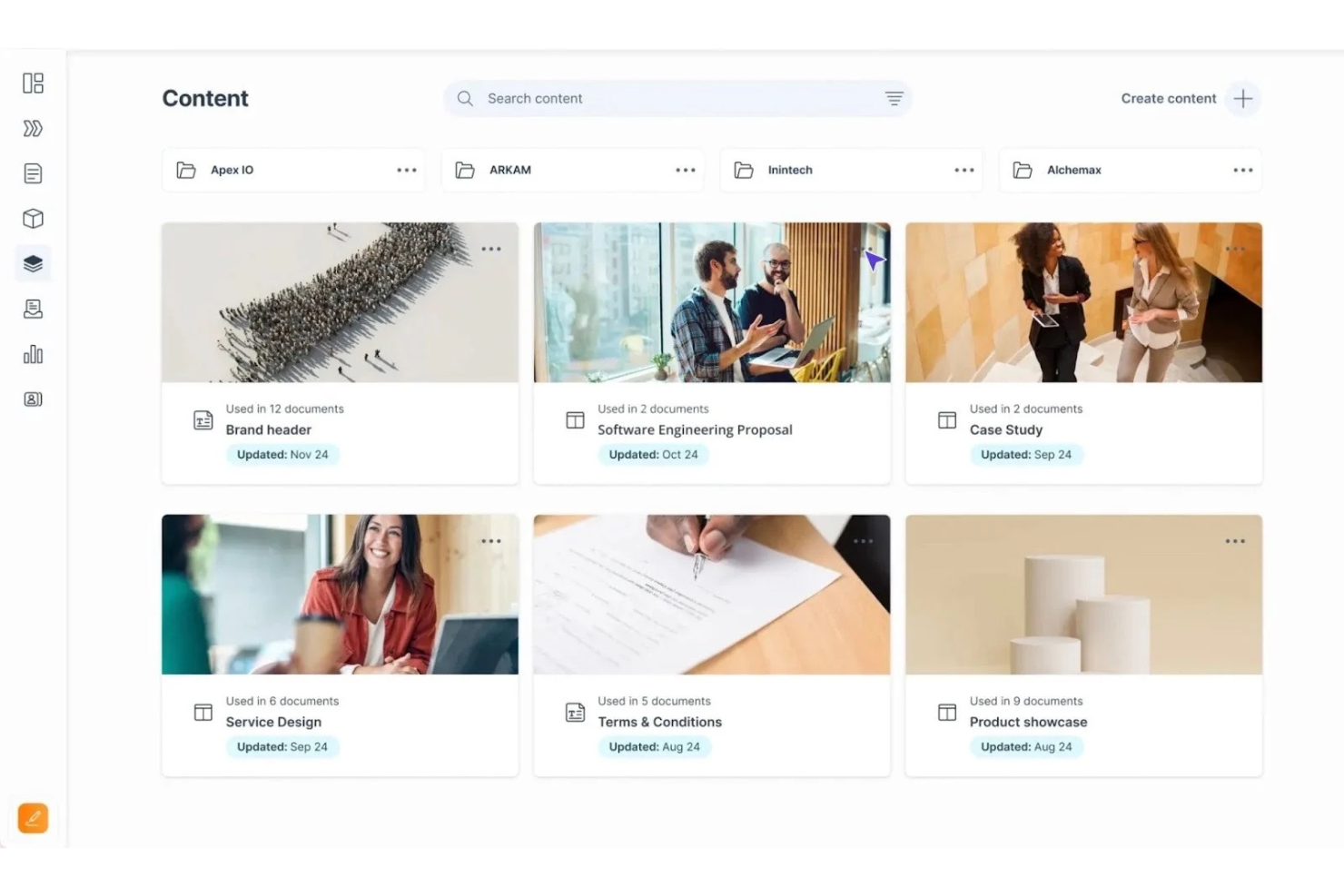
GetAccept is a digital sales room platform designed for proposal generation, document management, automated follow-ups, electronic signatures, and tracking client engagement throughout the sales process.
Who Is GetAccept Best For?
GetAccept is a strong choice for B2B sales teams in mid-sized to large organizations looking to automate proposal workflows and manage client engagement.
Why I Picked GetAccept
I picked GetAccept as one of the best because I can automate proposal follow-ups and reminders, track recipient interactions in real time, and use AI to personalize proposal content and outreach sequences.
GetAccept Key Features
- Document collaboration tools: Multiple users can review and comment on proposals in real time.
- Integrated e-signature: Recipients can securely sign documents without leaving the platform.
- Custom proposal templates: Build reusable, branded templates for fast proposal generation.
- Content library: Store, organize, and manage frequently used proposal assets and clauses.
GetAccept Integrations
GetAccept offers native integrations with Salesforce, HubSpot, Microsoft Dynamics 365, Pipedrive, Zoho CRM, Salesforce CPQ, Jira, Dropbox, MailChimp, UKG Pro, Asana, Google Workspace, Slack, and more, and provides an API for custom integrations.
Pros and Cons
Pros:
- Built-in document tracking and analytics
- Real-time insights into recipient interactions
- Automated reminders for unsigned proposals
Cons:
- Editing complex proposals can lag
- Limited template customization options

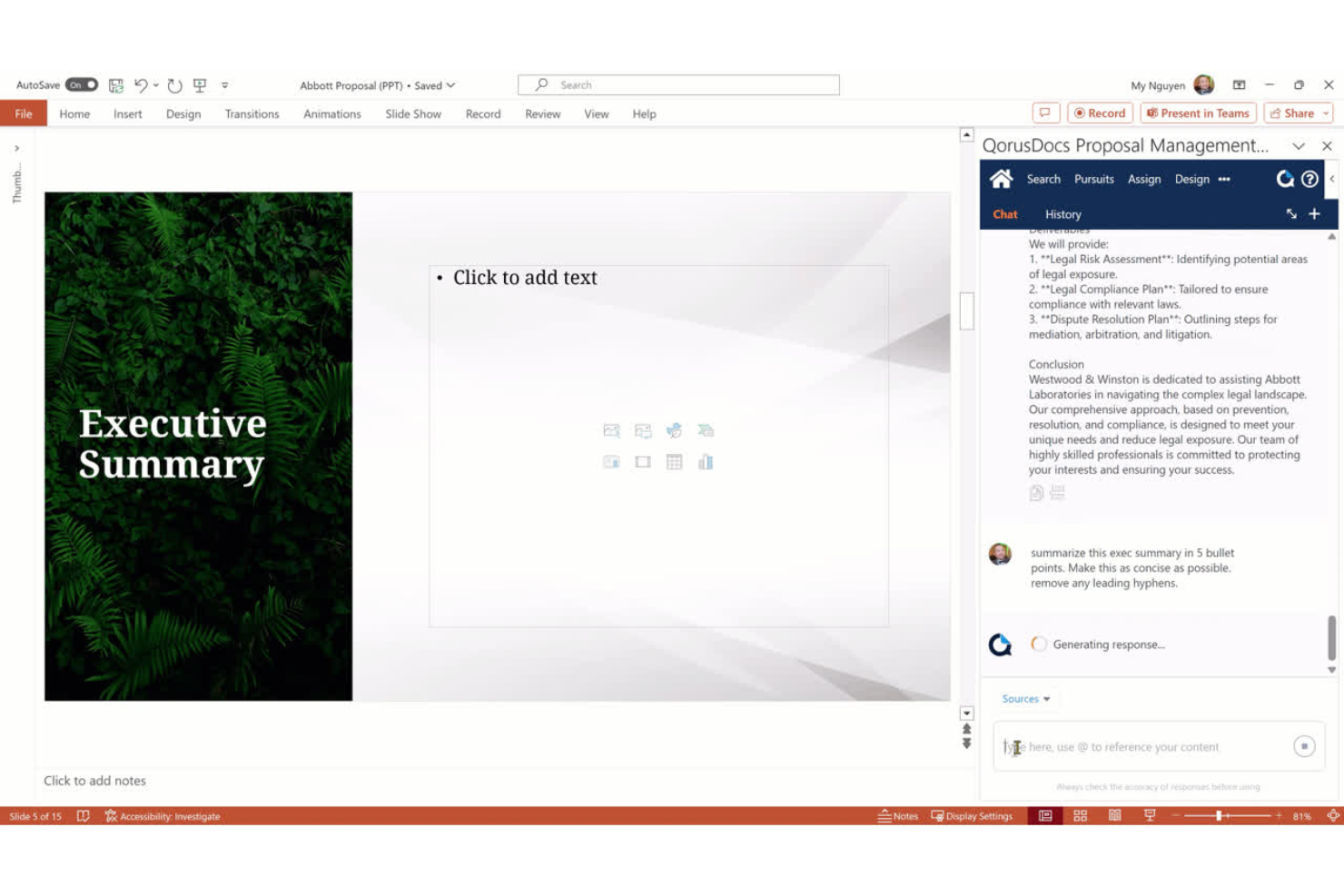
QorusDocs is an AI-driven proposal automation platform designed for teams who want to create, collaborate on, and manage proposals and sales documents.
Who Is QorusDocs Best For?
Sales, proposal, and business development teams at organizations that rely on Microsoft 365 for document creation and collaboration.
Why I Picked QorusDocs
I picked QorusDocs as one of the best because I can generate proposals directly inside Word, PowerPoint, and Outlook using AI-driven templates. My team relies on Microsoft 365 integration to pull in pre-approved content with just a few clicks.
QorusDocs Key Features
- Content library search: Lets you find and insert approved proposal content quickly.
- Collaboration workflows: Supports multi-user editing and approval routing on documents.
- Auto-answer suggestions: Uses AI to recommend responses based on previous proposals.
- Analytics dashboard: Tracks proposal engagement metrics and user activity.
QorusDocs Integrations
QorusDocs has native integrations across the Microsoft ecosystem, including Microsoft 365 and SharePoint, and integrates with Litera, Salesforce, HighPoint, and more. An API is available for custom integrations.
Pros and Cons
Pros:
- Centralized search for approved proposal assets
- AI-driven content recommendations and auto-filling
- Direct proposal editing within Microsoft apps
Cons:
- Some template management features feel limited
- Reporting options lack advanced customization

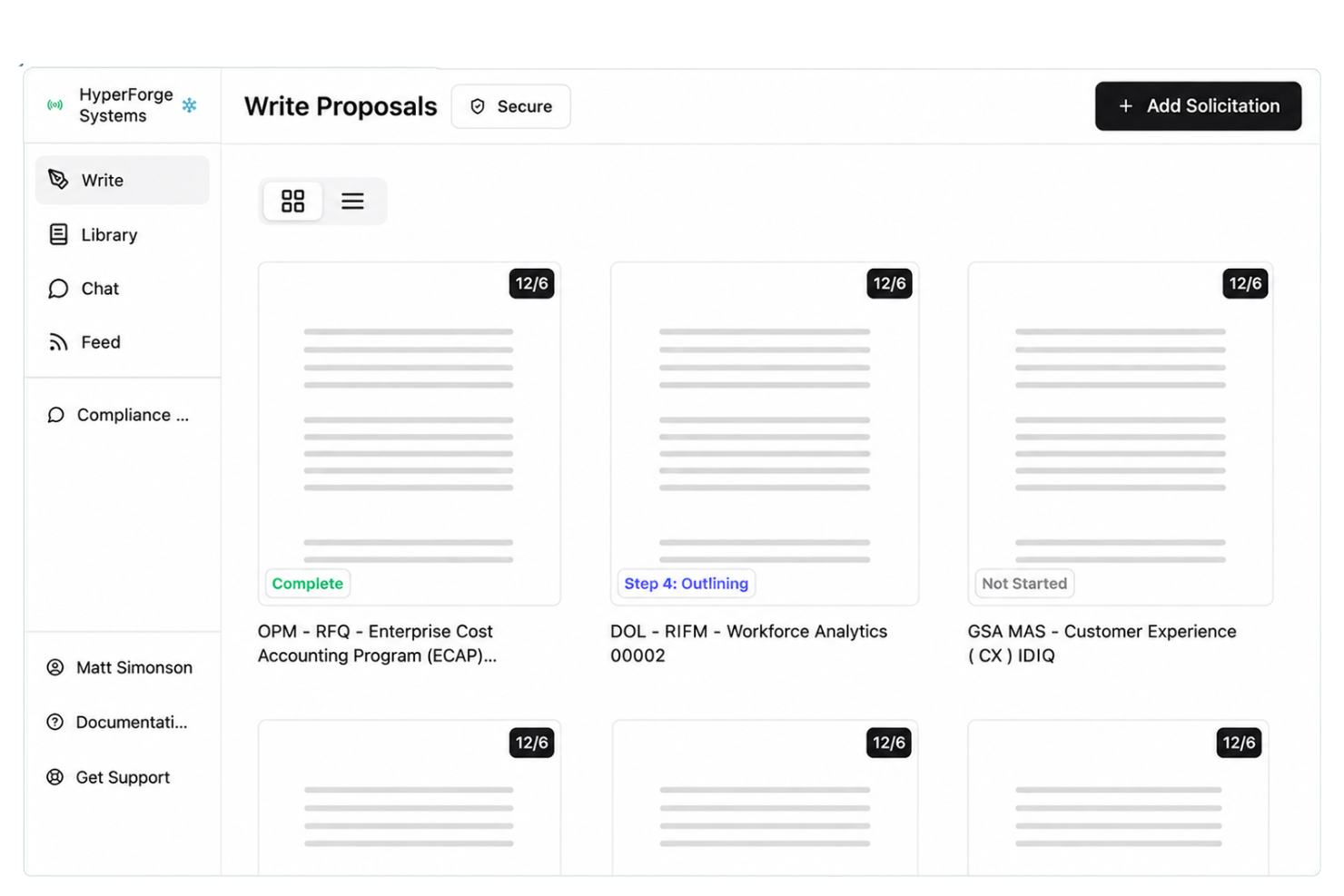
Unanet ProposalAI is an AI-powered proposal generator platform built for government contractors and every professional proposal writer, offering automated compliance checks, content libraries, and workflow tools to support federal RFP response processes.
Who Is Unanet ProposalAI Best For?
Federal contractors and proposal teams are responsible for responding to U.S. government RFPs and maintaining compliance with federal acquisition regulations.
Why I Picked Unanet ProposalAI
I picked Unanet ProposalAI as one of the best because I can generate compliant proposals for federal RFPs, automate section mapping to FAR requirements, and keep my team's content library aligned with government standards.
Unanet ProposalAI Key Features
- Automated storyboarding: Create and organize proposal outlines within the platform.
- Role-based access controls: Assign user permissions for content creation and review.
- AI-powered writing assistant: Use the built-in AI writer to draft narrative sections using context-aware suggestions.
- Proposal status dashboards: Monitor draft progress and upcoming deadlines from a centralized view.
Unanet ProposalAI Integrations
Unanet ProposalAI integrates with ADP, Criterion, Dicerio, Paylocity, UKG, Viewpoint, Newforma and more. The tool provides an API for custom integrations.
Pros and Cons
Pros:
- Industry-specific compliance templates available
- Supports collaboration across global proposal teams
- AI-assisted authoring for complex bid responses
Cons:
- Export templates offer limited customization
- Editing large documents can feel sluggish


GovDash is an AI proposal generator platform designed for agencies, with features for managing RFPs, generating compliance documents, and collaborating on government-focused responses.
Who Is GovDash Best For?
Government contracting agencies and consulting firms needing to manage, draft, and respond to RFPs and compliance documents.
Why I Picked GovDash
I picked GovDash as one of the best because my team can quickly respond to government RFPs using automated compliance checklists and templates made for agency workflows. I like that we can assign contributors specific response sections and track progress.
GovDash Key Features
- AI-powered content suggestions: Generates tailored responses based on government RFP language.
- Document version tracking: Keeps a full history of edits and contributions inside proposals.
- Agency knowledge base: Centralizes reusable past performance and project data for quick access.
- Role-based access controls: Lets administrators set granular permissions for proposal contributors.
GovDash Integrations
GovDash offers integrations with Okta, Salesforce, Slack, and Microsoft Office suite. An API and webhooks are available for custom integrations.
Pros and Cons
Pros:
- Centralized library for agency knowledge reuse
- Automated compliance responses and document structuring
- Specialized workflows for government RFP requirements
Cons:
- Limited integration options for external tools
- Advanced features mainly tailored to the government sector

Best for managing proposal approval processes

Proposify is a proposal software platform designed for building, organizing, and collaborating on client proposals with tools for content management, workflow controls, and real-time document tracking.
Who Is Proposify Best For?
Sales teams and agencies that need structured control over multi-step proposal drafting and internal approvals.
Why I Picked Proposify
I picked Proposify as one of the best because I use its approval workflows to assign reviewers, set multi-levelsign-offss, and automate reminders for pending proposal actions. That level of directed oversight really keeps proposal governance tight for my team.
Proposify Key Features
- Content library: Store and access reusable proposal sections, images, and pricing tables.
- Drag-and-drop proposal builder: Assemble, edit, and arrange proposal elements in a visual editor.
- Roles and permissions: Set access controls for team members to manage editing and viewing rights.
- Interactive pricing tables: Let clients select options and see price updates in real time.
Proposify Integrations
Proposify offers native integrations with Salesforce, HubSpot, QuickBooks, Stripe, Zoho CRM, Pipedrive, FreshBooks, and Slack, and provides an API for custom integrations.
Pros and Cons
Pros:
- Offers in-document commenting with version history
- Enables workflow automation for approvals and signatures
- AI-driven proposal content suggestions available
Cons:
- Some editing tools can feel inflexible
- APIs are limited to higher-tier plans

Best for enterprise-level collaboration
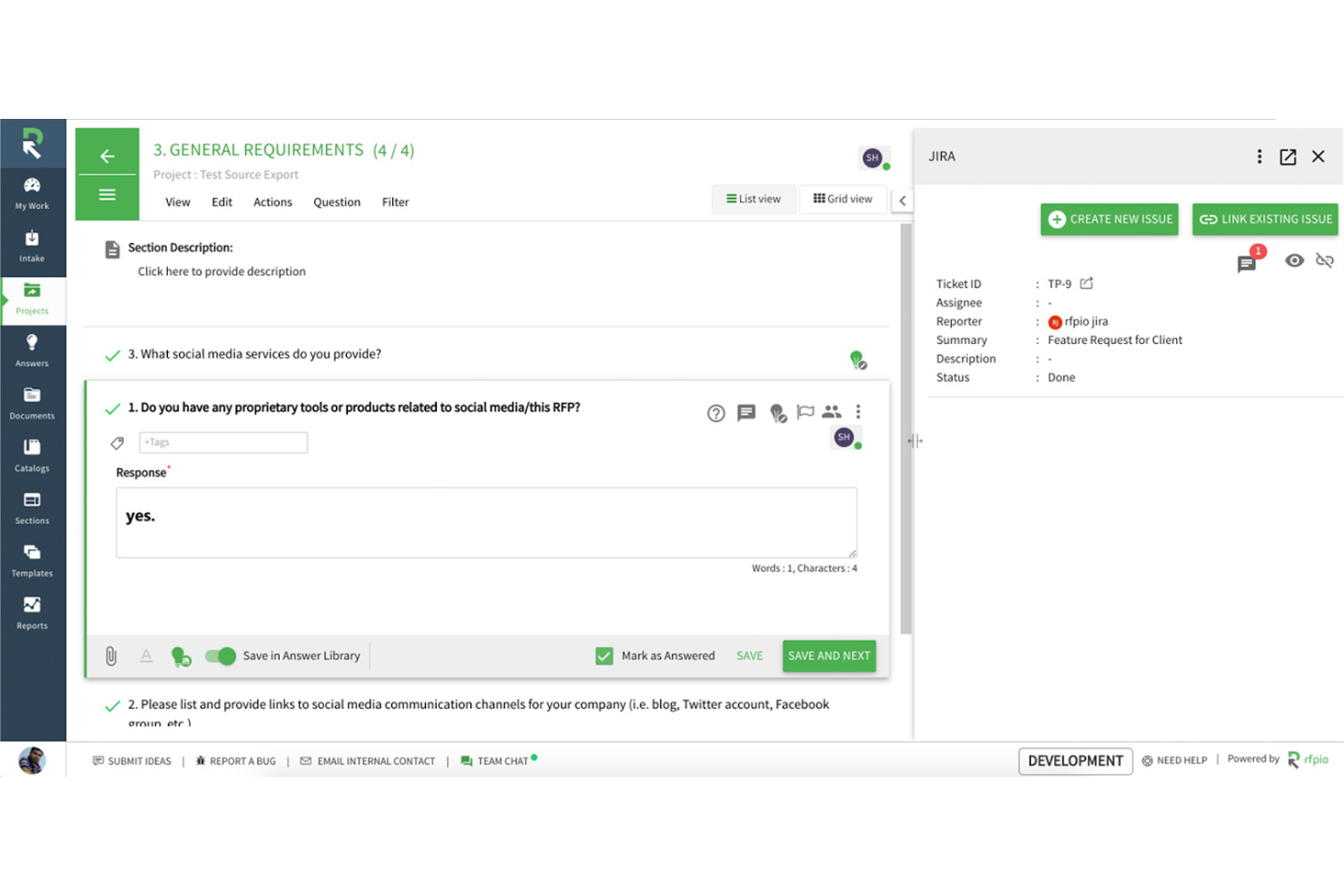
Responsive is an AI-driven proposal management software that centralizes RFP responses, automates content suggestions, tracks project progress, and enables controlled team collaboration across large organizations.
Who Is Responsive Best For?
Proposal teams and sales operations leaders at large enterprises who need to coordinate and manage high-volume, complex RFPs across business units.
Why I Picked Responsive
I picked Responsive as one of the best because my team can set detailed user permissions, assign contributors to sections, and use audit trails to track every update across high-stakes proposals at scale. That level of collaboration fits complex enterprise workflows.
Responsive Key Features
- AI-powered answer library: Suggests the best automated responses from historical proposal content.
- Real-time project dashboards: Visualizes the status and progress of multiple proposals.
- Custom content templates: Standardizes formatting and branding to create high-quality, complex proposal documents.
- Automated deadline reminders: Sends notifications to keep proposal tasks on schedule.
Responsive Integrations
Responsive offers more than 30 native integrations, including Salesforce, Slack, Google Drive, Microsoft 365, HubSpot, Box, OneDrive, SharePoint, and Dropbox, and provides an API for custom integrations.
Pros and Cons
Pros:
- Built-in AI suggests relevant content
- Offers robust audit trails for compliance
- Handles RFP collaboration for global teams
Cons:
- Editing large documents can lag
- Limited customization of export templates

Qwilr
Best for interactive webpages through proposals

Qwilr is a digital proposal software for creating, editing, and sharing interactive webpage-style proposals with customization, content blocks, and analytics features designed for modern teams.
Who Is Qwilr Best For?
Marketing and sales teams that need to deliver visually polished, interactive proposals or client-facing documents at scale.
Why I Picked Qwilr
I picked Qwilr as one of the best because I can create interactive proposal webpages that let clients view, sign, and pay all in one experience. My team customizes proposals with dynamic content blocks, embeds video, and tracks engagement analytics for every proposal.
Qwilr Key Features
- Template library: Access a variety of pre-built proposal templates for quick project starts.
- Quote builder: Generate itemized, interactive pricing tables and quotes for clients.
- Role-based permissions: Assign granular access to proposals and assets based on team roles.
- Custom branding tools: Add company logos, fonts, and brand colors to every proposal.
Qwilr Integrations
Qwilr offers native integrations with HubSpot, Salesforce, Zoho CRM, Slack, Stripe, QuickBooks, and Pipedrive. It connects with Zapier and provides an API for custom integrations.
Pros and Cons
Pros:
- Tracks client engagement with built-in analytics
- Embeds video and dynamic content blocks
- Converts proposals into interactive webpages
Cons:
- Limited offline or PDF editing capabilities
- Formatting options outside templates feel restricted
PandaDoc
Best for integrating e-signature workflows
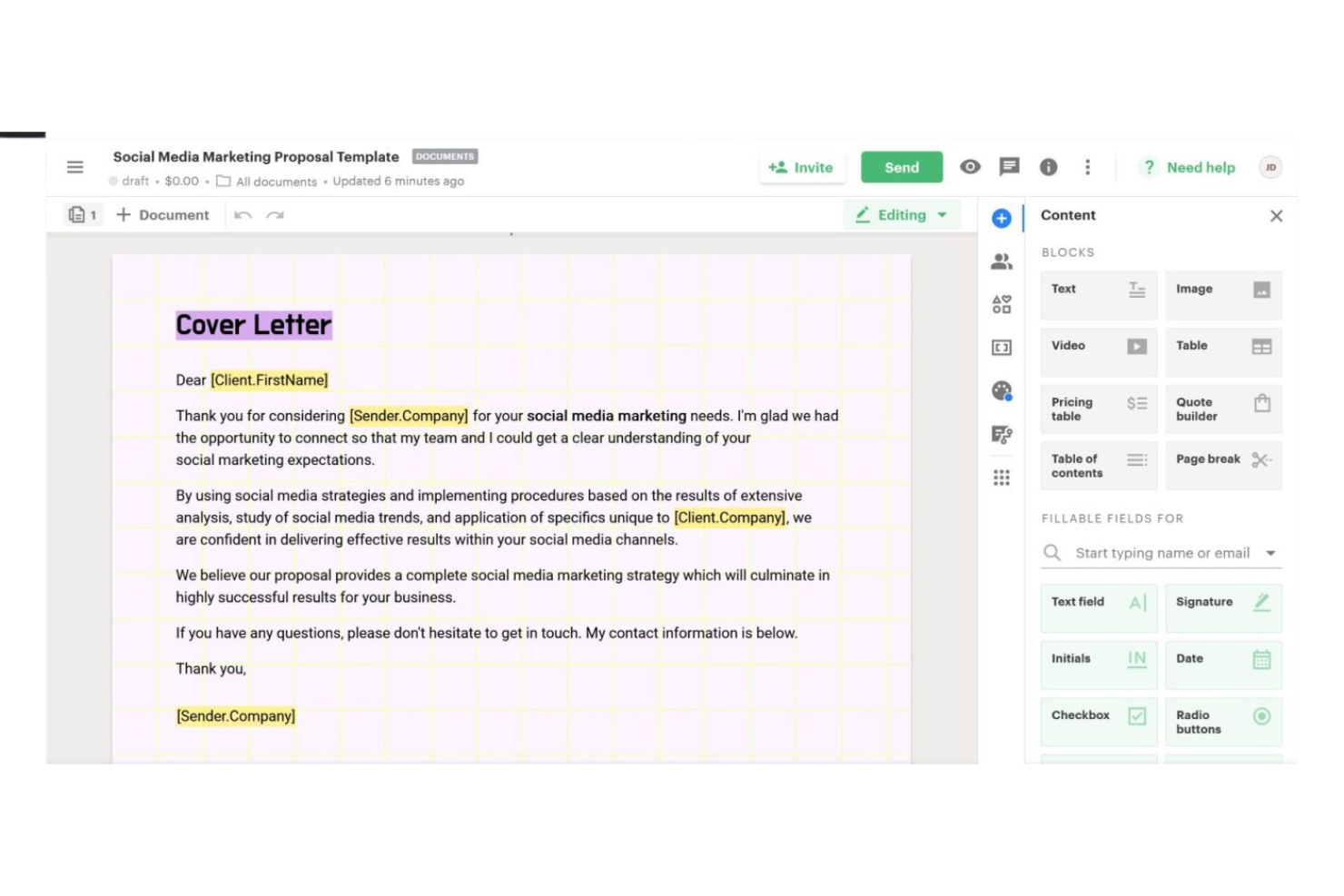
PandaDoc is an AI-driven proposal management platform that lets you create, edit, track, and manage business proposals with built-in document automation and digital signing features.
Who Is PandaDoc Best For?
Sales teams and client-facing professionals in small to midsize businesses who need streamlined document workflows and electronic signatures.
Why I Picked PandaDoc
I picked PandaDoc as one of the best because its AI-powered proposal generator tightly connects with e-signature workflows. I use it to automate document approvals, embed signing fields, and keep proposal status clear for everyone involved.
PandaDoc Key Features
- AI content suggestions: Automatically generate draft proposal content based on deal details.
- Template library: Access prebuilt templates for common proposal formats and use cases.
- Real-time collaboration: Edit proposals with teammates and collect internal feedback live.
- CRM integration: Connect directly with tools like Salesforce and HubSpot to sync proposal data.
PandaDoc Integrations
PandaDoc offers more than 30 native integrations, including Salesforce, HubSpot, Pipedrive, Zoho CRM, Slack, Dropbox, QuickBooks, PayPal, and Stripe. An API is available for custom integrations.
Pros and Cons
Pros:
- Automated reminders and status tracking
- Real-time collaboration on documents
- AI assists with proposal drafting
Cons:
- Advanced automation features requirea higher tier
- The templatee library can feel restrictive


AutogenAI is an AI-powered proposal generator designed for bid, tender, and RFP response teams, offering advanced content automation and workflow management features tailored to high-stakes proposal creation.
Who Is AutogenAI Best For?
Proposal managers and bid teams in large enterprises or regulated industries who need to automate high-volume tender and RFP responses.
Why I Picked AutogenAI
I picked AutogenAI as one of the best because I can generate tailored bid and tender responses using advanced AI models trained on my organization’s content. I like being able to automate compliance checks and maintain content libraries for sector-specific requirements.
AutogenAI Key Features
- Collaborative editing: Multiple users can co-author proposal documents in real time.
- Automated section mapping: System parses RFP requirements and aligns responses accordingly.
- Access control management: Customizable permissions for different team members and stakeholders.
- Audit history tracking: Maintains version history and activity logs across all proposal drafts.
AutogenAI Integrations
AutogenAI offers native integrations with Salesforce, SharePoint, and Zapier, and provides an API for custom integrations.
Pros and Cons
Pros:
- Industry-specific compliance templates available
- Supports collaboration across global proposal teams
- AI-assisted authoring for complex bid responses
Cons:
- Editing large documents can feel sluggish
- Export templates offer limited customization
Other AI Proposal Generator
Here are some additional AI proposal generator options that didn’t make it onto my shortlist, but are still worth checking out:
- Inventive AI
For custom-branded proposal formatting
- Loopio
For centralizing proposal content libraries
- ClickUp
For integrating AI into task workflows
- Oneflow
For contract workflows with live editing
- DealHub
For guided sales and deal configuration
- Tribble
For generating tailored business proposals
- DeepRFP
For automating complex RFP analysis
- Getcone
For pipeline visibility with tracking
- VisibleThread
For document clarity and compliance checks
- Shred (OpenAsset)
For extracting key content from documents


How I Evaluate AI Proposal Generators
Every tool on this list needs to do more than slap an AI label on a text editor—it should save a PM real hours when drafting SOWs, scoping deliverables, or responding to RFPs. I split my evaluation into two layers: the core functionality a tool must have to qualify, and the differentiating factors that separate good options from great ones.
Core Functionality (Table Stakes For This List)
When I'm selecting tools for my list, I rank each one on a scale from 0 (does not offer the functionality) to 5 (excels in this area) for each core functionality listed below. Then, I calculate the tool's total score into a percentage. Each tool needs to achieve a minimum total score of 65% to be considered for inclusion.
- AI Content Generation: I look for AI that can draft full proposal sections—executive summaries, scopes, deliverables—from a short prompt or brief, not just rewrite text I've already typed.
- Project Scoping Inputs: The tool should let me enter timelines, budgets, and resource details so the AI tailors output to each engagement instead of producing generic filler.
- Template Library: I check whether templates cover project-based formats like SOWs and RFP responses, and whether they're customizable enough to match different client types.
- Content Reuse & Knowledge Base: Past proposals and reusable blocks should be stored and retrievable—ideally with AI surfacing relevant snippets when I'm building a new proposal.
- Collaboration & Review: Multiple stakeholders need to edit, comment, and approve in-platform, especially when proposals involve input from PMs, SMEs, and sales leads.
- Export & E-Signature: Clean export to PDF or DOCX with consistent branding matters, and built-in or integrated e-signature capability speeds up client sign-off.
Once I have a list of tools that meet this criteria, I consider what sets each platform apart.
Differentiating Factors (What Sets Vendors Apart)
Here's how I compare and contrast different vendors:
Standout Features
Engagement analytics change how you time your follow-ups—I look for tools that show which proposal sections a client spent time on, not just whether they opened the link. CRM-powered personalization is another big differentiator; pulling deal data from HubSpot or Salesforce to auto-fill client names, pricing, and scope removes a lot of manual busywork. I also value interactive proposals where clients can adjust quantities or select optional add-ons directly, which tends to speed up sign-off.
Beyond Features
Integration ecosystem matters a lot here—I check whether a tool connects to the CRMs and PM platforms your team already uses, since a proposal tool that lives in isolation creates more work. Pricing structure is another factor I evaluate closely, especially whether plans scale by user or by document volume, which makes a big difference for PMOs running dozens of proposals per month. I also look at compliance and brand controls, like locked content blocks and approval routing, that help teams maintain consistency without bottlenecking every proposal through a single reviewer.
How to Choose an AI Proposal Generator
It’s easy to get bogged down in long feature lists and complex pricing structures. To help you stay focused as you work through your unique software selection process, here’s a checklist of factors to keep in mind:
| Factor | What to Consider |
|---|---|
| Scalability | Can the tool support your team’s anticipated proposal volume and future growth? Will adding new users or handling multiple simultaneous projects be seamless? |
| Integrations | Does it directly connect to your content repositories, CRM, or office suites like Microsoft 365 or Google Workspace? Gaps can mean manual work or workflow delays. |
| Customizability | Can you tailor templates, approval workflows, and content libraries to fit your exact proposal processes without developer assistance? |
| Ease of use | Is the interface intuitive for both occasional and frequent users? Could your team realistically prepare a proposal with minimal training or documentation? |
| Implementation and onboarding | What setup and data migration steps are required? Assess the learning curve and what vendor-led onboarding, product tours, or documentation are available. |
| Cost | Do subscription tiers match your budget and deliver value for your team size and feature requirements? Watch for extra charges for storage, users, or add-ons. |
| Security safeguards | Are there controls for data access, audit trails, and compliance with your organization’s privacy or industry standards, especially for sensitive RFP proposals? |
| Support availability | What channels and service levels does the vendor offer? Can you reach support quickly if something blocks a live proposal submission? |
What is an AI Proposal Generator?
AI proposal generators are software tools that use artificial intelligence to automate the creation, editing, and management of business proposals and RFP responses.
These tools help teams produce tailored, error-free documents by leveraging content libraries, natural language processing, and workflow automation, reducing manual effort and speeding up turnaround times for high-stakes proposals.
Features
When selecting an AI proposal generator, keep an eye out for the following key features:
- AI-based content suggestions: Uses artificial intelligence to recommend relevant text, answers, or sections based on your historical documents and RFP requirements.
- Template management: Lets you create, store, and reuse branded templates to maintain consistency and speed up proposal creation.
- Collaboration tools: Enables multiple users to edit, comment, or approve proposals in real time, ensuring version control and cross-team input.
- Content library: Stores approved responses, graphics, and standard sections regarding project deliverables for quick access and consistent reuse across all proposals.
- Workflow automation: Automates tasks like approval routing, notification alerts, and deadline reminders to help deliver proposals on time.
- Document formatting and export options: Enables customized formatting using tools like Canva and easy export to various file types such as PDF, Word, or PowerPoint.
- Proposal analytics: Tracks when and how proposals are accessed, providing engagement data that can inform sales strategies and follow-ups.
- User permissions and roles: Allows granular control over who can create, edit, review, or send proposals, protecting sensitive information and workflows.
- Compliance and audit trails: Monitors changes and maintains records for regulatory compliance and accountability during the proposal process.
Benefits
Implementingan AI proposal generator provides several benefits for your team and your business. Here are a few you can look forward to:
- Faster proposal turnaround: Automated content suggestions and reusable templates help teams build, review, and send proposals much more quickly.
- Higher proposal consistency: Centralized content libraries and template management make it easier to maintain consistent branding and messaging.
- Improved collaboration: Real-time editing, commenting, and workflow tools allow teams to work together smoothly, even when distributed.
- Increased proposal accuracy: AI-powered auto-filling and compliance tools help catch errors and ensure complete, relevant responses.
- Better visibility and tracking: Built-in analytics and engagement tracking provide insight into how recipients interact with proposals.
- Reduced manual effort: Workflow automation and AI-driven response recommendations drastically reduce the repetitive work required for each proposal.
- Enhanced data security: Robust permissions and audit features protect sensitive business information throughout the proposal process.
Costs and Pricing
Selectingan AI proposal generator requires an understanding of the various pricing models and plans available. Costs vary based on features, team size, add-ons, and more. The table below summarizes common plans, their average prices, and typical features included in AI proposal generator solutions:
Plan Comparison Table for AI Proposal Generator
| Plan Type | Average Price | Common Features |
|---|---|---|
| Free Plan | $0 | Basic proposal creation, limited templates,single-userr access, and restricted export options. |
| Personal Plan | $10-$25/user/month | Enhanced template management, simple collaboration tools, content library access, and basic analytics. |
| Business Plan | $30-$65/user/month | Team collaboration, workflow automation, advanced analytics, proposal tracking, and custom branding options. |
| Enterprise Plan | $75-$150/user/month | Advanced permissions, API access, compliance features, premium support, onboarding services, and audit trails. |
AI Proposal Generator FAQs
Here are some answers to common questions aboutthe AI proposal generator:
How does an AI proposal generator speed up the proposal process?
AI proposal generators quickly suggest relevant content, pull reusable sections from a library, and automate approval workflows. This means teams spend less time searching for past responses or reformatting, so you can meet tight deadlines without sacrificing quality.
Can AI proposal generators integrate with other business tools?
Yes, most AI proposal generators connect with tools like CRM systems, document storage platforms, and productivity suites. Integrations help you pull client data, sync documents, and keep workflows running smoothly across your existing tech stack.
How secure is the data stored in an AI proposal generator?
Most vendors use standard security practices like encryption, user permissions, and audit logs. Look for solutions offering compliance certificates and options to control who accesses sensitive files, especially when handling confidential client or company data.
Is it difficult to onboard my team to a new AI proposal generator?
No, most platforms provide templates, product tours, and training videos to help teams get started quickly. Good onboarding should include live support and clear documentation to help new users get value in the first week.
What kinds of analytics can I expect from an AI proposal generator?
You can expect insights like recipient engagement, document open rates, and approval status tracking. These analytics help you see which proposals are progressing and identify ways to improve your process and response rates.