

10 Best AI Orchestration Tools Reviewed in 2026

Best AI Orchestration Tools Shortlist


AI orchestration tools play a critical role in managing complex workflows, coordinating data pipelines, and deploying models efficiently across environments. As AI systems grow more sophisticated, teams need solutions that bring structure, visibility, and automation to processes that would otherwise be difficult to manage at scale.
From my experience testing these platforms, the right orchestration tool can significantly improve productivity by reducing manual coordination and helping teams focus on higher-value work. I’ve independently reviewed a range of options to provide a clear, unbiased look at how their AI capabilities perform in real-world scenarios.
In this article, I’ll share my top picks for AI orchestration tools, highlighting the features and functionality that matter most when building, running, and maintaining AI workflows. You’ll gain insight into which tools can best support your team’s goals and technical requirements.
Why Trust Our Software Recommendations
Our team has been testing and reviewing software since 2012. As project managers ourselves, we know how difficult—and important—it is to choose the right software.
For this guide, we evaluated tools using hands-on testing and independent research, scoring tools using our selection criteria. We also draw on insights from industry thought leaders and practicing project management experts.
Our reviews reflect our human editorial judgment, not a sales pitch.
Expert reviewers:
AI Orchestration Tools Comparison Table
This comparison table summarizes pricing details for my top AI orchestration tools selections.
| Tool | Best For | Trial Info | Price | ||
|---|---|---|---|---|---|
| 1 | Best for client-facing workflow coordination | Free demo available | From $5,000/year (billed annually) | Website | |
| 2 | Best with robust security and compliance | 30-day free trial | Pricing upon request | Website | |
| 3 | Best for visual workflows | Free plan + free demo available | From $9/month (billed annually) | Website | |
| 4 | Best for open-source automation | Free trial available | From €20/month (billed annually) | Website | |
| 5 | Best for data integration | 14-day free trial available | Pricing upon request | Website | |
| 6 | Best for vector search | Free demo available | Pricing upon request | Website | |
| 7 | Best for team collaboration | Free plan + free trial available | Pricing upon request | Website | |
| 8 | Best for team collaboration | Free demo available | From $25/month | Website | |
| 9 | Best for workflow automation | Free plan available | Pricing upon request | Website | |
| 10 | Best for data transformation | 14-day free trial + freemium version available | Plans start at $100/developer seat/month | Website |

Best AI Orchestration Tool Reviews
Below are my detailed summaries of the best AI orchestration tools that made it onto my shortlist. My reviews offer a detailed look at the key features, pros & cons, integrations, and ideal use cases of each tool to help you find the best one for you.

Moxo
Best for client-facing workflow coordination

Moxo is an AI orchestration platform that coordinates humans, AI agents, and connected systems within structured business processes—covering routing, validation, approvals, client onboarding, and multi-party workflow execution across internal teams and external stakeholders.
Who Is Moxo Best For?
Moxo is a strong fit for mid-market and enterprise teams in financial services, legal, or professional services that run complex, multi-party client workflows.
Why I Picked Moxo
I picked Moxo as one of the best because it's one of the few AI orchestration platforms built to include external stakeholders directly in the process flow. In a client onboarding or KYC workflow, clients don't get handed off to a separate portal—they're a named participant inside the same orchestrated flow, completing their step with full context and zero confusion. I also like how Moxo's logic engine handles real-world client variability: conditional branching based on form inputs means a high-risk client submission can automatically route to compliance while a standard submission moves forward without manual intervention.
Moxo Key Features
- Assist agents: AI agents that draft summaries, surface relevant context, and pre-fill information so every participant arrives at their step ready to act.
- Automate agents: Rules-based agents that validate submissions, extract data, and trigger system updates automatically between human decision points.
- Amplify agents: Background monitoring agents that detect stuck work, missed SLAs, and emerging risks, then send nudges or escalate without manual intervention.
- Audit trail: A complete operational record that captures every action, document, decision, message, and timestamp tied to specific steps in the process.
Moxo Integrations
Moxo offers data sync connectors with Salesforce, HubSpot, Microsoft Dynamics, Zoho, Wealthbox, Redtail, Filevine, Global Relay, Smarsh, Xero, and Follow Up Boss. It also supports native calendar integrations with Google Calendar and Outlook. Integration actions like DocuSign and Jumio can be embedded directly as workflow steps. Moxo connects with Zapier and provides a REST API with webhooks for custom integrations.
Pros and Cons
Pros:
- Granular role-based workspace permissions
- Built-in eSignatures within workflow steps
- White-label portals match your brand identity
Cons:
- Navigation feels cluttered with multiple paths
- Rigid structure restricts creative workflows

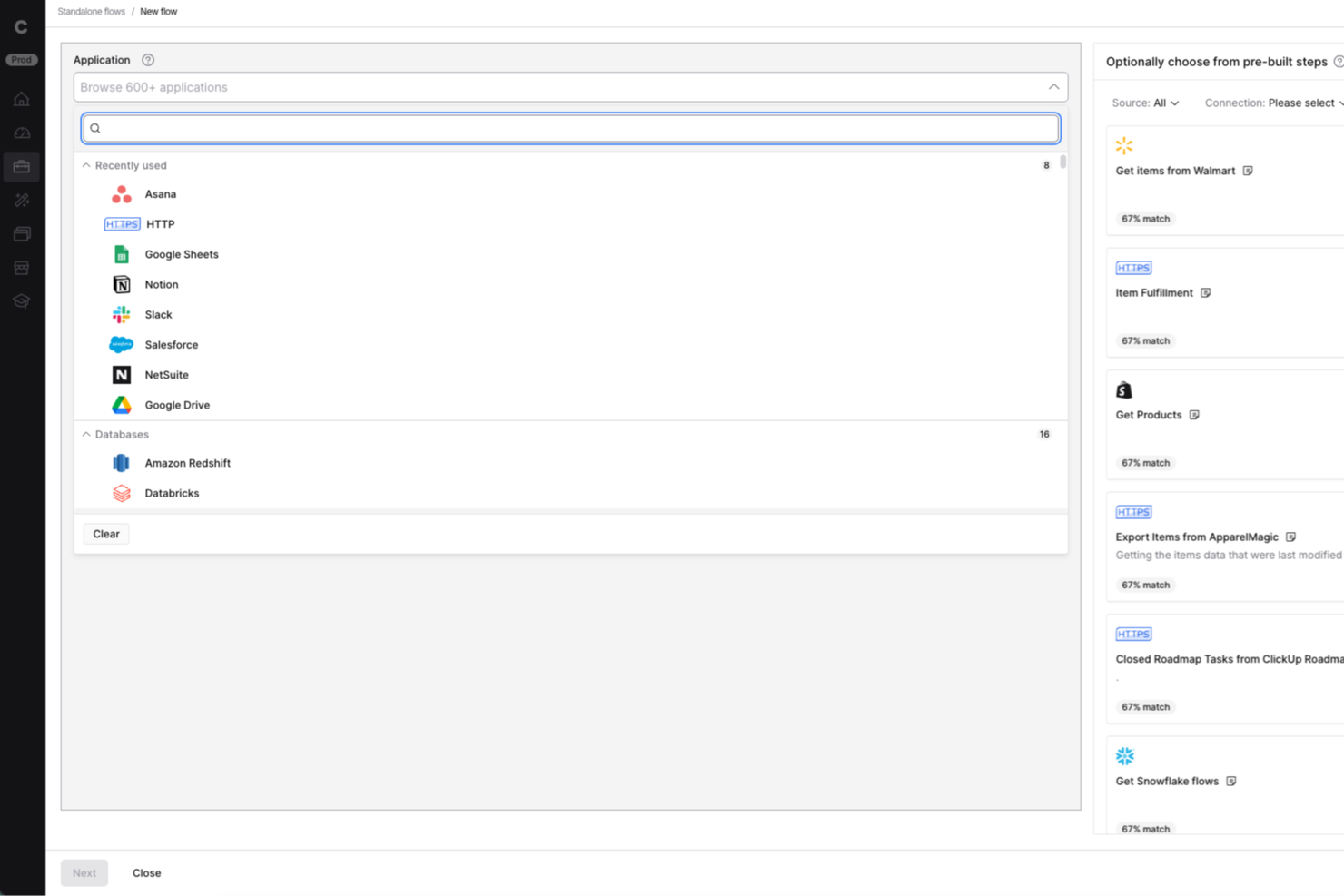
Celigo is a low-code ai orchestration platform designed for IT teams and business operations leaders who need to automate workflows, connect cloud apps, and manage complex integrations across finance, ecommerce, and HR systems.
Who Is Celigo Best For?
Mid-sized and enterprise IT and operations teams in finance, ecommerce, and HR who need to automate and orchestrate workflows across multiple cloud applications.
Why I Picked Celigo
Celigo earns its spot as one of the best on my shortlist because it offers enterprise-grade security features like SOC 2 Type II certification and granular access controls. My team is able to enforce data encryption in transit and at rest, which is essential for handling sensitive business data. I also rely on Celigo’s audit trails and compliance reporting to meet regulatory requirements in finance and healthcare projects.
Celigo Key Features
- AI-powered integration monitoring: Continuously tracks integration health and flags anomalies for review.
- Custom connector builder: Lets you create and deploy connectors for unique or proprietary systems.
- Automated workflow scheduling: Supports time-based and event-driven automation for orchestrating complex processes.
- Sandbox environment: Provides a safe space to test integrations and workflows before deploying to production.
Celigo Integrations
Integrations include Salesforce, Microsoft Dynamics 365 Business Central, Oracle NetSuite, Walmart, SAP, Snowflake, Acumatica, ADP, Adobe, and 3PL Central.
Pros and Cons
Pros:
- Supports event-driven and scheduled workflows
- Visual workflow builder for complex automations
- Real-time monitoring of integration health
Cons:
- Advanced features require higher-tier plans
- Limited AI features compared to some peers
New Product Updates from Celigo
Celigo Adds SuiteTax and Variant Publishing for Shopify–NetSuite
Celigo adds NetSuite SuiteTax support and variant-level sales channel publishing to its Shopify–NetSuite integration. These updates improve tax handling and give merchants more control over how product variants are published. For more information, visit Celigo’s official site.
 .
.
Make
Best for visual workflows

Make is a visual automation platform that caters to businesses and teams looking to automate processes and integrate apps visually. It empowers users to design, build, and automate workflows with an intuitive drag-and-drop interface, enhancing productivity and collaboration.
Why I picked Make: Make excels in creating visual workflows, allowing your team to automate tasks through an easy-to-use drag-and-drop interface. Its visual approach simplifies the process of connecting apps and automating processes, making it accessible for users without technical expertise. The platform's flexibility lets you customize workflows to fit your specific needs. Make's real-time monitoring ensures that your workflows run smoothly and efficiently.
Standout features & integrations:
Features include a drag-and-drop interface for designing workflows, real-time monitoring of workflow execution, and flexible customization options. Make provides tools for conditional logic and error handling, ensuring your processes are resilient. Its visual approach makes it easy for your team to collaborate and innovate.
Integrations include Google Workspace, Slack, Trello, Dropbox, Salesforce, Mailchimp, Shopify, HubSpot, Airtable, and Asana.
Pros and Cons
Pros:
- Flexible customization options
- Real-time monitoring of workflows
- Intuitive drag-and-drop interface
Cons:
- Limited advanced features for complex tasks
- May require time to master

n8n
Best for open-source automation

n8n is an open-source workflow automation tool that empowers developers and small businesses to automate tasks and connect different apps and services. It offers flexibility and extensibility, allowing users to create custom workflows tailored to their specific needs.
Why I picked n8n: n8n is ideal for open-source automation, providing a platform where you can create custom workflows without restrictions. Its node-based interface simplifies the process of connecting different services and automating tasks. The platform's flexibility lets you modify and extend functionalities, ensuring it adapts to your evolving needs. With n8n, you can leverage community-contributed nodes and integrations, enhancing its capabilities.
Standout features & integrations:
Features include a node-based interface for easy workflow creation, community-contributed nodes for expanded functionality, and the ability to self-host for complete control. n8n also offers real-time execution monitoring and customizable triggers to suit various automation needs. Its open-source nature encourages continuous improvement and collaboration.
Integrations include Slack, Google Sheets, Trello, GitHub, Twilio, Discord, Dropbox, AWS S3, Airtable, and Notion.
Pros and Cons
Pros:
- Community-contributed nodes enhance functionality
- Node-based interface simplifies automation
- Highly flexible and extensible
Cons:
- Initial setup may be time-consuming
- Requires technical knowledge for complex workflows

Talend
Best for data integration

Talend is a data integration platform aimed at data professionals and businesses that need to manage complex data environments. It facilitates the fluid integration of various data sources, providing tools for data transformation, quality, and governance.
Why I picked Talend: Talend excels in data integration with its ability to connect to a wide range of data sources. Its AI capabilities enhance data mapping and transformation, ensuring your team can manage data efficiently. The platform's focus on data quality and governance helps maintain accuracy and compliance. Talend's open-source nature allows for flexibility and customization, making it adaptable to different business needs.
Standout features & integrations:
Features include comprehensive data transformation tools, data quality and governance functionalities, and a user-friendly interface for managing data workflows. Talend supports real-time data processing and provides a scalable solution for large data environments. Its open-source framework allows for customization and flexibility in data management.
Integrations include Salesforce, SAP, AWS, Google Cloud, Microsoft Azure, Snowflake, Oracle, IBM, MongoDB, and Cloudera.
Pros and Cons
Pros:
- Advanced data transformation tools
- Open-source for flexibility
- Strong focus on data quality
Cons:
- Initial setup can be complex
- High cost for small businesses

Best for vector search

Relevance AI is a platform designed for developers and data scientists to enhance search capabilities using vector search technology. It provides tools to manage and analyze large datasets, offering insights and improving search accuracy through AI-driven solutions.
Why I picked Relevance AI: Relevance AI excels in vector search by leveraging advanced algorithms to improve search relevance and accuracy. Its ability to handle large datasets ensures your team can manage and analyze data effectively. The platform's focus on AI-driven insights allows you to uncover hidden patterns and trends. With its scalable architecture, Relevance AI is suitable for growing businesses that need robust search capabilities.
Standout features & integrations:
Features include advanced vector search algorithms for improved accuracy, tools for managing and analyzing large datasets, and AI-driven insights to uncover patterns. Relevance AI also offers scalable architecture to support business growth and provides a user-friendly interface for ease of use. Its focus on enhancing search capabilities makes it a valuable tool for data-driven organizations.
Integrations include Google Cloud, AWS, Microsoft Azure, Snowflake, MongoDB, PostgreSQL, Elasticsearch, Apache Kafka, Redis, and Datadog.
Pros and Cons
Pros:
- Provides AI-driven insights
- Handles large datasets effectively
- Advanced vector search algorithms
Cons:
- Initial setup can be complex
- May require technical expertise

CrewAI
Best for team collaboration

CrewAI is a multi-agent automation platform designed for industries looking to support workflow efficiency using advanced AI capabilities. It's ideal for teams needing to build and deploy automated workflows with large language models (LLMs) and cloud platforms, providing flexibility and scalability.
Why I picked CrewAI: CrewAI's strength lies in orchestrating collaborative AI agents, making it perfect for team-based tasks. It offers a no-code interface and tools for creating and managing multi-agent workflows, which simplifies complex processes. The platform's ability to integrate various AI models furthers its versatility. CrewAI's scalability ensures it can handle the demands of large organizations, making it suitable for diverse applications.
Standout features & integrations:
Features include a no-code interface for workflow creation, support for large language models, and detailed monitoring tools. It also provides performance metrics optimization and real-time business intelligence dashboards. CrewAI's ability to automate strategic planning and financial reporting further enhances its utility.
Integrations include GitHub, Slack, Google Workspace, Microsoft Teams, AWS, Azure, Salesforce, HubSpot, Trello, and Asana.
Pros and Cons
Pros:
- Scalable for large organizations
- Offers no-code tools for workflow creation
- Facilitates collaborative AI agent orchestration
Cons:
- Can be complex for small teams
- Requires understanding of AI models

Vellum
Best for team collaboration

Vellum AI is a platform built for creating AI agents using plain English, serving industries like healthcare, retail, and government. It focuses on agent creation through chat, low-code, or coding, allowing teams to automate tasks and enhance collaboration.
Why I picked Vellum AI: It stands out with its focus on team collaboration, offering features like agent creation through chat, low-code, or coding. Your team can leverage its sandbox console for testing and monitoring agent performance, ensuring smooth deployment. It also supports integration with tools like HubSpot and Slack, enhancing team connectivity. In my experience, these features make it a top choice for collaborative environments.
Standout features & integrations:
Features include a sandbox console, which allows you to test and monitor agent performance. It also offers full visibility into agent operations, providing insights into how they function. You can embed agents into your applications using SDK or API, ensuring seamless integration with existing systems.
Integrations include HubSpot, Gmail, Slack, Notion, Salesforce, Microsoft Teams, Google Workspace, Trello, Asana, and Monday.com.
Pros and Cons
Pros:
- Secure deployment options
- Easy integration with team tools
- Supports multiple creation methods
Cons:
- Requires initial setup time
- Limited customization for niche needs


Apache Airflow is an open-source platform designed for orchestrating complex computational workflows and data processing pipelines. It's widely used by data engineers and developers who need to manage and automate workflows efficiently, offering a flexible solution for scheduling and monitoring tasks.
Why I picked Apache Airflow: Airflow's strength lies in its ability to automate workflows through a user-friendly interface, making it accessible for your team to design and monitor processes. The platform offers dynamic pipeline generation, allowing you to define workflows as code. Its scalability supports enterprise-level operations, and the community-driven development ensures continuous improvements. Airflow's extensive documentation and modular architecture further enhance its usability for diverse applications.
Standout features & integrations:
Features include a web-based user interface for easy monitoring and management, dynamic pipeline generation for defining workflows as code, and a scheduler to trigger tasks. Airflow's modular architecture allows you to plug in custom components and extend functionality. The platform's scalability ensures it can handle large-scale workflows efficiently.
Integrations include Amazon S3, Google Cloud Storage, Microsoft Azure, Apache Hive, MySQL, PostgreSQL, Slack, Apache Kafka, Docker, and Kubernetes.
Pros and Cons
Pros:
- Community-driven continuous improvements
- Scalable for enterprise operations
- Dynamic pipeline generation as code
Cons:
- Can be complex for new users
- Requires technical expertise to configure


dbt is a data transformation tool targeted at data analysts and engineers, facilitating the transformation of raw data into models that drive insights. It enables teams to build, test, and maintain data pipelines efficiently, enhancing data analytics capabilities.
Why I picked dbt: dbt excels in data transformation by allowing your team to turn raw data into actionable insights through SQL-based modeling. Its ability to automate testing and documentation ensures data reliability and transparency. The platform's focus on modular code allows for easy collaboration and maintenance across teams. dbt's integration with modern data warehouses makes it a valuable asset for scalable data operations.
Standout features & integrations:
Features include SQL-based modeling for transforming data, automated testing and documentation for data reliability, and modular code for collaboration. dbt also supports version control, making it easy to track changes and collaborate with your team. Its integration with modern data warehouses enhances its scalability and efficiency.
Integrations include Snowflake, BigQuery, Redshift, Databricks, PostgreSQL, Google Cloud Storage, AWS S3, Microsoft Azure, Looker, and Tableau.
Pros and Cons
Pros:
- Integrates with modern data warehouses
- Supports SQL-based data modeling
- Automates testing and documentation
Cons:
- Initial setup may be complex
- Requires SQL knowledge
Other AI Orchestration Tools
Here are some additional AI orchestration tools options that didn’t make it onto my shortlist, but are still worth checking out:
- Prefect
For data flow management
- Kubiya
For conversational AI
- AutoGPT
For autonomous tasks
- Akka
For distributed systems
- LlamaIndex
For custom indexing
- Microsoft AutoGen
For code generation
- Metaflow
For data science projects
- DAGWorks
For DAG-based workflows
- Mage AI
For AI model building
- Dagster
For orchestrating data pipelines
- Pipedream
For event-driven workflows
- Relay Payments
For automation tasks
- VectorShift
For AI-driven analytics
- Flyte360
For scalable workflows
- Haystack
For data-driven insights


How I Evaluate AI Orchestration Tools
Every tool here needs to do more than slap an AI label on basic automation—I look for platforms that actually coordinate multiple agents and models to move project work forward. I break my evaluation into core functionality a tool must offer to make the cut, and differentiating factors that separate the strongest options.
Core Functionality (Table Stakes For This List)
When I'm selecting tools for my list, I rank each one on a scale from 0 (does not offer the functionality) to 5 (excels in this area) for each core functionality listed below. Then, I calculate the tool's total score into a percentage. Each tool needs to achieve a minimum total score of 65% to be considered for inclusion.
- AI Agent Orchestration: I check whether a tool can coordinate multiple AI agents across tasks—like assigning one agent to draft a risk report while another updates dependencies in parallel.
- Workflow Automation Engine: The builder needs to chain AI steps with conditional logic, so I evaluate whether I can set up branching workflows triggered by sprint events or deadline changes.
- Multi-Tool Integrations: I look at how many PM platforms (Jira, Asana, Monday, ClickUp) and communication tools connect natively, since orchestration only works when it reaches your full stack.
- LLM/Model Flexibility: Each tool should support multiple AI providers and let you assign different models per step—using one model for summarization and another for technical analysis, for example.
- Context & Memory Management: I evaluate whether the platform retains project context across sessions, so an agent updating a weekly status report remembers last week's blockers without re-prompting.
- Human-in-the-Loop Controls: Approval gates and intervention points matter here—I look for configurable checkpoints where a PM can review AI outputs before they hit stakeholders or update live boards.
Once I have a list of tools that meet this criteria, I consider what sets each platform apart.
Differentiating Factors (What Sets Vendors Apart)
Here's how I compare and contrast different vendors:
Standout Features
A no-code agent builder is a big differentiator—I look for platforms where a PMO lead can spin up a custom agent for sprint retrospective summaries without filing an engineering request. Cross-portfolio intelligence also matters when you're managing multiple programs and need visibility into shared dependencies or resource conflicts across them. I evaluate natural language task creation too, where a PM can paste meeting notes and get a structured backlog with dependencies ready for review.
Beyond Features
Trust and explainability are high on my list—I check whether a platform logs which model and data source produced each AI output, since a PM needs to confidently defend AI-generated recommendations to leadership. Pricing transparency also shapes my evaluation, especially how costs scale as you add agents or workflow runs across a growing portfolio. I look at data governance policies too, particularly whether customer project data is used to train underlying models, which is a real concern for teams handling sensitive product roadmaps or client deliverables.
How to Choose AI Orchestration Tools
It’s easy to get bogged down in long feature lists and complex pricing structures. To help you stay focused as you work through your unique software selection process, here’s a checklist of factors to keep in mind:
| Factor | What to Consider |
|---|---|
| Scalability | Does the tool grow with your business? Consider the number of users and data volume it can handle as your team expands. Look for options that offer flexible scaling options. |
| Integrations | Can the tool connect with your existing systems? Ensure it integrates with your current software stack to avoid data silos and inefficiencies. |
| Customizability | Does the tool allow for tailoring to your needs? Look for solutions that let you adjust workflows and settings to fit your unique processes. |
| Ease of use | Is the tool user-friendly for your team? Assess the learning curve and interface design to ensure it won’t slow down your team’s productivity. |
| Implementation and onboarding | How quickly can you get up and running? Evaluate the availability of training resources and support during the setup phase to minimize downtime. |
| Cost | Does the pricing fit your budget? Compare costs across tools, considering both initial expenses and long-term value. Be wary of hidden fees. |
| Security safeguards | Are your data and operations secure? Check for encryption, access controls, and compliance with industry standards to protect sensitive information. |
What Are AI Orchestration Tools?
AI orchestration tools are software solutions that automate and manage complex workflows involving AI models and data processes. These tools are typically used by data scientists, engineers, and IT professionals to enhance efficiency and decision-making. Automation, integration, and monitoring features help with managing AI workflows, connecting various systems, and ensuring smooth operations. Overall, these tools provide significant value by optimizing resource use and improving workflow accuracy.
Features
When selecting AI orchestration tools, keep an eye out for the following key features:
- Automation capabilities: Automate repetitive tasks to improve efficiency and reduce manual errors.
- Integration support: Connect seamlessly with existing systems and applications to ensure smooth data flow.
- Scalability: Handle increasing workloads and data volumes as your business grows without compromising performance.
- Real-time monitoring: Provide live insights into workflow performance to quickly identify and address issues.
- Customizable workflows: Tailor processes and settings to fit specific business needs and optimize operations.
- AI model management: Facilitate the deployment, monitoring, and updating of AI models to ensure they perform optimally.
- Data security: Protect sensitive information with encryption and access controls to maintain compliance with industry standards.
- Collaboration tools: Enable team members to work together effectively by sharing insights and updates within the platform.
Benefits
Implementing AI orchestration tools provides several benefits for your team and your business. Here are a few you can look forward to:
- Increased efficiency: Automate routine tasks, freeing up time for your team to focus on more strategic initiatives.
- Improved data accuracy: Ensure data integrity and consistency through automated data processing and monitoring.
- Enhanced collaboration: Facilitate team collaboration by integrating workflows and sharing insights across the platform.
- Scalability: Easily manage growing data volumes and workloads without sacrificing performance or reliability.
- Real-time insights: Gain immediate visibility into processes with real-time monitoring, allowing quick responses to any issues.
- Cost savings: Reduce operational costs by optimizing resource use and minimizing manual intervention.
- Better decision-making: Use AI-driven analytics to uncover insights and trends that guide strategic business decisions.
Costs & Pricing
Selecting AI orchestration tools requires an understanding of the various pricing models and plans available. Costs vary based on features, team size, add-ons, and more. The table below summarizes common plans, their average prices, and typical features included in AI orchestration tools solutions:
Plan Comparison Table for AI Orchestration Tools
| Plan Type | Average Price | Common Features |
|---|---|---|
| Free Plan | $0 | Basic automation, limited integrations, and community support. |
| Personal Plan | $5-$25/user/month | Enhanced automation, more integrations, and basic analytics. |
| Business Plan | $30-$75/user/month | Advanced automation, premium integrations, team collaboration tools, and real-time monitoring. |
| Enterprise Plan | $100+/user/month | Custom automation, unlimited integrations, dedicated support, and advanced security features. |
AI Orchestration Tools FAQs
Here are some answers to common questions about AI orchestration tools:
How do AI orchestration tools integrate with existing systems?
AI orchestration tools integrate with existing systems through APIs and pre-built connectors. This allows you to connect your current software stack, ensuring data flows smoothly between applications. For example, if your team uses Salesforce and Slack, an AI orchestration tool can automate data updates and notifications between these platforms. Always check the tool’s integration capabilities to ensure it supports your critical applications.
Can AI orchestration tools handle complex workflows?
Yes, AI orchestration tools are designed to manage complex workflows by automating various tasks and processes. They offer features like conditional logic, real-time monitoring, and error handling to ensure workflows run smoothly. For instance, you can automate customer data processing from multiple sources, ensuring accuracy and efficiency without manual intervention.
What should I consider regarding data security?
It’s essential to ensure that the AI orchestration tool you choose complies with data security standards. Look for features like encryption, access controls, and compliance certifications like GDPR or HIPAA. These measures protect sensitive information and maintain customer trust. Always verify the vendor’s security credentials and ask for a security audit if needed.
How customizable are AI orchestration tools?
AI orchestration tools are generally customizable to fit your specific needs. They allow you to tailor workflows, modify interfaces, and create custom integrations. For example, you can adjust automation rules to match your business processes. Check if the tool offers a user-friendly interface for customization or if technical expertise is required.
Do AI orchestration tools support real-time analytics?
Yes, many AI orchestration tools offer real-time analytics to provide insights into workflow performance and data trends. This feature helps your team make informed decisions quickly. You can monitor key metrics and receive alerts for any anomalies, ensuring that your operations remain efficient and effective.
What’s Next:
If you're in the process of researching AI orchestration tools, connect with a SoftwareSelect advisor for free recommendations.
You fill out a form and have a quick chat where they get into the specifics of your needs. Then you'll get a shortlist of software to review. They'll even support you through the entire buying process, including price negotiations.