

27 Best AI Meeting Assistant in 2026

AI Meeting Assistant Shortlist


An AI meeting assistant is software that uses artificial intelligence to record, transcribe, and summarize your meetings so you never miss details or follow-ups. If you’re looking for smarter ways to keep your team organized and focused—without getting buried in manual note-taking—AI meeting assistants can make a real difference.
This list will help you cut through the noise and compare the top options, so you can pick the best-fit tool for your workflow, collaboration style, and productivity goals.
Why Trust Our Software Recommendations
Our team has been testing and reviewing software since 2012. As project managers ourselves, we know how difficult—and important—it is to choose the right software.
For this guide, we evaluated tools using hands-on testing and independent research, scoring tools using our selection criteria. We also draw on insights from industry thought leaders and practicing project management experts.
Our reviews reflect our human editorial judgment, not a sales pitch.
Expert reviewers:
AI Meeting Assistant Comparison Table
This comparison table summarizes pricing details for my top AI meeting assistant selections.
| Tool | Best For | Trial Info | Price | ||
|---|---|---|---|---|---|
| 1 | Best for collaborative meeting workflows | Free plan available | From $7/user/month (billed annually) | Website | |
| 2 | Best for AI call summaries with CRM sync | Free plan + free demo available | From $16/user/month (billed annually) | Website | |
| 3 | Best for meeting insights and coaching | 14-day free trial + free demo available | From $19/user/month (billed annually) | Website | |
| 4 | Best for concise meeting summaries | Free plan available | From $14/user/month | Website | |
| 5 | Best for real-time transcription and notes | Free plan available | From $16.99/user/month | Website | |
| 6 | Best for automatic meeting transcription | Free plan + free demo available | From $10/user/month (billed annually) | Website | |
| 7 | Best for real-time meeting summaries | Free plan available | From $8/user/month (billed annually) | Website | |
| 8 | Best for multi-language transcription | Free plan available | From $8.17/month (billed annually) | Website | |
| 9 | Best for meeting analytics and insights | Free plan available | From $15/month (billed annually) | Website | |
| 10 | Best for multilingual meeting capture | Free plan + free demo available | From €39/user/month (billed annually) | Website |
AI Meeting Assistant Reviews
Below are my detailed summaries of the AI meeting assistants that made it onto my shortlist. My reviews offer a detailed look at the features, capabilities, and integrations of each tool to help you find the best one for you.

Fellow
Best for collaborative meeting workflows
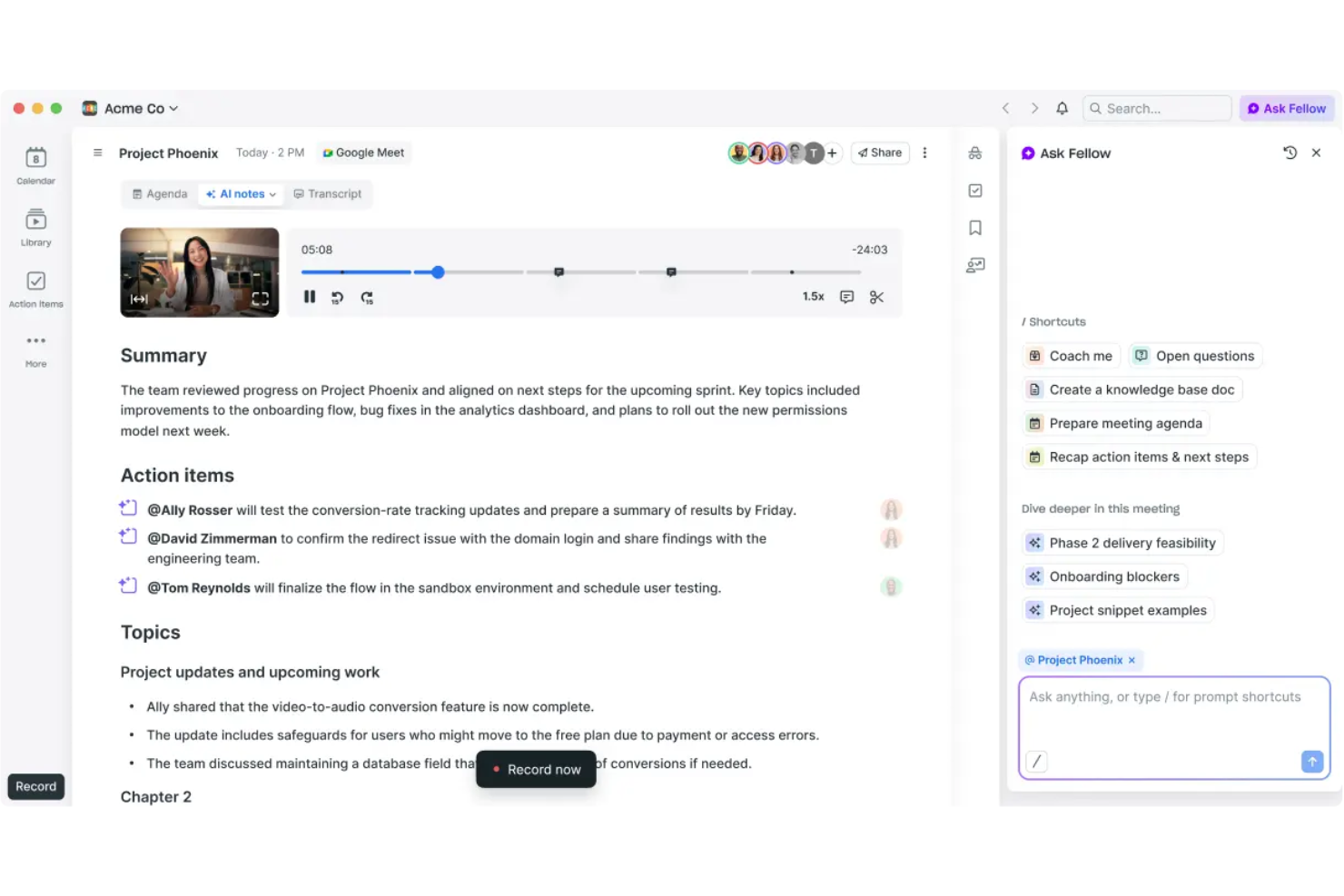
Fellow is an AI meeting assistant platform for creating collaborative agendas, capturing shared meeting notes, and facilitating structured team feedback and action items.
Who Is Fellow Best For?
Fellow fits managers and team leads at small to mid-sized tech companies who want organized, collaborative meeting workflows.
Why I Picked Fellow
I picked Fellow as one of the best because my team actually uses its collaborative agendas to keep meetings focused and accountable. I love how we can capture notes side-by-side in real time, and assign action items during the call. It’s especially useful for building and sharing meeting feedback directly in the workspace.
Fellow Key Features
- AI meeting transcription: Automatically generates transcripts for recorded meetings.
- Template library: Offers pre-built templates for different meeting types and structures.
- Meeting analytics dashboard: Tracks meeting frequency, engagement, and attendee data.
- Shared streams: Lets users organize meetings and notes by project, team, or topic.
Fellow Integrations
Fellow offers native integrations with Google Calendar, Outlook, Slack, Microsoft Teams, Zoom, Asana, Jira, Salesforce, HubSpot, and Linear. An API is available for custom integrations.
Pros and Cons
Pros:
- Dedicated agenda templates for different meeting types
- Built-in AI meeting summaries and transcripts
- Structured feedback and action item management
Cons:
- Occasional sync issues with some calendar platforms
- Fewer workflow automations
Fathom
Best for AI call summaries with CRM sync
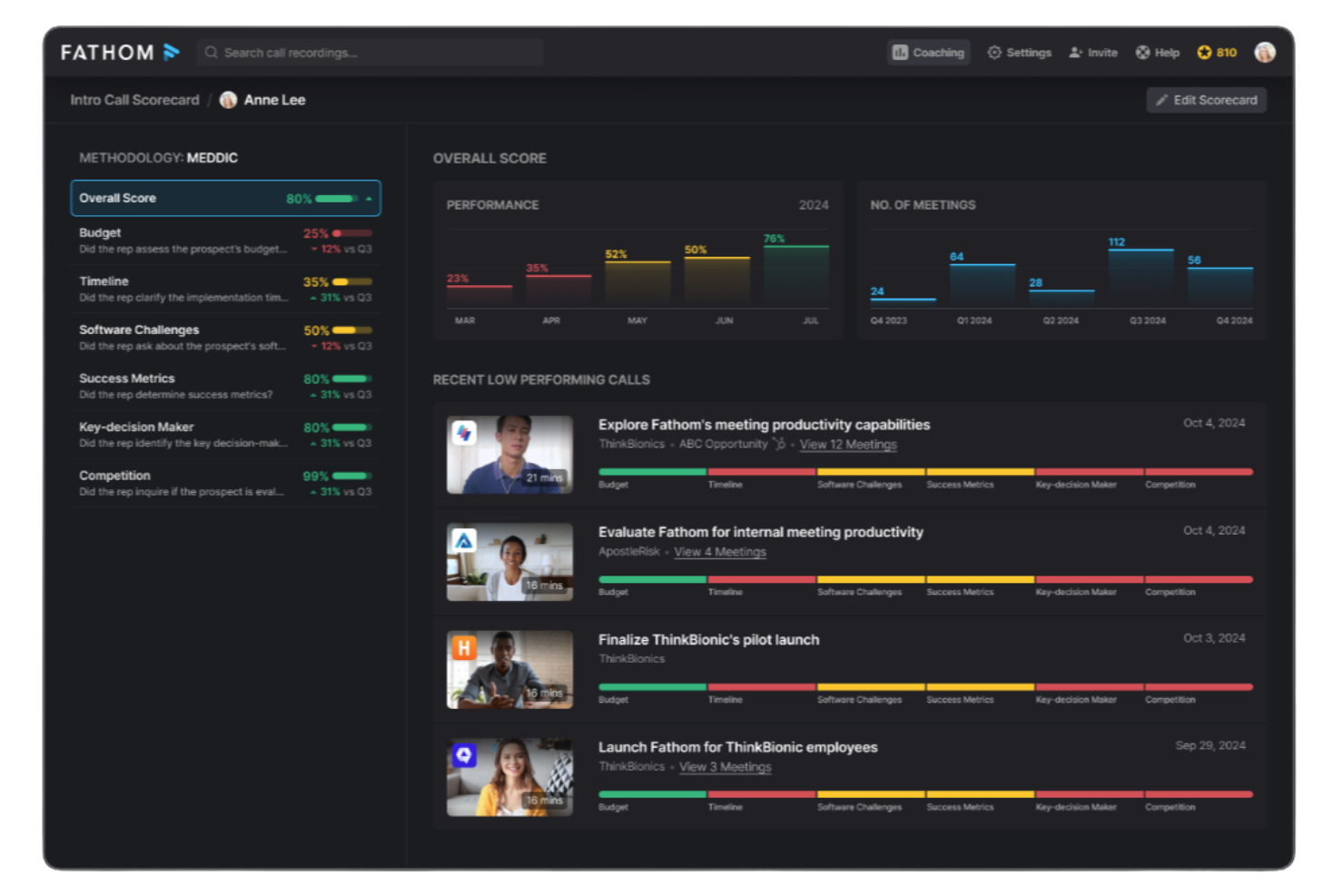
Fathom is an AI meeting assistant platform for recording, transcribing, highlighting, and summarizing video calls, offering instant access to meeting insights and action items.
Who Is Fathom Best For?
Fathom suits distributed sales, customer success, and research teams recording and analyzing virtual meetings across Zoom, Google Meet, and Microsoft Teams.
Why I Picked Fathom
I picked Fathom as one of the best because my team gets truly unlimited meeting recordings and transcriptions without hidden limits or upcharges, staying completely free for individual users. I like using Fathom to automatically generate sharable meeting summaries, highlight key points during calls, and sync action items to our connected apps.
Fathom Key Features
- Real-time transcription: Captures spoken words live on Zoom, Google Meet, and Microsoft Teams.
- Multi-language support: Transcribes meetings in multiple languages without manual switching.
- Speaker identification: Clearly marks which participant is speaking throughout the transcript.
- Automated call tagging: Tags important topics and segments for quick reference after meetings.
Fathom Integrations
Fathom offers native integrations with Salesforce, HubSpot, Slack, Notion, Google Docs, and supports exporting meeting content to Google Drive. An API is available for custom integrations.
Pros and Cons
Pros:
- Highlights and tags key moments during calls
- Real-time transcription in multiple languages
- Unlimited meeting recordings for individuals
Cons:
- Speaker labeling can be inconsistent on large calls
- No offline recording or mobile meeting capture

Avoma
Best for meeting insights and coaching
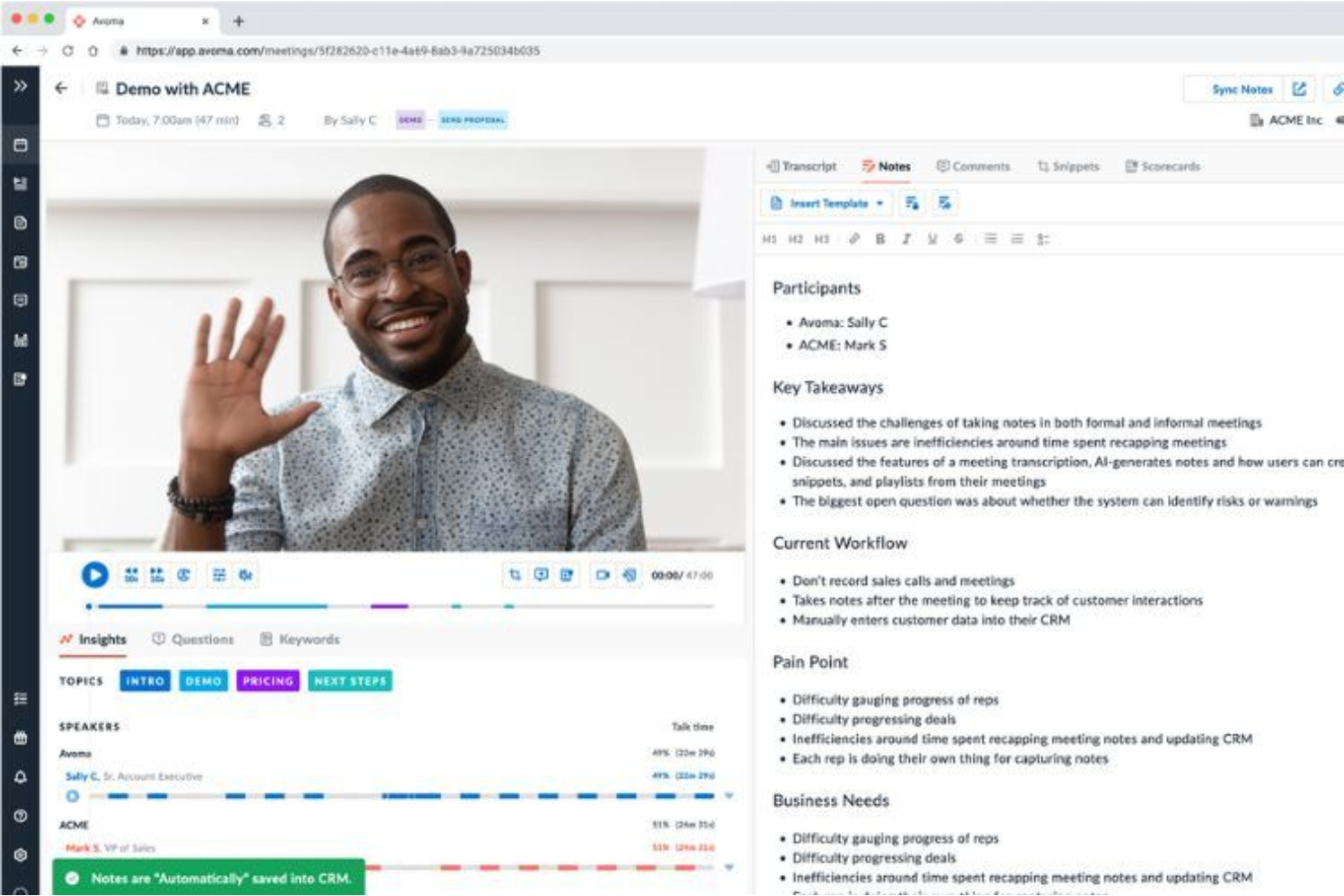
Avoma is an AI meeting assistant platform that records, transcribes, and analyzes conversations while supporting collaboration and coaching features for team meetings.
Who Is Avoma Best For?
Avoma fits revenue and customer-facing teams who need AI-powered meeting recording, insights, and coaching across recurring conversations.
Why I Picked Avoma
I picked Avoma because it goes beyond basic AI notes to deliver in-depth meeting transcriptions, collaborative real-time note-taking, and post-call coaching insights. My team uses Avoma to annotate decisions together during calls and organize conversation highlights for quick reference. The built-in coaching tools let managers review calls and share feedback tied directly to specific conversations.
Avoma Key Features
- Automated agenda templates: Lets you create and reuse structured agendas for recurring meetings.
- Searchable meeting transcript repository: Stores and indexes transcripts for keyword and topic search across all conversations.
- CRM integration: Syncs meeting insights and notes directly with Salesforce, HubSpot, and other CRMs.
- Speaker identification: Distinguishes individual speakers to attribute statements and action items accurately.
Avoma Integrations
Avoma offers native integrations with Zoom, Microsoft Teams, Google Meet, Salesforce, HubSpot, Slack, Google Calendar, and Outlook Calendar. An API is available for custom integrations.
Pros and Cons
Pros:
- Conversation intelligence provides coaching and analytics
- Automated agenda templates for recurring meetings
- Collaborative notes editing during and after meetings
Cons:
- No mobile app for recording meetings on the go
- Occasional transcription errors with strong accents

Granola
Best for concise meeting summaries
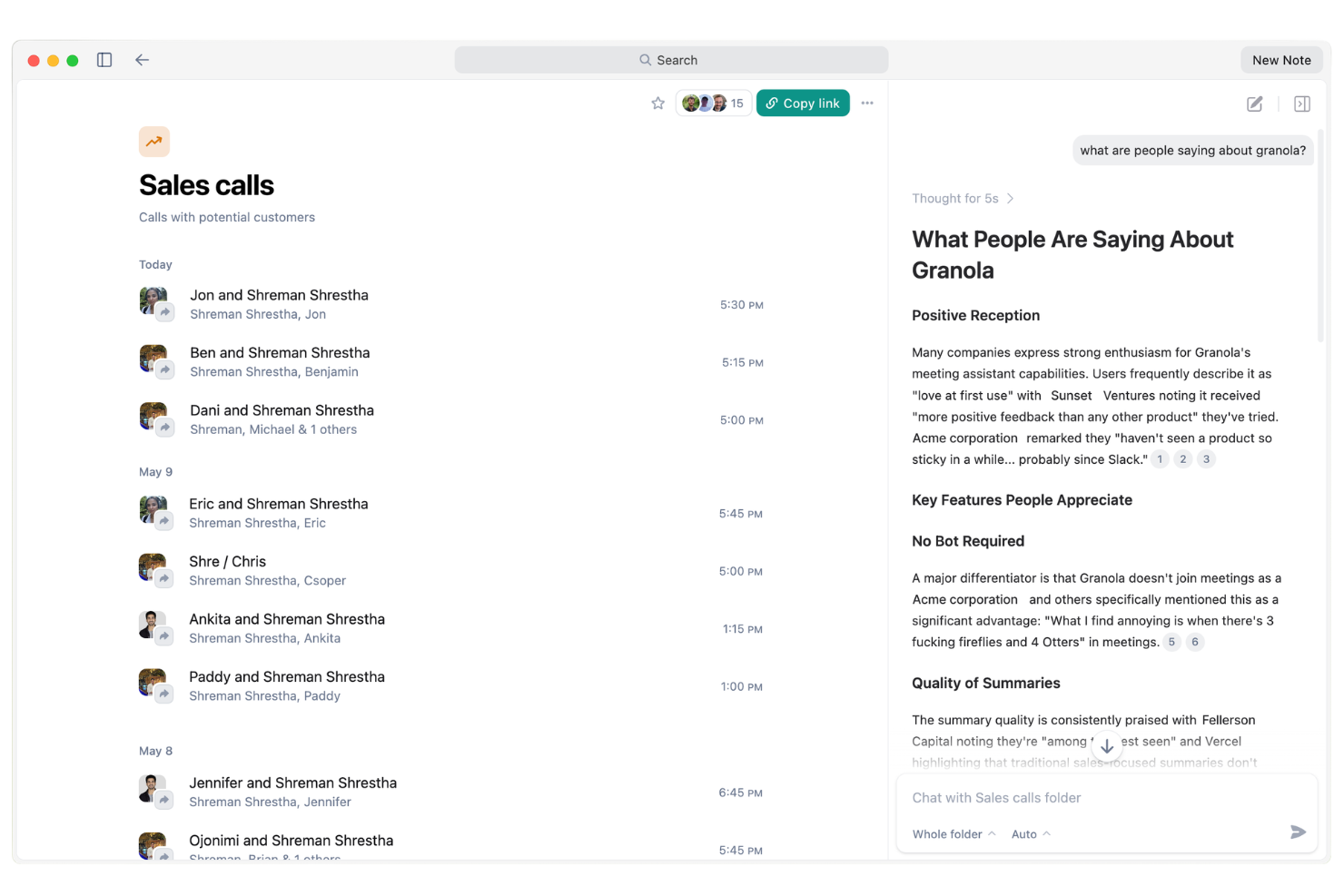
Granola is an AI meeting assistant platform that records meetings, generates transcripts, tracks action items, and triggers automated follow-ups and reminders for your team.
Who Is Granola Best For?
Granola suits busy sales and client-facing teams who need automated follow-ups and reliable action tracking from every meeting.
Why I Picked Granola
I've included Granola in my shortlist because I value how its AI agent automatically handles meeting follow-ups, reminders, and key action items with no manual effort from my side. I like how it actively tracks commitments and nudges participants after meetings so nothing slips. In practice, that means my team is able to focus on discussions while Granola ensures tasks and follow-ups are always managed.
Granola Key Features
- Live meeting transcription: Granola captures and transcribes meeting audio in real time.
- Speaker detection: Identifies and labels different speakers during meeting recordings.
- Searchable meeting archive: Lets users search and retrieve past meeting notes or transcripts easily.
- AI-powered meeting summaries: Generates concise written summaries of each meeting automatically.
Granola Integrations
Granola offers native integrations with Google Calendar, Zoom, Google Meet, Slack, Notion, and Salesforce. An API is available for custom integrations.
Pros and Cons
Pros:
- Summarizes meetings with AI-generated notes
- Tracks and reminds participants on follow-ups
- Automated action items assigned after each meeting
Cons:
- No mobile app for on-the-go use
- Lower plans restrict monthly transcription minutes

Otter.ai
Best for real-time transcription and notes
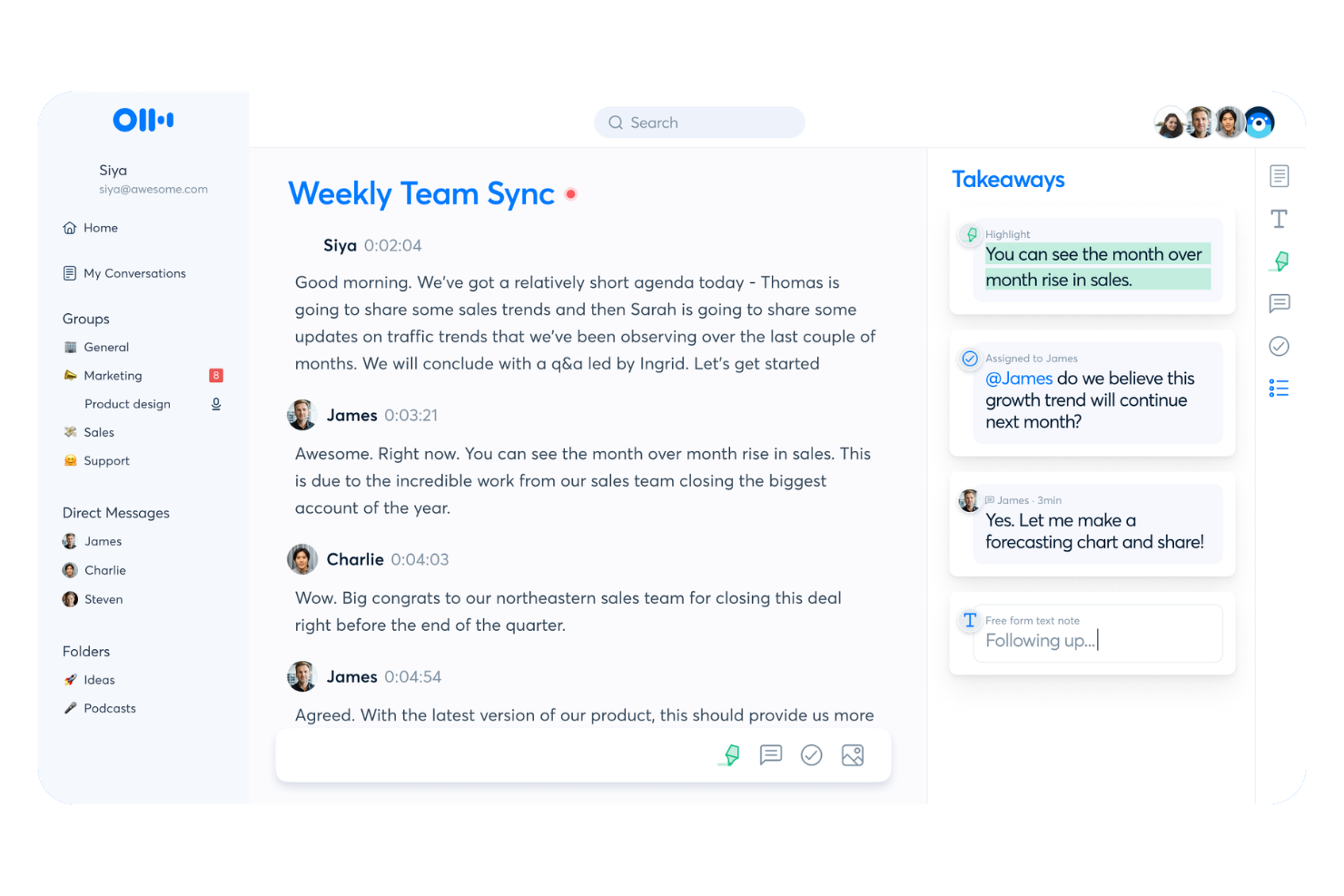
Otter.ai is an AI meeting assistant platform for live voice meeting notes, automated transcription, real-time collaboration, and turning conversations into searchable records for teams and organizations.
Who Is Otter.ai Best For?
Remote and hybrid teams that need live, collaborative voice transcripts and meeting documentation across distributed meetings.
Why I Picked Otter.ai
I picked Otter.ai as one of the best because I rely on its live voice meeting notes and instant transcript sharing during cross-team meetings. I like collaborating on shared notes in real time, with teammates adding comments or edits mid-conversation. My team uses interactive live summary cards to capture decisions and assigned action items as they happen.
Otter.ai Key Features
- Automated speaker identification: Distinguishes and labels speakers in meeting transcripts.
- Syncs with video conferencing platforms: Connects directly to Zoom, Google Meet, and Microsoft Teams.
- Audio import for transcription: Lets you upload audio files to generate searchable transcripts.
- Custom vocabulary: Allows you to add industry terms or names for more accurate transcription.
Otter.ai Integrations
Otter.ai offers native integrations with Zoom, Google Meet, Microsoft Teams, Dropbox, Google Drive, and more. An API is available for custom integrations.
Pros and Cons
Pros:
- Live note collaboration during conversations
- Automated speaker identification is accurate
- Real-time transcription in meetings and calls
Cons:
- Edit options for summaries are limited
- Meeting bot can disrupt privacy-conscious guests

Best for automatic meeting transcription
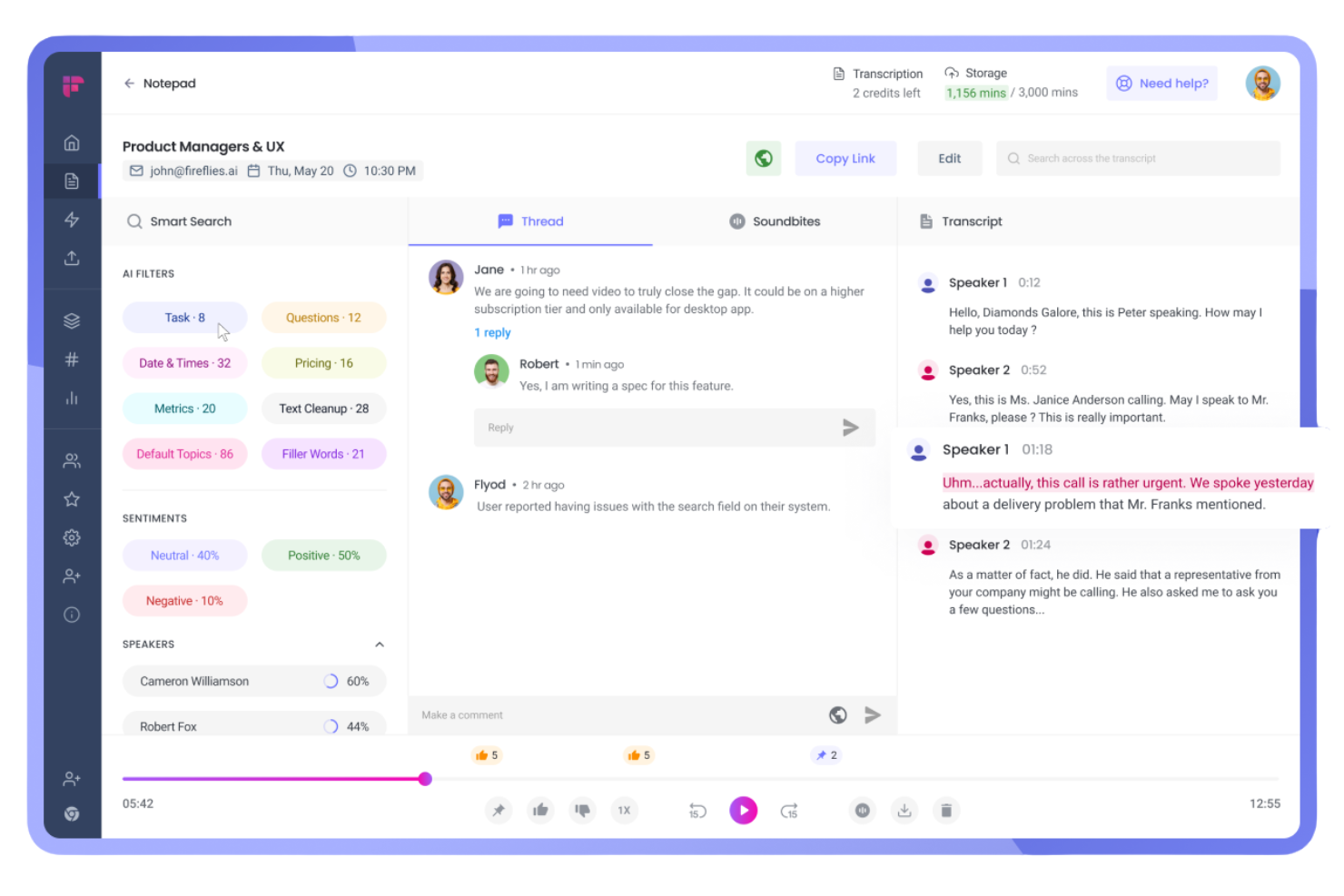
Fireflies.ai is an AI meeting assistant platform that records calls, generates searchable transcripts, auto-summarizes conversations, and integrates with a wide range of video conferencing and collaboration tools.
Who Is Fireflies.ai Best For?
Sales teams and project managers who need automated call transcription and documentation across distributed meetings.
Why I Picked Fireflies.ai
I picked Fireflies.ai as one of the best because it transcribes and summarizes meetings across platforms automatically, taking care of multi-platform recordings in real time. I use its AI-generated summaries to share tailored recaps with different stakeholders, and rely on its keyword search to track key action items from hours of calls without manual effort.
Fireflies.ai Key Features
- Smart search: Search transcripts by keyword, speaker, or topic across all your meetings.
- Speaker identification: Detects and labels different speakers automatically during recordings.
- Collaboration tools: Highlight, comment, and assign tasks directly within transcribed meeting notes.
- CRM integration: Sync meeting data and notes with popular CRM platforms like Salesforce and HubSpot.
Fireflies.ai Integrations
Fireflies.ai offers native integrations with Google Meet, Zoom, Microsoft Teams, Slack, Salesforce, HubSpot, Asana, ClickUp, Monday.com, and more. It connects with Zapier and provides an API for custom integrations.
Pros and Cons
Pros:
- Searchable archive of all recorded meetings
- Real-time AI summaries delivered after calls
- Accurate multi-speaker transcription on meetings
Cons:
- Occasional transcription errors with heavy accents
- No live video recording, audio only

Tactiq
Best for real-time meeting summaries
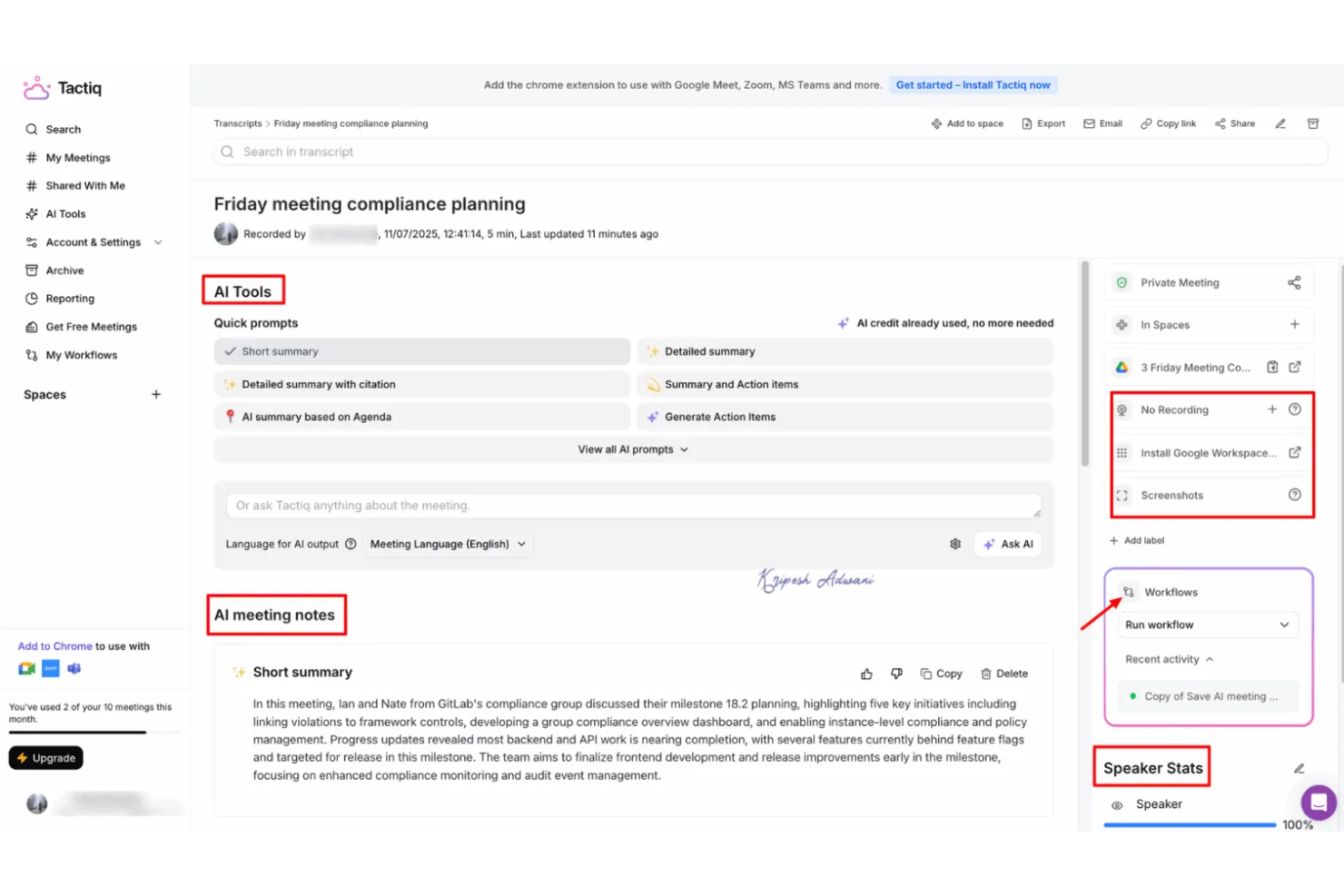
Tactiq is an AI-driven meeting assistant platform that captures live transcripts, generates summaries and action items, and integrates directly with platforms like Google Meet, Zoom, and Microsoft Teams.
Who Is Tactiq Best For?
Tactiq suits cross-functional teams in hybrid or remote workplaces that need instant, AI-powered transcripts and meeting documentation on major video platforms.
Why I Picked Tactiq
I picked Tactiq as one of the best because it grabs transcripts, summaries, and action items live as my team uses Google Meet, Zoom, and Microsoft Teams. I like being able to highlight key moments during a meeting, tag teammates for follow-up, and instantly reference specific details in the transcript. I’ve used it to streamline note-taking by exporting meeting records to tools like Google Docs and Notion.
Tactiq Key Features
- AI topic detection: Identifies and organizes topics discussed in meetings automatically.
- Speaker labeling: Differentiates speakers throughout the transcript for reference.
- Custom vocabulary: Lets you add keywords for better recognition and accuracy.
- Export in multiple formats: Allows exports to PDF, Word, and subtitle files for sharing or archiving.
Tactiq Integrations
Tactiq offers native integrations with Google Meet, Zoom, and Microsoft Teams, and provides export options to Google Docs, Notion, and Slack. An API is available for custom integrations.
Pros and Cons
Pros:
- AI summarizes meetings with key action items
- Detects and labels different speakers
- Captures transcripts in multiple languages
Cons:
- Speakers sometimes mislabeled in fast exchanges
- Few project management or CRM integrations

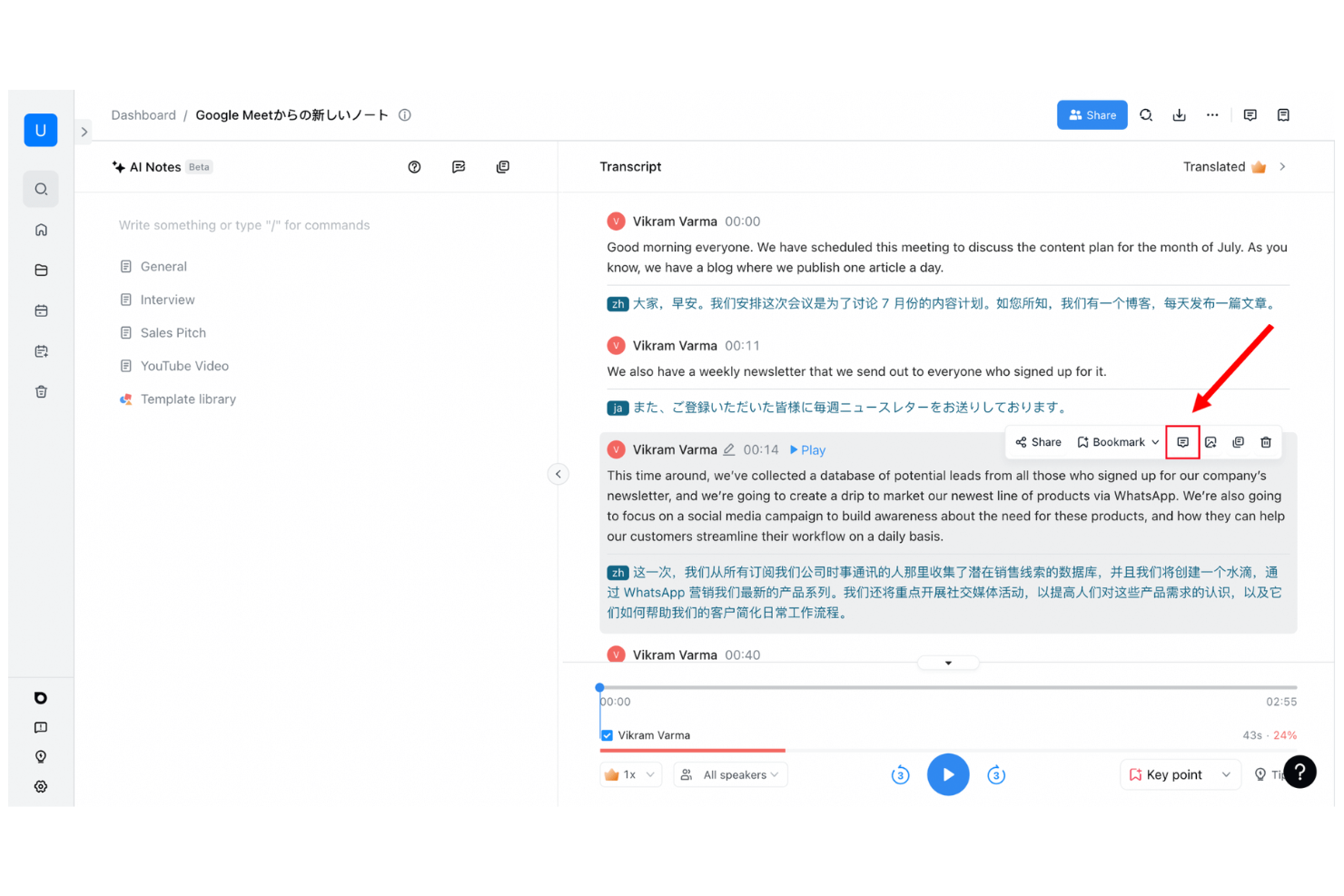
Notta is an AI-powered meeting assistant platform for recording, transcribing, and organizing conversations from online meetings, phone calls, and uploaded audio or video files.
Who Is Notta Best For?
Notta suits remote professionals and global businesses that need fast, accurate transcription for meetings, webinars, calls, and live events across multiple languages.
Why I Picked Notta
I picked Notta as one of the best AI meeting assistants because it instantly transcribes conversations in real time—whether I’m in a video call, attending a live event, or uploading an audio file. I like being able to record and capture every word as it happens, then search, edit, and organize transcripts from any device. I also appreciate that Notta supports multiple languages and recognizes different speakers automatically.
Notta Key Features
- Meeting summary generator: Automatically creates concise AI-powered summaries after each meeting.
- Export options: Lets you export transcripts to PDF, Word, TXT, or subtitle formats.
- Calendar integration: Syncs with Google and Outlook calendars to auto-record meetings.
- Team workspace: Allows teams to organize and share recorded meetings and transcriptions in one place.
Notta Integrations
Notta offers native integrations with Google Meet, Zoom, Microsoft Teams, Google Calendar, and Outlook Calendar, and provides an API for custom integrations.
Pros and Cons
Pros:
- Action items are pulled out from conversation
- Can auto-join and record scheduled meetings
- Distinguishes speakers in transcripts
Cons:
- Free tier limits monthly transcription duration
- Transcription struggles with background noise
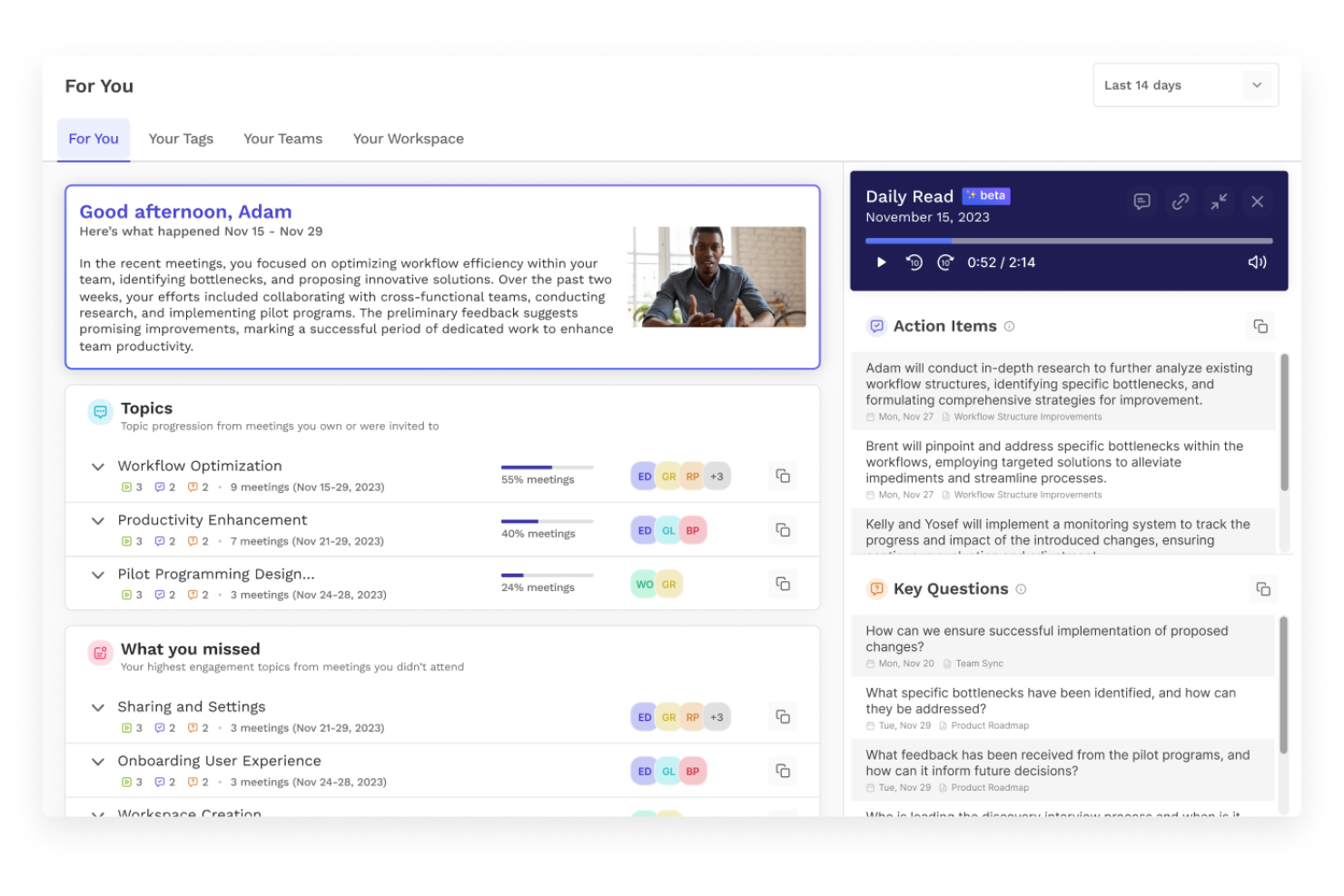
Read AI is an AI meeting assistant platform that automates meeting notes, generates summaries, and tracks action items, while supporting integrations for collaboration across popular video conferencing tools.
Who Is Read AI Best For?
Read AI suits remote and hybrid teams who need automated meeting summaries, tracking, and action items across multiple video conferencing platforms.
Why I Picked Read AI
I picked Read AI because it automates not just meeting notes, but summaries and action items as well, using its AI host feature. I’ve used it to get instant, structured recaps after calls, and I like that it reliably captures every decision point on the fly. My team often references Read AI’s real-time action item tracking to stay on top of follow-ups across multiple meetings.
Read AI Key Features
- Automatic meeting attendance reports: Generates participant lists and attendance summaries after each meeting.
- Live engagement analytics: Measures attentiveness and engagement scores in real time during meetings.
- Custom vocabulary support: Lets you add specific terms and jargon for accurate transcription.
- Calendar integration: Syncs with your calendars to schedule, join, and track meetings automatically.
Read AI Integrations
Read AI offers native integrations with Zoom, Microsoft Teams, Google Meet, Slack, andmore. An API is available for custom integrations.
Pros and Cons
Pros:
- Exports meeting notes to Notion and Drive
- Unlimited meeting recordings for individuals
- Highlights and tags important meeting moments
Cons:
- No offline or mobile meeting capture support
- Speaker labeling inconsistent on large calls

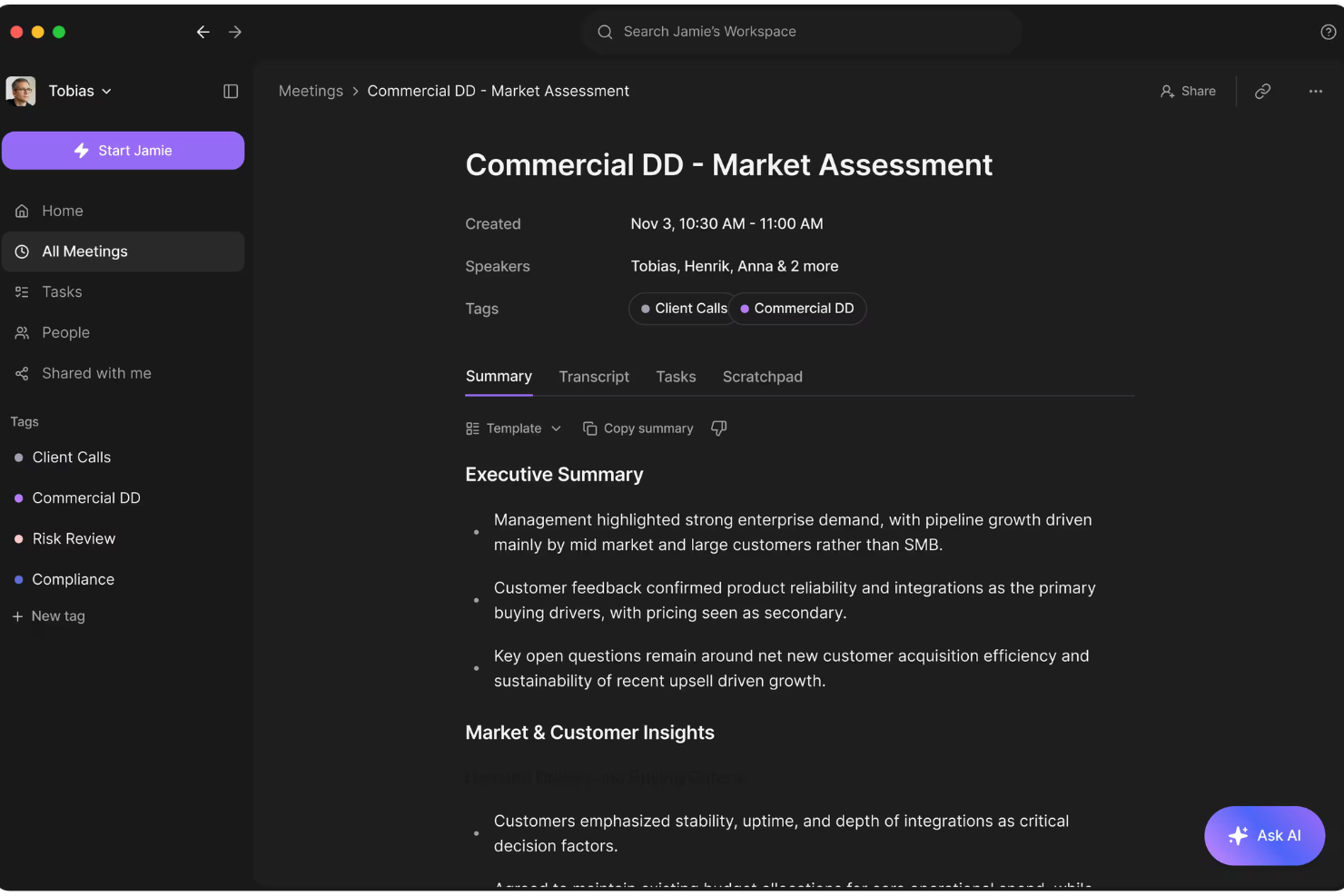
Jamie is an AI meeting assistant that automatically records virtual meetings across platforms, transcribes discussions, and delivers detailed, multilingual summaries for every conversation.
Who Is Jamie Best For?
Jamie fits distributed teams and consultants working internationally who need AI-powered meeting transcription and summaries in multiple languages.
Why I Picked Jamie
I picked Jamie as one of my best AI meeting assistants because I love that it runs on any meeting platform, not just the big names. I’m able to get clear, structured summaries in my choice of language right after every meeting. I also like how Jamie joins automatically and captures everything without my needing to start a recording or manage permissions.
Jamie Key Features
- Automated meeting recordings: Jamie automatically records audio from all scheduled meetings.
- Speaker diarization: The tool distinguishes and labels individual speakers during meetings.
- Action item extraction: Jamie identifies and displays action items discussed in the meeting.
- Edit and export summaries: You can edit generated meeting summaries and export them as text or PDF files.
Jamie Integrations
Jamie offers native integrations with Google Calendar, Microsoft Outlook Calendar, and native video conferencing platforms including Zoom, Google Meet, and Microsoft Teams. An API is available for custom integrations.
Pros and Cons
Pros:
- Action items are automatically detected and listed
- Can join meetings automatically as an attendee
- Transcripts include speaker identification
Cons:
- Summaries occasionally misattribute speakers
- Transcription quality drops with poor audio
Other AI Meeting Assistant
Here are some additional ai meeting assistant options that didn’t make it onto my shortlist, but are still worth checking out:
- tl;dv
For meeting highlights and timestamps
- MeetGeek
For automated meeting summaries
- Gong
For revenue-focused conversation insights
- Grain
For video meeting highlights
- Sybill
For conversational meeting insights
- Reclaim
For smart meeting scheduling
- Microsoft CoPilot
For AI within Microsoft 365
- Google Gemini
For AI in Google Workspace
- Cirrus Insight
For Salesforce meeting automation
- Chorus
For sales conversation analytics
- Clari Copilot
For revenue conversation insights
- Supernormal
For instant meeting notes
- Zoom AI Companion
For AI in Zoom meetings
- Hedy AI
For multilingual meeting assistance
- Sembly AI
For meeting transcription and analysis
- Colibri.ai
For real-time meeting transcription
- AudioCodes Meeting Insights
For voice analytics and summaries


How I Evaluate AI Meeting Assistants
To make this list, a tool's AI has to deliver real time savings after standups, sprint reviews, and stakeholder check-ins—not just hand you a transcript. I split my evaluation into core functionality every tool must meet to qualify and differentiating factors that separate one pick from another.
Core Functionality (Table Stakes For This List)
When I'm selecting tools for my list, I rank each one on a scale from 0 (does not offer the functionality) to 5 (excels in this area) for each core functionality listed below. Then, I calculate the tool's total score into a percentage. Each tool needs to achieve a minimum total score of 65% to be considered for inclusion.
- Automated Meeting Transcription: I check whether the tool auto-joins and transcribes calls across Zoom, Google Meet, Microsoft Teams, and Webex without manual setup.
- AI-Generated Meeting Summaries: A good summary should break a 45-minute sprint review into topics, decisions, and outcomes I can share with stakeholders right away.
- Action Item Extraction: I look for AI that pulls out tasks, assigns owners, and flags due dates from natural conversation rather than requiring manual tagging.
- Project Tool Integrations: Tools like Otter.ai, Fireflies.ai, and Fellow differ in how deeply they connect with Jira, Asana, or Monday—I evaluate native sync depth.
- Searchable Meeting Repository: I evaluate whether I can search across months of transcripts by keyword, speaker, or topic to find a past decision quickly.
- Speaker Identification: Accurate speaker labels matter, especially when attributing action items across a cross-functional team of engineers, designers, and product managers.
Once I have a list of tools that meet the criteria, I consider what sets each platform apart.
Differentiating Factors (What Sets Vendors Apart)
Here's how I compare and contrast different vendors:
Standout Features
Custom AI summary templates are a big deal for PMs who run different meeting types daily—I want sprint retro outputs structured differently than a stakeholder update. I also look for conversational AI chat that lets me ask questions like "What risks came up in last month's planning sessions?" across stored transcripts. Multi-meeting project intelligence takes this further by surfacing recurring blockers and decision patterns over time, which helps me spot trends before they become problems.
Beyond Features
Security matters because meeting transcripts often contain sensitive project details, client names, and internal decisions. I check for SOC 2 Type II compliance and configurable data retention policies. Pricing structure is another factor I weigh—some tools cap monthly meeting minutes or lock PM integrations behind higher tiers, which changes the real cost for active teams. I also evaluate transcription accuracy with technical jargon, since a tool that mishandles acronyms like "CI/CD" or "OKR" creates more cleanup work than it saves.
How to Choose AI Meeting Assistant
It’s easy to get bogged down in long feature lists and complex pricing structures. To help you stay focused as you work through your unique software selection process, here’s a checklist of factors to keep in mind:
| Factor | What to Consider |
|---|---|
| Scalability | Will the solution handle your team’s meeting volume as you grow? Check for user, seat, or meeting limits. |
| Integrations | Does the assistant connect natively to your calendar, video platform, and collaboration tools? |
| Customizability | Can you adjust templates, export formats, or trigger specific workflows to match your team’s process? |
| Ease of use | Are key actions like scheduling, joining, and sharing outputs clear for all users, including non-technical staff? |
| Implementation and onboarding | How quickly can your team get up and running? Are there guides, training resources, and migration support available? |
| Cost | Do the features and usage limits match your budget? Beware hidden costs for advanced features, usage caps, or support. |
| Security safeguards | Does the platform meet your data privacy needs and relevant standards? Look for encryption and data controls. |
| Support availability | Is live support accessible when you need help? Consider your timezone, business hours, and urgency of support tickets. |
What Is AI Meeting Assistant?
An AI meeting assistant is a digital tool that uses artificial intelligence to record, transcribe, and analyze meetings in real time. These AI tools automate AI note-taking by generating AI meeting notes, summaries, and action items during virtual or in-person meetings.
Many platforms also include features like AI chat, automatic follow-up emails, and searchable summaries that can be stored in a shared knowledge base. This helps team members improve team collaboration, increase team productivity, and access high-quality meeting insights without manual effort.
Teams increasingly use AI meeting assistants to simplify post-meeting workflows, reduce repetitive tasks, and make meeting outcomes easier to share and act on.
Features
When selecting ai meeting assistant, keep an eye out for the following key features:
- Real-time transcription: Captures spoken content as text during your meetings, making it easier to follow conversations, review details, and share meeting records right after calls.
- Speaker identification: Distinguishes and labels each participant’s voice, so you always know who said what, even in group discussions or panels.
- Automated summaries: Uses AI to produce condensed recaps that highlight main topics, action items, and decisions, providing instant meeting notes you can use or send to colleagues.
- Action item extraction: Automatically identifies, lists, and tracks follow-up tasks or responsibilities that arise during the conversation, helping teams stay accountable.
- Searchable meeting history: Lets you search across past meetings by keyword, topic, or participant, making it easy to retrieve information or revisit conversations.
- Native video conferencing integrations: Connects directly with platforms like Zoom, Google Meet, or Microsoft Teams so you can use the assistant during meetings without switching tabs or tools.
- Export and sharing options: Provides ways to export transcripts and summaries to common formats or workplace apps, ensuring notes are available in the places your team works.
- Multi-language support: Handles transcription and summary in languages beyond English, which is useful for multinational teams or international partners.
- Security and privacy controls: Offers encryption, access permissions, and compliance options so confidential meeting data is protected and meets your organization’s standards.
Benefits
Implementing ai meeting assistant provides several benefits for your team and your business. Here are a few you can look forward to:
- Accurate meeting records: Automatic transcription and speaker identification ensure you capture every detail and know exactly who said what.
- Reduced manual note-taking: Real-time AI summaries and action item extraction let participants focus on conversations instead of scribbling notes.
- Faster follow-up: Action items and export features help your team quickly assign tasks or circulate meeting outcomes without delay.
- Improved accountability: Searchable transcripts and accessible records make it easy to reference commitments and decisions made in past meetings.
- Enhanced accessibility: Multi-language support and integrations with video platforms make meetings easier to participate in and review for remote or global teams.
- Stronger data security: Privacy controls and encryption features protect sensitive meeting information from unauthorized access.
- Greater productivity: Automated processes speed up meeting wrap-ups and free up time for higher-value work.
Costs and Pricing
Selecting ai meeting assistant requires an understanding of the various pricing models and plans available. Costs vary based on features, team size, add-ons, and more. The table below summarizes common plans, their average prices, and typical features included in ai meeting assistant solutions:
Plan Comparison Table for AI Meeting Assistant
| Plan Type | Average Price | Common Features |
|---|---|---|
| Free Plan | $0 | Includes basic meeting transcription, limited minutes per month, single user, core integrations, and essential summaries. |
| Personal Plan | $5-$15/user/month | Provides unlimited or expanded transcription, individual speaker identification, export options, priority support, and action item capture. |
| Business Plan | $15-$40/user/month | Supports team accounts, advanced integrations, shared meeting history, enhanced summaries, analytics, and admin controls. |
| Enterprise Plan | $40-$80/user/month | Offers custom integrations, dedicated account management, SSO, compliance features, bulk onboarding, and advanced security options. |
AI Meeting Assistant FAQs
Here are some answers to common questions about ai meeting assistant:
Can AI meeting assistants integrate with my existing calendar and video conferencing tools?
Yes, most AI meeting assistants integrate with major calendar apps and video conferencing platforms. This makes it easy to automatically join and record meetings, sync schedules, and ensure that your notes and transcripts are linked to the right event.
How accurate is the transcription from AI meeting assistants?
Transcription accuracy is generally high, especially in quiet environments with clear audio. You may notice errors when speakers talk over each other, speak quickly, or if there’s a lot of background noise. Reviewing and editing transcripts is a good idea for very important meetings.
Is my meeting data secure when using an AI meeting assistant?
Yes, most reputable AI meeting assistant platforms use encryption and provide privacy controls to protect your data. Always check each vendor’s security settings and privacy policies, especially if you work in a regulated industry or handle sensitive information.
Can AI meeting assistants handle multiple languages?
Yes, many AI meeting assistants offer multi-language support, both in transcription and in meeting summaries. This is especially useful for international teams or meetings that shift between different languages.
What happens if a participant joins late—will their input be captured?
Yes, most tools will capture everything said as soon as the participant joins. However, anything discussed before the meeting assistant is enabled or the user joins will not appear in the transcript. Starting the assistant on time ensures complete coverage.
How do I share meeting notes with my team after a call?
Most AI meeting assistants allow you to export notes and transcripts to cloud drives, collaboration tools, or as shared links. Some tools even automate note sharing to Slack or update project trackers with tasks identified during a meeting.