

10 Best AI Document Management Software Reviewed in 2026

Best AI Document Management Software Shortlist


AI document management software helps project managers organize, store, and retrieve files more efficiently by automating version control, tagging, permissions, and search. Instead of wasting time hunting down documents or managing access manually, these tools use artificial intelligence to streamline how teams handle files across the project lifecycle.
I’ve tested and reviewed top AI-powered document management tools to identify which ones actually make life easier for busy project teams. From auto-tagging and OCR to smart search and workflow automation, each tool brings something valuable to reduce friction and improve productivity.
Why Trust Our Software Recommendations
Our team has been testing and reviewing software since 2012. As project managers ourselves, we know how difficult—and important—it is to choose the right software.
For this guide, we evaluated tools using hands-on testing and independent research, scoring tools using our selection criteria. We also draw on insights from industry thought leaders and practicing project management experts.
Our reviews reflect our human editorial judgment, not a sales pitch.
Expert reviewers:
AI Document Management Software Comparison Table
This comparison table summarizes pricing details for my top AI document management software selections:
| Tool | Best For | Trial Info | Price | ||
|---|---|---|---|---|---|
| 1 | Best for multilingual document handling | Free demo available | Pricing upon request | Website | |
| 2 | Best for AI-assisted document collaboration | 7-day free trial | From $19.99/user/month (billed annually) | Website | |
| 3 | Best for secure file sharing | 14-day free trial | From CAD$21/user/month (billed annually) | Website | |
| 4 | Best for metadata-driven organization | Free demo available | From $65/user/month | Website | |
| 5 | Best for hybrid cloud solutions | Free demo + 15-day free trial available | From $22/user/month (billed annually) | Website | |
| 6 | Best for AI-based document processing | Free trial available | Pricing upon request | Website | |
| 7 | Best for cloud-based document analysis | Free demo available | From $$30 per 1,000 pages | Website | |
| 8 | Best for enterprise content management | Free consultation available | Pricing upon request | Website | |
| 9 | Best for OCR technology | Free demo available | Pricing upon request | Website | |
| 10 | Best for invoice data extraction | Free demo available | Pricing upon request | Website |
Best AI Document Management Software Reviews
Below are my detailed summaries of the best AI document management software that made it onto my shortlist. My reviews offer a detailed look at the key features, pros & cons, integrations, and ideal use cases of each tool to help you find the best one for you.
Doxis
Best for multilingual document handling
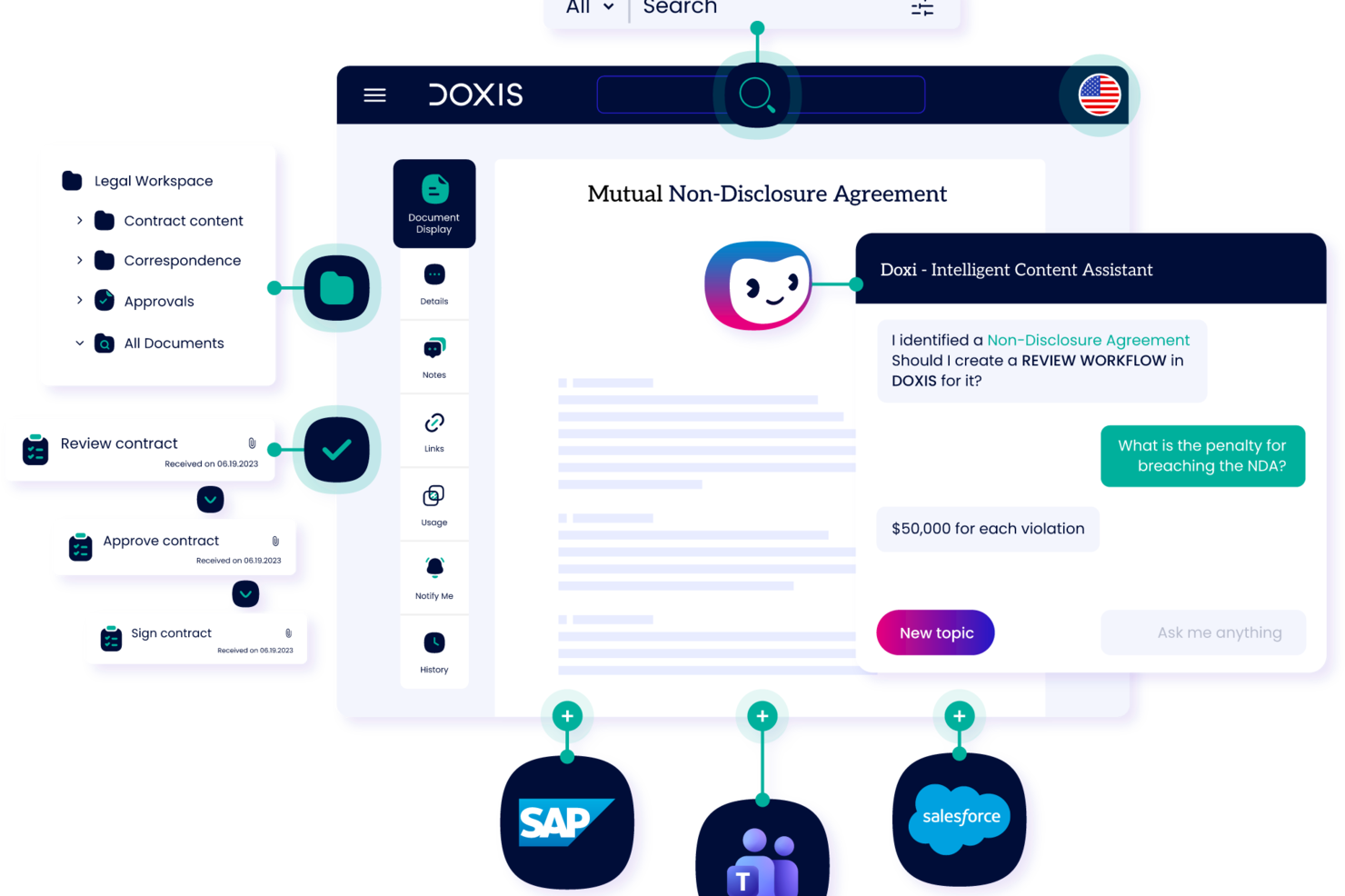
Built for enterprises, Doxis is an AI document management platform that uses intelligent content automation to capture, classify, process, and archive documents with version tracking and lifecycle controls.
Who Is Doxis Best For?
Doxis is ideal for large organizations with records management or legal teams that need clear, defensible proof of every document action.
Why I Picked Doxis
I've included Doxis in my top picks because its AI document processing engine handles over 100 languages natively, which is rare at this level of accuracy. I like that Doxis AI.dp doesn't just store multilingual documents but actively reads, classifies, and extracts structured metadata from them regardless of language. In practice, that means my team can route a German invoice and a French contract through the same automated workflow without any manual pre-sorting. The enterprise search also lets you filter results by language, which is a genuine time-saver across a large, mixed-language repository.
Doxis Key Features
- Intelligent content assistant: Doxi, Doxis' built-in AI assistant, delivers contextual answers and surfaces relevant documents within your workspace.
- No-code app builder: Doxis Business Studio lets you build custom content apps and document processes without writing any code.
- Automated retention management: The platform applies and enforces document retention periods based on configurable rules.
- Audit-proof archiving: Completed documents are locked into an immutable, read-only state at the end of each workflow.
Doxis Integrations
Doxis offers certified native integrations with SAP, Salesforce, and the Microsoft ecosystem, including Microsoft 365, Microsoft Teams, Microsoft Outlook, Microsoft SharePoint, and Microsoft Dynamics 365. It uses vendor-independent connectors for ERP, CRM, HR, CAD, and email/groupware systems, along with an event-condition-action (ECA) framework for cross-system process automation. An API is available for custom integrations. Zapier support is not documented.
Pros and Cons
Pros:
- AI-driven automated filing and metadata capture
- Flexible product that adapts to organizational needs
- Covers document management, workflows, and automation on one platform
Cons:
- Sales team tends to overpromise during selection
- Complex customizations often require support coordination

Best for AI-assisted document collaboration
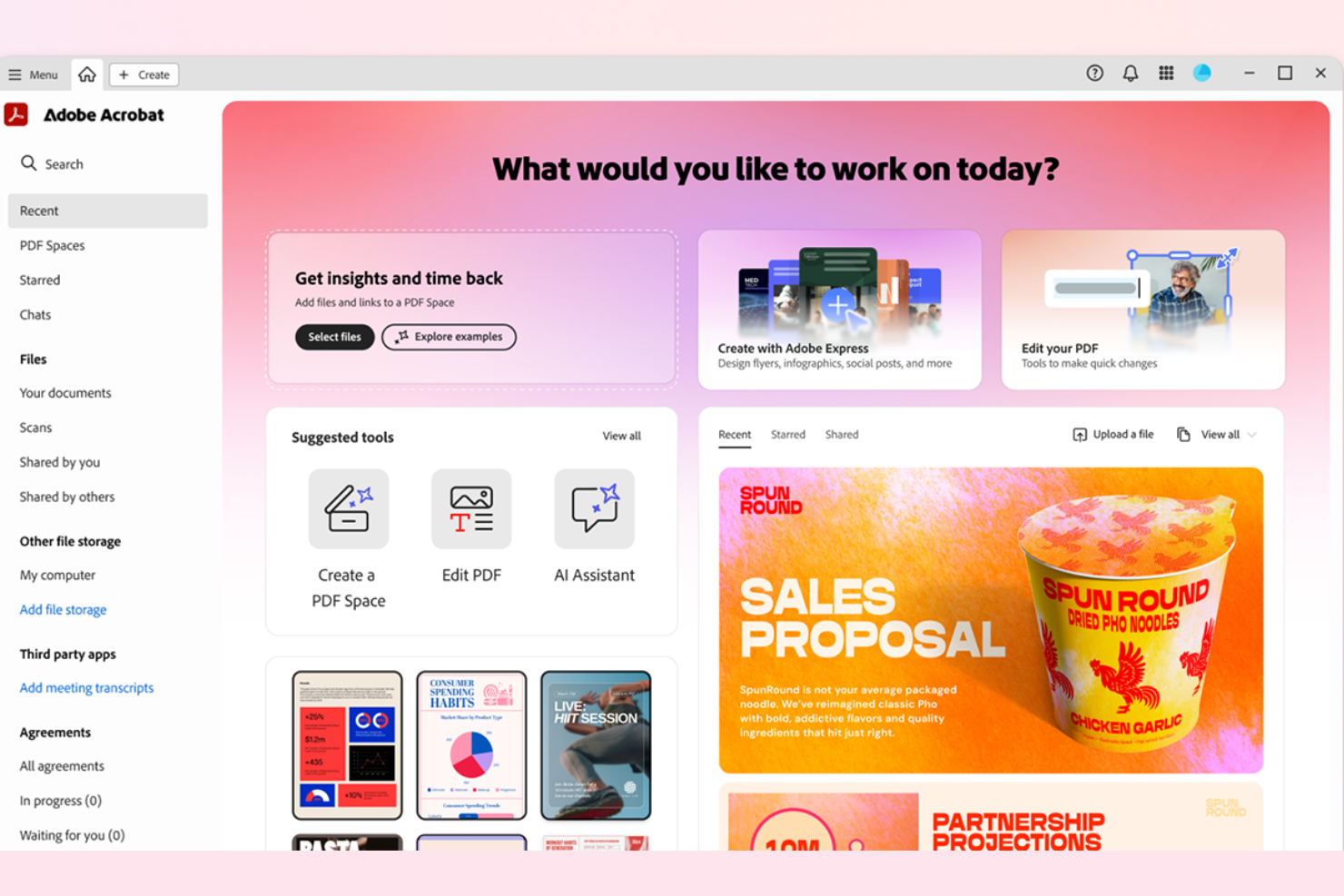
Adobe Acrobat earns its spot on my list because it lets teams collaborate on documents in real time, with generative AI helping summarize and organize feedback across versions. In practice, I see teams use the AI Assistant to extract action items and refine document drafts during complex review cycles.
What stands out for me is how the AI ties comments, tasks, and file changes together, so you always have a live, context-rich view of who did what and why.
Adobe Acrobat's Best For
- Teams handling document collaboration and review at scale
- Organizations centralizing feedback, file changes, and approvals
Adobe Acrobat's Not Great For
- Teams that need advanced content management features
- Workflows focused on records retention or strict compliance archiving
What sets Adobe Acrobat apart
Adobe Acrobat anchors everything around document control and collaborative markup. Unlike Google Workspace, which assumes lightweight co-editing, Adobe Acrobat builds on granular permissioning, version history, and formal review cycles. I find it suits organizations that track changes, comments, and handoffs tightly and want audit trails to stay central to each document.
Tradeoffs with Adobe Acrobat
Acrobat optimizes for managed review and approval, but you give up broader workflows and content lifecycle management. This means teams needing end-to-end records management or robust automation might hit limits.
Pros and Cons
Pros:
- Centralized template and document library management
- Advanced redaction and sensitive data protection tools
- AI-powered document search and summarization
Cons:
- Some e-signature transaction limits depend on plan
- Occasional lag with large or complex PDFs

Box
Best for secure file sharing

Box earns a spot on this list because it’s one of the only tools I trust for handling documents that need airtight security in cloud environments. When I see organizations moving sensitive contracts, financial records, or research to the cloud, Box’s granular access controls, document watermarking, and custom retention policies stand out.
What I appreciate here is the ability to set file-level permissions and compliance options for teams with strict data requirements.
Box’s Best For
- Organizations handling confidential files or regulated data
- Teams needing detailed access controls and retention policies
Box’s Not Great For
- Teams needing document creation or editing in-app
- Small groups that rarely share sensitive information
What sets Box apart
Box is set up for organizations that want to treat document storage and sharing as a security-first process rather than as basic cloud file storage. Unlike Google Drive, which prioritizes fast sharing and collaboration, Box expects you to plan out who has access and how files are handled. In practice, this makes it a strong fit for compliance-focused industries where strict governance matters.
Tradeoffs with Box
Box optimizes for security and control, but that means in-app collaboration and editing tools are limited. You’ll need separate apps for live document editing.
Pros and Cons
Pros:
- Wide range of integrations
- Customizable workflow options
- Strong security measures
Cons:
- Requires internet access
- Initial setup complexity

M-Files
Best for metadata-driven organization

M-Files is on this list because its metadata-driven approach completely changes how you organize and retrieve information. Instead of relying on folders, you tag documents by what they are, which lets you surface content in whatever context makes sense.
I like how AI-assisted metadata suggestions help keep tagging consistent and accurate, especially for teams dealing with messy, complex document libraries. This works best when you're managing regulated files or need to satisfy strict audit requirements.
M-Files' Best For
- Teams managing regulated documents with strict audit requirements
- Organizations needing context-based, metadata-driven search and classification
M-Files' Not Great For
- Teams that prefer simple folder-based organization
- Small businesses with minimal compliance or metadata needs
What sets M-Files apart
M-Files shifts your focus from organizing files by location to organizing by what each document is and means. Unlike Google Drive or Dropbox, you don’t browse through nested folders. You add metadata that describes documents, then search or filter them by purpose, status, or project. This works well when things are moving fast and files need to show up in any workflow context, not just one place.
Tradeoffs with M-Files
M-Files optimizes for structure and consistency, but that means setup and maintenance take extra effort, especially when you just want to toss documents in a simple folder and move on.
Pros and Cons
Pros:
- Strong compliance features
- Flexible deployment options
- Metadata-driven search
Cons:
- Requires training for users
- Initial setup complexity

Egnyte
Best for hybrid cloud solutions

Egnyte made my list because it’s the first place I look when hybrid cloud is a non-negotiable for document management. I see teams that manage both sensitive internal content and need external collaboration gravitate to Egnyte because it lets you set clear controls over where files live and who can access them.
What I like here is the way Egnyte’s file lifecycle automation and granular permissions really simplify compliance—especially for organizations with regulatory needs or split infrastructure.
Egnyte’s Best For
- Organizations with hybrid IT environments or strict compliance needs
- Teams managing external sharing plus internal, permission-based content
Egnyte’s Not Great For
- Businesses that want only public cloud storage
- Small teams with simple, low-security document needs
What sets Egnyte apart
Egnyte is built for those who expect their files to cross between cloud and on-premise, all under granular access control. Compared to Google Workspace, Egnyte doesn't assume all your content can safely live in the public cloud. This tool leans into hybrid storage, letting you keep regulated data in-house while collaborating offsite.
In practice, I see it work best when compliance and split infrastructure are required, not optional.
Tradeoffs with Egnyte
Egnyte optimizes for hybrid deployment and detailed compliance. That extra control means setup and ongoing administration are heavier, especially for teams hoping to avoid managing storage policies.
Pros and Cons
Pros:
- Handles large files well
- Strong compliance capabilities
- Flexible storage options
Cons:
- Initial learning curve
- Requires stable internet connection


Azure AI Document Intelligence lands on this list for how it automates classification and data extraction from complex documents using trainable AI models. When I've tried this with large contracts and multi-form invoices, the prebuilt and custom models handled tricky layouts way better than standard OCR tools.
I like how it supports extraction from both structured and unstructured files, making it easy for teams dealing with diverse document types to bring everything into a searchable, manageable system.
Azure AI Document Intelligence’s Best For
- Teams automating extraction from contracts, forms, and invoices
- Organizations processing large volumes of diverse document types
Azure AI Document Intelligence’s Not Great For
- Small teams that only need basic OCR capabilities
- Businesses needing built-in document editing or collaboration features
What sets Azure AI Document Intelligence apart
Azure AI Document Intelligence takes a model-driven approach to parsing and interpreting documents. Instead of focusing on manual tagging or rule-based extraction like legacy tools, it expects you to use trained AI models to classify and extract content. I tend to see it used in organizations processing large batches of invoices and contracts, where templates and simple OCR just do not hold up.
Unlike something basic like Adobe Acrobat, Azure targets scenarios where structure varies and manual document prep does not scale.
Tradeoffs with Azure AI Document Intelligence
It optimizes for automation at scale, but you give up some flexibility when you need hands-on editing or collaborative review of the documents themselves.
Pros and Cons
Pros:
- Suitable for diverse industries
- Scalable cloud infrastructure
- Flexible model customization
Cons:
- Requires technical expertise
- Initial setup complexity


Google Document AI stands out for cloud-based document analysis, especially if you're dealing with massive document volumes that need automated extraction. I like how it reliably handles complex file types (invoices, contracts, unstructured PDFs) and pulls out structured data using custom-trained models. Teams who need scalable OCR, form parsing, and custom document workflows really benefit when accuracy and speed matter.
Google Document AI’s Best For
- Organizations processing high volumes of unstructured or scanned documents
- Teams needing automated data extraction from varied document types
Google Document AI’s Not Great For
- Smaller teams with basic document storage needs
- Situations where extensive manual review or editing is required
What sets Google Document AI apart
Google Document AI approaches document management differently from traditional DMS solutions like SharePoint. It assumes you want to automate data capture and classification rather than just store and organize files. In practice, this works best when you deal with high volumes of invoices, contracts, or forms and absolutely need accurate, scalable extraction—especially if you want a cloud-native workflow.
Tradeoffs with Google Document AI
It optimizes for automation and advanced extraction, but you give up easy, manual document editing and folder-based control common in standard repositories. If you need hands-on document management, you may run into friction.
Pros and Cons
Pros:
- Cloud-based accessibility
- Pre-trained models available
- Efficient for large-scale processing
Cons:
- May need technical knowledge
- Requires internet connectivity


Xerox DocuShare is on this list because its content management capabilities can handle demanding document control, indexing, and workflow automation at scale. I think it's best for organizations with complex governance and security requirements who need to manage millions of files across different teams or business units.
What I appreciate is how DocuShare's automation features support high-volume capture, intelligent categorization, and retention policies. This fits well for teams who must balance compliance and information accessibility without a lot of manual oversight.
DocuShare’s Best For
- Enterprises with complex document compliance and governance needs
- Organizations handling high-volume, multi-department content management
DocuShare’s Not Great For
- Small teams with basic document storage needs
- Anyone needing simple, lightweight file sharing or collaboration
What sets DocuShare apart
DocuShare is designed with enterprise-level governance in mind, where document lifecycle management and strict compliance are the priority.
Unlike Google Workspace, which favors everyday collaboration, DocuShare is built for regulated environments that need formal processes for capturing, handling, and retaining documents. In practice, this platform works best when you need granular control, centralized policies, and automation around secure document handling.
Tradeoffs with DocuShare
DocuShare optimizes for compliance and high-volume control, but that adds complexity and can slow down simple collaboration or quick sharing between smaller teams.
Pros and Cons
Pros:
- Customizable user permissions
- Scalable for large enterprises
- Strong compliance features
Cons:
- May need user training
- Requires initial setup time


ABBYY makes the cut because its OCR technology is in a class of its own for document management at scale. If you deal with large volumes of scanned paper or image-based files, ABBYY extracts structured data and metadata more accurately than any platform I’ve tested. I like that you can automate multi-language document capture and recognition, which is rare at this level.
ABBYY’s Best For
- Organizations processing high volumes of scanned documents
- Teams needing advanced multilingual OCR and data capture
ABBYY’s Not Great For
- Simple document management without OCR requirements
- Small teams with mostly digital, text-based files
What sets ABBYY apart
ABBYY is built for organizations that depend on extracting text and structured information from paper or image-based files at scale. Where Google Workspace and Microsoft SharePoint focus on digital file management, ABBYY expects you to start with physical documents, receipts, or PDFs that aren’t natively searchable. In practice, this works best when document capture and data extraction are core to your workflow, not an afterthought.
Tradeoffs with ABBYY
ABBYY puts high accuracy and advanced OCR first, but this means you give up lightweight collaboration and built-in editing features you’d expect from broader document platforms.
Pros and Cons
Pros:
- Handles diverse document types
- Supports multiple languages
- High accuracy in data capture
Cons:
- Requires training for optimal use
- Initial setup complexity


Rossum.ai makes my list because its AI-driven invoice data extraction handles a level of document complexity most tools can’t touch. I see finance teams use Rossum.ai when they get stuck manually entering data from invoices that look different every week.
What I appreciate is how Rossum.ai learns from corrections, so extraction keeps improving over time. If you deal with large volumes of vendor invoices or constantly shifting formats, this helps avoids missed details.
Rossum.ai’s Best For
- Finance teams processing high volumes of vendor invoices
- Organizations needing AI-driven extraction from unstructured invoice formats
Rossum.ai’s Not Great For
- Small businesses with limited invoice volume
- Teams prioritizing document management beyond invoice extraction
What sets Rossum.ai apart
Rossum.ai approaches document processing by expecting teams to automate high-volume invoice workflows using AI models that learn from every correction. Unlike tools like Google Workspace or traditional OCR, Rossum.ai handles constantly changing, non-standard invoice formats without relying on fixed templates. I see it work best when invoices come in many shapes and sources, making manual entry painful and error-prone.
Tradeoffs with Rossum.ai
Rossum.ai optimizes for highly automated invoice extraction, but that focus means you give up broader document management features and flexibility to handle non-invoice content.
Pros and Cons
Pros:
- Customizable workflow options
- High data extraction accuracy
- Quick setup process
Cons:
- Requires internet access
- Limited to invoice data
Other AI Document Management Software
Here are some additional AI document management software options that didn’t make it onto my shortlist, but are still worth checking out:
- Document360
For knowledge base creation
- Trupeer
For automated script enhancement
- OpenText
For enterprise-grade content management
- Affinda
For resume parsing and analysis


How I Evaluate AI Document Management Software
Every tool on this list needs to deliver real AI value—not just slap a chatbot onto a basic file repository and call it intelligent. I split my evaluation into two layers: the core functionality a tool must have to qualify (like AI classification, smart search, and extraction) and the differentiating factors that separate good options from great ones for project teams.
Core Functionality (Table Stakes For This List)
When I'm selecting tools for my list, I rank each one on a scale from 0 (does not offer the functionality) to 5 (excels in this area) for each core functionality listed below. Then, I calculate the tool's total score into a percentage. Each tool needs to achieve a minimum total score of 65% to be considered for inclusion.
- AI Document Classification: I look for tools that auto-tag and categorize uploads—like sorting incoming SOWs, change orders, and meeting notes into the right project folders without manual effort.
- Intelligent Search & Retrieval: A project manager hunting for a specific clause in a 90-page contract should be able to ask a question in plain language and get a precise result, not hundreds of keyword matches.
- AI Summarization & Extraction: I evaluate whether the tool can pull out deadlines, deliverables, and action items from documents like project briefs or vendor agreements automatically.
- Centralized Document Repository: The platform needs structured, permission-based storage where project teams can organize files by workspace, phase, or workstream with clear access controls.
- Version Control & Workflow Automation: I check for automated versioning and configurable approval workflows—for example, routing a revised project plan through sequential sign-offs before it's finalized.
- Project Management Integrations: Tools that connect with platforms like Jira, Asana, or Monday let teams link documents directly to tasks and milestones, which I consider essential for real adoption.
Once I have a list of tools that meet this criteria, I consider what sets each platform apart.
Differentiating Factors (What Sets Vendors Apart)
Here's how I compare and contrast different vendors:
Standout Features
A built-in generative AI assistant adds serious value when project managers can ask questions across their entire document library instead of opening files one by one. I also look for cross-document insights—AI that surfaces dependencies between linked SOWs, change orders, and schedules saves hours of manual cross-referencing. Automated risk detection is another differentiator, especially tools that flag missing clauses or version conflicts in contracts before they become problems downstream.
Beyond Features
Security and AI data handling policies matter a lot here—I check whether vendors train models on customer data and whether they offer private deployment options. For project teams scaling across multiple portfolios, I also evaluate how flexible the licensing model is, since per-user pricing can get expensive fast for large PMOs. Implementation support is another factor I weigh. Tools that offer migration assistance and document import tooling make the switch far less painful than platforms that leave you to figure it out alone.
How to Choose AI Document Management Software
It’s easy to get bogged down in long feature lists and complex pricing structures. To help you stay focused as you work through your unique software selection process, here’s a checklist of factors to keep in mind:
| Factor | What to Consider |
|---|---|
| Scalability | Can the software grow with your business? Consider the maximum number of users and document volume it supports. Are there extra costs as you scale up? |
| Integrations | Does it work with tools you already use? Check for compatibility with your existing software like CRM, ERP, or email systems to avoid future headaches. |
| Customizability | Can you tailor the software to fit your workflows? Look for options to customize dashboards, reports, and document templates to match your team's processes. |
| Ease of Use | Is the software intuitive for your team? A steep learning curve can slow adoption. Look for user-friendly interfaces and read user reviews for insights. |
| Implementation and Onboarding | How long will it take to get up and running? Consider the availability of training resources, support during setup, and the complexity of migrating existing documents. |
| Cost | Does the pricing fit your budget? Look for hidden fees and consider the total cost of ownership over time, including any add-ons or upgrades. |
| Security Safeguards | How does the software protect your data? Check for encryption standards, access controls, and compliance with data protection regulations to ensure security. |
What Is AI Document Management Software?
AI document management software is a tool that uses artificial intelligence to automate the organization, storage, and retrieval of digital documents. These tools are commonly used by professionals in industries like finance, healthcare, and legal, providing value by increasing efficiency and reducing manual data entry.
Features like data extraction, automated workflows, and secure access help with managing large volumes of documents and ensuring compliance. Overall, these tools simplify document handling and enhance productivity.
Features of AI Document Management Software
When selecting AI document management software, keep an eye out for the following key features:
- Data extraction: Automatically pulls relevant data from documents, reducing manual entry and errors.
- Automated workflows: Streamlines document processing by routing tasks to the right people or systems.
- Secure access: Ensures only authorized users can view or edit documents, protecting sensitive information.
- Version control: Tracks changes and maintains previous versions, allowing easy access to document history.
- Customizable templates: Lets you create document formats that suit your specific business needs.
- Integration capabilities: Connects with other tools and software, enhancing overall productivity.
- Scalability: Supports growing document volumes and user numbers as your business expands.
- Multilingual support: Handles documents in multiple languages, useful for global teams.
- Analytics tools: Provides insights into document usage and performance, helping improve processes.
- Cloud-based storage: Offers easy access to documents from anywhere, facilitating remote work.
Benefits of AI Document Management Software
Implementing AI document management software provides several benefits for your team and your business. Here are a few you can look forward to:
- Increased efficiency: Automates repetitive tasks like data extraction and document routing, saving time for your team.
- Improved accuracy: Reduces manual data entry errors with automated data processing features.
- Enhanced security: Protects sensitive information with secure access controls and encryption.
- Better collaboration: Allows multiple users to access and edit documents simultaneously, supporting teamwork.
- Scalability: Grows with your business, accommodating more documents and users as needed.
- Cost savings: Reduces the need for physical storage and manual labor, lowering operational costs.
- Informed decision-making: Provides analytics and insights into document usage, helping guide business strategies.
Costs and Pricing of AI Document Management Software
Selecting AI document management software requires an understanding of the various pricing models and plans available. Costs vary based on features, team size, add-ons, and more. The table below summarizes common plans, their average prices, and typical features included in AI document management software solutions:
Plan Comparison Table for AI Document Management Software
| Plan Type | Average Price | Common Features |
|---|---|---|
| Free Plan | $0 | Basic document storage, limited data extraction, and simple collaboration tools. |
| Personal Plan | $5-$25/user/month | Enhanced data processing, secure access controls, and version history tracking. |
| Business Plan | $25-$50/user/month | Workflow automation, advanced security features, and customizable templates. |
| Enterprise Plan | $50-$100+/user/month | Scalable storage solutions, integration capabilities, and comprehensive analytics tools. |
AI Document Management Software FAQs
Here are some answers to common questions about AI document management software:
How does AI document management improve workflow efficiency?
AI document management software automates repetitive tasks like data extraction and classification, allowing your team to focus on more strategic activities. By integrating with existing workflows, it reduces manual errors, speeds up document processing, and enhances overall productivity.
What are the security features in AI document management systems?
These systems offer features like encryption, access controls, and compliance with regulations to protect your data. Look for software that provides audit trails and two-factor authentication to ensure only authorized users access sensitive documents.
Can AI document management software integrate with existing systems?
Yes, most AI document management solutions offer integrations with common tools like CRM, ERP, and cloud storage services. Check for compatibility with your current systems to ensure a smooth workflow and avoid disruptions during implementation.
How customizable are AI document management solutions?
These solutions often provide customizable templates, workflows, and dashboards to fit your specific needs. Consider how easily you can tailor the software to match your business processes and whether it offers the flexibility to adapt as your needs change.
What is the typical onboarding process for new users?
Onboarding usually involves training sessions, product tours, and access to support resources like webinars and documentation. A good onboarding process ensures your team can quickly adapt to the new system and start reaping its benefits without a steep learning curve.
How does AI document management software handle compliance requirements?
These tools often include features that help you meet compliance standards like HIPAA or GDPR. They provide secure access controls and audit trails to ensure your document management practices align with regulatory requirements, reducing the risk of non-compliance.