

10 Best AI Construction Estimating Software Reviewed in 2026

10 Best AI Construction Estimating Software Shortlist


Managing construction projects can be daunting, with complex estimates, tight deadlines, and sometimes unreliable general contractors. These challenges make it all the more difficult to tackle time-consuming and error prone manual processes. AI construction estimating software, on the other hand, helps you rise to the occasion by improving accuracy and efficiency.
In my experience, the right software can alleviate your team's workload and enhance decision-making. These tools use AI to analyze project data, predict costs, and generate estimates quickly, letting you spend far less time staring at spreadsheets. I'll guide you through the top AI construction estimating software solutions, focusing on their unique capabilities and project benefits.
You'll find an unbiased, well-researched review of the best options available, helping you make an informed choice.
Why Trust Our Software Recommendations
Our team has been testing and reviewing software since 2012. As project managers ourselves, we know how difficult—and important—it is to choose the right software.
For this guide, we evaluated tools using hands-on testing and independent research, scoring tools using our selection criteria. We also draw on insights from industry thought leaders and practicing project management experts.
Our reviews reflect our human editorial judgment, not a sales pitch.
Expert reviewers:
AI Construction Estimating Software Comparison Table
This comparison table summarizes pricing details for my top AI construction cost estimating software selections.
| Tool | Best For | Trial Info | Price | ||
|---|---|---|---|---|---|
| 1 | Best for automated contract risk review | Free demo available | From $50/project | Website | |
| 2 | Best for large construction firms | Free demo available | From $10,000/year (billed annually) | Website | |
| 3 | Best for detailed cost analysis | Free consultation available | Pricing upon request | Website | |
| 4 | Best for voice-activated estimating and scheduling | Free trial + free demo available | Pricing upon request | Website | |
| 5 | Best for integrating with BIM | Free demo available | From $108/user/month | Website | |
| 6 | Best for cloud-based takeoffs | Free demo available | From $1,999/user/year (billed annually) | Website | |
| 7 | Best for automatic plan analysis | 7-day free trial available | From $299/user/month (billed annually) | Website | |
| 8 | Best for AI-driven design insights | 7-day free trial available | From $35/user/month (billed annually) | Website | |
| 9 | Best for predictive analytics | Free demo + free trial available | Pricing upon request | Website | |
| 10 | Best for quantity takeoff accuracy | 7-day free trial available | From $25/user/month (billed annually) | Website |
Best AI Construction Estimating Software Review
Below are my detailed summaries of my shortlisted AI construction estimating software. My reviews offer a detailed look at their key features, pros & cons, integrations, and ideal use cases.

Best for automated contract risk review
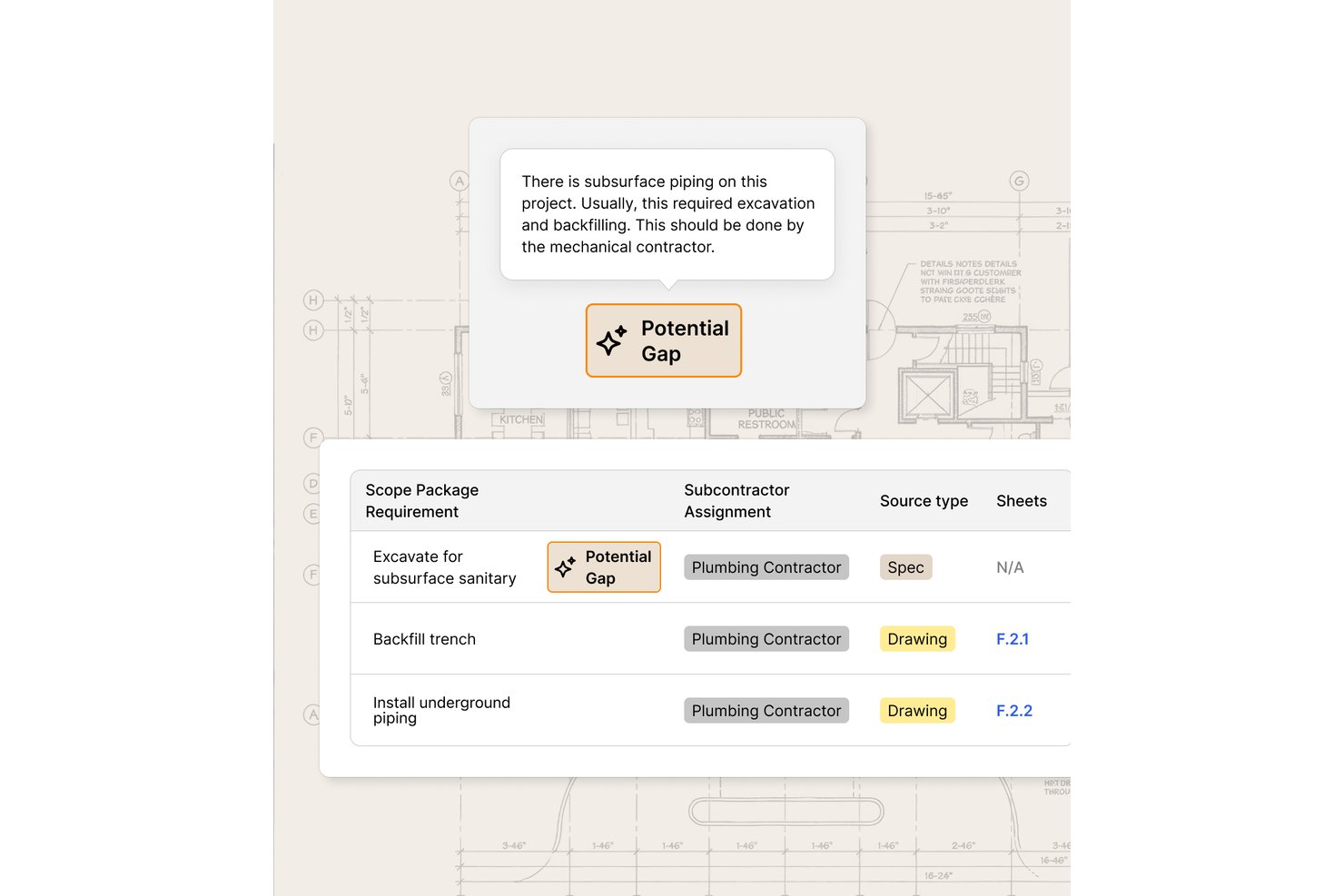
Provision is an AI-driven contract and document analysis tool designed for construction teams who need to review specifications, blueprints, and contracts for risk and scope gaps before bid submission.
Who Is Provision Best For?
Construction legal, risk, and project management teams that regularly review complex contracts and technical documents for errors or exposures.
Why I Picked Provision
I picked Provision as one of the best because I can use its AI to scan thousands of contract and spec pages for risk, flag missing or conflicting scope, and instantly benchmark risky clauses against client standards. It handles locked PDFs and multi-format contract sets for complex construction bid reviews.
Provision Key Features
- Bulk document processing: Review up to 100,000 pages of plans, specs, and contracts at once.
- Collaborative annotation tools: Tag and comment on documents with your whole project team.
- AI-powered multi-document search: Instantly find and reference key terms or clauses across massive file sets.
- Exportable risk reports: Generate detailed audits and export findings to PDF, Word, or Excel.
Provision Integrations
Native integrations are not publicly documented. An API is available for custom integrations.
Pros and Cons
Pros:
- Handles locked and complex PDF documents
- Flags missing or conflicting project scope
- Automates contract and spec risk review
Cons:
- Lacks built-in estimating cost database
- No quantity takeoff automation

Procore
Best for large construction firms

Procore is a construction management software tailored for large construction firms. The platform offers detailed project management features, like AI-driven insights that enhance efficiency and accuracy.
Why I picked Procore: The AI capabilities provide predictive insights that help large construction teams manage complex projects. Procore’s AI tools analyze project data to forecast potential risks and delays, keeping your projects on track. Automated reporting features maintain transparency across teams. In my experience, Procore’s scalability is its best feature, making it ideal for large-scale operations.
Standout Features & Integrations:
Features include document management, real-time project tracking, and mobile accessibility. This means your team can access vital project information anytime, anywhere.
Integrations include QuickBooks, Sage 300 CRE, Microsoft Project, Primavera P6, Docusign, Bluebeam, Smartsheet, Dropbox, OneDrive, and Google Drive.
Pros and Cons
Pros:
- Automated reporting improves transparency
- Scalable for large construction projects
- Predictive insights enhance project planning
Cons:
- Requires initial setup and customization
- Has a steep learning curve

Best for detailed cost analysis

Sage Estimating is a construction estimating software aimed at contractors and construction firms. It provides detailed cost analysis with AI-driven insights to enhance project accuracy and efficiency.
Why I picked Sage Estimating: AI-enhanced capabilities allow your team to perform in-depth cost analysis, making it ideal for projects requiring detailed financial oversight. Machine-learning-generated estimates and forecasts are accurate, reducing the risk of budget overruns. Additionally, you’ll find its cost database helpful for maintaining precise pricing information. In my experience, this level of granularity is ideal for accuracy-obsessed financial teams.
Standout Features & Integrations:
Features include customizable templates, advanced reporting tools, and multi-level cost breakdowns. This means you can help your team create detailed estimates and improve project planning.
Integrations include Sage 300 Construction and Real Estate, Sage 100 Contractor, Microsoft Excel, PlanSwift, eTakeoff, Autodesk Revit, Bluebeam, Procore, Trimble, and On Center Software.
Pros and Cons
Pros:
- Advanced reporting tools enhance decision-making
- Customizable templates for diverse project needs
- Detailed cost breakdowns for accurate budgeting
Cons:
- Complex interface for new users
- May require extensive implementation


Houzz is an AI construction estimating platform that reduces manual scheduling and estimate-building by using natural-language prompts and automated data mapping.
Why I picked Houzz: Houzz offers AI-driven features like AutoMate, which can generate estimates from a simple text prompt, perfect when you want to speed up preconstruction work without sacrificing accuracy. Its AI construction estimating tools also convert estimates into schedules, cutting down on manual data entry. The voice-activated command system is another standout, helping users move through complex tasks faster. In practice, this degree of automation speeds up collaboration and smoother handoffs for any estimating team, no matter the size.
Standout Features & Integrations:
Features include automated estimate generation, voice-activated scheduling, and real-time collaboration tools. All this equates to intuitive software that reduces manual error and helps your team efficiently manage projects.
Integrations include QuickBooks, Xero, Stripe, PayPal, Mailchimp, Google Calendar, Outlook, Dropbox, Slack, and Asana.
Pros and Cons
Pros:
- Real-time collaboration tools
- Voice command-enabled estimate building
- Automated estimate generation simplifies project planning
Cons:
- Limited customization for complex projects
- May require extensive implementation


Autodesk ProEst is a construction estimating software designed for contractors and construction firms. It offers advanced estimating capabilities and AI features that integrate with BIM workflows.
Why I picked Autodesk ProEst: Its integration with BIM allows your team to leverage AI for precise cost estimates directly from 3D models. Autodesk improves accuracy and reduces manual errors through AI project analyses. You’ll also find the cloud-based platform convenient for accessing estimates and project details anytime. In my experience, a built-in BIM integration is extremely handy for firms looking to modernize their estimating process.
Standout Features & Integrations:
Features include digital construction takeoff software tools, cost database management, and real-time collaboration. These features allow your team to efficiently manage project costs and improve communication.
Integrations include Revit, AutoCAD, Navisworks, PlanGrid, Procore, Bluebeam, Microsoft Excel, Smartsheet, Dropbox, and Box.
Pros and Cons
Pros:
- Detailed cost database for accurate pricing
- Cloud-based access enhances flexibility
- Integrates well with BIM for detailed estimates
Cons:
- Initial setup can be time-consuming
- Higher learning curve for new users


STACK is a cloud-based AI construction estimating software designed for contractors and construction industry professionals. It offers key functions such as automatic proposal creation, SAI-enhanced estimation for improved accuracy, and Roof AI, which produces roof takeoffs from aerial imagery.
Why I picked STACK: Its AI-assisted tools facilitate quick and accurate takeoffs, making it perfect for cloud-based operations. STACK automates estimation processes and provides real-time collaboration features that help align team members. In my experience, STACK’s biggest advantage is its ability to handle complex projects through AI-driven insights.
Standout Features & Integrations:
Features include instant plan uploads, customizable reports, and project tracking. These features enable your team to manage projects efficiently and make informed, data-driven decisions.
Integrations include Procore, Autodesk BIM 360, Bluebeam, SmartBid, Dropbox, OneDrive, Google Drive, PlanGrid, Buildertrend, and Box.
Pros and Cons
Pros:
- Real-time updates improve project management
- Quick setup with minimal technical knowledge
- Cloud-based access for remote collaboration
Cons:
- Limited offline capabilities
- Training may be needed for advanced features


Togal.AI is a construction estimating software that caters to contractors and construction firms. AI-generated estimates are highly accurate, saving time and reducing errors.
Why I picked Togal.AI: Its AI-driven plan analysis automatically identifies and measures project areas, making it ideal for rapid estimations. Togal.AI’s machine learning tools boost productivity by removing the need for manual takeoffs. You’ll also find the instant report generation feature essential for fast-paced decision-making. In my professional experience, I’ve found these automations are particularly beneficial for firms tackling multiple simultaneous projects.
Standout Features & Integrations:
Features include automatic plan detection, real-time project updates, and detailed reporting tools. These features ensure your team can efficiently manage project estimates and keep stakeholders informed.
Integrations include Procore, PlanGrid, Bluebeam, Autodesk, Oracle, Primavera, BIM 360, SmartBid, Dropbox, and Box.
Pros and Cons
Pros:
- Real-time updates improve project tracking
- Instant report generation aids decision-making
- Automated plan analysis saves time
Cons:
- Limited customization for unique project needs
- May require training for optimal use


Kreo is an AI construction estimating software designed for architects, engineers, and construction industry professionals. It leverages AI to provide design insights and optimize construction planning, making it valuable for detailed project analysis.
Why I picked Kreo: AI-generated design insights help your team make informed planning decisions. Kreo’s AI capabilities also suggest design improvements and cost efficiencies. What’s more, you’ll find the predictive modeling feature useful for forecasting project outcomes. From my perspective, Kreo’s design insights set it apart in this crowded software marketplace.
Standout Features & Integrations:
Features include predictive modeling, automated design analysis, and cost optimization tools. These features ensure your team can enhance project planning and identify potential improvements.
Integrations include Autodesk Revit, AutoCAD, Navisworks, SketchUp, Microsoft Excel, Primavera P6, Procore, Bluebeam, PlanGrid, and Dropbox.
Pros and Cons
Pros:
- Predictive modeling aids in decision-making
- Enhances project quality through analysis
- Provides AI-driven design insights
Cons:
- Limited customization for unique workflows
- May require technical expertise to use


Beam AI is an AI construction estimating software designed for contractors and project managers. It focuses on providing predictive analytics using AI to enhance decision-making and project planning.
Why I picked Beam AI: AI-driven predictive analytics help your team anticipate project challenges and opportunities. Beam AI aids in strategic planning through its use of AI to analyze historical data and forecast future trends. You’ll also find the risk assessment tools valuable for identifying potential project pitfalls. In my experience, Beam AI’s predictive capabilities are a great fit for teams requiring proactive project management.
Standout Features & Integrations:
Features include real-time data analysis, customizable dashboards, and risk assessment tools. These AI features allow your team to monitor project status and quickly make informed decisions.
Integrations include Procore, Autodesk BIM 360, Bluebeam, PlanGrid, Microsoft Project, Oracle Primavera, Smartsheet, Dropbox, Google Drive, and OneDrive.
Pros and Cons
Pros:
- Risk assessment tools improve decision-making
- Real-time data analysis reveals deep insights
- Predictive analytics enhances project planning
Cons:
- Limited offline functionality
- May require training for advanced features


CountBricks is an AI construction estimating software tailored for contractors and builders. It focuses on delivering precise quantity takeoffs using AI, enhancing the accuracy and efficiency of your project estimates.
Why I picked CountBricks: AI-driven takeoff software capabilities ensure your team achieves high accuracy in its calculations. CountBricks saves time and reduces manual errors by automating counting. Additionally, the intuitive interface helps quickly navigate and manage projects. In my experience, CountBricks is essential for accuracy-obsessed teams.
Standout Features & Integrations:
Features include automated measurement tools, detailed reporting features, and voice-to-estimate, which lets you transcribe project details directly into estimates. This feature set is especially well-suited for managing project estimates while improving productivity.
Integrations include Procore, Bluebeam, PlanGrid, Autodesk Revit, AutoCAD, Microsoft Excel, Dropbox, Google Drive, OneDrive, and Box.
Pros and Cons
Pros:
- Automated measurements save time
- Intuitive interface improves user experience
- Accurate quantity takeoffs reduce errors
Cons:
- May require training for new users
- Limited advanced customization options
Other AI Construction Estimating Software
Here are some additional AI construction estimating software options that didn’t make it onto my shortlist, but are still worth checking out:
- TakeCost
For fast proposal generation
- ConstructConnect
For market insights
- Handoff
For real-time project updates
- TaksoAi
For AI-driven cost predictions
- Attentive.ai
For automated site inspection
- Operum
For team communication


How I Evaluate AI Construction Estimating Software
Every tool on this list has to do more with AI than slap a label on it—I want to see takeoffs that actually read plans, costs that update without manual busywork, and estimates that get sharper over time. I split my evaluation into two layers: the core functionality a tool needs to qualify and the differentiating factors that separate good options from great ones.
Core Functionality (Table Stakes For This List)
When I'm selecting tools for my list, I rank each one on a scale from 0 (does not offer the functionality) to 5 (excels in this area) for each core functionality listed below. Then, I calculate the tool's total score into a percentage. Each tool needs to achieve a minimum total score of 65% to be considered for inclusion.
- AI-Driven Takeoff: I check whether the AI can detect and measure objects like doors, fixtures, and linear footages across trades from uploaded plan sets.
- Cost Database Access: The tool should connect to built-in or third-party cost libraries so estimators aren't manually pricing every line item from scratch.
- Automated Estimate Output: I look for the ability to turn takeoff quantities into structured, bid-ready estimates with markups and contingencies applied.
- Plan & Document Parsing: Good tools use AI or computer vision to read specs and drawings—pulling scope details without someone retyping each page.
- Bid Management Workflow: I evaluate whether the platform supports creating, comparing, and tracking bids, especially when juggling multiple subcontractor quotes.
- Construction Tool Integrations: Tools should sync with construction platforms so estimates flow into broader project and accounting workflows.
Once I have a list of tools that meet this criteria, I consider what sets each platform apart.
Differentiating Factors (What Sets Vendors Apart)
Here's how I compare and contrast different vendors:
Standout Features
I value tools that learn from past bids—when the AI flags that your concrete costs have consistently run over on recent projects, that insight shapes smarter future estimates. Risk and margin analytics matter too, especially for spotting scope gaps before you submit a bid that eats your profit. I also look for real-time collaboration so estimators, PMs, and subs can mark up the same takeoff without version control headaches.
Beyond Features
AI accuracy and transparency matter a lot here—I check whether the tool lets estimators see why the AI flagged a quantity or cost, so your team can trust and verify outputs instead of blindly accepting them. Implementation speed is another big one. Migrating years of cost libraries and historical bids into a new platform can stall adoption, so I look at how each vendor handles onboarding and data migration. I also evaluate whether the pricing model scales for firms bidding on dozens of projects versus a handful per quarter.
How to Choose AI Construction Estimating Software
It’s easy to get bogged down in long feature lists and complex pricing structures. To help you stay focused as you work through your unique software selection process, here’s a checklist of factors to keep in mind:
| Factor | What to Consider |
| Scalability | Can the software grow with your business? Consider the number of projects you handle now and project future growth. Ensure the tool can accommodate increased data and user demands. |
| Integrations | Does it connect with your existing tools? Look for seamless data exchange with project management, accounting, and design software to avoid manual data entry and errors. |
| Customizability | Can you tailor it to your workflows? Assess if the tool allows you to customize reports, dashboards, and templates to fit your specific project management needs. |
| Implementation and Onboarding | How long will it take to get up and running? Consider the time needed for setup, data migration, and training sessions. Look for vendors offering strong onboarding support. |
| Ease of Use | Is the interface user-friendly? Ensure your team can quickly learn and use the tool without extensive training. Test the demo to see if navigation feels intuitive. |
| Cost | Is it within your budget? Compare the pricing plans and ensure they align with your financial constraints. Consider hidden costs, such as add-ons or premium support fees. |
| Security Safeguards | Are your data protected? Check for encryption standards, access controls, and compliance with relevant data protection regulations to safeguard sensitive information. |
| Support Availability | What kind of support does the vendor offer? Ensure there's adequate support during your working hours, and assess the quality of their customer service through reviews or trials. |
What Is AI Construction Estimating Software?
AI construction estimating software is a tool that uses artificial intelligence to automate and enhance the process of calculating construction project costs. These tools are typically used by contractors, project managers, and construction professionals to improve accuracy and efficiency in their estimates.
Automated takeoffs, predictive analytics, and real-time collaboration features help reduce manual errors, forecast project outcomes, and improve team communication. Overall, such tools offer significant time savings and increased project planning precision.
Features
When choosing an AI construction estimating solution for your preconstruction workflow, look for features that genuinely support your estimating team and the way your construction business operates.
- Automated takeoffs: Use an advanced takeoff tool to measure and quantify project elements quickly, improving accuracy across your scope of work and specs.
- Predictive analytics: Tap into AI-driven cost and timeline forecasts to support stronger decision-making throughout bidding, planning, and renovation projects.
- Real-time collaboration: Keep estimators, project managers, and subcontractors aligned with instant updates and shared access to key documents.
- Cost optimization tools: Review project data to spot cost-saving opportunities without affecting project quality or profitability.
- Customizable templates: Adapt estimate templates, proposals, and markups to match your brand and project requirements.
- Risk assessment tools: Identify risks early so your team can address potential issues before construction begins.
- Integration with BIM: Connect with BIM tools for improved project visualization and more informed estimating work.
- Voice-activated commands: Speed up tasks with voice inputs, especially helpful for busy teams juggling multiple jobs.
- Detailed reporting: Generate clear reports that outline project progress, costs, and financial performance.
- AI-driven design insights: Get recommendations that help refine plans and improve overall project outcomes.
Benefits
Implementing AI construction estimating software provides several benefits for your team and your business. Here are a few you can look forward to:
- Increased accuracy: Automated takeoffs and AI-driven analytics minimize human error, leading to more precise estimates.
- Time savings: Automated processes and real-time collaboration reduce the time spent on manual calculations and project updates.
- Better decision-making: Predictive analytics provide insights into project costs and timelines, helping you make informed choices.
- Cost efficiency: Cost optimization tools identify savings opportunities without sacrificing project quality.
- Risk management: AI-driven risk assessment tools help you anticipate and mitigate potential project issues.
- Enhanced collaboration: Real-time updates and shared access keep your team aligned and informed throughout the project.
- Improved design outcomes: AI-driven design insights offer suggestions for optimizing construction plans, leading to better project results.
Costs and Pricing
Selecting AI construction estimating software requires an understanding of the various pricing models and plans available. Costs vary based on features, team size, add-ons, and more. The table below summarizes common plans, their average prices, and typical features included in AI construction estimating software solutions:
Plan Comparison Table for AI Construction Estimating Software
| Plan Type | Average Price | Common Features |
| Free Plan | $0/user/month | Limited access to basic estimating tools, community support, and limited project storage. |
| Personal Plan | $15-$30/user/month | Basic estimating features, real-time collaboration, and email support. |
| Business Plan | $50-$100/user/month | Advanced estimating tools, integration with BIM, and priority customer support. |
| Enterprise Plan | $150-$300/user/month | Customizable dashboards, predictive analytics, dedicated account management, and enhanced security. |
AI Construction Estimating Software FAQs
Here are some answers to common questions about AI construction estimating software:
Can AI construction estimating software integrate with my existing tools?
Yes, most AI construction estimating software can integrate with popular project management, accounting, and design tools. Before purchasing, check if it supports integrations with the tools you already use, like Procore, Autodesk, or QuickBooks. This ensures seamless data exchange and helps you avoid manual data entry, saving your team time and effort. Look for software with an open API for more flexibility in connecting with various systems.
How secure is AI construction estimating software?
AI construction estimating software typically includes security measures like data encryption, access controls, and compliance with data protection regulations. When evaluating options, inquire about the software’s security certifications and practices. Ensure it complies with relevant industry standards, such as GDPR or CCPA, to protect your sensitive project data. Ask for details on how the vendor handles data breaches and what backup systems are in place.
Is there a steep learning curve for new users?
The learning curve varies, but many AI construction estimating software tools offer user-friendly interfaces and training resources. Before committing, explore demo versions or free trials to gauge usability. Look for vendors offering onboarding support like tutorials, webinars, or interactive guides to ease the transition. In my experience, a straightforward interface and good training resources can make a significant difference in how quickly your team adapts to the new software.