
11 Best AI Agency Management System Reviewed in 2026

Best AI Agency Management System Shortlist
Here’s my shortlist of the best AI agency management systems:


AI agency management tools help agencies stay on top of client work, project timelines, and internal operations by automating repetitive tasks, improving visibility, and streamlining collaboration. Whether you're juggling multiple clients, shifting priorities, or managing a hybrid team, the right AI-powered platform can bring structure to the chaos.
I’ve tested and reviewed leading AI agency management software to identify tools that actually support fast-moving teams. From project tracking and resource allocation to automated reporting and client communication, each tool in this guide is designed to help agencies deliver great work—faster and with fewer headaches.
Why You Can Trust Us
Best AI Agency Management System Summary
This comparison chart summarizes pricing details for my top AI agency management system selections to help you find the best one for your budget and business needs.
| Tool | Best For | Trial Info | Price | ||
|---|---|---|---|---|---|
| 1 | Best for AI-driven decision-making | Free 14-day trial available + free demo available | From $19.90/user/month (billed annually) | Website | |
| 2 | Best for AI-powered agency management | Free demo available | Pricing upon request | Website | |
| 3 | Best for process automation | Free demo available | From $25/user/month | Website | |
| 4 | Best for agency profitability | Free demo available | From $9/user/month (billed annually) | Website | |
| 5 | Best for insurance industry | Free demo available | Pricing upon request | Website | |
| 6 | Best for all-in-one business suite | 14-day free trial + free demo available | From $19.90/user/month (billed annually) | Website | |
| 7 | Best for insurance quoting | Free trial available | Pricing upon request | Website | |
| 8 | Best for financial services | Free consultation available | From $74/month | Website | |
| 9 | Best for CRM integration | Free plan available | From $25/user/month (billed annually) | Website | |
| 10 | Best for onboarding projects | 14-day free trial + free demo available | From $19/team member/month (billed annually) | Website |


-

Insightful
Visit WebsiteThis is an aggregated rating for this tool including ratings from Crozdesk users and ratings from other sites.4.8 -
Accelo
Visit WebsiteThis is an aggregated rating for this tool including ratings from Crozdesk users and ratings from other sites.4.4 -
Forecast
Visit WebsiteThis is an aggregated rating for this tool including ratings from Crozdesk users and ratings from other sites.4.6




Best AI Agency Management System Reviews
Below are my detailed summaries of the best AI agency management system that made it onto my shortlist. My reviews offer a detailed look at the key features, pros & cons, integrations, and ideal use cases of each tool to help you find the best one for you.


Scoro is designed for teams looking to elevate their agency management with AI-driven insights and automation. It caters to businesses needing project tracking, resource allocation, and financial oversight. By addressing the complexities of AI integration, Scoro appeals to those seeking efficiency and agility in their operations.
Why I Picked Scoro
I picked Scoro for its integration of AI capabilities that enhance decision-making and operational efficiency. The AI engine, ELI, stands out by interpreting complex business data and providing actionable insights. Additionally, Scoro's advanced quoting and resource planning features support precise financial management and resource allocation.
Scoro Key Features
In addition to its AI-powered insights, I also found several features that enhance its functionality:
- Time Tracking: Allows you to monitor billable and non-billable hours, ensuring accurate billing and resource allocation.
- Reporting and Dashboards: Provides real-time visibility into project progress and financial health, aiding in informed decision-making.
- Invoicing: Automates billing processes, reducing manual entry and errors while ensuring timely payments.
- Collaboration Tools: Facilitates seamless communication within teams, keeping everyone aligned and informed.
Scoro Integrations
Integrations include Google Calendar, Microsoft Exchange, Xero, QuickBooks, Sage Intacct, Exact Online, Expensify, Stripe, HubSpot, and Jira.
Pros and Cons
Pros:
- Strong financial management tools
- Advanced resource planning capabilities
- AI powered business insights
Cons:
- Steep learning curve initially
- Higher pricing for small teams
New Product Updates from Scoro

Scoro Introduces Subtasks for More Granular Work Planning
Scoro introduces subtasks and improved price list deletion warnings, enabling teams to break down work into smaller units for detailed planning while protecting pricing data from accidental changes. For more information, visit Scoro’s official site.

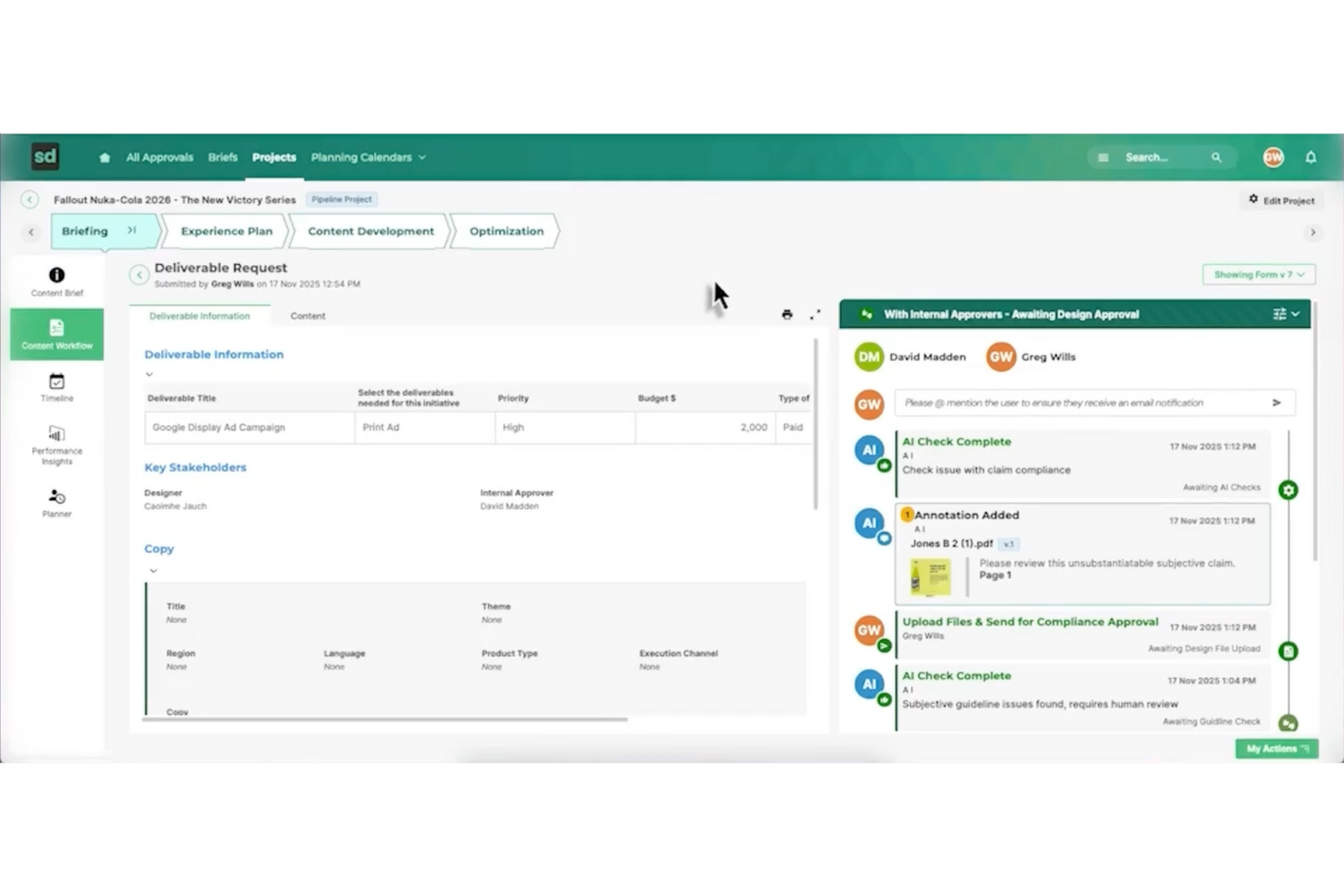
Screendragon is an AI agency management system built for marketing and creative operations that need AI-driven workflow automation. It offers a no-code platform that helps teams manage tasks, approvals, and project flows in one place. With real-time visibility into work progress, Screendragon supports better day-to-day coordination and more efficient project execution.
Why I Picked Screendragon
I picked Screendragon for its unique ability to seamlessly integrate AI-driven workflow automation with project and resource management. This system excels at automating complex workflows without programming knowledge, a significant advantage for teams aiming to improve efficiency. Additionally, its real-time insights and enterprise-grade security add functionality that directly addresses the needs of agencies managing multiple projects and teams. These features make Screendragon a compelling choice for anyone seeking a comprehensive AI agency management solution.
Screendragon Key Features
In addition to AI-driven workflow automation, Screendragon offers:
- Visual Workflow Builder: Allows you to create and customize workflows visually, simplifying the process of managing complex tasks.
- Dynamic Custom Forms: Enables your team to design forms that adapt to your specific operational needs, ensuring data collection is both relevant and efficient.
- Advanced Permission Controls: Provides robust security measures by allowing you to set detailed access permissions, safeguarding sensitive information.
- Proofing and Version Control: Facilitates creative workflows by enabling easy review and version tracking of creative content, ensuring consistency and quality.
Screendragon Integrations
Integrations include Adobe Creative Cloud, Slack, Microsoft Teams, SharePoint, Salesforce, JIRA, Workday, Oracle, SAP, and Google Workspace.
Pros and Cons
Pros:
- Project and resource management features help centralize work details
- Collaborative tools that improve team coordination and project visibility
- Flexible customization lets teams tailor workflows and project structures
Cons:
- Reporting and manual report creation can feel limited or complex
- The admin console and settings may be confusing for new users

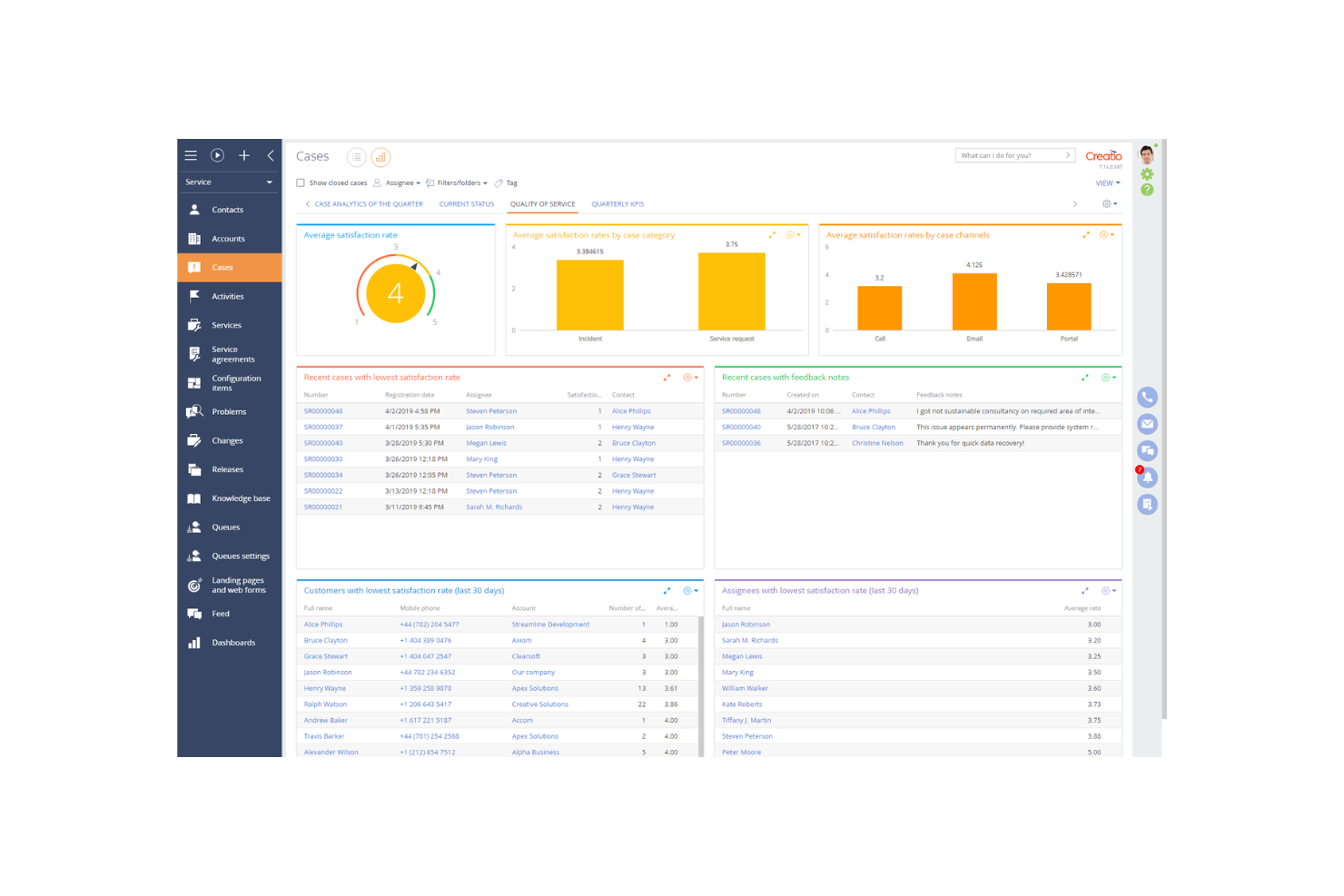
Creatio is a low-code platform designed for businesses looking to automate processes and enhance customer relationship management. It primarily serves mid-sized to large enterprises, offering tools for sales, marketing, and service automation.
Why I picked Creatio: Creatio excels in process automation, providing a platform that allows you to create workflows without extensive coding knowledge. The drag-and-drop interface simplifies the creation of custom processes. With its robust CRM capabilities, your team can manage customer interactions effectively. The platform's flexibility ensures it adapts to various business needs, making it a versatile choice for automation.
Standout Features & Integrations:
Features include the low-code process designer that simplifies workflow creation. The CRM tools offer a comprehensive view of customer interactions and data. Additionally, the marketing automation features help you manage campaigns and track results efficiently.
Integrations include Microsoft Outlook, Google Workspace, Mailchimp, Zapier, DocuSign, LinkedIn, Slack, QuickBooks, Facebook, and Twilio.
Pros and Cons
Pros:
- Flexible process automation
- Strong CRM capabilities
- Low-code platform for easy customization
Cons:
- Requires training for full utilization
- Complexity in initial setup

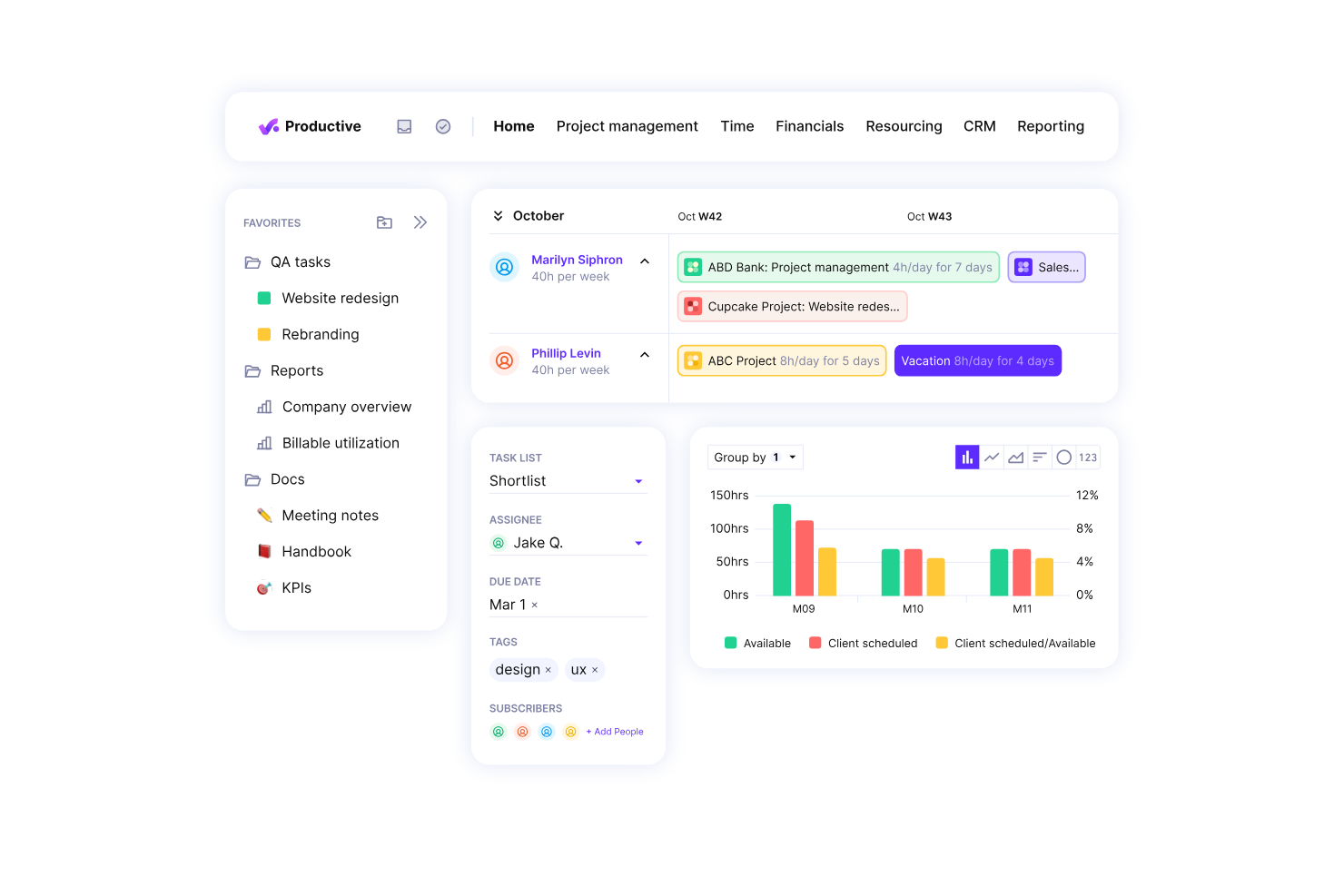
Productive.io is a professional services automation software designed for agencies and service businesses. It excels in resource planning, project management, and financial management, making it ideal for those focused on improving profitability.
Why I picked Productive.io: Productive.io is tailored for agencies aiming to boost profitability. It offers real-time profitability tracking, which helps your team make informed decisions quickly. Features like budgeting and invoicing are integrated, allowing you to handle financial aspects efficiently. The platform's growth forecasting tools ensure you can plan for future success without missing a beat.
Standout Features & Integrations:
Features include detailed project tracking that helps you monitor progress at every stage. The budgeting tools allow for precise financial planning, ensuring that your projects remain profitable. Additionally, the time tracking feature integrates seamlessly with your workflow to provide accurate billing.
Integrations include Xero, Slack, QuickBooks, Jira, Trello, Google Workspace, Microsoft Teams, Asana, HubSpot, and Zoom.
Pros and Cons
Pros:
- Effective resource planning
- Real-time profitability tracking
- Detailed financial insights
Cons:
- Complex setup for large teams
- May require training for new users


Applied Systems provides software solutions specifically designed for the insurance industry, offering tools for agency management, policy administration, and customer engagement. It serves insurance agencies and brokers by streamlining their operations and improving client interactions.
Why I picked Applied Systems: Applied Systems is tailored for the insurance industry with its comprehensive agency management capabilities. It offers policy management features that help your team handle client policies efficiently. The customer engagement tools ensure you maintain strong relationships with your clients. Its emphasis on industry-specific needs makes it a reliable choice for insurance professionals.
Standout Features & Integrations:
Features include automated policy management that simplifies handling client policies. The client communication tools enhance engagement by offering multiple channels for interaction. Additionally, the reporting feature provides insights into agency performance, helping you make informed decisions.
Integrations include Microsoft 365, Salesforce, DocuSign, QuickBooks, Vertafore, IBM, Oracle, Adobe Sign, Google Workspace, and Slack.
Pros and Cons
Pros:
- Strong client communication tools
- Efficient policy management
- Tailored for insurance agencies
Cons:
- Complex for new users
- Pricing details not transparent

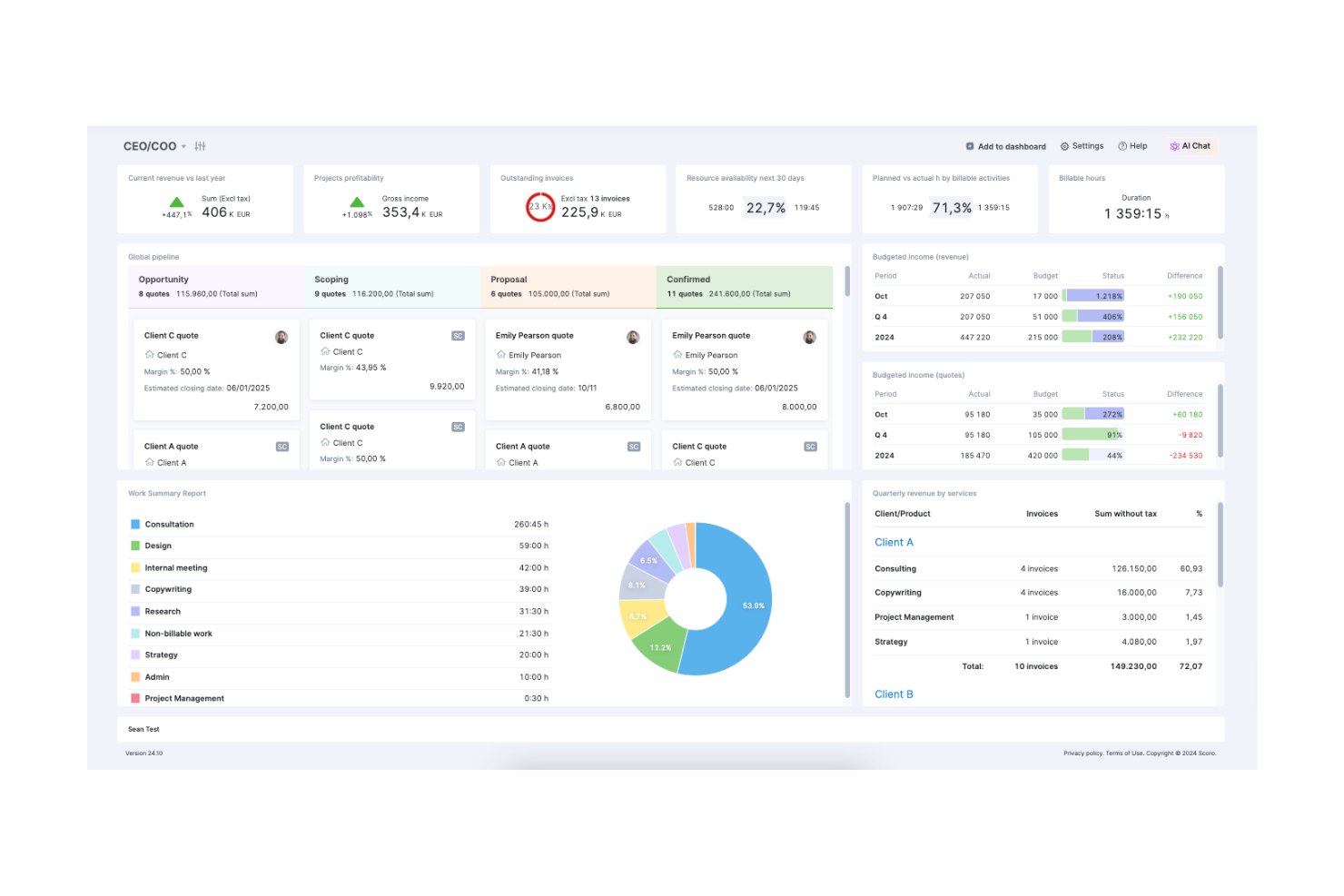
Scoro is an all-in-one business management software designed for small to medium-sized businesses. It handles project management, billing, and reporting, offering a comprehensive suite of tools to keep your operations running smoothly.
Why I picked Scoro: Scoro is ideal for businesses looking to have everything in one place. It combines project management with billing and CRM, ensuring you don't have to switch between multiple tools. The platform's dashboard provides an overview of your business, helping you track KPIs and financial metrics. With Scoro, your team can manage projects, finances, and customer relations seamlessly.
Standout Features & Integrations:
Features include a customizable dashboard that lets you track your key metrics at a glance. The time management tools help you allocate resources efficiently across projects. Additionally, Scoro offers financial management features that integrate with your project data for accurate billing.
Integrations include Xero, Slack, QuickBooks, Asana, Dropbox, Google Calendar, Mailchimp, HubSpot, Zapier, and Outlook.
Pros and Cons
Pros:
- Fast customer support response
- Customizable dashboard options
- Comprehensive project overview
Cons:
- Limited mobile app functionality
- Steep learning curve for new users
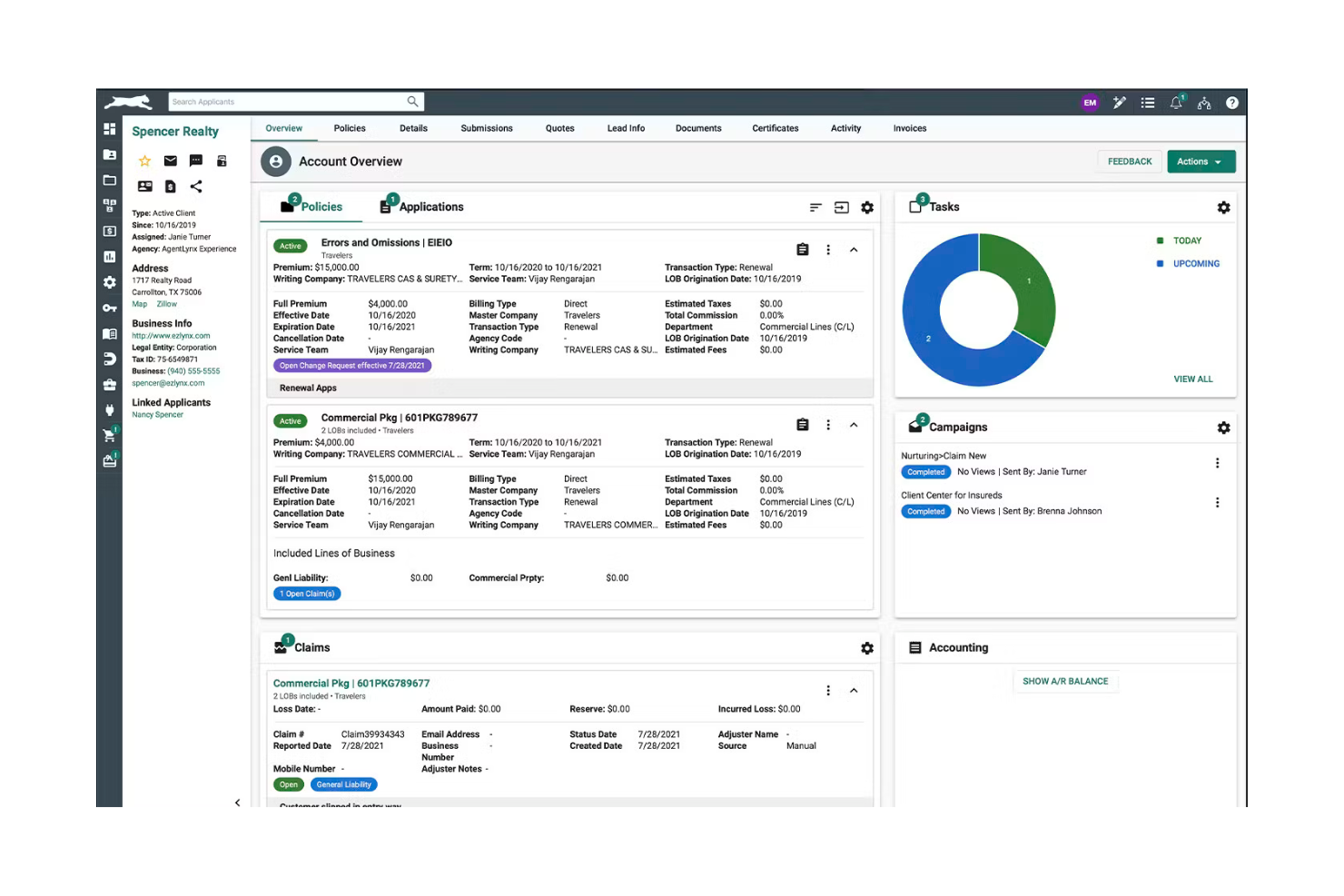
EZLynx is a software solution designed specifically for insurance agencies, focusing on streamlining the quoting process and client management. It helps agencies manage customer relationships, automate quoting, and handle policy administration efficiently.
Why I picked EZLynx: EZLynx is ideal for insurance agencies looking to optimize their quoting processes. It offers real-time quoting features that ensure your team can provide clients with accurate information quickly. The client management tools help you maintain strong relationships and improve customer satisfaction. With its focus on the insurance industry, EZLynx provides specialized tools that cater to your unique needs.
Standout Features & Integrations:
Features include a client portal that enhances customer interaction by allowing clients to access their information anytime. The policy management tools offer a streamlined approach to handle renewals and changes. Additionally, the reporting features provide insights into agency performance, helping you make data-driven decisions.
Integrations include QuickBooks, Microsoft Outlook, Salesforce, Google Calendar, Dropbox, Twilio, RingCentral, DocuSign, Adobe Sign, and Zapier
Pros and Cons
Pros:
- Strong client management tools
- Specialized for insurance agencies
- Real-time quoting capabilities
Cons:
- May require training for new users
- Pricing details not transparent


Equisoft offers software solutions tailored for the insurance and investment sectors, primarily serving insurance companies and financial advisors. It focuses on policy management, client relationship management, and investment tracking to provide comprehensive support for financial services.
Why I picked Equisoft: Equisoft excels in addressing the needs of financial services with its specialized software. Advanced analytics provide deep insights into your data, while customizable dashboards offer flexibility in how information is displayed. The user-friendly interface ensures your team can navigate the platform with ease. Its emphasis on enhancing customer experience aligns with the needs of financial service providers.
Standout Features & Integrations:
Features include advanced analytics that help you gain insights into your operations. Customizable dashboards let you tailor how information is displayed to suit your team's needs. The user-friendly interface ensures that your team can navigate the platform with ease.
Integrations include Oracle Insurance Policy Administration, Salesforce, Microsoft Dynamics, SAP, Guidewire, Duck Creek Technologies, IBM, Accenture, Cognizant, and Capgemini.
Pros and Cons
Pros:
- Customizable dashboards
- Advanced analytics capabilities
- Specialized financial services solutions
Cons:
- Limited to specific industry sectors
- Pricing details not transparent

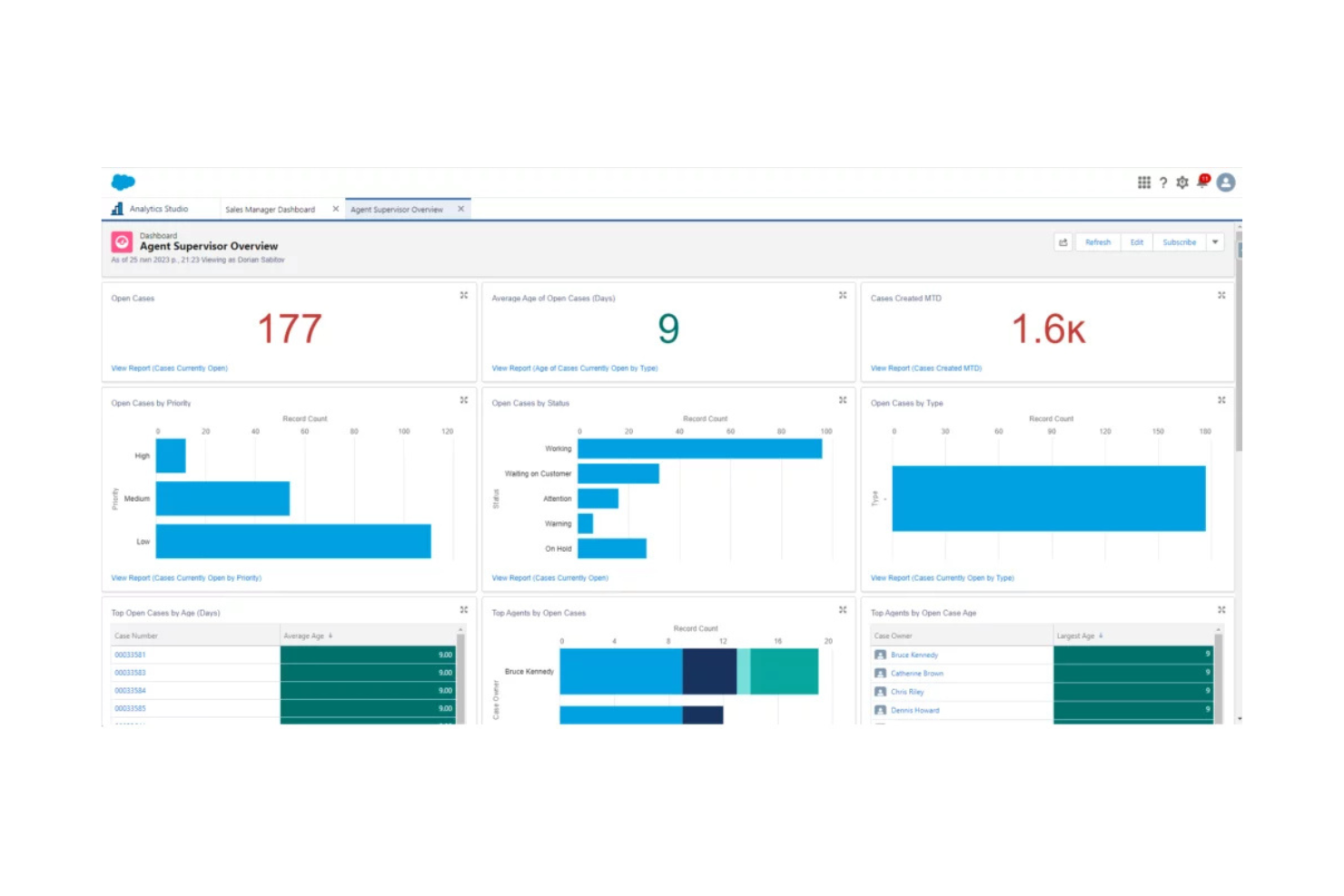
Salesforce is a cloud-based customer relationship management (CRM) platform used by businesses across various industries to manage customer interactions, sales, and data analytics. It helps companies improve customer service, automate sales processes, and enhance team collaboration.
Why I picked Salesforce: Salesforce excels in CRM integration, offering a platform that connects with numerous business tools to streamline your operations. The customizable dashboards give you insights into customer data and sales performance. With its automation capabilities, your team can handle repetitive tasks efficiently. The platform's scalability ensures it grows with your business, adapting to changing needs.
Standout Features & Integrations:
Features include customizable dashboards that let you track key metrics and performance indicators. The automation tools help manage repetitive tasks, freeing up your team for more strategic work. Additionally, the platform's scalability ensures it can grow with your business, adapting to your evolving needs.
Integrations include Mailchimp, QuickBooks, Slack, Dropbox, Google Workspace, Microsoft Outlook, LinkedIn Sales Navigator, DocuSign, Zoom, and HubSpot.
Pros and Cons
Pros:
- Extensive customization options
- Strong data analytics capabilities
- Highly scalable for growing businesses
Cons:
- Requires training for new users
- Can be complex to set up

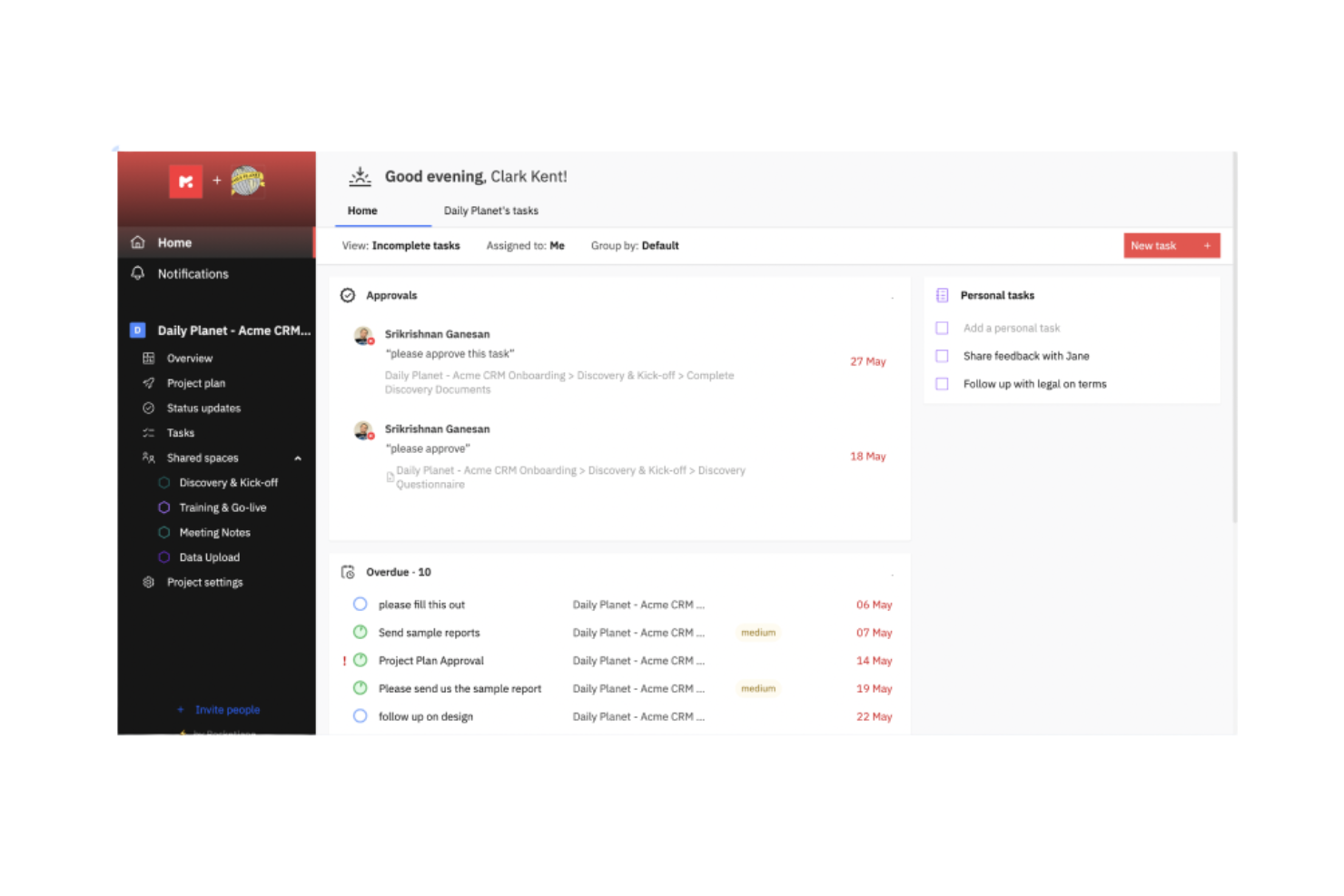
Rocketlane is a project management and customer onboarding software designed for businesses that want to enhance their project delivery and client interactions. It serves professional services teams by providing tools for efficient project tracking and customer collaboration.
Why I picked Rocketlane: Rocketlane specializes in onboarding projects, offering features like collaborative project planning and customer-facing dashboards. Its standout function is the AI-driven client updates, which keep your clients informed without manual effort. The platform also provides real-time financial insights to help your team manage resources effectively. The ability to automate time logging and integrate project data ensures that your onboarding processes are both efficient and transparent.
Standout Features & Integrations:
Features include AI-driven automations that simplify task allocation and resource planning. Time tracking is integrated to provide real-time insights into project profitability. Additionally, the tool offers collaborative workspaces that enhance communication between your team and clients.
Integrations include Salesforce, HubSpot, Slack, Microsoft Teams, Google Workspace, Trello, Asana, QuickBooks, Jira, and Zoom.
Pros and Cons
Pros:
- Detailed reporting tools
- Efficient onboarding support
- Easy to navigate interface
Cons:
- Limited day view on the schedule
- Occasional lag with large data
Other AI Agency Management Systems
Here are some additional AI agency management system options that didn’t make it onto my shortlist, but are still worth checking out:
- monday.com
For team collaboration
- Attio
For contact management


AI Agency Management System Selection Criteria
When selecting the best AI agency management system to include in this list, I considered common buyer needs and pain points like integration capabilities and project tracking efficiency. I also used the following framework to keep my evaluation structured and fair:
Core Functionality (25% of total score)
To be considered for inclusion in this list, each solution had to fulfill these common use cases:
- Project management
- Task assignment
- Time tracking
- Client communication
- Reporting and analytics
Additional Standout Features (25% of total score)
To help further narrow down the competition, I also looked for unique features, such as:
- AI-driven insights
- Customizable dashboards
- Automated billing
- Multi-language support
- Mobile app functionality
Usability (10% of total score)
To get a sense of the usability of each system, I considered the following:
- Intuitive interface
- Easy navigation
- Minimal learning curve
- Aesthetic design
- Responsive performance
Onboarding (10% of total score)
To evaluate the onboarding experience for each platform, I considered the following:
- Availability of training videos
- Interactive product tours
- Access to templates
- Chatbot assistance
- Webinars and live demos
Customer Support (10% of total score)
To assess each software provider’s customer support services, I considered the following:
- 24/7 support availability
- Multi-channel support options
- Response time efficiency
- Access to a knowledge base
- Availability of dedicated account managers
Value For Money (10% of total score)
To evaluate the value for money of each platform, I considered the following:
- Competitive pricing
- Feature set vs. cost
- Transparency in pricing
- Discounts for annual payments
- Free trial availability
Customer Reviews (10% of total score)
To get a sense of overall customer satisfaction, I considered the following when reading customer reviews:
- Overall satisfaction rating
- Commonly cited strengths
- Commonly cited weaknesses
- Frequency of updates
- Feedback on customer service
How to Choose AI Agency Management System
It’s easy to get bogged down in long feature lists and complex pricing structures. To help you stay focused as you work through your unique software selection process, here’s a checklist of factors to keep in mind:
| Factor | What to Consider |
|---|---|
| Scalability | Can the tool grow with your agency? Consider if it can handle increased workloads and users without sacrificing performance. Look for options that offer scalable pricing plans. |
| Integrations | Does it integrate with the tools you already use? Evaluate the ease of connecting with existing platforms like CRMs, email, and project management tools. |
| Customizability | Can you tailor the software to fit your workflows? Check if it allows modifications to dashboards, reports, and processes to suit your agency’s needs. |
| Ease of Use | Is the interface intuitive for your team? A steep learning curve can slow down adoption. Test the software to ensure it’s user-friendly for all team members. |
| Implementation and Onboarding | How quickly can you get started? Consider the resources required for setup and training. Look for software with a straightforward onboarding process and available support. |
| Cost | Does it fit your budget? Compare the cost of ownership, including subscription fees, setup charges, and any hidden costs. Look for value rather than just low prices. |
| Security Safeguards | Does it protect your data? Evaluate the security measures in place, such as encryption and access controls, to ensure client and agency information stays safe. |
| Support Availability | Is help easily accessible? Check if the vendor offers 24/7 support, live chat, or dedicated account managers to assist when issues arise. |
What Is AI Agency Management System?
AI agency management system is a software solution designed to help agencies manage their projects, resources, and client interactions efficiently. These tools are generally used by project managers, team leaders, and agency executives to enhance productivity and collaboration.
Time tracking, task assignment, and client communication features help with managing workloads, meeting deadlines, and maintaining client satisfaction. Overall, these tools provide agencies with the ability to operate more effectively and deliver better results to their clients.
Features of AI Agency Management System
When selecting an AI agency management system, keep an eye out for the following key features:
- Project management: Helps organize and oversee projects from start to finish, ensuring tasks are completed on time.
- Time tracking: Monitors how time is spent on tasks, providing insights into productivity and helping with accurate billing.
- Task assignment: Allows for clear delegation of responsibilities, ensuring team members know what they need to do.
- Client communication: Facilitates interactions with clients, keeping them informed and engaged throughout the project lifecycle.
- Reporting and analytics: Offers insights into project performance and agency operations, aiding in data-driven decision-making.
- Customizability: Lets you tailor the software to fit your agency’s specific workflows and needs, enhancing usability.
- Integrations: Connects with other tools your agency uses, streamlining operations and centralizing data.
- Security safeguards: Protect sensitive information with encryption and access controls, ensuring data privacy.
- Automation: Reduces manual tasks by automating repetitive processes, freeing up time for strategic work.
Benefits of AI Agency Management System
Implementing an AI agency management system provides several benefits for your team and your business. Here are a few you can look forward to:
- Improved efficiency: Automation features reduce manual tasks, allowing your team to focus on strategic work.
- Better collaboration: Task assignment and client communication tools help your team work together and keep clients in the loop.
- Enhanced decision-making: Reporting and analytics provide insights into performance, helping you make informed choices.
- Increased productivity: Time tracking helps identify bottlenecks, ensuring resources are used effectively.
- Custom fit: Customizability allows you to tailor the system to your agency’s needs, making it easier to use.
- Centralized operations: Integrations connect your existing tools, streamlining processes and keeping data in one place.
Costs and Pricing of AI Agency Management System
Selecting an AI agency management system requires an understanding of the various pricing models and plans available. Costs vary based on features, team size, add-ons, and more. The table below summarizes common plans, their average prices, and typical features included in AI agency management system solutions:
Plan Comparison Table for AI Agency Management System
| Plan Type | Average Price | Common Features |
|---|---|---|
| Free Plan | $0 | Basic project management, task assignment, and limited integrations. |
| Personal Plan | $5-$25/user/month | Project management, time tracking, task assignment, and basic reporting. |
| Business Plan | $30-$60/user/month | Advanced reporting, client communication, integrations, and customization options. |
| Enterprise Plan | $75-$150/user/month | Full customization, premium support, advanced security features, and comprehensive analytics. |
AI Agency Management System FAQs
Here are some answers to common questions about AI agency management system:
How do I integrate an AI agency management system with existing tools?
Integrating an AI agency management system with your current tools involves checking compatibility with your software ecosystem. Most systems offer APIs or built-in integrations with popular tools like CRMs, email platforms, and project management software. Ensure to evaluate the ease of integration and any technical support provided by the vendor.
What should I consider regarding data security?
Data security is crucial when choosing an AI agency management system. Look for systems with robust encryption, access controls, and compliance with data protection regulations like GDPR. Ask about the vendor’s security protocols and how they handle data breaches to ensure your client information remains safe.
Can AI agency management systems handle remote teams?
Yes, many AI agency management systems support remote work by offering cloud-based access, mobile apps, and collaboration features. These tools help keep your team connected, allowing them to manage projects, communicate, and access data from anywhere. Check for features that enhance remote collaboration and connectivity.
How do AI agency management systems improve client communication?
These systems enhance client communication by centralizing contact information, tracking interactions, and offering communication tools like email templates and chat. This helps your team maintain consistent contact with clients, ensuring timely updates and responses, which improves client satisfaction and retention.
What level of customization is possible?
The level of customization varies between systems, but most offer options for tailoring dashboards, workflows, and reports. Assess how easy it is to customize the system to fit your agency’s specific needs. Some systems may require technical assistance for more advanced customizations, so consider your team’s capabilities.
What are the common challenges during implementation?
Common challenges include data migration, user training, and adapting workflows to the new system. To mitigate these, ensure your vendor provides comprehensive onboarding resources like tutorials, webinars, and support. Plan for a transition period where your team can acclimate to the new system without pressure.