

Os 10 Melhores Softwares Gratuitos de Gestão de Tarefas em 2026

10 Seleção do Melhor Software Gratuito de Gestão de Tarefas


O melhor software gratuito de gestão de tarefas mantém as tarefas, os prazos e as atribuições num só lugar, para que nada seja esquecido. Sem ele, gerir tarefas através de e-mails dispersos, folhas de cálculo desconectadas e conversas de chat provoca entregas falhadas, prioridades pouco claras e trabalho duplicado. Estas ferramentas centralizam o acompanhamento de tarefas, simplificam a colaboração e dão a todos visibilidade sobre o progresso, ajudando as equipas a manterem-se focadas e responsáveis.
Enquanto gestor de projetos com mais de 10 anos de experiência a testar e comparar ferramentas de gestão de tarefas, analisei dezenas de plataformas para identificar as soluções gratuitas mais eficazes, que eliminam a confusão e mantêm as equipas alinhadas.
Why Trust Our Software Recommendations
Our team has been testing and reviewing software since 2012. As project managers ourselves, we know how difficult—and important—it is to choose the right software.
For this guide, we evaluated tools using hands-on testing and independent research, scoring tools using our selection criteria. We also draw on insights from industry thought leaders and practicing project management experts.
Our reviews reflect our human editorial judgment, not a sales pitch.
Expert reviewers:
Tabela Comparativa de Avaliações de Software Gratuito de Gestão de Tarefas
| Tool | Best For | Trial Info | Price | ||
|---|---|---|---|---|---|
| 1 | Best with built-in AI-powered project insights | Free plan + 14-day free trial + free demo available | From $9/user/month (billed annually) | Website | |
| 2 | Best for custom task views | Free plan + demo available | From $7/user/month (billed annually) | Website | |
| 3 | Best for scalable project planning | Free plan + 14-day trial + demo available | From $10/user/month (billed annually) | Website | |
| 4 | Best for customizable project management | Free plan + 15-day trial + demo available | From $4/user/month (billed annually) | Website | |
| 5 | Best for task tracking with built-in time logs | Free plan available; 30-day free trial; Free demo available | From $9/user/month | Website | |
| 6 | Best for real-time task notifications | Free plan available | From $29/month (billed annually) | Website | |
| 7 | Best for unlimited tasks and team members | Free plan + 14-day free trial available | From €17.50/user/month | Website | |
| 8 | Best for team performance tracking | 14-day free trial + free plan | Pricing upon request | Website | |
| 9 | Best for unlimited users/projects | Free plan + 14-day trial available | From $2.49/user/month | Website | |
| 10 | Best for agile project management | 30-day free trial and free plan available | From $35/month | Website |


Análise das 10 Melhores Avaliações de Software Gratuito de Gestão de Tarefas
Eis as minhas opiniões detalhadas sobre cada software desta lista, incluindo aquilo que fazem melhor e as áreas em que apresentam dificuldades.

Best with built-in AI-powered project insights
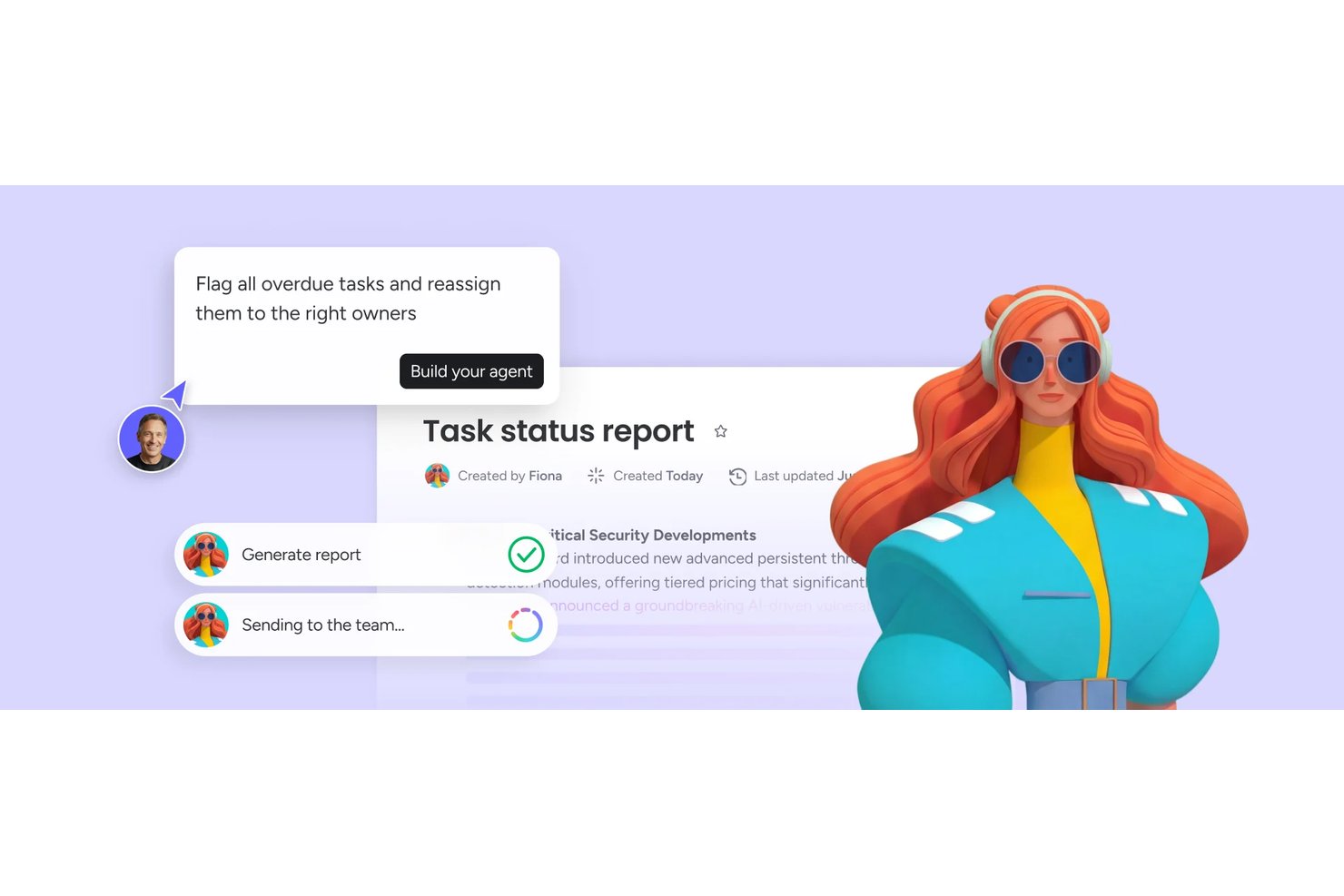
monday AI Workspace is a work management platform that combines customizable task boards, multiple project views, automations, and built-in AI tools to help teams plan, track, and coordinate work across projects.
Who Is monday AI Workspace Best For?
It's a strong fit for small to mid-sized teams that want AI assistance built directly into their project workflows without needing separate tools.
Why I Picked monday AI Workspace
I've included monday AI Workspace in my top picks because its AI project insights go further than surface-level summaries. monday sidekick reads live board data to flag at-risk tasks and overdue dependencies before they derail a sprint, which I find genuinely useful when managing parallel workstreams. The AI workflow builder generates full automations from a plain-language prompt, so my team spends less time configuring boards and more time delivering actual work.
monday AI Workspace Key Features
- Customizable board views: Set up Kanban boards or simple lists to manage tasks the way your team works best.
- Task grouping and subtasks: Organize tasks into sections, split large items into subtasks, and manage project hierarchy.
- File attachments: Attach documents, images, and files directly to tasks for easy access and reference.
- Mobile app support: Use dedicated iOS and Android apps for on-the-go project and task management.
monday AI Workspace Integrations
monday AI Workspace offers hundreds of native integrations through its built-in integrations and marketplace, including Slack, Google Workspace, Microsoft Teams, Salesforce, HubSpot, Dropbox, Zoom, Outlook, Jira, GitHub, and Zapier. An API is available for custom integrations.
What's Free?
monday AI Workspace offers a free-forever plan for up to 2 seats, which includes unlimited boards, docs, and over 200 templates. Automations, integrations, and advanced views like timeline and Gantt are locked behind paid tiers.
Pros and Cons
Pros:
- Multiple project views available on free tier
- Free plan includes unlimited boards and docs
- AI sidekick flags at-risk tasks automatically
Cons:
- Automations unavailable on the free plan
- Free plan capped at only two seats
New Product Updates from monday AI Workspace
monday AI Workspace Adds Human Approval Routing
monday AI Workspace adds a human-in-the-loop approval block to AI Workflows, sending approval requests and routing workflow paths based on responses. For more information, visit monday AI Workspace's official site.
ClickUp
Best for custom task views

ClickUp gives teams, freelancers, and small businesses a flexible workspace to organize tasks, manage projects, and collaborate—all without paying for a plan.
Who Is ClickUp Best For?
ClickUp is a great fit for cross-functional teams that need a single workspace to manage tasks across product, engineering, and design.
Why I Picked ClickUp
ClickUp earns its spot on my shortlist because of how much control it gives you over the way tasks are displayed and organized. I love that you can switch between 15+ views—including List, Board, Gantt, Calendar, and Table—without changing your underlying data. My team uses the Table view to track task fields side by side, and the Gantt view to map dependencies across sprints. The free plan includes access to multiple views, which is rare and genuinely useful for teams that work across different workflows.
ClickUp Key Features
- Custom task statuses: Define your own workflow stages beyond the default to-do, in progress, and done labels.
- Task dependencies: Link tasks so your team knows what's blocked and what's ready to move forward.
- Docs: Create and attach rich-text documents directly to tasks to keep context and work in one place.
- Time tracking: Log time spent on individual tasks natively, without needing a third-party timer tool.
ClickUp Integrations
Integrations include Slack, GitHub, HubSpot, Google Drive, OneDrive, Dropbox, Outlook, Google Calendar, Figma, and Zoom.
What's Free?
ClickUp offers a free-forever plan with unlimited tasks and unlimited free plan members. The free plan includes 60MB storage and access to core features like Kanban boards, calendar view, and collaborative docs.
Pros and Cons
Pros:
- Unlimited task-creation and member-access limits
- Integration with over 1,000 other tools
- Customizable task views for different work preferences
Cons:
- Limited storage capacity on free plan
- Occasional performance-lag on large projects
New Product Updates from ClickUp
ClickUp Adds Meetings Hub, Super Agent Templates, and ZoomInfo Integration
ClickUp adds a searchable Meetings Hub, new ways to clone and template Super Agents, and a ZoomInfo integration through the App Center. These updates improve meeting retrieval, agent reuse, and access to sales intelligence. For more information, visit ClickUp’s official site.

Wrike
Best for scalable project planning

Wrike gives teams in tech, marketing, and professional services a flexible workspace to organize tasks, manage projects, and collaborate in real time—all with a free plan that supports unlimited users and core task management features.
Who Is Wrike Best For?
Wrike is a strong fit for growing teams and mid-size organizations that need a task management tool that can scale alongside their projects and headcount.
Why I Picked Wrike
Wrike earns its spot on my shortlist because it's one of the few free task management tools that's built to grow with your team. Project templates and blueprints let you replicate proven workflows across new projects, so you don't have to rebuild processes when workload increases. Wrike's Gantt chart view also lets you map out task dependencies and timelines as project complexity increases. The effort management feature, which lets you estimate task effort at creation, helps forecast delivery dates before a project kicks off.
Wrike Key Features
- Custom workflows: Build and modify task statuses to match how your team actually moves work through a pipeline.
- Real-time activity stream: See a live feed of task updates, comments, and changes across all projects in one place.
- Cross-tagging: Add tasks to multiple project folders simultaneously so work stays visible across different team views.
- Request forms: Create intake forms that automatically generate and assign tasks when submitted, reducing manual setup.
Wrike Integrations
Integrations include Microsoft Teams, Salesforce, Google Drive, Microsoft SharePoint, Zoom, Adobe Creative Cloud, QuickBooks, Power BI, Tableau, and Miro.
What's Free?
Wrike offers a free-forever plan with essential task management features and no credit card required. The free plan supports unlimited users but has limited integrations and advanced features compared to paid plans.
Pros and Cons
Pros:
- Real-time activity stream
- Task dependencies can be set up
- Custom workflows without a paid upgrade
Cons:
- Higher starting price point
- Limited features on paid plan
New Product Updates from Wrike
Wrike Expands Gantt Planning, Approvals, and AI Work Intake
Wrike adds cross-project Gantt dependencies, flexible approval routing, and AI work intake through Wrike MCP. These updates give teams more control over planning, decision-making, and incoming work. For more information, visit Wrike’s official site.

Best for customizable project management

Zoho Projects gives small businesses and project teams a flexible way to organize tasks, track progress, and collaborate—all without paying for a subscription.
Who Is Zoho Projects Best For?
Zoho Projects is a great fit for small to mid-sized teams that need structured project tracking without outgrowing a free plan too quickly.
Why I Picked Zoho Projects
Zoho Projects earns its spot on my shortlist because of how far its customization goes compared to most free task management tools. I particularly like the custom statuses feature—my team can define exactly what "in review" or "blocked" means for our specific workflow, rather than working around a fixed set of labels. Custom layouts let you build task and issue forms that capture the fields your team needs, such as a priority tier, a client name, or a URL. I also use Blueprint to map out task workflows visually, so the right person is notified when a status changes.
Zoho Projects Key Features
- Task dependencies: Link tasks so that work can't begin until its predecessor is marked complete, keeping sequenced work on track.
- Kanban board view: Visualize tasks as cards across columns to manage work-in-progress and spot bottlenecks at a glance.
- Time tracking: Log hours directly against tasks to monitor effort and keep project timelines accurate.
- Document management: Attach and store files directly within tasks so your team's reference materials stay tied to the relevant work.
Zoho Projects Integrations
Integrations include Zoho CRM, Zoho Desk, Zoho Analytics, Zoho People, Google Calendar, Microsoft Teams, Slack, Dropbox, GitHub, and Jira.
What's Free?
Zoho Projects offers a free-forever plan for up to 3 users and 2 projects. The free plan has limited storage and does not include features like task dependencies or advanced integrations.
Pros and Cons
Pros:
- Interactive read-only Gantt charts
- Extensive customization options
- In-app time tracking features
Cons:
- No subtask-creation support
- Limited mobile app features
New Product Updates from Zoho Projects
Zoho Projects Adds CodeX Scripts for Custom Modules
Zoho Projects now supports CodeX Scripts for custom modules, enabling conditional logic and rules for creating, updating, and deleting records. For more information, visit Zoho Projects' official site.
 .
Toggl
Best for task tracking with built-in time logs
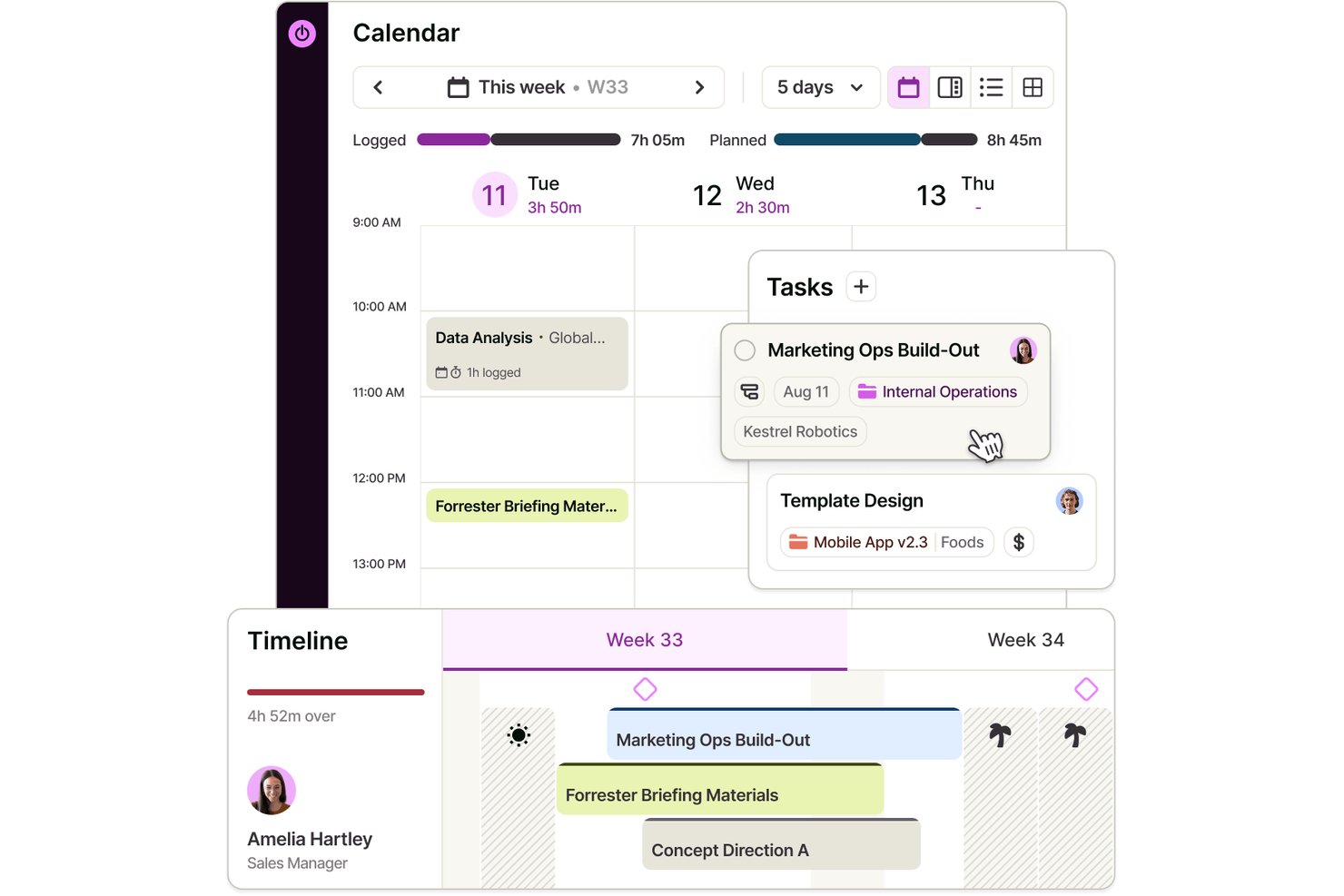
Toggl is a task management platform with a free plan for up to three users, offering task lists and boards, assignments, estimates, subtasks, calendar integrations, and built-in time tracking.
Who Is Toggl Best For?
Independent consultants and small project leads who want to compare task estimates with logged hours will find Toggl a practical fit.
Why I Picked Toggl
I picked Toggl for “Best for task tracking with built-in time logs” because I can compare task estimates with hours logged as work progresses. I use assignments and subtasks to break a small project into owned work, then track time against each task. The Free plan supports up to three users and includes task lists and boards.
Toggl Key Features
- Task priorities : Set a priority for each task.
- Task dates : Add start and end dates to tasks.
- Task filters : Search, filter, group, and sort tasks by fields such as status, priority, and date.
- Private tasks : Mark tasks as private or shared and add attachments.
Toggl Integrations
Toggl has native Google Calendar and Outlook Calendar integrations; Free supports one Google Calendar account. Native Asana and Jira integrations are available on Premium, and a public API supports custom integrations.
What’s Free?
Toggl offers a free-forever plan for up to three users, with task lists, boards, and built-in time tracking. The Free plan supports one Google Calendar account; native Asana and Jira integrations require Premium.
Pros and Cons
Pros:
- Reviewers praise quick timers and project reports
- Organize subtasks by assignee and priority
- Compare task estimates with logged hours
Cons:
- Task deadlines lack dedicated reminder controls
- Free collaboration stops at three users
Best for real-time task notifications

Connecteam is a mobile-first task management platform built for deskless teams in industries like retail, hospitality, and field services who need to assign, track, and communicate about tasks in real time.
Who Is Connecteam Best For?
Connecteam is a strong fit for small to mid-sized businesses managing hourly or shift-based workers across multiple locations.
Why I Picked Connecteam
I picked Connecteam as one of the best because of how well its notification system keeps managers and workers in sync without any manual follow-up. When a task is assigned, the employee gets an instant push notification on their phone. Then, as a manager, I get notified when they've viewed it and again when it's marked complete—so I always know where things stand without having to chase anyone down. I also like the subtask notifications, which let me track progress at each step of a multi-part task, not just at the finish line.
Connecteam Key Features
- Recurring task scheduling: Set tasks to repeat daily, weekly, or monthly so routine assignments are automatically created without manual re-entry each cycle.
- Task-level in-app chat: Ask questions and share updates directly within a task, keeping all relevant communication attached to the work itself.
- Forms and checklists attachment: Attach digital forms, checklists, images, and files directly to a task so workers have everything they need to complete it in one place.
- Mobile task management: Create, assign, and manage tasks from a mobile device, giving managers full control without needing to be at a desktop.
Connecteam Integrations
Integrations include QuickBooks, Gusto, Xero, ADP, Wix, Lightspeed, PrismHR, Square, BambooHR, and Accu-Time Systems.
What's Free?
Connecteam offers a free-forever plan for up to 10 users. Some advanced features and integrations are only available on paid plans.
Pros and Cons
Pros:
- Real-time task completion tracking
- Integrated team communication hub
- Mobile-first task assignment notifications
Cons:
- Potential problems with SMS delivery
- Basic free-version reporting
New Product Updates from Connecteam

Connecteam Adds Automatic Paid Break Actions and Manual Break Windows
Connecteam adds automatic paid break actions and configurable start windows for manual breaks. These updates help teams manage break schedules and maintain accurate timesheets. For more information, visit Connecteam’s official site.
 .
Best for unlimited tasks and team members

MeisterTask gives teams in tech, creative, and business environments a flexible way to organize, assign, and track tasks visually, making it easy to manage projects and collaborate without limits on users or tasks.
Who Is MeisterTask Best For?
MeisterTask is a strong fit for small to mid-sized teams that need a visual, Kanban-style task management tool without restrictions on how many people can collaborate.
Why I Picked MeisterTask
MeisterTask earns its spot as one of the best on my shortlist because its free plan puts no cap on tasks or team members—something most free tools won't give you. I like that you can run a full Kanban board with task owners, due dates, and color-coded tags without hitting an artificial ceiling on how many people can join. My team can add a new developer, designer, or stakeholder to a project without triggering a paywall. The built-in task commenting also keeps discussions tied directly to the work, so nothing gets buried in a separate thread.
MeisterTask Key Features
- Timeline view: Map tasks to calendar dates to identify priorities and manage deadlines across a project.
- Workflow automations: Automatically trigger actions—like assigning a task owner—when a task moves to a specific board section.
- Roles and permissions: Assign access levels to team members and control what external collaborators can see or edit.
- Reporting: Track project performance data filtered by task owner, status, or due date to monitor progress.
MeisterTask Integrations
Integrations include Slack, Microsoft Teams, GitHub, Zendesk, Google Calendar, Gmail, Outlook, Confluence, JIRA, and Pabbly.
What's Free?
MeisterTask offers a free-forever plan with unlimited tasks and unlimited team members, but limits you to 3 projects and 5 notes per team. Integrations and advanced features require a paid plan.
Pros and Cons
Pros:
- Strong for small to medium teams looking for simplicity
- Built-in automations and time tracking features
- Intuitive, visually appealing Kanban-based interface
Cons:
- Limited views, customizations and integrations
- Mixed feedback on customer support and pricing transparency
Best for team performance tracking

Runrun.it is a task management platform designed for teams and businesses that want to organize projects, track progress, and manage workloads while gaining visibility into how work gets done.
Who Is Runrun.it Best For?
Runrun.it is a good fit for mid-sized teams and growing businesses that need structured task management with clear visibility into individual and team workloads.
Why I Picked Runrun.it
Runrun.it earns its spot as one of the best on my shortlist because of how well it surfaces team performance data alongside task management. I particularly like the Smart Time Tracking feature, which automatically logs how long tasks spend in each stage of your workflow—so instead of guessing where work is getting stuck, you can see it clearly. The burnup chart gives my team a predictive view of project progress, which is genuinely useful when you need to flag delivery risks before they become problems. The activity dashboard and customizable reports also let me slice performance data by user, task type, project, or client, making it easy to have grounded conversations about workload and output.
Runrun.it Key Features
- Gantt chart: Visualize tasks on a timeline, filtered by assigned team member, client, or project, to track progress and deadlines.
- Intake forms: Build custom request forms to collect structured information from internal teams or external stakeholders before work begins.
- Capacity management: Monitor available hours per team member to anticipate bottlenecks and redistribute workloads before they pile up.
- Process automation: Set up automated rules to assign tasks, create deadlines, and trigger approval requests based on your defined workflow.
Runrun.it Integrations
Integrations include Salesforce, HubSpot, Jira Software, Trello, Slack, Microsoft Teams, Google Calendar, Google Drive, Microsoft OneDrive, and Zapier.
What's Free?
Runrun.it offers a free-forever plan for up to 5 users. This plan includes basic task management features but does not provide access to advanced reports or automation.
Pros and Cons
Pros:
- Real-time predictive-delivery timestamps
- Automated labor-cost mapping
- Built-in client-request ticketing queues
Cons:
- Slow-performing mobile application
- Limited subtask-depth levels

Best for unlimited users/projects

Freedcamp is a task management platform designed for teams and organizations that need flexible project tracking, collaboration, and planning tools without user or project limits.
Who Is Freedcamp Best For?
Freedcamp is a great fit for small to mid-sized teams that need to manage multiple projects across a growing number of collaborators without hitting paywalls.
Why I Picked Freedcamp
Freedcamp earns its spot on my shortlist because it's one of the few free task management tools that genuinely doesn't cap your team size or project count. I like that you can run unlimited projects simultaneously—each with its own task lists, milestones, and discussions—without ever hitting a tier wall. My team is able to use the Kanban board view to track work across multiple active projects at once, which is something a lot of free plans quietly restrict. That kind of flexibility is rare at the free tier.
Freedcamp Key Features
- Time tracking: Log time directly against tasks to monitor how long work takes across projects.
- Password manager: Store and share login credentials securely within your workspace.
- File storage: Attach and organize files at the task or project level for easy team access.
- Subtasks: Break tasks into smaller, actionable steps and assign them to individual team members.
Freedcamp Integrations
Integrations include Google Calendar, Google Drive, and Dropbox.
What's Free?
Freedcamp offers a free-forever plan with unlimited users and unlimited projects. Some advanced features and integrations are only available on paid plans.
Pros and Cons
Pros:
- Flexible integrations with other tools
- Comprehensive set of project management features
- No limits on users or projects
Cons:
- Interface may have a learning curve for new users
- Monthly billing option is more expensive
Backlog
Best for agile project management

Backlog gives tech teams and small businesses a way to organize tasks, track progress, and collaborate on projects with built-in issue tracking and visual project boards.
Who Is Backlog Best For?
Backlog is a good fit for small to mid-sized development teams that need task tracking and project management in a single tool.
Why I Picked Backlog
Backlog earns its spot on my shortlist because it brings agile project management tools into a free plan without stripping out the features that actually matter. I like that it includes burndown charts and sprint management natively, so my team can run proper agile cycles without needing a separate tool. The built-in issue tracker lets us log bugs, assign them, and link them directly to tasks, which keeps development work and project tracking in the same place. Milestone tracking rounds this out by giving the team a clear view of where each sprint lands against broader delivery goals.
Backlog Key Features
- Kanban boards: Visualize task status and move work through custom workflow stages using drag-and-drop cards.
- Gantt charts: Map task dependencies and project timelines in a visual chart that updates as work progresses.
- Subtasks and checklists: Break tasks into smaller steps and track completion at a granular level within each issue.
- Wiki: Create and store project documentation, meeting notes, and team knowledge directly inside Backlog.
Backlog Integrations
Integrations include Cacoo, Slack, Redmine Importer, and Jira Importer. An open API is also available for custom integrations.
What's Free?
Backlog offers a free-forever plan for up to 10 users, limited to 1 project and 100 MB of storage. Some features like Gantt charts, burndown charts, and subtasks are only available on paid plans.
Pros and Cons
Pros:
- Built-in Git and SVN repositories
- Simplified bug-and-issue tracking tools
- Fast onboarding and easy-to-use interface
Cons:
- Performance and speed issues reported
- No subtasking support in free plan
Outro Software Gratuito de Gestão de Tarefas a Considerar
Segue-se uma lista de software gratuito adicional de gestão de tarefas que selecionei, mas que não chegou à lista principal. Vale definitivamente a pena conhecê-lo.
- Asana
For project boards and task lists
- TickTick
For personal task tracking
- Taskworld
For visual task boards
- WorkFlowy
For outline-based planning
- nTask
For visual project timelines
- Trello
For visual project tracking
- Notion
For integrated notes & tasks
- Quire
For organizing complex projects
- Teamhood
For agile project management
- GoodDay
For supporting Agile workflows
- PathPro
For converting feature requests into tasks
- Teamwork.com
Good for streamlining project workflows
- Hitask
For team collaboration
- Drag
For shared inbox collaboration
- Amazing Marvin
Good for customizable task planning


How I Evaluate Free Task Management Software
I split my evaluation into baseline criteria—the must-haves like task assignment and a genuine free plan—and differentiators like automation and integrations that set top tools apart.
Core Functionality (Table Stakes For This List)
When I'm selecting tools for my list, I rank each one on a scale from 0 (does not offer the functionality) to 5 (excels in this area) for each core functionality listed below. Then, I calculate the tool's total score into a percentage. Each tool needs to achieve a minimum total score of 65% to be considered for inclusion.
- Task Creation & Assignment: I look at how each tool handles assigning tasks with due dates, priorities, and statuses—like a sprint lead distributing backlog items across developers before a release.
- Multiple Task Views: Different workflows call for different views. I check whether each tool offers Kanban boards, lists, calendars, or timelines so teams can pick the format that fits how they work.
- Free Plan Availability: I evaluate whether the free tier genuinely supports day-to-day task management for a small team, not just a time-limited trial or a plan so restricted it's unusable.
- Collaboration Features: Real teamwork means more than just seeing each other's tasks. I look for commenting, @mentions, file attachments, and shared workspaces that keep conversations in context.
- Deadlines & Reminders: Missed deadlines derail projects fast. I check for due date tracking, in-app notifications, and reminder options that keep team members accountable without constant manual follow-up.
- Subtasks & Task Organization: Breaking work into smaller pieces matters—especially for multi-step deliverables. I evaluate how each tool handles subtasks, checklists, and project-level grouping to support structured planning.
Once I have a list of tools that meet this criteria, I consider what sets each platform apart.
Differentiating Factors (What Sets Vendors Apart)
Here's how I compare and contrast different vendors:
Standout Features
Automation is a big one—I look at whether a free plan lets you set rules like auto-assigning tasks when a status changes or generating recurring sprint items. That kind of hands-off upkeep saves hours each week. Built-in time tracking also matters, especially for freelancers logging billable work against specific tasks. And a solid templates library can make or break onboarding speed for small teams spinning up new projects without the budget for custom setup.
Beyond Features
I pay close attention to how transparent each vendor is about their free plan limits—some bury user caps or storage restrictions deep in their pricing pages. Integrations matter just as much. A tool that connects to Slack, Google Drive, or your calendar keeps task updates visible where your team already works. I also evaluate the upgrade path, because a freelancer who outgrows the free tier shouldn't have to migrate everything to a new platform just to add a few paid features.
Como escolher software gratuito de gestão de tarefas
É fácil ficar sobrecarregado com listas extensas de funcionalidades e estruturas de preços complexas. Para o ajudar a manter o foco durante o processo de seleção do software, eis uma lista de verificação dos principais fatores a ter em conta:
| Fator | O que considerar |
| Escalabilidade | A ferramenta continuará a ser adequada se a sua equipa crescer? Procure opções que permitam adicionar utilizadores ou atualizar os planos sem mudar de plataforma. |
| Integrações | O software liga-se facilmente às ferramentas que já utiliza, como o Slack ou o Google Workspace? Evite ferramentas que exijam soluções alternativas ou atualizações manuais para se manterem sincronizadas. |
| Personalização | Pode ajustar as vistas de tarefas, as etiquetas ou os fluxos de trabalho para corresponderem à forma como a sua equipa trabalha? Uma configuração rígida pode atrasar o trabalho se os seus processos mudarem. |
| Facilidade de utilização | A sua equipa consegue começar a utilizar a ferramenta sem formação? Interfaces pouco intuitivas ou demasiados cliques para ações simples podem conduzir a uma baixa adoção. |
| Implementação e integração inicial | Quanto tempo será necessário para configurar as tarefas e os utilizadores? Procure modelos, ferramentas de importação e guias que o ajudem a começar a trabalhar rapidamente. |
| Custo | O plano gratuito é suficiente para o tamanho e as necessidades da sua equipa? Verifique os limites de utilizadores, tarefas ou armazenamento para não ser obrigado a atualizar demasiado cedo. |
| Medidas de segurança | O software oferece elementos básicos, como encriptação e inícios de sessão seguros? Certifique-se de que não irá expor dados sensíveis dos projetos, mesmo sendo uma ferramenta gratuita. |
| Disponibilidade do suporte | Se ficar bloqueado, é fácil obter ajuda? Verifique se oferecem chat em direto ou e-mail aos utilizadores gratuitos. |
Tendências do software gratuito de gestão de tarefas
O panorama do software gratuito de gestão de tarefas está a evoluir rapidamente. Eis as principais tendências que estão a moldar o seu futuro.
- Integração com IA e aprendizagem automática: A IA e a aprendizagem automática estão a impulsionar a análise preditiva e a automatização de tarefas. As ferramentas conseguem agora melhorar a eficiência ao aprenderem o comportamento dos utilizadores e anteciparem estrangulamentos.
- Acessibilidade multiplataforma: O software sincroniza agora as tarefas sem problemas entre dispositivos e plataformas, tornando a gestão de projetos mais flexível e acessível.
- Funcionalidades de segurança reforçadas: Com o aumento das ciberameaças, a encriptação de ponta a ponta e a autenticação de dois fatores estão a tornar-se funcionalidades padrão para proteger dados sensíveis dos projetos.
- Ferramentas de colaboração em tempo real: A edição em direto, o chat e as notificações instantâneas permitem um trabalho de equipa mais rápido e dinâmico entre diferentes localizações.
- Personalização e adaptação: Os utilizadores podem agora ajustar detalhadamente as interfaces, os fluxos de trabalho e as notificações, alinhando o software com os seus estilos de trabalho para aumentar a produtividade.
O que é um software gratuito de gestão de tarefas?
Um software gratuito de gestão de tarefas é uma ferramenta que ajuda indivíduos e equipas a organizar, atribuir, acompanhar e concluir tarefas sem custos.
Centraliza listas de tarefas, datas-limite e o acompanhamento do progresso numa única plataforma. Os gestores de projetos, as equipas e os trabalhadores independentes utilizam normalmente software gratuito de gestão de tarefas para simplificar os fluxos de trabalho, melhorar a responsabilização e manter os projetos dentro do prazo.
Funcionalidades do software gratuito de gestão de tarefas
Ao selecionar um software gratuito de gestão de tarefas, procure as seguintes funcionalidades essenciais:
- Criação e organização de tarefas: Adicione, edite e organize tarefas facilmente para manter as suas prioridades sob controlo e nunca perder de vista o que tem de fazer a seguir.
- Datas-limite e lembretes: Defina prazos e receba lembretes atempados, ajudando-o a manter-se a par das tarefas importantes — sem mais correrias de última hora.
- Ferramentas de colaboração: Convide colegas de equipa, atribua tarefas e comente diretamente nas tarefas, tornando simples trabalhar em conjunto e partilhar atualizações sem intermináveis cadeias de e-mails.
- Quadros de projeto básicos: Utilize ferramentas visuais, como quadros kanban ou listas, para delinear os fluxos de trabalho e obter uma visão clara do seu progresso — perfeito se for uma pessoa com pensamento visual.
- Notificações: Receba atualizações em tempo real quando ocorrerem alterações nas tarefas ou nos projetos, tornando a comunicação com a sua equipa mais fluida e minimizando a confusão.
- Acesso através de dispositivos móveis: Aceda à sua lista de tarefas a partir de qualquer dispositivo, quer esteja à sua secretária ou em movimento, para estar sempre a par de tudo.
Funcionalidades de IA comuns no software gratuito de gestão de tarefas
Para além das funcionalidades padrão do software gratuito de gestão de tarefas apresentadas acima, muitas destas soluções estão a integrar IA com funcionalidades como:
- Priorização inteligente de tarefas: A IA analisa a sua carga de trabalho e os prazos para sugerir automaticamente quais as tarefas que deve realizar primeiro, ajudando-o a maximizar a produtividade sem pensar demasiado no assunto.
- Ajustes automatizados dos prazos: A IA pode monitorizar o progresso e a disponibilidade da equipa e, em seguida, propor prazos mais adequados ou redistribuir tarefas para manter os projetos a avançar sem problemas.
- Lembretes baseados em IA: Os lembretes inteligentes ajustam o momento e o contexto com base nos seus hábitos, para que receba um aviso precisamente quando precisa dele (e não quando já está ocupado a fazer outra coisa).
- Introdução de tarefas em linguagem natural: Adicione tarefas descrevendo simplesmente o que precisa de fazer em linguagem corrente — a IA compreende e organiza os detalhes por si, tornando mais fácil (e um pouco mais divertido) manter-se organizado.
Benefícios do software gratuito de gestão de tarefas
A implementação de um software gratuito de gestão de tarefas pode proporcionar vários benefícios à sua equipa e à sua empresa. Eis algumas das principais vantagens:
- Integração fácil: Muitos planos gratuitos ligam-se a calendários ou e-mails, permitindo-lhe manter as tarefas alinhadas com as ferramentas que já utiliza.
- Custos mais baixos: Pode organizar tarefas e colaborar sem pagar por uma ferramenta, o que é ideal para equipas pequenas ou orçamentos limitados.
- Maior visibilidade das tarefas: Os planos gratuitos permitem acompanhar atribuições e prazos num único local, para que nada passe despercebido.
- Configuração mais rápida: A maioria das ferramentas gratuitas permite criar uma conta e começar a utilizá-la imediatamente, sem um longo processo de integração.
- Melhor comunicação da equipa: Os comentários e as notificações integrados ajudam todos a manter-se atualizados sobre o progresso e as alterações.
- Acesso a partir de qualquer lugar: As aplicações móveis e o acesso através da Internet permitem gerir tarefas em qualquer lugar, sem custos adicionais.
- Fluxos de trabalho mais simples: As listas de tarefas básicas e a organização de projetos facilitam a estruturação do trabalho sem acrescentar complexidade.
Perguntas frequentes sobre software gratuito de gestão de tarefas
Eis algumas perguntas frequentes sobre software gratuito de gestão de tarefas.
Existem limitações à utilização de software gratuito de gestão de tarefas?
Sim, as versões gratuitas restringem frequentemente o número de utilizadores, o espaço de armazenamento, as vistas avançadas e as integrações. Os gestores de projeto podem encontrar limitações nos modelos de projeto, nas automatizações, no tempo de resposta do suporte ou nos controlos de segurança. Verifique estes fatores ao comparar plataformas para a sua equipa.
Quão seguro é o software gratuito de gestão de tarefas?
Os padrões de segurança variam entre as ferramentas, mas muitas plataformas gratuitas conceituadas utilizam encriptação e permissões básicas. Os gestores de projeto devem consultar a política de privacidade de dados de cada ferramenta e considerar a autenticação de dois fatores caso sejam armazenadas informações sensíveis. Os planos pagos oferecem, por vezes, funcionalidades de segurança mais granulares.
O software gratuito de gestão de tarefas é adequado para equipas grandes ou projetos complexos?
As ferramentas gratuitas podem funcionar para equipas pequenas ou projetos menos complexos. No caso de equipas grandes ou projetos multifuncionais, poderá notar limitações no número de utilizadores, nas funcionalidades de acompanhamento de projetos ou nas integrações. Se o seu fluxo de trabalho crescer, considere uma atualização paga para obter mais flexibilidade e capacidade.
Que integrações são normalmente suportadas pelas ferramentas gratuitas de gestão de tarefas?
A maioria das ferramentas gratuitas oferece algumas integrações básicas, como a ligação ao Google Calendar, ao Slack ou ao e-mail. As integrações avançadas, como controladores de tempo, CRM ou ferramentas de automatização, requerem frequentemente um plano pago. Consulte o diretório de integrações da ferramenta antes de se comprometer.
Posso gerir vários projetos num software gratuito de gestão de tarefas?
Muitas plataformas gratuitas de gestão de tarefas permitem gerir vários projetos em simultâneo, mas podem limitar o número total de projetos ou quadros. Deve verificar estas restrições e considerar quantos projetos a sua equipa terá de executar em paralelo.
As ferramentas gratuitas de gestão de tarefas têm funcionalidades de colaboração?
Sim, a maioria das plataformas gratuitas de gestão de tarefas permite que a sua equipa colabore através da atribuição de tarefas, da publicação de comentários e da partilha de ficheiros. No entanto, os planos gratuitos podem impor limites ao número de utilizadores, às integrações ou aos projetos partilhados. Consulte a lista de funcionalidades específica da plataforma para garantir que esta satisfaz as necessidades da sua equipa.