

Os 10 melhores softwares de gestão de tarefas de projetos analisados para 2026

10 Lista dos melhores softwares de gestão de tarefas de projetos


Quer organizar, estabelecer prioridades e acompanhar as tarefas dos seus projetos de forma mais eficaz, mas precisa de perceber qual será a melhor ferramenta para si. Afinal, com tantas soluções diferentes de gestão de tarefas de projetos disponíveis, pode ser difícil perceber qual é a mais adequada para si. Eu ajudo!
Nesta publicação, vou ajudá-lo a tornar a sua escolha mais fácil, partilhando as minhas experiências pessoais com dezenas de ferramentas diferentes de gestão de tarefas e uma variedade de projetos, incluindo as minhas escolhas para o melhor software de gestão de tarefas de projetos disponível no mercado.
Why Trust Our Software Recommendations
Our team has been testing and reviewing software since 2012. As project managers ourselves, we know how difficult—and important—it is to choose the right software.
For this guide, we evaluated tools using hands-on testing and independent research, scoring tools using our selection criteria. We also draw on insights from industry thought leaders and practicing project management experts.
Our reviews reflect our human editorial judgment, not a sales pitch.
Expert reviewers:
Tabela de comparação de softwares de gestão de tarefas de projetos
Eis uma tabela que pode utilizar para comparar as ferramentas que acabámos de abordar nas análises gerais:
| Tool | Best For | Trial Info | Price | ||
|---|---|---|---|---|---|
| 1 | Best all-in-one work management solution for agencies | 14-day free trial | From $10/user/month (billed annually) | Website | |
| 2 | Project task management software with built-in project management templates | Free plan + 14-day trial + demo available | From $10/user/month (billed annually) | Website | |
| 3 | Best for visual tracking with Kanban and Gantt | Free plan + 14-day free trial + free demo available | From $9/user/month (billed annually) | Website | |
| 4 | Best with deep Google Workspace integration | 14-day free trial | From $3/user/month (billed annually) | Website | |
| 5 | Best for no-code workflows at enterprise scale | Free demo available | Pricing upon request | Website | |
| 6 | Best for breaking down complex tasks | Free plan + 30-day free trial available | From $7.65/user/month (billed annually) | Website | |
| 7 | Best for managing connected projects within a portfolio | 14-day free trial | From $10/user/month (billed annually) | Website | |
| 8 | Best for seamless collaboration and visualization for effective project management | Free plan + 14-day free trial + free demo available | From $8/user/month (billed annually) | Website | |
| 9 | Project task management software for prioritizing tasks | Free demo available | Pricing upon request | Website | |
| 10 | Best for brainstorming, ideation, and task management in one | Free plan + 14-day free trial available | From €17.50/user/month | Website |


Avaliações dos melhores softwares de gestão de tarefas de projetos
Eis todos os pormenores sobre cada ferramenta e aquilo que oferece.

Best all-in-one work management solution for agencies

Productive is an all-in-one work management tool that caters to the needs of agencies. It provides tools to plan and manage projects, break down and assign tasks, track employee time, manage invoicing and billing, and more. When you plan your team's projects, you can assign tasks to specific team members, set deadlines, and then track the task's progress as your team moves forward.
Because it has built-in resource management, you can also assign tasks based on employee capacity and skills. Team members track their time right in the system, giving you clear gauges of how long certain tasks take, thereby assigning work more effectively. The time tracking tool also connects with the billing capabilities, and lets employees track both their billable and non-billable working hours.
This software integrates with several other popular work tools, including Dropbox, Exact, Jira, Outlook, Microsoft Calendar, Slack, QuickBooks, and Xero. A Zapier integration is also available, which can unlock more integrations with a paid account.
New Product Updates from Productive
Productive Adds Voice Dictation, Slack Connector, Proposals, and Overtime
Productive adds voice dictation, a Slack Connector, proposal controls, and overtime tracking. These updates support faster AI interactions, client proposals, and time management. For more information, visit Productive’s official site.

Wrike
Project task management software with built-in project management templates

Wrike is a work management platform with dashboards, workflows, and request forms you can use to complete tasks and projects. It has Gantt charts and Kanban boards you can use to visually assess your team’s progress and help you determine if you can meet a deadline or if you need more time from your client. Wrike has a file-sharing functionality that allows project members to collaborate to beat project due dates.
Large projects take time, and they are easier to manage if you break them down into phases. If you need project task management software with built-in and customizable templates, then Wrike should be on top of your list. Wrike lets you create multiple phases for a project and further break down phases into tasks to make them easier to complete. You can also assign milestones or due dates for each phase, so assignees know exactly how much time they have to complete a task.
Wrike integrates with other time management and work management tools like Microsoft OneDrive, MS Excel, MS Project, Microsoft Office 365, Dropbox, etc.
Wrike has a free version and a free trial for paid plans.
New Product Updates from Wrike
Wrike Expands Gantt Planning, Approvals, and AI Work Intake
Wrike adds cross-project Gantt dependencies, flexible approval routing, and AI work intake through Wrike MCP. These updates give teams more control over planning, decision-making, and incoming work. For more information, visit Wrike’s official site.

Best for visual tracking with Kanban and Gantt
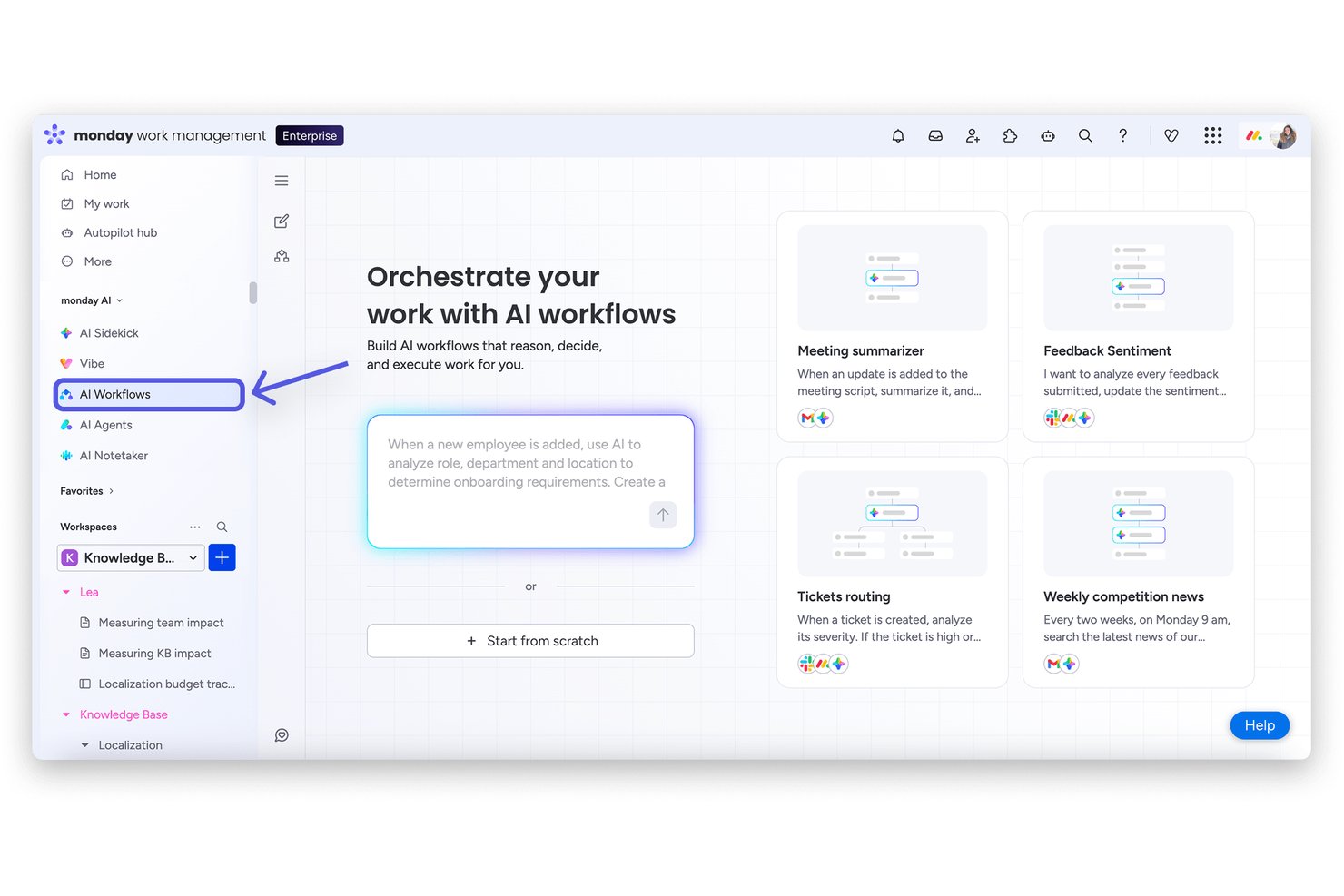
monday AI Workspace is a work management platform that combines AI-powered task tracking, multiple project views, workflow automation, and cross-team collaboration tools in a single configurable workspace.
Who Is monday AI Workspace Best For?
It's a strong fit for mid-sized to enterprise teams that manage multiple concurrent projects across departments and need one shared workspace to keep everyone aligned.
Why I Picked monday AI Workspace
monday AI Workspace earns its spot as one of the best on my shortlist because of how its visual project tracking actually works in practice. I can switch a board from Kanban to Gantt view in seconds, which means my team can shift between sprint-style task flow and timeline planning without rebuilding anything. The dependency tracking in Gantt view also flags scheduling conflicts before they become a problem, which I find valuable when managing overlapping workstreams.
monday AI Workspace Key Features
- AI-powered dashboards: Users can build and customize real-time dashboards that pull data from any board for detailed project tracking.
- Automated workflow builder: Teams can create rule-based automations to reduce manual updates and repetitive admin work across projects.
- Portfolio management: Roll up multiple projects into portfolios with cross-project reporting and strategic goal tracking for leadership.
- Native time tracking: Log hours directly on tasks, track billable and non-billable work, and generate detailed timesheet reports.
monday AI Workspace Integrations
monday AI Workspace offers hundreds of native integrations through its built-in integrations and marketplace, including Slack, Google Workspace, Microsoft 365, Jira, Dropbox, Zoom, HubSpot, Salesforce, GitHub, and Outlook. It also supports Zapier and provides an API for custom integrations.
Pros and Cons
Pros:
- Portfolio-level dashboards across multiple projects
- AI-generated task summaries and status updates
- Switchable Kanban and Gantt project views
Cons:
- Reporting depth requires higher-tier subscriptions
- Automations are capped on lower-tier plans
New Product Updates from monday AI Workspace
monday AI Workspace Adds Human Approval Routing
monday AI Workspace adds a human-in-the-loop approval block to AI Workflows, sending approval requests and routing workflow paths based on responses. For more information, visit monday AI Workspace's official site.

GQueues
Best with deep Google Workspace integration
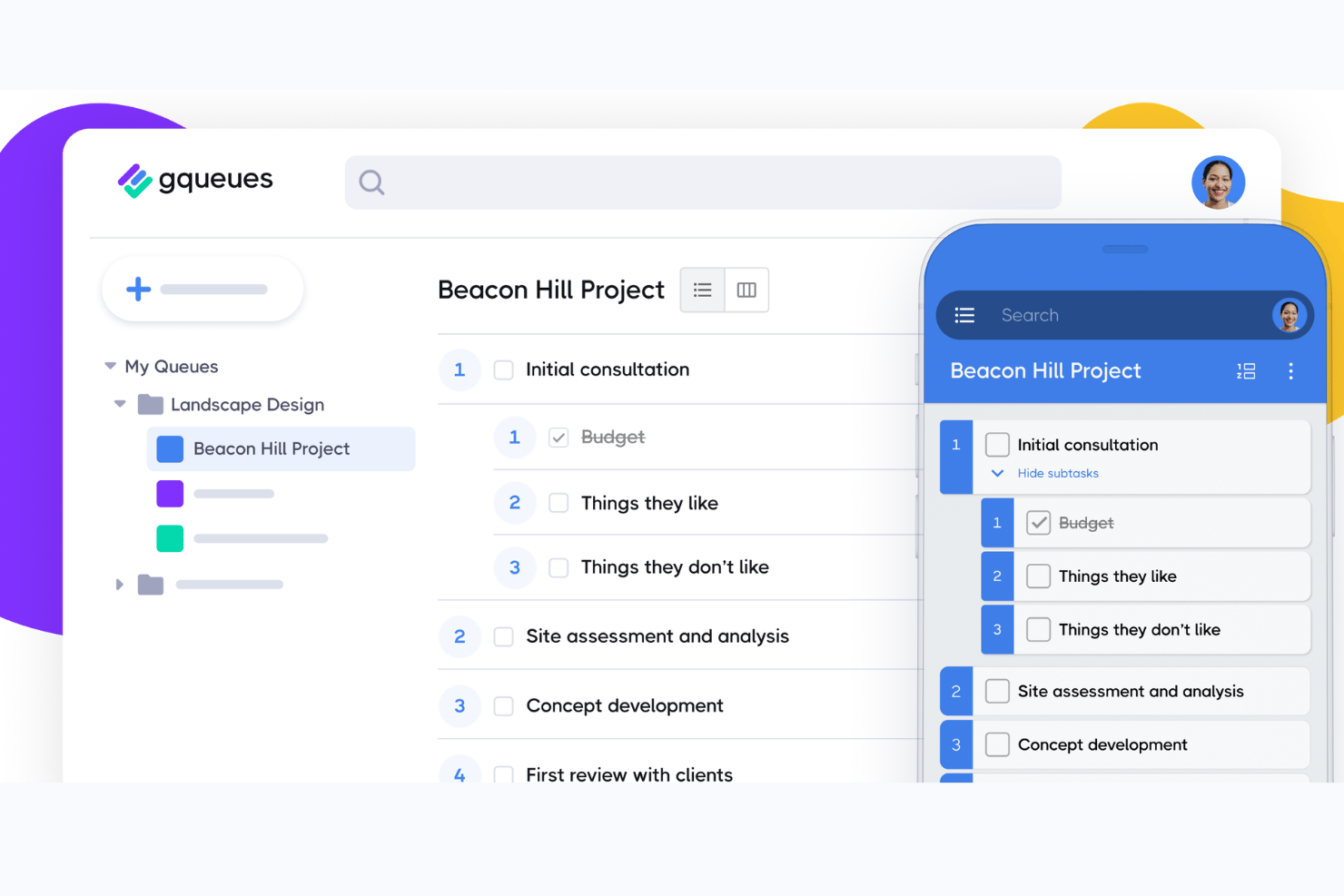
GQueues is a task management tool built natively for Google Workspace, combining task creation, assignments, subtasks, Kanban boards, and two-way syncing across Google Calendar, Gmail, and Drive.
Who Is GQueues Best For?
GQueues fits small-to-mid-sized teams that run their work entirely inside Google Workspace and want task management without leaving that ecosystem.
Why I Picked GQueues
I've included GQueues in my top picks because its Google Workspace integration goes deeper than any other task manager I've used. Creating a task directly from a Gmail thread, having it appear instantly in Google Calendar, and attaching a Drive file without leaving the task view is something I rely on daily. The 2-way Calendar sync is particularly useful: tasks with due dates become real calendar events, not just app-side reminders.
GQueues Key Features
- Smart Queues: Save custom task filters for instant access to prioritized, tagged, or scheduled work.
- Unlimited subtasks: Create detailed task breakdowns with unlimited nested subtasks for complex workflows.
- Shared queues: Collaborate with your team on shared task lists, each with its own set of permissions.
- Mobile apps: Access and manage all your tasks on both Android and iOS devices with full feature support.
GQueues Integrations
GQueues offers native integrations with Google Calendar, Gmail, Google Drive, Google Contacts, Google Chrome, and Google Workspace Marketplace.
Pros and Cons
Pros:
- Reliable recurring task scheduling built in
- Tasks created directly from Gmail threads
- Deep two-way Google Calendar sync
Cons:
- Reporting features are minimal and basic
- No Gantt or timeline view available
Best for no-code workflows at enterprise scale
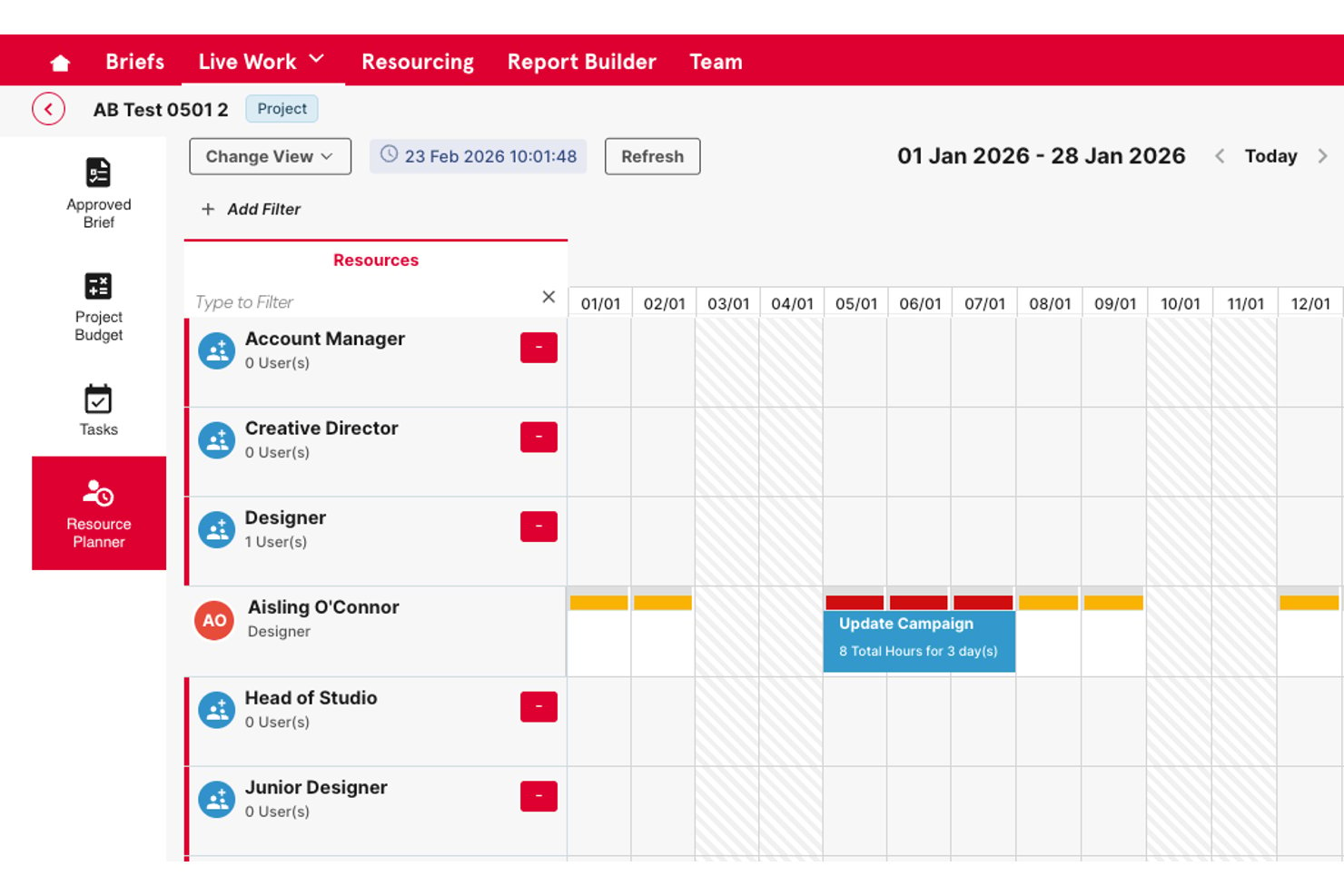
Screendragon is an enterprise work management platform that combines no-code workflow building, task and project tracking, resource planning, approval automation, and operational reporting in a single configurable system.
Who Is Screendragon Best For?
Screendragon is a strong fit for enterprise marketing and creative operations teams that manage high-volume, multi-stakeholder workflows at scale.
Why I Picked Screendragon
I picked Screendragon as one of the best because its no-code workflow builder lets enterprise teams design complex, multi-step approval and review processes without writing a single line of code. I particularly like how dynamic forms connect directly to automated workflow sequences, replacing the scattered email chains that typically slow creative and marketing operations down. The AI Hub takes it further, letting my team deploy AI agents directly inside live workflows to handle routing, compliance checks, and approvals at scale.
Screendragon Key Features
- Resource and workload planning: Lets you allocate resources, track capacity, and balance team workloads across projects.
- Portfolio management dashboards: Provides executive-level visibility with cross-project rollups and KPI tracking.
- Custom intake forms: Converts work requests into structured tasks using configurable forms tailored to each workflow.
- Advanced permissions and audit trails: Supports granular, role-based access controls and maintains detailed records of every change.
Screendragon Integrations
Screendragon offers native integrations with Google Drive, Box, OneDrive, Egnyte, Adobe Creative Cloud, Jira, Trello, Salesforce, Microsoft Dynamics 365, and Microsoft 365. An API is available for custom integrations.
Pros and Cons
Pros:
- Built-in approval routing with automated review stages
- Role-based permissions across large teams
- No-code workflow builder handles complex processes
Cons:
- Steeper setup process than lighter task tools
- Reporting customization requires initial configuration
New Product Updates from Screendragon
Screendragon Unveils New AI Hub
Screendragon introduced AI Hub, a new capability that lets teams build and manage AI agents directly within workflows. The update helps marketing teams automate tasks, maintain governance controls, and scale AI-driven operations more efficiently. For more information, visit Screendragon's official site.

Quire
Best for breaking down complex tasks

Quire is a project task management software that helps teams plan, organize, and track work in a structured way. It supports nested task lists, kanban boards, and timeline views to manage projects from start to finish.
One reason I picked Quire is its nested task structure, which lets you break down complex projects into smaller, manageable pieces. You can create tasks and subtasks in a tree format, making it easy to see the hierarchy and relationships between different parts of your project.
Another feature that stands out is the dynamic timeline view, which provides a visual representation of your project's schedule. You can see how tasks overlap, identify potential bottlenecks, and adjust deadlines as needed. This is especially useful for teams that need to coordinate multiple tasks and ensure everything stays on track.
Some of Quire's integrations include Google Calendar, Gmail, Slack, Outlook, Zoho Flow, GitHub, Apple Calendar Sync, Box, Dropbox, Google Drive, and Microsoft Teams.
New Product Updates from Quire
Quire Adds Custom Field Locking and Comment Reaction API Support
Quire adds custom field locking and API support for reading and setting emoji reactions on comments. These updates give teams more control over field data and expand comment interaction options for developers. For more information, visit Quire’s official site.
 .

Celoxis
Best for managing connected projects within a portfolio
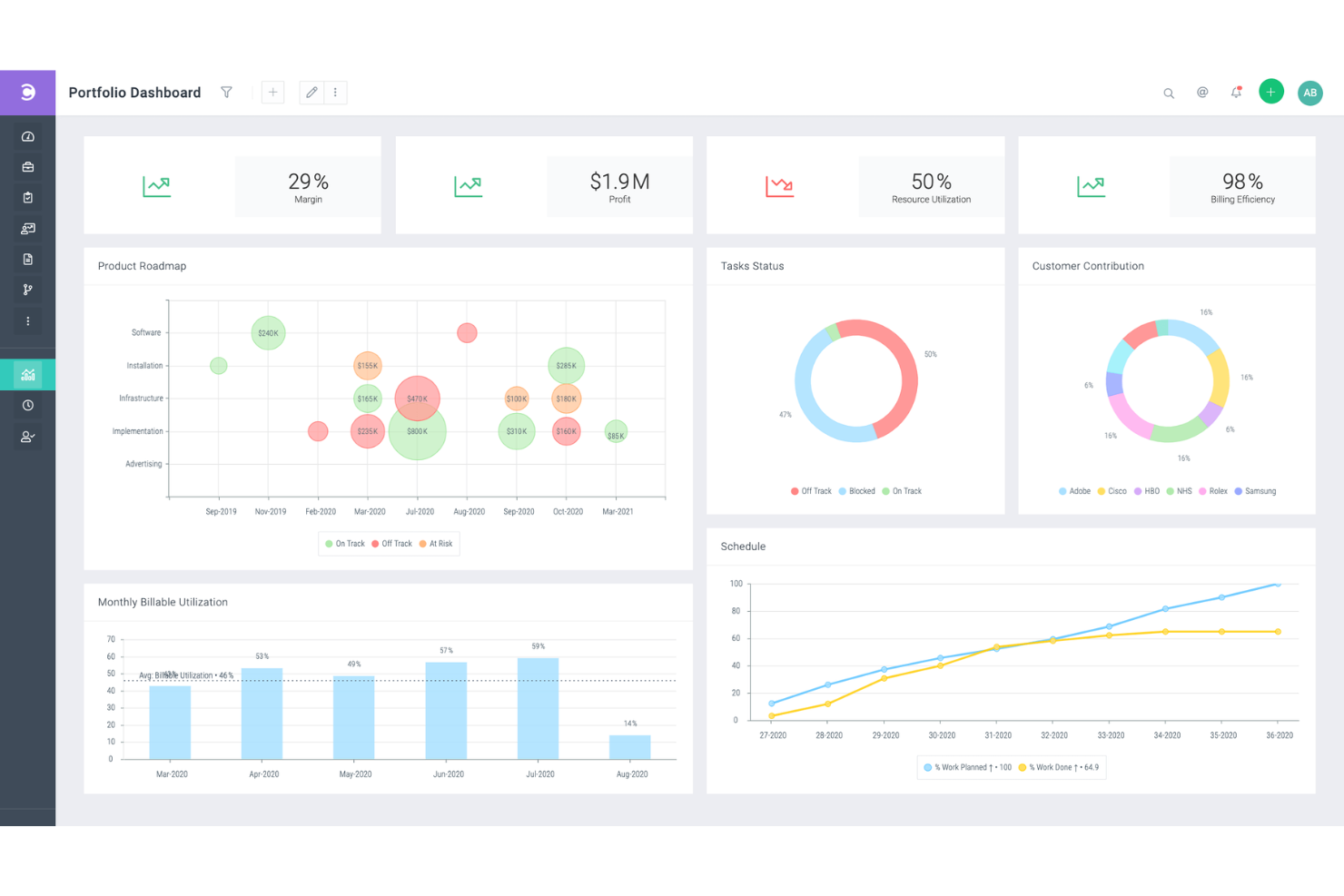
Celoxis is a project portfolio management (PPM) software with project, resource, time, expense, and workflow management features. It's capable of handling complex, inter-connected projects, and is well-suited to the needs of enterprise and professional services businesses.
The Gantt chart tool helps you plan a high-level overview of each of your projects. It includes features like color coding, recurring tasks, and inter-project task dependencies. Not only can you connect tasks across different projects, you can also assign multiple resources to the same task. All of these tools allow you to clarify your multi-project or multi-product strategy and keep your plans well-documented.
In addition to project management, the software offers resource management tools. Work can be assigned to specific team members based on capacity and other factors. You can also manage project expenses in the platform, and track the time spent on various tasks and projects. This helps you keep your budget up-to-date and accurate, and avoid overspending before it happens.
Several pre-built integrations are included, for tools like Google Drive, Microsoft Excel, Microsoft Project, Jira, Slack, Salesforce, Google Calendar, Outlook, Evernote, and QuickBooks Online. You can also access additional integrations with a paid Zapier account.
Paid plans for Celoxis start from $25 per user, per month. A 30-day free trial is also available.
Miro
Best for seamless collaboration and visualization for effective project management

Miro is an online whiteboard platform tailored for collaborative and visual work in project management. It's a tool where teams, whether co-located or remote, can bring their ideas to life in a shared, interactive space. This project task management software caters to a variety of team types and sizes, from tech developers to marketers and small businesses.
The platform's flexibility allows everyone to express ideas, allowing users to incorporate various data forms, including images, videos, and text, into their project boards. This adaptability aids in creating detailed and informative visual elements for projects. Additionally, Miro's planner feature offers a visual representation of tasks by different categories, such as sprints or status, while the dependencies app provides insights into task interdependencies, assisting teams in navigating and managing project complexities.
Integrations include Asana, monday.com, Notion, Webex, Figma, Jira, Azure DevOps, Confluence, Trello, Slack, Microsoft Teams, Google Workspace, Zoom, and 100+ others. You can access thousands of additional tools using a Zapier integration. This may require an additional expense.
New Product Updates from Miro
Miro Adds Japan Data Residency for Enterprise Customers
Miro has introduced Japan data residency for enterprise customers, offering in-region storage for production data, backups, and metadata, plus in-region compute infrastructure. For more information, visit Miro's official site.

Project task management software for prioritizing tasks

Profit.co is an OKR (Objectives and Key Results) software to help you measure and achieve company goals. Profit.co helps you plan your to-do-list to focus on urgent task assignments throughout the day. You can use Profit.co to track tasks easily by sorting tasks and projects according to their progress or level of importance, ensuring that you prioritize projects with approaching due dates. Profit.co also lets you create workspaces where you communicate and collaborate with team members in private to protect confidential or sensitive projects.
As much as we want to treat all tasks equally, some tasks are critical and require immediate attention, making Profit.co an ideal project task management for prioritizing tasks. When you create a task using Profit.co, it lets you set a priority level, so assignees know that you need a specific task completed quickly. The software also lets you assign a date and time when a project task is due, so team members know when to complete their task and estimate if they require extensions.
Profit.co works well with other project task management tools like Microsoft Planner, Asana, G Suite, BambooHR, and others.
Profit.co has a free plan for up to 5 users, while the pricing for plaid plans starts at $7/user/month. They also offer a free 30-day trial.
MeisterTask
Best for brainstorming, ideation, and task management in one
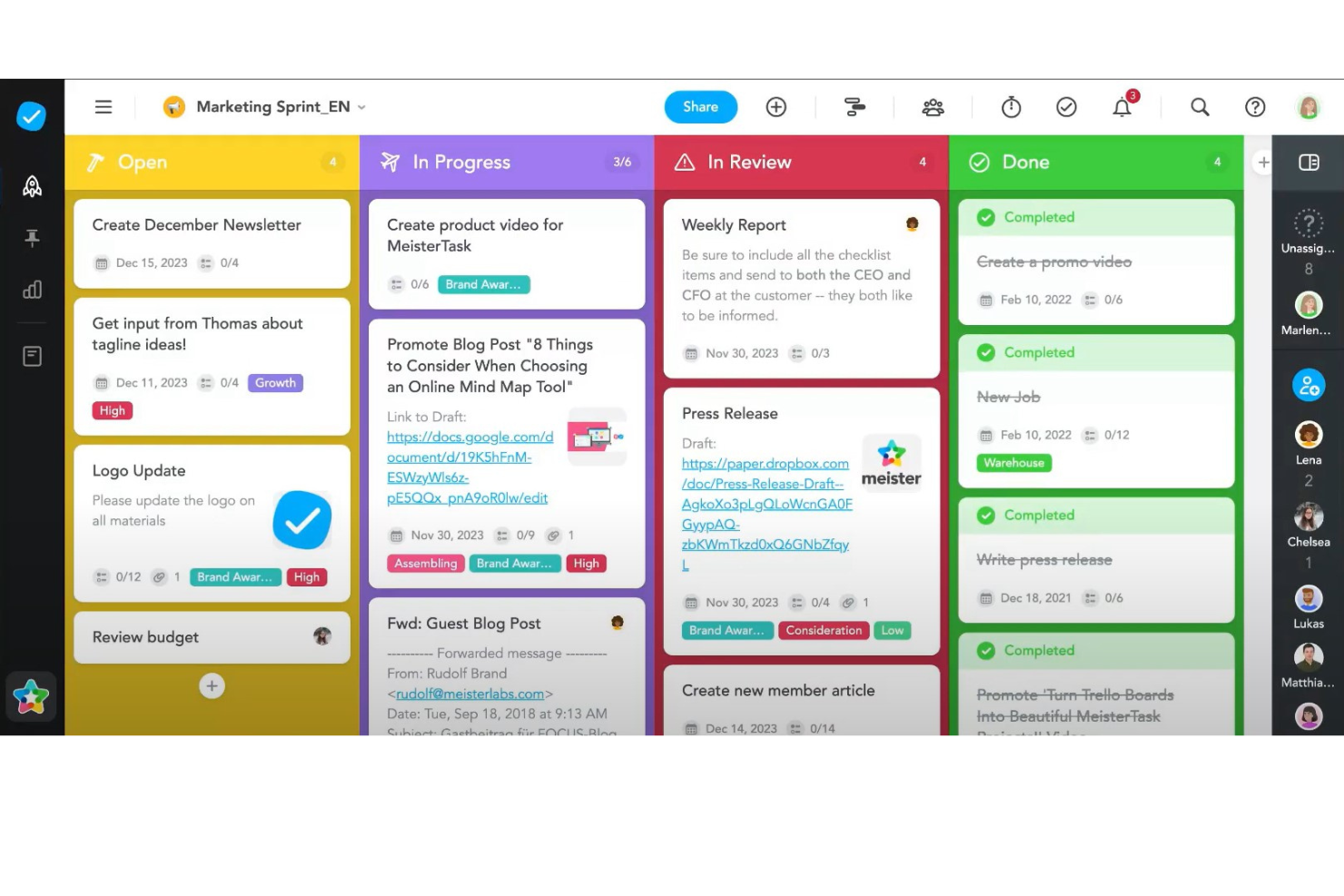
MeisterTask is a project task management software that excels in providing a streamlined, intuitive platform for teams to manage their tasks and projects efficiently. It adopts a visual approach to task management through the use of Kanban boards, making it easy for users to organize tasks, monitor progress, and adapt workflows in real-time. The software is designed to cater to a variety of project types and sizes, offering customizable boards that can be tailored to match specific project needs. Features such as task automation, due date reminders, and time tracking are integrated into the platform, simplifying the management process and enabling teams to focus on the work that matters most.
Beyond its core task management capabilities, MeisterTask stands out for its emphasis on collaboration and integration. The software facilitates seamless team communication with features like file sharing, commenting, and task assignments, ensuring that all team members are on the same page. Additionally, MeisterTask offers robust integration options with popular tools such as Slack, Google Drive, and MindMeister, the latter providing a unique bridge between mind mapping and task management. This integration enables a fluid transition from brainstorming and planning stages to actionable tasks, enhancing the overall productivity and creativity of teams.
Integrations include Slack, Dropbox, Github, Google Drive, Microsoft Teams, Outlook, Trello, Asana, MindMeister, and hundreds more through a paid plan with Zapier.
MeisterTask costs from $14.50/month (billed annually) and offers a fre trial.
Outros softwares de gestão de tarefas de projetos
Eis mais algumas opções que não entraram na lista principal.
- Backlog
For Agile workflows and bug tracking
- Workzone
For managing multiple projects and clients
- ActiveCollab
For its focus on simplicity
- Teamwork.com
Project task management software with a portfolio of projects and their status
- Bonsai Agency Software
For integrated project, client, and financial management
- Birdview
For resource allocation and portfolio management
- FunctionFox
Project task management software with time tracking feature
- Ravetree
For managing projects, resources, and requests in one place
- Stackfield
For GDPR-compliant teams
- Height
Efficient task and project management for remote teams.
- Mosaic
Project task management software that lets you outline project tasks
- ClickUp
Project task management software that lets you break down big projects into subtasks
- Smartsheet
Project task management software that lets you automate tasks
- Hive
For teams looking for a user-friendly interface
- Accelo
For project, task, and resource management
- ProWorkflow
For resource management tools
- Kantata
Project task management software with team collaboration tools
- PathPro
For product development teams
- Adobe Workfront
Web-based work and project management software for enterprises
- Forecast
Project task management software with resource management features


How I Evaluate Project Task Management Software
I split my evaluation into two layers: baseline capabilities a tool must have to qualify—like task dependencies and Gantt views—and differentiators like workload management and portfolio reporting.
Core Functionality (Table Stakes For This List)
When I'm selecting tools for my list, I rank each one on a scale from 0 (does not offer the functionality) to 5 (excels in this area) for each core functionality listed below. Then, I calculate the tool's total score into a percentage. Each tool needs to achieve a minimum total score of 75% to be considered for inclusion.
- Task Creation & Assignment: I check whether you can create tasks with assignees, due dates, priorities, and custom fields—the basics for running a sprint or managing a product launch.
- Multiple Project Views: Switching between Kanban boards, Gantt charts, calendars, and lists matters because different stakeholders digest progress differently.
- Task Dependencies & Subtasks: I evaluate how well a tool handles finish-to-start dependencies and nested subtasks, like mapping a phased release where QA can't start until dev signs off.
- Collaboration & Comments: Threaded comments, @mentions, and file attachments on tasks are what I look for—teams shouldn't need to chase updates across Slack and email.
- Progress Tracking & Reporting: Dashboards and status reports should show task completion, milestone health, and workload distribution without requiring manual spreadsheet exports.
- Workflow Automation & Integrations: I look at whether a tool connects to your existing stack (Slack, Google Workspace, GitHub) and lets you automate recurring steps like status changes or assignee routing.
Once I have a list of tools that meet the criteria, I consider what sets each platform apart.
Differentiating Factors (What Sets Vendors Apart)
Here's how I compare and contrast different vendors:
Standout Features
Resource and workload management is a big differentiator—I look for tools that show each team member's capacity across projects so you can rebalance assignments before deadlines slip. Portfolio management matters when you're overseeing multiple projects at once, because rolling up status and progress into one dashboard beats compiling manual updates for leadership. I also evaluate whether a tool offers AI features that can draft task summaries or generate status reports, saving time on administrative overhead.
Beyond Features
Integration depth matters a lot—I check whether a tool connects natively to dev platforms like GitHub or Jira, since project managers in tech often need task updates to sync with engineering workflows. Pricing transparency is another factor I weigh carefully, particularly whether core task management features are available on lower tiers or locked behind enterprise plans. I also consider how well a tool scales, from a five-person team to a 200-person department, without requiring a full migration later.
Como escolher um software de gestão de tarefas de projetos
É fácil ficar preso a listas extensas de funcionalidades e estruturas de preços complexas. Para o ajudar a manter-se concentrado enquanto percorre o seu processo único de seleção de software, eis uma lista de verificação dos fatores a ter em conta:
| Fator | O que considerar |
| Escalabilidade | Procure um software que possa crescer com a sua equipa. Escolha uma ferramenta que consiga acomodar mais utilizadores e projetos conforme necessário. |
| Integrações | Certifique-se de que o software se integra com as ferramentas que a sua equipa já utiliza, como o Slack, o Google Workspace ou plataformas de CRM. |
| Possibilidade de personalização | Selecione uma ferramenta que lhe permita adaptar os seus fluxos de trabalho, painéis e campos de tarefas aos processos da sua equipa. |
| Facilidade de utilização | Opte por uma ferramenta com uma interface simples e intuitiva, para que a sua equipa possa adotá-la rapidamente sem formação extensa. |
| Orçamento | Tenha em conta tanto os custos iniciais como quaisquer complementos de que possa necessitar. Verifique se existem avaliações gratuitas para avaliar a ferramenta sem um compromisso total. |
| Medidas de segurança | Escolha um software com uma proteção de dados robusta, como encriptação e cópias de segurança regulares, para manter as suas informações protegidas. |
| Ferramentas de colaboração | Certifique-se de que o software oferece funcionalidades como comentários nas tarefas, partilha de ficheiros e notificações para uma comunicação fluida entre a equipa. |
| Acessibilidade móvel | Se a sua equipa trabalhar remotamente ou viajar, procure uma solução com uma aplicação móvel para ajudar a gerir as tarefas em qualquer lugar. |
Tendências nos softwares de gestão de tarefas de projetos para 2025
Na minha investigação, recolhi inúmeras atualizações de produtos, comunicados de imprensa e registos de lançamentos de diferentes fornecedores de software de gestão de tarefas de projetos. Um tema importante comum a todos? Maior automatização. Muitas plataformas estão a evoluir para soluções robustas de software de automatização de tarefas, com novas funcionalidades concebidas para reduzir o esforço manual e melhorar a produtividade geral. Eis algumas das tendências emergentes que estou a acompanhar:
- Priorização de tarefas assistida por IA: A IA pode agora ajudar os utilizadores a estabelecer prioridades para as tarefas com base em prazos, carga de trabalho e dependências. Esta tendência visa reduzir a fadiga de decisão e melhorar a produtividade, orientando as equipas para se concentrarem no que é mais importante em cada dia.
- Análise preditiva dos resultados dos projetos: As funcionalidades preditivas analisam dados de projetos anteriores para prever cronogramas, identificar potenciais atrasos e avaliar riscos. Estes dados podem ajudar as equipas a gerir expectativas e a melhorar a precisão do planeamento sem dependerem exclusivamente do agendamento manual.
- Reconhecimento de emoções para o bem-estar das equipas: Algumas ferramentas estão a experimentar a análise de sentimentos para avaliar o moral das equipas através de conversas ou comentários sobre tarefas. Esta tendência ajuda os gestores a identificar riscos de esgotamento e fornece informações para melhorar o bem-estar das equipas, o que é especialmente relevante em ambientes de trabalho remotos e híbridos.
- Gamificação da conclusão de tarefas: As funcionalidades de gamificação, como distintivos, pontos e classificações, estão a ganhar popularidade para motivar as equipas. A inclusão destes elementos torna a gestão de tarefas mais envolvente e pode impulsionar a produtividade, especialmente em ambientes altamente colaborativos.
- Visualização da gestão de recursos em tempo real: Os fornecedores estão a melhorar as ferramentas de visualização que apresentam a disponibilidade de recursos, a carga de trabalho e potenciais conflitos em tempo real. Esta tendência ajuda os gestores a fazer ajustes rápidos e a melhorar a eficiência, equilibrando as tarefas entre equipas e projetos. À medida que mais equipas adotam modelos de trabalho híbridos ou totalmente remotos, as ferramentas de colaboração na nuvem estão a tornar-se essenciais para gerir fluxos de trabalho distribuídos, permitir atualizações em tempo real e manter todos alinhados entre diferentes localizações.
O que é o software de gestão de tarefas de projetos?
O software de gestão de tarefas de projetos é uma ferramenta que ajuda a organizar e acompanhar diferentes tarefas de um projeto. Permite criar uma lista de tarefas, atribuí-las a pessoas, definir prazos e monitorizar o progresso de cada tarefa. Este tipo de software pode ser muito útil para manter tudo num só lugar, para que não tenha de gerir informações em diferentes plataformas nem perder o controlo do que precisa de ser feito.
A principal vantagem de utilizar software de gestão de tarefas de projetos é tornar a gestão de projetos muito mais simples e clara. Ajuda a ver rapidamente o que precisa de ser feito, quem está a trabalhar em cada tarefa e quando é necessário concluí-las. Isto pode ser muito útil para as equipas, uma vez que todos sabem o que devem fazer e podem colaborar de forma mais eficaz. Também é uma excelente forma de garantir que nada é esquecido ou deixado para trás, além de ajudar a manter os projetos dentro do prazo.
Funcionalidades do software de gestão de tarefas de projetos
Ao selecionar software de gestão de tarefas de projetos, procure as seguintes funcionalidades essenciais:
- Atribuição de tarefas: Atribui tarefas a membros específicos da equipa, garantindo uma responsabilidade e uma prestação de contas claras por cada tarefa.
- Acompanhamento de prazos: Acompanha as datas de conclusão para manter os projetos dentro do prazo e evitar prazos falhados.
- Gestão de dependências: Define dependências entre tarefas para identificar estrangulamentos e gerir os fluxos de trabalho de forma mais eficaz.
- Acompanhamento do progresso: Monitoriza o progresso das tarefas em tempo real, para que a equipa se mantenha atualizada e ajuste as prioridades conforme necessário.
- Registo de tempo: Regista o tempo dedicado às tarefas para analisar a produtividade e atribuir recursos de forma mais eficaz.
- Ferramentas de colaboração: Permite a comunicação entre os membros da equipa através de comentários, menções e partilha de ficheiros diretamente nas tarefas.
- Painéis personalizáveis: Personaliza painéis para diferentes funções, para que todos tenham acesso fácil às informações relevantes.
- Relatórios e análises: Gera relatórios sobre a conclusão de tarefas, a produtividade da equipa e o progresso dos projetos para apoiar decisões baseadas em dados.
- Integração com calendários: Sincroniza tarefas e prazos com calendários externos para simplificar o agendamento e os lembretes.
- Notificações e alertas: Envia notificações atempadas sobre atualizações de tarefas e prazos que se aproximam, mantendo todos alinhados.
Vantagens do software de gestão de tarefas de projetos
A implementação de software de gestão de tarefas de projetos pode proporcionar várias vantagens tanto para a sua equipa como para a sua empresa em geral. Eis algumas das vantagens que pode esperar:
- Organização melhorada: Manter todas as tarefas, ficheiros e discussões num só lugar torna significativamente mais fácil para a sua equipa manter-se organizada e encontrar aquilo de que precisa.
- Maior responsabilização: A atribuição clara de tarefas e o acompanhamento do progresso permitem que todos saibam quem é responsável por cada tarefa, reduzindo a confusão.
- Melhor gestão do tempo: Funcionalidades como o acompanhamento de prazos e do tempo ajudam a gerir os calendários de forma mais eficaz e a evitar prazos ultrapassados.
- Aumento da produtividade: Ao manter as tarefas priorizadas e visíveis, a equipa pode concentrar-se no trabalho importante sem se distrair.
- Decisões mais informadas: Os relatórios e as análises fornecem informações sobre a produtividade e o progresso dos projetos, ajudando-o a tomar decisões baseadas em dados.
- Maior flexibilidade: Os painéis e as vistas personalizáveis permitem que cada membro da equipa veja as suas tarefas da forma que melhor lhe convém.
- Colaboração melhorada: As ferramentas de colaboração integradas facilitam a comunicação direta entre os membros da equipa no âmbito das tarefas, mantendo todas as discussões relevantes e acessíveis.
Custos e preços do software de gestão de tarefas de projetos
A seleção de software de gestão de tarefas de projetos exige uma compreensão dos vários modelos de preços e planos disponíveis. Os custos variam consoante as funcionalidades, o tamanho da equipa, os complementos e outros fatores. A tabela abaixo resume os planos comuns, os respetivos preços médios e as funcionalidades normalmente incluídas nas soluções de software de gestão de tarefas de projetos:
Tabela de comparação de planos de software de gestão de tarefas de projetos
| Tipo de plano | Preço médio | Funcionalidades comuns |
| Plano gratuito | $0 | Gestão básica de tarefas, projetos limitados, relatórios básicos e ferramentas básicas de colaboração. |
| Plano pessoal | $5-$15/utilizador/mês | Atribuição de tarefas, acompanhamento de prazos, integrações básicas, painéis personalizáveis e suporte prioritário. |
| Plano empresarial | $15-$25/utilizador/mês | Relatórios avançados, opções de automatização, acompanhamento do tempo, ferramentas de colaboração em equipa e fluxos de trabalho personalizados. |
| Plano empresarial avançado | $25-$50/utilizador/mês | Segurança avançada, integrações personalizadas, suporte dedicado, análises avançadas e projetos ilimitados. |
Perguntas frequentes sobre software de gestão de tarefas de projetos
Eis algumas respostas a perguntas comuns sobre software de gestão de tarefas de projetos: