Os 10 melhores softwares empresariais de gestão de ativos digitais para 2026

10 Lista restrita dos melhores softwares empresariais de gestão de ativos digitais


Gerir ficheiros digitais em várias plataformas, equipas e campanhas pode rapidamente tornar-se descontrolado. É difícil manter os ativos seguros, com controlo de versões e fáceis de encontrar quando tudo está completamente disperso.
O software empresarial de gestão de ativos digitais oferece-lhe uma forma melhor de organizar, armazenar e partilhar os seus conteúdos digitais. Foi concebido para lidar com bibliotecas em crescimento e fluxos de trabalho complexos sem abrandar a sua equipa.
Nesta lista, apresento-lhe as melhores opções disponíveis no mercado. Analisei cada uma de forma independente, tendo em conta as necessidades de um gestor de projetos e concentrando-me na facilidade de utilização, nas principais funcionalidades e no valor no mundo real.
Why Trust Our Software Recommendations
Our team has been testing and reviewing software since 2012. As project managers ourselves, we know how difficult—and important—it is to choose the right software.
For this guide, we evaluated tools using hands-on testing and independent research, scoring tools using our selection criteria. We also draw on insights from industry thought leaders and practicing project management experts.
Our reviews reflect our human editorial judgment, not a sales pitch.
Expert reviewers:
Tabela comparativa: software empresarial de gestão de ativos digitais
Esta tabela comparativa resume os detalhes de preços das minhas principais escolhas de software empresarial de gestão de ativos digitais.
| Tool | Best For | Trial Info | Price | ||
|---|---|---|---|---|---|
| 1 | Best for creative & marketing teams | Free demo available | Pricing upon request | Website | |
| 2 | Best for visual creative collaboration | Free plan + demo available | From $900/month (billed annually) | Website | |
| 3 | Best for enterprise brand consistency and content experiences | Free demo available | Pricing upon request | Website | |
| 4 | Best for advanced AI-powered asset organization | Free plan available | From $9/month | Website | |
| 5 | Best for face-based photo discovery | Free plan + free trial available | From $250/month (billed annually) | Website | |
| 6 | Best to integrate with Google Drive and Amazon S3 | 7-day free trial + free demo available | From $100/month | Website | |
| 7 | Best for configuration and customization | Free demo available | Pricing upon request | Website | |
| 8 | Best modular enterprise digital asset management software that scales with company growth | 14-day free trial | Pricing upon request | Website | |
| 9 | Best white label experience/custom branding | 30-day free trial available | From $29/month | Website | |
| 10 | Best for collaborative work | Free demo available | Pricing upon request | Website |

Avaliações dos melhores softwares empresariais de gestão de ativos digitais
Apresentamos abaixo os meus resumos detalhados dos melhores softwares empresariais de gestão de ativos digitais que entraram na minha lista restrita. As minhas avaliações oferecem uma análise detalhada das principais funcionalidades, vantagens e desvantagens, integrações e casos de utilização ideais de cada ferramenta, para o ajudar a encontrar a melhor opção para si.
Best for creative & marketing teams

MediaValet aims to empower sales teams to find up-to-date, relevant collateral and marketing content on any device, anywhere. They allow users to create, collaborate and preview Office documents, visuals, PDFs, videos, even 3D files within the MediaValet library. Streamline the sorting and search process with AI-driven object, text, color, and face recognition.
The searchability of assets is pristine with MediaValets auto-tagging features. Files are organized for easy retrieval by grouping them into categories and subcategories to amplify the user experience. This is why I was compelled to score them highly in the UX and Usability categories within our evaluation criteria guidelines.
MediaValet has an app for iOS, Android, and Windows. Software integrations include Wrike, Workfront, Slack, OKTA, Active Directory, WordPress. Drupal 8, Adobe Creative Cloud, Sharepoint, Office 365, Hootsuite, and more.
MediaValet offers customized pricing upon request as well as a free demo.

Air
Best for visual creative collaboration

Air is a creative operations platform designed to manage the collection, approval, and sharing of visual content. It offers a centralized system for feedback and approvals, which simplifies the creative process and automates operations, making it a unique tool that consolidates everything you need into a single workspace.
As a digital asset management software, Air offers a visual workspace for creative teams to collaborate on different assets. The platform centralizes comments, feedback, and approvals directly around the files, making communication and visibility easier for all team members, no matter where they are. It also provides advanced cross-functional sharing capabilities and integrates with many enterprise tool stacks.
Air also has features such as smart search to locate specific files within the platform, dynamic feedback for real-time collaboration, Kanban for visualization of the workflow and task management, and versions to track and manage different iterations of assets.
Integrations include Zapier, Canva, Adobe Premier Pro, Slack, Dropbox, WordPress, Airtable, and much more.
New Product Updates from Air

Air Showcases Introduces Custom Branding, Content Blocks, and Sub-Pages
Air Showcases now support custom branding, content blocks, sub-pages, and saved default layout settings, plus more control over removing items and branding options for Enterprise. For more information, visit Air's official site.

Bynder
Best for enterprise brand consistency and content experiences

A Leader by The Forrester Wave™ Digital Asset Management for Customer Experience, Q1 2022 report.
Bynder is a SaaS DAM that lets you organize all your digital assets in one location for easier management and quick access for all users. It has a data-driven analytics feature to get useful insights about your assets and how users benefit from them. You can use Bynder to protect your brand’s reputation by restricting access permissions on sensitive digital assets.
Bynder is the best DAM solution for you if you have an e-commerce business because it allows you to manage vital digital assets, including product shots and campaign ads. It has integrations for auto-updating and auto-publishing of assets, ensuring the products on your e-commerce sites are up-to-date. Bynder’s Creative Workflow allows you to streamline requests, reviews, and approvals so your creative team can churn out marketing materials quickly.
Bynder integrates with Wrike, eGo CMS, Vimeo, and other common digital workplace apps.
Bynder pricing details are available upon request.

ImageKit
Best for advanced AI-powered asset organization
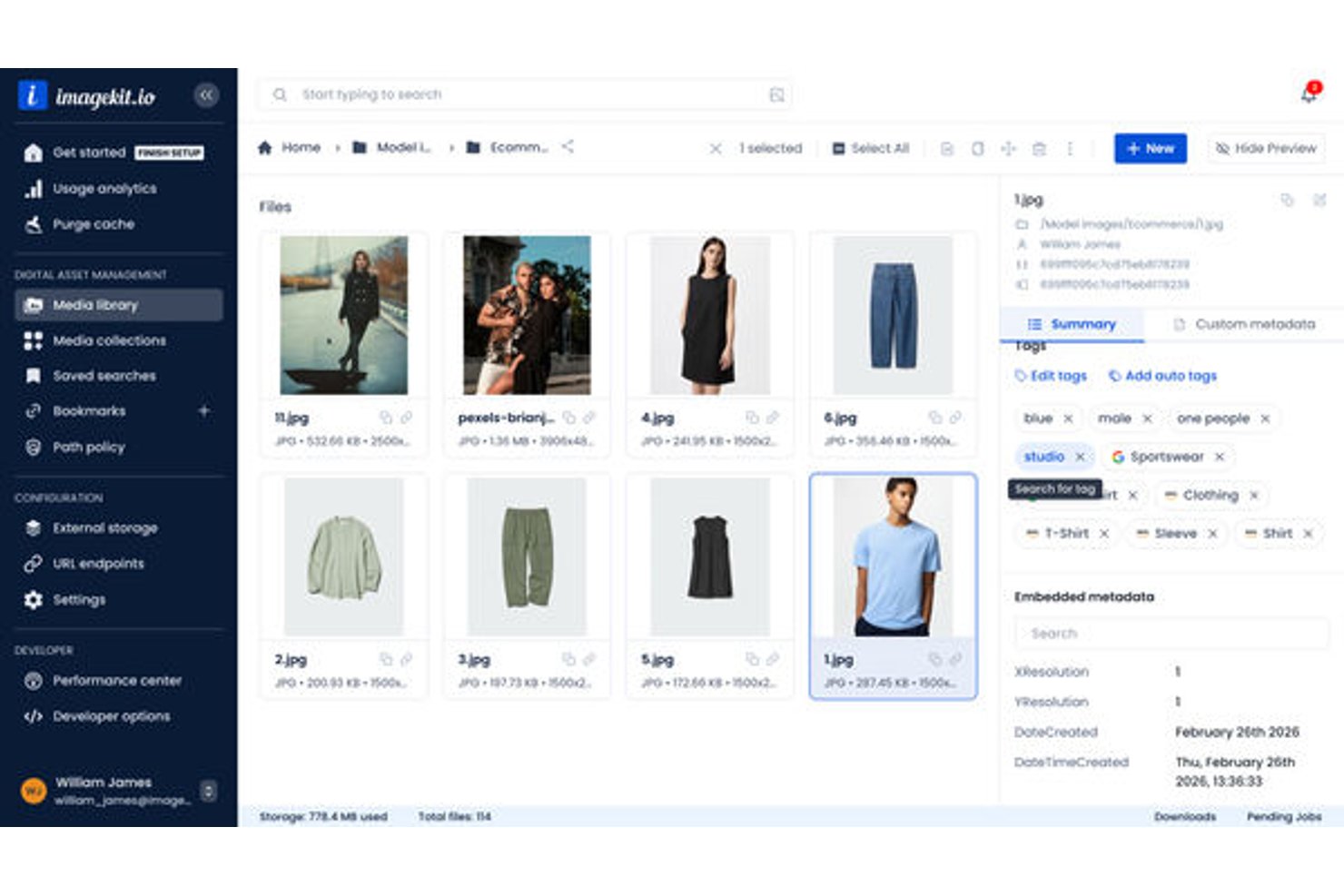
ImageKit is a cloud-based digital asset management platform that pairs AI-powered asset organization with built-in real-time media processing and global CDN delivery for images, videos, and rich media.
Who Is ImageKit Best For?
ImageKit suits tech-forward marketing and creative operations teams that manage high volumes of media assets alongside developer-driven delivery workflows.
Why I Picked ImageKit
ImageKit earns its spot on my shortlist because of how its AI handles asset organization at a structural level. I particularly like the AI Tasks feature, which lets you configure natural-language prompts to extract structured metadata automatically (think: "What is the collar type of this shirt?" applied across thousands of product images). The DAM Agent goes further, letting me execute multi-step bulk operations and build governance policies through conversational commands.
ImageKit Key Features
- Creative automation templates: Create and version image and video variants in bulk using CSV-driven templates directly within the DAM.
- Virtual collections: Organize assets into dynamic collections without duplicating files across folders.
- Role-based access control: Assign granular user permissions for viewing, updating, or managing assets and folders.
- Audit history and timeline tracking: Monitor every asset action with detailed logs and version history for compliance.
ImageKit Integrations
ImageKit offers 30+ native integrations, including Asana, Jira, Slack, Notion, Confluence, HubSpot, Mailchimp, and Hootsuite, and provides an API for custom integrations.
Pros and Cons
Pros:
- Global CDN delivery included natively
- Real-time media transformation built into DAM
- AI Tasks automate bulk metadata extraction
Cons:
- Folder-based structure limits complex taxonomy needs
- DAM functionality is newer than established competitors
Best for face-based photo discovery

Tagbox.io is an enterprise digital asset management platform for teams that need to organize, search, and share large libraries of photos, videos, and creative files. Its custom AI-powered tagging, visual search, duplicate detection, permissions, and version control help creative, marketing, and retail/ecommerce teams find assets faster while keeping content organized and accessible. I especially like its custom AI tagging capabilities, which help retail and ecommerce brands automatically tag products, colors, styles, categories, and other visual attributes across large media libraries.
Who Is Tagbox.io Best For?
Tagbox.io is a strong fit for marketing and creative teams at mid-to-large companies that manage high volumes of visual assets across multiple projects or brands, especially retail and eCommerce teams managing large product and campaign asset libraries.
Why I Picked Tagbox.io
I picked Tagbox.io because it helps teams manage large photo and video libraries with AI-powered search, tagging, and asset organization tools. Its face recognition feature is especially useful for finding photos of specific people, which can save time for event teams, agencies, and brands managing people-heavy media collections. I also like that you can search assets by visual details like objects, scenes, colors, and text instead of relying only on file names or manual tags. What stands out for retail and ecommerce teams is its custom AI tagging functionality, which can automatically identify and organize products, apparel styles, colors, packaging, and other brand-specific visual attributes across large media libraries, helping merchandising, marketing, and creative teams quickly find approved assets for campaigns, product launches, and seasonal promotions. For enterprise teams, Tagbox.io also supports permissions, collections, duplicate detection, and version control to keep shared asset libraries organized and easier to manage.
Tagbox.io Key Features
Some other features in Tagbox.io support enterprise teams that need better control over shared media libraries:
- Guest uploads: Let clients, photographers, event vendors, and other external contributors upload assets directly into your workspace without needing a full account.
- Video AI analysis: Detect people, products, speech, and brand moments across video files to make specific clips easier to find.
- Asset collections: Group related files into collections so teams can organize campaign, event, or client assets in one place.
- Duplicate detection: Identify duplicate files to reduce clutter and keep large asset libraries easier to manage.
Tagbox.io Integrations
Connect Tagbox.io through Tagbox Desktop (drag-and-drop into any app), Zapier, Make, and a REST API. Custom workflows are available for Enterprise.
Pros and Cons
Pros:
- Guest uploads simplify collecting media from external contributors
- Face recognition helps locate people across photos and videos
- AI search finds assets by faces, objects, and scenes
Cons:
- Digital rights tracking features are not clearly listed
- Approval workflow routing is not clearly documented

Pics.io
Best to integrate with Google Drive and Amazon S3

Pics.io is a digital asset management (DAM) software that helps your business keep digital assets organized and managed efficiently. It can handle multiple file formats and stores assets in a centralized depository in the cloud, making them accessible to staff in different places and on different devices.
The software provides its own storage space, but users can also integrate it with Google Drive and Amazon S3 to avoid needing to migrate existing files. Specific file formats it supports include images, videos, audio files, and documents. Metadata makes for easy search and organization of assets. When it comes to AI-based functionality, Pics.io lets users choose from three different AI models for generating keywords for digital assets. Users can also automatically create descriptions for their files and even customize prompts with the help of customer support.
One notable feature is the version control, which lets users track changes and revert files back to previous versions as needed. Teams can also collaborate on assets through the platform with commenting, tagging, and approvals. Files can be shared externally and the interface can be customized to your company’s branding.
Integrations include Google Drive, Amazon S3, Shopify, Slack, Adobe Photoshop, Figma, Hootsuite, HubSpot, Salesforce, Trello, and ZohoCRM.
Pricing starts from $50 per month, and a 7-day free trial is available.
New Product Updates from Pics.io
Pics.io Adds Filtered Audit Trail CSV Exports
Pics.io now lets you export Audit Trail logs to CSV and apply filters before exporting, making it easier to analyze and share activity history. For more information, visit Pics.io's official site.
 .
Best for configuration and customization

Acquia DAM (Widen) is a really useful tool to organize, share, and distribute your brand assets and product content across the web. In the end, it helps empower your marketers, salespeople, and partners to get the content they need on demand.
Something notable about this tool is its powerful search functionality and flexible metadata models. In this sense, Acquia DAM stands out in our features and functionality evaluation, where searchability and flexibility reign supreme. And in addition to using metadata to classify your assets, you can also assign different roles and permissions to different user groups to control access levels.
You don't see this in every digital asset manager, but in Acquia DAM you'll find an analytics feature. This means you can understand who is using your content, which can inform more effective creative deliverables.
It's worth mentioning that you could use this tool as a standalone digital asset management tool or you could build it out into a larger management system. In addition to the core DAM offering, several add-on applications are available to construct your brand management, marketing resource management, or product information management system that works for your use case. For example, you can use Entries to assemble product content for e-commerce distribution, or Portals to share curated collections within branded webpages. You could also leverage Templates to build localized ads and brochures or use their Workflow add-on to manage work-in-process review and approval.
The Acquia DAM integrates with dozens of platforms spanning content management, project management, marketing automation, customer relationship management, social media, sales enablement, and more.
Acquia DAM offers pricing upon request.

Best modular enterprise digital asset management software that scales with company growth

4ALLPORTAL provides two main products, product information management (PIM) and digital asset management (DAM) software for companies that want a customizable and scalable solution capable of facilitating workflows around file management and corporate data in an efficient and automated manner.
Due to the modular nature of the software, each instance is individually scalable to meet increasing demands or growth as a company needs. The software provides a flexible licensing model, which allows businesses to utilize the enterprise DAM system based on the number of users or be completely user-independent. The data center is securely situated in Germany and audited by the Technical Inspection Agency to ensure that the servers meet all the legal requirements and regulatory standards, including that of the ISO standard for information and IT environment security for data backup.
The digital asset management software also has powerful search functions to help users locate files and other digital assets easily. With tagging, users can easily store keywords and meaningful descriptions for individual assets, which they can utilize for targeted queries. In addition to file names, users can leverage advanced search criteria like file types and release status to locate specific assets.
Pricing for the 4ALLPORTAL DAM software is available only upon request.

Filecamp
Best white label experience/custom branding

Filecamp is a lightweight, cloud-based digital asset management (DAM) solution that helps marketing and creative teams organize and share their digital media such as images, videos, and brand guidelines. More than 1,500 brands from all over the world trust Filecamp with their digital assets and brand guidelines.
Filecamp comes with unlimited users, each user configured with their own set of user admin and folder permissions. Filecamp lets you employ custom branding options so that your DAM system matches your brand guidelines. You can even customize the interface and log-in screen down to specific folders and customers.
You can also use Filecamp to set up a custom media portal for distributors around the world, or simply to send a download link to a colleague. Filecamp offers advanced search capabilities and lets you filter by keyword, author, file type, and expiry date. Keywords, XMP metadata, and auto tags make all your media files searchable.
Team leaders can leverage their built-in online proofing and commenting tools to review and approve creative work.
Filecamp costs from $29/month (unlimited users!) and offers a 30-day free trial.
New Product Updates from Filecamp
Filecamp Adds Analytics, AI Thumbnails, and CDN Embed Links
Filecamp adds Analytics, AI-powered thumbnails, and CDN-backed Embed links. These updates give teams more visibility into asset usage, improve thumbnail presentation, and make embedded images easier to manage. For more information, visit Filecamp’s official site.
 .

Frontify
Best for collaborative work

Frontify’s digital asset management solution simplifies uploading, storing, organizing, and sharing digital assets in a unified platform. Its asset rights management system helps ensure that asset rights are up-to-date and sends notifications before the digital rights to use a specific asset expires. As a centralized asset library, any changes on a brand asset automatically reflect wherever that asset is in use, ensuring brand consistency.
Working in a fast-paced, collaborative environment requires modern communication strategies (commenting, @-ing, emojis, customizable proofing/approval workflows)—all of which Frontify delivers. With feedback and approval automation, you can ensure that crucial digital assets receive timely approvals to keep projects on track.
Frontify integrates with Google Docs, InDesign, Adobe Creative Cloud, Getty Images, and other asset- and workflow-based apps.
Frontify pricing is available upon request.
Outros softwares empresariais de gestão de ativos digitais
Eis algumas opções adicionais de software empresarial de gestão de ativos digitais que não entraram na minha lista restrita, mas que ainda vale a pena conhecer:
- IntelligenceBank
Marketing asset templates
- Image Relay
DAM + product information management (PIM)
- Adobe Experience Manager
For cross-channel asset management
- Brightspot
For agile content workflows
- Wedia
For maintaining compliance and approval processes
- Artwork Flow by Bizongo
DAM for enterprise CPG brands
- Asset Bank
For multi-brand companies
- Scaleflex
For AI-driven media optimization
- DemoUp Cliplister
For dynamic asset distribution
- Orange Logic
With built-in project management
- hyperCMS DAM Server
Open source enterprise DAM
- MediaBeacon
Taxonomy management
- Swivle DAM
On-premise DAM
- Cloudinary
With AI-powered agents for asset automation
- Brandfolder
DAM for enterprise usability and adoption
- Papirfly
For brand consistency at scale
- Connecter Suite
For large visual libraries
- Digizuite
Scalable and comprehensive digital asset management system for growing companies.
- Amplifi.io
AI-powered DAM and Product Information Management (PIM).
- Paperflite
Content management software for marketing and sales.


Pode encontrar aqui versões não empresariais de software de gestão de ativos digitais.
How I Evaluate Enterprise Digital Asset Management Software
I evaluate enterprise DAM platforms on two levels: whether they clear the baseline—like versioning, metadata, and role-based access—and what differentiates each one for large-scale project teams.
Core Functionality (Table Stakes For This List)
When I'm selecting tools for my list, I rank each one on a scale from 0 (does not offer the functionality) to 5 (excels in this area) for each core functionality listed below. Then, I calculate the tool's total score into a percentage. Each tool needs to achieve a minimum total score of 65% to be considered for inclusion.
- Centralized Asset Repository: I check whether the platform can handle enterprise-scale storage across file types—think thousands of PSDs, videos, and PDFs organized in one place.
- Metadata & AI Tagging: Strong search depends on tagging, so I evaluate the depth of custom taxonomy options and whether AI can auto-tag assets on upload.
- Version Control & Workflows: I look for clear version histories and configurable approval workflows, like routing a campaign asset through design, legal, and brand review.
- Permissions & Rights Management: Granular access controls matter here—especially the ability to restrict asset usage by role, team, or license expiration date.
- Project Tool Integrations: I evaluate native connections with platforms like Workfront, Asana, and Adobe Creative Cloud that project teams already rely on daily.
- Brand Portals & Distribution: Teams need to share approved assets externally, so I look for branded portals with controlled access for agencies and partners.
Once I have a list of tools that meet this criteria, I consider what sets each platform apart.
Differentiating Factors (What Sets Vendors Apart)
Here's how I compare and contrast different vendors:
Standout Features
AI-powered search is a big differentiator—when your library holds hundreds of thousands of assets, natural language queries and visual recognition save project teams real time finding what they need. I also evaluate creative workflow automation, like automated proofing routes and task assignments that tie asset reviews directly to project timelines. Usage analytics dashboards round things out by showing which assets actually get downloaded and reused across campaigns, helping teams justify creative spend.
Beyond Features
Security and compliance certifications like SOC 2 Type II and ISO 27001 are worth checking early—especially if your organization operates in regulated industries. I also evaluate implementation support, since migrating a legacy asset library with years of metadata into a new platform is a major undertaking. Transparent pricing models matter too; I look at how vendors structure costs around storage, users, and bandwidth to avoid surprises as your team scales.
Como escolher um software empresarial de gestão de ativos digitais
É fácil ficar atolado em listas extensas de funcionalidades e estruturas de preços complexas. Para o ajudar a manter-se concentrado enquanto avalia o seu processo específico de seleção de software, eis uma lista de verificação dos fatores a ter em conta:
| Fator | O que considerar |
| Escalabilidade | Certifique-se de que o sistema consegue lidar com bibliotecas de ativos em crescimento, mais utilizadores e casos de utilização adicionais sem ficar mais lento ou exigir uma reformulação significativa. |
| Integrações | Procure ferramentas que se liguem ao seu conjunto de ferramentas atual — pense em plataformas de gestão de projetos, software criativo como o Adobe e armazenamento na nuvem. |
| Personalização | Escolha uma plataforma que lhe permita adaptar campos de metadados, estruturas de pastas, níveis de permissão e fluxos de trabalho às necessidades exatas da sua equipa. |
| Facilidade de utilização | A sua equipa não deverá precisar de formação apenas para carregar ou encontrar um ficheiro. Procure software com um esquema limpo, pesquisa intuitiva e sugestões úteis. |
| Orçamento | Tenha em consideração não só as mensalidades, mas também os custos de configuração, os limites de utilizadores e quaisquer complementos. Certifique-se de que obtém as funcionalidades de que necessita pelo preço pago. |
| Medidas de segurança | Verifique se existem permissões granulares, registos de auditoria, SSO e encriptação. É importante proteger os ficheiros sensíveis e limitar quem vê cada conteúdo. |
| Capacidades de pesquisa | Precisa de uma pesquisa rápida e precisa, com filtros como etiquetas, data de carregamento, tipo de ficheiro ou utilizador. É uma vantagem se o software incluir etiquetagem com IA ou pesquisa visual. |
| Ferramentas de colaboração | Procure funcionalidades como ligações partilháveis, fluxos de trabalho de aprovação, acompanhamento de versões e comentários, para que as equipas possam trabalhar em conjunto sem mudar de ferramenta. |
Tendências no software empresarial de gestão de ativos digitais
Na minha pesquisa, consultei inúmeras atualizações de produtos, comunicados de imprensa e registos de lançamento de diferentes fornecedores de software empresarial de gestão de ativos digitais. Eis algumas das tendências emergentes que estou a acompanhar:
- Metadados e etiquetagem gerados por IA: Cada vez mais ferramentas utilizam IA para etiquetar automaticamente imagens, vídeos, animações e documentos com palavras-chave baseadas no conteúdo. Isto reduz a introdução manual de dados e facilita a identificação rápida dos ativos certos. É especialmente útil para equipas que gerem grandes volumes de ficheiros criativos.
- Pesquisa visual: Alguns sistemas permitem agora que os utilizadores pesquisem carregando uma imagem de referência, em vez de introduzirem texto. Isto é útil quando as palavras-chave estão em falta ou são inconsistentes e melhora a descoberta de conteúdos visuais semelhantes.
- Gestão de direitos integrada: As funcionalidades de acompanhamento de direitos estão a tornar-se mais comuns, ajudando as equipas a gerir diretamente no sistema os termos de utilização, as datas de expiração e os limites de distribuição. Isto reduz o risco de utilizar conteúdos expirados ou sujeitos a restrições.
- Ferramentas de comparação de versões: As equipas podem agora comparar versões de ativos lado a lado, com indicadores visuais das alterações efetuadas. Isto permite ciclos de revisão mais eficazes e evita a confusão causada pelo trabalho com ficheiros desatualizados.
- Espaços de colaboração integrados: Os comentários, as anotações e o acompanhamento de tarefas estão a ser integrados no próprio visualizador de ativos. Isto mantém o trabalho de revisão e aprovação num único local, em vez de depender de ferramentas de comunicação externas.
O que é o software empresarial de gestão de ativos digitais?
O software empresarial de gestão de ativos digitais (DAM) é uma ferramenta utilizada pelas organizações para armazenar, organizar, gerir e distribuir ativos digitais, como imagens, vídeos, documentos e outros ficheiros multimédia. Fornece uma plataforma centralizada para gerir grandes volumes de conteúdos digitais, permitindo um acesso, uma categorização e um controlo fáceis sobre esses ativos.
As ferramentas de gestão de ativos digitais são particularmente úteis para grandes empresas com bibliotecas multimédia extensas ou eventos onde os ativos digitais estão a ser captados e geridos, ajudando-as a gerir eficazmente os seus recursos digitais, a garantir a consistência da marca e a melhorar a colaboração entre equipas.
Funcionalidades do software empresarial de gestão de ativos digitais
Ao selecionar software empresarial de gestão de ativos digitais, esteja atento às seguintes funcionalidades essenciais:
- Campos de metadados personalizados: Permitem adaptar as informações dos recursos às necessidades da sua equipa, facilitando a gestão e a pesquisa de ficheiros.
- Ferramentas de organização de recursos: Permitem categorizar e etiquetar ficheiros com metadados, facilitando o seu armazenamento, filtragem e recuperação.
- Funcionalidade de pesquisa avançada: Ajuda a encontrar rapidamente recursos através de filtros como palavras-chave, tipos de ficheiro, datas de carregamento e atividade dos utilizadores.
- Controlos de permissões: Permitem controlar quem pode visualizar, editar ou transferir recursos específicos, de modo a proteger conteúdos sensíveis.
- Gestão de versões: Mantém um registo das alterações aos recursos, permitindo acompanhar edições, comparar versões e restaurar ficheiros anteriores, se necessário.
- Gestão de direitos digitais: Acompanha a utilização de licenças e as datas de expiração para impedir a utilização não autorizada de imagens, vídeos ou outros conteúdos multimédia.
- Ferramentas de pré-visualização e reprodução: Permitem visualizar imagens, vídeos e documentos diretamente na plataforma, sem os transferir.
- Fluxos de trabalho de aprovação: Permitem atribuir tarefas de revisão e recolher comentários no sistema para gerir as aprovações de recursos.
- Registos de auditoria: Acompanham as ações dos utilizadores e as alterações do sistema para ajudar a monitorizar a atividade e apoiar a conformidade.
- Armazenamento e cópia de segurança na nuvem: Garantem que os seus recursos digitais são armazenados de forma segura, com cópias de segurança regulares em caso de perda de dados.
Vantagens do software empresarial de gestão de recursos digitais
A implementação de software empresarial de gestão de recursos digitais proporciona várias vantagens à sua equipa e à sua empresa. Eis algumas das vantagens que pode esperar:
- Poupa tempo à equipa: A automatização e a organização reduzem tarefas repetitivas, como etiquetar, arquivar e procurar ficheiros.
- Recuperação mais rápida de ficheiros: A pesquisa avançada e a etiquetagem facilitam a localização do recurso certo sem ter de procurar em várias pastas. Isto é especialmente útil para equipas isoladas, como as que utilizam software DAM para universidades.
- Menos confusões entre versões: A gestão de versões ajuda a sua equipa a trabalhar com o ficheiro correto e a evitar conteúdos desatualizados.
- Maior consistência da marca: O acesso organizado e os fluxos de trabalho de aprovação ajudam as equipas a utilizar sempre recursos alinhados com a marca. Isto é especialmente útil para equipas que utilizam software DAM para comércio eletrónico e gerem centenas de imagens de marca para sítios Web.
- Colaboração melhorada: As ferramentas integradas de comentários e o acesso partilhado permitem às equipas rever e aprovar ficheiros sem mudar de ferramenta.
- Armazenamento mais seguro: As definições de permissões e os registos de auditoria protegem conteúdos sensíveis e acompanham a atividade dos utilizadores.
- Acompanhamento mais fácil de licenças: As funcionalidades de gestão de direitos ajudam a evitar a utilização de conteúdos expirados ou restritos.
Custos & preços do software empresarial de gestão de recursos digitais
A seleção de software empresarial de gestão de recursos digitais exige uma compreensão dos vários modelos de preços e planos disponíveis. Os custos variam consoante as funcionalidades, a dimensão da equipa, os complementos e outros fatores. A tabela abaixo resume os planos mais comuns, os respetivos preços médios e as funcionalidades normalmente incluídas nas soluções empresariais de software de gestão de recursos digitais:
Tabela de comparação de planos de software empresarial de gestão de recursos digitais
| Tipo de plano | Preço médio | Funcionalidades comuns |
|---|---|---|
| Gratuito | $0 | Armazenamento básico de recursos, contas de utilizador limitadas, pesquisa e filtragem básicas, apoio da comunidade |
| Básico | $500 - $1,000/mês | Maior capacidade de armazenamento, funcionalidades de pesquisa avançada, permissões de utilizador, apoio por e-mail |
| Profissional | $1,500 - $5,000/mês | Personalização da marca, acesso à API, capacidades de integração, apoio profissional, análise e relatórios |
| Empresarial | $7,000 - $25,000/mês | Armazenamento ilimitado, gestor de conta dedicado, garantias de SLA, desenvolvimento personalizado, apoio premium 24/7 |
Perguntas frequentes sobre software DAM empresarial
Aqui estão algumas respostas a perguntas comuns sobre gestão de ativos digitais e software DAM.
O que é software de ativos digitais?
Que outras ferramentas de gestão de projetos criativos posso utilizar?