

Os 10 melhores softwares de assinatura eletrónica analisados para 2026

10 Melhor seleção de software de assinatura eletrónica


O software de assinatura eletrónica simplifica o processo de recolha de aprovações, assinatura de contratos e finalização de documentos, eliminando os atrasos causados pela impressão, digitalização e intermináveis trocas de e-mails. Quer esteja a gerir acordos com clientes, aprovações de fornecedores ou assinaturas internas, as ferramentas de assinatura eletrónica ajudam as equipas a trabalhar mais rapidamente e a manterem-se organizadas.
Testei e analisei de forma independente os principais softwares de assinatura eletrónica para perceber quais as plataformas que oferecem a melhor combinação de rapidez, segurança, integrações e facilidade de utilização para equipas de projeto. Desde assinaturas juridicamente vinculativas a lembretes automáticos e registos de auditoria, concentrei-me no que funciona realmente em fluxos de trabalho do mundo real.
Neste guia, encontrará as melhores opções de software de assinatura eletrónica disponíveis em 2026, além de uma análise das principais funcionalidades, dos casos de utilização ideais e do que cada ferramenta faz (e não faz) bem.
Why Trust Our Software Recommendations
Our team has been testing and reviewing software since 2012. As project managers ourselves, we know how difficult—and important—it is to choose the right software.
For this guide, we evaluated tools using hands-on testing and independent research, scoring tools using our selection criteria. We also draw on insights from industry thought leaders and practicing project management experts.
Our reviews reflect our human editorial judgment, not a sales pitch.
Expert reviewers:
Tabela de comparação de software de assinatura eletrónica
Esta tabela de comparação resume os detalhes de preços das minhas principais escolhas de software de assinatura eletrónica:
| Tool | Best For | Trial Info | Price | ||
|---|---|---|---|---|---|
| 1 | Best for workflow automation tools | Free trial available | From $8/month (billed annually) | Website | |
| 2 | Best for form-driven signing workflows | Free plan available | Pricing upon request | Website | |
| 3 | Best for seamless Integration with Gmail | Free forever plan | From $8/month | Website | |
| 4 | Best for editing and signing PDFs | Free trial available | From $8/month (billed annually) | Website | |
| 5 | Best for audit trail transparency | Free plan available | From $10/month (billed annually) | Website | |
| 6 | Best for real-time collaboration | Free demo available | Pricing upon request | Website | |
| 7 | Best for guided signing workflows | Free trial available | From $20/month; API plans start at $49/month | Website | |
| 8 | Best for remote team workflows | 14-day free trial | From $10/user/month (billed annually) | Website | |
| 9 | Best for multi-language support | 14-day free trial + free plan available | From $12/month | Website | |
| 10 | Best for mobile-first document signing | Free trial + free plan available | From $8/user/month | Website |
Análises do melhor software de assinatura eletrónica
Aqui encontrará a minha avaliação e comparação das melhores opções de software de assinatura eletrónica. Verá as principais funcionalidades, os motivos pelos quais escolhi determinado software, uma visão geral dos preços e uma captura de ecrã que oferece uma perspetiva sobre o funcionamento interno da plataforma. Utilize estas várias explicações para criar o seu próprio quadro de comparação e escolher a sua ferramenta.
SignNow
Best for workflow automation tools
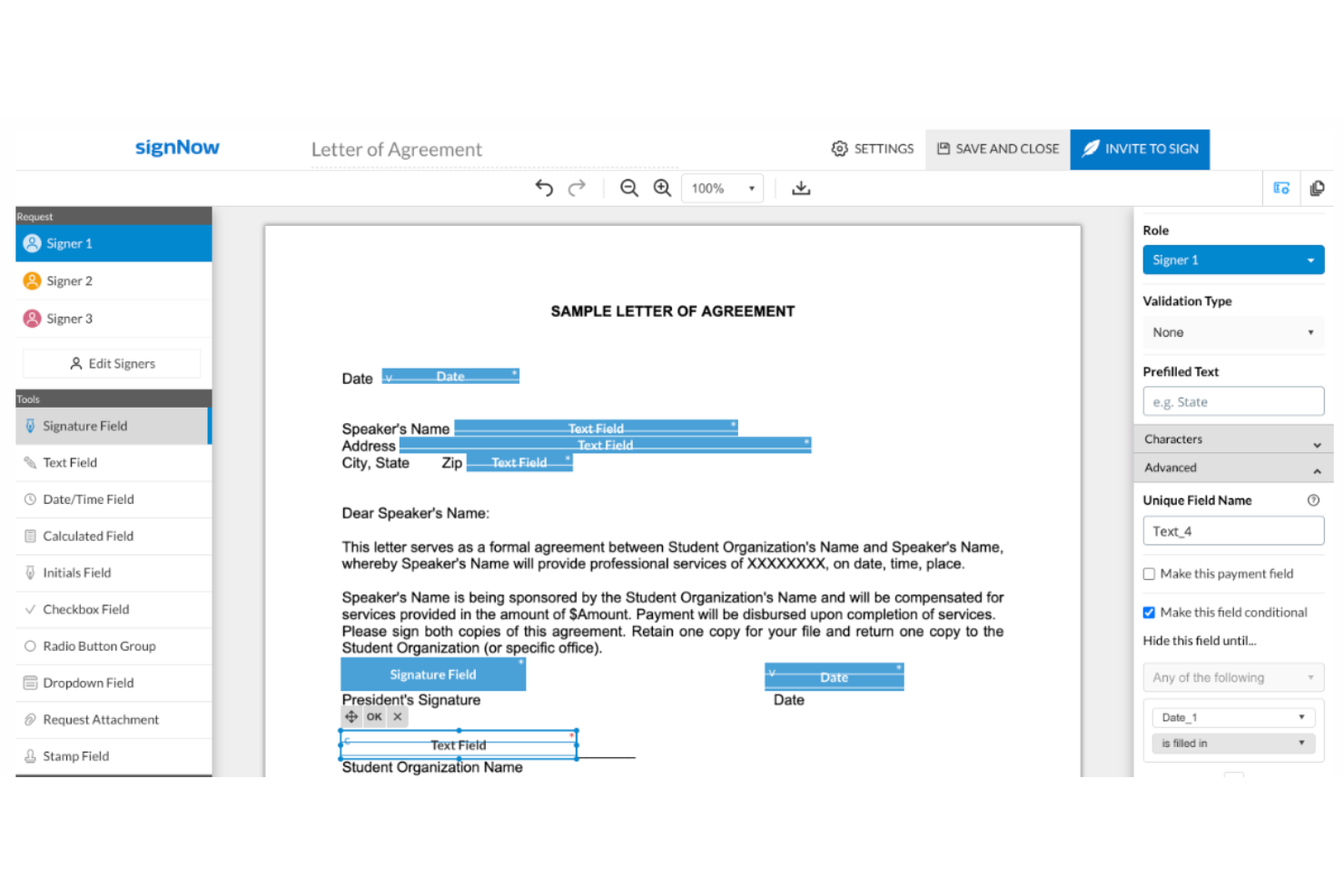
SignNow is built for teams that want to automate document workflows while managing electronic signatures. It’s a strong fit for operations, legal, and procurement teams that need to route, approve, and sign documents in a controlled sequence. With workflow automation tools, SignNow helps you reduce manual steps and keep signature processes moving.
Who is SignNow Best For?
SignNow is appropriate for operations and IT teams in mid-sized to enterprise companies that automate document-driven business processes. It supports organizations integrating signing workflows into broader automation initiatives.
Why I Picked SignNow
SignNow stands out for its workflow automation capabilities, which go beyond basic electronic signature tools. I picked SignNow because it lets you build custom signing sequences, set conditional routing, and automate reminders, so documents move through your process without manual intervention. The platform also supports role-based signing, allowing you to assign specific actions to different stakeholders in a workflow. If your team needs to manage complex approval chains or automate repetitive signature tasks, SignNow is built to handle those requirements.
SignNow Key Features
Some other features that make SignNow useful for electronic signature workflows include:
- Bulk Sending: Send documents to multiple recipients for signature in one action.
- Document Merge: Combine multiple files into a single document before sending for signature.
- Mobile App: Access, sign, and manage documents from iOS and Android devices.
- Custom Branding: Add your company logo and colors to signature requests and notifications.
SignNow Integrations
Integrations include Salesforce, Google Workspace, Netsuite, Autodesk, and Office 365.
Pros and Cons
Pros:
- Advanced mobile and tablet experience
- Valuable for creating a paperless office
- Simplifies adding signatures and fields to documents
Cons:
- Customer support services could be improved
- Occasional crashes
Jotform
Best for form-driven signing workflows
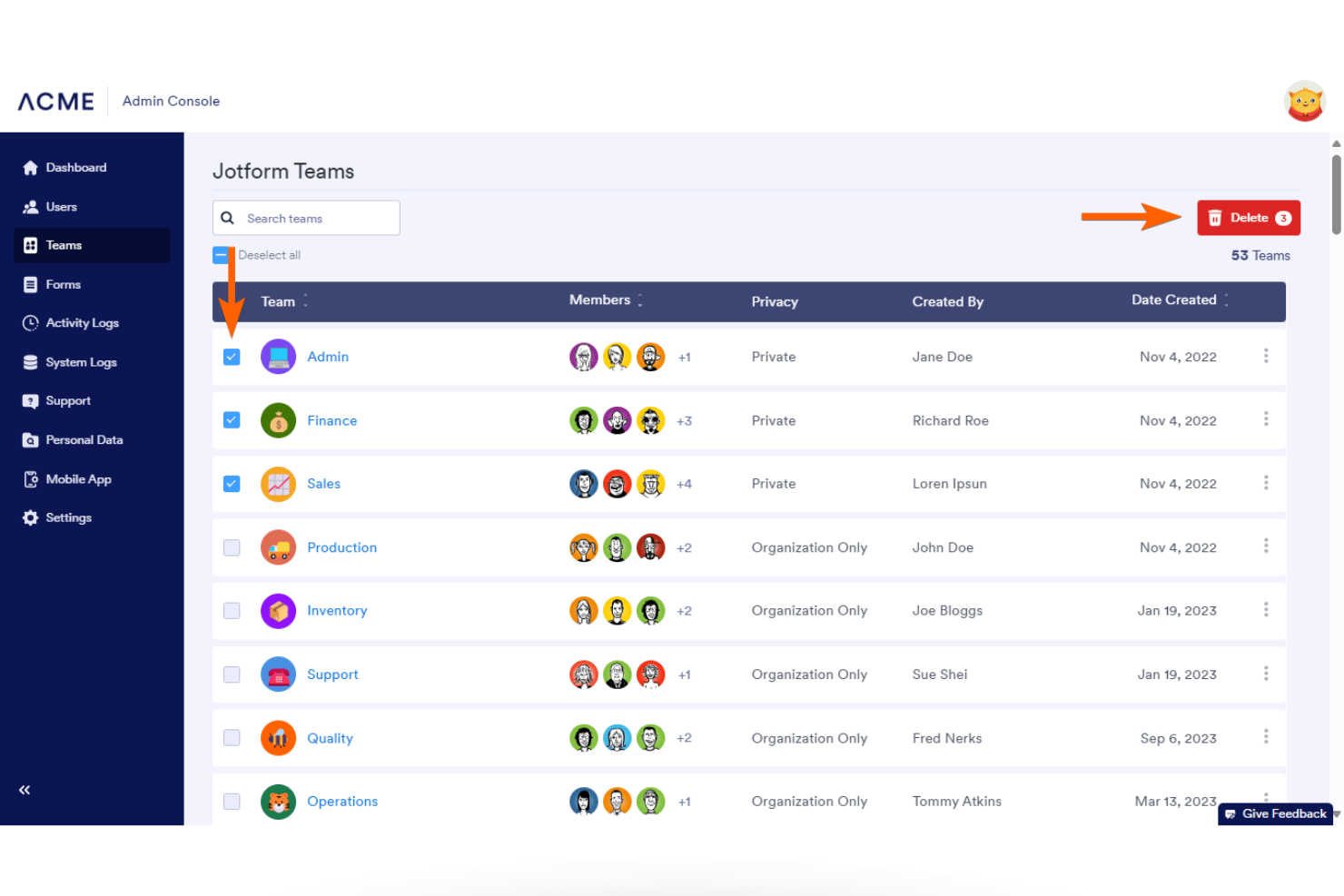
Jotform is an online form automation platform that includes e-signature functionality through Jotform Sign. While it is not a standalone e-signature provider in the traditional sense, it allows teams to generate documents, collect data, and capture legally binding signatures within a single automated workflow. This makes it particularly useful for organizations that need signatures embedded into broader approval, onboarding, or intake processes rather than sent as isolated documents.
Who Is Jotform Best For?
Jotform is a good fit for organizations that need e-signatures embedded within form-driven workflows, especially teams that want to combine data collection, document generation, and signing in one platform.
Why I Picked Jotform
For teams that prioritize branded and customizable signing experiences, Jotform stands out for its flexibility within its form automation environment. I picked Jotform because it allows users to customize forms, emails, and signing workflows to reflect their organization’s identity. This helps maintain consistency throughout the signing process while keeping document generation and signature collection within the same system.
Jotform Key Features
Some other features that make Jotform a strong choice for e signature workflows include:
- Document automation: Automatically generate and send documents for signature based on form submissions.
- Conditional logic: Set up rules that change form behavior or signing workflows based on user responses.
- Audit trails: Track every action taken on a document, including who signed and when, for compliance and transparency.
- Multi-party signing: Collect signatures from multiple stakeholders in a specific order or simultaneously, depending on your workflow needs.
Jotform Integrations
Integrations include Salesforce, Google Sheets, Slack, PayPal, Dropbox, HubSpot, Stripe, Mailchimp, Zoom, and monday.com.
Pros and Cons
Pros:
- Enables mobile-friendly document signing
- Supports bulk sending of signature requests
- Provides detailed audit trails for signatures
Cons:
- Limited offline signing capabilities
- Lacks advanced document editing tools

DocHub
Best for seamless Integration with Gmail

For those in search of an intuitive e-signature solution, DocHub presents an engaging platform to enhance your document workflows. It offers seamless integration with tools like Google Workspace and caters to a range of industries, including education and healthcare. With user-friendly features for editing, signing, and sharing PDFs, DocHub is designed to meet your needs for productivity and compliance with legal standards.
Why I Picked DocHub
I picked DocHub for its integration with Gmail, which is ideal for those who want an efficient e-signature solution without leaving their email workflow. This integration allows you to open, edit, and sign PDF attachments directly within Gmail, saving valuable time and keeping your document management organized. The DocHub for Gmail add-on ensures a secure and user-friendly experience, with compliance to standards like GDPR and HIPAA, providing peace of mind for sensitive documents. By centralizing your document tasks in Gmail, you enhance productivity and protect your data, making DocHub a compelling choice for e-signature needs.
DocHub Key Features
In addition to its integration with Gmail, DocHub offers a range of features to enhance your document management experience.
- Advanced Document Editing: Modify PDFs with tools for text, images, and annotations, allowing you to create custom forms tailored to specific needs.
- Collaborative Workflow Enhancement: Engage in real-time collaboration by sharing documents with controlled permissions and tracking version history to maintain document integrity.
- Mobile Accessibility: Access and manage your documents on mobile devices without the need for an app, ensuring flexibility and productivity on the go.
- Security Features: Share documents securely with options for password protection and recipient authentication, providing peace of mind for sensitive information.
DocHub Integrations
- Integrations include Gmail, Google Drive, Google Classroom, Dropbox, OneDrive, and Microsoft Edge.
Pros and Cons
Pros:
- Supports real-time collaboration, enhancing team productivity.
- Provides advanced document editing features for comprehensive PDF management.
- Offers seamless integration with Google Drive for efficient workflows.
Cons:
- Mobile optimization could be better
- Limited docs with free version

Best for editing and signing PDFs
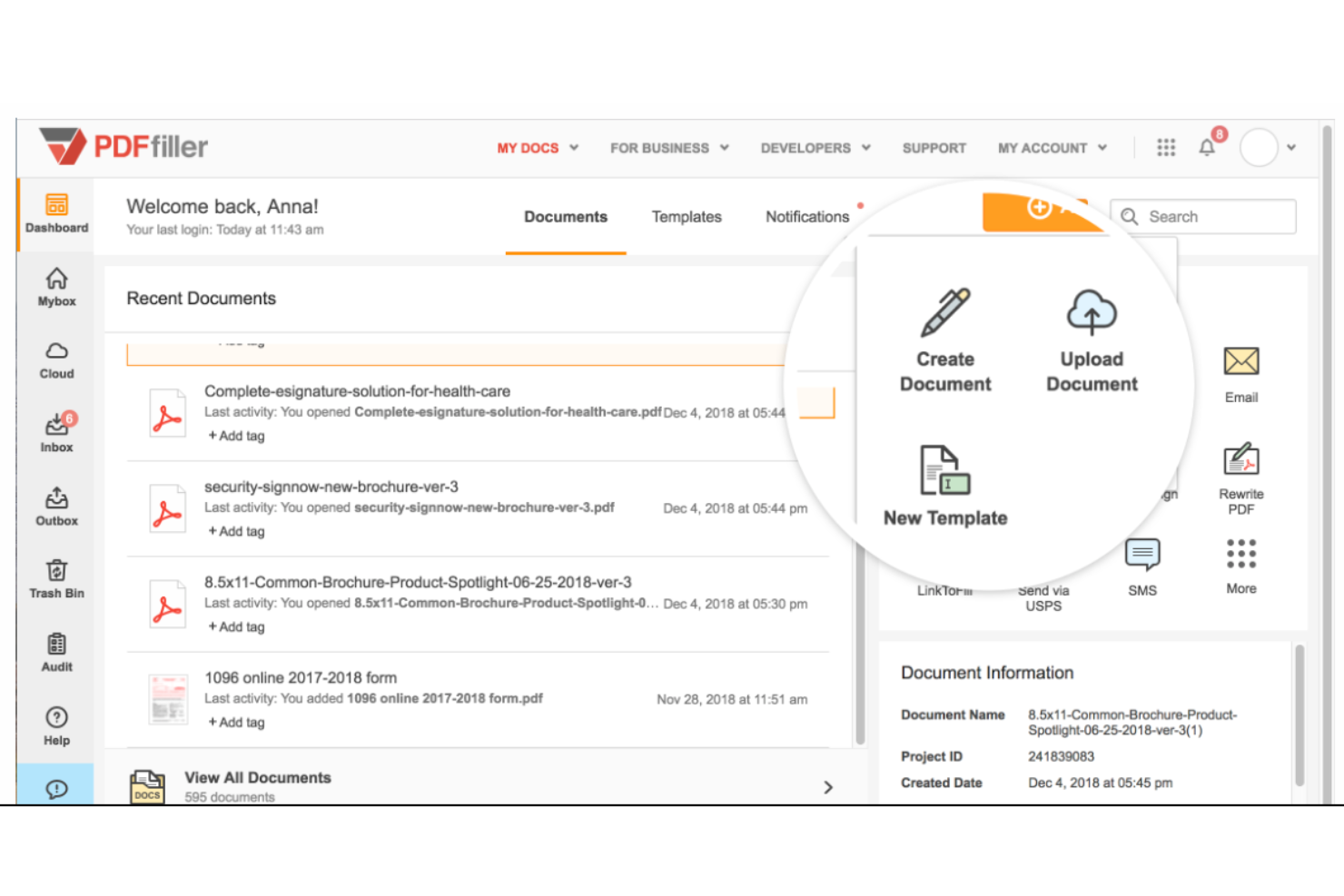
pdfFiller is designed for teams that need to edit, fill, and sign PDFs in one place. It’s especially useful for HR, legal, and administrative professionals who handle a high volume of forms and contracts. With built-in editing and signing tools, pdfFiller helps you manage document workflows without switching between platforms.
Who is pdfFiller Best For?
pdfFiller serves administrative and compliance teams in small to mid-sized organizations that regularly edit and complete PDF forms. It fits businesses that combine document editing and signing within a single workflow.
Why I Picked pdfFiller
What sets pdfFiller apart is its ability to let you edit and sign PDFs within a single platform. I picked pdfFiller because it combines a full-featured PDF editor with electronic signature tools, so you can make changes to documents and collect signatures without exporting files or using multiple apps. The platform supports adding text, images, and checkboxes directly to PDFs, which is especially useful for teams that need to customize forms or contracts before sending them out. If your workflow involves frequent document edits and signatures, pdfFiller brings both together in one place.
pdfFiller Key Features
Some other features that make pdfFiller useful for electronic signature workflows include:
- Bulk Send: Send documents to multiple recipients for signature at once.
- Reusable Templates: Save and reuse frequently used forms and contracts.
- Audit Trail: Track every action taken on a document for compliance.
- Custom Branding: Add your company logo and colors to signature requests and notifications.
pdfFiller Integrations
Integrations include OneDrive, Box, Dropbox, Google Chrome, and G Suite.
Pros and Cons
Pros:
- Helps save time and money
- User-friendly design
- Documents can be password protected
Cons:
- Some formatting issues when converting PDFs to Word
- Advanced features require a steep learning curve

Signwell
Best for audit trail transparency

SignWell is a digital signature platform built for teams that need clear, detailed audit trails for every document. It’s especially useful for legal, finance, and compliance-focused organizations that require transparent tracking of signature activity. SignWell helps you maintain accountability and meet regulatory requirements by providing granular visibility into every step of the signing process.
Who is SignWell Best For?
SignWell is appropriate for small business owners and operations leads that require clear audit trails for signed agreements. It fits organizations that prioritize transparency and straightforward recordkeeping in routine contracts.
Why I Picked SignWell
What sets SignWell apart is its focus on providing a transparent and detailed audit trail for every document you send. The platform automatically records each action—such as when a document is viewed, signed, or declined—along with timestamps and IP addresses. I picked SignWell because this level of tracking is essential for teams that need to demonstrate compliance or resolve disputes. With its audit trail features, you can quickly verify the authenticity and status of any signed document.
SignWell Key Features
Some other features that make SignWell useful for teams managing digital agreements include:
- Reusable Templates: Save time by creating and storing templates for frequently used documents.
- Bulk Send: Send the same document to multiple recipients at once for signature collection.
- Signer Fields: Add custom fields for initials, dates, checkboxes, and text to guide signers through the document.
- Reminders and Notifications: Set up automated reminders and notifications to keep signers on track and informed.
SignWell Integrations
Integrations include QuickBooks Online, Xero, Clio, Close, Jack Henry, and Mambu.
Pros and Cons
Pros:
- Solid basic e-signature functionality (templates, tracking, audit trails)
- Very good value for the cost
- User-friendly and easy to use
Cons:
- Free plan comes with some usage and capability caps
- Feature limitations, better suited for simple workflows

Lightico
Best for real-time collaboration

Lightico is designed for teams that need to collaborate with customers in real time during document signing and completion. It’s especially useful for financial services, insurance, and call centers that want to guide clients through forms, signatures, and document uploads in a live session. With Lightico, you can co-browse, collect signatures, and complete transactions while staying connected with your customers.
Who is Lightico Best For?
Lightico is designed for customer service and financial services teams in enterprise organizations that require real-time document collaboration. It fits businesses that manage time-sensitive customer interactions across digital channels.
Why I Picked Lightico
Lightico stands out for its real-time collaboration capabilities, which are especially valuable for teams that need to guide customers through signing processes as they happen. I picked Lightico because it lets you co-browse documents, collect signatures, and complete forms together with clients in a live session. The platform also supports instant document sharing and secure uploads during the same interaction, so nothing gets lost in follow-up emails. These features make Lightico a strong fit for industries like financial services and insurance, where live customer engagement is often essential.
Lightico Key Features
In addition to its real-time collaboration tools, Lightico offers several other features that support electronic signature workflows:
- eForms: Create and send digital forms for customers to complete and sign within the same session.
- ID Verification: Verify customer identity using built-in ID capture and validation tools.
- Workflow Automation: Set up automated processes for document routing and approval.
- SMS Document Requests: Send document requests and signature links directly to customers via SMS.
Lightico Integrations
Integrations include Salesforce.
Pros and Cons
Pros:
- Designed for real-time use
- Fully integrated with Salesforce
- ADA compliant platform
Cons:
- Requires internet accessibility
- Limited integrations

Best for guided signing workflows

Signaturely is designed for teams and professionals who want a step-by-step signing experience that reduces errors and confusion. Its guided signing workflows help ensure every required field is completed and signatures are collected in the right order. This approach is especially useful for businesses that handle complex agreements or need to walk clients through multi-step documents.
Who is Signaturely Best For?
Signaturely is a practical option for HR teams and operations managers in growing small businesses that need structured, guided signing processes. It works well for organizations formalizing internal document workflows across distributed teams.
Why I Picked Signaturely
Signaturely stands out for its focus on guided signing workflows, which is especially valuable for teams that need to ensure every document is completed accurately. The platform lets you set required fields and signing orders, so you can control exactly how recipients move through each document. I like that Signaturely provides clear prompts and visual cues to guide signers step by step, reducing the risk of missed signatures or incomplete forms. This makes it a strong choice for businesses that handle contracts or agreements with multiple parties and complex requirements.
Signaturely Key Features
Some other features in Signaturely help support a range of document management needs:
- Document Templates: Create and reuse templates for frequently signed agreements and forms.
- Team Management: Add multiple users, assign roles, and manage permissions within your organization.
- Audit Trails: Track every action taken on a document, including timestamps and user details.
- Notifications: Receive email alerts when documents are viewed, signed, or completed.
Signaturely Integrations
Native integrations are not currently listed by Signaturely.
Pros and Cons
Pros:
- Sustainable, green giving
- Hassle-free learning curve
- User-friendly interface
Cons:
- Limited templates unless you pay for the highest tier
- Free plan only allows one document per month

Signeasy
Best for remote team workflows

Signeasy is designed for distributed teams that need to manage signatures and approvals from anywhere. It’s especially useful for businesses with remote or hybrid workforces that require quick, mobile-friendly document signing. Signeasy helps you keep signature workflows moving smoothly, even when your team is spread across different locations and time zones.
Who is Signeasy Best For?
Signeasy is appropriate for remote teams and managers in small to mid-sized companies that need consistent signing workflows across devices. It aligns with organizations managing distributed workforces across multiple locations.
Why I Picked Signeasy
When remote teams need to keep business moving, Signeasy stands out for its mobile-first approach to electronic signatures. I picked Signeasy because it lets users send, sign, and track documents from smartphones and tablets, which is essential for distributed teams that aren’t always at a desk. The tool also supports in-person signing on mobile devices, making it flexible for hybrid work scenarios. With real-time notifications and status tracking, Signeasy helps remote teams stay aligned and responsive throughout the signature process.
Signeasy Key Features
Some other features that make Signeasy useful for electronic signature workflows include:
- Document Templates: Save and reuse frequently used documents to speed up signature requests.
- Team Management Dashboard: Assign roles, manage users, and monitor team activity from a centralized dashboard.
- Audit Trails: Access a detailed log of every action taken on a document for compliance and tracking.
- Cloud Storage Integrations: Connect directly with Google Drive, Dropbox, and OneDrive to import and export documents.
Signeasy Integrations
Integrations include Google Workspace, Microsoft SharePoint, Microsoft Outlook, and Teamtailor.
Pros and Cons
Pros:
- Solid integrations and device compatibility
- Affordable pricing for smaller teams
- Mobile and on-the-go friendly
Cons:
- Some integration issues reported
- Feature limitations for complex workflows

CocoSign
Best for multi-language support

If your team needs to send and sign documents in multiple languages, CocoSign is built to support global workflows. It’s a strong fit for international businesses, legal teams, and HR departments that manage agreements across different regions. CocoSign helps you handle e-signatures and document management without language barriers getting in the way.
Who is CocoSign Best For?
CocoSign is suitable for cross-border teams and mid-sized companies that manage documents in multiple languages. It supports organizations with international operations that require accessible signing workflows for diverse user bases.
Why I Picked CocoSign
CocoSign caught my attention because it’s one of the few electronic signature platforms that truly prioritizes multi-language support. You can send, sign, and manage documents in over a dozen languages, which is essential for teams working across borders or with international clients. I appreciate that CocoSign allows both senders and signers to interact with the platform in their preferred language, reducing confusion and errors. This focus on language accessibility makes CocoSign a practical choice for global organizations and distributed teams.
CocoSign Key Features
Some other features that make CocoSign useful for electronic signature workflows include:
- Bulk Send: Send the same document to multiple recipients at once for signature collection.
- Document Templates: Save reusable templates for frequently used agreements and forms.
- Audit Trail: Track every action taken on a document with a detailed, time-stamped log.
- In-Person Signing: Capture signatures on-site using a tablet or mobile device.
CocoSign Integrations
Integrations include Google Drive, Google Docs, Gmail, and Microsoft Word.
Pros and Cons
Pros:
- Mobile-friendly interface
- Low barrier to entry
- Free plan that allows unlimited signatures
Cons:
- No bulk deleting of documents
- No mobile app

DottedSign
Best for mobile-first document signing

If you need to sign and manage documents on the go, DottedSign is built with a mobile-first approach that’s ideal for remote teams, field workers, and busy professionals. The app’s design prioritizes mobile usability, making it easy to send, sign, and track documents from your phone or tablet. This focus on mobile workflows helps teams keep business moving, even when they’re away from their desks.
Who is DottedSign Best For?
DottedSign is suitable for field teams, sales representatives, and mobile-first professionals in small to mid-sized companies. It supports organizations that require document signing capabilities optimized for remote and on-the-go use.
Why I Picked DottedSign
DottedSign caught my attention because it’s designed specifically for mobile-first document signing, which is still rare among electronic signature tools. The app offers a dedicated mobile experience with features like in-app signing, document tracking, and push notifications, all optimized for smartphones and tablets. I appreciate that DottedSign lets users manage signing tasks, send reminders, and monitor document status directly from their mobile devices. This makes it a strong fit for teams and professionals who need to handle signatures and approvals while working remotely or in the field.
DottedSign Key Features
Some other features in DottedSign help round out its document management capabilities:
- Bulk Send: Send the same document to multiple recipients for signature at once.
- Template Library: Save and reuse frequently used documents as templates.
- Document Expiration: Set expiration dates for signing requests to keep workflows on track.
- Audit Trail: Access a detailed log of all document activities and actions.
DottedSign Integrations
Integrations include Salesforce and LINE WORKS.
Pros and Cons
Pros:
- Can edit documents on mobile
- User-friendly platform
- More comprehensive free option
Cons:
- Limited template options
- Cost is per user
Outro software de assinatura eletrónica
Eis as alternativas selecionadas para as melhores opções de assinatura eletrónica, juntamente com o respetivo melhor caso de utilização.
- SignRequest
For simple API integration
- SignPlus
For cross-platform accessibility
- PandaDoc
For contract lifecycle management
- DigiSigner
For quick document turnaround
- Under.io
For blockchain-based verification
- Dropbox Sign
For Dropbox document management
- Scrive
For advanced authentication options
- GetAccept
For sales document automation
- Xodo Sign
For Google Workspace integration
- Box
For secure cloud storage integration
- Qwilr
For interactive proposal creation
- CINCEL
For Latin American compliance
- Foxit eSign
For PDF document handling


Análises relacionadas de software de assinatura eletrónica
Se ainda não encontrou aqui o que procura, consulte estas ferramentas estreitamente relacionadas com software de assinatura eletrónica que testámos e avaliámos.
- Software de CRM
- Software de vendas
- Software de gestão de potenciais clientes
- Software de inteligência empresarial
- Software de gestão de contratos
- Sistema de gestão de receitas
- Software de recolha de documentos
- Software de verificação de documentos
- Software de gestão de documentos de código aberto
How I Evaluate Electronic Signature Software
I split my evaluation into two layers: baseline requirements every tool must meet—like legally binding signatures and multi-party workflows—and differentiators that separate good from great.
Core Functionality (Table Stakes For This List)
When I'm selecting tools for my list, I rank each one on a scale from 0 (does not offer the functionality) to 5 (excels in this area) for each core functionality listed below. Then, I calculate the tool's total score into a percentage. Each tool needs to achieve a minimum total score of 65% to be considered for inclusion.
- Legally Binding Signatures: I check for compliance with ESIGN, UETA, and eIDAS at a minimum, plus whether advanced or qualified signatures are available for regulated projects.
- Multi-Party Signing Workflows: Project sign-offs rarely involve one signer, so I evaluate how each tool handles sequential, parallel, and role-based routing across stakeholders.
- Reusable Templates & Fields: Sending the same SOW or change order format repeatedly should be painless—I look for drag-and-drop field placement and shared template libraries.
- Document Status Tracking & Reminders: Chasing down a missing signature on a milestone approval kills momentum, so automated reminders and real-time status dashboards matter here.
- Project Management Integrations: I evaluate native connections with tools like Asana, Jira, Monday, and Smartsheet, along with API and Zapier support for custom workflows.
- Audit Trail & Secure Storage: Every signed document should produce a certificate of completion with timestamps, IP addresses, and signer identity—plus encrypted storage to back it up.
Once I have a list of tools that meet this criteria, I consider what sets each platform apart.
Differentiating Factors (What Sets Vendors Apart)
Here's how I compare and contrast different vendors:
Standout Features
Conditional logic in forms is a big deal for project documents. A change order template that adjusts fields based on whether the scope change affects budget, timeline, or both saves teams from managing multiple document versions. I also evaluate mobile signing, since field teams and remote stakeholders need to execute documents from a phone without a degraded experience. In-person signing mode matters too—contractor onboarding at a job site where you pass a single tablet around is a common scenario.
Beyond Features
The signer experience matters more than most buyers realize. If external contractors or clients need to create an account just to countersign an SOW, you're adding friction to every project kickoff. I look for platforms where signers complete documents with zero account setup. Pricing models also deserve attention—per-envelope pricing can spike costs during high-volume delivery phases, while per-user plans may suit smaller PMOs better. Security certifications like SOC 2 Type II and data residency options come into play when your projects span multiple regions or involve sensitive data.
Como escolher software de assinatura eletrónica
É fácil perder-se em listas extensas de funcionalidades e estruturas de preços complexas. Para o ajudar a manter o foco enquanto analisa avaliações de software de assinatura eletrónica, apresentamos uma lista de verificação dos fatores a ter em conta:
| Fator | O que considerar |
| Escalabilidade | Certifique-se de que a ferramenta consegue acompanhar o crescimento da sua equipa. Procure planos flexíveis, acesso para vários utilizadores e suporte para grandes volumes de documentos. |
| Integrações | Verifique se o software funciona com as suas ferramentas de gestão de projetos, armazenamento na nuvem ou CRM. As integrações poupam tempo e reduzem os erros. |
| Personalização | Verifique se pode adicionar o logótipo da sua empresa, criar modelos e ajustar os fluxos de trabalho de acordo com a forma como a sua equipa trabalha. |
| Facilidade de utilização | A interface deve ser suficientemente intuitiva para que qualquer pessoa da sua equipa possa enviar e assinar documentos sem precisar de passar por uma curva de aprendizagem. |
| Orçamento | Analise o que está incluído em cada nível de preços. Considere a frequência com que enviará documentos e quantos utilizadores precisam de acesso. |
| Medidas de segurança | Certifique-se de que a ferramenta inclui registos de auditoria, encriptação e autenticação dos signatários para proteger documentos sensíveis. |
| Acesso móvel | É útil ter a opção de assinar ou consultar documentos através de um telemóvel ou tablet quando está longe da sua secretária. |
| Acompanhamento de documentos | Procure atualizações de estado em tempo real, notificações e lembretes para acompanhar os documentos que requerem atenção. |
O que é software de assinatura eletrónica?
O software de assinatura eletrónica é uma ferramenta digital que permite aos utilizadores assinar documentos eletronicamente de forma rápida, segura e juridicamente vinculativa.
Utilizado por equipas jurídicas, de recursos humanos, de operações e de gestão de projetos, simplifica os fluxos de trabalho de aprovação através de funcionalidades como autenticação dos signatários, acompanhamento de documentos e modelos reutilizáveis. As ferramentas de assinatura eletrónica reduzem o trabalho administrativo manual, aceleram os processos e melhoram a precisão na manutenção de registos.
Tendências do software de assinatura eletrónica
Na minha investigação, consultei inúmeras atualizações de produtos, comunicados de imprensa e registos de lançamentos de diferentes fornecedores de software de assinatura eletrónica. Eis algumas das tendências emergentes que estou a acompanhar:
- Preparação de documentos assistida por IA: Algumas ferramentas utilizam agora IA para sugerir onde colocar campos de assinatura e preencher automaticamente informações importantes. Isto ajuda as equipas a preparar documentos mais rapidamente e a evitar campos esquecidos.
- Assinatura integrada em fluxos de trabalho personalizados: Os fornecedores estão a disponibilizar opções para integrar a assinatura em portais ou aplicações personalizados. Isto ajuda as equipas a manter uma experiência de utilizador consistente sem encaminhar os utilizadores para uma ferramenta externa.
- Complementos de verificação de identidade: Atualmente, mais ferramentas permitem realizar verificações de identidade, como a leitura de documentos de identificação oficiais ou o reconhecimento facial, antes da assinatura. Isto ajuda a garantir a conformidade e reduz o risco de fraude.
- Modelos inteligentes com lógica condicional: Algumas plataformas permitem criar modelos que se alteram com base nos dados introduzidos pelo utilizador. Isto reduz as edições manuais e ajuda a uniformizar tipos de documentos complexos.
- Registos de auditoria mais completos: Os registos de auditoria incluem agora frequentemente mais detalhes, como endereços IP, o tempo despendido em cada página e o comportamento de cliques. Isto proporciona às equipas uma visão mais clara de quem fez o quê e quando.
Funcionalidades do software de assinatura eletrónica
Ao selecionar software de assinatura eletrónica, procure as seguintes funcionalidades essenciais:
- Ferramentas de preparação de documentos: Crie, carregue e prepare documentos para assinatura sem esforço. Estas ferramentas permitem adicionar campos como assinaturas, datas e iniciais, para que a recolha das informações certas seja sempre simples e organizada.
- Assinatura por várias partes: Recolha assinaturas de várias pessoas num único fluxo de trabalho. Esta funcionalidade é perfeita quando os acordos exigem o contributo de diferentes departamentos ou de vários clientes, tornando a colaboração rápida e eficiente.
- Opções de autenticação: Escolha entre métodos como verificação por e-mail, códigos SMS ou verificações de identidade para confirmar a identidade de cada signatário. Isto ajuda a proteger dados sensíveis e garante que as suas assinaturas têm validade legal.
- Registos de auditoria: Acompanhe todas as ações — como quando um documento foi aberto, quem o assinou e os detalhes do carimbo temporal. Isto proporciona uma camada adicional de segurança e tranquilidade, especialmente se precisar de comprovar posteriormente a integridade do documento.
- Gestão de modelos: Poupe tempo reutilizando modelos para acordos, contratos ou qualquer documentação que envie regularmente. Com esta funcionalidade, pode configurar formulários padrão uma única vez e enviá-los com apenas alguns cliques.
- Capacidades de integração: Ligue a sua ferramenta de assinatura eletrónica a outro software que já utiliza, como CRM, armazenamento na nuvem ou aplicações de produtividade. Esta integração perfeita ajuda a manter o trabalho em andamento sem ter de alternar constantemente entre plataformas.
- Compatibilidade com dispositivos móveis: Assine e gira documentos a partir do seu telemóvel ou tablet. Quer esteja em deslocação ou a trabalhar remotamente, pode manter tudo em andamento com apenas alguns toques.
- Normas de conformidade e segurança: Certifique-se de que o software cumpre normas legais e do setor importantes, como o eIDAS ou o ESIGN, e utiliza encriptação para proteger os seus dados. Isto mantém tudo em conformidade e seguro.
Funcionalidades comuns de IA do software de assinatura eletrónica
Para além das funcionalidades padrão do software de assinatura eletrónica listadas acima, as ferramentas de assinatura eletrónica baseadas em AI incluem funcionalidades como:
- Reconhecimento inteligente de documentos: A AI deteta e identifica automaticamente campos para assinaturas, nomes ou datas assim que carrega um documento, poupando tempo na configuração e reduzindo erros manuais.
- Sugestões automatizadas de fluxos de trabalho: A AI prevê a ordem ideal de assinatura ou recomenda etapas do fluxo de trabalho com base nos seus documentos anteriores, tornando os processos de aprovação grandes ou complexos muito mais simples.
- Algoritmos de deteção de fraude: A aprendizagem automática identifica padrões ou comportamentos de assinatura invulgares — como endereços IP suspeitos ou falhas de autenticação repetidas —, ajudando a sinalizar precocemente possíveis fraudes.
- Pesquisa em linguagem natural: Pode encontrar contratos ou detalhes específicos dentro de documentos assinados utilizando consultas de pesquisa simples e conversacionais, porque a AI compreende aquilo que procura — tornando as auditorias e revisões muito mais fáceis.
- Análise da validade das assinaturas: A AI monitoriza em tempo real a autenticidade de cada assinatura através da análise de marcadores digitais, para que possa confirmar com confiança se um documento é genuíno ou foi adulterado.
Vantagens do software de assinatura eletrónica
A implementação de software para assinaturas digitais proporciona várias vantagens para a sua equipa e para a sua empresa. Eis algumas das vantagens que pode esperar:
- Aprovações mais rápidas: Pode enviar, assinar e devolver documentos em minutos, em vez de esperar dias.
- Menos atrasos: Os lembretes automatizados e as ferramentas de acompanhamento ajudam a evitar estrangulamentos e assinaturas em falta.
- Custos mais baixos com documentação: Não precisará de imprimir, digitalizar ou enviar documentos pelo correio, o que poupa tempo e dinheiro.
- Maior precisão: Os modelos e os campos obrigatórios ajudam a evitar assinaturas em falta ou formulários incompletos.
- Melhor gestão de registos: Os registos de auditoria e as integrações com armazenamento na nuvem facilitam o armazenamento e a recuperação de documentos.
- Assinatura mais segura: Funcionalidades como a encriptação e a autenticação ajudam a proteger informações sensíveis.
- Colaboração mais fácil: As equipas em diferentes localizações podem assinar e enviar documentos sem precisarem de se reunir presencialmente.
Custos e preços do software de assinatura eletrónica
A seleção de software de assinatura eletrónica exige uma compreensão dos vários modelos de preços e planos disponíveis. Os custos variam consoante as funcionalidades, a dimensão da equipa, os complementos e outros fatores. A tabela abaixo resume os planos comuns, os respetivos preços médios e as funcionalidades normalmente incluídas nas soluções de software de assinatura eletrónica:
Tabela de comparação de planos de software de assinatura eletrónica
| Tipo de plano | Preço médio | Funcionalidades comuns incluídas |
|---|---|---|
| Básico | $10 - $25/user/month | Assinatura eletrónica básica, número limitado de envios de documentos, integração essencial |
| Profissional | $25 - $40/user/month | Assinatura eletrónica avançada, mais envios de documentos, marca personalizada, integrações |
| Empresarial | Preço personalizado | Integrações avançadas, acesso à API, maior segurança, suporte dedicado |
| Gratuito | $0 | Assinatura eletrónica muito básica, número limitado de documentos por mês |
Perguntas frequentes sobre software de assinatura eletrónica
Ainda tem dúvidas sobre software de assinatura eletrónica? Aqui encontrará algumas perguntas frequentes para o ajudar a reunir toda a informação necessária.
Como podem os gestores de projetos automatizar fluxos de trabalho com software de assinatura eletrónica?
Pode automatizar os processos de documentos através da configuração de modelos, encaminhamento para aprovação, lembretes e lógica condicional. Muitas ferramentas de assinatura eletrónica permitem atribuir a ordem dos signatários, desencadear os passos seguintes após as assinaturas e arquivar automaticamente os documentos finalizados. Procure software com criadores de fluxos de trabalho ou integrações incorporadas com ferramentas de gestão de projetos para poupar tempo e reduzir o acompanhamento manual.
O software de assinatura eletrónica pode integrar-se com sistemas CRM?
Sim, a maioria das principais plataformas de assinatura eletrónica disponibiliza integrações com CRM, incluindo Salesforce, HubSpot e Zoho. Estas ligações ajudam a obter dados de contacto, enviar documentos diretamente a partir do CRM e registar automaticamente os acordos concluídos nos registos. A integração das ferramentas de assinatura eletrónica com o CRM reduz a introdução duplicada de dados e acelera a conclusão dos contratos.
Que aspetos legais devo ter em conta ao utilizar ferramentas de assinatura eletrónica?
As assinaturas eletrónicas são legais na maioria dos países, mas deve verificar se o seu software cumpre regulamentos como o ESIGN, o eIDAS ou o UETA. Confirme se os seus documentos exigem tipos especiais de autenticação ou registos de auditoria mais detalhados. Alguns contratos (como testamentos) podem exigir uma assinatura manuscrita — consulte a sua equipa jurídica antes de mudar totalmente para o formato digital.
Como verifica o software de assinatura eletrónica a identidade do signatário?
As plataformas de assinatura eletrónica utilizam métodos como a verificação por e-mail, códigos SMS, códigos PIN de acesso e registos de auditoria para confirmar a identidade dos signatários. Para documentos sensíveis, pode exigir autenticação multifator ou até validação através de um documento de identificação oficial. O método de verificação escolhido deve corresponder ao nível de risco dos seus contratos.
Existe software de assinatura eletrónica gratuito?
Sim, vários fornecedores oferecem planos gratuitos, mas estes limitam frequentemente as funcionalidades, os modelos ou o volume mensal de documentos. As versões gratuitas podem ser adequadas para testes ou utilizações muito pontuais, mas a maioria das equipas de projeto precisa de subscrições pagas para aceder a integrações robustas, suporte e funcionalidades de conformidade. Verifique se um fornecedor oferece um período de teste gratuito para avaliar a funcionalidade com o seu fluxo de trabalho.
Quais são os tipos de software de assinatura eletrónica?
Existem ferramentas de assinatura eletrónica baseadas na nuvem, instaladas localmente e orientadas por API. As aplicações na nuvem são as mais fáceis para a maioria das equipas, oferecendo uma configuração rápida e atualizações automáticas. As soluções instaladas localmente são adequadas para organizações com necessidades de segurança rigorosas. As plataformas baseadas em API permitem integrações personalizadas, mas podem exigir uma configuração técnica mais complexa. Considere os conhecimentos técnicos e as necessidades de segurança da sua equipa antes de escolher.
Existem opções para envio em massa?
Muitas plataformas de assinatura eletrónica incluem funcionalidades de envio em massa, permitindo criar um modelo e enviá-lo a dezenas ou centenas de destinatários de uma só vez. Os lembretes automáticos e um painel de acompanhamento das respostas simplificam o acompanhamento, poupando tempo em tarefas administrativas repetitivas e melhorando a eficiência na gestão da distribuição de documentos em grande escala.
Como lidam as plataformas de assinatura eletrónica com o controlo de versões dos documentos?
A maioria das ferramentas regista as edições dos documentos, mantém registos de auditoria e permite recuperar versões assinadas ou anteriores quando necessário. Consulte o painel do seu software para verificar as funcionalidades de controlo de versões e certifique-se de que o seu fluxo de trabalho inclui salvaguardas para impedir o envio de documentos desatualizados para assinatura, reduzindo os erros e mantendo a conformidade.