

As 10 principais ferramentas de gestão de ativos digitais para pequenas empresas

Melhor software de gestão de ativos digitais para pequenas empresas: lista restrita


Armazenar e partilhar ficheiros digitais pode tornar-se confuso — especialmente quando a sua equipa gere ativos de clientes, conteúdos criativos e prazos apertados. Se alguma vez perdeu tempo à procura da versão certa de um ficheiro, conhece bem essa frustração.
O software de gestão de ativos digitais (DAM) mantém os ficheiros organizados e fáceis de aceder. Isto é especialmente útil para pequenas empresas que não têm tempo extra para lidar com sistemas desorganizados.
Neste artigo, vou apresentar-lhe as melhores ferramentas de DAM para pequenas equipas, com foco nas funcionalidades que ajudam a manter a organização, poupar tempo e manter os projetos em andamento.
Why Trust Our Software Recommendations
Our team has been testing and reviewing software since 2012. As project managers ourselves, we know how difficult—and important—it is to choose the right software.
For this guide, we evaluated tools using hands-on testing and independent research, scoring tools using our selection criteria. We also draw on insights from industry thought leaders and practicing project management experts.
Our reviews reflect our human editorial judgment, not a sales pitch.
Expert reviewers:
Tabela comparativa de software de gestão de ativos digitais para pequenas empresas
Esta tabela comparativa resume os detalhes de preços das minhas principais escolhas de software de DAM para pequenas empresas:
| Tool | Best For | Trial Info | Price | ||
|---|---|---|---|---|---|
| 1 | Best for asset collaboration | 7-day free trial + free demo available | From $100/month | Website | |
| 2 | Best for customizable branded portals | Free demo available | Pricing upon request | Website | |
| 3 | Best for smart asset search | Free plan + demo available | From $900/month (billed annually) | Website | |
| 4 | Best for dynamic search filters | Free plan + 14-day free trial + demo available | From $99/month | Website | |
| 5 | Best for granular user access control | Free plan + free trial available | From $250/month (billed annually) | Website | |
| 6 | Best for custom branding features | 30-day free trial available | From $29/month | Website | |
| 7 | Best for creative content | Free demo available | Pricing upon request | Website | |
| 8 | Best for marketing operations | Free demo available | From $567/month (billed annually) | Website | |
| 9 | Best for asset distribution | Free trial + demo available | From $300/user/month | Website | |
| 10 | Best for data management | Free demo available | Pricing upon request | Website |

Avaliações do melhor software de gestão de ativos digitais para pequenas empresas
Apresento abaixo os meus resumos detalhados do melhor software de DAM para pequenas empresas que integrou a minha lista restrita. As minhas avaliações oferecem uma análise detalhada das principais funcionalidades, vantagens & desvantagens, integrações e casos de utilização ideais de cada ferramenta, para ajudar a encontrar a melhor opção para si.

Pics.io
Best for asset collaboration
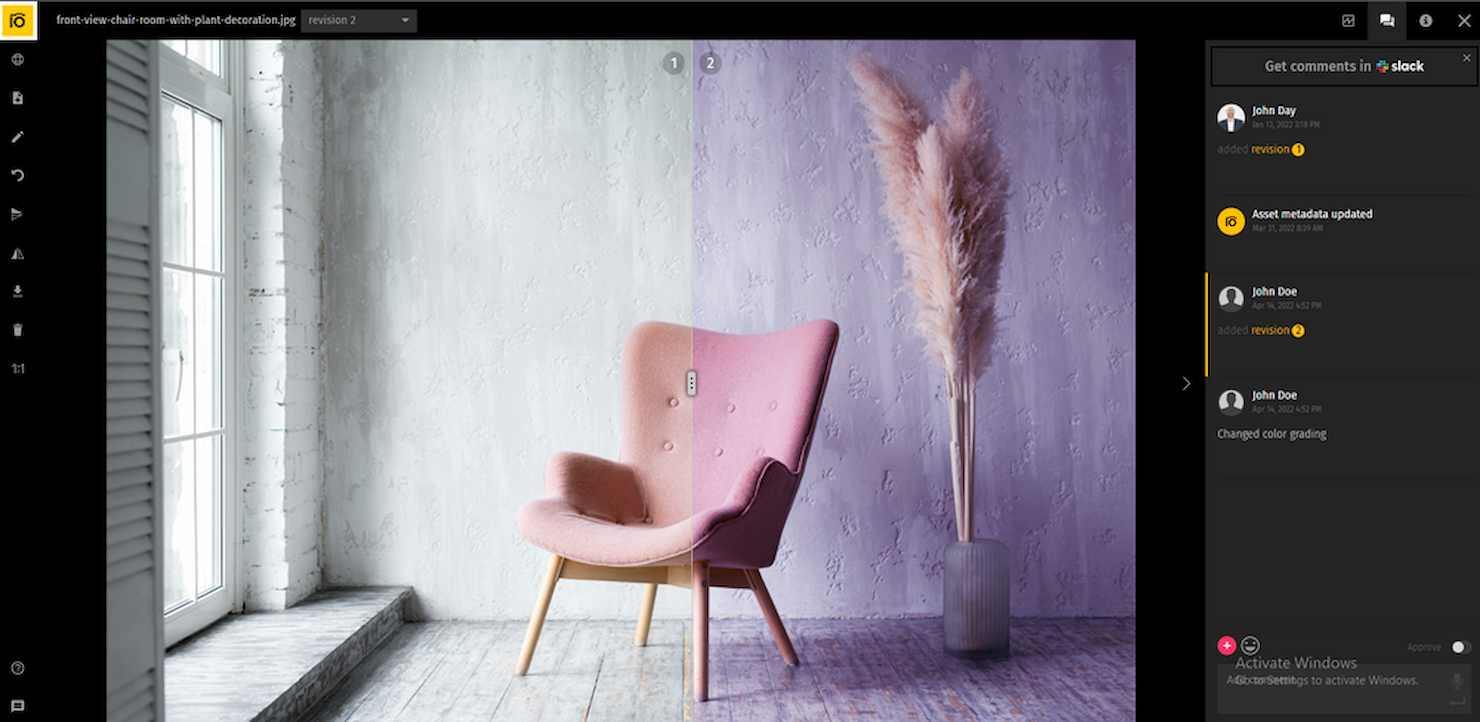
Pics.io is a digital asset management platform for small businesses that organizes, stores, and centralizes images, videos, and creative files in the cloud.
Who Is Pics.io Best For?
Pics.io is a good fit for small creative and marketing teams that need a shared space to store, organize, and manage visual assets together.
Why I Picked Pics.io
I picked Pics.io as one of the best tools because of how well it handles collaboration across creative teams working on shared assets. I particularly like the inline commenting on images and videos—comments are time-stamped, and you can even pin them to specific timecodes in a video, which makes feedback loops between designers, editors, and stakeholders much tighter. My team also uses the version control feature to approve or reject file versions directly in the platform, so there's no need to chase down feedback over email. The role-based permissions let you control exactly who can view, edit, or share each asset, which keeps external contractors and freelancers in their lane without locking them out entirely.
Pics.io Key Features
- Custom metadata fields: Create your own metadata fields beyond default options to match your team's specific workflows and terminology.
- AI auto-tagging: Automatically generate keywords and tags for uploaded assets, including facial recognition across image libraries.
- Saved searches: Save frequently used search queries and filter combinations so your team can pull up recurring asset sets instantly.
- Expiring share links: Set expiration dates on shared asset links to control how long external partners or clients can access your files.
Pics.io Integrations
Pics.io offers native integrations with Google Drive, Amazon S3, and Adobe Creative Cloud. An API is available for custom integrations.
Pros and Cons
Pros:
- Extensive integration options with popular tools and services
- Comprehensive version control for asset management
- Intuitive interface for easy navigation and use
Cons:
- The learning curve for advanced features may require additional training
- Minimum user requirements
New Product Updates from Pics.io
Pics.io Adds Filtered Audit Trail CSV Exports
Pics.io now lets you export Audit Trail logs to CSV and apply filters before exporting, making it easier to analyze and share activity history. For more information, visit Pics.io's official site.
 .
Best for customizable branded portals

MediaValet is a digital asset management platform for small businesses that lets you organize, store, search, and share digital files in a centralized cloud library.
Who Is MediaValet Best For?
MediaValet is a good fit for marketing and creative teams in small businesses that need a centralized place to manage and distribute brand assets.
Why I Picked MediaValet
MediaValet earns its spot on my shortlist because of its Experience Portals feature, which lets small business marketing teams build fully branded asset-sharing spaces with custom colors, typography, and media. I like that these portals aren't just static pages—they use a flexible CMS so you can push real-time updates to brand content without rebuilding anything. You can also set granular permissions per portal, so external partners get access to the assets they need while sensitive files stay locked down. The self-serve access model means your creative team spends less time fielding asset requests and more time on actual work.
MediaValet Key Features
- AI-powered metadata tagging: Automatically generate descriptive tags for assets using AI, including object detection, color recognition, and face recognition to improve searchability.
- Advanced search with custom attributes: Filter assets by file type, status, document text, rating, and custom tags, with the option to save and share search views across your team.
- Asset proofing: Review and annotate assets directly in the platform to move files through an approval workflow without switching tools.
- Templating: Customize locked, on-brand templates (powered by Marq) directly from the DAM without needing to involve the design team.
MediaValet Integrations
MediaValet offers native integrations with Adobe Creative Cloud, Microsoft 365, WordPress, Drupal, and Hootsuite. An API is available for custom integrations.
Pros and Cons
Pros:
- Robust search capabilities allow for quick location of assets
- Advanced security features ensure assets remain protected
- Mobile access allows for asset management on the go
Cons:
- Potential learning curve for new users
- Limited options for customizing the user interface

Air
Best for smart asset search

Air is a digital asset management platform for small businesses that offers AI-powered search, visual organization, version control, and team collaboration tools for managing creative files.
Who Is Air Best For?
Air is a good fit for small creative teams—like marketing, design, and content teams—that manage large libraries of visual assets and need a faster way to find and share files.
Why I Picked Air
Air earns its spot on my shortlist because of how well its AI-powered search handles large libraries of visual content. I can search by color, subject, or even text within an image—without manually tagging a single file. Air's automatic tagging does the heavy lifting, so my team can locate a specific product photo or campaign asset in seconds rather than digging through folders. I also like that search results surface in a visual grid, making it easy to scan and confirm you've found the right file at a glance.
Air Key Features
- Reviews and approvals: Leave comments, annotate, and approve assets directly within Air without switching to a separate tool.
- Version control: Track changes across asset iterations so your team always knows which file is the most current, approved version.
- Share links: Share collections of assets with external stakeholders via a single link, with no account required to view.
- Video and audio transcription: Automatically transcribe spoken content in video and audio files, making them searchable by what's said.
Air Integrations
Air offers native integrations with Slack, Adobe Creative Cloud, Zapier, and Canva. An API is available for custom integrations.
Pros and Cons
Pros:
- Good for approval and feedback features
- Supports various file formats
- Facilitates easy sharing of visual assets
Cons:
- Lacks a dedicated mobile app
- Not ideal for non-visual digital assets
New Product Updates from Air

Air Showcases Introduces Custom Branding, Content Blocks, and Sub-Pages
Air Showcases now support custom branding, content blocks, sub-pages, and saved default layout settings, plus more control over removing items and branding options for Enterprise. For more information, visit Air's official site.

Best for dynamic search filters

Stockpress is a digital asset management platform for small businesses that organizes, stores, and shares files with customizable permissions and advanced search capabilities.
Who Is Stockpress Best For?
Stockpress is a good fit for small creative and marketing teams that need a straightforward way to store, organize, and share brand assets.
Why I Picked Stockpress
Stockpress earns its spot on my shortlist because of how well its dynamic filters work for teams that manage large, mixed-format asset libraries. You can filter files by orientation, file extension, owner, tag, status, and more—all at once—which means finding a specific approved PNG from last quarter's campaign takes seconds, not a scroll through endless folders. I also like the Smart Collections feature, which lets you build collections dynamically using saved search terms and tags, so your most-used asset groups stay current without any manual upkeep. Pinned searches also let you save and repeat complex filter combinations.
Stockpress Key Features
- AI tagging: Tags uploaded images with up to 90% accuracy, reducing manual metadata work across large asset libraries.
- File versioning: Upload new file versions directly into existing ones, creating a version stack so your team always knows which file is current.
- Guest uploads: Generate public upload pages so external contributors can add files directly to specific collections in your workspace.
- File annotations: Add comments to specific areas on any file type, including video, for precise feedback during review cycles.
Stockpress Integrations
Stockpress offers native integrations with Adobe Creative Cloud, Google Drive, Dropbox, and Slack. An API is available for custom integrations.
Pros and Cons
Pros:
- Can create custom collections for assets
- Good AI tagging features
- Manages large asset volumes
Cons:
- File migration support limited to enterprise plan
- Could offer more integrations
Best for granular user access control

Tagbox.io is a digital asset management platform designed for small teams that need organized file storage, fast search, and structured access controls for managing brand assets.
Who Is Tagbox.io Best For?
Tagbox.io is a strong fit for small marketing and creative teams that need a centralized, searchable hub for storing and sharing visual assets without a complex enterprise setup. Most AI features are available on all plans.
Why I Picked Tagbox.io
I picked Tagbox.io because its permission controls are flexible without being overly complicated. You can assign access at the collection level, making it easy to give team members or external collaborators access only to what they need. Combined with natural-language search, it helps small teams stay organized without spending hours manually labelling files.
Tagbox.io Key Features
- Natural-language search: Combine keyword queries with filters for collections, people, and metadata fields.
- Guest access controls: Allow external collaborators to view or download assets without full platform access.
- Ease of use: Features a clean, intuitive interface, making it easy for small teams to organize, find, and share assets.
Tagbox.io Integrations
Connect Tagbox.io through Tagbox Desktop (drag-and-drop into any app), Zapier, Make, and a REST API. Custom workflows are available for Enterprise.
Pros and Cons
Pros:
- Simple interface suited for small teams
- AI-powered search reduces manual tagging work
- Granular collection-level permission controls
Cons:
- Limited native integrations beyond core storage and communication tools

Filecamp
Best for custom branding features

Filecamp is a digital asset management platform for small businesses that need centralized file storage, branded client portals, and customizable user permissions.
Who Is Filecamp Best For?
Filecamp suits small creative and marketing teams that need a straightforward way to store, organize, and share brand assets with clients or collaborators.
Why I Picked Filecamp
Filecamp earns its spot on my shortlist because it's one of the few DAM tools that includes unlimited users across all plans, which makes a real difference when you're a small team watching every line of your budget. I like that you're not penalized for growing your team or bringing in clients and collaborators. The custom branding features let you apply your logo, colors, and a custom URL to your asset portal, so clients see your brand rather than a third-party tool. On top of that, auto-tagging uses image analysis to tag assets automatically, which cuts down the manual work of organizing a growing file library.
Filecamp Key Features
- Collections: Group files from across multiple folders into a single collection for easier sharing and collaboration with external partners.
- Online proofing and approvals: Add comments, labels, and approval statuses directly to files to manage review cycles without leaving the platform.
- Version control: Store and access previous versions of a file so your team can track changes and roll back when needed.
- Request file links: Generate upload links that let anyone send files directly into your Filecamp account, even without a user login.
Filecamp Integrations
Native integrations are not clearly documented. Filecamp offers an API for custom integrations.
Pros and Cons
Pros:
- Advanced file sharing and online proofing
- Customizable branding options
- Flat-rate pricing with unlimited users
Cons:
- May struggle to upload and retrieve larger files
- Extra charges for additional storage
New Product Updates from Filecamp
Filecamp Adds Analytics, AI Thumbnails, and CDN Embed Links
Filecamp adds Analytics, AI-powered thumbnails, and CDN-backed Embed links. These updates give teams more visibility into asset usage, improve thumbnail presentation, and make embedded images easier to manage. For more information, visit Filecamp’s official site.
 .

Best for creative content

PhotoShelter is a digital asset management platform designed for small businesses that need to organize, store, and collaborate on creative files like images and videos.
Who Is PhotoShelter Best For?
PhotoShelter is a good fit for small creative teams—like marketing, design, or photography studios—that need a central place to manage and share visual assets.
Why I Picked PhotoShelter
PhotoShelter earns its spot as one of the best on my shortlist because of how well it handles creative content at every stage of the workflow. I particularly like the AI-powered auto-tagging and visual search, which means my team can find the right image or video in seconds rather than digging through folders manually. The real-time content distribution feature is also a standout for creative teams—once assets are approved, you can push them directly to stakeholders or social channels without jumping between tools. The built-in analytics show which assets are being used and what stakeholders search for, so I can make smarter decisions about which content to prioritize.
PhotoShelter Key Features
- Version control: Track changes to assets over time and restore previous versions of files directly within your library.
- Custom permissions and access controls: Set granular access levels for individual users or groups to control who can view, download, or share specific assets.
- Video management: Upload, organize, and distribute video files alongside image assets within a single centralized library.
- User-generated content (UGC) management: Collect and manage real photos and videos submitted by your audience, then store them alongside your own brand assets.
PhotoShelter Integrations
Integrations include WordPress, Adobe Creative Cloud, Canva, SketchUp, Drupal, Content Hub, and Dropbox.
Pros and Cons
Pros:
- User-friendly interface
- Customizable metadata fields
- Advanced search and version control features
Cons:
- Performance issues with larger asset libraries and bulk operations
- Limited integration options

Best for marketing operations

IntelligenceBank is a digital asset management platform designed for small businesses that need centralized asset storage, brand management, and workflow automation features.
Who Is IntelligenceBank Best For?
IntelligenceBank is a good fit for small marketing teams that need to manage brand assets, creative approvals, and content distribution in one place.
Why I Picked IntelligenceBank
I've included IntelligenceBank in my top picks because it covers the full marketing operations workflow in a single platform—from creative briefs and task allocation to proofing, approvals, and asset distribution. What I particularly like is the marketing work management module, which lets you build custom approval workflows and track every step from brief to final sign-off using Kanban boards and marketing calendars. I also find the AI-powered compliance detection genuinely useful—it automatically flags brand and legal risks in content before it goes live, which removes a lot of back-and-forth between marketing and legal teams.
IntelligenceBank Key Features
- Version control: View, compare, and revert to previous versions of any asset directly within the platform.
- Role-based access controls: Set user permissions to manage who can view, edit, or share specific assets and folders.
- AI metadata tagging: Automatically generate metadata tags for images and videos to make assets searchable without manual input.
- Asset usage reporting: Track where and when assets have been used with configurable reporting dashboards.
IntelligenceBank Integrations
IntelligenceBank offers native integrations with Adobe Creative Cloud, Microsoft 365, Google Workspace, Drupal, WordPress, and Salesforce. An API is available for custom integrations.
Pros and Cons
Pros:
- Strong compliance and brand management features
- A comprehensive set of marketing operations tools
- Customizable workflows tailored for marketing
Cons:
- Minimum seat requirements
- Annual billing may not be preferred by all businesses

Best for asset distribution

Image Relay is a digital asset management platform for small businesses that centralizes file storage, organizes digital content, and supports branded asset sharing and distribution.
Who Is Image Relay Best For?
Image Relay is a good fit for small marketing and creative teams that need a central place to store, organize, and share brand assets with external partners or clients.
Why I Picked Image Relay
I picked Image Relay as one of the best tools because it accelerates delivery of assets to the right people. The Marketing Delivery feature lets my team build branded, shareable collections of files that external partners, retailers, or clients can access without needing a login. I also like the branded portal functionality, which means distributors and resellers get a white-labeled hub stocked with the latest approved assets. Controlled, on-brand distribution like this is hard to replicate with a generic file-sharing tool.
Image Relay Key Features
- AI-powered search and tagging: Automatically organizes and tags assets so your team can find files without manually entering metadata.
- Approval workflow: Routes assets through a centralized review and proofing process before they're finalized or shared.
- Customizable brand portals: Creates dedicated, branded hubs where internal teams and external partners can access approved assets.
- Product information management: Connects product data—like SKUs, specs, and descriptions—directly to their associated digital assets in one place.
Image Relay Integrations
Image Relay offers native integrations with Adobe Creative Cloud, Microsoft 365, Shopify, WordPress, and Drupal. An API is available for custom integrations.
Pros and Cons
Pros:
- User-friendly interface and robust search functionality
- Customizable metadata fields for tailored asset management
- Efficient asset distribution with dynamic share links and automatic updates
Cons:
- Requires exploration to fully leverage the platform's capabilities
- Higher starting price point compared to some other DAM offerings

Pimcore
Best for data management

Pimcore is a digital asset management platform that combines asset organization, product information management, and centralized data storage for small businesses needing unified control over digital content.
Who Is Pimcore Best For?
Pimcore suits small businesses that manage large volumes of digital content alongside product data, particularly in retail, manufacturing, or ecommerce.
Why I Picked Pimcore
I've included Pimcore in my top picks because it goes further than most DAM tools for data management. Where a typical DAM just stores and tags files, Pimcore lets my team build custom data models using over 45 configurable data components—so structured product data, digital assets, and master data all live in the same place and stay linked. I particularly like the Master Data Management layer, which creates a "golden record" across domains like products, suppliers, and locations, keeping everything consistent without manual reconciliation. The data quality management tools—mandatory field rules, completeness checks, and real-time dashboards—mean my team can catch gaps before assets or product data ever reach a channel.
Pimcore Key Features
- Asset conversion: Transcode assets between formats, apply watermarking, and use AI-based upscaling directly within the platform.
- Version control: Every asset change creates a new version, with full history and rollback available across documents, assets, and objects.
- Brand portals: Centralized, customizable portals for distributing brand assets to internal teams and external stakeholders with search and filtering.
- Multichannel publishing: Distribute assets across digital, social, mobile, print, and POS channels from a single source.
Pimcore Integrations
Pimcore offers native integrations with Adobe Creative Cloud, SAP, Salesforce, Akeneo, and Magento, and provides an API for custom integrations.
Pros and Cons
Pros:
- Strong integration capabilities with other systems
- Flexible and customizable to fit business requirements
- Unified platform for various data management needs
Cons:
- Resource intensive, especially at scale
- May require technical expertise to fully leverage the platform
Outro software de gestão de ativos digitais para pequenas empresas
Eis algumas opções adicionais de software de DAM para pequenas empresas que não entraram na minha lista restrita, mas que ainda vale a pena conhecer:
- Canto
For asset organization
- Lingo
For centralized asset organization
- Asset Bank
For brand management
- Mailchimp
Asset management in a marketing platform
- Guru
For verified brand assets
- Adobe Experience Manager
For personalized experiences
- Extensis Portfolio
For asset utilization
- Dash
For teams without per-seat fees
- Daminion
For diverse media formats
- Cloudinary
For media optimization
- Plytix
For product digital assets
- Brandfolder
For AI-driven asset tagging
- Connecter Suite
For minimal setup
- Smartsheet
For project collaboration
- Box
For cloud content management


How I Evaluate Digital Asset Management Software for Small Business
I evaluate these tools across two layers: the core capabilities any small team needs to stop emailing files and digging through folders, and the differentiators that signal a better long-term fit.
Core Functionality (Table Stakes For This List)
When I'm selecting tools for my list, I rank each one on a scale from 0 (does not offer the functionality) to 5 (excels in this area) for each core functionality listed below. Then, I calculate the tool's total score into a percentage. Each tool needs to achieve a minimum total score of 65% to be considered for inclusion.
- Centralized Asset Library: I check whether a tool lets small teams store, organize, and preview files like PSDs, videos, and brand templates in one searchable location.
- Metadata & Tagging: Tagging and custom metadata fields matter because they determine how fast you can find a specific asset across dozens of project folders.
- Version Control: I look for automatic version history and rollback, so your team can track revisions on a deliverable without renaming files or losing prior work.
- Permissions & Access Control: Small teams often loop in freelancers or clients, so I evaluate how each tool handles user roles, folder permissions, and guest access.
- Sharing & Collaboration: I consider whether you can share assets via branded links, set expiration dates, and collect feedback through comments or annotations in one place.
- Project Tool Integrations: A DAM that connects to tools like Asana, Trello, Slack, or Adobe Creative Cloud fits into your existing workflow instead of creating another silo.
Once I have a list of tools that meet the criteria, I consider what sets each platform apart.
Differentiating Factors (What Sets Vendors Apart)
Here's how I compare and contrast different vendors:
Standout Features
AI-powered search is a big one—I look for tools that auto-tag uploads and let you find assets by describing what's in them, not just by file name. Creative approval workflows also earn extra points when they include annotations, status routing, and notifications that keep deliverables moving without side conversations. Brand portals matter too, especially for teams sharing approved assets with clients or partners through a curated, branded experience instead of raw folder links.
Beyond Features
Pricing structure matters a lot for small teams. I look at whether a vendor offers transparent, per-user or storage-based tiers without forcing you into enterprise contracts. Implementation speed is another factor I weigh—small businesses rarely have a dedicated admin, so self-serve onboarding, migration tools, and solid documentation go a long way. I also evaluate storage and performance, especially how well a platform handles large creative files like RAW images or video edits without lag or surprise overage fees.
Como escolher software de gestão de ativos digitais para pequenas empresas
É fácil ficar preso a longas listas de funcionalidades e estruturas de preços complexas. Para o ajudar a manter o foco enquanto percorre o seu processo específico de seleção de software, eis uma lista de verificação dos fatores a ter em conta:
| Fator | O que considerar |
| Escalabilidade | Procure uma ferramenta que possa crescer com a sua empresa, adicionando utilizadores, armazenamento ou funcionalidades sem uma atualização significativa. |
| Integrações | Certifique-se de que o software se liga às ferramentas que a sua equipa já utiliza, como aplicações de gestão de projetos, design ou armazenamento na nuvem. |
| Personalização | O software deve permitir-lhe ajustar as estruturas de pastas, os campos de metadados e as funções dos utilizadores para se adaptarem aos seus fluxos de trabalho. |
| Facilidade de utilização | Escolha uma ferramenta com uma interface simples e uma navegação intuitiva, para que a sua equipa possa começar a utilizá-la sem uma longa curva de aprendizagem. |
| Orçamento | Encontre preços de software adequados à dimensão e às necessidades da sua equipa. Tenha atenção a custos ocultos, como excedentes de armazenamento ou funcionalidades adicionais. |
| Medidas de segurança | Certifique-se de que a ferramenta disponibiliza permissões de utilizador, encriptação e registos de auditoria para proteger ativos sensíveis ou destinados a clientes. |
| Pesquisa de ficheiros | A ferramenta deve disponibilizar filtros de pesquisa avançados, etiquetas e metadados para ajudar a sua equipa a encontrar rapidamente os ativos. |
| Colaboração | Verifique se existem funcionalidades como ligações partilhadas, ferramentas de revisão ou fluxos de trabalho de aprovação que possam ajudar a sua equipa a trabalhar em conjunto nos ativos. |
Tendências do software de gestão de ativos digitais para pequenas empresas
Na minha pesquisa, recolhi inúmeras atualizações de produtos, comunicados de imprensa e registos de lançamentos de diferentes fornecedores de software DAM. Eis algumas das tendências emergentes que estou a acompanhar:
- Etiquetagem com IA e pesquisa visual: Atualmente, mais ferramentas utilizam IA para etiquetar automaticamente imagens e vídeos ou permitem aos utilizadores pesquisar através do carregamento de uma imagem de referência. Isto ajuda equipas — como fotógrafos independentes ou profissionais de marketing — a poupar tempo na organização e localização de elementos visuais.
- Ferramentas de gestão de direitos: As soluções DAM para pequenas empresas começam a incluir ferramentas para acompanhar os termos de licenciamento e os direitos de utilização. Isto ajuda as equipas a evitar problemas de direitos de autor ao reutilizar imagens de banco, vídeos ou conteúdos criativos. Isto é especialmente útil para pequenas empresas que utilizam software DAM para comércio eletrónico.
- Funcionalidades de colaboração e comentários: As plataformas estão a adicionar ferramentas integradas de anotações, comentários e aprovação, para que as equipas possam rever ficheiros sem utilizarem aplicações externas. Isto mantém tudo num só lugar durante as revisões criativas ou as aprovações de clientes.
- Ferramentas de publicação simplificadas: Alguns fornecedores estão a adicionar ferramentas de publicação simples para enviar diretamente elementos para sites, publicações nas redes sociais ou campanhas de email. Isto encurta o fluxo de trabalho das equipas que gerem conteúdos em várias plataformas.
- Métricas de sustentabilidade: Algumas ferramentas já acompanham as pegadas de carbono digitais ou sugerem formas de reduzir o desperdício de armazenamento. É uma funcionalidade de nicho, mas útil para pequenas equipas que pretendem alinhar a gestão de elementos com objetivos de sustentabilidade.
O que é o software de gestão de elementos digitais para pequenas empresas?
O software de gestão de elementos digitais para pequenas empresas é uma ferramenta que ajuda as equipas a armazenar, organizar, encontrar e partilhar ficheiros digitais a partir de um local central. Estas ferramentas são frequentemente utilizadas por profissionais de marketing, designers, equipas de conteúdos e proprietários de pequenas empresas que precisam de acesso rápido a conteúdos visuais ou de marca. Se a sua equipa lida regularmente com elementos de vídeo, considere escolher um software de gestão de elementos digitais para vídeo que suporte reprodução, edição e partilha de ficheiros.
A etiquetagem, os controlos de permissões e o acompanhamento de versões ajudam as equipas a manter-se organizadas, a poupar tempo e a garantir que todos utilizam os ficheiros corretos. Em geral, estas ferramentas ajudam as pequenas equipas a manter o seu conteúdo digital sob controlo e fácil de utilizar.
Funcionalidades do software de gestão de elementos digitais para pequenas empresas
Ao escolher um software de gestão de elementos digitais para pequenas empresas, esteja atento às seguintes funcionalidades essenciais:
- Acesso na nuvem: Permite à sua equipa aceder aos ficheiros a partir de qualquer lugar, o que é útil se alguns membros trabalharem remotamente.
- Biblioteca de ficheiros centralizada: Armazena todos os seus elementos digitais num só lugar, para que a sua equipa possa encontrar e aceder facilmente aos ficheiros.
- Etiquetagem de metadados: Permite identificar ficheiros com etiquetas personalizadas, facilitando a pesquisa e a organização dos elementos.
- Controlo de versões: Acompanha as edições e atualizações dos elementos, para que todos trabalhem com o ficheiro mais recente.
- Permissões de utilizador: Permite controlar quem pode ver, editar ou partilhar elementos, o que é especialmente útil em pequenas equipas com funções diferentes.
- Filtros de pesquisa: Ajuda a encontrar rapidamente ficheiros específicos utilizando filtros como tipo de ficheiro, data, etiquetas ou pessoa que efetuou o carregamento.
- Ferramentas de pré-visualização e reprodução: Permite aos utilizadores ver imagens, vídeos ou documentos sem os descarregar.
- Ligações partilhadas e transferências: Facilita o envio de elementos a clientes ou colaboradores externos à sua equipa.
- Fluxos de trabalho de aprovação: Apoia a colaboração em pequenas empresas, permitindo que os membros da equipa revejam e aprovem elementos antes da sua utilização.
- Acompanhamento da utilização de ficheiros: Mostra quem utiliza cada elemento e de que forma, ajudando a compreender o que está a ser utilizado ou ignorado.
Benefícios do software de gestão de elementos digitais para pequenas empresas
A implementação de um software de gestão de elementos digitais para pequenas empresas pode proporcionar vários benefícios à sua equipa e à sua empresa. Eis alguns dos benefícios que pode esperar:
- Trabalho remoto mais fácil: O acesso à nuvem permite que a sua equipa aceda aos seus ficheiros a partir de qualquer lugar, quer esteja em casa ou em deslocação.
- Acesso mais rápido aos ficheiros: As etiquetas, os filtros e as ferramentas de pesquisa ajudam a sua equipa a encontrar o que precisa sem ter de procurar em várias pastas.
- Melhor controlo de versões: O acompanhamento das versões garante que todos utilizam o ficheiro mais recente, evitando confusões ou erros.
- Melhor colaboração da equipa: As ligações partilhadas, as permissões e as ferramentas de aprovação facilitam o trabalho conjunto das equipas pequenas.
- Partilha mais segura: As permissões dos utilizadores e as definições de acesso permitem controlar quem consulta e transfere cada ficheiro.
- Poupança de tempo: Uma biblioteca central e uma boa organização reduzem o tempo despendido à procura, recriação ou substituição de ficheiros perdidos.
- Utilização mais clara dos ativos: As ferramentas de acompanhamento mostram como os ativos estão a ser utilizados, ajudando-o a decidir o que deve manter ou atualizar.
Leia também: Está à procura de uma ferramenta DAM capaz de gerir eventos? Consulte a nossa lista das melhores ferramentas de gestão de ativos digitais para eventos.
Custos e preços do software de gestão de ativos digitais para pequenas empresas
Para quem está a começar a utilizar software DAM, compreender as várias opções de planos e os custos associados é essencial para tomar uma decisão informada, alinhada tanto com as necessidades operacionais como com as limitações orçamentais. Abaixo, apresentamos uma tabela com os vários planos e preços do software DAM para pequenas empresas.
Tabela de comparação de planos de software de gestão de ativos digitais para pequenas empresas
| Tipo de plano | Preço médio | Funcionalidades comuns |
| Opção gratuita | $0 | Gestão básica de ativos, armazenamento limitado e apoio da comunidade |
| Nível de entrada | $0 - $25/mês | Categorização de ativos, gestão básica de ficheiros, acesso limitado dos utilizadores e capacidades básicas de pesquisa/filtragem |
| Intermédio | $25 - $500/mês | Controlo melhorado dos ativos, maior capacidade de armazenamento, licenças de utilizador adicionais e pesquisa/filtragem avançadas |
| Topo de gama | $500+/mês | Biblioteca completa de ativos, gestão avançada de metadados, capacidades de integração e análises abrangentes |
As pequenas empresas devem avaliar cuidadosamente o custo total de propriedade, incluindo eventuais taxas ocultas ou custos adicionais de apoio e integração, para garantir que escolhem uma solução que oferece a melhor relação qualidade-preço para as suas necessidades específicas. Por exemplo, deve fazer uma contagem rápida do número de pessoas da sua equipa que precisarão de acesso ao software. Vários fornecedores de DAM, como a Pics.io, cobram taxas por utilizador, pelo que isso ajudará a perceber até que ponto os custos podem aumentar.
Outra opção é escolher um software de gestão de ativos digitais de código aberto ou um software gratuito de gestão de ativos digitais, uma vez que isso pode ajudar a organizar os ativos sem comprometer o orçamento, testar a adequação de uma ferramenta deste tipo à sua estratégia e decidir se pretende investir numa ferramenta paga.
Com o software adequado, as pequenas empresas podem obter retornos significativos do investimento através de uma melhor organização dos ativos, fluxos de trabalho simplificados e colaboração reforçada.
Software de gestão de ativos digitais para pequenas empresas: perguntas frequentes
Em que difere o software de gestão de ativos digitais dos serviços de armazenamento na nuvem?
Embora tanto o software de gestão de ativos digitais como os serviços de armazenamento na nuvem disponibilizem soluções de armazenamento, o software DAM oferece funcionalidades mais avançadas, concebidas especificamente para gerir ativos digitais. Ao contrário do armazenamento básico na nuvem, os sistemas DAM incluem ferramentas para categorizar e etiquetar ativos, pesquisar conteúdos através de metadados, automatizar fluxos de trabalho e integrar-se com outros sistemas empresariais. O armazenamento na nuvem é frequentemente apenas um local para guardar ficheiros, enquanto o DAM é uma solução abrangente para gerir o ciclo de vida dos ativos digitais. Muitas plataformas DAM também disponibilizam \u003ca href=\u0022https://thedigitalprojectmanager.com/tools/best-digital-asset-management-software-for-mac/\u0022\u003eaplicações compatíveis com Mac\u003c/a\u003e dedicadas ou interfaces baseadas na Web otimizadas para macOS, garantindo uma gestão de ativos integrada nos ambientes Apple.
O software de gestão de ativos digitais de código aberto é uma opção viável para pequenas empresas?
O software de gestão de ativos digitais de código aberto pode ser uma opção viável para pequenas empresas, especialmente para aquelas com orçamentos limitados ou necessidades específicas de personalização. As soluções DAM de código aberto permitem frequentemente uma maior flexibilidade e podem ser adaptadas às necessidades exclusivas de cada empresa. No entanto, é importante ter em conta a possível necessidade de conhecimentos técnicos para gerir e manter o software, bem como o nível de apoio comunitário ou comercial disponível.
Como é que o software de gestão de ativos digitais melhora a colaboração entre os membros da equipa?
As plataformas DAM melhoram a colaboração ao disponibilizarem uma plataforma centralizada onde os membros da equipa podem aceder e partilhar ativos digitais em tempo real. Funcionalidades como o controlo de versões, os comentários e os fluxos de trabalho de aprovação facilitam a comunicação e garantem que todos trabalham com os ficheiros mais atualizados. Isto reduz o risco de erros e de duplicação do trabalho, tornando os projetos colaborativos mais eficientes.