

As 10 melhores alternativas ao Workfront para equipas de projeto em 2026

Melhores alternativas ao Workfront — lista restrita


As melhores alternativas ao Workfront oferecem funcionalidades eficazes para gerir tarefas, projetos e fluxos de trabalho. Se o Workfront não for exatamente a opção certa para a sua equipa, a alternativa adequada ajudá-lo-á a melhorar o acompanhamento de projetos ágeis e a colaboração através de uma interface intuitiva.
Utilizei a minha experiência em gestão de projetos e mais de 3 anos de testes de software para analisar dezenas de ferramentas e selecionar a minha lista das melhores alternativas ao Workfront. Cada uma das minhas recomendações será mais adequada ao seu fluxo de trabalho, ajudando-o a gerir e acompanhar as suas tarefas e a entregar trabalho de impacto aos seus clientes.
O que são alternativas ao Workfront?
As alternativas ao Workfront são ferramentas de gestão de projetos que ajudam as equipas a organizar o trabalho, acompanhar o progresso e concluir projetos em conjunto. Oferecem funcionalidades semelhantes às do Workfront, mas podem ter uma interface mais intuitiva, funcionalidades adicionais que o Workfront não disponibiliza ou mais opções de personalização para se adaptarem às suas necessidades.
Os gestores de projetos, os responsáveis de equipa e os profissionais de operações utilizam estas opções para planear tarefas, acompanhar as fases dos projetos e manter todos em sintonia. Estas ferramentas ajudam-no a perceber o estado do trabalho, identificar estrangulamentos e manter-se ligado à equipa, para que os projetos avancem sem confusão.
Why Trust Our Software Recommendations
Our team has been testing and reviewing software since 2012. As project managers ourselves, we know how difficult—and important—it is to choose the right software.
For this guide, we evaluated tools using hands-on testing and independent research, scoring tools using our selection criteria. We also draw on insights from industry thought leaders and practicing project management experts.
Our reviews reflect our human editorial judgment, not a sales pitch.
Expert reviewers:
Tabela comparativa das alternativas ao Workfront
| Tool | Best For | Trial Info | Price | ||
|---|---|---|---|---|---|
| 1 | Best for workflow automation | Free demo available | Pricing upon request | Website | |
| 2 | Best for agile project management | Free plan + 14-day trial + demo available | From $10/user/month (billed annually) | Website | |
| 3 | Best for unified systems | Free plan + free trial + free demo available | From $10/user/month | Website | |
| 4 | Best for pre-built forms for project intake | 2-week free trial + free demo available | From $8/user/month (billed annually) | Website | |
| 5 | Best for centralized project control | 14-day free trial | From $45/month (billed annually) | Website | |
| 6 | Best for client project tracking | Free plan + 14-day free trial + free demo available | From $9.99/user/month (billed annually) | Website | |
| 7 | Best for project dependencies | Free plan + 14-day free trial available | From $15/user/month (billed annually) | Website | |
| 8 | Best for customizable workspaces | Free plan + 30-day free trial + free demo available | From $14/user/month | Website | |
| 9 | Best for flexible project management | Not available | Pricing upon request | Website | |
| 10 | Best for Agile software development | Free plan available | From $8.48/user/month (billed annually) | Website |


Análises das melhores alternativas ao Workfront
Esta é a minha análise detalhada e visão geral de cada alternativa ao Workfront. Examino as vantagens e limitações de cada ferramenta e apresento informações sobre as funcionalidades e os cenários em que mais se destacam.

Best for workflow automation
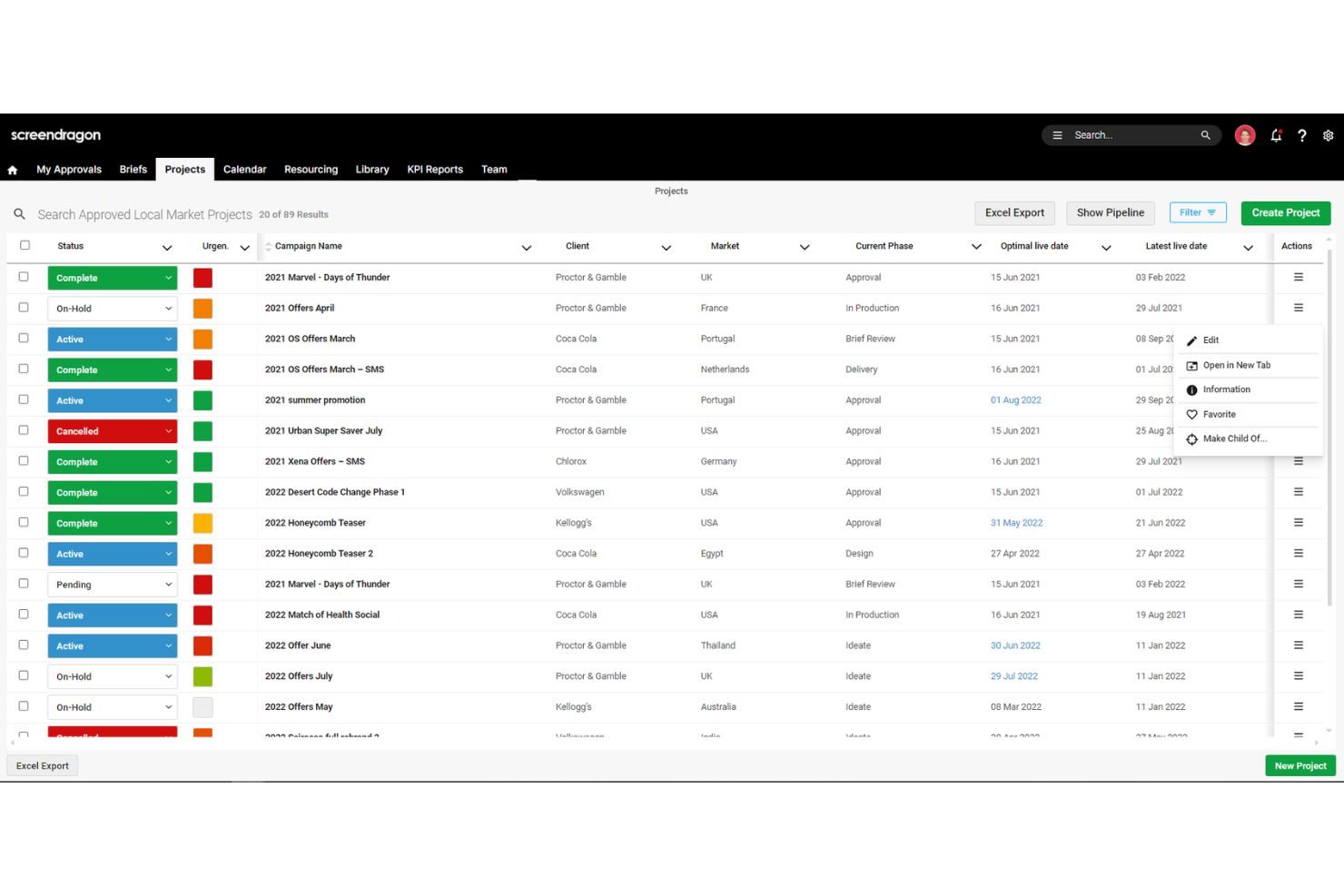
Screendragon is an enterprise workflow management platform built for marketing, creative, and agency teams, combining work intake, project and campaign management, resource planning, and approval automation in one system.
Who Is Screendragon Best For?
Screendragon is a strong fit for enterprise marketing and in-house agency teams that need to connect intake, resource planning, and approvals in one place.
Why I Picked Screendragon
Screendragon earns its spot on my shortlist because its no-code workflow builder lets marketing and creative teams design conditional routing logic, approval stages, and dynamic briefs without touching a line of code. I particularly like how the workflow audit trail captures every approval decision and AI agent action, which matters when brand, legal, and compliance teams all need a clear record of what changed and who signed off. That level of automation depth is what makes it a credible Workfront alternative for enterprise marketing operations.
Screendragon Key Features
- Capacity forecasting: Models future resource demand and identifies capacity gaps using forward-looking views across teams and projects.
- Skills-based resource scheduling: Assigns and reassigns team members to tasks based on skills, availability, and configurable role-matching rules.
- Campaign dashboards: Tracks timelines, milestones, dependencies, and budgets across active campaigns in a single view.
- Workflow audit trail: Logs every approval decision and action—including AI agent outputs—so brand, legal, and compliance teams have a full record.
Screendragon Integrations
Screendragon lists 1,000+ integrations, including native connections to Aprimo, HubSpot, Microsoft Power BI, Slack, Microsoft Teams, Amazon S3, Sitecore, Ziflow, and Workato. Its REST API supports OAuth 2.0, webhooks, Swagger documentation, and a sandbox.
Pros and Cons
Pros:
- Campaign dashboards connect timelines, budgets, and KPIs
- Skills-based forecasting clarifies team capacity
- Custom intake routes briefs through approvals
Cons:
- Proofing tools trail dedicated review platforms
- Complex configurations can delay rollout
New Product Updates from Screendragon
Screendragon Unveils New AI Hub
Screendragon introduced AI Hub, a new capability that lets teams build and manage AI agents directly within workflows. The update helps marketing teams automate tasks, maintain governance controls, and scale AI-driven operations more efficiently. For more information, visit Screendragon's official site.

Wrike
Best for agile project management
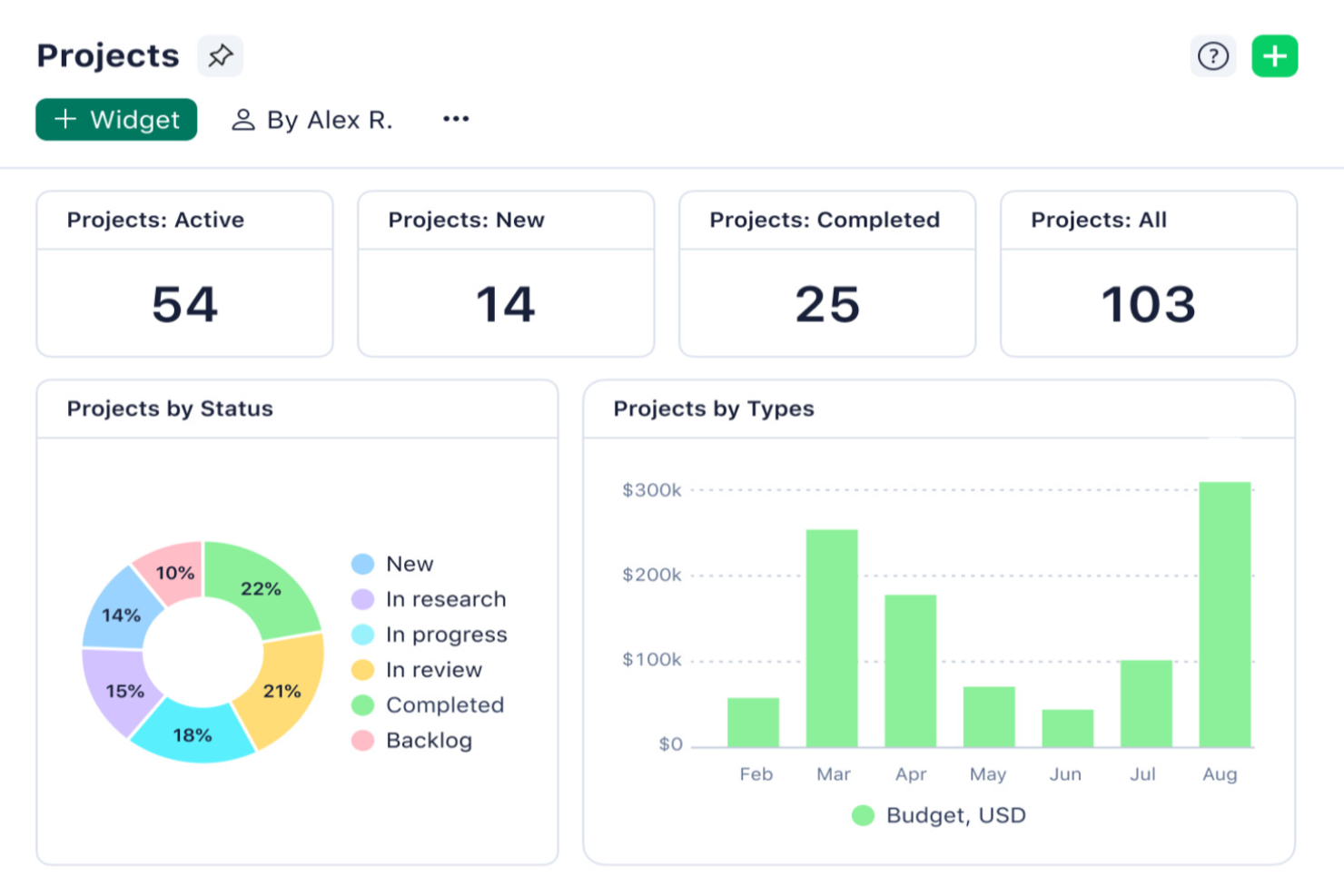
Wrike is a work management platform that brings together project planning, task tracking, resource management, workflow automation, and cross-project reporting in a single configurable workspace.
Who Is Wrike Best For?
Wrike is a strong fit for mid-size to enterprise teams running complex, cross-functional projects who need flexibility across Agile, Waterfall, and hybrid workflows.
Why I Picked Wrike
I picked Wrike as one of the best because it handles Agile, Waterfall, and hybrid workflows without forcing your team into a single delivery model. I find the Agile-specific tooling particularly strong: Scrum boards, backlog prioritization, sprint planning, and request forms that auto-create tasks from conditional responses all live in one place. Wrike's workload charts let me see capacity by person or project across daily, weekly, or monthly views, so sprint planning doesn't happen in a vacuum.
Wrike Key Features
- Critical path analysis: Identifies tasks whose delay would push out the project finish date, displayed directly on the Gantt chart.
- Baseline tracking: Records original start dates, due dates, and durations so you can compare planned vs. actual progress throughout a project.
- Cross-tagging: Makes a single work item visible across multiple spaces, folders, and projects without duplicating it.
- Custom dashboards: Pulls real-time data from multiple projects and spaces into configurable widgets for cross-team reporting.
Wrike Integrations
Wrike offers 400+ pre-built native integrations, including Jira, GitHub, Salesforce, Google Drive, Microsoft Teams, Slack, and Adobe Creative Cloud. It also provides an open REST API and Wrike Integrate for custom connections and workflow automation.
Pros and Cons
Pros:
- Conditional intake forms reduce request back-and-forth
- Workload charts expose team capacity bottlenecks
- Agile, Waterfall, and hybrid workflows coexist
Cons:
- Native invoicing requires a separate finance system
- Advanced setup demands sustained administrator effort
New Product Updates from Wrike
Wrike Expands Gantt Planning, Approvals, and AI Work Intake
Wrike adds cross-project Gantt dependencies, flexible approval routing, and AI work intake through Wrike MCP. These updates give teams more control over planning, decision-making, and incoming work. For more information, visit Wrike’s official site.
Notion
Best for unified systems
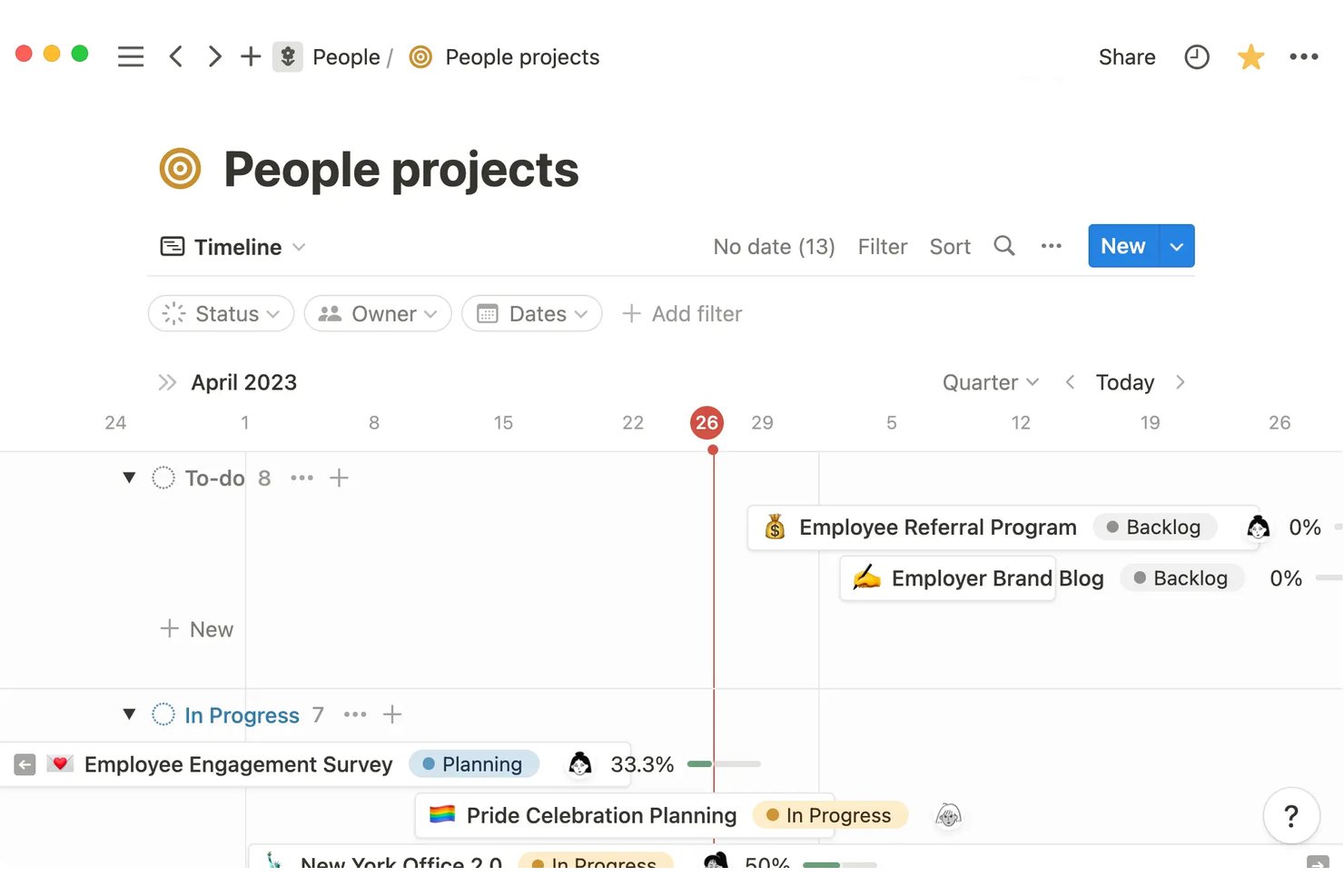
Notion is an all-in-one workspace platform that combines project and task databases, wikis, docs, and AI tools into a single connected environment for managing cross-functional work.
Who Is Notion Best For?
Notion works well for cross-functional teams that want to manage projects, documentation, and wikis in a single connected workspace rather than juggling separate tools.
Why I Picked Notion
Notion earns its spot on my shortlist because it genuinely unifies what most teams spread across three or four separate tools: project databases, wikis, docs, and task tracking all live in one connected workspace. I particularly like how you can link a campaign brief directly to its task database, then surface that same data in a dashboard view filtered by team or status. There's no native approval chain, but for teams that want to replace Workfront's complexity with something more flexible and consolidated, Notion's connected databases do a lot of the heavy lifting.
Notion Key Features
- Database automations: Set triggers based on property changes, page additions, or recurring schedules to automatically update fields, create pages, send notifications, or call webhooks.
- Dependency tracking: Link tasks in sequential relationships with settings that can automatically shift dependent task dates when upstream items move.
- Forms with conditional logic: Build intake forms that show follow-up questions based on previous answers, routing responses directly into project databases.
- Enterprise Search: Search across Notion and connected apps like Jira, GitHub, Google Drive, and Microsoft Teams from a single search interface.
Notion Integrations
Notion offers marketplace integrations with Jira, GitHub, Slack, Figma, Google Drive, Microsoft Teams, and Salesforce. Its public API, webhooks, MCP, and Workers support custom integrations and connected workflows.
Pros and Cons
Pros:
- Dashboards combine cross-project views
- Flexible databases adapt to campaign workflows
- Connects project tasks with team documentation
Cons:
- Approval chains require manual workarounds
- No native capacity or utilization planning
Workzone
Best for pre-built forms for project intake
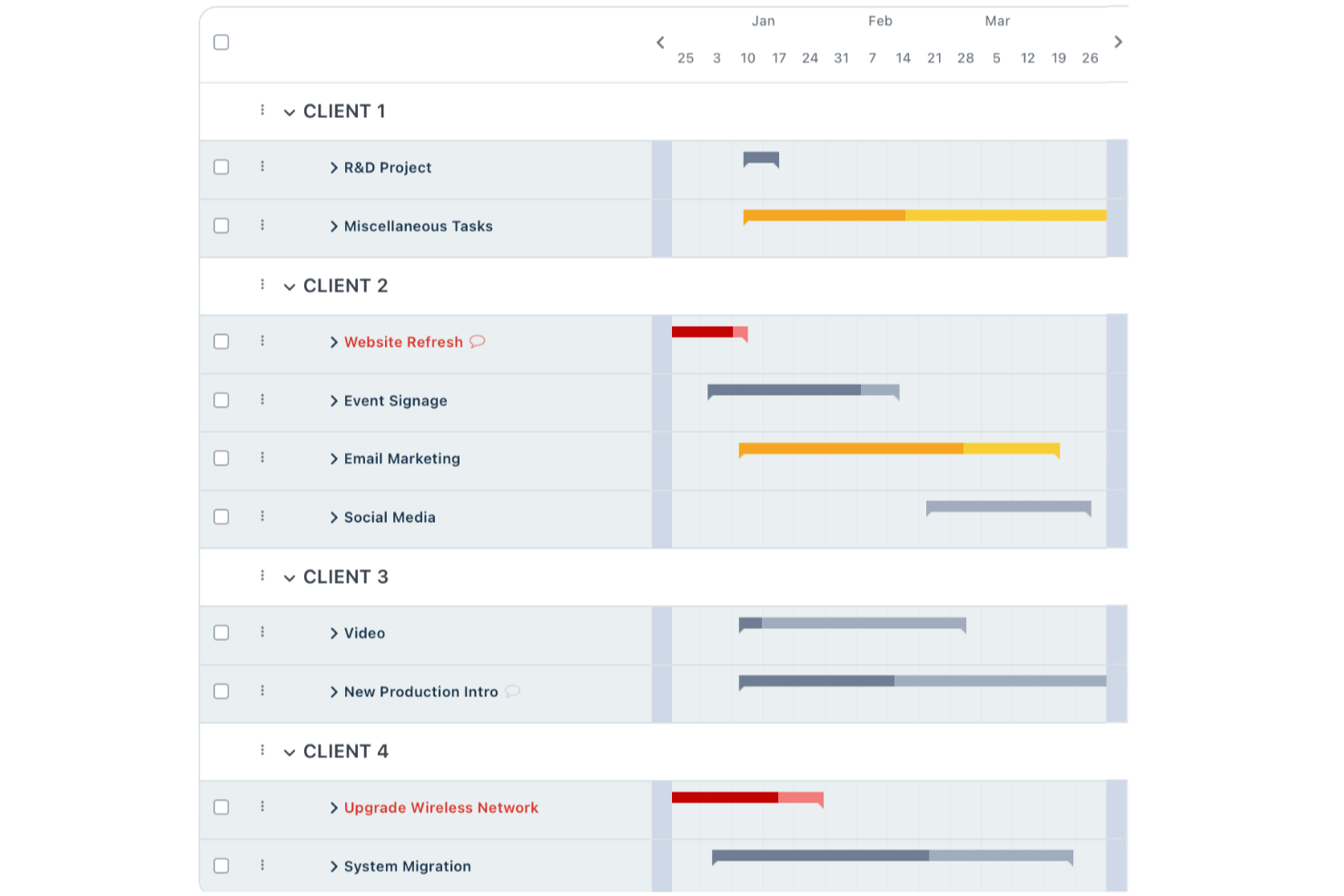
Workzone is a project management platform built around structured work intake, offering request forms with conditional logic, document approvals, multi-view project planning, resource capacity tracking, and cross-project portfolio reporting.
Who Is Workzone Best For?
Workzone suits PMO teams and marketing ops managers who need structured project intake with pre-built forms, capacity tracking, and cross-project visibility in one place.
Why I Picked Workzone
Workzone earns its spot on my shortlist because of how well its pre-built intake forms handle structured project requests. I love that you can build separate forms for different teams, apply conditional logic to show or hide sections based on prior answers, and then automatically map submitted fields into a new project, so nothing gets lost between request and kickoff. The capacity report is also a standout for resource-heavy PMO work, flagging over-allocated team members in red so I can rebalance before a deadline slips.
Workzone Key Features
- Portfolio view: See all active projects across workspaces in a single view, with drill-down into project-level details.
- Document proofing and markups: Review, annotate, and mark up PDF and image files directly within the platform.
- Workload and capacity report: Compare assigned hours against each team member's set capacity, with over-allocation flagged in red.
- Cross-project dependencies: Link tasks across separate projects within the same workspace to surface scheduling relationships.
Workzone Integrations
Workzone offers native integrations with Slack, Microsoft Teams, Google Drive, and OneDrive, plus 1,000+ broader integrations. It also supports REST API integrations and Zapier.
Pros and Cons
Pros:
- Proofing keeps creative feedback beside project files
- Capacity reports flag overloaded team members
- Conditional intake forms map requests into projects
Cons:
- Cross-project links stay within one workspace
- Active form edits interrupt in-progress submissions
New Product Updates from Workzone

Workzone Enterprise Adds Multi-Stage Approval Workflows
Workzone Enterprise now includes Approval Workflows, enabling multi-stage document approvals to standardize complex processes and reduce manual effort. For more information, visit Workzone's official site.
 .

ProofHub
Best for centralized project control
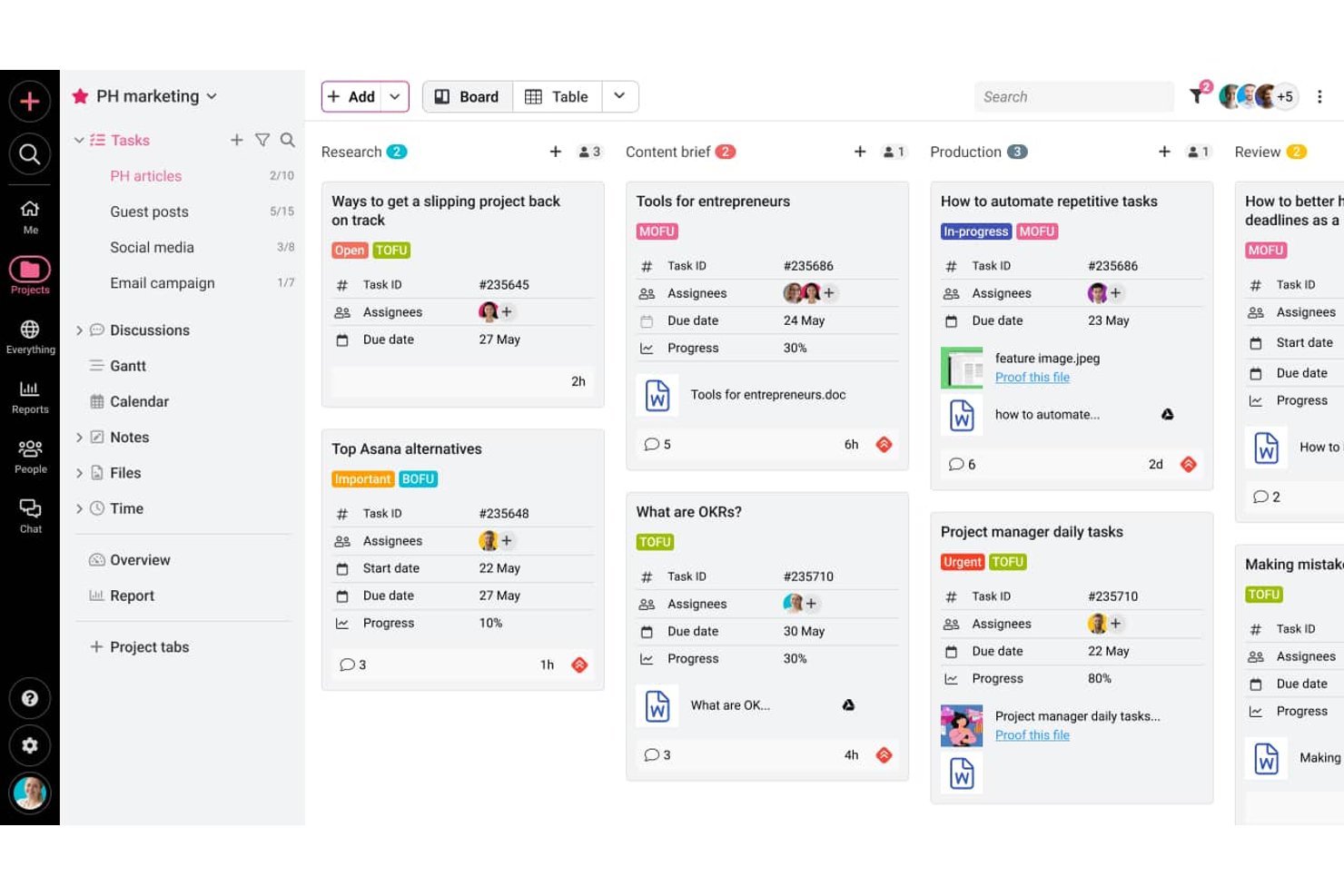
ProofHub is a project management and team collaboration platform that centralizes task tracking, multi-view project planning, proofing and approvals, and cross-project reporting in one place.
Who Is ProofHub Best For?
ProofHub is a strong fit for marketing and creative teams that need one place to plan projects, review work, and track progress without per-seat pricing eating into the budget.
Why I Picked ProofHub
I picked ProofHub as one of the best because it genuinely centralizes project control in a way that cuts through the chaos of managing work across multiple teams. I love how the linked board setup works in practice: a global marketing team can run a central project board while regional teams maintain their own boards, all connected for cross-project visibility. Gantt views with cascade dependencies and cross-project workload reports keep every layer of progress visible without switching tools.
ProofHub Key Features
- Proofing and review: Annotate files, review designs and documents, and approve work directly within the platform using built-in markup tools.
- Forms: Collect work requests, support queries, or tickets via customizable forms that save submissions directly as tasks.
- Time tracking: Log time manually or with timers, add timesheets, set time estimates per task, and generate time reports across projects.
- Custom roles and permissions: Create custom roles, assign them to team members, and set access levels to control what each person can see and do.
ProofHub Integrations
ProofHub offers native integrations with Slack, Box, Dropbox, Google Calendar, iCal, OneDrive, FreshBooks, and QuickBooks. Its API, available on Ultimate Control, supports custom integrations.
Pros and Cons
Pros:
- Cross-project reports expose workload and progress
- Task-linked proofing reduces approval back-and-forth
- Linked boards preserve regional autonomy
Cons:
- Workload reports lack capacity forecasting
- Forms lack documented conditional routing

Best for client project tracking
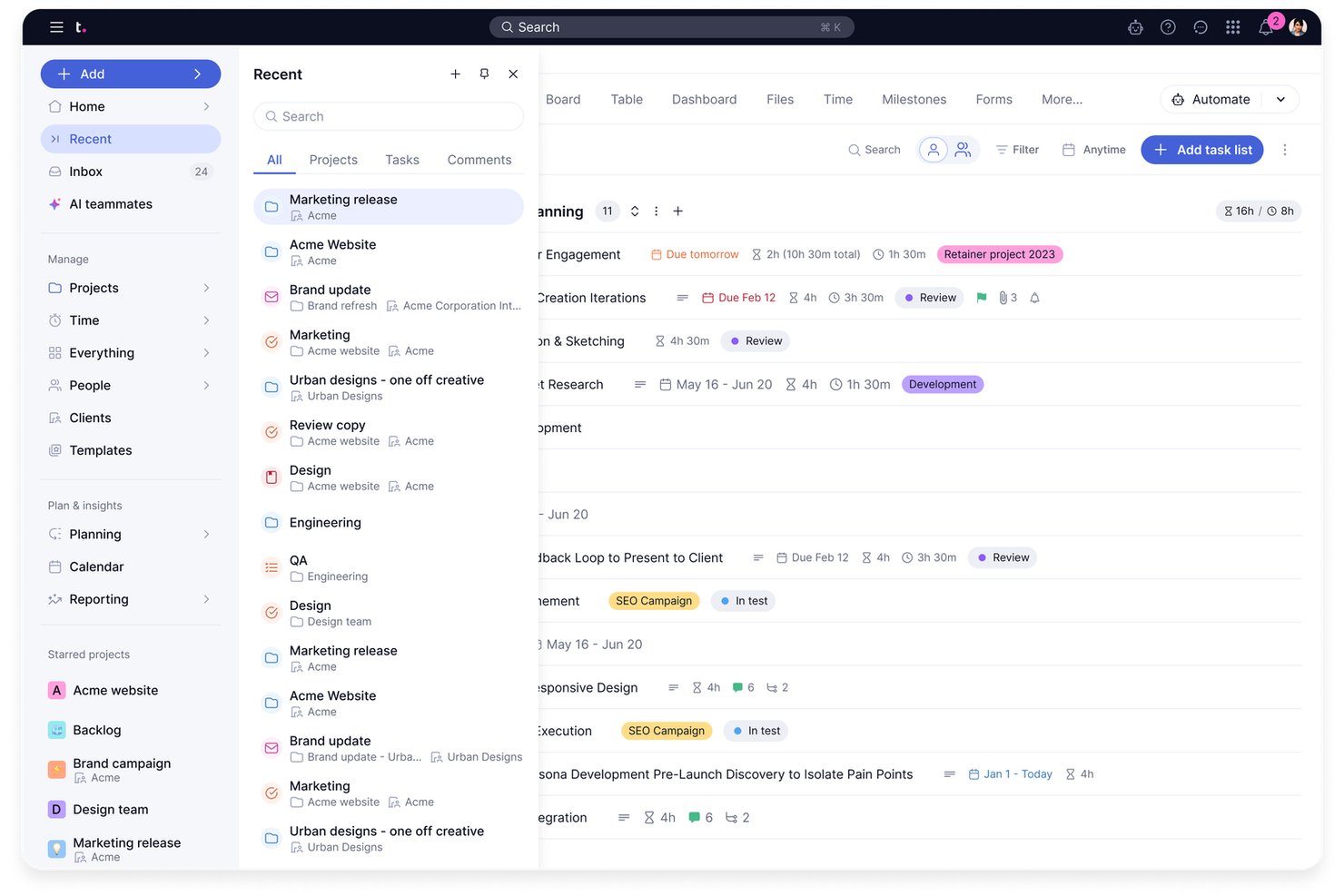
Teamwork.com is a project management platform built around client work, combining task tracking, resource planning, time tracking, budgeting, proofing, and cross-project reporting in one tool.
Who Is Teamwork.com Best For?
Teamwork.com is a strong fit for agencies and client-services teams that need to track billable time, manage deliverables, and give clients direct visibility into project progress.
Why I Picked Teamwork.com
I picked Teamwork.com as one of the best because it's purpose-built for client project tracking in a way most project management tools aren't. I love how it connects time tracking and invoicing directly to project budgets, so when a client asks where their budget went, I can pull a profitability report that shows logged hours, billable rates, and actual costs by project. The proofing tool is another standout for me: clients can review, annotate, and approve deliverables without needing a full account.
Teamwork.com Key Features
- Task dependencies across projects: Link tasks within or across projects using finish-start or finish-finish dependency types, blocking dependent work until predecessors are complete.
- Intake forms with conditional logic: Build request forms with up to 150 questions that surface or hide fields based on submitter responses, with logic depth expanding on higher tiers.
- Workload and capacity planning: View team workloads and available capacity, identify resourcing gaps, and reassign tasks directly from the workload planner.
- Cross-project reporting: Generate project health, utilization, planned-versus-actual, and profitability reports across multiple projects from a single reporting view.
Teamwork.com Integrations
Teamwork.com lists 150+ integrations, including native integrations with Slack, Microsoft Office, Harvest, QuickBooks, HubSpot, Salesforce, and NetSuite, plus marketplace integrations for ChatGPT and Claude. It also offers an API and webhooks for custom connections.
Pros and Cons
Pros:
- Cross-project reports track health and utilization
- Billable time ties delivery to project budgets
- Client proofing keeps approvals beside deliverables
Cons:
- Advanced resource visibility requires top-tier plans
- Requests become tasks, not routed queues
Best for project dependencies
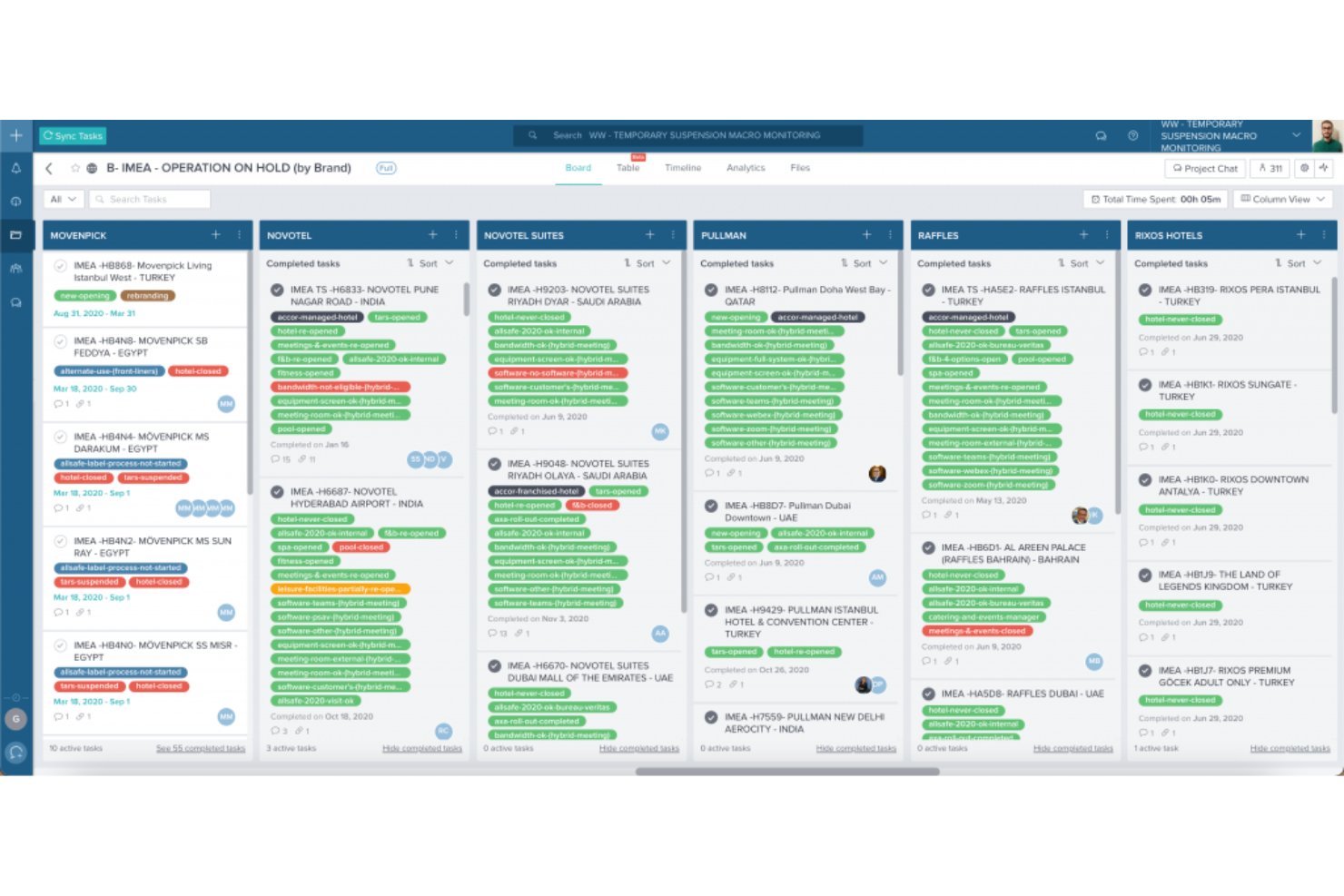
Taskworld is a project and task management platform with Kanban, Gantt, and table views, task dependencies, team chat, and collaboration tools built for coordinating work across teams and business units.
Who Is Taskworld Best For?
Taskworld suits IT project managers and cross-functional teams that need clear task sequencing, dependency tracking, and a straightforward interface without a steep learning curve.
Why I Picked Taskworld
I picked Taskworld as one of the best because it handles project dependencies in a way that genuinely supports sequenced, structured delivery. You can set dependencies in both directions, so no one accidentally closes out a task that something else is still waiting on. The Timeline (Gantt) view surfaces those dependency chains visually, which makes it easy to spot where a delay in one task will ripple through the rest of a sprint or release cycle.
Taskworld Key Features
- Project chat: Communicate with your team directly within projects using built-in group and project-level chat, separate from task comments.
- GitHub integration: Link pull requests to tasks so you can track code status and changed lines without leaving the project.
- Automation rules: Set preset rules to move tasks or add assignees and followers automatically based on due dates or task status changes.
- My Workload report: View your assigned tasks across all projects in daily, weekly, or monthly breakdowns, and export the data to CSV.
Taskworld Integrations
Taskworld offers native integrations with GitHub, Slack, Microsoft Teams, Google Calendar, Outlook Calendar, Dropbox, Google Drive, Google Meet, and Trello. It also supports an Open API and Zapier.
Pros and Cons
Pros:
- Reviewers report quick adoption across teams
- Task discussions keep updates beside work
- Task dependencies map delivery sequencing
Cons:
- Workload reports omit team-wide capacity planning
- No request intake or triage queues
Podio
Best for customizable workspaces
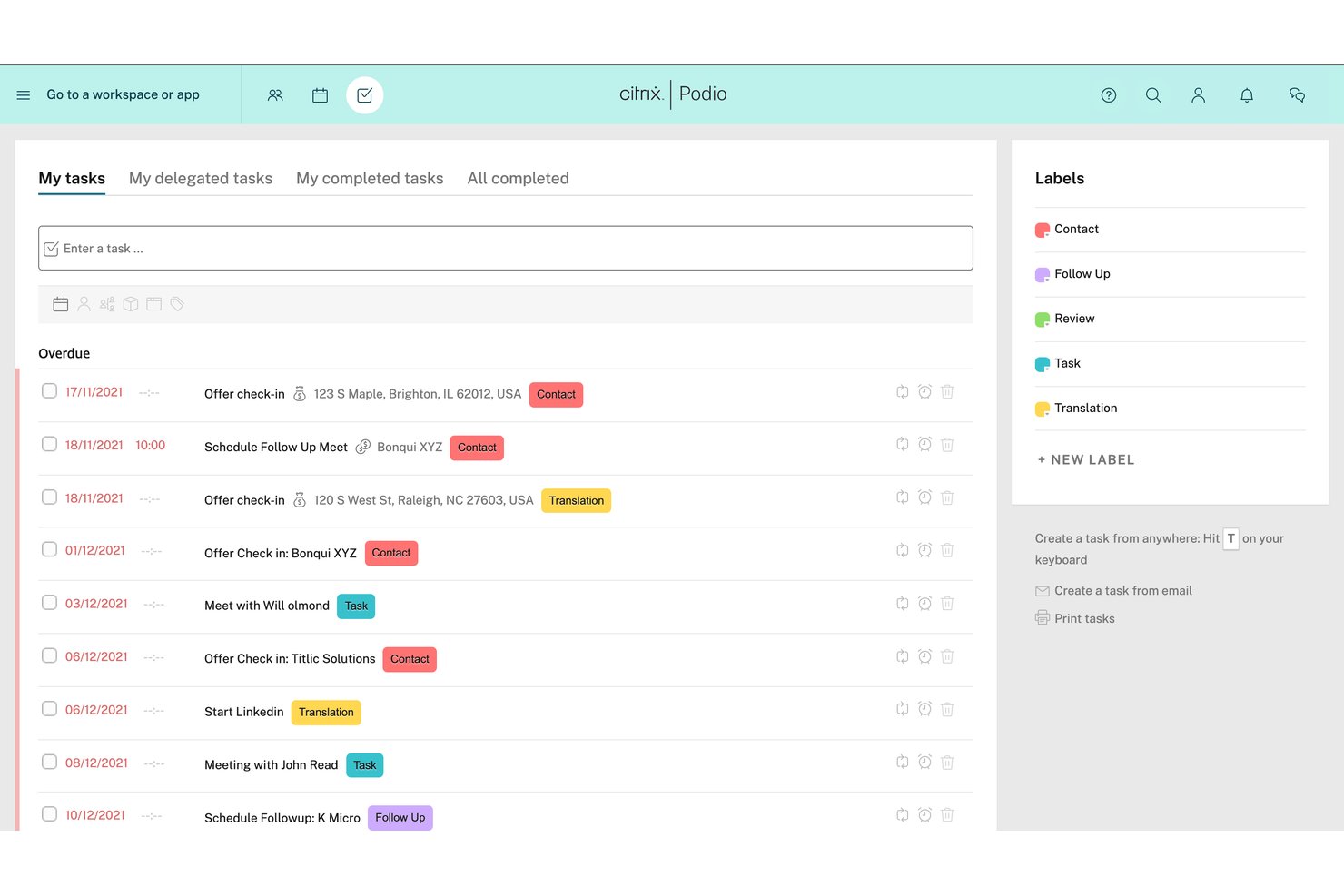
Podio is a customizable work management platform built around no-code app creation, shared workspaces, and workflow automation.
Who Is Podio Best For?
Podio suits small to mid-sized teams that need to build their own work structure from scratch rather than conform to a rigid, out-of-the-box system.
Why I Picked Podio
I've included Podio in my top picks because its no-code app builder lets teams design their own work structure from scratch, which is a genuine alternative to Workfront's more rigid, out-of-the-box setup. I particularly like how you can build a custom Actions app with fields for assignees, due dates, status, and related items, then filter that view by team member to see who owns what. Shared workspaces tie those apps together, so cross-functional groups work inside the same context rather than across disconnected tools.
Podio Key Features
- No-code app builder: Create custom apps using drag-and-drop fields to match your team's exact workflow structure.
- Workflow automation: Set triggers based on dates or item changes to automatically create tasks, send emails, or update records.
- Webforms: Each app includes a built-in webform to collect and route incoming requests directly into your workspace.
- Granular permissions: Control access at both the workspace and app level to manage who can view or edit specific work.
Podio Integrations
Podio offers native integrations with Google Drive, ShareFile, Dropbox, Excel, and GoToMeeting, plus marketplace integrations such as Plecto. Its open API supports custom integrations.
Pros and Cons
Pros:
- Webforms route requests into custom workflows
- Shared workspaces keep cross-team work contextual
- Custom apps fit unconventional workflows
Cons:
- No calculated capacity or portfolio rollups
- No Gantt views or task dependencies
nTask
Best for flexible project management
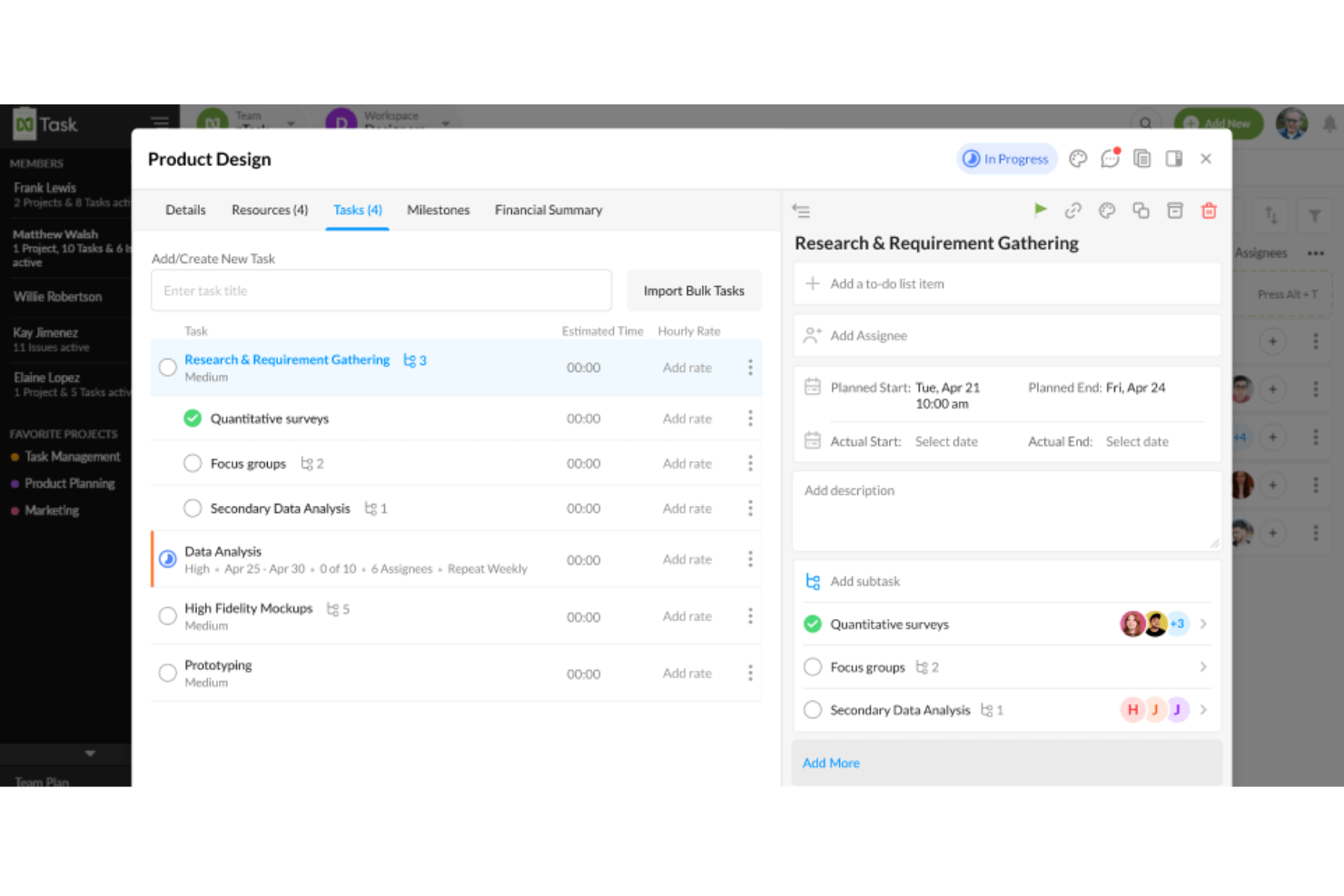
nTask is a project management tool that covers task planning, Gantt charts, Kanban boards, time tracking, issue tracking, and built-in risk management across team workspaces.
Who Is nTask Best For?
nTask suits small teams and early-stage startups that need straightforward project and task management without a steep learning curve or a high price tag.
Why I Picked nTask
I picked nTask as one of the best because its built-in risk management sets it apart from most lightweight project tools. I can document risks, assign owners, run impact and likelihood assessments, and track mitigation plans without leaving the platform. Paired with Gantt charts that include critical path analysis and task-level issue tracking, nTask gives small teams a surprisingly complete project oversight setup without the complexity of enterprise-grade platforms.
nTask Key Features
- Kanban board: Organize and manage work visually by moving tasks across customizable columns.
- Issue tracking: Log, categorize, and track issues by severity and status, with direct links to related tasks or projects.
- Time tracking and timesheets: Record time spent on tasks and review logged hours through built-in timesheets.
- Meeting management: Schedule meetings, set agendas, capture action items, and publish meeting minutes from within the platform.
nTask Integrations
nTask offers native integrations with Google Calendar, Google Meet, and Slack. It also lists integrations with Zoom, Outlook Calendar, Apple Calendar, and Zapier.
Pros and Cons
Pros:
- Time logs connect task work with budgets
- Kanban boards give teams visual task status
- Built-in risk registers track mitigation ownership
Cons:
- Advanced reporting offers little portfolio depth
- Cross-project Gantt visibility remains limited

Jira
Best for Agile software development
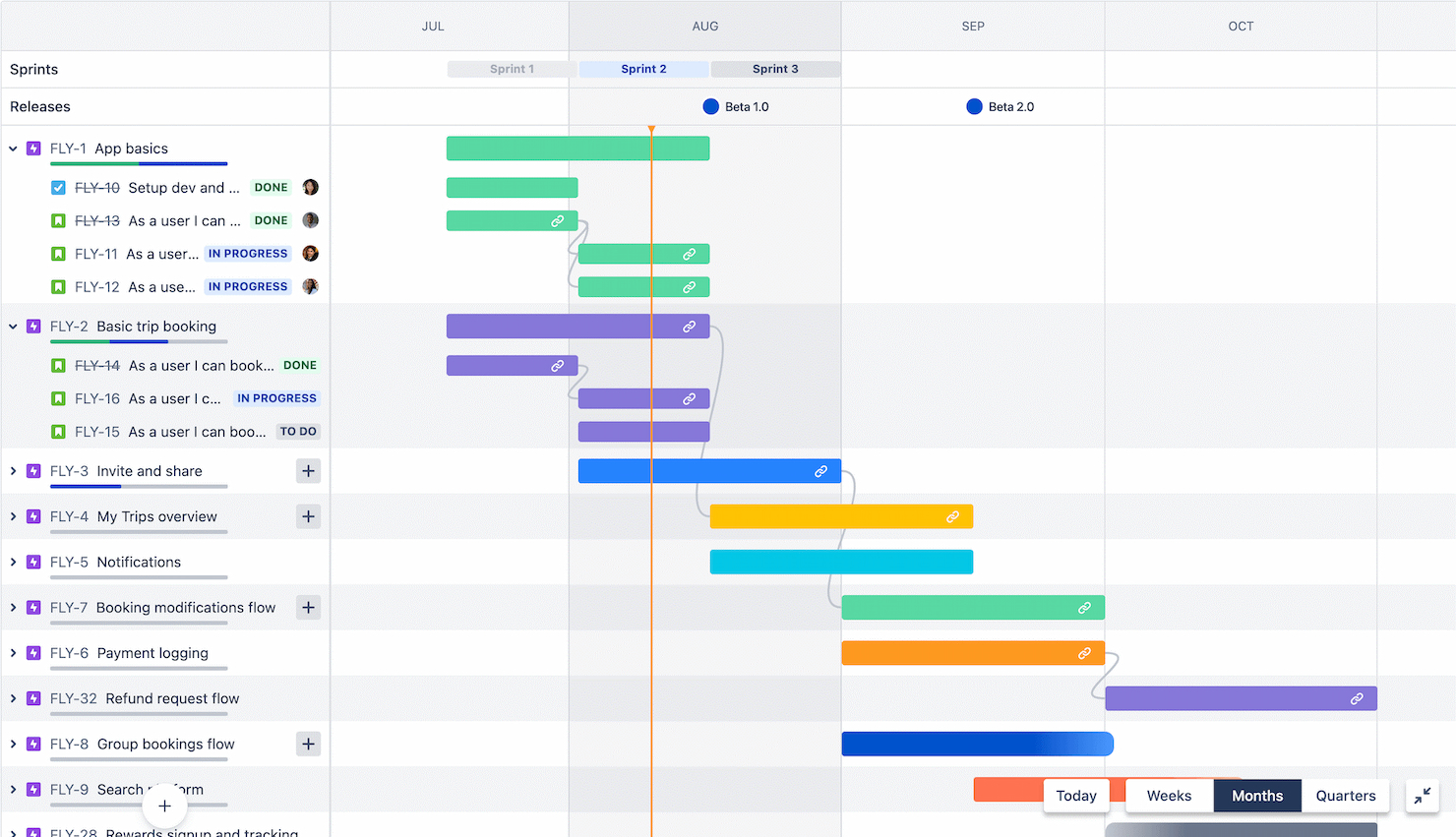
Jira is adept at facilitating Agile project management, particularly for software development teams. It excels in this area due to its specialized project tracking capabilities and support for Agile practices.
Why it's a good Workfront alternative: I selected Jira as a Workfront alternative because of its strong focus on Agile development processes. Its specialized tools for issue and project tracking, as well as its Agile reporting features, make it a standout choice for software development teams.
Standout features & integrations:
Features include Scrum and Kanban boards, customizable workflows, roadmaps, Agile reporting tools, real-time collaboration, advanced search, issue types and fields customization, and dashboards and gadgets.
Integrations include Confluence, Bitbucket, Figma, Slack, GitHub, GitLab, Jenkins, CircleCI, Trello, and Zendesk.
Pros and Cons
Pros:
- Tailored for Agile and Scrum methodologies
- Comprehensive integration capabilities
- Extensive customization options
Cons:
- Complexity can be daunting for small projects
- Steep learning curve for beginners
Outras alternativas ao Workfront
Estas são algumas alternativas adicionais ao Workfront que selecionei. Também não ficaram entre as 10 melhores, mas vale a pena considerá-las se não encontrou uma boa alternativa acima.
- Ravetree
For Agile and Scrum workflows
- Trello
For visual task organization
- Zoho Projects
For versatile project planning
- RoboHead
For in-app creative reviews and approvals
- Smartsheet
For spreadsheet-like project tracking
- Asana
For team workflow management
- Basecamp
For remote team collaboration
- Freedcamp
For budget-conscious teams
- Kantata
For creative and professional services
- monday AI Workspace
For intuitive workflow customization
- ProjectManager
For real-time project planning
- Businessmap
For Kanban board enthusiasts
- Microsoft Project
For robust project scheduling
- Airtable
For customizable workflow databases
- Bitrix24
For CRM integration
- ClickUp
For all-in-one productivity
- TeamGantt
For visual project planning
- Scoro
For detailed business management
- Clarizen
For enterprise-grade solutions


Encontre mais opções nesta lista de alternativas ao Coda.
Análises de software de gestão de projetos relacionadas
Se ainda não encontrou aqui o que procura, consulte estas outras ferramentas relacionadas que testámos e avaliámos:
- Software de gestão de projetos
- Software de gestão de recursos
- Software de automatização de fluxos de trabalho
- Software de controlo de tempo
- Software de gestão de tarefas
- Ferramentas de colaboração
- Criador de gráficos de Gantt
- Ferramentas de produtividade
- Software de acompanhamento de projetos
- Software de planeamento de projetos
How I Evaluate Workfront Alternatives
I split my evaluation into baseline requirements—like portfolio reporting and resource planning—and differentiators that separate tools built for enterprise PMOs from tools that just look the part.
Core Functionality (Table Stakes For This List)
When I'm selecting tools for my list, I rank each one on a scale from 0 (does not offer the functionality) to 5 (excels in this area) for each core functionality listed below. Then, I calculate the tool's total score into a percentage. Each tool needs to achieve a minimum total score of 75% to be considered for inclusion.
- Enterprise Work Management: I look for platforms that let you organize work across multiple teams and departments—think managing a product launch where marketing, engineering, and design all need nested project structures under a single program.
- Resource & Capacity Planning: Each tool should offer workload views and allocation features so you can spot overbooked team members and rebalance assignments across concurrent projects before deadlines slip.
- Custom Workflows & Automation: I evaluate whether you can build intake forms, approval chains, and rule-based automations—like auto-routing a creative brief from requester to project manager to design lead based on project type.
- Portfolio Reporting & Dashboards: Cross-project roll-ups and configurable dashboards matter here. I check whether leadership can pull real-time status across an entire portfolio without chasing PMs for manual updates.
- Proofing & Asset Collaboration: For teams reviewing creative output, I look at native markup, version control, and approval workflows—the kind where a designer uploads a revised asset and reviewers compare it side by side with the prior version.
- Enterprise Integrations & Governance: The platform should connect to tools your teams already use (Jira, Salesforce, SSO providers) and offer role-based permissions, audit trails, and admin controls suited for large-scale rollouts.
Once I have a list of tools that meet this criteria, I consider what sets each platform apart.
Differentiating Factors (What Sets Vendors Apart)
Here's how I compare and contrast different vendors:
Standout Features
Strategic portfolio management is a big differentiator—I evaluate whether a tool lets you tie project work to OKRs or business objectives so leadership can prioritize investments, not just track tasks. For agency and professional services teams, I also look at native time tracking and billable rate management, since those teams need budget-to-actuals visibility without bolting on a separate tool. Client and guest collaboration matters too. When external stakeholders need to review deliverables or approve milestones, dedicated guest portals keep the workflow inside the platform.
Beyond Features
A major reason teams leave Workfront is Adobe ecosystem lock-in, so I evaluate whether each alternative integrates with marketing and creative tools independently—without forcing you into a single vendor's stack. Implementation timelines also weigh heavily. Workfront rollouts can stretch across quarters, so I check whether a platform offers prebuilt PMO and marketing templates that shorten time-to-value. Total cost of ownership matters too, especially transparent per-user pricing and predictable add-on costs that mid-market teams can actually budget for.
Porquê utilizar uma alternativa ao Workfront?
Pode estar à procura de uma alternativa ao Workfront se:
- Precisar de um custo mais baixo: o Workfront pode ser demasiado caro se for uma pequena empresa ou uma startup a operar com um orçamento limitado.
- O considerar demasiado complexo: pode considerar o Workfront demasiado complexo ou rico em funcionalidades e querer uma alternativa mais simples, mais fácil de utilizar e gerir.
- Precisar de funcionalidades específicas: precisa de funcionalidades específicas que não são disponibilizadas pelo Workfront, como análises avançadas, melhores ferramentas de gestão ágil de projetos ou integrações mais profundas com CRM.
- Preferir uma melhor experiência de utilização: a interface e a experiência de utilização do Workfront são superadas pelas de outras ferramentas e pode preferir uma ferramenta mais intuitiva.
- Precisar de algo que acompanhe o crescimento da sua empresa: precisa de uma solução que acompanhe o crescimento da sua equipa e dos seus projetos ou que ofereça melhor suporte e formação para equipas maiores.
- Precisar de mais opções de integração: se o Workfront não oferecer integrações com as outras ferramentas que utiliza atualmente, será melhor procurar uma opção que as disponibilize.
Principais funcionalidades das alternativas ao Workfront
Eis algumas funcionalidades importantes que a sua alternativa ao Workfront deve disponibilizar ou melhorar para se adequar às suas necessidades:
- Automatização de fluxos de trabalho: A automatização de tarefas aumenta a produtividade ao reduzir o esforço manual e melhorar os seus processos. Isto permite que os membros da equipa se concentrem em atividades mais estratégicas.
- Ferramentas de colaboração: A comunicação centralizada melhora a coordenação da equipa, a transparência dos projetos e a tomada de decisões.
- Gestão de campanhas: Deve ser possível gerir e acompanhar campanhas multicanal a partir de uma única plataforma. Isto garante uma comunicação consistente e um acompanhamento fácil do desempenho em vários canais.
- Gestão de recursos: As ferramentas de gestão de recursos permitem equilibrar as cargas de trabalho e atribuir tarefas de forma eficaz. Poderá otimizar a produtividade da equipa e evitar o esgotamento.
- Relatórios e análises: Com os dados certos, pode tomar decisões mais estratégicas e identificar tendências, estrangulamentos e oportunidades. Isto ajuda-o a ser um gestor mais proativo e a aperfeiçoar os seus processos.
- Painéis personalizáveis: Pode adaptar relatórios e apresentações às necessidades específicas do projeto ou da organização, bem como fornecer aos intervenientes informações relevantes e melhorar a compreensão e a comunicação.
- Registo de tempo: Isto fornece relatórios detalhados sobre a duração dos projetos e das tarefas, para que possa faturar corretamente aos clientes e alocar recursos, avaliar a produtividade e garantir que os projetos se mantêm dentro do orçamento e do calendário.
- Gestão de documentos: Manter os documentos dos projetos num local central garante um acesso consistente aos membros da equipa do projeto, o que facilita uma melhor colaboração e continuidade.
- Capacidades de integração: A ferramenta que escolher deve ligar-se a todas as suas outras ferramentas para melhorar a eficiência dos fluxos de trabalho e criar um ecossistema tecnológico que suporte as suas necessidades operacionais.
- Acessibilidade móvel: Isto garante que os membros da equipa possam manter-se atualizados e contribuir independentemente da sua localização. Promove a flexibilidade e a conectividade contínua no seu ambiente de trabalho.