

As 10 melhores alternativas ao Todoist analisadas em 2026

Melhores alternativas ao Todoist — lista resumida


As melhores alternativas ao Todoist oferecem funcionalidades avançadas de gestão de tarefas, um design intuitivo e flexibilidade para se adaptarem às necessidades da sua equipa. Se o Todoist não estiver a funcionar bem para si, a alternativa certa ajudá-lo-á a facilitar a colaboração, a manter os projetos organizados e a trabalhar de forma mais eficiente.
Utilizei a minha experiência em gestão de projetos e mais de 3 anos de testes de software para analisar dezenas de ferramentas e selecionar a minha lista das melhores alternativas ao Todoist. Cada uma das minhas recomendações adaptar-se-á melhor ao seu fluxo de trabalho, ajudando-o a gerir e acompanhar as suas tarefas e a produzir um trabalho de grande impacto para os seus clientes.
O que são alternativas ao Todoist?
As alternativas ao Todoist são ferramentas de gestão de tarefas que pode utilizar para organizar e acompanhar o seu trabalho. Trabalhadores independentes, gestores de projetos e qualquer pessoa que tenha de gerir muitas tarefas podem procurar alternativas ao Todoist para encontrar funcionalidades que se adequem à sua forma de trabalhar, uma interface de utilizador diferente ou opções adicionais de personalização.
Why Trust Our Software Recommendations
Our team has been testing and reviewing software since 2012. As project managers ourselves, we know how difficult—and important—it is to choose the right software.
For this guide, we evaluated tools using hands-on testing and independent research, scoring tools using our selection criteria. We also draw on insights from industry thought leaders and practicing project management experts.
Our reviews reflect our human editorial judgment, not a sales pitch.
Expert reviewers:
Tabela de comparação das alternativas ao Todoist
Utilize esta tabela de comparação para comparar as especificações e os preços das minhas principais alternativas ao Todoist.
| Tool | Best For | Trial Info | Price | ||
|---|---|---|---|---|---|
| 1 | Best for Google Workspace integration | 14-day free trial | From $3/user/month (billed annually) | Website | |
| 2 | Best for hierarchical task organization | Free plan + 30-day free trial available | From $7.65/user/month (billed annually) | Website | |
| 3 | Best for timeline-based task planning | Free plan + 15-day trial + demo available | From $4/user/month (billed annually) | Website | |
| 4 | Best for Microsoft ecosystem integration | Free-forever plan available | Free to use | Website | |
| 5 | Best for adaptable project management | 14-day free trial + free plan available | From $8/user/month (billed annually) | Website | |
| 6 | Best for note-taking and task management | Free plan + 7-day free trial available | From $10/user/month | Website | |
| 7 | Best for comprehensive task management | Free plan available | From $49.99/year (billed annually) | Website | |
| 8 | Best for Apple device integration | 14-day free trial | From $4.99/month | Website | |
| 9 | Best for software development teams | Free plan + 14-day trial available | From $21.50/user/month | Website | |
| 10 | Best for task breakdowns | Not available | Pricing upon request | Website |
Análises das melhores alternativas ao Todoist
Abaixo, apresentarei uma análise e uma visão geral detalhadas de cada alternativa ao Todoist, examinando as vantagens e limitações destas ferramentas. Ficará a conhecer as suas funcionalidades e compreenderá os cenários em que se destacam mais.

GQueues
Best for Google Workspace integration
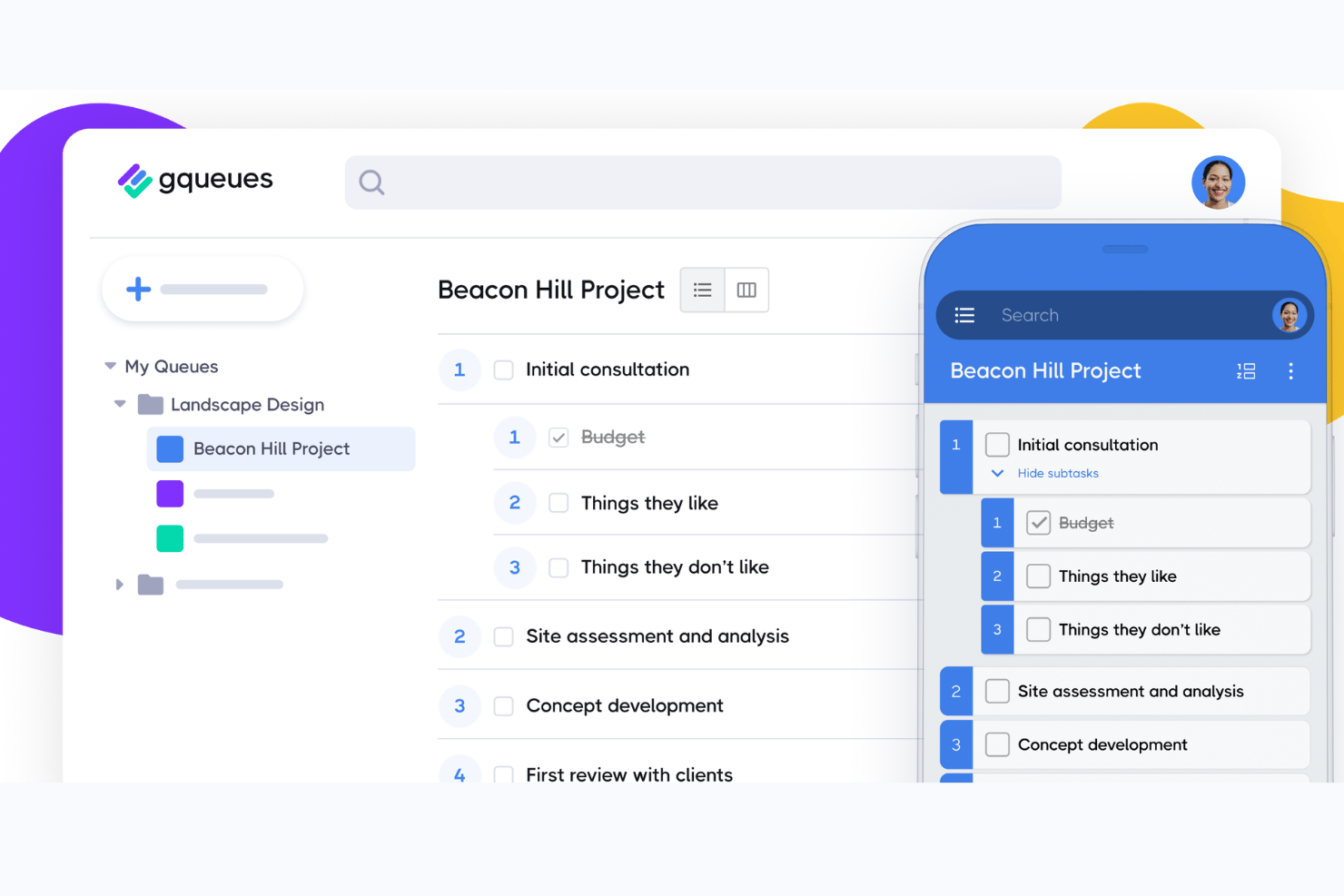
GQueues is a task management tool built specifically for teams and individuals who live in Google Workspace, helping them organize work, collaborate on shared projects, and keep tasks connected to their existing Google Calendar and Gmail workflows.
Who Is GQueues Best For?
GQueues is a strong fit for small teams and solo professionals who run their entire work life inside Google Workspace and want task management that feels native to it.
Why GQueues Is a Good Best Todoist Alternatives
I picked GQueues because its Google Workspace integration goes deeper than any other tool on my list. When I convert a Gmail message into a task, it lands in GQueues with full context intact, and two-way Google Calendar sync means due dates show up exactly where I'm already working. I also appreciate the Google Drive attachment workflow: creating a new Doc or Sheet directly from a task, with permissions automatically inherited from team member roles.
GQueues Key Features
- Smart queues: Filter tasks automatically based on search criteria, tags, or status for faster organization and tracking.
- Bulk actions: Change due dates, assign tasks, or update multiple items at once to save time when managing high task volume.
- Board view: Visualize projects as Kanban boards, letting you drag and drop tasks between columns for workflow management.
- Mobile apps: Access task lists and manage updates on both iOS and Android devices, keeping all your work synced on the go.
GQueues Integrations
GQueues offers native integrations across the Google Workspace ecosystem, including Google Calendar, Gmail, Google Drive, Google Contacts, and Chrome. An API is available for custom integrations.
Pros and Cons
Pros:
- Shared queues work well for small teams
- Tasks created directly from Gmail messages
- Deep two-way sync with Google Calendar
Cons:
- No natural language input for task entry
- Limited views compared to competitors

Quire
Best for hierarchical task organization
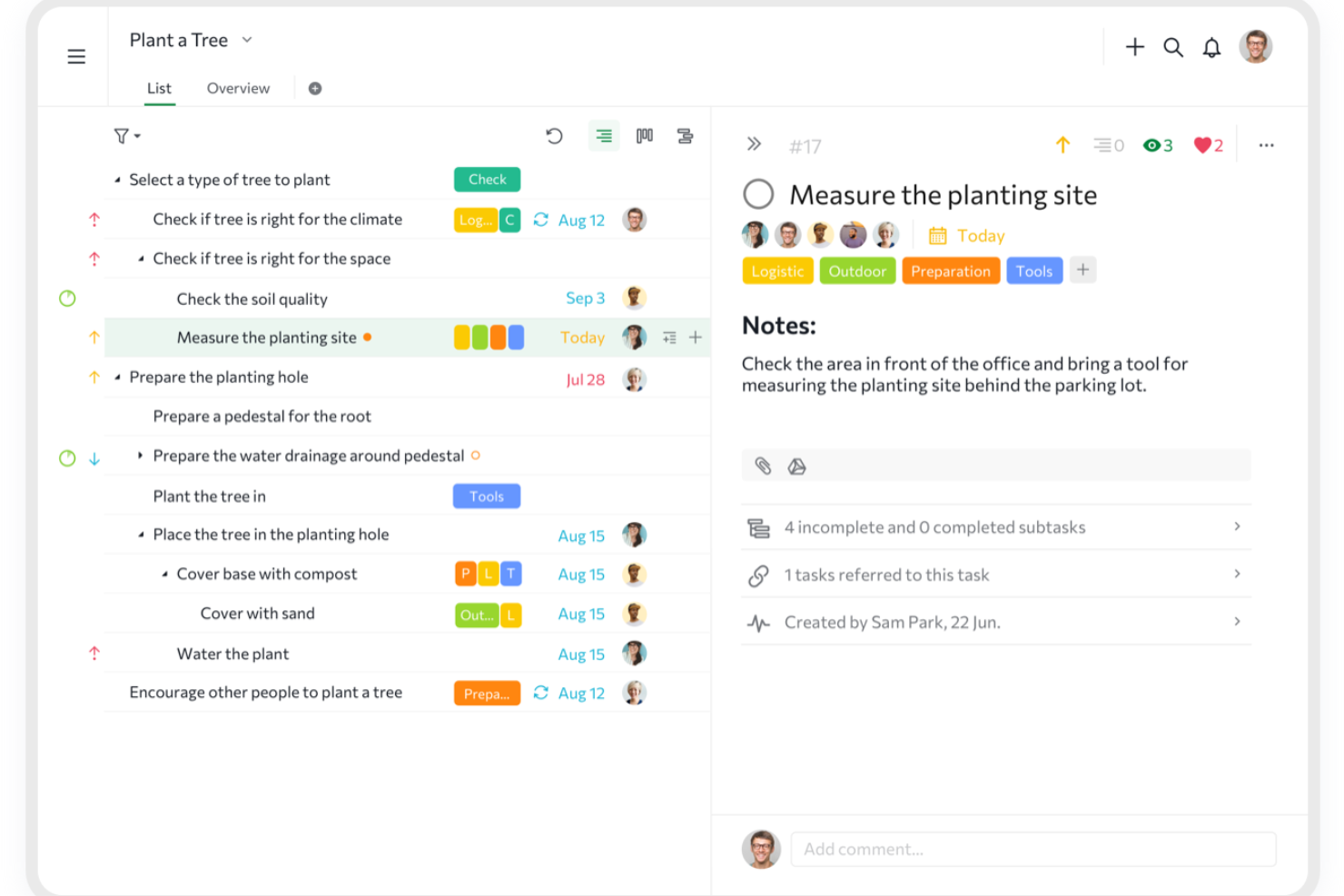
Quire is a project management tool built around the idea of clarity through hierarchy. It helps you tackle overwhelming workloads by letting you visually break down big goals into smaller, achievable steps.
Why it's a good Todoist alternative:
Its infinite nested view is one way it can break down complex projects into manageable tasks. This ability to create tasks and subtasks in a hierarchical structure helps maintain clarity and focus, ensuring that you can track progress at every level of your project. I also like Quire's sublist functionality that lets you create personalized views from your main task list, so you can focus on specific tasks or priorities that are part of your immediate responsibility.
Standout features and integrations:
Features include the dynamic timeline view, which provides a Gantt chart-like visualization to help you plan and track project schedules. Additionally, the calendar view allows you to schedule tasks by simply dragging and dropping them onto your calendar, making deadline management more intuitive.
Integrations include Google Calendar, Gmail, Slack, Outlook, Zoho Flow, GitHub, Apple Calendar Sync, Box, Dropbox, Google Drive, and Microsoft Teams.
Pros and Cons
Pros:
- Ability to create nested tasks and subtasks, allowing for detailed project breakdowns
- Multiple project views, including lists, boards, and timelines
- Easy to collaborate with team members
Cons:
- Potential for notification overload, especially when working with large teams
- The mobile version lacks some features available on the desktop
New Product Updates from Quire
Quire Adds Custom Field Locking and Comment Reaction API Support
Quire adds custom field locking and API support for reading and setting emoji reactions on comments. These updates give teams more control over field data and expand comment interaction options for developers. For more information, visit Quire’s official site.
 .

Best for timeline-based task planning
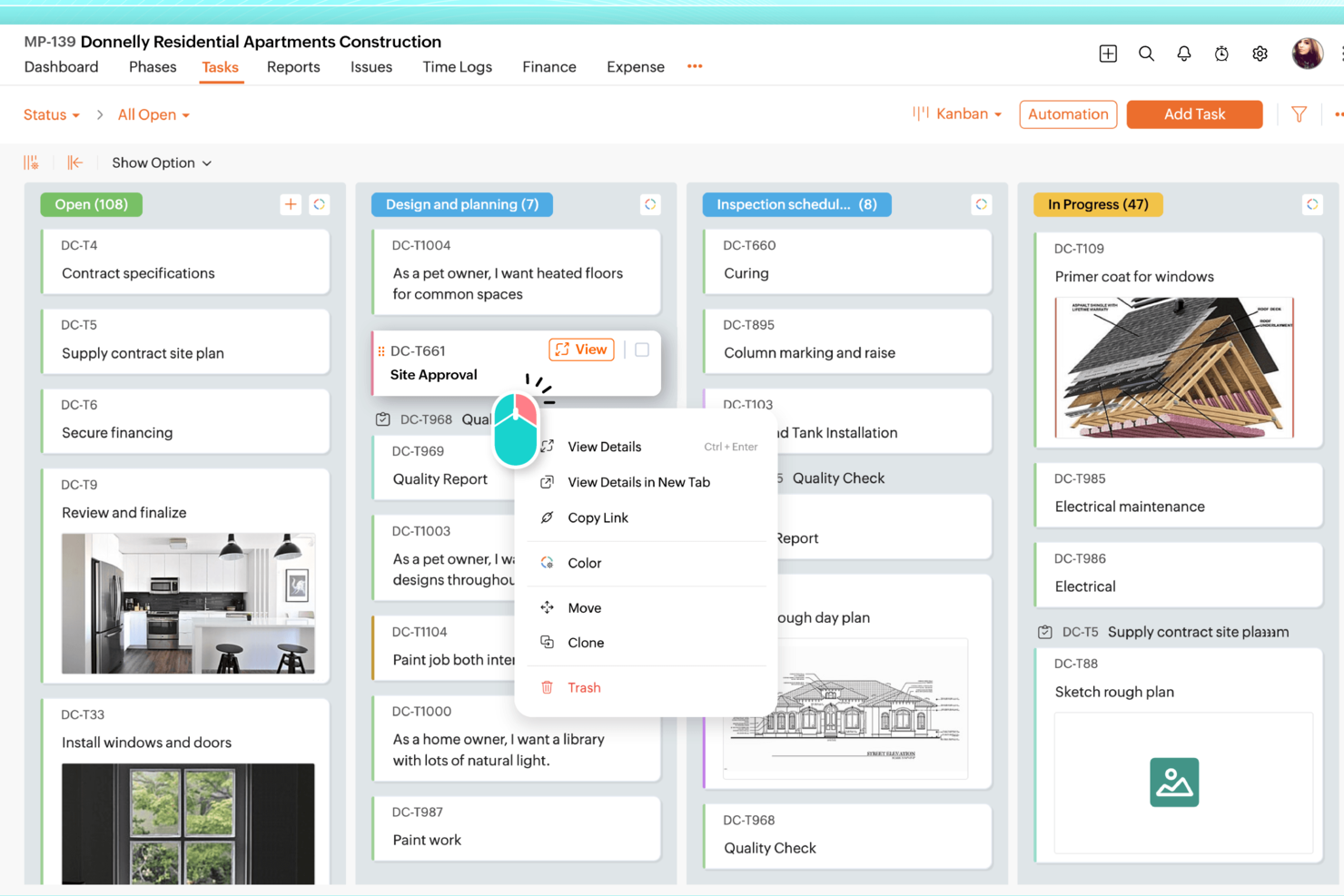
Zoho Projects is a strong Todoist alternative for professionals who need more than a simple task list. It works well for teams in IT and construction, as well as freelancers managing multiple projects, especially when tasks need timelines, dependencies, and clearer progress tracking. Alongside task management, Zoho Projects includes time tracking and team collaboration tools that help keep work organized as projects grow in scope.
Why I Picked Zoho Projects
I picked Zoho Projects as a Todoist alternative because it supports more detailed project planning and tracking. Gantt charts make it easier to map deadlines, visualize dependencies, and see how work is progressing across a timeline. It also includes built-in time tracking and timesheets, which is helpful for teams that need to monitor hours, manage workload, or bill client time. If you’ve outgrown basic to-do lists, Zoho Projects gives you more control without forcing you into a complicated setup.
Zoho Projects Key Features
In addition to the robust project tracking capabilities, Zoho Projects offers several other features that enhance its functionality:
- Task Management: Create, assign, and prioritize tasks, with options for subtasks and recurring tasks to ensure comprehensive project planning.
- Team Collaboration: Utilize in-app chat, forums, and document sharing to facilitate seamless communication among team members.
- Custom Workflows: Tailor workflows to fit your team's processes with customizable fields, statuses, and automation rules.
- Reporting Tools: Generate detailed reports on tasks, timesheets, and project progress to gain insights into team productivity and project outcomes.
Zoho Projects Integrations
Integrations include Google Calendar, Google Drive, Microsoft Office 365, Dropbox, Slack, GitHub, Bitbucket, Microsoft Teams, Zapier, and Zoho CRM.
Pros and Cons
Pros:
- Affordable pricing for growing teams
- Built-in time tracking and billing
- Strong automation and workflow customization
Cons:
- Mobile experience less fully featured
- Interface has steeper learning curve
New Product Updates from Zoho Projects
Zoho Projects Adds CodeX Scripts for Custom Modules
Zoho Projects now supports CodeX Scripts for custom modules, enabling conditional logic and rules for creating, updating, and deleting records. For more information, visit Zoho Projects' official site.
 .

Best for Microsoft ecosystem integration
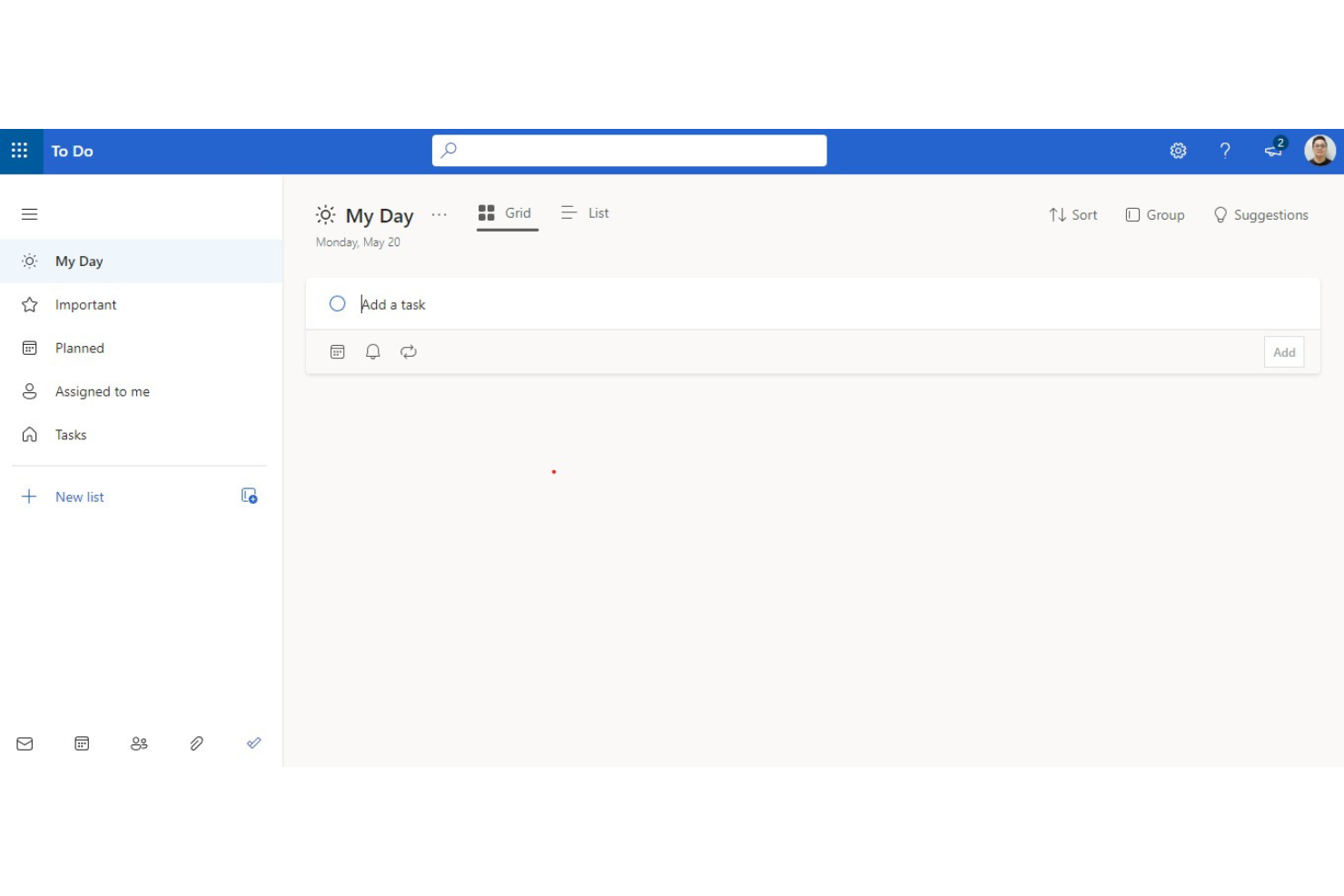
Microsoft To Do is a task management app that integrates seamlessly with the Microsoft ecosystem. It’s best for users who are already embedded in the Microsoft environment and offers smooth integration with other Microsoft services like Outlook and Teams.
Why it's a good Todoist alternative:
Microsoft To Do offers a strong task management solution that integrates deeply with the Microsoft ecosystem. Its intuitive interface and features such as smart lists, due dates, and reminders make it easy to organize and track tasks efficiently. These features make it a compelling alternative to Todoist, especially for users who rely heavily on Microsoft products.
Standout features and integrations:
Features include task prioritization, due dates, messaging, set reminders, the ability to create multiple lists, and task sharing and collaboration.
Integrations include Microsoft Outlook, Microsoft Teams, Microsoft OneNote, Microsoft Planner, Cortana, Microsoft 365, Windows 10, Android, and iOS.
Pros and Cons
Pros:
- Easy task prioritization
- Deep integration with Microsoft products
- Free to use
Cons:
- No team analytics or reporting
- Limited advanced features

Zenkit
Best for adaptable project management

Zenkit is a project management tool that offers project organization, task management, team chat, and more. It’s best for adaptable project management due to its scalability and customization options, making it suitable for various project methodologies.
Why it's a good Todoist alternative:
Zenkit stands as a highly adaptable project management solution that can grow with your team's needs. Its ability to integrate multiple project methodologies and its user-friendly interface make it a strong alternative to Todoist.
Standout features and integrations:
Features include multi-project management, team chat integration, resource management, real-time reporting, and data migration from other tools.
Integrations include Trello, Asana, Microsoft To Do, Zapier, Slack, Google Calendar, Dropbox, Evernote, GitHub, and Microsoft Teams.
Pros and Cons
Pros:
- Dedicated support with quick response times
- GDPR compliant with EU-based servers
- Highly customizable and scalable
Cons:
- Limited offline capabilities
- Some advanced features may require a learning curve

Evernote
Best for note-taking and task management

Evernote is a note-taking app that also offers task management features, allowing users to organize their notes, tasks, and schedules in one place. It’s best for note-taking and task management due to its powerful search capabilities and ability to capture various types of information.
Why it's a good Todoist alternative:
Evernote’s versatile note-taking capabilities seamlessly integrate with its task management features. This combination allows for efficient organization of notes, tasks, and schedules within a single platform. Additionally, its integration with other productivity tools enhances its utility, making it a versatile tool for organizing both notes and tasks.
Standout features and integrations:
Features include note-taking, web clipping, document scanning, task management, and calendar integration.
Integrations include Google Drive, Slack, Microsoft Teams, Outlook, Salesforce, Zapier, Trello, Google Calendar, and Microsoft OneNote.
Pros and Cons
Pros:
- Integration with various tools
- Versatile information capture
- Powerful note-taking and search capabilities
Cons:
- Limited project management features
- Can be overwhelming for new users

TickTick
Best for comprehensive task management

TickTick is a task management app that helps users stay organized with features like reminders, calendar views, and collaboration tools. It’s best for comprehensive task management due to its extensive feature set that includes task lists, habit tracking, and seamless synchronization across multiple platforms.
Why it's a good Todoist alternative:
TickTick’s wide feature set selection goes beyond simple task management. It stands out as a good Todoist alternative because it offers flexible calendar views, collaboration tools, and a habit tracker, making it suitable for both personal and professional use.
Standout features and integrations:
Features include multiple reminders, flexible calendar views, recurring tasks, a simple, intuitive interface, habit tracker, and a Pomo Timer.
Integrations include Google Calendar, Outlook, Siri, Alexa, Slack, Zapier, IFTTT, Evernote, Gmail, and Apple Calendar.
Pros and Cons
Pros:
- Intuitive and simple interface
- Cross-platform compatibility
- Comprehensive feature set
Cons:
- Occasional sync issues across devices
- Some advanced features require a premium subscription

Best for Apple device integration
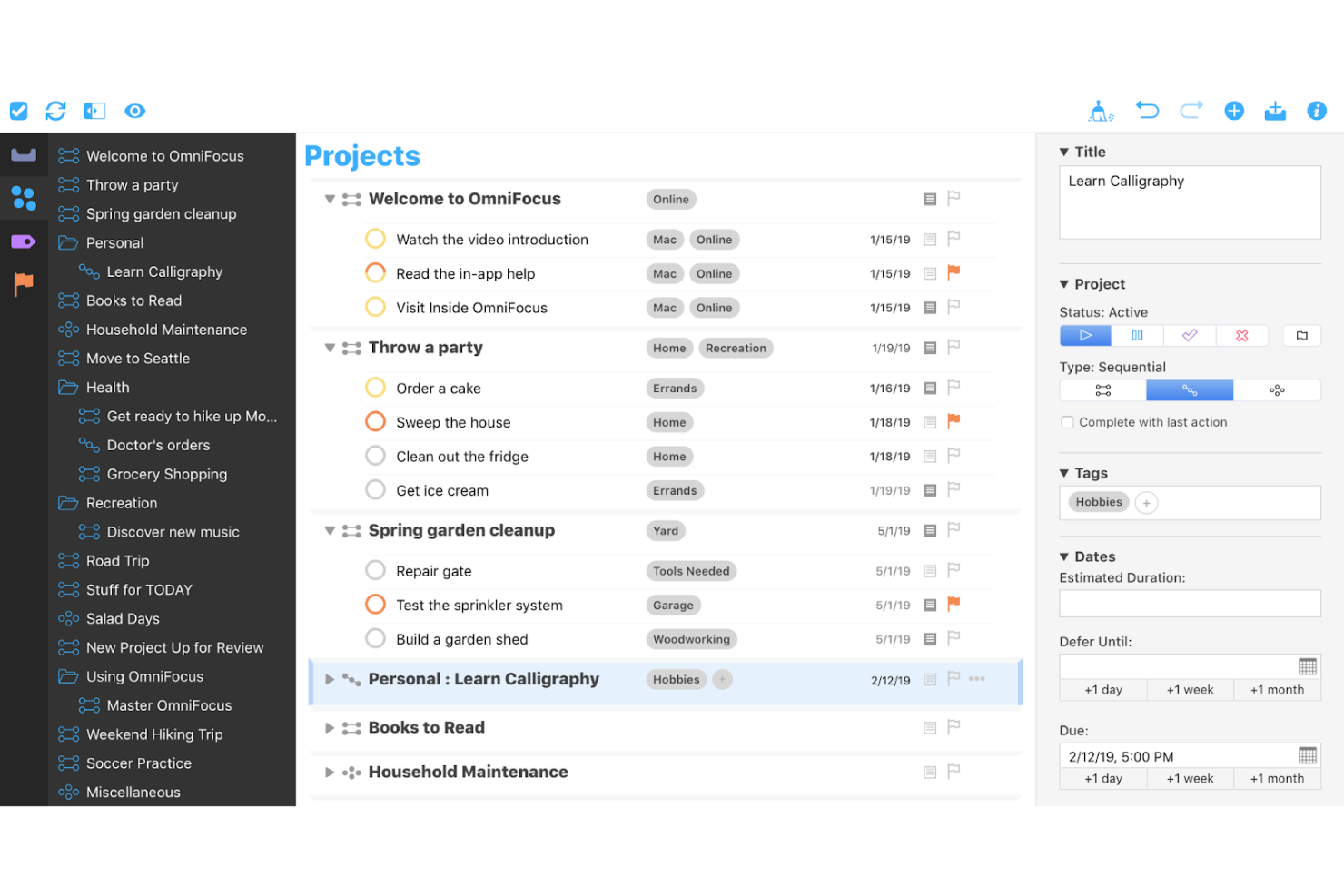
OmniFocus is a task management tool designed for professionals, offering detailed features for capturing and organizing tasks across Apple devices. It’s best for Apple device integration due to its deep compatibility with macOS, iOS, and other Apple platforms, ensuring a cohesive workflow.
Why it's a good Todoist alternative:
OmniFocus provides users with seamless integration with Apple devices, making it an excellent alternative for users deeply embedded in the Apple ecosystem. Its ability to sync tasks across all Apple devices ensures that users can manage their tasks efficiently, no matter which device they are using.
Standout features and integrations:
Features include forecasting, projects, tagging, custom perspectives, and deep integration with macOS and iOS notifications.
Integrations include Apple Calendar, Apple Reminders, Siri, Mail Drop, iCloud, OmniPlan, OmniOutliner, OmniGraffle, Zapier, and Slack.
Pros and Cons
Pros:
- Robust forecasting and tagging features
- Customizable perspectives for task management
- Deep integration with Apple devices
Cons:
- Steeper learning curve for new users
- Limited to Apple ecosystem for full functionality
Best for software development teams

Jira is a project management tool designed to help software development teams plan, track, and release software. It’s best for software development teams due to its advanced features tailored for Agile methodologies and extensive integration capabilities.
Why it's a good Todoist alternative:
Jira offers specialized tools for software development that Todoist lacks. Its Agile project management features and extensive integrations make it a strong alternative for development teams needing more than basic task management.
Standout features and integrations:
Features include customizable workflows, advanced reporting and insights, dependency management, automation, and AI-powered suggestions.
Integrations include Confluence, Bitbucket, GitHub, Slack, Microsoft Teams, Google Drive, Dropbox, Figma, Trello, and Zoom.
Pros and Cons
Pros:
- Robust integration capabilities
- Strong support for Agile methodologies
- Extensive customization options
Cons:
- Steeper learning curve for new users
- Can be complex to set up
nTask
Best for task breakdowns

nTask is a project management tool that helps teams stay organized with tasks, projects, and collaborative workflows. Designed for both individual users and teams, nTask provides a range of features that go beyond basic to-do lists.
Why it's a good Todoist alternative:
I picked nTask as a good Todoist alternative because of its task management features that allow for more detailed planning and prioritization. nTask supports multiple layers of task breakdowns, letting you assign subtasks, create dependencies, and set priority levels that help in structuring even complex projects. With the ability to assign tasks to specific team members and set recurring tasks, nTask enables your team to handle daily tasks alongside longer-term project goals without losing track.
Standout features and integrations:
Features include Kanban boards, Gantt charts, dedicated workspaces, project reporting, custom task labels, progress monitoring, time logging, task prioritization, meeting agendas, risk tracking, deadline reminders, and file attachments.
Integrations include Google Calendar, Microsoft Teams, Outlook Calendar, Zapier, Asana, monday.com, ClickUp, and Microsoft Outlook.
Pros and Cons
Pros:
- Intuitive Gantt charts
- Real-time collaboration features
- Comprehensive task management capabilities
Cons:
- Mobile app is less robust than desktop version
- Lacks advanced automation features
Outras alternativas ao Todoist
Segue-se uma lista de alternativas adicionais ao Todoist que selecionei. Embora não tenham ficado entre as 10 melhores, continuam a ser valiosas e merecem ser investigadas mais aprofundadamente.
- Trello
For visual project tracking
- Things
For elegant design and ease of use
- GoodDay
For customizable workspaces
- Smartsheet
For spreadsheet-like project management
- Asana
For AI-powered work management
- Basecamp
For simple project management
- Wrike
For complex project management needs
- Taskworld
For visual task tracking with analytics
- MeisterTask
For team and self management
- ClickUp
For customizable workflows and integrations


Análises relacionadas de software de gestão de projetos
Se ainda não encontrou aqui o que procura, consulte estas outras ferramentas relacionadas que testámos e avaliámos:
- Software de gestão de projetos
- Software de gestão de recursos
- Software de automatização de fluxos de trabalho
- Software de controlo de tempo
- Software de gestão de tarefas
- Ferramentas de colaboração
- Criador de gráficos de Gantt
- Ferramentas de produtividade
- Software de acompanhamento de projetos
- Software de planeamento de projetos
How I Evaluate Todoist Alternatives
I look for two things: baseline capabilities like task assignment and cross-platform sync, and differentiators like AI, automation, and reporting that separate the best picks from the rest.
Core Functionality (Table Stakes For This List)
When I'm selecting tools for my list, I rank each one on a scale from 0 (does not offer the functionality) to 5 (excels in this area) for each core functionality listed below. Then, I calculate the tool's total score into a percentage. Each tool needs to achieve a minimum total score of 75% to be considered for inclusion.
- Task Creation & Organization: I look for flexible task structuring—subtasks, labels, priorities, recurring tasks—so you can break down something like a product launch into manageable pieces.
- Multiple Project Views: I check that tools offer at least two ways to visualize work.
- Team Collaboration: Shared projects, task assignments, comments, and activity feeds all matter here. I evaluate how well a tool handles real-time teamwork across a shared workspace.
- Cross-Platform Availability: A tool needs to work where you do. I look for native apps on iOS, Android, web, and desktop so tasks stay accessible during commutes, meetings, or deep work blocks.
- Third-Party Integrations: Connecting to calendars, Slack, email, and tools like Zapier is essential. I evaluate the breadth and depth of each tool's integration ecosystem.
- Reminders & Notifications: Configurable alerts across devices keep deadlines visible. I check for push notifications, email reminders, and due date alerts you can tailor to your workflow.
Once I have a list of tools that meet this criteria, I consider what sets each platform apart.
Differentiating Factors (What Sets Vendors Apart)
Here's how I compare and contrast different vendors:
Standout Features
Workflow automation is a big differentiator. I look for tools that let you set up rules like auto-assigning tasks when a status changes or triggering notifications when a deadline approaches. Native time tracking and reporting also matter, especially for freelancers billing by the hour or managers monitoring team capacity across projects. Beyond that, I evaluate whether a tool supports natural language input for quick task creation—typing "review deck Friday at 3pm" and having it parsed automatically is a real time-saver for heavy task creators.
Beyond Features
Pricing structure matters a lot here. I check whether a tool offers a usable free tier for solo users and whether per-user costs stay reasonable as teams grow. Ease of migration is another factor I weigh—switching from Todoist is much smoother when a tool supports direct imports of projects, labels, and due dates rather than forcing you to rebuild everything manually. I also evaluate offline reliability, since distributed teams working across time zones and spotty connections need confident sync without lost edits.
Por que motivo procurar uma alternativa ao Todoist
Embora o Todoist seja um software popular, pode não funcionar bem para a sua empresa. Pode estar à procura de uma alternativa ao Todoist se:
- Precisa de uma opção mais económica: O Todoist é um software relativamente barato, mas se precisar de menos licenças ou tiver um orçamento mais limitado, uma solução alternativa poderá ser mais vantajosa.
- Precisa de funcionalidades avançadas: Se precisar de funcionalidades mais avançadas, como uma personalização mais aprofundada ou capacidades melhoradas de acompanhamento da produtividade, uma alternativa ao Todoist poderá ser uma opção melhor.
- Quer mais flexibilidade: Um software flexível ajudará a aumentar a produtividade e a rentabilidade e, se o Todoist não estiver a funcionar para si, poderá ser altura de mudar.
- Precisa de uma melhor integração: O Todoist integra-se com várias opções de software, mas se não funcionar com o seu conjunto atual de ferramentas, poderá ter de procurar software alternativo.
- Prefere uma interface de utilizador ou um design diferente: Com uma interface mais intuitiva, as equipas podem assumir o controlo dos seus projetos e, se uma solução alternativa oferecer uma interface melhor, não há nada a perder em dar o salto e mudar de software.
Principais funcionalidades das alternativas ao Todoist
Eis algumas das principais funcionalidades do Todoist que o seu software alternativo deverá conseguir replicar ou melhorar para ser uma opção adequada.
- Priorização de tarefas: As funcionalidades de priorização nas alternativas ao Todoist permitem aos utilizadores atribuir níveis de prioridade às tarefas, ajudando-os a concentrarem-se primeiro nos itens mais importantes. Isto é necessário para uma gestão eficiente das tarefas, pois direciona a atenção para as atividades de elevada prioridade.
- Datas de conclusão e tarefas recorrentes: Estas ferramentas permitem aos utilizadores definir prazos específicos para as tarefas e agendar tarefas recorrentes, o que é essencial para gerir projetos contínuos e garantir um progresso consistente sem ser necessário repor manualmente as tarefas.
- Etiquetas e filtros: Ao utilizar etiquetas para categorizar tarefas e aplicar filtros, os utilizadores podem simplificar o seu fluxo de trabalho, concentrando-se apenas nas tarefas que cumprem determinados critérios. Isto facilita a gestão de projetos de grandes dimensões e a manutenção da organização entre vários tipos de tarefas.
- Subprojetos e secções: Organizar os projetos em subprojetos e secções ajuda os utilizadores a manter uma estrutura clara e a dividir projetos complexos em partes geríveis, o que é fundamental para um planeamento e uma execução detalhados dos projetos.
- Modelos de projetos: Os modelos permitem poupar bastante tempo nas alternativas ao Todoist, ao possibilitar que os utilizadores reproduzam estruturas de projetos bem-sucedidas sem terem de começar do zero de cada vez. Isto é particularmente útil para equipas que gerem vários projetos semelhantes.
- Colaboração: As funcionalidades de colaboração permitem partilhar projetos e tarefas com os membros da equipa e atribuir funções específicas. Isto melhora o trabalho em equipa e garante que todos têm conhecimento das suas responsabilidades, facilitando o acompanhamento do progresso coletivo e individual.
- Integrações: A capacidade de integração com outras aplicações, como o Slack, o Google Calendar e o Zapier, amplia a funcionalidade das alternativas ao Todoist, facilitando um fluxo de trabalho contínuo e melhorando a produtividade através da ligação entre várias ferramentas utilizadas diariamente.
- Quadro Kanban: Visualizar as tarefas e as fases dos projetos num quadro Kanban é crucial para a gestão do fluxo de trabalho, permitindo aos utilizadores ver o estado de diferentes tarefas num relance e gerir o progresso através de uma interface visual.
- Introdução em linguagem natural: Esta funcionalidade permite aos utilizadores adicionar rapidamente tarefas utilizando linguagem natural, tornando a gestão de tarefas mais intuitiva e eficiente. Simplifica o processo de definição de datas de conclusão, atribuição de prioridades e atualização de tarefas.
- Aplicações para dispositivos móveis e computadores: Disponibilizar aplicações para dispositivos móveis e computadores garante que os utilizadores podem aceder às suas tarefas e gerir os seus projetos a partir de qualquer lugar, quer estejam no escritório, em casa ou em deslocação. Esta flexibilidade é fundamental para manter a produtividade em diferentes ambientes.