

What Is Project Management Software? Features & Examples


Structure and Visibility: Project management software helps improve organization and clarity, which is crucial for teams managing diverse projects.
Key Benefits: Properly implemented project management software can save time, reduce errors, and improve overall business outcomes.
User Groups: Various industries, including marketing and construction, can use project management software to improve their workflows.
Core Features: Essential capabilities include task management, timelines, collaboration tools, and automated workflows for efficiency.
Project management software brings structure and visibility to even the most chaotic projects, making it essential for teams juggling multiple priorities and timelines. In my experience, the right tool turns messy handoffs, missed deadlines, and status confusion into predictable progress you can count on.
If you’ve ever lost time hunting down details or worried about risks slipping through the cracks, this guide will walk you through the main types of project management software, core features, practical use cases, and proven best practices.
What Is Project Management Software?
Project management software is a digital platform that helps teams plan, track, and manage projects from start to finish. It centralizes tasks, schedules, documents, and communication so everyone stays aligned and progress is easy to monitor.

These tools are designed to streamline teamwork, reduce manual tracking, and improve accountability across complex workstreams to make it easier to spot blockers and keep even complex projects on track throughout their lifecycle.
Examples of Project Management Software
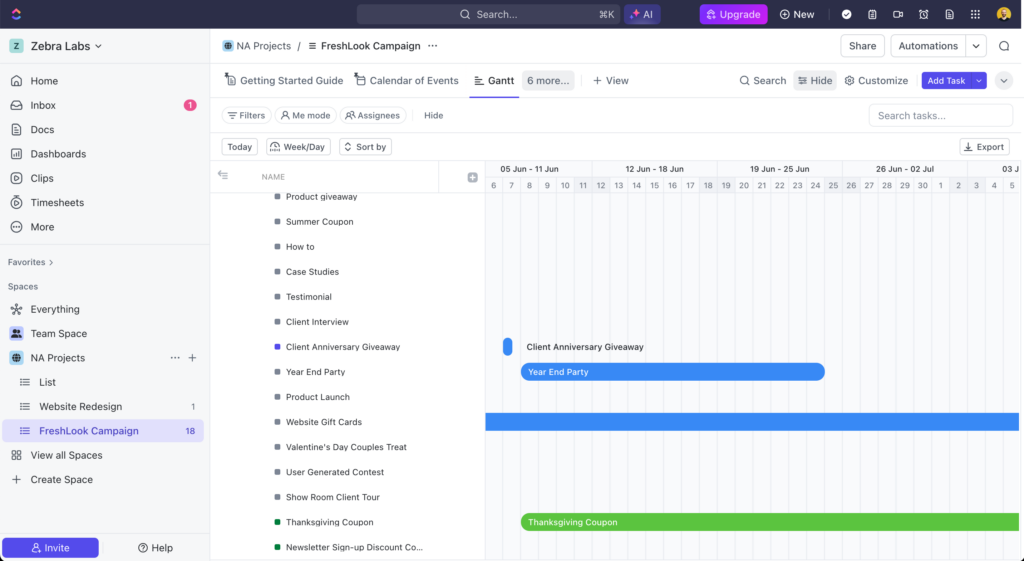
Here are a few sample interfaces to show what project management software typically looks like:

Top Project Management Software to Consider
Here’s my shortlist of the best project management software solutions:
Clicks on the links below may earn a commission, which supports our independent testing and review of software and services. Learn more about how we stay transparent.



Who Uses Project Management Software?
Project management software is widely used by these types of teams and organizations:
- Product Development Teams: Coordinate roadmaps, sprints, and releases in tech and software companies.
- Marketing Departments: Plan campaigns, manage content calendars, and track projects and deliverables from kickoff to launch.
- Professional Services Firms: Oversee client projects, track deadlines, and manage billable workstreams (these firms might also use a related tool: professional services automation software).
- Construction and Engineering Firms: Schedule milestones, assign tasks, and track progress on complex, multi-phase builds.
- Agencies (Creative, Digital, PR): Organize projects for multiple clients, balance team capacity, monitor profitability, and manage feedback loops (this might include more specialized tools, like creative project management software).
Key Project Management Software Benefits & Potential Business Impacts
Project management software helps teams save time, cut down on mistakes, and drive better business outcomes by keeping work organized and transparent. While it’s usually an affordable investment, choosing the wrong tool or rolling it out poorly can add confusion or cost if you’re not careful.
Use this table to weigh the main benefits and risks of project management solution adoption:
| Benefits | Risks |
|---|---|
| Increases visibility across tasks and teams | Poor adoption leads to inconsistent use |
| Speeds up project tracking and reporting | Tool overload can add to confusion |
| Centralizes all project information | Steep learning curve for some team members |
| Improves accountability and ownership | Project data migration can be time-consuming |
| Supports remote and hybrid team collaboration | Integration issues with existing systems |
| Reduces missed deadlines and oversights | Ongoing subscription costs and pricing increases |
| Makes resource allocation more transparent | Security concerns with sensitive information |
Project Management Software Case Studies
These case studies show how teams improved visibility, accountability, and project performances after switching to project management software. Each example highlights how specific challenges were solved and how software helped improve project success.
Case Study: E.ON Next's Implementation of Asana
E.ON Next, one of the UK's leading energy suppliers, embedded Asana across its Go-to-Market (GTM) department to bring structure to its campaign, creative, and content workflows. The team built a centralized intake process, standardized project templates, and used Asana AI Studio to automate project brief generation and task assignment.
Here are the results of E.ON Next's implementation of project management software:
- 465% increase in request capacity year-over-year, allowing the team to handle far greater volume without adding headcount.
- 318 work days saved through workflow automation and process optimization.
- Campaigns launched 7–10 days faster, cutting time-to-market without compromising regulatory compliance.
- £5.5K saved monthly by automating the two-step project triage process using Asana AI Studio.
- 30–40% reduction in time spent gathering request details during intake.
- 25% decrease in early-stage cross-functional back-and-forth.
Core Features & Capabilities of Project Management Software
You’ll find these core features in most project management platforms that matter to project managers:
- Task Management: Break work into assignments, update statuses, and track ownership so nothing falls through the cracks.
- Project Timelines and Gantt Charts: Visualize schedules, dependencies, and key deadlines to spot delays early and keep projects moving.
- Resource Allocation: Assign team members and track workloads to avoid bottlenecks and balance priorities.
- Collaboration Tools: Centralize comments, workspaces, file sharing, and feedback to keep all discussions and documents in one place.
- Automated Workflows: Set up rules, triggers, and recurring tasks to reduce manual work and standardize routine processes.
- Customizable Dashboards and Reporting: Surface real-time insights, track project progress against goals, and keep stakeholders in the loop with tailored views.
- Permission Controls: Manage who can view, edit, or approve work to maintain role clarity and data security in your project management software.
- Time Tracking: Keep track of work hours and measure actuals vs your project plan.
Project Management Software Use Cases: Typical Processes & Workflows
Project management software lets teams map out, manage, and optimize workflows for cross-functional initiatives, product launches, client projects, and recurring operations.
You can build clear processes, assign responsibilities, and track milestones. This helps catch risks early, keeps everyone accountable, and improves delivery speed across projects of any size.
Use this overview to understand the key project management processes and how software adds value:
| Process | Description | How Software Helps |
|---|---|---|
| Project Planning | Define goals, scope, resources, key tasks, and milestones for new projects. | Provides templates, project scheduling tools, and visual timelines for more accurate plans. |
| Task Assignment & Tracking | Delegate tasks, set deadlines, and monitor progress across teams. | Centralizes task ownership, automates notifications, and tracks status in real time. |
| Resource Planning & Resource Management | Manage team workloads and allocate resources to avoid burnout or bottlenecks. | Offers workload views, allocation charts, capacity planning, and real-time availability updates. |
| Issue & Risk Management | Identify, assess, and resolve risks or blockers before they impact delivery. | Lets teams log, assign, and track issues in one place with automated reminders. |
| Project Reporting | Share progress, highlight risks, and communicate key updates to stakeholders. | Generates status reports, custom dashboards, and shares updates instantly. |
If you are shopping for PM software, writing down detailed project use cases can help you narrow down your tool choices and get the most out of demos.

Types of Project Management Software & Similar Tools
Project management software covers a broad range of tools, each built around a different way of organizing and delivering work. Here's a breakdown of the main types of project management software you'll come across:
| Type | Differentiator |
|---|---|
| Agile project management software | Designed around Scrum, sprints, backlogs, and iterative delivery for software development teams |
| Waterfall project management software | Follows a fixed, sequential project structure with clearly defined phases and sign-offs |
| Kanban-based project management software | Organizes work as visual cards on a board to manage flow and work-in-progress limits |
| Task management software | Focuses on individual task tracking without the broader project planning and reporting functions |
| Work management software | Covers a wider range of operational workflows beyond project delivery, including team requests and recurring work |
| Project portfolio management software | Manages and prioritizes multiple projects at once with a focus on resource allocation and strategic alignment |
| Collaboration software | Supports team communication and file sharing but lacks structured project planning and task ownership features |
Ready to Go Deeper on Project Management Software?
If you've made it this far, you have a solid foundation for evaluating your options. If you’re not quite ready to choose a project management tool, find out more about project management software benefits and how each one plays out in practice.




