

A Guide to Project Tracking: Tools, Tips, And Best Practices


What Is Project Tracking?
Project tracking is the process of monitoring and managing a project’s progress to ensure it stays on schedule, within scope, and on budget. It involves tracking timelines, resources, costs, risks, and deliverables throughout the project lifecycle. Teams often use a project tracker—a tool or system designed to monitor tasks, milestones, and performance in real time—to keep work organized and projects moving forward successfully.
Each industry may benefit from different types of project management apps tailored to their specific project tracking needs.
What is a Project Tracker?
A project tracker is a tool or system used to monitor the progress of a project from start to finish. It helps teams keep track of tasks, deadlines, milestones, budgets, resources, and overall project performance in one place. While some teams use spreadsheets or manual tracking methods, many rely on project tracking software to automate updates, improve visibility, and support real-time collaboration. Common features include Gantt charts, Kanban boards, reporting dashboards, and task management tools that help teams stay organized and keep projects on track.

Why is Project Tracking Important?
Project tracking helps teams monitor progress, manage resources, identify risks, and keep projects aligned with deadlines and budgets. Without it, even well-planned projects can quickly spiral into delays, communication breakdowns, and costly failures. Just ask Taylor. Yes, as in, international singer-songwriter Taylor Swift.
Taylor Swift's Ticketmaster Disaster
When tickets for one of Taylor Swift’s highly anticipated tours went on sale, demand overwhelmed Ticketmaster’s systems. The platform repeatedly crashed, leaving frustrated fans unable to purchase tickets and damaging the reputations of both Ticketmaster and Taylor Swift.
The issue wasn’t just technical—it was a project tracking failure. Ticketmaster failed to accurately forecast demand and prepare the infrastructure needed to support traffic at scale. Without proper tracking and planning around capacity, risk, and performance metrics, the project couldn’t handle real-world conditions.
While most projects won’t fail this publicly, the underlying problems are common. Without effective project tracking, teams can lose visibility into progress, miss deadlines, overspend budgets, and struggle to respond to issues before they escalate.
Avoiding disasters like the one at Ticketmaster is just one reason project tracking is vital. Here are some other reasons:
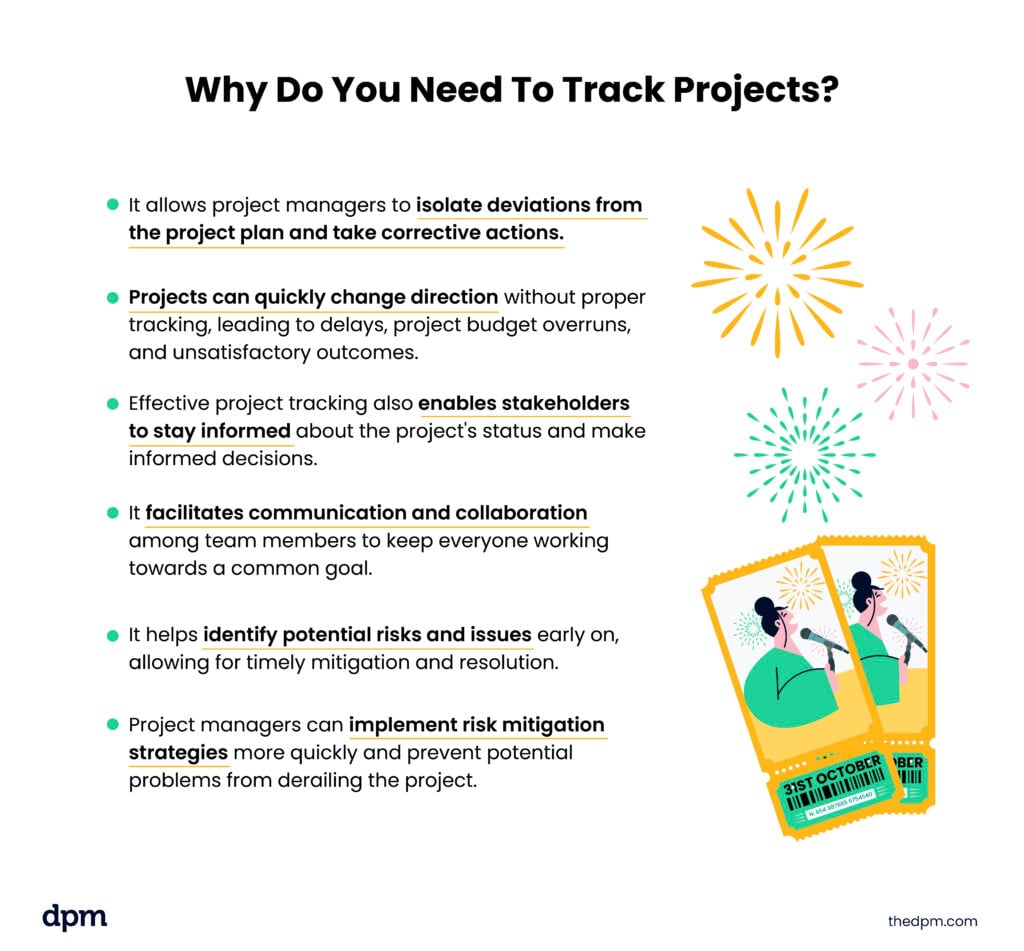
- It allows project managers to isolate deviations from the project plan and take corrective actions.
- Projects can quickly change direction without proper tracking, leading to delays, project budget overruns, and unsatisfactory outcomes.
- Effective project tracking also enables stakeholders to stay informed about the project's status and make informed decisions.
- It facilitates communication and collaboration among team members to keep everyone working towards a common goal.
- It helps identify potential risks and issues early on, allowing for timely mitigation and resolution.
- Project managers can implement risk mitigation strategies more quickly and prevent potential problems from derailing the project.
Simply put, project tracking provides the necessary insights and data to make informed decisions, keep projects on track, and deliver exceptional results.
Benefits of Project Tracking
Effective project tracking gives teams greater visibility into project performance, helping them stay aligned on goals, timelines, budgets, and deliverables. By monitoring progress in real time, project managers can identify issues early, make informed decisions faster, and keep projects moving forward efficiently.
Some of the biggest benefits of project tracking include:
- Improved visibility into project progress: Teams can see what’s on track, what’s delayed, and where attention is needed.
- Better resource management: Tracking workloads and timelines helps prevent bottlenecks, burnout, and underutilization.
- Stronger communication and collaboration: Clear project updates keep stakeholders and team members aligned throughout the project lifecycle.
- More accurate forecasting and planning: Historical tracking data helps teams estimate timelines, budgets, and resource needs more effectively.
- Reduced project risks: Monitoring risks, dependencies, and blockers in real time allows teams to address issues before they escalate.
- Better accountability: Clearly tracked tasks, owners, and deadlines make it easier to measure performance and responsibility.
- Improved budget control: Tracking project costs alongside progress helps teams avoid overspending and scope creep.
- Higher project success rates: With better oversight and decision-making, teams are more likely to deliver projects on time and within scope.
Whether you’re managing a small internal initiative or a large cross-functional project, effective project tracking provides the structure and visibility needed to deliver successful outcomes consistently.
How To Effectively Track Project Progress
To effectively track projects and avoid disasters like the Taylor Swift Ticketmaster debacle, it's essential to follow best practices and implement proven strategies by following these steps.
1. Determine Objectives & Deliverables
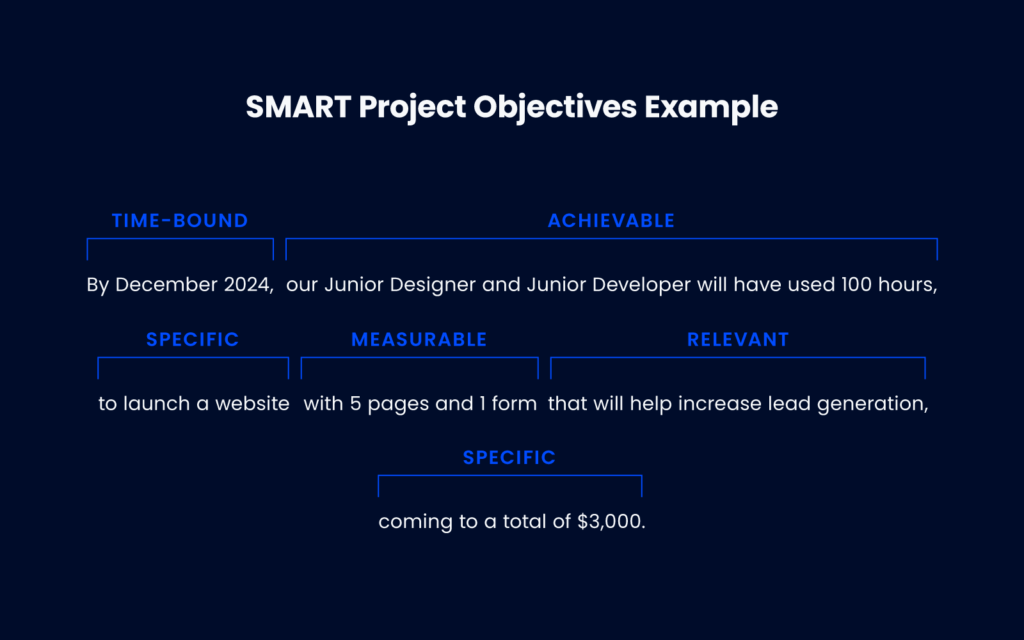
Clearly define project goals and objectives that are specific, measurable, achievable, relevant, and time-bound (SMART). These goals provide a clear direction for the project and serve as a baseline for tracking progress.
Make sure to identify specific project goals and validate each goal clearly. Accurately identify each deliverable. Be specific and clear about what the customer can expect and make sure it is agreed upon.
2. Define Project Milestones & Deadlines
Tracking milestones helps you gauge progress and identify any delays that need to be addressed.
- Break down the project into smaller milestones
- Set realistic deadlines and expectations
Here’s an example of the right and wrong way to set realistic expectations.
| Wrong | Right |
|---|---|
| XYZ Company will deliver approximately 2,000 cups by mid-December 2025. | XYZ Company will deliver the following to ABC Company by December 15, 2025, at ABC Company’s office.
|

3. Utilize Project Tracking Tools & Software
Invest in project tracking tools and software that streamline the tracking process and provide real-time insights into project progress. This is one of the ways to use project management tools to your advantage.
Often built into project management software, these tools are used to increase automation when integrating with other systems and apps, saving time and reducing errors when it comes to real-time data collection, analysis, and reporting.
4. Establish A Communication Plan
Develop a comprehensive communication plan that outlines the communication channels, frequency, and stakeholders involved. Regular and effective communication ensures that everyone is on the same page and minimizes misunderstandings. Make sure to do the following:
- Understand your project parameters
- Define communication goals
- Identify all stakeholders
- Define the frequency of communication
- Spell out all communication methods to be used
5. Monitor Resource Allocation & Utilization
You'll need to regularly track the allocation and utilization of project resources, such as your workforce, budget, and equipment. This ensures the project has the necessary resources and helps identify inefficiencies or bottlenecks.
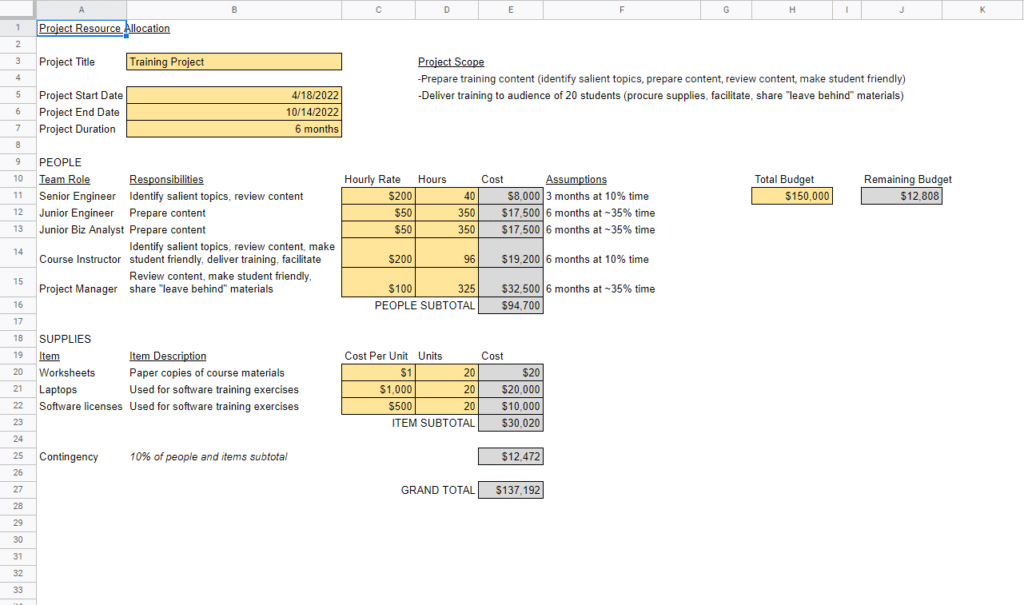
Resource allocation should involve these steps:
- Determine project scope and required resources
- Determine resource availability
- Schedule and assign resources to tasks
- Track utilization and capacity
- Re-evaluate and adjust as needed
Keeping an eye on the triple constraints will help with this process. If your scope changes, you'll need to make adjustments to either your timeline or budget as well. Either of these adjustments will affect your resource plan, and the quicker you can identify a change, the quicker you can respond to keep things on track.
Tracking project scope and required resources with a project dashboard offers transparency and control over budget and resources.
6. Regularly Review & Adjust Project Tracking Strategies
Project tracking is an ongoing process, and it's important to have regular check-ins to review and modify your tracking strategies based on project progress and changing circumstances. This ensures that your tracking methods remain effective and relevant throughout the project's life cycle.
Typically, project tracking tools are a part of basic project management platform functionality.
Common Project Tracking Methods
Project teams use a variety of project tracking methods and frameworks to monitor progress, manage workloads, and keep projects moving efficiently. The right approach depends on your team structure, project complexity, and workflow preferences, but most modern project tracking software supports multiple tracking methods.
Gantt Charts
Gantt charts provide a visual timeline of a project’s tasks, milestones, and dependencies. They help project managers track progress against deadlines, identify scheduling conflicts, and understand how delays in one task may impact the overall project timeline.
Gantt charts are especially useful for:
- Complex projects with multiple dependencies
- Long-term project planning
- Monitoring milestones and deadlines
- Resource scheduling and forecasting
Kanban Boards
Kanban boards track work visually using columns that represent different stages of a workflow, such as “To Do,” “In Progress,” and “Completed.” Tasks move through the board as work progresses, giving teams real-time visibility into project status and bottlenecks.
Kanban boards are ideal for:
- Agile and continuous delivery teams
- Managing ongoing workflows
- Improving team visibility and collaboration
- Identifying workflow bottlenecks quickly
Agile Tracking
Agile project tracking focuses on iterative progress through short work cycles called sprints. Teams track completed work, remaining tasks, and sprint goals using tools like sprint boards and burndown charts.
Agile tracking helps teams:
- Adapt quickly to changing priorities
- Measure sprint progress in real time
- Improve team accountability and transparency
- Deliver work incrementally and consistently
Burndown charts, in particular, help teams visualize how much work remains in a sprint compared to the time left before the deadline.
Tools for Project Tracking
Using the right project tracking tools can help teams streamline workflows, improve visibility, and make better decisions throughout the project lifecycle. Modern project management software centralizes project data and provides real-time insights into tasks, timelines, resources, and performance.
Some of the biggest benefits of project management tools include:
- Better risk management: Identify risks early, assess downstream impacts, and respond before issues escalate.
- Increased productivity: Centralized task management and real-time updates help teams stay aligned and reduce unnecessary status meetings (these are also key benefits of productivity tools).
- Improved transparency: Stakeholders can monitor progress, identify bottlenecks, and stay informed throughout the project lifecycle.
- Enhanced reporting: Reporting dashboards and analytics help teams track KPIs, visualize project data, and optimize performance over time.
Effective project tracking also improves scope management by helping teams monitor project changes, reduce scope creep, and keep deliverables aligned with project goals.
Features To Look For in Project Tracking Software
If you’re picking out project tracking software, look for tools that support your team’s workflows today while remaining flexible enough to scale as projects grow in complexity.
Task Management
Task management features help teams organize work, assign responsibilities, manage deadlines, and monitor progress from a centralized platform.
Look for tools that allow you to:
- Create and assign tasks and subtasks
- Prioritize work and adjust project schedules
- Set task dependencies
- Track task status in real time
- Give stakeholders visibility into upcoming work and deadlines
Collaboration & Communication
Strong collaboration features help teams stay aligned and reduce communication silos.
Key collaboration features include:
- File sharing and document uploads
- Real-time document updates
- Version control
- Task comments and discussions
- Real-time collaboration
- Multi-channel communication support
Reporting & Analytics
Reporting and analytics features help project managers monitor performance and make data-driven decisions.
Look for software that offers:
- Project progress reports
- Customizable dashboards and reporting
- Visualizations like charts and graphs
- KPI and trend tracking
- Data export capabilities
Integration & Scalability
Project tracking tools should integrate seamlessly with your existing tech stack and scale alongside your organization as project demands increase.
Look for tools that can:
- Integrate with other business and productivity tools
- Support complex projects and growing teams
- Maintain performance at scale
- Provide mobile accessibility for remote work
Features like Gantt charts, dashboards, and customizable permissions can also improve visibility and help teams tailor workflows to different stakeholders and project needs.
Project Tracking Best Practices
Good project tracking isn’t just about updating dashboards and checking boxes—it’s about creating enough visibility and structure to keep projects moving without constant chaos. These best practices can help teams stay aligned, spot problems earlier, and avoid last-minute surprises.
Set Clear Goals & Deliverables
Before you start tracking anything, make sure the team is aligned on what success actually looks like. Clear goals, deliverables, timelines, and ownership make it much easier to measure progress and avoid confusion later on.
Keep Tracking Consistent
Project tracking only works if it’s maintained regularly. Whether it’s daily standups, weekly status updates, or automated reporting, consistent updates help teams catch issues before they turn into bigger problems.
Use Real-Time Data Whenever Possible
Outdated project information leads to bad decisions. Using project tracking software with real-time visibility into tasks, workloads, and timelines helps teams stay proactive instead of reactive.
Identify Risks Early
Most project disasters don’t come out of nowhere—there are usually warning signs along the way. Keeping an eye on blockers, dependencies, and workload issues early makes it easier to adjust before timelines or budgets start slipping.
Centralize Communication
Scattered updates across emails, spreadsheets, and chat threads make projects harder to manage. Keeping communication tied to tasks, timelines, and project updates helps everyone stay aligned and reduces unnecessary back-and-forth.
Review & Adjust As You Go
Projects change. Priorities shift, timelines move, and unexpected challenges come up. Regularly reviewing project progress gives teams the flexibility to adapt without losing momentum or visibility into the bigger picture.
Common Mistakes To Avoid
These are just some of the common mistakes that can lead to disasters. By understanding these mistakes, you can take proactive steps to resolve or avoid them.
Underestimating The Impact
The first mistake a project manager can make is underestimating the significance and impact of project tracking and moving ahead without giving it sufficient time and attention. Think of your project as a roadmap that needs to be followed closely to reach your destination.
If you don't know how your project is doing at any given moment, how can you tell if it's on track or where to adjust to avoid unintended consequences?
Tracking your project in real time gives you full visibility into how your resources, time, and quality aspects are on point or make changes ahead of potential issues.
Failing to Set Clear Goals
One of the most common mistakes is failing to set clear goals and objectives at the start of a project. With clear goals, it's easier to track progress and measure success, and meeting those goals is possible.
It's also important to define specific, measurable, achievable, relevant, and time-bound (SMART) goals that provide a clear direction for your project.
No Communication Plan
Another mistake is not establishing a proper communication plan. Effective communication is crucial for project success. Without it, misunderstandings and delays can occur. Establishing regular communication channels and ensuring all team members are on the same page is essential for effective project tracking.
Document and communicate project goals, risk strategies, project timelines, roles, and responsibilities with your project team and relevant stakeholders. This way, when changes happen, everyone can adjust faster, increasing the chance of project success.
Not Using Tracking Software
Relying on manual tracking methods can be a recipe for disaster. There are just too many moving pieces in a project, and resources or time are often limited. Using Microsoft Excel spreadsheets and manually updating progress can lead to errors and delays in your project.
Investing in project management tools (or open source reporting tools, if you're on a tight budget) or using an automated project tracking template to simplify task tracking significantly streamlines your tracking process and provides everyone with real-time insights into project progress.
Project tracking tools that follow best practices for project management can help maintain momentum and achieve timely results.
Failing to Prioritize Tasks
Unfortunately, not every task is a top priority, and not every stakeholder will agree on priorities. Understanding the project goals and resourcing limitations can help you isolate which tasks should be prioritized and in what order.
Join For More Project Tracking Insights
Want to connect with other digital project managers to share resources and best practices? Join our membership community and get access to 100+ templates, samples, and examples, and connect with 100s of other digital project managers in Slack.



