

De 10 beste programvareløsningene for prosjektstyring av designprosjekter i 2026

10 Beste programvare for prosjektstyring innen design – kortliste


Det kan være krevende å lede designprosjekter. Frister, teamsamarbeid og kundens forventninger kolliderer ofte, og du kan ende opp med å føle deg overveldet. Det er her programvare for prosjektstyring innen design kommer inn i bildet. Den bidrar til å organisere oppgaver, fremmer samarbeid og sørger for at prosjektene holder seg på rett spor.
Jeg har testet og gjennomgått ulike verktøy for å finne dem som virkelig gjør en forskjell. Målet mitt er å gi deg et objektivt innblikk i de beste alternativene som finnes.
I denne artikkelen finner du verktøy som kan hjelpe teamet ditt med å jobbe mer effektivt og nå prosjektmålene deres. Enten du er del av et lite team eller en stor organisasjon, finnes det noe her for deg.
Hvorfor du kan stole på våre programvareanbefalinger
Teamet vårt har testet og anmeldt programvare siden 2012. Vi er selv prosjektledere, så vi vet hvor vanskelig og hvor viktig det er å velge riktig programvare.
I denne guiden har vi vurdert verktøyene gjennom praktisk testing og uavhengig research og gitt dem poeng ut fra våre utvelgelseskriterier. Vi bygger også på innsikt fra ledende eksperter i bransjen og erfarne prosjektledere.
Anmeldelsene våre bygger på vår egen redaksjonelle vurdering. De er ikke et salgsargument.
Ekspertanmeldere:
Sammenligningstabell for programvare for prosjektstyring innen design
Denne sammenligningstabellen oppsummerer prisopplysningene for mine beste utvalgte programmer for prosjektstyring innen design:
| Tool | Best For | Trial Info | Price | ||
|---|---|---|---|---|---|
| 1 | Best for resource planning | Free trial available | From $17/user/month | Website | |
| 2 | Best for profitability tracking | Free trial available | From $10/user/month (billed annually) | Website | |
| 3 | Best for annotations and version control | Free plan available | From $9/user/month (billed annually) | Website | |
| 4 | Creative brief templates to help you start your project on the right foot. | 14-day free trial | From $10/user/month | Website | |
| 5 | Real-time collaboration for your proofing stage. | Free demo available | Pricing upon request | Website | |
| 6 | Best design project management and collaboration software | Free plan + 15-day free trial available | Pricing upon request | Website | |
| 7 | Best for full lifecycle service delivery | Free demo available | Pricing upon request | Website | |
| 8 | Best for a highly flexible and customizable solution | Free plan + 14-day free trial available | From $8/user/month (billed annually) | Website | |
| 9 | Best for connecting with Figma's design platform | Free plan available | From $16/user/month | Website | |
| 10 | User-friendly visuals and intuitive navigation for design teams. | Free trial + free plan + free demo available | From $13/user/month (billed annually) | Website |


Anmeldelser av den beste programvaren for prosjektstyring innen design
Nedenfor finner du mine detaljerte sammendrag av den beste programvaren for prosjektstyring innen design som kom med på kortlisten. Anmeldelsene mine gir et detaljert innblikk i de viktigste funksjonene, fordeler & ulemper, integrasjoner og ideelle bruksområder for hvert verktøy, slik at du kan finne det som passer best for deg.

Scoro
Best for resource planning

Scoro is an all-in-one business management software designed to help professional and creative services streamline their operations. It combines project management, time tracking, sales, billing, and reporting into a single platform, enabling teams to work more efficiently.
One reason I chose Scoro is its real-time Gantt chart feature. This tool lets you track progress, tasks, dependencies, and events in an always up-to-date view, helping you adapt quickly to changes and understand how delays or logged hours impact your plans. By minimizing manual updates and avoiding double bookings, your team can focus more on the creative aspects of design projects.
I also like Scoro's resource planning capabilities. With a drag-and-drop planner or Kanban task board, you can distribute tasks effectively, ensuring balanced workloads and preventing overlaps. Shared calendars, timesheets, and a built-in time tracker help manage your team's time efficiently while monitoring billable and non-billable hours ensures accountability for time spent on client work.
Integrations include Google Calendar, Microsoft Exchange, QuickBooks, Xero, Stripe, PayPal, Jira, Asana, HubSpot, Salesforce, Dropbox, and Zapier.
New Product Updates from Scoro

Scoro Adds Time Mobile App and ELI Improvements
Scoro adds the Scoro Time mobile app for iOS/Android to track time anywhere and expands ELI with attachments, smarter filtering, and trigger-based actions. For more information, visit Scoro's official site.

Best for profitability tracking

Productive is an all-in-one project management tool that helps you manage your entire workflow, from sending proposals and planning resources to delivering projects and billing clients.
Productive provides a focus on profitability. It allows you to run each project like a separate profit and loss statement, giving you clear insights into your financial performance. This feature helps you understand which projects are most profitable and where you might need to adjust your strategies.
Another useful aspect is Productive's resource planning capabilities. You can allocate your team's time effectively, ensuring that everyone is working on the right tasks at the right time. This helps prevent overbooking or underutilizing your team members, leading to more efficient project completion.
Integrations include Google Calendar, Jira, Slack, QuickBooks, Xero, Zapier, Sage, BambooHR, and HubSpot.
New Product Updates from Productive
Productive Adds Voice Dictation, Slack Connector, Proposals, and Overtime
Productive adds voice dictation, a Slack Connector, proposal controls, and overtime tracking. These updates support faster AI interactions, client proposals, and time management. For more information, visit Productive’s official site.

Best for annotations and version control
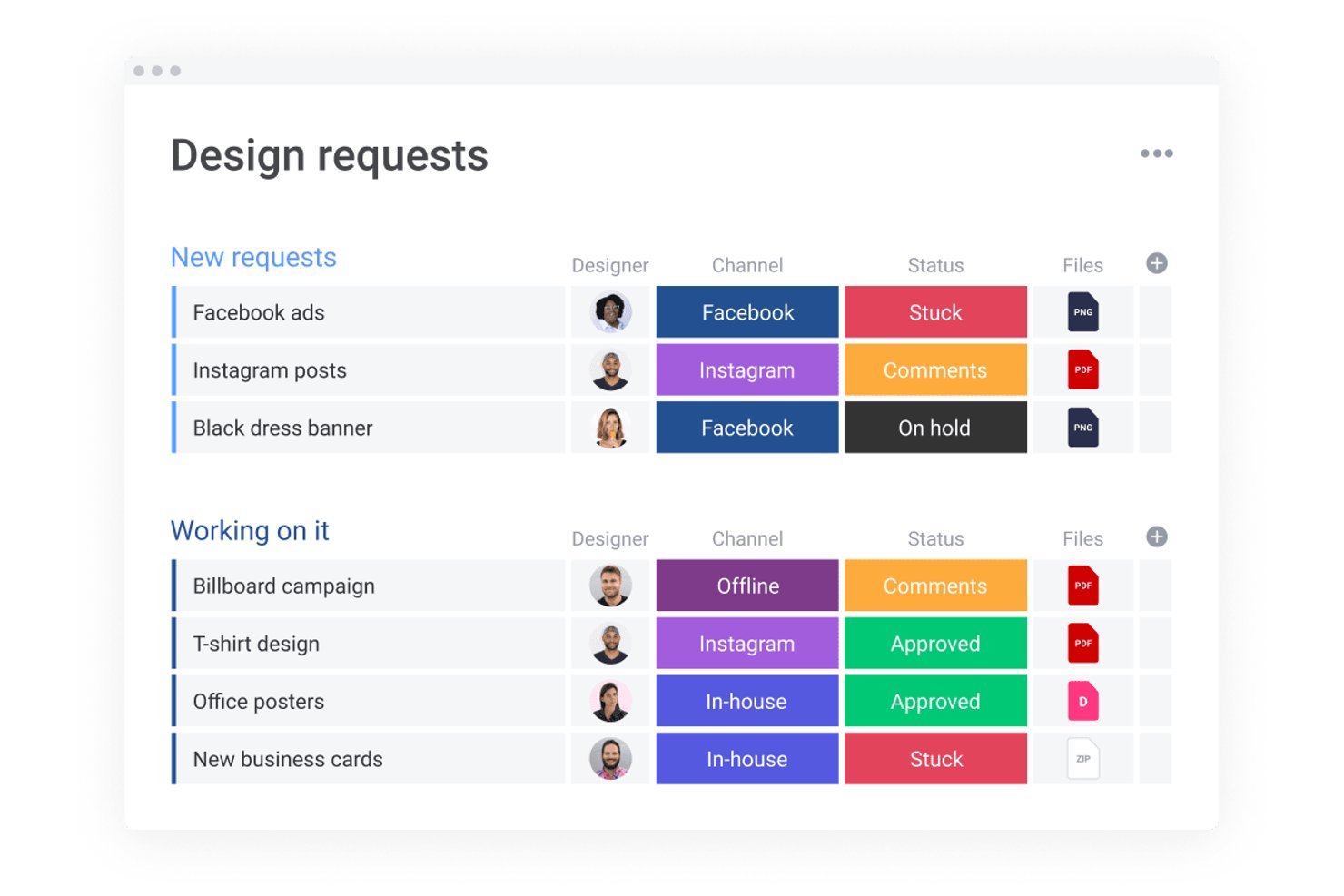
monday AI Workspace is a configurable work management platform that combines visual project tracking, AI-powered automation, design file integrations, and cross-functional collaboration tools for creative and design teams.
Who Is monday AI Workspace Best For?
It's a strong fit for in-house design teams and creative agencies that manage multiple projects across cross-functional stakeholders and need one central workspace.
Why I Picked monday AI Workspace
I've included monday AI Workspace in my top picks because of how it connects version control directly to project tasks via its Figma integration. Each board item links to a specific Figma version, so my team always knows which design iteration is under review. The live Figma and Canva embeds sync automatically, keeping feedback tied to the exact asset rather than buried in a comment thread from three revisions ago.
monday AI Workspace Key Features
- AI Notetaker: Captures, transcribes, and summarizes meeting discussions straight into the workspace for easy follow-up.
- WorkCanvas whiteboard: Lets you brainstorm, plan, and map creative ideas visually within your project boards.
- Custom workflow automation: Automates repetitive project management tasks like status changes, asset routing, or deadline tracking.
- Guest access and permissions: Allows clients or stakeholders to collaborate, comment, and review within defined access controls.
monday AI Workspace Integrations
monday AI Workspace offers hundreds of native integrations through its built-in integrations and marketplace, including Slack, Google Workspace, Microsoft 365, Jira, Dropbox, Zoom, HubSpot, Salesforce, GitHub, and Outlook. It also supports Zapier and provides an API for custom integrations.
Pros and Cons
Pros:
- Highly visual boards suit creative workflow tracking
- Annotation tools tied directly to design files
- Figma embeds sync live within project boards
Cons:
- Not purpose-built for creative-only workflows
- Advanced features locked behind pricier plans
New Product Updates from monday AI Workspace
monday AI Workspace Adds Human Approval Routing
monday AI Workspace adds a human-in-the-loop approval block to AI Workflows, sending approval requests and routing workflow paths based on responses. For more information, visit monday AI Workspace's official site.

Wrike
Creative brief templates to help you start your project on the right foot.

Wrike is a powerful project management software that enables design teams to create their own customized workflows based on their unique needs. Streamline work intake, simplify proofing, configure creative workflows, and increase delivery in a single collaborative platform. Spend less time on repetitive administrative tasks and more time producing high-quality design projects.
Pre-built templates will help you create design workflows and launch design projects quickly and efficiently. Wrike features customizable briefs and request forms, visual and customizable workload management, space for team members to provide feedback, and reporting and analytics. Customize workflows, dashboards, reports, and request forms with highly configurable software that’s designed to eliminate time-consuming admin, so your team can spend more time creating high-value assets.
Wrike has an easy-to-use interface with distinct Spaces, folders, and tasks. You can switch between Kanban boards, interactive drag-and-drop Gantt charts, and traditional workload views to visualize priorities. Or navigate between the home screen and timesheets, dashboards, calendars, reports, and a stream for notifications and messages. Users also have access to a variety of pre-built templates for common organizational processes that allow teams to launch projects faster.
Wrike has over 400 integrations, including with Adobe Creative Cloud, giving you the visibility and efficiency you need without disrupting your team’s creativity. The Wrike extension for Adobe is free for all Wrike subscribers and is available for Photoshop CC, Illustrator CC, InDesign CC, and Premiere Pro CC.
New Product Updates from Wrike

Wrike Redesigns AI Agent Builder
Wrike redesigns its AI Agent Builder with a side-by-side setup, Scopes, sentence-style triggers and actions, and clearer filters. These changes make it easier to configure, test, and manage agent behavior. For more information, visit Wrike’s official site.

Real-time collaboration for your proofing stage.
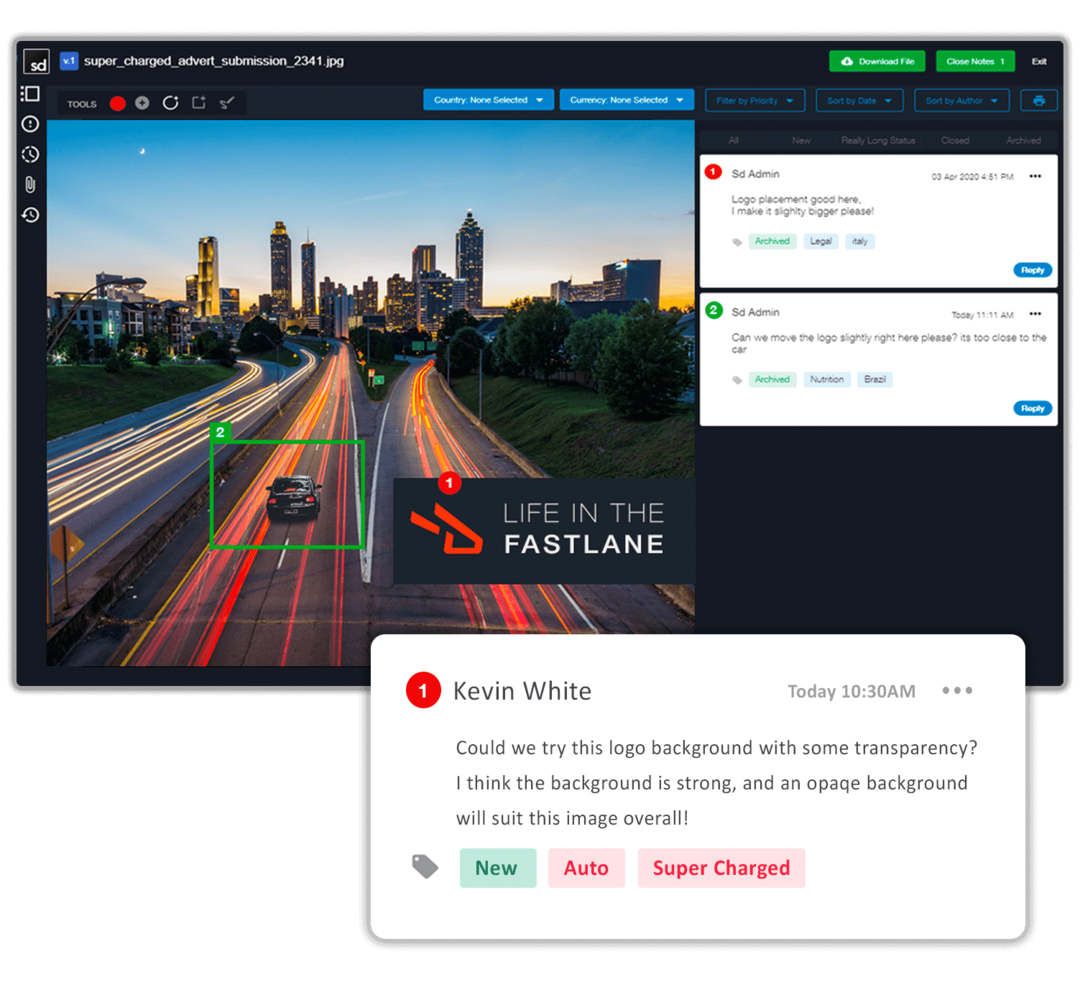
Screendragon has capabilities in their software that help streamline creative production workflows. Version control, file sharing and automated approvals are only a few. They also pride themselves in having a software that was well-thought out and designed before it was developed. No patchy work here!
What I like about this tool is their version comparison feature. You can see side by side different versions of the same content being worked on, you can highlight a section with a free hand tool or forms, and track the history of changes and comments. Perfect for internal audits!
Screendragon has over a thousand integrations through Zapier.
Pricing is available upon request.
New Product Updates from Screendragon
Screendragon Unveils New AI Hub
Screendragon introduced AI Hub, a new capability that lets teams build and manage AI agents directly within workflows. The update helps marketing teams automate tasks, maintain governance controls, and scale AI-driven operations more efficiently. For more information, visit Screendragon's official site.

Best design project management and collaboration software
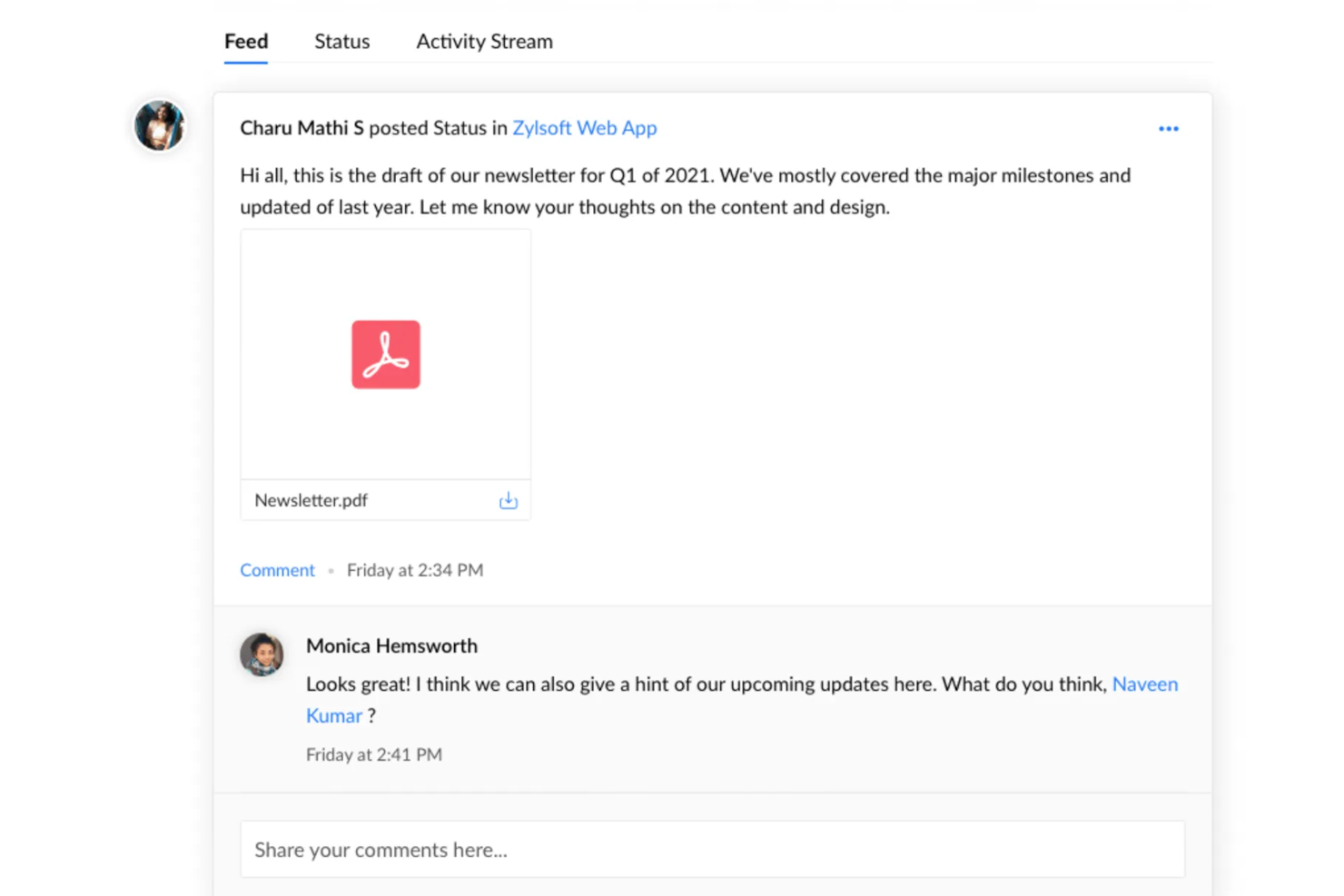
Zoho Projects is a project management software that can be used by all types of teams. The platform has plenty of customizable features, like the layout, individual views, project templates, and project statuses. Users can build project workflows, assign tasks, and set dependencies in the system. User roles can be set to make sure the right people are assigned to the right projects, and an availability heatmap helps ensure no one's overloaded.
What makes this software stand out is its collaboration features. Users can comment, tag, and share files directly in the platform, making it easy to work together on creative projects. The software can store and manage large quantities of documents, and has version and access control as well as notes to keep files organized and up-to-date. A live chat tool means users can connect quickly to exchange feedback and important project details without leaving the software's environment.
Users can integrate the software with other tools like Dropbox, Github, Google Workspace, Microsoft Teams, Slack, and Zapier, which unlocks even more integrations with a paid account.
A free version is available, and paid plans start from $5/user/month. 10-day free trials let you test out a paid subscription.
New Product Updates from Zoho Projects
Zoho Projects Adds CodeX Scripts for Custom Modules
Zoho Projects now supports CodeX Scripts for custom modules, enabling conditional logic and rules for creating, updating, and deleting records. For more information, visit Zoho Projects' official site.
 .
.
Kantata
Best for full lifecycle service delivery
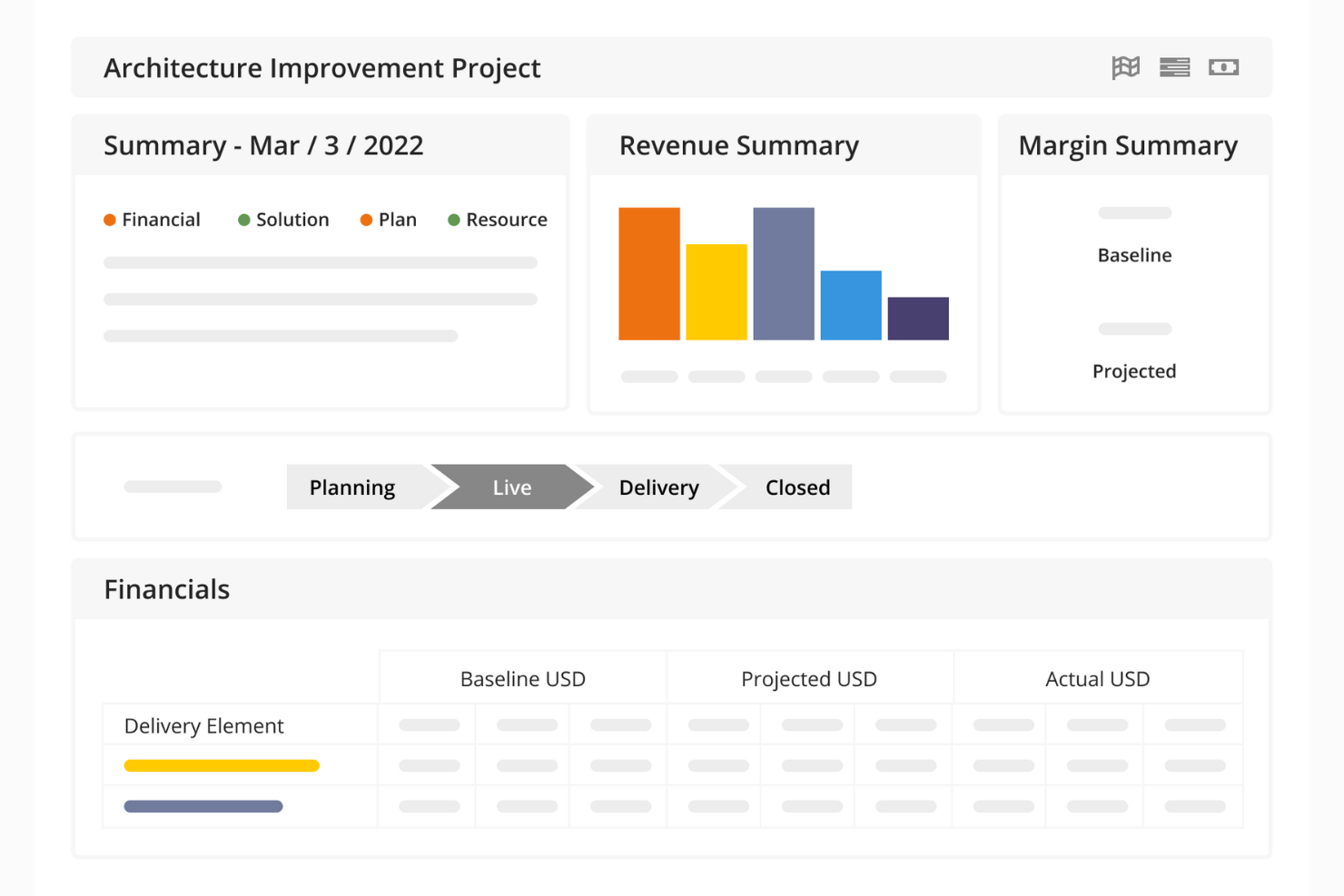
Kantata is a project management platform designed to help design agencies and creative services teams manage their work from start to finish. Beyond task management, it brings together workflow, resource planning, financial oversight, and collaboration in one system.
The software supports your team throughout the entire project lifecycle. Real-time dashboards and financial tracking help you stay ahead of risks, while task and resource management tools ensure the right designers are assigned to the right projects. Built-in collaboration features also keep communication flowing between internal teams and clients, so your creative work stays on track and feedback is addressed quickly.
For design teams managing multiple client accounts or large portfolios of creative work, Kantata provides portfolio-level visibility alongside project-specific details. You can track profitability, capacity, and progress across campaigns while drilling into task-level execution. This makes it easier to balance resources, hit deadlines, and deliver quality creative consistently.
Kantata integrates with several other workplace tools, including Slack, Sage, Quickbooks, Expensify, BambooHR, NetSuite, Jira, Salesforce, Xero, and Google Workspace.
New Product Updates from Kantata

Kantata Adds Access Group Change History
Kantata adds Access Groups History, letting account administrators track changes to group details, membership, and permissions in Recent History. The update also makes these events available through the Subscribed Events API for broader monitoring. For more information, visit Kantata’s official site.
 .
.
Miro
Best for a highly flexible and customizable solution

Miro is a visual collaboration platform tailored for design project management, offering an extensive virtual whiteboard space. It supports various forms of idea expression, including shapes, flowcharts, sticky notes, and multimedia elements. Additional key features include an infinite canvas for unrestricted ideation, TalkTrack for asynchronous video explanations of process maps, and asynchronous collaboration tools, like comments and reactions, to facilitate continuous feedback.
Miro also comes with a large bank of templates for agile workflows, roadmaps and strategy planning, brainstorm sessions, and various other use cases. Overall, it's a highly flexible solution that's well suited to the needs of design teams who may need a customizable workspace that accommodates diverse working styles and schedules.
The software integrates with other workplace tools like Zoom, Microsoft Teams, Slack, Google Workspace, Asana, monday.com, Jira, Dropbox, OneDrive, Notion, Airtable, ClickUp, and Unito, among others. A free plan is available and paid plans start from $10 per user per month.
New Product Updates from Miro
Miro Adds Japan Data Residency for Enterprise Customers
Miro has introduced Japan data residency for enterprise customers, offering in-region storage for production data, backups, and metadata, plus in-region compute infrastructure. For more information, visit Miro's official site.
FigJam
Best for connecting with Figma's design platform

FigJam is a virtual whiteboard solution that offers real-time collaboration tools. It's created by Figma, and designed to integrate with Figma's design platform. The flexible and versatile platform can facilitate project planning, task tracking, and more, and you can then sync up the assets you create with your Figma account.
Because of how freeform of a solution it is, the whiteboarding tool is helpful for more than just project management. You can use it for ideation, rough prototyping, and other use cases. Its automations can do things like auto-sort your sticky notes or consolidate notes into clear action items. There's also lots of support documentation available, both from Figma and from the Figma community.
What makes FigJam especially useful for design teams is its integration with Figma's design platform. For product and design teams, this is super useful because you can plan, manage, and execute your work all within the same environment.
Native integrations are available for Figma, Microsoft Teams, Asana, Jira, Mixpanel, and Github.
A freemium plan is available for up to 3 boards, and paid plans start from $3 per user, per month.
MeisterTask
User-friendly visuals and intuitive navigation for design teams.

MeisterTask is a task management tool with user-friendly visuals and intuitive navigation. Although it has no proofing integrated just yet, it has other features that can help you and your team stay on top of projects.
One of my personal favorites is their agenda. This is a section where your team will be able to see all the tasks assigned to them and arrange them in custom status columns. Perfect so they can prioritize their work across different projects.
MeisterTask has integrations with Google Workspace, Office 365, and thousands of other apps through Zapier.
MeisterTask is free for single use. Paid plans start at $8.25/user/month and offer a 30-day free trial.
Annen programvare for prosjektstyring innen design
Her er noen flere alternativer for programvare for prosjektstyring innen design som ikke kom med på kortlisten min, men som likevel er verdt å se nærmere på:
- ClickUp
Share links with clients to review your work and hide sensitive information.
- Trello
Kanban views that can easily map your design projects and keep everyone on track.
- IntelligenceBank
Marketing operations platform with digital asset management capabilities.
- Workzone
For integrated proofing and approvals system
- Filestage
For its variety of ways to gather feedback
- Teamwork.com
Project management with unlimited free access for your clients.
- Bonsai Agency Software
For managing design agency projects, clients, and finances
- Ravetree
Project and work management software for design agencies
- Gain
Reviews and team collaboration in one place so you have full control of your project.
- Quire
For breaking down complex tasks


How I Evaluate Design Project Management Software
I evaluate these tools in two layers: the baseline must-haves—like proofing, approval routing, and versioning—and the differentiators that set one tool apart for your team's specific workflow.
Core Functionality (Table Stakes For This List)
When I'm selecting tools for my list, I rank each one on a scale from 0 (does not offer the functionality) to 5 (excels in this area) for each core functionality listed below. Then, I calculate the tool's total score into a percentage. Each tool needs to achieve a minimum total score of 65% to be considered for inclusion.
- Visual Task Management: I check whether a tool offers multiple project views—boards for sprinting through a campaign, timelines for mapping a product launch—that creative teams can switch between.
- Design File Handling: The tool should support native previews of common design formats like PSD, AI, and Figma files so teams can review assets without downloading or switching apps.
- Proofing & Annotation: I look for the ability to drop comments directly on a design asset—pinning feedback to a specific spot on a mockup rather than describing it in a separate thread.
- Approval Workflows: Routing a homepage redesign through a copywriter, creative director, and then the client should be structured, not ad hoc. I evaluate how each tool handles multi-stage review cycles.
- Version Control: When a designer uploads a revised logo file, I want to see automatic versioning with the ability to compare the current draft against earlier iterations side by side.
- Creative Team Collaboration: I evaluate how the tool handles communication between internal designers, project managers, and external clients—especially guest access and shared creative briefs.
Once I have a list of tools that meet the criteria, I consider what sets each platform apart.
Differentiating Factors (What Sets Vendors Apart)
Here's how I compare and contrast different vendors:
Standout Features
Resource and capacity planning is a big differentiator—I look for workload views that show which designers are overloaded and who has bandwidth for a new project. Client portals also matter, especially for agencies managing external feedback. A branded portal where a client can review mockups and approve deliverables keeps stakeholders engaged without cluttering the team's workspace. For agency PMs tracking profitability, built-in time tracking tied to specific design tasks makes billing far simpler than toggling between separate tools.
Beyond Features
Creative tool integrations are one of the first things I check. A design PM tool that connects natively with Adobe Creative Cloud, Figma, or Sketch saves designers from constant file exporting and re-uploading. I also evaluate how pricing handles guest access—agencies that loop in dozens of clients shouldn't pay full per-user rates for reviewers who only log in to approve a deliverable. Pre-built creative workflow templates matter too. Starting a brand campaign from a blank board wastes time that a good template eliminates on day one.
Slik velger du programvare for prosjektstyring innen design
Det er lett å gå seg vill i lange funksjonslister og kompliserte prismodeller. For å hjelpe deg med å holde fokus mens du går gjennom den unike prosessen med å velge programvare, har jeg laget en sjekkliste over faktorer du bør ha i mente:
| Faktor | Hva du bør vurdere |
|---|---|
| Skalerbarhet | Kan verktøyet vokse med teamet ditt? Vurder om det støtter flere brukere, prosjekter og data etter hvert som behovene dine øker. |
| Integrasjoner | Kan det kobles til de eksisterende verktøyene dine? Sjekk kompatibilitet med designprogramvare, kommunikasjonsapper og andre verktøy for prosjektstyring. |
| Tilpasningsmuligheter | Kan du tilpasse det til arbeidsflytene dine? Se etter alternativer for å justere oversikter, maler og tillatelser slik at de passer til teamets prosesser. |
| Brukervennlighet | Er det enkelt for teamet ditt å ta i bruk? Vurder grensesnittet og læringskurven for å sikre rask tilpasning uten omfattende opplæring. |
| Implementering og opplæring | Hvor lang tid vil oppsettet ta? Vurder tiden og ressursene som kreves for opplæring, inkludert opplæringsmateriell og tilgjengelig støtte. |
| Kostnad | Passer det inn i budsjettet ditt? Sammenlign prisplaner, skjulte gebyrer og prøveperioder for å sikre at det samsvarer med de økonomiske rammene dine. |
| Sikkerhetstiltak | Er prosjektene dine sikre? Kontroller databeskyttelsestiltak som kryptering, tilgangskontroller og samsvar med relevante standarder. |
| Tilgjengelig støtte | Kan du få hjelp når du trenger det? Vurder hvilke supportkanaler som tilbys, og hvor raskt de svarer, særlig i kritiske prosjektfaser. |
Hva er programvare for designprosjektstyring?
Programvare for designprosjektstyring er et verktøy som hjelper team med å planlegge, gjennomføre og følge opp designprosjekter effektivt. Den brukes ofte av designere, prosjektledere og kreative team for å styrke samarbeidet og overholde tidsfrister. Funksjoner for oppgavestyring, tidslinjeoppfølging og teamsamarbeid bidrar til å organisere prosjekter og holde alle samkjørte. Alt i alt forenkler disse verktøyene prosjektarbeidsflyter og forbedrer teamets produktivitet.
Funksjoner
Når du velger programvare for designprosjektstyring, bør du se etter følgende viktige funksjoner:
- Oppgavestyring: Organiserer oppgaver og tidsfrister, slik at team enkelt kan prioritere og fullføre arbeidet effektivt.
- Tidslinjeoppfølging: Hjelper med å følge opp prosjektets tidslinjer for å sikre at tidsfristene overholdes og ressursene fordeles effektivt.
- Teamsamarbeid: Tilrettelegger for kommunikasjon og fildeling mellom teammedlemmer, noe som forbedrer koordinering og produktivitet.
- Fildeling: Gjør det enkelt for team å dele og få tilgang til designfiler, slik at alle arbeider med de nyeste versjonene.
- Tilpassbare arbeidsflyter: Gjør det mulig for brukere å tilpasse prosesser og oversikter etter bestemte teambehov og prosjektkrav.
- Integrasjonsmuligheter: Kobler sammen andre verktøy og annen programvare, noe som forbedrer den samlede arbeidsflyten ved å holde alle ressurser samlet på ett sted.
- Tilbakemeldinger i sanntid: Gjør det mulig å gi umiddelbare innspill og utføre endringer, slik at team raskt kan tilpasse seg endringer og kundeforespørsler.
- Versjonskontroll: Følger endringer i designfiler, slik at tidligere versjoner kan åpnes ved behov.
- Sikkerhetstiltak: Beskytter sensitive prosjektdata med kryptering og tilgangskontroller, og sikrer samsvar med bransjestandarder.
- Opplæringsressurser: Tilbyr støtte ved opplæring gjennom videoer, veiledninger og guider som hjelper team med å ta programvaren raskt i bruk.
Fordeler
Implementering av programvare for designprosjektstyring gir flere fordeler for teamet og virksomheten din. Her er noen av fordelene du kan se frem til:
- Bedre organisering: Holder orden på oppgaver og tidsfrister, slik at teamet ditt kan holde fokus og være produktivt.
- Forbedret samarbeid: Tilrettelegger for kommunikasjon og fildeling, noe som gjør det enklere for teammedlemmer å samarbeide effektivt.
- Bedre tidsstyring: Følger opp tidslinjer og tidsfrister, slik at prosjektene holder seg i rute og ressursene brukes fornuftig.
- Økt fleksibilitet: Tilpassbare arbeidsflyter lar deg tilpasse prosesser etter de spesifikke behovene i prosjektet ditt.
- Større åpenhet: Gir innsikt i prosjektfremdrift og oppgavestatus, slik at du raskt kan ta informerte beslutninger.
- Datasikkerhet: Beskytter sensitiv informasjon med kryptering og tilgangskontroller, og sikrer samsvar med bransjestandarder.
- Raskere opplæring: Tilbyr opplæringsressurser som videoer og veiledninger, slik at teamet ditt raskt kommer i gang.
Kostnader & priser
Å velge programvare for designprosjektstyring krever en forståelse av de ulike prismodellene og planene som er tilgjengelige. Kostnadene varierer basert på funksjoner, teamstørrelse, tillegg og mer. Tabellen nedenfor oppsummerer vanlige planer, gjennomsnittsprisene deres og typiske funksjoner som er inkludert i løsninger for programvare for designprosjektstyring:
Sammenligningstabell for programvare for designprosjektstyring
| Plantype | Gjennomsnittspris | Vanlige funksjoner |
|---|---|---|
| Gratisplan | $0 | Grunnleggende oppgavehåndtering, begrenset fildeling og grunnleggende samarbeidsverktøy. |
| Personlig plan | $5-$25/bruker/måned | Oppgavehåndtering, tidslinjesporing, fildeling og grunnleggende integrasjoner. |
| Bedriftsplan | $30-$60/bruker/måned | Avansert samarbeid, tilpassbare arbeidsflyter, forbedrede integrasjoner og brukerstøtte. |
| Foretaksplan | $70-$120/bruker/måned | Full tilpasning, avanserte sikkerhetsfunksjoner, dedikert brukerstøtte og verktøy for samsvar. |
Vanlige spørsmål om programvare for designprosjektstyring
Her er noen svar på vanlige spørsmål om programvare for designprosjektstyring:
Kan programvare for designprosjektstyring integreres med andre designverktøy?
Ja, det meste av programvaren for designprosjektstyring integreres med populære designverktøy som Adobe Creative Suite og Sketch. Denne integrasjonen muliggjør sømløs fildeling og samarbeid, slik at teamet ditt kan arbeide effektivt uten å måtte bytte mellom apper hele tiden. Kontroller de spesifikke integrasjonene før du velger et verktøy, for å sikre kompatibilitet med programvaren du bruker nå.
Hvordan kan programvare for designprosjektstyring forbedre samarbeidet i teamet?
Programvare for designprosjektstyring samler kommunikasjon og prosjektinformasjon på ett sted, noe som gjør det enklere for teammedlemmene å samarbeide. Funksjoner som delte tidslinjer, oppgavetildelinger og fildeling gjør det mulig for alle å holde seg informert og bidra effektivt. Disse verktøyene legger også til rette for tilbakemeldinger i sanntid, noe som gir raskere prosjektgjentakelser og beslutningstaking.
Er datasikkerhet en bekymring ved bruk av programvare for designprosjektstyring?
Ja, datasikkerhet er en bekymring, men de fleste anerkjente programvareleverandører tilbyr sterke sikkerhetstiltak. Se etter verktøy som tilbyr kryptering, tilgangskontroller og samsvar med bransjestandarder. Vurder alltid sikkerhetsfunksjonene hos leverandøren for å sikre at de sensitive designfilene og prosjektdataene dine forblir beskyttet mot uautorisert tilgang.