

10 verktøy for prosjektstyring av programvareutvikling i 2026

Kortliste over de beste verktøyene for prosjektstyring innen programvareutvikling


De fleste verktøy for prosjektstyring ble ikke utviklet for utviklere – de ble tilpasset for dem. Derfor ender så mange team fortsatt opp med å sette sammen arbeidsflyter på tvers av systemer for feilsporing, kodearkiver og chatteverktøy bare for å holde seg samkjørte.
Når sprintplanleggingen din foregår ett sted, koden et annet sted og oppdateringene et helt annet sted, glipper ting. Det rette verktøyet for prosjektstyring innen programvareutvikling løser dette. Det samler planlegging, sporing og samarbeid i et system som faktisk gjenspeiler hvordan utviklingsarbeid foregår – enten du kjører Agile-sprinter, administrerer lanseringer eller koordinerer på tvers av produkt- og utviklingsavdelinger.
I denne veiledningen har jeg gått gjennom de beste alternativene for å hjelpe deg med å forenkle arbeidsflyter, redusere kontekstbytte og holde teamet ditt i bevegelse fremover uten den vanlige friksjonen.
Hvorfor du kan stole på våre programvareanbefalinger
Teamet vårt har testet og anmeldt programvare siden 2012. Vi er selv prosjektledere, så vi vet hvor vanskelig og hvor viktig det er å velge riktig programvare.
I denne guiden har vi vurdert verktøyene gjennom praktisk testing og uavhengig research og gitt dem poeng ut fra våre utvelgelseskriterier. Vi bygger også på innsikt fra ledende eksperter i bransjen og erfarne prosjektledere.
Anmeldelsene våre bygger på vår egen redaksjonelle vurdering. De er ikke et salgsargument.
Ekspertanmeldere:
Sammenligningstabell for verktøy for prosjektstyring innen programvareutvikling
Denne sammenligningstabellen oppsummerer prisdetaljene for mine beste valg av programvare for prosjektstyring innen programvareutvikling:
| Tool | Best For | Trial Info | Price | ||
|---|---|---|---|---|---|
| 1 | Best for Agile teams avoiding enterprise complexity | Free plan + 30-day free trial available | From $7.65/user/month (billed annually) | Website | |
| 2 | Best for integrated client collaboration tools | 14-day free trial | From $10/user/month (billed annually) | Website | |
| 3 | Best for planning large-scale development initiatives | Not available | Pricing upon request | Website | |
| 4 | Best for built-in team discussions | 14-day free trial | From $45/month (billed annually) | Website | |
| 5 | Best for tracking billable hours and profitability | Free plan + 14-day free trial + free demo available | From $9.99/user/month (billed annually) | Website | |
| 6 | Best for a customizable agile workflow engine | Free plan + 7-day free trial available | From $8.48/user/month | Website | |
| 7 | Best for all-in-one work management with AI | Free plan + trial + demo available | From $12/user/month | Website | |
| 8 | Best for creative agency project and client management | Free demo available | From $49/user/month | Website | |
| 9 | Best for agency resource and budget planning | 14-day free trial | From $10/user/month (billed annually) | Website | |
| 10 | Best for portfolio-level dashboards and reporting | 30-day free trial + demo available | From $9/user/month (billed annually) | Website |


Anmeldelser av verktøy for prosjektstyring innen programvareutvikling
Nedenfor finner du mine detaljerte sammendrag av de beste verktøyene for prosjektstyring innen programvareutvikling som kom med på kortlisten min. Anmeldelsene mine gir et detaljert innblikk i funksjonene, integrasjonene og de beste bruksområdene for hver plattform, slik at du kan finne det beste alternativet for deg.

Quire
Best for Agile teams avoiding enterprise complexity
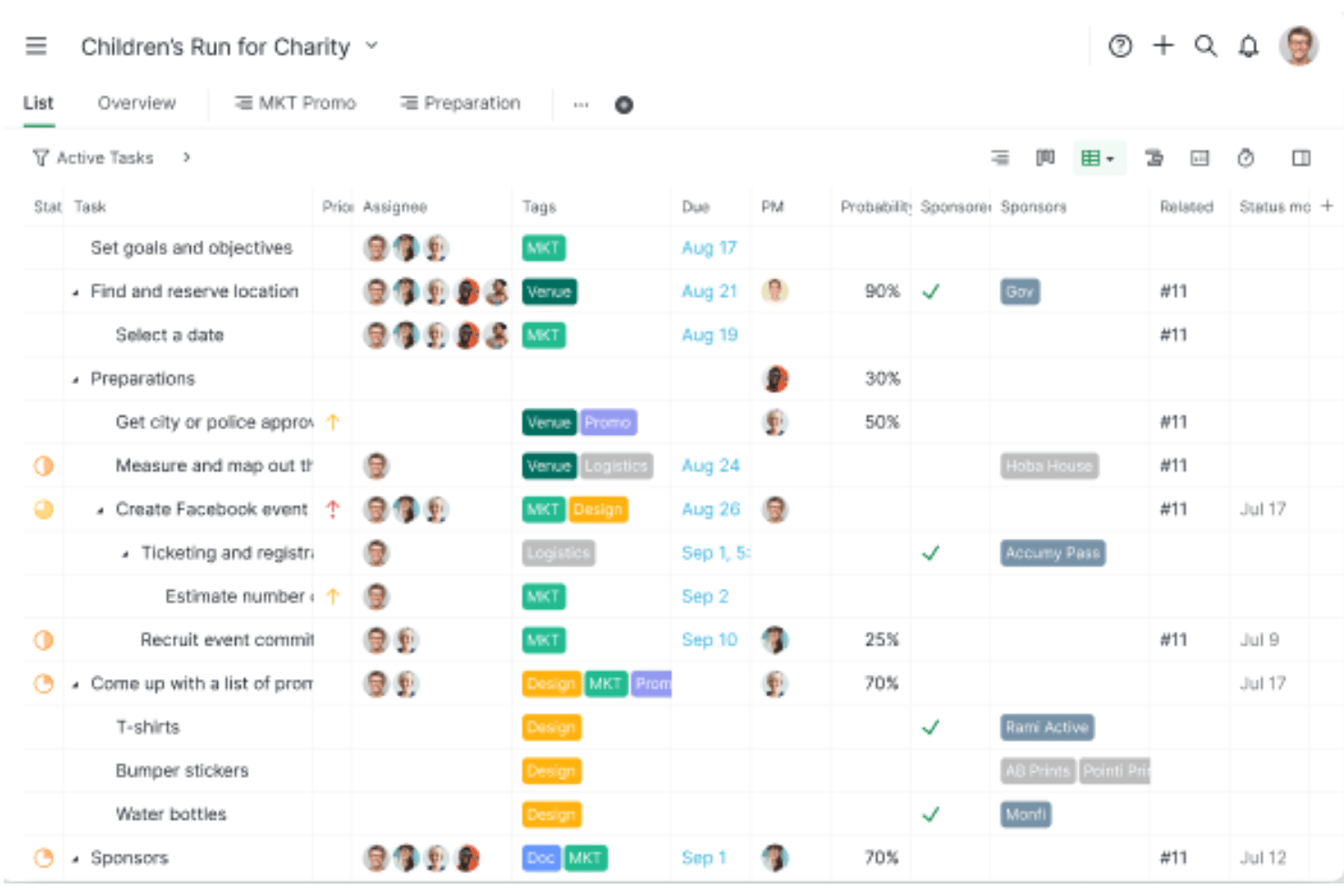
Quire is a project management tool built around a nested task hierarchy, offering Kanban boards, sprint sublists, Timeline (Gantt) views, and native GitHub integration for software teams.
Who Is Quire Best For?
Quire suits small dev teams and early-stage startups that want Agile-friendly task management without the overhead of enterprise tools like Jira.
Why I Picked Quire
I've included Quire in my top picks because it gives Agile teams a genuinely lightweight alternative to tools like Jira, without sacrificing the structural depth dev teams actually need. I particularly like how the nested task hierarchy maps naturally to epics, stories, and bugs, and how sprint sublists let you pull backlog items into a focused sprint board without any clunky setup. The native GitHub integration, available even on the free plan, means commits and issues stay linked to tasks from day one.
Quire Key Features
- Nested task hierarchy: Break down epics, stories, and bugs into unlimited levels of subtasks, keeping parent-child relationships visible across every project view.
- Timeline view: Schedule tasks and milestones on a Gantt-style timeline with dependency linking, giving you a clear picture of sprint pacing and delivery windows.
- Smart Folders: Aggregate multiple projects into a single portfolio view for cross-team tracking and reporting without duplicating work.
- MCP server: Connect AI assistants like Claude directly to Quire via a first-party Model Context Protocol server to create, update, and query tasks using natural language.
Quire Integrations
Quire offers native integrations with GitHub, Slack, Microsoft Teams, Google Drive, Google Calendar, and Dropbox. It also provides a REST API for custom integrations and supports Zapier.
Pros and Cons
Pros:
- Customizable statuses support varied development workflows
- Native GitHub integration for code traceability
- Nested task hierarchy for structuring epics and bugs
Cons:
- Lacks native CI/CD and DevOps integrations
- No built-in burndown or velocity charts
New Product Updates from Quire
Quire Adds Custom Field Locking and Comment Reaction API Support
Quire adds custom field locking and API support for reading and setting emoji reactions on comments. These updates give teams more control over field data and expand comment interaction options for developers. For more information, visit Quire’s official site.
 .

Celoxis
Best for integrated client collaboration tools
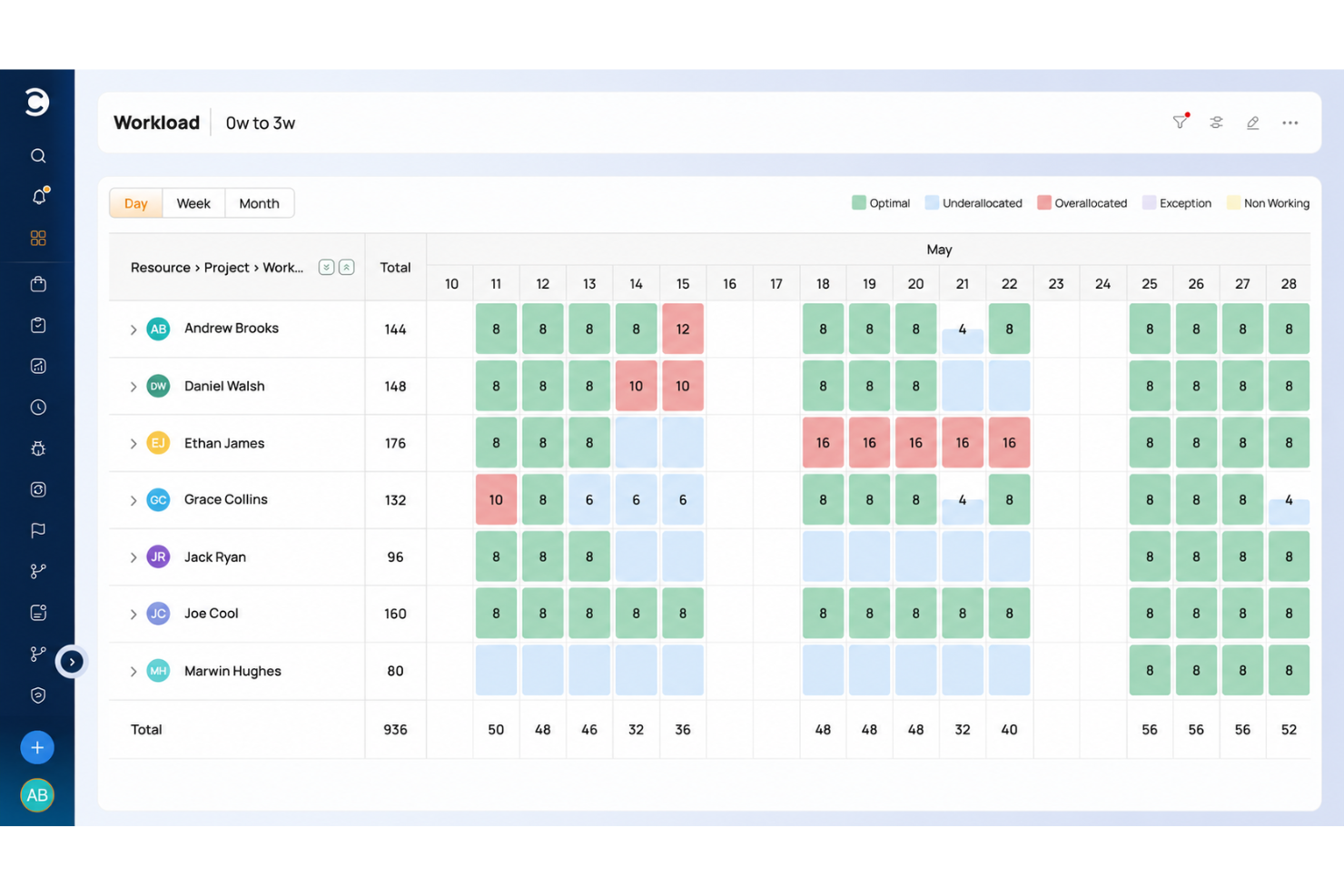
Celoxis is a project portfolio management platform that combines Gantt scheduling, resource management, request intake, budgeting, and portfolio tracking with native integrations for development tools like Jira, GitHub, and Azure DevOps.
Who Is Celoxis Best For?
Celoxis is a good fit for mid-size to enterprise project management offices (PMOs) that need to manage multiple projects, portfolios, and cross-functional teams from a single platform.
Why I Picked Celoxis
I picked Celoxis as one of the best because of how it handles client visibility without requiring additional seat licenses. The free, fully customizable client portal lets clients log in to their own personalized dashboards, where they can track progress, review reports, and exchange comments directly on tasks. I also like that you can share reports and schedule automated PDF delivery to clients on a recurring basis, which cuts down on the manual status update cycle that eats into a dev PM's time.
Celoxis Key Features
- Interactive Gantt charts: Build multi-project timelines with task dependencies, critical path highlighting, and automatic schedule recalculation.
- Resource workload management: View team capacity across projects using workload heatmaps, and reassign tasks directly from the chart.
- Time and expense tracking: Log hours against specific tasks and run multi-level approval workflows before billing.
- Bug and issue tracking app: Use a built-in workflow app to log, assign, and resolve bugs without leaving your project workspace.
Celoxis Integrations
Celoxis offers native integrations with Google Drive, Microsoft Excel, Microsoft Project, Salesforce, Jira, Zendesk, Slack, QuickBooks Online, and more. It also connects with Zapier, and an API is available for custom integrations.
Pros and Cons
Pros:
- On-premise and cloud deployment options
- Interactive Gantt charts with auto-rescheduling
- Built-in financial tracking with revenue forecasting
Cons:
- Dashboards slow with large project loads
- UI feels dated and menu-heavy
Best for planning large-scale development initiatives
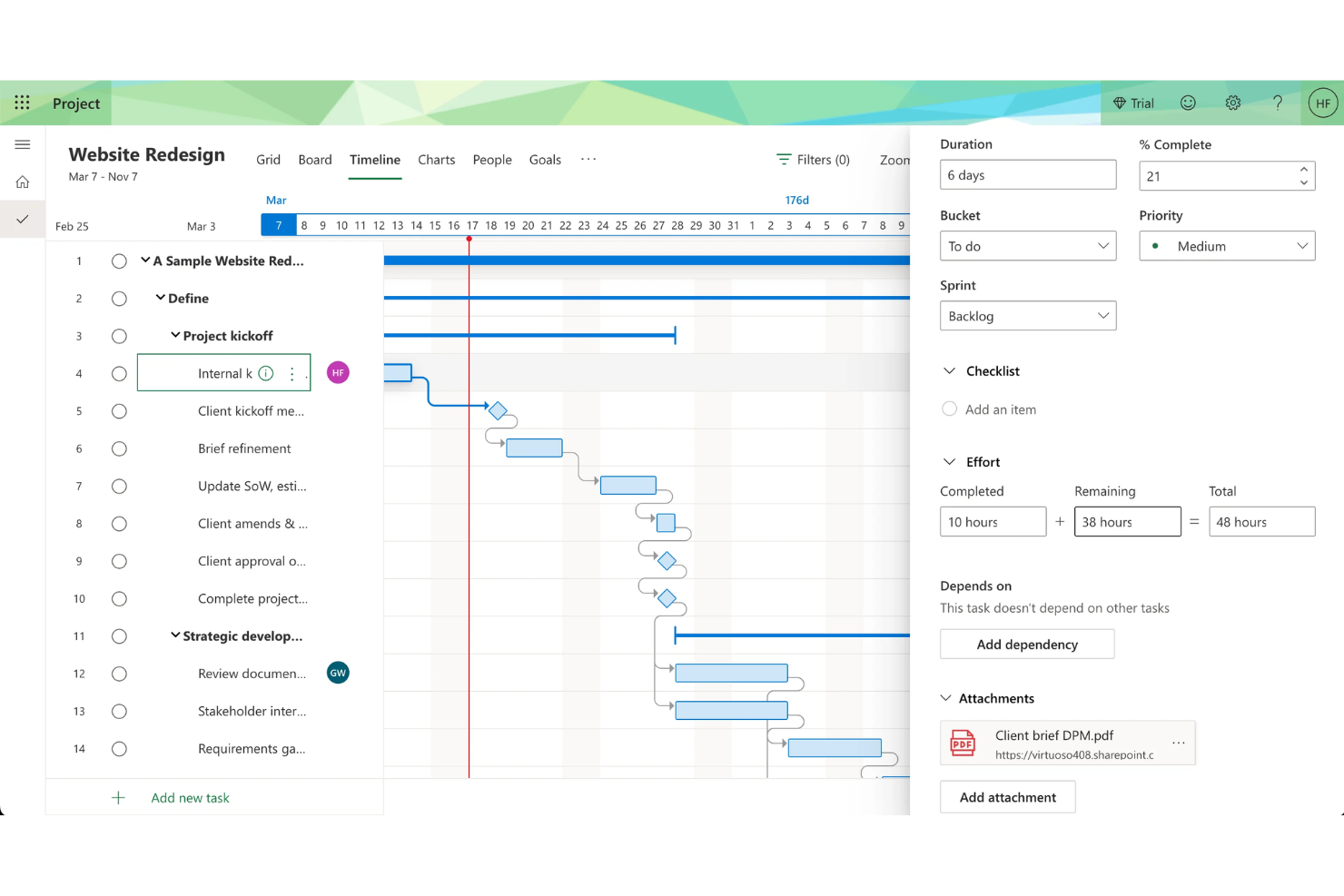
Microsoft Project is a project management platform for software teams that provides timeline planning, resource allocation, dependency mapping, and portfolio management in a single workspace.
Who Is Microsoft Project Best For?
Enterprise project managers and PMOs who need to coordinate complex, multi-team software development initiatives.
Why I Picked Microsoft Project
Microsoft Project is built for complexity. I picked Microsoft Project as one of the best because I rely on its Gantt charts and timeline views to map out dependencies and milestones for multi-phase software projects. My team uses its resource management features to allocate developer hours and balance workloads across overlapping initiatives. I like how the critical path analysis helps us spot bottlenecks before they impact delivery.
Microsoft Project Key Features
- Portfolio selection and optimization: Evaluate and prioritize multiple projects based on strategic impact.
- Built-in project templates: Start new projects quickly with pre-configured templates for common workflows.
- Timesheet submission: Track actual work hours and update progress directly within the platform.
- Integration with Microsoft 365: Sync tasks, calendars, and files with Microsoft Teams, Outlook, and SharePoint.
Microsoft Project Integrations
Microsoft Project has native integrations across the Microsoft ecosystem, including Microsoft 365, Teams, Outlook, SharePoint, Power BI, Power Apps, and Power Automate. An API is available for custom integrations.
Pros and Cons
Pros:
- Integrates natively with Microsoft 365 suite
- Offers advanced resource allocation tools
- Handles complex project dependencies and hierarchies
Cons:
- Steep pricing for smaller teams
- Lacks built-in Agile board views

ProofHub
Best for built-in team discussions
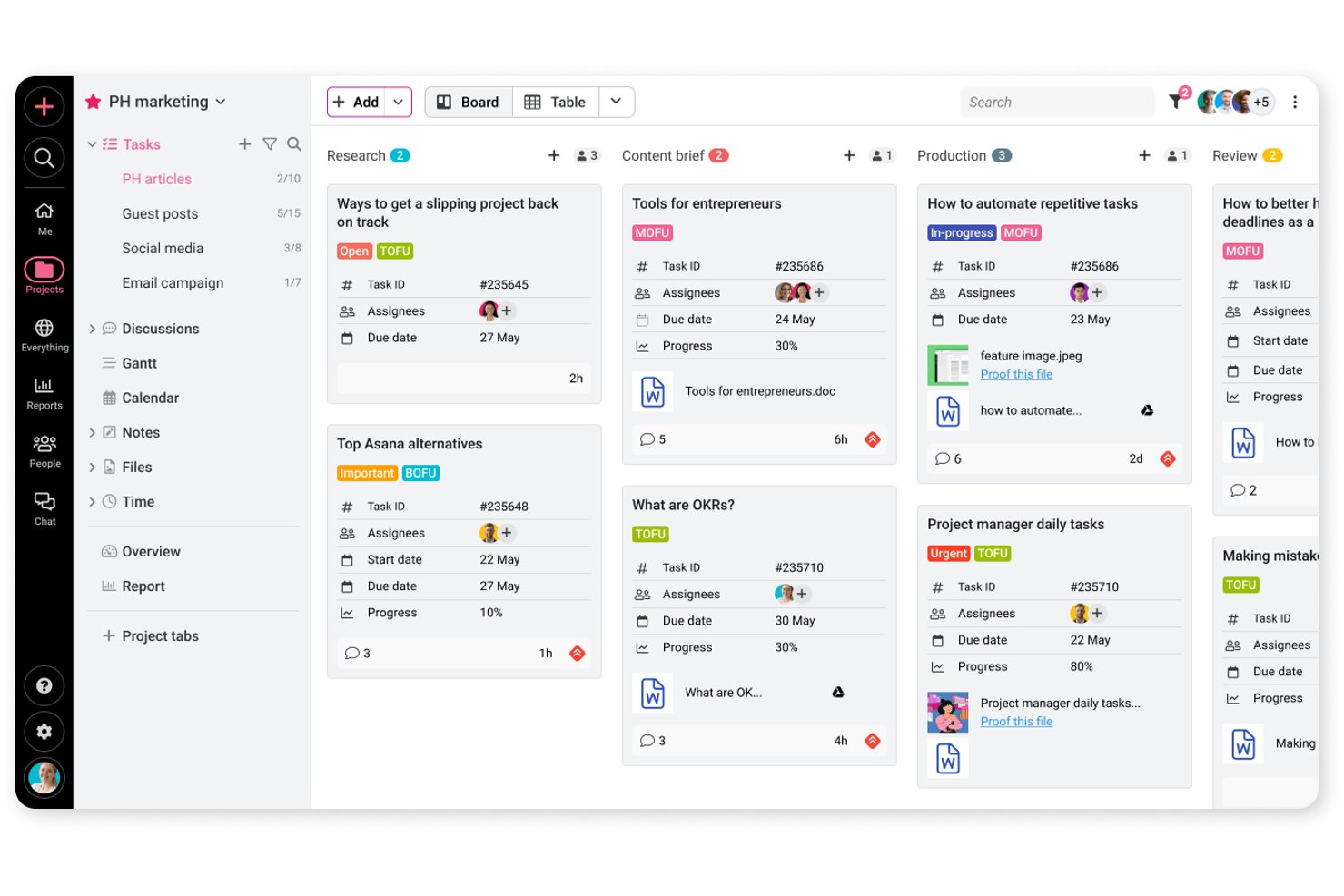
ProofHub is a project management and team collaboration platform that covers task tracking, Gantt scheduling, file proofing, and built-in discussions across Agile and Waterfall workflows.
Who Is ProofHub Best For?
ProofHub suits creative and marketing teams that need file proofing, threaded discussions, and task tracking in one place without paying per seat.
Why I Picked ProofHub
I've included ProofHub in my top picks because built-in team discussions aren't an afterthought here—they're threaded, tied directly to tasks and files, and keep feedback out of your inbox. I particularly like the proofing tools: you can annotate a design file, resolve comments, and formally approve the asset without leaving the project. When a client needs to review a deliverable, a shared proofing link lets them leave feedback without needing a ProofHub account.
ProofHub Key Features
- Agile and Waterfall workflows: ProofHub supports both Agile and Waterfall methodologies, including backlog planning, task dependencies, and release-progress tracking for development teams.
- Custom roles and permissions: Assign section-level access controls to team members, limiting visibility to assigned projects or specific areas like files, timesheets, and reports.
- Gantt chart with dependencies: Map tasks over time, set dependencies between them, and track completion progress directly within the Gantt view.
- Time tracking and timesheets: Log time manually or with timers, attach entries to specific tasks, and generate time reports across projects.
ProofHub Integrations
ProofHub offers nine documented native integrations, including Slack, Google Calendar, iCal, Box, Dropbox, OneDrive, QuickBooks, FreshBooks, and FreshBooks Classic. Ultimate Control includes API access for custom integrations, but native GitHub, GitLab, Jira, or Azure DevOps connections aren’t documented.
Pros and Cons
Pros:
- Proofing keeps design approvals in project context
- Gantt dependencies clarify delivery blockers
- Discussions keep development decisions with tasks
Cons:
- Timelines don’t recalculate automatically from dependencies
- Resource reports track time, not capacity

Best for tracking billable hours and profitability
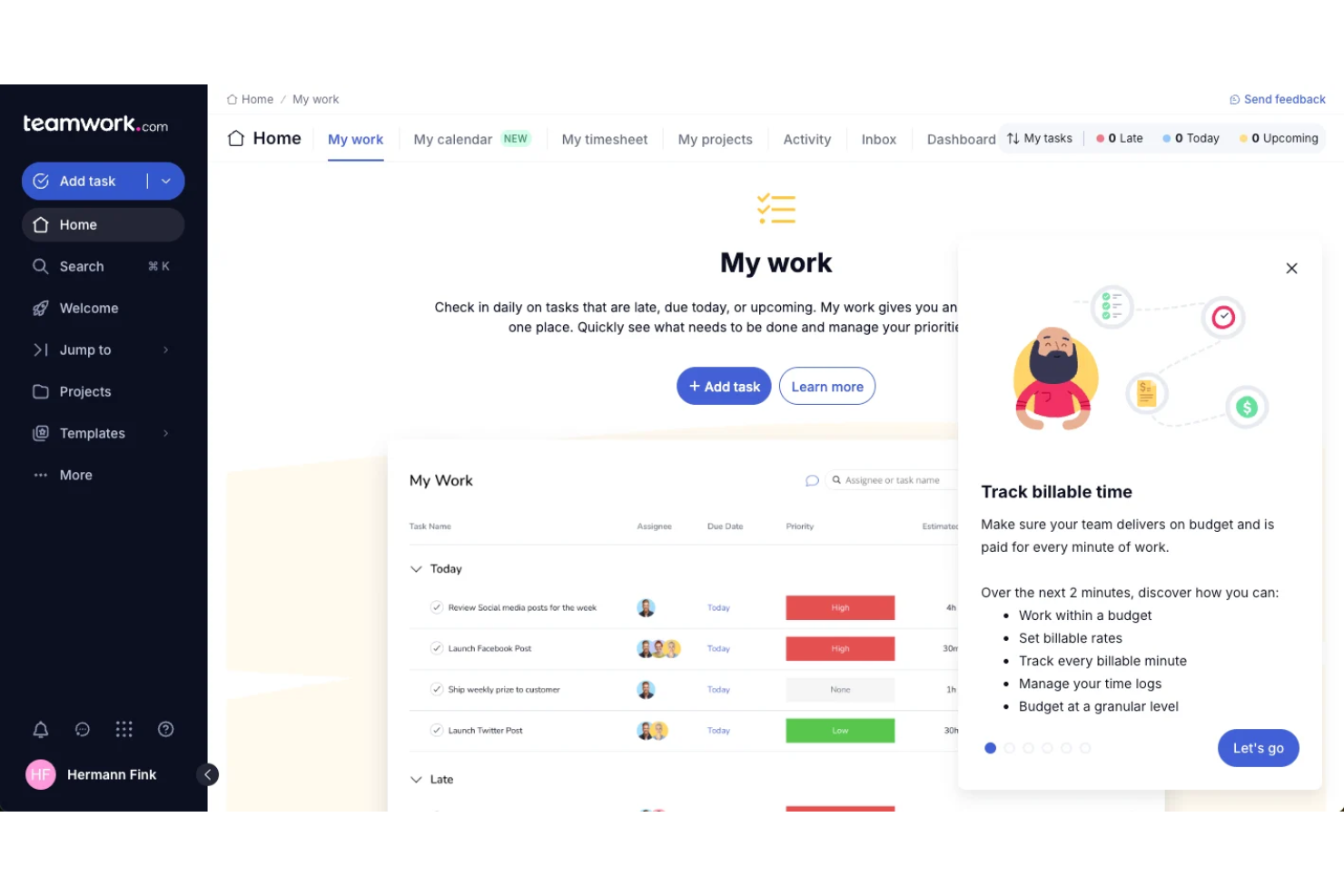
Teamwork.com is a project management platform for software teams that combines task management, time tracking, billing, resource scheduling, and client collaboration in one system.
Who Is Teamwork.com Best For?
Agencies and client services teams looking to track billable hours and project profitability.
Why I Picked Teamwork.com
Most tools treat time tracking as an add-on. Teamwork makes it central. I included it because it’s one of the few platforms that connects project execution directly to billable hours and profitability—making it a better fit for agencies and client-facing teams.
Teamwork.com Key Features
- Task dependencies: Set and visualize dependencies between tasks to manage project flow.
- Gantt chart view: Plan and adjust project timelines with interactive Gantt charts.
- Milestone tracking: Track key project milestones and deadlines in one place.
- Client portal: Give clients access to project updates, files, and communications.
Teamwork.com Integrations
Teamwork.com offers 150+ native integrations, including Slack, Microsoft Office, Harvest, Xero, BugHerd, HubSpot, Stripe, and ChatGPT, and connects with Zapier. An API is available for custom integrations.
Pros and Cons
Pros:
- Client portal supports external collaboration
- Profitability dashboard for project financials
- Built-in time tracking for billable work
Cons:
- Resource management is less advanced than peers
- Limited Agile board customization options
Jira
Best for a customizable agile workflow engine

Jira is a software development project management tool from Atlassian that provides issue tracking, sprint planning, backlog management, and customizable workflows for Agile teams.
Who Is Jira Best For?
Agile software development teams that need detailed sprint, backlog, and issue tracking.
Why I Picked Jira
If you need strict Agile processes, Jira still sets the standard. Compared to more flexible tools, it gives you deeper control over sprint structure, backlog grooming, and issue tracking. I chose it because it handles complexity better than most—especially for teams managing multiple squads, detailed workflows, and large backlogs.
Jira Key Features
- Advanced permissions: Control user access and project visibility at a granular level.
- Marketplace apps: Extend functionality with thousands of add-ons from the Atlassian Marketplace.
- Automation engine: Set up custom rules to automate repetitive project management tasks.
- Release management: Track, schedule, and manage software releases within your projects.
Jira Integrations
Jira offers native integrations with Confluence, Bitbucket, Trello, GitHub, Slack, Microsoft Teams, Google Drive, Dropbox, Zendesk, and Salesforce, and provides an API for custom integrations.
Pros and Cons
Pros:
- Detailed reporting and dashboard capabilities
- Highly customizable workflows for development teams
- Advanced sprint and backlog management tools
Cons:
- Can feel slow with large projects
- Complex setup for new users

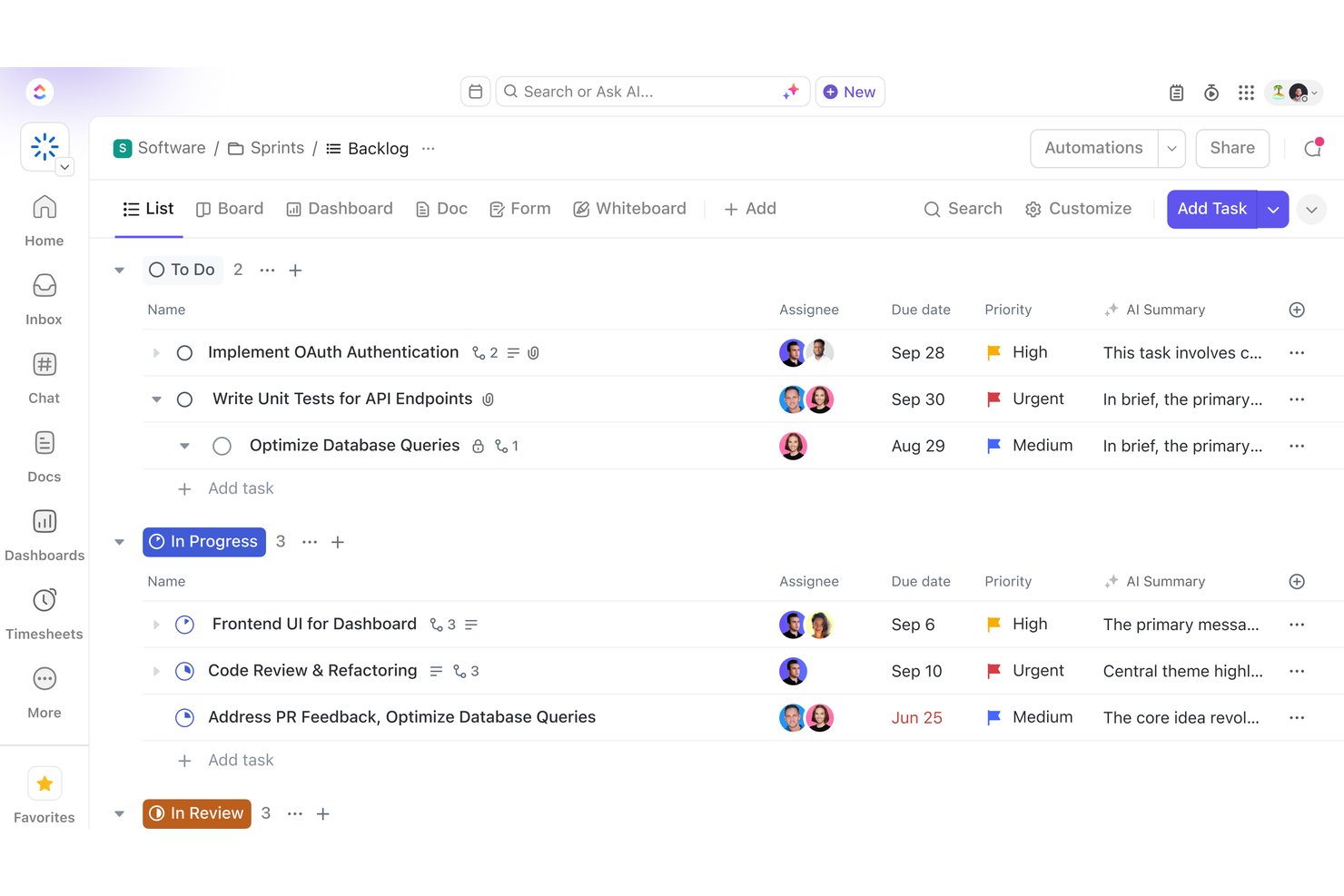
ClickUp is an all-in-one work management platform that combines task tracking, project scheduling, sprint planning, Docs, Dashboards, and built-in AI across software development and cross-functional team workflows.
Who Is ClickUp Best For?
ClickUp suits cross-functional teams that want to manage software development, creative work, and client delivery in a single workspace without stitching together multiple tools.
Why I Picked ClickUp
I've included ClickUp in my top picks because it's one of the few tools that genuinely consolidates software development and cross-functional project work without forcing you to stitch together separate apps. I especially like how ClickUp Brain sits across your entire workspace, so you can ask it to summarize sprint activity, draft a project update, or surface blockers from task comments in seconds. The GitHub and GitLab integrations automatically update linked task statuses when a pull request merges, which keeps your board accurate without any manual work.
ClickUp Key Features
- Sprint planning and reporting: Manage time-boxed sprints with backlogs, spillover handling, sprint points, and per-assignee reporting built directly into your workspace.
- Workload view: See each team member's daily, weekly, or monthly capacity alongside their assigned tasks so you can spot and fix over-allocation across projects.
- Proofing on images, videos, and PDFs: Pin timestamped comments directly to a specific frame or location in a file so reviewers can give precise, contextual feedback.
- Custom automations: Set trigger-and-condition rules to automatically change task statuses, reassign work, or post comments when defined events occur in your workflow.
ClickUp Integrations
ClickUp lists 1,000+ integrations, including native connections with GitHub, GitLab, Bitbucket, Jira, Sentry, Bugsnag, LambdaTest, Figma, and Slack. It supports a REST API, webhooks, OAuth, an MCP Server, and Zapier.
Pros and Cons
Pros:
- Proofing pins feedback to design assets
- Sprint reports connect effort with delivery
- Configurable statuses map software delivery stages
Cons:
- Specialized metrics may need reporting workarounds
- Dense workspaces can slow team adoption

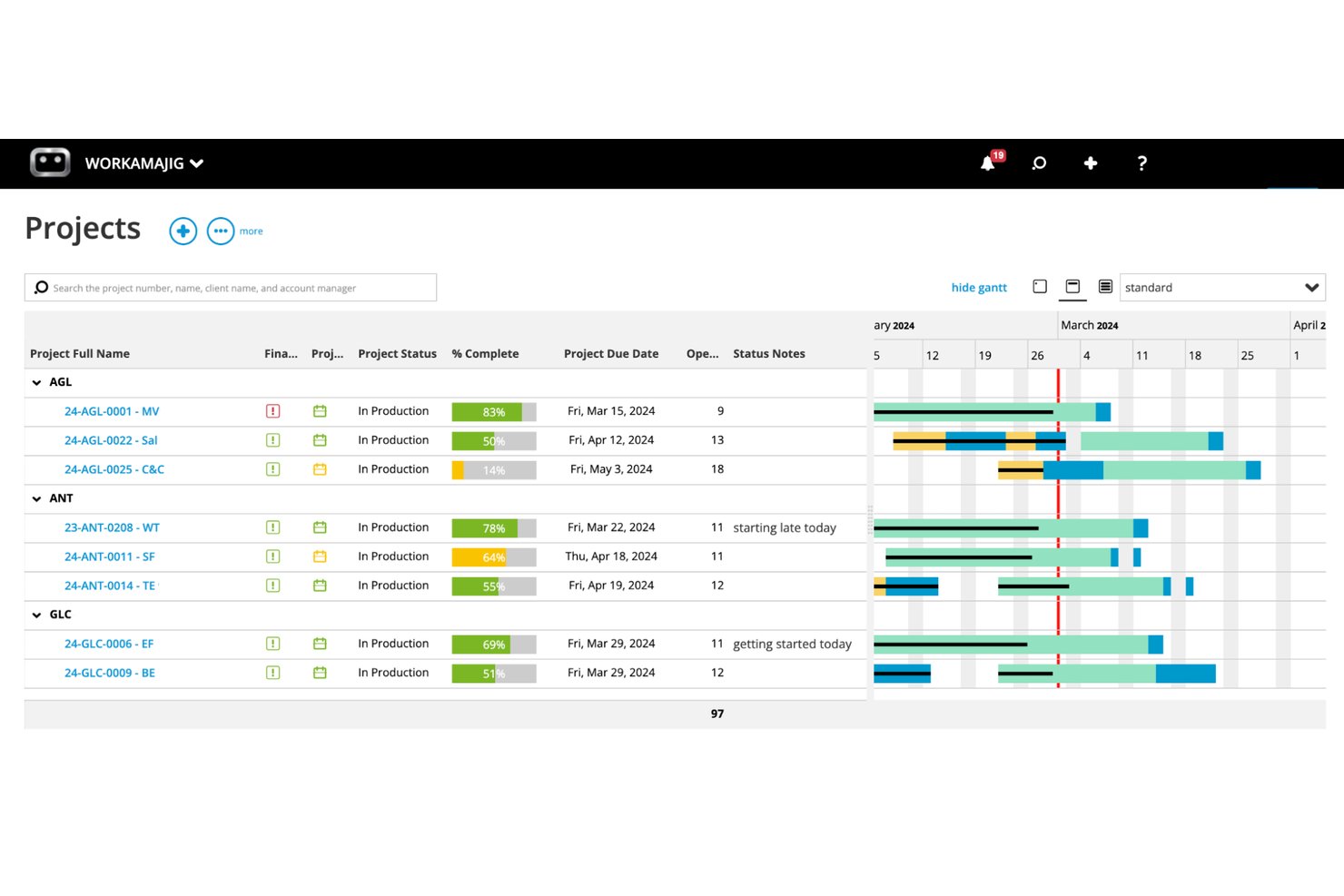
Workamajig is an all-in-one agency management platform that combines project management, resource scheduling, time tracking, client portals, and financial reporting for creative agencies and in-house marketing teams.
Who Is Workamajig Best For?
Workamajig is built for creative agencies and in-house marketing teams that need to manage client projects, creative reviews, and agency finances in one place.
Why I Picked Workamajig
I've included Workamajig in my top picks because it's purpose-built for creative agencies that need project management and client financials in one place. I particularly like its structured client approval workflows, where you can route deliverables through sequential reviewers so a project manager signs off before the account manager, keeping review cycles from going sideways. Time logged against tasks feeds directly into invoicing and budget-vs-actuals reporting, so I can see project profitability without jumping between systems.
Workamajig Key Features
- Resource scheduling dashboard: View employee hours, weekly allocations, and utilization across active projects, with workload rebalancing and capacity caps that account for PTO and holidays.
- Project budget vs. actuals tracking: Compare budgets against real costs with breakdowns by item, type, task, or person, pulling directly from logged time, materials, and expenses.
- Sales CRM with project estimation: Capture sales opportunities and convert them into detailed, branded estimates based on labor, resources, and expenses before turning them into live projects.
- Configurable security groups: Set role-based access controls for clients, vendors, and freelancers, with admin-level control over portal areas, file actions, session timeouts, and two-factor authentication.
Workamajig Integrations
Workamajig lists 11 integrations, including Jira, Slack, Google, Microsoft, and HubSpot. It also supports API-based custom integrations and Zapier.
Pros and Cons
Pros:
- Capacity views surface workload, availability, and PTO
- Logged hours connect project budgets to billing
- Sequential client approvals clarify stakeholder handoffs
Cons:
- Schedule changes can be cumbersome on shifting projects
- Technical tracking lacks depth for software teams

Best for agency resource and budget planning
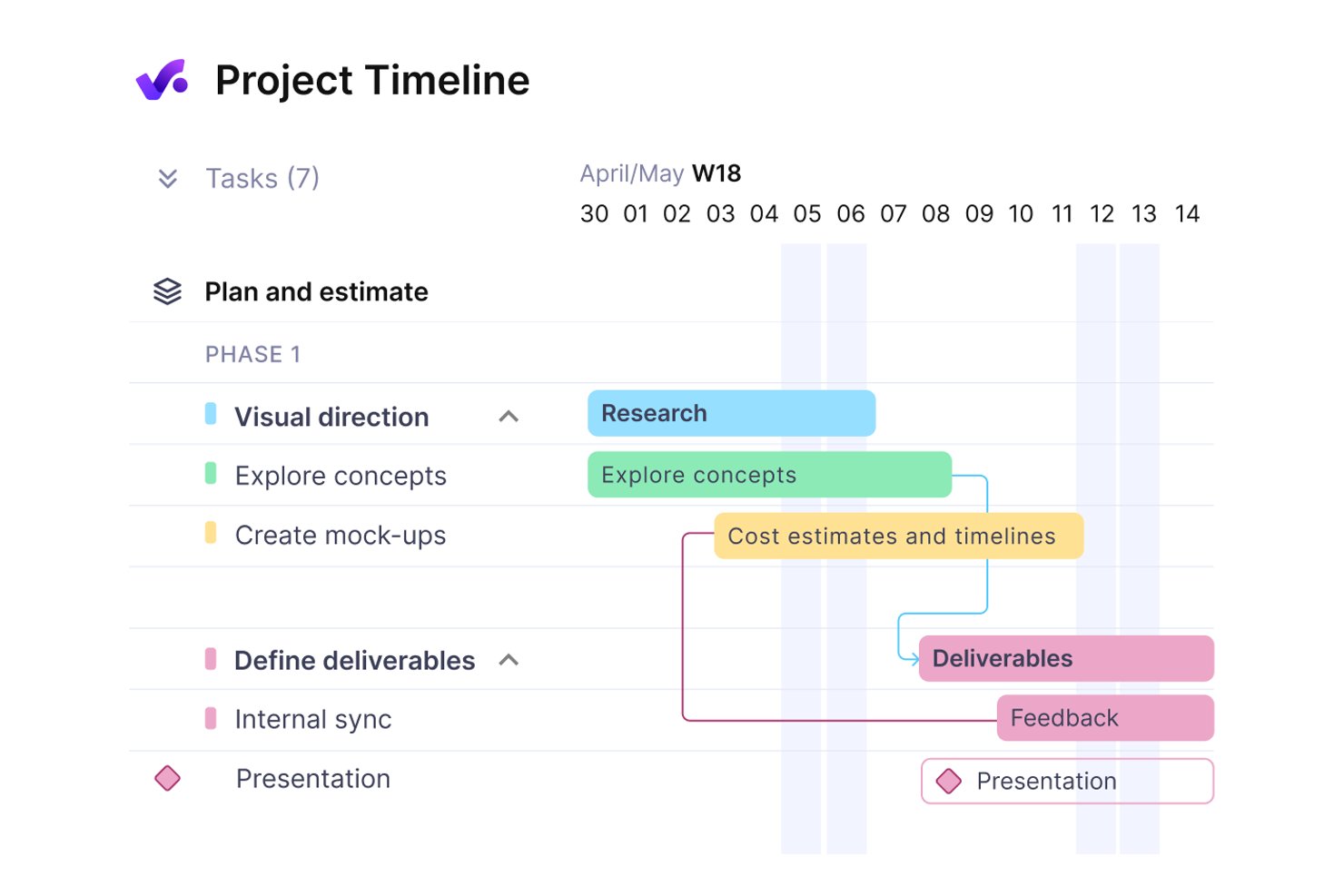
Productive is a professional services management platform that brings together project and task management, resource planning, time tracking, budgeting, and invoicing in a single workspace.
Who Is Productive Best For?
Productive is a strong fit for agency operations leads and client services directors who need resource planning, time tracking, and financial management in one place.
Why I Picked Productive
I picked Productive as one of the best because it handles resource planning and budget tracking in a way that's genuinely connected to project work. I love how the Resource Planner shows team capacity alongside bookings and time off, so you can see exactly who's available before committing to a scope. The budget-overrun controls are also a standout: time entries get blocked or flagged at the service limit, which keeps billable hours honest against client scopes without relying on manual checks.
Productive Key Features
- Client collaborator roles: Invite clients to projects with tiered permission levels that control what tasks, comments, budgets, and time entries they can view.
- Automated workflow triggers: Set up automations using object creation, time-based events, or Slack messages as triggers to create tasks, update fields, or add comments.
- Jira integration: Connect Jira with Productive so time entries update in sync with activity logged in Jira.
- AI-powered timesheet autofill: Analyze calendar events and past time entries to automatically populate team timesheets.
Productive Integrations
Productive offers native integrations with Jira, Slack, Google Calendar, Microsoft Outlook, and Gmail. It also provides an open API, webhooks, and Zapier for custom connectivity.
Pros and Cons
Pros:
- Client permissions keep project work visible
- Budgets connect tracked hours to client scopes
- Resource plans expose cross-project team capacity
Cons:
- Reports can require spreadsheet cleanup
- Task editing makes bulk updates cumbersome
New Product Updates from Productive
Productive Adds Voice Dictation, Slack Connector, Proposals, and Overtime
Productive adds voice dictation, a Slack Connector, proposal controls, and overtime tracking. These updates support faster AI interactions, client proposals, and time management. For more information, visit Productive’s official site.
Smartsheet
Best for portfolio-level dashboards and reporting

Smartsheet is a collaborative work management platform for software teams that combines project tracking, resource management, reporting, and workflow automation in a spreadsheet-style interface.
Who Is Smartsheet Best For?
Portfolio managers and PMOs at mid-size to large organizations who need advanced reporting and dashboard capabilities.
Why I Picked Smartsheet
Smartsheet bridges the gap between spreadsheets and project management tools. It’s more structured than Excel but more flexible than traditional PM platforms. I picked it for teams managing multiple projects who need high-level reporting without fully committing to rigid Agile systems.
Smartsheet Key Features
- Automated workflows: Set up rule-based automations for approvals, alerts, and task assignments.
- Gantt chart view: Visualize project timelines and dependencies in a drag-and-drop interface.
- Form builder: Collect structured project requests or bug reports directly into sheets.
- Cell-level comments: Add context and discussion to specific tasks or deliverables.
Smartsheet Integrations
Smartsheet offers native integrations with Jira, Microsoft Teams, Slack, Google Drive, Salesforce, Docusign, ServiceNow, Box, and Tableau. It also connects with Zapier and provides an API for custom integrations.
Pros and Cons
Pros:
- Gantt charts visualize dependencies and timelines
- Automated workflows handle repetitive project tasks
- Portfolio dashboards show cross-project status clearly
Cons:
- Limited support for code repository integrations
- No built-in burndown or velocity charts
New Product Updates from Smartsheet

Smartsheet Adds Non-Plan User Management in Admin Center
Smartsheet adds a Non plan users tab to the Seat types and true-up page in Admin Center. This lets system admins review non-plan users and add them to the plan or remove them from the organization in one place. For more information, visit Smartsheet’s official site.
Andre verktøy for prosjektstyring innen programvareutvikling
Her er noen flere alternativer for verktøy for prosjektstyring innen programvareutvikling som ikke kom med på kortlisten min, men som fortsatt er verdt å undersøke:
- Hive
For creative proofing and dev tool workflows
- Wrike
For advanced analytics and customization
- Zoho Projects
For time tracking with invoicing
- ProjectManager
For real-time workload management
- Airtable
For customizable workflow automation
- OpenProject
For self-hosted deployment options
- GoodDay
For multi-view project dashboards
- monday dev
For dev and product team sprint planning
- Notion
With AI agents for knowledge and tasks


How I Evaluate Software Development Project Management Tools
I split my evaluation into three parts, weighting core functionality most: assign tasks, track deadlines, and map dependencies. Next, I look for features like creative proofing and GitHub integrations. Finally, I consider onboarding, support, and pricing value for client teams.
Core Functionality (Table Stakes For This List)
When I'm selecting tools for my list, I score each one on a scale from 0 (does not offer the functionality) to 5 (excels in this area) for each core functionality listed below. I then convert the total into a percentage to help assess each tool's overall fit, with extra weight on any functionalities I’ve deemed essential.
- Task & Workflow Management (Essential): I look for assignable tasks, dependencies, subtasks, and configurable stages that can handle handoffs from design to development.
- Project Planning & Scheduling (Essential): I assess timeline views, milestones, and dependency mapping, including how clearly teams can reschedule phases when requirements shift.
- Resource & Capacity: I check whether workload views show allocation across projects, so leads can spot conflicts before assigning another deliverable.
- Collaboration & File Sharing: I look for task-level comments, notifications, and file sharing that keep design feedback and delivery discussions tied to the work.
- Client & Stakeholder Collaboration: I consider guest access, shared project views, and approval workflows for client reviews and deliverable sign-off.
- Time & Budget Tracking: I check whether teams can log time against tasks and compare it with estimates to monitor client scope and project budgets.
Once I have a list of tools that meet the criteria, I consider what sets each platform apart.
Differentiating Factors (What Sets Vendors Apart)
Here's how I compare and contrast different vendors:
Standout Features
I look for native dev tool integrations that sync with repositories and design platforms like GitHub or Figma. A two-way sync between a Kanban board and a repo's pull requests keeps developers from toggling between tools. I also evaluate creative proofing capabilities—markup, annotation, and version comparison built into the platform shorten review cycles that otherwise sprawl across email threads. Automated workflow triggers round out the picture; I check whether rules can move tasks between stages or notify stakeholders when a status changes, cutting manual upkeep on busy multi-project boards.
Beyond Features
I evaluate how well a platform handles hybrid teams—agencies and dev shops juggle internal staff, freelancers, and client stakeholders, so permission tiers and flexible seat licensing matter. Integration depth is equally important; a one-way Jira export is far less useful than a two-way sync that keeps both boards current. I also check onboarding support, since billable teams can't afford weeks of ramp-up when a new client engagement starts next Monday.
Slik velger du verktøy for prosjektstyring innen programvareutvikling
Det er lett å gå seg vill i lange funksjonslister og komplekse prisstrukturer. For å hjelpe deg med å holde fokus mens du går gjennom den unike programvareutvelgelsesprosessen din, finner du her en sjekkliste over faktorer du bør ha i tankene:
| Faktor | Hva du bør vurdere |
| Skalerbarhet | Vil verktøyet håndtere teamstørrelsen og prosjektmengden din etter hvert som du vokser? Sjekk brukerbegrensninger og prosjektgrenser. |
| Integrasjoner | Kan det kobles direkte til de eksisterende verktøyene dine, som kodearkiver, chat og plattformer for dokumentasjon? |
| Tilpasningsmuligheter | Kan du tilpasse arbeidsflyter, felt og tillatelser slik at de samsvarer med teamets prosesser og terminologi? |
| Brukervennlighet | Vil teamet ditt ta det i bruk raskt, eller vil opplæring og støtte være et konstant behov? |
| Implementering og oppstart | Hvor lang tid vil det ta å komme i gang? Finnes det migreringsverktøy, maler eller støtte til oppstart? |
| Kostnad | Er prisnivåene tydelige og forutsigbare når behovene dine endrer seg? Vær oppmerksom på gebyrer per bruker og kostnader for tillegg. |
| Sikkerhetstiltak | Tilbyr verktøyet SSO, datakryptering og rollebaserte tilgangskontroller for å beskytte sensitive prosjektdata? |
| Tilgjengelig kundestøtte | Er hjelp tilgjengelig når du trenger det – spesielt i kritiske prosjektfaser eller utenom vanlig arbeidstid? |
Hva er prosjektstyring for programvareutvikling?
Prosjektstyring for programvareutvikling er prosessen med å organisere, tildele og følge opp arbeid på tvers av oppgavelister, deloppgaver og gjøremålslister for å levere programvareprosjekter i tide. Apper for prosjektstyring hjelper team med å koordinere arbeid, administrere en prosjektportefølje og følge med på måltall, samtidig som utviklingsoppgaver holdes koblet til bredere arbeidsflyter i virksomheten, som CRM-systemer og fillagring.
Disse verktøyene brukes av små team og større organisasjoner til å administrere alt fra enkle prosjekter til komplekse utviklingsprosjekter. Team bruker dem til å tildele oppgaver, følge fremdriften gjennom oversikter og widgeter og holde kontakten via tilgang til mobilapper. Selv om enkelte plattformer har en læringskurve, støtter mange et ubegrenset antall brukere og fleksible oppsett som tilpasses ulike utviklingsarbeidsflyter.
Funksjoner i verktøy for prosjektstyring av programvareutvikling
Når du velger verktøy for prosjektstyring av programvareutvikling, bør du se etter følgende viktige funksjoner:
- Oppgavehåndtering: Lar deg opprette, tildele og følge opp oppgaver eller problemer, slik at alle vet hva som må gjøres og av hvem.
- Gantt-diagrammer: Visualiserer prosjektets tidslinjer, avhengigheter og milepæler, slik at team kan planlegge og justere tidsplaner etter hvert som arbeidet skrider frem.
- Kanban- eller smidige tavler: Gir et dra-og-slipp-grensesnitt for å administrere arbeid i kolonner og støtter smidige arbeidsflyter som Scrum eller Kanban.
- Ressursfordeling: Følger med på teammedlemmenes arbeidsmengde og tilgjengelighet, noe som gjør det enklere å balansere tildelinger og unngå flaskehalser.
- Tidsregistrering: Registrerer hvor mange timer som brukes på oppgaver eller prosjekter, og støtter nøyaktig fakturering, prognoser og resultatanalyse.
- Samarbeidsverktøy: Tilbyr innebygd chat, kommentarer eller fildeling for å holde kommunikasjon og dokumentasjon samlet.
- Rapportering og analyse: Genererer sanntidsrapporter om fremdrift, arbeidstakt og prosjektets tilstand, slik at team og interessenter holdes informert.
- Integrasjonsmuligheter: Kobler seg til kodelagre, CI/CD-pipelines og andre verktøy for å effektivisere utviklingsarbeidsflyter.
- Tilgangskontroller: Lar deg angi brukerroller og tilgangsnivåer, beskytte sensitiv informasjon og oppfylle krav til samsvar.
- Automatiserte varsler: Sender varsler eller påminnelser om tidsfrister, statusendringer eller viktige oppdateringer, slik at behovet for manuell oppfølging reduseres.
Fordeler med verktøy for prosjektstyring av programvareutvikling
Implementering av verktøy for prosjektstyring av programvareutvikling gir flere fordeler for teamet og virksomheten din. Her er noen av fordelene du kan se frem til:
- Bedre prosjektinnsikt: Sentraliserte oversikter og rapporteringsfunksjoner gjør det enkelt å følge fremdrift, tidsfrister og flaskehalser i sanntid.
- Bedre teamsamarbeid: Innebygde kommunikasjonsverktøy og delte arbeidsområder sørger for at alle er samkjørte og reduserer misforståelser.
- Raskere problemløsning: Oppfølging av oppgaver og automatiserte varsler hjelper team med raskt å identifisere, tildele og løse feil eller hindringer.
- Mer forutsigbar levering: Tidslinjeplanlegging, ressursfordeling og håndtering av avhengigheter støtter ferdigstilling av prosjekter i tide.
- Bedre ansvarliggjøring: Tilgangskontroller og aktivitetslogger tydeliggjør ansvarsområder og gjør det enklere å revidere prosjektaktiviteter.
- Effektiviserte arbeidsflyter: Integrasjoner med kodelagre og CI/CD-verktøy reduserer manuelt arbeid og holder utviklingsprosessene sammenkoblet.
- Datadrevet beslutningstaking: Analyse- og rapporteringsfunksjoner gir innsikt som hjelper team med å prioritere arbeid og fordele ressurser effektivt.
Kostnader og priser for verktøy for prosjektstyring av programvareutvikling
Ved valg av verktøy for prosjektstyring av programvareutvikling er det nødvendig å forstå de ulike prismodellene og abonnementene som er tilgjengelige. Kostnadene varierer basert på funksjoner, teamstørrelse, tillegg og mer. Tabellen nedenfor oppsummerer vanlige abonnementer, gjennomsnittsprisene deres og typiske funksjoner som er inkludert i løsninger for prosjektstyring av programvareutvikling:
Sammenligningstabell for abonnementer for verktøy for prosjektstyring av programvareutvikling
| Abonnementstype | Gjennomsnittspris | Vanlige funksjoner |
| Gratisabonnement | $0 | Grunnleggende oppgavehåndtering, begrenset antall brukere, enkel rapportering og brukerstøtte fra fellesskapet. |
| Personlig abonnement | $5-$15/bruker/måned | Oppgave- og prosjektsporing, grunnleggende integrasjoner, begrenset lagringsplass og støtte via e-post. |
| Bedriftsabonnement | $15-$30/bruker/måned | Avansert rapportering, ressursstyring, arbeidsflytautomatisering, integrasjoner og prioritert brukerstøtte. |
| Abonnement for store virksomheter | $30-$60/bruker/måned | Tilpassede tillatelser, forbedret sikkerhet, avansert analyse, dedikert oppstart og SLA-støttet brukerstøtte. |
Vanlige spørsmål om verktøy for prosjektstyring av programvareutvikling
Her er noen svar på vanlige spørsmål om verktøy for prosjektstyring av programvareutvikling:
Hva er forskjellen mellom verktøy for prosjektstyring av programvareutvikling og generelle prosjektstyringsverktøy?
Verktøy for prosjektstyring av programvareutvikling har funksjoner som er tilpasset kodeteam, for eksempel problemsporing, integrasjoner med kodelagre og Agile-tavler. Generelle prosjektstyringsverktøy fokuserer mer på oppfølging av oppgaver og planlegging uten disse utviklingsspesifikke funksjonene.
Kan disse verktøyene støtte både Agile- og fossefallsmetodikker?
Ja, de fleste verktøy for prosjektstyring av programvareutvikling støtter både Agile- og fossefallstilnærminger. Du kan vanligvis bytte mellom Kanban-tavler, Scrum-sprinter og Gantt-diagrammer for å tilpasse arbeidsflyten til teamets foretrukne arbeidsmåte.
Hvordan hjelper disse verktøyene med tverrfunksjonelt samarbeid?
Disse verktøyene samler kommunikasjon, dokumentasjon og oppgavetildelinger på ett sted, slik at utviklere, designere og produktansvarlige lettere kan holde seg samkjørte. Funksjoner som delte tavler, kommentarer og filvedlegg sørger for at alle har den samme oversikten.
Finnes det sikkerhetsrisikoer ved skybaserte prosjektstyringsverktøy?
Ja, skybaserte verktøy kan innebære sikkerhetsrisikoer hvis de ikke konfigureres riktig. Se etter løsninger med kryptering, SSO og rollebaserte tilgangskontroller, og gjennomgå alltid leverandørens samsvarssertifiseringer og retningslinjer for datahåndtering.
Hva bør jeg ta hensyn til når jeg bytter fra et annet verktøy?
Planlegg datamigrering, opplæring av brukere og justeringer av arbeidsflyten. Undersøk om det nye verktøyet tilbyr importverktøy, støtte ved oppstart og dokumentasjon som hjelper teamet med en smidig overgang uten at viktig prosjekthistorikk går tapt.