10 beste verktøy for prosjektplanlegging for team i 2026

10 Beste programvare for prosjektplanlegging – kortliste


Den beste programvaren for prosjektplanlegging hjelper deg med å effektivisere prosjekt tidsplaner, fordele ressurser effektivt og holde kursen for å overholde tidsfrister, slik at du kan fokusere på å levere resultater.
Med over 20 års erfaring som prosjektleder i ledende digitale byråer har jeg på nært hold sett hvordan uorganisert planlegging kan føre til oversittelse av tidsfrister, feilkommunikasjon og sløsing med ressurser. Min praktiske erfaring, kombinert med ytterligere ti år som programvareanmelder, har understreket for meg hvor avgjørende det er å bruke de riktige verktøyene for å oppnå suksess.
I denne veiledningen tar jeg deg gjennom de mest effektive løsningene for prosjektplanlegging. De vil spare deg for tid, redusere friksjon og hjelpe deg med å nå prosjektmålene. For hvert verktøy har jeg nøye undersøkt de viktigste funksjonene, fordelene og ulempene samt unike egenskaper, slik at du kan finne det som passer best for dine behov.
Why Trust Our Software Recommendations
Our team has been testing and reviewing software since 2012. As project managers ourselves, we know how difficult—and important—it is to choose the right software.
For this guide, we evaluated tools using hands-on testing and independent research, scoring tools using our selection criteria. We also draw on insights from industry thought leaders and practicing project management experts.
Our reviews reflect our human editorial judgment, not a sales pitch.
Expert reviewers:
Sammenligningstabell for programvare for prosjektplanlegging
Denne sammenligningstabellen oppsummerer prisopplysningene for mine beste utvalg av programvare for prosjektplanlegging:
| Tool | Best For | Trial Info | Price | ||
|---|---|---|---|---|---|
| 1 | Best for comprehensive agency project management | 14-day free trial | From $10/user/month (billed annually) | Website | |
| 2 | Best project planning software for agencies | 14-day free trial | Pricing upon request | Website | |
| 3 | Best software for planning project workflows | Free plan available | From $9/user/month (billed annually) | Website | |
| 4 | Best for automated creative operations workflows | Free demo available | Pricing upon request | Website | |
| 5 | Best for planning multiple projects of varying complexity | Free plan + 15-day free trial + free demo available | From $4/user/month (billed annually) | Website | |
| 6 | Best for project planning with AI | 14-day free trial + free demo available | From $10/user/month (billed annually) | Website | |
| 7 | Best for dynamic project management through custom workflows | 30-day free trial | From $35/user/month (billed annually) | Website | |
| 8 | Best for breaking down complex tasks | Free plan + 30-day free trial available | From $7.65/user/month (billed annually) | Website | |
| 9 | Best for visual project planning and collaboration | Free plan + 14-day free trial available | From $8/user/month (billed annually) | Website | |
| 10 | Best project planning software for small teams or small businesses | Free plan available | From $9/user/month (billed annually) | Website |


Anmeldelser av den beste programvaren for prosjektplanlegging
Her er en kort beskrivelse av programvaren for prosjektplanlegging på listen min, med informasjon om hva den er best på, samt skjermbilder som viser noen av funksjonene.

Best for comprehensive agency project management

Productive is a comprehensive project management software designed to streamline operations for agencies. It offers a robust platform for planning, managing, and executing projects, making it an essential tool for businesses aiming to enhance efficiency and productivity.
The platform offers Gantt charts for visualizing project timelines and dependencies, which is crucial for keeping projects on track. Additionally, its workload feature allows managers to monitor team utilization, ensuring that resources are allocated efficiently and preventing burnout. The automation tools in Productive also help with repetitive tasks. For example, automations can be set to trigger notifications when an invoice is overdue or when a task status changes.
Another standout feature of Productive is its budgeting and financial management capabilities. With the simple budget editor, users can create and manage budgets with ease, making it ideal for both small and large projects. The platform also supports various billing types such as time and materials, fixed price, and non-billable projects. It also offers project profitability tracking and forecasting.
Key integrations include Jira, Slack, QuickBooks, Xero, Zapier, Google Drive, Sage, BambooHR, and HubSpot.
Pros and Cons
Pros:
- User-friendly interface
- Robust workload and resource management capabilities
- Good profitability tracking feature
Cons:
- Could have more integrations
- Initial setup can take time
New Product Updates from Productive
Productive Adds Voice Dictation, Slack Connector, Proposals, and Overtime
Productive adds voice dictation, a Slack Connector, proposal controls, and overtime tracking. These updates support faster AI interactions, client proposals, and time management. For more information, visit Productive’s official site.

Wrike
Best project planning software for agencies

Wrike is a project planning tool and is ideal for teams of five members to an unlimited number of members. It offers tools for predicting and preventing delays, visualizing deadlines, and monitoring project progress. The tool is highly configurable, allowing users to customize workflows, dashboards, reports, and request forms. For Danilo Coviello, Founder of Espresso Translations, Wrike proved to be a major time-saver: “Wrike saved me 8 hours per week that used to go into scheduling. I now spend that time I have saved on building new relationships with clients.”
Wrike’s interface is highly visual, and allows users to switch between Kanban boards, interactive drag-and-drop Gantt charts, and traditional workload views to understand priorities. Project planning capabilities include task lists, subtasks, schedules, file sharing, and real-time communication and collaboration.
Wrike includes a robust mobile application that allows users to update team members or upload files and photos. Users can switch between calendars, dashboards, and task lists, and keep an eye on notifications and messages. Wrike also has a dedicated help center with interactive training, videos, a ‘Getting Started’ guide, and a thriving community.
Wrike offers a host of pre-built templates, including a phased project template, which can help break a complex project into manageable chunks, as well as a simple project scheduling template. Real-time reporting helps project managers allocate resources and adjust workloads, and requests keep repetitive admin to a minimum.
Wrike includes over 400 pre-built native integrations, including integrations with the most popular file management software from Microsoft, Google, and Dropbox.
Pros and Cons
Pros:
- Variety of project views met different user needs
- Holistic, comprehensive task modeling
- Ease of use and setup
Cons:
- Drag and drop feature not flexible
- Commenting system needs to be more prominent
- Best features limited to Business plan
New Product Updates from Wrike
Wrike Adds Klaxoon MCP Integration
Wrike’s Klaxoon MCP integration is now generally available, enabling AI agents to navigate between Wrike tasks and attached whiteboards, read task context, and manage whiteboard attachments via API. For more information, visit Wrike's official site.

Best software for planning project workflows
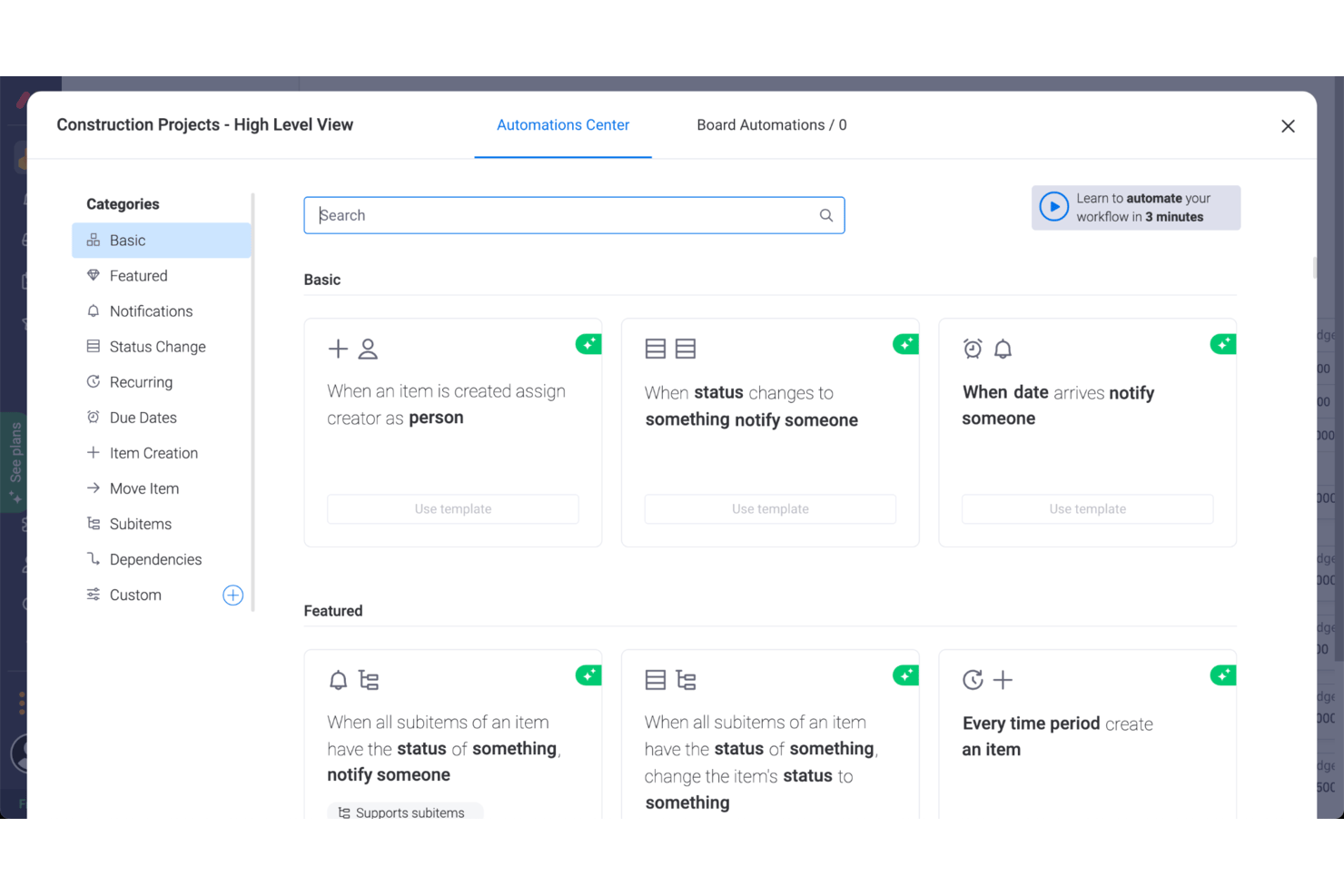
monday AI Workspace is a colorful, user-friendly, jack-of-all-trades project planning tool for modern teams. You’ll be able to plan, track, and deliver projects using hundreds of visual and customizable templates that make data more digestible. View data as a map, calendar, timeline, or kanban. I also love the ability to automate repetitive administrative tasks, like creating new lead entries according to incoming emails.
monday AI Workspace costs from $9/user/month and comes with a free 14-day trial. They offer a free plan for up to 2 users.
Pros and Cons
Pros:
- Excellent collaborative features
- Simple organization by dragging and dropping tasks
- Very easy to invite others, share timelines, and assign tasks
Cons:
- Best features locked to Standard or Pro versions
- Automations are not fully customizable
- No bottleneck identification or assistance
New Product Updates from monday AI Workspace
monday AI Workspace Adds Human Approval Routing
monday AI Workspace adds a human-in-the-loop approval block to AI Workflows, sending approval requests and routing workflow paths based on responses. For more information, visit monday AI Workspace's official site.

Best for automated creative operations workflows
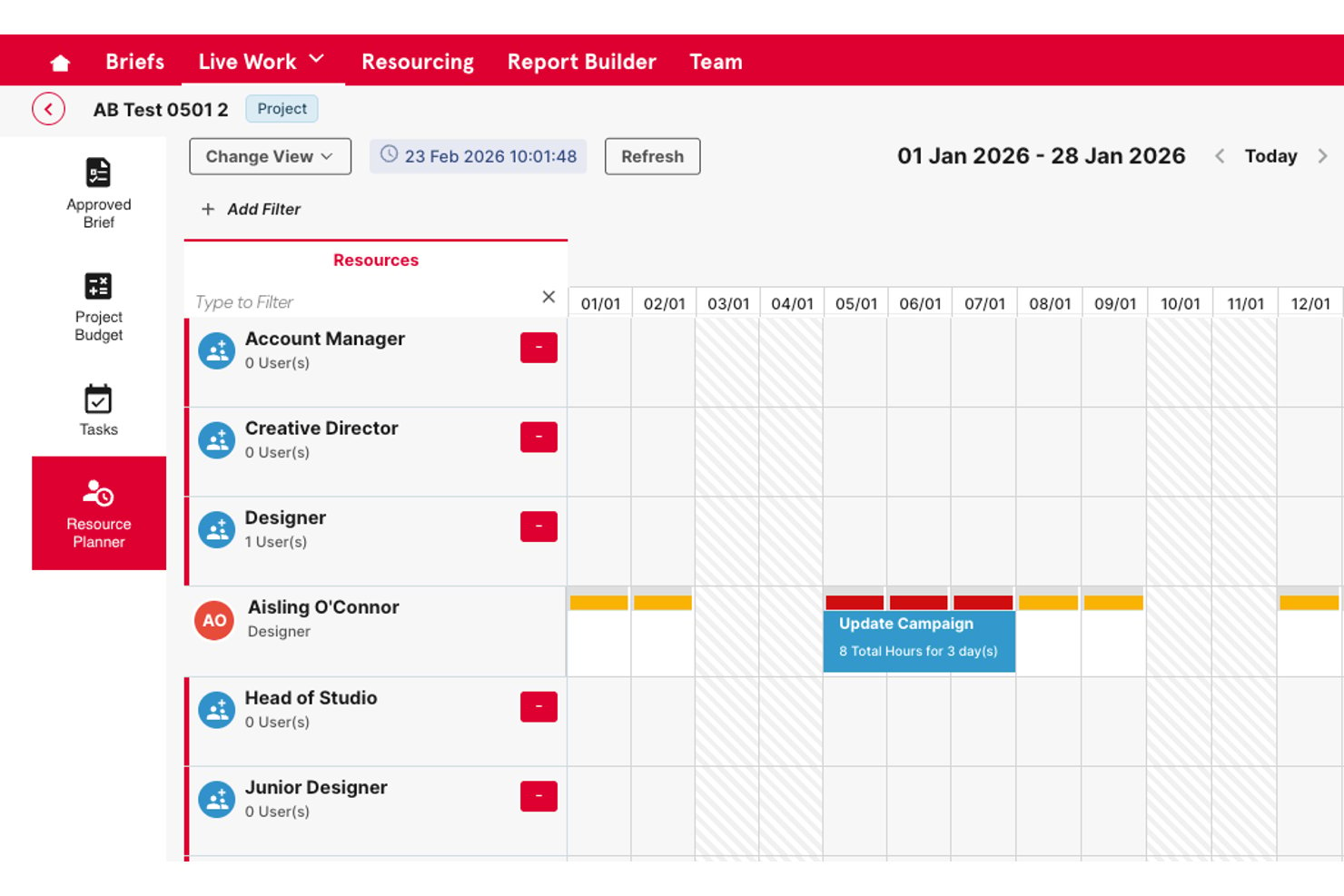
Screendragon is a work management platform built for marketing and creative teams, combining project portfolio management, no-code workflow automation, resource planning, and approval workflows in one system.
Who Is Screendragon Best For?
It's a strong fit for enterprise-scale agencies and in-house marketing teams managing high volumes of creative projects across multiple brands or clients.
Why I Picked Screendragon
I've included Screendragon in my top picks because its no-code workflow builder genuinely sets it apart for creative operations planning. I can design end-to-end workflows with custom routing, automated step sequences, and dynamic intake forms, which replaces scattered email briefing threads with structured, repeatable processes. The built-in review and markup tools handle structured feedback on documents, graphics, and video, with version comparison and full audit trails included.
Screendragon Key Features
- Resource management module: Lets you monitor team capacity, forecast availability, and analyze workloads across multiple projects.
- Project portfolio manager: Allows you to organize, track, and prioritize several projects in unified dashboards with executive-level views.
- Custom reporting and dashboards: Generates real-time reports from any dataset, supporting tailored analytics and visualizations.
- Granular role-based permissions: Enables you to manage access, approvals, and workflows by role, team, region, or client.
Screendragon Integrations
Native integrations are not clearly documented. The tool supports integrations via API for custom setups.
Pros and Cons
Pros:
- Handles large portfolio management across multiple brands
- Built-in review routing for creative approvals
- Highly configurable no-code workflow builder
Cons:
- Steep initial configuration required for complex workflows
- Gantt scheduling features are relatively limited
New Product Updates from Screendragon
Screendragon Unveils New AI Hub
Screendragon introduced AI Hub, a new capability that lets teams build and manage AI agents directly within workflows. The update helps marketing teams automate tasks, maintain governance controls, and scale AI-driven operations more efficiently. For more information, visit Screendragon's official site.

Best for planning multiple projects of varying complexity

Zoho Projects is a project planning and management solution that can support multiple projects of any scale or complexity. The platform has tools like Gantt charts, Kanban boards, portfolio dashboards, a built-in issue tracker, and a task automation system with blueprint functionality. The task automation with blueprint feature enables project managers and admins to map out their entire workflow, creating a visual flowchart representation.
Tasks and notifications can be automated, and approval criteria can be set for projects and tasks. The software also has collaboration tools like discussion boards, community forums, and real-time activity feeds. In addition to project planning , users can also benefit from in-depth reporting. The cloud-based software’s reporting tools allow project managers to generate detailed reports to keep track of various aspects of project performance and progress.
Pricing for Zoho Projects starts at $5 per user/month with a 10-day free trial included. A free plan is available for teams of no more than three users.
Pros and Cons
Pros:
- Robust feature suite for team members and project managers alike
- Migration from other software providers is available
- Free plan is available for up to 2 projects and up to 3 users
Cons:
- Large feature set can make for a steep learning curve
- Employee scheduling functionality is limited
New Product Updates from Zoho Projects
Zoho Projects Adds CodeX Scripts for Custom Modules
Zoho Projects now supports CodeX Scripts for custom modules, enabling conditional logic and rules for creating, updating, and deleting records. For more information, visit Zoho Projects' official site.
 .
.
Celoxis
Best for project planning with AI
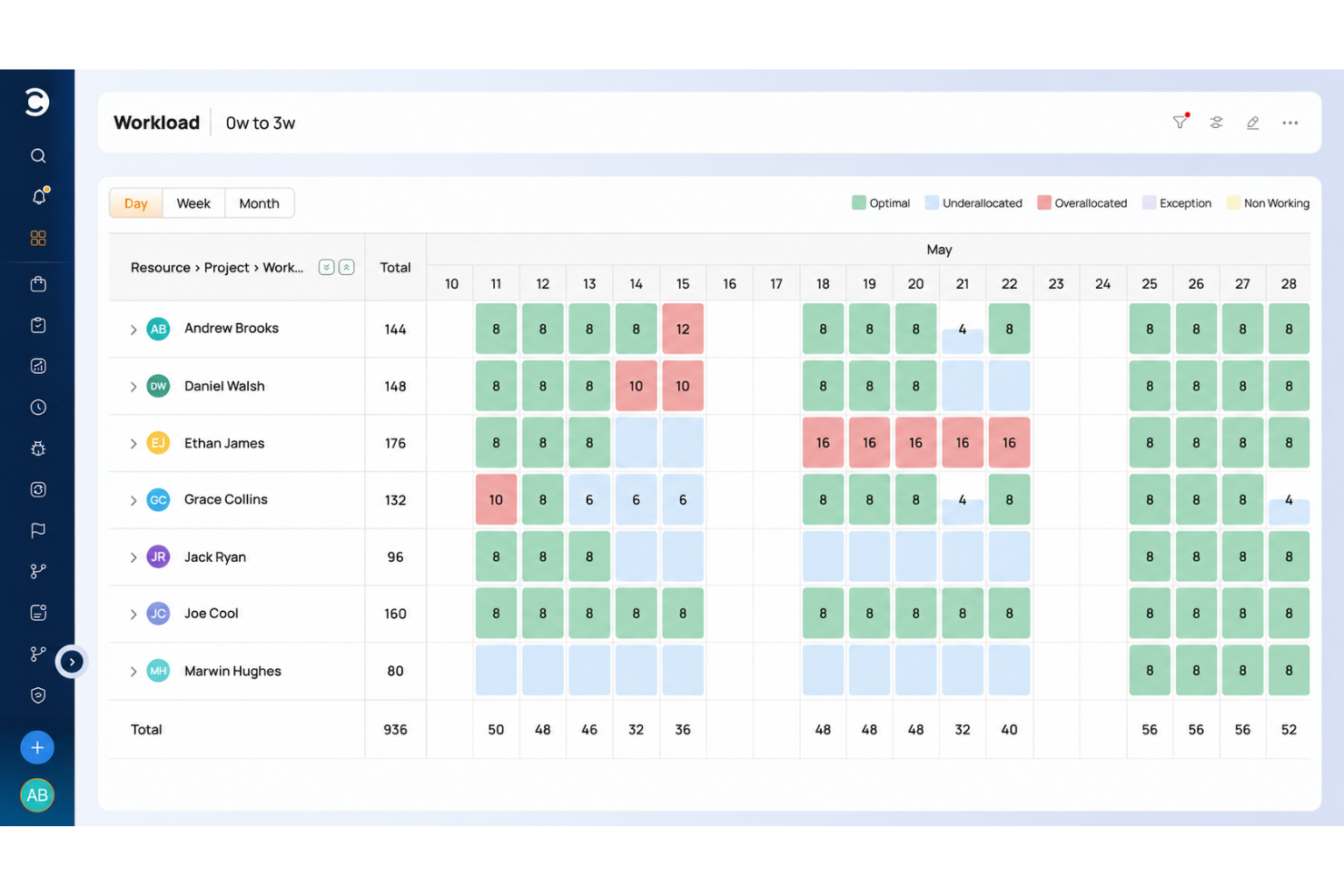
Celoxis has powerful planning and scheduling tools that help you build project plans that adapt to real-world conditions.
Celoxis has one of the most flexible and responsive interactive Gantt charts and can effortlessly handle large project plans involving multiple levels of sub-tasks, inter-project dependencies and even multiple resources per task.
Among the many features available, there is automatic scheduling that helps build a reliable project schedule and resource workload, utilization, capacity, and efficiency. These features, in turn, enable data-driven planning and decision-making across the project lifecycle. Ultimately helping you with better resource planning and management.
Celoxis integrates with over 400 business apps, including Google Drive, email and calendar platforms, Jira, Salesforce, Slack, and many more through Zapier. In addition, their API lets you build custom integrations with any other tools you use.
Celoxis is one of the few project management software programs available both in SaaS and on-premise flavors. SaaS costs $22.50/user/month (annually), and on-premise pricing is available upon request. Both require a minimum 5-user sign-up and come with 30-day free trial.

Best for dynamic project management through custom workflows

QuickBase is a user-friendly platform that helps you plan and manage dynamic workflows and projects. You can use its no-code builder to craft customized applications tailored to your unique business needs. It's a flexible solution that provides various tools to support your project and resource management and workflow automation.
Even for complex workflows and projects, this tool is capable of helping your map them out and execute them effectively. Because of its code-free builder, it's easy to set up your workflows and get them up and running quickly. The builder can be used for designing workflows, applications, integrations, and automations, making it a versatile tool to contribute to your various work processes.
Paid plans start from $35 per user, per month, and a 30-day free trial is available.
Pros and Cons
Pros:
- User-friendly and quick to learn
- Helpful and responsive customer support team
- Highly customizable to suit various industries
Cons:
- Limited offline access
- Limited analytics capabilities

Quire
Best for breaking down complex tasks

Quire is a cloud-based project planning software designed to help teams organize, track, and complete their work more efficiently. It offers a flexible structure that allows you to break down complex projects into manageable tasks and subtasks.
One feature that helps you break down larger projects is its nested lists. This hierarchical structure helps your team focus on specific tasks without losing sight of the overall project goals. Additionally, Quire's Kanban board view allows you to visualize tasks as they move through different stages, making it easier to manage workflows and identify bottlenecks.
The platform even includes a dynamic timeline feature, which provides a Gantt chart-style view of your project's schedule. This helps you plan ahead, track progress, and ensure that deadlines are met. The calendar view complements this by allowing you to drag and drop tasks to set deadlines, keeping your team on track and aligned with project timelines.
Some integrations include Google Calendar, Gmail, Slack, Outlook, Zoho Flow, GitHub, Apple Calendar Sync, Box, Dropbox, Google Drive, and Microsoft Teams.
Pros and Cons
Pros:
- Easy to collaborate with team members
- Multiple project views, including lists, boards, and timelines
- Ability to create nested tasks and subtasks, allowing for detailed project breakdowns
Cons:
- The mobile version lacks some features available on the desktop
- Potential for notification overload, especially when working with large teams
New Product Updates from Quire
Quire Adds Custom Field Locking and Comment Reaction API Support
Quire adds custom field locking and API support for reading and setting emoji reactions on comments. These updates give teams more control over field data and expand comment interaction options for developers. For more information, visit Quire’s official site.
 .
.
Miro
Best for visual project planning and collaboration

Miro is an online collaborative whiteboarding platform designed to facilitate visual project planning and enhance teamwork. It offers an infinite canvas where users can brainstorm, plan, and execute projects in a highly interactive and visually engaging environment. For Wynter Johnson, Founder and CEO of Caily, Miro stands out as a particularly intuitive and dynamic tool for bringing people together: “I love using Miro for project mapping specifically because it's so intuitive and engaging. It's easy to bring freelancers, consultants, and potential customers into the workspace to show them exactly how things are going. It's an experience that's dynamic without being overwhelming.”
The platform's whiteboard allows users to map out entire projects, breaking down complex tasks into manageable visual components. Miro's rich set of tools, including sticky notes, mind maps, flowcharts, and Kanban boards, helps teams brainstorm ideas, outline workflows, and monitor progress visually. Real-time collaboration is also at the core of Miro's functionality, enabling team members to work together simultaneously, leave comments, and share feedback.
Integrations include Slack, Microsoft Teams, Jira, Trello, Asana, Google Drive, Dropbox, OneDrive, Zoom, Microsoft Office, Notion, Confluence, Salesforce, Airtable, Zapier, and many more.
Pros and Cons
Pros:
- Users can collaborate on plans in real-time
- Variety of templates for project planning
- Infinite whiteboard for various iterations
Cons:
- Mobile app is limited compared to desktop version
- No offline capabilities
New Product Updates from Miro
Miro Adds Japan Data Residency for Enterprise Customers
Miro has introduced Japan data residency for enterprise customers, offering in-region storage for production data, backups, and metadata, plus in-region compute infrastructure. For more information, visit Miro's official site.

ClickUp
Best project planning software for small teams or small businesses

For those seeking a project planning software that adapts to your unique workflow and enhances team collaboration, ClickUp offers a customizable platform that integrates project management, time tracking, and AI tools. Whether you're managing simple tasks or complex projects, ClickUp's versatility supports various industries and team sizes, helping to streamline workflows and improve productivity. By centralizing essential tools into one user-friendly interface, ClickUp addresses challenges like disorganized workflows and inefficient communication, making it a valuable asset for teams aiming to optimize their project planning processes.
Why I Picked ClickUp
I picked ClickUp as an excellent fit for project planning, particularly for small teams and businesses, because of its customizable project views and automation features. With Gantt charts and Kanban boards, your team can visualize tasks and timelines, making it easier to manage projects collaboratively. ClickUp's automation capabilities reduce repetitive tasks, allowing your team to focus on more strategic work. Additionally, its extensive features and competitive pricing make it a cost-effective solution for those looking to enhance productivity without compromising on functionality.
ClickUp Key Features
In addition to the features that make ClickUp ideal for small teams, several other functionalities enhance its appeal as a project planning tool.
- Task Dependencies: This feature lets your team define relationships between tasks, ensuring that tasks are completed in the correct order and reducing bottlenecks.
- Time Tracking: With built-in time tracking, you can monitor how much time is spent on each task, helping improve productivity and budget management.
- Custom Fields: This feature allows you to add specific fields to tasks and projects, enabling more tailored data entry and organization according to your team's needs.
- Dashboards: ClickUp provides customizable dashboards that give your team a visual overview of project progress, helping maintain transparency and accountability.
ClickUp Integrations
Integrations include Slack, Google Calendar, Zoom, GitHub, Microsoft Teams, Salesforce, Dropbox, Outlook, HubSpot, and Trello.
Pros and Cons
Pros:
- Impressive organization: create folders, sub-groups, and sub-tasks
- Huge number of customization options
- Easy to switch between unrelated project plans
Cons:
- More third-party integrations welcomed
- Tricky to email with attachments, files sometimes unopenable
- Steep learning curve due to number of features
New Product Updates from ClickUp
ClickUp Adds Meetings Hub, Super Agent Templates, and ZoomInfo Integration
ClickUp adds a searchable Meetings Hub, new ways to clone and template Super Agents, and a ZoomInfo integration through the App Center. These updates improve meeting retrieval, agent reuse, and access to sales intelligence. For more information, visit ClickUp’s official site.
Annen programvare for prosjektplanlegging
Her er beskrivelser av noen andre verktøy du kan prøve:
- Shortcut
For aligning tasks to goals
- Lucen
For PowerPoint timeline visuals
- Bonsai Agency Software
For project planning with time-tracking
- Birdview
For planning projects, resources, and finances in one system
- FunctionFox
Project planning software for creative teams
- ProjectManager
For multiple project views (lists, kanban boards, Gantt charts, etc)
- Tempo Portfolio Manager
For its planning intelligence features
- Easy Projects
For enterprise teams from medium to large companies
- Ravetree
For integrated project planning and management
- Height
For cross-functional project planning
- Smartsheet
Project template gallery
- ClickTime
For time tracking & project management
- Hubstaff
For agile team planning
- Hive
Online project planning tool for 3rd party integrations
- Kantata
For contextual collaboration
- Runn
Software for analyzing project profitability
- Hub Planner by Milient
Project planning software with built-in budget and resource allocation features
- TaskRay
For Salesforce-native data security
- PathPro
For product development teams
- Basecamp
For software development planning
- Planview AdaptiveWork
Project planning for marketers
- Forecast
For AI work automation
- Teamwork.com
For project templates
- Scoro
For building and construction management
- Trello
For task collaboration
- Planview Vantage
For Waterfall and Critical Chain methodologies
- OpenProject
Open source project planning software
- ProWorkflow
Planning tool mobile app for most touchscreen-based devices
- Workzone
For personal to-do lists and automatic reminder emails
- TeamGantt
Free Gantt chart software


Gratis programvare for prosjektplanlegging
- Nutcache – Ganske generøs gratisplan: gratis for alltid for maksimalt 20 brukere (inkluderer ubegrenset antall prosjekter, tidsregistrering, enkelte integrasjoner og mer)
- Runn – Gratis for opptil 5 brukere med ubegrenset antall prosjekter
- TeamGantt – Gratis for alltid for opptil 3 brukere og 1 prosjekt
- Wrike – Gratis for opptil 5 brukere
- Monday.com – Gratis for opptil 5 brukere
- ClickUp – Gratis for et ubegrenset antall brukere, med enkelte begrensninger på lagring og funksjoner
- Asana – Gratis for opptil 15 brukere
How I Evaluate Project Planning Software
When a PMO needs to manage dozens of projects or an agency needs to hit client deadlines, I split my evaluation into two layers: core must-haves and the differentiators that separate the right tool.
Core Functionality (Table Stakes For This List)
When I'm selecting tools for my list, I rank each one on a scale from 0 (does not offer the functionality) to 5 (excels in this area) for each core functionality listed below. Then, I calculate the tool's total score into a percentage. Each tool needs to achieve a minimum total score of 75% to be considered for inclusion.
- Task & Dependency Management: I check whether you can define finish-to-start, start-to-start, and other dependency types with lag and lead times—like sequencing a design review before dev begins.
- Gantt Chart / Timeline View: A drag-and-drop Gantt that lets you reschedule tasks and see dependency lines in real time is what I look for, not just a static timeline graphic.
- Milestone & Baseline Tracking: I evaluate whether the tool lets you save baseline snapshots and compare them against your current schedule to spot scope creep or slippage mid-sprint.
- Resource Planning & Allocation: Workload views that surface overallocated team members across concurrent projects matter here—tools like monday.com and Smartsheet handle this differently.
- Critical Path & Scheduling Logic: I look for auto-calculated critical paths that update when durations shift, so you can immediately see which delays will push your launch date.
- Collaboration & Plan Sharing: Stakeholder views, role-based permissions, and comment threads tied to specific tasks are what I evaluate—especially for distributed teams coordinating across time zones.
Once I have a list of tools that meet the criteria, I consider what sets each platform apart.
Differentiating Factors (What Sets Vendors Apart)
Here's how I compare and contrast different vendors:
Standout Features
Portfolio-level views matter when your PMO juggles dozens of active projects and needs to spot resource conflicts across them. I also look for scenario planning—the ability to model a shifted deadline or reassigned team member without touching the live plan. AI-assisted scheduling is increasingly a differentiator too; tools that flag at-risk tasks or suggest adjustments based on historical data give PMs a real edge during replanning cycles.
Beyond Features
Integrations shape how well a planning tool fits your stack. I check for native connections to Jira, Slack, and file storage platforms, plus API and iPaaS support for custom workflows. Scalability is another key factor—a tool that works for a five-person team should also hold up when your PMO scales to hundreds of projects. I also evaluate onboarding resources like templates, training libraries, and migration support, since time-to-value matters when you're rolling out a new planning tool mid-quarter.
Slik velger du programvare for prosjektplanlegging
Det er lett å bli overveldet av lange funksjonslister og kompliserte priser. For å hjelpe deg med å holde fokus under prosessen med å velge programvare, får du her en sjekkliste over viktige faktorer du bør ha i tankene:
| Faktor | Hva du bør vurdere |
| Skalerbarhet | Forsikre deg om at programvaren kan vokse i takt med teamets behov. Se etter alternativer som støtter større prosjekter, flere brukere og mer data uten at det går utover ytelsen. |
| Integrasjoner | Kontroller om verktøyet kan integreres med plattformer som Slack, Google Workspace eller CRM-systemet ditt. Sømløse integrasjoner bidrar til å redusere datasiloer og forbedre effektiviteten. |
| Tilpasningsmuligheter | Velg programvare som lar deg tilpasse arbeidsflyter, oppgavetyper og rapporter. Tilpassbare maler kan spare tid og passe bedre med teamets preferanser. |
| Brukervennlighet | Et brukervennlig grensesnitt sikrer raskere opplæring av teamet. Se etter verktøy med dra-og-slipp-funksjonalitet og enkel navigering for å redusere læringskurven. |
| Budsjett | Finn en balanse mellom budsjettet og verdien programvaren gir. Se etter tydelige priser, gratis prøveperioder eller skalerbare abonnementer som lar deg betale bare for det du trenger. |
| Sikkerhetstiltak | Kontroller at verktøyet oppfyller sikkerhetsstandarder, inkludert kryptering, rollebasert tilgang og samsvarssertifiseringer, for å holde dataene dine sikre. |
Trender innen programvare for prosjektplanlegging
I undersøkelsen min hentet jeg produktoppdateringer, pressemeldinger og versjonslogger fra ulike leverandører av programvare for prosjektplanlegging. Her er noen fremvoksende trender jeg følger med på:
- AI-støttet planlegging: AI-verktøy hjelper nå team med å forutsi risikoer, justere tidsplaner og tildele oppgaver mer effektivt. AI kan for eksempel markere oppgaver som står i fare for å bli forsinket, og foreslå omfordeling av ressurser.
- Forbedringer for samarbeid i sanntid: Forbedret direkte redigering og umiddelbare oppdateringer blir stadig mer vanlig. Dette gjør det mulig for team å arbeide sammen på tidslinjer og dokumenter uten forsinkelser, noe som reduserer mengden e-post og forbedrer samkjøringen i teamet.
- Verktøy for scenarioplanlegging: Mange plattformer tilbyr nå funksjoner for å simulere mulige forsinkelser, ressursmangel eller budsjettendringer, slik at team kan justere planene sine i tråd med dette.
- Bærekraftsindikatorer: Funksjoner for å måle prosjektets bærekraft får stadig større utbredelse. Team kan følge med på energiforbruk, materialeffektivitet og miljøpåvirkning for å tilpasse seg bærekraftsmål.
- Integrert videokommunikasjon: Innebygde verktøy for videokonferanser og skjermdeling blir lagt til i prosjektstyringspaneler, slik at møter og oppdateringer kan gjennomføres uten separate plattformer. Etter hvert som eksterne og hybride team blir større, øker etterspørselen etter programvare for oppgavehåndtering for virksomheter som kombinerer planlegging, kommunikasjon, automatisering og ressursstyring i én plattform.
Hva er programvare for prosjektplanlegging?
Programvare for prosjektplanlegging er et verktøy som hjelper team med å opprette, planlegge og følge opp prosjekter fra start til slutt, slik at tidsfrister overholdes og ressursene brukes effektivt.
Denne programvaren brukes av prosjektledere og team i ulike bransjer for å organisere oppgaver, fordele ressurser og administrere tidslinjer. Ved å samle alle prosjektdetaljer på ett sted forbedrer den samarbeidet, holder oversikt over ressurser og følger fremdriften, slik at prosjektene gjennomføres smidig og ferdigstilles i tide.
Funksjoner i programvare for prosjektplanlegging
Når du velger programvare for prosjektplanlegging, bør du se etter følgende viktige funksjoner:
- Oppgavehåndtering: Opprett, tildel og følg enkelt oppgaver for alle på teamet. Dette hjelper deg med å dele opp store prosjekter i mindre handlinger og sørger for at ingenting faller mellom stolene.
- Prosjektplanlegging: Lag tidslinjer for prosjekter med dra-og-slipp-kalendere eller Gantt-diagrammer. Denne funksjonen lar deg angi tydelige tidsfrister, fordele ressurser og oppdage planleggingskonflikter tidlig.
- Samarbeidsverktøy: Del filer, oppdater statuser og chat med kolleger, alt i programvaren. Innebygd kommunikasjon gjør det enkelt for alle å holde seg synkronisert, enten teamet sitter i rommet ved siden av eller på andre siden av kloden.
- Ressursfordeling: Tildel personer, utstyr eller budsjetter til hver oppgave, og se med et blikk hvem som er tilgjengelig. Smart ressursstyring hjelper deg med å unngå å overbelaste teamet eller gå glipp av behov for kritisk utstyr.
- Dokumenthåndtering: Lagre, organiser og oppdater viktige dokumenter direkte i prosjektsentralen. Du slipper å lete gjennom endeløse e-posttråder etter den nyeste filen – alt er der du trenger det.
- Fremdriftsoppfølging: Overvåk statusen til oppgaver og prosjekter i sanntid via oversikter eller rapporter. Du får umiddelbart vite hva som følger planen, hva som er forsinket, og hvor du bør rette oppmerksomheten videre.
- Tidsregistrering: Registrer hvor mye tid teammedlemmene bruker på oppgaver. Dette er spesielt nyttig for å holde prosjekter innenfor budsjettet eller forstå hvor teamets innsats går.
- Budsjettstyring: Angi og følg opp kostnader for hver fase, og sammenlign forventede og faktiske utgifter. Budsjettfunksjoner hjelper deg med å oppdage overskridelser før de kommer ut av kontroll.
- Rapportering og analyse: Generer rapporter om alt fra teamets produktivitet til fullføringsgrad for prosjekter. Tydelige analyser hjelper deg med å feire seire og oppdage flaskehalser, slik at du kan jobbe smartere neste gang.
KI-funksjoner i programvare for prosjektplanlegging
Mange moderne løsninger for prosjektplanlegging drives nå av kunstig intelligens for å gjøre arbeidsflyten enda smidigere:
- Automatiske oppgaveforslag: KI kan analysere prosjektdataene dine og anbefale neste steg, slik at du kan planlegge mer effektivt og unngå å glemme kritiske oppgaver.
- Smart planlegging: Avanserte algoritmer justerer automatisk tidslinjer basert på teamets tilgjengelighet, arbeidsbelastning og prosjektprioriteringer, slik at du kan optimalisere ressursene uten manuelt arbeid.
- Prediktiv analyse: KI-drevet innsikt hjelper deg med å forutse prosjektrisiko, budsjettoverskridelser og mulige forsinkelser før de oppstår, slik at du får et proaktivt fortrinn.
- Naturlig språkbehandling: Noen plattformer lar deg opprette eller oppdatere oppgaver bare ved å skrive eller snakke på vanlig engelsk, noe som gjør prosjektstyring mer intuitiv for alle.
- Automatiske statusoppdateringer: KI kan følge fremdriften og sende oppdateringer eller påminnelser i sanntid for å holde teamet på rett spor uten stadige oppfølgingssjekker.
Fordeler med programvare for prosjektplanlegging
Implementering av programvare for prosjektplanlegging kan gi flere fordeler for teamet og virksomheten din:
- Bedre organisering: Holder oppgaver, tidsplaner og ressurser samlet på ett sted, noe som forenkler kompleks prosjektstyring.
- Bedre tidsstyring: Gir tilgang til Gantt-diagrammer og verktøy for tidsregistrering som hjelper team med å holde tidsplanen og overholde tidsfrister.
- Forbedret samarbeid: Muliggjør samarbeid med delte arbeidsområder, kommentarer og funksjoner for fildeling.
- Tydeligere ansvarlighet: Tildeler oppgaver med tidsfrister, noe som gjør det enkelt å følge opp ansvar og fremdrift.
- Kostnadskontroll: Følger opp budsjetter og utgifter, slik at du kan unngå overforbruk og styre økonomiske ressurser.
- Risikoreduksjon: Lar deg modellere scenarier og justere planer for å forberede deg på mulige problemer på forhånd.
- Datadrevne beslutninger: Tilpassede rapporter og analyser gir innsikt i resultater for bedre planleggingsbeslutninger.
Kostnader og priser for programvare for prosjektplanlegging
Når du velger programvare for prosjektplanlegging, må du forstå de ulike prismodellene og abonnementene som er tilgjengelige. Kostnadene avhenger av funksjoner, teamstørrelse, tillegg og mer. Tabellen nedenfor oppsummerer vanlige abonnementer, gjennomsnittspriser og typiske funksjoner som inngår i løsninger for prosjektplanlegging:
| Plantype | Gjennomsnittspris | Vanlige funksjoner |
| Gratisplan | $0 | Grunnleggende oppgavehåndtering, begrenset antall brukere, minimal lagringsplass og grunnleggende samarbeidsverktøy. |
| Personlig plan | $5-$15 per bruker/måned | Oppgavehåndtering, tidslinjevisninger, grunnleggende rapportering og begrensede integrasjoner. |
| Bedriftsplan | $20-$50 per bruker/måned | Avansert rapportering, Gantt-diagrammer, verktøy for teamsamarbeid, ressursallokering og tidsregistrering. |
| Foretaksplan | $60-$120 per bruker/måned | Tilpassede arbeidsflyter, ubegrenset antall brukere, avansert sikkerhet, dedikert kundestøtte og API-integrasjoner. |
Ofte stilte spørsmål om programvare for prosjektplanlegging
Her er noen svar på vanlige spørsmål om programvare for prosjektplanlegging:
Hvilke integrasjoner bør jeg se etter i programvare for prosjektplanlegging?
Se etter integrasjoner med e-post-, kalender-, fillagrings- og meldingsverktøyene dine (f.eks. Slack, Google Drive og Outlook). Det er også nyttig hvis programvaren kobler seg til plattformer for tidsregistrering, fakturering og rapportering. Disse integrasjonene reduserer manuelt arbeid, holder all informasjonen din synkronisert og hjelper deg med å administrere prosjekter uten å måtte bytte mellom apper.
Hvordan flytter jeg eksisterende prosjektdata til ny programvare for prosjektplanlegging?
De fleste verktøy tilbyr importalternativer via CSV eller direkte integrasjoner med andre plattformer. Før du starter, bør du rydde opp i de gamle dataene for å sikre at de er korrekte. Mange leverandører tilbyr oppsettsveiledninger eller hjelp med innføringen for å lede deg gjennom prosessen. Hvis du er usikker, kan du undersøke om programvaren har en migreringsspesialist eller en kundestøttetjeneste som kan håndtere komplekse overføringer.
Hvordan kan programvare for prosjektplanlegging hjelpe med ressursstyring?
Programvare for prosjektplanlegging hjelper deg med å fordele oppgaver, angi arbeidsmengder og følge med på tilgjengelige ressurser på tvers av prosjektene dine. Du kan se hvem som har for mye arbeid, omfordele oppgaver og forhindre flaskehalser. Mange verktøy tilbyr oversikter eller Gantt-diagrammer som viser teamets kapasitet. Denne oversikten lar deg balansere arbeidet og planlegge fremover, noe som reduserer utbrenthet og forbedrer prosjektresultatene.
Er det mulig å tilpasse programvare for prosjektplanlegging slik at den passer til arbeidsflytene?
Ja, de fleste plattformer for prosjektplanlegging lar deg tilpasse arbeidsflytene etter teamets behov. Du kan redigere oppgavestadier, opprette egendefinerte felt, angi automatiseringsregler og justere tillatelser. Hvis du administrerer unike prosjekttyper, bør du se etter løsninger med dra-og-slipp-verktøy, malalternativer eller API-tilgang, slik at du ikke blir tvunget inn i en rigid prosess.
Hvordan kan programvare for prosjektplanlegging bidra til å forhindre prosjektforsinkelser?
Programvare for prosjektplanlegging bidrar til å forhindre forsinkelser ved å sende automatiske påminnelser, muliggjøre oppdateringer i sanntid og vise avhengigheter i tidslinjen. Du kan oppdage risikoer tidlig og omfordele arbeidsmengder hvis noen blir forsinket. Funksjoner som sporing av kritisk sti og visuelle tidslinjer lar deg justere planene før små forsinkelser utvikler seg til større problemer.
Hvilke rapporteringsfunksjoner er mest nyttige for prosjektledere?
Prosjektledere bør se etter tilpassbare oversikter, tidslinjesporing og rapporter om arbeidsmengde. Muligheten til å filtrere etter prosjekt, teammedlem eller dato gjør det enklere å oppdage problemer. God programvare genererer også rapporter som kan eksporteres, for interessenter, slik at du raskt kan dele fremdrift, tidsfrister og budsjettstatus.
Hvilke sikkerhetstiltak er på plass for å beskytte prosjektdata?
Ledende programvare for prosjektplanlegging tilbyr vanligvis datakryptering, rollebasert tilgangskontroll og regelmessige sikkerhetskopier. Spør om samsvar med standarder som SOC 2 eller ISO 27001. For sensitive prosjekter bør du velge en plattform med revisjonslogger, tofaktorautentisering og tilpassbare brukertillatelser for å holde informasjonen din trygg.
Hvordan velger jeg mellom verktøy for komplekse og enkle prosjekter?
For komplekse prosjekter bør du velge programvare med avanserte funksjoner som sporing av avhengigheter, prognoser for arbeidsmengde og automatisering. For enklere behov vil lettere verktøy med oversiktlige oppgavelister og kalendere holde teamet i gang uten unødig kompleksitet. Test flere alternativer i prøveperioder for å finne et verktøy som passer til det typiske omfanget av prosjektene dine.