

10 beste verktøy for AI-prosjektstyring for virksomheter gjennomgått i 2026

10 Beste verktøy for prosjektstyring med kunstig intelligens for virksomheter


Verktøy for prosjektstyring med kunstig intelligens for virksomheter bruker kunstig intelligens til å hjelpe store organisasjoner med å planlegge, gjennomføre og optimalisere komplekse prosjekter. De håndterer utfordringen med å administrere enorme datamengder, distribuerte team og dynamiske arbeidsflyter, og forbedrer beslutningstaking, risikoforutsigelser og den overordnede prosjektoversikten.
Gjennom min erfaring med testing og vurdering av programvare har jeg funnet ut at disse verktøyene kan redusere vanlige utfordringer innen prosjektstyring betydelig. Du vil oppdage hvordan KI-funksjoner kan forbedre prosjektplanleggingen og gjennomføringen.
I denne artikkelen deler jeg mine beste anbefalinger for de beste verktøyene for prosjektstyring med kunstig intelligens for virksomheter, slik at du får innsikten du trenger for å ta en informert beslutning for teamet ditt.
Why Trust Our Software Recommendations
Our team has been testing and reviewing software since 2012. As project managers ourselves, we know how difficult—and important—it is to choose the right software.
For this guide, we evaluated tools using hands-on testing and independent research, scoring tools using our selection criteria. We also draw on insights from industry thought leaders and practicing project management experts.
Our reviews reflect our human editorial judgment, not a sales pitch.
Expert reviewers:
Sammenligningstabell for verktøy for prosjektstyring med kunstig intelligens for virksomheter
Denne sammenligningstabellen oppsummerer prisopplysningene for mine beste anbefalinger av verktøy for prosjektstyring med kunstig intelligens for virksomheter.
| Tool | Best For | Trial Info | Price | ||
|---|---|---|---|---|---|
| 1 | Best for resource management | 14-day free trial + free demo available | From $10/user/month (billed annually) | Website | |
| 2 | Best for AI-powered portfolio visibility | Free plan available | From $9/user/month (billed annually) | Website | |
| 3 | Best for no-code enterprise workflow automation | Free demo available | Pricing upon request | Website | |
| 4 | Best for AI features included in all plans | 14-day free trial | Pricing upon request | Website | |
| 5 | Best for AI-driven project planning | Free demo available | Pricing upon request | Website | |
| 6 | Best AI for meeting notes | Free plan available | From $10.99/user/month (billed annually) | Website | |
| 7 | Best for GitHub integration | Free plan + 14-day free trial + free demo available | From $4.99/user/month (billed annually) | Website | |
| 8 | Best customizable task views | Free plan + 14-day free trial + free demo available | From $7/user/month (billed annually) | Website | |
| 9 | Best for team document collaboration | Free plan + free demo available | From $10/user/month (billed annually) | Website | |
| 10 | Best for agile project management | Free plan available; 7-day free trial | From $8.48/user/month | Website |


Anmeldelser av de beste verktøyene for prosjektstyring med kunstig intelligens for virksomheter
Nedenfor finner du mine detaljerte sammendrag av de beste verktøyene for prosjektstyring med kunstig intelligens for virksomheter som kom med på listen min. Anmeldelsene mine gir en detaljert oversikt over de viktigste funksjonene, fordelene og ulempene, integrasjonene og ideelle bruksområdene for hvert verktøy, slik at du kan finne det beste for deg.

Celoxis
Best for resource management

Celoxis is a comprehensive project management tool designed for businesses that require detailed resource management and planning capabilities. It caters to mid-sized and large enterprises, providing tools for project tracking, resource allocation, and financial management. Celoxis's AI features enhance decision-making by offering predictive analytics and automated scheduling.
Why I picked Celoxis: Celoxis excels in resource management, allowing your team to allocate resources efficiently across projects. Its AI-driven algorithms predict resource needs and help you optimize workload distribution. Celoxis also offers automated scheduling, reducing manual effort and improving project timelines. This focus on resource management makes it ideal for businesses with complex resource allocation needs.
Standout Features & Integrations
Features include interactive Gantt charts, customizable dashboards, and time tracking. These features help your team monitor project progress and manage tasks effectively. Celoxis also offers advanced reporting tools to provide insights into project performance.
Integrations include Salesforce, QuickBooks, Google Drive, Slack, Jira, Microsoft Project, Outlook, Excel, Zendesk, and Trello.
Pros and Cons
Pros:
- Advanced reporting tools
- Automated scheduling features
- Strong resource management capabilities
Cons:
- Low-tier lacks customization options
- Outdated interface layout may cause lags

Best for AI-powered portfolio visibility
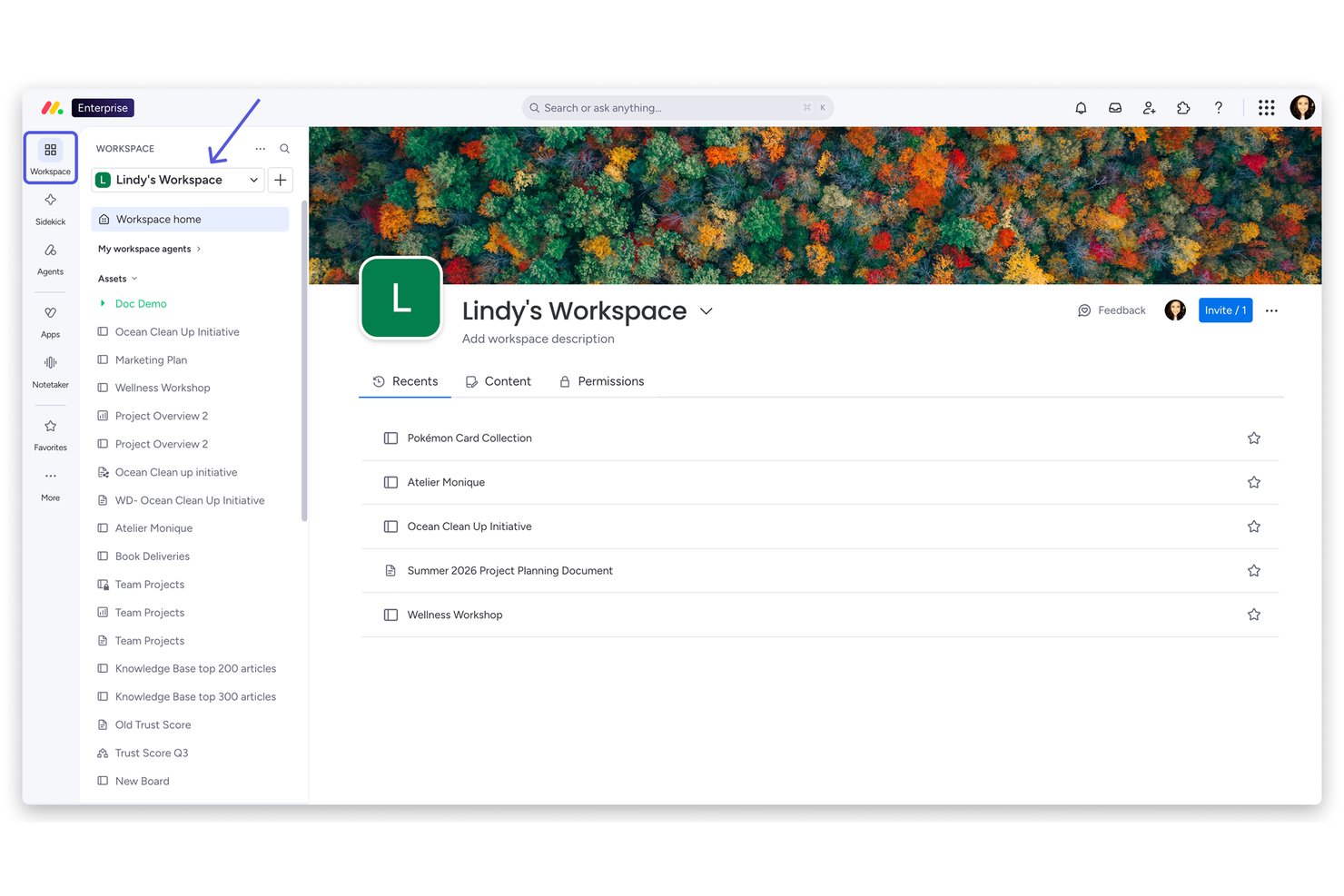
monday AI Workspace is an enterprise AI work platform that combines portfolio management, AI-powered task automation, resource planning, and cross-functional workflow orchestration across project and program teams.
Who Is monday AI Workspace Best For?
It's a strong fit for enterprise PMO teams and portfolio managers at large organizations running multiple cross-functional projects simultaneously.
Why I Picked monday AI Workspace
monday AI Workspace earns its spot on my shortlist because of how it handles portfolio visibility at scale. I love the Portfolio Dashboards, which surface real-time health snapshots across every active project without any manual status chasing. On top of that, monday sidekick lets me query project data in natural language and get instant executive-ready summaries, which cuts reporting prep significantly. The AI Smart Assignment in Capacity Manager also means my team can match the right people to the right work across a full portfolio, not just a single project.
monday AI Workspace Key Features
- AI workflow builder: Orchestrates custom automations across project and portfolio workflows using AI-powered logic and triggers.
- Advanced resource management: Assigns and monitors resources based on skills, workload, and availability across multiple projects.
- Portfolio dashboards: Displays live visual snapshots and data rollups from every project in an enterprise-wide workspace.
- Jira and Salesforce two-way sync: Maintains up-to-date project and portfolio data by synchronizing with key enterprise systems in real time.
monday AI Workspace Integrations
monday AI Workspace offers hundreds of native integrations, including Salesforce, Jira, HubSpot, Google Workspace, Slack, Microsoft Teams, GitHub, DocuSign, Stripe, Zoom, and connects with Zapier. An API is also available for custom integrations.
Pros and Cons
Pros:
- Supports Agile, Waterfall, and hybrid delivery methods
- Autonomous agents handle multi-step project tasks independently
- AI portfolio dashboards surface real-time project health
Cons:
- Complex enterprise setups require significant admin configuration
- AI features gated behind higher-tier plans
New Product Updates from monday AI Workspace
monday AI Workspace Adds Human Approval Routing
monday AI Workspace adds a human-in-the-loop approval block to AI Workflows, sending approval requests and routing workflow paths based on responses. For more information, visit monday AI Workspace's official site.

Best for no-code enterprise workflow automation
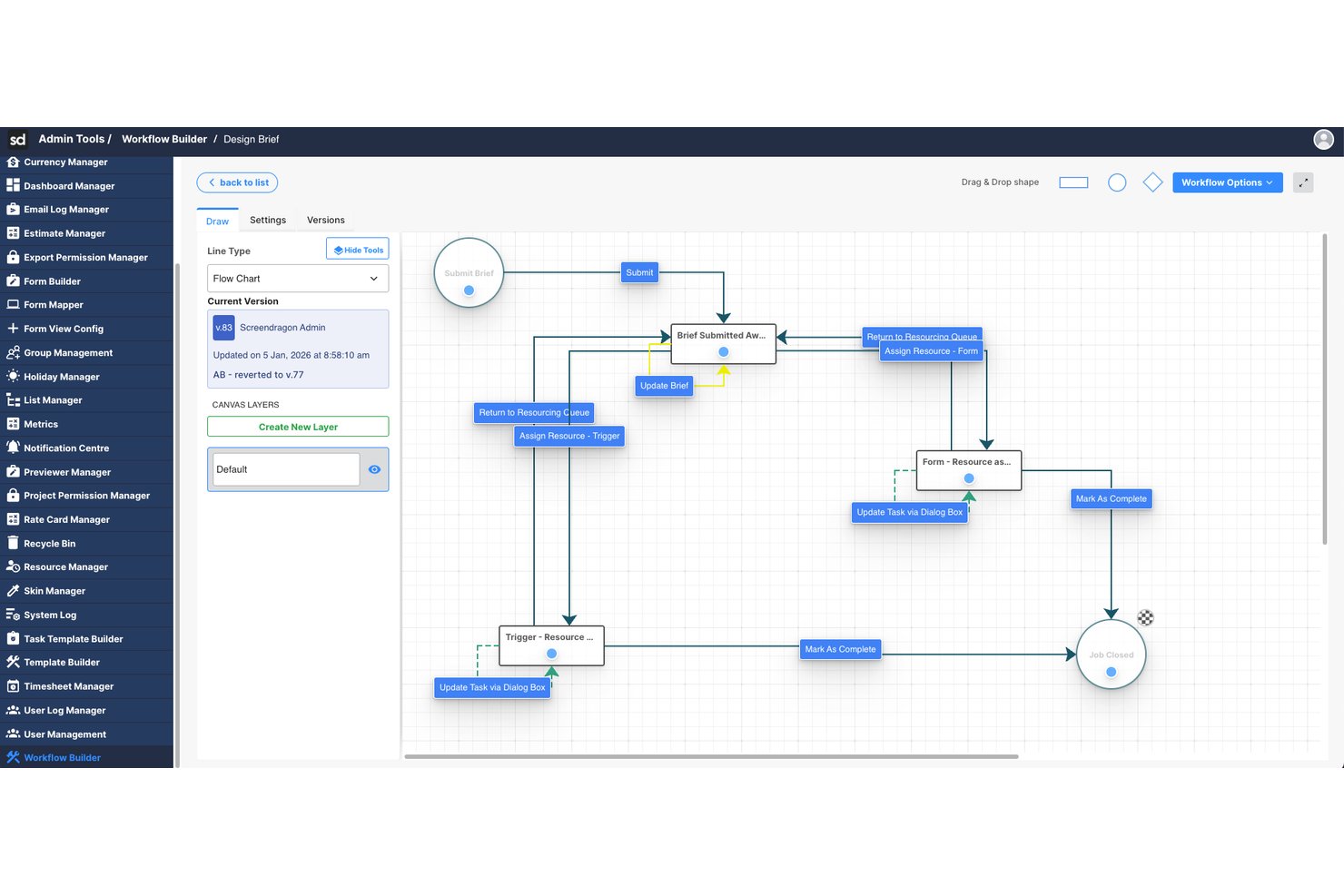
Screendragon is an enterprise work management platform that combines AI-powered workflow orchestration, resource planning, and project management with no-code automation tools built for large-scale marketing and creative operations.
Who Is Screendragon Best For?
Screendragon is well-suited for enterprise marketing teams, in-house agencies, and creative operations groups managing high volumes of work across multiple stakeholders.
Why I Picked Screendragon
Screendragon earns its spot on my shortlist because of its no-code workflow engine, which lets enterprise teams build and automate complex approval chains without any developer involvement. I also like the AI agent orchestration layer, which routes work across multiple AI models based on cost and performance needs. The smart resourcing feature rounds it out by auto-assigning team members based on skills, not just availability.
Screendragon Key Features
- AI governance controls: Offers oversight and management of AI usage, model routing, and workflow execution within the platform.
- Advanced operational reporting: Provides real-time dashboards and analytics across projects, people, budgets, and approvals.
- Enterprise integrations: Connects natively with platforms like SAP, Salesforce, PeopleSoft, Jira, and Microsoft 365.
- Role-based access controls: Supports enterprise-grade security with permissions for users, teams, and external partners.
Screendragon Integrations
Screendragon offers native integrations with SAP, PeopleSoft, Salesforce, Microsoft 365, Google Drive, Adobe Creative Cloud, Jira, Trello, Box, and Egnyte, and provides an API for custom integrations.
Pros and Cons
Pros:
- Skill-based resource assignment via AI
- AI agents handle multi-step tasks autonomously
- No-code workflow automation without developer support
Cons:
- AI predictive risk features are less mature
- Skewed toward marketing over broader PMO use
New Product Updates from Screendragon
Screendragon Unveils New AI Hub
Screendragon introduced AI Hub, a new capability that lets teams build and manage AI agents directly within workflows. The update helps marketing teams automate tasks, maintain governance controls, and scale AI-driven operations more efficiently. For more information, visit Screendragon's official site.

Wrike
Best for AI features included in all plans

Wrike is a work management platform designed for teams looking to enhance their project workflows. It primarily serves enterprises and teams that need deep automation and task management features. Wrike's AI capabilities, like Wrike Copilot, assist in real-time data analysis and task automation, providing substantial value to its users.
Why I picked Wrike: Wrike's AI features are included in all plans, making it accessible for various team sizes. The Wrike Copilot offers AI-driven insights to help you manage projects efficiently. It includes AI capabilities for data analysis, allowing your team to automate repetitive tasks. This makes Wrike a versatile choice for enhancing productivity across different industries.
Standout Features & Integrations
Features include task management, Gantt charts, and a visual collaboration platform. The platform provides templates for Agile and event management, helping your team get started quickly. Wrike also emphasizes user education through online courses and webinars.
Integrations include Google, Microsoft, Adobe Creative Cloud, Box, GitHub, JIRA, Salesforce, Zoom, Tableau, and MS Teams.
Pros and Cons
Pros:
- Strong user education resources
- Extensive project templates
- AI features in all plans
Cons:
- Automations are capped unless upgrading
- Complex folder-based structure
New Product Updates from Wrike
Wrike Adds Klaxoon MCP Integration
Wrike’s Klaxoon MCP integration is now generally available, enabling AI agents to navigate between Wrike tasks and attached whiteboards, read task context, and manage whiteboard attachments via API. For more information, visit Wrike's official site.

Forecast
Best for AI-driven project planning

Forecast is a project management and resource planning tool designed for teams seeking AI-driven insights to optimize their workflows. It is tailored for businesses that need to manage projects, resources, and budgets efficiently. Forecast's AI capabilities automate project planning and provide predictive analytics to enhance decision-making and resource allocation.
Why I picked Forecast: Forecast leverages AI to drive project planning and resource management, making it a top choice for teams looking to optimize operations. Its AI features include automated task scheduling and resource forecasting, which help you manage workloads effectively. Forecast's predictive analytics offer insights into project timelines and potential risks. This focus on AI-driven planning ensures your team can adapt quickly to changes and maintain productivity.
Standout Features & Integrations
Features include time tracking, budget management, and customizable dashboards. These features help your team monitor project progress and financial health. Forecast also offers a timeline view to visualize project schedules and dependencies.
Integrations include Slack, Google Calendar, Microsoft Teams, QuickBooks, Jira, Trello, Xero, Zapier, HubSpot, and Salesforce.
Pros and Cons
Pros:
- Predictive analytics for risk assessment
- Comprehensive resource management
- AI-driven project planning
Cons:
- Requires time to configure fully
- Higher cost for small teams

Asana
Best AI for meeting notes

Asana is a project management tool designed for teams that need to organize their work and manage tasks efficiently. It is popular among businesses of all sizes, offering tools for task tracking and project planning. Asana's AI capabilities focus on improving productivity by automating routine tasks and providing insights from project data.
Why I picked Asana: Asana excels in using AI to optimize meeting notes, helping your team capture and organize information effectively. Its AI features include automated task suggestions and timeline predictions, which can enhance your team's workflow. Asana also uses AI to provide insights into project progress and potential roadblocks. This focus on AI-driven meeting management makes it a valuable tool for teams looking to improve collaboration.
Standout Features & Integrations
Features include task dependencies, a timeline view, and project milestones. These features help you manage complex projects with multiple moving parts. Asana also offers a workload feature to help you balance team capacity.
Integrations include Slack, Microsoft Teams, Google Drive, Dropbox, Zoom, Salesforce, Jira, Trello, Zapier, and Adobe Creative Cloud.
Pros and Cons
Pros:
- Visual timeline and workload features
- Intuitive task dependencies
- Effective AI for meeting notes
Cons:
- Notifications overload without tuning
- Limited advanced field customization

Zenhub
Best for GitHub integration

Zenhub is a project management platform designed specifically for development teams using GitHub, helping them enhance productivity and collaboration. It integrates directly with GitHub, providing tools for issue tracking, sprint planning, and release management within the GitHub interface. Zenhub's AI capabilities include workflow automation and predictive analytics to optimize project timelines and resource allocation.
Why I picked Zenhub: Zenhub is distinguished by its quick integration with GitHub, making it an essential tool for development teams. Its AI features simplify workflow management by automating routine tasks and providing insights into project health. Zenhub's predictive analytics help your team identify potential bottlenecks and adjust plans accordingly. This deep integration with GitHub and AI-driven insights makes it a valuable asset for software development projects.
Standout Features & Integrations
Features include kanban boards, burndown charts, and milestone tracking. These tools provide your team with visual project management capabilities within GitHub. Zenhub also offers a reporting suite to analyze project performance and team productivity.
Integrations include GitHub, Slack, Microsoft Teams, Google Workspace, Jira, Trello, Asana, Zoom, Dropbox, and Salesforce.
Pros and Cons
Pros:
- Comprehensive reporting suite
- Effective workflow automation
- Seamless integration with GitHub
Cons:
- Limited use for non-developers
- Limited functionality outside GitHub


ClickUp is a versatile project management tool designed for teams seeking flexibility in managing tasks and projects. It serves a diverse user base, from small teams to large enterprises, offering tools for task management, goal setting, and workflow automation. ClickUp's AI capabilities enhance productivity by automating task assignments and providing insights into project performance.
Why I picked ClickUp: ClickUp offers highly customizable task views, allowing your team to tailor their workspace to fit specific needs. Its AI features include automation of repetitive tasks and smart suggestions for task prioritization. ClickUp's AI-driven tools help you optimize team productivity by analyzing workload and efficiency. This flexibility in customization sets it apart, making it suitable for various industries and project types.
Standout Features & Integrations
Features include time tracking, goal setting, and a built-in document editor. These features enable your team to manage projects comprehensively within a single platform. ClickUp also provides a whiteboard feature for visual collaboration and brainstorming.
Integrations include Slack, Google Drive, Microsoft Teams, Zoom, Dropbox, Trello, HubSpot, Salesforce, GitHub, and Outlook.
Pros and Cons
Pros:
- Built-in document editor
- Comprehensive project management features
- Highly customizable task views
Cons:
- Feature sprawl can be overwhelming
- Performance lag in large spaces

Notion is a versatile workspace tool designed for teams looking to collaborate and organize their work in one place. It appeals to a diverse range of users, from startups to large enterprises, by offering tools for note-taking, project management, and document collaboration. Notion's AI capabilities enhance productivity by automating workflows and providing intelligent search and organization features.
Why I picked Notion: Notion excels in team document collaboration with its unique blend of note-taking and project management features. Its AI tools help you organize information efficiently, making it easy to locate and manage content. Notion's templates and databases allow you to customize your workspace to fit your team's needs. This makes it an ideal choice for teams focused on effective document collaboration and management.
Standout Features & Integrations
Features include a flexible page layout, customizable templates, and a powerful database system. These features help you create a tailored workspace that fits your team's workflow. Notion also offers a web clipper tool to save and organize web content directly into your workspace.
Integrations include Slack, Google Drive, Figma, Microsoft Teams, GitHub, Trello, Asana, Zapier, Typeform, and Jira.
Pros and Cons
Pros:
- Intuitive database features
- Highly customizable workspace
- Excellent for document collaboration
Cons:
- Limited offline functionality
- Extensive permission slows large groups

Jira
Best for agile project management

Jira is a project management tool designed for software development teams that require agile methodologies like Scrum and Kanban. It is widely used by technical teams to plan, track, and release software projects. Jira's AI capabilities help teams automate workflows and predict project timelines, enhancing efficiency and collaboration.
Why I picked Jira: Jira is tailored for agile project management, making it a top choice for software development teams. Its AI features include smart automation rules that save time by automating repetitive tasks. Jira's predictive analytics provide insights into project progress, helping your team anticipate potential delays. These AI-driven capabilities make Jira an excellent fit for managing complex software projects.
Standout Features & Integrations
Features include customizable workflows, detailed reporting, and backlog prioritization. These tools help your team manage tasks efficiently and stay focused on project goals. Jira also offers a mobile app, allowing you to track projects on the go.
Integrations include Slack, GitHub, Bitbucket, Confluence, Microsoft Teams, Google Drive, Zoom, Trello, Salesforce, and Zendesk.
Pros and Cons
Pros:
- Detailed reporting and analytics
- Advanced automation capabilities
- Excellent for agile methodologies
Cons:
- Steep learning curve for non-technical teams
- Complex setup
Andre verktøy for prosjektstyring med kunstig intelligens for virksomheter
Her er noen flere alternativer for verktøy for prosjektstyring med kunstig intelligens for virksomheter som ikke kom med på listen min, men som likevel er verdt å undersøke:
- Smartsheet
For spreadsheet-like interface
- TaskRay
With Salesforce-native integration
- Zoho Projects
For customizable workflows
- Taskade
For real-time team collaboration
- Microsoft Planner
For Microsoft ecosystem users
- Motion
For AI-driven scheduling
- Productive.io
For agency project management


How I Evaluate Enterprise AI Project Management Tools
Every tool on this list needs to go beyond AI branding—I look for platforms where AI actually cuts the manual work of running projects at scale, like auto-generating status reports or flagging at-risk deliverables before they slip. I split my evaluation into core functionality every tool must have to qualify and differentiating factors that separate one vendor from the next.
Core Functionality (Table Stakes For This List)
When I'm selecting tools for my list, I rank each one on a scale from 0 (does not offer the functionality) to 5 (excels in this area) for each core functionality listed below. Then, I calculate the tool's total score into a percentage. Each tool needs to achieve a minimum total score of 65% to be considered for inclusion.
- AI-Powered Task Automation: I check whether a tool can auto-generate tasks, assign owners, and adjust priorities based on project context rather than just running static if-then rules.
- Predictive Risk & Forecasting: I look for ML-driven signals that flag schedule slippage or budget overruns early, like alerting a PM weeks before a milestone is likely to miss.
- Intelligent Resource Management: The platform should recommend staffing decisions based on skills and capacity, not just show a utilization chart that PMs still interpret manually.
- Generative AI Reporting: I evaluate whether the tool produces natural-language project summaries and answers ad hoc questions, like "which workstreams are behind this sprint?"
- Enterprise Security & Scalability: SSO/SAML, role-based permissions, audit logging, and compliance certifications like SOC 2 or ISO 27001 all factor into my scoring here.
- Portfolio-Level Integrations: I look at native connectors to core enterprise systems like Jira, Salesforce, SAP, and Workday to confirm data flows into AI models cleanly.
Once I have a list of tools that meet this criteria, I consider what sets each platform apart.
Differentiating Factors (What Sets Vendors Apart)
Here's how I compare and contrast different vendors:
Standout Features
Scenario simulation is a big differentiator—I look for tools that let a PMO director model what happens to timelines and budgets if a key team gets reassigned before making the call. Cross-project dependency mapping matters just as much, especially when a delay in one product launch quietly blocks three other workstreams. I also evaluate whether a platform offers autonomous agents that handle recurring tasks like chasing status updates or summarizing standups without anyone prompting them.
Beyond Features
AI governance is a major consideration—I evaluate whether a vendor clearly discloses how project data trains its models and whether organizations can opt out or run AI in-tenant. Total cost of ownership also gets close attention, since some platforms gate their best AI features behind premium tiers or charge per-use credits that balloon at enterprise scale. I also check methodology flexibility, because a PMO running SAFe for engineering and Waterfall for compliance needs one tool that handles both under a single reporting layer.
Slik velger du et verktøy for prosjektstyring med kunstig intelligens for virksomheter
Det er lett å gå seg vill i lange funksjonslister og komplekse prisstrukturer. For å hjelpe deg med å holde fokus mens du går gjennom den unike prosessen med å velge programvare, får du her en sjekkliste over faktorer du bør ha i bakhodet:
| Faktor | Hva du bør vurdere |
| Skalerbarhet | Vil verktøyet vokse sammen med teamet ditt? Vurder brukerbegrensninger og om verktøyet kan håndtere økte datamengder og større kompleksitet etter hvert som prosjektene dine vokser. |
| Integrasjoner | Kan det kobles til de eksisterende verktøyene dine? Sjekk kompatibiliteten med programvaren du allerede bruker, slik at du sikrer sømløs dataflyt og kontinuitet i arbeidsflyten. |
| Tilpasningsmuligheter | Kan du tilpasse det til arbeidsflyten din? Se etter muligheter for å tilpasse dashbord, rapporter og arbeidsflyter slik at de passer teamets prosesser og preferanser. |
| Brukervennlighet | Er det brukervennlig? Vurder læringskurven og om teammedlemmene raskt kan ta det i bruk uten omfattende opplæring. |
| Implementering og oppstart | Hvor lang tid tar det å komme i gang? Vurder tiden og ressursene som kreves for oppsett, datamigrering og innledende opplæring av teamet. |
| Kostnad | Hva er den totale kostnaden? Sammenlign abonnementsavgifter, skjulte kostnader og verdien som tilbys av ulike prisnivåer, slik at de passer budsjettet ditt. |
| Sikkerhetstiltak | Er dataene dine beskyttet? Se etter kryptering, tilgangskontroller for brukere og samsvar med relevante personvern- og databeskyttelsesforskrifter for å sikre at informasjonen din er trygg. |
| Tilgjengelig brukerstøtte | Hvilke støttealternativer er tilgjengelige? Finn ut om du har tilgang til rask hjelp via chat, telefon eller e-post, og om det finnes selvbetjeningsressurser som ofte stilte spørsmål eller forum. |
Hva er AI-verktøy for prosjektstyring i virksomheter?
AI-verktøy for prosjektstyring i virksomheter er programvareløsninger som er utviklet for å forbedre prosjektplanlegging og -gjennomføring ved å ta i bruk kunstig intelligens. Disse verktøyene brukes vanligvis av prosjektledere, teamledere og IT-fagfolk for å øke effektiviteten og forbedre beslutningstakingen. Funksjoner for automatisering, prediktiv analyse og ressursoptimalisering bidrar til å håndtere oppgaver, forutse prosjektutfordringer og fordele ressurser effektivt. Samlet sett gir disse verktøyene betydelig verdi ved å forbedre produktiviteten og muliggjøre datadrevne beslutninger.
Funksjoner i AI-verktøy for prosjektstyring i virksomheter
Når du velger AI-verktøy for prosjektstyring i virksomheter, bør du se etter følgende viktige funksjoner:
- Automatisering: Automatiserer repetitive oppgaver for å spare tid og redusere feil, slik at teamet ditt kan fokusere på mer strategisk arbeid.
- Prediktiv analyse: Gir innsikt i prosjekttidslinjer og potensielle risikoer, slik at du kan ta informerte beslutninger og forutse utfordringer.
- Ressursoptimalisering: Analyserer ressursfordelingen for å sikre optimal bruk av teammedlemmer og eiendeler, noe som forbedrer prosjekteffektiviteten.
- Tilpassbare oversikter: Lar deg tilpasse visninger og rapporter etter teamets spesifikke behov, slik at oversikten og kontrollen blir bedre.
- AI-drevet innsikt: Gir datadrevne anbefalinger for prosjektstyring, forbedrer beslutningstakingen og bidrar til strategisk planlegging.
- Arbeidsflytautomatisering: Samler prosesser ved å automatisere rutinemessige arbeidsflyter, noe som øker produktiviteten og konsistensen.
- Integrasjonsmuligheter: Kobler seg til eksisterende verktøy og plattformer for å sikre rask dataflyt og samarbeid på tvers av systemer.
- Tidsregistrering: Overvåker tiden som brukes på oppgaver og prosjekter, og gir innsikt i produktivitet og ressursfordeling.
- Budsjettstyring: Følger opp prosjektbudsjetter og utgifter, slik at du kan holde deg innenfor økonomiske rammer og ta kostnadseffektive beslutninger.
- Sikkerhetstiltak: Sikrer databeskyttelse med kryptering og tilgangskontroller for brukere, og opprettholder informasjonens konfidensialitet og integritet.
Fordeler med AI-verktøy for prosjektstyring i virksomheter
Implementering av AI-verktøy for prosjektstyring i virksomheter gir flere fordeler for teamet og virksomheten din. Her er noen av fordelene du kan se frem til:
- Økt effektivitet: Automatiserer rutineoppgaver, slik at teamet ditt får mer tid til å fokusere på aktiviteter med høy prioritet.
- Bedre beslutningstaking: Gir prediktiv analyse og AI-drevet innsikt, slik at du raskt kan ta informerte valg.
- Bedre ressursfordeling: Optimaliserer ressursbruken ved å analysere teamets kapasitet og prosjektbehov, slik at arbeidsbelastningen fordeles effektivt.
- Bedre risikostyring: Identifiserer potensielle prosjektrisikoer tidlig ved hjelp av AI-funksjoner, slik at du kan iverksette proaktive tiltak.
- Kostnadsbesparelser: Følger budsjetter og utgifter nøyaktig, slik at du kan identifisere muligheter for kostnadsreduksjon og holde deg innenfor økonomiske rammer.
- Bedre samarbeid: Integreres med eksisterende verktøy og legger til rette for datadeling og kommunikasjon på tvers av teamet.
- Skalerbarhet: Tilpasser seg virksomhetens voksende behov og gir fleksibiliteten som kreves for å håndtere større eller mer komplekse prosjekter over tid.
Kostnader og priser for AI-verktøy for prosjektstyring i virksomheter
Ved valg av AI-verktøy for prosjektstyring i virksomheter er det nødvendig å forstå de ulike prismodellene og tilgjengelige abonnementene. Kostnadene varierer basert på funksjoner, teamstørrelse, tillegg og mer. Tabellen nedenfor oppsummerer vanlige abonnementer, gjennomsnittsprisene deres og typiske funksjoner som inngår i løsninger for AI-verktøy for prosjektstyring i virksomheter:
Sammenligningstabell for abonnementer for AI-verktøy for prosjektstyring i virksomheter
| Abonnementstype | Gjennomsnittspris | Vanlige funksjoner |
| Gratisabonnement | $0 | Grunnleggende oppgavestyring, begrensede integrasjoner og brukerstøtte fra fellesskapet. |
| Personlig abonnement | $5-$15/bruker/måned | Oppgavestyring, grunnleggende automatisering, rapporteringsfunksjoner og begrenset brukerstøtte. |
| Bedriftsabonnement | $20-$40/bruker/ måned | Avansert automatisering, prosjektmaler, tidsregistrering og prioritert brukerstøtte. |
| Virksomhetsabonnement | $50-$100/bruker/ måned | Tilpassede integrasjoner, avansert analyse, en dedikert kundeansvarlig og forbedret sikkerhet. |
Vanlige spørsmål om verktøy for prosjektstyring med KI for virksomheter
Her er noen svar på vanlige spørsmål om verktøy for prosjektstyring med KI for virksomheter:
Hvordan påvirker KI-funksjoner prosjekt tidslinjer?
KI-funksjoner kan forbedre prosjekt tidslinjer betydelig ved å automatisere planlegging og forutsi mulige forsinkelser. Med KI kan teamet ditt analysere historiske data for å anslå prosjektvarighet mer nøyaktig. Dette bidrar til effektiv ressursfordeling og til å identifisere mulige flaskehalser før de oppstår.
KI-drevne planleggingsverktøy kan for eksempel automatisk justere tidslinjer basert på oppdateringer om fremdrift i sanntid, slik at teamet ditt holder seg på rett spor. Ved å redusere behovet for manuell innblanding gjør KI-funksjoner det også mulig for prosjektledere å fokusere på strategisk planlegging i stedet for daglig planlegging.
Kan KI-verktøy integreres med eksisterende arbeidsflyter?
Ja, KI-verktøy kan integreres med eksisterende arbeidsflyter via API-er og innebygde koblinger. Når du velger et KI-verktøy for prosjektstyring, bør du kontrollere at det er kompatibelt med den nåværende programvarestakken din, for eksempel CRM- eller ERP-systemer. Integrasjon sørger for at data flyter sømløst mellom plattformene, noe som reduserer manuell dataregistrering og feil.
Ved å integrere et KI-verktøy med CRM-systemet ditt kan du for eksempel automatisere kundekommunikasjon og oppdateringer. De fleste KI-verktøy tilbyr tilpassbare integrasjonsalternativer, noe som gjør det enklere for teamet ditt å opprettholde eksisterende arbeidsflyter samtidig som dere drar nytte av KI-forbedringer.
Er datasikkerhet en bekymring ved bruk av verktøy for prosjektstyring med KI?
Ja, datasikkerhet er en viktig faktor ved bruk av verktøy for prosjektstyring med KI. Disse verktøyene håndterer ofte sensitive prosjektdata, noe som krever robuste sikkerhetstiltak som kryptering og tilgangskontroller. Sørg for at verktøyet overholder bransjestandarder som GDPR eller HIPAA, hvis det er relevant.
Se etter funksjoner som flerfaktorautentisering og regelmessige sikkerhetsrevisjoner. Det er også lurt å gjennomgå leverandørens retningslinjer for datalagring for å forstå hvordan dataene dine lagres og beskyttes. Ved å prioritere sikkerhet kan du beskytte teamets informasjon samtidig som du utnytter KI-funksjonene.
Hva skjer videre:
Hvis du undersøker verktøy for prosjektstyring med KI for virksomheter, kan du ta kontakt med en rådgiver hos SoftwareSelect for å få gratis anbefalinger.
Du fyller ut et skjema og tar en kort prat der de går gjennom behovene dine i detalj. Deretter får du en kortliste over programvare du kan vurdere. De støtter deg også gjennom hele kjøpsprosessen, inkludert prisforhandlinger.