

10 beste prosjektstyringsprogrammer med fakturering for 2026

10 Beste programvare for prosjektstyring med fakturering – kortliste


Med så mange forskjellige tilgjengelige løsninger for prosjektstyring er det vanskelig å finne ut hvilke som har funksjoner som støtter prosjektøkonomien din. Du vet at du vil forenkle oppfølgingen av prosjektfremdrift og utgifter, samtidig som du får en sømløs prosess for å opprette og administrere fakturaer, men du må finne ut hvilket verktøy som passer best. Jeg hjelper deg! I dette innlegget gjør jeg valget enklere ved å bruke mine personlige erfaringer med dusinvis av ulike PM-verktøy i store team og prosjekter for å dele mine anbefalinger av den beste programvaren for prosjektstyring med faktureringsverktøy.
Why Trust Our Software Recommendations
Our team has been testing and reviewing software since 2012. As project managers ourselves, we know how difficult—and important—it is to choose the right software.
For this guide, we evaluated tools using hands-on testing and independent research, scoring tools using our selection criteria. We also draw on insights from industry thought leaders and practicing project management experts.
Our reviews reflect our human editorial judgment, not a sales pitch.
Expert reviewers:
Sammenligningstabell for programvare for prosjektstyring med fakturering
Tabellen nedenfor sammenligner prisopplysningene for mine beste programvareløsninger for prosjektstyring med fakturering.
| Tool | Best For | Trial Info | Price | ||
|---|---|---|---|---|---|
| 1 | Best for centralized global invoicing | 14-day free trial | From $17/user/month | Website | |
| 2 | Best for agencies operating globally | 14-day free trial | From $10/user/month (billed annually) | Website | |
| 3 | Best time tracking & timesheets for easy invoicing | 14-day free trial | Pricing upon request | Website | |
| 4 | Best for timesheet modules | Free plan + 15-day free trial + free demo available | From $4/user/month (billed annually) | Website | |
| 5 | Best for branded invoice generation | Free plan + 30-day free trial + free demo available | From $6/user/month (billed annually) | Website | |
| 6 | Best if you also need staffing tools | 14-day free trial | From $15/user/month | Website | |
| 7 | Best for financial forecasting | Free demo available | Pricing upon request | Website | |
| 8 | Best for agencies | Free 7-day trial available | From $9/user/month (billed annually) | Website | |
| 9 | Best for client invoicing and management | Free trial + free demo available | From $29/user/month (billed annually) | Website | |
| 10 | Best for billing controls and margin tracking | Free demo available | Pricing upon request | Website |


Anmeldelse av den beste programvaren for prosjektstyring med fakturering
Nedenfor finner du mine detaljerte sammendrag av den beste programvaren for prosjektstyring med fakturering som kom med på kortlisten min. Anmeldelsene mine gir en detaljert gjennomgang av de viktigste funksjonene, fordeler & ulemper, integrasjoner og ideelle bruksområder for hvert verktøy, slik at du kan finne det som passer best for deg.

Scoro
Best for centralized global invoicing
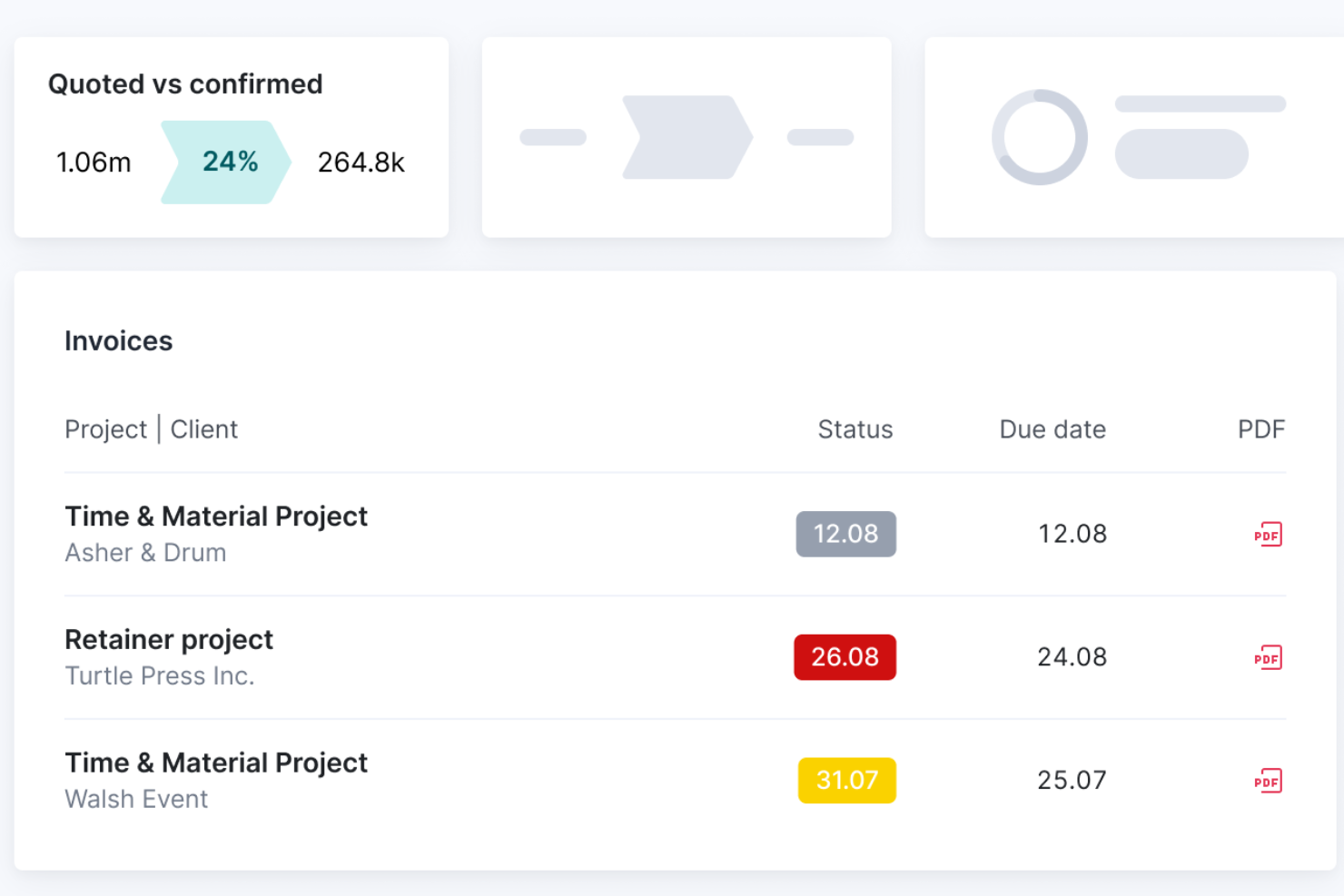
Scoro is a professional services automation platform that brings together project management, time tracking, expense management, billing rate configuration, and client invoicing in one connected system.
Who Is Scoro Best For?
Scoro is a strong fit for agencies and consultancies managing multiple clients across different currencies, billing rates, and entities.
Why I Picked Scoro
I've included Scoro in my top picks because it handles multi-currency, multi-entity billing in a way that most project management tools simply don't. I love that it supports client-specific price lists, each with its own currency, so negotiated rates pull automatically onto quotes and invoices without manual overrides. When one client pays in euros and another in Australian dollars, Scoro keeps each entity's tax rates and accounting files separate while consolidating everything into group reports.
Scoro Key Features
- Milestone and partial invoicing: Generate invoices tied to specific project milestones or bill incrementally as work progresses, rather than waiting until a project is complete.
- Retainer management: Manage recurring client engagements by billing period, with per-period budgets, rollover of unused hours, and a choice of fixed fee or time-and-materials models.
- Quote-to-invoice workflow: Convert approved quotes directly into projects, budgets, and time logs, so billable data flows through to invoices at the rates already saved.
- Accounting sync: Two-way sync with Xero, QuickBooks, Sage Intacct, and Exact Online keeps invoices, bills, and payment status aligned across platforms.
Scoro Integrations
Scoro offers 40+ native integrations, including Xero, QuickBooks, Sage Intacct, Exact Online, Stripe, Salesforce, and HubSpot. It also provides a REST API v2 and Zapier.
Pros and Cons
Pros:
- Profitability reports expose unbilled work
- Milestones and time logs feed billing
- Client-specific rates carry into invoices
Cons:
- Dense screens complicate initial configuration
- Invoice formatting can require extra work
New Product Updates from Scoro

Scoro Adds Time Mobile App and ELI Improvements
Scoro adds the Scoro Time mobile app for iOS/Android to track time anywhere and expands ELI with attachments, smarter filtering, and trigger-based actions. For more information, visit Scoro's official site.

Best for agencies operating globally
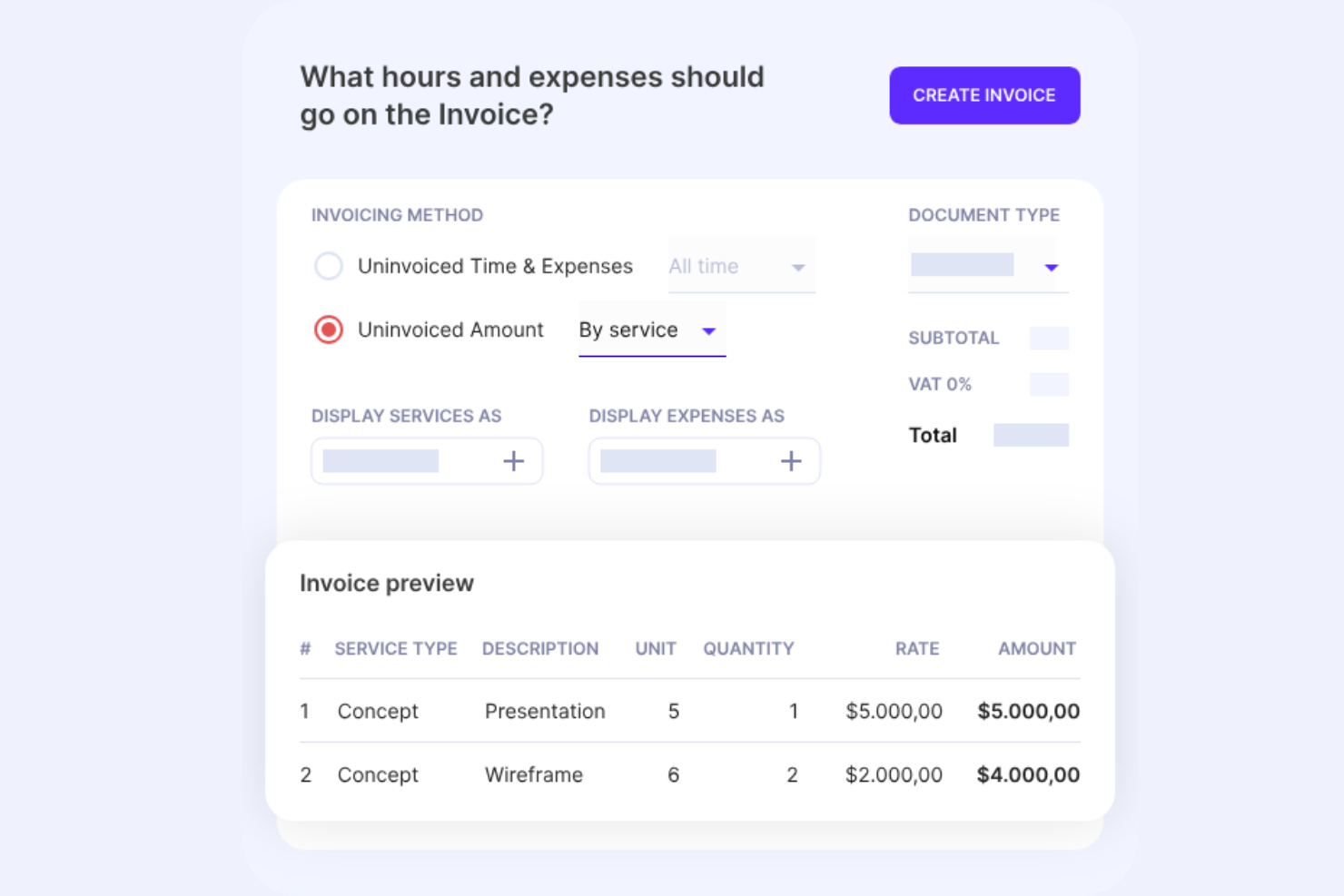
Productive is a project management and invoicing platform built for agencies, combining time tracking, project budgeting, billing rate management, and client invoicing with multi-currency support and global accounting integrations.
Who Is Productive Best For?
Productive is a strong fit for agencies managing projects and billing across multiple countries, currencies, and accounting systems.
Why I Picked Productive
I've included Productive in my top picks because it handles the full billing cycle across multiple currencies and tax jurisdictions without forcing you to stitch together separate tools. I particularly like that each subsidiary can carry its own tax rates and that invoices automatically display both the client currency and the exchange rate, which matters when you're billing a client in euros while your books run in pounds. Recurring budgets also auto-generate invoice drafts for retainer clients, so your monthly billing cycle starts review-ready rather than from scratch.
Productive Key Features
- AI timesheet autofill: Productive uses AI to suggest time entries based on your activity, reducing manual logging across your team.
- Budget overrun limits: You can cap time logging at the service level so team members can't log hours once a budget threshold is hit.
- Approval workflows: Billable time and expense approvals let designated reviewers check entries before they flow into invoices or revenue reports.
- E-invoicing support: Productive supports PEPPOL, XRechnung, FACe, SDI, and Moj e-Račun for agencies with structured invoicing requirements.
Productive Integrations
Productive offers native integrations with Xero, QuickBooks Online, Sage, Exact, Visma e-conomic, Fortnox, Twinfield, NetSuite, Jira, and Slack. It also supports an Open API and Zapier.
Pros and Cons
Pros:
- Reviewers praise joined-up project and billing workflows
- Recurring retainer budgets create invoice drafts
- Live budget-to-profit and invoice visibility
Cons:
- Reporting customization can feel clunky
- No native online invoice payment collection
New Product Updates from Productive
Productive Adds Voice Dictation, Slack Connector, Proposals, and Overtime
Productive adds voice dictation, a Slack Connector, proposal controls, and overtime tracking. These updates support faster AI interactions, client proposals, and time management. For more information, visit Productive’s official site.

Wrike
Best time tracking & timesheets for easy invoicing
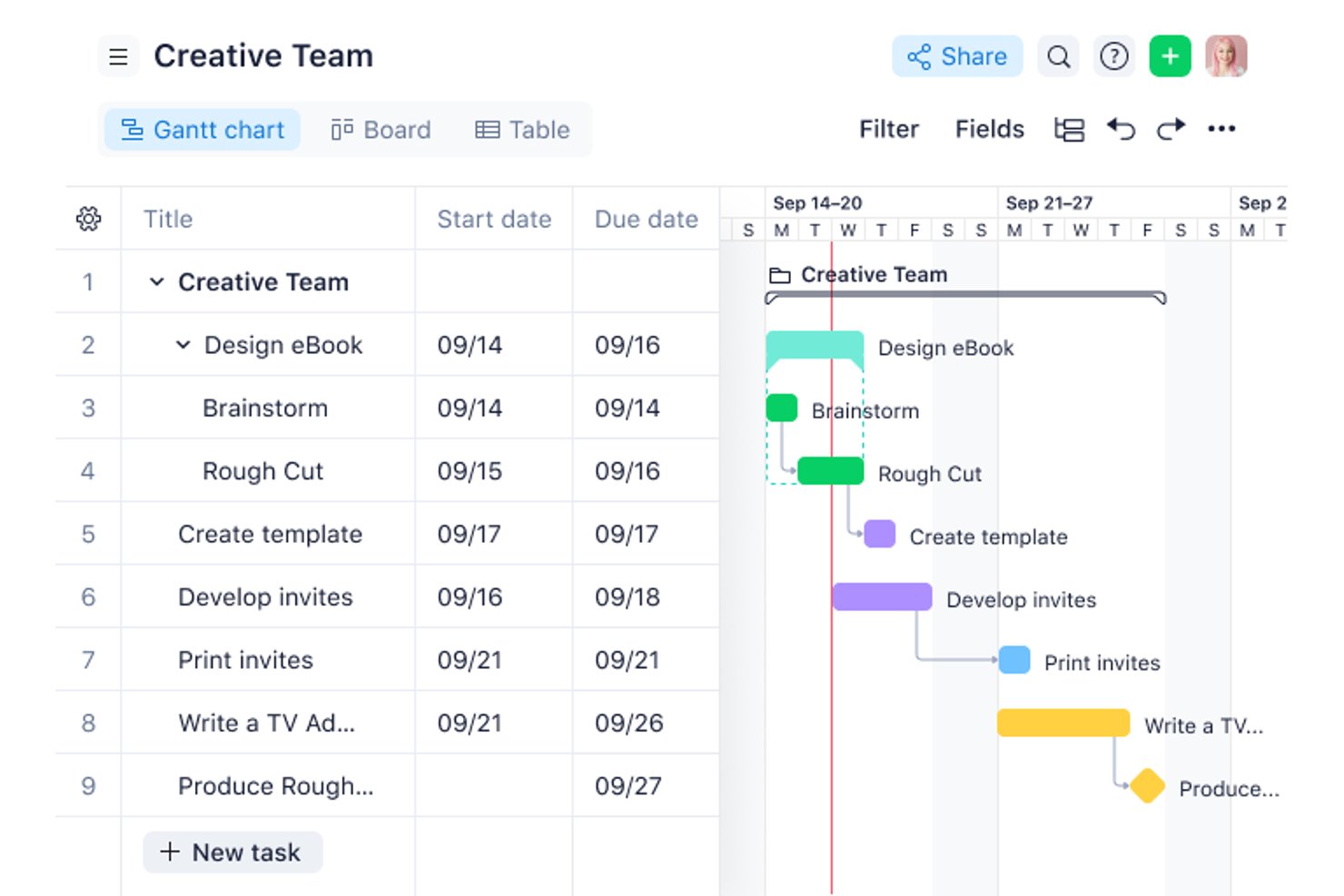
Wrike is a work management platform with time tracking, timesheet approvals, billable hour controls, project budgeting, and a QuickBooks Online integration for exporting logged time to invoicing workflows.
Who Is Wrike Best For?
Wrike suits mid-to-large teams that already use QuickBooks Online and need billable time approvals and budget tracking built into their project workflows.
Why I Picked Wrike
I've included Wrike in my top picks because its billable time controls are genuinely well-thought-out: tasks inherit billable flags from their parent project, time entries inherit them from tasks, and approved timesheets get locked so nothing slips through before export. I like how the QuickBooks Online integration automates that export, so when a task hits "Completed," logged hours move to QuickBooks ready for invoicing without manual re-entry. The per-user and per-role bill rates, with project-level overrides, give you clean cost and fee tracking across multiple client engagements.
Wrike Key Features
- Timesheet approval locking: Managers can approve or decline weekly and monthly timesheets, and approved periods are locked to prevent edits before export.
- Automation-triggered QuickBooks export: Automation rules can push time entries to QuickBooks Online when a task reaches a set status, such as "Completed."
- Per-role and per-user billing rates: Default bill and cost rates can be assigned by user or job role, with the option to override them at the project level.
- Planned vs. actual financial fields: Projects automatically calculate planned and actual fees and costs from effort and logged time, giving you a live budget vs. actual view.
Wrike Integrations
Wrike offers 400+ prebuilt connectors, including native QuickBooks Online, Salesforce, HubSpot, Jira, GitHub, Microsoft Teams, Slack, and Power BI integrations. It also supports custom integrations through its API and connects with Xero via Zapier.
Pros and Cons
Pros:
- Planned-versus-actual fees expose budget overruns
- Approved billable hours lock before export
- Clear project visibility across workstreams
Cons:
- No payment collection or recurring billing
- No client-ready invoices inside Wrike
New Product Updates from Wrike
Wrike Adds Klaxoon MCP Integration
Wrike’s Klaxoon MCP integration is now generally available, enabling AI agents to navigate between Wrike tasks and attached whiteboards, read task context, and manage whiteboard attachments via API. For more information, visit Wrike's official site.

Best for timesheet modules
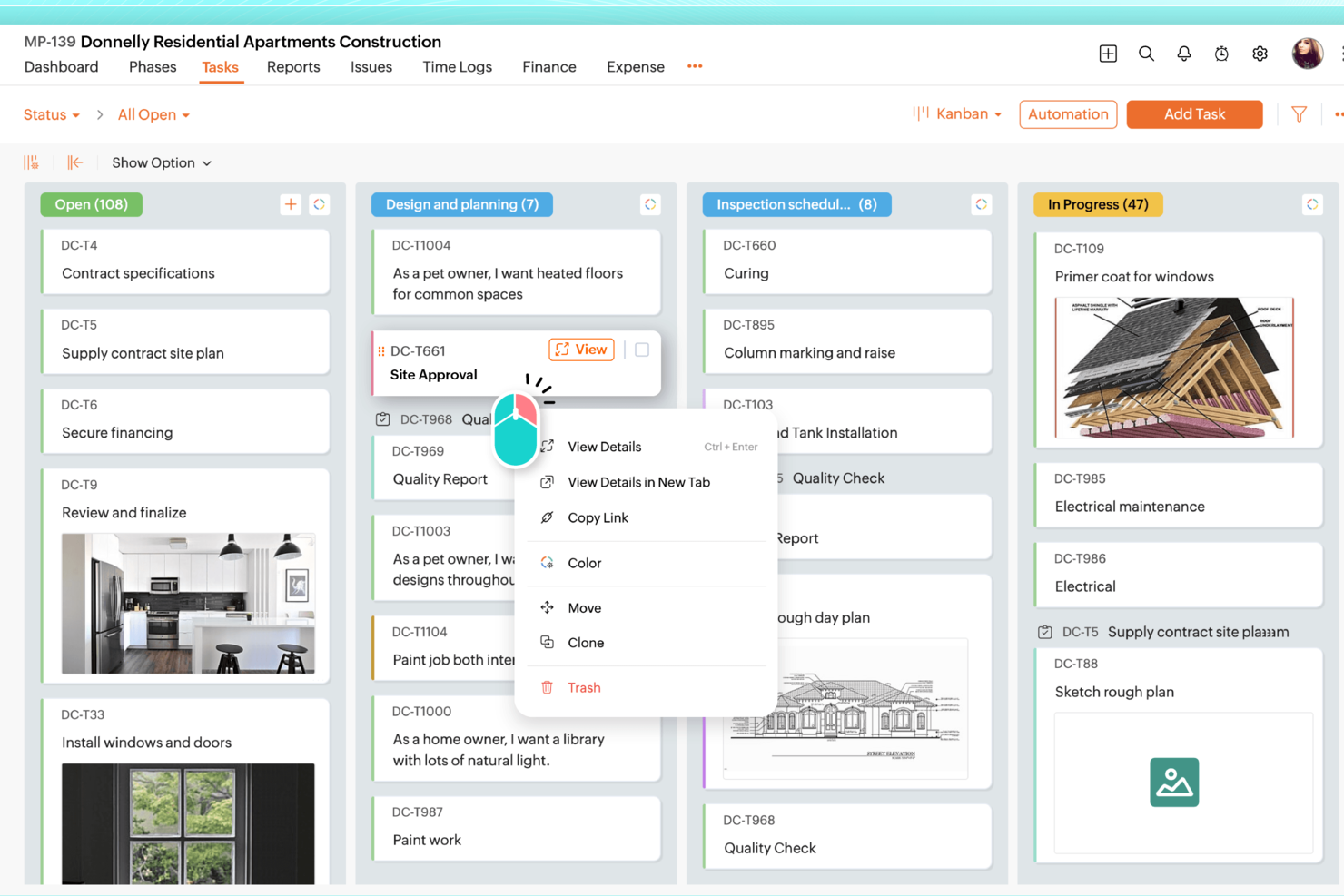
Zoho Projects is a project management platform with deep timesheet capabilities, multi-level budget tracking, and billing rate management that connects to Zoho's finance tools for invoicing and payment collection.
Who Is Zoho Projects Best For?
Zoho Projects is a strong fit for project managers and agency teams already using Zoho's ecosystem who need detailed timesheet controls and multi-level budget tracking across client projects.
Why I Picked Zoho Projects
Zoho Projects earns its spot on my shortlist because of how far it takes timesheet management compared to most project management tools. I'm particularly impressed by its multi-level approval workflows, which ensure only billable, approved hours flow through to invoicing in Zoho Books. You also get billing rate flexibility I rarely see at this price: rates can be set by staff member, project, task, or fixed cost, with per-project overrides so one team member can bill at different rates across clients.
Zoho Projects Key Features
- Project budget tracking: Set budgets by hours or amount at the project, milestone, or task level, with threshold alerts and a health widget that flags overruns.
- Earned value management (EVM): Compare work completed against your planned cost and schedule to catch variances before they become serious problems.
- Zoho Finance Suite integration: Push timesheet data directly to Zoho Invoice or Zoho Books to create client invoices, quotes, and purchase orders from within Projects.
- Client portal: Add clients as users so they can view project progress, tasks, and hours logged without needing full team access.
Zoho Projects Integrations
Zoho Projects offers native integrations with Zoho Invoice, Zoho Books, Zoho Billing, Zoho Expense, Google Sheets, Microsoft Teams, Slack, and GitHub. It also supports Zoho Flow, webhooks, an API, and Zapier.
Pros and Cons
Pros:
- Reviewers praise task organization and reporting
- Budget alerts flag project and task overruns
- Detailed time logs support billable-hour approvals
Cons:
- Reviewers report a cluttered interface
- Projects doesn’t generate invoices natively
New Product Updates from Zoho Projects
Zoho Projects Adds CodeX Scripts for Custom Modules
Zoho Projects now supports CodeX Scripts for custom modules, enabling conditional logic and rules for creating, updating, and deleting records. For more information, visit Zoho Projects' official site.
 .
.
actiTIME
Best for branded invoice generation
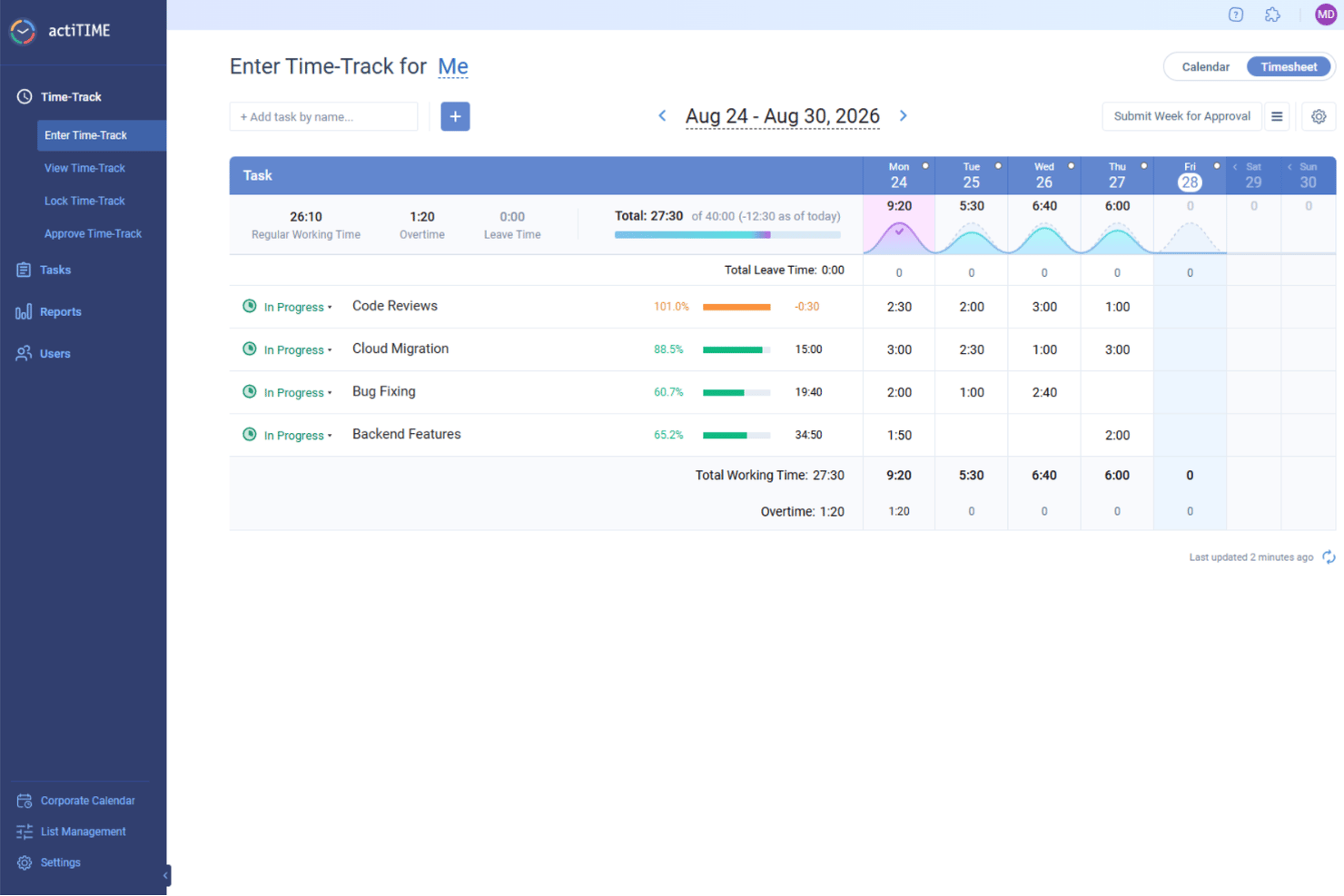
actiTIME is a time tracking and project management tool that combines timesheet management, task tracking, budget monitoring, and branded PDF invoice generation from billable hours.
Who Is actiTIME Best For?
actiTIME is a good fit for agency owners and project managers who need to turn tracked billable hours into branded, client-ready PDF invoices without a lot of manual effort.
Why I Picked actiTIME
I picked actiTIME as one of the best because of how cleanly it turns tracked billable hours into polished, client-ready PDF invoices. I love that you can add your logo, adjust line-item descriptions, apply discounts, and include payment terms before sending, all from the Invoice Export Report. The Billing Summary Report rounds it out by giving clients a clear breakdown of what they're paying for and why.
actiTIME Key Features
- Timesheet approvals: Managers can review, edit, and lock submitted timesheets before any billable hours flow into reports or invoices.
- Project budget tracking: Set time, cost, and billing budgets at the customer, project, or task level, with progress bars showing spend in real time.
- Profit/Loss reporting: The Profit/Loss report breaks down revenue, labor costs, and gross profit across projects so you can see where you're making and losing money.
- QuickBooks Online integration: Sync time data directly to QuickBooks for accounting reports and invoice management across both platforms.
actiTIME Integrations
actiTIME offers native integrations with QuickBooks Online and actiPLANS. It also supports custom connections through a REST API and Zapier.
Pros and Cons
Pros:
- Profitability reports connect billable hours to margins
- Project budgets expose cost and revenue drift
- Branded PDFs built from approved timesheets
Cons:
- Advanced budget setup takes configuration
- Invoice PDFs require separate payment follow-up
New Product Updates from actiTIME

actiTIME Visual Hour Indicator and Time-Track Report Redesign
actiTIME adds a wave-style hour indicator to the Timesheet and Calendar views and refreshes the Time-Track report for smoother navigation and clearer visuals. For more information, visit actiTIME's official site.

Zistemo
Best if you also need staffing tools
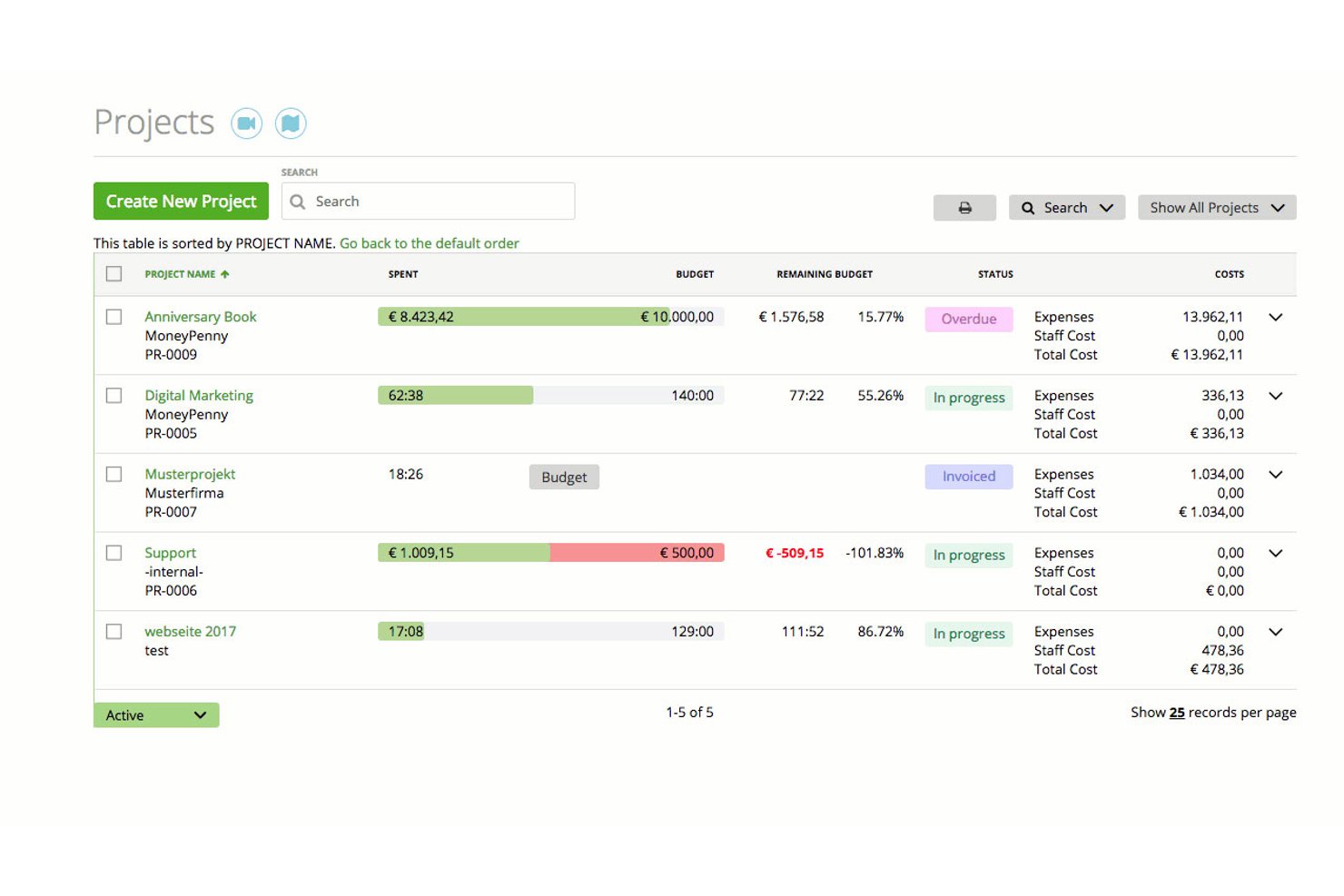
Zistemo is a cloud-based project management and invoicing platform that combines time tracking, expense management, staff scheduling, and client billing in one tool.
Who Is Zistemo Best For?
Zistemo is a strong fit for agencies and consulting firms that need to manage staff schedules and project billing in the same place.
Why I Picked Zistemo
I've included Zistemo in my top picks because its staffing and scheduling tools go well beyond what most project management and invoicing platforms offer. I can assign work by skill, view team availability up to six weeks out, and account for leave and holidays, all without leaving the platform. The drag-and-drop scheduler feeds directly into time tracking and budgeting, so billable hours stay tied to real capacity rather than guesswork.
Zistemo Key Features
- Invoice wizard: Pulls tracked hours, tasks, expenses, and mileage into a client invoice in one click, with support for retainers, progress invoicing, and credit notes.
- Seven billing methods: Choose from hourly task, hourly project, flat project, flat task, hourly staff, and day rate options to match how each client engagement is structured.
- Budget escalation alerts: Set a percentage threshold and get notified by email, Slack, or in-app bell when a project approaches its budget limit.
- Client portal: Clients can log in to view shared projects, tracked time, invoices, unpaid balances, and estimates without counting as paid users.
Zistemo Integrations
Zistemo offers documented integrations with QuickBooks, Xero (beta), Lexoffice, Asana, Jira, Trello, HubSpot, Pipedrive, Slack, and Microsoft Teams. It also provides a REST API and Zapier (beta).
Pros and Cons
Pros:
- Staff scheduling connects capacity with project budgets
- Tracked hours and expenses feed invoices directly
- Support responds quickly to billing questions
Cons:
- Project dashboards feel limited at scale
- Project and task setup can feel complex

NetSuite
Best for financial forecasting
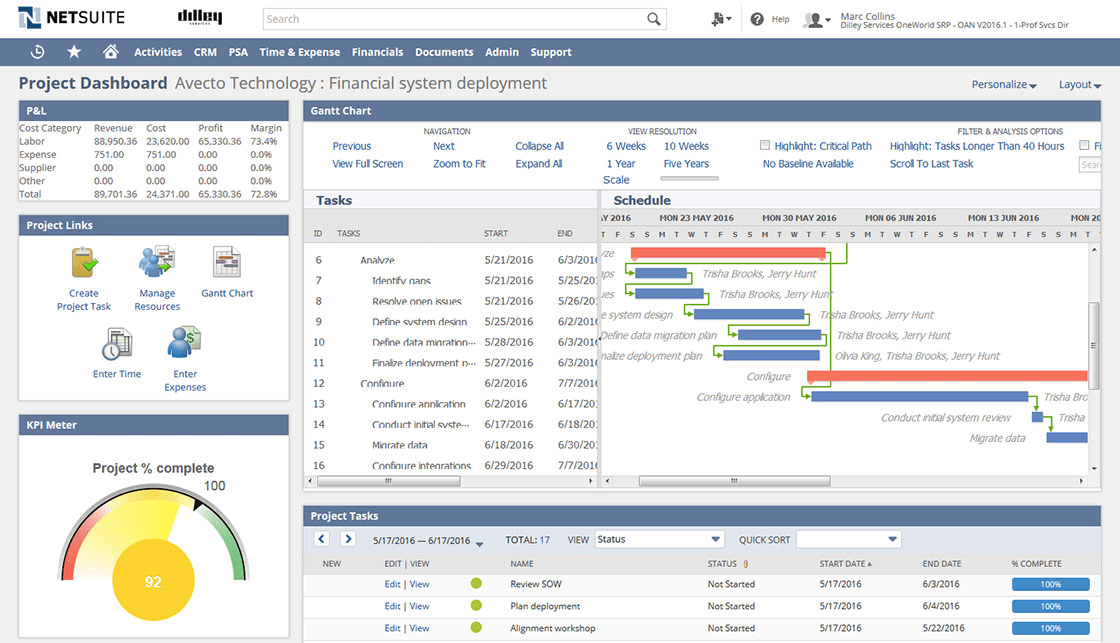
NetSuite is a cloud-based ERP platform with a built-in professional services automation module that covers project management, time and expense tracking, invoicing, billing automation, and financial planning.
Who Is NetSuite Best For?
NetSuite is a strong fit for finance and operations managers at mid-to-large organizations that need project billing, revenue recognition, and financial forecasting in one system.
Why I Picked NetSuite
I picked NetSuite as one of the best because its budget-versus-actual tracking is genuinely built for finance-first teams, not bolted on. Submitted timesheets and expense reports hit the project budget automatically, so variances surface in real time without any manual reconciliation. I also like that the Planning and Budgeting module layers in AI-driven scenario modeling, letting you run forecasts across products, customers, and locations directly from your general ledger data.
NetSuite Key Features
- Rate cards: Set billing rates by client, billing class, or role, with effective dates that automatically apply the right rate when prices change.
- SuiteBilling: Manage recurring billing with evergreen or fixed-term subscriptions, consolidated invoices, prorated change orders, and automatic renewals.
- Milestone-based invoicing: Trigger invoices automatically when a project milestone is reached using the Fixed Bid, Milestone billing type.
- Resource and capacity planning: Match staff to projects by skills, availability, and planned time off, with utilization monitoring built into the PSA module.
NetSuite Integrations
NetSuite offers 600+ marketplace integrations and add-ons, including Salesforce, Microsoft Office, Google Sheets, and Oracle Analytics Cloud. SuiteCloud and SuiteScript support custom integrations, while native connections include NetSuite CRM and SuitePeople.
Pros and Cons
Pros:
- Rate cards support client-specific billing changes
- Timesheets and expenses update project budgets
- Reviewers praise centralized finance and operations
Cons:
- SuiteProjects Pro interface feels dated
- Reviewers report difficult, time-consuming setup
Best for agencies
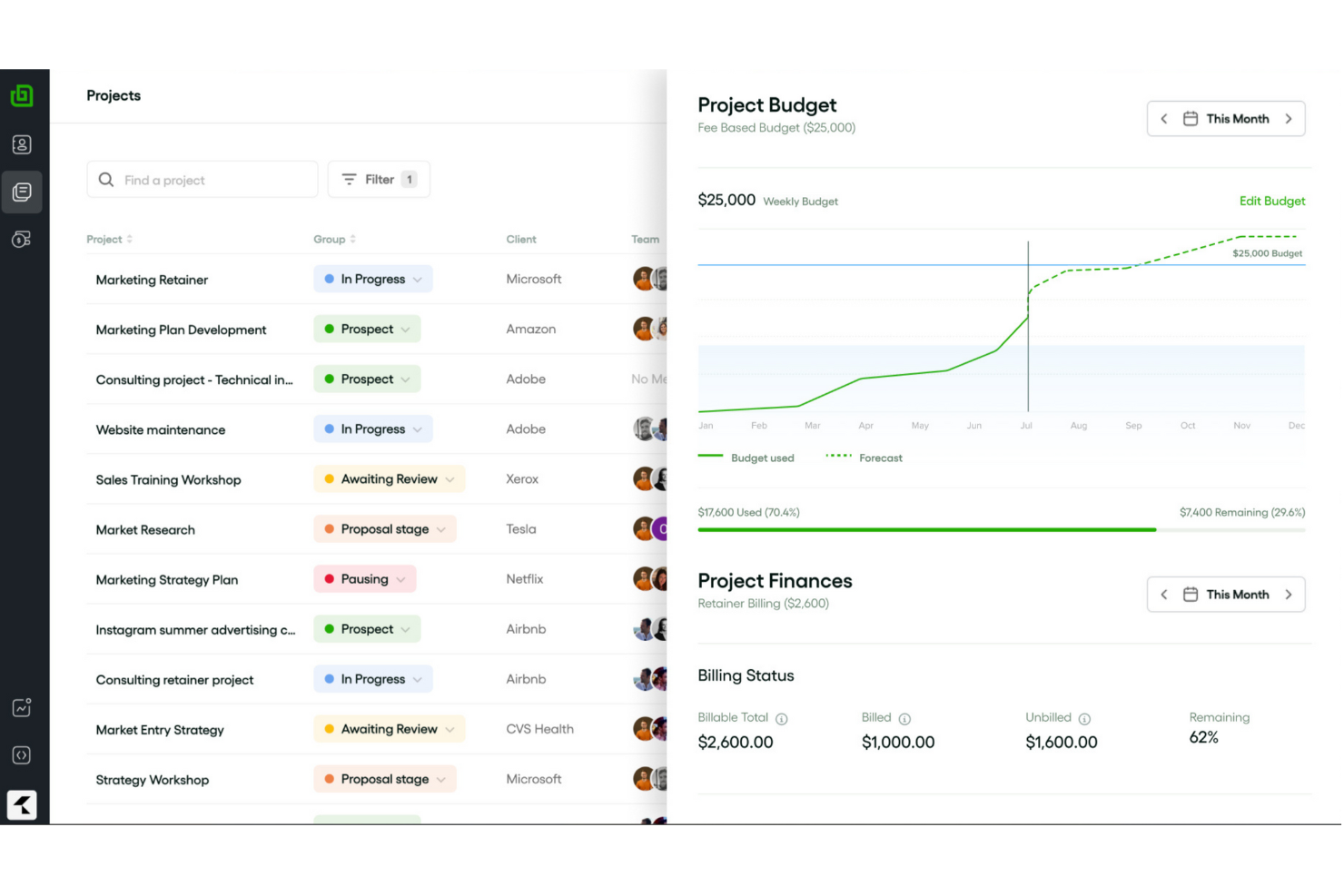
Bonsai Agency Software is a project management and invoicing platform that combines client billing, time tracking, expense management, resource planning, and built-in proposals and contracts.
Who Is Bonsai Agency Software Best For?
Bonsai Agency Software is a strong fit for client-service teams that need to manage projects, track billable hours, and invoice clients from a single platform.
Why I Picked Bonsai Agency Software
I picked Bonsai Agency Software as one of the best because it's built around the way agencies actually bill, with rate cards you can assign by role, client, or project so logged hours automatically calculate at the right rate without manual adjustments. I also love how tracked time and expenses convert into a branded invoice in just a few clicks, with recurring billing available for retainer clients. The client portal ties it together by letting clients view project progress, review deliverables, and pay invoices from a single link.
Bonsai Agency Software Key Features
- Resource and capacity planning: A drag-and-drop timeline lets you schedule team bookings, flag tentative work, and track live capacity against part-time schedules, time off, and public holidays.
- Kanban and Gantt views: Projects can be visualized as a Kanban board or Gantt chart, with task dependencies, custom statuses, and recurring tasks built in.
- SOC 2 Type II certification: Bonsai completed its SOC 2 Type II audit in July 2025, with GDPR and CCPA compliance, enforced multi-factor login, and role-based access controls.
- Accounting integrations: QuickBooks Online and Xero connect with two-way invoice sync, keeping your project billing and bookkeeping aligned without manual data entry.
Bonsai Agency Software Integrations
Bonsai Agency Software offers documented integrations with QuickBooks Online, Xero, Stripe, Slack, Gmail, Google, and Calendly. It also supports Zapier, but no public API is documented for custom integrations.
Pros and Cons
Pros:
- Clients track milestones and pay through portal
- Role-based rate cards reduce billing adjustments
- Billable hours flow directly into client invoices
Cons:
- Slow support responses complicate billing issues
- Payment holds can delay agency cash flow

Ravetree
Best for client invoicing and management

Ravetree is a professional services automation (PSA) platform that brings together project management, time and expense tracking, client invoicing, retainer billing, CRM, and resource planning in one system.
Who Is Ravetree Best For?
Ravetree is a strong fit for agencies and consultancies that bill clients for services and need project management, time tracking, and invoicing to work as one system.
Why I Picked Ravetree
Ravetree earns its spot on my shortlist because of how tightly it connects project delivery to client billing. I love that its "Ready to Invoice" page automatically pulls approved time, expenses, and retainer charges into a single invoice, so nothing gets missed at billing time. Client-specific rate cards with start and expiration dates mean the right rate applies automatically, even across complex, multi-phase projects.
Ravetree Key Features
- Retainer billing automation: Ravetree generates and sends renewal invoices on a set schedule and can auto-charge clients through Stripe at the end of each billing period.
- Resource capacity planning: Utilization heat maps, skill-based filtering, and drag-and-drop scheduling let you manage team availability across all active client projects.
- Project budgeting and profitability tracking: Real-time budget burndown, estimated-vs-actual comparisons, and gross-profit reports are tied directly to each project.
- Proposal-to-project conversion: Approved proposals can automatically create a project from a template and trigger invoice generation without any manual setup.
Ravetree Integrations
Ravetree offers native integrations with QuickBooks, Xero, Stripe, HubSpot, Google Calendar, Outlook Calendar, Google Drive, Dropbox, OneDrive, and GitHub. It also supports an open API for custom integrations; Slack is listed as coming soon.
Pros and Cons
Pros:
- Profitability reports connect budgets and actuals
- Approved time and expenses feed invoices
- Responsive support helps teams get started
Cons:
- Occasional bugs can slow billing work
- Staff can feel overwhelmed during adoption

Accelo
Best for billing controls and margin tracking
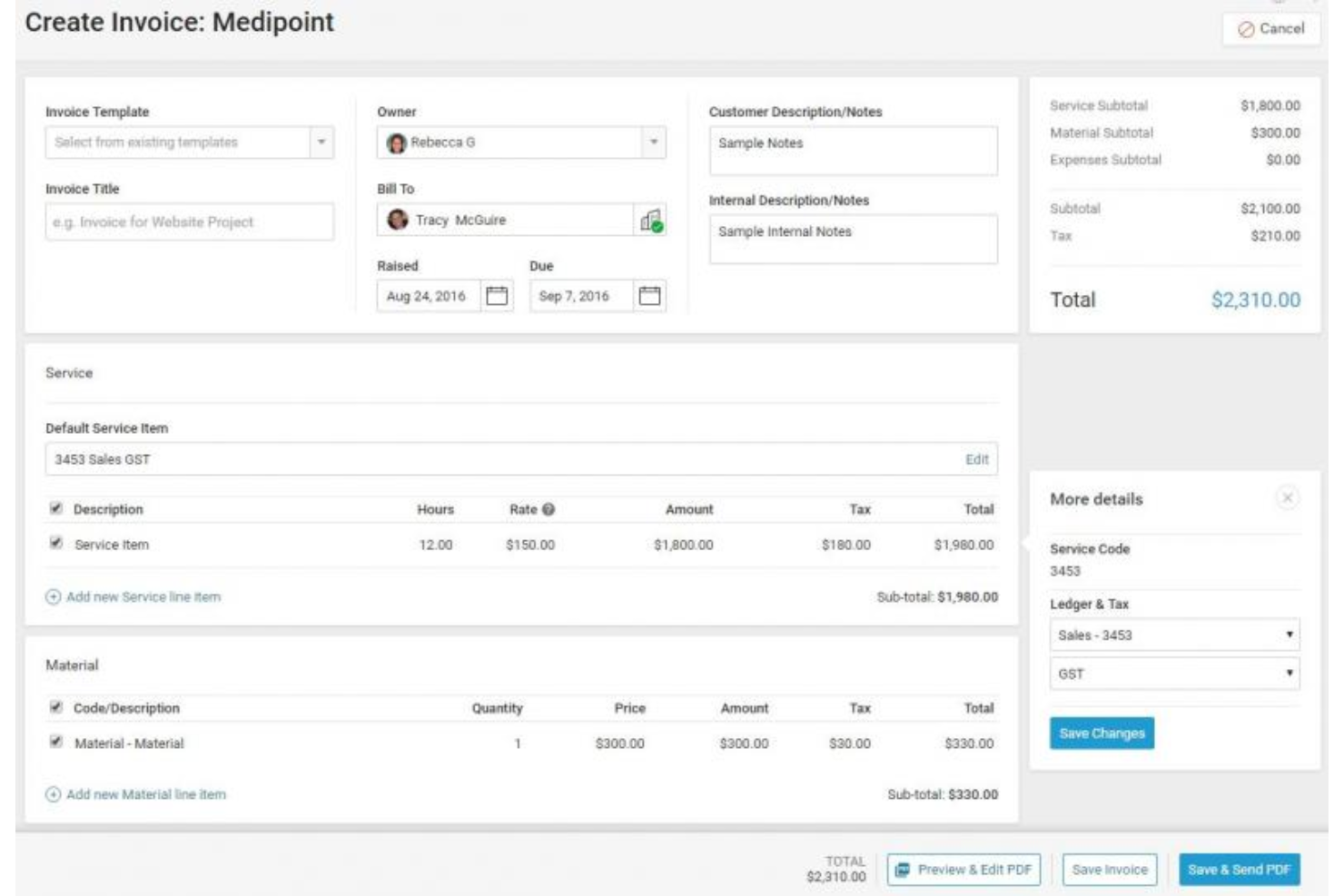
Accelo is an AI-powered professional services automation (PSA) platform that combines project management, time tracking, client billing, retainer management, and profitability forecasting in a single system.
Who Is Accelo Best For?
Accelo is built for mid-sized agencies and professional services firms that need tight control over billing across multiple clients, retainers, and projects simultaneously.
Why I Picked Accelo
I picked Accelo as one of the best because it gives you genuinely granular control over what gets billed and at what rate. The project rate card system lets you set per-staff rates, apply client division defaults, and override them at the project level, so margins stay predictable across every engagement. I especially like the Margin Guard AI agent, which flags profitability drops before they become losses, and the bulk Company Billing wizard, which invoices across multiple clients, retainers, and tickets in one pass.
Accelo Key Features
- Timesheet approval workflow: Time entries move through a structured pending-to-approved process, and only approved time becomes available to invoice.
- Retainers module: Automatically renews billing periods and schedules invoices, including fixed charges for non-time items like licenses and subscriptions.
- Client Workspace portal: A branded, passwordless client portal where clients can view project dashboards, Gantt timelines, and milestone sign-offs with a timestamped audit trail.
- Resource and capacity planning: AI matches staff to projects based on skills, availability, and workload, with utilization tracking and pipeline-weighted demand forecasts.
Accelo Integrations
Accelo offers integrations with Xero, QuickBooks Online, Sage Intacct, Stripe, Authorize.net, PayPal, Jira, Azure DevOps, GitHub, and Expensify. It also provides RESTful and Forms APIs for custom integrations, plus Zapier.
Pros and Cons
Pros:
- Retainers renew and invoice automatically
- Approved time feeds invoice creation
- Client and project data stay together
Cons:
- Complex workflows can slow initial adoption
- Reporting takes hunting to find worked hours
New Product Updates from Accelo

Accelo Rebuilds Mobile App for Project and Time Management
Accelo rebuilds its mobile app with task management, new work creation, and mobile timesheets for Forecast customers. This helps teams keep project and time data current while working away from a desktop. For more information, visit Accelo’s official site.
Annen programvare for prosjektstyring med fakturering
Her er noen andre alternativer for programvare for prosjektstyring med fakturering som ikke kom med på kortlisten min, men som likevel er verdt å undersøke:
- VOGSY
For mixed billing models across projects
- Kantata
For margin tracking tied to client billing
- Avaza
For client approval and billing in one place
- BigTime
For billing rate rules across client projects
- Rocketlane
For milestone-based billing workflows
- Bonsai
For billing clients through a project portal
- Certinia
For Salesforce-native billing and projects
- Harvest
Free time-to-invoice workflow
- WorkflowMax
For job costing tied to billing rates
- Workamajig
For creative agency billing and accounting


How I Evaluate Project Management Software Invoicing
My evaluation breaks into two layers: what a tool must do—like billing clients from tracked hours—and what makes certain tools stand out.
Core Functionality (Table Stakes For This List)
When I'm selecting tools for my list, I rank each one on a scale from 0 (does not offer the functionality) to 5 (excels in this area) for each core functionality listed below. Then, I calculate the tool's total score into a percentage. Each tool needs to achieve a minimum total score of 65% to be considered for inclusion.
- Invoice Creation & Customization: I check whether you can build branded, client-ready invoices with line items, taxes, and discounts directly inside the PM tool.
- Time & Expense Billing: Tracked hours and logged expenses should flow into invoice line items—no rekeying data from timesheets into a separate billing tool.
- Project-Based Billing Models: I look for support across hourly, fixed-fee, milestone, and retainer billing since most agencies juggle multiple contract types at once.
- Budget & Profitability Tracking: Each tool should tie invoiced revenue back to project budgets so you can see billed vs. unbilled amounts and margin per project.
- Client & Payment Management: I evaluate how clients receive and pay invoices—whether through integrated gateways like Stripe or PayPal, or a client-facing portal.
- Accounting Integrations: Syncing invoice data to tools like QuickBooks or Xero matters here, so I look at depth of integration and whether sync is one- or two-way.
Once I have a list of tools that meet the criteria, I consider what sets each platform apart.
Differentiating Factors (What Sets Vendors Apart)
Here's how I compare and contrast different vendors:
Standout Features
Multi-currency invoicing matters when your projects span multiple regions—I look for tools that handle currency conversion and local tax formats without manual workarounds. Approval workflows are another differentiator, especially for agencies where a finance lead needs to sign off on draft invoices before they reach the client. I also evaluate revenue recognition features, since tying recognized revenue to delivery milestones gives PMO leads a much clearer picture of project health than invoice-sent dates alone.
Beyond Features
Pricing structure matters a lot here—I check whether invoicing is bundled into the base plan or locked behind a premium tier, since that changes the real cost for smaller teams. I also evaluate buyer fit by team model. A tool built for a ten-person creative agency often feels bloated for a solo consultant, and vice versa. Security is worth a close look too, especially role-based permissions that keep billing data visible only to finance leads while project teams stay focused on delivery.
Slik velger du programvare for prosjektstyring med fakturering
Det er lett å gå seg vill i lange funksjonslister og kompliserte prisstrukturer. For å hjelpe deg med å holde fokus mens du går gjennom den unike prosessen din for valg av programvare, får du her en sjekkliste over faktorer du bør ha i tankene:
| Faktor | Hva du bør vurdere |
|---|---|
| Skalerbarhet | Kan programvaren vokse med virksomheten din? Tenk på antallet prosjekter og brukere du planlegger å ha i fremtiden, og sørg for at verktøyet kan håndtere dette. |
| Integrasjoner | Kan programvaren kobles til de eksisterende systemene dine? Sjekk om den kan integreres med verktøy som CRM-systemet, e-post eller regnskapsprogrammet ditt. |
| Tilpasningsmuligheter | Kan du tilpasse verktøyet til arbeidsflytene dine? Se etter muligheter for å tilpasse felt, dashbord og rapporter slik at de samsvarer med prosessene dine. |
| Brukervennlighet | Er grensesnittet brukervennlig? Et enkelt design hjelper teamet med å komme raskt i gang uten omfattende opplæring. |
| Implementering og innføring | Hvor lang tid tar det å komme i gang? Vurder hvor enkelt det er å sette opp programvaren, og hvilken støtte som er tilgjengelig under innføringsprosessen. |
| Kostnad | Er prisen innenfor budsjettet ditt? Vurder totalkostnaden, inkludert eventuelle skjulte gebyrer eller kostnader for flere brukere eller funksjoner. |
| Sikkerhetstiltak | Hvordan beskytter programvaren dataene dine? Se etter kryptering, regelmessige sikkerhetskopier og samsvar med standarder for databeskyttelse. |
Hva er fakturering i prosjektstyring?
Programvare for prosjektstyring med fakturering kombinerer funksjonalitet for prosjektstyring med verktøy for økonomistyring, som timelister og oppfølging av fakturerbare timer, kontantstrømsanalyse og faktureringsverktøy.
Denne typen programvare omfatter vanligvis funksjoner for prosjektplanlegging, oppgavehåndtering, samarbeid og tidsregistrering, slik at brukerne effektivt kan administrere og følge opp ulike deler av et prosjekt.
Små team, frilansere og oppstartsbedrifter har stor nytte av å bruke det. Disse gruppene har vanligvis budsjettbegrensninger og andre områder der de trenger å investere pengene sine, i stedet for å betale for tre eller fire ulike verktøy for profesjonelle tjenester.
Funksjoner
Når du velger prosjektstyringsprogramvare med fakturering, bør du se etter følgende nøkkelfunksjoner:
- Sikkerhetstiltak: Beskytter sensitive prosjekt- og økonomidata med kryptering og regelmessige sikkerhetskopier.
- Oppgavehåndtering: Organiserer oppgaver og tildeler dem til teammedlemmer, slik at prosjektene holder seg på rett spor.
- Tidssporing: Overvåker tiden som brukes på oppgaver, og sørger for nøyaktig fakturering og innsikt i produktiviteten.
- Fakturagenerering: Oppretter og sender fakturaer direkte fra programvaren, noe som forenkler faktureringsprosessen.
- Tilpassbare dashbord: Gjør det mulig for brukerne å tilpasse visningen for rask tilgang til viktige prosjektdata.
- Budsjettsporing: Holder oversikt over prosjektutgifter og sørger for at de holder seg innenfor det tildelte budsjettet.
- Integrasjonsmuligheter: Kobler seg til andre verktøy som CRM-systemer og regnskapsprogramvare for sømløs dataflyt.
- Støtte for flere valutaer: Forenkler fakturering av kunder i ulike land ved å støtte forskjellige valutaer.
- Rapporteringsverktøy: Gir innsikt og analyser av prosjektresultater og økonomi.
- Samarbeidsfunksjoner: Forbedrer kommunikasjonen i teamet og fildelingen på plattformen.
- Kundeportaler: Lar kunder se fakturaer, utgifter og registrert tid, og kan muliggjøre betaling på nett.
Fordeler
Implementering av prosjektstyringsprogramvare med fakturering gir flere fordeler for teamet og virksomheten din. Her er noen av fordelene du kan se frem til:
- Bedre organisering: Oppgavehåndtering og tilpassbare dashbord bidrar til å holde prosjektene ryddige og i rute.
- Nøyaktig fakturering: Tidssporing og fakturagenerering sørger for at kundene faktureres riktig for arbeidet som er utført.
- Bedre samarbeid: Innebygde kommunikasjonsverktøy gjør det enkelt for teammedlemmer å dele ideer og oppdateringer.
- Bedre økonomisk oversikt: Budsjettsporing og rapporteringsverktøy gir innsikt i prosjektkostnader og økonomisk helse.
- Forenklede arbeidsflyter: Integrasjonsmuligheter kobler seg til andre verktøy for å redusere manuell dataregistrering og feil.
- Global rekkevidde: Støtte for flere valutaer gjør det enkelt å håndtere internasjonale kunder.
- Datasikkerhet: Sikkerhetstiltak beskytter prosjekt- og økonomidataene dine mot uautorisert tilgang.
Kostnader og priser
Valg av prosjektstyringsprogramvare med fakturering krever en forståelse av de ulike prismodellene og abonnementene som er tilgjengelige. Kostnadene varierer basert på funksjoner, teamstørrelse, tillegg og mer. Tabellen nedenfor oppsummerer vanlige abonnementer, gjennomsnittsprisene deres og typiske funksjoner som er inkludert i løsninger for prosjektstyringsprogramvare med fakturering:
Sammenligningstabell for prosjektstyringsprogramvare med fakturering
| Abonnementstype | Gjennomsnittspris | Vanlige funksjoner |
|---|---|---|
| Gratisabonnement | $0 | Grunnleggende oppgavehåndtering, begrenset antall prosjekter og grunnleggende brukerstøtte. |
| Privatabonnement | $5-$25/bruker/måned | Oppgavehåndtering, tidssporing, fakturagenerering og begrensede integrasjoner. |
| Bedriftsabonnement | $30-$50/bruker/måned | Avansert rapportering, budsjettsporing, forbedrede integrasjoner og samarbeidsfunksjoner. |
| Virksomhetsabonnement | $60-$100/bruker/måned | Tilpassbare dashbord, støtte for flere valutaer, avanserte sikkerhetstiltak og dedikert brukerstøtte. |
Vanlige spørsmål om prosjektstyringsprogramvare med fakturering
Her er noen svar på vanlige spørsmål om prosjektstyringsprogramvare med fakturering:
Hvilke integrasjoner bør jeg se etter?
Når du velger et prosjektstyringsverktøy med fakturering, bør du vurdere integrasjoner med tidsregistrering og CRM-programvare, som Hubspot, Harvest, Pipedrive og Salesforce, samt kommunikasjonsplattformer som Slack og Teams.
Hvordan kan tilpassbare dashbord forbedre prosjektstyringsprogramvare med fakturering?
Tilpassbare dashbord lar deg tilpasse visningen for å fokusere på de mest relevante dataene. Denne tilpasningen hjelper deg med å få rask tilgang til prosjektstatuser, faktureringsinformasjon og teamets ytelse, slik at du kan ta mer informerte beslutninger og føre tilsyn med prosjekter mer effektivt.
Hvorfor er støtte for flere valutaer viktig i prosjektstyringsprogramvare med fakturering?
Støtte for flere valutaer er avgjørende hvis du jobber med internasjonale kunder. Det lar deg fakturere i ulike valutaer uten manuelle omregninger, noe som sikrer nøyaktighet og profesjonalitet i faktureringsprosessen. Denne funksjonen hjelper deg med å betjene kunder over hele verden og utvide markedsrekkevidden.