

10 beste programvarer for SEO-prosjektstyring valgt ut for 2026

Kortliste over den beste programvaren for prosjektstyring av SEO


Å administrere SEO-prosjekter innebærer ofte å håndtere skiftende prioriteringer, stramme tidsfrister og spredte verktøy, samtidig som du prøver å forbedre rangeringen din i søkemotorene. Uten det rette systemet er det vanskelig å holde oversikt over oppgaver, innhold og resultater.
Det er her programvare for prosjektstyring av SEO kan være til hjelp. Det rette verktøyet kan gi deg struktur, oversikt og bedre måter å samarbeide med teamet og kundene dine på.
I denne listen går jeg gjennom den beste tilgjengelige programvaren for prosjektstyring av SEO i dag. Jeg tester og vurderer verktøy uavhengig og fokuserer på hva som faktisk fungerer for prosjektteam som ditt, slik at du får den best mulige programvaren for behovene dine.
Hvorfor du kan stole på våre programvareanbefalinger
Teamet vårt har testet og anmeldt programvare siden 2012. Vi er selv prosjektledere, så vi vet hvor vanskelig og hvor viktig det er å velge riktig programvare.
I denne guiden har vi vurdert verktøyene gjennom praktisk testing og uavhengig research og gitt dem poeng ut fra våre utvelgelseskriterier. Vi bygger også på innsikt fra ledende eksperter i bransjen og erfarne prosjektledere.
Anmeldelsene våre bygger på vår egen redaksjonelle vurdering. De er ikke et salgsargument.
Ekspertanmeldere:
Sammenligningstabell for programvare for prosjektstyring av SEO
Denne sammenligningstabellen oppsummerer prisdetaljene for mine beste utvalgte programmer for prosjektstyring av SEO:
| Tool | Best For | Trial Info | Price | ||
|---|---|---|---|---|---|
| 1 | Best for real estate project management | 15-day free trial | Pricing upon request | Website | |
| 2 | Best for customizable workflows | 14-day free trial | Pricing upon request | Website | |
| 3 | Best for goal tracking across SEO campaigns | Free plan available | From $7/user/month (billed annually) | Website | |
| 4 | Best for database-driven projects | Free plan available; 14-day free trial | From $20/user/month (billed annually) | Website | |
| 5 | Best for multi-client milestone tracking | Free plan + 14-day free trial + free demo available | From $79/user/month (billed annually) | Website | |
| 6 | Best for adapting one workspace to SEO content ops | Free plan available | From $10/user/month (billed annually) | Website | |
| 7 | Best for white-label multi-client work tracking | 14-day money-back guarantee | From $6/user/month (billed annually) | Website | |
| 8 | Best for no-code custom SEO workflow building | 30-day free trial + free plan + free demo available | From $11.20/user/month (billed annually) | Website | |
| 9 | Best for building custom SEO workflows | Free plan available | From $10.99/user/month (billed annually) | Website | |
| 10 | Best for content-led SEO team workflows | Free trial + free demo available | From $49/month (billed annually) | Website |


Anmeldelser av den beste programvaren for prosjektstyring av SEO
Her finner du mine grundige anmeldelser og oversikter over hver programvare for prosjektstyring av SEO. Disse analysene beskriver fordeler og ulemper, funksjoner og de beste bruksområdene for hvert verktøy, slik at du kan finne den perfekte løsningen for SEO-behovene dine.

Best for real estate project management
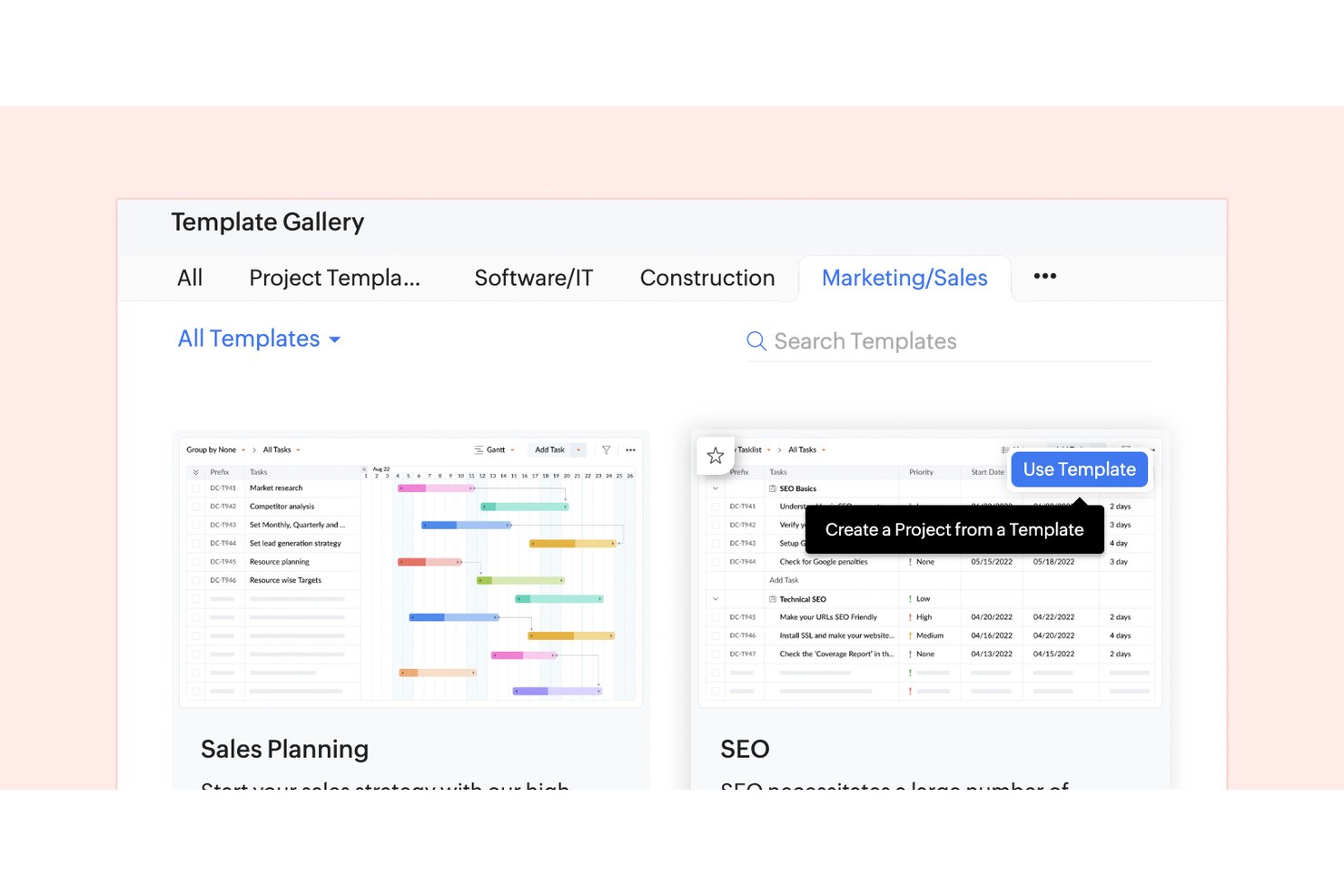
Zoho Projects is a project management platform that combines task management, Gantt charts, time tracking, and team collaboration tools with built-in integrations across the broader Zoho ecosystem.
Who Is Zoho Projects Best For?
Zoho Projects is a strong fit for real estate teams that need to coordinate listings, client timelines, and property development workflows in one place.
Why I Picked Zoho Projects
I picked Zoho Projects as one of the best because its Gantt chart-based timeline view maps perfectly onto the sequential, deadline-heavy nature of real estate workflows, like tracking listing prep, inspection windows, and closing milestones in a single view. I also like how task dependencies let you chain actions together, so a delayed appraisal automatically flags downstream tasks. Blueprint automation handles repeatable deal stages without manual follow-up.
Zoho Projects Key Features
- Issue tracker: Log, assign, and monitor bugs or content errors directly within a project to keep SEO deliverables on track.
- Timesheet logging: Record hours spent on individual tasks so you can measure effort across keyword research, content production, and link-building campaigns.
- Custom project dashboard: Build visual reports that surface task progress, workload, and milestone completion across active SEO projects.
- Document management: Attach and organize briefs, audit reports, and reference files directly to tasks for centralized access.
Zoho Projects Integrations
Zoho Projects offers integrations with Zoho CRM, Zoho Desk, Zoho Analytics, Google Drive, Microsoft Teams, Slack, GitHub, Dropbox, and Zendesk. It also supports Zapier.
Pros and Cons
Pros:
- Briefs and audit files stay attached
- Timesheets show effort by SEO task
- Gantt timelines map SEO campaign milestones
Cons:
- SEO workflows require custom task configuration
- No built-in keyword research or rank tracking
New Product Updates from Zoho Projects
Zoho Projects Adds CodeX Scripts for Custom Modules
Zoho Projects now supports CodeX Scripts for custom modules, enabling conditional logic and rules for creating, updating, and deleting records. For more information, visit Zoho Projects' official site.
 .

Wrike
Best for customizable workflows
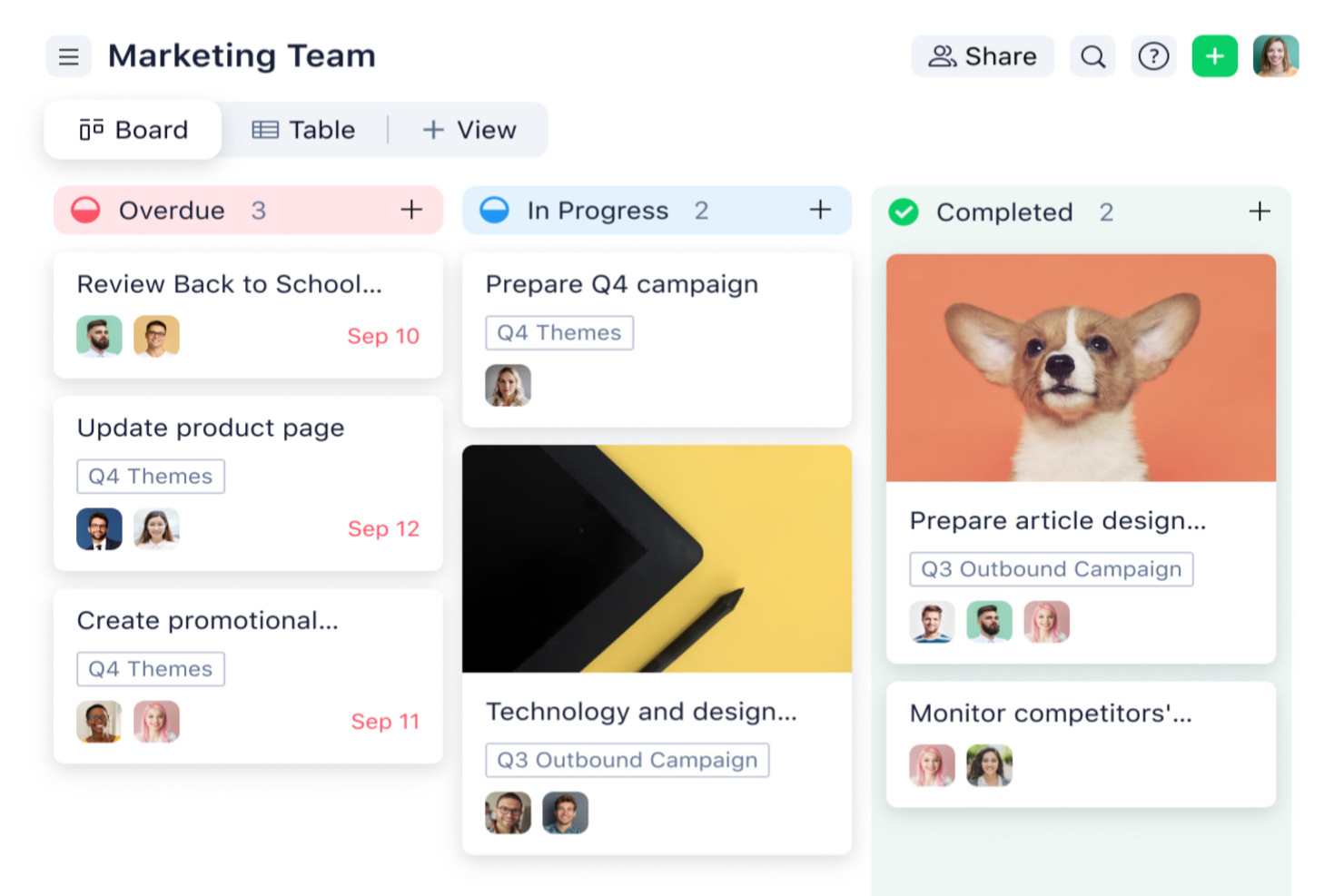
Wrike is a work management platform that covers SEO project planning, task assignment, workflow automation, reusable project blueprints, and cross-team collaboration in a single configurable workspace.
Who Is Wrike Best For?
Wrike is a strong fit for in-house marketing teams and SEO managers who need to coordinate recurring campaign work, manage cross-functional task dependencies, and standardize workflows across multiple workstreams.
Why I Picked Wrike
I've included Wrike in my top picks because its customizable workflows make it genuinely adaptable to how SEO teams actually operate. I love how reusable blueprints let you save an entire technical audit or content plan as a template, then spin up a preconfigured project the moment a new request comes in via a request form. Pairing that with custom automation rules for task handoffs and deadline reminders means recurring SEO work runs consistently without manual oversight each cycle.
Wrike Key Features
- Gantt chart view: Visualize task timelines, manage dependencies between deliverables, and adjust due dates directly on an interactive chart.
- Visual proofing and version comparison: Review and mark up files with inline comments, then compare original and revised versions side by side within a task.
- Public dashboard sharing: Share view-only dashboard links with non-Wrike users, including optional password protection and expiration dates.
- Cross-tagging: Tag tasks and folders across multiple projects so different teams can track the same work without duplicating it.
Wrike Integrations
Wrike lists 400+ application integrations, including native integrations with Jira, GitHub, Google Drive, Dropbox, Box, and Adobe Creative Cloud. Its REST API, webhooks, Wrike Integrate, and Wrike Sync support custom and two-way connections.
Pros and Cons
Pros:
- Proofing keeps feedback tied to deliverables
- Task dependencies clarify deadlines across campaigns
- Reusable blueprints standardize recurring SEO work
Cons:
- SEO metrics lack native rank tracking
- Workspace setup requires planning and oversight
New Product Updates from Wrike

Wrike Redesigns AI Agent Builder
Wrike redesigns its AI Agent Builder with a side-by-side setup, Scopes, sentence-style triggers and actions, and clearer filters. These changes make it easier to configure, test, and manage agent behavior. For more information, visit Wrike’s official site.
ClickUp
Best for goal tracking across SEO campaigns
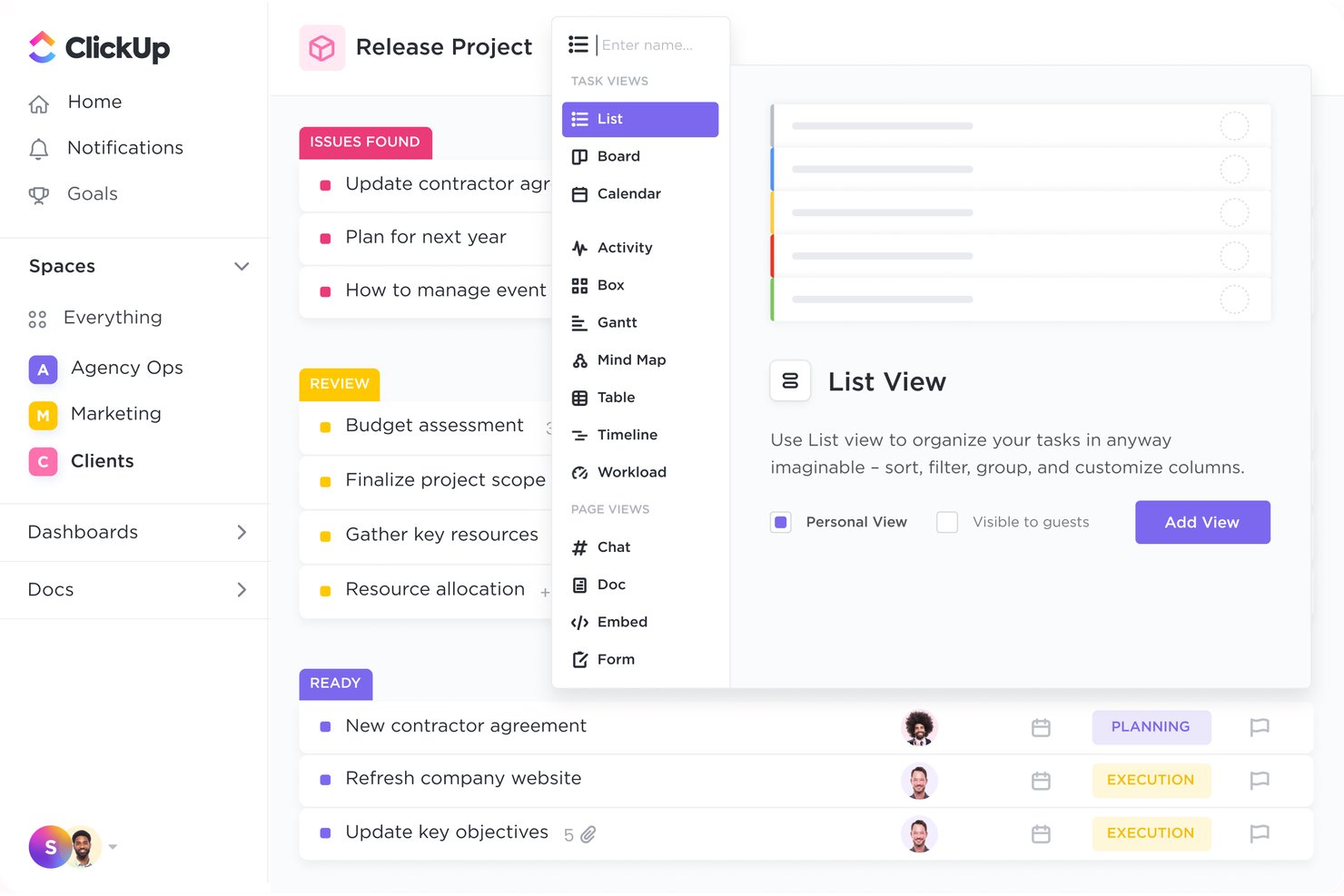
ClickUp is a work management platform that combines task tracking, campaign organization, goal setting, and customizable dashboards to manage SEO projects across teams and clients.
Who Is ClickUp Best For?
ClickUp is a strong fit for digital marketing agencies and in-house marketing teams that need to manage multiple SEO campaigns, coordinate cross-functional work, and track goals in one shared workspace.
Why I Picked ClickUp
I've included ClickUp in my top picks because it handles goal tracking across SEO campaigns better than most general project management tools. I particularly like how Goals connect directly to tasks, so when my team finishes a batch of content or closes out a backlink outreach list, that progress rolls up automatically to the campaign objective. The SEO Project Management Template also gives you 16 custom statuses and dedicated views for urgent and overdue tasks, which keeps priorities visible without any manual setup.
ClickUp Key Features
- Customizable task views: Switch between List, Board, Calendar, Timeline, and Gantt chart views to match how your team tracks SEO work at any stage.
- Docs with task linking: Create content briefs, SOPs, or audit notes directly in ClickUp and attach them to related tasks within the same workspace.
- Permission-controlled guest access: Share specific Lists, Dashboards, or tasks with clients or external collaborators without exposing the full workspace.
- Workflow automations: Set rules to automatically update task statuses, reassign work, or send notifications when conditions are met across SEO campaigns.
ClickUp Integrations
ClickUp offers 50+ native integrations, including Slack, GitHub, Google Drive, Google Calendar, Figma, Microsoft Teams, and Zoom. It also supports Google Analytics and Google Search Console integrations, plus a Public API, MCP server, webhooks, OAuth, and Zapier.
Pros and Cons
Pros:
- Client work stays organized across projects
- Dashboards clarify task and campaign progress
- SEO template speeds campaign setup
Cons:
- Initial workflow setup takes deliberate planning
- Guest access can add seat costs
New Product Updates from ClickUp
ClickUp Adds Meetings Hub, Super Agent Templates, and ZoomInfo Integration
ClickUp adds a searchable Meetings Hub, new ways to clone and template Super Agents, and a ZoomInfo integration through the App Center. These updates improve meeting retrieval, agent reuse, and access to sales intelligence. For more information, visit ClickUp’s official site.
Airtable
Best for database-driven projects
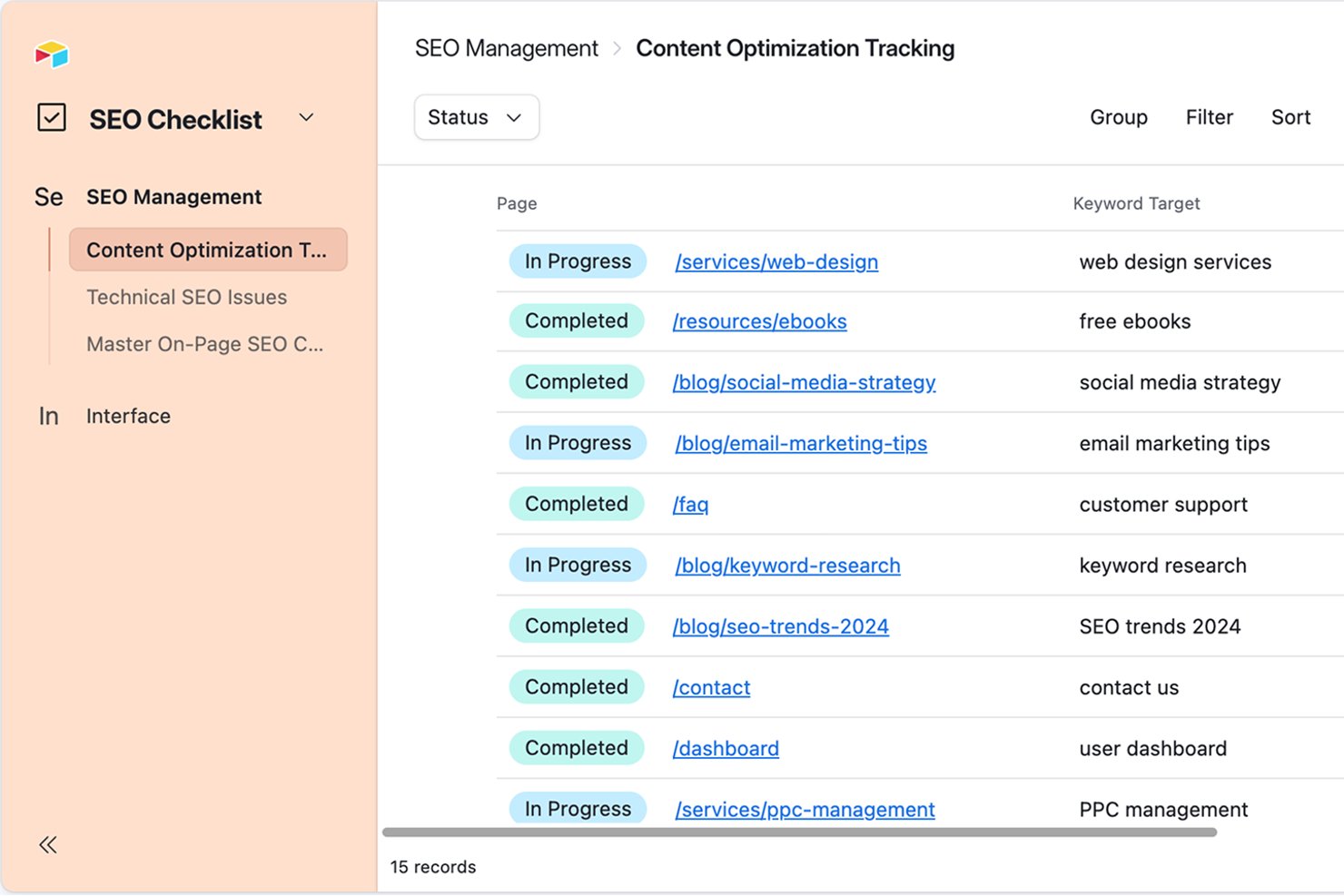
Airtable is a no-code database platform that lets you build connected SEO workflows across keyword research, content pipelines, on-page metadata, and task management—all within a customizable, relational workspace.
Who Is Airtable Best For?
Airtable is a strong fit for in-house marketing teams and SEO managers who want to build a custom, database-driven SEO workflow without writing code.
Why I Picked Airtable
I picked Airtable as one of the best because it treats your SEO workflow as a relational database problem, which is exactly what it is. Keyword research, content briefs, metadata, and page statuses all live in linked tables, so a change in one record ripples across the whole system. I especially like the SEO checklist template's content quality score Field Agent, which evaluates pages for relevance, readability, and SEO best practices on demand, giving you a clear signal on what to prioritize next.
Airtable Key Features
- Gantt view with dependencies: Visualize SEO task timelines, set linked-record dependencies, and highlight the critical path across your project.
- Airtable Portals: Share selected interface data with external collaborators through a branded, access-controlled portal without exposing your underlying base.
- Trigger-and-action automations: Build multi-step workflow automations that connect Airtable to external tools like Slack, Gmail, and WordPress.
- Interface Designer: Create role-specific views that show each stakeholder only the fields and records relevant to their part of the SEO workflow.
Airtable Integrations
Airtable lists integrations with DataForSEO, WordPress, Slack, Gmail, Google Drive, Jira, Salesforce, and Tableau Cloud. Its REST API supports custom SEO data connections and workflow integrations.
Pros and Cons
Pros:
- Reusable workflows support multiple campaigns
- Dashboards help reduce SEO status requests
- Connected tables link keywords, content, and metadata
Cons:
- Custom SEO workflows take setup time
- Complex schedules can make dependencies awkward
Nifty
Best for multi-client milestone tracking
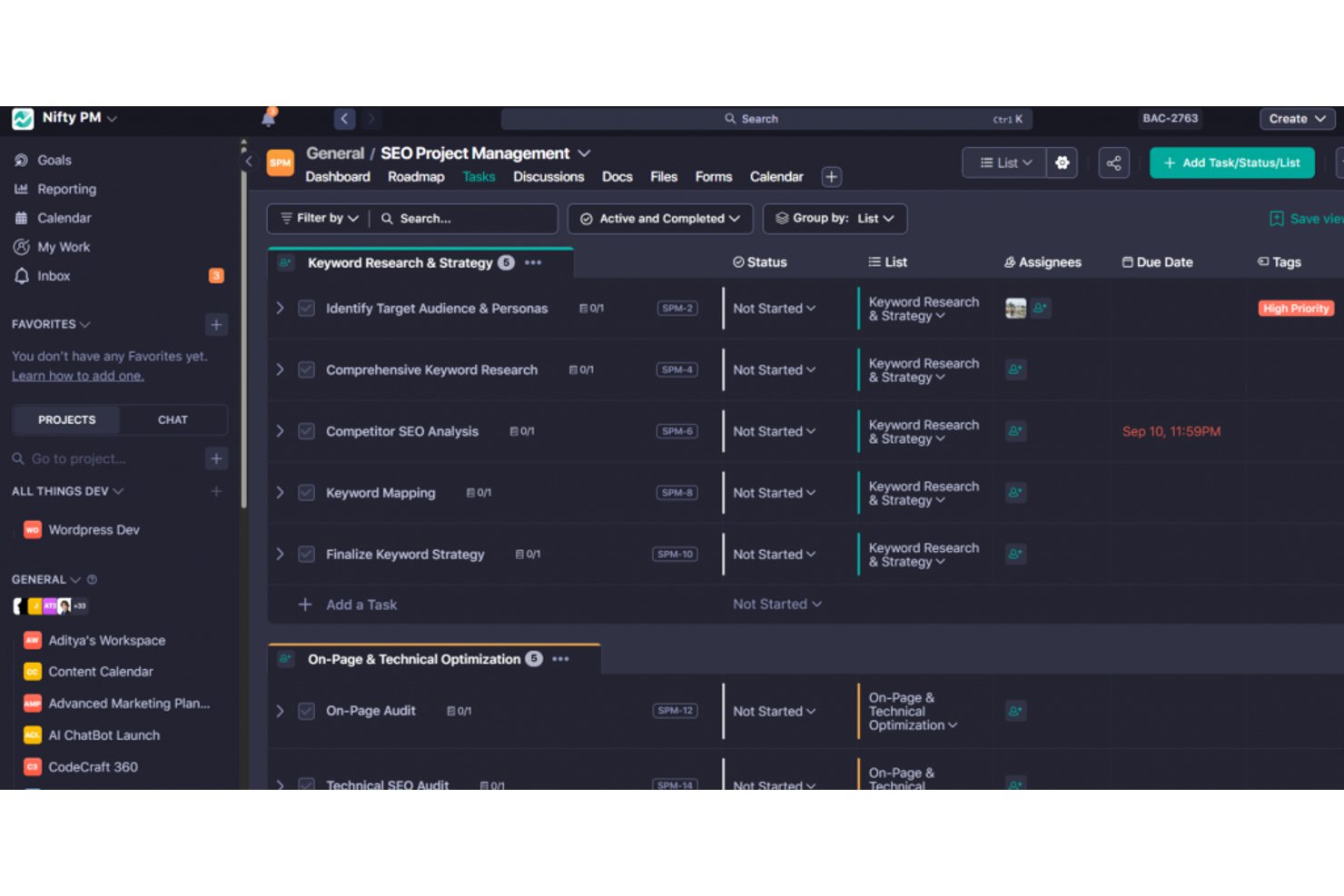
Nifty is a project management platform that brings tasks, milestones, roadmaps, docs, and client collaboration tools into one workspace for managing SEO and digital marketing projects across multiple clients or campaigns.
Who Is Nifty Best For?
Nifty is a strong fit for digital marketing agencies that need to manage deliverables, milestones, and client communication across multiple active projects from one workspace.
Why I Picked Nifty
I picked Nifty as one of the best because it handles multi-client milestone tracking better than most general project management tools. Each client lives in its own project, milestones auto-update as tasks complete, and you can group everything into portfolios for a cross-client progress view. I especially like the task-to-milestone conversion: you build out a deliverable list, set due dates, and Nifty rolls that work directly into a milestone whose progress reflects real task completion.
Nifty Key Features
- Workflow automations: Set if/then rules that trigger task assignments, status updates, due dates, and subtask creation based on conditions like task completion or custom-field values.
- File proofing: Collect feedback directly on uploaded files, with comments that can generate subtasks to keep revision work tracked and actionable.
- Public read-only sharing: Share project Roadmap and Task views via a public link so clients and stakeholders can follow progress without needing a Nifty account.
- Goals tracking: Create KPI-based goals that update automatically using tasks, tags, or custom fields, with target dates and values you set at the project or team level.
Nifty Integrations
Nifty offers native integrations with Google Drive and Calendar, Slack, GitHub, Figma, Microsoft Suite, Zoom, Webex, Harvest, Miro, and Typeform. It also supports REST API, webhooks, OAuth 2.1, and over 2,000 integrations through Zapier.
Pros and Cons
Pros:
- Tasks, discussions, and files stay connected
- Client projects group into portfolio views
- Milestones reflect completed task progress
Cons:
- Customized reporting exports offer limited flexibility
- SEO performance metrics stay outside project reporting
Notion
Best for adapting one workspace to SEO content ops
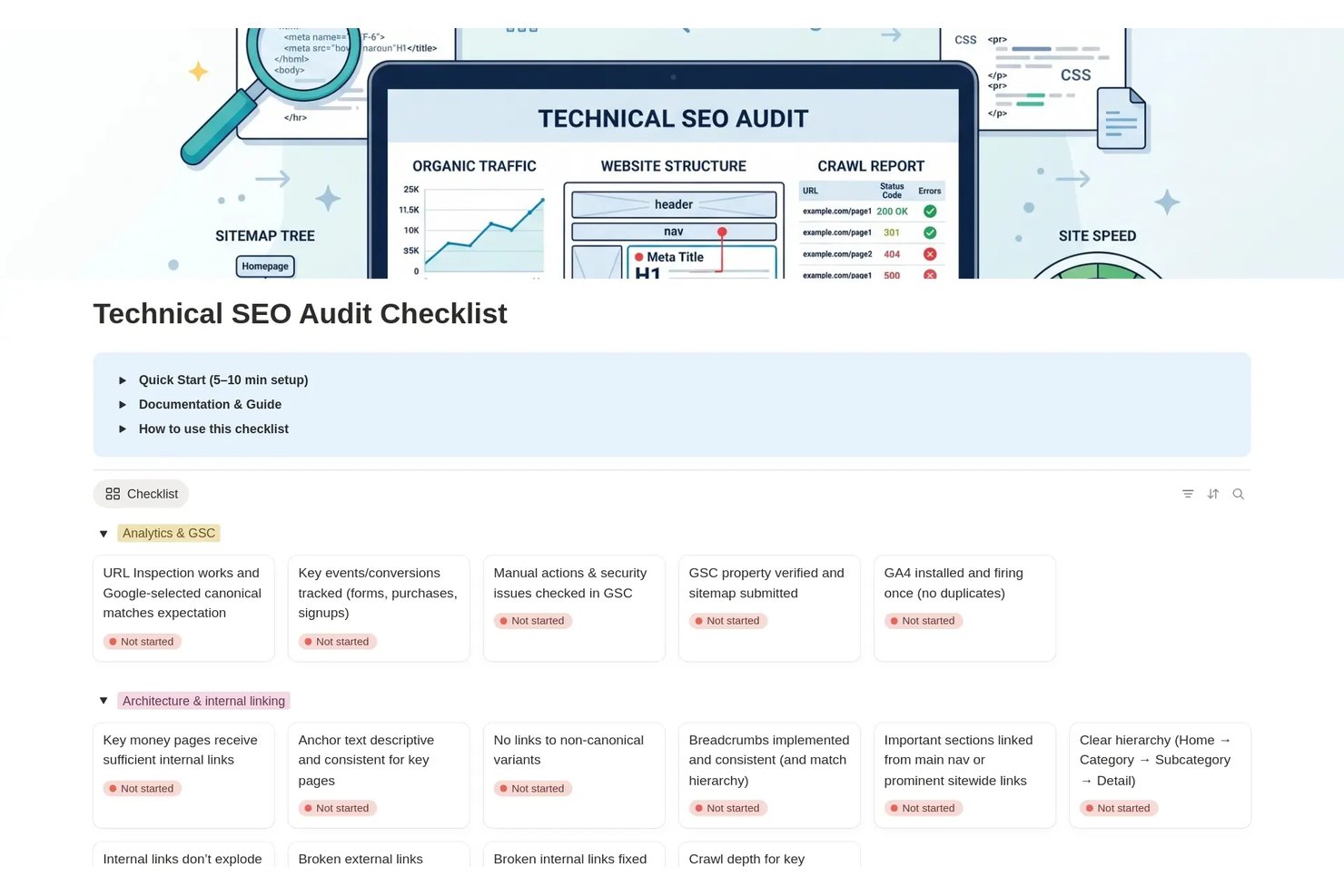
Notion is a flexible all-in-one workspace that combines block-based documents, connected databases, project tracking, and real-time collaboration to help teams organize content, manage tasks, and centralize knowledge.
Who Is Notion Best For?
Notion works well for in-house marketing teams that want to manage content planning, SEO tasks, and team collaboration in a single flexible workspace.
Why I Picked Notion
I've included Notion in my top picks because it's the tool I reach for when a team wants to run SEO content ops without juggling five separate apps. Its block-based databases let you build a content calendar with status, assignee, deadline, and an SEO checklist (think structured URLs and keyword-optimized meta descriptions) all in one view. Pair that with 92 community-built SEO templates covering everything from keyword research to technical audits, and your team can adapt a single workspace to fit almost any content workflow.
Notion Key Features
- Block-based content databases: Build content entries that store briefs, drafts, feedback, and strategy documents alongside task properties like status, assignee, and due date.
- Multiple project views: Switch between board, timeline, calendar, and list views to track SEO tasks and deadlines across campaigns.
- Database automations: Set triggers based on property changes, page additions, or recurring schedules to move tasks forward without manual updates.
- Granular page permissions: Assign view, comment, edit, or full-access levels to guests on specific pages without exposing the rest of your workspace.
Notion Integrations
Notion’s marketplace integrations include Jira, Asana, Slack, Google Drive, GitHub, Figma, and Salesforce. It also offers a public API, webhooks, Workers, and MCP for custom connections.
Pros and Cons
Pros:
- Comments support shared content reviews
- Custom calendars surface writers and deadlines
- Keeps SEO briefs beside task tracking
Cons:
- Client-specific access needs careful workarounds
- SEO performance reporting remains manual

Infinity
Best for white-label multi-client work tracking
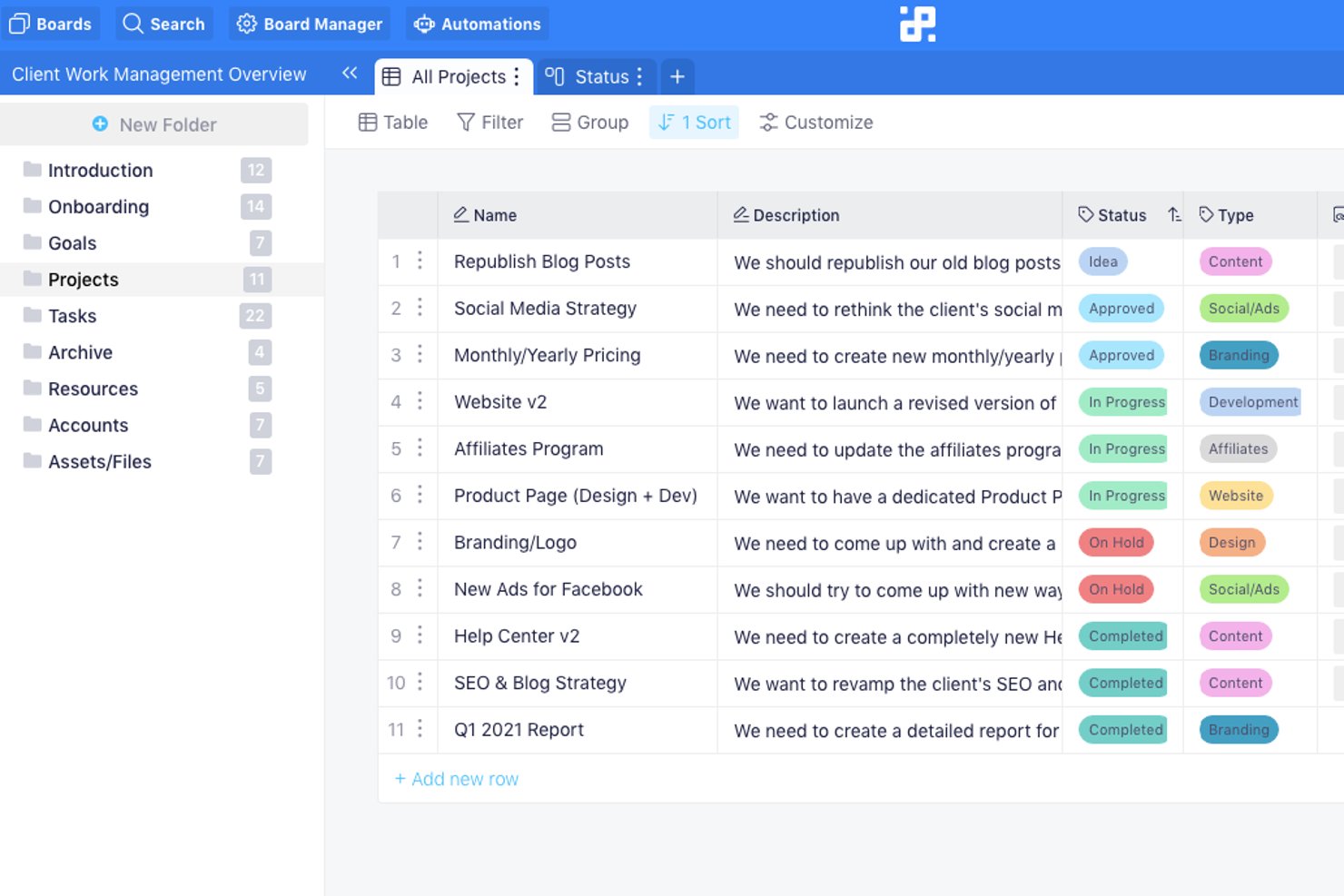
Infinity is a flexible work management platform that lets agencies and consultants organize client projects across customizable boards, folders, and views, with white-label branding, multi-workspace support, and built-in automation.
Who Is Infinity Best For?
Infinity is a strong fit for digital marketing agencies and SEO consultants managing multiple clients who need white-label branding and flexible multi-workspace organization.
Why I Picked Infinity
I picked Infinity as one of the best because its Agency Plan is purpose-built for managing multiple client accounts under one roof, with white-label branding and custom domains that let you present the workspace as your own product. I particularly like that you can structure separate boards and folders for each client, with SEO, Content, and Social Media as distinct subfolders, while controlling exactly what clients see through granular board and folder-level permissions. The reseller license and dedicated account manager make it a serious option for consultants running client work at scale.
Infinity Key Features
- Automation rules: Set up if-then triggers to automatically create, move, or update items when task conditions are met.
- Gantt view: Visualize project timelines and track start and end dates across client deliverables in one place.
- Granular permission controls: Assign admin, full member, or restricted member roles at the workspace, board, or folder level.
- Public board sharing: Share boards with external collaborators who don't have an Infinity account, with owner-controlled guest editing rights.
Infinity Integrations
Infinity offers native integrations with Google Calendar, Google Drive, Clockify, iCalendar, and Trello imports. It also supports CSV, API, webhooks, and Zapier for custom connectivity.
Pros and Cons
Pros:
- Shared boards clarify team and client responsibilities
- Reusable workflows support client onboarding
- White-label workspaces keep client work branded
Cons:
- Folder-bound dashboards limit cross-client reporting
- No native SEO performance tracking or scoring
Podio
Best for no-code custom SEO workflow building
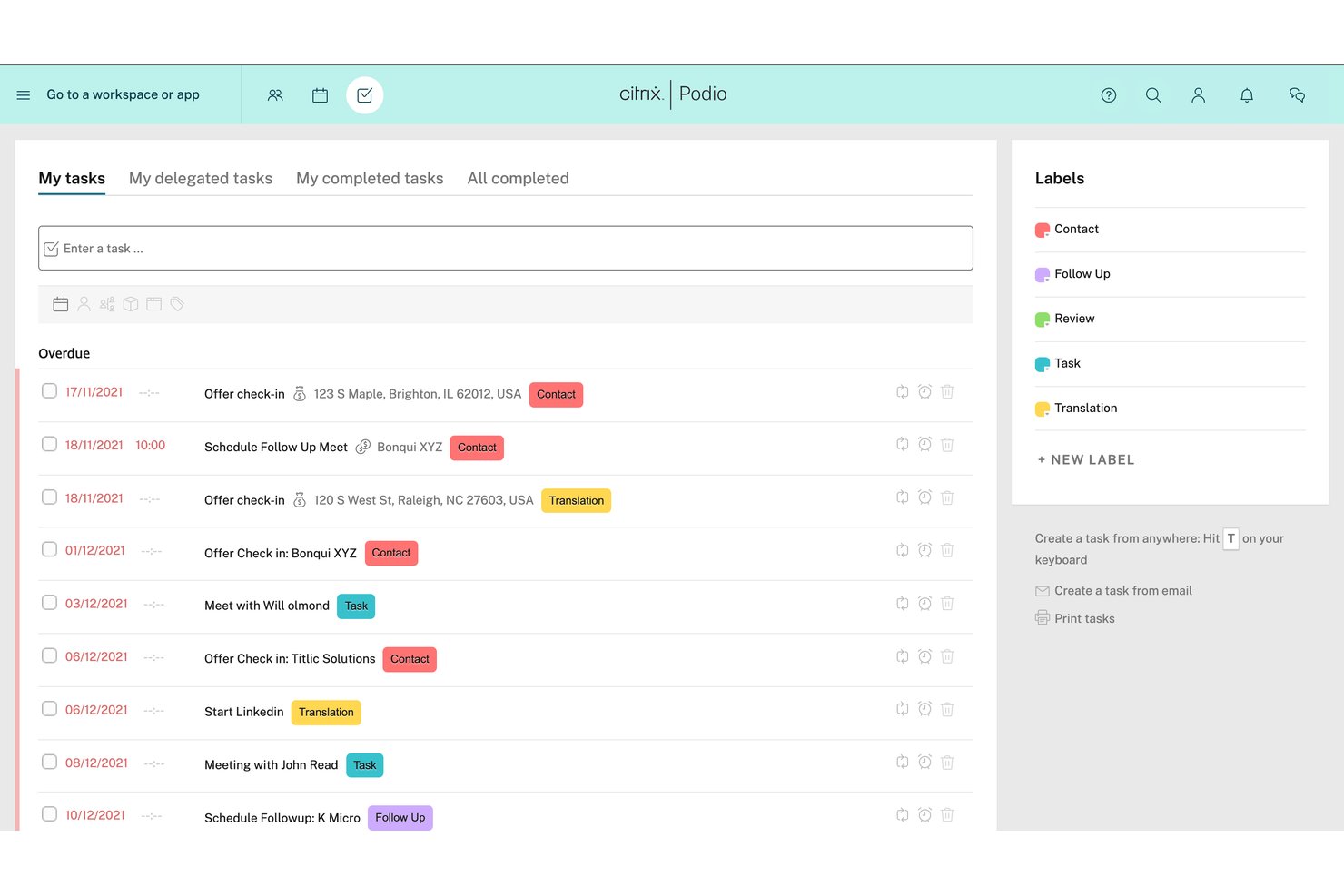
Podio is a no-code work platform that lets you build custom apps, automate workflows, manage tasks, and organize project workspaces without writing code.
Who Is Podio Best For?
Podio is a strong fit for teams that want to build their SEO workflows from scratch rather than work around a tool's rigid, predefined structure.
Why I Picked Podio
I picked Podio as one of the best because its no-code app builder lets you design SEO workflows from scratch, rather than forcing your team into a rigid structure. I've built custom apps for content briefs, audit tracking, and link-building pipelines using drag-and-drop fields, then connected them with Workflow Automation to move items through each stage automatically. That flexibility is genuinely hard to replicate in tools built around fixed project templates.
Podio Key Features
- No-code app builder: Create custom apps using drag-and-drop fields without writing any code, then modify them as your SEO processes evolve.
- Workspace organization: Group related apps, tasks, and files into separate workspaces, with controls for private access and external member invitations.
- Task automation: Set up "when/then" workflow rules on Plus, or advanced multi-step automations on Premium, to move items through defined stages automatically.
- Kanban, table, and calendar views: Switch between multiple layout options within any app to visualize SEO tasks and deliverables in the format your team prefers.
Podio Integrations
Podio offers native integrations with ShareFile, Dropbox, GoToMeeting, Excel, and Google Drive. It also supports custom integrations through its open API and marketplace integrations, including Zapier.
Pros and Cons
Pros:
- Shared workspaces support client collaboration
- Tasks connect briefs, deadlines, and deliverables
- Custom apps fit bespoke SEO workflows
Cons:
- Building workflows takes time and setup
- Reports can be confusing to run
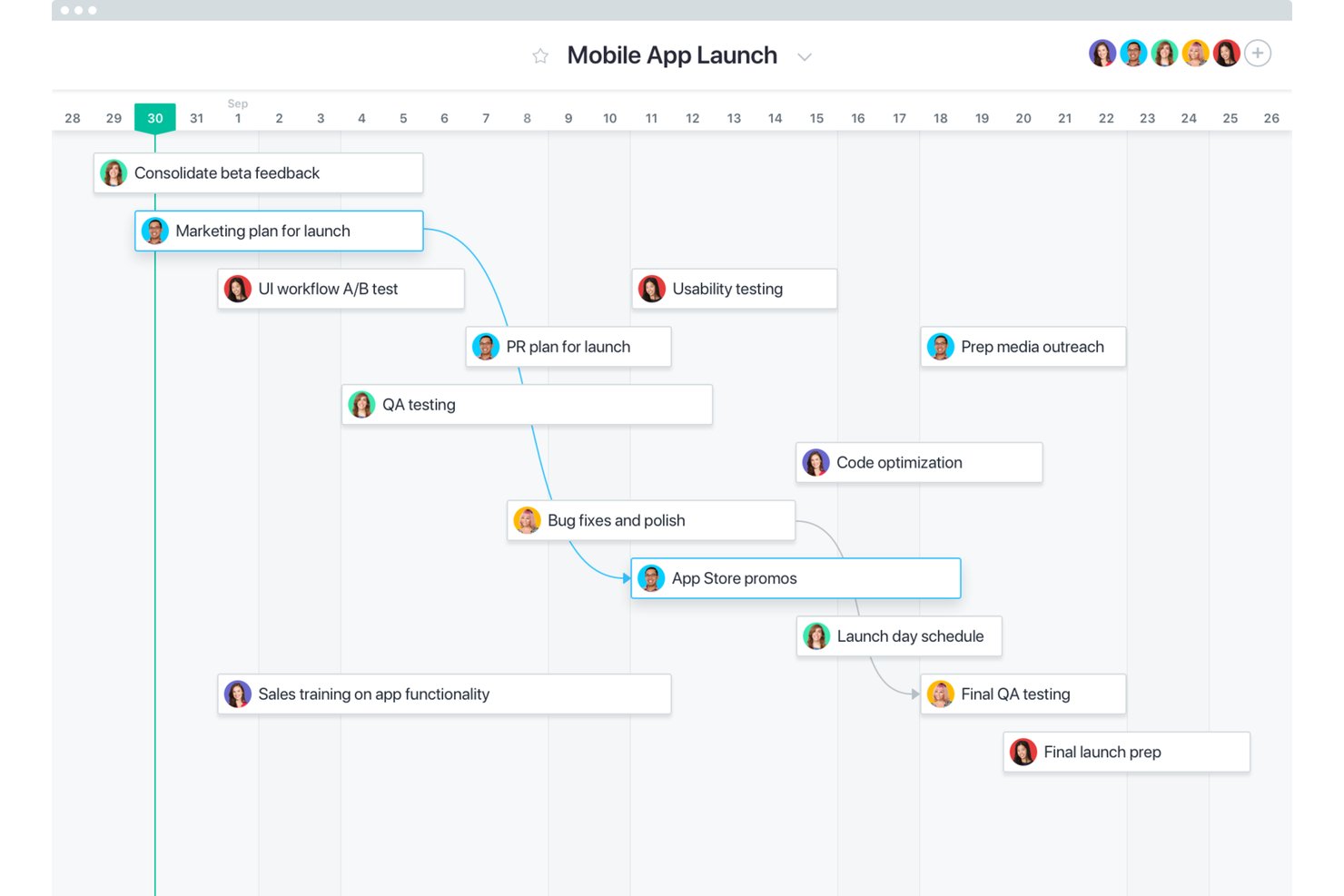
Asana is a work management platform that lets teams build custom project workflows, automate task routing and assignments, and track progress across campaigns using templates, rules, and AI-powered workflow tools.
Who Is Asana Best For?
Asana is a strong fit for cross-functional marketing teams that need to build and automate custom SEO workflows from scratch rather than rely on out-of-the-box SEO tooling.
Why I Picked Asana
I've included Asana in my top picks because it gives SEO teams the flexibility to build exactly the workflows they need rather than forcing them into rigid, predefined structures. Using AI Studio, you can automate the entire content intake process: a form captures a brief, a rule assigns the task, and status updates fire automatically as work moves through review. I also like how project templates with custom fields let teams codify repeatable processes, like a keyword research pipeline or a site audit cycle, so nothing gets rebuilt from scratch each sprint.
Asana Key Features
- Multi-homing: Tasks can appear in multiple projects simultaneously, with updates syncing across every project they belong to.
- Portfolio dashboards: Portfolios group up to 1,500 projects into a single view, showing progress and health across all active campaigns.
- Read-only project links: Shareable links give external stakeholders a live view of project boards, lists, or timelines without requiring a paid seat.
- Branching forms: Forms display different follow-up questions based on a respondent's previous answers, enabling smarter content or campaign intake.
Asana Integrations
Asana offers 200+ app integrations, including native Salesforce, Tableau, and Power BI connections, plus marketplace integrations with Google Sheets, Slack, Jira Cloud, and Google Drive. Its REST API and webhooks support custom integrations, and Zapier is available.
Pros and Cons
Pros:
- Dashboards clarify campaign ownership and progress
- Task discussions keep cross-functional handoffs visible
- Reusable workflows organize recurring SEO campaigns
Cons:
- Subtask automation gaps complicate SEO reporting
- No native rank or search analytics tracking

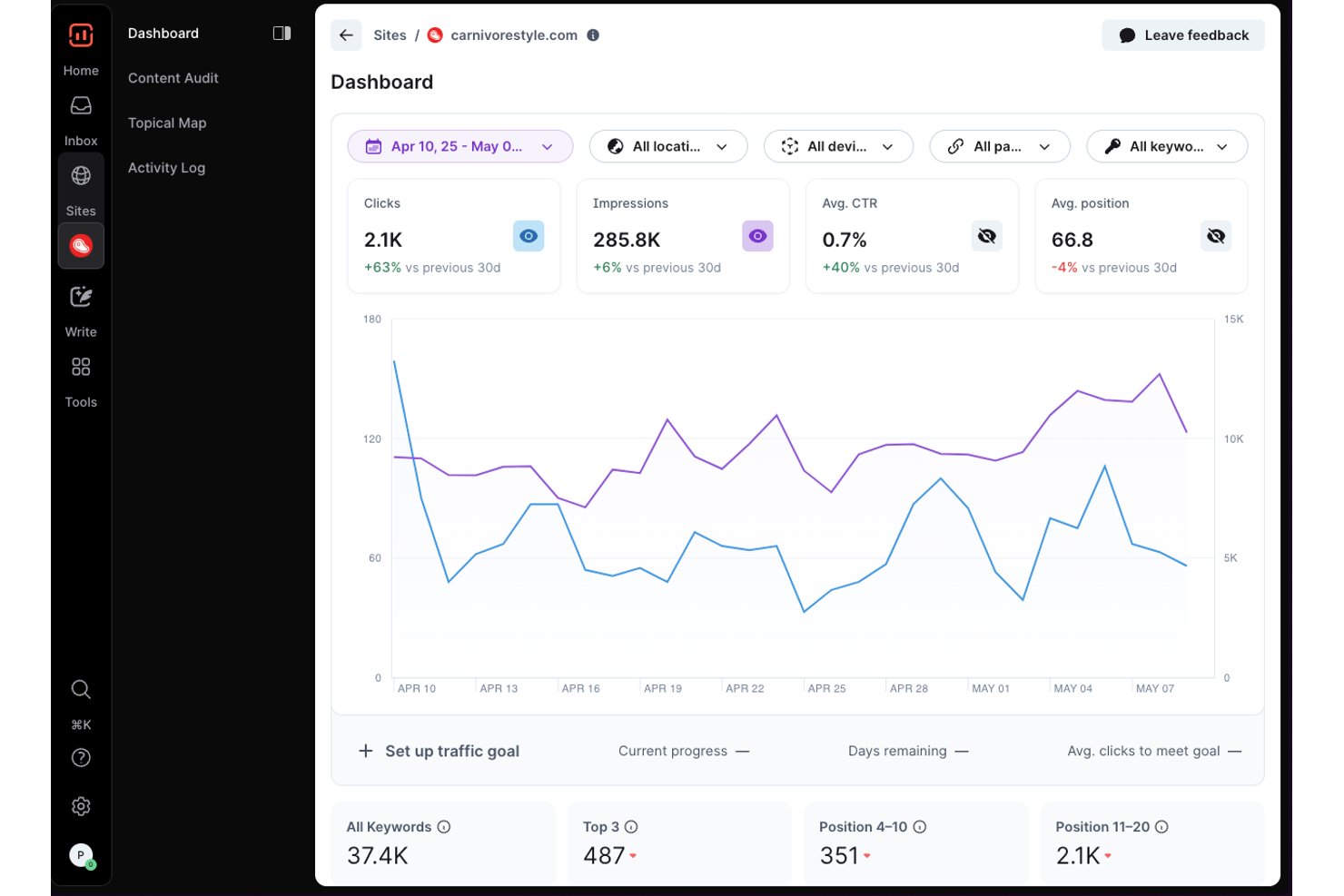
Surfer SEO is an AI-powered content platform that combines content creation, on-page optimization, topical mapping, content auditing, and GSC-integrated performance tracking in a single workspace.
Who Is Surfer SEO Best For?
Surfer SEO is a strong fit for content-focused SEO teams and agencies that need to plan, create, optimize, and audit content within a single platform.
Why I Picked Surfer SEO
I've included Surfer SEO in my top picks because it's the strongest option on this list for teams whose SEO work is primarily content-driven. The Content Editor ties live content scoring, competitor-derived keyword guidance, and real-time optimization recommendations into a single writing environment, so content teams aren't bouncing between tools to brief, write, and optimize. I also like that GSC connects automatically to feed the Content Audit dashboard, making it easy to spot ranking drops and identify pages that need a refresh without building a separate reporting workflow.
Surfer SEO Key Features
- Topical map: Maps content clusters across a topic to identify coverage gaps and plan articles that build topical authority.
- Rank drop detection: Flags pages experiencing ranking drops so your team can prioritize which content to refresh first.
- Simultaneous content editing: Lets multiple team members write and edit the same Content Editor document at the same time with live comments.
- Brand workspaces: Separates content, data, and settings into distinct workspaces, one per brand or client, within a single subscription.
Surfer SEO Integrations
Surfer SEO offers native integrations with Google Docs, WordPress, and Contentful. It also supports Zapier and provides a REST API with webhooks for custom integrations.
Pros and Cons
Pros:
- Reviewers praise writer collaboration tools
- Audit signals help prioritize content refreshes
- Live content scores guide article optimization
Cons:
- Backlink and technical SEO work remain outside
- No assignable SEO task workflow
Annen programvare for prosjektstyring av SEO
Nedenfor finner du en liste over ytterligere programmer for prosjektstyring av SEO som vi vurderte, men som ikke kom med på topplisten. Det er absolutt verdt å ta en titt på dem.
- Jira
For agile-style SEO task tracking
- monday AI Workspace
For cross-team SEO campaign tracking
- Smartsheet
For spreadsheet-style SEO campaign tracking
- ProofHub
For flat-rate client feedback and approvals
- ProjectManager
For real-time campaign dashboard visibility
- Teamwork.com
For agency-side client work tracking
- Trello
For kanban-style client task collaboration


How I Evaluate SEO Project Management Software
I split my evaluation into three parts, giving the most weight to core functionality: assigning SEO tasks, tracking deadlines, and organizing campaigns across clients. Next, I look for differentiators such as white-label client portals. Finally, I consider factors beyond features, including onboarding support and pricing that fits team and client volume.
Core Functionality (Table Stakes For This List)
When I'm selecting tools for my list, I score each one on a scale from 0 (does not offer the functionality) to 5 (excels in this area) for each core functionality listed below. I then convert the total into a percentage to help assess each tool's overall fit, with extra weight on any functionalities I’ve deemed essential.
- Task & Workflow Management (Essential): I look for assignable SEO tasks and adaptable stages for work like audits, content briefs, and link-building campaigns.
- Project & Campaign Organization (Essential): I assess how clearly teams can separate campaigns or client work, track timelines, and see progress across projects.
- SEO Data Integration: I check whether SEO metrics from tools such as rank trackers, Google Search Console, or analytics can inform campaign priorities.
- Collaboration & Client Communication: I look for comments, approvals, and permissioned sharing that help teams and clients review deliverables.
- Reporting & Progress Tracking: I assess whether dashboards show task completion and project progress over time, ideally alongside SEO results.
- Content & Deliverable Management: I check how briefs, drafts, and optimization checklists connect to tasks from planning through review and publication.
Once I have a list of tools that meet the criteria, I consider what sets each platform apart.
Differentiating Factors (What Sets Vendors Apart)
Here's how I compare and contrast different vendors:
Standout Features
White-label client portals matter when your agency needs branded dashboards that hide internal workflow details from clients. I check whether portals support custom domains and filtered reporting. Backlink workflow automation is another differentiator—I look for structured pipelines that move prospects through outreach stages with tracked status, not just a shared spreadsheet. I also evaluate multi-site management, since agencies juggling dozens of domains need isolated project spaces per property without duplicating templates.
Beyond Features
Pricing models matter here. Per-seat costs add up fast when agencies loop in freelance writers, developers, and clients—so I check whether guest or reviewer seats are free or capped. I also evaluate onboarding complexity, since SEO workflows need custom fields, integrations, and templates before anyone sees value. A tool like monday.com offers pre-built templates that cut setup time, while more flexible platforms may need days of configuration. Finally, I look at how well a platform handles cross-functional handoffs between writers, developers, and external stakeholders through role-based permissions.
Slik velger du programvare for prosjektstyring av SEO
Det er lett å gå seg vill i lange funksjonslister og komplekse prisstrukturer. For å hjelpe deg med å holde fokus mens du arbeider deg gjennom den unike prosessen med å velge programvare, får du her en sjekkliste over faktorer du bør ha i tankene:
| Faktor | Hva du bør vurdere |
| Skalerbarhet | Sørg for at programvaren kan støtte teamet ditt etter hvert som det vokser, spesielt hvis du administrerer flere kundekontoer eller utvider SEO-tjenestene dine. |
| Integrasjoner | Se etter integrasjoner med verktøy som Google Analytics, SEMrush, Ahrefs eller Slack, slik at du slipper å hoppe mellom plattformer. |
| Tilpasningsmuligheter | Kontroller om du kan tilpasse arbeidsflyter, felt og oversikter slik at de samsvarer med hvordan teamet ditt håndterer SEO-oppgaver og rapportering. |
| Brukervennlighet | Velg et verktøy som er enkelt å navigere i, også for teammedlemmer som ikke er teknisk erfarne eller som er nye innen prosjektstyring. |
| Budsjett | Vurder prisen basert på brukerplasser eller funksjoner. Finn ut hva du får på hvert nivå, og om det passer til de aktuelle behovene dine. |
| Sikkerhetstiltak | Sørg for at verktøyet bruker kryptering, tilbyr kontroll over brukertillatelser og følger standard praksis for databeskyttelse. |
| Samarbeidsverktøy | Teamet ditt trenger delte tavler, kommentarer og filvedlegg for å holde kommunikasjonen samlet og oppgavefokusert. |
| Rapporteringsfunksjoner | Velg et verktøy som hjelper deg med å følge opp SEO-leveranser, tidsfrister og resultatmålinger uten behov for ekstra verktøy. |
Trender innen programvare for prosjektstyring av SEO
I undersøkelsen min hentet jeg inn utallige produktoppdateringer, pressemeldinger og utgivelseslogger fra ulike leverandører av programvare for SEO-prosjektstyring. Her er noen av de fremvoksende trendene jeg følger med på:
- Automatisering av innholdsbrief: Noen verktøy genererer nå innholdsbriefer basert på tildelte søkeord, og henter inn konkurrentdata, sider som rangerer høyest og forslag til struktur. Denne trenden gjør skriveprosessen raskere og sørger for at innholdet samsvarer med SEO-målene.
- AI-drevne innholdsforslag: Noen verktøy bruker nå AI til å anbefale søkeord, bloggtemaer og justeringer av metadata direkte i arbeidsflyten for oppgaver. Dette hjelper team med å jobbe raskere uten å måtte bytte mellom SEO-verktøy og prosjektstyringstavler.
- Innebygde SERP-sporingsdashbord: Flere leverandører legger nå til visninger av søkeresultater i sanntid direkte i prosjektarbeidsområdet. Du kan spore rangeringer og synlighet som en del av oppdateringene av oppgavene dine – uten behov for ekstra dashbord.
- Funksjoner for kundesamarbeid: Mange plattformer legger nå til kundevendte visninger, tråder for tilbakemeldinger og godkjenningsarbeidsflyter for å redusere frem-og-tilbake-kommunikasjon på e-post. Dette hjelper byråer med å håndtere SEO-leveranser og kundeinnspill på ett sted.
- Ferdigbygde SEO-arbeidsflytmaler: Leverandører tilbyr ferdige maler for søkeordsundersøkelser, optimalisering på siden og innholdsrevisjoner. Dette hjelper team med å standardisere prosesser og lære opp nyansatte raskere.
Hva er programvare for SEO-prosjektstyring?
Programvare for SEO-prosjektstyring er et spesialisert verktøy som er utviklet for å effektivisere og forbedre håndteringen av søkemotoroptimaliseringskampanjer. Denne programvaren brukes vanligvis av SEO-byråer, markedsavdelinger og uavhengige SEO-konsulenter, og legger til rette for planlegging, gjennomføring og overvåking av SEO-strategier for å forbedre rangeringer i søkemotorer og øke trafikken.
Viktige komponenter i programvare for SEO-prosjektstyring omfatter oppgaveplanlegging, søkeordsporing, innholdsstyring, verktøy for lenkebygging og analyseoversikter. Disse funksjonene gjør det mulig for brukere å koordinere SEO-oppgaver effektivt, analysere ytelsesdata og justere strategier basert på innsikt i sanntid.
Funksjoner i programvare for SEO-prosjektstyring
Når du velger programvare for SEO-prosjektstyring, bør du se etter følgende viktige funksjoner:
- Varsler i sanntid: Holder teamet ditt oppdatert når oppgaver tildeles, tidsfrister endres eller tilbakemeldinger legges til.
- Oppgavesporing: Lar deg tildele, prioritere og følge fremdriften for SEO-oppgaver som revisjoner, søkeordsundersøkelser og innholdsoppdateringer.
- Verktøy for søkeordsplanlegging: Hjelper deg med å administrere målsøkeord, koble dem til innhold og tilpasse dem til kampanjemålene.
- Visninger av innholdskalender: Gir deg en visuell oversikt over kommende SEO-innhold, tidsfrister og publiseringsdatoer.
- Ytelsesrapportering: Sporer viktige måltall som rangeringer, trafikk og tilbakekoblinger for å vise hvordan SEO-arbeidet ditt gir resultater.
- Portaler for kundesamarbeid: Gjør det mulig for eksterne kunder å se prosjektoppdateringer, godkjenne leveranser og legge igjen kommentarer.
- Tilpassede arbeidsflyter: Lar deg opprette gjentakbare oppgavesekvenser for ting som optimalisering på siden eller lenkebygging.
- Innebygde briefmaler: Gir strukturerte disposisjoner for innhold som samsvarer med SEO-strategien din.
- Rollebaserte tillatelser: Sørger for at riktige teammedlemmer og kunder har passende tilgang til å se eller redigere oppgaver.
- Dokumentlagring: Samler SEO-filer, briefer og undersøkelser på ett sted, slik at teamet ditt får tilgang til alt fra én plass.
Fordeler med programvare for prosjektstyring
Implementering av programvare for SEO-prosjektstyring gir flere fordeler for teamet og virksomheten din. Her er noen av fordelene du kan se frem til:
- Mindre bytting mellom verktøy: Integrasjoner og innebygde SEO-funksjoner reduserer behovet for å hoppe mellom separate plattformer.
- Færre oversette tidsfrister: Innebygde kalendere og påminnelser hjelper teamet ditt med å holde oversikt over publiseringsplanene for SEO.
- Bedre teamkoordinering: Delte oppgavetavler og oppdateringer i sanntid sørger for at alle har den samme oversikten.
- Tydeligere innholdsplanlegging: Innholdskalendere og briefmaler hjelper deg med å koble søkeord til innholdsideer og tidsfrister.
- Raskere tilbakemeldinger fra kunder: Kundeportaler og kommentartråder reduserer forsinkelser som skyldes spredt kommunikasjon.
- Enklere rapportering: Innebygde SEO-dashbord lar deg spore søkeordrangeringer, tilbakekoblinger og trafikk på ett sted.
- Mer konsistente prosesser: Tilpassede arbeidsflyter sørger for at teamet ditt følger de samme trinnene for SEO-oppgaver hver gang.
Kostnader og priser for prosjektstyringsprogramvare
Valg av programvare for SEO-prosjektstyring krever en forståelse av de ulike prismodellene og planene som er tilgjengelige. Kostnadene varierer basert på funksjoner, teamstørrelse, tillegg og mer. Tabellen nedenfor oppsummerer vanlige planer, gjennomsnittsprisene deres og typiske funksjoner som er inkludert i løsninger for SEO-prosjektstyringsprogramvare:
| Plantype | Gjennomsnittspris | Vanlige inkluderte funksjoner |
|---|---|---|
| Gratis | $0 | Grunnleggende oppgavestyring, begrenset antall søkeord og prosjekter |
| Grunnleggende | $25/user/month | Planlegging av oppgaver, grunnleggende analyse, enkelte integrasjoner |
| Profesjonell | $50/user/month | Avansert analyse, flere integrasjoner, tilpasningsmuligheter |
| Bedrift | Tilpasset pris | Tilgang til alle funksjoner, dedikert kundestøtte, ubegrenset antall prosjekter |
Vanlige spørsmål om programvare for SEO-prosjektstyring
Her er noen vanlige spørsmål om programvare for SEO-prosjektstyring:
Hva brukes programvare for SEO-prosjektstyring til?
Programvare for SEO-prosjektstyring er utviklet for å hjelpe med å administrere og optimalisere de ulike oppgavene som er knyttet til SEO-kampanjer. Den lar brukerne planlegge, gjennomføre og overvåke SEO-aktiviteter for å forbedre rangeringen i søkemotorer og øke trafikken til nettstedet.
Hvem bruker vanligvis programvare for SEO-prosjektstyring?
Denne programvaren brukes vanligvis av SEO-byråer, markedsføringsbyråer, fagfolk innen digital markedsføring, SEO-eksperter og bedriftseiere som trenger å administrere flere SEO-prosjekter og koordinere team på en effektiv måte.
Kan programvare for SEO-prosjektstyring bidra til å forbedre nettstedets rangering?
Ja, ved å tilby verktøy for søkeordsporing, analyse av tilbakekoblinger, innholdsoppretting og planlegging med mer kan denne programvaren bidra til å optimalisere strategier som forbedrer rangeringen i søkemotorer.
Kan programvare for SEO-prosjektstyring integreres med andre verktøy?
Det meste av programvaren for SEO-prosjektstyring kan integreres med en rekke andre verktøy, for eksempel analyseplattformer, CRM-programvare og innholdsstyringssystemer, for å effektivisere arbeidsflyt og databehandling.
Passer programvare for SEO-prosjektstyring for små bedrifter?
Ja, mange leverandører tilbyr skalerbare løsninger som passer for små bedrifter og kan vokse sammen med virksomheten din, fra grunnleggende funksjoner til mer avanserte alternativer.
Hva bør jeg se etter når jeg velger programvare for SEO-prosjektstyring?
Se etter programvare som tilbyr omfattende funksjoner som oppgavestyring, analyse, samarbeidsverktøy og skalerbarhet. Vurder også hvor enkel programvaren er å bruke, kundestøtten og integrasjonsmulighetene.
Finnes det gratis alternativer for programvare for SEO-prosjektstyring?
Ja, enkelte leverandører tilbyr gratisversjoner av programvaren sin, som ofte er tilstrekkelige for enkeltpersoner eller små team som nettopp har startet. Disse gratisplanene har imidlertid vanligvis begrensninger når det gjelder funksjoner og skalerbarhet.Å administrere SEO-prosjekter innebærer ofte å håndtere skiftende prioriteringer, stramme tidsfrister og spredte verktøy. Uten riktig system er det vanskelig å holde oversikt over oppgaver, innhold og resultater.