

10 beste programvarer for ressursbestilling for prosjekter i 2026

10 Kortliste over beste programvare for ressursbestilling


Det er viktig å sørge for at teamet ditt har tilgang til de riktige ressursene til riktig tid for å holde prosjektene i rute. Men manuell håndtering av bestillinger kan føre til bortkastet tid og unngåelige feil.
Programvare for ressursbestilling tilbyr en enkel løsning. Den hjelper deg med å reservere og holde oversikt over ressurser som møterom, utstyr eller delte verktøy, noe som reduserer konflikter og sørger for at alt fungerer problemfritt. Med det rette verktøyet kan du konsentrere deg om arbeidet i stedet for å bekymre deg for logistikk.
I denne artikkelen går jeg gjennom de beste alternativene for programvare for ressursbestilling som er tilgjengelige i dag. Jeg har testet disse verktøyene med prosjektledere i tankene, med fokus på praktiske funksjoner som løser reelle behov. Her kan du undersøke alternativene dine og finne det som passer best for teamet ditt.
Why Trust Our Software Recommendations
Our team has been testing and reviewing software since 2012. As project managers ourselves, we know how difficult—and important—it is to choose the right software.
For this guide, we evaluated tools using hands-on testing and independent research, scoring tools using our selection criteria. We also draw on insights from industry thought leaders and practicing project management experts.
Our reviews reflect our human editorial judgment, not a sales pitch.
Expert reviewers:
Sammenligningstabell for programvare for ressursbestilling
Denne sammenligningstabellen oppsummerer prisopplysningene for mine beste utvalgte programmer for ressursbestilling:
| Tool | Best For | Trial Info | Price | ||
|---|---|---|---|---|---|
| 1 | Best for resource forecasting | 14-day free trial | From $17/user/month | Website | |
| 2 | Best for tracking resources against budget | 14-day free trial | From $10/user/month (billed annually) | Website | |
| 3 | Best for scalability | 14-day free trial | Pricing upon request | Website | |
| 4 | Best for people-centric resource planning | Free demo available | Pricing upon request | Website | |
| 5 | Best for collaborative project delivery | 14-day free trial + free demo available | From $19/user/month (billed annually) | Website | |
| 6 | Best for various resource views | Free plan available | From $9/user/month (billed annually) | Website | |
| 7 | Best for agencies | Free 7-day trial available | From $9/user/month (billed annually) | Website | |
| 8 | Best for professional services companies | 14-day free trial available | From $9/user/month (billed annually) | Website | |
| 9 | Best for prefilled timesheets | 30-day free trial | From $7/user/month | Website | |
| 10 | Best for built-in time tracking | 30-day free trial | From $14/user/month | Website |


Anmeldelser av den beste programvaren for ressursbestilling
Du kan bruke de enkle oversiktene over hvert verktøy nedenfor for å forstå hvordan hvert av dem skiller seg fra de andre.

Scoro
Best for resource forecasting

Scoro is a comprehensive work management software designed to consolidate various business processes, from project management to financial oversight and resource management.
Why I picked Scoro: Its intuitive resource booking system allows users to schedule and allocate resources effectively. Scoro’s utilization reports help to forecast workloads and identify potential resource shortages in advance, enabling proactive decision-making.
Scoro's resource booking features include a dynamic calendar view that allows users to see the availability of resources at a glance. The system’s drag-and-drop interface simplifies the scheduling process, making it easy to adjust bookings as needed. Furthermore, Scoro’s resource management capabilities integrate with project timelines and budgets, providing a comprehensive overview of project progress and resource allocation.
Scoro Standout Features and Integrations
Features include an automated scheduling assistant, which recommends optimal resource allocations based on availability, skillsets, and project requirements. The platform also includes capacity planning tools that allow users to simulate different resource allocation scenarios to optimize workload distribution and project timelines. Additionally, Scoro’s integration of resource booking with financial tracking provides insights into the profitability of resource usage.
Integrations include Google Calendar, Microsoft Exchange, Xero, QuickBooks, Sage Intacct, Exact Online, Expensify, Stripe, Jira, HubSpot, Salesforce, Google Drive, Dropbox, Okta, Azure AD, and Zapier.
Pros and Cons
Pros:
- Real-time tracking of projects and team progress
- Comprehensive features for business management
- Allows for customizable fields and workflows
Cons:
- The mobile app lacks some functionalities compared to the web version
- Some users find the platform complex when customizing it
New Product Updates from Scoro

Scoro Adds Time Mobile App and ELI Improvements
Scoro adds the Scoro Time mobile app for iOS/Android to track time anywhere and expands ELI with attachments, smarter filtering, and trigger-based actions. For more information, visit Scoro's official site.

Best for tracking resources against budget
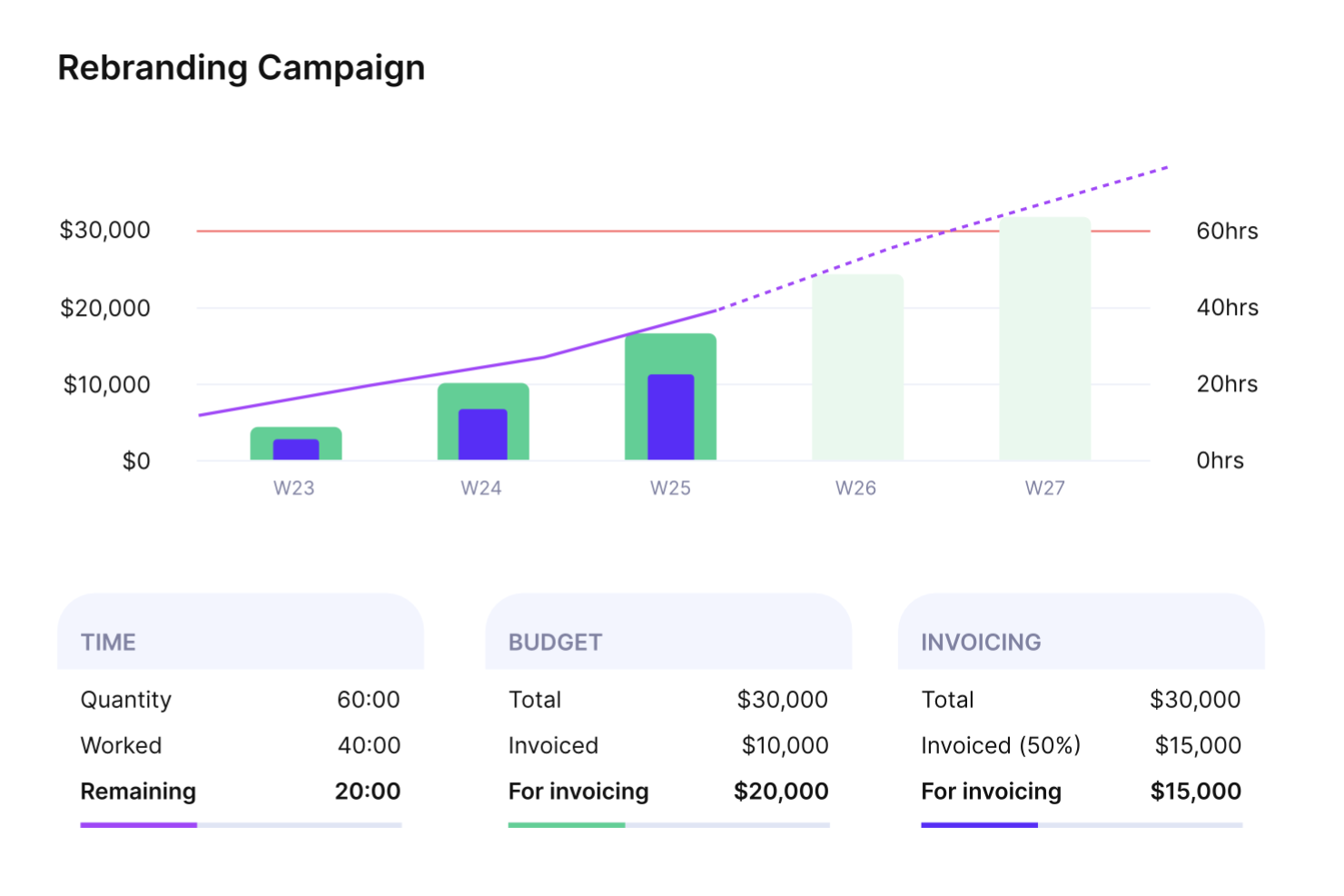
Productive is a resource management software solution for agencies of all types and sizes, designed to give you a strong grip on operations and profitability.
Why I picked Productive: Productive acts as a scalable platform that helps agencies consolidate data, run projects, budget effectively, and plan the optimal use of resources.
The software lets you manage your resources, set project budgets, and see how each resource allocation impacts project financials. You can monitor budgets and profit margins, keep team members focused on priorities, and generate accurate invoices.
Productive Standout Features and Integrations
Features include the ability to assign placeholders for future capacity planning, which allows you to forecast resource needs even before specific team members are allocated. Additionally, Productive’s integration of resource booking with profitability tracking ensures that resource allocation decisions are directly tied to project financial performance, making it easier to maintain profitability while managing workloads.
Integrations include Exact, Fortnox, Google Calendar, Harvest Import, Jira, Outlook, Personio, Quickbooks, Slack, and Xero.
Pros and Cons
Pros:
- Continually improving roadmap
- Flexible views
- All-in-one agency solution
Cons:
- Occasional glitches
- More filters required
New Product Updates from Productive
Productive Adds Voice Dictation, Slack Connector, Proposals, and Overtime
Productive adds voice dictation, a Slack Connector, proposal controls, and overtime tracking. These updates support faster AI interactions, client proposals, and time management. For more information, visit Productive’s official site.

Wrike
Best for scalability

Wrike is an all-in-one platform for managing projects, organizing work, enhancing collaboration and accelerating execution across your entire organization. It's ideal for organizations of all sizes, including scaling teams.
Why I picked Wrike: Wrike streamlines resource management to maximize productivity. It allows you to see your team’s workload and quickly reallocate tasks to prevent burnout. It empowers teams to collaborate, manage projects, drive strategic initiatives, and achieve goals.
You can focus priorities and adapt workflows, using Wrike as your central hub. It’s easy to outline targets for your team, and increase visibility across teams and departments with fully-customizable dashboards.
Wrike Standout Features and Integrations
Features include a workload view that provides a real-time visual of resource capacity and task assignments to optimize utilization. Its smart scheduling functionality also allows users to adjust timelines dynamically. Additionally, Wrike’s custom fields enable teams to track unique data points, such as skillsets or task priorities, while its resource allocation reporting helps analyze historical data and predict future resource needs for proactive planning.
Integrations include Dropbox, GitHub, Google Drive, Google Sheets, Jira, Microsoft Sharepoint, Miro, Salesforce , Slack, and Zoom.
Pros and Cons
Pros:
- Powerful scheduling
- Helpful dashboards
- Flexible project management
Cons:
- Limited recurring task functionality
- RM features only available on Business Plan and above
New Product Updates from Wrike
Wrike Adds Klaxoon MCP Integration
Wrike’s Klaxoon MCP integration is now generally available, enabling AI agents to navigate between Wrike tasks and attached whiteboards, read task context, and manage whiteboard attachments via API. For more information, visit Wrike's official site.

Kantata
Best for people-centric resource planning
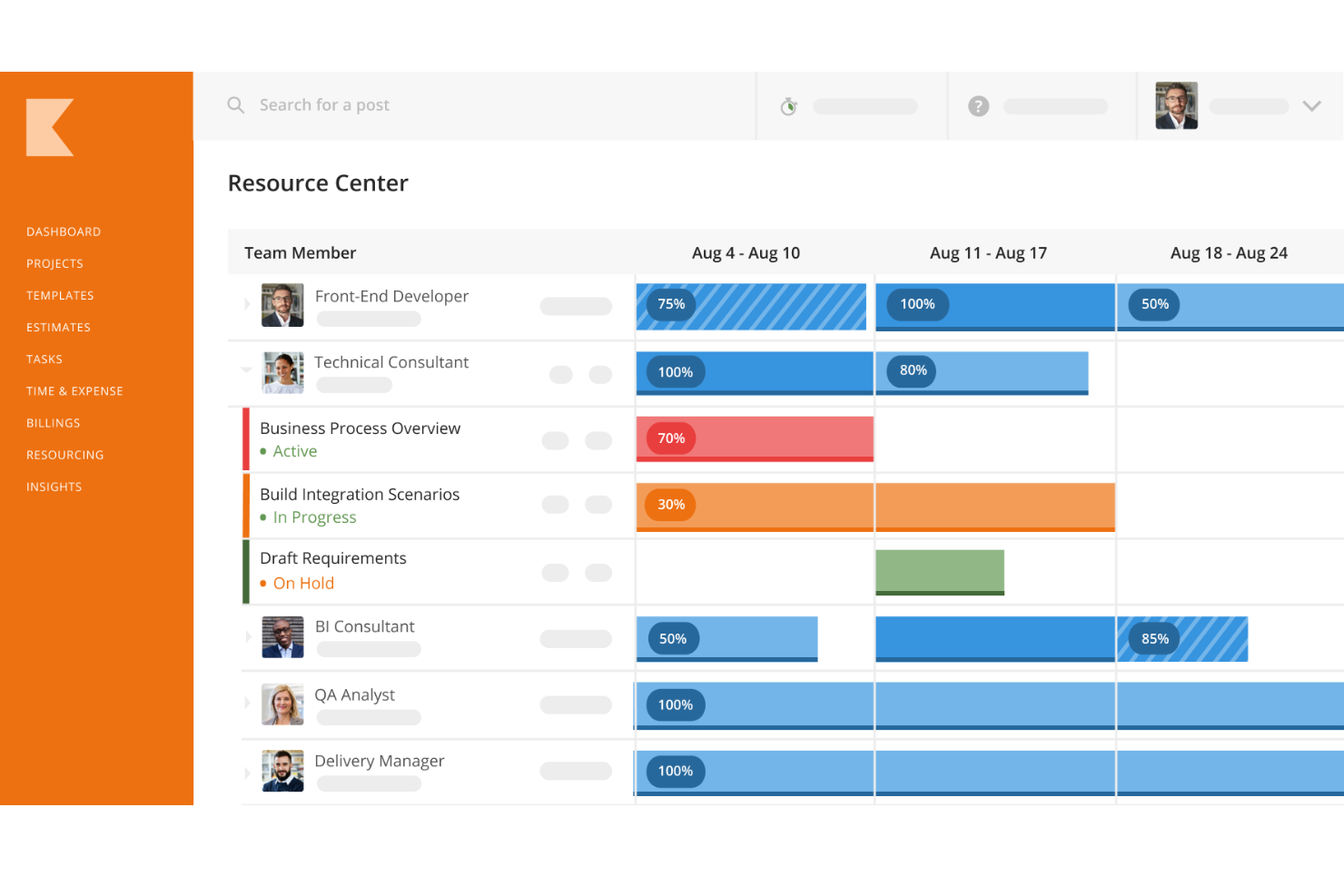
Kantata is a resource booking and project management platform designed for professional services organizations. It helps you plan, schedule, and optimize your team’s capacity so you can balance workloads, improve utilization, and keep projects adequately staffed.
Why I picked Kantata: The platform offers robust tools for forecasting, capacity planning, and scheduling, giving you real-time visibility into your team’s availability and demand. Instead of just filling roles, Kantata helps you make people-centric staffing decisions that consider skills, availability, and workload balance. This means your team members are set up for success, while your projects remain properly staffed and on schedule.
Kantata also includes a detailed skills inventory that aligns project demands with your team’s expertise. By surfacing skill gaps and development opportunities, it helps you not only staff smarter but also invest in employee growth. This focus on people makes it easier to retain top talent while keeping clients satisfied with quality delivery.
Kantata Standout Features and Integrations
Features include automated resource assignment based on skills and availability, scenario planning to model staffing decisions before committing, and real-time alerts to flag overbooked or underutilized team members. Kantata also brings external freelancers and contractors into the same booking system, giving you a full picture of all available talent so nothing slips through the cracks.
Integrations include Salesforce, Slack, Sage, NetSuite, QuickBooks, HubSpot, BambooHR, Jira, Expensify, and more.
Pros and Cons
Pros:
- Detailed reporting capabilities with lots of customization options
- Skills inventory to align talent with projects
- Resource forecasting and planning
Cons:
- Can be challenging to see who is responsible for a task if multiple people are assigned to it
- Potential learning curve for new users
New Product Updates from Kantata

Kantata Adds Access Group Change History
Kantata adds Access Groups History, letting account administrators track changes to group details, membership, and permissions in Recent History. The update also makes these events available through the Subscribed Events API for broader monitoring. For more information, visit Kantata’s official site.
 .
.
Best for collaborative project delivery

Rocketlane is a professional services automation (PSA) platform built for client-facing delivery teams, combining project execution, resource management, financial tracking, and a shared client portal in one place.
Who Is Rocketlane Best For?
Rocketlane is a strong fit for professional services teams at SaaS companies that need to manage client onboarding and delivery projects in a structured, repeatable way.
Why I Picked Rocketlane
I picked Rocketlane as one of the best because of how it brings internal teams and clients into a single, shared delivery environment. The shared client portal gives clients real-time visibility into project progress while keeping your team accountable, so no one is chasing status updates over email. I also like that Rocketlane's project plans, forms, documents, and chat all live in one place, which means my team can hand off context, flag blockers, and move work forward without jumping between tools.
Rocketlane Key Features
- Resource allocation and staffing: Assign team members to projects based on availability, skills, and workload to avoid overbooking.
- Time tracking: Log hours directly within projects, with built-in governance to keep timesheets complete and billable hours accurate.
- Financial management: Track project budgets, margins, and revenue in real time as delivery work unfolds.
- Workflow automations: Set up automated approvals, nudges, and escalations so governance runs in the background without manual oversight.
Rocketlane Integrations
Rocketlane offers native integrations with Slack, Salesforce, Jira, HubSpot, Google Calendar, and Outlook Calendar, and it connects with Zapier and Workato for broader automation. An API is also available for custom integrations and workflows.
Pros and Cons
Pros:
- Reusable templates with task dependencies
- Built-in timesheet and time tracking
- Client portal with branded project visibility
Cons:
- Switching between multiple projects is slow
- Reporting filters lack advanced customization
New Product Updates from Rocketlane

Rocketlane Introduces Governance and Workforce Agents
Rocketlane introduces Governance Agents and Workforce Agents to automate delivery processes and recurring tasks. These updates help teams enforce rules and streamline project execution. For more information, visit Rocketlane’s official site.
 .
.
ClickUp
Best for various resource views
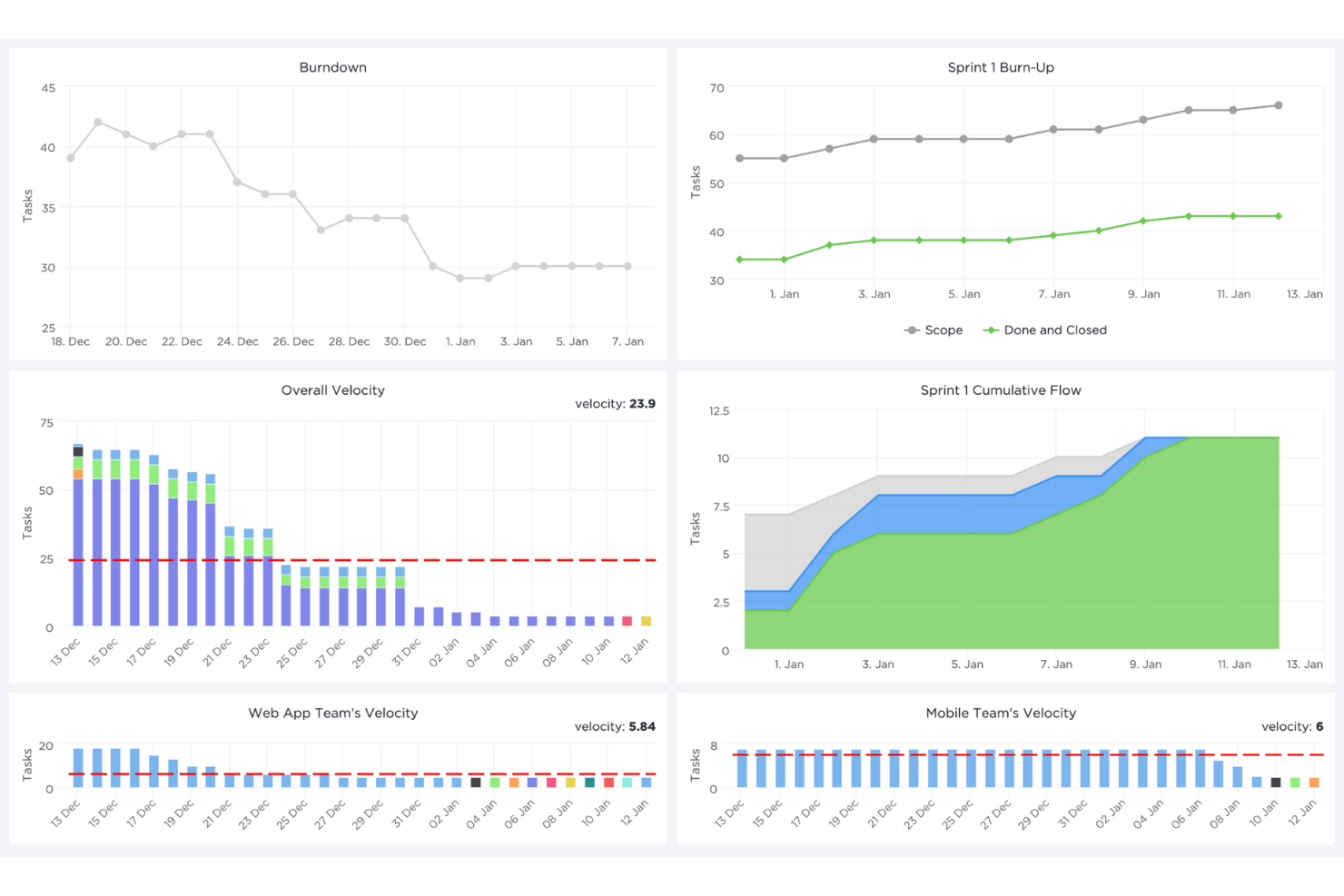
ClickUp is a cloud-based collaboration and project management tool suitable for all kinds of organizations.
Why I picked ClickUp: ClickUp helps you plan, track, and manage any type of work or resources to increase business productivity. The box view displays resource information on workload and resource-specific task progress information to help you make quick decisions.
Additionally, you can assign comments and tasks to specific team members, mark comments and tasks as resolved or in progress, or create custom statuses. You can view projects from an Agile dashboard, or organize them by assignee.
ClickUp Standout Features and Integrations
Features include the ability to create detailed capacity planning with custom fields that allow you to track resource-specific metrics like skills, availability, and effort. Its Workload view also provides drag-and-drop functionality to reallocate tasks dynamically to ensure balanced workloads. Additionally, ClickUp’s real-time collaborative Whiteboards enable teams to visually plan and allocate resources while discussing strategies and aligning on project goals in a single space.
Integrations include Dropbox, Gmail, Google Calendar, Harvest, HubSpot, Loom, Make, Slack, Unito, and Zoom. You can also use ClickUp’s API to build custom integrations with your current tech stack.
Pros and Cons
Pros:
- Informative dashboards
- Available on multiple devices
- Clear notification system
Cons:
- Occasionally slow
- Can be overwhelming
New Product Updates from ClickUp
ClickUp Adds Meetings Hub, Super Agent Templates, and ZoomInfo Integration
ClickUp adds a searchable Meetings Hub, new ways to clone and template Super Agents, and a ZoomInfo integration through the App Center. These updates improve meeting retrieval, agent reuse, and access to sales intelligence. For more information, visit ClickUp’s official site.
Best for agencies

Bonsai Agency Software is an all-in-one platform designed to help agencies manage resources, projects, and client relationships.
Why I picked Bonsai Agency Software: Bonsai's resource planning and forecasting features let you book work based on your team's capacity and track utilization in real-time. This ensures that projects are assigned appropriately, preventing overloading and promoting balanced workloads.
The time-tracking and timesheet functionalities allow your team to log hours easily, providing a clear view of project progress and individual contributions. Monitoring availability and utilization becomes straightforward, enabling you to set custom billable and cost rates for members, tasks, and projects.
Bonsai Agency Software Standout Features and Integrations
Features include custom fields and properties that allow you to track specialized data for each resource, such as expertise, certifications, or availability, enabling precise booking decisions. Additionally, the software’s client portal offers a transparent way to share project timelines and resource updates with clients, fostering collaboration and trust.
Integrations include QuickBooks Online, Zapier, Calendly, Xero, Google Drive, Slack, Gmail, Trello, Google Sheets, Google Calendar, ClickUp, and Jira.
Pros and Cons
Pros:
- Integrates time and budget tracking
- Good resource forecasting capabilities
- Professional-looking client portal
Cons:
- Mobile app could be enhanced with additional features
- May not be suitable for businesses with high volume operations

Birdview
Best for professional services companies
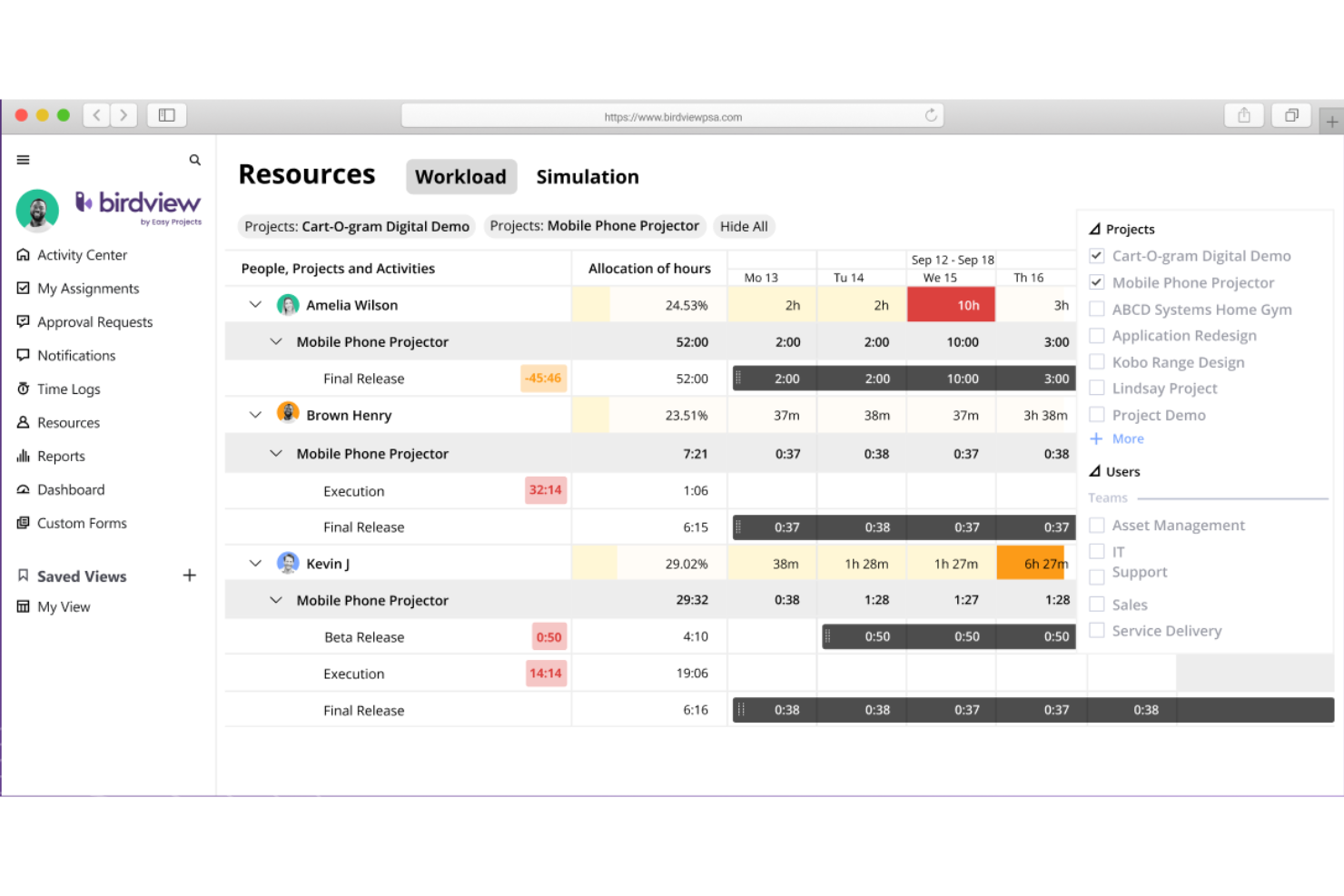
Birdview PSA is a resource management, planning, and scheduling software with resource management features that will help you with your capacity planning.
Why I picked BirdviewPSA: This tool has everything you need to support your projects through its resource planning center. It allows you to access 3 main views. The first one is planning. This view gives you the option to book resources in advance and ensure your capacity meets the demands. Birdview PSA displays your team's skills and other useful information that will help you make informed decisions.
Then, you have the workflow view. This view shows current projects and resource allocations in real time. The system will automatically color-code for you those resources that are over or under-allocated and allow you to address conflicts with a simple drag-and-drop.
The last view is simulation. In this view you can assess the viability of working on a new project, run scenarios to inform your resource hiring, and create project drafts for a quick start. The simulator also allows you to alter resource allocation percentages and modify team members in case someone becomes over-allocated after you run the sim.
Birdview PSA Standout Features & Integrations
Features include a skills-based matching system that can help you allocate resources by aligning team members' expertise with project requirements for optimal performance. Additionally, Birdview PSA's simulation view allows you to model various resource scenarios, assess the impact of taking on new projects, and plan hiring needs, which can offer unparalleled insights for strategic capacity planning.
Integrations include 2000+ pre-built connectors, including MS Teams, Jira, Adobe, Hubspot, Salesforce, Slack, Zoom, Olark, TimeCamp, Xero, and Invision. Additionally, you can connect to 5000+ apps using Zapier and Workato. Both of these need you to have a paid plan with them.

Float
Best for prefilled timesheets
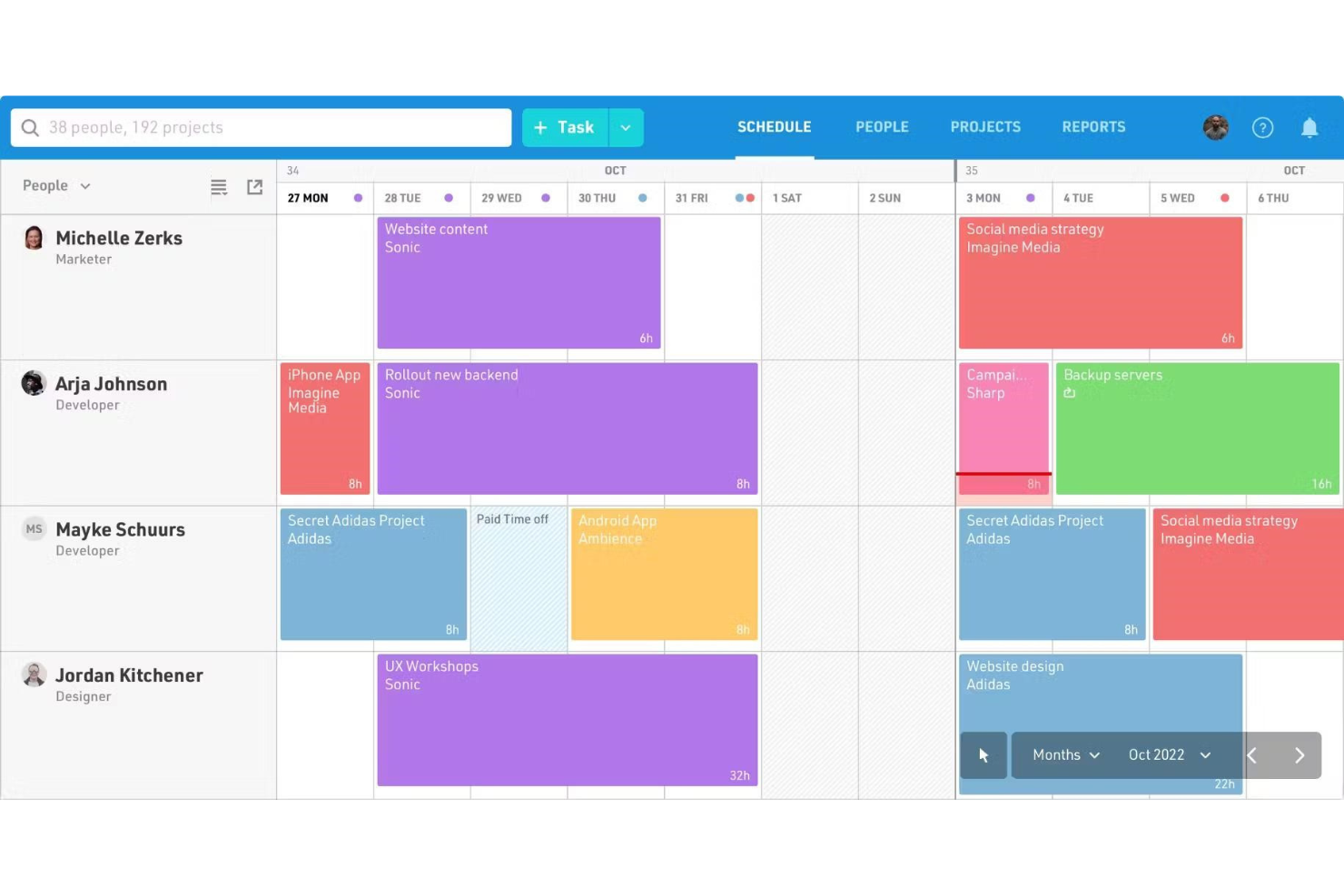
Float is a resource capacity and work scheduling tool that helps you make the most effective use of the resources at your disposal.
Why I picked Float: Using Float, you can centralize all your people and projects into one live timeline, then assign work and resources according to the available capacity.
Timesheets are prefilled with scheduled tasks so team members can log their hours easily, while managers can compare estimated versus actual time. You can sync events with your preferred calendar, import tasks from your project management system, and send hours to your billing software.
Float Standout Features and Integrations
Features include a live timeline that updates in real time, allowing you to instantly see how changes in one project affect overall resource capacity. Its drag-and-drop interface also lets you reassign tasks effortlessly, ensuring quick adjustments to resource availability. Furthermore, Float’s forecasting tools provide insights into future workload trends, helping you plan ahead and avoid overbooking or underutilization of resources.
Integrations include Asana, Google Calendar, Jira, Outlook Calendar, Slack, Teamwork, Trello, WorkflowMax, and Zapier.
Pros and Cons
Pros:
- Single, comprehensive dashboard
- Automatic reporting
- Powerful team manager
Cons:
- Limited customization options
- No self-hosted solution

elapseit
Best for built-in time tracking

Elapseit is a workforce management platform that helps you with resource planning, time tracking and project management.
Why I picked Elapseit: Elapseit is a holistic tool that allows you to review projects, allocate people depending on their role, and approve vacations based on the timeline of your projects. Every task can be managed via approval workflows and email notifications.
You can facilitate document sharing, send invoices, keep smart timesheets, and work in multiple languages. Task management options such as Kanban boards and Gantt charts give a clear overview of activity and progress.
Elapseit Standout Features and Integrations
Features include an interactive resourcing dashboard that provides a comprehensive view of team allocation, availability, and capacity in real time. Additionally, Elapseit’s integrated leave management system ensures seamless scheduling by automatically reflecting approved time-off requests in resource plans, preventing conflicts or overbooking.
Integrations include a native integration with Xero. Other integrations with thousands of additional apps are available via Zapier.
Pros and Cons
Pros:
- Multiple access levels
- Excellent visual planner
- Informative dashboards
Cons:
- No mobile app
- Limited customization options for reporting
Annen programvare for ressursbestilling
Her er noen flere alternativer som ikke kom med på listen over den beste programvaren for ressursbestilling.
- Ganttic
For Gantt-based workflows
- Silverbucket
For comprehensive resource management
- eResource Scheduler
For real-time resource visibility
- monday AI Workspace
With AI-powered resource recommendations
- Resource Guru
For capacity planning & utilization tracking
- Screendragon
For drag-and-drop scheduling
- GoodDay
For clear workload management
- Runn
For resource scenario planning
- Hub Planner by Milient
For team capacity planning
- Dayshape
For AI resource scheduling
- Smartsheet
For a work management solution based on advanced spreadsheets
- Paymo
For tracking the financial aspects of resource usage
- Zoho Projects
For optimizing resource utilization
- Forecast
For cutting down on non-billable work using AI
- Saviom
For highly-customizable, scalable resource management
- Mosaic
For its AI-powered resource planning
- Meisterplan
For its role-based resource allocation prior to staffing
- Parallax
For professional services companies
- TeamGantt
For project scheduling based on Gantt charts


How I Evaluate Resource Booking Software
I split my evaluation into two layers: baseline scheduling and conflict-detection capabilities a tool must have, and the differentiators—like rate tracking or scenario planning—that set the best apart.
Core Functionality (Table Stakes For This List)
When I'm selecting tools for my list, I rank each one on a scale from 0 (does not offer the functionality) to 5 (excels in this area) for each core functionality listed below. Then, I calculate the tool's total score into a percentage. Each tool needs to achieve a minimum total score of 65% to be considered for inclusion.
- Resource Scheduling Calendar: I look for a visual timeline where you can drag and drop bookings across days, weeks, or months—like reassigning a designer mid-sprint without losing context.
- Availability & Conflict Detection: Each tool should surface real-time availability and flag when someone's double-booked, especially when PTO or holidays overlap with active project allocations.
- Capacity & Utilization Tracking: I evaluate whether you can see booked vs. available hours at a glance, with utilization rates broken out by individual, team, or time period.
- Skills & Attribute Filtering: The booking flow should let you filter resources by skills, role, location, or seniority so you're matching the right person to the right project quickly.
- Project & Task Assignment: I check that bookings tie directly to projects or tasks rather than floating as standalone entries, keeping allocations connected to delivery work.
- Forecasting & Reporting: Good tools let you model upcoming demand against current capacity, so you can spot hiring gaps or bench time weeks before they become problems.
Once I have a list of tools that meet this criteria, I consider what sets each platform apart.
Differentiating Factors (What Sets Vendors Apart)
Here's how I compare and contrast different vendors:
Standout Features
Scenario planning is a big differentiator. I look for tools that let you model alternate staffing plans side by side before locking in bookings, like testing whether pulling a developer off one project creates a downstream bottleneck. Billing and cost rate tracking also matters, especially for agencies and consultancies where margin visibility per resource drives staffing decisions. I also evaluate request and approval workflows, which let PMs formally request resources from a centralized pool instead of pinging managers over chat.
Beyond Features
Integrations carry a lot of weight here. I check whether each tool connects natively with the PM platforms your team already uses—Jira, Asana, monday.com—so bookings stay synced with actual project work. Pricing structure matters more than sticker price; some vendors charge per booked resource while others charge per user, which can balloon costs when you have many viewers or requesters. I also evaluate how well a tool fits specific team sizes and industries, since a platform built for a 20-person agency works very differently than one designed for enterprise PMOs managing hundreds of resources.
Slik velger du programvare for ressursbestilling
Det er lett å gå seg vill i lange funksjonslister og kompliserte prismodeller. For å hjelpe deg med å holde fokus mens du arbeider deg gjennom den unike prosessen med å velge programvare, er her en sjekkliste over faktorer du bør ha i mente:
| Faktor | Hva du bør vurdere |
| Skalerbarhet | Sørg for at programvaren kan vokse med virksomheten din, enten du administrerer et lite team eller skalerer globalt. |
| Integrasjoner | Kontroller om programvaren kobles til verktøy som Google Kalender, Outlook, Slack eller den eksisterende prosjektstyringsprogramvaren din. |
| Tilpasningsmuligheter | Se etter alternativer for å tilpasse bestillingsarbeidsflyter, tillatelser eller varsler slik at de dekker teamets spesifikke behov. |
| Brukervennlighet | Velg et verktøy som er intuitivt og ikke krever omfattende opplæring, slik at teamet kan begynne å bruke det med en gang. |
| Budsjett | Sørg for at løsningen passer budsjettet ditt og tilbyr transparente priser uten skjulte gebyrer. Vurder gratis prøveperioder eller gratismodeller. |
| Sikkerhetstiltak | Kontroller funksjoner som rollebasert tilgang, datakryptering og samsvar med GDPR eller andre relevante standarder. |
| Tilgjengelighet på mobil | Sørg for at plattformen tilbyr en mobilapp eller et responsivt design, slik at bestillinger kan administreres på farten. |
| Rapporteringsfunksjoner | Se etter analysefunksjoner for å følge med på ressursutnyttelsen, identifisere trender og optimalisere bestillingsprosessene dine. |
Trender innen programvare for ressursbestilling
I forbindelse med undersøkelsene mine hentet jeg inn utallige produktoppdateringer, pressemeldinger og lanseringslogger fra ulike leverandører av programvare for ressursbestilling. Her er noen av de fremvoksende trendene jeg følger med på:
- KI-drevet optimalisering: Verktøy begynner å bruke KI til å forutsi ressursbehov og anbefale justeringer i planleggingen. For eksempel analyserer enkelte plattformer for KI-basert ressursstyring bestillingsmønstre for å minimere nedetid eller varsle om underutnyttede ressurser.
- Selvbetjeningsportaler: Flere programvareløsninger tilbyr nå selvbetjeningsportaler der brukere kan administrere bestillinger selv. Dette reduserer arbeidsmengden for administratorer og gir brukerne kontroll over egne reservasjoner.
- Sanntidsanalyse: Avanserte dashbord gir nå team umiddelbar innsikt i ressursutnyttelsen. Leverandører legger til sanntidsvarmekart og måledata for å hjelpe ledere med å ta raskere, datadrevne beslutninger.
- Sporing av bærekraft: Enkelte løsninger integrerer funksjoner for å spore miljøpåvirkningen av ressursbruken, for eksempel energiforbruk eller karbonavtrykk. Dette appellerer til virksomheter som prioriterer bærekraftsmål.
- Støtte for hybridarbeid: Leverandører utvikler nå funksjoner for å møte behovene til hybride team, for eksempel administrasjon av delte kontorlokaler eller koordinering av reservasjoner av fjernutstyr i tillegg til bestillinger for fysisk oppmøte.
Hva er programvare for ressursbestilling?
Programvare for ressursbestilling er et verktøy som hjelper virksomheter med å planlegge og administrere delte ressurser som møterom, utstyr eller arbeidsplasser. Den brukes ofte av kontorledere, IT-team og prosjektkoordinatorer for å holde oversikten over planer og unngå konflikter. Sentraliserte kalendere, automatiserte varsler og tilgang basert på roller bidrar til effektiv planlegging, redusert nedetid og bedre ressursutnyttelse. Alt i alt hjelper disse verktøyene team med å spare tid og maksimere verdien av de delte ressursene.
Funksjoner i programvare for ressursbestilling
Når du velger programvare for ressursbestilling, bør du se etter følgende nøkkelfunksjoner:
- Sentralisert kalender: Gjør det mulig å se alle bestillinger på ett sted, noe som bidrar til å unngå dobbeltbestillinger og gjør det enkelt å følge med på ressursenes tilgjengelighet.
- Automatiserte varsler: Sender varsler om bekreftelser, avbestillinger eller endringer i bestillinger, slik at alle holdes informert.
- Konfliktløsning: Varsler om overlappende bestillinger og gir forslag til hvordan planleggingskonflikter kan løses.
- Rollebaserte tillatelser: Styrer hvem som kan bestille, endre eller se bestemte ressurser for å opprettholde orden og sikkerhet.
- Gjentakende bestillinger: Gjør det mulig for brukere å planlegge gjentakende reservasjoner uten å legge inn opplysningene på nytt.
- Bruksanalyse: Sporer ressursutnyttelsen for å hjelpe team med å identifisere trender og optimalisere effektiviteten.
- Mobiltilgang: Tilbyr et mobiltilpasset grensesnitt eller en app, slik at bestillinger kan administreres mens du er på farten.
- Tilpassbare bestillingsskjemaer: Lar brukere tilpasse feltene for å samle inn relevante opplysninger som er spesifikke for hver ressurs eller hvert team.
- Integrasjon med kalendere: Synkroniserer med verktøy som Google Kalender eller Outlook for å effektivisere arbeidsflyten for planlegging.
- Ressursmerking: Kategoriserer ressurser etter type, sted eller andre egenskaper for å gjøre søk og valg enklere.
Fordeler med programvare for ressursbestilling
Implementering av programvare for ressursbestilling gir flere fordeler for teamet og virksomheten din. Her er noen av fordelene du kan se frem til:
- Fleksibilitet: Gjør det mulig å administrere bestillinger på mobile enheter og støtter team som arbeider eksternt eller er på farten.
- Bedre organisering: Holder alle bestillinger på ett sted, noe som gjør det enkelt å følge med på og administrere ressursenes tilgjengelighet.
- Tidsbesparelser: Reduserer manuell planlegging og konfliktløsning ved hjelp av automatiserte verktøy og varsler.
- Bedre ressursutnyttelse: Sporer bruksdata for å hjelpe deg med å identifisere underutnyttede ressurser og gjøre nødvendige justeringer.
- Bedre samarbeid: Tilbyr et transparent bestillingssystem der alle kan se ressursenes tilgjengelighet og planlegge effektivt.
- Færre planleggingskonflikter: Verktøy for ressursplanlegging forhindrer dobbeltbestillinger med konfliktvarsler og oppdateringer i sanntid.
- Kostnadseffektivitet: Optimaliserer hvordan ressursene brukes, noe som potensielt kan spare penger på unødvendige leieforhold eller innkjøp.
Kostnader og priser for programvare for ressursbestilling
Valg av programvare for ressursbestilling krever en forståelse av de ulike prismodellene og abonnementene som er tilgjengelige. Kostnadene varierer basert på funksjoner, teamstørrelse, tillegg og mer. Tabellen nedenfor oppsummerer vanlige abonnementer, gjennomsnittsprisene deres og typiske funksjoner som er inkludert i programvareløsninger for ressursbestilling:
Sammenligningstabell for planer for programvare for ressursbestilling
| Plantype | Gjennomsnittlig pris | Vanlige funksjoner |
| Gratisplan | $0 | Grunnleggende ressursbestilling, begrensede kalendervisninger og e-postvarsler. |
| Privatplan | $5-$25/bruker/måned | Tilgang for én bruker, grunnleggende analyser, mobiltilgang og enkle integrasjoner. |
| Bedriftsplan | $30-$100/bruker/måned | Tilgang for flere brukere, avanserte analyser, rollebaserte tillatelser, tilpassbare bestillingsskjemaer og rapportering. |
| Foretaksplan | $100+/bruker/måned | Ubegrenset antall brukere, API-tilgang, avansert sikkerhet, tilpassede integrasjoner og dedikert kontostøtte. |
Vanlige spørsmål om programvare for ressursbestilling
Her er noen populære spørsmål andre stiller om dette emnet.
Hva er ressursbestilling?
Ressursbestilling innebærer å reservere eller planlegge bruken av en bestemt ressurs, for eksempel et møterom, utstyr eller personale, for et bestemt tidspunkt eller en bestemt varighet. Det brukes ofte i prosjektledelsesorganisasjoner og virksomheter for å sikre at ressursene fordeles effektivt mellom prosjektene.
Hvordan håndterer programvaren konflikter eller dobbeltbestillinger?
Programvare for ressursbestilling varsler vanligvis brukerne om konflikter og bidrar til å unngå overlapp mellom prosjekter ved å følge regler som kan tilpasses. I verktøy som bruker visuelle indikatorer, kan en AI-planleggingsassistent fremheve problemer med rød eller gul markering når en ressurs møter en planleggingskonflikt. I andre tilfeller viser programvaren umiddelbart en advarsel når den oppdager en mulig dobbeltbestilling – noe som gjør konfliktløsningen raskere og mer proaktiv.
Hvordan kan Gantt-diagrammer hjelpe med ressursbestilling?
Gantt-diagrammer hjelper med ressursbestilling ved å vise ressursenes tilgjengelighet og arbeidsbelastning på tvers av oppgaver og tidslinjer. De gjør det mulig for prosjektledere å identifisere planleggingskonflikter, optimalisere ressursfordelingen og sikre at oppgavene fordeles jevnt. Denne oversikten bidrar til å unngå overbooking og sikrer effektiv bruk av ressursene.
Hvordan kan programvare for ressursbestilling støtte samarbeid i sanntid?
Programvare for ressursbestilling støtter samarbeid i sanntid ved å la flere brukere planlegge og justere tidsplaner samtidig, samtidig som endringene blir synlige for alle teammedlemmer med én gang. Den muliggjør også effektiv håndtering av brukertillatelser, slik at bare autoriserte personer kan endre bestillinger eller få tilgang til sensitive data. Dette fremmer samarbeid og reduserer planleggingskonflikter.
Kan jeg fortsette å bruke regneark til ressursplanlegging?
Selv om regneark kan fungere for grunnleggende ressursplanlegging, tilbyr dedikert programvare for ressursplanlegging avanserte funksjoner som oppdateringer i sanntid, balansering av arbeidsbelastning og automatisk oppdagelse av konflikter. Disse verktøyene er enklere å bruke for komplekse prosjekter og reduserer risikoen for feil som ofte oppstår ved manuell håndtering av regneark. Samlet sett bidrar overgangen fra regneark til programvare for ressursplanlegging til bedre effektivitet og skalerbarhet etter hvert som behovene dine vokser.
Finnes det bransjespesifikke verktøy for ressursstyring?
Ja, mange verktøy for ressursstyring er utviklet for bestemte bransjer. Disse verktøyene tilbyr tilpassede funksjoner som prosjektmaler, sporing av samsvar med krav eller bransjespesifikk rapportering. Ved å velge et bransjespesifikt verktøy sikrer du at ressursplanleggingen samsvarer med unike driftsbehov. Slike verktøy inkluderer:
- Programvare for ressursstyring for byråer
- Programvare for ressursstyring for små bedrifter
- Programvare for ressursstyring innen markedsføring
- Programvare for ressursstyring for konsulenter
- Programvare for ressursstyring for store virksomheter