

10 beste programvareløsninger for økonomisk prosjektstyring i 2026

Beste programvareverktøy for økonomisk prosjektstyring


Å administrere digitale prosjekter uten sanntidsinnsikt i kostnadene fører direkte til budsjettoverskridelser og pressede marginer. Programvare for økonomisk prosjektstyring løser dette ved å kombinere standard oppgavesporing med løpende budsjettoppfølging, utgiftslogger og prognoser for lønnsomhet, slik at du alltid vet nøyaktig hvordan inntektene dine ligger an.
Jeg testet dusinvis av plattformer for å finne verktøyene som håndterer faktureringssatser, tidsregistrering og økonomisk rapportering parallelt med teamets daglige arbeidsflyter. Les gjennom mine beste anbefalinger for 2026 for å finne den riktige plattformen for teamet ditt og holde prosjektene lønnsomme.
Why Trust Our Software Recommendations
Our team has been testing and reviewing software since 2012. As project managers ourselves, we know how difficult—and important—it is to choose the right software.
For this guide, we evaluated tools using hands-on testing and independent research, scoring tools using our selection criteria. We also draw on insights from industry thought leaders and practicing project management experts.
Our reviews reflect our human editorial judgment, not a sales pitch.
Expert reviewers:
Sammenligningstabell for programvare for økonomisk prosjektstyring
Denne sammenligningstabellen oppsummerer prisdetaljene for mine beste anbefalinger innen programvare for økonomisk prosjektstyring:
| Tool | Best For | Trial Info | Price | ||
|---|---|---|---|---|---|
| 1 | Best for professional services firms | 14-day free trial | From $17/user/month | Website | |
| 2 | Best for agency project profitability tracking | 14-day free trial | From $10/user/month (billed annually) | Website | |
| 3 | Best for tracking budgets | 14-day free trial | Pricing upon request | Website | |
| 4 | Best for integrated portfolio tracking | 14-day free trial + free demo available | From $10/user/month (billed annually) | Website | |
| 5 | Best for real-time budget tracking | Free demo available | Pricing upon request | Website | |
| 6 | Best for financial oversight with time tracking | Free plan + 15-day free trial + free demo available | From $4/user/month (billed annually) | Website | |
| 7 | Best for managing complex billing schedules | Free trial available | From $16/user/month (billed annually) | Website | |
| 8 | Best with native Office and Teams integration | 30-day free trial | From $10/user/month (billed annually) | Website | |
| 9 | Best for accounting practice management | 14-day free trial | From $19/month (billed annually) | Website | |
| 10 | Best for onboarding project tracking | 14-day free trial + free demo available | From $19/user/month (billed annually) | Website |


Anmeldelser av den beste programvaren for økonomisk prosjektstyring
Nedenfor finner du mine detaljerte sammendrag av den beste programvaren for økonomisk prosjektstyring som kom med på kortlisten min. Anmeldelsene mine gir et detaljert innblikk i de viktigste funksjonene, fordelene \u0026 ulempene, integrasjonene og de ideelle bruksområdene for hvert verktøy, slik at du kan finne det som passer best for deg.

Scoro
Best for professional services firms
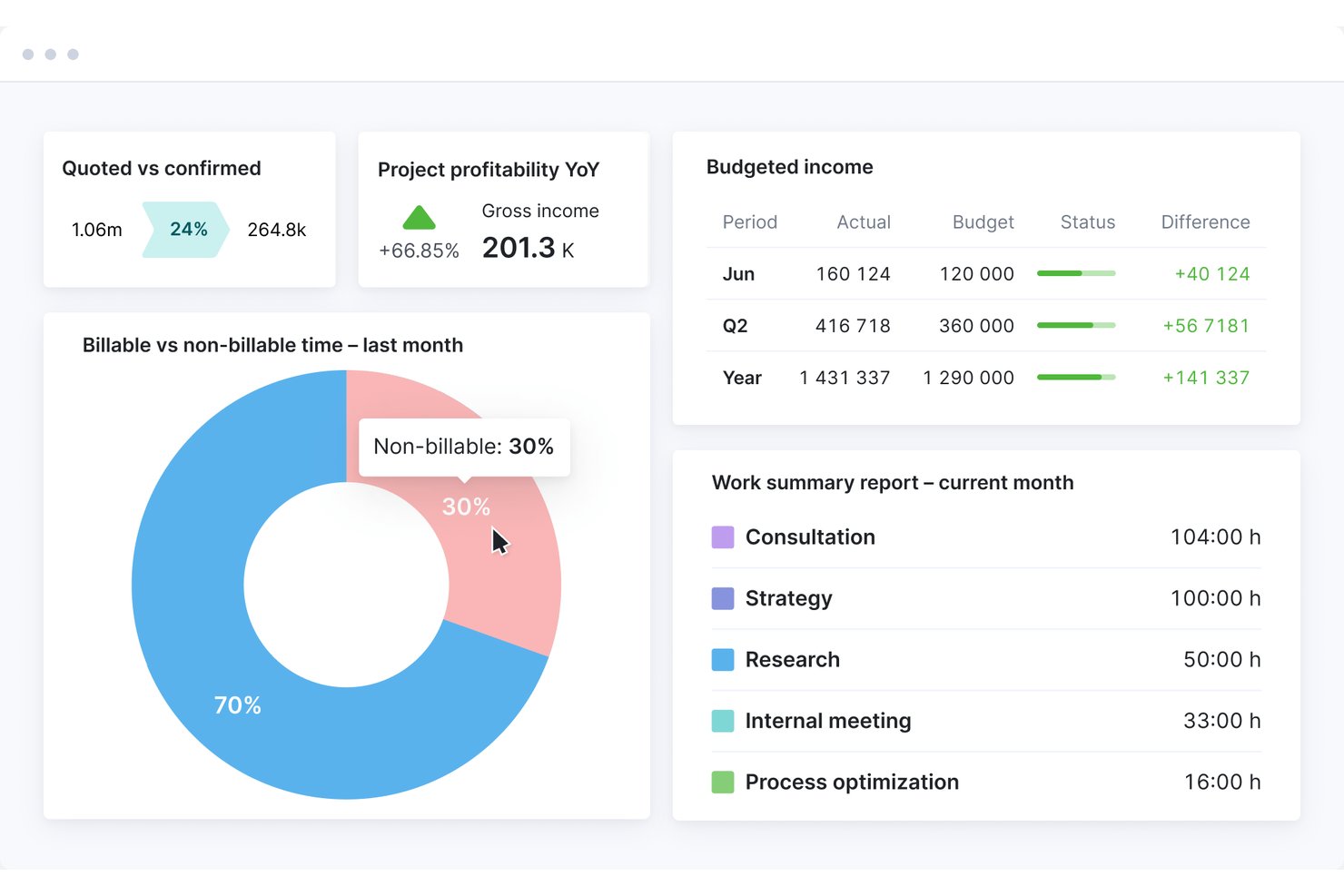
Scoro is a professional services automation platform that combines project budgeting, cost tracking, time and billing management, revenue forecasting, and profitability reporting in a single end-to-end system.
Who Is Scoro Best For?
Scoro fits agencies, consultancies, and other project-based service firms with 10–500 staff who need tight control over project finances and client billing.
Why I Picked Scoro
Scoro earns its spot on my shortlist because of how tightly it connects quoting to project financials. I love that I can build a quote using the estimation matrix, breaking deliverables down by role and effort, and that same data flows directly into budget tracking and profitability reporting. The Project Revenue Models (Fixed Fee, T&M Capped, T&M Uncapped) let my team track how revenue should accrue against what's actually been delivered, without manual reconciliation.
Scoro Key Features
- Resource capacity planner: Lets you allocate, view, and adjust team workloads and availability in real time across projects.
- Multi-currency support: Enables handling of international billing, reporting, and client transactions in multiple currencies with accurate conversions.
- Revenue recognition automation: Applies fixed-fee, time and materials, or custom rules to automate project revenue recognition.
- Client portal: Offers clients secure access to review project budgets, approve invoices, and monitor financial status online.
Scoro Integrations
Scoro offers native integrations with QuickBooks, Xero, Sage Intacct, Exact Online, Stripe, Expensify, Envoice, and Finbite, and connects with Zapier. An API is also available for custom integrations.
Pros and Cons
Pros:
- Quotes feed directly into project budgets
- Native billing models for T&M and fixed-fee
- Tracks project profitability in real time
Cons:
- Reporting dashboards have limited drill-down options
- Steeper setup for complex org structures
New Product Updates from Scoro

Scoro Adds Time Mobile App and ELI Improvements
Scoro adds the Scoro Time mobile app for iOS/Android to track time anywhere and expands ELI with attachments, smarter filtering, and trigger-based actions. For more information, visit Scoro's official site.

Best for agency project profitability tracking
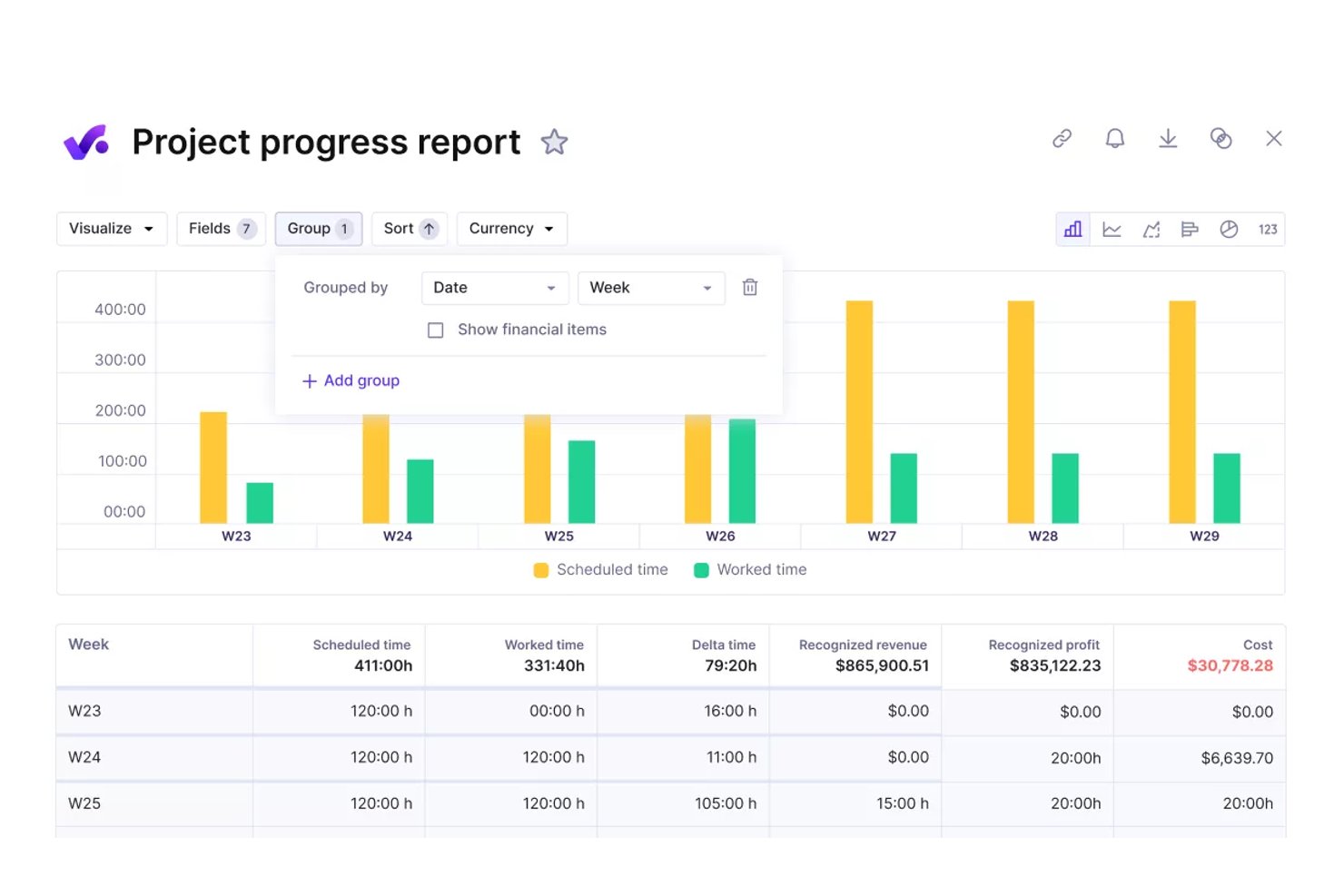
Productive is an agency management platform that combines project budgeting, real-time profitability tracking, time and billing management, resource planning, and financial reporting in a single system built for agencies and professional services teams.
Who Is Productive Best For?
Productive fits growing agencies and consultancies — typically 20 or more people — that need to move beyond spreadsheets and manage project finances alongside operations in one place.
Why I Picked Productive
Productive earns its spot as one of the best on my shortlist because it connects salary-based cost rates and overhead allocation directly to every project budget. Every hour logged instantly updates the project's profitability margin, so I can see which engagements are actually making money without manual reconciliation. The overhead spreading feature distributes facility costs and non-billable time across active budgets automatically, which is something most agency tools simply skip.
Productive Key Features
- Scenario builder: Simulate project outcomes and test financial scenarios before committing resources.
- Retainer management and invoicing: Manage recurring retainers with built-in tools for scheduling and generating invoices.
- Advanced reporting library: Access pre-built and customizable reports focused on financials, utilization, and project performance.
- Native accounting integrations: Sync data bidirectionally with platforms like QuickBooks Online, Xero, and Exact for centralized financials.
Productive Integrations
Productive offers native integrations with QuickBooks Online, Xero, Exact, e-conomic, Fortnox, Twinfield, and Zapier. An API is available for custom integrations.
Pros and Cons
Pros:
- Portfolio-level margin analysis across multiple clients
- Resource utilization linked directly to project financials
- Real-time budget burn tracked per project phase
Cons:
- Less suited for non-agency project structures
- Revenue recognition automation not available natively
New Product Updates from Productive
Productive Adds Voice Dictation, Slack Connector, Proposals, and Overtime
Productive adds voice dictation, a Slack Connector, proposal controls, and overtime tracking. These updates support faster AI interactions, client proposals, and time management. For more information, visit Productive’s official site.

Wrike
Best for tracking budgets
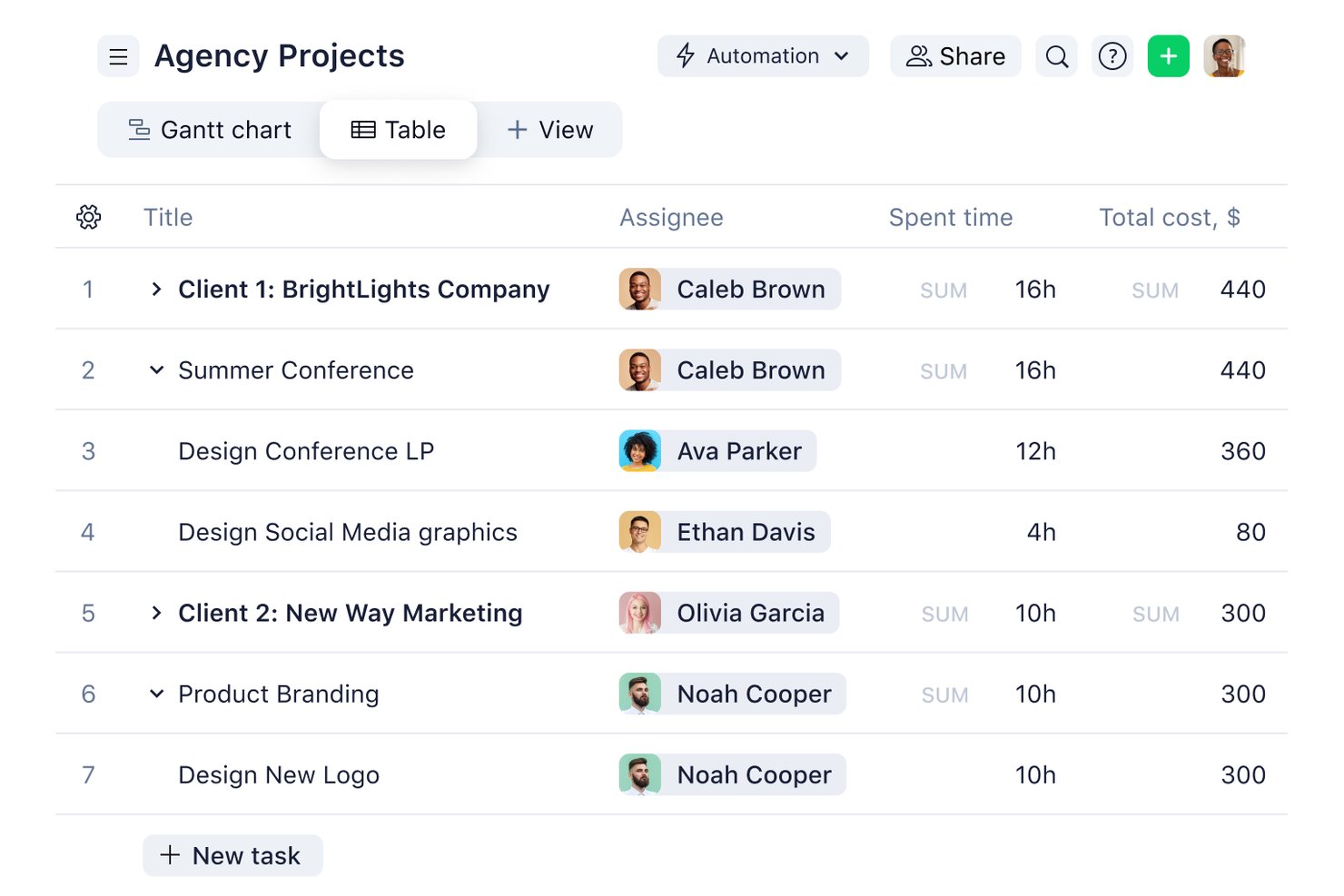
Wrike is a work management platform that combines project planning, task tracking, time logging, and budget monitoring with portfolio-level financial reporting across projects and teams.
Who Is Wrike Best For?
Wrike suits mid-size to enterprise professional services teams that need project management and financial tracking in a single platform.
Why I Picked Wrike
Wrike earns its spot on my shortlist because of how it handles budget tracking at both the project and portfolio level. I set custom hourly rates by job role or individual user, and Wrike automatically calculates planned versus actual fees as work gets logged. What I find especially useful is the real-time financial fields view, which surfaces budget variance across projects without any manual spreadsheet work.
Wrike Key Features
- AI-powered work intelligence: AI Agents identify project risks and generate insights for financial and execution planning.
- Customizable dashboards: Create role-based views for financial data, project statuses, and portfolio analytics.
- Resource capacity planning: Visualize and allocate team resources to optimize workload and margin performance.
- Native accounting integrations: Connect with QuickBooks, NetSuite, and others for two-way financial data sync.
Wrike Integrations
Wrike offers hundreds of integrations through its built-in integrations and marketplace, including tools like Google Workspace, Microsoft 365, Salesforce, and Slack. It also supports Zapier and provides an API for custom integrations.
Pros and Cons
Pros:
- Granular financial reporting at portfolio level
- Custom hourly rates configurable by individual role
- Real-time budget tracking across project portfolios
Cons:
- No native invoicing or client billing generation
- Advanced financial features locked behind higher-tier plans
New Product Updates from Wrike
Wrike Adds Klaxoon MCP Integration
Wrike’s Klaxoon MCP integration is now generally available, enabling AI agents to navigate between Wrike tasks and attached whiteboards, read task context, and manage whiteboard attachments via API. For more information, visit Wrike's official site.

Celoxis
Best for integrated portfolio tracking

Celoxis is a project and portfolio management platform with built-in project accounting, budget tracking, revenue forecasting, multi-currency support, time and expense management, and Earned Value Analysis for projects and portfolios.
Who Is Celoxis Best For?
Celoxis is well-suited for mid-size to enterprise teams managing multiple projects at once, where financial visibility and cross-project reporting play a central role in successful delivery.
Why I Picked Celoxis
I've included Celoxis in my top picks because its portfolio monitoring is genuinely built into the core platform, not bolted on as an afterthought. I can track schedules, budgets, margins, and custom KPIs from a single, drillable portfolio dashboard without exporting data or switching tools. What I find especially useful is the what-if analysis feature, which lets me model different portfolio mixes based on custom metrics and resource capacity before committing to a plan.
Celoxis Key Features
- Earned Value Analysis: Calculates cost performance index (CPI) and schedule performance index (SPI) in real time to measure project health against the baseline.
- Time and expense tracking: Capture billable and non-billable hours with smart timesheets and multi-level approval workflows that flow directly into project costs.
- Revenue forecasting: Estimate expected revenue, costs, and profit margins for both individual projects and the overall portfolio with built-in financial modeling.
- Resource cost tracking: Set cost rates for each resource and monitor actual spend against planned labor costs in all active projects.
Celoxis Integrations
Celoxis offers native integrations with Jira, Salesforce, Trello, Zendesk, Okta, Microsoft Project, Slack, Outlook, Google Drive, and more, with an API available for custom integrations.
Pros and Cons
Pros:
- Portfolio-level budget and risk roll-ups
- Supports hourly and fixed-price billing
- Built-in Earned Value Management for forecasting
Cons:
- Complex project templates are time-consuming to set up
- Mobile access needs improvement

Best for real-time budget tracking
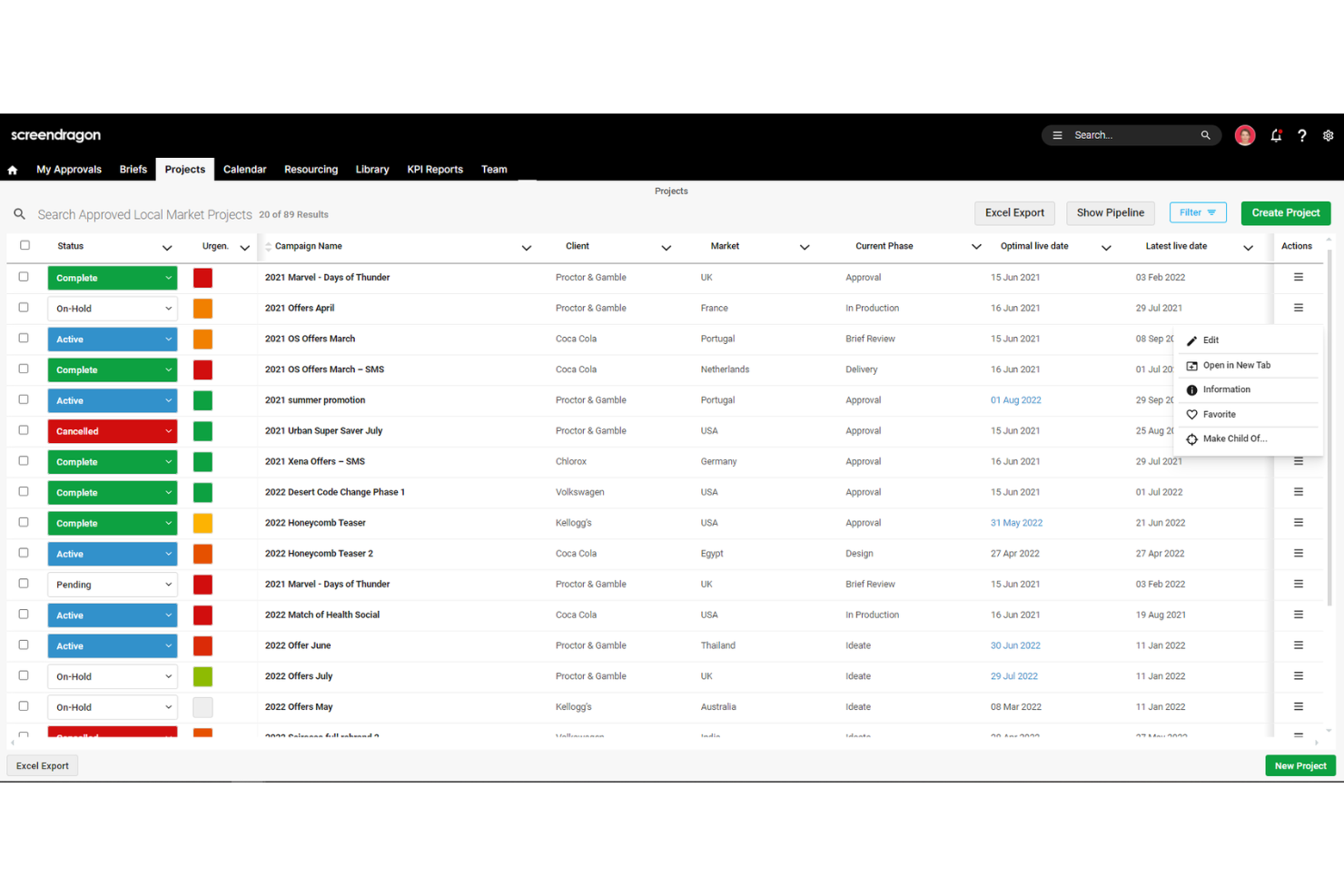
Screendragon is a work management platform designed for marketing, agency, and professional services teams.
Why I Picked Screendragon:
I like its comprehensive budget management capabilities. The platform allows you to compare estimated, budgeted, and actual costs in real-time, giving you a clear picture of your project's financial health. This feature helps identify potential budget overruns early, enabling timely corrective actions to keep your projects on track. Another reason I like Screendragon is its integrated resource management tool. It offers a 360-degree view of resource capacity, helping you see how much new work your team can handle and spot bottlenecks before they become issues.
Standout features & integrations:
Features include configurable workflows that automate task assignments and approvals, reducing manual intervention and speeding up project timelines. Additionally, the platform's online proofing tool allows for real-time collaboration on various media types, simplifying the review process and ensuring timely feedback.
Integrations include MS Power BI, Slack, MS Teams, Zapier, Google Drive, Trello, Microsoft 365, Box, Jira, Microsoft OneDrive, and PeopleSoft.
Pros and Cons
Pros:
- Can tailor the platform to your specific needs
- Good resource planning features
- Integrates various tools like project management and budget tracking
Cons:
- Time-consuming setup
- Platform's depth can feel a bit complex
New Product Updates from Screendragon
Screendragon Unveils New AI Hub
Screendragon introduced AI Hub, a new capability that lets teams build and manage AI agents directly within workflows. The update helps marketing teams automate tasks, maintain governance controls, and scale AI-driven operations more efficiently. For more information, visit Screendragon's official site.

Best for financial oversight with time tracking
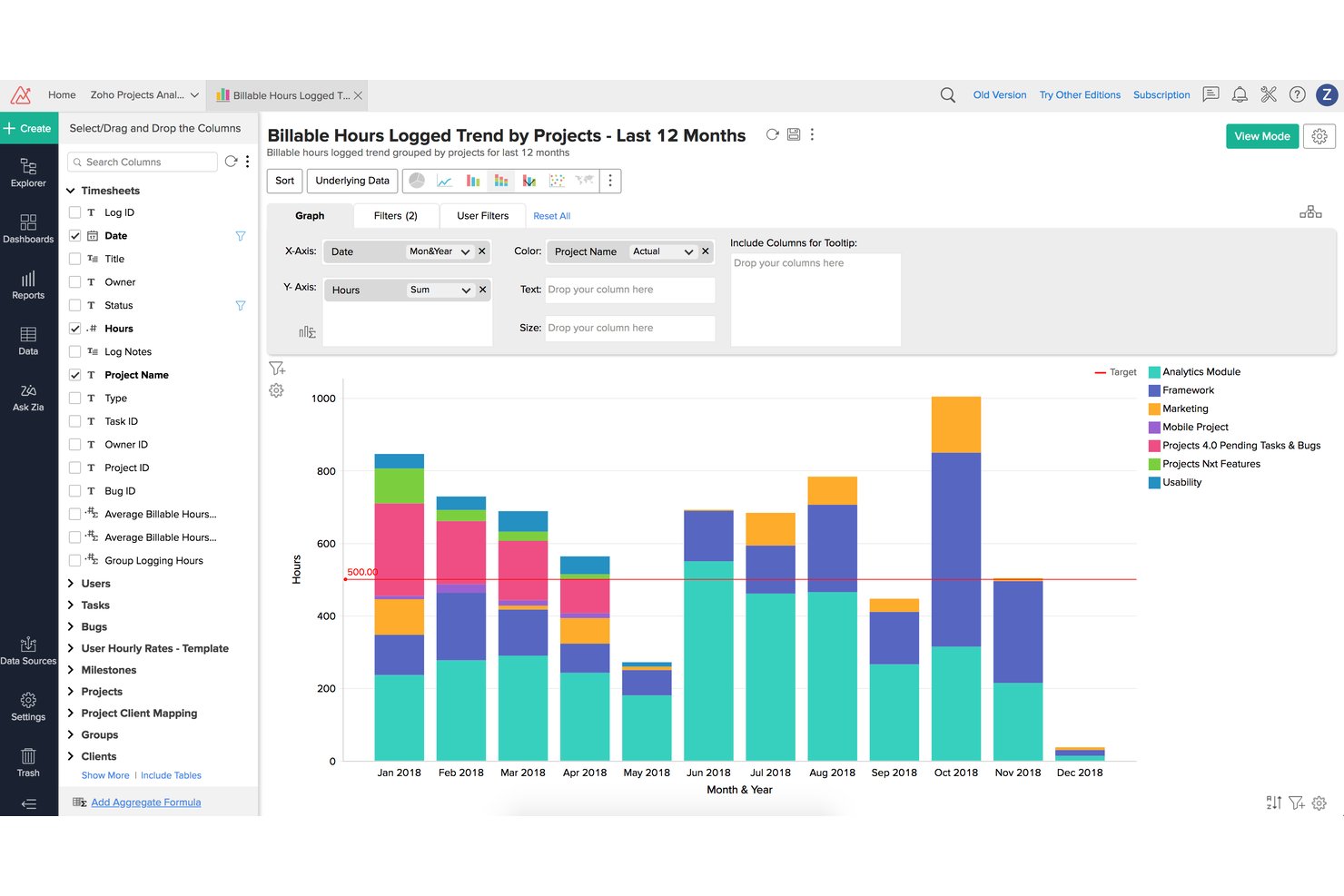
Zoho Projects is a project management platform that combines task planning, time tracking, budgeting, earned value management, and billing integration to support financial oversight across projects.
Who Is Zoho Projects Best For?
It's a strong fit for small to mid-sized professional services teams already running on the Zoho ecosystem who need time tracking tied directly to client billing.
Why I Picked Zoho Projects
Zoho Projects earns its spot on my shortlist because of how tightly it connects logged hours to financial outcomes. I like that the built-in EVM module calculates EAC, ETC, and CPI directly from timesheet data, giving me real variance visibility without exporting to a spreadsheet. Multi-level timesheet approvals mean I can enforce billing accuracy before hours ever reach an invoice.
Zoho Projects Key Features
- Portfolio dashboard: Gives a unified overview of multiple projects’ statuses and financials in one place.
- Project baseline management: Lets you set and compare multiple baselines to track schedule and budget changes.
- Custom roles and profiles: Enables granular access control for project, finance, and client stakeholders.
- Native Zoho Books and Zoho Invoice integration: Syncs with Zoho’s accounting tools for real-time financial data flow.
Zoho Projects Integrations
Zoho Projects offers native integrations with Zoho Books, Zoho Invoice, Zoho CRM, Slack, Google Drive, Microsoft Teams, GitHub, Bitbucket, Google Calendar, and Zapier. An API is available for custom integrations.
Pros and Cons
Pros:
- Built-in budget baseline tracking across phases
- Multi-level timesheet approvals enforce billing accuracy
- EVM metrics calculated directly from timesheets
Cons:
- EVM features locked behind higher-tier plans
- Reporting customization limited for complex needs
New Product Updates from Zoho Projects
Zoho Projects Adds CodeX Scripts for Custom Modules
Zoho Projects now supports CodeX Scripts for custom modules, enabling conditional logic and rules for creating, updating, and deleting records. For more information, visit Zoho Projects' official site.
 .
.
VOGSY
Best for managing complex billing schedules
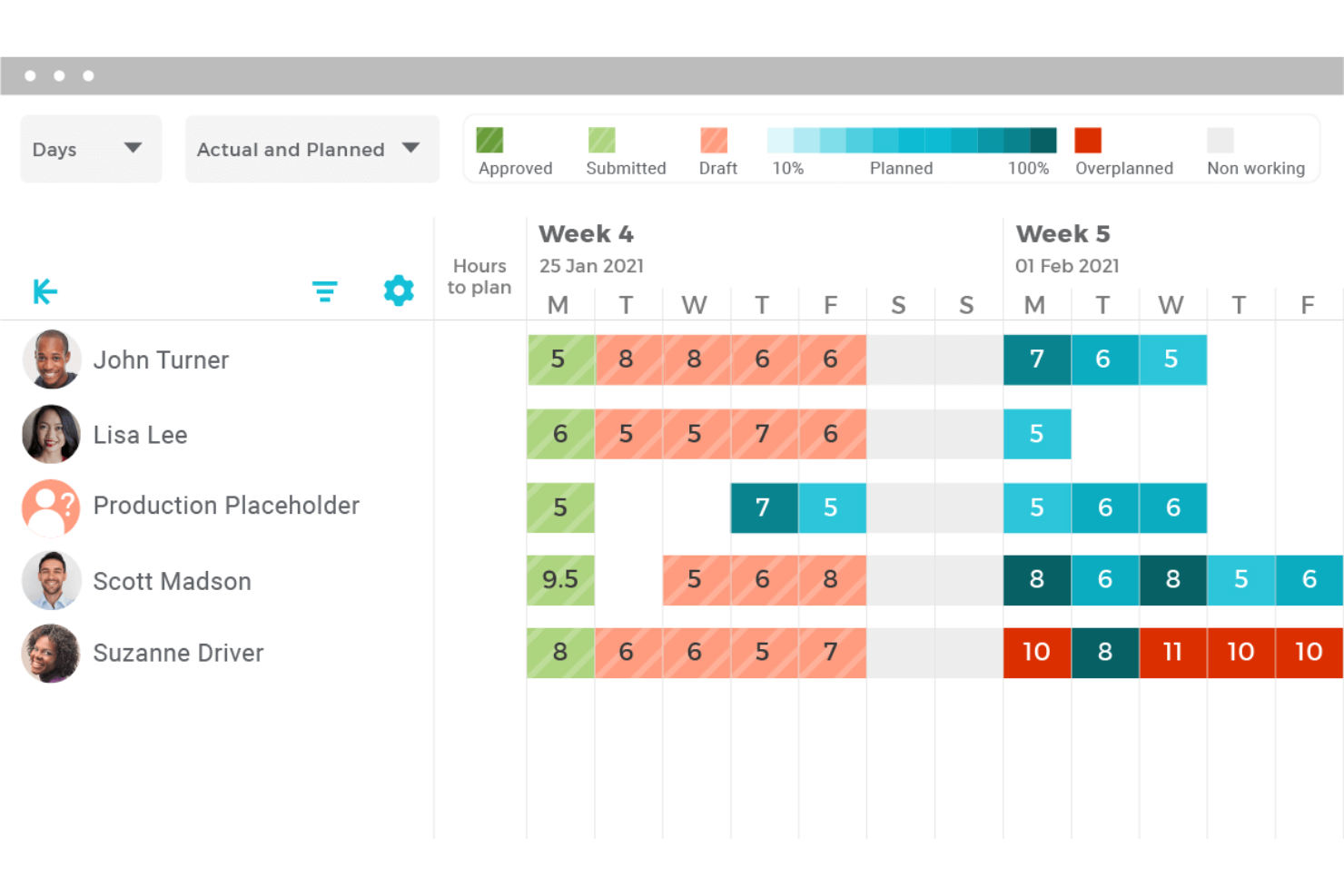
VOGSY is a professional services automation platform that combines project accounting, billing, resource management, time tracking, and financial reporting for services-based organizations.
Who Is VOGSY Best For?
VOGSY is a strong fit for mid-sized professional services firms managing multi-entity or multi-currency project portfolios across distributed teams.
Why I Picked VOGSY
VOGSY earns its spot as one of the best on my shortlist because of how it handles billing complexity that would break most project management tools. I love that a single project can carry multiple billing models at once, mixing hourly, fixed-price, and license-based arrangements across different deliverables. VOGSY's project accounting layer then ties those billing structures directly to multi-currency P&L reporting, so margin visibility doesn't lag behind invoicing activity.
VOGSY Key Features
- Resource capacity planning: Model and manage resource allocation, utilization rates, and capacity constraints across project teams.
- Multi-currency and multi-entity support: Run global project portfolios with native support for various currencies, tax regimes, and legal entities.
- Bidirectional ERP/accounting integrations: Sync data with systems like Xero, QuickBooks, Oracle, and Sage for unified project financials.
- Role-based permissions: Control financial visibility and approvals by user, project, or client segment.
VOGSY Integrations
VOGSY offers native integrations with Xero, QuickBooks Online, Sage, Oracle, Tally, Wave, ABSS, Omie, and Datev. An open API is available for custom integrations.
Pros and Cons
Pros:
- Built natively for professional services billing
- Real-time margin visibility tied directly to invoices
- Mixed billing models per single project
Cons:
- Reporting dashboards lack deep customization options
- Limited fit outside professional services firms
New Product Updates from VOGSY
VOGSY Adds Velocity Agent Verdicts for Quote Approvals
VOGSY adds Velocity agent verdicts for quote approval requests with risk levels, margin checks, discount analysis, and reasoning. This helps approvers assess quote risk before making a final decision. For more information, visit VOGSY’s official site.
 .
.
Best with native Office and Teams integration
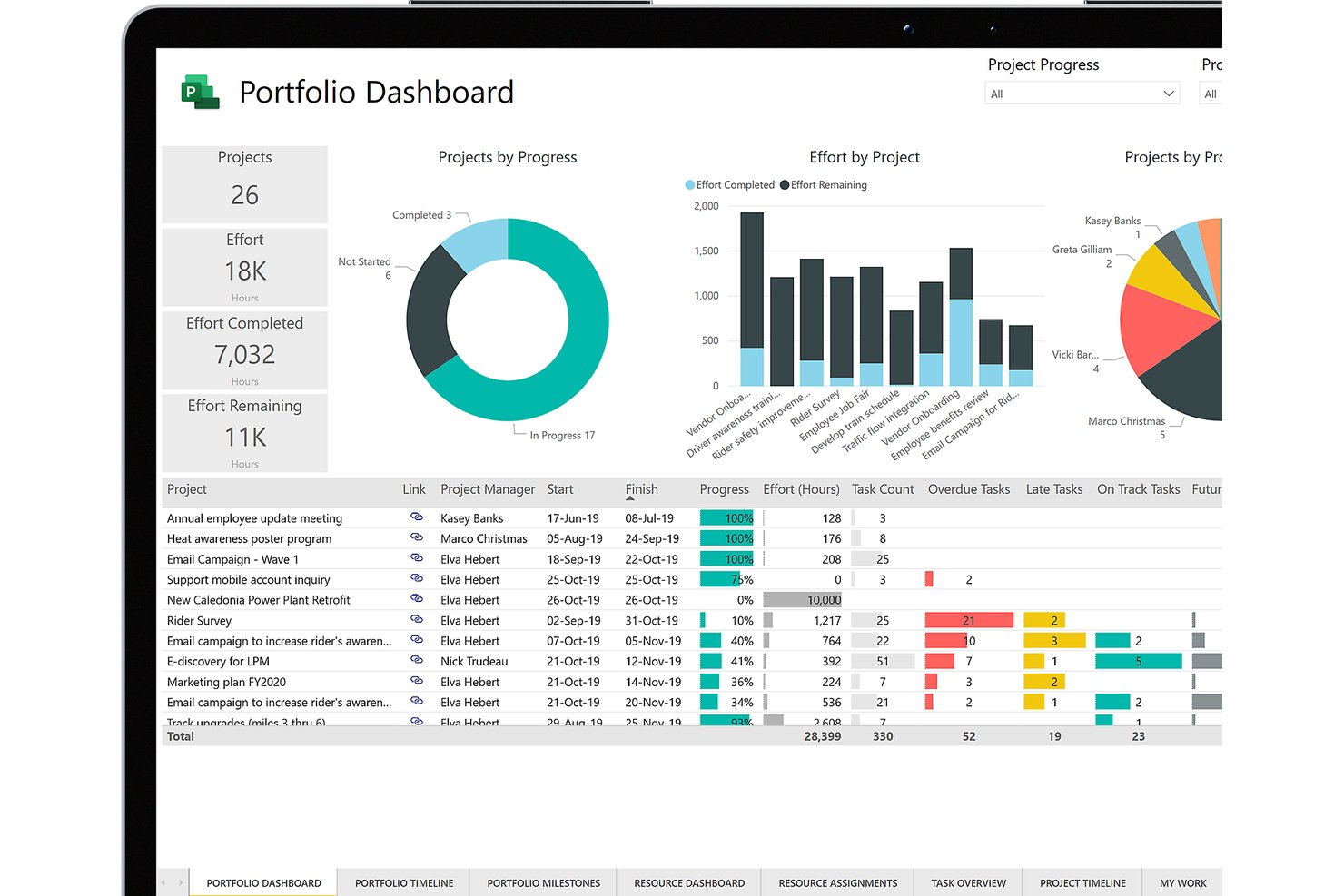
Microsoft Project is a project management platform that combines task scheduling, resource management, cost tracking, baseline budgeting, and earned value analysis across project portfolios.
Who Is Microsoft Project Best For?
Microsoft Project is a strong fit for enterprise PMO directors and large organizations already running the Microsoft 365 ecosystem who need portfolio-level project oversight.
Why I Picked Microsoft Project
Microsoft Project earns its spot on my shortlist because of how naturally its cost tracking lives inside tools my team already uses daily. I love that budget baselines and earned value analysis feed directly into Power BI dashboards without manual exports, giving my team real-time cost variance visibility across a full portfolio. Teams integration keeps budget conversations and file sharing tied directly to project tasks, so nothing falls through the cracks between a schedule update and a cost discussion.
Microsoft Project Key Features
- Gantt chart scheduling: Visualize and manage project timelines, dependencies, and milestones using interactive Gantt charts.
- Resource capacity planning: Allocate, balance, and monitor workloads across project teams to prevent over- or under-utilization.
- Baseline tracking: Set multiple budget and schedule baselines to compare planned versus actual performance at any stage.
- Portfolio reporting dashboards: Consolidate financial and status data for multiple projects for portfolio-level oversight in customizable dashboards.
Microsoft Project Integrations
Microsoft Project has native integrations across the Microsoft ecosystem, including Microsoft 365, Teams, Power BI, SharePoint, and Azure. An API is available for custom integrations.
Pros and Cons
Pros:
- Portfolio-level cost visibility across multiple projects
- Baseline budgeting with variance tracking included
- Earned value analysis built into the platform
Cons:
- Steep setup needed for financial reporting workflows
- No native invoicing or client billing capabilities

Best for accounting practice management
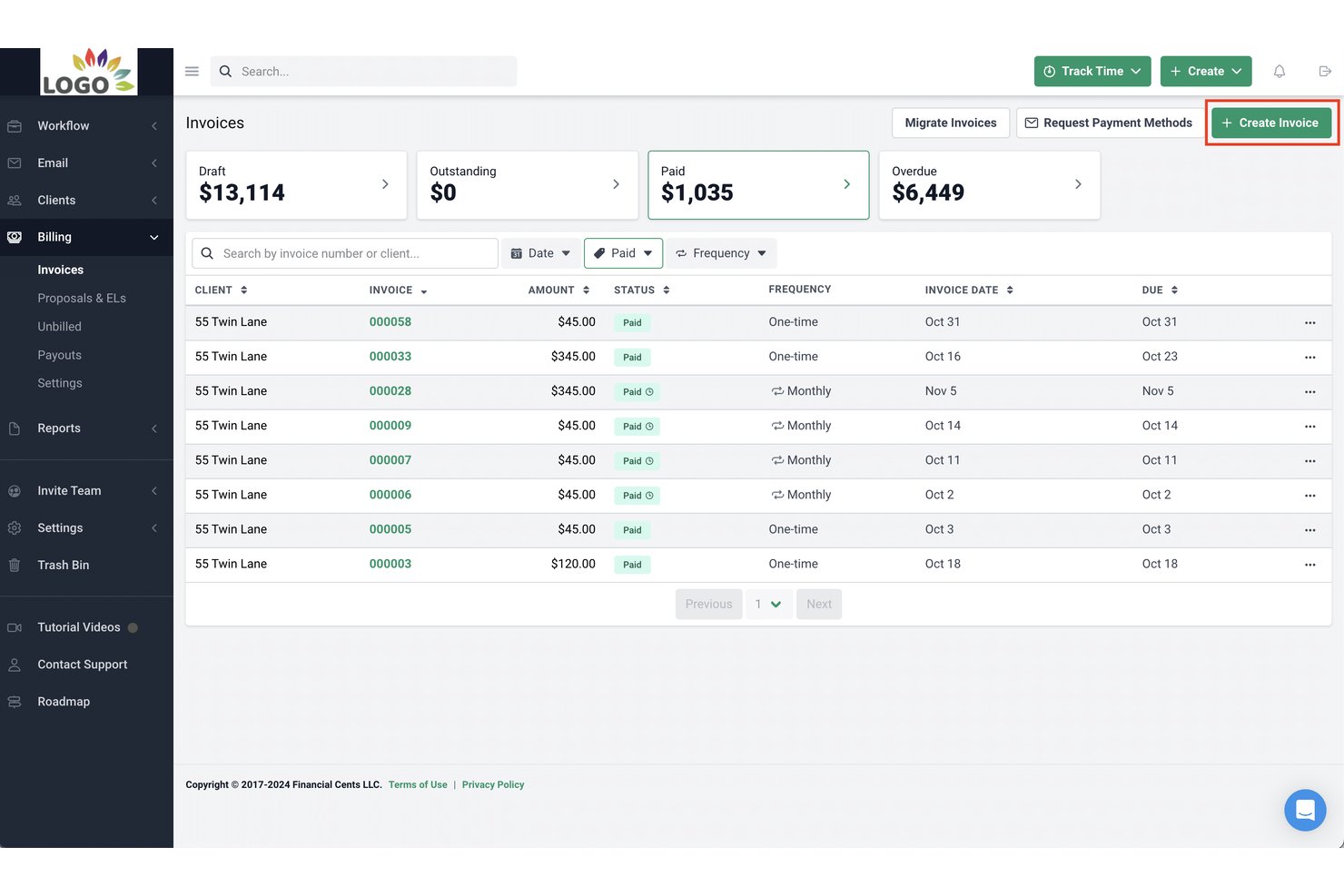
Financial Cents is an accounting practice management platform that combines client workflow tracking, time and billing, invoicing, and profitability reporting for small accounting and bookkeeping firms.
Who Is Financial Cents Best For?
Financial Cents is built for small accounting, bookkeeping, and tax firms — typically teams of 2 to 30 — that need to manage recurring client work in one place.
Why I Picked Financial Cents
I picked Financial Cents as one of the best because it's the only tool here built specifically around how accounting practices manage client work. The 250+ pre-built workflow templates cover bookkeeping, tax, and payroll engagements out of the box, with no configuration from scratch. I also like the AI File Validator, which checks each client upload against the request, accounting period, and client details, flagging wrong-year or wrong-account documents the moment they arrive.
Financial Cents Key Features
- Client CRM integration: Syncs client information with QuickBooks Online to connect records, documents, and invoices in one place.
- Passwordless client portal: Offers a secure, branded portal for document exchange and e-signature without client passwords.
- Reporting and capacity dashboard: Displays real-time team capacity, project statuses, and client-level profitability metrics.
- Pre-built accounting templates: Includes over 250 ready-to-use templates for bookkeeping, tax, and CAS workflows.
Financial Cents Integrations
Financial Cents offers native integration with QuickBooks Online and provides an API for custom integrations.
Pros and Cons
Pros:
- Real-time profitability visibility per client
- Recurring workflow templates for accounting engagements
- Time tracking tied to client invoicing
Cons:
- No multi-currency support for global teams
- Limited project budgeting depth for non-accounting firms
Rocketlane
Best for onboarding project tracking

Rocketlane is an AI-powered professional services automation (PSA) platform that covers project delivery, resource management, financial tracking, client portals, and time tracking in a single system.
Who Is Rocketlane Best For?
Rocketlane is a strong fit for professional services teams at B2B SaaS companies that need to manage client-facing project delivery alongside financials and resource planning.
Why I Picked Rocketlane
I picked Rocketlane as one of the best for onboarding project tracking because it's built from the ground up for client-facing implementation work, not adapted from a generic project tool. I like how milestone pacing gives my team a live read on whether each onboarding is on track or starting to drift, so we're course-correcting before a deadline slips. The Nitro Project Architect converts a SOW directly into a structured, execution-ready project plan, which means we're not rebuilding the same onboarding plan from scratch for every new customer. The dedicated client portal also keeps external stakeholders accountable for their tasks without my team having to chase them down over email.
Rocketlane Key Features
- Project budgeting: Set project-level budgets and track estimated vs. actual spend in real time across tasks and resources.
- Time tracking and timesheets: Log billable and non-billable hours directly against project tasks, with built-in timesheet approval workflows.
- Rate cards: Define role-based or project-specific bill rates to calculate revenue and margins accurately across your portfolio.
- Resource utilization reports: View capacity and utilization across your team to identify over-allocation or bench time before it affects delivery.
Rocketlane Integrations
Rocketlane offers native integrations with Slack, Salesforce, Jira, HubSpot, Google Calendar, and Outlook Calendar, and it connects with Zapier and Workato for broader workflow automation. An API is also available for custom integrations.
Pros and Cons
Pros:
- AI auto-generates delivery and handoff documents
- Client portal gives real-time project visibility
- Built-in financials with project-level profitability views
Cons:
- Mobile app has limited editing capabilities
- Custom reporting lacks calculated formula fields
New Product Updates from Rocketlane

Rocketlane Introduces Governance and Workforce Agents
Rocketlane introduces Governance Agents and Workforce Agents to automate delivery processes and recurring tasks. These updates help teams enforce rules and streamline project execution. For more information, visit Rocketlane’s official site.
 .
.Annen programvare for økonomisk prosjektstyring
Her er noen flere alternativer innen programvare for økonomisk prosjektstyring som ikke kom med på kortlisten min, men som likevel er verdt å undersøke:
- ProProfs Project
With simple client invoicing tools
- Adobe Workfront
For work automation
- Bonsai Agency Software
For agencies and consultancies
- Jetpack Workflow
For accounting firm efficiency
- Tempo Portfolio Manager
For predictive scheduling
- Ravetree
For billing and expenses
- Harvest
For intuitive time tracking
- Clarizen
For enterprise work management
- Smartsheet
For scalable project management
- ProWorkflow
For financial management integration


How I Evaluate Financial Project Management Software
I split my evaluation into baseline requirements—like whether a tool can track budget variance across project phases—and differentiators that separate strong options from the rest.
Core Functionality (Table Stakes For This List)
When I'm selecting tools for my list, I rank each one on a scale from 0 (does not offer the functionality) to 5 (excels in this area) for each core functionality listed below. Then, I calculate the tool's total score into a percentage. Each tool needs to achieve a minimum total score of 65% to be considered for inclusion.
- Project Budgeting: I look for multi-line budgets broken into phases, cost categories, and task-level allocations—not just a single dollar amount tied to the whole project.
- Cost & Expense Tracking: Real-time budget vs. actual views matter here, especially when labor, materials, and subcontractor costs all hit the same project.
- Time & Billing Management: I evaluate whether a tool supports configurable rate cards, billable vs. non-billable classification, and project-linked invoicing for T&M engagements.
- Financial Forecasting & EAC: Tools should calculate estimate-at-completion and estimate-to-complete figures automatically as actuals come in, not rely on manual spreadsheet updates.
- Profitability & Margin Reporting: I check for project-level P&L dashboards and the ability to roll up margin data across a full portfolio of active projects.
- Accounting System Integration: A native sync with platforms like QuickBooks, Xero, or NetSuite is what I look for—CSV exports alone aren't enough for finance teams.
Once I have a list of tools that meet the criteria, I consider what sets each platform apart.
Differentiating Factors (What Sets Vendors Apart)
Here's how I compare and contrast different vendors:
Standout Features
Revenue recognition is a big one—I look for tools that automate percentage-of-completion or milestone-based schedules so finance teams aren't reconciling this manually at month-end. Multi-currency and multi-entity support also matters for teams running projects across borders, where billing in one currency and reporting in another is routine. Resource capacity planning rounds things out by tying staffing costs directly to project margins, helping PMO leaders make smarter allocation decisions before a project goes over budget.
Beyond Features
Integration ecosystem is a major consideration—I check whether a tool connects natively with accounting platforms like QuickBooks or NetSuite, plus CRM and payroll systems, since project financials rarely live in isolation. Industry-specific fit also shapes my evaluation. A tool built for consulting firms with T&M billing works very differently from one designed for construction with cost-plus contracts. Finally, I look at how pricing scales—whether per seat, per project, or by entity—to make sure the model fits teams where finance users and project managers share the platform.
Slik velger du programvare for økonomisk prosjektstyring
Det er lett å gå seg vill i lange funksjonslister og komplekse prisstrukturer. For å hjelpe deg med å holde fokus mens du går gjennom den unike prosessen med å velge programvare, får du her en sjekkliste over faktorer du bør ha i tankene:
| Faktor | Hva du bør vurdere |
| Skalerbarhet | Forsikre deg om at verktøyet kan håndtere flere prosjekter, brukere og mer data etter hvert som teamet ditt vokser. Se etter fleksible pris- og bruksnivåer. |
| Integrasjoner | Kontroller om programvaren enkelt kobles til de eksisterende verktøyene dine – som QuickBooks, Excel eller CRM-systemet ditt – slik at du ikke utfører dobbelt arbeid. |
| Tilpasningsmuligheter | Du bør kunne tilpasse rapporter, oversikter og arbeidsflyter slik at de samsvarer med teamets behov for økonomisk oppfølging. |
| Brukervennlighet | Grensesnittet i verktøyet bør være intuitivt nok til at teamet ditt kan begynne å bruke det uten omfattende opplæring eller frustrasjon. |
| Budsjett | Se på totalkostnaden, inkludert tillegg og brukeravgifter. Velg programvare som passer budsjettet ditt uten å ofre viktige funksjoner. |
| Sikkerhetstiltak | Bekreft at plattformen bruker kryptering, rollebasert tilgang og revisjonslogger for å beskytte sensitive økonomiske data. |
| Rapporteringsverktøy | Du vil ha enkel tilgang til sanntidsdata med tilpassbare økonomiske rapporter som hjelper deg med å ta velinformerte beslutninger. |
| Supportalternativer | Hvis det oppstår problemer, er det nyttig å ha tilgang til direktechat, et hjelpesenter eller dedikert brukerstøtte som kan hjelpe deg tilbake på rett spor. |
Trender innen programvare for økonomisk prosjektstyring
I researcharbeidet mitt innhentet jeg utallige produktoppdateringer, pressemeldinger og lanseringslogger fra ulike leverandører av programvare for økonomisk prosjektstyring. Her er noen av trendene som er i ferd med å vokse frem, og som jeg følger med på:
- AI-drevet prognostisering: Flere verktøy bruker nå maskinlæring til å forutsi prosjektkostnader, forsinkelser og ressursbehov. Dette hjelper deg med å ta raskere beslutninger basert på trender i dataene dine, ikke gjetninger.
- Budsjettjusteringer i sanntid: Noen programvarer støtter nå løpende budsjettendringer basert på faktiske utgifter. Du kan oppdatere økonomiske planer uten å vente på rapporter ved månedsslutt.
- Detaljert kostnadssporing: Team kan nå spore kostnader på et mer detaljert nivå – etter oppgave, fase eller teammedlem. Dette gjør det enklere å oppdage overforbruk og justere planer i sanntid.
- Innebygd scenarioplanlegging: Flere plattformer lar deg kjøre økonomiske «hva hvis»-scenarioer for å se hvordan ulike valg kan påvirke budsjettet. Dette hjelper deg med å planlegge for både best tenkelige og verst tenkelige utfall.
- Mer visuelle økonomiske dashbord: Økonomiske data presenteres på tydeligere og mer interaktive måter. Du kan se trender, fremdrift og problemer uten å eksportere regneark eller kjøre egendefinerte rapporter.
Hva er programvare for økonomisk prosjektstyring?
Programvare for økonomisk prosjektstyring er et spesialisert verktøy som er utviklet for å håndtere og spore de økonomiske aspektene ved prosjekter. Den brukes av prosjektledere, økonomiteam og interessenter til å planlegge, kontrollere og overvåke prosjektkostnader og budsjetter.
Programvaren inneholder funksjoner for budsjettering, prognostisering, utgiftssporing og økonomisk rapportering. Den er avgjørende for brukere som trenger økonomisk kontroll over prosjekter, slik at kostnadene holder seg innenfor budsjettet og de økonomiske målene nås. I bransjer som produksjon kan programvare for økonomisk prosjektstyring også bidra til å håndtere produksjonskostnader, leverandørbetalinger og ressursplanlegging, slik at driftsutgiftene samsvarer med prosjektmålene.
Funksjoner i programvare for økonomisk prosjektstyring
Når du velger programvare for økonomisk prosjektstyring, bør du se etter følgende viktige funksjoner:
- Tilgangskontroller: Lar deg styre hvem som kan se eller redigere økonomiske data, og beskytter sensitiv informasjon.
- Budsjettsporing: Lar deg angi, overvåke og justere prosjektbudsjetter i sanntid for å unngå overforbruk.
- Registrering av utgifter: Gjør det mulig for teamet ditt å registrere og kategorisere kostnader, slik at du kan se hvor pengene går.
- Faktureringsverktøy: Hjelper deg med å opprette, sende og spore fakturaer knyttet til bestemte prosjektmilepæler eller arbeidede timer.
- Kostnadsfordeling for ressurser: Tildeler økonomiske verdier til teammedlemmer, verktøy eller tid, slik at du kan spore de faktiske prosjektkostnadene.
- Prognoseverktøy: Bruker historiske data til å anslå fremtidige utgifter og hjelpe deg med å planlegge fremover.
- Tilpassede økonomiske rapporter: Lar deg lage rapporter som er tilpasset behovene dine, slik at du kan dele innsikt med interessenter.
- Integrasjon for tidssporing: Kobler registrerte timer til budsjetter og fakturering for nøyaktig prosjektregnskap.
- Støtte for flere valutaer: Gjør det mulig å håndtere budsjetter og fakturaer i ulike valutaer for globale prosjekter.
- Revisjonsspor: Sporer alle økonomiske endringer og godkjenninger for ansvarlighet og overholdelse av regelverk.
Fordeler med programvare for økonomisk prosjektstyring
Implementering av programvare for økonomisk prosjektstyring gir flere fordeler for teamet og virksomheten din. Her er noen av fordelene du kan se frem til:
- Bedre revisjonsspor: Registrerte økonomiske endringer og godkjenningshistorikk bidrar til overholdelse av regelverk og ansvarlighet.
- Bedre budsjettkontroll: Sporing og varsler i sanntid hjelper deg med å oppdage overforbruk tidlig og holde deg innenfor budsjettet.
- Raskere faktureringssykluser: Innebygde faktureringsverktøy gjør det raskere å sende fakturaer og få betalt.
- Forbedret prognostisering: Historiske data og trendanalyse gjør det enklere å planlegge fremtidige prosjektkostnader.
- Bedre oversikt: Dashbord og rapporter viser deg nøyaktig hvor pengene dine går på tvers av prosjekter.
- Mer nøyaktig rapportering: Tilpassede økonomiske rapporter reduserer manuelle feil og gir deg data du kan stole på.
- Enklere ressursplanlegging: Verktøy for kostnadsfordeling hjelper deg med å tilpasse ressurser til budsjetter på en mer effektiv måte.
Kostnader og priser for programvare for økonomisk prosjektstyring
Ved valg av programvare for økonomisk prosjektstyring er det nødvendig å forstå de ulike prismodellene og tilgjengelige abonnementene. Kostnadene varierer basert på funksjoner, teamstørrelse, tillegg og mer. Tabellen nedenfor oppsummerer vanlige abonnementer, gjennomsnittsprisene deres og typiske funksjoner som er inkludert i løsninger for økonomisk prosjektstyring:
Sammenligningstabell for abonnementer for programvare for økonomisk prosjektstyring
| Abonnementstype | Gjennomsnittspris | Vanlige funksjoner |
| Gratis | $0 | Grunnleggende oppgavestyring, gjøremålslister, innebygd kalender, begrenset antall brukere |
| Individuell | $3.66 per måned | Avanserte tavler, økt lagringsplass, forbedret kundestøtte, integrasjoner med tredjeparter |
| Småbedrift | $8.90 per måned/bruker | Gantt-diagramvisning, innebygde dokumenter, automatisering, utvidet kundestøtte, integrasjon med andre verktøy |
| Mellomstor bedrift | $16.88 per måned/bruker | Avansert sikkerhet, ubegrenset antall brukere, rapportering i sanntid, ulike prosjektvisninger |
| Virksomhet | Forhandlingsbart | Tilpassede tillatelser, avansert rapportering, prioritert kundestøtte, omfattende funksjonssett, krav om minimum antall brukere |
Ofte stilte spørsmål om programvare for økonomisk prosjektstyring
Hvilke typer data og analyser tilbyr programvare for økonomisk prosjektstyring?
Økonomisk prosjektstyringsprogramvare gir budsjettsporing, utgiftsrapportering, økonomiske prognoser og analyser av prosjektlønnsomhet. Disse verktøyene gir innsikt i arbeidskostnader, kostnadssatser og prosjektmarginer. Avanserte analysefunksjoner inkluderer en porteføljeoversikt for å følge med på KPI-er, overvåke inntektsføring, vurdere avtaler om løpende honorar og generere tidsrapporter for å holde prosjektene innenfor budsjettet.
Hvor enkelt er det å oppdatere planen i programvare for økonomisk prosjektstyring, og hvem gjør endringene?
Det er som regel enkelt å oppdatere planer i programvare for økonomisk prosjektstyring, siden de fleste moderne løsninger er utviklet for å gjøre det enkelt å justere prosjektplaner, budsjetter og tidsplaner. Autoriserte brukere, for eksempel prosjektledere og finansanalytikere, kan gjøre endringer, og programvaren inneholder ofte revisjonsspor og endringslogger for å sikre ansvarlighet.
Hvilke aktiviteter kreves for å få størst mulig utbytte av programvare for økonomisk prosjektstyring?
For å maksimere utbyttet av programvare for økonomisk prosjektstyring må man fastsette tydelige økonomiske mål, oppdatere og gjennomgå økonomiske data jevnlig og bruke rapportering og analyser som grunnlag for beslutninger. God opplæring av teamet og integrering av programvaren med andre forretningssystemer er også viktige aktiviteter for å utnytte programvarens fulle potensial.
Hvordan skiller programvare for økonomisk prosjektstyring seg fra andre løsninger for prosjektstyring?
Programvare for økonomisk prosjektstyring fokuserer på de økonomiske aspektene ved prosjektstyring, som budsjettering, kostnadssporing og økonomisk rapportering, i motsetning til generelle løsninger for prosjektstyring, som kan konsentrere seg om oppgavefordeling og planlegging. Denne spesialiseringen gir mer detaljert økonomistyring i prosjektene.
Hvordan vil programvare for økonomisk prosjektstyring bidra til å løse de tre største problemene prosjekter står overfor i dag?
Programvare for økonomisk prosjektstyring løser vanlige prosjektproblemer som budsjettoverskridelser, ineffektiv ressursfordeling og manglende økonomisk oversikt. Den tilbyr nøyaktig budsjettering, kostnadssporing i sanntid og verktøy for økonomiske prognoser, slik at prosjektledere kan overvåke den økonomiske utviklingen og håndtere problemer proaktivt.
Hvilken støtte og opplæring tilbyr programvare for økonomisk prosjektstyring?
Støtte og opplæring for programvare for økonomisk prosjektstyring kan omfatte hjelpesentre på nett, brukerveiledninger og kundestøtte via telefon, e-post eller direktechat. Leverandører kan tilby webinarer, nettbaserte veiledninger og opplæringsøkter med fysisk oppmøte, samt brukerfora for samhandling mellom brukere. Tilgjengeligheten og kvaliteten på disse tjenestene er viktige hensyn når man velger programvare.
Hvordan integreres programvare for økonomisk prosjektstyring med andre forretningssystemer?
Programvare for økonomisk prosjektstyring kan integreres med programvare for prosjektregnskap, CRM-systemer, ERP-systemer og HR-programvare. Disse integrasjonene legger til rette for sømløs overføring av økonomiske data, minimerer manuell dataregistrering og reduserer feil. Integrasjon med regnskapsprogramvare kan for eksempel effektivisere fakturering og utgiftssporing, mens CRM-integrasjon kan gi økonomisk innsikt i kundeprosjekter.