10 beste programmer for tidsregistrering for konsulenter i 2026

Liste over den beste programvaren for tidsregistrering for konsulenter


Den beste programvaren for tidsregistrering for konsulenter hjelper deg med å holde orden, fakturere nøyaktig og håndtere flere kunder og stramme tidsfrister, slik at du får mest mulig ut av tiden din. Uten riktig programvare vet du ikke hvor mye tid du bruker på hvert prosjekt og hver kunde, noe som gjør faktureringen til et mareritt.
I løpet av tiden min som prosjektleder har jeg brukt mange verktøy for tidsregistrering og sett hvordan de øker produktiviteten og effektiviteten. Til denne veiledningen har jeg testet og vurdert de mest populære alternativene uavhengig, slik at du kan finne et verktøy som passer kravene dine når det gjelder brukervennlighet, viktige funksjoner og samlet verdi.
Nedenfor går jeg gjennom de beste alternativene og forklarer hva hvert av dem tilbyr, slik at du trygt kan velge det som passer best.
Why Trust Our Software Recommendations
Our team has been testing and reviewing software since 2012. As project managers ourselves, we know how difficult—and important—it is to choose the right software.
For this guide, we evaluated tools using hands-on testing and independent research, scoring tools using our selection criteria. We also draw on insights from industry thought leaders and practicing project management experts.
Our reviews reflect our human editorial judgment, not a sales pitch.
Expert reviewers:
Sammenligningstabell: Programvare for tidsregistrering for konsulenter
Denne sammenligningstabellen oppsummerer prisopplysningene for mine beste utvalg av programvare for tidsregistrering for konsulenter:
| Tool | Best For | Trial Info | Price | ||
|---|---|---|---|---|---|
| 1 | Best as AI for business | Free demo available | From $8/user/month | Website | |
| 2 | Best for agency management | 14-day free trial + free demo available | From $10/user/month (billed annually) | Website | |
| 3 | Best with calendar integrations for time entry | Free plan + 30-day free trial + free demo available | From $9/user/month (billed annually) | Website | |
| 4 | Best with privacy-focused time tracking | 14-day free trial + free demo available | From $6.42/user/month (billed annually) | Website | |
| 5 | Best for simple time management | Free plan + 30-day free trial + free demo available | From $6/user/month (billed annually) | Website | |
| 6 | Best for multi-rate client billing | Free plan + 7-day free trial available | From $4.99/user/month | Website | |
| 7 | Best for automatic time tracking | Free 14-day trial + free demo available | From $9/user/month (billed annually) | Website | |
| 8 | Best for mid-sized agencies and consultancies | Free demo available | Pricing upon request | Website | |
| 9 | Best for maximizing billable utilization | 21-day free trial + free demo available | From $17/user/month (billed annually) | Website | |
| 10 | Best for expense tracking | Free trial + free plan available | From $9/user/month (billed annually) | Website |


Anmeldelser av den beste programvaren for tidsregistrering for konsulenter
Her er mine detaljerte sammendrag av den beste programvaren for tidsregistrering for konsulenter som kom med på listen min. Jeg har dekket viktige funksjoner, fordeler og ulemper, integrasjoner og ideelle bruksområder for å hjelpe deg med å finne den beste løsningen for deg.

Best as AI for business
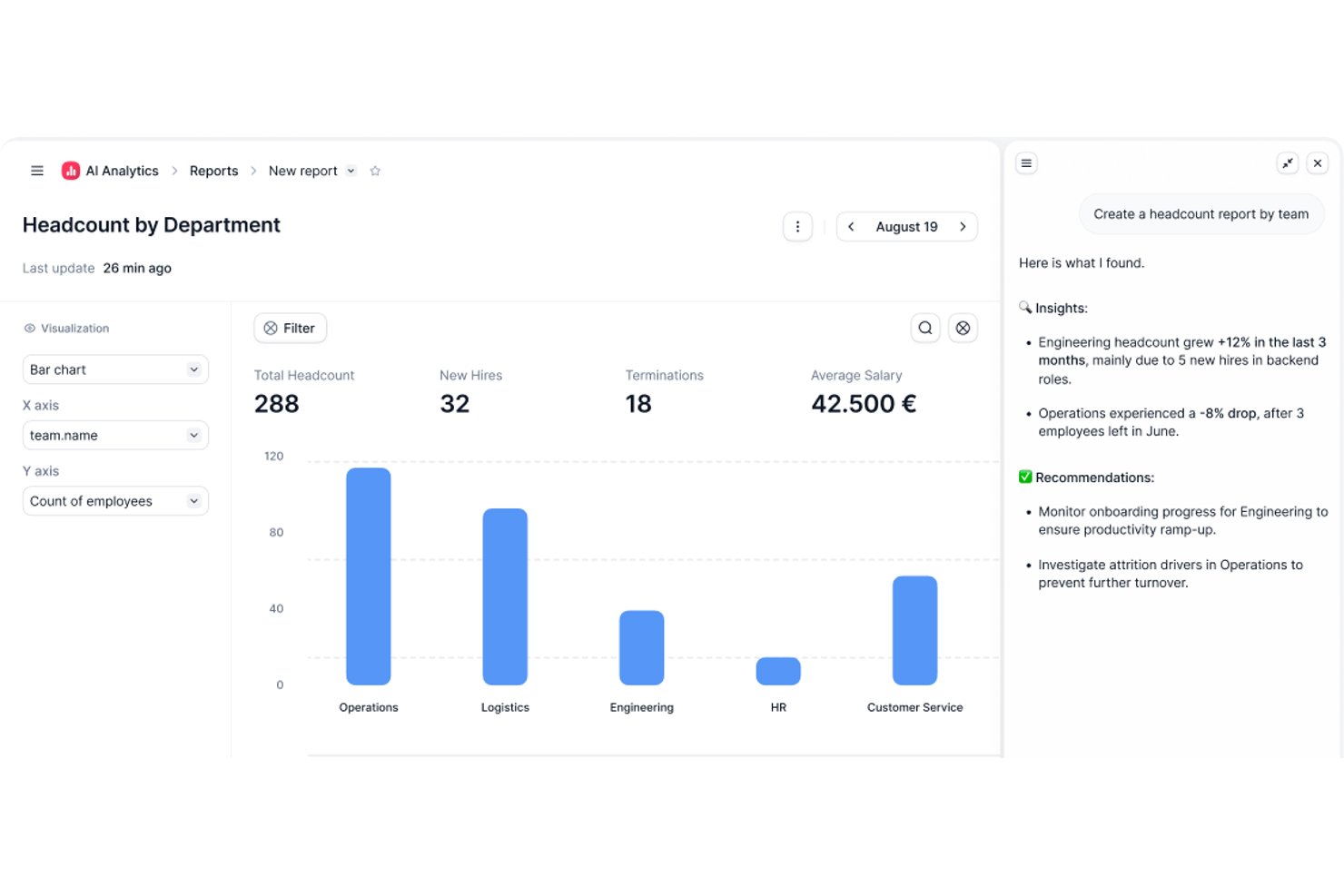
Factorial is an AI-driven HR and business operations platform that combines time tracking, shift management, timesheet approvals, and project-hour logging with AI-assisted tools for scheduling, reporting, and employee policy queries.
Who Is Factorial Best For?
Factorial suits HR and operations teams in growing companies that want AI assistance built into daily workflows like scheduling, reporting, and policy management.
Why I Picked Factorial
I've included Factorial in my top picks because its AI-driven approach to business operations brings real intelligence to daily HR and time-management workflows. I like how it uses AI to assist with scheduling, generate reports, and answer employee policy questions automatically. Consultants managing teams can track project hours, approve timesheets in bulk, and request employee e-signatures without manual chasing.
Factorial Key Features
- Project hour logging: Employees can clock into assigned projects to record hours worked against specific client engagements.
- Bulk timesheet export: Approved timesheets can be exported in bulk, with employee e-signature requests supported directly in the platform.
- Shift scheduling: Managers can build and manage team schedules using drag-and-drop planning, automated shifts, and rotating shift configurations.
- Mobile clock-in with geolocation: Employees can clock in and out via the mobile app or QR code, with geolocation and geofencing options available.
Factorial Integrations
Factorial lists marketplace integrations with Microsoft Power BI, Google Workspace, Slack, Sage 200, DATEV LODAS, and Okta. It also supports a Public API, webhooks, SDKs, OAuth 2.0, API keys, OpenAPI, and Zapier.
Pros and Cons
Pros:
- Familiar interface simplifies routine time entry
- Project-hour tracking with manager approvals
- Quick clock-ins and timesheet submissions
Cons:
- Limited analytics hinder profitability reviews
- No documented client-specific bill-rate controls

Best for agency management

Productive is a project management and time tracking tool built for agencies and service-based teams. It helps you manage projects, track time, and improve daily operations, and it’s a good fit for teams that want to work more efficiently.
Why I picked Productive: Productive combines project management and time tracking in one place. Your team can track hours and manage budgets without switching tools. The budgeting feature helps you keep project costs in check. You can also manage leads and monitor upcoming work with the sales pipeline. It’s different from other time tracking tools because it ties time tracking, project delivery, and business performance together.
Standout Features & Integrations:
Features include the ability to generate invoices directly from tracked time and project data. Productive also offers detailed analytics and insights into project performance, time usage, and profitability.
Integrations include QuickBooks, Slack, Google Calendar, Microsoft Outlook, Jira, and Xero.
Pros and Cons
Pros:
- Accurate time tracking
- Effective budgeting feature
- Seamless agency management tools
Cons:
- May need customization for specific needs
- Limited offline functionality
New Product Updates from Productive
Productive Adds Voice Dictation, Slack Connector, Proposals, and Overtime
Productive adds voice dictation, a Slack Connector, proposal controls, and overtime tracking. These updates support faster AI interactions, client proposals, and time management. For more information, visit Productive’s official site.
Toggl
Best with calendar integrations for time entry
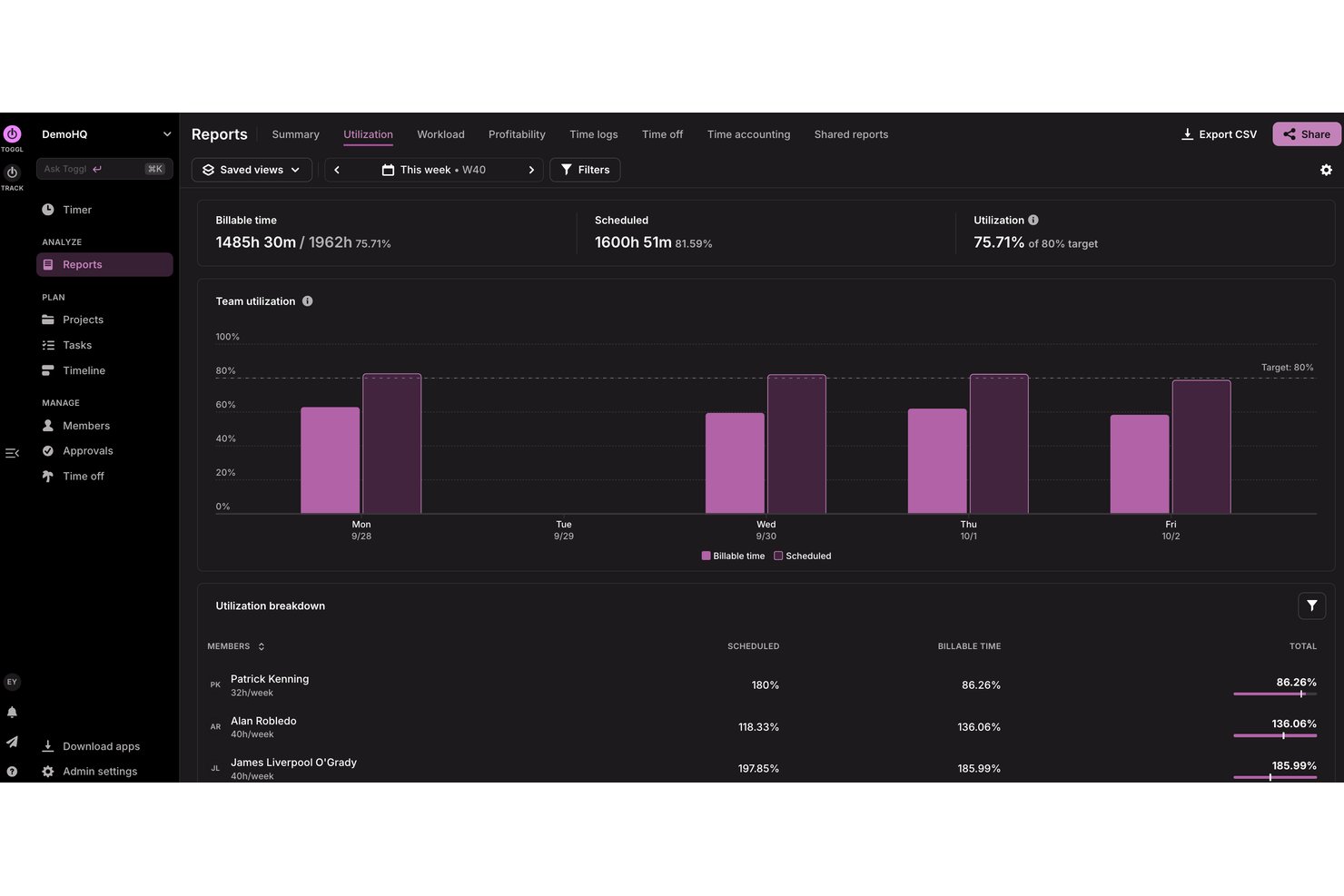
Toggl is a time tracking platform for consultants that brings together timer-based and manual time entry, capacity planning, multi-project organization, billable rate management, profitability reporting, and integrations with popular tools.
Who Is Toggl Best For?
Toggl is a strong fit for consultants and freelancers who want to capture billable time through calendar events without switching between tools.
Why I Picked Toggl
I've included Toggl in my top picks because its calendar integration is genuinely one of the best I've seen for consultants who live in Google Calendar or Outlook. You can set up keyword-based matching rules that automatically assign calendar events to the right client project, tag them as billable, and log them without any manual input. I also like that the Premium Profitability Report breaks down revenue, cost, and margin by client and project, so you always know which engagements are actually worth your time.
Toggl Key Features
- Billable rate management: Set hourly rates at the workspace, member, project, or project-member level, with historical rate retention for accurate reporting over time.
- Timesheet approvals: Submit, review, approve, or reject team timesheets with multi-layer approval support, configurable reminders, and a full audit log.
- Fixed-fee project tracking: Set a client budget for fixed-fee engagements and track logged time and rates against it to monitor spend in real time.
- AI-assisted time logging: Ask Toggl AI in plain language to log time, create projects, or update tasks directly within your workspace.
Toggl Integrations
Toggl offers native integrations with Google Calendar, Outlook Email & Calendar, Asana, Jira, Slack, GitHub, Todoist, Google Docs, Gmail, and iCal. It also provides a REST API, webhooks, an MCP server, and CLI for custom integrations.
Pros and Cons
Pros:
- Estimate-versus-actual views help catch scope drift
- Profitability reports expose engagement-level margins
- Client-project tracking keeps billable work organized
Cons:
- Invoice layouts and recurring automation remain limited
- Client approval isn't part of timesheet workflow

DeskTime
Best with privacy-focused time tracking
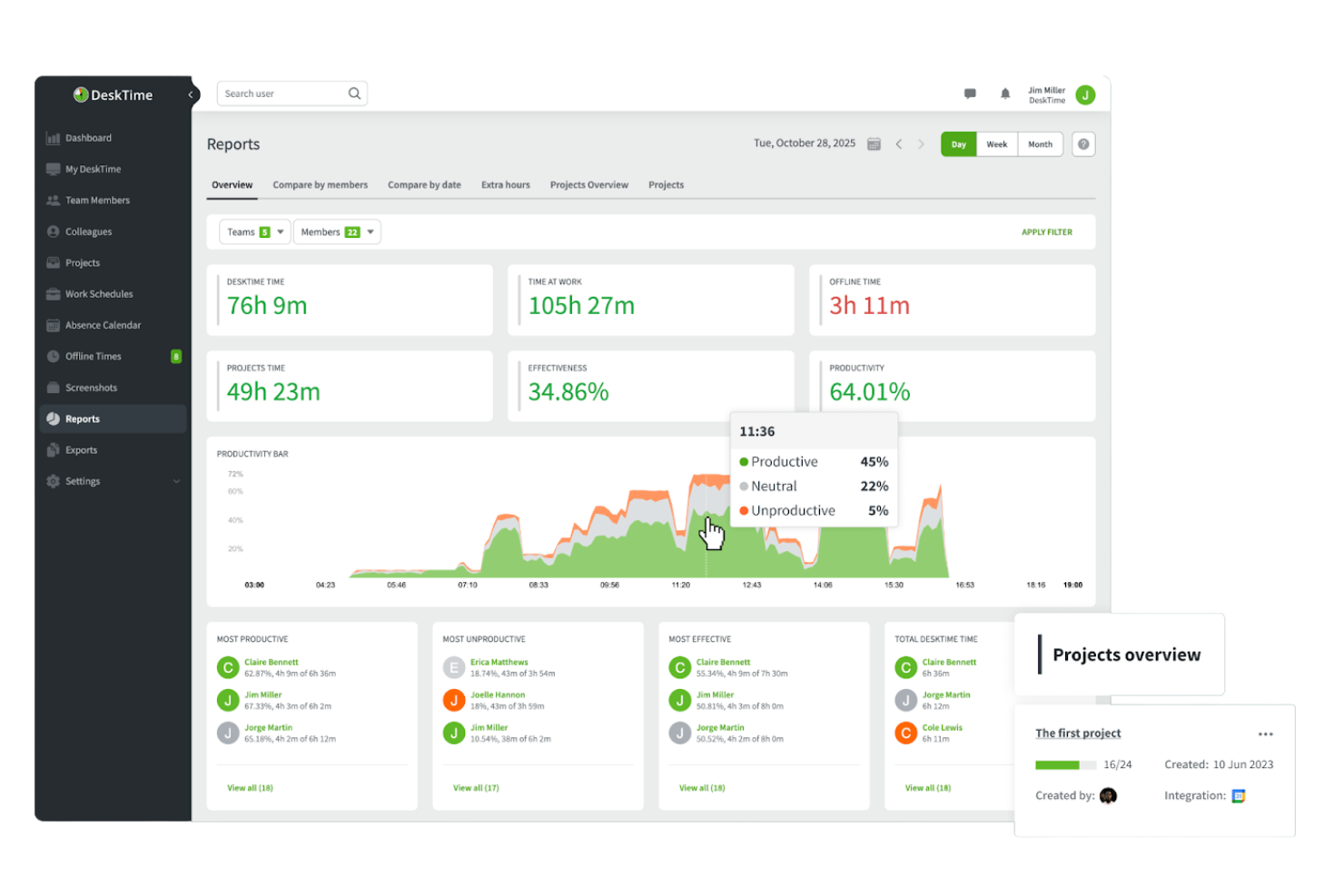
DeskTime is an automatic time tracking tool that logs billable hours, tracks application and URL usage, monitors project costs, and generates productivity reports across clients and teams.
Who Is DeskTime Best For?
DeskTime suits small consulting teams and independent consultants who need automatic, hands-off time tracking without invasive employee monitoring.
Why I Picked DeskTime
I picked DeskTime as one of the best because its approach to privacy is genuinely different from other automatic tracking tools. The Private Time feature lets users pause all monitoring with one click, so personal browsing or confidential client calls are never captured. When screenshots are on, they blur automatically before appearing on any admin dashboard. I've seen that kind of control become non-negotiable once consultants start tracking hours across sensitive client engagements.
DeskTime Key Features
- Automatic desktop time tracking: Captures all app, website, and document activity as consultants work, without manual timers.
- Project and task tracking: Lets you assign tracked time directly to projects, clients, or tasks for more detailed reporting.
- Mobile and offline time entry: Allows logging of hours when meeting on-site with clients or working away from a computer.
- Calendar integrations: Syncs with Outlook and Google Calendar to automatically log scheduled consulting appointments as time entries.
DeskTime Integrations
DeskTime offers native integrations with Jira, Asana, Trello, GitLab, and supports Zapier and an API for custom integrations.
Pros and Cons
Pros:
- Absence scheduling simplifies consultant leave management
- Private Time feature protects sensitive client sessions
- Automatic tracking catches unlogged billable hours
Cons:
- Reporting lacks per-client profitability breakdowns
- No native invoicing for client billing

actiTIME
Best for simple time management
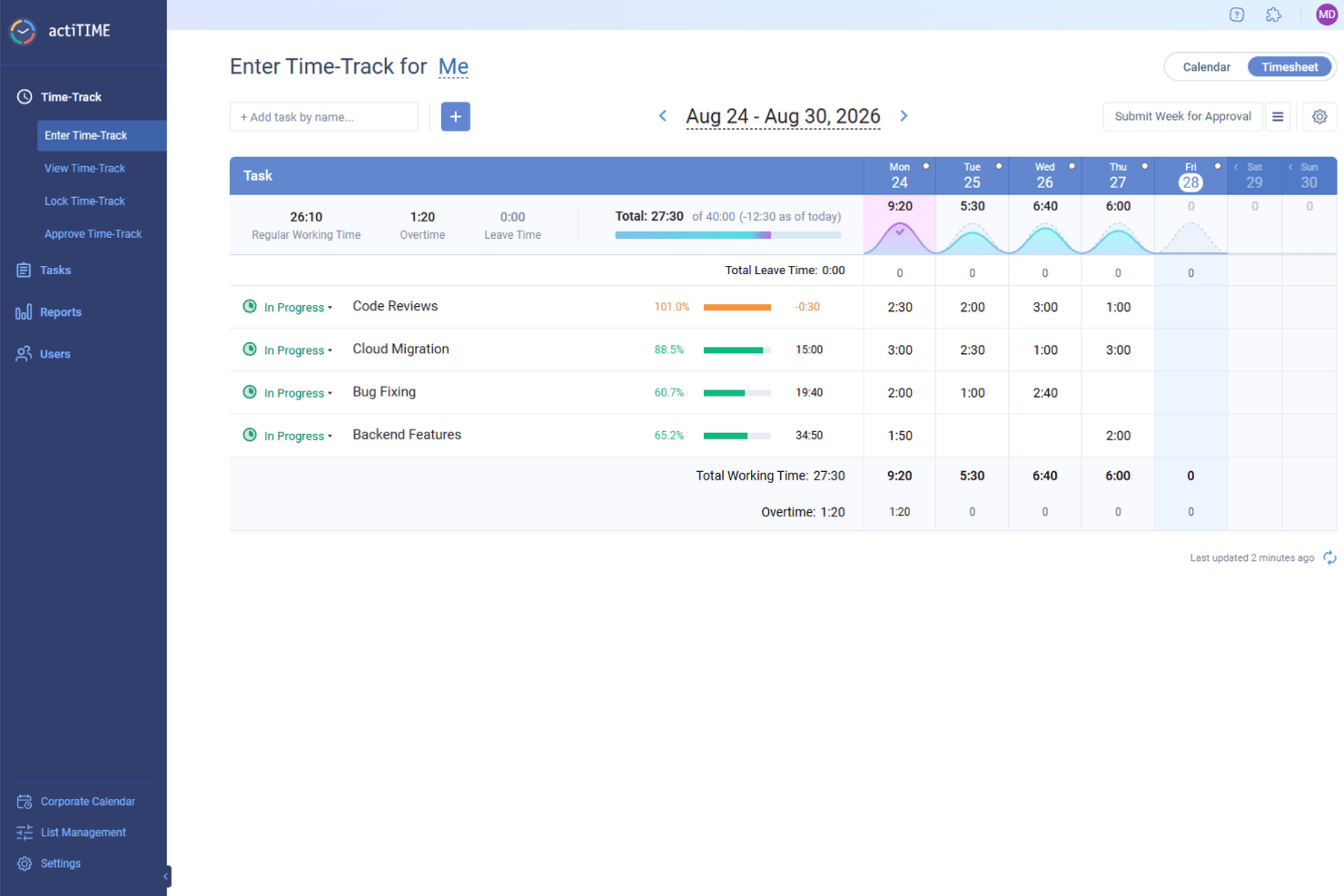
actiTIME is a time tracking and management tool for teams that want a simple way to track hours and manage projects. It’s commonly used by small to mid-sized teams that want time tracking and task management in one platform.
Why I picked actiTIME: actiTIME offers a simple approach to time management with features like manual time entries and daily timesheets. Its user-friendly interface makes it easy for your team to get started. You can set up projects and tasks quickly and stay organized easily. The reporting feature gives you clear insights into how the team’s time is spent, which you can use in decision-making.
Standout Features & Integrations:
Features include customizable billing rates that let you set different rates for different projects or clients. The task management feature helps you organize and prioritize work efficiently. actiTIME also offers time off management so you can track vacations and leaves.
Integrations include QuickBooks and Zapier.
Pros and Cons
Pros:
- Customizable billing rates
- Easy project setup
- Simple manual time entries
Cons:
- Basic user interface
- Limited advanced features
New Product Updates from actiTIME

actiTIME Visual Hour Indicator and Time-Track Report Redesign
actiTIME adds a wave-style hour indicator to the Timesheet and Calendar views and refreshes the Time-Track report for smoother navigation and clearer visuals. For more information, visit actiTIME's official site.

Clockify
Best for multi-rate client billing

Clockify is a time tracking tool used by freelancers, small teams, and larger organizations. It helps you track work hours, manage projects, and stay productive.
Why I picked Clockify: I selected Clockify because it allows consultants to set custom hourly rates for specific projects, clients, and individual team members. Independent advisors and small firms can assign distinct billable values across different tasks within the same project, ensuring accurate invoice math. This makes it ideal for consultants who need to streamline multi-rate client billing and protect project profit margins without paying for expensive enterprise software.
Standout Features & Integrations:
Features include a Pomodoro timer that encourages focused work periods. The dashboard provides a clear overview of tracked time and project progress. Clockify also offers invoicing functionality, so you can create invoices directly from tracked hours.
Integrations include Asana, Trello, Jira, Google Calendar, QuickBooks, Zapier, monday.com, and Basecamp.
Pros and Cons
Pros:
- Detailed reporting capabilities
- Scalable for growing teams
- Five users on free plan
Cons:
- May require manual adjustments
- Basic features in free version

Timely
Best for automatic time tracking

Timely is an automatic time tracking tool designed for consultancies, agencies, and SaaS teams. It features memory tracking and AI-generated timesheets which help improve time management and boost operational efficiency.
Why I picked Timely: Timely uses automatic tracking to take the pressure off your team when it comes to logging hours. The memory tracker records work in the background, and AI features can build out timesheets for you. You get a clear view of where your time goes without chasing team members for updates. It’s different from other time tracking tools because it maintains accuracy and doesn’t require you to micromanage your team.
Standout Features & Integrations:
Features include project dashboards that offer a clear view of your team's workload and progress. Invoicing capabilities help you manage billing and convert tracked hours into invoices. Detailed reporting offers insights into time usage so you can make informed decisions.
Integrations include Asana, Trello, Google Calendar, Microsoft Teams, Slack, QuickBooks, Zapier, Zoom, Jira, and Outlook.
Pros and Cons
Pros:
- Detailed memory tracking
- AI-generated timesheets
- Automatic time tracking
Cons:
- May require manual adjustments
- Limited offline capabilities

Forecast
Best for mid-sized agencies and consultancies

Forecast is an AI-powered project and resource management tool designed to help consultants manage time, projects, and financials in one platform. Its AI-assisted time tracking captures hours automatically, reducing manual input and improving billing accuracy. The tool also supports project planning, resource allocation, and financial tracking, making it a comprehensive choice for consulting teams.
Why I picked Forecast: I picked Forecast because its AI-powered time tracking removes the need for manual timesheets while giving you real-time visibility into how your team’s hours are spent. You can spot risks early with predictive alerts and use utilization reports to balance workloads. Unlike other tools, Forecast ties time tracking directly into budgeting and project delivery, so you can keep margins healthy while staying on schedule.
Standout Features & Integrations:
Features include automated time tracking, risk prediction alerts, and real-time project dashboards. Forecast also offers resource optimization and budget management to help you prevent bottlenecks and maintain financial control.
Integrations include Salesforce, HubSpot, Pipedrive, Slack, Google Calendar, MS Teams, Zapier, Trello, Jira Cloud, QuickBooks, Xero, and Sage Intacct.
Pros and Cons
Pros:
- Strong resource planning tools
- Predictive risk management
- Accurate AI time tracking
Cons:
- Limited reporting depth
- Steep learning curve

Best for maximizing billable utilization

Projectworks is a cloud-based PSA platform designed specifically for consulting firms. It combines time and expense tracking, resource planning, and financial reporting to help teams stay profitable and on schedule. With features tailored to consulting workflows, Projectworks can give you full visibility into utilization rates and project margins.
Why I picked Projectworks: I picked Projectworks because it helps you maximize billable hours while reducing admin overhead. The live time and expense tracking makes it easy to keep client billing accurate, and the utilization dashboards give you a clear view of workload distribution across projects. I also like that it integrates directly with accounting tools like Xero and QuickBooks, so invoicing stays smooth and financials are always up to date.
Projectworks standout features and integrations:
Features include resource planning tools that help you allocate staff effectively, automated invoicing to reduce billing errors, and real-time project reporting so you always know where projects stand financially. Consultants can also track reimbursable expenses alongside time entries, ensuring full cost visibility.
Integrations include Xero, QuickBooks, HubSpot, Salesforce, 12d Synergy, MYOB, Jira, Azure DevOps, Employment Hero, Zapier, direct data connections, and API connections.
Pros and Cons
Pros:
- Automated invoicing
- Strong utilization insights
- Accurate real-time tracking
Cons:
- Initial setup takes time
- Limited reporting customization

Harvest
Best for expense tracking

Harvest is a time tracking and expense management tool used by freelancers and small to mid-sized teams. It helps track time, manage costs, and keep better control over projects.
Why I picked Harvest: Harvest makes it easy to track expenses and keep project costs organized. Your team can log expenses quickly using a simple interface. Time tracking and invoicing are built in, so billing stays accurate. Reports combine time and expense data to help you make better financial decisions. It’s different from other time tracking tools because it brings time, cost, and billing together in one place.
Standout Features & Integrations:
Features include the ability to generate detailed invoices directly from tracked time and expenses. The project budgeting feature helps you monitor project financials and stay within budget. Harvest also lets you review and approve logged time easily.
Integrations include QuickBooks, Slack, Asana, Trello, Xero, Stripe, Zapier, Google Calendar, Basecamp, and GitHub.
Pros and Cons
Pros:
- Timesheet approval process
- Detailed invoicing features
- Effective expense management
Cons:
- Can be expensive for large teams
- Limited customization options
Annen programvare for tidsregistrering for konsulenter
Her er noen flere alternativer for programvare for tidsregistrering for konsulenter som ikke kom med på listen min, men som likevel er verdt å undersøke nærmere:
- FunctionFox
For creative teams
- Ravetree
For all-in-one project management
- ProWorkflow
For project collaboration
- Timogix
For user-friendly interface
- Insightful
For automatic time mapping
- Resource Guru
For resource scheduling
- Accelo
For project-level tracking of time & costs
- GoodDay
With customizable dashboards
- Kantata
For professional services teams
- Runn
For real-time forecasting
- Asana
For task management
- Wrike
For cross-team collaboration
- TimeCamp
For automatic activity tracking
- Jibble
For attendance tracking
- ClickUp
For all-in-one productivity
- Hubstaff
For remote team management
- TMetric
For detailed time reports
- Rocketlane
For project delivery
- monday.com
For customizable workflows


How I Evaluate Time Tracking Software for Consultants
I split my evaluation into two layers: the baseline features every tool must have—like client-level billing rates and timesheet approvals—and the differentiators that set the best options apart.
Core Functionality (Table Stakes For This List)
When I'm selecting tools for my list, I rank each one on a scale from 0 (does not offer the functionality) to 5 (excels in this area) for each core functionality listed below. Then, I calculate the tool's total score into a percentage. Each tool needs to achieve a minimum total score of 65% to be considered for inclusion.
- Billable Hours Tracking: I check whether a tool lets you distinguish billable from non-billable hours and set different rates per client, project, or consultant role.
- Client & Project Structuring: Every consulting engagement has layers, so I look for tools that organize time by client, project, phase, and task.
- Invoicing From Time Entries: I evaluate how each tool converts logged hours into client invoices, whether natively or through direct accounting integrations.
- Timesheet Approvals & Submission: Approval workflows matter when billing clients, so I look for structured submit-and-approve flows with entry locking.
- Budget & Utilization Reporting: I look for reports that show budget burn, utilization rates, and per-client profitability rather than just raw hour totals.
- Project Management Integration: Consultants live in PM tools, so I evaluate whether time entries connect to tasks and milestones in platforms like Asana or Jira.
Once I have a list of tools that meet this criteria, I consider what sets each platform apart.
Differentiating Factors (What Sets Vendors Apart)
Here's how I compare and contrast different vendors:
Standout Features
Automatic time capture is a real differentiator—tools that log activity from calendars, apps, and meetings in the background help consultants recover hours they'd otherwise forget to bill. I also evaluate whether a platform offers client portal access, where clients can review logged time and approve entries directly. For firms managing ongoing engagements, retainer and fixed-fee tracking matters because it lets you monitor burn-down rates and flag clients before a balance runs out.
Beyond Features
Integrations with accounting tools like QuickBooks and Xero matter because consultants need logged hours to flow into invoicing without manual re-entry. I also evaluate firm size fit—a solo consultant needs a same-day setup and a lightweight interface, while a 50-person firm needs multi-level approvals and portfolio-level views. Pricing transparency is another factor I check, particularly whether free tiers or trials give independent consultants enough room to validate the tool before committing.
Slik velger du programvare for tidsregistrering for konsulenter
Det er lett å gå seg vill i lange funksjonslister og kompliserte prismodeller. For å hjelpe deg med å holde fokus mens du går gjennom den unike prosessen din for valg av programvare, får du her en sjekkliste over faktorer du bør ha i bakhodet:
| Faktor | Hva du bør vurdere |
|---|---|
| Skalerbarhet | Kan programvaren vokse med teamet ditt? Vurder om den støtter antallet brukere du forventer å trenge etter hvert som virksomheten utvider seg. Se etter alternativer som tilbyr fleksible prisnivåer. |
| Integrasjoner | Kan programvaren kobles til de eksisterende verktøyene dine? Sørg for at den integreres med plattformene dine for prosjektstyring, regnskap og kommunikasjon. Dette sparer tid og reduserer manuell dataregistrering. |
| Tilpasningsmuligheter | Kan du tilpasse programvaren til arbeidsflytene dine? Sjekk om du kan tilpasse rapporter, oversikter og brukertillatelser. Denne fleksibiliteten kan gjøre verktøyet mer effektivt for dine spesifikke behov. |
| Brukervennlighet | Er programvaren intuitiv for teamet ditt? Se etter et brukervennlig grensesnitt som reduserer læringskurven. Vurder å bestille en demonstrasjon for å se hvor enkelt teamet ditt kan navigere på plattformen. |
| Implementering og opplæring | Hvor raskt kan teamet ditt komme i gang? Undersøk om leverandøren tilbyr opplæringsressurser, for eksempel videoer eller veiledninger, for å legge til rette for en smidig overgang. |
| Kostnad | Passer programvaren inn i budsjettet ditt? Sammenlign prisplaner og ta hensyn til eventuelle skjulte gebyrer. Se etter en løsning som balanserer kostnadene med funksjonene du trenger. |
| Sikkerhetstiltak | Hvordan beskytter programvaren dataene dine? Kontroller at den tilbyr kryptering, regelmessige sikkerhetskopier og overholdelse av personvernregler. |
| Tilgjengelig brukerstøtte | Hvilke brukerstøttealternativer er tilgjengelige? Vurder om leverandøren tilbyr brukerstøtte døgnet rundt, chat i sanntid eller telefonassistanse, spesielt hvis teamet ditt arbeider på tvers av ulike tidssoner. |
Hva er tidsregistreringsprogramvare for konsulenter?
Tidsregistreringsprogramvare for konsulenter er en type programvareverktøy for registrering av fakturerbare timer og styring av prosjekttid. Den brukes av konsulenter, frilansere og små team for å forbedre nøyaktigheten i faktureringen og produktiviteten.
Viktige funksjoner som tidsregistrering, fakturering og rapportering gir bedre støtte for tidsstyring og oppfølging av prosjektene dine, og hjelper deg og teamet ditt med å utnytte tiden og ressursene deres best mulig.
Funksjoner i tidsregistreringsprogramvare for konsulenter
Når du velger tidsregistreringsprogramvare for konsulenter, bør du se etter følgende viktige funksjoner:
- Tidsregistrering: Lar deg registrere fakturerbare timer nøyaktig og dokumentere alt arbeidet som er utført for kundene.
- Fakturering: Genererer fakturaer direkte fra registrert tid, forenkler faktureringsprosessen og sparer tid.
- Rapportering: Gir innsikt i tidsbruk og prosjektfremdrift, slik at du kan ta velinformerte beslutninger.
- Utgiftsregistrering: Overvåker prosjektrelaterte utgifter og hjelper deg med å holde oversikt over kostnadene og holde deg innenfor budsjettet.
- Integrasjoner: Kobles til andre verktøy, for eksempel programvare for prosjektstyring og regnskap, for å forbedre arbeidsflytene dine.
- Tilpassbare oversikter: Lar deg tilpasse visninger for å fokusere på de mest relevante dataene for teamets behov.
- Mobiltilgang: Gjør det mulig å registrere tid mens du er på farten, noe som gir større fleksibilitet og brukervennlighet ved fjernarbeid.
- Brukertillatelser: Administrerer tilgangsnivåer for ulike teammedlemmer for å ivareta datasikkerhet og personvern.
- Prosjektstyring: Organiserer oppgaver og tidsfrister, slik at du kan holde prosjektene på rett spor og innfri kundenes forventninger.
Fordeler med tidsregistreringsprogramvare for konsulenter
Implementering av tidsregistreringsprogramvare for konsulenter gir flere fordeler for teamet og virksomheten din. Her er noen av fordelene du kan se frem til:
- Mer nøyaktig fakturering: Registrerer fakturerbare timer nøyaktig, noe som sikrer at kundene faktureres korrekt og reduserer uenigheter.
- Bedre produktivitet: Gir innsikt i tidsbruk og hjelper deg med å identifisere ineffektivitet og optimalisere arbeidsflytene.
- Bedre prosjektstyring: Organiserer oppgaver og tidsfrister, slik at du kan holde prosjektene i rute og innenfor budsjettet.
- Kostnadskontroll: Overvåker utgifter, slik at du kan styre prosjektkostnadene og forhindre overforbruk.
- Effektiv fakturering: Genererer fakturaer automatisk fra registrert tid for å spare tid og redusere manuelle feil.
- Datadrevne beslutninger: Gir detaljerte rapporter som hjelper deg med å ta velinformerte forretningsbeslutninger og planlegge effektivt.
- Større fleksibilitet: Gir mobiltilgang, slik at teamet ditt kan registrere tid hvor som helst, noe som støtter fjernarbeid.
Kostnader og priser for tidsregistreringsprogramvare for konsulenter
Å velge tidsregistreringsprogramvare for konsulenter innebærer å forstå de ulike prismodellene og abonnementene som er tilgjengelige. Kostnadene kan variere avhengig av funksjoner, teamstørrelse, tillegg og andre faktorer. Tabellen nedenfor beskriver vanlige plantyper, gjennomsnittlig pris og typiske funksjoner i tidsregistreringsverktøy for konsulenter.
Sammenligningstabell for tidsregistreringsprogramvare for konsulenter
| Plantype | Gjennomsnittlig pris | Vanlige funksjoner |
|---|---|---|
| Gratisabonnement | $0 | Grunnleggende tidsregistrering, et begrenset antall prosjekter og grunnleggende rapportering. |
| Personlig abonnement | $5 - $15/bruker/måned | Tidsregistrering, fakturering og prosjektstyring. |
| Bedriftsabonnement | $15 - $30/bruker/måned | Avansert rapportering, integrasjoner og utgiftsregistrering. |
| Virksomhetsabonnement | $30 - $50/bruker/måned | Tilpassbare dashbord, prioritert brukerstøtte og avanserte sikkerhetsfunksjoner. |
Vanlige spørsmål om tidsregistreringsprogramvare for konsulenter
Her er noen svar på vanlige spørsmål om tidsregistreringsprogramvare for konsulenter:
Hvordan registrerer man arbeidstimer som konsulent?
Tidsregistreringsapper som Clockify og Toggl Track hjelper deg med å loggføre arbeidstimer. Du kan registrere tid på tvers av flere prosjekter og kunder, noe som gjør det enklere å holde oversikt over fakturerbare timer. Funksjoner som tidtakere og manuell registrering gir deg fleksibilitet basert på hvordan du arbeider.
Hvordan håndterer man tiden som konsulent?
Effektiv tidsstyring innebærer å sette realistiske mål og prioritere oppgaver. Tidsregistreringsprogramvare hjelper deg med å planlegge arbeidstimene dine og unngå overbooking. Med disse verktøyene kan du følge med på timeplanen din, slik at du kan overholde frister og holde deg produktiv.
Hvilken tidsregistreringsapp passer for konsulenter?
Clockify er et populært valg for konsulenter på grunn av GPS-sporing og et enkelt grensesnitt. Med appen kan du loggføre arbeidstimer, registrere fakturerbar tid og opprette fakturaer. Dette gjør den nyttig for konsulenter som arbeider ute hos kunder og trenger nøyaktige tidsregistreringer.
Kan tidsregistreringsprogramvare integreres med andre forretningsverktøy?
Ja, det meste av tidsregistreringsprogramvaren kan integreres med verktøy for prosjektstyring, regnskap og kommunikasjon. Dette bidrar til å forenkle arbeidsflyter og reduserer behovet for manuell dataregistrering. Sørg for å sjekke integrasjonsmulighetene i verktøyet du vurderer, slik at du er sikker på at det fungerer med systemene du bruker i dag.
Finnes det gratis alternativer for tidsregistrering for konsulenter?
Mange tidsregistreringsverktøy tilbyr gratisabonnementer med grunnleggende funksjoner, noe som fungerer godt for individuelle konsulenter eller små team. Disse abonnementene omfatter vanligvis tidsregistrering og grunnleggende rapporter, men tilbyr kanskje ikke fakturering eller integrasjoner. Undersøk om gratisabonnementet dekker det du trenger.