

10 beste programvarer for tidsregistrering for profesjonelle tjenester vurdert i 2026

Beste programvare for tidsregistrering for profesjonelle tjenester


Tid er en verdifull ressurs, og som prosjektleder vet du hvor lett den kan forsvinne. Å administrere teamets tid er avgjørende for å levere prosjekter i tide og innenfor budsjettet. Det er her programvare for tidsregistrering for profesjonelle tjenester kan gjøre en forskjell.
Disse verktøyene hjelper deg med å holde oversikt over hver time som brukes, og gir innsikt som kan forbedre produktiviteten og redusere sløsing. Jeg har testet og vurdert flere alternativer for å gi deg en upartisk oversikt over de beste tilgjengelige løsningene.
I denne artikkelen finner du mine beste anbefalinger, som alle tilbyr unike funksjoner for ulike behov. Enten du håndterer stramme tidsfrister eller komplekse prosjekter, finnes det et verktøy her som kan hjelpe deg og teamet ditt med å lykkes.
Hvorfor du kan stole på våre programvareanbefalinger
Teamet vårt har testet og anmeldt programvare siden 2012. Vi er selv prosjektledere, så vi vet hvor vanskelig og hvor viktig det er å velge riktig programvare.
I denne guiden har vi vurdert verktøyene gjennom praktisk testing og uavhengig research og gitt dem poeng ut fra våre utvelgelseskriterier. Vi bygger også på innsikt fra ledende eksperter i bransjen og erfarne prosjektledere.
Anmeldelsene våre bygger på vår egen redaksjonelle vurdering. De er ikke et salgsargument.
Ekspertanmeldere:
Sammenligningstabell for programvare for tidsregistrering for profesjonelle tjenester
Denne sammenligningstabellen oppsummerer prisdetaljer for mine beste utvalgte programmer for tidsregistrering for profesjonelle tjenester:
| Tool | Best For | Trial Info | Price | ||
|---|---|---|---|---|---|
| 1 | Best for AI-powered reporting insights | Free trial available | From $10/user/month (billed annually) | Website | |
| 2 | Best for simple interface | Free plan available; 30-day free trial; Free demo available | From $9/user/month | Website | |
| 3 | Best for real time project budgeting | Free plan + 30-day free trial + free demo available | From $5/user/month (billed annually) | Website | |
| 4 | Best for GPS-based time tracking | 30-day free trial | From $50/month | Website | |
| 5 | Best for browser extensions | Free plan + 7-day free trial available | From $4.99/user/month | Website | |
| 6 | Best for automatic time tracking | Free 14-day trial + free demo available | From $9/user/month (billed annually) | Website | |
| 7 | Best for small teams | Free plan + 14-day free trial + free demo available | From $4/user/month (billed annually) | Website | |
| 8 | Best for budget management | 14-day free trial + free plan + free demo available | From $3.99/user/month (billed annually) | Website | |
| 9 | Best for productivity tracking | 14-day free trial | Pricing upon request | Website | |
| 10 | Best for accounting integration | 30-day free trial | From $38/month | Website |


Vurdering av den beste programvaren for tidsregistrering for profesjonelle tjenester
Nedenfor finner du mine detaljerte sammendrag av den beste programvaren for tidsregistrering for profesjonelle tjenester som kom med på listen min. Vurderingene mine gir en grundig gjennomgang av de viktigste funksjonene, fordelene & ulempene, integrasjonene og ideelle bruksområdene for hvert verktøy, slik at du kan finne det som passer best for deg.

Best for AI-powered reporting insights
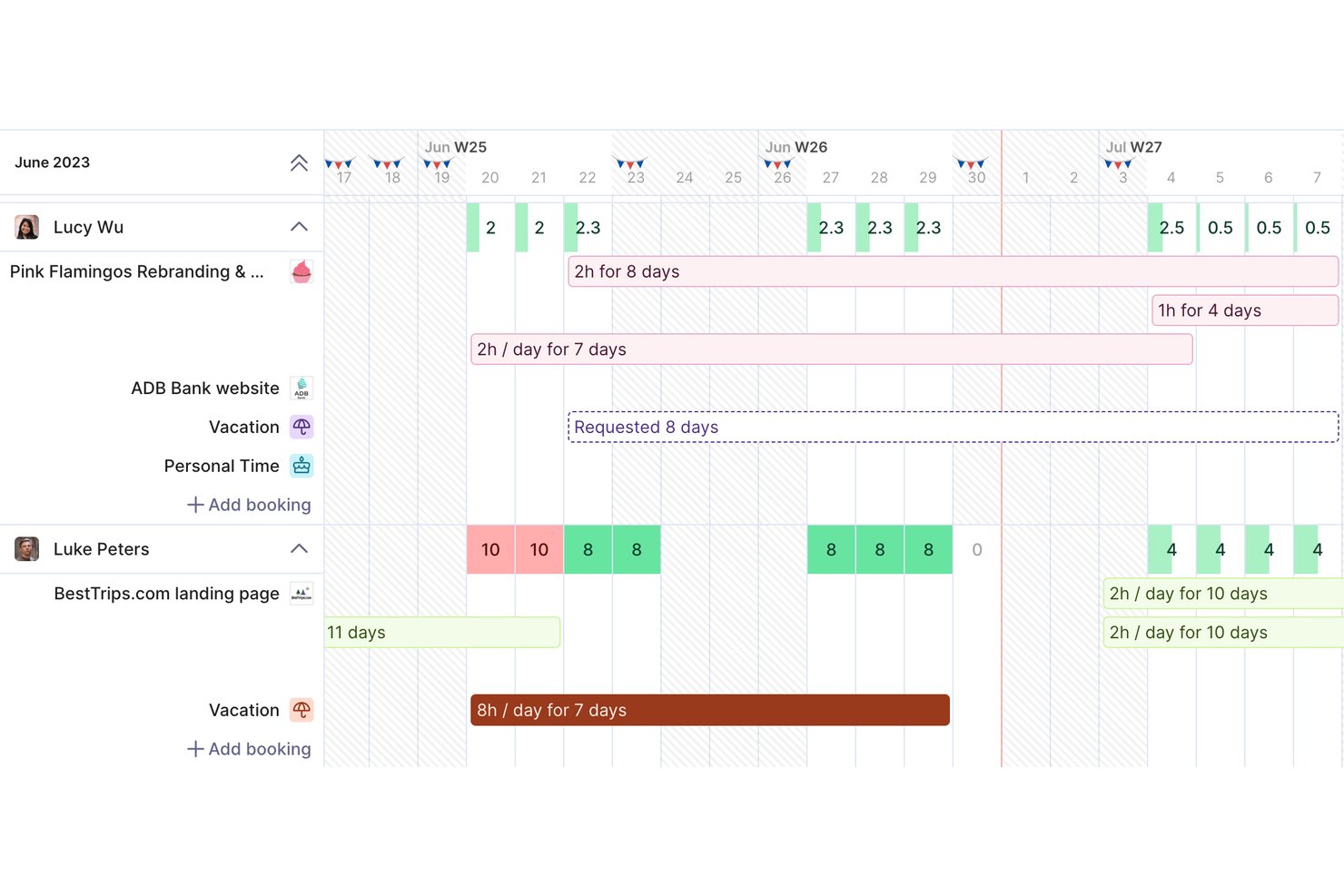
Productive is a professional services management platform that combines time tracking, project budgeting, resource planning, invoicing, and profitability reporting in a single tool built for agencies and consultancies.
Who Is Productive Best For?
Productive is a strong fit for small-to-mid-sized agencies, consultancies, and IT services firms that need to tie billable time directly to project finances.
Why I Picked Productive
Productive earns its spot on my shortlist because of how its AI reporting tools surface financial insights without requiring manual analysis. I love that Report Intelligence reads across multiple datasets and delivers plain-language summaries, so I can immediately see which projects are margin risks. AI Time Tracking also auto-fills timesheets using calendar events and past entries, which keeps utilization data accurate enough to actually trust.
Productive Key Features
- Resource planner: Plan and assign consultant capacity using tentative, repeating, and split bookings.
- Retainer and fixed-fee management: Track recurring retainers and fixed-fee project drawdowns alongside T&M work.
- Multi-currency invoicing: Generate invoices in different currencies to support global client engagements.
- Role-based permissions: Set detailed access controls for user roles, clients, and sensitive financial data.
Productive Integrations
Productive offers native integrations with Xero, HubSpot, Jira, Slack, Sage, Outlook, Google Calendar, and Microsoft 365. It connects with Zapier and provides an API for custom integrations.
Pros and Cons
Pros:
- Real-time budget and profitability views per project
- AI auto-fills timesheets from calendar data
- Tracks billable time and project margins together
Cons:
- Mobile app has limited reporting functionality
- Initial project setup takes considerable time
New Product Updates from Productive
Productive Adds Voice Dictation, Slack Connector, Proposals, and Overtime
Productive adds voice dictation, a Slack Connector, proposal controls, and overtime tracking. These updates support faster AI interactions, client proposals, and time management. For more information, visit Productive’s official site.
Toggl
Best for simple interface
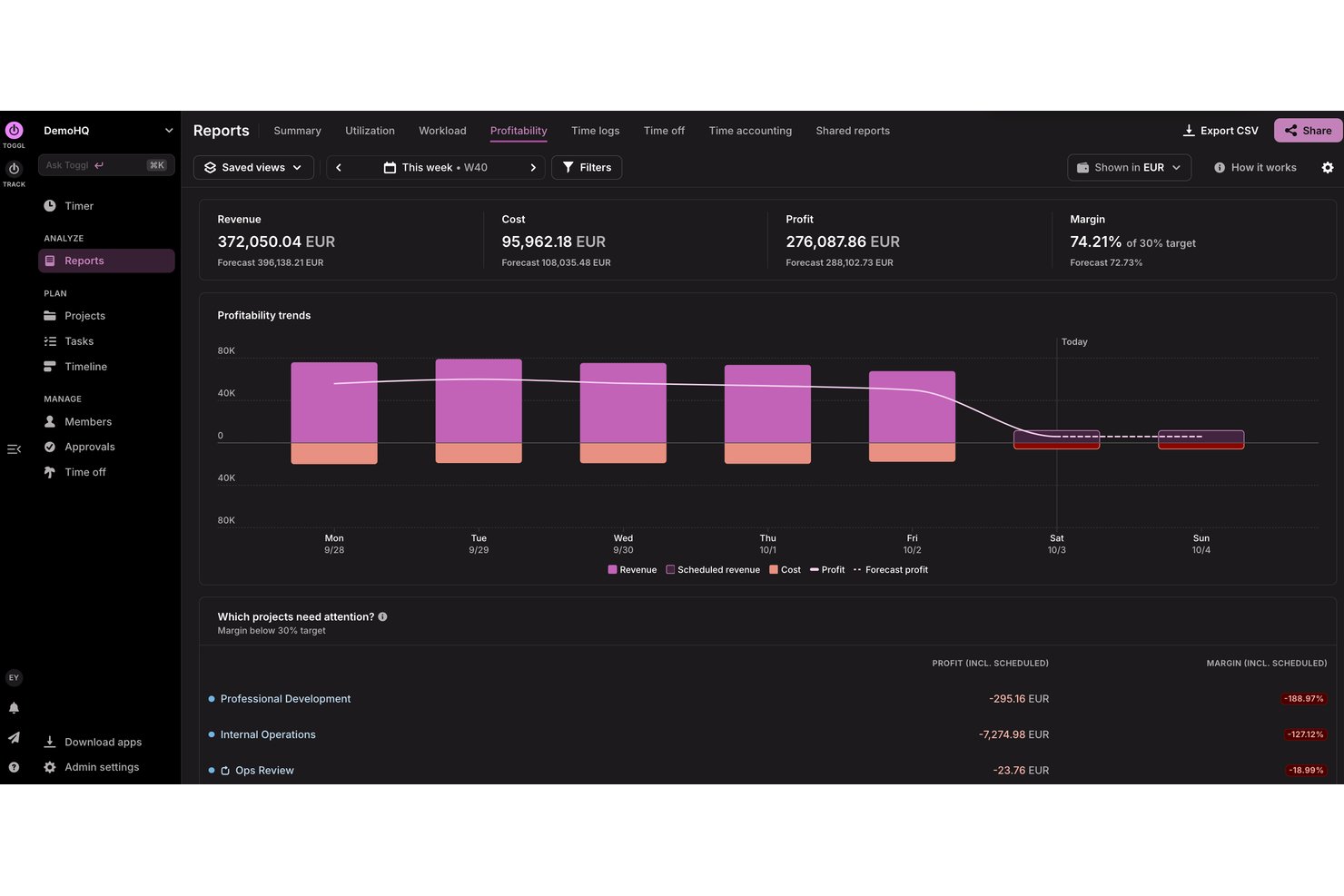
Toggl is a time tracking and capacity planning tool designed for agencies, consultancies, and other professional services teams. It helps users track billable and non-billable hours, build productivity and profitability reports, and plan team capacity so they can deliver client work on time and within budget.
Why I picked Toggl: I picked Toggl for its focus on speed and clarity. Its interface removes friction, timers are easy to start, switch, and categorize, making it ideal for individuals or small teams that want minimal setup. Idle detection and visual reporting help understand how to distribute time without overwhelming users with configuration options.
Standout Features & Integrations:
Features include project tracking, task management, capacity planning, billable rates, and idle detection. You can differentiate between billable and non-billable hours, which helps with accurate billing. The idle detection feature ensures you’re only tracking active work time, while reports help you analyze how time is spent, assess team capacity, and identify project profitability.
Integrations include Asana, Jira, Outlook, Google Calendar, GitHub, Todoist, and more. An API is available for custom integrations, along with MCP support for connecting to Claude, Cursor, and Codex.
Pros and Cons
Pros:
- Idle detection with time adjustment prompts
- Flexible tracking with multiple project views
- Simple to use for teams and freelancers
Cons:
- Lacks advanced billing features
- Periodic sync inconsistencies

actiTIME
Best for real time project budgeting
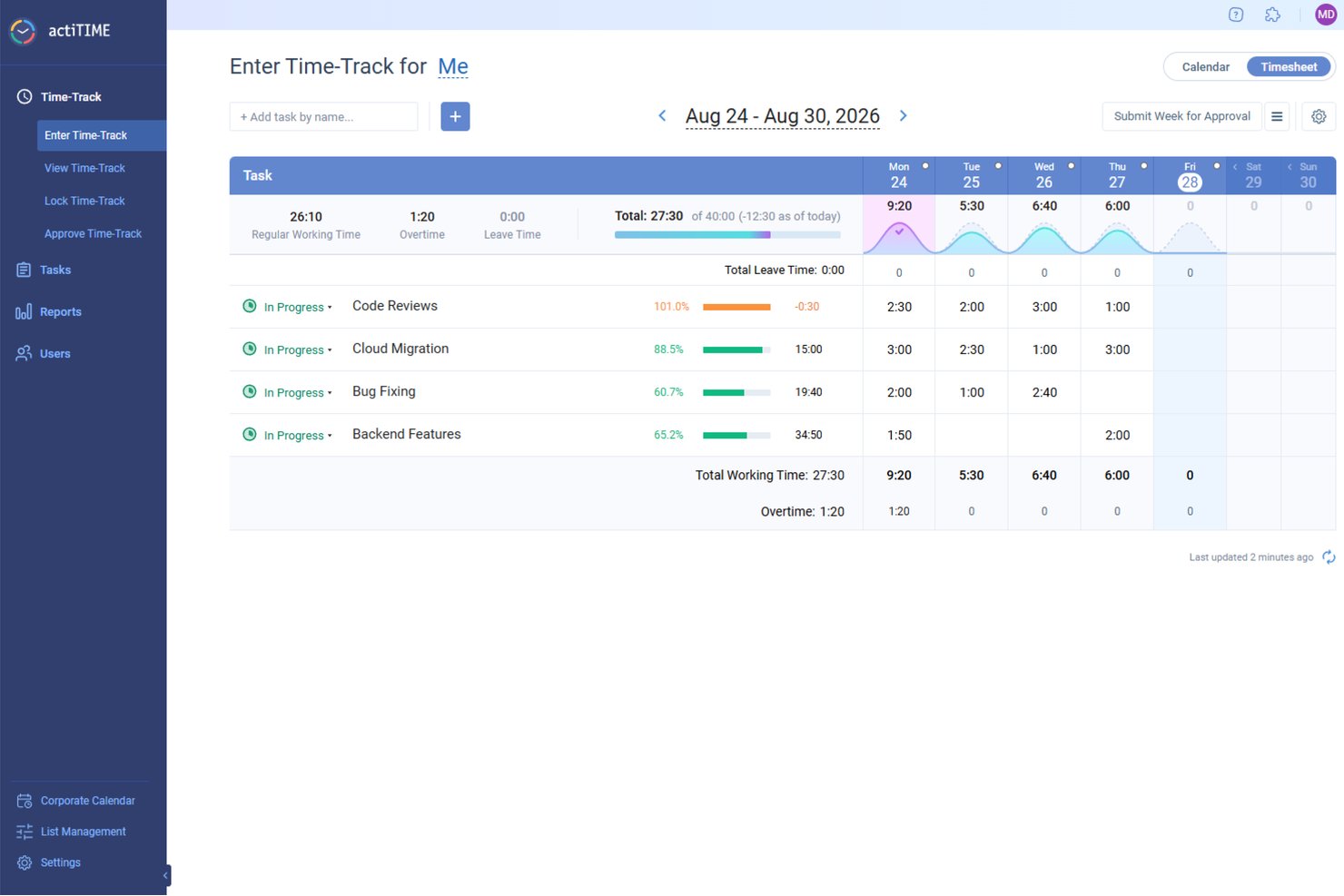
actiTIME offers a comprehensive solution for professionals in need of meticulous time management and project tracking. Ideal for industries such as architecture, consulting, and IT, actiTIME addresses the need for accurate billing and efficient resource allocation. It provides tools to manage projects, budgets, and team activities, ensuring that your business runs smoothly and profitably.
Why I Picked actiTIME
I picked actiTIME because it excels in addressing the specific needs of professional services with its detailed time tracking and project management features. You can easily track billable hours and manage project budgets, which are critical for maintaining profitability and accountability in client services. The tool also offers comprehensive reporting capabilities, allowing you to analyze project performance and make informed decisions.
actiTIME Key Features
In addition to its core functionalities, actiTIME provides several other features that enhance its utility for professional services:
- Budget Tracking: Monitor project budgets in real-time to prevent overspending.
- Leave Management: Manage team availability by tracking time off and absences.
- Billing and Invoicing: Generate invoices based on tracked time and project work.
- Custom Workflows: Tailor workflows to fit specific business processes and requirements.
actiTIME Integrations
Integrations include actiPLANS, QuickBooks, and Zapier.
Pros and Cons
Pros:
- Custom workflows support business processes
- Real-time project budget monitoring tools
- Accurate tracking of billable hours
Cons:
- Integrations limited compared to competitors
- Interface may be confusing for first-time users
New Product Updates from actiTIME

actiTIME Visual Hour Indicator and Time-Track Report Redesign
actiTIME adds a wave-style hour indicator to the Timesheet and Calendar views and refreshes the Time-Track report for smoother navigation and clearer visuals. For more information, visit actiTIME's official site.

TimeTrex
Best for GPS-based time tracking
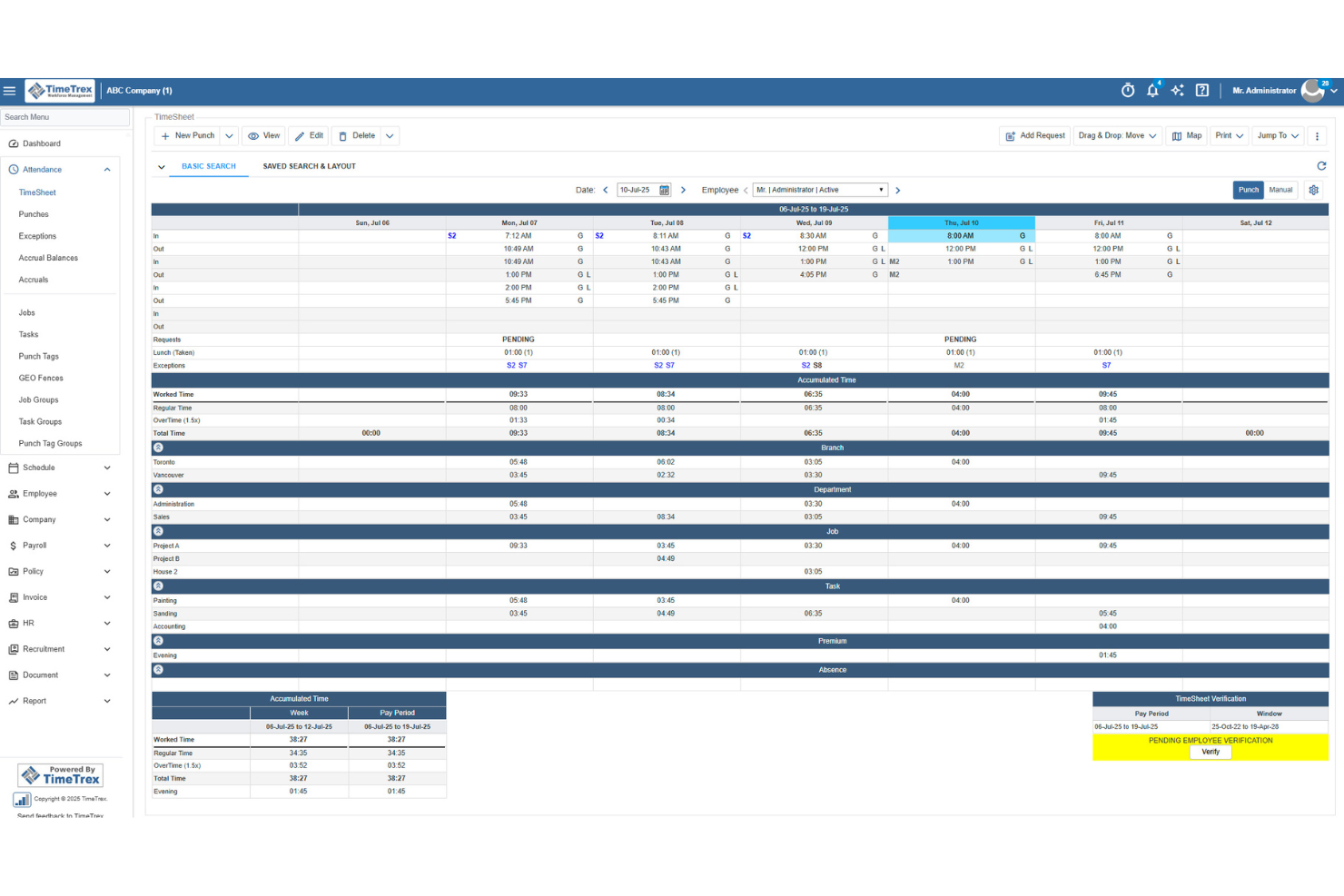
TimeTrex helps professional services teams track billable hours, manage expenses, and turn timesheet data into invoices with less manual work. Its mobile clock-in tools, GPS tracking, and job costing features make it a strong fit for firms managing consultants, field staff, or project-based teams.
Who Is TimeTrex Best For?
TimeTrex Now is a strong fit for mid-sized to large professional services firms that need to manage time tracking, payroll, and compliance in one platform.
Why I Picked TimeTrex
I picked TimeTrex because it helps professional services teams track billable hours from mobile devices while verifying where work happens through GPS tracking and geofencing. I like that employees can clock in from the field, client sites, or remote locations, and managers can review location-based punch data before approving timesheets. TimeTrex also supports job costing, expense tracking, and invoicing, so your team can connect tracked time to project costs and client billing. Its payroll and attendance rules are useful for teams with different schedules, overtime policies, or pay requirements.
TimeTrex Key Features
Some other TimeTrex features help professional services teams manage schedules, payroll, and workforce records alongside tracked time:
- Payroll management: Process payroll using approved time and attendance data, including overtime rules, deductions, paystubs, and tax reports.
- Employee scheduling: Build employee schedules, manage availability, and handle time-off requests from one system.
- Expense tracking: Record project-related expenses, upload receipts, manage approvals, and connect costs to departments or tasks.
- Employee self-service: Let employees view schedules, request leave, access paystubs, and manage personal information.
TimeTrex Integrations
Integrations include ADP, Intuit QuickBooks, Sage, Paychex, Surepay, Ceridian, Meditech, Insync, Millennium, and CompuPay.
Pros and Cons
Pros:
- Expense tools support receipts, approvals, and real-time reporting
- Job costing allocates tracked time across multiple cost centers
- Mobile GPS and geofencing verify off-site employee clock-ins
Cons:
- Interface may feel less intuitive for admin users
- Project management features appear limited beyond job costing
New Product Updates from TimeTrex
TimeTrex Redesigns Workforce Management With New Payroll, Scheduling, and AI Tools
TimeTrex redesigns its workforce management experience with new dashboards, scheduling and timesheet tools, a rebuilt payroll workflow, and expanded AI assistance. These updates give teams more flexible ways to manage schedules, payroll, reporting, and employee data. For more information, visit TimeTrex’s official site.
 .
.
Clockify
Best for browser extensions

Clockify is time-tracking software designed for individuals and teams to track work hours. Freelancers and small businesses use it to monitor productivity and manage billing.
Why I picked Clockify: Its browser extensions make timer-based tracking accessible. This is ideal for teams that work across multiple tabs, tools, or cloud platforms. Its simple reporting and offline mode add reliability, giving users a flexible way to capture time even when moving between devices or working with an unstable internet connection.
Standout Features & Integrations:
Features include time audits, project templates, and offline mode. These features help you ensure accuracy in time tracking and simplify project setup. The offline mode lets you continue tracking time even without an internet connection.
Integrations include Asana, Trello, Jira, QuickBooks, Slack, monday.com, Basecamp, Freshdesk, Todoist, and GitHub.
Pros and Cons
Pros:
- Offline time tracking
- Helpful time-use insights
- Easy browser extension setup
Cons:
- Basic user access controls
- No advanced invoicing tools

Timely
Best for automatic time tracking

Timely is time-tracking software designed for teams and individuals who want to automate time tracking. It's popular among creative professionals and consultants looking to manage their time without manual input.
Why I picked Timely: It offers automatic time tracking that captures activity in the background, eliminating the need for manual timers. You can focus on your work while Timely records your time spent on different tasks. The memory feature allows you to review and approve logged time, ensuring accuracy. These aspects make Timely a great choice for those who prefer a hands-off approach to time tracking.
Standout Features & Integrations:
Features include project timelines, budgeting tools, and visual reports. You can set budgets for projects and visually track progress, helping you stay on track. The visual reports provide insights into how time and resources are allocated.
Integrations include Asana, Trello, Slack, QuickBooks, Xero, Salesforce, Zapier, Google Calendar, Outlook, and Microsoft Teams.
Pros and Cons
Pros:
- Simple budgeting tools
- Accurate memory feature
- Automatic time capture
Cons:
- Basic invoicing capabilities
- Limited manual tracking options

My Hours
Best for small teams

My Hours is time-tracking software tailored for small teams to manage their projects and billing. It's designed to help businesses track time, manage tasks, and control project budgets.
Why I picked My Hours: My Hours is a strong fit for small teams because it focuses on clarity and control rather than complexity. Its customizable billing rates, approval workflow, and straightforward reporting help smaller groups maintain oversight of project budgets and client work without needing a featured project management suite. It’s great for teams that want structure without heavy configuration.
Standout Features & Integrations:
Features include customizable billing rates, detailed reporting tools, and attendance tracking. You can set different rates for various projects or clients, which helps in precise billing. The reporting tools provide insights into how time is spent across projects.
Integrations include QuickBooks, Trello, Basecamp, Asana, Google Calendar, Slack, Zapier, Xero, Microsoft Teams, and Dropbox.
Pros and Cons
Pros:
- Suitable for remote teams
- Customizable billing rates
- Simple to navigate
Cons:
- Occasional lag in reporting
- Limited offline capabilities

TimeCamp
Best for budget management

TimeCamp is time-tracking software designed to help businesses manage time and expenses effectively. Project managers and finance teams commonly use it to oversee budgets and improve productivity.
Why I picked TimeCamp: I selected TimeCamp because it links time tracking to budgets and project expenses. Its budget alerts, financial reporting, and automated tracking give project managers real-time visibility into how work affects costs. This emphasis on budget control sets it apart from tools that focus on timesheets.
Standout Features & Integrations:
Features include automatic time tracking, invoicing, and attendance management. You can track time without manual entry, saving you effort and reducing errors. The invoicing feature allows you to bill clients from tracked time.
Integrations include Trello, Asana, Slack, Jira, monday.com, QuickBooks, Xero, Salesforce, Microsoft Teams, and Google Calendar.
Pros and Cons
Pros:
- Simple attendance management
- Detailed financial reports
- Automatic time capture
Cons:
- Occasional data syncing issues
- No advanced customization

Best for productivity tracking

Time Doctor is time-tracking software tailored for teams and individuals who need to boost productivity and manage time more efficiently. Remote teams and freelancers use it to monitor work habits and improve time management.
Why I picked Time Doctor: It provides detailed productivity insights by tracking time spent on various tasks and websites. You can set alerts for excessive time spent on non-work-related activities, which helps you stay focused. The software also offers screenshots and activity levels to ensure accountability. These features make it useful for boosting productivity and monitoring remote teams.
Standout Features & Integrations:
Features include distraction alerts, time use reports, and offline tracking. The distraction alerts keep you focused by notifying you of time spent off-task. Time use reports provide a breakdown of how time is divided across projects.
Integrations include Asana, Trello, Slack, Jira, Basecamp, monday.com, Salesforce, QuickBooks, GitHub, and Freshdesk.
Pros and Cons
Pros:
- Simple offline tracking
- Effective distraction alerts
- Detailed productivity insights
Cons:
- Learning curve for new users
- No advanced invoicing tools

QuickBooks
Best for accounting integration

QuickBooks is time-tracking and accounting software designed for small- to medium-sized businesses to manage finances and time. It's beneficial for companies that need integrated accounting and time management solutions.
Why I picked QuickBooks: It connects time tracking to accounting workflows. Billable hours, expenses, and invoices flow into the same system used for financial reporting and payroll, making it a practical choice for teams that want their time data to tie into their overall bookkeeping.
Standout Features & Integrations:
Features include automated invoicing, expense tracking, and payroll management. You can create invoices from tracked time, which helps in accurate billing. The expense-tracking feature lets you monitor and categorize expenses.
Integrations include PayPal, Shopify, Square, Amazon, Etsy, TSheets, Salesforce, HubSpot, Mailchimp, and Stripe.
Pros and Cons
Pros:
- Detailed financial reports
- Automated invoicing
- Easy accounting integration
Cons:
- Limited customization options
- Interface may feel complex at first
Annen programvare for tidsregistrering for profesjonelle tjenester
Her er noen flere alternativer for programvare for tidsregistrering for profesjonelle tjenester som ikke kom med på listen min, men som likevel er verdt å undersøke:
- Memtime
For freelancers
- Teamwork
For integrated timesheets
- Time Champ
For large teams
- Deltek Replicon Time
For compliance tracking
- Knack
For custom databases
- Harvest
For integration options
- Big Time
For billing features
- TimeRewards
For expense tracking
- ClickTime
For DCAA-compliant records
- DeskTime
For automatic work time calculation
- Paymo
For task management
- Wrike
For project visualization
- Scoro
For end-to-end profitability tracking
- Connecteam
For mobile workforce
- monday.com
For team collaboration
- BuddyPunch
For employee scheduling
- Click Time
For compliance monitoring


How I Evaluate Professional Services Time Tracking Software
I look at two layers: the core requirements a tool must meet—billable hour tracking, timesheet approvals, client invoicing—and the differentiators that separate the best options from the rest.
Core Functionality (Table Stakes For This List)
When I'm selecting tools for my list, I rank each one on a scale from 0 (does not offer the functionality) to 5 (excels in this area) for each core functionality listed below. Then, I calculate the tool's total score into a percentage. Each tool needs to achieve a minimum total score of 65% to be considered for inclusion.
- Billable Hours Tracking: I check whether each tool lets you log time against specific clients, projects, and tasks with a clear billable vs. non-billable split—like tagging discovery hours as non-billable while tracking implementation work at a client rate.
- Timesheet Approval Workflows: Multi-tier review and approval flows matter here, especially for firms where a project manager approves hours before a finance lead signs off on client-facing entries.
- Client Billing & Invoicing: I evaluate how each tool converts logged hours into invoices, looking for flexible rate structures—per consultant, per role, or per engagement—so you can handle T&M and blended billing models.
- Project Budgeting & Profitability: Each tool should let you set a project budget, track labor costs against it, and surface margin data so you can spot overruns before a fixed-fee engagement goes sideways.
- Resource Utilization Reporting: I look for reports that show actual vs. forecasted utilization by person and project, giving resource managers visibility into who's overbooked and where capacity exists.
- Accounting & PM Integrations: Connections to accounting platforms like QuickBooks, Xero, or Sage Intacct and PM tools like Jira or Asana are key—I evaluate whether sync is native and bidirectional or limited to one-way exports.
Once I have a list of tools that meet this criteria, I consider what sets each platform apart.
Differentiating Factors (What Sets Vendors Apart)
Here's how I compare and contrast different vendors:
Standout Features
Automated time capture is a big differentiator—tools that pull hours from calendars, emails, and apps save consultants from reconstructing their week every Friday. I also evaluate how well a platform handles retainer and fixed-fee engagements alongside T&M work, since most firms juggle all three. Client-facing portals add another layer of value, letting clients review logged hours and approve invoices directly without back-and-forth emails.
Beyond Features
Firm size and service model fit matters—a solo consultant needs a different tool than a 200-person agency with multiple practices and blended billing. I consider how quickly a platform gets teams productive, since configuring rate cards, approval chains, and project templates can stall rollout if onboarding support is thin. Pricing transparency is another factor I weigh, especially whether core capabilities like budgeting and client invoicing are included at entry-level tiers or locked behind expensive upgrades.
Slik velger du programvare for tidsregistrering for profesjonelle tjenester
Det er lett å gå seg vill i lange funksjonslister og komplekse prisstrukturer. For å hjelpe deg med å holde fokus mens du går gjennom den unike prosessen med å velge programvare, får du her en sjekkliste over faktorer du bør ha i bakhodet:
| Faktor | Hva du bør vurdere |
|---|---|
| Skalerbarhet | Kan programvaren vokse med virksomheten din? Vurder om den kan håndtere flere brukere eller prosjekter uten ekstra kostnader eller komplikasjoner. |
| Integrasjoner | Kan den integreres med de eksisterende verktøyene dine? Se etter kompatibilitet med prosjektstyrings-, regnskaps- og kommunikasjonssystemene dine. |
| Tilpasningsmuligheter | Kan du tilpasse programvaren til arbeidsflytene dine? Se etter alternativer for å justere dashbord, rapporter og faktureringssatser slik at de passer behovene dine. |
| Brukervennlighet | Er grensesnittet brukervennlig? Sørg for at teamet ditt enkelt kan navigere i det uten omfattende opplæring. |
| Implementering og innføring | Hvor raskt kan du komme i gang? Se etter programvare med enkle oppsettsprosesser og tilgjengelige opplæringsressurser som veiledninger eller webinarer. |
| Kostnad | Passer prisen budsjettet ditt? Vurder både forhåndskostnader og løpende gebyrer, og se etter skjulte kostnader eller fallgruver med trinnvis prising. |
| Sikkerhetstiltak | Hvordan beskytter programvaren dataene dine? Se etter funksjoner som kryptering, regelmessige oppdateringer og samsvar med standarder for databeskyttelse. |
| Tilgjengelig kundestøtte | Er hjelp tilgjengelig når du trenger det? Vurder leverandørens åpningstider for kundestøtte, svartid og tilgjengelige kontaktmetoder som chat eller telefon. |
Hva er programvare for tidsregistrering for profesjonelle tjenester?
Programvare for tidsregistrering for profesjonelle tjenester er et verktøy som hjelper virksomheter med å overvåke og registrere tiden som brukes på kundeprosjekter. Fagpersoner som konsulenter, regnskapsførere og advokater bruker disse verktøyene til å administrere fakturering og forbedre produktiviteten. Funksjoner for tidsregistrering, fakturering og rapportering bidrar til å sikre nøyaktig fakturering og effektiv prosjektstyring. Alt i alt gir disse verktøyene åpenhet og bidrar til å maksimere utnyttelsen av ressursene.
Funksjoner
Når du velger programvare for tidsregistrering for profesjonelle tjenester, bør du se etter følgende funksjoner for tidsregistrering:
- Tidsregistrering: Gjør det mulig for brukere å overvåke og loggføre arbeidede timer på bestemte prosjekter, noe som sikrer nøyaktig fakturering og innsikt i produktiviteten.
- Fakturering: Genererer fakturaer basert på registrert tid og utgifter, og effektiviserer faktureringen av kunder.
- Utgiftssporing: Bidrar til å administrere og kategorisere prosjektrelaterte utgifter, noe som gjør det enklere å ha økonomisk oversikt og styre budsjettet.
- Rapportering: Gir detaljerte rapporter om tidsbruk og prosjektfremdrift, slik at brukerne kan ta velinformerte beslutninger.
- Prosjektstyring: Bidrar til å organisere oppgaver og tidsplaner, og forbedrer teamsamarbeid og prosjektleveranser.
- Tilpassbare faktureringssatser: Gjør det mulig å angi ulike satser for forskjellige kunder eller prosjekter, noe som sikrer fleksibel og nøyaktig fakturering.
- Integrasjonsmuligheter: Kobler seg til eksisterende verktøy som regnskaps- og prosjektstyringsprogramvare, og forbedrer effektiviteten i arbeidsflyten.
- Mobiltilgang: Gjør det mulig å registrere tid og administrere oppgaver på farten, og gir fleksibilitet ved fjernarbeid.
- Sikkerhetstiltak: Sikrer databeskyttelse gjennom kryptering og samsvar med datastandarder, og beskytter sensitiv informasjon.
Fordeler
Implementering av programvare for tidsregistrering for profesjonelle tjenester gir flere fordeler for teamet og virksomheten din. Her er noen av fordelene du kan se frem til:
- Mer pålitelig kundefakturering: Tydelige arbeidsregistreringer bidrar til å redusere tvister og forkorte faktureringssyklusene uten at timene må rekonstrueres.
- Forbedret produktivitet: Detaljert tidsinnsikt synliggjør flaskehalser og hjelper teamene med å konsentrere seg om arbeid med høy verdi.
- Bedre prosjektoversikt: Innsikt i fremdrift og arbeidsbelastning i sanntid hjelper ledere med å gjøre justeringer slik at prosjektene holder tidsplanen.
- Større økonomisk bevissthet: Teamene kan oppdage mønstre i forbruk og ressursbruk, noe som støtter bedre budsjettbeslutninger.
- Økt åpenhet: Tydelig innsikt i bidrag og arbeidsbelastning støtter samordning på tvers av team og interessenter.
- Bedre støtte for distribuerte team: Sentralisert registrering hjelper eksterne eller hybride team med å holde seg samordnet på tvers av tidssoner.
- Konsekvent beskyttelse av sensitive data: Innebygde sikkerhetstiltak hjelper virksomheter med å opprettholde tillit og oppfylle interne samsvarskrav.
Kostnader og priser
Valg av programvare for tidsregistrering for profesjonelle tjenester krever en forståelse av de ulike prismodellene og abonnementene som er tilgjengelige. Kostnadene varierer basert på funksjoner, teamstørrelse, tillegg og mer. Tabellen nedenfor oppsummerer vanlige abonnementer, gjennomsnittsprisene deres og typiske funksjoner som er inkludert i programvareløsninger for tidsregistrering for profesjonelle tjenester:
Sammenligningstabell for programvare for tidsregistrering for profesjonelle tjenester
| Plantype | Gjennomsnittspris | Vanlige funksjoner |
|---|---|---|
| SMB/små team | Free-$5/user/month | Grunnleggende tidsregistrering, begrenset antall prosjekter, enkel rapportering; ofte manuelle tidtakere eller begrensede funksjoner. |
| Mellommarkedet/vekstteam | $5-$25/user/month | Tidsregistrering + fakturering, grunnleggende prosjekt- og utgiftssporing, integrasjoner, standardrapporter, mobiltilgang. |
| Virksomheter/etablerte firmaer | $25-$50/user/month | Avansert rapportering, tilpassbare faktureringssatser, fullstendige integrasjoner, utgiftssporing, støtte for mobil og datamaskin. |
| Foretak/store organisasjoner | $50+/user/month (eller tilpassede priser for foretak) | Fullt funksjonssett: sikkerhet og samsvar, tilpassede integrasjoner, avansert analyse, dedikert brukerstøtte, verktøy for store team og administratorer. |
Vanlige spørsmål om programvare for tidsregistrering for profesjonelle tjenester
Her er noen svar på vanlige spørsmål om programvare for tidsregistrering for profesjonelle tjenester:
Hvordan håndterer programvare for tidsregistrering for profesjonelle tjenester personvern?
Ja, de fleste programmer for tidsregistrering prioriterer personvern gjennom kryptering og overholdelse av personvernregler som GDPR. Når du velger et verktøy, bør du kontrollere sikkerhetssertifiseringene og personvernerklæringene, særlig hvis plattformen har funksjoner som AI-drevet rapportering eller integrerte tidslogger. Vurder å spørre leverandørene om praksisen deres for datalagring, hvordan de håndterer sikkerhetsbrudd, og om skrivebordsappene deres støtter sikker tilgang. Sørg alltid for at teamet ditt får opplæring i beste praksis for personvern, slik at sensitiv informasjon beskyttes.
Kan programvare for tidsregistrering for profesjonelle tjenester integreres med lønnssystemer?
Ja, mange av de beste løsningene for tidsregistrering tilbyr integrasjoner med populære lønnssystemer som QuickBooks og ADP. Denne integrasjonen kan automatisere lønnsberegninger og redusere feil ved manuell dataregistrering, selv om teamet ditt eksporterer data fra Excel eller bruker en app for tidsregistrering av innstemplinger. Når du vurderer programvare, bør du kontrollere at den har kompatible integrasjoner med det eksisterende lønnssystemet ditt, slik at arbeidsflytene kan optimaliseres og nøyaktige lønnsregistre kan opprettholdes for alle teammedlemmer.
Er det vanskelig å gå fra manuell tidsregistrering til programvare?
Nei, det kan være enkelt å gå fra manuell til programvarebasert tidsregistrering med god planlegging. Begynn med å velge et brukervennlig verktøy som er tilpasset teamets behov, enten det er en alt-i-ett-plattform, et automatisert system for tidsregistrering eller noe enkelt som ClickUp. Arranger opplæringsøkter og tilby ressurser som hjelper teamet med å tilpasse seg fakturerbar tid, ressursallokering og tidsregistrering i prosjekter. Implementer programvaren gradvis, slik at det blir tid til justeringer. Denne fremgangsmåten minimerer forstyrrelser og hjelper teamet med å ta i bruk det nye systemet.
Kan programvare for tidsregistrering for profesjonelle tjenester brukes av eksterne team?
Ja, programvare for tidsregistrering er nyttig for eksterne team. Den gjør det mulig å overvåke produktiviteten og håndtere oppgaver uten behov for fysisk oppfølging ved registrering av ansattes arbeidstid på tvers av ulike steder. Se etter programvare med mobiltilgang, GPS-sporing eller Chrome-utvidelser for å imøtekomme fjernarbeid. Disse verktøyene kan også støtte prosjektplanlegging, sporing av prosjektlønnsomhet og godkjenning av timelister, slik at teamet kan registrere tid uavhengig av hvor de befinner seg. Dette gjør det enklere å følge opp pågående arbeid og opprettholde beste praksis for tidsregistrering.