10 beste nettbaserte kommunikasjonsverktøy for team i 2026

10 Kortliste over de beste kommunikasjonsverktøyene


Det finnes så mange ulike nettbaserte kommunikasjonsverktøy for team at det kan være vanskelig å lage en kortliste over de beste. Du vil legge til rette for kommunikasjon og samarbeid i teamet ditt, uansett hvor medlemmene befinner seg – og du trenger riktig verktøy. Jeg hjelper deg! I dette innlegget deler jeg mine personlige erfaringer med å styrke kommunikasjonen i store, eksterne team, og presenterer mine favoritter blant de beste nettbaserte kommunikasjonsverktøyene for team.
Why Trust Our Software Recommendations
Our team has been testing and reviewing software since 2012. As project managers ourselves, we know how difficult—and important—it is to choose the right software.
For this guide, we evaluated tools using hands-on testing and independent research, scoring tools using our selection criteria. We also draw on insights from industry thought leaders and practicing project management experts.
Our reviews reflect our human editorial judgment, not a sales pitch.
Expert reviewers:
Sammenligningstabell for kommunikasjonsverktøy
Denne sammenligningstabellen oppsummerer prisdetaljene for mine utvalgte beste kommunikasjonsverktøy:
| Tool | Best For | Trial Info | Price | ||
|---|---|---|---|---|---|
| 1 | Best for updates, team chats, and employee surveys | 14-day free trial | From $29/month (billed annually) | Website | |
| 2 | Best for project management communication | Free plan available | From $9/user/month (billed annually) | Website | |
| 3 | Best for growing teams and SMEs | Free demo available | Pricing upon request | Website | |
| 4 | Best collaborative whiteboard for hybrid teams | Free plan + 14-day free trial available | From $8/user/month (billed annually) | Website | |
| 5 | Best range of communication options | Free demo available | Pricing upon request | Website | |
| 6 | Best for combining chat and work | Free plan available | From $9/user/month (billed annually) | Website | |
| 7 | Best for unlimited search history | 30-day free trial + free demo available | From $2.50/user/month | Website | |
| 8 | Best for deskless employees | Free trial available | From $3.75/user/month (billed annually) | Website | |
| 9 | Best for unlimited users and message history | 7-day free trial + free plan + free demo available | From $2.49/seat/month (billed annually) | Website | |
| 10 | Best for organizing communication using channels | 30-day free trial + free plan available | From $4.50/user/month (billed annually) | Website |


Oversikt over de beste kommunikasjonsverktøyene
La oss se nærmere på detaljene for hver kommunikasjonsplattform og hva som gjør dem til verdige kandidater på denne topp 10-listen.
Best for updates, team chats, and employee surveys

Connecteam offers a communications platform for businesses as well as an operations platform and an HR and training platform. The communication software facilitates company updates and announcements and live chat and messaging. It also stores a company directory and knowledge base for your workers.
You can set up team chats, individual chats, and broadcast channels in the app to keep communications segmented however makes sense for your company. People can share images and videos, files, and even locations through the system, making it a helpful tool for remote and hybrid teams.
The knowledge base is another cool feature for ensuring all staff have access to things like company policies and procedures. You can also add training material, forms, and other files people may need to access. Employee surveys can also be sent out through the platform, so you can gather feedback on important topics to your organization.
Integrations include Paychex, Xero, Gusto, QuickBooks Payroll (online + desktop), Google Calendar and others.
New Product Updates from Connecteam

Connecteam Expands Break and Timesheet Controls
Connecteam adds flexible break thresholds, personalized policies, auto-end options, a centralized exceptions report, and improved timesheet issue visibility to help teams manage breaks and timesheets more effectively. For more information, visit Connecteam’s official site.
 .
.
Best for project management communication
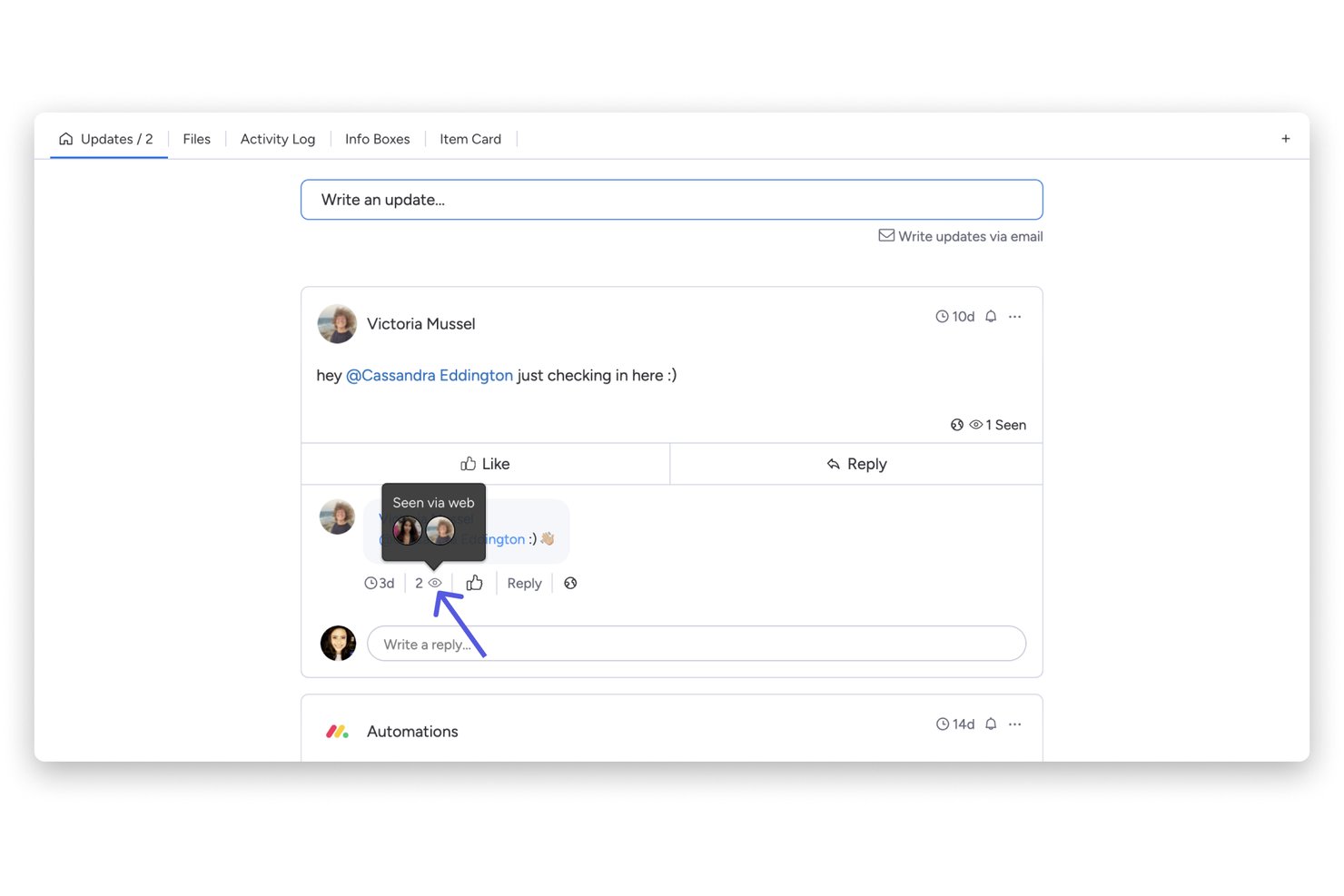
monday AI Workspace is a work management platform that embeds team communication directly into project workflows through task-level updates, AI-assisted meeting notes, real-time document co-editing, and integrations with tools like Slack and Microsoft Teams.
Who Is monday AI Workspace Best For?
Project managers and cross-functional teams at mid-size to enterprise organizations who need communication and project tracking in a single workspace.
Why I Picked monday AI Workspace
I picked monday AI Workspace because it ties communication directly to the work itself, not to a separate inbox or channel. When my team discusses a task, the update thread lives on that item, so context never gets lost in a side conversation. I also rely on the AI Notetaker, which captures meeting discussions and turns them into tasks automatically, cutting out the manual handoff between meeting notes and the project board.
monday AI Workspace Key Features
- Real-time document co-editing: Multiple users can simultaneously edit monday Docs and embed boards within documents.
- Automation builder: Set up custom workflows using triggers and actions for tasks, notifications, and reminders.
- Board view options: Choose from Gantt, calendar, timeline, Kanban, and table views to visualize project information.
- Extensive integrations: Connect with 200+ external apps like Zoom, Slack, GitHub, Google Workspace, and Jira.
monday AI Workspace Integrations
monday AI Workspace offers hundreds of native integrations through its built-in integrations and marketplace, including Slack, Microsoft Teams, Google Workspace, Zoom, Jira, Salesforce, HubSpot, GitHub, Dropbox, and OneDrive. It also supports Zapier and provides an API for custom integrations.
Pros and Cons
Pros:
- Async updates reduce unnecessary team meetings
- AI meeting notes auto-generate action items
- Communication lives inside project tasks
Cons:
- Notification overload on busy project boards
- Chat functionality less mature than Slack
New Product Updates from monday AI Workspace
monday AI Workspace Adds Human Approval Routing
monday AI Workspace adds a human-in-the-loop approval block to AI Workflows, sending approval requests and routing workflow paths based on responses. For more information, visit monday AI Workspace's official site.

Hub
Best for growing teams and SMEs

Hub is an intranet-style tool designed to enhance internal communications for growing teams and SMEs. It offers a centralized platform where your team can access company news and resources and collaborate effectively. With features like news feeds, people directories, and polls, Hub aims to keep everyone connected and informed.
One standout feature of Hub is its news module, which allows you to share company updates and announcements effortlessly. You can organize news into channels, ensuring that relevant information reaches the right team members. This targeted communication helps keep your team informed without overwhelming them with unnecessary details.
Another valuable aspect is the forms with smart workflows. This feature lets you create online forms to gather information, manage submissions, and assign tasks based on responses. It simplifies processes like feedback collection and approval workflows, reducing the need for manual paperwork and enhancing efficiency.
Integrations include Microsoft Entra ID, Google, OKTA, OneLogin, Office 365, SharePoint, OneDrive, GDrive, BOX, Slack, MS Teams, and Active Directory.

Miro
Best collaborative whiteboard for hybrid teams
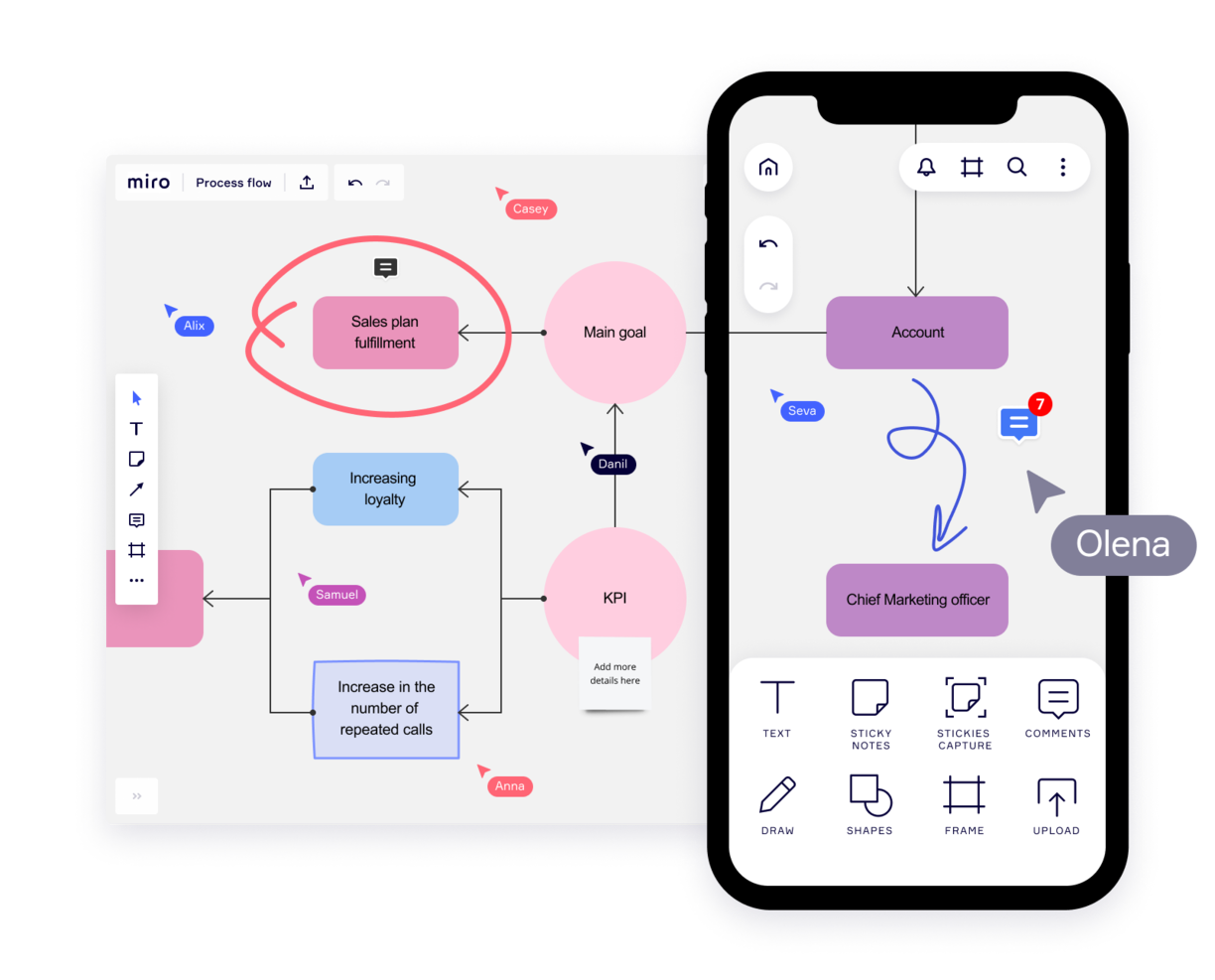
Miro is a collaborative whiteboard designed for hybrid teams, offering over 1,000 templates for diverse planning and brainstorming needs. Valued by top Fortune 100 companies, it supports teams at organizations like TransUnion and Cisco with a platform that suits the hybrid work model.
Key features of Miro include an infinite canvas for limitless project mapping and the flexibility to express ideas through various media. Its asynchronous collaboration tools, such as comments and reactions, enable productive teamwork across time zones. The TalkTrack feature also allows team members to record and share video explanations of process maps, fostering clearer communication.
With integrations including project management tools like Jira and Asana, Miro connects different project facets in one platform, making it a comprehensive tool for today's varied team dynamics.
Miro also integrates with a whole suite of tools, including Zoom, Figma, Monday.com Microsoft Teams, Slack, Google Drive, Box, Airtable, Notion, Azure, and Webex. Some integrations are limited to paid plans only.
Miro is free to use for unlimited members with up to 3 editable boards. Paid plans start at $8/user/month (billed annually).
Pros and Cons
Pros:
- Built-in communication features for streamlined collaboration
- Intuitive and easy setup
- Free forever plan available
Cons:
- Free version does not allow high-quality export to pdf
- Zooming can be jumpy on larger projects
- Visitor/guest accounts locked to paid plans only
New Product Updates from Miro
Miro Adds Japan Data Residency for Enterprise Customers
Miro has introduced Japan data residency for enterprise customers, offering in-region storage for production data, backups, and metadata, plus in-region compute infrastructure. For more information, visit Miro's official site.

Workvivo
Best range of communication options

Workvivo is an online employee communication platform that allows teams to communicate and collaborate in real time. It provides a single location for each team’s projects, tasks, and conversations—enabling them to stay in sync no matter where they are located.
The platform offers features like chat groups, team calendars, task boards, and social media integration, making it easy for your teams to stay connected and up-to-date on their projects so they can move forward quickly and efficiently. Workvivo helps everyone stay connected by providing a central hub for all communications. Instead of having multiple conversations via emails or text messages, everything is kept organized within the platform so that all members can see what’s going on with their team’s work.
Workvivo’s group chats allow teams to converse without switching between different applications or platforms. Team members can easily join group chats and share their thoughts quickly and efficiently. This helps ensure that everyone is on the same page when it comes to project deadlines and goals. Notifications provide users with updates relevant to them, giving them a single point of reference for the most current information about work progress.
Additionally, its project management tools allow users to create tasks, assign them to team members, set deadlines, track progress, and monitor task completion in one place. This makes project management easier for everyone involved by providing visibility into tasks and progress across all levels of the organization. Workvivo allows you to easily track employee performance by monitoring activity logs within the platform or running advanced analytics reports that provide insights into how well employees are completing tasks or meeting deadlines.
Finally, integrations with software like Slack, Zoom, and MS Teams and live video functions allow your team to communicate through a wide range of channels. These include streaming, video, text, podcast, and news updates.

ClickUp
Best for combining chat and work
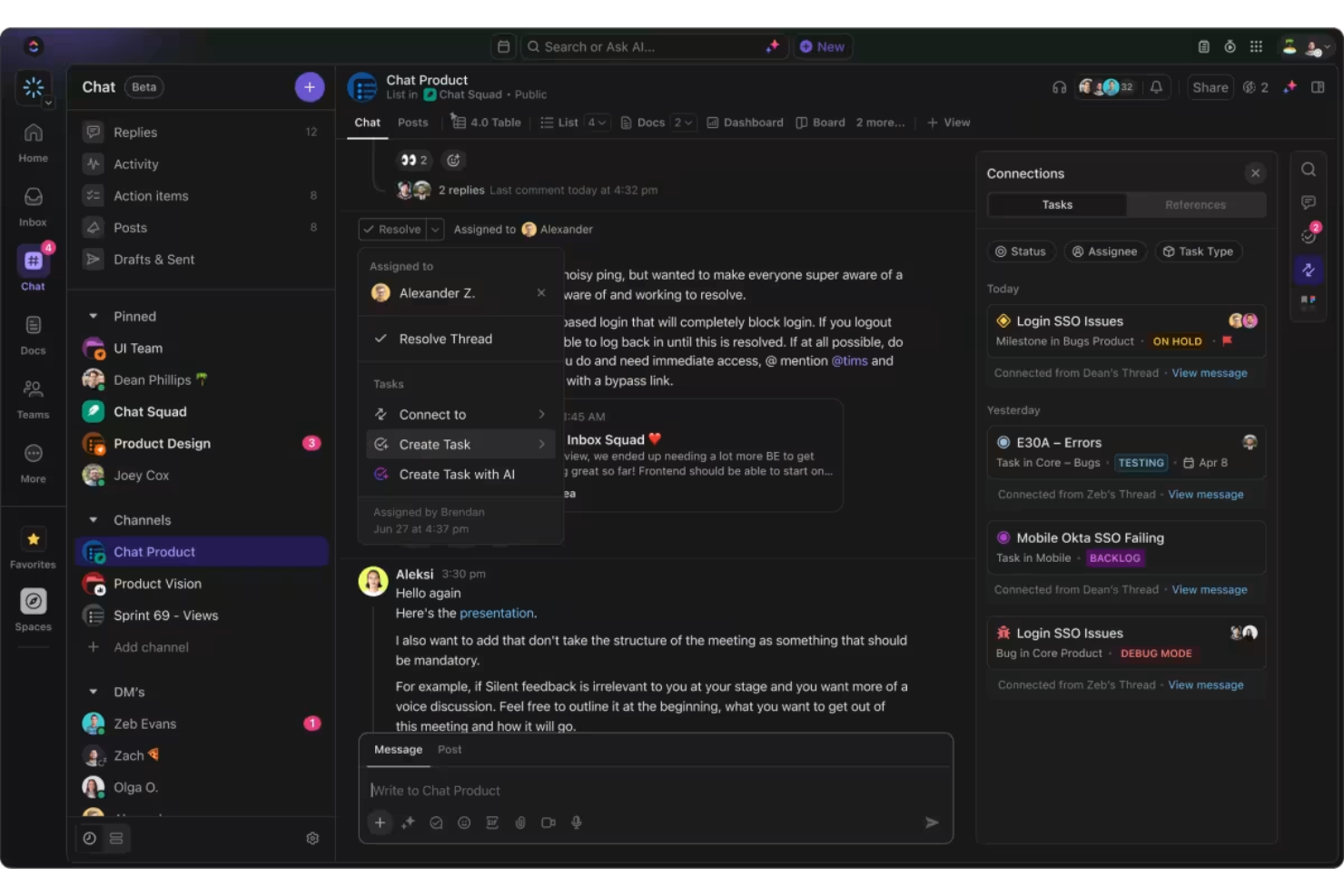
ClickUp's chat feature stands out as an essential tool for online communication because it integrates messaging with work. One unique aspect is the ability to turn messages into tasks with just one click, allowing you to immediately assign action items without leaving the conversation. This feature ensures that ideas and tasks are not lost within chat threads.
Another powerful feature is how conversations are automatically linked to relevant tasks and documents. This ensures that context is never lost and you can quickly reference necessary materials within the same chat window.
ClickUp's AI-powered capabilities further enhance communication by offering smart suggestions and auto-creating tasks from conversations. The AI also summarizes threads and keeps chat manageable, ensuring you can focus on what's important without getting overwhelmed by excessive information.
The platform’s ability to sync conversations across tasks is another notable capability. You can easily follow up on chat discussions by linking them to tasks, ensuring accountability and that no important detail slips through the cracks.
ClickUp offers native integrations with Slack, Google Workspace, Dropbox, and many more tools, as well as over 1,000+ integrations through Zapier.
ClickUp is free with limited storage for an unlimited number of users. Paid plans start at $7/user/month and offer a free trial.
New Product Updates from ClickUp
ClickUp Adds Meetings Hub, Super Agent Templates, and ZoomInfo Integration
ClickUp adds a searchable Meetings Hub, new ways to clone and template Super Agents, and a ZoomInfo integration through the App Center. These updates improve meeting retrieval, agent reuse, and access to sales intelligence. For more information, visit ClickUp’s official site.
Best for unlimited search history

Troop Messenger is far more than a simple chat interface. It was designed to improve the communication of internal teams of all sizes, from small teams to large corporations, and it delivers a robust feature set for doing so.
Overall this tool does a standout job with its feature offering and hits all of the criteria I look for in a communication tool, plus more. The main features include instant messaging, voice-video calling, video conferencing, file sharing, and desktop sharing.
But something I find especially useful in this tool are its more advanced messaging features. I like both the "respond later" option as well as the "burnout" option which lets you set a message to send at a later time. The self-messaging feature is also unique—a simple but useful feature that lets you send reminders and notes to yourself. Finally, there's a way to send bulk text messages and files to multiple users at once, using the "forkout" feature. And the advanced search in this tool is really good, too.
Troop Messenger supports many native and third-party integration such as employee monitoring and tracking apps, attendance management systems, Google Drive, Dropbox, and LDAP. It's available across Windows, Linux, Mac, Android, and iOS.
Troop Messenger costs from $2.50/user/month. It's worth noting that although it’s a SaaS model, it offers the delivery models of self-hosting, API, and custom application.
Blink
Best for deskless employees

Blink is a communication tool for the unique needs of deskless workers, who, until now, didn’t have the same quality technology as their colleagues in HQ. In just one app, it includes workplace messaging, a social media style company Feed for top-down communications, directory, cloud storage, workplace analytics, polls, and more.
Blink is built around the concept of workplace messaging as the central functionality so peer-to-peer direct messaging, group Chats, and top-down communications via the company Feed, all play an important role. Moderators and admins who post in the company Feed also have the option of turning on and off push notification for each post depending on importance. Blink also features polls, powerful integrations, and digital forms for reporting.
Analytics for admins features prominently through the app: post by post analytics, Org-wide and Team analytics within the Admin Portal, and Hub analytics that measures interactions and adoption within the document storage and reporting section of the app.
Blink is a straight-out-of-the box Saas communication software; no technical knowledge is necessary to get started and to invite colleagues to the platform. Its user-friendly, brandable interface is designed with familiar social media style features (think emojis and like buttons) that encourages engagement from employees—even less tech-savvy ones.
You can use existing integrations with 3rd party systems such as Jira, Trello, Office 365 and G-suite or build new integrations to your existing systems using Blink’s public APIs. Blink supports Android, iOS, Windows, and Mac, and you can access Blink via your browser.
Blink costs from $3.40 user/month. They offer a free 14-day trial and you can book a demo through the homepage.
Pumble
Best for unlimited users and message history
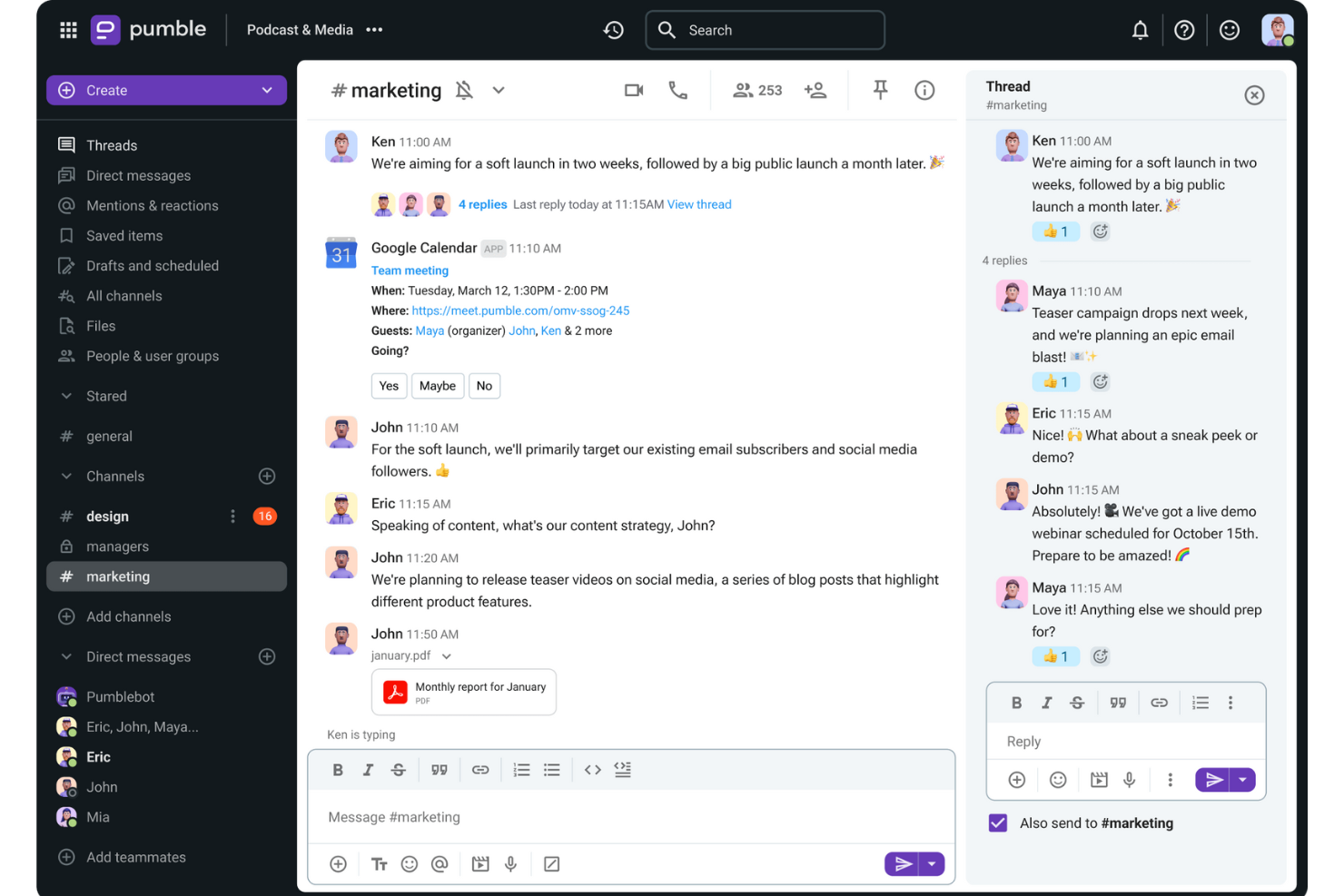
Pumble is a collaboration and communication tool designed to facilitate team interactions across desktop, mobile, and web platforms. The versatile platform is ideal for a wide range of teams, including sales, marketing, HR, product planning, and fully remote teams.
This tool provides channels for organized discussions, direct messaging for individual conversations, and threads for specific topics within a channel. The platform also includes video and voice calls, screen sharing, and file sharing to support comprehensive communication needs.
Furthermore, Pumble enables collaboration with external guests by inviting them to a Pumble meeting, even if they do not have an account. The platform even offers a free plan with unlimited users and message history, ensuring that important information is always retrievable and well-organized while supporting businesses and teams as they scale.
Integrations include Clockify for time tracking, Plaky for project management, and Zapier for connecting to over 3000 apps. Other important integrations include Google Drive, OneDrive, Outlook, Trello, and Zoom, as well as the ability to create custom integrations using the Pumble API.

Flock
Best for organizing communication using channels

Flock is one of the most robust communication apps, going far beyond a simple messaging system. This communication app stands out with its chat module which is designed to streamline and centralize communication from different groups and across different teams. Going a step beyond “back and forth” communication, Flock enables you to turn messages into useful resources with bookmarks, and convert discussions into tasks.
Flock’s features include video and audio calls, group and individual chats, and an intuitive screen sharing module. It also includes many nice-to-have communication tools, like the ability to create an anonymous poll, share it with your team, and download the results. You can also use tags in conversations to indicate high priority info. Another useful feature is the ability to automatically generate email lists of members in a particular discussion board, allowing you to quickly send out group emails to the right people.
Flock integrations include Trello, Airtable, Paperform, Slack, Asana,GitHub, Facebook Lead Ads, Twitter, Reddit, Evernote, Dropbox, Google Doc and Google Calendar, Office 365, and many more.
Flock costs from $6/user/month and offers a 30-day free trial. They also have a free plan with limited features to get started as well.
Annen kommunikasjonsprogramvare du kanskje kan ha nytte av
Det finnes så mange verktøy for kommunikasjon i prosjektstyring der ute – her er noen gode alternativer som vi ikke har tatt med i denne gjennomgangen. Ta en titt på dem!
- Livestorm
For hosting online events
- TalkRoute
For unified communications on any device
- Teamwork.com
Marketing communication tool
- FLEEP
User interface and UX
- Microsoft Teams
For live communication on Microsoft
- Zoho Cliq
For small enterprises
- MyHub
For mobile intranet access
- Nutcache
For internal team communications
- Rocket.Chat
Free communication software
- Workmates
With native engagement functionality


How I Evaluate Communication Tools
I split my evaluation into two layers: baseline capabilities like threaded channels and PM integrations, and the differentiators that make one tool a better fit for your team than another.
Core Functionality (Table Stakes For This List)
When I'm selecting tools for my list, I rank each one on a scale from 0 (does not offer the functionality) to 5 (excels in this area) for each core functionality listed below. Then, I calculate the tool's total score into a percentage. Each tool needs to achieve a minimum total score of 65% to be considered for inclusion.
- Real-Time Messaging: I check for reliable group and 1:1 chat with presence indicators, mentions, and reactions—the basics your team needs for quick decisions between standups.
- Channels & Threads: Organized, topic-based channels with threaded replies keep sprint discussions separate from general chatter, so I evaluate how each tool structures conversations.
- File Sharing & Collaboration: Teams constantly pass around specs, mockups, and docs, so I look for inline previews, version history, and cloud storage integrations like Google Drive or OneDrive.
- Video & Voice Conferencing: I evaluate built-in or deeply integrated video meetings with screen sharing and recording—features that replace the need for a separate tool during sprint reviews.
- PM Tool Integrations: Native connections with tools like Jira, Asana, and Monday matter here. I look for in-channel notifications, task creation, and bi-directional status syncing.
- Searchable Message History: When you need to trace a scope decision from three months ago, search has to deliver. I evaluate filter options, archive depth, and history limits across plan tiers.
Once I have a list of tools that meet this criteria, I consider what sets each platform apart.
Differentiating Factors (What Sets Vendors Apart)
Here's how I compare and contrast different vendors:
Standout Features
AI-powered channel summaries and meeting recaps are a big deal for PMs juggling multiple workstreams—I look for tools that extract action items and key decisions automatically. Workflow automation is another differentiator; the ability to trigger reminders, approvals, or status updates from project events saves real time. I also evaluate guest access options, since most projects involve external stakeholders who need visibility without requiring a full license.
Beyond Features
Integration depth matters here. I check whether a tool connects natively with the PM platforms your team already runs on and whether its API supports custom automations. Security and compliance weigh heavily too—I evaluate SSO support, encryption standards, and certifications like SOC 2 Type II, especially for teams handling sensitive project data. Pricing structure also plays a role; I look at how guest seat costs and message history limits scale as your team grows.
Hva er nettbaserte kommunikasjonsverktøy?
Nettbaserte kommunikasjonsverktøy i prosjektstyring er programvare som hjelper folk med å kommunisere, dele informasjon og samarbeide effektivt, uavhengig av hvor de befinner seg. Disse verktøyene omfatter ofte direktemeldinger, videokonferanser, fildeling og sanntidssamarbeid om dokumenter.
Nettbasert kommunikasjonsprogramvare forbedrer samarbeidet og kommunikasjonen mellom teammedlemmer, noe som er avgjørende for effektiviteten og suksessen til moderne arbeidsplasser. De bidrar til å bryte ned geografiske barrierer, slik at eksterne og distribuerte team kan arbeide sammen som om de var i samme rom. Dette øker ikke bare produktiviteten, men støtter også fleksible arbeidsordninger.
Vanlige spørsmål om kommunikasjonsverktøy
Finn noen av de vanligste spørsmålene andre stiller om dette emnet.
Hva er kommunikasjonsverktøy?
Kommunikasjonsverktøy er apper som fungerer som virtuelle, nettbaserte møterom for teammedlemmer og gjør det mulig for eksterne team å samarbeide. De hjelper teamet ditt med å ha samtaler, utveksle viktige prosjektdata, oppdatere andre om fremdriften og dele filer, slik at fjernarbeid blir et alternativ for nesten alle selskaper.
Kommunikasjonsverktøy omfatter alle verktøy (frakoblede eller nettbaserte) som hjelper deg med å forstå andre og bli forstått. Verktøy for team- eller internkommunikasjon omfatter kjente verktøy som post, e-post og telefoner, samt apper og programvare for nettbaserte konferanser (Skype), \u003ca href=\u0022https://thedigitalprojectmanager.com/tools/best-screen-sharing-software/\u0022\u003eskjermdeling\u003c/a\u003e, fildeling, gruppemeldinger og samarbeidende arbeidsstyring.
Hvilke typer kommunikasjonsverktøy brukes vanligvis i næringslivet?
Vanlige kommunikasjonsverktøy i næringslivet omfatter: verktøy for dokumentsamarbeid, fildelingsverktøy, chatte- og meldingsverktøy, kunnskapsbaseverktøy, tale- og \u003ca href=\u0022https://thedigitalprojectmanager.com/tools/video-conferencing-software/\u0022\u003evideokonferanseverktøy\u003c/a\u003e samt \u003ca href=\u0022https://thedigitalprojectmanager.com/tools/best-project-management-software/\u0022\u003eprosjektstyringsprogramvare\u003c/a\u003e.
Hva er de beste kommunikasjonsverktøyene for små team?
Vi valgte disse som de beste kommunikasjonsverktøyene for små team fordi de tilbyr en gratis plan.
\u003cul\u003e
\t\u003cli\u003e\u003ca href=\u0022https://www.zoho.com/cliq/?r=cmt\u0022 rel=\u0022noreferrer noopener\u0022 target=\u0022_blank\u0022\u003eZoho Cliq\u003c/a\u003e\u003c/li\u003e
\t\u003cli\u003e\u003ca href=\u0022https://gmelius.com/?utm_source=thedigitalprojectmanager\u0026utm_medium=paid\u0026utm_campaign=directories\u0026utm_term=communication_tools\u0022 rel=\u0022noreferrer noopener\u0022 target=\u0022_blank\u0022\u003eGmelius\u003c/a\u003e\u003c/li\u003e
\t\u003cli\u003e\u003ca href=\u0022https://slenke.com/?r=cmt\u0022 rel=\u0022noreferrer noopener\u0022 target=\u0022_blank\u0022\u003eSlenke\u003c/a\u003e\u003c/li\u003e
\t\u003cli\u003e\u003ca href=\u0022https://flock.com/?r=cmt\u0022 rel=\u0022noreferrer noopener\u0022 target=\u0022_blank\u0022\u003eFlock\u003c/a\u003e\u003c/li\u003e
\t\u003cli\u003e\u003ca href=\u0022https://rocket.chat/?r=cmt\u0022 rel=\u0022noreferrer noopener\u0022 target=\u0022_blank\u0022\u003eRocket Chat\u003c/a\u003e\u003c/li\u003e
\t\u003cli\u003e\u003ca href=\u0022https://www.teamwork.com/?partner=pz7aj1mr84\u0022 rel=\u0022noreferrer noopener\u0022 target=\u0022_blank\u0022\u003eTeamwork\u003c/a\u003e\u003c/li\u003e
\u003c/ul\u003e
Hva er de beste kommunikasjonsverktøyene for byråer?
Dette er noen av de beste kommunikasjonsverktøyene for byråer fordi de tilbyr nyttig fildeling, administrasjon og kontroll over brukertillatelser i tillegg til standard meldingsfunksjoner: \u003ca href=\u0022https://monday.com/lp/mb/dpm/communication/?utm_source=mb\u0026utm_campaign=dpm\u0026utm_medium=communication\u0022 rel=\u0022nofollow noopener\u0022 target=\u0022_blank\u0022\u003emonday.com\u003c/a\u003e, \u003ca href=\u0022https://ryver.com/?r=cmt\u0022 rel=\u0022nofollow noopener\u0022 target=\u0022_blank\u0022\u003eRyver\u003c/a\u003e, \u003ca href=\u0022https://fleep.io/?r=cmt\u0022 rel=\u0022nofollow noopener\u0022 target=\u0022_blank\u0022\u003eFleep\u003c/a\u003e, \u003ca href=\u0022https://slenke.com/?r=cmt\u0022 rel=\u0022nofollow noopener\u0022 target=\u0022_blank\u0022\u003eSlenke\u003c/a\u003e, \u003ca href=\u0022https://flock.com/?r=cmt\u0022 rel=\u0022nofollow noopener\u0022 target=\u0022_blank\u0022\u003eFlock\u003c/a\u003e og \u003ca href=\u0022https://teamwork.grsm.io/communication-tools\u0022 rel=\u0022nofollow noopener\u0022 target=\u0022_blank\u0022\u003eTeamwork\u003c/a\u003e.
Hva er forretningskommunikasjon?
Forretningskommunikasjon er et bredt begrep som kan omfatte interaktiv kommunikasjon som meldinger, e-poster, samtaler og møter, samt aspekter ved kommunikasjon mellom avdelinger, kundekommunikasjon og til og med kundeoppfølging, markedsføring og PR.
Hvorfor er kommunikasjon viktig i næringslivet?
Kommunikasjon er viktig i næringslivet fordi gode relasjoner er selve livsnerven i en virksomhet – og relasjoner bygges og opprettholdes gjennom kommunikasjon. Betydningen av god kommunikasjon i næringslivet kan ikke overvurderes!
\u0026nbsp;
Kom i gang med å forbedre kommunikasjonen din med disse \u003ca href=\u0022https://thedigitalprojectmanager.com/projects/communication/communication-strategies-project-management/\u0022\u003ekommunikasjonsstrategiene\u003c/a\u003e.
Hva er 7 fordeler med kommunikasjonsverktøy?
Fordelene med nettbaserte kommunikasjonsverktøy omfatter:
\u003col\u003e
\t\u003cli\u003eOrganiserer samtaler\u003c/li\u003e
\t\u003cli\u003eGir kontekst for diskusjoner\u003c/li\u003e
\t\u003cli\u003eMuliggjør asynkron kommunikasjon og fjernarbeid\u003c/li\u003e
\t\u003cli\u003eHolder deg oppdatert i sanntid\u003c/li\u003e
\t\u003cli\u003eReduserer kostbare feil\u003c/li\u003e
\t\u003cli\u003eMuliggjør bedre styring\u003c/li\u003e
\t\u003cli\u003eStyrker ansvarligheten\u003c/li\u003e
\u003c/ol\u003e
Du kan lese mer om disse fordelene med kommunikasjonsprogramvare nedenfor.
Hvis du arbeider med prosjektstyring, selv bare én dag, vet du hvilken viktig rolle god kommunikasjon spiller i et team. Noen av de mer omfattende prosjektstyringsverktøyene der ute inkluderer allerede funksjonalitet for teamkommunikasjon, men her utforsker vi de beste verktøyene i klassen som spesialiserer seg på kommunikasjon. I dag er det å være på nett og koblet til hvert teammedlem ikke en luksus, men en standard – og en god standard i tillegg.
På dagens moderne arbeidsplass er mange kommunikasjonsapper rimelige (eller gratis) – det er et opplagt valg for byråer, studioer og oppstartsbedrifter som trenger å koordinere innsatsen på prosjekter med høyt tempo, utført av distribuerte team. Faktisk er mange unge selskaper svært avhengige av direktemeldingsapper for kommunikasjon frem til de er klare til å skalere og oppgradere til noe mer omfattende.
Kjøperveiledning for kommunikasjonsverktøy
Hvordan velger du de beste kommunikasjonsverktøyene for teamet ditt? La oss snakke om hva du bør vurdere når du velger mellom kommunikasjonsverktøy.
Hva trenger du kommunikasjonsprogramvare til?
Oppgraderer du fra et gammelt kommunikasjonssystem og trenger å importere eksisterende data, eller begynner du fra blanke ark? Hva er dessuten behovene til teamet ditt? Vurder om du ser etter interne verktøy for prosjektkommunikasjon, eller om du trenger programvare som er rettet mot kunder. Hvis du kommuniserer via video, bør du vurdere Slack, eller populære Slack-alternativer som Flock eller Ryver.
Hvor stort er teamet ditt?
Det kan være vanskelig å få alle til å bruke den samme appen, særlig når teamet ditt er stort og mangfoldig når det gjelder teknisk kompetanse, geografisk plassering, prosjekt og så videre. Robuste verktøy med ulike nivåer av brukertillatelser og gjestetilgang, som Microsoft Teams, passer godt for store, distribuerte team.
Hvordan passer det inn i arbeidsflyten din?
Dette handler ofte om integrasjon. Lag en liste over verktøyene du bruker for å få prosjektene gjennomført. Hvis du allerede har en samling med apper for tidsregistrering, fakturaapper og andre verktøy, bør du vurdere Fleep eller Zoho Cliq, som har et stort bibliotek med ferdigbygde integrasjoner. På den annen side kan du prøve en løsning som Slenke hvis verktøykassen din er begrenset nå, men du ser for deg at driften vil skalere. Slenke tilbyr funksjoner for prosjekt- og oppgavehåndtering som kan hjelpe deg etter hvert som du vokser. Lag en liste over integrasjonskravene dine, og sjekk den to ganger – det skader heller ikke å spørre teammedlemmene dine hvilken ekstra programvare de bruker, og hva de foretrekker.
Hvor lang tid tar det å sette det opp?
De fleste kommunikasjonsverktøy er intuitive å bruke og sette opp som en nettapp. Hvis du imidlertid foretrekker å drifte løsningen på dine egne servere, tar det litt mer tid. Rocket Chat har et profesjonelt team som kan hjelpe deg, og Slack er et populært valg med god brukerstøtte. Uansett avhenger det av hvor sensitive dataene er, og hvor mye datatrafikk teamet ditt forventer.
Hvordan er læringskurven?
Enten du tar i bruk et nytt kommunikasjonssystem eller oppgraderer fra et gammelt, må alle involverte venne seg til endringene. Endringshåndtering blir ofte enklere med grensesnitt som er enkle å bruke.
Teamwork Chat er et eksempel på et visuelt enkelt verktøy som er lett å lære. Husk at teamet ditt ikke er de eneste som bruker det – du kan ha kunder eller personer som ikke er en del av de daglige prosessene dine, men som trenger tilgang til videokonferanser. Hvis dette er tilfelle, bør du sørge for at det finnes en intuitiv kundeportal.
Hva koster det?
Hva er budsjettet ditt for et kommunikasjonsverktøy? Det er en god idé å investere i programvare for prosjektstyringskommunikasjon, men husk at mindre ofte er mer – den gode nyheten er at mange kommunikasjonsverktøy har en versjon som er «gratis for alltid», med begrenset funksjonalitet. Gratisversjonen av kommunikasjonsverktøyet kan dekke teamets behov godt nok, og tilbyr alle de «viktigste funksjonene» uten å bli unødvendig komplisert med «kjekt å ha»-funksjoner.