

10 beste gratis AI-verktøy for prosjektstyring vurdert i 2026

Kortliste over de beste gratis AI-verktøyene for prosjektstyring


Det kan være litt av en balansegang å finne det riktige AI-verktøyet som kan hjelpe deg med å styre prosjektene dine på et stramt budsjett. Korte tidsfrister, begrensede ressurser og behovet for teamsamarbeid øker presset ytterligere.
Her er mine anbefalinger av de beste gratis AI-verktøyene for prosjektstyring. De tilbyr nyskapende og nyttige AI-funksjoner for organisering av oppgaver, bedre samarbeid og for å holde prosjekter på rett spor – uten ekstra kostnader. Jeg har gjennomgått og vurdert hvert verktøy og deler min ærlige mening nedenfor.
Why Trust Our Software Recommendations
Our team has been testing and reviewing software since 2012. As project managers ourselves, we know how difficult—and important—it is to choose the right software.
For this guide, we evaluated tools using hands-on testing and independent research, scoring tools using our selection criteria. We also draw on insights from industry thought leaders and practicing project management experts.
Our reviews reflect our human editorial judgment, not a sales pitch.
Expert reviewers:
Sammenligningstabell over gratis AI-verktøy for prosjektstyring
Her er grunnkostnadene for hvert av verktøyene som kom med på kortlisten min:
| Tool | Best For | Trial Info | Price | ||
|---|---|---|---|---|---|
| 1 | Best for visualizing project progress | Free plan available; 14-day free trial | From $9/user/month (billed annually) | Website | |
| 2 | Best for AI-assisted project workflows | 14-day free trial | From $10/user/month (billed annually) | Website | |
| 3 | Best for small teams | Free plan + 15-day free trial available | Pricing upon request | Website | |
| 4 | Best for interactive Gantt chart scheduling | 14-day free trial | From $7/user/month (billed annually) | Website | |
| 5 | Best for AI-generated project plans and WBS | Free plan available; 14-day free trial | From $3/user/month | Website | |
| 6 | Best for canvas-based AI project planning | Free plan + 14-day free trial available | From $8/user/month (billed annually) | Website | |
| 7 | Best for docs, tasks, and wikis in one workspace | Free plan available | From $10/user/month (billed annually) | Website | |
| 8 | Best for AI-edited docs in free workspaces | Free plan available | From $7/user/month (billed annually) | Website | |
| 9 | Best for AI-generated plans in remote teams | Free plan available | From $20/month | Website | |
| 10 | Best for integrated CRM and project tracking | 15-day free trial + free demo available | From $49/month (billed annually) | Website |


Anmeldelser av de beste gratis AI-verktøyene for prosjektstyring
Her er mine grundige sammendrag av hvert gratis AI-verktøy for prosjektstyring som kom med på listen min. Jeg tar for meg funksjoner, fordeler og ulemper, integrasjoner og bruksområder for å hjelpe deg med å velge det som passer best. Noen verktøy tilbyr en helt gratis versjon, mens andre gir en gratis prøveperiode i en begrenset tidsperiode – jeg har tatt med en merknad om hva som er gratis i hver anmeldelse.

Best for visualizing project progress

monday.com is a flexible project management platform designed for teams in tech, marketing, and operations who want to organize work, automate tasks with AI, and keep projects moving forward with clear visibility.
Who Is monday.com Best For?
monday.com is a good fit for cross-functional teams in mid-sized companies who need a centralized place to manage projects across product, engineering, and marketing.
Why I Picked monday.com
monday.com earns its spot on my shortlist because of how well it handles project visibility at every level. I love the customizable dashboards that pull live data from across boards, letting my team see task status, workload distribution, and milestone progress all in one place without digging through individual project views. The AI-powered risk analyzer is useful—it proactively flags tasks approaching their deadlines and surfaces dependencies that could derail delivery. The portfolio management view connects multiple projects into a single high-level picture, making it easy to see which are on track and which aren't.
monday.com Key Features
- AI task generation: Automatically breaks down project goals into actionable tasks using AI based on a project brief or description.
- Gantt chart view: Displays project timelines, task durations, and dependencies in a drag-and-drop Gantt format.
- Workload management: Shows each team member's assigned tasks and capacity across projects to help balance work distribution.
- Automations builder: Lets you set up no-code trigger-and-action rules to handle recurring task updates, notifications, and status changes.
monday.com Integrations
Integrations include Salesforce, QuickBooks, HubSpot, Zendesk, Active Directory, GitHub, GitLab, Slack, Gmail, and Microsoft Teams.
What's Free?
monday.com offers a free-forever plan for up to 2 users. This plan includes up to 3 boards, limited integrations, and basic features suitable for small teams or individuals.
Pros and Cons
Pros:
- Enterprise-grade security and compliance
- Extensive third-party app integrations
- Highly customizable visual project boards
Cons:
- Complex workflows need learning time
- Automation limits per pricing tier
New Product Updates from monday AI Workspace
monday AI Workspace Adds Human Approval Routing
monday AI Workspace adds a human-in-the-loop approval block to AI Workflows, sending approval requests and routing workflow paths based on responses. For more information, visit monday AI Workspace's official site.

Wrike
Best for AI-assisted project workflows

Wrike gives project managers and cross-functional teams a flexible workspace with built-in AI features to help organize tasks, manage deadlines, and collaborate on projects without the usual manual busywork.
Who Is Wrike Best For?
Wrike is a good fit for mid-size to enterprise teams in tech, marketing, and professional services who need structured project workflows with AI-assisted planning and execution.
Why I Picked Wrike
I selected Wrike for its ability to combine core project tracking with accessible AI functionality across every pricing tier, including its free offering. On the no-cost plan, you get immediate access to AI Essentials, which handles content drafting, comment summaries, onboarding assistance, Whiteboard AI, and mobile inbox prioritization, alongside Wrike’s Model Context Protocol (MCP) Server to connect workspace data directly to external AI models. For teams that choose to upgrade, higher tiers unlock advanced automation like Wrike Copilot, an AI agent builder, and natural language generation for intake forms and automation rules.
Wrike Key Features
- AI Content Drafting and Editing: Generates initial task descriptions, writes project briefs, refines prose tone, and fixes grammar within task items.
- Smart Comment Summaries: Condenses lengthy discussion threads across complex project tasks into concise, key action items.
- Whiteboard AI: Assists in brainstorming sessions by transforming ideas into actionable task cards directly on visual digital canvases.
- Mobile Inbox Prioritization: Uses AI to automatically sort and highlight urgent notifications on mobile devices.
Wrike Integrations
Integrations include Salesforce, Microsoft Teams, Google Drive, Microsoft SharePoint, Zoom, Adobe Creative Cloud, QuickBooks, Power BI, Tableau, and Miro.
What's Free?
Wrike offers a free-forever plan with unlimited users and 2 GB of storage per account, alongside a 14-day trial of paid features with no credit card required.
Pros and Cons
Pros:
- Generative AI drafts and edits
- Predicts project risks proactively
- Suggests task prioritization automatically
Cons:
- Advanced AI requires paid plan
- Predictions need accurate project data
New Product Updates from Wrike
Wrike Adds Klaxoon MCP Integration
Wrike’s Klaxoon MCP integration is now generally available, enabling AI agents to navigate between Wrike tasks and attached whiteboards, read task context, and manage whiteboard attachments via API. For more information, visit Wrike's official site.

Best for small teams
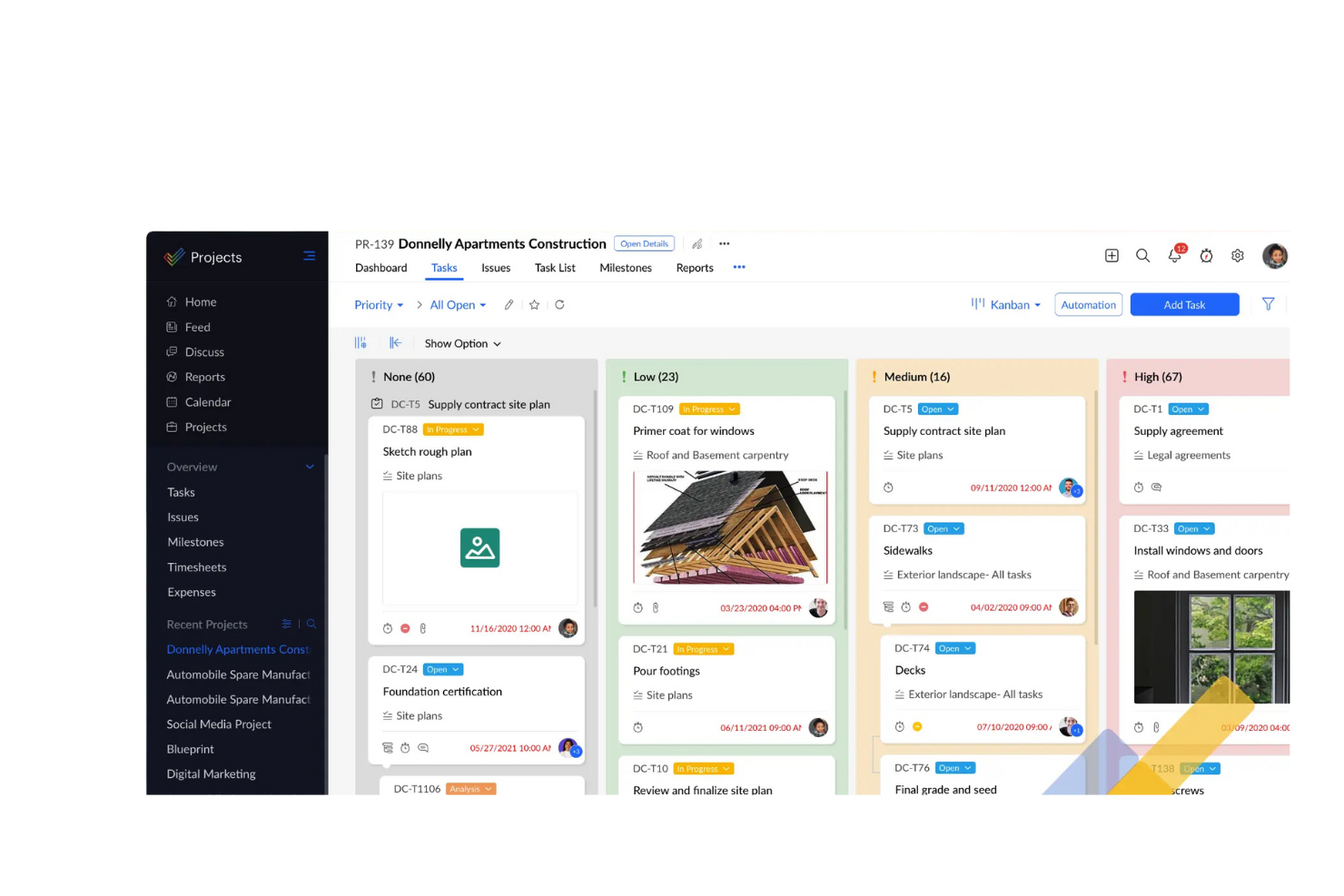
Zoho Projects gives tech teams and small businesses a free way to organize tasks, track progress, and use AI-powered features to manage projects with less manual effort.
Who Is Zoho Projects Best For?
Zoho Projects is a strong fit for small teams that need a structured, feature-rich project management tool without a large budget.
Why I Picked Zoho Projects
I picked Zoho Projects as one of the best because it gives small teams a genuinely capable free plan without forcing them to upgrade just to get things done. The free tier supports up to 5 users and includes Gantt charts, task management, and even the Zoho MCP Server, which connects AI models to your project data so they can read context and take actions from natural language prompts. On the paid Premium plan, Zia adds AI-powered task creation, summaries, and insights that help small teams move faster without needing a dedicated project coordinator. I also like that the free plan includes workflow automation (50 executions/month), so even a lean team can automate routine status updates or notifications from day one.
Zoho Projects Key Features
- Time tracking: Log hours directly on tasks and generate timesheets to monitor where your team's time is going.
- Issue tracker: Create, assign, and prioritize bugs or blockers so nothing slips through during a sprint or release cycle.
- Project templates: Start new projects from pre-built templates to skip repetitive setup work.
- Resource utilization chart: View workload distribution across team members to spot over-allocation before it becomes a problem.
Zoho Projects Integrations
Integrations include Zoho CRM, Zoho Desk, Zoho Analytics, Zoho People, Google Calendar, Microsoft Teams, Slack, Dropbox, GitHub, and Jira.
What's Free?
Zoho Projects offers a free-forever plan for up to 3 users and 2 projects. The free plan includes basic task management features but limits access to advanced tools and most integrations.
Pros and Cons
Pros:
- Offers project templates
- Includes issue tracking
- Suitable for small teams
Cons:
- May require setup time
- Limited customization options
New Product Updates from Zoho Projects
Zoho Projects Adds CodeX Scripts for Custom Modules
Zoho Projects now supports CodeX Scripts for custom modules, enabling conditional logic and rules for creating, updating, and deleting records. For more information, visit Zoho Projects' official site.
 .
.
GanttPRO
Best for interactive Gantt chart scheduling

GanttPRO is project management software that lets you map out projects using drag-and-drop Gantt charts, manage resources, assign tasks, set dependencies, and export timelines for your team.
Who Is GanttPRO Best For?
GanttPRO is a good fit for project managers and team leads who need visual timeline planning without a steep learning curve.
Why I Picked GanttPRO
GanttPRO is one of my top picks because I love how its interactive Gantt charts handle scheduling in real time. My team can drag and drop tasks to shift dates, and the auto-scheduling feature instantly recalculates dependent tasks and timelines. When a sprint slips or a deadline changes, I don't have to manually update every downstream task. I also rely on the critical path feature, which highlights exactly which tasks will affect the final delivery date if they run late.
GanttPRO Key Features
- Task assignment and roles: Assign tasks to specific team members, set roles, and define access levels directly within the project timeline.
- Baseline tracking: Save a project baseline to compare your original plan against actual progress as work moves forward.
- Board view: Switch from Gantt chart to a Kanban-style board view to manage tasks by status without leaving the platform.
- Time tracking: Log time spent on individual tasks directly in GanttPRO to monitor effort against your project schedule.
GanttPRO Integrations
GanttPRO offers native integrations with Jira Cloud, Google Drive, Slack, and Microsoft Teams. It provides an API for custom integrations.
What's Free?
GanttPRO offers a 14-day free trial with access to all premium features and no credit card required. There is no free-forever plan—after the trial, a paid subscription is needed to continue using the software.
Pros and Cons
Pros:
- Interactive drag-and-drop Gantt chart scheduling
- Built-in resource workload and capacity visualization
- Exports timelines as PDF, PNG, and XML
Cons:
- No built-in budgeting or cost tracking tools
- Interface centered primarily around Gantt view

Best for AI-generated project plans and WBS
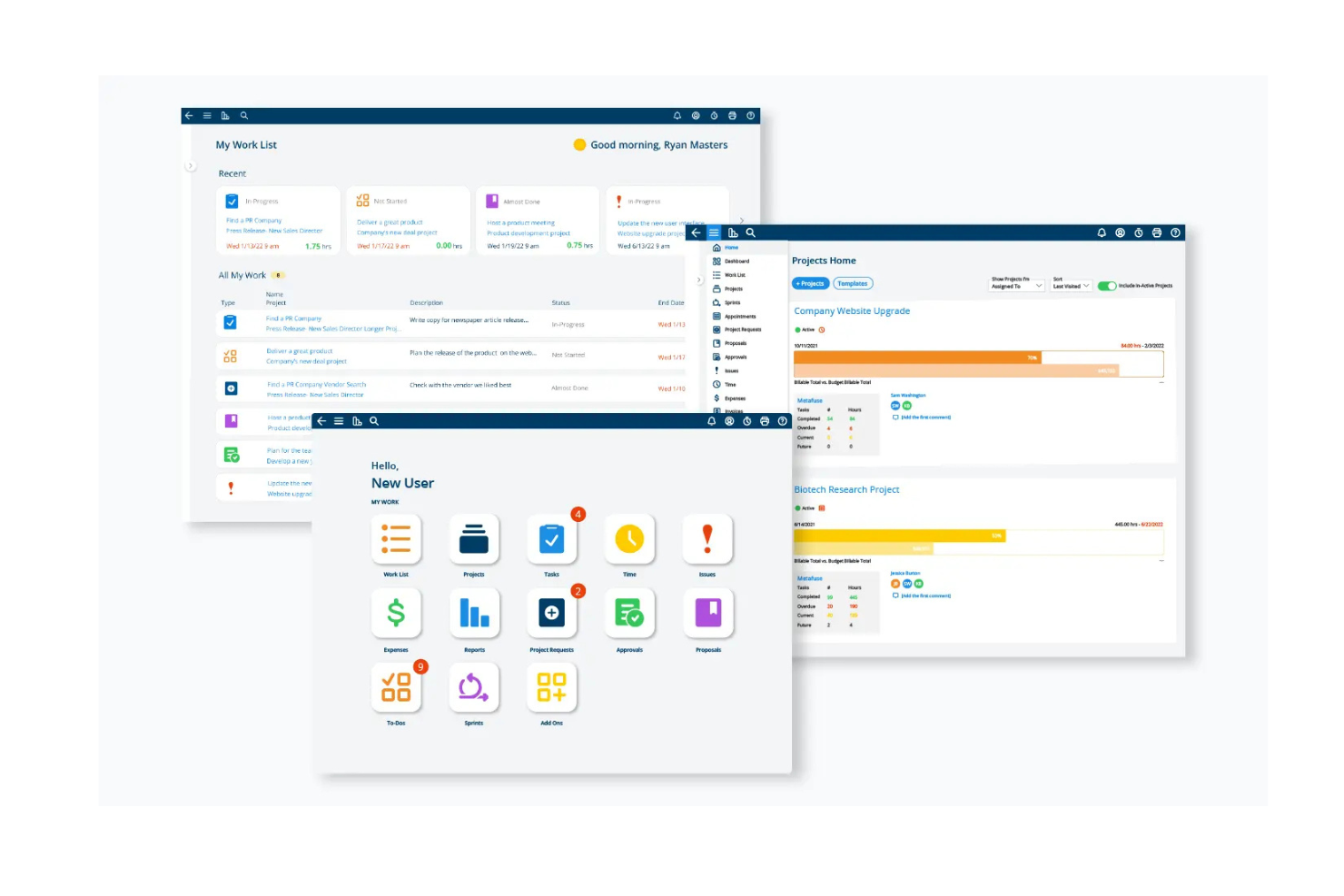
Project Insight is a project management platform with a free tier for up to three users, combining AI project templates and WBS creation with intelligent scheduling, task management, dashboards, and Gantt and Kanban views.
Who Is Project Insight Best For?
Project Insight suits PMO-oriented project managers who need AI-generated project plans, work breakdown structures, and structured scheduling.
Why I Picked Project Insight
I picked Project Insight as Best for AI-generated project plans and WBS because its AI turns project context into a draft with phases, tasks, milestones, roles, and dependencies. Intelligent Scheduling adjusts dependent dates and flags delays or overloaded team members as plans change.
Project Insight Key Features
- Project views: Free includes more than 20 views, including Gantt charts, Kanban boards, and task lists.
- Dashboards and reporting: View project information through dashboards and reports.
- Document management: Store and manage project documents in the platform.
- Comments and activity: Free includes unlimited comments and activity.
Project Insight Integrations
Project Insight documents two-way integrations with Jira Software, Azure DevOps, Salesforce, NetSuite, HubSpot, and ServiceNow. It also lists an API for custom connections.
What’s Free?
Project Insight offers a free-forever plan for up to three users. The user limit is the main restriction noted.
Pros and Cons
Pros:
- Free includes Gantt, Kanban, and task views
- Intelligent Scheduling flags delays and overloads
- AI drafts WBS plans with dependencies
Cons:
- No AI-generated project status summaries
- Three-user limit restricts team collaboration

Miro
Best for canvas-based AI project planning
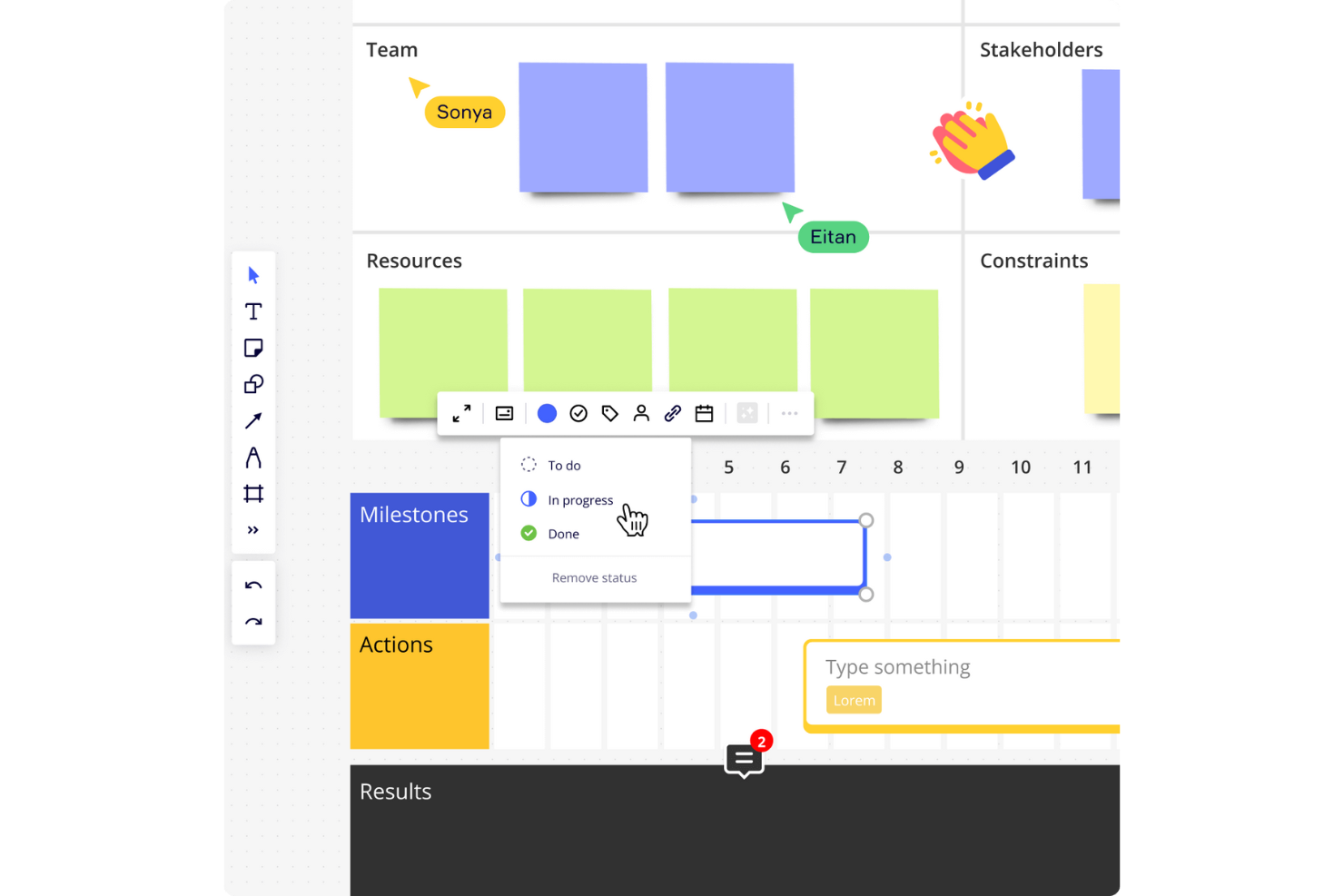
Miro is a visual project management platform with a free AI-enabled plan, combining a shared canvas, Kanban, Timeline, and Table boards with AI summaries and prompt-generated boards.
Who Is Miro Best For?
Product and design teams coordinating discovery and cross-functional workshops can use Miro to turn shared input into project plans.
Why I Picked Miro
I picked Miro as Best for canvas-based AI project planning because Sidekick can turn discovery notes into Kanban or Timeline boards. Catch-up summarizes board changes and action items before a status review. The free plan includes these AI tools, but its three-editable-board cap and limited credits constrain ongoing project tracking.
Miro Key Features
- Live co-editing: Team members can edit the same canvas in real time.
- Comments and mentions: Add comments and @mention teammates on boards.
- Template library: Choose from more than 7,000 Miro and community templates.
- Integrations: Connect Miro with more than 250 apps, including Microsoft, Slack, Google, and Adobe.
Miro Integrations
Miro offers 250+ integrations, including Microsoft, Slack, Google, and Adobe. Jira and Asana integrations start on Starter; Business adds two-way sync with Jira, Asana, Linear, ClickUp, and Azure DevOps.
What's Free?
Miro offers a free-forever plan with AI tools, but limits each team to three editable boards and provides limited AI credits.
Pros and Cons
Pros:
- Kanban and Timeline support visual tracking
- AI turns board notes into plans
- Live co-editing keeps workshops aligned
Cons:
- Large boards can lag and clutter
- Three editable boards constrain ongoing projects
New Product Updates from Miro
Miro Adds Japan Data Residency for Enterprise Customers
Miro has introduced Japan data residency for enterprise customers, offering in-region storage for production data, backups, and metadata, plus in-region compute infrastructure. For more information, visit Miro's official site.
Notion
Best for docs, tasks, and wikis in one workspace

Notion is a project management workspace with task databases, subtasks, dependencies, and board, timeline, calendar, and other views, plus AI-assisted planning and summaries that are limited to a trial on its free plan.
Who Is Notion Best For?
Notion suits freelancers and solo project leads who want to manage tasks alongside project briefs and documentation in one customizable workspace.
Why I Picked Notion
I picked Notion for its “Best for docs, tasks, and wikis in one workspace” focus, with project databases that support subtasks, dependencies, and board or timeline views. I like keeping a project brief beside assigned tasks and status details. Notion AI can draft plans and summarize notes, but Free access is a limited trial, so I wouldn’t rely on it for ongoing AI work.
Notion Key Features
- Request forms: Collect project requests with basic forms on the Free plan.
- Comments and mentions: Discuss work and notify collaborators on pages.
- Project templates: Browse templates for roadmaps, issue tracking, and planning.
- AI Meeting Notes: Transcribe and summarize meetings, with limited trial access on Free.
Notion Integrations
Notion integrations include Slack, Google Drive, GitHub, Figma, Jira, Asana, and Amplitude; premium connections and database syncs require Business. Notion also supports a public API, webhooks, and Zapier.
What’s Free?
Notion has a free-forever plan, but AI features are limited to a trial on Free, so ongoing AI use isn’t included.
Pros and Cons
Pros:
- Templates speed up project workspace setup
- Flexible databases support multiple tracking views
- Project briefs live beside assigned tasks
Cons:
- Shared workspaces hit a 1,000-block cap
- Free AI access ends after limited trial

ClickUp
Best for AI-edited docs in free workspaces
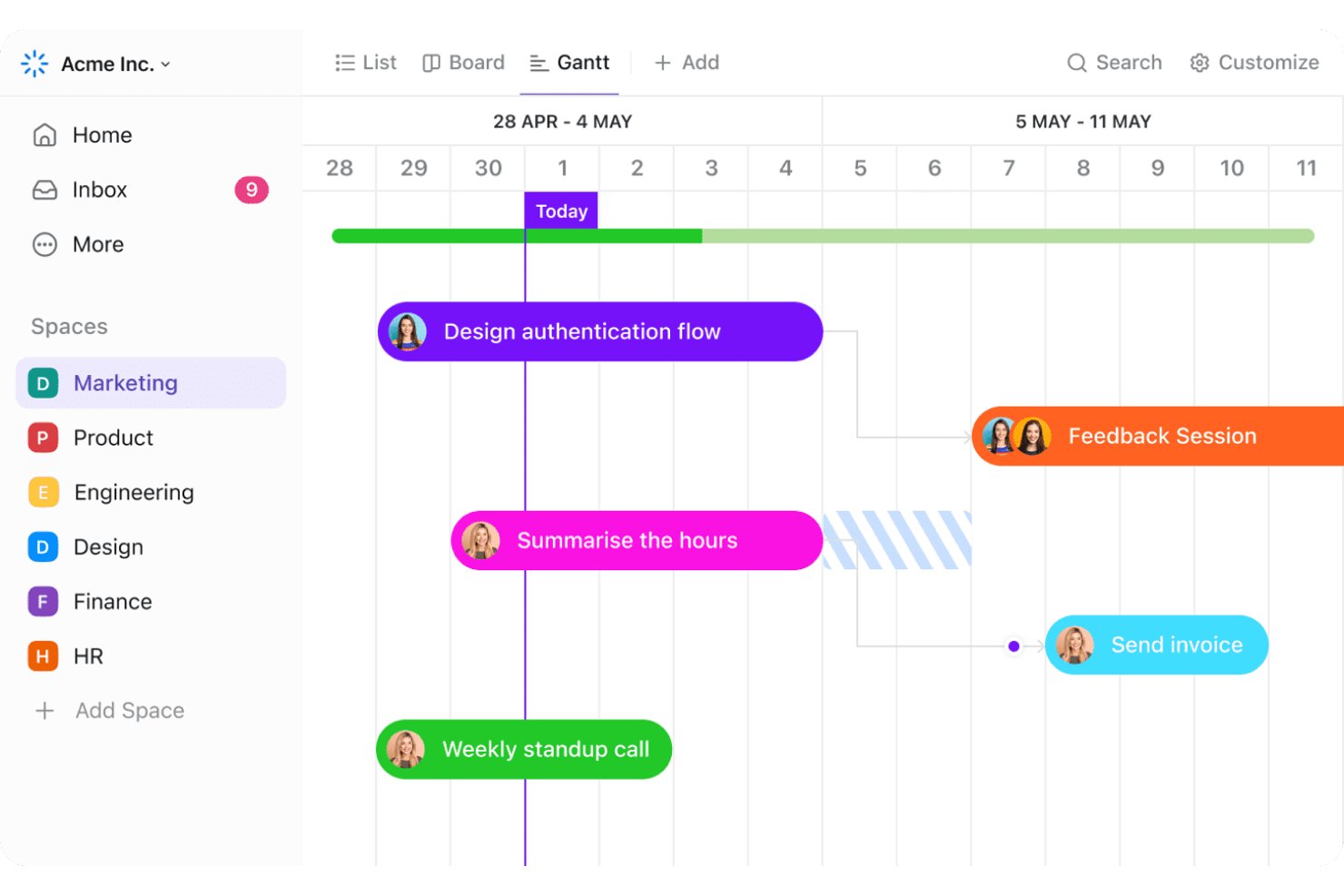
ClickUp is a project management platform for task tracking, collaboration, Docs, and AI-assisted writing, summaries, and task creation; its free plan includes a limited AI credit trial.
Who Is ClickUp Best For?
ClickUp suits small businesses and team leads coordinating cross-functional projects who want shared tasks and Docs in one free workspace.
Why I Picked ClickUp
I picked ClickUp because it’s Best for AI-edited docs in free workspaces. In Docs, I can select text for Brain to improve, summarize, or rewrite, then use inline comments to turn feedback into tasks. The Doc sidebar also pulls out action items, though free AI access relies on a limited 500-credit workspace trial.
ClickUp Key Features
- Unlimited tasks and members: Create tasks and invite team members on the free plan.
- List, Board, and Calendar views: Track work in three free project views.
- Sprint management and time tracking: Organize sprint work and record time on tasks.
- Automations: Run up to 100 automation actions per workspace each month.
ClickUp Integrations
ClickUp offers 50+ native integrations, including Slack, GitHub, GitLab, Google Drive, Microsoft Teams, Figma, Zoom, and Google Calendar; some require a paid plan. It also supports a public API and Zapier.
What’s Free?
ClickUp offers a free-forever plan with unlimited tasks and members. Brain AI access is limited to a 500-credit workspace trial, not unlimited AI use.
Pros and Cons
Pros:
- Comments and assignments support team coordination
- AI edits Docs and extracts action items
- Unlimited free tasks and members
Cons:
- Workspace setup can overwhelm new teams
- Free AI credits may not renew
New Product Updates from ClickUp
ClickUp Adds Meetings Hub, Super Agent Templates, and ZoomInfo Integration
ClickUp adds a searchable Meetings Hub, new ways to clone and template Super Agents, and a ZoomInfo integration through the App Center. These updates improve meeting retrieval, agent reuse, and access to sales intelligence. For more information, visit ClickUp’s official site.

Taskade
Best for AI-generated plans in remote teams

Taskade is an AI project management platform with task tracking, collaborative workspaces, multiple project views, and prompt-generated plans, though its Free plan starts with zero AI credits.
Who Is Taskade Best For?
Taskade suits small remote teams that need shared task views and collaboration, though its Free plan’s AI tools require earned or purchased credits.
Why I Picked Taskade
I picked Taskade for AI-generated plans in remote teams because its AI Project Plan Generator turns a short brief into sequenced phases, tasks, owners, dependencies, and risk mitigations. AI Project Studio can also build a project from prompts and source material. One caveat: the Free plan starts with zero AI credits, so you’ll need to earn or buy credits to generate plans.
Taskade Key Features
- Project views: Switch between List, Board, Table, Mind Map, Docs, and Calendar views.
- Task details: Add subtasks, assignees, due dates, reminders, comments, and custom fields.
- Team collaboration: Edit projects in real time and use chat, comments, and @mentions.
- Project imports and exports: Import from tools like Trello or Asana, then export projects as CSV, Markdown, PDF, images, or plain text.
Taskade Integrations
Taskade lists 166 integrations, including Google Workspace, Microsoft 365 and Teams, Jira, Linear, Trello, Asana, ClickUp, GitHub, Zoom, and Zapier. Free access is limited to standard connectors; premium connectors and the REST API require paid plans.
What's Free?
Taskade offers a free plan rather than a time-limited trial, with up to two people and 10 automation runs per month. It starts with zero AI credits, and free users get standard integrations only; premium connectors require a paid plan.
Pros and Cons
Pros:
- Supports real-time editing, comments, and team chat
- Switches between six views on shared project data
- Generates phased plans with tasks and risk mitigations
Cons:
- Two-member cap limits remote team collaboration
- Free plan starts with zero AI credits

Bitrix24
Best for integrated CRM and project tracking

Bitrix24 is a project management and CRM platform with task tracking, Kanban and Gantt views, team chat, and limited CoPilot AI on its free plan.
Who Is Bitrix24 Best For?
Small-business project managers who want task tracking alongside CRM, chat, and shared calendars can start with Bitrix24’s free plan, though its AI limits are unclear.
Why I Picked Bitrix24
I picked Bitrix24 as Best for integrated CRM and project tracking because tasks sit alongside CRM deals and contacts. I can track work in Kanban or Gantt views, while CoPilot provides limited AI in chat and files on the free plan. Bitrix24 doesn’t publish the free AI quota, so I wouldn’t rely on it for AI-heavy workflows.
Bitrix24 Key Features
- Shared calendars: View team schedules and coordinate events in a shared calendar.
- Group video calls: Host group calls with up to 300 participants, with no time limit.
- Project feed: Share updates and discussions in a project feed.
- Online documents: Create and co-edit documents, with simultaneous editors capped by plan.
Bitrix24 Integrations
Bitrix24 has native integrations with Google Calendar, Apple iCloud, Microsoft 365, and Zoom. Marketplace integrations include Zapier, but free plans can’t install Market apps; REST API access is available on Vibe+ plans.
What's Free?
Bitrix24 offers a free-forever plan with limited CoPilot AI, but it doesn’t publish the free AI quota. Free-plan users also can’t install Market apps.
Pros and Cons
Pros:
- Built-in chat and video support team coordination
- Kanban and Gantt support visual tracking
- Tasks connect directly to CRM deals
Cons:
- Crowded interface can slow daily navigation
- Free AI quota remains unpublished
Andre gratis AI-verktøy for prosjektstyring
Her er noen flere alternativer for AI-verktøy for prosjektstyring som også tilbyr gratis abonnementer eller prøveperioder. Hvis du ikke fant det du lette etter ovenfor, kan du ta en titt på disse:
- Hive
For AI-driven insights
- Basecamp
For connecting AI assistants to project work
- Jira
For agile teams outgrowing spreadsheets
- MeisterTask
For one-click AI project status updates
- Airtable
For database-style project tracking
- Nifty
For milestone-driven project planning
- Linear
For engineering-team issue tracking with free AI
- GoodDay
For customizable free team workspaces
- Odoo
For modular business app integration
- Plane
For open-source self-hosted project tracking


How I Evaluate Free AI Project Management Tools
I evaluate every tool on two layers—baseline criteria that qualify it for the list, and differentiating factors that matter when a remote team lead needs AI to auto-draft a project plan for free.
Core Functionality (Table Stakes For This List)
When I'm selecting tools for my list, I rank each one on a scale from 0 (does not offer the functionality) to 5 (excels in this area) for each core functionality listed below. Then, I calculate the tool's total score into a percentage. Each tool needs to achieve a minimum total score of 65% to be considered for inclusion.
- Free Plan Availability: I check whether the tool offers a true free tier—not a time-limited trial—that gives small teams enough room to run real projects with AI features included.
- Native AI Features: Tools like ClickUp and Asana have built-in AI, so I look for platform-native capabilities like task generation or summaries rather than just a third-party API bolted on.
- Task & Project Management: I evaluate whether you can create tasks with assignees, due dates, subtasks, and dependencies—the basics you'd need to plan a product launch or sprint cycle.
- Multiple Project Views: Whether it's a Kanban board for a design sprint or a timeline for a client deliverable, I look for at least two or three view options available on the free plan.
- Team Collaboration: Real teamwork means comments, @mentions, and shared workspaces. I check that free-tier users can invite teammates and collaborate without hitting immediate seat restrictions.
- AI Automation & Workflows: I look for AI-driven automations like auto-generating subtasks from a brief or triggering status updates when conditions are met, not just basic if-then rules.
Once I have a list of tools that meet this criteria, I consider what sets each platform apart.
Differentiating Factors (What Sets Vendors Apart)
Here's how I compare and contrast different vendors:
Standout Features
Natural language project creation is a big one for me. A tool that lets you type "plan a website redesign in six sprints" and generates a full task breakdown saves hours of manual setup. I also look for predictive risk insights—AI that flags slipping deadlines or overloaded teammates before they become blockers. For remote teams, an AI meeting assistant that pulls action items from call transcripts and turns them into assigned tasks closes the gap between conversation and execution.
Beyond Features
Data privacy and AI governance matter a lot when your team's project data feeds an AI model. I check whether vendors disclose how prompts and project content are handled and whether you can opt out of model training. Integration depth is another key factor—a free tool that connects to Slack, GitHub, or Google Workspace keeps your workflow intact without paid upgrades. I also evaluate free plan transparency, especially whether AI usage caps and seat limits are clearly documented upfront so teams aren't blindsided mid-project.
Slik velger du et gratis AI-verktøy for prosjektstyring
Komplekse funksjoner og ulike prisnivåer kan gjøre det vanskelig å se hva et gratis AI-verktøy for prosjektstyring faktisk tilbyr. For å hjelpe deg med å holde oversikten når du skal velge riktig programvare, er dette noen viktige faktorer du bør vurdere:
| Faktor | Hva bør vurderes |
|---|---|
| Omfanget av gratistilbudet | Undersøk hva som er inkludert i gratisabonnementet. Se etter begrensninger på funksjoner, brukere og prosjekter for å sikre at det dekker teamets behov uten uventede kostnader. |
| Skalerbarhet | Sørg for at verktøyet kan vokse sammen med teamet. Vurder om det tilbyr betalingsabonnementer med funksjoner som støtter større prosjekter og flere brukere etter hvert som teamet utvides |
| Integrasjoner | Kontroller om verktøyet kan kobles til annen programvare dere bruker. Integrasjoner med verktøy som Slack, Google Workspace eller Trello kan øke produktiviteten ved å effektivisere arbeidsflytene |
| Brukervennlighet | Vurder brukergrensesnittet og læringskurven. Et verktøy som er enkelt å navigere i, sparer teamet for tid og reduserer behovet for opplæring |
| Tilpasning | Finn ut om du kan tilpasse verktøyet til arbeidsflyten din. Tilpassbare dashbord, arbeidsflyter og rapporter kan bidra til å tilpasse verktøyet til teamets arbeidsprosesser. |
| Støttealternativer | Vurder hvilket støttenivå som tilbys. Tilgang til chat-, e-post- eller telefonstøtte kan være avgjørende, særlig når dere kommer i gang eller møter tekniske problemer |
| Sikkerhet | Vurder sikkerhetstiltakene som er på plass. For team som håndterer sensitive data, er funksjoner som kryptering og overholdelse av personvernregler avgjørende. |
| Mobiltilgang | Undersøk om verktøyet har en mobilapp eller et mobiltilpasset nettsted. Dette gjør det mulig for teammedlemmer å administrere prosjekter på farten og øker fleksibiliteten og reaksjonsevnen |
Hva er gratis KI-prosjektstyringsverktøy?
Gratis KI-prosjektstyringsverktøy er programvareplattformer som hjelper team med å planlegge, følge opp og administrere arbeid mer effektivt ved hjelp av KI-funksjoner. De tilbyr vanligvis gratisabonnementer eller prøveperioder med grunnleggende funksjoner som også finnes i programvare for oppgavehåndtering, for eksempel oppfølging av oppgaver, teamsamarbeid og rapportering.
Disse verktøyene er nyttige for prosjektledere, teamledere og frilansere som trenger å holde oversikt over oppgaver og tidsfrister. Med funksjoner som automatisering av oppgaver, oppdateringer i sanntid og integrasjon med andre apper blir det enklere å håndtere arbeidsmengder og holde alle samkjørte.
Funksjoner i gratis KI-prosjektstyringsverktøy
Her er funksjonene som ofte finnes i KI-prosjektstyringsverktøy, og hvilke som vanligvis er inkludert i gratis- og betalingsabonnementer.
Funksjoner som vanligvis er inkludert i gratis KI-prosjektstyringsverktøy
- Oppgavehåndtering: Gjør det mulig å opprette og tildele oppgaver og hjelper team med å holde orden og holde seg på rett spor.
- Samarbeidsverktøy: Tilbyr chat- og fildelingsfunksjoner for å legge til rette for kommunikasjon og koordinering i teamet.
- Prosjektoppfølging: Hjelper med å følge fremdrift og tidsfrister for å sikre at prosjekter blir ferdigstilt i tide.
- Grunnleggende rapportering: Tilbyr enkle rapporter for å følge prosjektmålinger og teamets prestasjoner.
- Støtte for integrasjoner: Kobles til populære apper som Slack og Google Drive for å forbedre funksjonaliteten og effektivisere arbeidsflytene.
- Kanban-tavler: Visualiserer oppgaver og arbeidsflyter for å forbedre prosjektstyringen og prioriteringen av oppgaver.
- Tidsregistrering: Gjør det mulig for team å registrere hvor mange timer som brukes på oppgaver, noe som bidrar til produktivitetsanalyse.
- Dokumenthåndtering: Lagrer og deler prosjektrelaterte dokumenter slik at alle teammedlemmer holdes informert.
Funksjoner som vanligvis er inkludert i betalte KI-prosjektstyringsverktøy
- Avansert rapportering: Tilbyr detaljert analyse og innsikt for å hjelpe deg med å ta datadrevne beslutninger.
- Tilpassede arbeidsflyter: Gjør det mulig å opprette skreddersydde prosesser som dekker spesifikke forretningsbehov.
- Ressursstyring: Optimaliserer fordelingen av teamets ressurser for å forbedre effektiviteten og produktiviteten.
- Porteføljestyring: Tilbyr verktøy som lar deg administrere flere prosjekter samtidig og få oversikt over alle prosjektaktiviteter.
- Automatiseringsverktøy: Effektiviserer gjentakende oppgaver og prosesser for å spare tid og redusere feil.
- Gantt-diagrammer: Gir detaljerte prosjekttidslinjer og avhengigheter for å forbedre planlegging og gjennomføring.
- Rollebaserte tillatelser: Kontrollerer tilgangen til sensitiv informasjon og funksjoner for å holde data trygge og sikre.
- KI-drevet innsikt: Bruker kunstig intelligens til å gi anbefalinger og prognoser for vellykkede prosjekter.
Fordeler med gratis AI-verktøy for prosjektstyring
Implementering av gratis AI-verktøy for prosjektstyring gir flere fordeler for teamet og virksomheten din. Her er noen av fordelene du kan se frem til:
- Kostnadsbesparelser: Få tilgang til viktige prosjektstyringsfunksjoner uten å bruke penger, noe som gjør dette ideelt for team med stramme budsjetter.
- Bedre samarbeid: Bruk innebygde chat- og fildelingsverktøy for å forbedre kommunikasjonen og samarbeidet i eksterne eller distribuerte team.
- Bedre organisering: Administrer oppgaver og tidsfrister effektivt, hold prosjekter på rett spor og reduser risikoen for overskredne tidsfrister.
- Fleksibilitet: Tilpass arbeidsflyter og dashbord etter teamets behov, også med gratisversjoner, for å opprettholde samsvar med prosessene deres.
- Enkel integrasjon: Koble til populære apper for å utvide funksjonaliteten og skape en mer helhetlig arbeidsflyt uten ekstra kostnader.
- Tidsstyring: Registrer tiden som brukes på oppgaver, slik at du kan identifisere ineffektivitet og forbedre produktiviteten uten å måtte investere i ekstra verktøy.
- Skalerbarhet: Start med en gratisplan og gå over til betalte funksjoner etter hvert som teamet vokser, slik at du gradvis kan utvide uten en umiddelbar økonomisk forpliktelse.
Kostnader og priser for gratis AI-verktøy for prosjektstyring
Jeg forstår at du kom til denne artikkelen på jakt etter de beste alternativene for AI-verktøy for prosjektstyring som er tilgjengelige gratis. Siden gratisplaner imidlertid bare tilbyr begrensede funksjoner, er det en god sjanse for at du må oppgradere planen din i fremtiden.
Tabellen nedenfor oppsummerer vanlige planer, gjennomsnittsprisene deres og typiske funksjoner som er inkludert i løsninger for AI-verktøy for prosjektstyring:
Sammenligningstabell for planer for AI-verktøy for prosjektstyring
| Plantype | Gjennomsnittlig pris | Vanlige funksjoner |
|---|---|---|
| Gratisplan | $0 | Oppgavestyring, grunnleggende samarbeidsverktøy, begrenset prosjektsporing og grunnleggende rapportering. |
| Personlig plan | $5 - $15/bruker/måned | Avansert oppgavestyring, bedre samarbeidsfunksjoner, flere integrasjoner og tidsregistrering. |
| Bedriftsplan | $15 - $25/bruker/måned | Tilpassede arbeidsflyter, detaljert rapportering og analyse, ressursstyring og prioritert brukerstøtte. |
| Plan for større virksomheter | $25 - $50/bruker/måned | Avanserte sikkerhetsfunksjoner, omfattende porteføljestyring, dedikert kontoadministrasjon og fullstendige tilpasningsmuligheter. |
Vanlige spørsmål om gratis AI-verktøy for prosjektstyring
Her er noen svar på vanlige spørsmål om gratis AI-verktøy for prosjektstyring:
Hvordan velger jeg riktig gratis AI-verktøy for prosjektstyring?
Begynn med å identifisere teamets spesifikke behov og mål. Vurder hvilke funksjoner dere trenger, for eksempel oppgavehåndtering, samarbeid og rapportering. Evaluer begrensningene i gratisabonnementet, for eksempel grenser for antall brukere eller prosjekter, og sørg for at verktøyet kan skaleres med teamet. Test flere alternativer for å finne det som passer best.
Er gratis AI-verktøy for prosjektstyring sikre?
De fleste gratis AI-verktøy for prosjektstyring tilbyr grunnleggende sikkerhetsfunksjoner som kryptering og brukerautentisering. Gratisabonnementer kan imidlertid mangle avanserte sikkerhetsalternativer som er tilgjengelige i betalte versjoner. Vurder sikkerhetstiltakene som tilbys, og sørg for at de oppfyller teamets krav til databeskyttelse.
Kan jeg integrere gratis AI-verktøy for prosjektstyring med annen programvare?
Ja, mange gratis AI-verktøy for prosjektstyring tilbyr integrasjoner med populære apper som Slack, Google Workspace og Trello. Sjekk hvilke integrasjoner som er tilgjengelige i gratisabonnementet, for å sikre at verktøyet du velger, er kompatibelt med eksisterende verktøy, ettersom enkelte integrasjoner kan være begrenset til betalte abonnementer.
Hvordan håndterer gratis AI-verktøy for prosjektstyring datalagring?
Gratis AI-verktøy for prosjektstyring tilbyr vanligvis begrenset lagringskapasitet. Følg med på databruken, og vurder å oppgradere hvis lagringsbehovet overstiger grensene i gratisabonnementet. Noen verktøy tilbyr muligheten til å integrere med eksterne lagringsløsninger som Google Drive eller Dropbox.
Hvilke supportalternativer er tilgjengelige for gratis AI-verktøy for prosjektstyring?
Supportalternativer for gratis AI-verktøy for prosjektstyring omfatter vanligvis tilgang til nettressurser som vanlige spørsmål, brukerfora og grunnleggende e-postsupport. Direktechat og telefonsupport er ofte forbeholdt betalte abonnementer. Vurder den tilgjengelige supporten for å sikre at den dekker teamets behov.
Tilbyr gratis AI-verktøy for prosjektstyring mobiltilgang?
Mange gratis AI-verktøy for prosjektstyring tilbyr mobilapper eller mobiltilpassede nettsteder, slik at du kan administrere prosjekter mens du er på farten. Sjekk om gratisabonnementet inkluderer mobiltilgang, og om appen støtter funksjonene du trenger for å holde deg produktiv når du ikke sitter ved skrivebordet.